Argyll Free Press

Growing News Network

Saturday, February 14, 2026
Log in
  • Business
  • Finance
  • Sports
  • Tech & Science
    • HP Envy 4500 Review
    • LG Optimus 170 Review
    • iPod Touch 6th Generation Review
    • HTC One M8 Accessories Set-up
    • Surrealist Games You Must Play
    • Hisense Sero 8 Review
    • Dell Latitude e7440 Review
    • HP Laserjet 1536dnf mfp Review
    • Garmin Fenix 2 Review
    • Skype Vs Viber
    • Best Video Conferencing Software
    • Sony mdr 1r Headphones Review
    • Canon Rebel t3i Review
    • Sennheiser Momentum 2-0 Review
  • Travel
  • Headlines
  • Health
  • United States

PuzzlePhone Modular Smartphone

November 4, 2015 By Michael Turner Leave a Comment

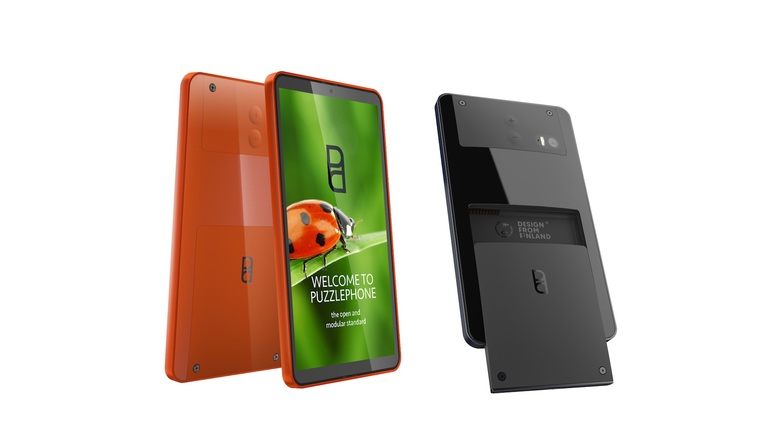
The PuzzlePhone modular smartphone is here.

When it was disclosed by the company in 2013, Google’s Project Ara immediately turned heads because it promised to produce a modular smart phone which would greatly reduce costs, allow users to swap just the malfunctioning or no longer working modules with new ones (instead of the total replacement of the phone), allow them to customize what modules they would want on a given phone in the first place and not least of all, help in the quest for sustainability and taking care of the environment, by greatly reducing the waste caused by throwing away such precious resources as those found in a phone.

This project is supposed to have its first pilot testing in 2016.

But it seems like another company has moved a bit faster towards the same goal, though with a different approach.

I am talking about the PuzzlePhone modular smartphone first announced by the Finnish-based companies developing it a year after Project Ara was announced (in 2014). However, despite announcing their intentions later than Google by a year, they seem to have actually managed to up-end them.

Because the first finalized PuzzlePhone is set to launch sometime in September 2016. And a crowdfunding campaign on Indiegogo is already open to interested early buyers.
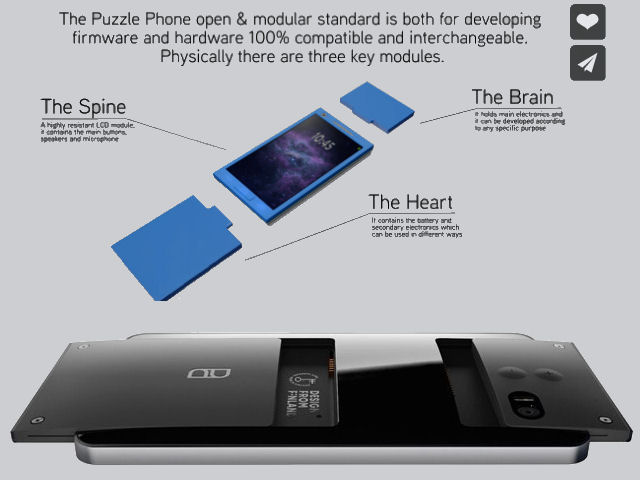
The PuzzlePhone modular smartphone is made up of three components.

True, Google’s Project Ara has in mind developing a series of interchangeable, individual components so you can make your phone however you like, while the PuzzlePhone modular smartphone is based on a simpler approach, namely having the same three modular components for each phone (the “brain”, “spine” and “heart”), that can each be replaced with an homologous component.

But homologous is the keyword, because these new components, apart from replacing malfunctioning or no longer working ones, can actually be upgraded, better versions of the former. So, in essence, though simpler than Project Ara, the PuzzlePhone is efficient and serves the purpose of having a functional modular phone on the market as soon as possible.

It also has some pretty cool functionalities and features, namely: 1080 x 1920 pixels 5 inch display, an octa-core processor, 3 GB of RAM, two cameras (the primary a 12 MP, the secondary a 5 MP) and 16 GB default internal storage, or 32 GB or 64 GB internal storage (depending on how much you are willing to pay extra).

It runs on Android and is made out of eco-friendly materials, both traits which will surely appeal to a wide range of users.

The starting price for the basic model, on Indiegogo, is 333$. The priciest version features engraved words of your choice and the 64 GB internal storage and costs 777$.

Image source: 1, 2.

Filed Under: Health Tagged With: modular, modular phone, modular smartphone, PuzzlePhone, PuzzlePhone modular smartphone, smartphone

TalkTalk Data Loss Story Continues

October 26, 2015 By Michael Turner 4 Comments

New information about the TalkTalk data loss.

TalkTalk Telecom Group plc is a United Kingdom company founded in 2003, which provides pay television, communications, internet access and mobile network services to its customers.

As the second quadruple play service company in the UK after Virgin media, one would expect, as its customers did too, that data protection would be pretty high on their list. And its CEO Dido Harding claims this to be true, declaring to BBC that: “We take any threat to the security of our customers’ data extremely seriously”.

Too bad this declaration doesn’t come as part of positive publicity campaign, but due to the inquiries currently being made about the hack and subsequent major data loss that the company suffered sometime last week, with them acknowledging in a statement, on the 22nd of October that: “[The] investigation is ongoing, but unfortunately, there is a chance that some of the following data has been compromised: names, addresses, date of birth, phone numbers, email addresses, TalkTalk account information, credit card details and/or bank details.” They have also confirmed that they have been contacted by someone claiming to be the hacker.

Now the story continues with new information, as over the weekend it was reported that this security breach may cost the company millions and also, that the number of cases of data loss that are currently under investigation number in the thousands. Important note: we are talking here about thousands of cases in which customers reportedly lost not just their data security but also actual money to the hackers.

Reuters has reported a confirmation of the situation from Jens Monrad, a security expert (at FireEye) who said that samples of what looked to be part of the financial data stolen from TalkTalk were available online.

The opinions regarding TalkTalk’s dilligence in protecting its customers’ data differ with some claiming that the company had suffered multiple cyber-attacks over the last 10 months and disregarded the security vulnerabilities (as reported by the Telegraph), while others put forward the scenario that this latest, admitted breach and its huge scope is in fact the work of an Islamist terror group. This later explanation comes from a former Scotland Yard cyber-crime unit detective, Adrian Culley, that told it to the BBC, without however, presenting any evidence.

TalkTalk themselves are not discussing the source of the attack, preferring for now to invoke the ongoing police investigation as the reason. But whatever the source turns out to be, terror group or just “plain old” hackers, it won’t really matter to the customers.

The size of the breach and the scope of the TalkTalk data loss are most definitely an alarm signal that should be heeded by all big companies catering to a lot of people.

Image source: 1.

Filed Under: Headlines Tagged With: TalkTalk, TalkTalk breach, TalkTalk data loss, TalkTalk hack, TalkTalk security breach

Roku Streaming Stick Review – Streaming Strikes Back

October 19, 2015 By Michael Turner 2 Comments

Roku Streaming Stick and Remote

The Roku Streaming Stick is a nifty little device that may help you rekindle your relationship with your big screen TV. It’s not the first of its kind but certainly packs a few things to show for itself.

Television has changed a lot. Forget about the awe that everyone was engulfed by when things like TiVo came out. It really feels like cable TV is becoming a thing of the past.

First, there was online streaming – allowing you to just watch your favorite shows on your computer, without having to wait for, say, 9 PM when they would normally come on. You could just watch them when you felt like it and that was fine.

Then, the online steaming moved onto our smartphones and tablets – finally, we were able to watch shows on the go, straight off of our mobile devices. That was great.

But neither the computer screen nor our tablet can really get the job done the same as the TV in our living room. And with the way things are advancing in the way we handle and access the media available out there, Roku comes as a pretty amazing helping hand and provides us with the freedom to choose what we like, when we like it from over 2,500 apps. Literally.

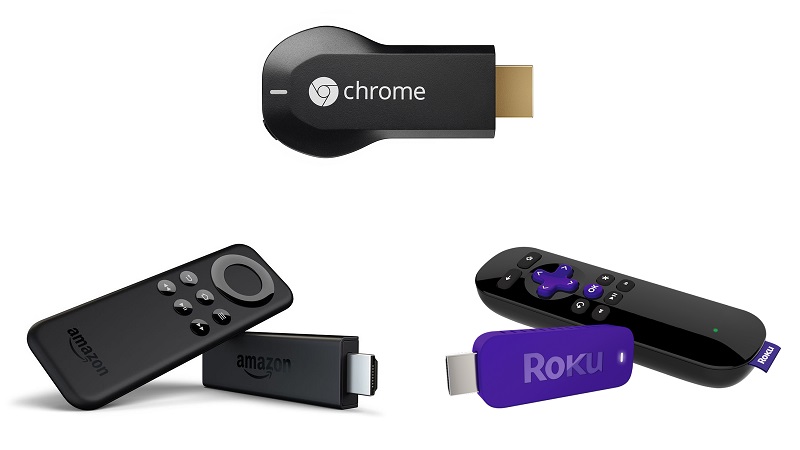
But Roku isn’t the only gadget that does that and the competition isn’t scarce – Chromecast, Amazon Fire TV Stick, Apple TV and even some of the other Roku streaming products might handle some of your needs better. Let’s take a moment and see where the Roku Streaming Stick shines and where another type of streaming device might do things better.

Roku Streaming Stick – How It Works

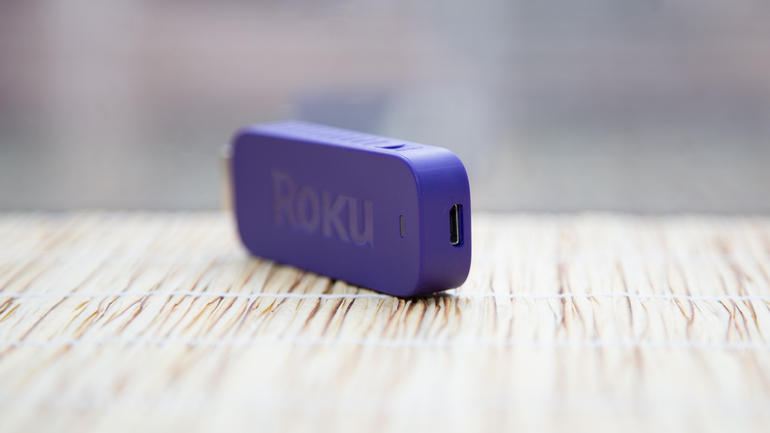
Firstly, in case you’re not fully familiar with how streaming media works, and more specifically what is Roku Streaming Stick, here’s a short heads-up. The Roku Streaming Stick is something you might mistake as a larger USB flash drive. Instead of the USB jack however, it has an HDMI plug that you can connect on the back of your TV. The other end of the stick hosts a micro USB slot which will help power the device with the 6-foot cable and adapter that are included in the box of the Roku Streaming Stick. After everything is connected and powered up, the last step is connecting your streaming stick to your WiFi through the interface and you instantly get access to thousands of apps that stream your favorite TV shows and movies.

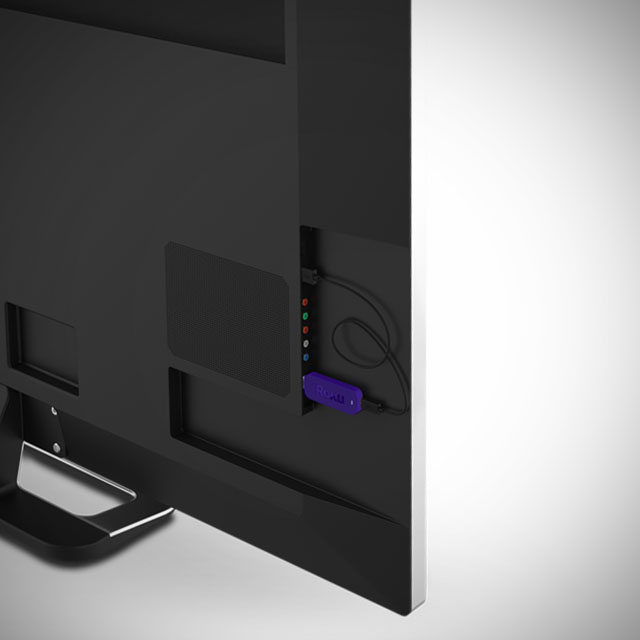
Roku Streaming Stick HDMI Slot Placement

In essence, a streaming device will allow you to do what Smart TVs were meant to but did not convincingly achieve. Having your TV connected to the Internet in the first place seemed like a great idea – you were no longer limited to what your cable company had to offer and could refer to other media services such as Netflix or YouTube to watch your shows and movies. But in reality, that particular functionality of the Smart TVs turned out to be hard to navigate, much slower than your tablet or computer, showcasing complicated user interfaces and rarely-if-ever updated software that was not developed by companies purely specialized in it.

So enter the Roku Streaming Stick and its partners in battle, and you can turn an older TV into a smart one – without having to rely on a messy interface and compatibility issues between the model of your TV and various services.

Roku Streaming Stick Design

So now that we know what the generic idea behind the Roku stream stick is, let’s discuss it in depth in comparison to other streaming devices. The HDMI dongle is 3.1 x 1.1 x 0.5 inches in size, making it a little larger than Google’s Chromecast, but smaller than the Amazon Fire TV Stick. While there is not much difference in overall size between different models, the problem with streaming sticks in general is being dependent on the HDMI port placement on the back of your TVs.

Roku Streaming Stick microUSB

Streaming sticks were originally designed with two ideas in mind: the former was removing the cable and box clutter than larger streaming devices would come along with; the latter regarded being able to make use of streaming on your TV even if you had a wall-mounted setup and couldn’t make it work without the whole thing ending up aesthetically displeasing.

Now, the Roku Streaming Stick is made to be as small as possible, but you should take into consideration how much space you have on the back of your television set before purchasing it. Sadly, there’s no HDMI extender like the ones you get with Chromecast and Amazon Fire TV Stick.

Its body is wrapped in a purple plastic-based cover that seems a little bulky and has the HDMI end directly stick out of it. This is another reason why you should check to see if your TV could host it – considering that HDMI slots on television sets’ backs were made to shelter cables that flex and are particularly thin – not bulky devices that are few times thicker than the HDMI port itself.

Roku Streaming Stick HDMI Placement TV

The weight of the Roku stick, while not exceptionally relevant, is only 18 grams – lighter than most other streaming sticks. Given the average, none of the devices would ever pose the threat of damaging or bending the HDMI slots on your TV’s back.

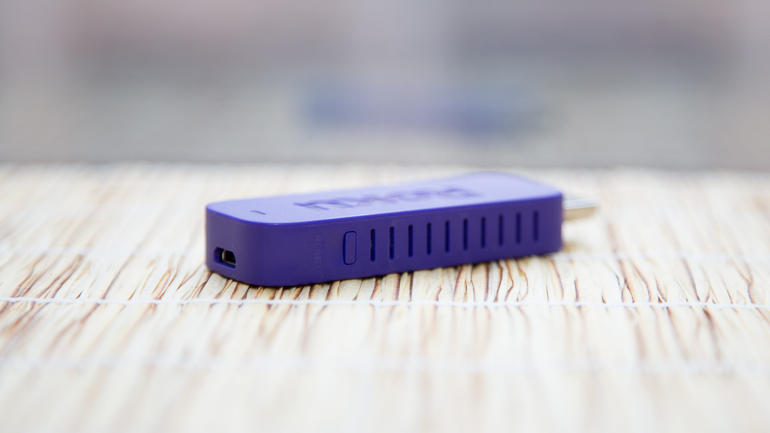
The Roku Streaming Stick does present one aspect that is wildly different from its counterparts. The stick’s body has vents on either side – making it particularly silent and less susceptible to overheating. Just like any other device, overheating is normally associated with low performance – so the Roku Streaming Stick does go the extra mile in that concern. We have also noticed a reset button on the side of Roku – something that is not to be found on the Amazon Fire TV Stick for example.

Roku Streaming Stick Side Vents

The Roku connectivity also seems to be better than its counterparts – featuring dual-band wireless N antennas – better than Chromecast’s single-band.

Roku Streaming Stick Applications, Services & Channels

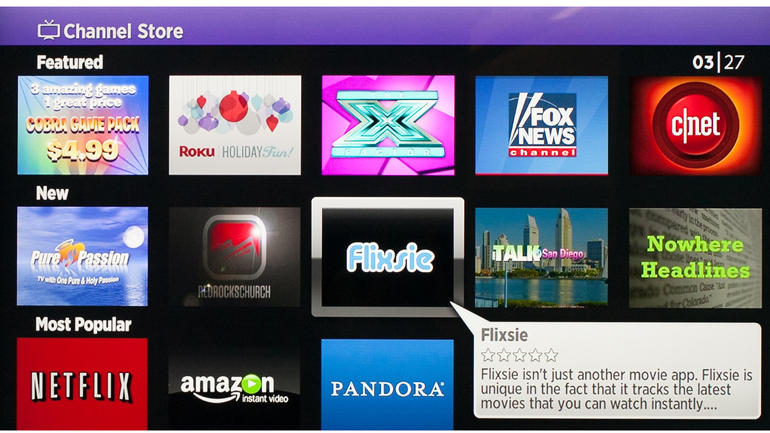
The selling point of the Roku Streaming Stick is the astounding number of apps – known as Roku channels in this case – it has. The website advertises over 2,500 apps and over 300,000 shows and movies put at your disposal. That is completely true: the Roku stick has exponentially more apps that you can access than both the Amazon Fire TV Stick and Chromecast offer. However, in realistic terms, you will probably end up settling on a few dozen of those and never touch the rest.

Roku Streaming Stick Apps

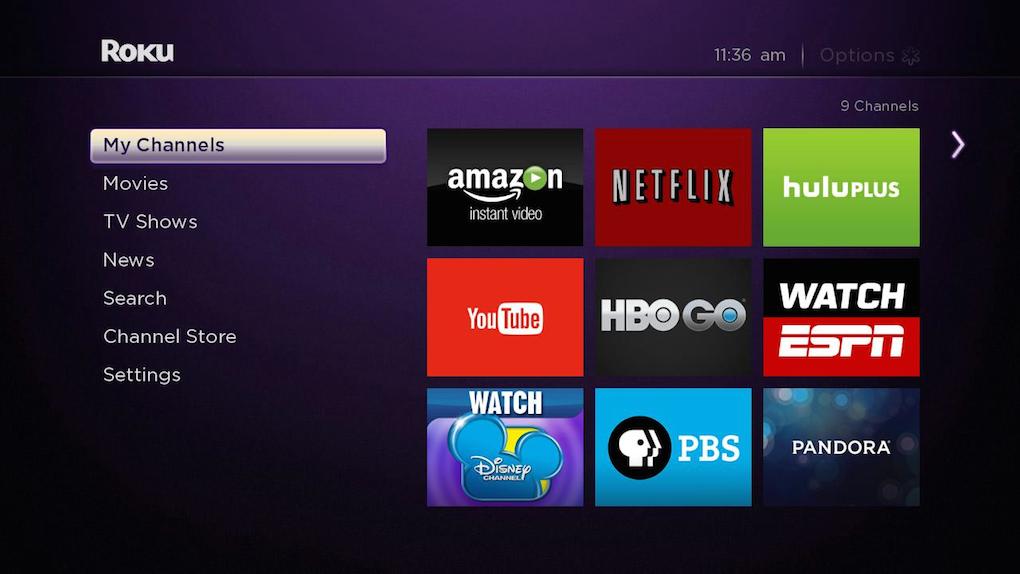
The popular apps, such as Netflix, YouTube, Hulu Plus and HBO Go will more often than not suffice for what you’re looking for. These are apps that you will surely find using any other streaming device so that is not an issue. However, there is a good chance that you will find rarer, more niche content on the Roku than on its counterparts.

Nevertheless, a rather important issue that is not to be omitted is the fact that not all of the apps that you can find on any of the streaming devices out on the market are free – some may incur extra taxes or subscription fees – but this is a generic fact.

You can not only find dozens app for any genre you are looking for – news, science, sports, apps for children and even puzzling channels such as the Pranks one or the baffling Occult Network – but the Roku Streaming Stick doesn’t fall behind on music streaming either. Spotify, Plex, Pandora and many other can be easily accessed via your Roku, just like you would with Chromecast or Amazon Fire TV.

Roku Streaming Stick Remote

Packed alongside the stick and its microUSB adapter you will find a remote. It is marginally bigger than the one that the Amazon Fire TV Stick comes with, but it eases navigating the user interface of the Roku a fair amount. Chromecast, for example, doesn’t even incorporate a native remote but it does allow using your TV’s default one or your mobile device instead.

Roku Streaming Stick 13-button Remote

The remote of the Roku Streaming Stick features a total of 13 buttons: a Home and a Back button, a 4-direction navigational arrow button, Return, Ok, Settings, Rewind, Play/Pause and Fast-Forward buttons, as well as 4 shortcut buttons to popular services – M-Go, Amazon Prime TV, Netflix and Blockbuster. Unfortunately, there’s no way of changing the functionality of the shortcut buttons; you’re stuck with only having those four popular services accessible directly off of the remote. It’s a little upsetting knowing that there is going to be at least one button that you will never touch on your remote when it could’ve had something else bound to it.

The remote feels comfortable when holding it and while the shortcut buttons may not seem like something you would die without, they’re nice to have. If there’s anything that the Roku remote lacks in comparison to Amazon Fire TV is the voice app – even if the voice search is something you only get to purchase separately with the latter, it remains a possibility. If the voice search is something that you would really look forward to when it comes to streaming devices, only the Roku 3 and 4 players offer such feature – but those are much larger and more expensive.

Sadly, the Roku remote for the streaming stick does not support motion control for games – so in the Roku vs Amazon Fire stick comparison, the latter wins the round through the dedicated gamepad sold separately.

Roku Streaming Stick vs Amazon Fire TV Stick remotes

While the remote finder doesn’t come as a default feature like in Roku 4’s case, there is an application that you can download on your smartphone or tablet off of Apple Store and Google Play alternatively that will allow you to use your mobile phone or tablet as a replacement remote. It’s certainly not a bad idea considering that it will make for a faster method of searching through content using the full QWERTY keyboard of your smartphone.

Roku Streaming Stick Phone App

Lastly, the Roku Streaming Stick remote unfortunately doesn’t include a digital audio port – a feature that you can find on the Roku 3 and 4 for example – meaning you wouldn’t be able to use a pair of headphones plugged in the remote for late night “private listening” mode and have to rely on your television set’s audio output.

Roku Streaming Stick Interface

With a lot of apps comes the great responsibility of making them easily accessible and simple to browse through the user interface. This is one aspect where the Roku Streaming Stick (along with the other Roku set-top boxes, given that they all use the same interface) will feel superior to other UIs.

Roku Streaming Stick Interface and sub-menus

You can personalize your own list of favorites through the My Channels option that will cleanly sort it in a plain grid, according to your preferences. You can shuffle through channel priority and remove the unwanted ones from your list in matters of seconds.

The Movie Store and TV Store sub-menus underneath are short pathways into M-GO’s on-demand service – not an amazing choice for a sub-selection given that you probably won’t ever use it and even forget it’s there, opting for accessing M-GO by quickly searching for it should the need be.

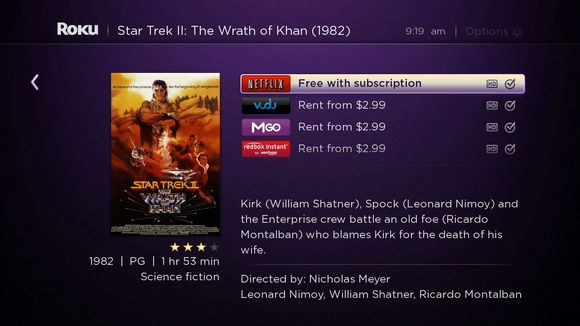
Next up is the search menu – in other words your bread and butter. Once you have installed your favorite apps, the search menu will quickly make an ample exploration of what you typed in the box and return all the results it has found. For example, if you were to type in Inception, it would list all the entries it found, regardless of the app it found it on. Every entry also lists the video quality it is available at and rental price where applicable. The Roku interface allows you to search by movie and TV show title, actor, director and much more.

Roku Streaming Stick Search Sub-menu

You can also freely browse all apps available on Roku TV using one of the sub-menus – it will take a while but you never know what you may find.

Lastly, the user interface displays a settings sub-menu that allows you to change your theme and customize a great number of aspects related to the UI.

If put in contrast with Amazon Fire TV interface for example, the Roku UI looks a lot cleaner, airier and less packed than the former.

Roku Streaming Stick Comparisons & Verdict

While the services supported are the same, you might end up realizing that there are a few things that the streaming sticks can’t perform over a set-top box. Take mirroring for example – to some degree you can convince your Roku Stick to mirror your phone screen or computer screen partially, but Chromecast and even Roku 2 and 3 can and will do it better.

Even when it comes to set-top boxes alone, take the Roku 2 vs Roku 3 comparison and you’ll find some great differences and improvements. For example you can’t get voice search unless you opt for a Roku 3 or newer model and 4k Ultra HD option is only available in the latest Roku 4 set-top box. Sure, you can grab the Roku stick, just put it in your backpack and any house and hotel in the world that has a Wi-Fi connection and a TV can feel like home in a jiffy. It’s a lot smaller and easy to transport but the performance of the stick may fall behind the one of a full-fledged Roku player simply because of the hardware that is packed in it.

If we are to compare the Roku Stick to its Amazon Fire TV and Chromecast counterparts in terms of hardware specifications, here’s what we get:

  • The processor of the Roku stick is a single-core one, just like Chromecast’s, while the Amazon Fire TV Stick features a dual-core;
  • Both the Roku and Chromecast only have 512 MB of memory while the Fire TV stick goes up to 1 GB;
  • The flash storage is a losing race for the Roku at its 256 MB – Chromecast offers 512 MB and Amazon Fire TV offers 8 GB of storage space;
  • Both the Roku Streaming and Amazon Fire TV sticks feature dual-band antennas, while Chromecast sticks to a more modest single-band.

Roku Streaming Stick vs Amazon Fire TV and Chromecast

So in essence, what do you get with the Roku Streaming Stick? You get a staggering amount of apps you can choose from, including some that may not be available on other services, such as HBO Go. You get an easier to use and more pleasant interface, a great remote and nearly everything else other comparable devices can do, but at a much smaller price.

What you lose by getting it is a small bit on the performance side, an HDMI extension and gaming support and access to various limited streaming platforms.

Put in perspective, the Roku Streaming Stick is comparable to the Roku 3 – but it’s a lot cheaper: you can get the streaming stick for $49.99 directly off of the Roku website. The more powerful Roku players are available for $99.99 for the Roku 3 and $129.99 for the latest Roku 4.

Roku Streaming Stick vs Roku 3

The Amazon Fire TV Stick will look cheaper at first ($39.99) but many of its features require extra purchases which will spike it up much higher than the Roku Streaming Stick price.

Naturally, all that we tried to accomplish here with the Roku stick review was to weigh the pros and cons – but the final decision lies in your preference.

Image Source: 1, 2, 3, 4, 5, 6, 7, 8, 9, 10, 11, 12, 13

Filed Under: Headlines Tagged With: amazon fire tv stick, Chromecast, roku 3, roku 4, roku streaming stick

The DJI Osmo Camera Shoots in 4K and Stabilizes Your Footage

October 10, 2015 By Michael Turner Leave a Comment

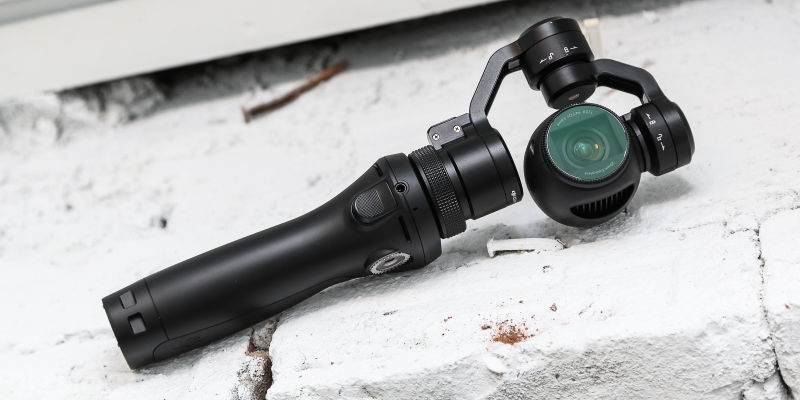
DJI Osmo Camera shoots in 4k and it retails at $650

The DJI Osmo camera shoots in 4K and stabilizes your footage, but it’s pricey as hell. Yes, it’s a selfie stick robot that resembles something out of a RoboCop or Terminator flick. No, it doesn’t follow you around and nor does it supplement your selfie-taking arm with some kind of high tech exoskeleton. Regardless of how much we would have loved it to be real.

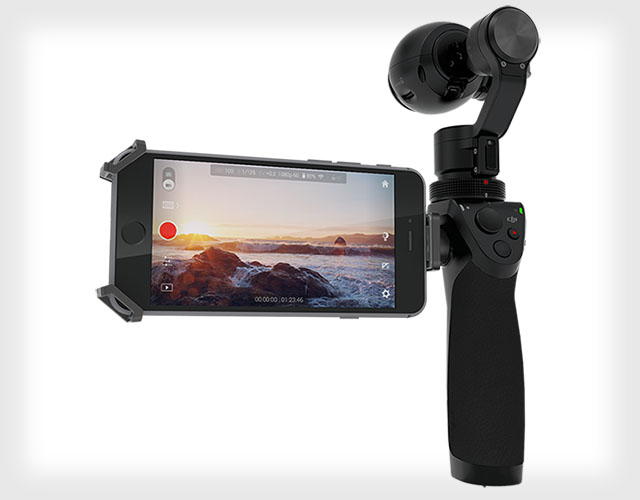
The Wall Street Journal reports that the new Osmo camera blends the fancy and high-tech camera that DJI uses in its drones and turns it into a six-inch camera-on-a-stick.

The nasty part? The DJI Osmo camera costs $650. It would be great as a stocking stuffer for this X-Mas for you and your selfie-obsessed friends. That is, if your existence is based on selfies.

As for it being a fully fledged robot, might be a overstatement. That’s just a geeky way of describing its three-axis gimbal and motorized interiors. Don’t be scared by fancy terms, because the Osmo is just like you’re average selfie-stick. It’s really not complicated. For crying out loud, it’s just a selfie-stick.

DJI Osmo Camera shoots in 4k and it costs $650

To trigger it, just use the little button on the Osmo to show it where you want your pic to focus. The gimbal keeps the Osmo in place as you move around trying to find the perfect pose for your shot. If you want to be in the picture, then just triple-tap the button you use to trigger the camera and the Osmo will spin around and include you in your video, or pic.

The DJI Osmo camera shoots in 4K and has a ton of other fun features. Including the ability to take steady panoramic shots using the Automatic Panorama mode. This makes shooting 360 degrees panoramas super easy. You just need to hold the camera up above your head and gently tap the shutter speed. The Osmo will rotate and it will grab images as it spins around, while maintaining a steady level.

The gimbal is really useful if you have twitchy hands, like me. It comes in handy when you want to take long-exposure shots, but just can’t manage a clear one because your hands are always shaky. And more than one occasion I have been mistaken with an alcoholic SOB, but really I’m just twitchy.

DJI Osmo Camera shoots in 4k and it's the most expensive selfie-stick on the market

But enough about me, let’s talk about you and your new DJI Osmo selfie-stick camera that can shoot in 4K. It even has a phone holder attachment, so you can better see what the end pic will look like. Also, it’s Wi-Fi capable to easier connect the two. The home-bred app also let’s you switch between device modes and even send the Osmo commands.

Image Source: 1, 2, 3

Filed Under: Headlines Tagged With: 4K Camera, DJI, DJI Osmo, Osmo Camera

Best Video Conferencing Tool: GoToMeeting, TeamViewer and Others

October 8, 2015 By Michael Turner 4 Comments

GoToMeeting is a great video conferencing tools

Whether you work from home or you just founded a startup, you need some sort of video conferencing tool to help keep in touch with colleagues, employees and clients. Do you know which service to use? Don’t worry, you aren’t the only one scouring the interwebz for the best video conferencing software.

There are so many choices to pick from and you clearly don’t have time to try all of them. The thing is, video conferencing is a crucial element to your business – even if you’re a freelancer. Down below we’ll be reviewing Adobe Connect, GoToMeeting, TeamViewer, WebEx, Google Hangouts and other more obscure software.

1. Adobe Connect Review

Adobe Connect is an alternative to GoToMeeting

Adobe Connect is one of the best online meeting services. It basically has all of the features that an entrepreneur looks for – stable, reliable and great video conferencing quality. All enveloped in a competitive price. It has a ton of customization options such as methods to record and analyse how individuals engage with your presentation or what have you. Adobe even offers a ton of tutorials to help newcomers get as much bang out of their buck as they possibly can. Yet, first-time participants won’t have that many problems with Adobe’s software mainly because it has a friendly UI. Adobe Connect pricing is fairly cheap, when compared to other online meeting services too.

It has rich multimedia features such as share animations, audio and HD video, and of course images. Instant messaging is a given due to the fact that 99 percent of meeting services offer it. It’s compatible with Windows, Mac OS X and Linux.

You can record meetings. You can edit them afterwards with a special tool. This means that you can let the viewer decide what topic he wants to watch first.

Adobe Connect allows screen shares, as well as video and document shares. It comes with a free 30 day trial to see if it suits you needs or not, but most likely, you’ll stick with it. Why? Well because you can share an unlimited number of webcams during your meeting.

The thing is, because it has so many options to choose from, Adobe Connect’s initial setup may be a little bit overwhelming to some users. Even though it has a super friendly UI.

Our Adobe Connect test went like a charm – no lag issues with crystal clear image and sound.

Adobe Connect pricing is competitive and it comes with three plans.

  • Adobe Connect Meetings;
  • Adobe Connect Webinars;
  • Adobe Connect Learning.

Adobe Connect Meetings

For an annual plan of $45 a month per host, or a monthly plan of $55 a month per host, with no commitment and the possibility to cancel anytime without repercussions you get the full pack for digital meetings. Although, this plan allows up to 25 participants and up to 9 meeting hosts per account.

Adobe Connect Webinars

Adobe Connect Webinars focuses on marketers and their needs. Prices start at $104 a month per webinar manager for 100 participants. The next in-line plan is $375 a month per webinar manager for 500 participants. For $458 a month per webinar manager you are allowed to have 1000 participants.

Adobe Connect Learning

Adobe Connect Learning is aimed more towards online classes or huge presentations – if you’re a little startup or a freelancer, I don’t recommend going with the Learning plan. The annual plan costs $292 a month and it has space for up to 200 virtual classroom participants. It also works for mobile platforms.

Adobe Connect download is available on Adobe’s official website.

2. Google Hangouts Review

Google HangOuts one of GoToMeeting's competitors

Google Hangouts is a free service. While it is a great choice for your online meetings, it lacks a lot of features that a paid software has. However, it is Google-quality software, meaning that it has a simple and clean user interface. The biggest issue, and frankly the deal breaker for some, is that it allows a maximum of 10 users or devices at a time in a meeting. Google Hangouts is compatible with the majority of devices and operating systems available – Mac, Windows, Linux iOS and Android enabled; so collaborating with others is not a chore.

It has an reliable chat feature where users can share links – go figure, YouTube works like a charm and there’s a simultaneous video watching feature too. Special designed apps for Android and iPhone. The common share screen option, as well as share presentations and such.

The thing is, it really lags if you have a poor internet connection and unfortunately, whatever you type in the chat will not be saved a la Skype. Also, a nasty thing that is really worth noting is that Google captures user data in order to improve Hangouts features – ad targeting and such. Be warned, if you choose to share confidential and sensitive information, it may very well land in the hands of an advertiser.

The Google Hangout plugin is available in the extension store for browsers – it’s a quick free install. The Google Hangout app can be found on the Apple and Google Play Store. For the Google Hangouts desktop app please visit Google’s official website.

3. TeamViewer Review

TeamViewer is a great alternative if you don't plan on using GoToMeeting

TeamViewer is a personal favorite of mine because it has an easy initial setup, it’s simple to handle and it’s completely free for private use. Yet, if you are a business owner it entails a huge investment on your part. The service however will be yours for the entirety of either your lifetime, or TeamViewer’s. Furthermore, there are little to none complaints about TeamViewer.

If every participant has a stable internet connection – regardless if it’s a poor one or not, then meetings will go out as planned. Because it’s available for free for individuals, you can test TeamViewer before committing to the huge upfront investment. You can access the TeamViewer download page right here.

All of TeamViewer’s capabilities are available for free for individuals.

Up to 25 participants can access your meeting, it has VPN included and it works exceptionally well with Mac, Windows, Linux, Android, iPhone, iPad and the reclusive Windows Phone – including the latest TeamViewer 10 version. Also, the TeamViewer quicksupport app is available on all mobile OSs.

TeamViewer VPN features includes firewall-friendly, and able to work with NAT. It supports all of the major protocols such as L2TP, IPsec, RemoteFX and RDP. It has an automatic performance optimization feature and a Web Connector readily available if you use it on a browser. Moreover, TeamViewer VPN works on Windows 7, Vista, XP all the MacOS 10.x versions, Linux distributions, Android and iOS.

The TeamViewer portable app is the best choice if you plan on remote controlling one of your clients PCs to fix an issue or alleviate a confusion – works great in customer support.

TeamViewer pricing starts at $749 and it’s called Business. The following Premium plan costs $1499, and the most expensive one stands at $2839 and it’s dubbed Corporate. All of them are a one time payment upfront, not yearly, with  lifetime support.

4. GoToMeeting Review

GoToMeeting is one of best video conferencing tools available right now

GoToMeeting is a fantastic tool for smaller businesses that are looking for a cheap and easy to use online meeting tool. You can start meetings with just one click. GoToMeeting is developed by Citrix and it has a plethora of features such as full mouse and keyboard control, Voice over IP, screen sharing and all sorts of drawing tools. Yet, if you are a Mac user, then you won’t have that many features available. But the great thing is that the GoToMeeting free version is available for up to 3 participants.

It’s borderline easy to use with great quality HD video and audio, it allows unlimited online meetings, and you can share almost anything.

The GoToMeeting download page can be accessed via Citrix’s official website, which is gotomeeting.com.

GoToMeeting pricing is cheap, and affordable for small businesses. You can opt-in for a 30 day free trial to see what’s all the fuss about and afterwards you can choose between two plans. A $39 a month up to 25 participants, per organizer. The second plan costs $56 a month up to 100 participants, per organizer.

There’s even a Citrix GoToMeeting app which you can download for iOS and Android.

5. InterCall Review

InterCall is a GoToMeeting competitor

InterCall Online’s video conferencing platform is dubbed Unified Meeting 5. Browsing on their website will be confusing, to say the least. Solely because they sell WebEx, Adobe Connect and Microsoft Lync. It’s a little bit pricey, but you have to ask InterCall yourself for an official pricing list because it differs from contract to contract. InterCall tailors its services to best suit your company’s needs, so just listing an average price on their website would make things more confusing than they already are.

You have the majority of features present on competing meeting service platforms such as share screen, record meetings and send them to those who couldn’t participate, share presentations and documents, easily accessible via tablets and smartphones, fully compatible with iOS and Android devices. It can be used up to 150 people, but, as I said before, it seriously depends on your plan. Yet, you have a 30 day free trial period so you can test InterCall before buying it.

6. WebEx Review

The Cisco WebEx meeting service is on par with GoToMeeting

Cisco WebEx is a cheap and affordable alternative for smaller scale businesses. Their Premium 25 version is a great price to value option that offers all of the key features that you need from a meeting service platform. A WebEx meeting can be hold on multiple different OSs, and it comes quite in handy if your company is keen on using Linux for servers, Macs for video editing and Windows for every day tasks.

Join WebEx meeting with a simple click of a button.

Fancy on trying it out before committing to a plan? How about a quick WebEx test? The free basic version allows a maximum of 3 people to join.

It comes with all sorts of drawing tools and the ability to share one’s desktop and everything docs related. You can record meetings regardless of the plan you’re opting in for, but only paid versions offer HD output. Also, paid versions come with 1 gig of storage space. It syncs perfectly well with iOS and Android devices, and it offers VoIP services at no additional costs.

Unfortunately, video will display only 7 attendees at a time and you can’t expand the window interface completely. The majority of your files will be converted and displayed in PDF, which may cause some errors in the process. Video lags totally random, even if you have a stable and reliable internet connection. Its default browser is none other than the lackluster Internet Explorer – you can change it, of course.

For a free WebEx download please go to their official website.

For a maximum of 8 people, the Premium 8 WebEx price start at $24 a month per host or $19 a month for an annual subscription. Premium 25, which offers WebEx services for a maximum of 25 people starts at $49 a month per host or $39 a month for an annual subscription. Premium 100, which offers WebEx services for a maximum of 100 people starts at $89 a month per host or $69 a month for an annual subscription.

7. MegaMeeting Review

MegaMeeting falls short when compared with GoToMeeting

MegaMeeting doesn’t require any installation whatsoever because it’s a cloud based video conferencing software. Meetings can be accessed via an Android or iOS enabled device. We don’t have a concise pricing list because MegaMeeting doesn’t offer one. On their official website they only state that plans start as low as $39 a month. You must contact them yourself and see what contract they can offer you – depending on your needs prices may vary, of course.

Unfortunately, there isn’t that much love for Mac. This means that not all of the MegaMeeting features will be available on an Apple machine.

However, it has 24/7 customer support which is a big plus in my book. MegaMeeting can display up to 16 video windows during a meeting which is quite fantastic. There is even a text chat console where you can add notes and bullet points. It allows sharing of documents.

However, you don’t have any free trials, video is somewhat delayed and you have to download a bunch of extra plugins to make various features work. Their official website looks a little bit shady, but it’s genuine – genuinely old I mean.

Yet, with all of these video conferencing tools available I found myself using GoToMeeting and TeamViewer the most. Mostly because I found GoToMeeting super reliable and stable, while offering at the same time exceptional quality, and TeamViewer for when I need a strong VPN service.

If you have anything to add, a video conferencing tool that we might have missed, please feel free to post in the comments section below.

Image Source: 0, 1, 2, 3, 4, 5, 6, 7,

Filed Under: Headlines Tagged With: Adobe Connect, GoToMeeting, TeamViewer, Video Conferencing, Video Conferencing Tools

Activision Announces Call of Duty E-Sports Competition

September 26, 2015 By Michael Turner Leave a Comment

Call of Duty e-sports competition will be called World League

On the brink of publishing another Call of Duty title, Activision has announced a new Call of Duty e-sports competition.

The plan is to expand from an annual tournament to a year-round international league a la League of Legends and DOTA 2. The publishing company is also increasing the competition’s prize pool from $1 million to a whooping $3 million.

Whether you are an amateur or a professional, you’ll have a place in the competition. The year-round tournament will feature all sorts of divisions aimed at newcomers and veterans alike. At the end of the year, a championship will be held to crown the best team/player.

Rob Kostich, who is the Senior VP and General Manager for Activision’s Call of Duty, said that this will be a cornerstone for Call of Duty e-sports. He continues to add that Activision is keeping up their promise of promoting professional gaming across the world. They want to make a fun and competitive year that will culminate with a huge Call of Duty championship.

Call of Duty e-Sports competition will have a prize pool of $3 million

The official name for the championship will be Call of Duty World League. The Californian-based Activision says that the competition will start at the beginning of 2016 with league-like events in New Zealand, Australia, Europe and North America. The Santa-Monica publisher says that there will be three territories that will feature independent seasons. This will eventually lead to 32 teams qualifying for the Fall 2016 Call of Duty e-sports competition.

The company first hosted a Call of Duty e-sports competition in 2011 with a prize pool of $1 million. Since 2013, it has been an annual event.

Kostich wants these kind of e-sports events to have a deeper impact on the average gamer. He, along with Activision, wants to encourage pro gamers to delve more into their hobby, while at the same time entice aspiring competitors and casual fans to take up Call of Duty on a more serious level.

Call of Duty e-sports competition

Call of Duty’s Senior Director of Product Management, Sam Cooper notes that their goal is to help the crème de la crème actually make money by competing in events aimed at pro gamers. The top 150 professional player will have the possibility to make a living by playing Call of Duty.

However, he didn’t comment about the financial prospects that this entails. What figures are you talking about Sam Cooper?

Events will be broadcast online, but Sam refused to specify what service they will be primarily using – Twitch, or Google’s YouTube Gaming platform?

To continue the trend, Kostich also refused to comment regarding the sensitive subject if Activision would test players for drugs.

The Electronic Sports League started administering random drug tests during the ESL One Cologne tournament this August.

Image Source: 1, 2, 3

Filed Under: Headlines Tagged With: Activision, Call of Duty, Call of Duty E-sports Competition, COD, E-Sports Competition, World League

New Amazon 6-inch Tablet Costs $50, Planned for this X-Mas

September 8, 2015 By Michael Turner Leave a Comment

Amazon 6-inch Tablet Planned for X-Mas 2015

The new Amazon 6-inch tablet costs $50, which is half the price of the cheapest Fire device. As the massive retailer struggles to sell their pricier tablets, the only way further is downwards.

The new Amazon 6-inch tablet is aimed at those buyers that are looking for a more simple device and aren’t willing to cough up major doe for streaming videos.

According to close sources, the Seattle-based company is planning to release their 50 bucks, 6-inch screen tablet in time for this year’s holiday season. This means that it will be one of the cheapest tablets on the market.

Amazon will offer a straightforward tablet which will be effectively disposable. Rumors have it that it will sport inferior specs, but for $50 we don’t need anyone telling us that.

The 6-inch tablet will be able to stream videos and users have the possibility of shopping on Amazon.com. Basically, you won’t be doing much with it. Durability, screen quality and battery life will be highly inferior if you dare to compare them with Apple’s iPad and even Amazon’s high-end Fire tablets.

The device will not have a stereo speaker built-in. In its stead, you will find a mono speaker.

The 50 bucks tablet is part of Amazon’s new product line that also includes other tablets with better specs. Also, bigger screens – 8-inch and respectively 10-inch.

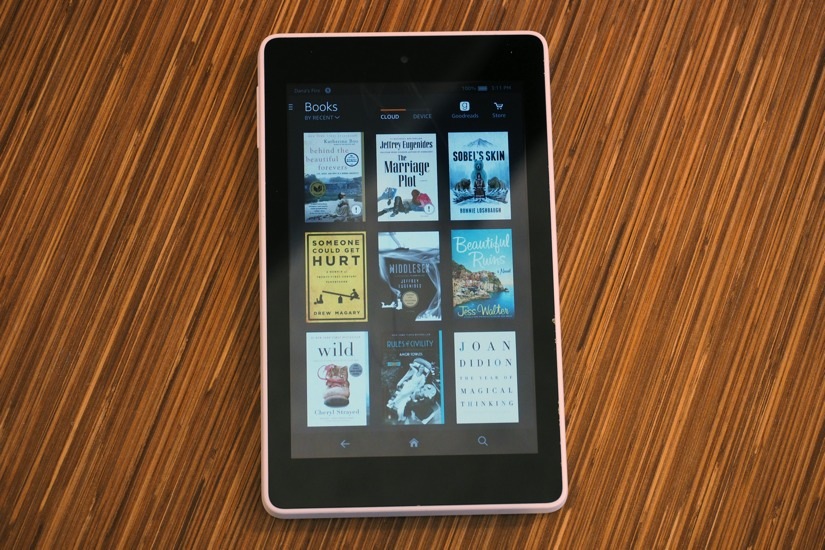
The Amazon Fire HD 6 $99 Tablet will be truped by  the new Amazon 6-inch Tablet which costs $50

Amazon Fire HD 6

Jeff Bezos, Chief Executive dubbed Lord and Savior of the first world, has always sought new ways to undercut the company’s hardware competitors. Amazon outsources almost everything when it comes down to manufacturing their new cheap-as-hell devices.

Much of the development was done overseas by a company called Shanghai Huaqin Telecom Technology Co. – Taiwan-based Compal Communications Inc. also plays a major role.

Amazon’s Lab126 did some of the grunt work, but not much, people close to the matter noted.

The cheapest Kindle costs $79. It could have been $50, but Amazon just couldn’t drop the retail price because the e-reader screen tech vendors wouldn’t settle for a bargain.

Cheap is really good, more so if you’re a cost-conscious buyer. But, is Amazon aware of what they are giving up? Are buyers aware that they will have an inferior experience? Will they tolerate it or will they dispose of their new purchase in a matter o weeks?

Everyone bashed Amazon and Bezos last year for pricing their Fire smartphone the same as Apple’s last gen iPhone. Regardless of packing it with a free Prime membership, which costs $99, nobody cared. Even when the massive on-line retailer cut down on the phone’s price tag sales didn’t change.

After their smartphone flop, Amazon laid off almost the entire group of engineers that worked on the Fire. The group was known to help develop Fire TV set-top boxes, Kindle e-readers, the Fire slate and other gadgets and devices.

Amazon’s cheapest Fire tablet, which currently sells for $99, includes adverts – they appear as screen savers. Want no ads and the same tablet? You’ll have to pay up $114.

It is unknown at the current moment if the Amazon 6-inch tablet will include ads or not.

Image Source: 1, 2

Filed Under: Headlines Tagged With: 6-inch Tablet, Amazon, cheap tablet, tablet

Streaming is Easier Thanks to the New GeForce Experience

September 5, 2015 By Michael Turner Leave a Comment

new GeForce Experience from Nvidia

With YouTube Gaming and now the new GeForce Experience from Nvidia, streaming has never been easier!

There are two modes of game streaming. The first one is streaming via a video feed that showcases what you do inside the game. The second one is about how you can play a game remotely through another device that streams the experience.

Nvidia is well aware that both of these modes are becoming more and more popular with each passing year. That’s why they are introducing a new GeForce Experience, which lets users do both things much more easily.

It has begun rolling out in beta form, but I would recommend patience on your behalf. They still need to polish everything before it’s suitable for the end-consumer.

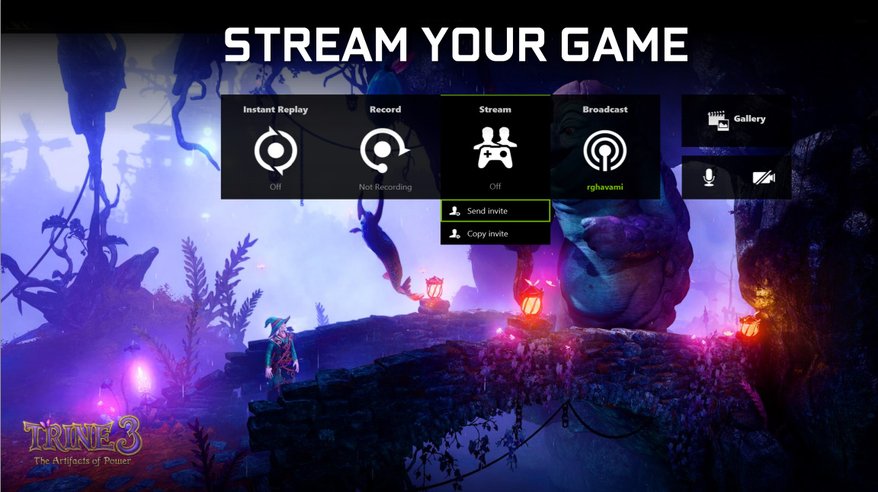
The update that introduces an on-screen overlay will be available for all of your games. You don’t need to set anything prior to your gaming session. All your tools are already there, if you want to use them of course. You can access it via a keyboard shortcut.

If you don’t want to use this feature, just don’t. It won’t stand in your way, it’s totally unobtrusive.

New GeForce Experience - The Witcher 3

Instant replay and video recording resemble Nvidia’s ShawdoPlay function. Basically, that’s exactly what they are, but in a more straightforward and intuitive format.

The max res you can use is 4k at 60 frames per second, this means that for an hour of recording you’ll need roughly 60 gigs of free space.

You have the option to let the Nvidia GPU run a DVR service in your background. It automatically records the last 30 seconds – you can set it to as long as 20 minutes. Afterwards, they are available for replay.

The most important feature is the sharing element. The new overlay is so much more easier to use and uploading is reliable and quick. Trim your video as you like and then upload it to YouTube.

Those of use who have done gameplay walkthroughs or Let’s Play vids know how trimming a video is a huge chore. There are no settings you need to tweak before-hand. The new GeForce Experience might just be a knight in shining armor.

Play a match of LOL, record it, and upload a high-quality video to YouTube. Just Fantastic.

There’s also a broadcast to Twitch option. Yet again, Nvidia emphasizes  quick access – click one button named Start to get your session live.

New GeForce Experience - Trine 3

The last feature, that we know of so far, adds the possibility of inviting your friends to join your game via e-mail or a shareable URL. When and if they accept your invite, they will be able to either watch your session, play with you in co-op games or game in your place.

Everything will be done in a 720p res at 30 frames per second and your mates will need to run Chrome and a plug-in – on PC or Mac.

Unfortunately, there is no Chromebook support at the moment, but who knows what the future holds for us?

I’m quite curios on how this will evolve. What about you?

Image Source: 1, 2, 3

Filed Under: Headlines Tagged With: Geforce, Geforce Experience, nvidia, Nvidia Experience, Nvidia Geforce, Nvidia GeForce Experience, Streaming

Nextbit Robin – A Cloud-First, Design-First Smartphone

September 1, 2015 By Michael Turner Leave a Comment

Nextbit Robin

Scott Croyle has been credited for pushing the boundaries of what smartphones should look and feel like. When he was in charge of HTC’s design department, as commander-in-chief, the One series witnessed a critically acclaim never-before-seen by the company.

Now, with the Nextbit Robin, Croyle wants to push boundaries even further.

He departed HTC last year, in April, to join a highly-intriguing start-up called Nextbit. They were initially aiming at developing software, not hardware.

Croyle had his way and he gathered a team that would be eager to develop awesome things for our pockets.

Today marks the day Croyle showcases what he has been working for such a long time. The Nextbit Robin is what he likes to call the design-first, cloud-first smartphone.

Croyle has told The Verge that he was more than tired of pleasing mobile carriers instead of the end consumer. With Nextbit, he doesn’t have to go through all of the hassle. He feels more liberated and in power.

Nextbit will sell directly to consumers, and because they are a small start-up they can experiment and prioritize to better fit consumers – aesthetics, originally, freshness in design and, of course, tactile appeal.

Nextbit Robin - Launches on Kickstarter Soon

Their main goal was to look the part. It’s pretty hard to build a poorly designed smartphone nowadays, he adds. Because of this, they wanted to avoid the conventional and boring look.

I wanted to kind of zig and maybe zag.

When you first lay your eyes on the Nextbit Robin, you don’t know how to react. It’s simple but not really. Its rectangle shape doesn’t convey that natural sense at all. It has a spartan approach, notes Croyle.

Spartan symmetry to be accurate.

Designing a phone is to Croyle as is symmetry to Wes Anderson and Kubrick. They just fit together.

Everything is as it should be with the Robin. You got a bezel above the screen, and below it – both are identical. The cameras are positioned on opposite sides, but they mirror their placement.

However, we do not know how much difference this will make in the eyes of the end-user. But, it’s a pretty nice when considering how much thought and work Croyle and his team put in the smartphone’s design.

It features a Snapdragon 808 proc, which is a derivative of the 810 but without all that nonsense regarding thermal issues. The 5.2-inch 1080 display was a no-brainer, adds Croyle.

The Nextbit Robin will be launched on Kickstarter pretty soon. That’s where users who want to support the brand new smartphone-maker Nextbit will have the posibility of choosing a battery life and other components.

Image Source: 1, 2

Filed Under: Headlines Tagged With: Nextbit, Nextbit Robin, Robin, Scott Croyle

Introducing YouTube Gaming, Twitch’s Competitor

August 29, 2015 By Michael Turner Leave a Comment

YouTube Gaming Launched by Google

YouTube Gaming is Twitch’s main competitor. YouTube was already a big player, but Google doesn’t want it to become old and stale. The big G, starting with the 26th of August, has begun promoting YouTube Gaming as a separate dedicated website and app aimed at, go figure, gaming.

Users who want Call of Duty search results won’t have to go through Carly Rae Jepsen’s Call Me Maybe.

Yet, this wasn’t the main problem.

Esports popularity has grown tremendously over the past five years and Twitch was the main hub for it. Google can’t let this happen. If they succeed in their endeavor, if the company manages to separate different gaming content, they can rest assured that people will use it.

If you build it, they will come.

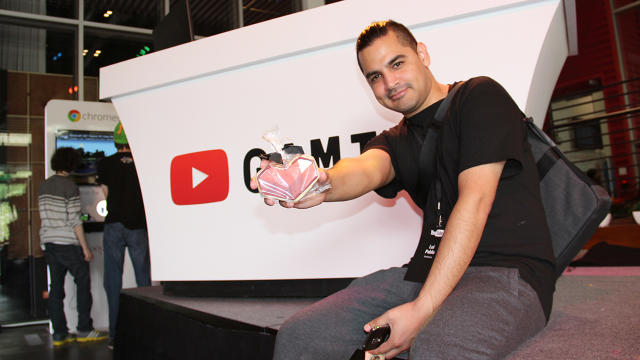
YouTube Gaming - Lui Calibre

Lui Calibre, whose site has 3.5 million subscribers, holds a cookie in the shape of the YouTube Gaming App’s heart logo. Photo: Susan Karlin.

YouTube Gaming resembles Netflix when it comes to watching a stream. It stays true to it roots, but you won’t notice the vanilla components that made the video service popular. Comments can be seen on the side, you can give a streamer either a thumbs-up or a thumbs-down and you can subscribe to their channel.

It’s really not that hard to use, and I’m inclined to think that the main YouTube page would benefit from looking like this.

The biggest difference lies in its essence. It’s gaming-oriented. There’s a list where you can see what games are trending, there are featured channels, and there are even landing pages for certain games.

Results are divided into categories like live shows, popular videos and pre-recorded Let’s Play vids.

The Android app looks a lot like Twitch’s, but its desktop counterpart is more fine-detailed. It looks sleeker, better organized and easier to use.

YouTube Gaming Android App

But this isn’t how you poach users from Twitch. Better features and great content creators will, however. The benefit of rewinding a stream in case you’ve missed its beginning is definitely a start.

Currently, Twitch’s most viewed channel racks-up approximately 32,000 viewers. YouTube’s most popular channel has around 11,000 – these may be users who are just trying out the service. Also, because YouTube features channels on its front page.

People don’t think of YouTube as a live streaming hub, but they’re starting to.

YouTube Gaming - PewDiePie Content Creator

Felix Kjellberg aka PewDiePie

Let’s take PewDiePie. He’s a huge part of YouTube and YouTube Gaming. He creates content especially for the video service. Because he uses Google’s video platform as his second home, he keeps people coming back.

If Felix Kjellberg decides to leave for Twitch, the majority of his fan-base will leave along with him. I’m curious to see if dividing YouTube in two will be worthwhile for Google, or if it’s a big mistake.

What do you think? Is Google making a mistake? Will Twitch reign supreme? Tell us in the comments section down below.

Image Source: 1, 2, 3, 4

Filed Under: Headlines Tagged With: Felix Kjellberg, gaming, Google, Live Streaming, PewDiePie, twitch, youtube, YouTube Gaming

  • « Previous Page
  • 1
  • …
  • 13
  • 14
  • 15
  • 16
  • 17
  • …
  • 26
  • Next Page »

Subscribe to Blog via Email

Enter your email address to subscribe to this blog and receive notifications of new posts by email.

Join 11 other subscribers

Recent Articles

police handcuffs man

German Man Probed In Poisoning That Killed 21 Employees Since 2000

June 29, 2018 By Kenneth Scott Leave a Comment

Chicken wings bar

Intoxicated South Carolina Man Punches Waitress Who Refused to Serve Him Alcohol

June 29, 2018 By Karen Jackson Leave a Comment

gaming

New Zealand gamer Who Flew Halfway Across The World for Virginia Teen Gets Shots By Her Mother

June 28, 2018 By Cristopher Hall Leave a Comment

party

Former Virginia Tech Freshman Sentenced to 50 Years in Prison for Stabbing a Girl to Death

June 28, 2018 By Roxanne Briean Leave a Comment

bonfire

British Couple Sentenced to Life in Prison for Torturing and Murdering French Nanny

June 27, 2018 By Deborah Campbell Leave a Comment

pay phone

Texas Father of Girl Disappeared in the 80s Ignored by Authorities

June 26, 2018 By Cristopher Hall Leave a Comment

bottled water

San Francisco Woman Threatened to Call Police on Girl Who Sold Ice Water for Disneyland Trip

June 25, 2018 By Roxanne Briean Leave a Comment

Maplewood Park

Missouri Man Robbed by Date and Accomplice in Park

June 22, 2018 By Nancy Young Leave a Comment

coding

New York Man Sentenced in Cyberstalking Former Girlfriend, Mailing Drugs to Her Dorm

June 22, 2018 By Deborah Campbell Leave a Comment

headphones

Bose Poised to Launch Sleepbuds, In-Ear Headphones That Help You Sleep

June 21, 2018 By Nancy Young Leave a Comment

Police light

Intoxicated Female Driver in Custody for Pulling Arresting Officer by the Hair

June 21, 2018 By Kenneth Scott Leave a Comment

kitchen

Restaurant Manager Arrested and Charged in Shooting Death of Co-Worker over Negative Yelp Reviews

June 20, 2018 By Karen Jackson Leave a Comment

plastic container

Pennsylvania Couple Charged in Violent Death of Infant Discovered Buried in Cat Litter

June 19, 2018 By Cristopher Hall Leave a Comment

tailpipe

Minnesota Teen Gets Head Stuck In Oversized Tailpipe Winstock Music Festival

June 18, 2018 By Karen Jackson Leave a Comment

Pages

  • About Us
  • Contact us
  • Privacy Policy
  • Privacy Policy GDPR
  • Staff
  • Terms and Conditions

Recent Posts

  • German Man Probed In Poisoning That Killed 21 Employees Since 2000 June 29, 2018
  • Intoxicated South Carolina Man Punches Waitress Who Refused to Serve Him Alcohol June 29, 2018
  • New Zealand gamer Who Flew Halfway Across The World for Virginia Teen Gets Shots By Her Mother June 28, 2018
  • Former Virginia Tech Freshman Sentenced to 50 Years in Prison for Stabbing a Girl to Death June 28, 2018
  • British Couple Sentenced to Life in Prison for Torturing and Murdering French Nanny June 27, 2018
  • Texas Father of Girl Disappeared in the 80s Ignored by Authorities June 26, 2018
  • San Francisco Woman Threatened to Call Police on Girl Who Sold Ice Water for Disneyland Trip June 25, 2018

Categories

  • Business
  • Entertainment
  • Finance
  • Headlines
  • Health
  • Life
  • Nature
  • Science
  • Sports
  • Tech & Science
  • Travel
  • Uncategorized
  • United States
  • World

Copyright © 2026 ArgyllFreePress.com
About · Privacy Policy · Terms of Use · Contact