Argyll Free Press

Growing News Network

Monday, January 19, 2026
Log in
  • Business
  • Finance
  • Sports
  • Tech & Science
    • HP Envy 4500 Review
    • LG Optimus 170 Review
    • iPod Touch 6th Generation Review
    • HTC One M8 Accessories Set-up
    • Surrealist Games You Must Play
    • Hisense Sero 8 Review
    • Dell Latitude e7440 Review
    • HP Laserjet 1536dnf mfp Review
    • Garmin Fenix 2 Review
    • Skype Vs Viber
    • Best Video Conferencing Software
    • Sony mdr 1r Headphones Review
    • Canon Rebel t3i Review
    • Sennheiser Momentum 2-0 Review
  • Travel
  • Headlines
  • Health
  • United States

Alienware Rolls Out 4 Gaming Laptops And X51 Desktop

August 28, 2015 By Karen Jackson Leave a Comment

Alienware Rolls Out 4 Gaming Laptops And X51 Desktop

The in-house PC gaming brand owned by Dell has just made it public that they will be updating some of their devices. The announcement took place at the PAX Prime gaming convention that is held annually in Seattle. The gaming PCs include 4 gaming laptops and one desktop.

Alienware stated they are not putting out new designs, but rather enhancing their existing products. Alienware X51 is a desktop that is famous among professional gamers who require full power systems for touring.

X51 is getting a boost and jumps straight to the sixth generation Core i5 and Core i7. We can also expect faster DDR4-rated RAM. More news about Alienware’s 4 Gaming Laptops is expected from the IFA tech trade that will be held in Berlin in a week.

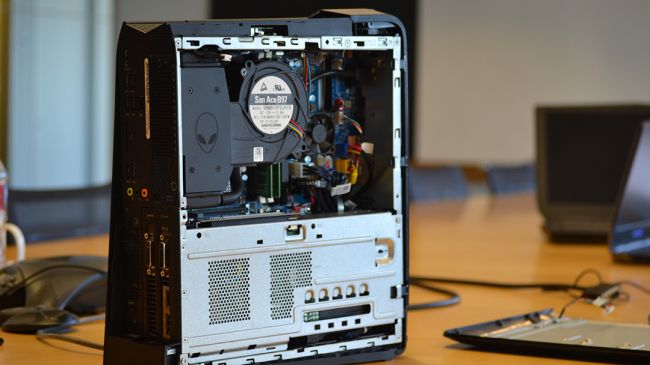
Another cool feature the new X51 promises is an optional liquid cooling. This translates into a combination of a pump and a radiator in a single device.
Alienware Rolls Out 4 Gaming Laptops And X51 Desktop

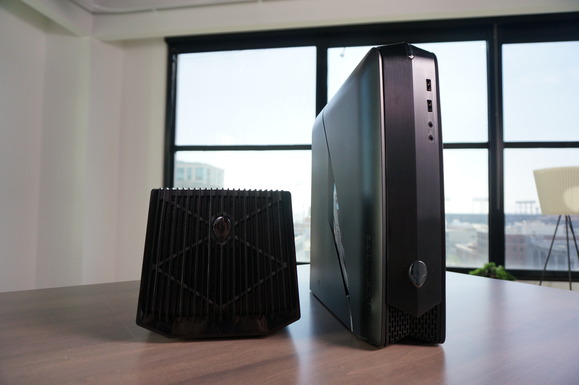
The design of the new X51 won’t blend in with your decor, but it promises a lot of high end features. The device is matte black with a green strip on the sides. The inside space is limited, so the CD drive has been sacrificed and expelled from the new model. But instead users get a removable tray for the GPU to compensate for that.

X51 R3 will be compatible with its Graphics Amplifier. However, before you go all out and buy yourself one of those, you should keep in mind that the amplifier is half as big as X51. Kind of a turn off, to be honest.

With two USB 2.0 and two USB 3.0 ports, built in 802.11ac Wi-Fi, 8GB of RAM and a CPU liquid cooler, Alienware seems to have worked hard to please the gamers’ niche and meet their demanding requirements. But have they succeeded?

Alienware Rolls Out 4 Gaming Laptops And X51 Desktop

What do early verdicts predict? We can’t deny the updated features are pretty attractive. However, this would be a wise choice only if you were specifically looking for a small gaming PC.

Props to the clever cooling solution as well. Alienware hit the nail on the head with that one. But the additional costs of a buying a separate graphics amplifier and also an external graphics card fail to fully justify this purchase.

If you’re a gaming enthusiast with a liking for small PCs and you want a sleek frame, the X51 R3 meets most of the expectations but leaves some space for improvement.
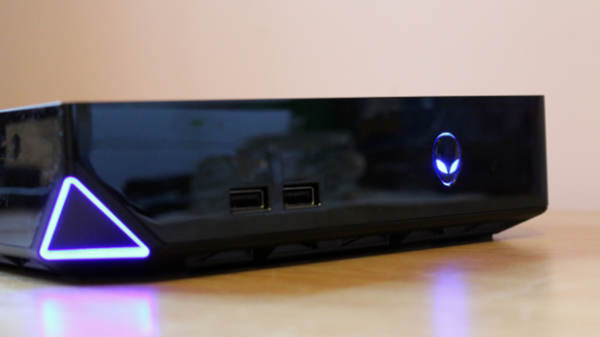
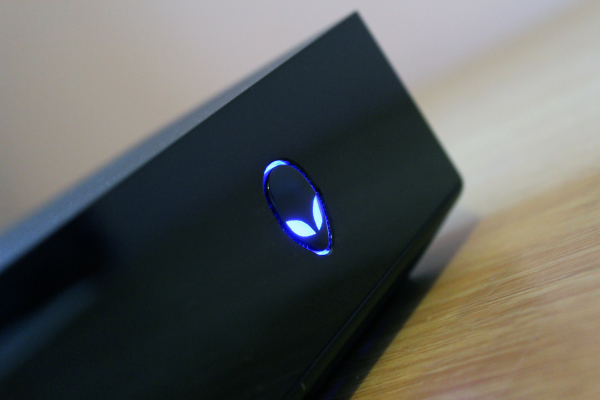
Image sources 1, 2, 3

Filed Under: Headlines Tagged With: alienware, gaming, pc

Alienware Alpha Review – A Pint-Sized PC

August 17, 2015 By Karen Jackson 4 Comments

Alienware Alpha - A pint-sized PC

Who says that you can’t have a PC gaming console?

The Alienware Alpha is a pint-sized PC that has a special place on the podium along with PS4, and Xbox One. It’s tons smaller than these two console mammoths, and its performance is on par.

What’s the deal with the Alienware Alpha?

Back in 1996, Alienware was founded by two tech enthusiasts Nelson Gonzalez, and Alex Aguila with the purpose of video-gaming in mind. In 2002 Dell expressed its wish of acquiring the company, but the deal didn’t went through until 2006. Now, Alienware is a subsidiary of Dell Inc.

The Alienware Alpha was first announced as a Steam Box, but it ended up being based on a custom-built user friendly XMBC UI.

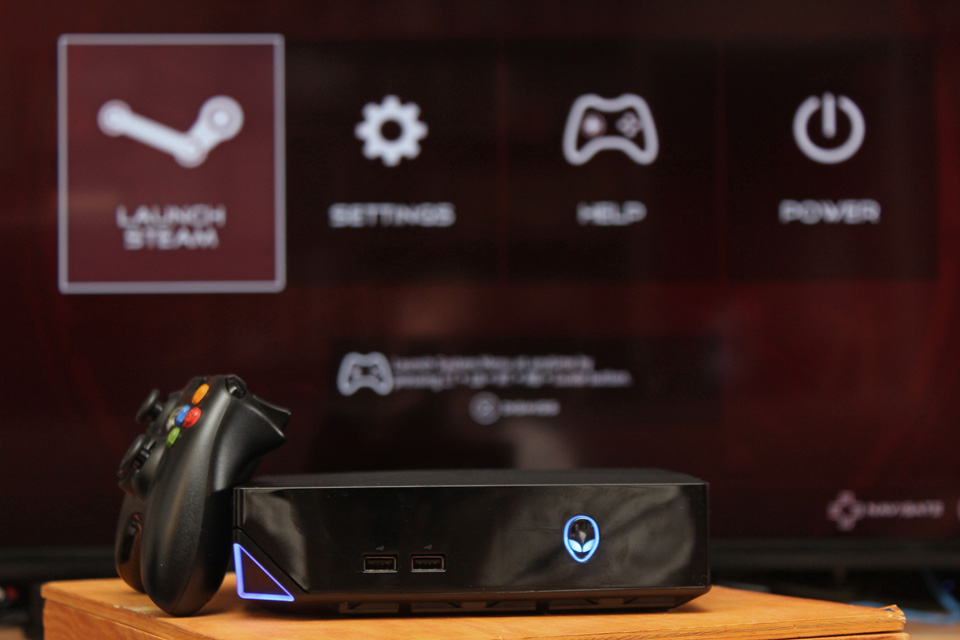
The Alienware Alpha is controller-friendly, and you can find an Xbox 360 gamepad in the box – for no additional cost.

It matches the PS4, and Xbox One, but it retails at a much bigger price without the possibility of upgrading its GPU, it’s equipped with an entry-level CPU, and RAM, which limits its performance.

I recommend going with the more expensive Alienware Alpha model that sports a faster quad-core Core i7 CPU, and 8 gigs of RAM.

Alienware Alpha Review

Alienware Alpha Console

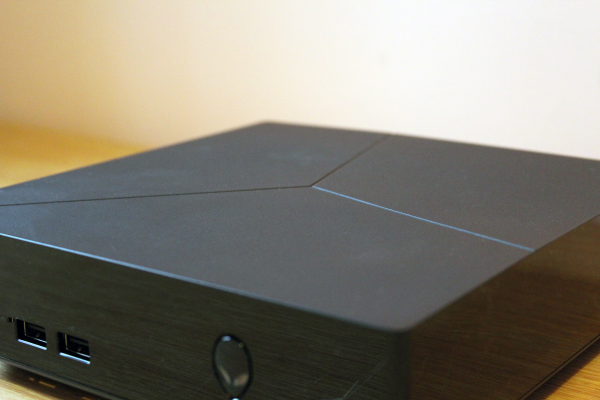
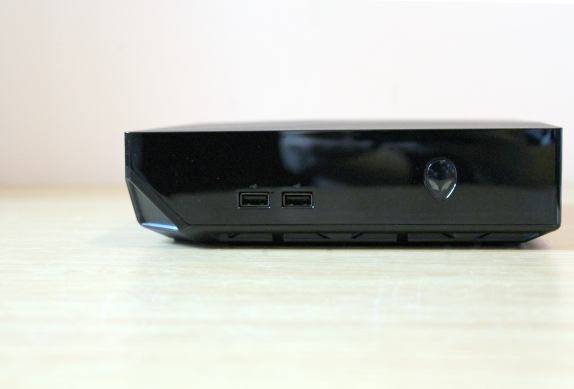
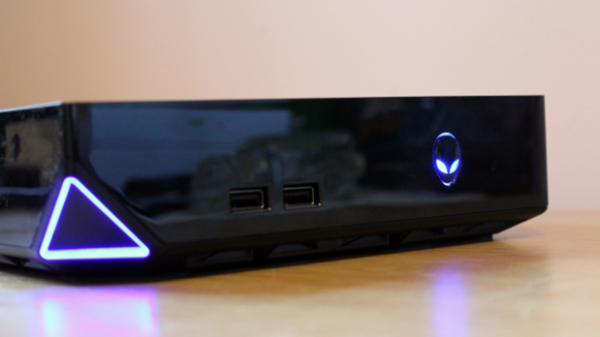
It looks beautiful. Glossy plastic covers its sides, and on the front of the Alienware gaming console you can see its power button constructed out of the company’s logo. Near it, two USB 2.0 ports reside. The top of  the console is somewhat divided into a trio of lines, and there’s a cut-away corner which shows-off more LEDs.

Design-wise, the Alpha is more than pleasing, I might go as far as calling it eye-candy. When added to a police line-up it can be found guilty of looking gaming-sexy.

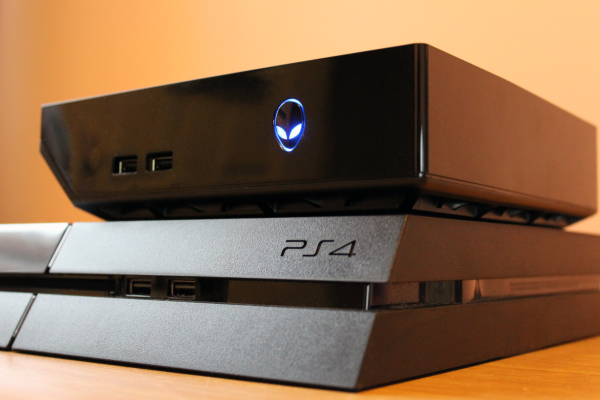
Measuring 200mm wide, 56mm tall, and 200mm deep, it’s much smaller than its console counter-parts. The PS4 is shorter, but not by much, and the 3mm difference is unnoticeable, however it’s wider, and more deep. The Xbox One is the biggest of them all.

The Alienware Alpha console weighs much less than any other console. It’s 1.54kg, and it looks petite when compared with the 2.8kg Sony console, or the 3.2kg Microsoft box.

Why is it so weightless? Mainly because it doesn’t have a built-in optical drive, and it uses an external power brick.

It’s a dust-magnet, but you can get passed this mildly annoying issue because when it comes to build materials the Alienware console doesn’t feel like a block of cheap creaking plastic.

Alienware Alpha Rear Side

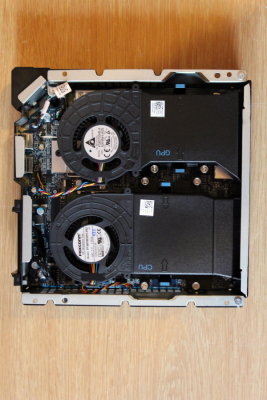
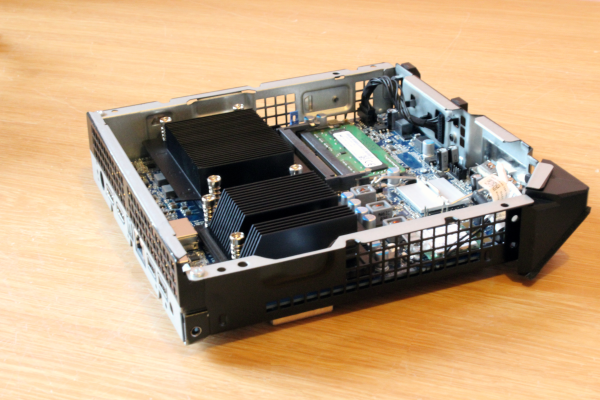
Everybody is calling it the Alienware game console but everyone tends to forget that it has PC blood flowing through its veins. Its base panel is easily popped off by removing the four screws found at the bottom of the console. The plastic lid that encompasses its internals and the sides, can be lifted away to showcase the engine under the hood.

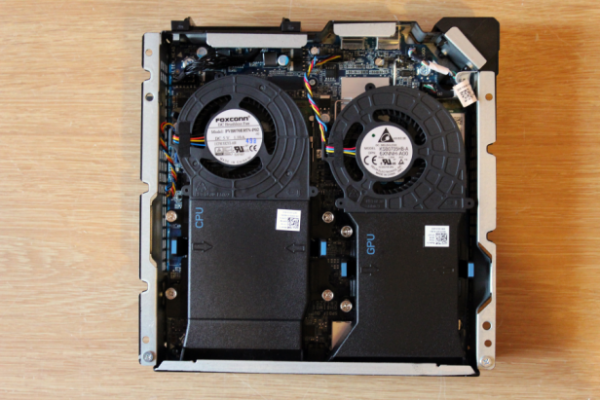
Inside the Alpha you’ll notice little plastic shrouds that help hot air navigate from the CPU, and the GPU. They are easily removable with only a couple of  plastic clips that keep them tight in place. It’s a gateway towards chipsets, and the rest of its interiors.

It’s designed for upgrades, but unfortunately not all of the components inside can be changed. The most important part, the GPU, can’t be removed as its soldered onto the motherboard.

The basic, naked Alienware Alpha model comes with a memory slot free, a dual-band 802.11ac wireless card, and a 2.5-inch HDD. The CPU is sitting nicely in a LGA 1150 socket.

Connectivity is good, and wireless connection doesn’t flop-out when you most need it, although it also depends on your ISP.

Alienware Alpha Design

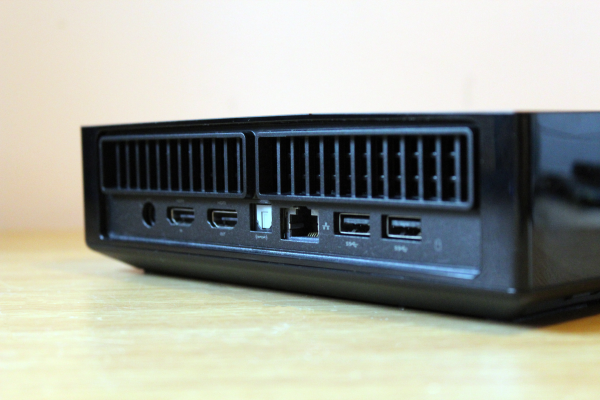
The Alpha Alienw has a Gigabit Ethernet, and a Bluetooth 4.0. On the front of the console there are two USB 2.0 ports. On its rear, you can find two additional USB 3.0 ports, the input, and output HDMI plug, and an optical S/PDIF connector. Just under, behind a flap-thingy, there’s your fifth USB port which has been built for a Valve USB controller, and other similar gadgets.

The Alpha UI has been perfectly designed for the Xbox 360 controller which can be found in the box. Don’t expect a revolutionary OS, it has Windows 8.1 with basic features. The Settings Menu is comprised of basic networking, video and audio options. There’s a specific option which lets the user change the LEDs color.

The Power Menu is where you’ll go to either reboot, or shut down your system, and also an option to open your Windows desktop.

It being a Valve golden-child, Steam’s Big Picture mode divides the screen into three menus:

  • Store
  • Library
  • Profile Page

Your library of games, and the store can be navigated on a horizontal menu, where you’ll also find links to friends, and a browser.

It’s intuitive, and easy to use. If you’ve meddled with a gaming console before, or Steam, you won’t notice anything game-changing. Newcomers won’t have issues navigating around in the library, or the store.

Alienware Alpha on top of a PS4

However, even though it’s highly intuitive, and beginner-friendly, it’s not that perfectly constructed. You’ll observe weird fonts throughout the store, the library, and in-game. This is because there’s a huge divide between Valve, and Alienware who built the UI.

Colors can be changed, but you don’t have this option for fonts, or navigation.

Alienware’s virtual keyboard is present, but it’s totally different from Steam’s on-screen one. Sadly, neither of them are as intuitive as they may see at first – nor the software.

The Alpha software is borderline mediocre when it comes down to how quick it runs, and there are some driver issues as in there’s no proprietary Nvidia Geforce Experience app that you can install so you get the latest updates. The Alpha console-manufacturer hasn’t announced when, and how users will receive them.

The alliance between Alienware, and Valve means that you will only have access to Steam while using the UI. There are thousands of games available on the Steam store, thousands more than on any other console. This is worth noting for those of us who want to use Origin, or Uplay.

Alienware Alpha components

For Origin, and Uplay you’ll have to connect to your desktop.

Describing it as an Alienware gaming console is faulty in its essence, and by removing the possibility of using multiple stores it doesn’t really break the console illusion, but still, it would have been nice to have them up for grabs.

The Alienware Alpha can also be used for work, watching Netflix, YouTube, and even web browsing.

The GPU is a generic Nvidia chipset, but don’t let this sink your boat. Under further investigation, it was revealed that its architecture is based on the desktop version of the GTX 750 Ti/GTX 860M chip.

It can be categorized in the mid-performance range with 640 stream processors that are clocked at 1,020MHz. Theoretically speaking, it features 1.4TFLOPS. It’s lower than the PS4 peak of 1.84, and higher, but not by much, when compared to the Xbox One’s 1.31TFLOP.

The dedicated GPU memory is DDR3, and it’s installed in single-channel mode which poses as an obstacle for performance. It looks bad when you compare it to the shared memory of the PS4, and Xbox One.

Alienware Alpha internals

The Alpha’s GPU is paired with an Intel Haswell CPU that can reach a maximum of 2.9GHz without Turbo Boost.

Tested in Battlefield 4 at Ultra Quality settings, and 1080p, the Alienware Alpha was sitting confidently at 27 frames per second. In Bioshock Infinite the console was outputting 44 fps, and in Crysis 3 it managed to produce  whooping 28 frames per second.

Even though it can run AAA games on Ultra Settings, I don’t recommend you sacrifice stability, and game fluidity for pretty colors and sharp textures. At High Settings the Alpha jumped towards the 40 fps mark in Battlefield 4, and an average of 60 in Bioshock. Crysis 3 managed to beat it down a bit, but performance increased up to 33 frames per second.

It’s crucial that you know the minimum framerates. The Alpha didn’t disappoint, and it actually performed rather well. In Battlefield it witnessed a down-spike to 22 fps on occasion, and 30 frames per second in Bioshock.

Alienware Alpha USB ports

Its direct competitor, The Syber, is slightly faster, but not by much. The Alienware Alpha runs well in the gaming department, but for a $500 machine we expected much more. It’s on par, performance wise, with the PS4, and Xbox One, but its architecture is not.

The Alpha’s hard disk is definitely not up to modern standards, and the 500GB 5,400 RPM disk runs like a snail. The Alienware Alpha has slow loading times, but not something that should be taken into account as a deal breaker. It took approximately 40 seconds to boot, and apps, once they were launched, never struggled with maintaining their flow.

Still, this is a poor mark to achieve for both PC, and gaming console standards.

Considering how small it is, and how its internals are cramped inside the little Alienware box, we expected it to reach Mount Doom levels. This wasn’t the case, and the Alienware Alpha strays away from the trend. The CPU, and GPU were constantly between 71, and 79 degrees.

Alienware Alpha Design

The Alienware is also not a noise-hog. It runs quietly, with a little bit of rumbles here and there when the machine is stretched in demanding game scenes. Nothing that’s worth fussing over anyway. It’s comparable with modern consoles.

It requires just about 22W in idle mode, and it can reach a peak of 101W. Power consumption isn’t a problem when comparing with the 110W Xbox One, and the 125W PlayStation 4.

The Alienware Alpha comes in two different configurations.

The base model costs $500, and is the cheapest of the bunch. It has an Intel i3 Haswell processor, and 500GB of storage space. If you want to upgrade it, you’ll have to cough up almost $100, but you’ll get 8 gigs of RAM, and 1TB of storage space.

The next configuration costs $850, and it comes equipped with a Core i7 proc, 8 GB of RAM, and 2 TB of storage space.

Both configs come with Windows 8.1, which can be upgraded for free to Windows 10.

It is possible to replicate this exact config by building your very own desktop PC, but you won’t have the mini-ITX case, the Alpha XMBC-based UI, nor the Xbox 360 wireless gamepad.

The Alienware Alpha comes with a 1 year limited hardware warranty.

Dell currently sells them packed with 6 free games.

Alienware Alpha chipsets

The $850 one, although incredibly expensive when compared with the PS4, and Xbox One, is more versatile than its console counterparts. If you don’t plan on using it just for gaming, you can use Windows 8.1, or 10, for work, streaming movies, or listening to music.

I would like to point-out that adding a SSD will make your life much more easier, and your machine faster. The equipped Alienware hard drive of 5,400 RPM is outdated, and the 7,200 RPM one will soon follow in its path.

It’s also worth nothing that even though Dell is the manufacturer, and also retailer, you can find the Alpha at a cheaper price at Amazon, or BestBuy.

Verdict

Alienware Alpha with Xbox Controller

Should you buy the Alienware Alpha?

It’s worth considering if you don’t plan on buying a Sony, or Microsoft gaming console, and if you’re more PC oriented. The big downside is that you can’t upgrade the GPU, and your machine will be obsolete in a few years. More so, considering that DirectX 12 is just around the corner.

Because it’s so PC oriented it proves to be versatile, and Windows 8.1 works perfectly well with this Dell gaming console. However, it is unaware at the moment how many compatibility issues are present in Windows 10.

The 5,400 RPM hard disk really holds it back from achieving its true potential, and you’ll have to acquire, separately a 7,200 RPM HDD, or an SSD – although, a worthwhile 500 GB SSD retails at $200, more or less.

Trustworthy Alienware retailers are Dell, Newegg, Amazon, and BestBuy.

Image Source: 1, 2, 3, 4, 5, 6, 7, 8, 9, 10, 11

Filed Under: Headlines Tagged With: alienware, alienware alpha, Alienware Alpha PC Gaming Console, Alpha

Best Gaming Laptops On the Market

February 27, 2015 By Nancy Young 1 Comment

Finding the best gaming laptop can be really hard for those people that compare the price of a gaming laptop to that of a PlayStation 4, which costs around $500.

Learning about the laptop’s specifications should give you a clue why it’s priced the way it is. Most gaming laptops come with 1080p displays, the best performing Intel CPU and 16GB or more RAM.

We present to you some of the best gaming laptops on the market today.

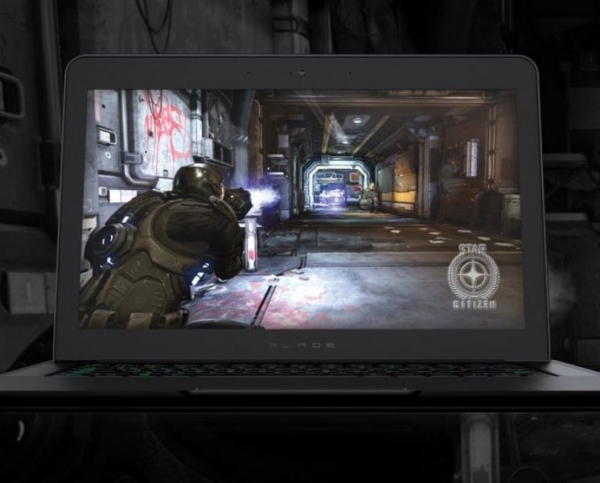
1. Razer Blade 14

Best Gaming Laptops

This is a very sleek laptop that is just 0.70 inches thick. It has a gorgeous QHD+ display and 16GB of 1600 MHz DDR3L RAM and up to 512GB SSD storage. Having SSD means that it is able to deliver speeds of up to four times faster than traditional hard disk drives, which allows the machine to boot a lot faster and launch games quicker.

It has an Intel Core i7 4720HQ processor, an Nvidia GeForce GTX 970M graphics card and an IGZO display that is more than gorgeous.

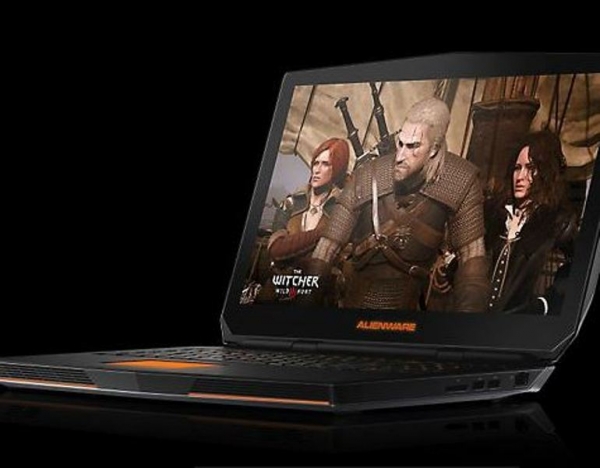
2. Alienware 17

Best Gaming Laptops

The Alienware 17 features high-end graphics and CPU with a carbon fiber design and copper heat sinks. This gaming laptop is designed to deliver a great gaming experience.

Other features on the laptop include the IPS LCD display, full sized keyboard, a 2.0MP Full HD webcam, Quad-Core Intel i7 CPU, great audio powered by Creative SoundBlaster, pre-installed software called Alien Autopsy and AlienFX API.

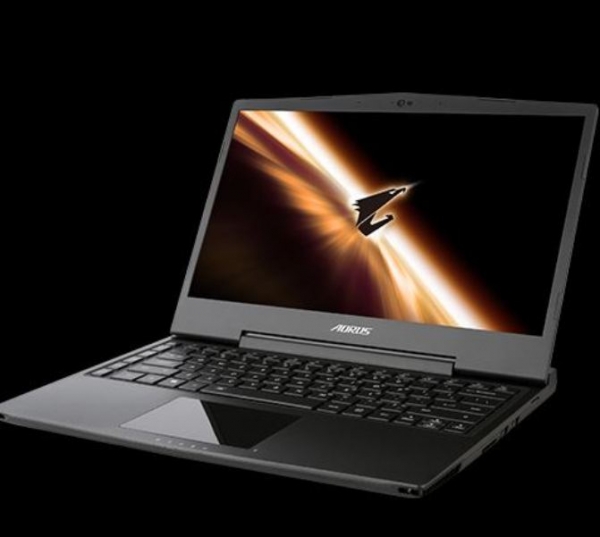
3. Gigabyte Aorus X3 Plus

Best Gaming Laptops

The key features on the gaming laptop from Gigabyte are its 13.3 inch display with a resolution of 3,200 x 1,800, an i7-4860HQ CPU, two 256GB SSDs and a GeForce GTX 870M graphics card. The laptop weights 1.8kg and is only 23mm thick. It’s a very portable gaming laptop and you can easily fit it inside a standard backpack. The screen is gorgeous and beats its competitors in terms of black levels, color accuracy and contrast ratio. The laptop also boasts a pair of very good speakers that offer highly detailed and great sound, a very suitable keyboard and a great battery life of up to 5 hours and 20 minutes.

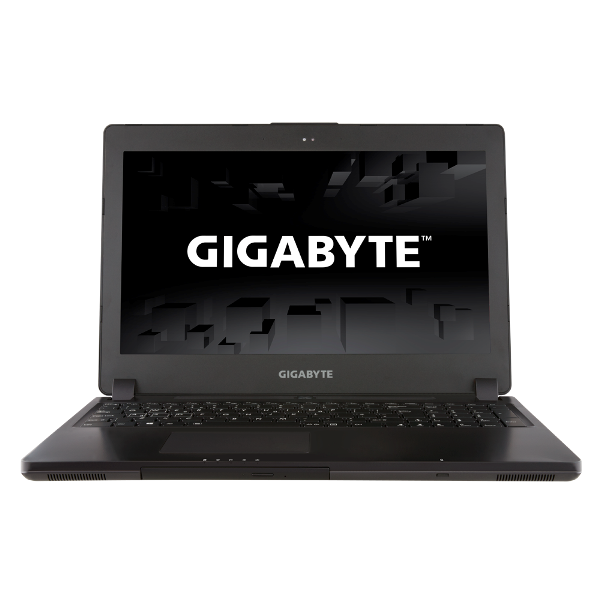
4. Gigabyte P35W v2

Best Gaming Laptops

This beautiful gaming laptop comes with a 4th gen i7 CPU paired with a great GeForce GTX 870M graphics card with 6GB video memory. The laptop also has a dual fan cooling system that keeps it very cool and supports two HDDs and two SSDs. If you opt for a full kit model you will be able to get a storage capacity of around 5TB. You can choose to replace one of the drives with a Blu-Ray. The display of this laptop is Full HD and has a very wide viewing angle. The Gigabyte P35W v2 also features a Mini Display Port that can display a 4K resolution.

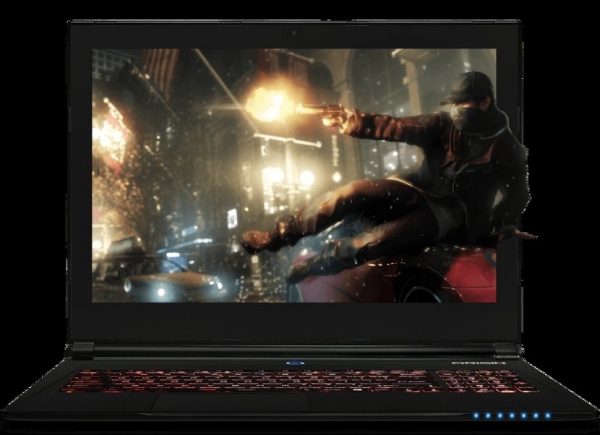
5. Origin EVO15-S

Best Gaming Laptops

This gaming laptop from Origin is only 0.78 inches in thickness and has great features and specs. It features a Quad-Core i7 CPU from Intel, a GTX 970M GeForce graphics card, 16GB of DDR3 RAM, a 128GB SSD and a 1TB HDD. The laptop features numerous USB 3.0 ports, a 720p webcam, an SD card reader and a choice between a matte or glossy 15 inch UHD IPS display.

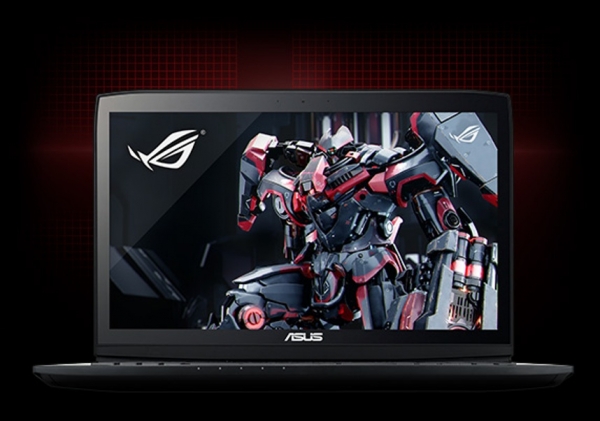
6. Asus Rog G751

Best Gaming Laptops

This laptop features a 17.3 inch Full HD IPS display and it’s one of the first laptops that can handle 4K games. It has up to 32GB RAM, dual fans with copper heat sinks and easy access game keys and programmable ones.

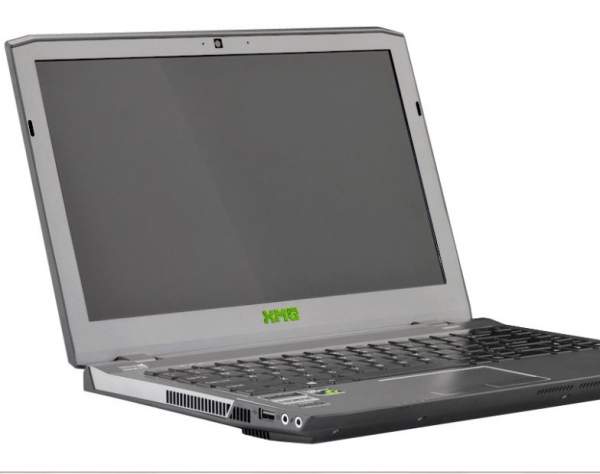
7. Schenker XMG P304

Best Gaming Laptops

This is a new breed of gaming laptops and features a 13.3 inch display and weights 2kgs. It also has a great battery life for how portable it is. You can play for up to 4 hours on a 40 percent brightness level. The display is great in terms of brightness, color accuracy and black levels. Other features on the gaming laptop include 8GB RAM, a 250GB Samsung 840 EVO SSD and an Nvidia GeForce GTX 860M graphics card.

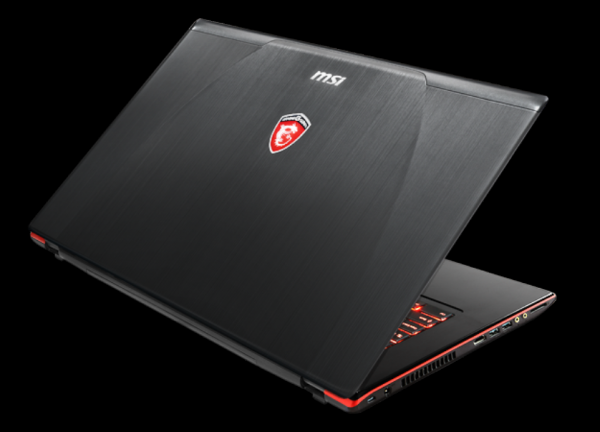
8. MSI GE70 Apache Pro-012

Best Gaming Laptops

This laptop is built with premium hardware that can easily enhance the gaming experience. It features an Intel Core i7-4700 HQ CPU that can be turbo boosted to 3.4GHz. The machine has 12GB of DDR3L RAM, a Steel Series Full Color Backlit keyboard and an Nvidia GeForce GTX 860M graphics card with 2GB of GDDR5 video memory.

This was our short guide on the best gaming laptops on the market at the moment. We hope you enjoyed it and wish you happy shopping.

Images source: techtimes.com

Filed Under: Tech & Science Tagged With: alienware, asus, best gaming laptop, best gaming laptops, best laptop for gaming, gaming laptop, gaming laptops, gigabyte, laptops for gaming, msi, origin, razer, schenker

Alienware Graphics Amplifier Review

January 9, 2015 By Nancy Young Leave a Comment

alienware-graphics-amplifier-logo

One of the limitations of having a laptop designed for gaming is that they are hardly upgradable. Even though you might be able to swap the hard drive or the RAM to add more, what else is there to upgrade? You will not be able to upgrade your graphics card, I’ll tell you that.

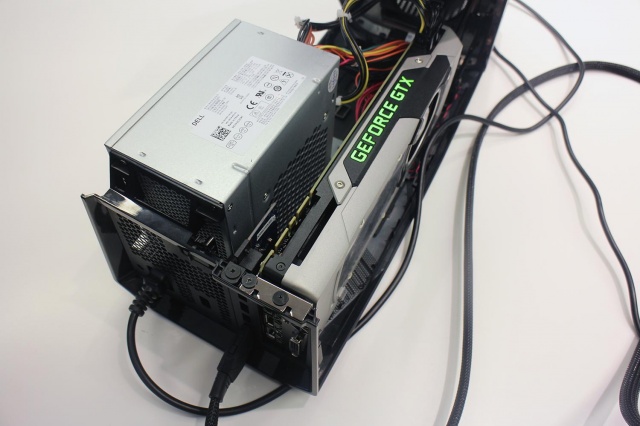
Alienware has found a way to make this possible, however, with what they call the Alienware Graphics Amplifier. This is basically a box with a PCI Express port and its own power supply that will supply your Alienware laptop with the power of a graphics card found on desktops. This device retails at $299.

Here is our Alienware Graphics Amplifier Review.

Alienware Graphics Amplifier: Design

alienware-graphics-amplifier-side

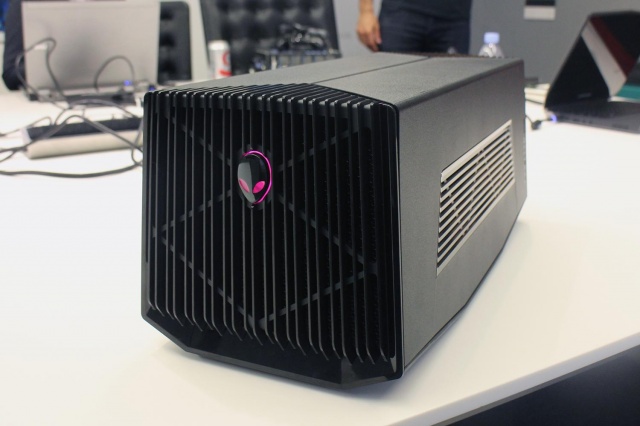
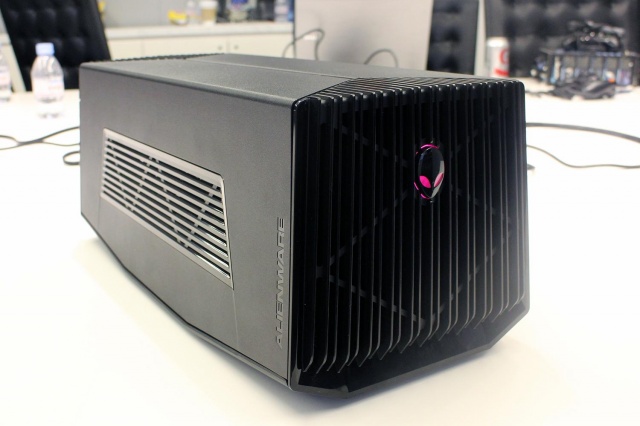
The Alienware Graphics Amplifier is unlike anything we’ve even seen before when it comes to PC accessories. The Graphics Amplifier from Alienware isn’t exactly eye candy, to say the least. It’s basically a gray and black case that has vents along its rear and sides. There are also vents on the front, along with a logo that lights up. We were surprised to find out that this Alienware logo is not the power switch, however. Even though the Graphics Amplifier isn’t exactly the looker in the bunch, it certainly does match Alienware’s design.

Weighing 7.7 pounds and measuring 6.8×7.3×16.1 inches, the Alienware Graphics Amplifier can’t really be called portable. Furthermore, the device weighs 7.7 pounds without a graphics card inside it. But there is a point to its bulkiness as almost any card fits inside it.

Alienware Graphics Amplifier: Setup

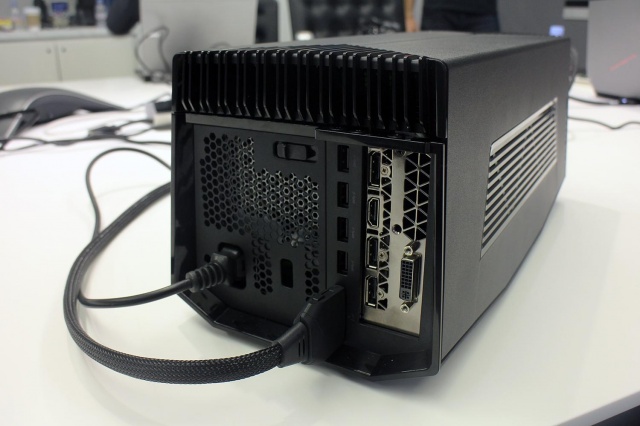
alienware-graphics-amplifier-rear

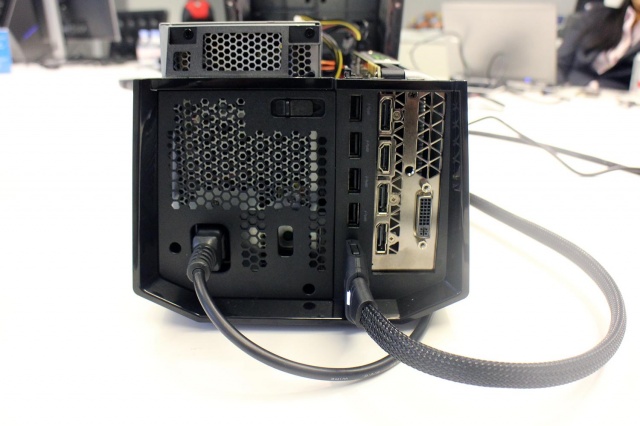
The setup of the Alienware Graphics Amplifier is a lot easier than you would imagine. If you ever had the chance to assemble a PC, setting up this device will be a walk in the park. All you have to do is put in a graphics card of your choice, connect the power supply (which is also included in the package), plug the device into your Alienware laptop and that’s it. You’re good to go.

The Graphics Amplifier also features USB 3.0 connectors in addition to whatever other connectors you have on your graphics card. This also makes the device a great hub for extra connectivity and also means it can support more than one monitors, should you wish to take advantage of this option.

For the moment, however, only Alienware laptops feature the special port you need to connect the device to. Alienware did not confirm if the port will be made available on other gaming laptops as well. Therefore, if you prefer other gaming laptops, don’t get your hopes up just yet and save your money for another time.

Alienware Graphics Amplifier: Performance Boost

alienware-graphics-amplifier-ports

It is a known fact that graphics cards intended for desktop are a lot more powerful than their mobile brothers. For example, the GeForce GTX 980M only provides around 75 percent of all that its big brother is capable of. So, expect to get full advantage of your desktop graphics card on your gaming laptop. As long as you buy the desktop graphics card as well, mind you.

Conclusion

alienware-graphics-amplifier-power-supply

The device produced by Alienware fills a gap in the mobile gaming industry. It addresses a problem that for long has tormented the gaming laptops.

The Alienware Graphics Amplifier is indeed a great device but is a little bit steep as it retails at $299.

Wrapping up…

PROS

– The Alienware Graphics Amplifier gives you the option of adding a graphics card intended for desktop on your laptop

– Great USB 3.0 hub

– Comes with a power supply

– The device is capable of fitting almost any graphics card on the market

CONS

– Very bulky

– Expensive, considering you also have to buy the graphics card

– Only works on Alienware laptops

The Verdict

Even though the sheer bulkiness of the device might not interest most hardcore gamers, the price is a little steep and the compatibility with only Alienware laptops are down sides, to say the least.

If you already own a newer generation of an Alienware laptop, however, you might come to the conclusion that this is just the device you were waiting for.

Images source: digitaltrends.com

Filed Under: Tech & Science Tagged With: alienware, alienware amplifier, alienware graphics, alienware graphics amplifier, Alienware Graphics Amplifier Review, graphics amplifier review, Review

Subscribe to Blog via Email

Enter your email address to subscribe to this blog and receive notifications of new posts by email.

Join 10 other subscribers

Recent Articles

police handcuffs man

German Man Probed In Poisoning That Killed 21 Employees Since 2000

June 29, 2018 By Kenneth Scott Leave a Comment

Chicken wings bar

Intoxicated South Carolina Man Punches Waitress Who Refused to Serve Him Alcohol

June 29, 2018 By Karen Jackson Leave a Comment

gaming

New Zealand gamer Who Flew Halfway Across The World for Virginia Teen Gets Shots By Her Mother

June 28, 2018 By Cristopher Hall Leave a Comment

party

Former Virginia Tech Freshman Sentenced to 50 Years in Prison for Stabbing a Girl to Death

June 28, 2018 By Roxanne Briean Leave a Comment

bonfire

British Couple Sentenced to Life in Prison for Torturing and Murdering French Nanny

June 27, 2018 By Deborah Campbell Leave a Comment

pay phone

Texas Father of Girl Disappeared in the 80s Ignored by Authorities

June 26, 2018 By Cristopher Hall Leave a Comment

bottled water

San Francisco Woman Threatened to Call Police on Girl Who Sold Ice Water for Disneyland Trip

June 25, 2018 By Roxanne Briean Leave a Comment

Maplewood Park

Missouri Man Robbed by Date and Accomplice in Park

June 22, 2018 By Nancy Young Leave a Comment

coding

New York Man Sentenced in Cyberstalking Former Girlfriend, Mailing Drugs to Her Dorm

June 22, 2018 By Deborah Campbell Leave a Comment

headphones

Bose Poised to Launch Sleepbuds, In-Ear Headphones That Help You Sleep

June 21, 2018 By Nancy Young Leave a Comment

Police light

Intoxicated Female Driver in Custody for Pulling Arresting Officer by the Hair

June 21, 2018 By Kenneth Scott Leave a Comment

kitchen

Restaurant Manager Arrested and Charged in Shooting Death of Co-Worker over Negative Yelp Reviews

June 20, 2018 By Karen Jackson Leave a Comment

plastic container

Pennsylvania Couple Charged in Violent Death of Infant Discovered Buried in Cat Litter

June 19, 2018 By Cristopher Hall Leave a Comment

tailpipe

Minnesota Teen Gets Head Stuck In Oversized Tailpipe Winstock Music Festival

June 18, 2018 By Karen Jackson Leave a Comment

Pages

  • About Us
  • Contact us
  • Privacy Policy
  • Privacy Policy GDPR
  • Staff
  • Terms and Conditions

Recent Posts

  • German Man Probed In Poisoning That Killed 21 Employees Since 2000 June 29, 2018
  • Intoxicated South Carolina Man Punches Waitress Who Refused to Serve Him Alcohol June 29, 2018
  • New Zealand gamer Who Flew Halfway Across The World for Virginia Teen Gets Shots By Her Mother June 28, 2018
  • Former Virginia Tech Freshman Sentenced to 50 Years in Prison for Stabbing a Girl to Death June 28, 2018
  • British Couple Sentenced to Life in Prison for Torturing and Murdering French Nanny June 27, 2018
  • Texas Father of Girl Disappeared in the 80s Ignored by Authorities June 26, 2018
  • San Francisco Woman Threatened to Call Police on Girl Who Sold Ice Water for Disneyland Trip June 25, 2018

Categories

  • Business
  • Entertainment
  • Finance
  • Headlines
  • Health
  • Life
  • Nature
  • Science
  • Sports
  • Tech & Science
  • Travel
  • Uncategorized
  • United States
  • World

Copyright © 2026 ArgyllFreePress.com
About · Privacy Policy · Terms of Use · Contact