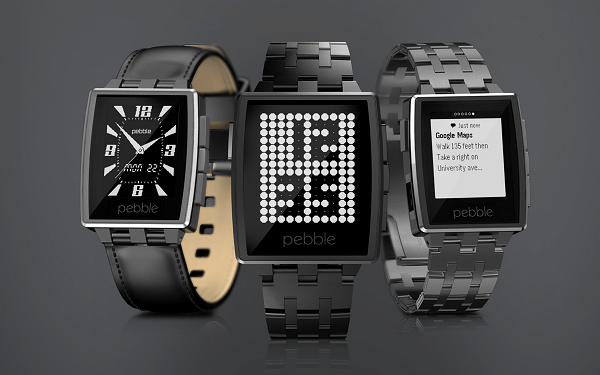
In spite of it being a “new” trend that everyone seems to be getting ultra hyped about, smart watches are not all that new. Indeed, nowadays there’s an undeniable focus on making them even smarter than one would expect and play more roles than they should. But all that extra effort into packing an outstanding amount of hardware into a tiny screen that simply has to be touch-sensitive and brilliant doesn’t come in cheap. Take a look at the Apple iWatch for a second and you’ll see exactly what I mean. Then take a look at the Pebble Steel smart watch, which is a modest early 2014 production; the differences may look severe, but are they really if you stop to think about how you would really be using it? That is something we’ll be touching on in this Pebble Steel review.
Mostly due to the fact that it’s not a highly developed market yet, anyone can agree that most smart watches lack in actual utility. Sure, they can be used as an extension of your smartphone and can even handle some of the things that you would normally do through your mobile. But once again I have to give the Apple iWatch as an example – it’s great, it’s smart but… so many people have complained that it’s hard to accurately tap on the oh-so-bright-and-colorful screen and would rather just use their phone instead. Others have stated that while the watch may succeed in architecture and hardware as a smartwatch, it’s simply not great looking as a watch.
So all introductory details aside, what does the Pebble Steel do and what does it not? It syncs with your iOS or Android phone and pushes notifications to you and also give you a fair amount of information regarding a number of things while not looking overly large or out of place as a watch. It doesn’t, however, appease one’s wearable tech desires nor fares well with either generic or health apps (it can only hold a maximum of 8 at a time).
Pros:
- Works with both iOS and Android OS
- Waterproof
- Classic yet classy
- Does most of what you would expect from it
Cons:
- Can’t even remotely compare to competition hardware standards
- Limited on apps
- Lacks fitness tracking sensors
- Too simple for the tech-savvy
Pebble Steel Review – Design
The Pebble Steel smartwatch is a huge upgrade from the original 2013 Pebble watch – both visually and material-wise. It has upgraded its design with a much more attractive display, featuring fashionable indents on its top and bottom edges, reminding us very much of a designer watch more than wearable tech. If anything, the Pebble Steel will pass for a regular watch once you take a closer look at the screen and its functionalities.
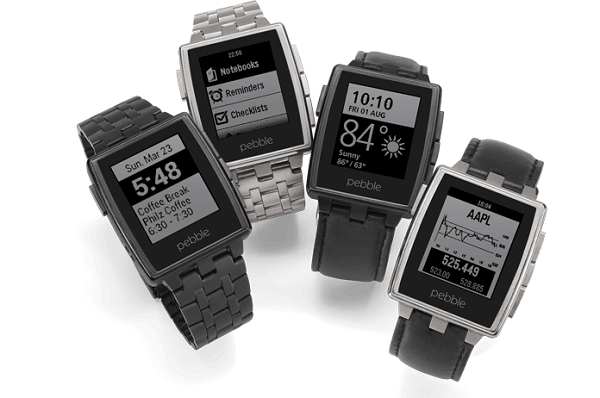
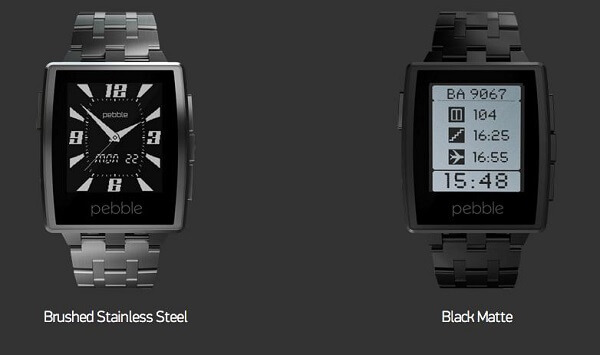
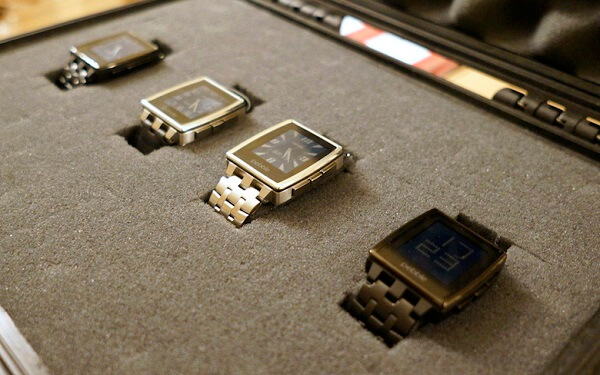
It comes in 4 variants on the official website by combining a Brushed Stainless steel or a Matte Black steel build with either the leather or metal bands. Regardless of what combination you go for, the Pebble Steel looks amazing, with a rugged and masculine but classy look. You can wear it with any kind of attire and regardless of the occasion; all things considered and it still ends up looking a lot less bulky and out of place than the Android Wear and Apple iWatch, measuring only 45 x 34 x 10.5 mm. its weight is very much in the green too, not exceeding 28 to 32 grams with the leather band – depending on the width of the band, which you can also customize when purchasing the watch. The Pebble watch steel band version does, however, go up to a weight of 56 grams.
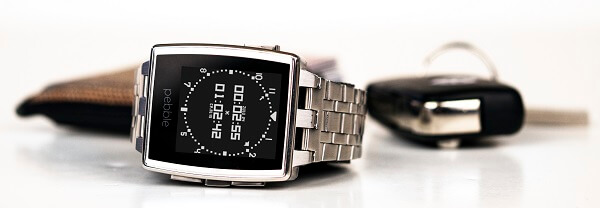
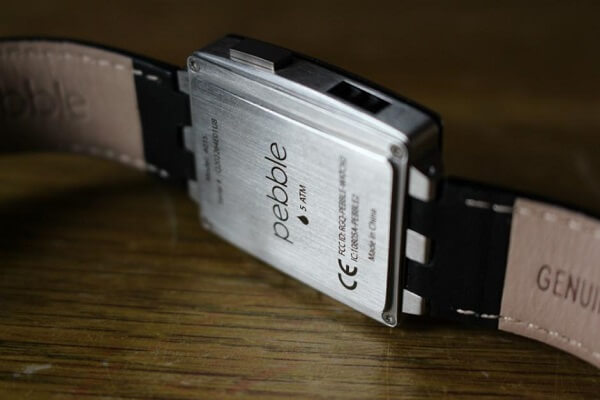
One aspect that you surely won’t find in many other, if any smartwatch is the fact that the Pebble Steel is water proof; well, at least up to 5 ATM water resistance. You can take it with you regardless of weather conditions, in the shower and even when you go swimming. Even the steel band version, which does come at an extra $30 gets the same water friendly treatment. The leather Pebble Steel band may start suffering when exposed to water too often however.
The display won’t elicit a “wow” anytime soon considering that it’s a black and white screen and can’t match up to any of the colorful LCD panels used in the competitors’ smart watches. However, it comes at the upside of preserving a lot of the energy used by the watch, making the battery last much longer than your iWatch’s would.
You shouldn’t feel disheartened at the fact that it’s black & white, however; it’s much brighter than the ones you normally find in e-book readers, handling itself well in terms of crispness and vividness. Thanks to the Gorilla Glass coating on it, you won’t have any difficulty reading its display in sunlit nor night-time conditions either as it reduces glare to some extent. Sadly, the 1.26 inch display is not a touchscreen and only goes up to 144 x 168 resolution. However, considering that the entire menu is made up of text-based options, it is hardly something to worry yourself over.
So in the absence of touch capability, you have to refer to the 4 buttons place on its sides: 1 on the left and 3 other on the right side. On this note, the bezel of the Pebble Steel smartwatch is not the thinnest you’ll find, scoring considerably on wideness as well as considerable height. The lone button is assigned to backlighting as well as entering or leaving sleep mode, while the group of 3 is your navigational help – allowing you to move up or down through the menu and select your choices. The watch can be taken out of sleep mode with a flick of your wrist as well, for the record.
Pebble Steel Review – Interface & Features
Before we delve into the actual utility that the Pebble Steel brings with it, we need to take a moment to mention a large plus that it comes with in comparison to its iWatch or Android Wear alternatives: the simple fact that it syncs and is compatible with both. If you purchase an Android Wear watch for example, you’d only be able to couple it with an Android phone. This versatility comes as a delight for users of both parties; sadly, Blackberry and Windows phone users are left out however.
Straight on the Pebble Steel watch itself, there’s not plenty you can do or fiddle around with. By using the central navigation button you enter the main menu – the hub that you’ll be able to select from a few types of settings or apps as well as view a history of your most recent notifications. Most of the Pebble watch features are accessible from here. You can also set alarms (yes, it does have a snooze button) from the Pebble Steel main menu as access your music playback feature.
The downside of the alarm system, however, is that it doesn’t make any sound whatsoever – if vibrations on your wrist can wake you up, then great. Otherwise, you should probably stick to your phone’s alarm.
The music playback can prove to have a couple of issues depending on the music app you use on your phone. There are some compatibility issues with various apps such as Spotify, where even if the watch will allow you to play, pause or skip through songs, it will show up as if it’s not finding any tunes. Confusing and a bit unprofessional to say so the least, but at least it works.
Connectivity is done solely through Bluetooth. As soon as you turn the Pebble Steel watch on for the first time you will be prompted to download the free Pebble app on your smartphone from either the App Store or Google Play. After you sync it to your device via Bluetooth, you can start setting up your user preferences and options.
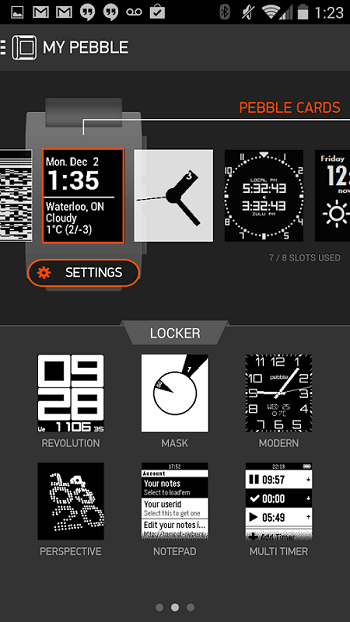
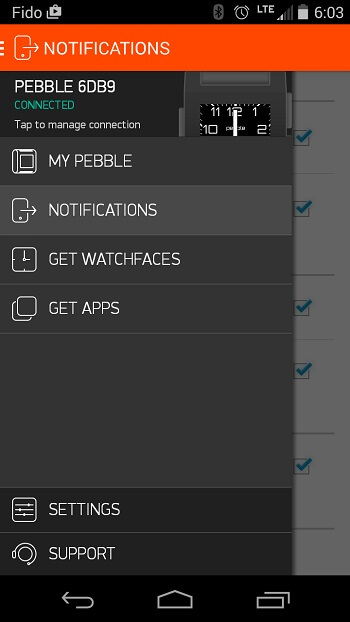
The mobile app menu is divided in two sections: one contains the smartwatch options, notification settings as well as two shortcuts to the app and watch face store. The latter contains other device settings as well as a help menu where you can troubleshoot and get guides on making the best of your Pebble Steel.
The notification menu is an easy to navigate menu that will allow you to tick or untick different categories of notifications that should or shouldn’t be sent to your watch; you can choose from a multitude of generic notifications, call or text notifications, calendar and even third party app notifications. The way they work on the smartwatch is through either flashing on the screen or a light vibration of the unit on your wrist; or both. For text messages for example, you’ll be able to read the content straight off of your smart watch’s screen, but given the small resolution you have to work with chances are you’ll be forced to scroll down a lot when attempting to go through the entire thing.
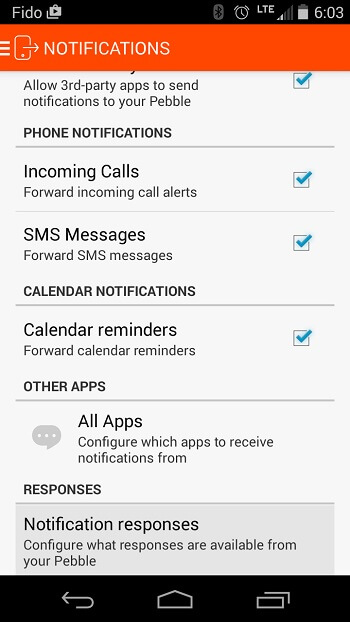
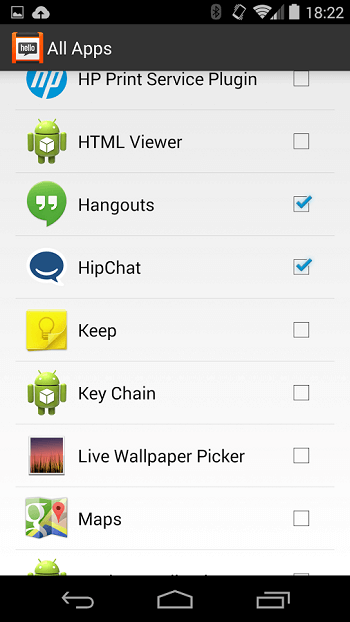
One issue that may annoy some users in regards to the shared notification system between the two units – your phone and your watch – is that sometimes your notifications will remain on one of them even after you’ve read or cleared them on the other. Thus, you’ll find yourself having to check and clear them from both devices to make them go away completely.
Pebble Steel Review – Apps
There’s a surprising amount of on-watch apps and even some games that you’ll find out there for the Pebble Steel. Yeah, you won’t be able to get the latest Asphalt on your watch but that’s hardly worrisome when you have a black and white screen on your wrist. What is worrisome, however, is the very limited space you get for apps and watch faces: instead of resorting to a limited amount of hard-drive space, the Pebble Steel uses a maximum of app slots instead.
While there’s no limit to how many apps you can download from the Pebble watch app store in order to, at one point, use on your watch, you’ll always have to switch them out and around using the mobile Pebble app. Most Pebble Steel apps you can get, you will most likely find for free and revolve around fitness apps, things such as Yelp or sports score apps that you don’t need a whole lot to navigate through. Naturally, there’s a considerable limit on the graphics that the apps can show.
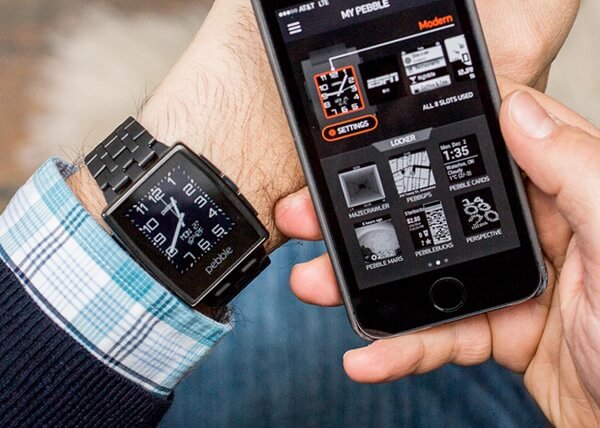
You can manage and work everything out regarding the apps you want to be able to use on your phone via the Pebble app cloud capability. Simply ticking apps marks them as something that you’ll be able to use on your watch once it’s done installing.
In terms of fitness apps, there’s a distinct lack of things you can actually track with the Pebble Steel – simply because it only features a pedometer and no other sensors such as an accelerometer, GPS or anything else that is normally used in activity trackers for example. However, you can download the native apps from FitBit or Jawbone UP in order to have your watch help you track your steps and sleep; that is, if you trust the results you will get from the Pebble Steel which may lack in the accuracy professional activity trackers are known for. However, the undeniable capability of accepting third party apps and even making them work somehow is yet another proof of just how universally competent this underrated smart watch really is. It may not do everything listed in the capability range of a Jawbone UP24, but it will at least give you a usable method of tracking a few things and then reviewing them on your phone.
Pebble Steel Review – Watch Faces
One of the relatively frustrating things about the Pebble Steel is the limited amount of app slots. And the worst part of it is that watch faces counts as a potential slot eater. Thus, there won’t be much customizing your watch on the fly given that you’d probably prefer to keep your app slots for something more important than watch faces.
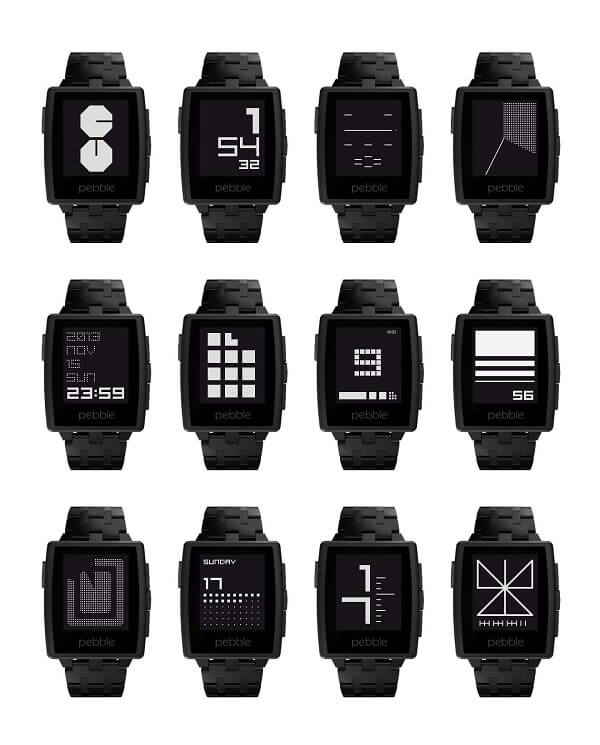
You can find a great number of watch faces on both the App Store and Google Play, most of which are free and a fun way you spice things up or change the generic look your watch gives off. On the upside, there’s a considerable amount of “app packs” you can find for your own Pebble Steel that will consist of both applications and watch faces bundled into one; a thoughtful gesture for users who really want more than just a pretty smartwatch.
Pebble Steel Review – Battery Life
Depending on what other kind of device you compare it too, the Pebble Steel can either be amazing in terms of battery life or not that impressive. In comparison to your regular smartwatch, aka iWatch or Android Wear, the battery of the Pebble Steel is great: while you normally have to charge your Apple or Android smartwatch basically every day, the Steel will last you somewhere around 5 to 6 days. It’s advertised to last up to a week but that seems a bit of an overstatement unless you’re really just using it as a fashion statement alone.
In comparison to some of the professional sports watches out there, the Pebble Steel can’t last as much as some of the more professional models do, but still handles itself pretty well. Charging is done via the magnetic slot that you can find on the watch’s left hand side, which ensures a satisfactory clip when the charger is connected correctly. Charging isn’t the speediest of processes however as it can take up to 4-5 hours. So you should probably get used to set it to charge while you sleep or otherwise it may be a bit of a nuisance if you have to be mobile during the day.
Pebble Steel Review – Final Conclusions
There’s a whole bunch of reasons some individuals will absolutely adore the Pebble Steel, while others will absolutely despise it. The watch is great for anyone who wants to own a smartwatch that is affordable and capable of sending notifications from their phone to their wrist, without the hullabaloo of tiny touch screens that you always tap incorrectly on. Fitness enthusiasts and tech lovers will, however, find the Pebble Steel unsatisfactory to say the least: there’s only so much you can do with it and actually feels like it tries really hard not to stand out as wearable tech and instead a fashionable watch with a technological secret.
You can purchase the Pebble Steel directly off of the Pebble website or through various retailers – both online and in-store. The price differs depending on the model that you aim for; the classic, leather band watch can be currently purchased for $159.99, while the stainless steel Pebble watch Steel band variant is available for $189.99. However, do keep in mind that there is a holiday sale at the current time – hence the reduced prices. Normally, you would pay $189.99 for the leather band Pebble Steel and $229.99 for the classier, longer-lasting stainless steel variety.
