Argyll Free Press

Growing News Network

Monday, January 19, 2026
Log in
  • Business
  • Finance
  • Sports
  • Tech & Science
    • HP Envy 4500 Review
    • LG Optimus 170 Review
    • iPod Touch 6th Generation Review
    • HTC One M8 Accessories Set-up
    • Surrealist Games You Must Play
    • Hisense Sero 8 Review
    • Dell Latitude e7440 Review
    • HP Laserjet 1536dnf mfp Review
    • Garmin Fenix 2 Review
    • Skype Vs Viber
    • Best Video Conferencing Software
    • Sony mdr 1r Headphones Review
    • Canon Rebel t3i Review
    • Sennheiser Momentum 2-0 Review
  • Travel
  • Headlines
  • Health
  • United States

Alienware Graphics Amplifier Review

January 9, 2015 By Nancy Young Leave a Comment

alienware-graphics-amplifier-logo

One of the limitations of having a laptop designed for gaming is that they are hardly upgradable. Even though you might be able to swap the hard drive or the RAM to add more, what else is there to upgrade? You will not be able to upgrade your graphics card, I’ll tell you that.

Alienware has found a way to make this possible, however, with what they call the Alienware Graphics Amplifier. This is basically a box with a PCI Express port and its own power supply that will supply your Alienware laptop with the power of a graphics card found on desktops. This device retails at $299.

Here is our Alienware Graphics Amplifier Review.

Alienware Graphics Amplifier: Design
alienware-graphics-amplifier-side

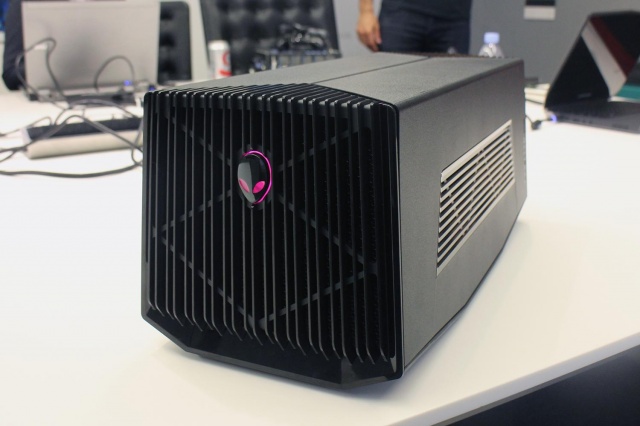
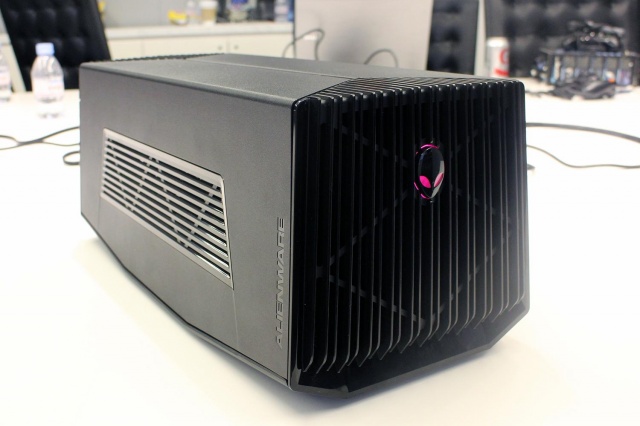
The Alienware Graphics Amplifier is unlike anything we’ve even seen before when it comes to PC accessories. The Graphics Amplifier from Alienware isn’t exactly eye candy, to say the least. It’s basically a gray and black case that has vents along its rear and sides. There are also vents on the front, along with a logo that lights up. We were surprised to find out that this Alienware logo is not the power switch, however. Even though the Graphics Amplifier isn’t exactly the looker in the bunch, it certainly does match Alienware’s design.

Weighing 7.7 pounds and measuring 6.8×7.3×16.1 inches, the Alienware Graphics Amplifier can’t really be called portable. Furthermore, the device weighs 7.7 pounds without a graphics card inside it. But there is a point to its bulkiness as almost any card fits inside it.

Alienware Graphics Amplifier: Setup
alienware-graphics-amplifier-rear

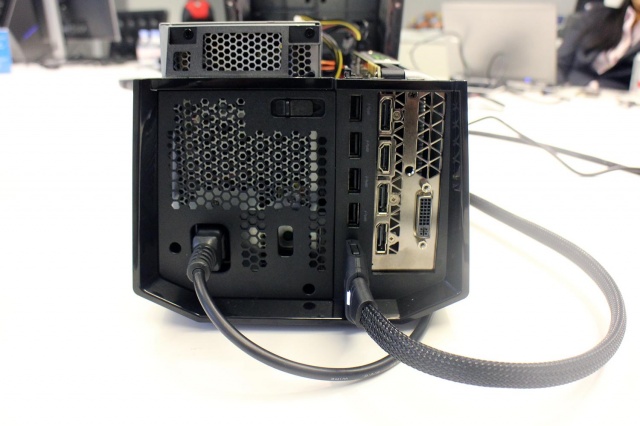
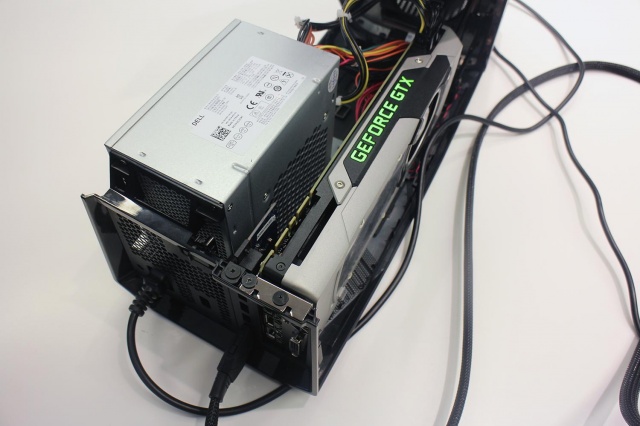
The setup of the Alienware Graphics Amplifier is a lot easier than you would imagine. If you ever had the chance to assemble a PC, setting up this device will be a walk in the park. All you have to do is put in a graphics card of your choice, connect the power supply (which is also included in the package), plug the device into your Alienware laptop and that’s it. You’re good to go.

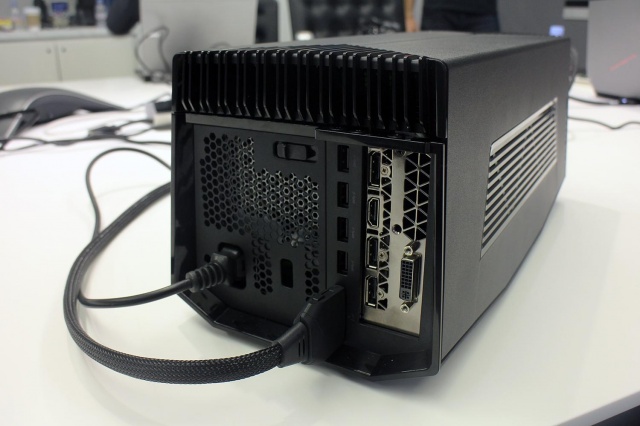
The Graphics Amplifier also features USB 3.0 connectors in addition to whatever other connectors you have on your graphics card. This also makes the device a great hub for extra connectivity and also means it can support more than one monitors, should you wish to take advantage of this option.

For the moment, however, only Alienware laptops feature the special port you need to connect the device to. Alienware did not confirm if the port will be made available on other gaming laptops as well. Therefore, if you prefer other gaming laptops, don’t get your hopes up just yet and save your money for another time.

Alienware Graphics Amplifier: Performance Boost
alienware-graphics-amplifier-ports

It is a known fact that graphics cards intended for desktop are a lot more powerful than their mobile brothers. For example, the GeForce GTX 980M only provides around 75 percent of all that its big brother is capable of. So, expect to get full advantage of your desktop graphics card on your gaming laptop. As long as you buy the desktop graphics card as well, mind you.

Conclusion
alienware-graphics-amplifier-power-supply

The device produced by Alienware fills a gap in the mobile gaming industry. It addresses a problem that for long has tormented the gaming laptops.

The Alienware Graphics Amplifier is indeed a great device but is a little bit steep as it retails at $299.

Wrapping up…

PROS

– The Alienware Graphics Amplifier gives you the option of adding a graphics card intended for desktop on your laptop

– Great USB 3.0 hub

– Comes with a power supply

– The device is capable of fitting almost any graphics card on the market

CONS

– Very bulky

– Expensive, considering you also have to buy the graphics card

– Only works on Alienware laptops

The Verdict

Even though the sheer bulkiness of the device might not interest most hardcore gamers, the price is a little steep and the compatibility with only Alienware laptops are down sides, to say the least.

If you already own a newer generation of an Alienware laptop, however, you might come to the conclusion that this is just the device you were waiting for.

Images source: digitaltrends.com
Filed Under: Tech & Science Tagged With: alienware, alienware amplifier, alienware graphics, alienware graphics amplifier, Alienware Graphics Amplifier Review, graphics amplifier review, Review

Nexus 6 Features Review: Design, Camera, Battery: Google’s Best Android Phone

November 20, 2014 By Roxanne Briean 1 Comment

The wait is finally over. As we are nearing the end of a year that has been particularly eventful in the area of mobile device hypes, Android lovers can rejoice with one of the most awaited launches – the powerhouse that is Google Nexus 6.

As it is no surprise to the well-versed of the mobile world, the newest Nexus launch – in essence Moto X’s bigger, sleeker brother – is the first one to sport the latest Android 5.0 Lollipop operating system and has officially leapt out of the trend set by the previous Nexus devices.

It’s huge, it’s powerful, and the first smart device pertaining to the Nexus family to have also been built to be water resistant, which will be a quiet relief for most of us. Take note however, that “water resistant” is not the same as “waterproof”, so refraining from taking your phone for a swim might be a good call.

The Qualcomm Snapdragon 2.7 GHz Quad-Core processor and 3 gigabytes of RAM are beautifully contained in a 0.4 inch slim device with a shameless display of no less than 6 inches; well, alright, 5.96”. It comes in either the 32 GB or 64 GB versions, sadly with no possibility of adding any memory card to it.

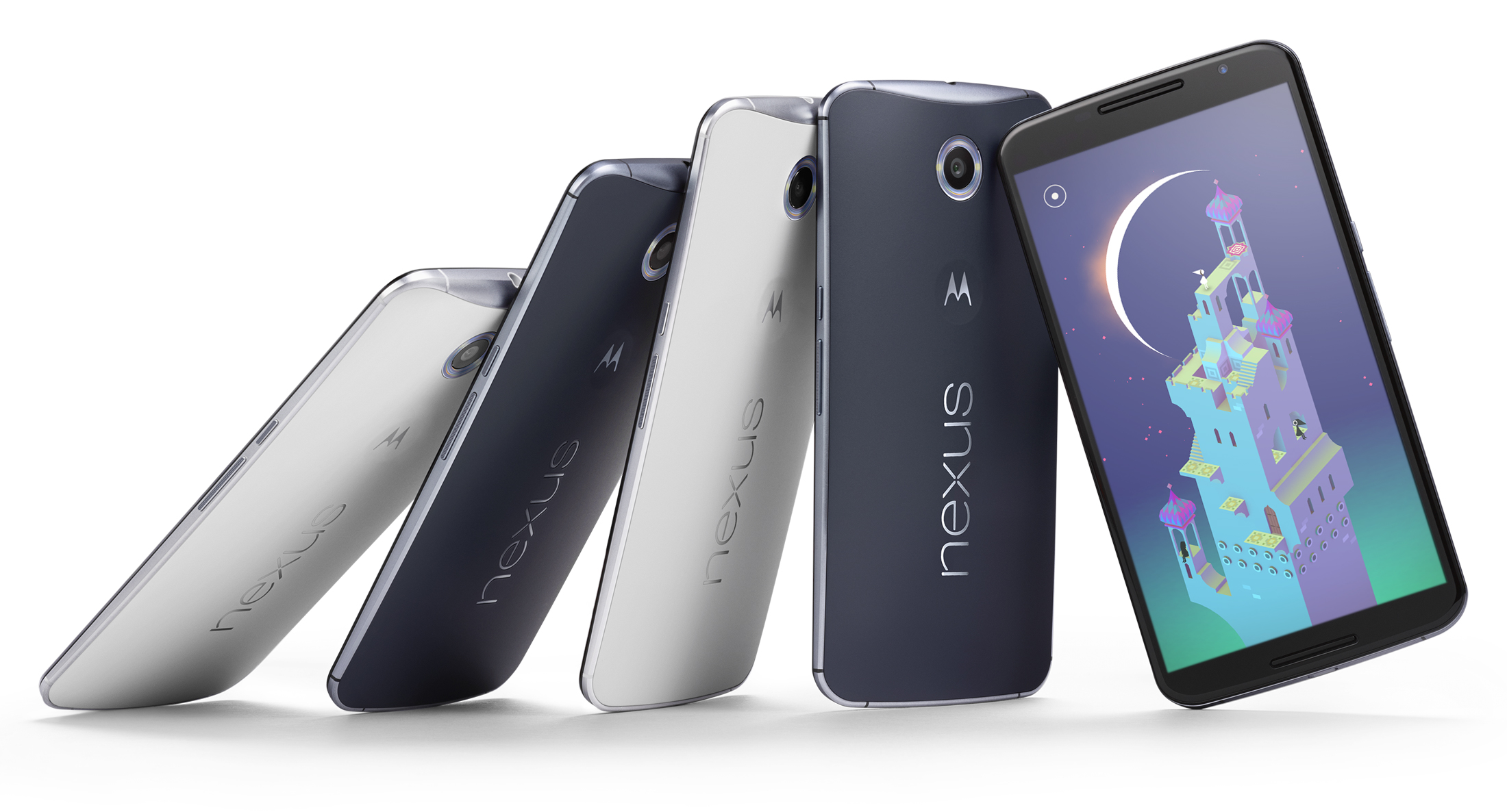
nexus-6-review-phone-623-80

This Midnight Blue or Cloud White wonder however, surprises us with the price that it has been listed at: $649 for the 32 GB version, or alternatively $699 for the 64 GB, undoubtedly a courageous jump up from its predecessor’s price on launch ($349). The ambitious design definitely takes the Nexus 6 out of the modest class of mobile devices and sets it to battle the biggest names in the industry. Sure, it’s got a lot to say for itself, no doubt, but let’s see if the spiked up price can justify itself through the features it provides.

Full Specs:

  • CPU: 2.7GHz Qualcomm® Snapdragon™ 805 with quad-core CPU (APQ 8084-AB), Adreno 420 GPU
  • Memory (RAM): 3 GB
  • Storage (ROM): 32 GB & 64 GB
  • Dimensions: Height: 159.3mm ( 6.27 inches); Width: 83.0 mm ( 3.15 inches); Curve: 3.8-10.1mm (0.15-0.39 inches)
  • Weight: 184 grams (6.49 ounces)
  • Display: 5.96” AMOLED, 1440×2560, 16:9 aspect ratio, 493 ppi, Corning® Gorilla Glass® 3
  • Battery: 3220 mAh; Mixed usage up to 24 hours; Qi Wireless charging support
  • Water Resistant: Yes
  • Rear Camera: 13 MP IMX 214 Image Sensor, f/2.0 aperture, Optical Image Stabilization, Ring flash with dual LEDs, 4K UHD video capture 2160p (4K) UHD, 1080p HD and 720p HD video capture modes (30fps) 4X digital zoom, HDR+, Panorama, PhotoSphere and Lens Blur​
  • Front Camera: 2 MP
  • SIM Card: Nano-SIM
  • Connectivity: Micro USB, 3.5mm headset jack; Bluetooth version 4.1 LE; Wi-Fi 802.11ac 2×2 (MIMO)
  • Speakers: Dual Front Facing Stereo Speakers
  • Video Capture: 1080p HD and 2160p Ultra HD Video, 30fps (MPEG4, H.264)
  • NFC: Yes

Nexus 6 Design

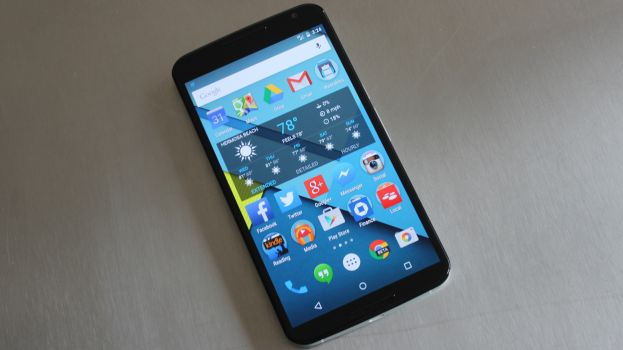
The shockingly huge device stands out as soon as it is taken out of the box. As mentioned before, the Nexus 6 will immediately remind you of Moto X, both in shape and looks. The edge-to-edge display presents a glass insert molding with 2.5D curved glass – the best choice for all of your swiping needs and a perfect fit represented through slightly rounded glass edges around the device screen, perfectly integrating into the side metal frame.

The hard plastic back of the Nexus 6 adopts the familiar Moto class curve, making the phone comfortable to hold and fit in the palm of your hand. Surely, the mere size of the phone might make handling it two-handed a more effective way of doing it, but the materials used for the outer layer of the phone prevent slipping and ensure minimal smudging.

n6-moreeverything-1600

Outside of that, the design of the phone is simple and effective: the volume and power buttons rest on the right-hand side of the edge, the latter presenting a textured surface to easily differentiate itself from the former and prevent slipping when keeping it held down.

The top of the phone is home to the headphone jack, comfortably placed for your hands-free experience and the insert slot of the nano-SIM. The charging socket is a comfortable micro-USB, further supporting the ultra-thin model design of the device.

Nexus 6 Display

What is a 6-inch display without more impressive numbers to match? The Nexus 6 surely has a few things to show off with. With a more-than-decent 493 pixels per inch and 2560 x 1440 resolution, it matches most high-end LG and Samsung devices, permitting you to enjoy games and videos alike in vivid colors and 1080p HD quality.

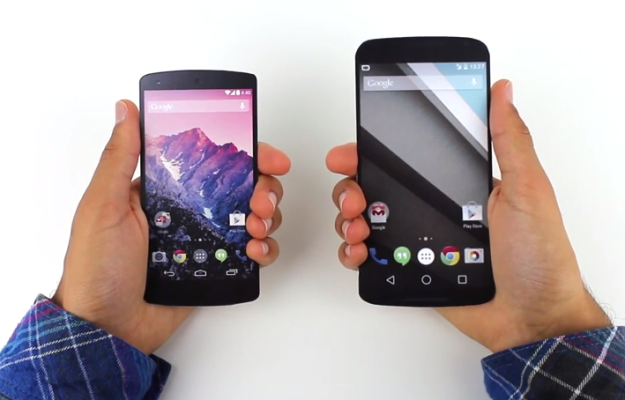
We will admit that we’ve never been particular fans of ‘phablets’, because they are difficult to use with one hand. However, the multitude of features packed in the Nexus 6 justify the size of the device. The multi-touch display fares exceptionally well even in sunlight and doesn’t fade or blur out to the eye when the device is angled.

As a combination of utility and efficient power usage, the display does light up on partial brightness when the phone is picked up and is protected with Corning Gorilla Glass 3, making it resistant to damage without having to trade on thinness.

Is the Nexus 6 too Large?

Some will say yes, while others will answer no. That’s because it ultimately depends on personal preference. If you’ve never held a smart-phone in your life you will become accustomed to the Nexus 6 with great difficulty. On the other hand, phablet enthusiasts will quickly adjust to the Nexus 6.

Also, it seems that huge devices are the latest trend nowadays (see Apple’s iPhone 6 models and Samsung’s Note line-up). We are happy that the selection extends to the Nexus 6 as well.

Camera

The rear camera is respecting itself with no less than 13 megapixels and up to a resolution of 4128 x 3096 pixels and a circular dual-LED flash meant to light up the entire area photographed uniformly. The upgrade from previous Nexus models is easily tangible in quality and a powerful zoom that will capture details with surprising accuracy and a keen fluency in video recording at the same time, at a 2160p quality with 30 frames per second.

The application accompanying the camera does not present any new, state-of-the-art particularities but will provide sufficient editing tools for a regular mobile device, a strong panorama tool and HDR capabilities.

Nexus6-Press-03-580-90

The front camera does limit itself to 1080p quality and 2 megapixels, but in terms of its regular usage, it’s still one of the strongest out there and will provide excellent video conferences, albeit grainier and more darkened when used in low lit environments.

Both cameras do however present the optical image stabilization technology and with the help of plenty editing tools available on the App Store, your Nexus 6 can easily replace a regular camera in most situations.

Nexus 6 Performance

The powerful Quad-core 2.7 GHz Snapdragon processor and 3 gigs of RAM memory, along with the dedicated Adreno 420 GPU certainly do the work and bring the device closely to the specifications of a tablet.

Unmistakably, the effort that Motorola put into this particular device brings it up to par with the most powerful mobile phones on the market right now – more specifically the Samsung Galaxy Note 4, iPhone 6 Plus and Samsung Galaxy S5 – ranking second in the Geekbench 3 benchmarking test with a score that once again nearly places it in tablet territory.

screen-shot-2014-10-03-at-12-40-21-pm

Navigation through the system is incredibly fluid, Android v5.0 Lollipop also helping out in the matter. Nexus 6 can easily run multiple applications at the same time with minimal, if any slowdown of the system, performance marginally suffering when the device is either very low on battery or nearing a full HDD – which after all is understandable for every single gadget and piece of technology out there in 2014, not just mobile devices.

The multitasking capability of the phone is made easier to explore through the familiar Recent Applications functionality and does not seem to hiccup even when put to a stress test.

In terms of connectivity, Nexus 6 has been given everything you would ever expect from a new-generation mobile device: 4G capability – including the long-term evolution (LTE) technology – dual-band Wi-Fi, Hotspot capability, GPS, Bluetooth and even the practical and on-the-go near field communication feature; the receivers are solid and thus interference reduced to a minimum.

Lastly, the device is equipped with sensors such as accelerometer, gyro, proximity, compass and a barometer to enhance the mobile experience wherever you are.

Nexus 6 Interface

With the addition of the Android v5.0 Lollipop OS, the user interface of the Nexus 6 has kept its basic functionalities that we are all accustomed to, while giving the system a refreshed, less loaded feel. The new look sported by the latest Nexus prodigy goes under the name of Material Design, with a few modifications that we greatly enjoyed.

The interface has been slightly altered to give it a more tridimensional look, featuring shadows and ambient lights, while maintaining a flat design look for the menu itself. The functionality of the lock screen has been revamped, now presenting a drop-down like menu for the notifications, replacing the hidden swipe-down function of older Android OS versions, thus making important information easily accessible without even having to unlock your phone.

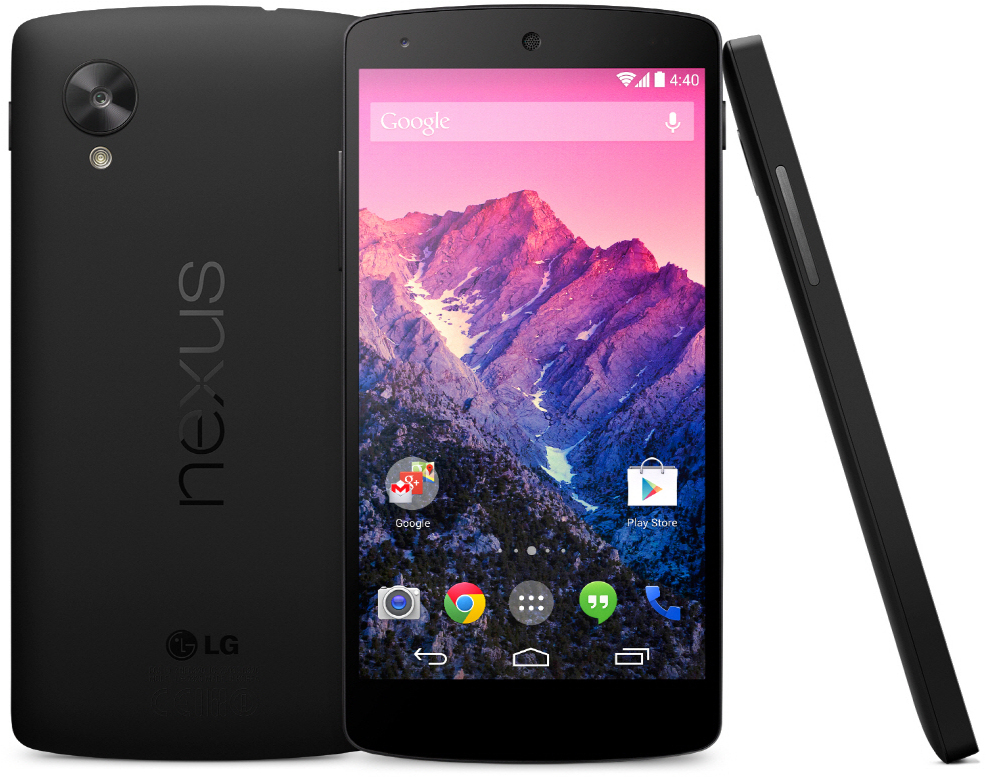
google-nexus-5-by-lg

The new notification system is highly customizable in regards to the type of alerts you want your phone to prioritize, means of notifying and even muting said notifications for pre-determined periods of time.

Quick Settings are easily accessible by typing the keyword of what you are looking for, and many other clumps of information have been finally made easier to view rather than being forced to navigate through multiple sub-menus to find out your current memory or network usage.

Certainly, this is mostly on behalf of the new operating system that comes with the device, but the specs of the device run in perfect tandem and are subject to improvements and optimizations via the constant updates that Google does not hesitate to deliver. They are onto a new approach to interacting with your mobile device and Nexus 6 is a living proof.

Nexus 6 Battery

Nexus 6 is equipped with a 3220 mAh battery that stands out through overall battery life but still will encounter medium amount of time you can spend happily tapping away at your mobile phone before you will have to look for a power socket. The battery is however sealed away in the phone and cannot be removed and/or changed, unlike almost all of the Android predecessors. The operating system has put emphasis on battery optimization itself and has so far received highly positive feedback.

We kept the best for the last. Qualcomm has come up with a very clever piece of technology, which luckily is included in this device. They call it QuickCharge 2.0 and basically allow you to ensure at least 6 hours of battery life in only 15 minutes of charging using the special adaptor.

This charger comes included in the package so no additional expenses for this nifty gadget are even necessary. So if you expect yourself to be heavily using your phone, keeping this portable charger with you can turn out to be quite the life saver.

Nexus 6 Verdict

Though it was originally rumored that the Nexus lineage was going to come to an end after the Nexus 5 launch, reality turned out to be quite the opposite, Motorola surprising us with what turned out to be a top competitor for high-end devices on the market right now.

The price of this miracle worker may be worrisome for some, but in the end it still falls short in comparison to other devices of same statistics and capability. For those who are worried about device size, Google promises that one week with the 5.96-inch display will help users adjust and never want to go back to a smaller device. Ultimately, it falls down to personal preference and expectations from the phone that will follow you around for a while.

nexus-6-review-phone-623-80

In our opinion, everything about the Nexus 6 is better than previous models. Its predecessors, the Nexus 5 and 4, were designed with usability and affordability in mind. Motorola decided to step up its game and provide with a smart-phone that could easily compete with other high-end models on the market. It succeeded beautifully.

So as a last note, here’s a list of pros and cons we could gather after a close look over everything that the Nexus 6 has to offer.

Pros:

  • Sleek design and maneuverability;
  • High-end hardware specifications;
  • Excellent display for media and applications;
  • Fast-charging technology;
  • Superior camera capabilities;
  • The first host of the new and improved Android v5.0 Lollipop OS

Cons:

  • The price range that it falls into is not as accessible as Nexus fans are accustomed to;
  • The size can prove to be a disadvantage as well;
  • Changes to functionalities might prove to be harder to deal with in the beginning;
  • Battery life is better than predecessors but still average.

This concludes our review of the Nexus 6. Do you own such a device? Have you had the chance to play around with it? We would love to hear your impressions about it in the comment box below.

Filed Under: Tech & Science Tagged With: Google, Google Nexus 6, Nexus 6, Nexus 6 review, Review

Subscribe to Blog via Email

Enter your email address to subscribe to this blog and receive notifications of new posts by email.

Join 10 other subscribers

Recent Articles

police handcuffs man

German Man Probed In Poisoning That Killed 21 Employees Since 2000

June 29, 2018 By Kenneth Scott Leave a Comment

Chicken wings bar

Intoxicated South Carolina Man Punches Waitress Who Refused to Serve Him Alcohol

June 29, 2018 By Karen Jackson Leave a Comment

gaming

New Zealand gamer Who Flew Halfway Across The World for Virginia Teen Gets Shots By Her Mother

June 28, 2018 By Cristopher Hall Leave a Comment

party

Former Virginia Tech Freshman Sentenced to 50 Years in Prison for Stabbing a Girl to Death

June 28, 2018 By Roxanne Briean Leave a Comment

bonfire

British Couple Sentenced to Life in Prison for Torturing and Murdering French Nanny

June 27, 2018 By Deborah Campbell Leave a Comment

pay phone

Texas Father of Girl Disappeared in the 80s Ignored by Authorities

June 26, 2018 By Cristopher Hall Leave a Comment

bottled water

San Francisco Woman Threatened to Call Police on Girl Who Sold Ice Water for Disneyland Trip

June 25, 2018 By Roxanne Briean Leave a Comment

Maplewood Park

Missouri Man Robbed by Date and Accomplice in Park

June 22, 2018 By Nancy Young Leave a Comment

coding

New York Man Sentenced in Cyberstalking Former Girlfriend, Mailing Drugs to Her Dorm

June 22, 2018 By Deborah Campbell Leave a Comment

headphones

Bose Poised to Launch Sleepbuds, In-Ear Headphones That Help You Sleep

June 21, 2018 By Nancy Young Leave a Comment

Police light

Intoxicated Female Driver in Custody for Pulling Arresting Officer by the Hair

June 21, 2018 By Kenneth Scott Leave a Comment

kitchen

Restaurant Manager Arrested and Charged in Shooting Death of Co-Worker over Negative Yelp Reviews

June 20, 2018 By Karen Jackson Leave a Comment

plastic container

Pennsylvania Couple Charged in Violent Death of Infant Discovered Buried in Cat Litter

June 19, 2018 By Cristopher Hall Leave a Comment

tailpipe

Minnesota Teen Gets Head Stuck In Oversized Tailpipe Winstock Music Festival

June 18, 2018 By Karen Jackson Leave a Comment

Pages

  • About Us
  • Contact us
  • Privacy Policy
  • Privacy Policy GDPR
  • Staff
  • Terms and Conditions

Recent Posts

  • German Man Probed In Poisoning That Killed 21 Employees Since 2000 June 29, 2018
  • Intoxicated South Carolina Man Punches Waitress Who Refused to Serve Him Alcohol June 29, 2018
  • New Zealand gamer Who Flew Halfway Across The World for Virginia Teen Gets Shots By Her Mother June 28, 2018
  • Former Virginia Tech Freshman Sentenced to 50 Years in Prison for Stabbing a Girl to Death June 28, 2018
  • British Couple Sentenced to Life in Prison for Torturing and Murdering French Nanny June 27, 2018
  • Texas Father of Girl Disappeared in the 80s Ignored by Authorities June 26, 2018
  • San Francisco Woman Threatened to Call Police on Girl Who Sold Ice Water for Disneyland Trip June 25, 2018

Categories

  • Business
  • Entertainment
  • Finance
  • Headlines
  • Health
  • Life
  • Nature
  • Science
  • Sports
  • Tech & Science
  • Travel
  • Uncategorized
  • United States
  • World

Copyright © 2026 ArgyllFreePress.com
About · Privacy Policy · Terms of Use · Contact