Argyll Free Press

Growing News Network

Thursday, December 25, 2025
Log in
  • Business
  • Finance
  • Sports
  • Tech & Science
    • HP Envy 4500 Review
    • LG Optimus 170 Review
    • iPod Touch 6th Generation Review
    • HTC One M8 Accessories Set-up
    • Surrealist Games You Must Play
    • Hisense Sero 8 Review
    • Dell Latitude e7440 Review
    • HP Laserjet 1536dnf mfp Review
    • Garmin Fenix 2 Review
    • Skype Vs Viber
    • Best Video Conferencing Software
    • Sony mdr 1r Headphones Review
    • Canon Rebel t3i Review
    • Sennheiser Momentum 2-0 Review
  • Travel
  • Headlines
  • Health
  • United States

Windows 10 Will Be Released This Summer In 190 Countries

March 20, 2015 By Deborah Campbell Leave a Comment

This summer, Microsoft is planning a world wide launch of Windows 10, which will come equipped with a new biometric authentication system, that aims to be a replacement for the traditional passwords.Also,Windows 10 will be released this summer in 190 countries.

However, there hasn’t been given a specific date for the launch, the chief of Windows, Terry Myerson stated during a speech at the Windows Hardware Engineering Community summit that took place in Shenzhen China,  that the company is planning a summer release.
Windows-10-Blue-Wallpaper-3

Myerson wrote in a blog post, that Microsoft keeps on making serious progress, and they have shared with the entire world, they fact that Windows 10 will be released the upcoming summer in 190 countries and in 111 different languages.

He added that Windows has been present on a global level with over 1.5 billion users all over the world and in China there are currently hundreds of million of computers operating on Windows.

Microsoft didn’t respond right away to the request for commenting, regarding a more precise date for the release.

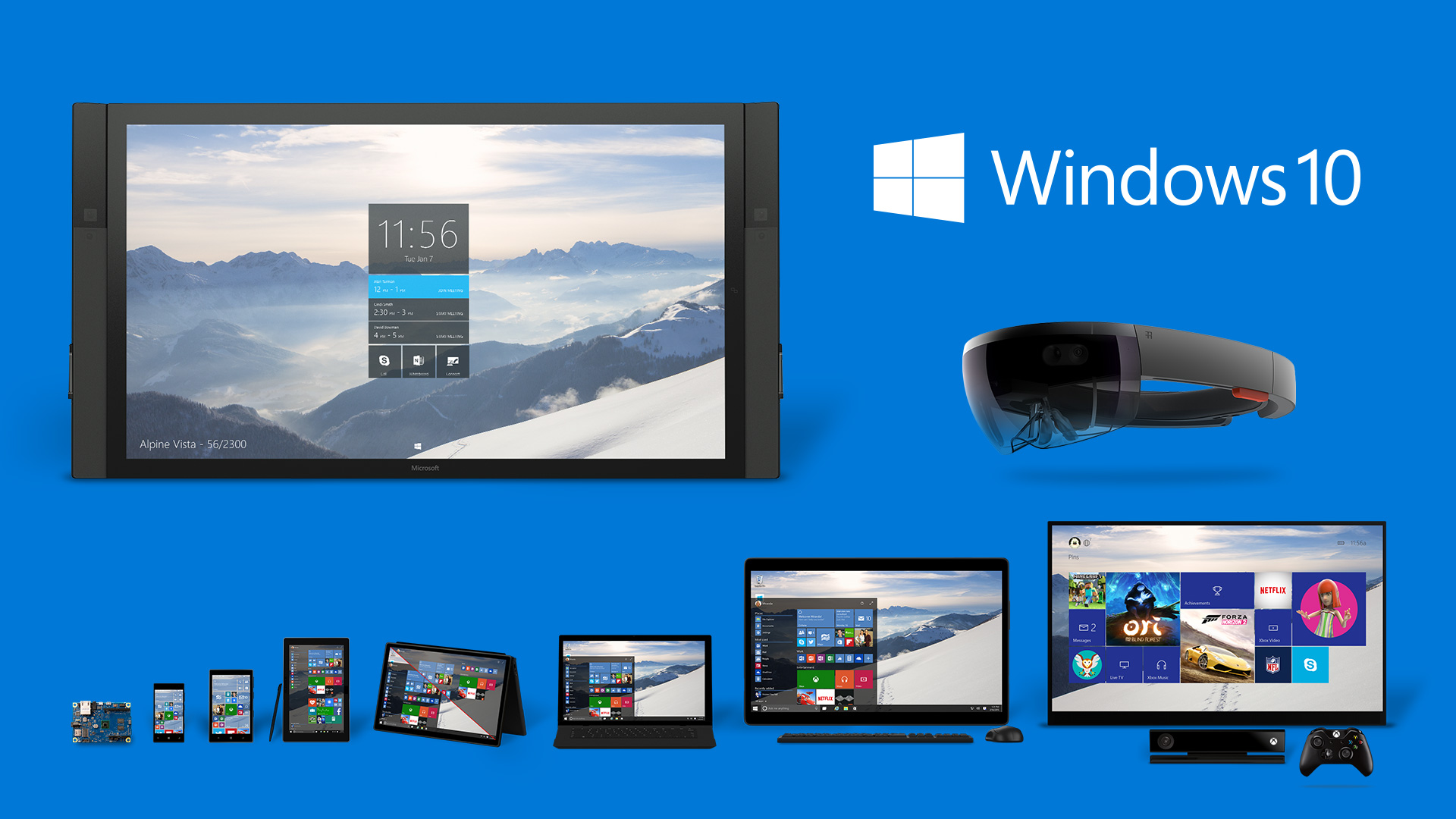
The company has high expectations from the new operating system and it would be the very first big chance of Microsoft to make forgotten the missteps of Windows 8. Microsoft has assured that Windows 10, which will be a free upgrade for users running Windows 7 or Windows 8, and will be run by every device, starting with desktops with huge hard drives to the low cost smart phones that have just one gigabyte to spare.

During his speech, Myerson took use of  the chance to talk about a new feature of the operating system, named Windows Hello, which stands for a new way of authentication process, that requires the face of the owner, its fingerprint or iris in order for the device to be unlocked.

This new option will be supported by a third party system, which includes Intel’s RealSense, a depth-sensing technology which is based on using  infrared cameras to detect the position and location of objects in space.

Biometric authentication, which certifies the identity of people thanks to their unique physical attributes, promises users to create an extra wall of security that would offer protection between devices and malicious exterior threats.

Even though it has been proved that using a finger print is a much more secure way that using a password, there are people who question the fact, whether hackers will find a way of breaking down their biometrics.

Myerson also added, that by the time of the release, there will also be available a version of Windows 10 oriented towards devices of small footprint Internet of Things, free of charge.

Windows 10, will make available, for other Windows versions, a diversified set of IoT devices, varying from powerful devices such ATMs and ultrasound machines, to resource uneasy devices such gateways, explained Myerson.

One other brand new feature, seems to allow users to download updates from other computers, apart from the servers of Microsoft. The latest creation of the future operating system, has been leaked on the internet the past weekend, and has revealed an option that lets you to choose if you want to download updates from the operating system of other PCs, and put them on your personal internal network, or transfer them from PCs on your network or on the web. In this manner, the updating process becomes a peer to peer capacity.
Image Source: Latest HD Wallpapers
Filed Under: Tech & Science Tagged With: new features of windows 10, windows 10, windows 10 comes with biometric athentication, windows 10 comes with windows hello, windows 10 features, windows 10 release, windows 10 will be released in 190 countries, windows 10 will be released this summer

Windows 10 vs Windows 7

February 16, 2015 By Nancy Young Leave a Comment

windows-10-vs-windows-7

Even in its early stages, we’ve come to the conclusion that Windows 10 is a far better deal for desktops than Windows 8. But how exactly does the new operating system stand against the very well-built Windows 7? Even though Microsoft is offering a free upgrade to the new OS if you are using Windows 7, should you take advantage of the deal and upgrade to it or not? In this guide we plan to show you who wins in the battle of Windows 10 vs Windows 7.

Windows 10 vs Windows 7 – Performance

One of the least discussed improvements brought by Windows 8 (and Windows 10) is its upgrade in terms of performance. The boot time in Windows 8 is significantly quicker than that of Windows 7. However, there are numerous other improvements such as hardware acceleration and even navigation seems a little faster in it. The power management has also been improved in Windows 8 which means that you will get more battery life out of your laptop.

Gaming performance is more evenly matched in Windows 8 and with Windows 10 we will also get access to DirectX 12. The new DirectX promises to unlock even more performance from all existing hardware.

It may not seem like a big deal, but essentially, the main reason we upgrade our operating systems is because we want better performance out of our machines. So because Windows 10 offers improvements in that area along all its other numerous features is more reason to be excited about it.

Windows 10 vs Windows 7 – Design

windows-10-vs-windows-7-design

Windows 8’s design was quite a departure from what we were used to, with its bold colors and flat windows replacing the round-edged, transparent windows and 3D icons in the Windows 7. Windows 10 will continue to change the design of the operating system. The bold and flat style now takes over the icons on the desktop and other core features of the new OS. However, we’ve seen that some of the old design is still present in Windows 10, like the old icons in Control Panel.

We’re not really convinced whether the new design will be better or not but it’s definitely more “modern”. It seems that the new trend of design somehow revolves around flat objects. Apple is doing it and so are different websites. However, we’re not very sure whether or not this is in fact more pleasing in terms of aesthetics.

That being said, there are some benefits from using this kind of design. One of the main advantages is that windows take less space because they aren’t as rounded anymore and pretty much lack borders. They’re also more customizable and some aspects are a lot clearer because of the absence of transparent backgrounds.

Microsoft still has time to change its mind (for the better, we hope), however, as Windows 10 is still in the preview stage.

Windows 10 vs Windows 7 – Search

windows-10-vs-windows-7-search

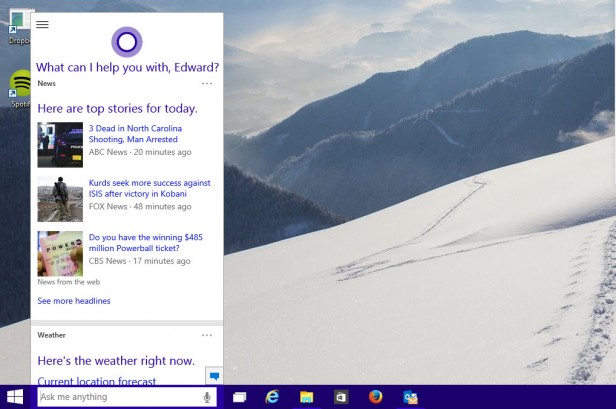
Windows 7 has a relatively powerful search feature that will quickly give results regarding documents and programs you search for. However, Windows 10 improves on this feature by adding a search for the apps in Windows Store and the web and a much more organized and improved page of results.

When you click on the search box in Windows 10 you will also receive information about the latest news headlines, weather reports and updates from your preferred sports team.

In addition to this, the new search function will also make use of Cortana, which is Microsoft’s digital personal assistant. This will add two main features into play. The first thing is that Cortana will monitor your calendar and email to give out relevant results, like when you have to leave to make it to your next appointment.

The other thing is that if you have equipped your computer with a microphone you will be able to give Cortana commands via voice. The digital personal assistant really does a great job understanding what you say and gives you appropriate search results. However, Cortana doesn’t give you the answer right in the search box, but opens a browser window to do so. But it is still a pretty cool thing to search for stuff without having to use your hands to type in what you want.

Windows 10 vs Windows 7 – File management

windows-10-vs-windows-7-file-management

While this may seem trivial at first, the fact is that the tools you use to find and manage the files in your computer are the most fundamental and often used in an operating system.

Windows 7 offered a generous selection of tools and we’ve come to be used to them by now. Still, it’s safe to say that they are not the most advanced ones and in a way or another are a slight step backwards from what we’ve seen in the past. A relevant example is the removal of the “Up” button in Windows Explorer.

This small feature pretty much sums up all what’s wrong with the file explorer in Windows 7. However, this isn’t the only problem that plagued the explorer. It was very badly designed, featuring a lot of wasted space not to mention that some of the main functions were hidden from the user’s view.

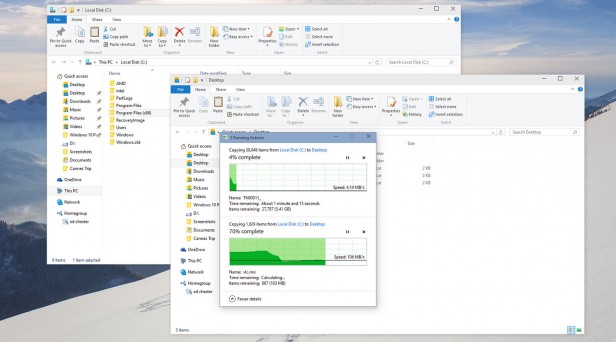
The “Up” button is back in Windows 10. And along with it, there are a series of other improvements in the file explorer. Some of them, however, already arrived in Windows 8, to be perfectly honest. The menu on top is now arranged in form of a ribbon, so the most used commands are within reach and, most important, very easy to find by novice users.

A new “Share” ribbon is now present which will let you move files between different applications such as Skype, Dropbox or Outlook with much ease. While the new file explorer is not perfect, it’s definitely a huge step in the right way.

Microsoft also improved the file copying interface along with these other improvements in the file explorer. Moving and copying tasks are now within a single window for better management. They also included a real time transfer speed monitor and you can also pause file operations, when until now you could only cancel them.

Another great addition is the Storage Spaces. This helps you group multiple hard drives to make a single logical drive. Even though this isn’t exactly revolutionary, the fact that it supports more levels of drive redundancy that will make sure all your data is backed up makes it particularly useful. This feature is entirely how swappable and supports drives in different sizes, unlike RAID systems.

All in all, Windows 10 adds a lot of nifty features in the file management section and takes very little away from it.

Windows 10 vs Windows 7 – DirectX 12 and gaming

windows-10-vs-windows-7-gaming

We said earlier that the gaming in Windows 10 hasn’t changed all that much, but now we’ll elaborate a little on the matter.

As a matter of fact, Windows 10 seems to be a tad slower than Windows 7, by about 0.5 percent, especially in some of the older games. Crisis 3, for example seems to run a little slower in Windows 10, however, there are some cases in which the results are reversed. It’s true that 0.5 percent doesn’t mean all that much so it’s not a reason to worry about.

Windows 7 was a very reliable and robust platform for gaming, even though it didn’t have many innovative features. However, it’s still a very good base on which numerous gaming tools have been built.

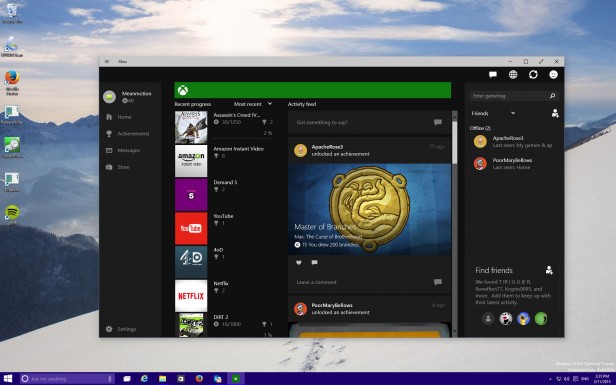
On the other hand, Windows 10 does add a bunch of new features. However, most of the new features won’t interest PC gamers, such as the option to access your account on Xbox Live, stream games from the Xbox straight to the PC and have a bunch of games that work cross-platform on Xbox and PCs. However, that isn’t to say that they’re not a welcomed addition.

The coolest new feature is probably the game capture one. You can record your gaming sessions and grab a 30 seconds snap shot that you can share with your friends. While this is not new technology, having it built right into the OS is a useful thing. Microsoft also claims that the new feature will work with every game ever made, so this mean that if you want to capture video footage from Monkey Island you can do so.

Windows 10 will also have exclusive access to the new DirectX 12, which claims to unlock performance on all existing hardware by allowing developers to have better access to the hardware’s features. However, the performance boosts are very likely to be small and dependent on certain circumstances. Nevertheless, this will probably be enough to make Windows 10 the better performing system regarding video games.

DirectX 12 will most likely offer numerous other new features but as of now Microsoft hasn’t said anything about what those features will be.

Windows 10 vs Windows 7 – The Notifications

windows-10-vs-windows-7-notifications

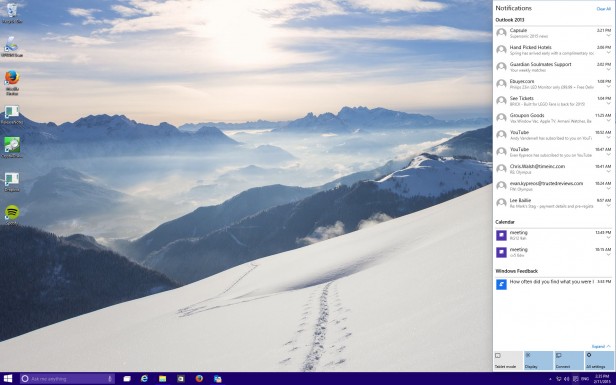
Windows always featured some sort of notification system in the form of the System Tray. In there you can find pop-up notifications from Dropbox, Spotify, Outlook and any other application that’s open in the background. However, there hasn’t been a proper place in which you could see all your notifications together along with their history.

In Windows 10 you can find a proper notification area. This is a very basic addition that brings app notifications and system messages together in one place, chronologically ordered. While it’s a very tiny addition, it’s extremely useful.

The area of notifications also has some system functions like a feature that lets you switch to the tablet mode or enter the screen settings.

Windows 10 vs Windows 7 – Workspace

windows-10-vs-windows-7-workspace

Keeping the workspace neat is very important to some users. While the users with laptops may be happy by making everything run full screen, if you use a desktop computer and have several monitors or just one very big one you will need good workspace management tools to make the best of the space you have.

Windows 7 features multi-monitor support but it’s rather limited in either allowing you to stretch the desktop across different screens or by offering a mirror mode. In Windows 7 you only had one task bar across multiple screens. It also featured a very primitive version of Snap. Snap is a feature that allows you to automatically resize windows when dragged to the sides of the screen. But that’s all that it offered.

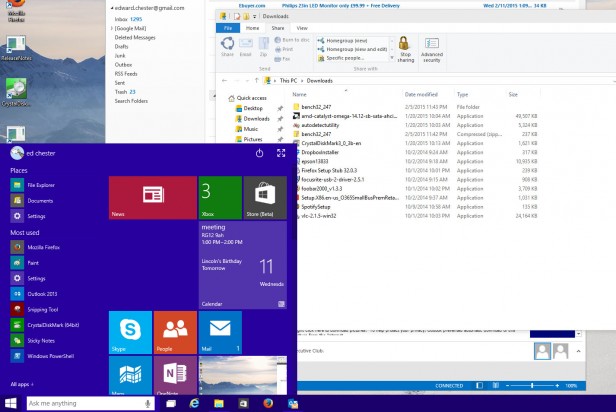
In Windows 10, these features have been improved. You can have different backgrounds on different screens now and different slideshows. Pictures can also be set to go across all your screens. The taskbar can also be found on all the monitors you use or just on whichever monitor you’re active in. Snap now supports snapping to all four corners of the screen, instead of just the sides.

But the biggest feature is perhaps the support of a virtual desktop. Even though Windows 7 supported virtual desktops through third-party programs, Windows 10 has this feature built-in. While the implementation is rather clumsy at the moment, it’s still useful, especially for users that have laptops.

Windows 10 vs Windows 7 – The price

Even though we don’t know the exact price of a retail copy of Windows 10 at the moment, the huge news is that it will be free for people who update from Windows 7 or Windows 8 in the first year from its release.

With this in mind, if you have a copy of Windows 7, it would a silly thing not to update. Especially since we don’t know exactly how the upgrade will work, if you’ll lose your license of Windows 7 or not. But the chances are that you will still be able to downgrade to your old Windows version if you find that the new OS just isn’t right for you.

The verdict

Windows 10 offers a lot of useful new functions as well as improvements to the old ones, when compared to the old Windows 7. Even though these functions when taken separately are not reasons enough to upgrade, as a package it’s safe to say that it will be worth it.

In Windows 10 you will get a better file management system, a better windows management system, a better search system, more advanced gaming tools and many more. The only thing we’re not really keen on is the design, but this is hardly a reason to pass up the upgrade.

With Windows 10 being free as an upgrade, it would actually be a stupid thing not to at least try the new operating system. While it probably won’t be perfect, it’s still an upgrade worth getting later this year.

Images source: trustedreviews.com

Filed Under: Tech & Science Tagged With: directx 12, microsoft, microsoft windows 10, windows 10, windows 10 better, windows 10 features, windows 10 new features, windows 10 price, windows 10 release date, windows 10 vs windows 7, windows 10 windows 7, windows 7 windows 10

Subscribe to Blog via Email

Enter your email address to subscribe to this blog and receive notifications of new posts by email.

Join 10 other subscribers

Recent Articles

police handcuffs man

German Man Probed In Poisoning That Killed 21 Employees Since 2000

June 29, 2018 By Kenneth Scott Leave a Comment

Chicken wings bar

Intoxicated South Carolina Man Punches Waitress Who Refused to Serve Him Alcohol

June 29, 2018 By Karen Jackson Leave a Comment

gaming

New Zealand gamer Who Flew Halfway Across The World for Virginia Teen Gets Shots By Her Mother

June 28, 2018 By Cristopher Hall Leave a Comment

party

Former Virginia Tech Freshman Sentenced to 50 Years in Prison for Stabbing a Girl to Death

June 28, 2018 By Roxanne Briean Leave a Comment

bonfire

British Couple Sentenced to Life in Prison for Torturing and Murdering French Nanny

June 27, 2018 By Deborah Campbell Leave a Comment

pay phone

Texas Father of Girl Disappeared in the 80s Ignored by Authorities

June 26, 2018 By Cristopher Hall Leave a Comment

bottled water

San Francisco Woman Threatened to Call Police on Girl Who Sold Ice Water for Disneyland Trip

June 25, 2018 By Roxanne Briean Leave a Comment

Maplewood Park

Missouri Man Robbed by Date and Accomplice in Park

June 22, 2018 By Nancy Young Leave a Comment

coding

New York Man Sentenced in Cyberstalking Former Girlfriend, Mailing Drugs to Her Dorm

June 22, 2018 By Deborah Campbell Leave a Comment

headphones

Bose Poised to Launch Sleepbuds, In-Ear Headphones That Help You Sleep

June 21, 2018 By Nancy Young Leave a Comment

Police light

Intoxicated Female Driver in Custody for Pulling Arresting Officer by the Hair

June 21, 2018 By Kenneth Scott Leave a Comment

kitchen

Restaurant Manager Arrested and Charged in Shooting Death of Co-Worker over Negative Yelp Reviews

June 20, 2018 By Karen Jackson Leave a Comment

plastic container

Pennsylvania Couple Charged in Violent Death of Infant Discovered Buried in Cat Litter

June 19, 2018 By Cristopher Hall Leave a Comment

tailpipe

Minnesota Teen Gets Head Stuck In Oversized Tailpipe Winstock Music Festival

June 18, 2018 By Karen Jackson Leave a Comment

Pages

  • About Us
  • Contact us
  • Privacy Policy
  • Privacy Policy GDPR
  • Staff
  • Terms and Conditions

Recent Posts

  • German Man Probed In Poisoning That Killed 21 Employees Since 2000 June 29, 2018
  • Intoxicated South Carolina Man Punches Waitress Who Refused to Serve Him Alcohol June 29, 2018
  • New Zealand gamer Who Flew Halfway Across The World for Virginia Teen Gets Shots By Her Mother June 28, 2018
  • Former Virginia Tech Freshman Sentenced to 50 Years in Prison for Stabbing a Girl to Death June 28, 2018
  • British Couple Sentenced to Life in Prison for Torturing and Murdering French Nanny June 27, 2018
  • Texas Father of Girl Disappeared in the 80s Ignored by Authorities June 26, 2018
  • San Francisco Woman Threatened to Call Police on Girl Who Sold Ice Water for Disneyland Trip June 25, 2018

Categories

  • Business
  • Entertainment
  • Finance
  • Headlines
  • Health
  • Life
  • Nature
  • Science
  • Sports
  • Tech & Science
  • Travel
  • Uncategorized
  • United States
  • World

Copyright © 2025 ArgyllFreePress.com
About · Privacy Policy · Terms of Use · Contact