Argyll Free Press

Growing News Network

Tuesday, January 20, 2026
Log in
  • Business
  • Finance
  • Sports
  • Tech & Science
    • HP Envy 4500 Review
    • LG Optimus 170 Review
    • iPod Touch 6th Generation Review
    • HTC One M8 Accessories Set-up
    • Surrealist Games You Must Play
    • Hisense Sero 8 Review
    • Dell Latitude e7440 Review
    • HP Laserjet 1536dnf mfp Review
    • Garmin Fenix 2 Review
    • Skype Vs Viber
    • Best Video Conferencing Software
    • Sony mdr 1r Headphones Review
    • Canon Rebel t3i Review
    • Sennheiser Momentum 2-0 Review
  • Travel
  • Headlines
  • Health
  • United States

Android M Release Date and Rumours

May 25, 2015 By Roxanne Briean Leave a Comment

Android M Features and Rumours

Android 5 Lollipop is a thing of the past for Google. Android M on the other hand is the next big update!

On the 28th of May, that is less than 3 days from now, Google will host its annual I/O developer conference at San Francisco’s Moscone Center. Nerds from different plateaus of coding will fill the room, but if you’re one of the geeks that will, unfortunately, not be attending the conference, don’t fret. Articles regarding key updates, and features will be posted by the AFP team as soon as they are announced.

Most likely Google is going to unveil their new Android M update, Android Wear, Android TV, and Android Auto – who knows, maybe even Android panties!

Until we know for sure, let’s speculate and talk amongst ourselves!

Android M – does it stand for Marshmallow? 

Android M stands for MarshMallow?

We all know how Google likes to name its software updates something based on pastry goods, or candy – Cupcake, Donut, Eclair, Froyo, JellyBean, KitKat, and Lollipop; but what does the new M stand for? Muffin? Marshmallow? Madeleine?  Mars isn’t out of discussion here either. Google formed an alliance with KitKat in order to use their name.

But what about the number? The logical thing would be Android M 5.2, but Google may wish to skip directly to Android M 6 – it’s not been unheard of.

By the way, have you noticed that Google likes to name its software in alphabetical order?

Android M Material Design

Android M Material Design

It’s unlikely that it’s going to change, and Android M is expected to build on top of Lollipop’s UI – it’s going to be an evolutionary update, like we’ve seen it happen a couple of times now, not a revolutionary one.

Expect to see new flat icons, shadows under objects, and sliding transitions – focus is shifting towards a minimalist design that will still keep the essence of Android. Google’s new update will focus more on enhancing existing features, rather than implementing new ones.

Security

Android M Fingerprint Scanner

Some time ago, the fingerprint scanner was released with a popular flagship phone, from a popular brand – it was really easy to use, and it didn’t pose as a frustrating problem like its earlier iterations did. We loved it – even my grandma loved how easy it was to unlock her phone.

It’s common sense that Android M will most likely release its own native version of a fingerprint scanner – this will allow developers to integrate in their apps the fingerprint scanners, without looking for a third-party, or building a new one themselves.

Fingerprint scanning is growing in popularity, and it’s the wisest of choices to support it – more so, people tend to love the fact that they can connect to every device they have using a universal fingerprint scanner.

Rumours have it that Android M will focus a little bit more on businesses, enterprises – this isn’t to say that Google will completely forget the average Joe.

Also, Google will add a feature that will allow the device’s owner to edit app permissions. Let’s say that you don’t want a certain app to look at your Google account info, or your photo gallery – just edit out its permission and the feeling of dread that the NSA, or whoever, watches over your personal info will be no more.

Android Pay

Android M will feature Android Pay

This isn’t a new mobile payment system; it’s going to be focused more on alleviating the stress that developers have. Android M Pay will give the ability that developers need – I’m talking about a safe, and easy integration of payment methods into their apps.

NFC will be its main communication medium, and support for biometrics will most likely come in future updates.

Support for Android Wear on iOS
Android M for wearables will support iOS devices!

Google’s software platform, Android Wear for wearables, has been improving constantly since its release. There’s a rumour, a huge one to be more specific, about Android Wear coming to iOS. It’s a little bit hard to believe, but we might see Google offering support for iPhones, and iPads at Google I/O. Come to think of it, we have seen Android Wear smartwatches paired with iOS devices – without any hacks involved whatsoever.

Google has been reported of saying that they are – ” close to finishing the final technical details”, that involves iOS support.

See, we will see two of the industry’s giants work together for the greater good of the consumer? Or is this a clever rouse to make money? I’ll go with option B.

Android M Release Date – When should we expect it?
Android M release date

I think it’s safe to say that we don’t need to hold our breaths for a release date being announced at the conference in 3 days. Sure, it will probably be available for download after the conference is over, but don’t expect a stable version – that’s going to take a couple of months of intensive tests.

Android 5.0 Lollipop was announced in June of 2014, and it rolled almost 5 months later. This isn’t to say that Android M will suffer from the same fate. Nexus and Google Play Edition devices will surely receive the software update first, then flagship smartphones and tablets from Samsung, LG, HTC, Motorola, and Sony will be the next ones.

We predict that Android M, a stable version, will be available for the public some time this Autumn, even Winter – probably to pair it with the Nexus 2015 release.

Source: Image 1, 2, 3, 4, 5, 6, 7

Filed Under: Headlines Tagged With: android, Android M, Android Marshmallow, Android Muffin, Google, Google I/O developer conference, Material Design

Google has Started a Cloud War!

May 20, 2015 By Michael Turner Leave a Comment

Cloud Computing

The cloud wars are real, and they are being fought on common ground – or at least, that’s what Google hopes!

Google has just cut down on prices for its Compute Engine by 30 percent, and has made Amazon, its primary challenger, re-consider their strategies.

The big G has also introduce a new a new Preemptible Virtual Machine – it’s able to deliver short-term computing capacity at a low, and fixed price. If Amazon doesn’t change its tactics immediately, they will most likely lose a ton of clients to Google.

The Google Cloud Platform Blog states that – ” Compared to other public cloud providers, Google Cloud Platform is now 40 percent less expensive for many workloads. Starting today, we are reducing prices of all Google Compute Engine Instance types as well as introducing a new class of preemptible virtual machines that deliver short-term capacity for a very low, fixed cost.”

This means that in the US a standard instance will be 20 percent cheaper, and a micro-instance will be 30 percent less. Europe, and Asia haven’t received the same treatment yet, and the price reduction will come in the near future, maybe even next month.

Google Cloud Computing

Google states that their clients have the upper-hand when it comes down to saving money – they will be paying 40 percent less than what other individuals are paying using a competitors services wink wink Amazon.

Microsoft, and Amazon are most likely to counter Google’s offer, so be patient and don’t move just yet from a service to another. Most analysts think that the services will get even more cheaper in the years to come, eventually leading to it being completely free.

Now, Google introduced their Preemptible Virtual Machines, that cost $0.015, and they are 70 percent cheaper than their non-preemptible siblings. But there is a catch to this. Google doesn’t guarantee that their VM’s will run continuously. This shouldn’t pose as a problem, because you use them only in a cluster, and if one drops, the cluster won’t suffer – also, you’ll receive a notification 30 seconds prior to it going offline.

Image Source: 1, 2

Filed Under: Headlines Tagged With: Amazon, Cloud Computing, Google, microsoft, Virtual Machines

Self Driving Cars Will be a Thing Soon – Thanks Google

May 15, 2015 By Roxanne Briean Leave a Comment

Self Driving Cars

Remember watching that Will Smith movie I, Robot – that is also based on a story by Asimov; and thinking Huh, wouldn’t it be great if self driving cars were a thing?

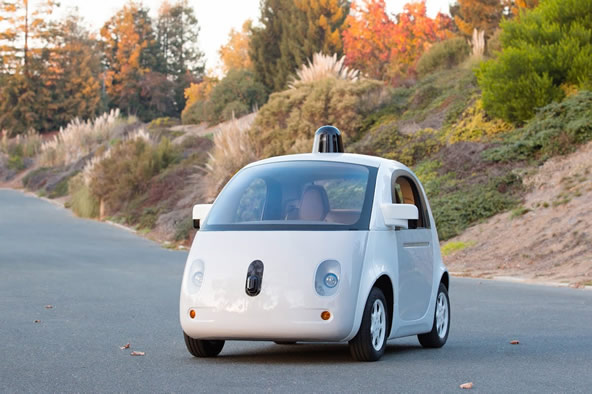
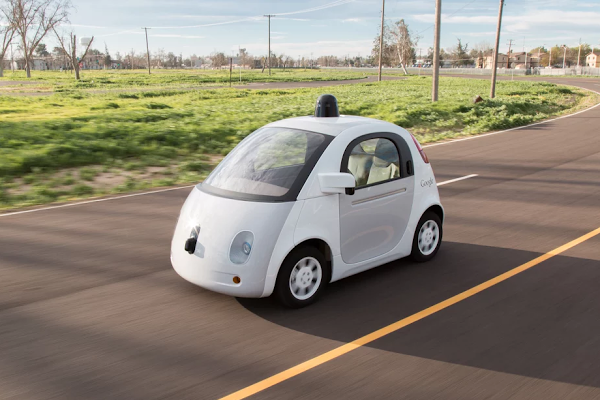
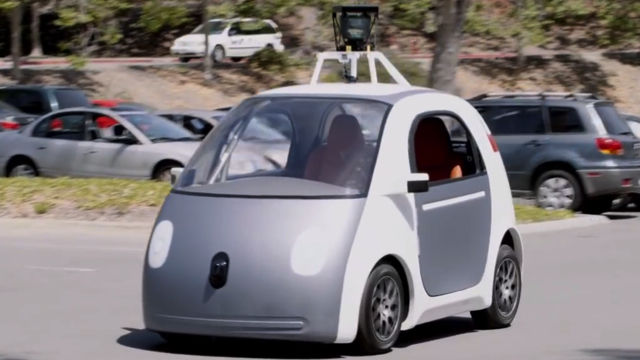
Well, they’ve been in tests for a while now thanks to Google, and this Summer self driving cars will make their début on the streets of California, more exactly Mountain View, where the company is based.

In a recent blog post, Google has stated that the car’s maximum speed will be capped at 25 miles, that is 40 kilometers per hour, and they will also be accompanied by safety drivers – just in case they become sentient and destroy the world, right Google?

Project director Chris Urmson says that the prototypes will run the same software as their Lexus RX450h fleet – which logged over a million miles, that is ” about 75 years of typical American adult driving experience.” says Urmson.

Google's Self Driving Car

“We’re looking forward to learning how the community perceives and interacts with the vehicles, and to uncovering challenges that are unique to a fully self-driving vehicle — e.g. where it should stop if it can’t stop at its exact destination due to construction or congestion. In the coming years, we’d like to run small pilot programs with our prototypes to learn what people would like to do with vehicles like this.” Chris Urmson has been reported saying.

I love the idea of self driving cars – the best way to combat drunk driving, teens, and adults alike, that can’t take their noses out of their smartphones, sudden seizures, falling asleep while driving; basically it will solve a ton of problems for us.

But are they really that safe? A recent report has found that since September Google’s self driving cars have been in 11 accidents.

Google has announced that the accidents were minor incidents, and their cars weren’t at fault. Seven vehicles were rear-ended, two of them were involved in sideswipes, and one car was involved in driving through a red light. How is the last one not your fault Google? Okay, I do understand that people were to blame for rear-ending, and sideswiping your vehicles, but passing a red light?

Self Driving Car on the Road

Pure PR Gold for Google here, because they emphasized two strong points

a) its sensors, and algorithms are far more efficient than a human driver, who is prone to error;

and

b) because the vehicles are surrounded by error prone humans, they are learning, and are far more efficient, and safe on the road. We basically feed their cars with our faults and they somehow make it better.

If we assume that what are they saying is correct, then, sheesh, that’s fantastic. A machine that learns from our errors and fixes our problems for us? Wait, no, that sounds like an introduction to the A.I. Revolution. Shut it down Google, right this minute!

But let’s put our fears and irrational paranoia aside for a moment. If what they are saying is true, then seriously Google deserves a Nobel Prize – make a category up and give it to the whole company.

One thing that the company has stated they are kinda struggling with is if, and when, the car reaches its designated stop location, and that location is blocked by either another car, congestion, or a sudden construction site that meddles with re-routing its path.


Image Source: 1, 2, 3

Filed Under: Headlines Tagged With: Google, Google's Self Driving Cars, Self Driving Cars

Steam Punk Augmented Reality Shooter From Magic Leap

May 5, 2015 By Deborah Campbell Leave a Comment

Augmented Reality Steam Punk Shooter

Google-backed Magic Leap is making the internet go crazy with their latest YouTube trailer titled – Just another day in the office at Magic Leap. Their augmented reality steam punk shooter is fresh, and crisp, but let’s not get ahead of ourselves and fall in the band wagon just yet. It’s not the first time we were promised a superb AR, or VR game only to be left outside in the rain – the only place where nobody can see you cry.

“This is a game we’re playing around the office right now (no robots were harmed in the making of this video),” said Magic Leap PR head Andy Fouché.

CEO Rony Abovitz was supposed to appear at a TED talk to speak about the game two months ago, but they pulled out unexpectedly – the reasons are still unknown to why the event was cancelled.

Augmented Reality Steam Punk Shooter

The video game bears Dr. Grordbort’s emblem – it’s a line of steam punk guns, comic books. It was created by an artist at the Weta Workshop, who is known to be a long-time partner of Magic Leap.

The whole game is basically a first person shooter where the player can use real steam punk weapons to fend off a swarm of crazy bloodthirsty robots that possibly want to enslave humanity. YOU are the only one standing in their way.

Pretty cool mechanics if you ask me – turning decorative guns into virtual weapons, and the virtual enemies are projected in into your physical space. Although this mean that you must buy the said decorative weapons from the Weta Workshop, and you’ll need a pretty big space for you to play in.

The prototype has been kept under a tight sealed lid, and nobody actually knows anything about its technological capabilities. What we know is that Google, Qualcomm, Andreessen Horowitz and Kleiner Perkins have invested $540 million.

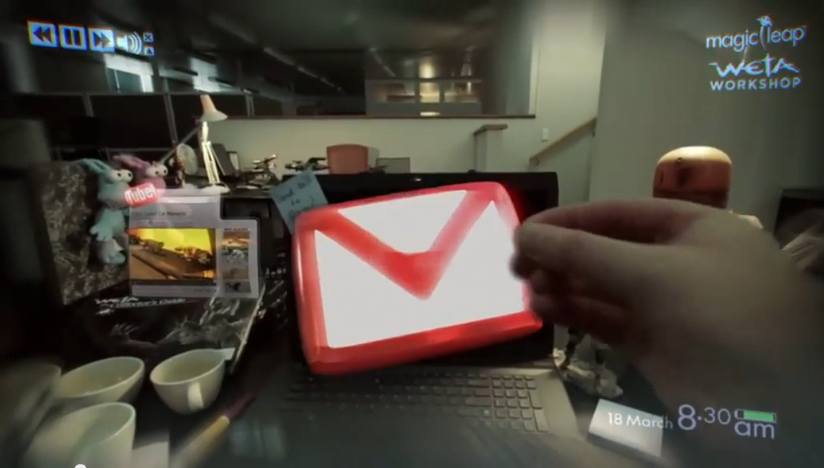
Augmented Reality Gmail app

At first glance, you can say that Magic Leap is trying to build Google Glass on steroids, but we all know how Google’s product resulted – a mediocre device that didn’t fulfil even the tinniest of promises.

A similar product is Microsoft’s HoloLens, and we’ve seen it in action at Microsoft Build 2015 – also, check out our article regarding the top announcements made at Microsoft Build 2015.

Here’s the YouTube trailer that involves having way too much fun at the office.

Besides just having mindless fun, you can see that Magic Leap’s gear can interact with Gmail and YouTube, and you can plaster the apps anywhere. Probably even make them follow you around.

Image Source: 1, 2, 3

Filed Under: Headlines Tagged With: Augmented Reality, Google, Magic Leap, virtual reality, VR Headsets

8 Must Have Apps this Year

March 29, 2015 By Roxanne Briean Leave a Comment

Nowadays mobile device apps are the most common form of media used on the market. The traditional forms of media stand no chance to them because the apps are online, easy to download, easy to install and most of all, easy to use.

Let’s take a quick look at all the must have apps of this moment.

Soundcloud

Must Have Apps

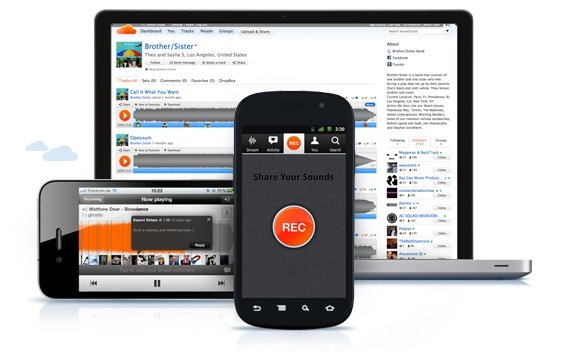
Since its start in 2007 Soundcloud proved to be the definition of music lovers and producers’ basic and most urgent needs. Using unlimited storage, free to listen options, easy to access streaming and easy to upload options, Soundcloud is THE music application out there.

The Sounds can be classified into playlists, favorites, and by artist. There is literally no one in contemporary music, whichever the genre that doesn’t have a Soundcloud profile, even if it is fan made. The other great advantage of this app is that it hosts musical works which are not necessarily included on the artists’ albums, that’s why on Soundcloud one can easily find live recordings from DJ sets and remixes.

FlashScore

Must Have Apps

FlashScore is out there for all the sport betting enthusiasts and sports fans alike. Covering about all official sports, individual and team sports, the application provides full real time details for all competitions, from football to cricket and water polo. In the same time, those interested can find fixtures, season tables, top goal scorer statistics, team line-ups, head-to-head past results comparisons, and options to choose and add favorite competitions.

For those interested in betting, FlashScore gives away offers from all the big names in sports betting agencies, such as Paddy Power, William Hill or Bet-at-Home. The options include simple 1×2 tips and more complex number of scored goals odds.

Tinder

Must Have Apps

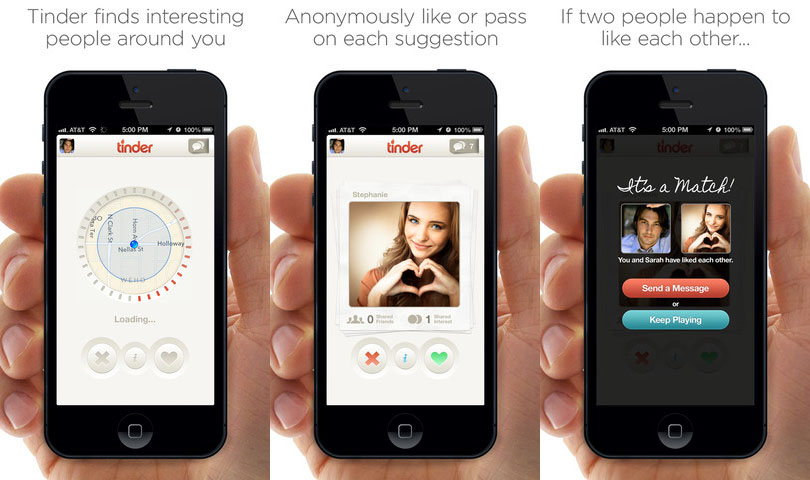
Nothing comes handier for a quick romantic fix in a world dominated by technology than Tinder. The app’s immense success is shown by its over 50 million users worldwide. The innovation brought by Tinder is the search for matches based on the physical proximity. The location is given by the GPS of the mobile device -Tinder is only to be used on mobile devices- and the (very) basic info on the profile (not a greater amount of information offered by a 2000s Yahoo profile) is provided by the user’s Facebook account (first name, age and a limited number of photos).

The “dating” process is very quick and simple. If one profile is liked, you have to sweep right on that profile, if not, the other way. If 2 users chose the “right side” they will be “matched” and that’s where the social aspect of the application steps into scene. You can start chatting right away avoiding interaction with other contenders; it’ll be just you and the person that catches your attention. It is a more synthetic version of Facebook, concentrated on one major purpose – one night stand dating and maybe even more.

MoovIt

Must Have Apps

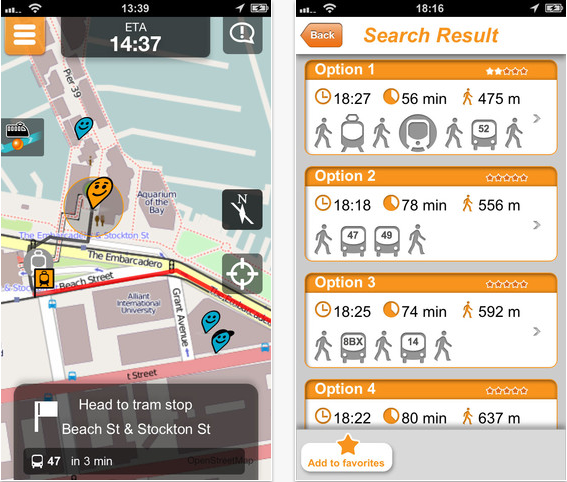
This urban traveler’s real time guide is simply a treasure. It is a free application using data gathered from official sources and from the people who travel using buses, trams, subway trains, intercity trains, ferryboats and/or other means of transportation. The fact that it is crowd sourced is a major plus for MoovIt. The users learn from those who were there before about schedules, stations, delays, the quality of the ride, alternative means of transportation and fares.

MoovIt was founded by 3 Israeli innovators and the idea for it came from a different crowd sourced application called Waze, used mostly by car drivers to ease their rides.

Launcher

Must Have Apps

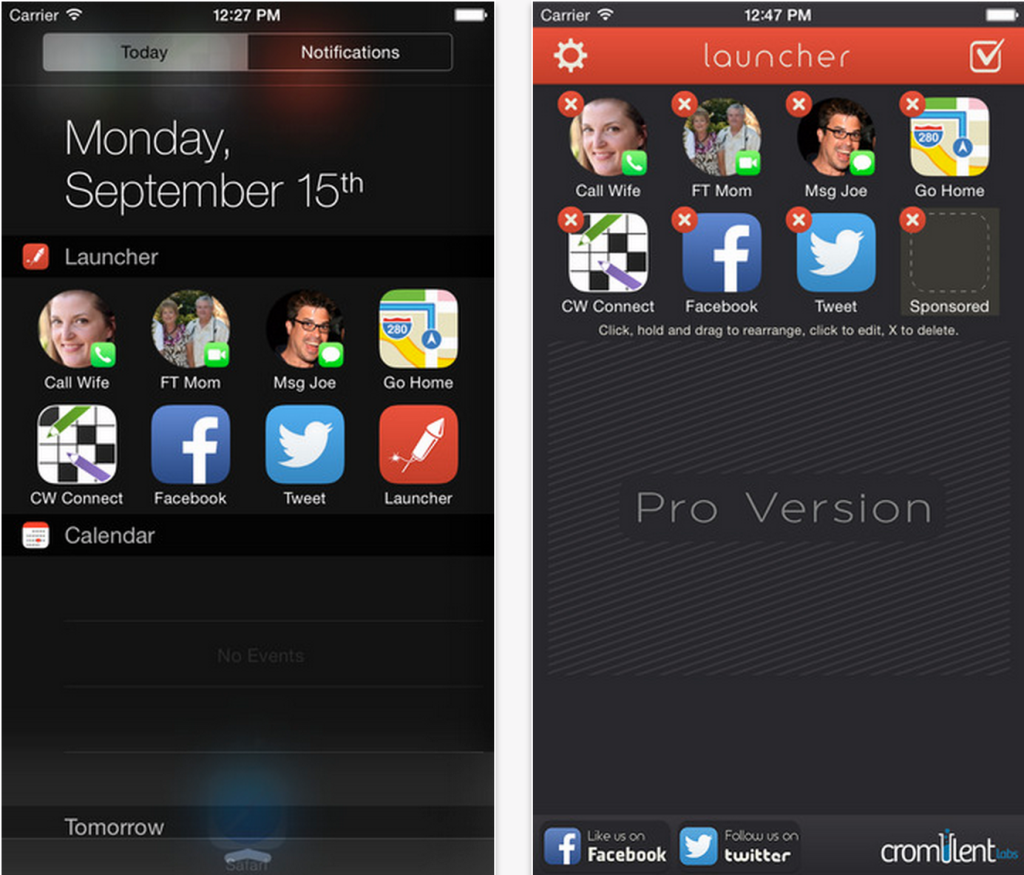
iOS users don’t get to customize their home screens as those who use Android. But Launcher comes really close in letting Apple users do that. The app uses the notification center in iOS 8 to let users place shortcuts of apps in their today panel. The app allows you to have widgets that you can customize. For example, you can add a shortcut for Twitter that will open the app directly on the “compose new tweet” page. You can upgrade the app and make it a lot more customizable for just $3.99.

You can have a Google Maps shortcut that you can customize in such a way that when you launch it, it will give you directions to reach your home address.

Mr. Jump

Must Have Apps

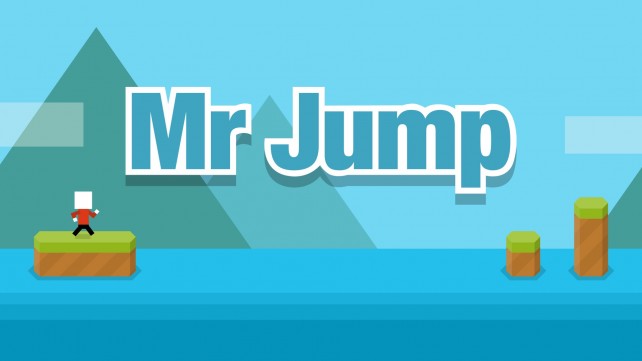
This game is very challenging as bad timing can ruin everything. The game is pretty straightforward: you have to make Mr. Jump reach the end of every level by avoiding the spikes and other obstacles. While the game doesn’t look that difficult, timing is crucial and it is very challenging for a simple game.

At the end of every round you will be presented with information regarding how many attempts you’ve had and for how far you’ve survived. If you’re stuck in a level you can skip it with an in-app purchase. Also, make sure you listen to the soundtrack as it is pretty whimsical.

Atari Fit

Must Have Apps

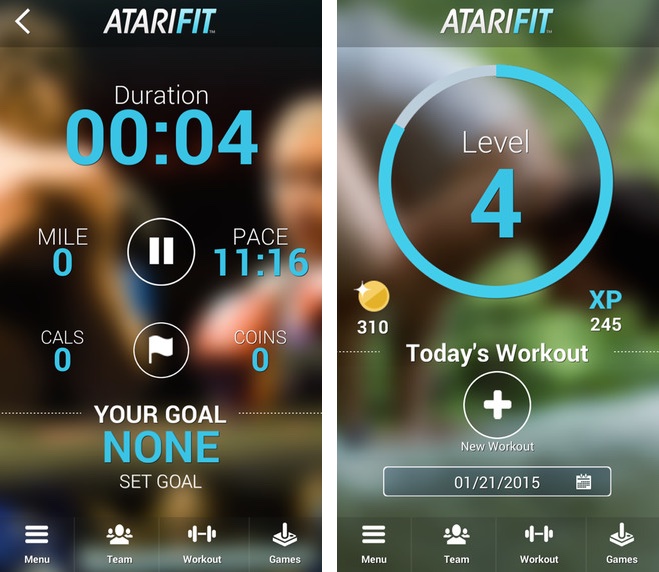
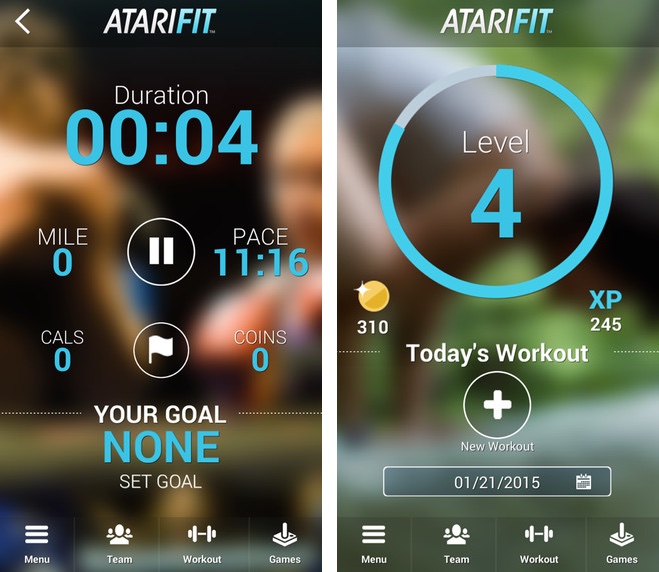
The designers from Atari made a fitness app that centers on games like Centipede, Pong and other retro jewels. Based on what your fitness goals are, the app will offer you numerous exercise plans. Exercises will earn you coins that you can then use in order to play games like Super Breakout, Centipede and Pong.

The app also includes social features that will let you compete with your friends. If you connect Atari Fit and Apple Health, the app will retrieve information from your wearable devices and other apps such as RunKeeper.

LinkedIn Job Search

LinkedIn finally decided to make an app for their website. You can search jobs in the numerous listings and apply directly from the application. The app works well with notifications and it will tell you when something opens up in a company or a field you’re interested in. The recommendations in the app will only get better as you search for more jobs and view more listings. LinkedIn Job Search also considers your skill and experience so keep your profile up to date.

Enlight

Must Have Apps

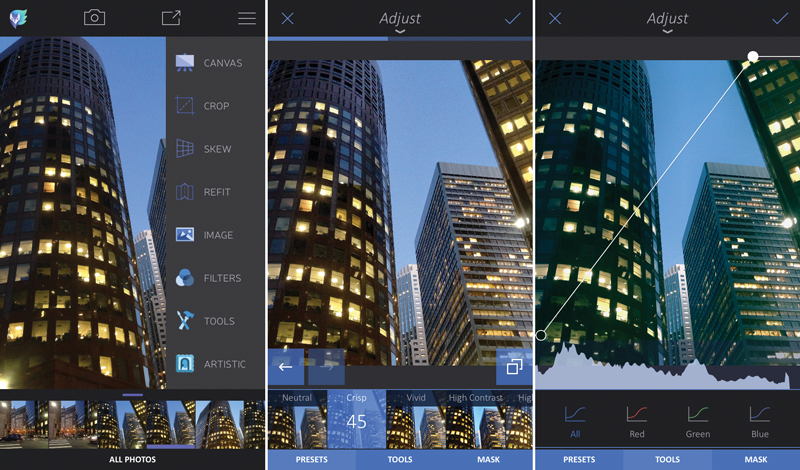
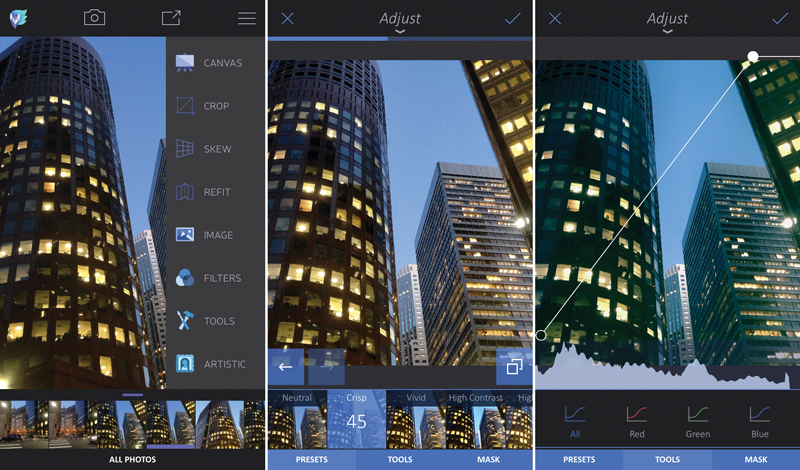
Enlight is the latest photo editing application from the same developers that brought us Facetune. The app is in many ways the dream app of every iPhone photographer. It features a great balance between artistic effects and filters and Photoshop controls. The app has a lot preset filters that you can choose from and you can also adjust elements of your images manually. The app also has a great and sophisticated curves control.

You can use the mask feature in the app to only apply effects to a certain part of the image and trust us when we say that it’s full of great artistic effects.

So there you have it. This was our list of recent must have apps.

Images source: 1, 2, 3, 4, 5, 6, 7, 8, 9

Filed Under: Tech & Science Tagged With: android, apps, atari fit, enlight, flashscore, Google, google play store, google store, great new apps, ios, ios apps, launcher, linkedin, moovit, mr jump, must have apps, new apps, soundcloud, tinder

Settings to Change on the Nexus 6

March 14, 2015 By Roxanne Briean Leave a Comment

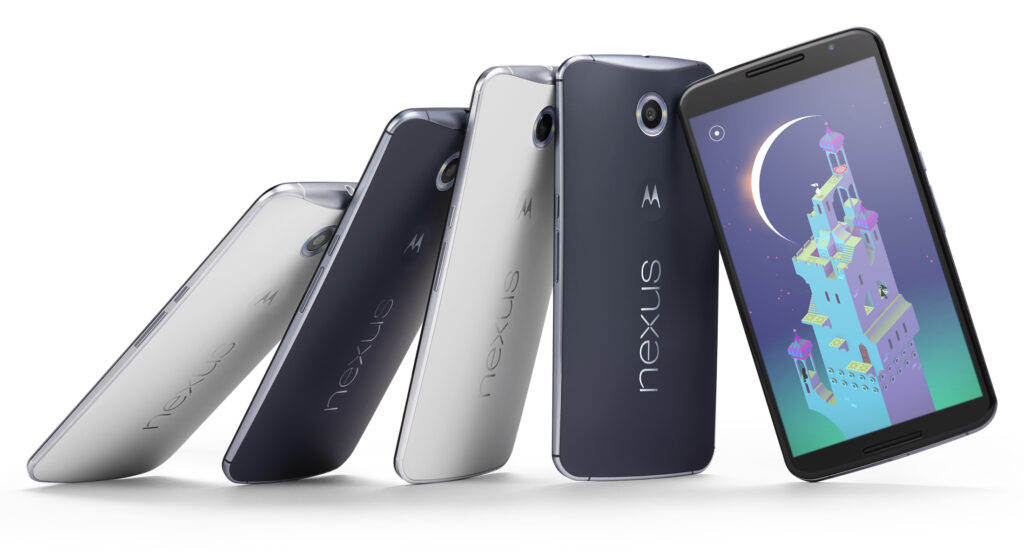
Google finally announced late last year its new smartphone called the Nexus 6 along with the Nexus 9 tablet, Android 5.0 Lollipop and the Nexus Player. While Lollipop and the new smartphone do have a lot to offer we present to you some settings to change in the Nexus 6.

There are numerous reasons to get a Nexus 6 instead of an iPhone or a Samsung Galaxy S5, especially hardware wise. There are also some software, features and settings that also make this quite an impressive smartphone. Here are some settings to change on the Nexus 6.

These settings can really improve the battery life, experience and will help you take full advantage of your new Nexus 6. Increasing the font on the phone, enabling the battery saver setting and adding some additional security are only a few of the numerous settings you can change on the Motorola-made Nexus 6.

Google announced yesterday that the new Android 5.1 Lollipop will be coming to the Nexus 6. While our Nexus 6 isn’t running the latest software, the device will do so in the near future. It’s highly unlikely that the settings and options we present to you will change so there’s no need to panic. With that being said, let’s dive right in.

The Nexus 6 has a great 2K 6 inch display that everyone will love. You can really enjoy watching a movie on the huge screen and because of the dual speakers on the front of the device. Not to mention that this is the first Nexus that comes with great battery life. While there definitely are numerous things you can love about the device, there are some that may be improved on it.

Settings to Change on the Nexus 6

Font size

The large display of the Nexus 6 combined with the very high resolution of 2,560 x 1,440 means that the text may appear small to some people. Even though every graphic and line is clear and crisp, some people will still find that the text is a little too small for the screen. But thankfully, there is a way to change the font size on the Nexus 6 and it doesn’t even require any effort.

Inside the app browser, go to Settings or swipe two fingers downward on the screen then select the settings menu. After you select it, tap on Display. Search for a setting called Fonts and tap on it. There you will find four different options to choose from: Huge, Large, Normal (this one is the default) and Small. While most people tend to use Normal, the Large one may suit you better.

Disable the emergency broadcast alerts

It’s true that this isn’t the most in your face feature available on the new smartphone, but when you have to deal with it, it can get a little annoying. I’m talking about the emergency broadcast alerts, of course. This will make your phone start an alarm out of nowhere, in full volume, regardless of what settings you use. Most of the times, this is to alert you of severe weather conditions, Amber alerts or other broadcasts sent out by your city or state.

You may want to keep some of them enabled just for emergencies, but they tend to be very loud and annoying so make sure you disable the ones that you don’t want to have anything to do with.

Go into Settings and tap on More, then on Emergency broadcasts. From this menu simply deselect all the ones you don’t need. I left the Extreme alerts still turned on but I’ve turned off all of the rest, mostly because I don’t want my phone to scare me half to death when I least expect it. Make sure you also deactivate the vibration option as it will vibrate for a long time and very loud, at full power.

Enable battery saver mode

The huge display on the new smartphone is the biggest battery killer. Even though the Nexus 6 has a 3,220 mAh battery and a Turbo Charge feature that allows you to use the phone for 6 hours with only a 15 minute charge, sometimes this is simply not enough. Google added a Battery Saver option in the Android Lollipop and you’ll definitely want to turn this on from time to time.

Go into Settings, then Battery at the bottom, tap on the three dots on the right of the upper part of the screen and tap on Battery Saver. Even though this isn’t a setting that you should use permanently, it does come in handy occasionally. The Battery Saver option kills background data and lowers the brightness of the screen to give you more battery life.

It’s true that you won’t be allowed to do most things but your Nexus will last for a very long time and you will be able to make phone calls or send texts. It’s a very useful feature that you should be aware of. Make it enable itself when your battery reaches 15% and it will automatically do so, giving you enough battery life when you absolutely need it.

Security

Android is great for syncing your Gmail account and other features but it generally lacks one important thing: security. You can set up a pattern lock or a passcode in under one minute which will protect your smartphone against strangers in the event that you lose it or that it’s stolen. Android 5.1 even brings a new security feature that’s called device protection. When this feature is enabled, even after a factory reset, your phone won’t be able to be used unless your Google account is signed in. This being said, you will want to secure your smartphone.

Slide the notification bar down and go to settings then Security, Screen Lock and from that select PIN, Password or Pattern.

In this menu there’s also an option called “Owner info” that will appear on the lockscreen. You can add your phone number, Facebook account or any other information. Be sure to fill in some information that will help you get your phone back in case an honest person finds it.

There are two more useful security options that you should be aware of. Go to the Google Play Store and enable the password protection for in-app purchases in the settings menu. This will make sure that you won’t get billed with app purchases in case you lose your phone. Also, your kids won’t be able to make purchases without your permission. Go to the Android Device Manager and prepare your smartphone for the services. By doing this, you will be allowed to lock, call and erase the data on your phone in case you lose it or it’s stolen.

Many people should think about securing their devices, but most of them don’t. This is the first thing you need to make sure when using a new device and the Nexus 6 is no exception.

Disable ambient light

A cool feature on the Moto X and many Motorola smartphones called Active Display (Moto Display) is the ability of the phone to pulse off and on with information and notifications. This was also added to the Nexus 6 but it was renamed Ambient Display. The phone knows when you pick it up and will give you a black and white screen with recent notifications and it’ll turn itself off shortly after. While this is a great feature, a single tap of the screen will fully light it up and you’ll often pocket dial people and will cause your screen to be on when you don’t need it which will drain the battery.

The feature is pretty cool in theory but it was one of the first features I turned off on the Nexus 6. Slide the notification bar down and tap the settings button. Go to Display and you will find the setting there. Tap on the Ambient Display option and you will turn it off. That’s the only thing you need to do to get rid of the feature.

This is a great feature and I really like it but Google should update this to be more precise or I’ll always keep it turned off.

Change default text messenger app

The default text messenger app was changed to Hangouts ever since Android KitKat. The new Nexus 6 also uses the Hangouts app as the default one but you may want to change this. You will be happy to know that you can actually do this.

To change the default app head to Settings and then More. Tap on the Default SMS option and you will see all the apps that are installed on your device. I personally like Textra SMS but feel free to use whatever you want if the stock one isn’t to your liking.

This is all that you have to do to change the default text messenger app.

Conclusion

There are numerous options, features and settings you can change on the Nexus 6 running on Android Lollipop. A few other features you might be interested in are the Do Not Disturb Notification options, the Smart Lock option and several other new ones in the Lollipop operating system.

The Nexus 6 is certainly a great device but everyone has different needs and you will have to play around with its settings to see what works for you. This was our list of settings to change on the Nexus 6.

Image source: 1

Filed Under: Tech & Science Tagged With: android lollipop, change nexus 6 settings, Google, Google Nexus 6, improve nexus 6, lollipop, Nexus 6, nexus 6 settings, settings on the nexus 6, settings to change on the nexus 6

Google May Launch Self-Driving Taxi Service

February 4, 2015 By Roxanne Briean Leave a Comment

self-driving-taxi-service

Image source: hereisthecity.com

A recent report claims that Google may launch a self-driving taxi service. This could mean that the relationship between the tech giant and the app-based transportation provider called Uber is flourishing. An executive from Google is in Uber’s board of directors and the tech company is a major investor in the company.

Uber was established in 2009 and since then has expanded its ride requesting app all over the world and was able to raise a fund of $1.2 billion. This sum includes an investment from Google Ventures of $258 million. On Monday Uber revealed that it was partnering with Carnegie Mellon University to develop technologies that will boost Uber’s wish of making reliable, safe transportation for everyone. The new Uber Advanced Technologies Center near the Carnegie Mellon University campus will research “the areas of mapping and vehicle safety and autonomy technology.”

This means that Uber is considering manufacturing self-driving cars. That, along with Google’s interest in creating a cab service, might mean that the two companies will start working on a self-driving taxi service. It’s been reported that there are already people working in Uber’s new center, a corporate facility separate of the CMU. The university has a lot of experience in autonomous navigation. Some of the Curiosity rover software is linked to CMU.

But Uber and Google aren’t the only companies that show interest in the self-driving car market. For instance, both Audi and Daimler grabbed the public’s attention at the Consumer Electronics Show last month in Las Vegas by revealing their autonomous cars.

Google unveiled its prototype of self-driving vehicle late last year. The company is currently testing it on the Silicon Valley test track and is expecting to try the new car this year in Northern California on the streets of the city.

By combining such a car with a taxi service, Google could make Uber’s journey even tougher. Even though Uber is growing rapidly and has a lot to offer, the company still faced criticism for the way it treats drivers and competitors. There have been reports of assaults on passengers by drivers and many other unpleasantries that seem to affect the company’s image.

The chief legal officer from Google who is also in Uber’s board, David Drummond has reportedly said to some of his fellow members of the board that Google is working on a service that may compete with the one offered by Uber. A source claims that the board is currently considering whether to ask Drummond to resign from his position or not.

Filed Under: Tech & Science Tagged With: Google, google self driving car, self driving cab, self driving cab service, self driving taxi, self driving vehicle, self-driving car, self-driving taxi service, uber

Nexus 6 Features Review: Design, Camera, Battery: Google’s Best Android Phone

November 20, 2014 By Roxanne Briean 1 Comment

The wait is finally over. As we are nearing the end of a year that has been particularly eventful in the area of mobile device hypes, Android lovers can rejoice with one of the most awaited launches – the powerhouse that is Google Nexus 6.

As it is no surprise to the well-versed of the mobile world, the newest Nexus launch – in essence Moto X’s bigger, sleeker brother – is the first one to sport the latest Android 5.0 Lollipop operating system and has officially leapt out of the trend set by the previous Nexus devices.

It’s huge, it’s powerful, and the first smart device pertaining to the Nexus family to have also been built to be water resistant, which will be a quiet relief for most of us. Take note however, that “water resistant” is not the same as “waterproof”, so refraining from taking your phone for a swim might be a good call.

The Qualcomm Snapdragon 2.7 GHz Quad-Core processor and 3 gigabytes of RAM are beautifully contained in a 0.4 inch slim device with a shameless display of no less than 6 inches; well, alright, 5.96”. It comes in either the 32 GB or 64 GB versions, sadly with no possibility of adding any memory card to it.

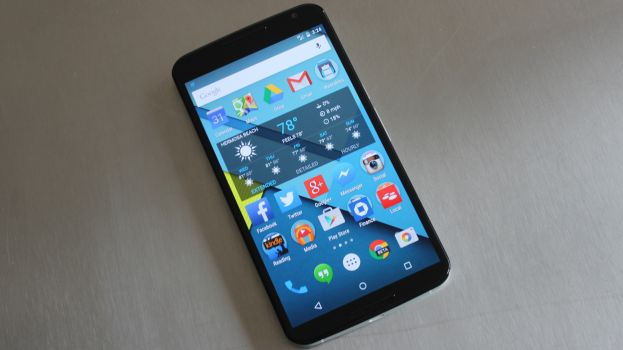
nexus-6-review-phone-623-80

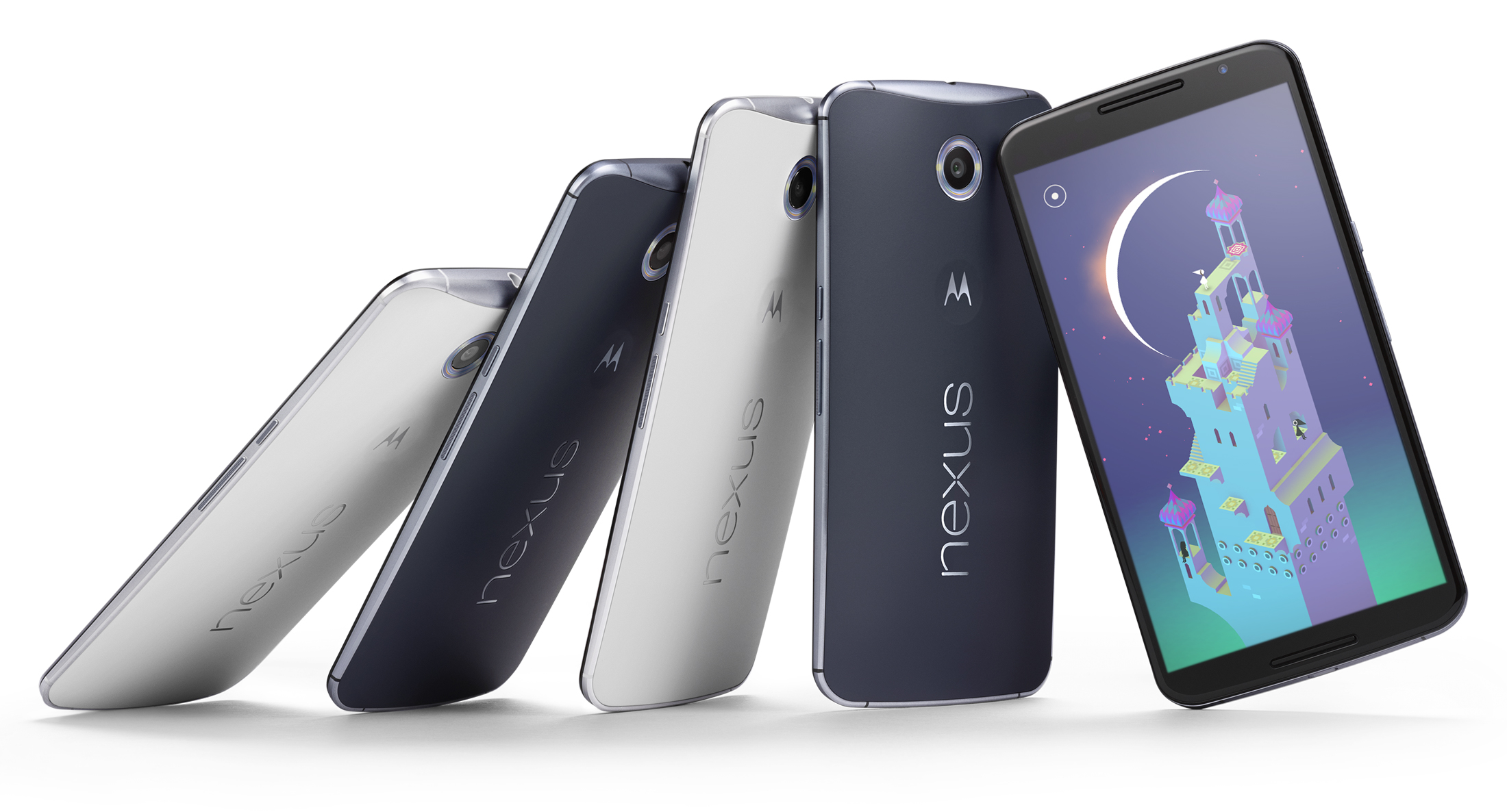
This Midnight Blue or Cloud White wonder however, surprises us with the price that it has been listed at: $649 for the 32 GB version, or alternatively $699 for the 64 GB, undoubtedly a courageous jump up from its predecessor’s price on launch ($349). The ambitious design definitely takes the Nexus 6 out of the modest class of mobile devices and sets it to battle the biggest names in the industry. Sure, it’s got a lot to say for itself, no doubt, but let’s see if the spiked up price can justify itself through the features it provides.

Full Specs:

  • CPU: 2.7GHz Qualcomm® Snapdragon™ 805 with quad-core CPU (APQ 8084-AB), Adreno 420 GPU
  • Memory (RAM): 3 GB
  • Storage (ROM): 32 GB & 64 GB
  • Dimensions: Height: 159.3mm ( 6.27 inches); Width: 83.0 mm ( 3.15 inches); Curve: 3.8-10.1mm (0.15-0.39 inches)
  • Weight: 184 grams (6.49 ounces)
  • Display: 5.96” AMOLED, 1440×2560, 16:9 aspect ratio, 493 ppi, Corning® Gorilla Glass® 3
  • Battery: 3220 mAh; Mixed usage up to 24 hours; Qi Wireless charging support
  • Water Resistant: Yes
  • Rear Camera: 13 MP IMX 214 Image Sensor, f/2.0 aperture, Optical Image Stabilization, Ring flash with dual LEDs, 4K UHD video capture 2160p (4K) UHD, 1080p HD and 720p HD video capture modes (30fps) 4X digital zoom, HDR+, Panorama, PhotoSphere and Lens Blur​
  • Front Camera: 2 MP
  • SIM Card: Nano-SIM
  • Connectivity: Micro USB, 3.5mm headset jack; Bluetooth version 4.1 LE; Wi-Fi 802.11ac 2×2 (MIMO)
  • Speakers: Dual Front Facing Stereo Speakers
  • Video Capture: 1080p HD and 2160p Ultra HD Video, 30fps (MPEG4, H.264)
  • NFC: Yes

Nexus 6 Design

The shockingly huge device stands out as soon as it is taken out of the box. As mentioned before, the Nexus 6 will immediately remind you of Moto X, both in shape and looks. The edge-to-edge display presents a glass insert molding with 2.5D curved glass – the best choice for all of your swiping needs and a perfect fit represented through slightly rounded glass edges around the device screen, perfectly integrating into the side metal frame.

The hard plastic back of the Nexus 6 adopts the familiar Moto class curve, making the phone comfortable to hold and fit in the palm of your hand. Surely, the mere size of the phone might make handling it two-handed a more effective way of doing it, but the materials used for the outer layer of the phone prevent slipping and ensure minimal smudging.

n6-moreeverything-1600

Outside of that, the design of the phone is simple and effective: the volume and power buttons rest on the right-hand side of the edge, the latter presenting a textured surface to easily differentiate itself from the former and prevent slipping when keeping it held down.

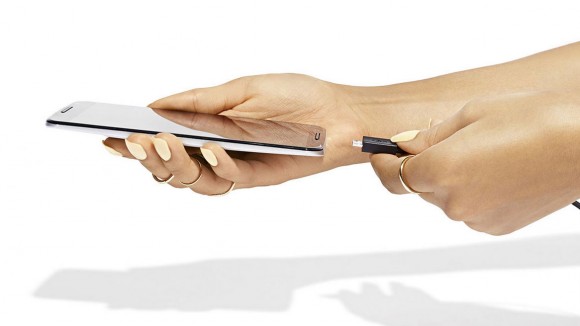
The top of the phone is home to the headphone jack, comfortably placed for your hands-free experience and the insert slot of the nano-SIM. The charging socket is a comfortable micro-USB, further supporting the ultra-thin model design of the device.

Nexus 6 Display

What is a 6-inch display without more impressive numbers to match? The Nexus 6 surely has a few things to show off with. With a more-than-decent 493 pixels per inch and 2560 x 1440 resolution, it matches most high-end LG and Samsung devices, permitting you to enjoy games and videos alike in vivid colors and 1080p HD quality.

We will admit that we’ve never been particular fans of ‘phablets’, because they are difficult to use with one hand. However, the multitude of features packed in the Nexus 6 justify the size of the device. The multi-touch display fares exceptionally well even in sunlight and doesn’t fade or blur out to the eye when the device is angled.

As a combination of utility and efficient power usage, the display does light up on partial brightness when the phone is picked up and is protected with Corning Gorilla Glass 3, making it resistant to damage without having to trade on thinness.

Is the Nexus 6 too Large?

Some will say yes, while others will answer no. That’s because it ultimately depends on personal preference. If you’ve never held a smart-phone in your life you will become accustomed to the Nexus 6 with great difficulty. On the other hand, phablet enthusiasts will quickly adjust to the Nexus 6.

Also, it seems that huge devices are the latest trend nowadays (see Apple’s iPhone 6 models and Samsung’s Note line-up). We are happy that the selection extends to the Nexus 6 as well.

Camera

The rear camera is respecting itself with no less than 13 megapixels and up to a resolution of 4128 x 3096 pixels and a circular dual-LED flash meant to light up the entire area photographed uniformly. The upgrade from previous Nexus models is easily tangible in quality and a powerful zoom that will capture details with surprising accuracy and a keen fluency in video recording at the same time, at a 2160p quality with 30 frames per second.

The application accompanying the camera does not present any new, state-of-the-art particularities but will provide sufficient editing tools for a regular mobile device, a strong panorama tool and HDR capabilities.

Nexus6-Press-03-580-90

The front camera does limit itself to 1080p quality and 2 megapixels, but in terms of its regular usage, it’s still one of the strongest out there and will provide excellent video conferences, albeit grainier and more darkened when used in low lit environments.

Both cameras do however present the optical image stabilization technology and with the help of plenty editing tools available on the App Store, your Nexus 6 can easily replace a regular camera in most situations.

Nexus 6 Performance

The powerful Quad-core 2.7 GHz Snapdragon processor and 3 gigs of RAM memory, along with the dedicated Adreno 420 GPU certainly do the work and bring the device closely to the specifications of a tablet.

Unmistakably, the effort that Motorola put into this particular device brings it up to par with the most powerful mobile phones on the market right now – more specifically the Samsung Galaxy Note 4, iPhone 6 Plus and Samsung Galaxy S5 – ranking second in the Geekbench 3 benchmarking test with a score that once again nearly places it in tablet territory.

screen-shot-2014-10-03-at-12-40-21-pm

Navigation through the system is incredibly fluid, Android v5.0 Lollipop also helping out in the matter. Nexus 6 can easily run multiple applications at the same time with minimal, if any slowdown of the system, performance marginally suffering when the device is either very low on battery or nearing a full HDD – which after all is understandable for every single gadget and piece of technology out there in 2014, not just mobile devices.

The multitasking capability of the phone is made easier to explore through the familiar Recent Applications functionality and does not seem to hiccup even when put to a stress test.

In terms of connectivity, Nexus 6 has been given everything you would ever expect from a new-generation mobile device: 4G capability – including the long-term evolution (LTE) technology – dual-band Wi-Fi, Hotspot capability, GPS, Bluetooth and even the practical and on-the-go near field communication feature; the receivers are solid and thus interference reduced to a minimum.

Lastly, the device is equipped with sensors such as accelerometer, gyro, proximity, compass and a barometer to enhance the mobile experience wherever you are.

Nexus 6 Interface

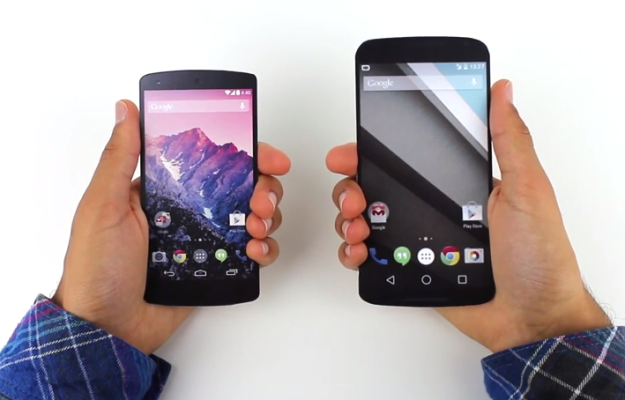
With the addition of the Android v5.0 Lollipop OS, the user interface of the Nexus 6 has kept its basic functionalities that we are all accustomed to, while giving the system a refreshed, less loaded feel. The new look sported by the latest Nexus prodigy goes under the name of Material Design, with a few modifications that we greatly enjoyed.

The interface has been slightly altered to give it a more tridimensional look, featuring shadows and ambient lights, while maintaining a flat design look for the menu itself. The functionality of the lock screen has been revamped, now presenting a drop-down like menu for the notifications, replacing the hidden swipe-down function of older Android OS versions, thus making important information easily accessible without even having to unlock your phone.

google-nexus-5-by-lg

The new notification system is highly customizable in regards to the type of alerts you want your phone to prioritize, means of notifying and even muting said notifications for pre-determined periods of time.

Quick Settings are easily accessible by typing the keyword of what you are looking for, and many other clumps of information have been finally made easier to view rather than being forced to navigate through multiple sub-menus to find out your current memory or network usage.

Certainly, this is mostly on behalf of the new operating system that comes with the device, but the specs of the device run in perfect tandem and are subject to improvements and optimizations via the constant updates that Google does not hesitate to deliver. They are onto a new approach to interacting with your mobile device and Nexus 6 is a living proof.

Nexus 6 Battery

Nexus 6 is equipped with a 3220 mAh battery that stands out through overall battery life but still will encounter medium amount of time you can spend happily tapping away at your mobile phone before you will have to look for a power socket. The battery is however sealed away in the phone and cannot be removed and/or changed, unlike almost all of the Android predecessors. The operating system has put emphasis on battery optimization itself and has so far received highly positive feedback.

We kept the best for the last. Qualcomm has come up with a very clever piece of technology, which luckily is included in this device. They call it QuickCharge 2.0 and basically allow you to ensure at least 6 hours of battery life in only 15 minutes of charging using the special adaptor.

This charger comes included in the package so no additional expenses for this nifty gadget are even necessary. So if you expect yourself to be heavily using your phone, keeping this portable charger with you can turn out to be quite the life saver.

Nexus 6 Verdict

Though it was originally rumored that the Nexus lineage was going to come to an end after the Nexus 5 launch, reality turned out to be quite the opposite, Motorola surprising us with what turned out to be a top competitor for high-end devices on the market right now.

The price of this miracle worker may be worrisome for some, but in the end it still falls short in comparison to other devices of same statistics and capability. For those who are worried about device size, Google promises that one week with the 5.96-inch display will help users adjust and never want to go back to a smaller device. Ultimately, it falls down to personal preference and expectations from the phone that will follow you around for a while.

nexus-6-review-phone-623-80

In our opinion, everything about the Nexus 6 is better than previous models. Its predecessors, the Nexus 5 and 4, were designed with usability and affordability in mind. Motorola decided to step up its game and provide with a smart-phone that could easily compete with other high-end models on the market. It succeeded beautifully.

So as a last note, here’s a list of pros and cons we could gather after a close look over everything that the Nexus 6 has to offer.

Pros:

  • Sleek design and maneuverability;
  • High-end hardware specifications;
  • Excellent display for media and applications;
  • Fast-charging technology;
  • Superior camera capabilities;
  • The first host of the new and improved Android v5.0 Lollipop OS

Cons:

  • The price range that it falls into is not as accessible as Nexus fans are accustomed to;
  • The size can prove to be a disadvantage as well;
  • Changes to functionalities might prove to be harder to deal with in the beginning;
  • Battery life is better than predecessors but still average.

This concludes our review of the Nexus 6. Do you own such a device? Have you had the chance to play around with it? We would love to hear your impressions about it in the comment box below.

Filed Under: Tech & Science Tagged With: Google, Google Nexus 6, Nexus 6, Nexus 6 review, Review

  • « Previous Page
  • 1
  • 2
  • 3
  • 4

Subscribe to Blog via Email

Enter your email address to subscribe to this blog and receive notifications of new posts by email.

Join 10 other subscribers

Recent Articles

police handcuffs man

German Man Probed In Poisoning That Killed 21 Employees Since 2000

June 29, 2018 By Kenneth Scott Leave a Comment

Chicken wings bar

Intoxicated South Carolina Man Punches Waitress Who Refused to Serve Him Alcohol

June 29, 2018 By Karen Jackson Leave a Comment

gaming

New Zealand gamer Who Flew Halfway Across The World for Virginia Teen Gets Shots By Her Mother

June 28, 2018 By Cristopher Hall Leave a Comment

party

Former Virginia Tech Freshman Sentenced to 50 Years in Prison for Stabbing a Girl to Death

June 28, 2018 By Roxanne Briean Leave a Comment

bonfire

British Couple Sentenced to Life in Prison for Torturing and Murdering French Nanny

June 27, 2018 By Deborah Campbell Leave a Comment

pay phone

Texas Father of Girl Disappeared in the 80s Ignored by Authorities

June 26, 2018 By Cristopher Hall Leave a Comment

bottled water

San Francisco Woman Threatened to Call Police on Girl Who Sold Ice Water for Disneyland Trip

June 25, 2018 By Roxanne Briean Leave a Comment

Maplewood Park

Missouri Man Robbed by Date and Accomplice in Park

June 22, 2018 By Nancy Young Leave a Comment

coding

New York Man Sentenced in Cyberstalking Former Girlfriend, Mailing Drugs to Her Dorm

June 22, 2018 By Deborah Campbell Leave a Comment

headphones

Bose Poised to Launch Sleepbuds, In-Ear Headphones That Help You Sleep

June 21, 2018 By Nancy Young Leave a Comment

Police light

Intoxicated Female Driver in Custody for Pulling Arresting Officer by the Hair

June 21, 2018 By Kenneth Scott Leave a Comment

kitchen

Restaurant Manager Arrested and Charged in Shooting Death of Co-Worker over Negative Yelp Reviews

June 20, 2018 By Karen Jackson Leave a Comment

plastic container

Pennsylvania Couple Charged in Violent Death of Infant Discovered Buried in Cat Litter

June 19, 2018 By Cristopher Hall Leave a Comment

tailpipe

Minnesota Teen Gets Head Stuck In Oversized Tailpipe Winstock Music Festival

June 18, 2018 By Karen Jackson Leave a Comment

Pages

  • About Us
  • Contact us
  • Privacy Policy
  • Privacy Policy GDPR
  • Staff
  • Terms and Conditions

Recent Posts

  • German Man Probed In Poisoning That Killed 21 Employees Since 2000 June 29, 2018
  • Intoxicated South Carolina Man Punches Waitress Who Refused to Serve Him Alcohol June 29, 2018
  • New Zealand gamer Who Flew Halfway Across The World for Virginia Teen Gets Shots By Her Mother June 28, 2018
  • Former Virginia Tech Freshman Sentenced to 50 Years in Prison for Stabbing a Girl to Death June 28, 2018
  • British Couple Sentenced to Life in Prison for Torturing and Murdering French Nanny June 27, 2018
  • Texas Father of Girl Disappeared in the 80s Ignored by Authorities June 26, 2018
  • San Francisco Woman Threatened to Call Police on Girl Who Sold Ice Water for Disneyland Trip June 25, 2018

Categories

  • Business
  • Entertainment
  • Finance
  • Headlines
  • Health
  • Life
  • Nature
  • Science
  • Sports
  • Tech & Science
  • Travel
  • Uncategorized
  • United States
  • World

Copyright © 2026 ArgyllFreePress.com
About · Privacy Policy · Terms of Use · Contact