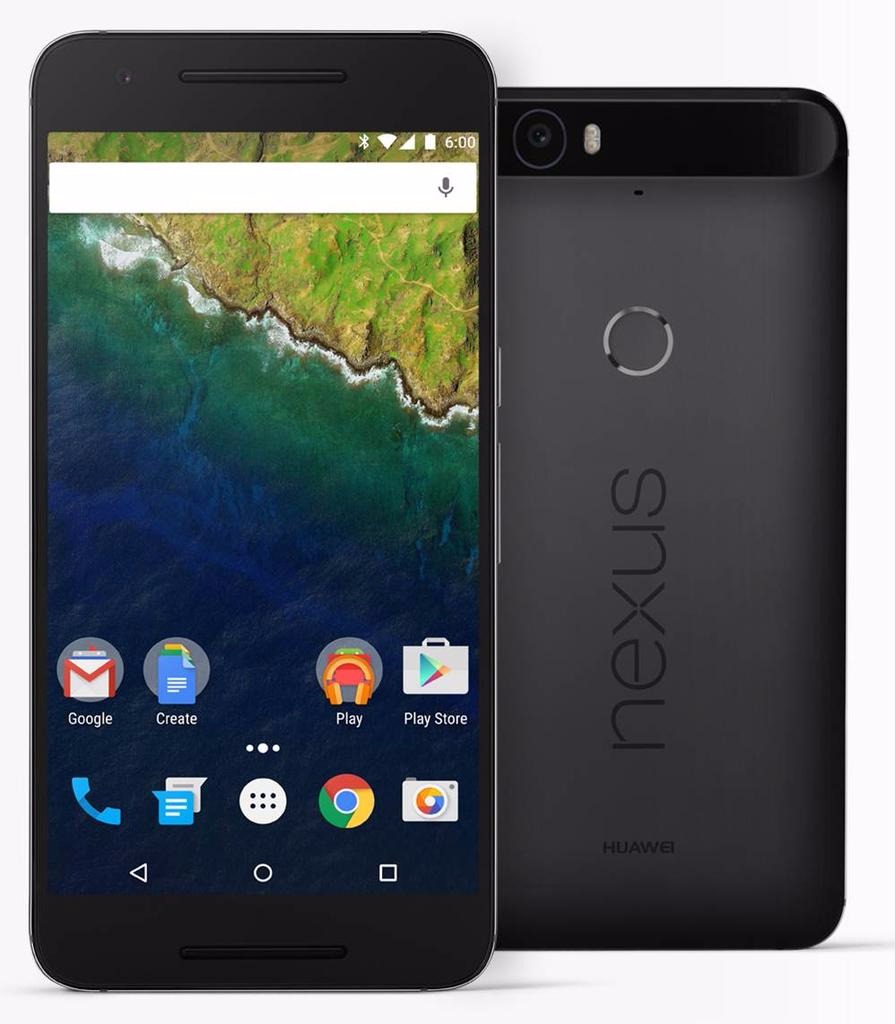
This time of year is particularly busy when it comes to the mobile phone industry. And because it’s nearing the end of 2015, smartphone developers all over the world take their final plunges in terms of innovation in technology. The result? Jaw-dropping flagship devices, entire powerhouses of hardware that only get larger and slimmer. And the Nexus 6P is one of our best examples.
However, coming as a surprise to some, the Nexus 6P is not of Motorola design like its predecessor. Nor does it have the LG logo sporting the brand; this time around, Chinese manufacturer Huawei has taken it upon themselves to make a phablet phone that would appeal to the western market. And with a sigh of relief, I have to say that not only the experiment was a great success, but the Nexus 6P ended up a masterpiece indeed.
This latest iteration of a long series of Google Nexus phones is one of the first hosts of the new Android operating system, Android 6.0 Marshmallow. Everything involved, it comes to battle other phablets of the market toe-to-toe; and it’s got an entire arsenal to do battle with. Being one of the most ambitious projects we’ve seen so far in the Nexus family, there’s a lot of things that have changed for the better to allow it to surpass the limitations known to the brand until now.
Lastly, it’s a great thing to know that despite a hefty number of improvements, Nexus has yet to put down its crown of value prices: despite it being an excellent piece of technology that has definitely surpassed previous Nexus devices and can actually compete with other top-tier smartphones, its price still falls in the same, average category.
Judging by everything that Google and Huawei have attempted to do in case of the Nexus 6P, the story is slightly reminiscent of another device that set out on its own path to overthrowing the competition through an absolutely outstanding construction that would not burn an entire series of holes in your wallet. That is the story of OnePlus 2 – the self-proclaimed 2016 Flagship Killer.
Nexus 6P Design
Google is proud to present a brand new phablet-constructed smartphone under the Nexus tag that is metallic. The plastic case trend has been left behind in favor of anodized aluminum – an alloy that is stronger than the ones we’ve seen in phones so far in terms of outside protection. Because of the materials used in its construction, the Nexus 6P is incredibly light despite its enormous size, suitable for a phablet – no more than 178 grams. That’s 14 grams less than the iPhone 6s Plus but a very small amount heavier than the OnePlus 2 – which weighs 175.
Considering that the Nexus 6P measures 159.3 mm in height and 77.8 mm in width, that makes for an impressive thickness of only 7.3 mm, matching the Apple counterpart but setting a new personal slimness record. The phone is really quite the sight – similar to the feeling of switching from a 22” monitor to a 27” after a few years of usage, the entire 5.7 inches wide screen feels large enough to suck you in if you’re using a phablet for the first time in your life. It may not come close to its direct predecessor – the Motorola Nexus 6 – which extended to the staggering display size of 5.96”, but some people may find this change adequate. 6″ in particularly difficult to handle for most individuals.
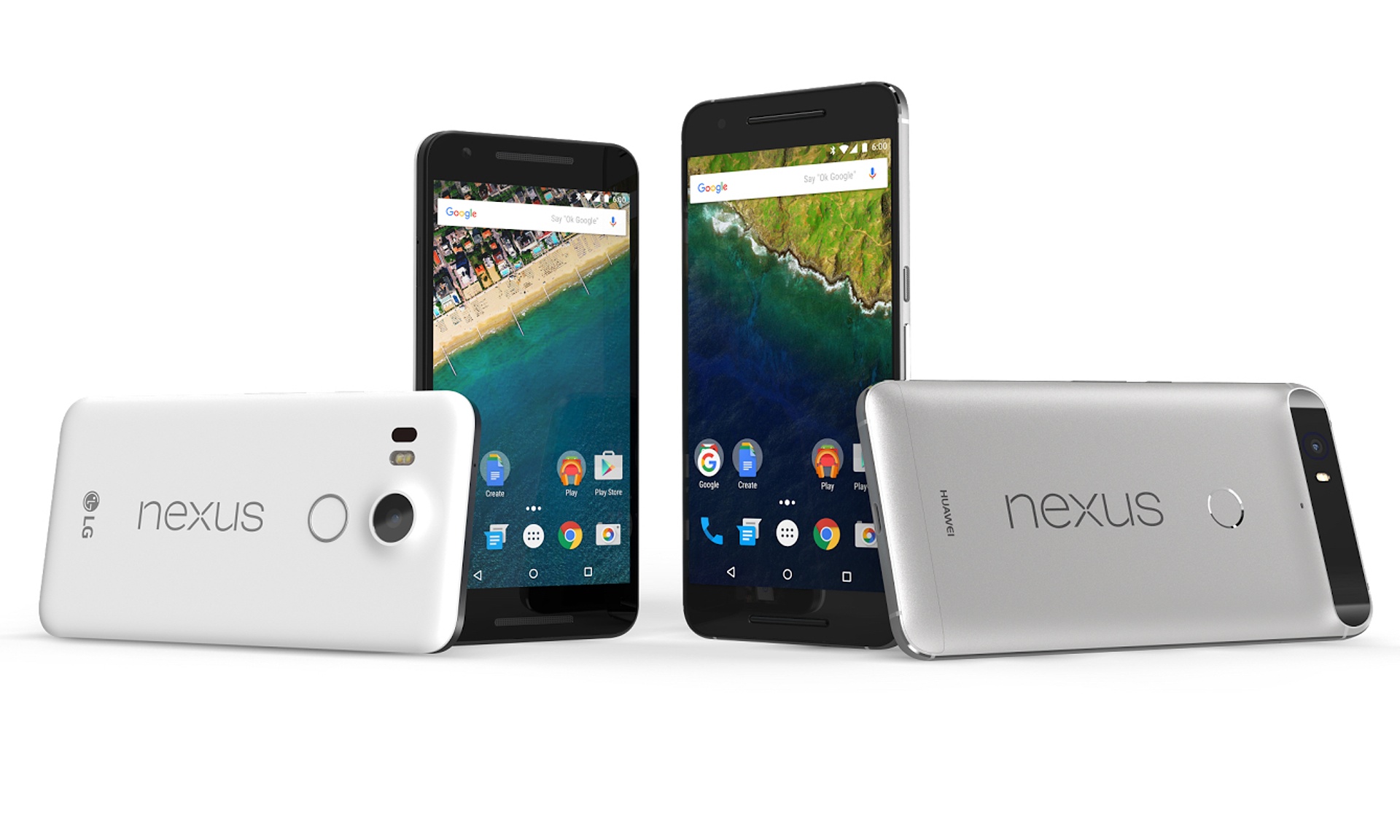
Because of its outstanding slim build, the phone is very comfortable to hold one-handedly; but naturally, just like any other phablet you will need the use of both of your hands to navigate it and use it to its full potential. As a downside to this bewildering-sized phablet, there is no stylus hidden anywhere in its frame to allow a minimal amount of stretching from one end of the screen to the other when using the features or apps you install. Everything you do, you will have to do by yourself, and unless you have unnaturally long thumbs, it will be a real feat stretching towards the top-most corners of the screen without having to switch the position of the phablet in your hand every time you have to reach another part of it.
The issue of holding the phone has a lot to do with the shape of its back too, where slightly curved makes for a more comfortable and secure grip. In Nexus 6P’s case, the edges – albeit extremely narrow – are cut straight and abruptly lead into the slightly curved back. That does not particularly help with securing your grip on the phone, and together with the impressive size may lead to quite the challenge for the device to actually feel good and fit in your hands.

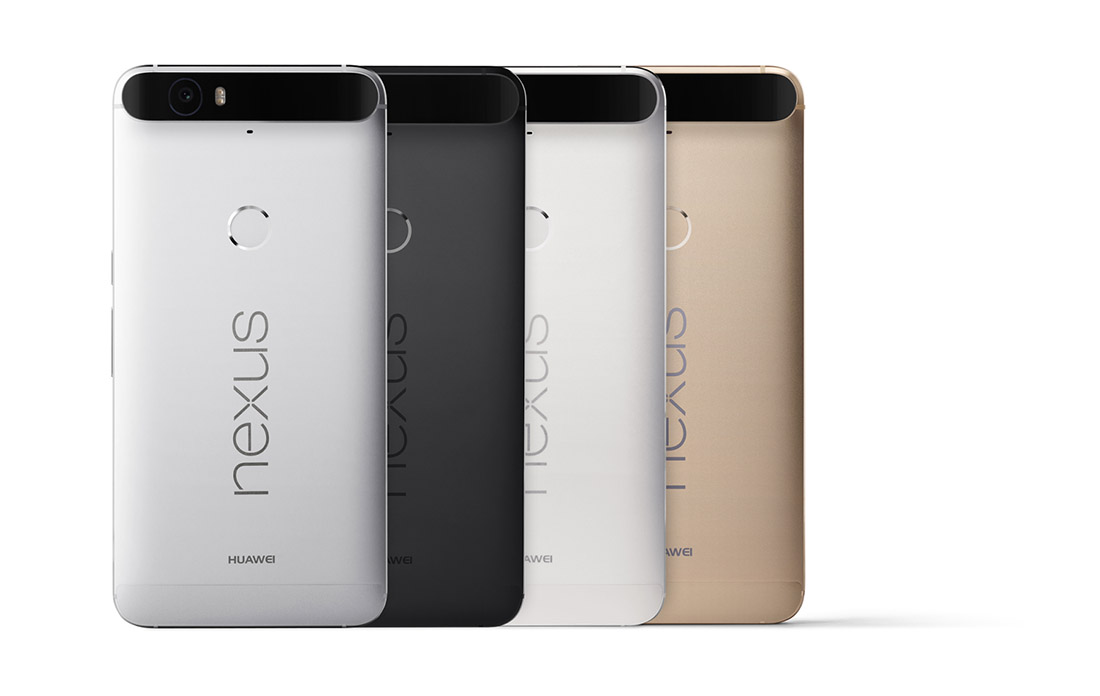
The unibody of the Nexus 6P is extremely minimalistic and looks sleek and elegant as a result. The designers have only released 3 color variants for this beauty, fitting for a device that speaks distinguished elegance and professionalism: aluminum, graphite and frost – more realistically called silver, black and white. There is a limited edition gold variant available in Japan for anyone interested. It keeps things pretty simple, unlike the OnePlus 2 that has a rather eccentric but distinctively classy selection of patterned back-covers – such as hardwood or granite mosaic patterns, on top of the classic matte black.
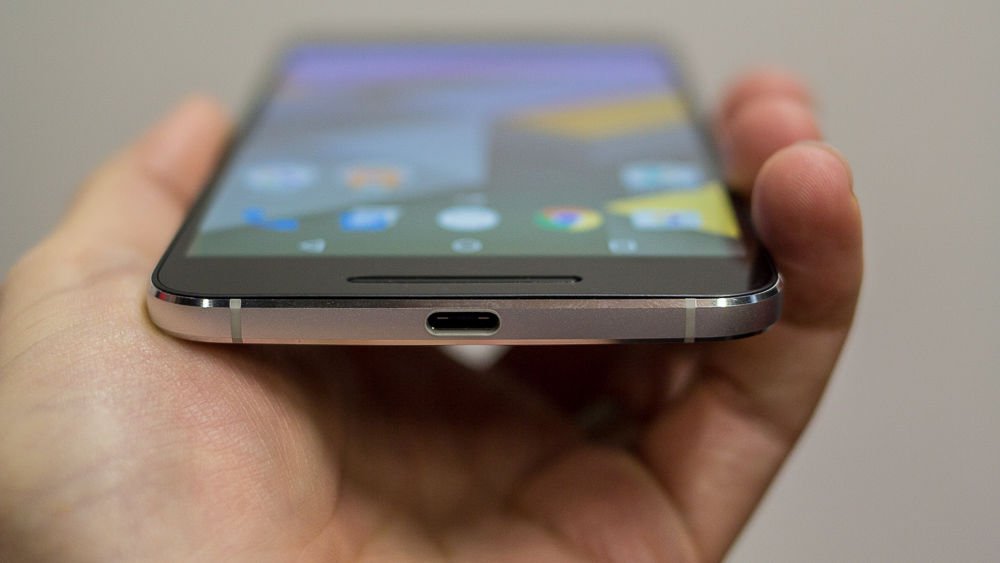
There is close to no unnecessary clutter on it either – you can find the power button and volume rocker on the right hand side of the phone, the former covered with a unique texture that will make it easy to differentiate from the latter. The bottom makes room for only one slot for the new and improved reversible USB Type-C charger. The classic 3.5 mm headphone jack is placed on top of the phone: while this is probably an internal space-related placement, I still feel like placing it on the bottom of the phone makes a lot more sense for people who normally put their phones in their pockets when they’re not using them. Each manufacturer has their own beliefs and reasoning I guess.

The back of the Nexus 6P is the focal point of design innovations and their resulting flaws. Firstly, the good news is that there is a fingerprint reader available for the users of this fabulous phablet; the bad news is that its placement is about 3 quarters of the phone up. While the entire idea of placing your fingerprint reader button on the back turned out to be a pretty neat idea after Huawei experimented with it in their Mate S, having it all the up closer to the top makes for a huge stretch of your hand to even reach it.

Secondly, the good news is that the phone is really slim, right? Their respective bad news is the only way Huawei managed to find room to stick its impressive camera into the 7.3 mm worth of space is by letting it jut out just slightly in the back. While the contrasting-colored strip is not half bad when you look at it, the fact that there’s a considerable area of the phone literally sticking out at the top of the phone feels and looks strange.
But there is at least another piece of good news that came out of this: the antenna lines that have haunted and daunted manufacturers for so long are handled pretty well by the Nexus 6P – hardly noticeable on the sides and hidden underneath the strip that incorporates the camera sensor on the top half of the phone.
Nexus 6P Display
The AMOLED screen goes no lower than 5.7 inches, as previously specified. It’s a capacitive touchscreen that makes up of 71.4% screen-to-body ratio and goes up to a staggering 518 ppi pixel density, featuring a more pleasant 16:9 aspect ratio. It is covered with a layer of Corning Gorilla Glass 4, featuring oleophobic coating. Along with the mind blowing quad HD 1440 x 2560 resolution that the phone is actually capable of, the display is unmistakably an amazing piece of hardware. The images are extremely vivid and colorful, yet particularly saturated; the image quality has improved considerably since last year’s Nexus 6, but still depicts unnatural looking hues of colors in some circumstances.

There is a difficult to explain tendency for smartphone and tablet manufacturers to start reverting to the older IPS display builds – the iPhone 6S and Sony Xperia Z5 Premium are two examples of comparable devices that make use of IPS technology – marginally inferior to AMOLED and LCD. The OnePlus 2 for example employs the LTPS LCD technology with is in essence very much similar to AMOLED, coming with a series of ups and downs. LCDs are exponentially better in color accuracy and hue precision, very bright and power-efficient; on the other hand AMOLED displays are particularly skilled in displaying true black but falling a little behind when outdoors.
There is a feature that changes the brightness of the screen according to the amount of light present in its environment. It adapts to dimmer-lit rooms by reducing brightness and vice-versa when exposed to bright environments. Strangely enough, the maximum level of brightness the phone is capable of is not one that your Nexus 6P will reach by itself using the adaptive brightness. But on the same note, viewing angles are great nor does the image suffer too much in sunlit situations.
The brightness is not the only adaptable feature of the screen however. The same adaptive display that we have noticed in the Motorola Nexus 6 is present here too – making your phone respond when the sensors notify it that you picked it up by displaying a grayscale notification lock-screen.
Nexus 6P Specifications: Performance & Comparison
To only sum up the hardware that the Nexus 6P packs inside the 7.3 millimeters of space is a disgrace to the power that really lies inside. The shortlist includes an octa-core processor, at least 32 GB of storage space and 3 GB of RAM. There are a lot of similarities in build and specifications with the OnePlus 2 once again – the phablet that was meant to overthrow the market after its release. Even more so, taking everything it packs into account, the Nexus 6P manages to exceed expectations and even run two steps ahead of its counterparts.
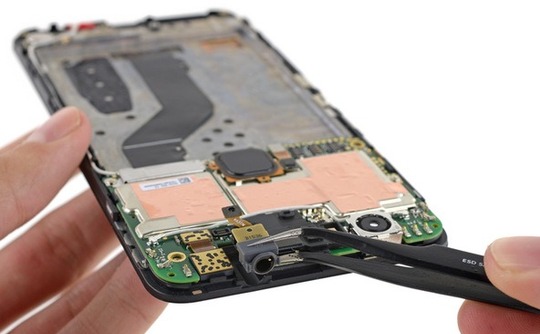
The Nexus 6P features one of the latest Qualcomm Snapdragon 810 octa-core processors. Featuring 64-bit computing, it’s a highly advanced piece of hardware that allows a smooth transition of smartphones into downright tablet and laptop replacements. The 8 CPU core chipset is LTE capable and allows a wide range of activities – starting with streaming 4K Ultra HD videos and handling 3D games smoothly, Qualcomm has made more efforts towards reducing battery usage along with increasing the power in this piece.
The processor is basically constructed from 2 quad-cores CPUs: a 1.55GHz Cortex-A53 and a Cortex-A57 that can go as high as 2.0 GHz. The same CPU is featured in the OnePlus 2 – and exceeds expectations far more than the Apple A9 dual-crore 1.84 GHz Twister featured in the latest iPhone 6s Plus. Nevertheless. it really does fall behind when it comes to the Exynos 7420 CPU featured in Samsung Galaxy S6 and Galaxy Note 5.
Along with the Snapdragon 810, there is a dedicated Adreno 430 graphics processing unit that improves the quality of life considerably for users who do actually enjoy graphic-heavy interactions with your phone. That means more than just extremely high quality video viewing: chances are any new 3D-rendered smartphone game that comes out by the end of this year and up to Q1 of 2016 will not even stutter. Both benchmark results and real life stress testing place the Adreno 430 GPU above both the Mali-T760MP8 and Apple’s PowerVR GT7600 six-core graphics card, making both the Nexus 6P and OnePlus 2 the better choices once again.
To bring an extra ounce of compliment to everything that we’ve listed so far, the Nexus 6P also features 3 GB of RAM memory – possibly one aspect where the phablet does not go as far as it possibly could, the OnePlus running the extra mile to reach the 4 GB milestone on its 64 GB HDD version, just like the Samsung Galaxy Note 5. Out of all the models that we’ve used for our comparison so far, the iPhone 6s Plus is the only one that stops at a meager 2 GB of RAM, most of them including at least 3.
Storage space is plenty to find inside the Nexus 6P. There are 3 variants of the phablet – 32, 64 or 128 GB worth of storage space respectively. The reason behind it is the lack of any kind of microSD aid – there is no microSD slot to speak of meaning that you’ll have to make use of either physical storage space or cloud services to keep things neat. Considering none of our studied models include said microSD storage option, the Nexus 6P offers the most space on average.
While some processors may exceed the Snapdragon 810 in terms of performance, the Nexus 6P fared ridiculously well with a series of tasks. It’s undeniably fast and a lot smoother than it proved to be when it first came on the market, featured in the LG G Flex 2. Still, there’s no denying that some newer processors are faster and perform better when complimented with other pieces of hardware that are at least on par with them.
Naturally, under heavy stress, the GPU tends to heat up a fair amount but without it becoming upsetting – a rather normal aspect of minimized yet powerful hardware. Depending on what you expect from a phone – or a phablet, rather – the 3 GB of RAM shouldn’t bother you the slightest bit considering multitasking didn’t seem to be minded the tiniest bit on the Nexus 6P. Now try to grasp everything and mix it with a price that is considerably lower than the ones you would normally pay for its Apple or Samsung comparable counterparts. Up to this point at least, the Nexus 6P is worth every cent.
Nexus 6P Software & Features
Rejoice, for the Android 6.0 Marshmallow is here, and the Nexus 6P has got it all. The operating system has brought a fair few improvements to both user interaction and performance. There’s a promised improvement to battery life thanks to the phablet’s ability to manage its power when on standby.
One of the most revolutionizing features of the 6.0 Marshmallow OS is Google Now. Its purpose is rather simple: whatever you are doing at a given moment, whether you’re reading something, listening to a song or watching a video of something, by using Google Now you will basically be able to read more about the topic. You can bring out the Google Now feature by holding down on the home button that can be found on your main screen; doing so is equivalent to googling something without physically having to visit the website and typing in the thing you’re interested in.
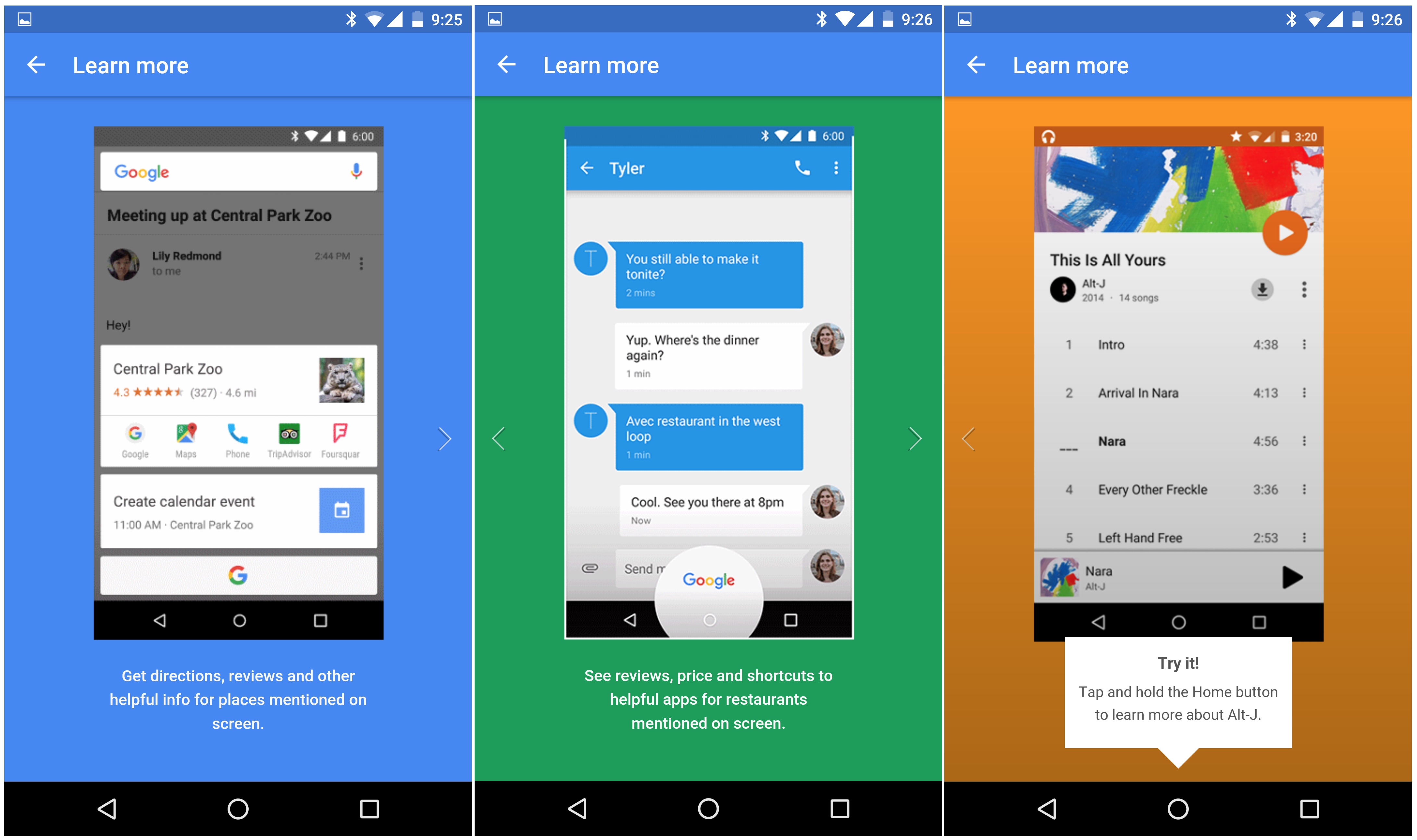

Marshmallow hasn’t made any radical changes to the operating system, so anyone who is used to your regular stock Android OS will familiarize with it immediately. One distinction that will be a little confusing for former Android users is that the app tray is navigated through by swiping up and down instead of left and right. On the bright side however, you get to store some recently used apps at the top of the screen to at least not have to scroll all the way up and down to find YouTube or Twitter for example.
The Google Imprint feature, made reality through the fingerprint reader on the back of the Nexus 6P gives you an ample method of securing your phone – up to 5 fingerprints. The reader however feels very forced from some respects; at the current moment its only purpose is to unlock your phone easily, where “easily” can be an exaggeration if your hands are as small as mine – needing you to stretch huge lengths to get it done. The fingerprint reader is not a button as well, such as the iPhone 5 and above variant, so it can’t be pressed, giving that entire part of the phone a rigid and lackluster feel. Still, unlocking your phone via the fingerprint reader is considerably faster than using a PIN – which requires you to swipe first then enter the pin using the keypad.
Nexus 6P Camera
You’d think that there’s no good excuse for Huawei to design the phone with a part of it jutting out in the back. As a matter of fact, there actually is. The manufacturer claims that the camera incorporated in the Nexus 6P is by far a milestone in the technology it has used so far. The reality of it is that it’s pretty good and definitely comes with some neat improvements – but it doesn’t go as far as being absolutely mind-blowing.
The rear camera – and the only real culprit basically – is a 12.3 MP camera that captures 1.55 micron pixels. In case that’s a new aspect of cameras that you have not heard of before, you should know that the standard pixel size is 1.4 and below (the iPhone 6s Plus has 1.22 only); this feature is responsible for making Nexus 6P’s camera a lot more proficient in taking shots indoors and low-light conditions, making it a great choice for night shots for example.

The photos taken with this camera are mostly realistic when translating real colors into an image and remain particularly loyal. All of the test photos that we took felt warm in terms of color crispiness, with a very good set of contrast levels. The autofocus allows you to take pictures on the run, without any prior preparation thanks to the speed it detects subjects in the image and removes the blur.
The Nexus 6P rear camera can also record video in 4k at 30 frames per second, which is a pretty awe-inducing feature of mobile phone cameras in general. On top of that, you can also record slow-motion video that can capture as many as 240 frames per second and the phone also provides you with a number of editing tools.
The front camera is not to be trifled with either; your selfies will be undoubtedly amazing in quality, considering you’ll be shooting using an 8 MP camera. Video calling is incredibly smooth too, being able to sustain a very high frames per second score.
The software that compliments both cameras will certainly give you a lot to play with. Switching between shooting modes, including file types or photo versus video is made incredibly smooth and easy and there is a large number of filters and post-editing you can do. Panoramic shooting, Photosphere and Burst Mode are present here as well, with the latter being able to shoot as many as 30 frames per second and allowing you to compile a GIF file afterwards.
Nexus 6P Battery & Verdict
Firstly, we need to elaborate on the way the Nexus 6P is charged. It is one of the first phablets that make use of the reversible Type-C charger. That means that you can plug it into the phone facing either way, so the curse of the USB and microUSB is now broken. On the downside, however, there aren’t a lot of other devices that use this type of charger so losing it or forgetting it will result in no way to charge up your 6P. However, hoping that no such situation would ever occur, charging your phone with the Type-C USB charger takes incredibly little to do – on average, about an hour and a half. The phone also notifies you of how long it still has until it is fully charged.
Thanks to the power saving features of the Android 6.0 Marshmallow OS, your Li-Po 3450 mAh battery can last as long as 11 to 12 hours with mild to heavy usage.
There’s a lot to weigh if you’re considering purchasing the Nexus 6P. Overall, it is just shy of becoming one of the absolute best phablets on the market. The hardware is powerful, but not the most powerful. Aesthetically, the phone is absolutely gorgeous – just like its very similar brother in arms OnePlus Two. But considering both of these phablets will be coming for a price that is similar in range, you get a considerable perk with the Nexus 6P – you can actually experience the Marshmallow OS instead of waiting for the update to hit other Android or Android-inspired systems. For its price, the 6P is definitely worth its money and won’t disappoint.
You can get the Nexus 6P at $499 for the 32 GB version, $549 for the 64 GB and $649 for the 128 GB model respectively.
