Argyll Free Press

Growing News Network

Tuesday, April 21, 2026
Log in
  • Business
  • Finance
  • Sports
  • Tech & Science
    • HP Envy 4500 Review
    • LG Optimus 170 Review
    • iPod Touch 6th Generation Review
    • HTC One M8 Accessories Set-up
    • Surrealist Games You Must Play
    • Hisense Sero 8 Review
    • Dell Latitude e7440 Review
    • HP Laserjet 1536dnf mfp Review
    • Garmin Fenix 2 Review
    • Skype Vs Viber
    • Best Video Conferencing Software
    • Sony mdr 1r Headphones Review
    • Canon Rebel t3i Review
    • Sennheiser Momentum 2-0 Review
  • Travel
  • Headlines
  • Health
  • United States

HTC Vive Pre-orders Start On 29 February, Watch Out Oculus

January 12, 2016 By Cristopher Hall Leave a Comment

HTC Vive Pre-orders Start On 29 February, Watch Out Oculus

HTC Vive pre-orders start on 29 February, watch out Oculus, you’re in a for the fight of your life. Given that virtual reality enthusiasts all over the world were utterly shocked last week upon the news that Palmer Luckey doesn’t know what in the same ballpark means, the HTC Vive might just have the upper hand.

Cher Wang, HTC CEO, has spoken to the Telegraph and said that the company has chosen to shift its focus on virtual reality, and drive away from the smartphone industry, because now, HTC, is more realistic.

HTC has partnered with game maker supreme Valve to design an immersive virtual reality headset. It will sell world-wide starting with April of this year, competing directly with the much-awaited Oculus Rift. Sony’s PlayStation VR is out of the question at the current moment as there is no information available on pricing or release date. What we do know is that Sony has stated, over and over again, that the company will release their virtual reality headset only when they have enough content available – the Japanese company is known for working on more than 100 titles for their VR headset.

For the HTC Vive, Valve will be in charge of the gaming platform with their beloved Steam – as well as offering a place for Oculus Rift lovers.

Even though we have an official pre-order date, we still don’t know what the price of a Vive headset will retail at. Yet, we will have details in the upcoming weeks regarding the cost of a Vive, notes Cher Wang.

But why the sudden shift from the smartphone industry?

Well, because the huge competition from Xiaomi and Apple, with both companies pumping a ton of money on marketing and communications. There are also a lot of other Chinese competitors that offer low-quality devices with staggering specifications, notes the CEO of HTC.

During CES 2016, HTC displayed and demoed their 2nd-gen dev kit, the Vive Pre. Those who were present, were the first to witness the huge difference between the two dev kits.

However, regardless of the change in design, the price needs to meet the expectations of VR enthusiasts across the world so the adoption rate soars, and brands jump on the bandwagon.

You need a powerful PC to run a VR headset. A PC that will make you cough up something between $500 and $1000. Dell’s Alienware has already started offering bundles that shave $200 off the base price of an Oculus Rift, and, Cher Wang says, that HP and Asus will be releasing VR-ready PCs in the upcoming months.

Image Source: 1
Filed Under: Headlines Tagged With: HTC Vive, HTC VR, virtual reality, Virtual Reality headset, Vive VR, VR Headset

Garmin Varia Vision Is Like Google Glass, But For Cyclists

January 5, 2016 By Cristopher Hall Leave a Comment

Garmin Varia Vision Is Like Google Glass, But For Cyclists

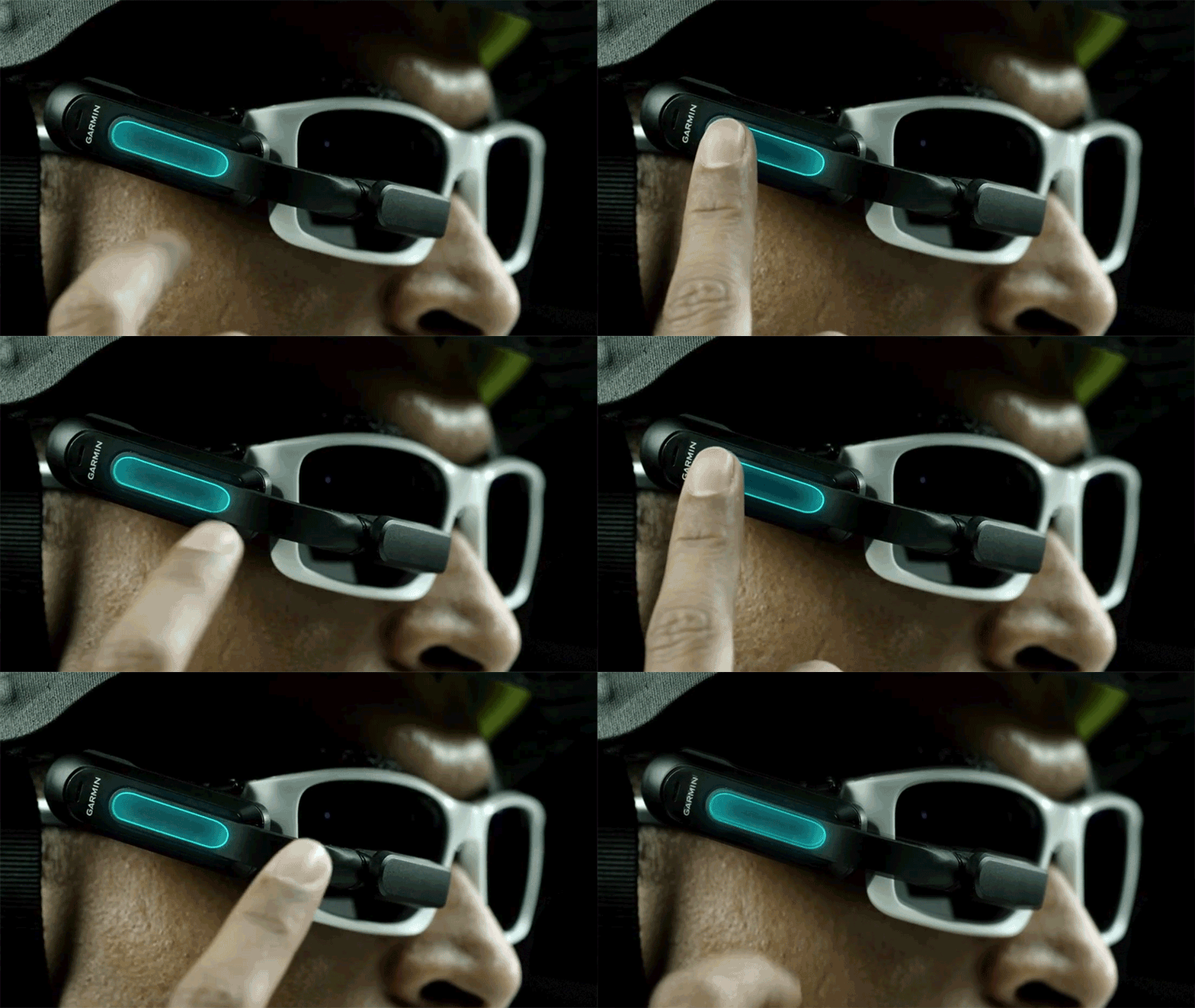
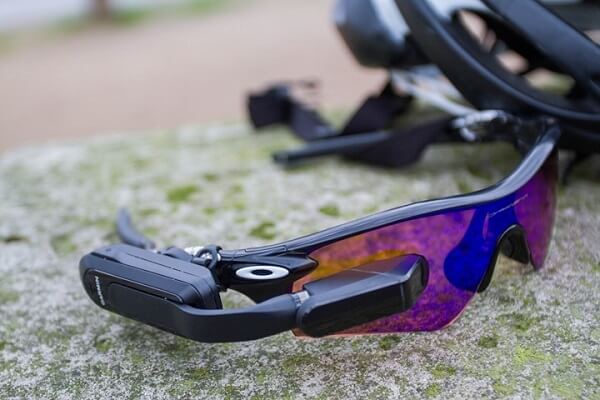
Garmin Varia Vision is like Google Glass, but for cyclists – at least, at a first glance.

Garmin might just make this Google Glass lookalike popular, as it targets a demographic that is in need of this kind of gadgets. The Varia Vision can attach to any pair of glasses. It weighs about 30 grams, and its battery juice makes it run just shy of eight hours on a single charge.

The Varia Vision can be clipped on either side of the glasses. It provides a compact display at the right, or left, edge of a cyclist’s view so they don’t need to look down at the handlebars and away from oncoming traffic ahead.

The Varia Vision comes with a pretty hefty price tag of $400 – this converts to 270 pounds in the UK, and AU$555 in Australia; and it’s most certainly not for newcomers to the sport. It’s aimed at professionals who compete, train and for those who rely on their bikes for commuting in a traffic-riddled city.

The heads-up display provides turn by turn directions, distance, cadence, speed metrics and other performance data, and even notifications and messages if the user pairs it with a smartphone. Furthermore, we don’t really know the resolution of the display, or what it’s actually made out of, but the company has assured us that it will be clearly readable in all weather conditions.

Analysing it, we notice that it does about everything that Google’s Glass did – it even has a touch-sensitive strip on the side so you can easily navigate the UI. Garmin claims that it can be utilized if the individual even wears gloves or has wet hands.

The Varia Vision can also connect to Garmin’s Rearview Bike Radar – a device that notifies the user if a car is coming from behind in order to ensure that the cyclist doesn’t steer in front of its path.

The Varia Vision offers an augmented reality display, but considering that the AR tech is somehow still in its incipient development phase we are quite curious to see it how it functions in real-life.

The device will come out in Q1 of 2016 and it’s compatible with Android and iOS – there doesn’t seem to be any love for Windows mobile OS at the moment, but we are still hoping.

However, Garmin isn’t the only company developing augmented reality devices for athletes. Recon Instruments is the first that comes to mind. The company was recently bought by Intel, so we are foreseeing great things in AR for athletes in the near future.

The Garmin Varia Vision has been announced at this year’s CES, which takes places in Las Vegas.

Image Source: 1, 2

Filed Under: Headlines Tagged With: Augmented Reality, Garmin, Google Glass, Varia Vision

A Fitness Journey: The Best Weight Loss Apps

January 5, 2016 By Cristopher Hall Leave a Comment

Best Weight Loss Apps

Everybody knows that getting fit and, most specifically, losing weight is a rather long and tenuous ordeal that requires more than just wishful thinking. Other than a healthy, well-balanced diet, workout sessions and a drive to not let your dreams be dreams, you will most likely need a guide; a framework if you wish. That is where the best weight loss apps out there can kick in as a helping hand.

Considering that getting a personal coach to handle that is a good idea and will, most of the time, be enough at least for your gym workouts, in order to truly keep everything in check you will need something extra. And that is where the fitness gadgets – and here I mostly mean wearable tech such as the Jawbone or Garmin Fenix – and, to a more affordable extent, fitness applications that one can make use of in their own home.

By using some of the best weight loss apps out there, you are not only giving yourself a very good overview of what and how well you’re doing in your goals, but also gain that extra motivational nudge that gets you up and about.

We’ve been experimenting with some of them and here is our very own list of the best weight loss apps that we could find.

Best Weight Loss Apps #1: Lose It!

Best Weight Loss Apps Lose It

Certainly meant in a positive, constructive way, Lose It is a great example of how you can use smartphone or computer applications to the betterment of your life. Most specifically – your healthy, fitness lifestyle-driven life. And the best piece of news about it is that you can get it for free for both iPhones and Android phones.

You can do a wide variety of things with the Lose It weight loss app without hooking any other trackers to it, but most of its native ability relies on an extensive set of information about your diet. For anyone who needs more than just an outlet of numbers to look at regarding calorie intake, Lose It! Is absolutely great as it allows you to set yourself challenges based on an internal scoring system, set weekly limits, and even create and share goals with friends.

Add a helpful tips & tricks section to it as well as reminders and the kind of messages that motivate you to keep at it, and you’ve got yourself a great thing to go on.

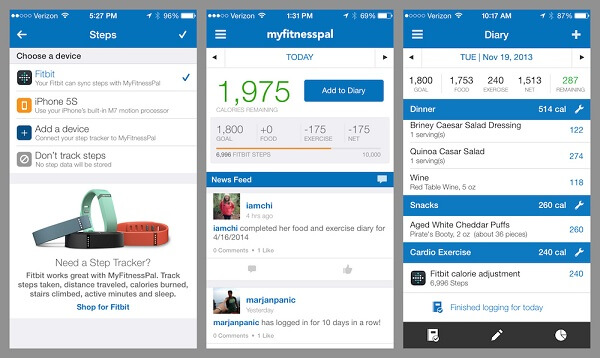
Best Weight Loss Apps #2: MyFitnessPal

Best Weight Loss Apps MyFitnessPal

Compare it to the Lose It application and MyFitnessPal manages to be just as good and even improve on some things that the previous entry wasn’t so good at. The most important thing I can mention in that direction to begin with is the fact that this application is made to work with Windows and BlackBerry phones too, in addition to the classic Android or Apple smartphone.

The MyFitnessPal app has a more “professional” approach to it and doesn’t fare that well on the “do it” kind of attitude. It does, however, offer you a very capable application to handle all of your statistics, diet information and even generate comprehensible graphs and pie charts and whatnot for you.

Similarly to all of the best weight loss apps or fitness tracker applications out there, it lets you connect it to a variety of other trackers that can provide you with a more insightful overview of your progress. You can also visit the www.myfitnesspal.com website for a fully functional dashboard.

Best Weight Loss Apps #3: Pact

Best Weight Loss Apps Pact

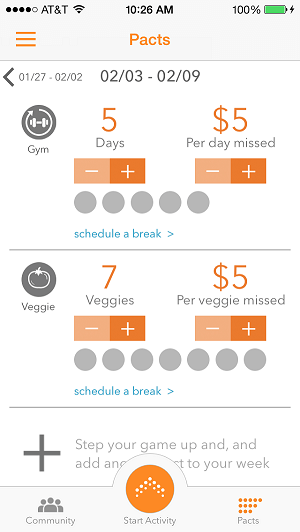
While I felt a definite sense of unease at the name of the app, Pact is actually an… odd one to say the least but an innovative idea nonetheless. While one could argue that it employs some form of negative reinforcement, I wouldn’t go that far. Depending on how “motivated” you are to lose weight, as well as how honest to yourself you manage to be, Pact can actually help you out a great amount.

The way it does that is through real life money and not all those mainstream, amateur gamification-inspired point systems that everyone uses. Basically, you will be making pacts that you need to hold – such as promising that you will eat vegetables and fruit and posting a relevant photo that suggests that which needs to get approved by the Pact community. Succeed in fulfilling the pact and you can win real money (up to $5 a week). Fail to do so, and money is taken out of your bank account.

Now there are no fixed amounts for each type of failed task and it gives you the freedom of not only setting the literal price of failure but also whether you’re going to go to the extent of entering your account details to begin with. While it also has some of the regular features one would expect from a fitness tracker such as step count, some degree of calorie burn calculations and the rest, I am unable to focus on that aspect of it altogether.

Best Weight Loss Apps #4: Nike+ Training Club

Best Weight Loss Apps Nike+ Training Club

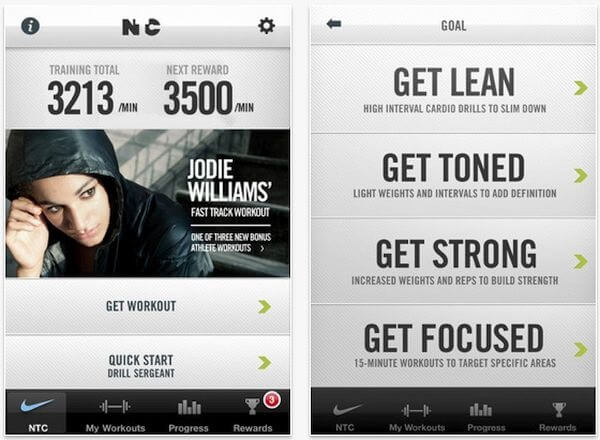
Thus, we move onto an application that I personally used for a fair amount of time a couple of years ago. The Nike Training Club you can regard as literal fitness coach; one that won’t be able to watch and correct you as you undergo your workouts, but a great guide of how the type of exercise you should be getting for losing weight.

You can use it for more than just losing weight as it has a huge number of workouts and types of workouts for anything you would ever dream of achieving. Things like toning, working particular groups of muscles and so on. Once yous’ve selected your preference, you will get a detailed explanation of what you have to do – particular exercises, number of times you need to repeat it, the amount of time you need to take a break for and so on.

It even allows you to “enroll” in a four-week program that will handle everything you need to do on a daily basis.

Best Weight Loss Apps #5: 7-Minute Workout App

Best Weight Loss Apps 7-Minute Workout App

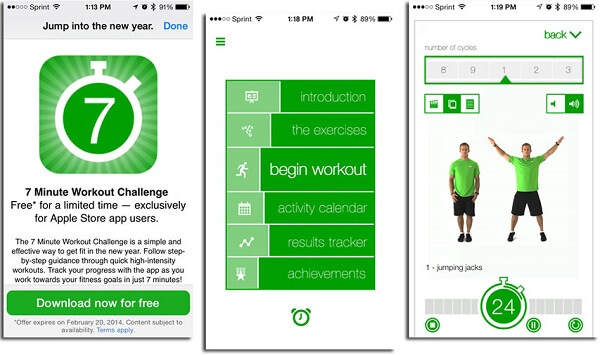
Once again, an application that’s slightly different than the ones we’ve talked about so far, the 7-Minute Workout app is just a distinctively helpful thing to have on your smartphone as it provides the user with a personalized workout they can do in the least amount of time. It’s meant to help you fit working out into your schedule no matter how busy or pressed you are by your day to day life. By following its instructions every day, you’re bound to start seeing results without changing much to your regular lifestyle.

Best Weight Loss Apps #6: Fooducate

Best Weight Loss Apps Fooducate

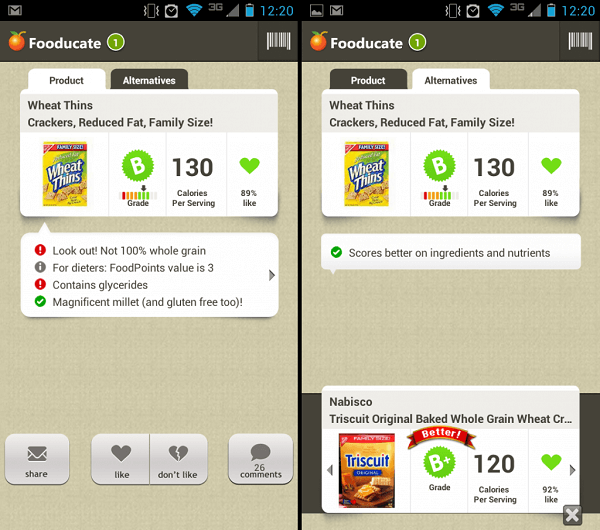
Using this application is not even remotely as difficult as it is to pronounce it. Its purpose is not, however, to teach you how to exercise or to motivate you to do your workout. Instead, it just offers a comprehensive translation of everything you can eat by employing the help of a huge database. It’s also heavily reliant on the social aspect of it.

Once you scan the barcode of a product, the app will return an overview of how good that particular item is for you, and providing you with nutritional information such as calories per portion, overall grade as well as a list of better alternatives.

Best Weight Loss Apps #7: Diet Hero

Best Weight Loss Apps Diet Hero

Diet Hero is a great choice for anyone who usually prefers min-maxing their resources and not spending ridiculous amounts of time looking for god knows what special ingredients or rare pieces of exotic herbs and vegetables that will “help you lose weight”. Instead, it tries to help and teach you how to use what you have and what you like to your weight-losing advantage.

By recording into the app what you like eating and what you have at home, Diet Hero will tell you whether it’s a good idea to eat it, when to eat it and in what quantity. After you’ve also typed in your weight and height and all the other necessary details, the Diet Hero app will help you create a personalized diet that you can truthfully start losing weight with.

The downside of the app is that it’s currently only available on the App Store and nowhere else. You will also have to pay a one-time $1.99 fee to purchase it.

Best Weight Loss Apps #8: iPhone’s Health App

Best Weight Loss Apps iPhone Health

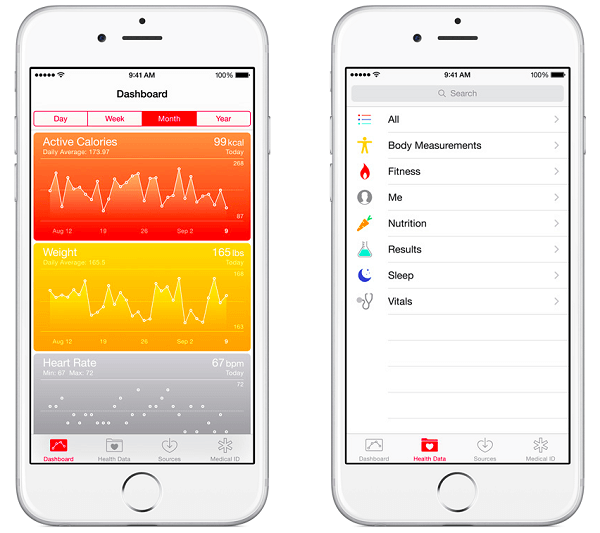
Moving onto how you can best use the health applications of your very own smartphone to the best of your interests, let’s start with Apple’s Health. Normally, the default health apps that major operating systems include in their basic programs tend to get overlooked and underestimated. It’s no news that these apps can’t do as much as a professional, dedicated fitness tracker app. But all of our smartphones are equipped with a multitude of sensors that help track a number of things.

If you go and open the iPhone Health app right now, you may be surprised to see a long history of steps taken, walking and running distance as well as flights climbed starting with when you first used the phone. But other than that, you will see a great number of categories of data that lack any kind of entry. Most of them will either require your manual input or information that you normally collect with other fitness and health apps to begin with.

And that is the one aspect where the iPhone Health app can truly shiny. While, by itself, it’s not that amazingly useful if you’re planning to lose weight, using it as your central hub of all things related to your health – including things such as sleeping patterns, vitals, regular medical checkups, nutrition and even reproductive health – can earn you a great overview of which aspects need improving and how well you keep things in check.

Best Weight Loss Apps #9: Google Fit

Best Weight Loss Apps Google Fit

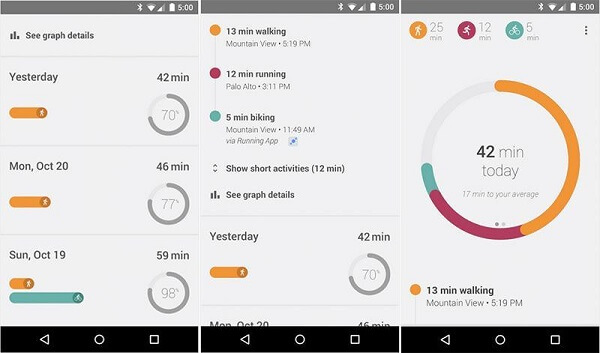
Android’s Google Fit – while in essence very similar to the iPhone equivalent – has a slightly more capable set of abilities, one could argue. To list the things that are native to default smartphone health apps, and in this case similar to what the iPhone Health app can do too – Google Fit provides you with a great overview of the things it can track by itself. That is: number of steps taken, distance and time walked, run or biked as well. It can draw a variety of charts and graphs that you can use to track your progress over time.

However, the one thing where the Google Fit can turn out to be a little more useful when it comes to the motivational factor – more or less. In comparison to Apple Health, this one allows you to set daily goals such as number of minutes you walk or number of steps you wish to take. After this is said and done, you’ll always be shown the percentage of completion you’ve done every day towards your goal.

However, the one aspect where both the Apple Health and Google Fit ultimately fail is their power as standalones. Logging food is difficult to do and will mostly rely on you knowing exact quantities of sugar, fat and calorie intake because there’s no internal database of foods you can choose from. Connect them to third party apps or a Google fitness tracker, however, and the result is ten times more satisfactory.

Best Weight Loss Apps #10: Xbox One Kinect’s Fitness App

Best Weight Loss Apps Xbox Kinect Fitness

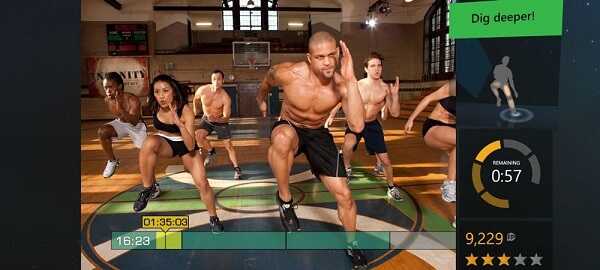
Remember Dance Dance Revolution? It basically employed gaming concepts to make you get some exercise for a change. That is something that was later attempted with the release of things such as Wii or the Xbox Kinect auxiliary devices. While you can try using regular Kinect gaming to get moving, you should also know that there is a dedicated Kinect Fitness app out there too that can make things easier for you.

The Xbox Kinect fitness app doesn’t just show you detailed videos of how to perform each and every exercise in its database, but it also constantly provides you with hints and tips on how to best practice them all. There’s a great amount of reinforcement and a wholly motivational approach to it. The best aspect of it all is the fact that thanks to the Kinect motion detection technology, the application will be able to tell how well you’re performing and doing the exercises while also not giving you a lot of room for slacking off.

Image Source: 1, 2, 3, 4, 5, 6, 7, 8, 9, 10, 11

Filed Under: Headlines Tagged With: 7minute workout app, apple health, best weight loss apps, diet hero, fooducate, google fit, lose it app, myfitnesspal, nike training club, pact app, weight loss applications, xbox kinect fitness

Juniper Networks Spy Code Story Continues

December 23, 2015 By Cristopher Hall Leave a Comment

Juniper Networks Logo and Motto in a building

New developments have occurred regarding the discovery of Juniper Networks spy code in its ScreenOS, that took place last week.

There were no less than two backdoors, not one. Discovered by non-Juniper Networks affiliated security and cryptography specialists in the past days.

The founder and CEO of Comsecuris, a German security company, said the more exact definition of what happened would be a “backdoored backdoor”.

Apart from the unauthorized code that Juniper Networks discovered last week in their ScreenOS, there was also a major vulnerability within the authorized code itself.

Because this code included a Random Number Generator (RNG) called Dual_EC_DRBG as the basis of its encryption for NetScreen devices. And this RNG was widely known to be a major security risk ever since 2007 when two Microsoft researchers, Dan Shumow and Neils Ferguson, exposed its backdoor potential via Q, one of the constants it uses.

What’s more interesting? Though it lost it’s NIST (US National Institute of Standards and Technology) approval then, it was initially standardized and approved by NIST after it was strongly promoted by… none other than the NSA. Who also happened to develop Dual_EC_DRBG.

Take into account that the New York Times reported in 2013 (based on Edward Snowden leaks) that NSA put the vulnerability inside this RNG on purpose and it paints a pretty picture.

Even more interesting is that Juniper Networks have admitted that they consciously used Dual_EC_DRBG, despite knowing of its security risk, because they took other countermeasures to nullify it.

Namely  using “self-generated basis points” instead of the P and Q constants, supposed to be points on an elliptic curve and, on top of that, using the output of Dual_EC_DRBG (the random number) as an input for another RNG called FIPS/ANSI X.9.31.

This latter RNG’s output was supposed to be used for the encryption operations. As described by Juniper Networks, the Q vulnerability (planted there by NSA or whoever did) would have indeed been useless.

But here’s the thing. The code that was supposed to pass the Dual_EC_DRGB result to the FIPS/ANSI X.9.31 RNG had an error in it. Hence, it failed and didn’t pass anything. Hence, FIPS/ANSI X.9.31 never ran and was completely useless, as pointed out by Willem Pinckaers, the security researcher who discovered this error. Which prompted Weinmann to say: backdoored backdoor.

This comes at a time when there is an increase of state-involvement in private companies’ data management and amid a push from governments and intelligence agencies to force big companies to implement backdoors for lawful use by them in investigations.

The Juniper Networks example should serve as a warning that hackers can use such backdoors too!

The good news: though real, as confirmed by the hard coded hidden password discovered by the researchers, the administrative rights vulnerability is not as extensive as previously announced by Juniper Networks.

It only affects ScreenOS versions 6.3.0r17 – 6.3.0r20.

The VPN decryption one affects versions 6.2.0r15 – 6.2.0r18 and 6.3.0r12 – 6.3.0r20.

Image source: 1.

Filed Under: Headlines Tagged With: Juniper Networks, Juniper Networks spy code, Juniper Networks vulnerabilities, Juniper Networks vulnerability, NetScreen vulnerabilities, NetScreen vulnerability, ScreenOS vulnerabilities, ScreenOS vulnerability, security, vulnerabilities, vulnerability

Juniper Networks Spy Code Alert

December 18, 2015 By Cristopher Hall Leave a Comment

Photo of the Juniper Networks headquarters.

Juniper Networks, one of the big US companies that produces networking devices and software, has discovered unauthorized code that can compromise such devices, in an internal review that the company recently had.

They made the announcement that such code was present on Thursday and subsequently proceeded to immediately release critical patches to fix the issue.

They recommended that users download and install these patches so that they are protected from any future attack.

The products with vulnerabilities are only those running certain versions of Juniper Networks’ operating system, called ScreenOS.

The OS system versions in question are 6.2.0r15 – 6.2.0r18 and 6.3.0r12 – 6.3.0r20.

The good news is that Juniper Networks have had no reports that the vulnerable NetScreen devices have actually been exploited.

The bad news is that if they were two be exploited, it could happen in 2 ways. Both of which are very difficult or impossible to detect.

The first scenario consists of a competent hacker getting administrative access to a Juniper device. This access can be gained remotely. And once the hacker has administrative access, he/she can simply delete the log files marking his passage. Therefore, no sign would be left of the attack and the operations performed.

The second scenario involves a likewise competent hacker being able to eliminate the encryption of data sent via the VPN’s using vulnerable Juniper devices. There are no means at the company or user’s disposal to detect whether such a decryption took place.

The disturbing part is that the unauthorized code allows for these two scenarios because it works by compromising the firewall on those Juniper devices running the above mentioned operating system. So, in essence, that barrier which should protect your computer from threats from the “outside” (the whole web) is the actual vulnerability, the entry point.

To add to that, the unauthorized code is designed to spy, not disable or damage your computer or cost you any money, which brings forth strong images of state involvement as opposed to freelance hackers or hacker organizations.

Also worth noting is that the Juniper Networks spy code alert comes just two years after a report by the German Der Spiegel featured an article on NSA’s frequent security breaches of the company’s devices, including the methods used (Feedthrough  – a toolkit that inserts software implants on Netscreen devices that remain active even after reboot or upgrade).

Also around 2013 were Edward Snowden’s allegations that the NSA and other US intelligence agencies intercept and alter technology products on a regular basis.

So why are these reports from 2 years ago relevant for the alert issued yesterday? Simple. Because the earliest version of the Screen OS 6.2.0r15 is dated 2012.

It all fits nicely and is a plausible assumption that this recently discovered breach is in fact state-sponsored.

What are your thoughts on the matter?

Image source: 1.

Filed Under: Headlines Tagged With: intelligence agencies, Juniper, Juniper Networks, Juniper Networks security breach, Juniper Networks spy code alert, security breach

Hideo Kojima Talks Going Into Movies, Animations, and New PS4 Exclusive

December 17, 2015 By Cristopher Hall Leave a Comment

Hideo Kojima

Hideo Kojima talks going into movies, animations, and new PS4 exclusive – however, that PS4 exclusive will come the PC medium as well. Kojima Productions isn’t just a video game studio, regardless if the first thing they release will be a game.

Kojima notes that their focus is on digital content – that means anything from movies, animations to video-games and probably even VR experiences. However, the company needs an established IP in games if they want to follow their dream of moving to the big pictures.

Remember that little project with Guillermo del Toro? Well, Kojima says that he still wants to work with the legendary filmmaker, even though del Toro has noted that he may be done with the video game industry entirely.

Kojima has expressed the willingness of going into virtual reality production, one day. He doesn’t know when, but he does believe it has a bright future ahead.

Clearly, Kojima Productions’ first project won’t be a VR one.

And little details are known of the company’s first project. Working alongside Yoji Shinkawa, both key-players in the gaming industry have said that they want to release a complete game – a video-game that has something that people have never seen before, but also something that gamers would expect from them.

Characters need to be more recognizable, more loved by gamers, says Shinkawa, and that’s something that comes from the art side. Visually, it is doable.

Hideo Kojima Talks Going Into Movies, Animations, and New PS4 Exclusive

Kojima hinted that he’s not hindered by Konami’s limitations any more by adding that he – the company; has more agility with projects. They have the freedom to do more edgy titles, while at the same time preserving the quality offered since the release of the first Metal Gear Solid title.

Shinkawa will be overseeing the art direction of Kojima Productions – from background and mechs concepts, to characters and more.

Kojima Productions still hasn’t decided on what game engine they will use. While working for Konami, Kojima and his team developed the Fox Engine – an extraordinary piece of software that is capable of delivering high-quality, photorealistic graphics. But it took several years of development to have it fully functional.

Kojima doesn’t really know what the company will go with – they could very well create an engine from scratch, or choose an existing one.

The PS4 exclusive will be a timed one, as it is already planned to become available to PC gamers after the console release. The statement published by Medium has revealed that Kojima’s game won’t be released on Microsoft’s Xbox one.

Several former team members that Kojima has worked with at Konami have followed him to the new studio.

Image Source: 1, 2

Filed Under: Headlines Tagged With: Hideo, Hideo Kojima, Kojima, Kojima Productions, Metal Gear Solid, MGS

Bose SoundLink Mini Bluetooth Speaker Review

December 12, 2015 By Cristopher Hall Leave a Comment

Bose SoundLink Mini Bluetooth Speaker Header

Let’s take a look at another aspect of the quality of life. Ever wished you didn’t have to invest in multiple music players so you don’t have to be in a specific room in order to listen to your favorite tunes? Or alternatively, got tired of having to carry your phone with you everywhere and be utterly disappointed at the inferior sound quality you had to put up with in the process? The Bose SoundLink Mini Bluetooth speaker is an answer to all of that and can do even more on top of it.

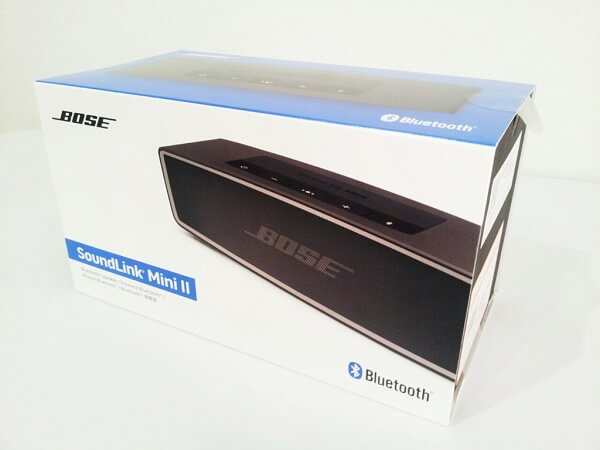
Basically, the SoundLink Mini is a portable speaker that can fit in the palm of your hand but doesn’t fail to amaze at the amount of bass and punch it can throw. It’s the second iteration of the Bose SoundLink Mini – occasionally named the Bose SoundLink Mini II – but it became the current and sole variant placed on sale soon after its release (the original cannot be found on the market anymore). Though there aren’t that many changes that were brought to the second version of the Bose SoundLink Mini Bluetooth speaker, the latest version ended up being very popular thanks to the addition of speakerphone capability.

Whether you don’t want to feel bound to a particular room in order to listen to music, your car stereo is busted or you simply need an easily transportable speaker to take with you wherever you may be going, the Bose SoundLink Mini Bluetooth speaker is one of the best choices you can make. With a reliable battery life, an unexpectedly powerful sound and wireless capability, it has pretty much everything you could ever wish for.

Pros:

  • Very powerful and high quality sound
  • Small and easy to transport or take without you
  • Compact and sturdy
  • Simple and sleek design

Cons:

  • Far from the cheapest on the market
  • Does not support near field communication (NFC) pairing
  • Doesn’t have an LCD display

Bose SoundLink Mini Bluetooth Speaker Design

Bose SoundLink Mini Bluetooth Speaker & Dock

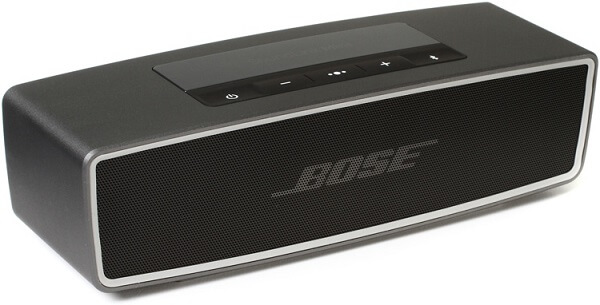
I won’t lie to you, my first reaction when seeing the Bose SoundLink Mini Bluetooth speaker wasn’t one of the greatest, and for a moment I wondered if I was looking at a recent device or some really outdated lone speaker. That’s mostly due to the front of the device – a perforated strip of aluminum that really resembles the one that my stereo had on its speakers… 15 years ago. I really, really wish the manufacturer had done something different with the front of the SoundLink mini speaker.

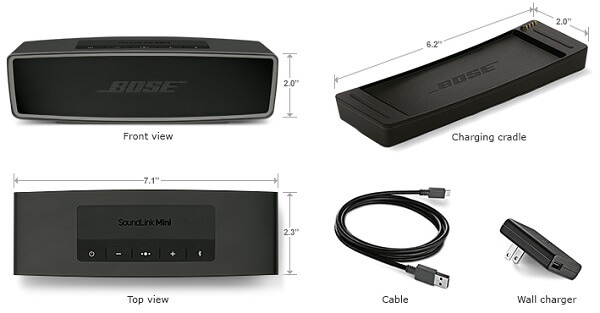
On the other hand, though, I can say that I understand the reasoning behind not employing a different design or softer material for covering the speaker’s drivers. This is supposed to be a portable speaker that you can just put in your camping bag and enjoy it when you’re there; it’s supposed to be sturdy. And that is certainly something that the Bluetooth speaker manages to pull off. The Bose SoundLink Mini Bluetooth speaker is amazingly compact, with a sound aluminum body and a very solid feel. It’s also unexpectedly heavy for its size too: at 2 x 7.1 x 2.3 inches it weighs 1.5 pounds which is really a bit of a shocker the first time you pick it up.

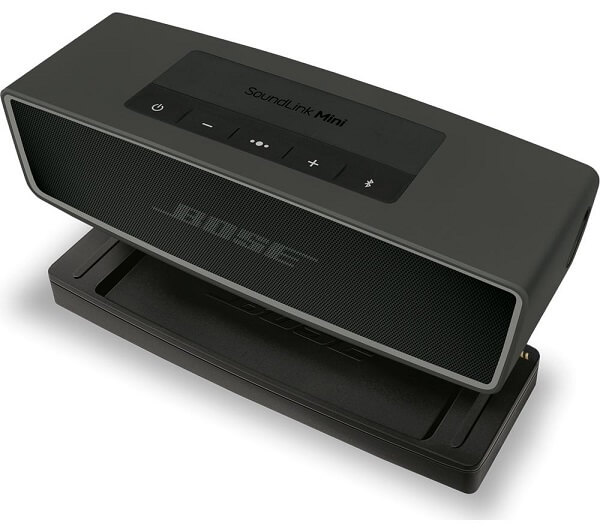
The sturdy and solid feel of the Bose SoundLink Mini Bluetooth speaker’s unibody is complimented by the button layout on the device’s top side. The entire area where the buttons are placed doesn’t leave any room for crevices on the sides, simply displaying the device’s logo in the very center and giving you access to 5 rubber-covered controls right below that. There is a power button, a Bluetooth button, the volume up and down controls, as well as a multifunction button. The last of the 5 handles playback and the speakerphone; for example, you can use it as a play/pause button, skip forward or backwards by 2 and 3 taps respectively, hold down on it to activate voice dial, answer or reject calls and even switch between calls.

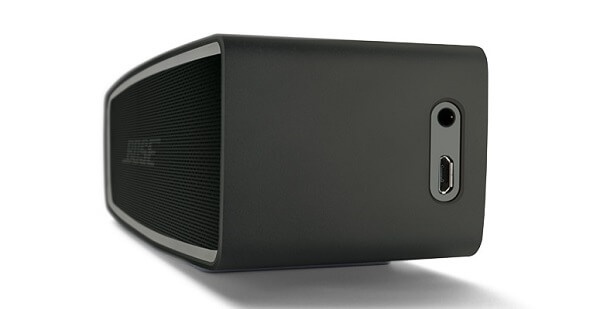
The right side of the speaker features 2 ports: a 3.5 jack input that you can use to connect any non-Bluetooth capable device to the speaker and a microUSB port that you can use as a secondary charging method. Sadly, the microUSB can’t be used to pair the speaker with various devices and can instead only be used as a charging port and connector for any kind of needed firmware update. The bottom of the device features the primary method of charging however. When connected to the charging cradle included in the box, the connectors enable charging via your nearest power socket.

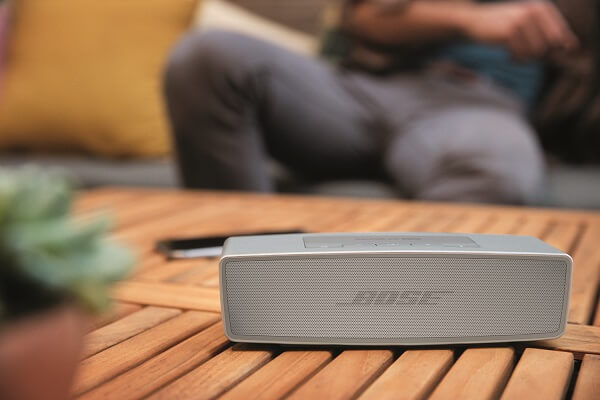
The way that the speaker was constructed suggests that you’re more likely to use this in your own home rather than anywhere else, like taking it with you on trips. Thanks to the charging cradle, you’re most likely to keep it somewhere mostly stationary, and switching its position only when you need to. Thanks to the simplistic and sleek design, you can probably place it nearly anywhere in your home and it’ll fit in just fine.

Bose SoundLink Mini Bluetooth Speaker Colors

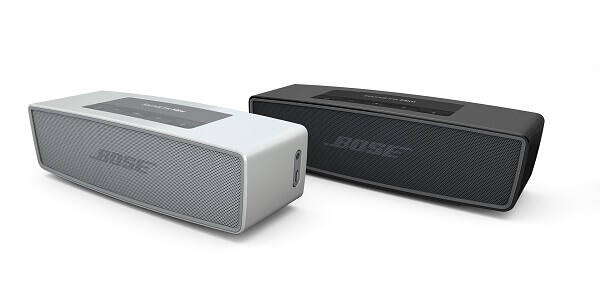
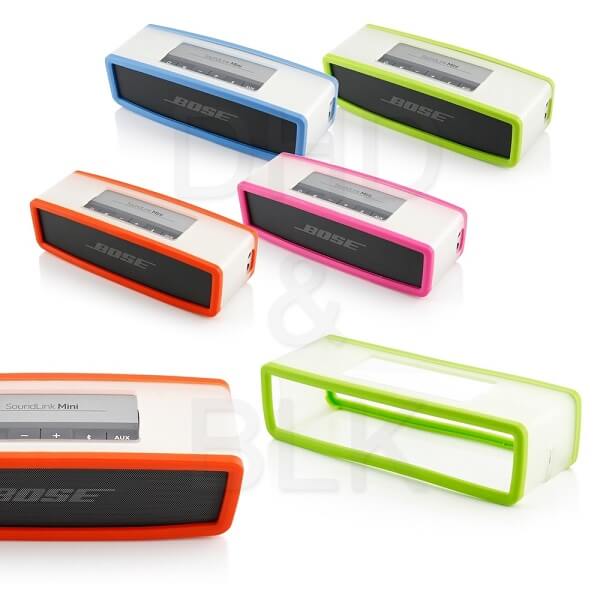
There are two color variations that you can purchase the Bose Soundlink Mini Bluetooth speaker in: Carbon and Pearl (basically black or white). However, given that the more fun and playful color variations are not being manufactured anymore, you can purchase a number of matching soft covers that will not only spike up the look of the speaker but also give it a touch of extra protection against external factors. The soft covers come in a multitude of color tones: blue, pink, red, gray, navy blue, energy green, deep red and charcoal black, thus sufficing for absolutely anyone’s tastes.

Bose SoundLink Mini Bluetooth Speaker Color Cases

Bose SoundLink Mini Bluetooth Speaker Features

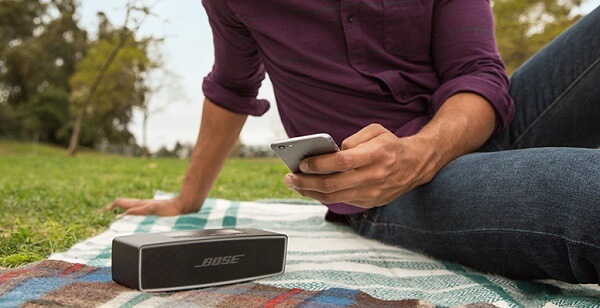
Even though on first look the Bose Soundlink Mini Bluetooth speakers are pretty straight forward, it’s necessary to elaborate on just how far its base functions really go. As long as a device is either Bluetooth capable or can be connected to the speaker via the 3.5 mm jack input, the Bose SoundLink Mini will act as a relay for any sound that’s made by the host. The range on the Bose SoundLink Bluetooth speaker is about 30 feet, meaning that you don’t necessarily have to carry your paired device with you wherever you go. Or, alternatively, you don’t have to carry the speaker either.

Bose SoundLink Mini Bluetooth Speaker microUSB

The Bose SoundLink Mini Bluetooth Speaker provides feedback through an automated voice system that’s meant to fill in for the absence of any kind of LCD display. The voice system notifies you of several things: starting with the battery level when you turn on the device and ending with the names of devices connected to the speakers. If there had been a way to read out the name of the song I’m listening to, I would’ve been completely sold on this as I tend to listen to a lot of random playlists and when I like something I have to go through an entire process of finding out what I just listened to.

There’s a fair number of pre-installed languages to select from if needed.

Bose SoundLink Mini Bluetooth Speaker Playback

Once you have a device paired with the SoundLink Mini Bluetooth speaker, you can control the music volume and controls from either of the two devices, giving you a fair amount of control without being subjected to too much hassle.

Bose SoundLink Mini Bluetooth Speaker Playback

You can pair up to 2 devices simultaneously: meaning both can be connected to the Bose SoundLink speaker and listen to them alternatively. The music won’t overlap but instead it will start playing off of the device you most recently used. Say if device A is already playing and you want to start using the speakers for device B, all you have to do is pause music playback on device A and turn it on for device B; the latter will start playing in the speakers instead.

You can pair up to 8 devices to the Bose SoundLink Mini Bluetooth mobile speaker without overriding any of the records kept on the device. Any time you come in range to the Bose SoundLink Mini Bluetooth speaker with a previously paired device, it will recognize your handheld automatically and allow you to start using it immediately. Whether we’re talking your smartphone, tablets or even Bluetooth capable laptops, the SoundLink Mini can handle it all.

Bose SoundLink Mini Bluetooth Speaker Wireless

Considering there’s no display on the speaker to let you know which device is currently connected to it, you need to make use of the Bluetooth button to find out. The name of the paired device will play through the speaker. Similarly, in order to connect a mobile device from the speaker’s recorded pairing list, you need to double tap the Bluetooth button then press it once to move through to the next device until you find the correct one.

If by any chance your 8 slots have already been filled with devices and you wish to connect a new one to the Bose SoundLink Mini Bluetooth Speaker, you have to press and hold the Bluetooth button for 10 seconds until the speakers notify you that the list has been cleared.

Bose SoundLink Mini Bluetooth Speaker Speakerphone

Thanks to the microphone that has been added to this second version of the Bose SoundLink Mini Bluetooth Speaker, you can now use it as a relay for your phone calls as well. While the multifunction button serves as your main aid for most of the call functionalities, it may take a while to get used to all the tapping and holding down combinations – considering each does something different.

There is a downside to using the SoundLink speaker for taking calls however; the reason behind that is the simple fact that you pretty much have to speak into the microphone that’s included in its body in order to be heard so the hands-free, wireless ordeal is a little defeated by that. On the bright side, however, the speaker is able to identify incoming callers when they’re recorded in your contacts so you’ll be notified prior to answering the call. This feature can be turned off by pressing the – and + buttons simultaneously until you hear a notification that says that the voice prompts are off.

Bose SoundLink Mini Bluetooth Speaker Setup & Performance

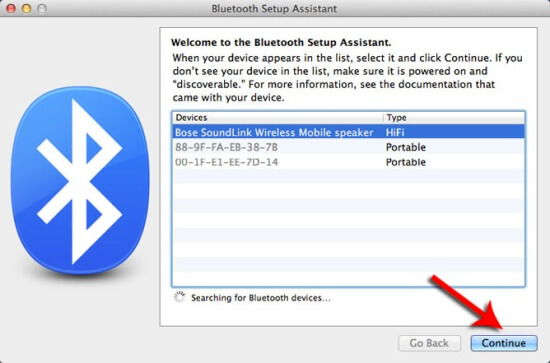
The setup process is very straight forward and doesn’t even require any application to be installed on your mobile phone or Bluetooth laptop. By simply turning on your Bose SoundLink Mini Bluetooth Speaker and turning on the Bluetooth on your phone, you can find the speaker and pair it to your smartphone; you will, in turn, be notified through the voice system that the devices have been paired.

Bose SoundLink Mini Bluetooth Speaker Setup

In terms of sound performance, the Bose SoundLink Mini Bluetooth Speaker is an undoubtedly powerful device, especially given its size and portability. The volume goes considerably high without any breaking or distortion. The bass and mid tones of the speaker are the strong point of the entire device, delivering a punchy and clear sound, with a lot of emphasis on detail. The treble isn’t particularly great, but overall the Bose SoundLink Mini Bluetooth Speaker performs well with a variety of music genres and will completely dwarf many competing models – if you can spare the extra cash for it at least.

Thanks to the passive radiators that are added in addition to the standard sound drivers, the low frequency sounds are enhanced a fair amount, thus allowing the speakers to provide an unexpected output of sound and volume, despite the small size of the SoundLink Mini. In comparison to the original Bose SoundLink Mini, not a lot has changed in terms of sound quality – the digital signal processing is mainly responsible of bringing out the best in the music you listen to; it’s not about an amazing and innovative set of hardware that’s miraculously packed inside the speaker, sadly.

Bose SoundLink Mini Bluetooth Speaker Battery

Bose SoundLink Mini Bluetooth Speaker Battery

The Bose SoundLink Mini Bluetooth Speaker contains a rechargeable battery that you can charge either via a wall socket or any USB device. The plastic charging dock that comes with the device is a nifty, nonintrusive peripheral that you can place your speaker in while you use it and either charge it at the same time or simply prevent battery usage. Without being connected to a power source, the Bose SoundLink Mini Bluetooth Speaker can last for up to 10 hours of playback time, which is a definitely improvement over the previous model which could only last up to 7. With even less worry of the device running out of juice while you’re on the road, you can really take the SoundLink Mini with you anywhere you go.

The charging cradle allows the speaker to be securely placed on top of it thanks to the pin connectors in the far right corner that keep it stable and secure. The user manual notifies the user that an increased volume will reduce the battery playback time. The device charges from 0 to 100% in roughly 4 hours if you’re not using the device in the meantime. There is also a battery saving feature that will automatically turn the device off after 30 minutes of inactivity in case you happen to forget it on.

Bose SoundLink Mini Bluetooth Speaker Verdict

Bose SoundLink Mini Bluetooth Speaker Packaging

The Bose SoundLink Mini Bluetooth Speaker is one of the most proficient and complete Bluetooth speaker you can find: with an amazing amount of power packed in the tiny box, you can enjoy your entire collection of music without being constricted to a pair of mobile phone speakers, unsatisfactory headphones or having to crank up your sound system’s volume loud enough for you to be able to hear it from a different room.

Even more so than that, you can event take the speakers with you wherever you go – 10 hours of playback time on a full charge is a lot more than one realizes. While it lacks the handier near field communication pairing that you may find in other competing models, the Bluetooth connectivity is particularly self-explanatory and really easy to use.

However, with unmistakable quality comes a higher price; and by all means, the Bose SoundLink Mini Bluetooth Speaker is not a couple of bucks more expensive. While you can get most wireless speakers for anywhere between $100 to $150, the SoundLink Mini is no less than $199. Depending on how much need you actually have for such a wireless speaker and how much you predict you’ll be using it, it falls onto you to decide if it’s worth paying that amount for it or not.

Image Source: 1, 2, 3, 4, 5, 6, 7, 8, 9, 10

Filed Under: Headlines Tagged With: Bose SoundLink Mini Bluetooth Speaker, Bose SoundLink Mini Bluetooth Speaker review, Bose SoundLink Mini Bluetooth Speakers, bose wireless speakers

New Smartwatch Released by Fossil

December 8, 2015 By Cristopher Hall Leave a Comment

The the new smartwatch released by Fossil will surely have a lot of success.

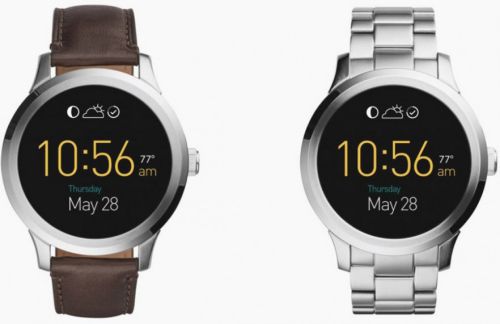
The new smartwatch released by Fossil comes in two versions: leather and stainless steel.

If you are wondering what new piece of Android Wear to get next, you should check out the new smartwatch released by Fossil. Named Fossil Q Founder, it already has two options that are available on the Google Play store.

While usually smartwatches come with a modern, high-tech look, the Fossil Q Founder actually looks so elegant you could wear it at a fancy dinner party. The watch was released on the market as the interest in Android Wear has recorded an important growth over the last year.

The intelligent watch comes in two versions. If you want to achieve a more elegant look, you can opt for the $275 watch with the classic leather strap. However, if you prefer stainless steel, you can choose the second option for $295. Both versions come with a smooth and round screen.

As for specifications, Fossil Q Founder has the Atom CPU from Intel, unlike other smartwatches which are powered by CPUs from Qualcomm. This makes it the latest technology for Android Wear up to this moment. It is expected to run quite smoothly, since it is equipped with 1GB RAM and 4GB of storage. Its screen has 1.5 inches and 240ppi, and its battery can last for 24 hours.

Furthermore, the smartwatch features a gyroscope, an accelerometer and ambient light. There is one downside to it though: the part of the screen resembling a flat tire. The problem is similar to the one the Moto 360 had, which was heavily criticised by users. However, it does not look as unpleasant on the Fossil Q Founder, and it shouldn’t stop you from choosing it. The model also lacks a heart-rate sensor which many sports fans find useful, but you can find the option on another smartwatch from Fossil, the Q Grant.

There is one other smartwatch powered by Intel. Produced by TAG Heuer, it comes at the painful price of $1,500. Overall, the Fossil Q Founder is best option on the market at the moment. The new smartwatch released by Fossil will surely be bought by many Android Wear enthusiasts, especially since the Christmas holidays are soon upon us and we will find ourselves in need of buying the perfect gift for our loved ones.

Image Source: 1
Filed Under: Headlines Tagged With: android wear, Fossil Q Founder, New Smartwatch Released by Fossil, new technology

Snowden’s Favorite Messaging App is Coming to Desktops

December 3, 2015 By Cristopher Hall Leave a Comment

Signal, Snowden's favorite messaging app is coming to desktops.

Apparently the safest messaging app will soon be available for desktops.

Cyber-security is a concerning matter in our days, since we tend to post all our personal information online. There has been recorded an increase in cyber-attacks. Furthermore, some social media platforms such as Telegram have been used by terrorists in the recent attack in Paris. As a result, people are trying to find other messaging apps to communicate instead of the classic ones like WhatsApp and Facebook Messenger. Open Whisper Systems has just announced that Edward Snowden’s favorite messaging app is coming to Desktops.

An expert who worked on the development of the application, Moxie Marlinspike, stated that the app named Signal will be available for Google Chrome as an extension. Signal will be able to sync the messages between the Android devices and the Desktops, and it links to your phone number. It is not available yet for Apple phones, but there are plans towards enabling a compatibility with these as well. The app also doesn’t support voice yet.

Signal is free to use for everyone, and has received very positive reviews regarding encryption. Edward Snowden himself has also praised it and declared that it is his favorite app for messaging. His past revelations have put the issue of surveillance in the spotlight and many people have growing concerns about their privacy. As a result, many new platforms and apps that promise safety from the prying eyes of either third party companies, governments or criminal organizations have appeared on the market.

It is important to mention that such apps that encrypt information are very difficult to be created. However, this is not the first messaging app which can encrypt messages and calls from Open Whisper Systems. Its predecessors, TextSecure and Redphone have both been transformed into Signal.

The mobile version of the application uses a special type of encryption for photos, messaging and voice calls: end-to-end. Not even the developer can access the calls or see the messages’ plain text, and that says a lot. Open Whisper Systems can only inspect the code of Signal, since it is open source. This technology also has the capability to identify potential software vendors which would make slight changes to the app in order to aid the surveillance programs of governments.

As Edward Snowden’s favorite messaging app is coming to Desktops, we can sleep a bit more relaxed knowing that our private lives will stay private.

Image Source: 1
Filed Under: Headlines Tagged With: Edward Snowden, Signal, Snowden's Favorite Messaging App is Coming to Desktops

Microsoft Surface Pro 4 Review – The Great Aspect of Hybrids

November 24, 2015 By Cristopher Hall 2 Comments

Microsoft Surface Pro 4 Overview

It’s already general knowledge what the Microsoft Surface Pro line of tablets is trying to achieve. While “innovative” is most likely an overstatement when attempting to describe what Microsoft did with the series, it still comes relatively close to that. Ever since its inception 3 years ago, the Microsoft Surface Pro attempted to bring something new while other tablets were focused on making things slimmer and better looking. Manufacturers believed that while a tablet was comfortable and easy to use for a series of activities, you would still have to switch to a laptop or full-fledged computer for a number of others. And because on-screen typing can only be so efficient, adding the possibility of using a keyboard and something that does what a mouse would do, except better, turned out to appeal to a great amount of people.

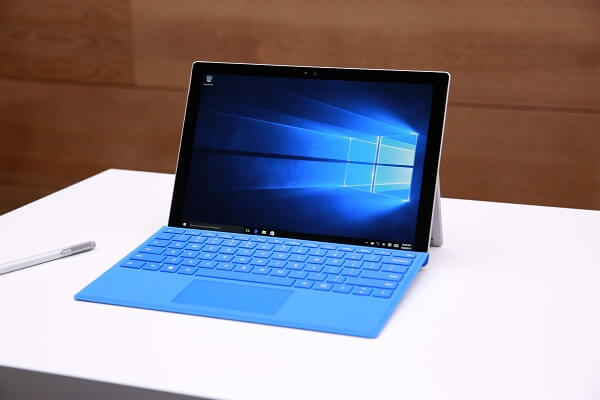
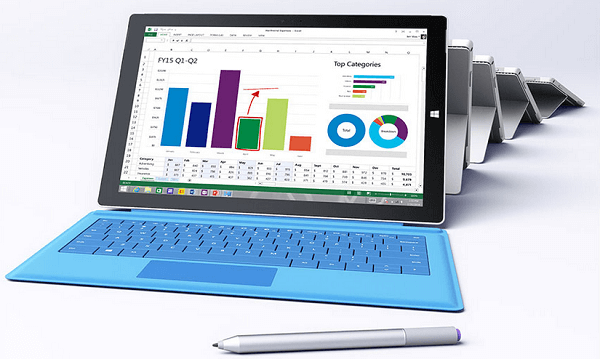
Thus the Microsoft Surface Pro 4 came to be – a highly useful hybrid that mixes the comfort of owning a tablet, with the utility of having a device that can handle your work just as well. But this time around, Microsoft made a point of focusing more on turning the tablet into an exquisite device than insisting on the hybrid aspect of it. And that is simply because it really feels like the Microsoft Surface Pro line of tablets has managed to nail it with the third iteration of it and now are just attempting to polish what they had already achieved with the Surface Pro 3.

Having been released less than 2 weeks ago, the Microsoft Surface Pro 4 has a lot to show for itself and you can be sure that you would be getting some of the latest components and a performance to match. But how can it appeal to people who are looking for just a tablet? Or otherwise – just looking for something that would replace their laptops?

Microsoft Surface Pro 4 Design

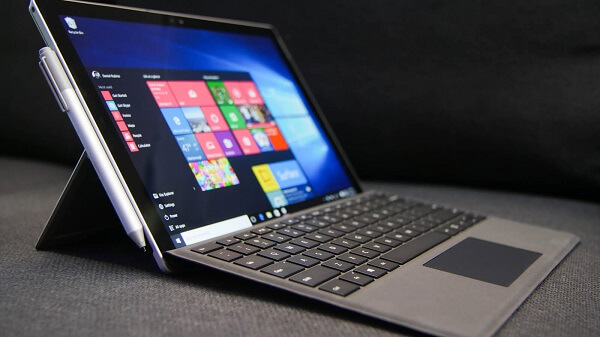
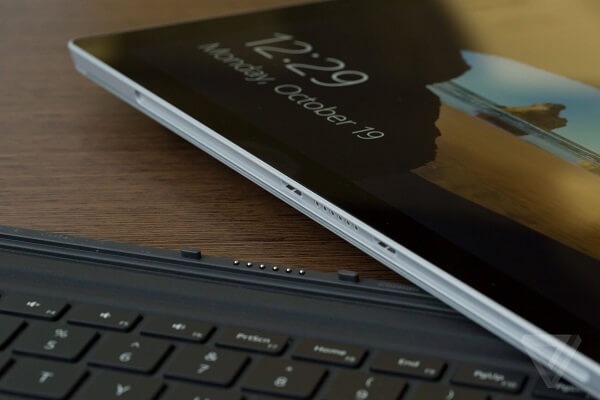
Microsoft Surface Pro 4 Type Cover and Stylus

Put the Microsoft Surface Pro 4 right next to its predecessor, the Surface Pro 3, and for a second you won’t see that big a difference. In accordance to the changes that we normally see on newer devices, the hybrid has lost some thickness and upgraded its screen size thanks to the reduction in size the bezel has gone through. Even when separated from its detachable keyboard, the Surface Pro 4 looks much sleeker and more elegant than its predecessor. Its overall dimensions of 292 x 201 x 8.45 mm are highly comparable to Surface Pro 3’s 292 x 201 x 9.1 mm but because of the new design choices the tablet just feels better thought out overall.

Surprisingly, especially given that the hardware packed in it is punching out more power than the predecessor, the Surface Pro 4 has also lost some weight – while not much, but it’s only a minimum of 766 grams in weight, having 32 grams less than its previous iteration; the larger versions (only larger in terms of hardware, not physically) score 786 grams in weight. However, as far as tablets are concerned, the Microsoft Surface Pro 4 will feel very large and hard to wield, at least for entertainment purposes, where the separate keyboard does not suffice as an excuse. Its primary method of usage seems to be more so oriented towards business and work, generally; however, making it a little more difficult to one-hand and use as an eBook reader or something to watch movies on when you’re relaxing in bed is a small price to pay when considering the extra juice you’ll find on it.

Microsoft Surface Pro 4 Bottom

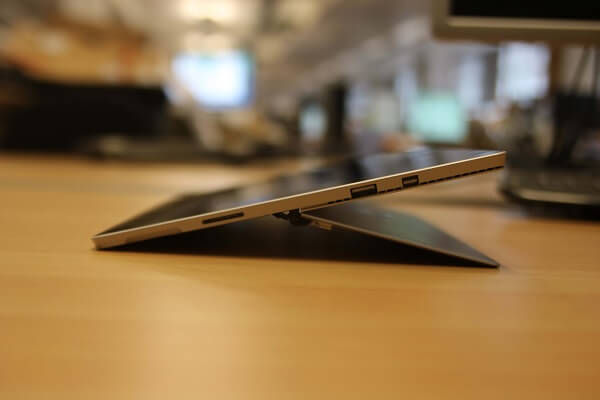
Design and button placement-wise, things haven’t changed that much. The face of the tablet features the front-facing camera at the top, while the rear is host to a bigger, better 8-megapixel camera. The area all around the edges however has seen some considerable change. For all the placements that will follow, we’ll consider that the normal orientation to hold the tablet in is landscape mode: the power button and volume rocker are placed at the top, on the left hand side, while the left side only hosts a 3.5 mm headphone jack, the rest of the area being left for the Surface Pro 4 Stylus to magnetically, but firmly attach to. On the opposite side, there are 3 ports – the full-fledged USB 3.0 port, a mini DisplayPort and the microSD card reader a little lower below. The bottom of the Microsoft Surface Pro 4 features several connector ports – here known as SurfaceConnectTM – that allows you to connect the detachable keyboard to the tablet.

Microsoft Surface Pro 4 Side

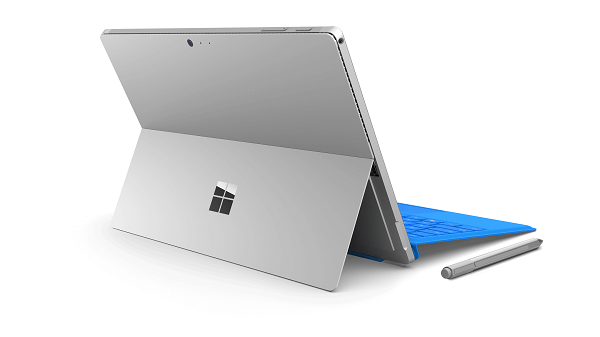
Microsoft Surface Pro 4 Back

The device features a unibody made of magnesium alloy and only comes in a silver finish at the moment. The back of the Microsoft Surface Pro 4 features a particularly sleek design – with the Microsoft Logo resting on the bottom half, seemingly made of black-tinted glass. This portion of the Surface Pro 4 can be parted from the rest of the body at the bottom, thus turning into the kickstand – capable of opening up to a maximum of more than 120 degrees giving you an ample choice of surfaces you can keep the Surface Pro 4 inclined on. Even though the hybrid is designed to be used mostly on flat surfaces, it will manage to remain stable even in your lap.

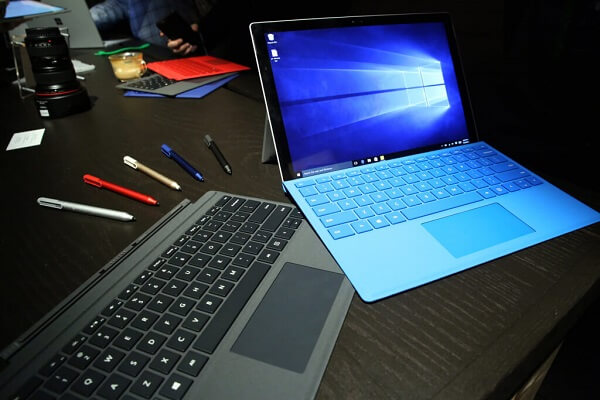
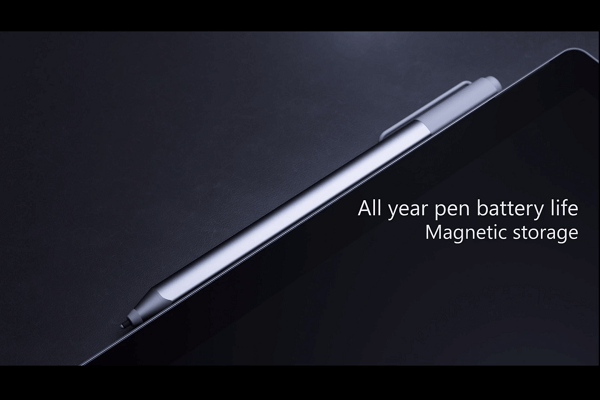
Microsoft Surface Pro 4 Stylus

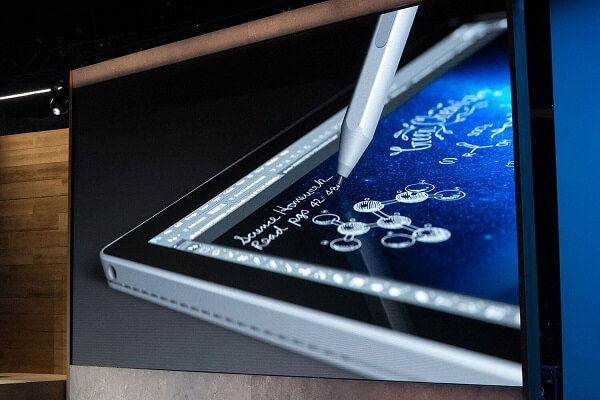
Even if visually the stylus that comes with this tablet-laptop hybrid hasn’t changed much, it comes with a lot of improvements over its predecessor. The fact that its default placement on the tablet is finally somewhere where it won’t complicate your life and that the magnetic attachment actually feels stable and sturdy this time around is only the beginning.

Microsoft Surface Pro 4 Stylus Attachment

However, while the tablet’s side is a good place to store the stylus when you’re using the keyboard, it wouldn’t be as advisable to keep it there when you’re carrying it in a bag or moving around with the tablet. In the lack of a physical clip to keep it in place, there’s a high chance the stylus will detach or get accidentally kicked off and get lost in the process. Clipping it into the Type Cover is a much better alternative to prevent the above from occurring.

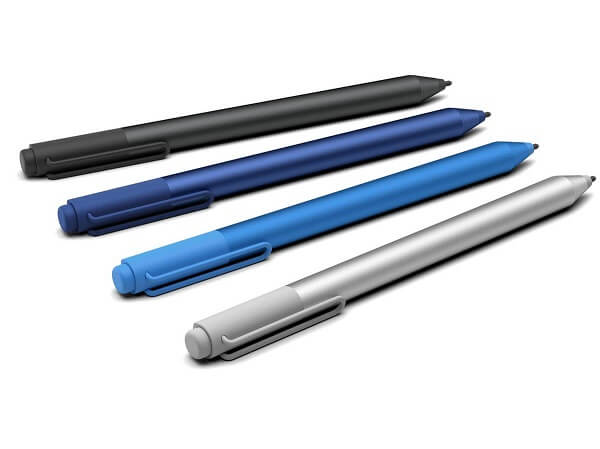
The stylus itself has gone through some improvements of its own: the first of which is the greatly increased sensitivity. Its pressure sensitivity has gone up to 1024 levels, which makes it mimic what a real pen would feel like on paper amazingly well. One part of it that stands out is the eraser that has forgotten the use of a button like it did in the case of the older Microsoft Surface Pro 3 and actually feels as real as an actual pencil eraser.

Microsoft Surface Pro 4 Stylus Models

You can still use the button on it to launch either Cortana or OneNote but the only real downside of it is the fact that it has a lifespan of only about a year. Considering that charging it is not possible, if you’re using it intensively for sketching and drawing on the tablet, do take into account the fact that you will have to purchase a replacement at a future point throughout the tablet’s lifetime.

While the stylus works great in any of the Windows-supported or inherent applications, it may prove to have a rather troublesome existence and utility for others; a lot of third party applications and games will prove to have a lot of difficulty in detecting the pen altogether.

Microsoft Surface Pro 4 Type Cover

Before we dive into praising the new and improved Type Cover to high heavens, we’ll get the bad parts out of the way. The most iconic of them all is the fact that the new detachable keyboard does not come in the basic price of the tablet. As a matter of fact, you will be forced to whip another $130 for it if you intend to truly use your Microsoft Surface Pro 4 as a replacement for your laptop.

Microsoft Surface Pro 4 Detachable Keyboard

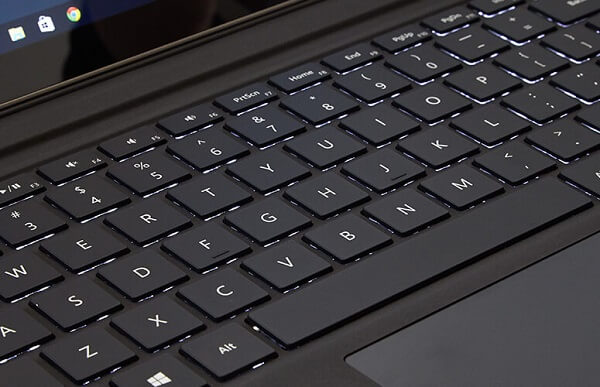
Alright, now that we got that out of the way, the new Type Cover brings the much needed fixes that its previous version asked for. It’s a great thing considering that it can very well be used with the Microsoft Surface Pro 3 just as well. The most important difference that you’ll immediately notice in this keyboard is the fact that the buttons have a considerable amount of room between each other now – no longer packed tightly together, making typing difficult due to it being tricky to distinguish between the keys.

The keys were redesigned to be raised but silent, with a very good responsiveness and travel – with the only downside that it might feel a little strange typing on it given that the keyboard won’t be resting directly on a flat surface and instead be elevated. While the Type Cover doesn’t seem that frail, it would be advisable to not hammer on the keyboard either so you don’t risk any damage to the platform.

One of the most appraised changes to the Microsoft Surface Pro 4 Type Cover is the track pad. Easily an underwhelming aspect on the previous variant of the keyboard, this time around it’s been considerably improved. Exceeding in smoothness thanks to the glass coating, much larger than its older brother and multi-touch capable (up to 5 fingers), the track pad will do a great job at replacing a mouse when you choose not to use the touch screen display.

Microsoft Surface Pro 4 Display

As previously mentioned, despite the Surface Pro 4’s unchanged dimensions, the display managed to grow from 12 inches to 12.3 – all thanks to the thinning of the now better looking bezel. However, if even that doesn’t seem like such a drastic change, the screen’s maximum resolution has also increased to a whopping 2,736 x 1,824; this counts as a great improvement over the 2,160 x 1,440 display we saw in the Surface Pro 3. This translates into an increase from the previous 216 ppi pixel density all the way to 267 pixels per inch.

Microsoft Surface Pro 4 Screen

The smoothness and vividness of the display is known as PixelSense – the Microsoft version of what Apple calls Retina Display – meaning that the screen shows no sign of pixelation or blocky-looking images. The Microsoft Surface Pro 4 Display excels when it comes to brightness and black levels – rewarding the user with a high contrast ratio – 940:1. The aspect ratio that the Surface Pro 4 brings to the table is 3:2 – not particularly amazing for enjoying media such as movies (which will end up letterboxed) but wide and tall enough for any type of internet navigation or work handling.

To only add a little insult to injury for those who hope to use the Microsoft Surface Pro 4 for entertainment, the color accuracy is not the best, but it hardly scores much lower than competition. While the grayscale reproduction is up there with the best laptops and hybrids on the market, color accuracy scores relatively low – another downside for watching movies for example.

Microsoft Surface Pro 4 Specifications & Customization

Given its hybrid status, the Microsoft Surface Pro 4 packs some hardware that you are not very likely to find in most other classic tablets. From that perspective, you can say that you would be getting your money’s worth. As a laptop replacement, it’s natural for it to come with a high level of hardware customization that will give you the opportunity to nail the perfect setup for you in terms of processor, RAM or hard disk size.

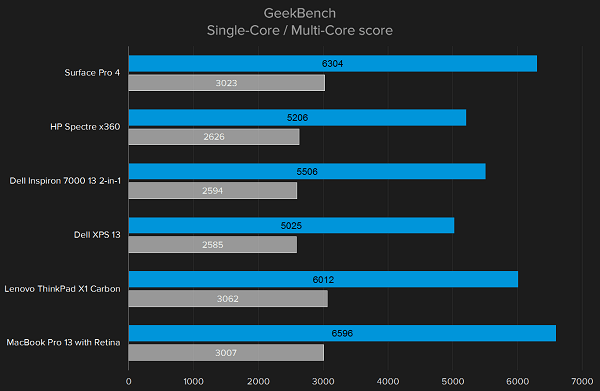
Microsoft Surface Pro 4 Benchmarks

The classic, low end rig that the Surface Pro 4 will come with consists of an Intel Core m3 processor, no less than 4 GB of RAM memory and a storage size of 128 GB.

I wouldn’t call the Intel Core m3 CPU underwhelming or downright bad, but instead will choose to refrain to stating that there’s a lot of room for improvement. While benchmarks would suggest that the Intel Core m3 manages to exceed the performance of the Intel Core i5 in terms of GPU Clock Speed for example, it would be a far-fetched act to say that it’s better. However, that being said – in realistic terms you’ll find the Intel Core m3-6Y30 processor to handle itself pretty well in most activities you choose to undergo. Any type of work-related activity won’t cringe or lag at all, faring well with multitasking by all means. The Surface Pro 4 is meant to replace a laptop and you can be sure that it will hold up to its promise

While the 4 GB of RAM may seem like too little on paper, it’s hardly true: unless you’re planning to run extremely demanding applications such as video editors or the most recent games you can find on the app store, 4 gigabytes of memory should suffice for your system’s needs as well as anything else that concerns your work or entertainment. Nevertheless, do keep in mind that this is the lowest amount you are able to get when you purchase the hybrid.

The base model also comes with Intel HD graphics 515 – the integrated graphics processing unit is inherent to the Skylake generation of Core m-series processors. It is not one of the newest pieces of technology, only managing to come close to older GPUs such as the AMD Radeon HD 6730M or the nVidia NVS 5400M. Because of that, coupled with the fact that it is after all just an integrated GPU, you won’t get outstanding graphic performance out of the Microsoft Surface Pro 4.

While the base model only offers a default amount of 128 GB of storage space in form of solid state drive (SSD), you can naturally improve that number by referring to the microSD slot available on the tablet’s side. However, you will only be able to use the card for storing data and not much else.

Luckily, the Microsoft website offers a wide range of customization you can bring to your own Microsoft Surface Pro 4. There is a series of setups you can opt for when purchasing the hybrid, thanks to the compatibility offered by the components. While the Intel Core M processor can only handle 4 GB of RAM and a 128 GB SSD hard drive, the Intel Core i5 variant of the Surface Pro 4 can take up to 16 GB of RAM. Lastly, the high end Intel Core i7 Processor can go up to 256 GB in storage space for the 8 GB of RAM and an amazing 1 TB for the 16 GB version.
Considering that the cameras on the hybrid are by far not its strongest point, we will just limit the review to mentioning that the front facing camera is a 5 megapixel HD one – not an outstanding piece of hardware, but surely one that will oblige for your video conferencing needs when your job asks for it. The rear camera, scoring 8 megapixels, does at least feature autofocus and a potential of up to 1080p HD video recording at 30 frames per second.

Microsoft Surface Pro 4 OS – Windows 10

Users rejoice for the blight of Windows 8.1 has lifted. While I would admit the harshness of that bold statement, it’s incontrovertible that the previous version of Windows presented a great number of aspects that were either unsatisfactory or downright frustrating; maybe less so when it came to smartphones and tablets. Nevertheless, the Microsoft Surface Pro 4 comes with the new and highly improved Windows 10 Pro version, including a great amount of features such as Cortana. Purchasing the Surface Pro 4 will also provide you with a free 30 day long Office trial, afterwards requiring a subscription or full program purchase in order to continue using it.
Microsoft Surface Pro 4 Operating System

The tablet, or in this case hybrid version of the latest Windows 10 operating system fells almost the same on the Microsoft Surface Pro 4. However, at a closer inspection you realise that there are many aspects where this version of the Windows 10 that spell handheld smart device. once of them is the fact that there is a number of applications that you cannot use unless you download them from the Windows store (for example most social media). Regardless, the operating system feels as sturdy as it does on desktops and even gives you a start button to work with as well as the exact same intuitive user interface you can find on any Windows 10 desktop.

The Start menu displays a list of commonly used or default Windows 10 applications and gives you a high level of customizability. You can drag in app icons in order to make them more accessible, create and rename app groups and gain access to the most useful shortcuts to a number of services such as News, the Xbox Live services, News and so on. The system runs on the Microsoft Surface Pro 4 smoothly and unhindered by bloatware of any kind.

Microsoft Surface Pro 4 Battery & Verdict

While the Microsoft website advertises the Surface Pro 4 battery to last to up to 9 hours of video playback, things are not that plain and simple. And unfortunately not that true either; the battery seems to drain a lot faster from strenuous activities such as video watching, especially when the brightness is set on default and above. Furthermore, there’s a distinct decrease in battery life with a series of factors such as keeping the device powered on for a long time; if you use the hybrid for watching videos while it’s plugged in to charge for example, not only that it will be unhealthy for the device on the long run, but charging will be slow and ineffective and you will risk some degree of overheating – in turn associated with slow performance. To wrap up though, the Microsoft Surface Pro 4 will most likely last you through the day without needing charging with a mild usage – working, web browsing, sending e-mails and so on.

Microsoft Surface Pro 4 Preview

As a finishing note to our Microsoft Surface Pro 4 review, I think we can agree that the Microsoft Surface Pro 4 can indeed replace your laptop if, however, you use it for work-inclined types of activity. Gaming for example will not be the most enjoyable of experiences, especially when you try to take it at a higher level. Using the Surface Pro 4 as a medium for your entertainment works out well enough, if for a few hindrances such as the tablet being hard to hold with just one hand. Otherwise, with the improvements that were brought to the Type Cover and the Stylus, together with the implementation of the Windows 10 operating system, the Microsoft Surface Pro 4 is a great addition to the hybrid class, if not one of the best. However, as a downright considerable downside, the price you would have to pay to have a highly operable hybrid is very high – at times making you wonder if you shouldn’t just spend less and stick to either a laptop or a tablet.

You can purchase the low end Surface Pro 4 configuration for $899, while the highest specifications available for the system will take you up to a shocking $2,699 – which scores higher than most high-end, professional laptops.

 Image Source: 1, 2, 3, 4, 5, 6, 7, 8, 9, 10, 11, 12

Filed Under: Headlines Tagged With: microsoft surface pro 4, surface pro 4 laptop, surface pro 4 review, surface pro 4 tablet, surface pro hybrid

  • « Previous Page
  • 1
  • …
  • 14
  • 15
  • 16
  • 17
  • 18
  • …
  • 38
  • Next Page »

Subscribe to Blog via Email

Enter your email address to subscribe to this blog and receive notifications of new posts by email.

Join 11 other subscribers

Recent Articles

police handcuffs man

German Man Probed In Poisoning That Killed 21 Employees Since 2000

June 29, 2018 By Kenneth Scott Leave a Comment

Chicken wings bar

Intoxicated South Carolina Man Punches Waitress Who Refused to Serve Him Alcohol

June 29, 2018 By Karen Jackson Leave a Comment

gaming

New Zealand gamer Who Flew Halfway Across The World for Virginia Teen Gets Shots By Her Mother

June 28, 2018 By Cristopher Hall Leave a Comment

party

Former Virginia Tech Freshman Sentenced to 50 Years in Prison for Stabbing a Girl to Death

June 28, 2018 By Roxanne Briean Leave a Comment

bonfire

British Couple Sentenced to Life in Prison for Torturing and Murdering French Nanny

June 27, 2018 By Deborah Campbell Leave a Comment

pay phone

Texas Father of Girl Disappeared in the 80s Ignored by Authorities

June 26, 2018 By Cristopher Hall Leave a Comment

bottled water

San Francisco Woman Threatened to Call Police on Girl Who Sold Ice Water for Disneyland Trip

June 25, 2018 By Roxanne Briean Leave a Comment

Maplewood Park

Missouri Man Robbed by Date and Accomplice in Park

June 22, 2018 By Nancy Young Leave a Comment

coding

New York Man Sentenced in Cyberstalking Former Girlfriend, Mailing Drugs to Her Dorm

June 22, 2018 By Deborah Campbell Leave a Comment

headphones

Bose Poised to Launch Sleepbuds, In-Ear Headphones That Help You Sleep

June 21, 2018 By Nancy Young Leave a Comment

Police light

Intoxicated Female Driver in Custody for Pulling Arresting Officer by the Hair

June 21, 2018 By Kenneth Scott Leave a Comment

kitchen

Restaurant Manager Arrested and Charged in Shooting Death of Co-Worker over Negative Yelp Reviews

June 20, 2018 By Karen Jackson Leave a Comment

plastic container

Pennsylvania Couple Charged in Violent Death of Infant Discovered Buried in Cat Litter

June 19, 2018 By Cristopher Hall Leave a Comment

tailpipe

Minnesota Teen Gets Head Stuck In Oversized Tailpipe Winstock Music Festival

June 18, 2018 By Karen Jackson Leave a Comment

Pages

  • About Us
  • Contact us
  • Privacy Policy
  • Privacy Policy GDPR
  • Staff
  • Terms and Conditions

Recent Posts

  • German Man Probed In Poisoning That Killed 21 Employees Since 2000 June 29, 2018
  • Intoxicated South Carolina Man Punches Waitress Who Refused to Serve Him Alcohol June 29, 2018
  • New Zealand gamer Who Flew Halfway Across The World for Virginia Teen Gets Shots By Her Mother June 28, 2018
  • Former Virginia Tech Freshman Sentenced to 50 Years in Prison for Stabbing a Girl to Death June 28, 2018
  • British Couple Sentenced to Life in Prison for Torturing and Murdering French Nanny June 27, 2018
  • Texas Father of Girl Disappeared in the 80s Ignored by Authorities June 26, 2018
  • San Francisco Woman Threatened to Call Police on Girl Who Sold Ice Water for Disneyland Trip June 25, 2018

Categories

  • Business
  • Entertainment
  • Finance
  • Headlines
  • Health
  • Life
  • Nature
  • Science
  • Sports
  • Tech & Science
  • Travel
  • Uncategorized
  • United States
  • World

Copyright © 2026 ArgyllFreePress.com
About · Privacy Policy · Terms of Use · Contact