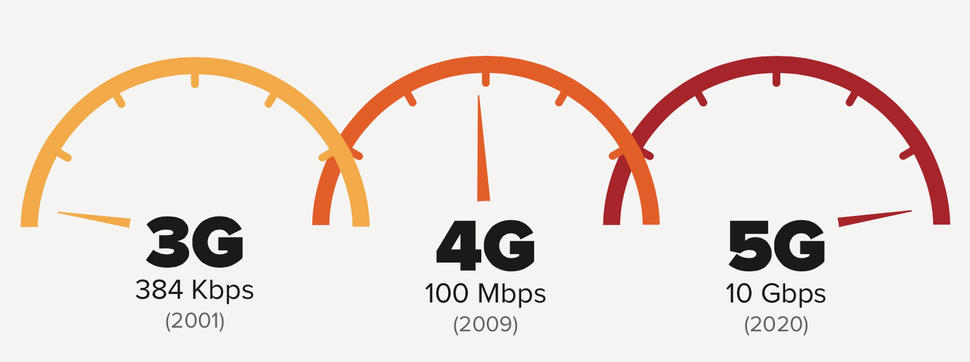
Fabled to be capable of being 10 to 100 times faster than 4G, the new type of network seems to have caught the eyes of phone carriers as AT&T begins 5G field testing this year. This doesn’t mean that 5G will actually become a reality this year too, as technology needs to pick up on the new type of data connection too.
However, it could mean that this is the beginning to carriers starting to work on their 5G network coverages and see how the new generation of super-fast wireless technology fares.
However, to no surprise, AT&T seems to be just ahead of the curve the tiniest bit as it proudly released a 5G roadmap recently, displaying a lot of information regarding the patented technologies such as network function virtualization, millimeter waves and software-defined networking that the 5G network would be reliant on. It is the second carrier to officially announce its 5G-related plans, right next to Verizon.
The speeds that the 5G network aim for may sound unfathomable to some; especially since you wouldn’t start by measuring them in megabits per second, but in gigabits per second. Which is quite something given that not everyone is getting that on their optic fiber internet connections at home yet.
This means that at such speeds you would download an HD movie in mere seconds and the time a video starts streaming after you hit the play button to be somewhere as low as 5 milliseconds. This is a very much welcomed innovation for mobile devices as statistics show that over 60% of the network traffic recorded in 2015 was achieved via videos.
And now as we move into the age of virtual reality and devices more performant than ever before, the network technology needs to follow suit as specialists expect a large increase in network traffic once again. And the mere way that 5G is built makes it a lot more efficient because it supports multiple radio interfaces.
While AT&T wishes to partner with Ericsson and Intel and try to push 5G solutions as early as the second quarter of 2016, this is not a feasible ambition for regular users and may just be put in place for internal use only. A more realistic plan is the one that Verizon describes: along with the combined efforts of Alcatel-Lucent, Cisco, Ericsson, Nokia, Qualcomm and Samsung, the company plans for the technology to be available to consumers no sooner than 2020.
No matter how much wishful thinking is at work here, an entire new type of network will mostly likely take a long time to implement all over the United States.
Image Source: 1