Argyll Free Press

Growing News Network

Monday, May 4, 2026
Log in
  • Business
  • Finance
  • Sports
  • Tech & Science
    • HP Envy 4500 Review
    • LG Optimus 170 Review
    • iPod Touch 6th Generation Review
    • HTC One M8 Accessories Set-up
    • Surrealist Games You Must Play
    • Hisense Sero 8 Review
    • Dell Latitude e7440 Review
    • HP Laserjet 1536dnf mfp Review
    • Garmin Fenix 2 Review
    • Skype Vs Viber
    • Best Video Conferencing Software
    • Sony mdr 1r Headphones Review
    • Canon Rebel t3i Review
    • Sennheiser Momentum 2-0 Review
  • Travel
  • Headlines
  • Health
  • United States

10 Great Galaxy Note 4 Accessories

February 21, 2015 By Nancy Young Leave a Comment

The best Samsung Galaxy Note 4 accessories are the ones that add more productivity and value to the device without being very expensive and making it bulkier and harder to use. We’ve made a list of 10 great Galaxy Note 4 accessories after we’ve used the device for some time at work, on the road and at home.

1. Samsung Galaxy Gear Fit
samsung-galaxy-gear-fit

Image source: clove.co.uk

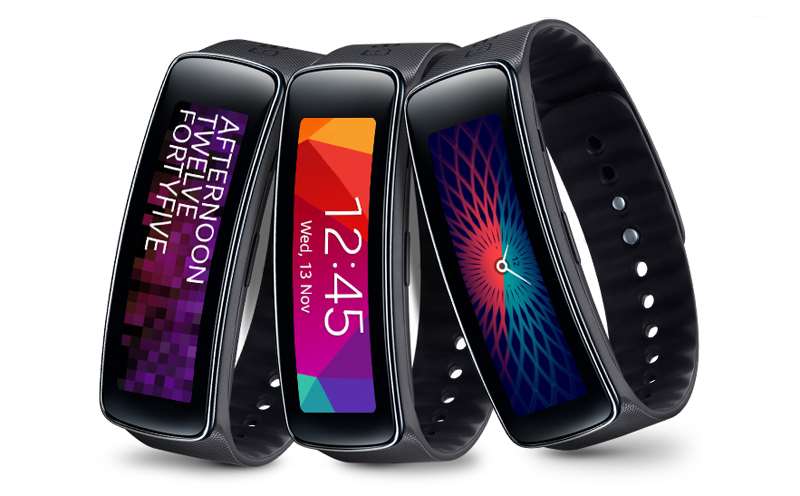
The Galaxy Gear Fit is the slimmest watch of the Galaxy Gear series. The smartwatch allows the user to track the heart rate and quickly react to notifications. You can customize the look of the Galaxy Gear Fit, which makes it more personalized. The Galaxy Gear Fit paired with the Galaxy Note 4 will help you with your fitness goals and aid you in losing some weight.

Because the device is a year old, you will probably be able to find all sorts of discounts for it.

Pros

– Dustproof and waterproof

– It measures hear rate

– Give real time coaching

– Very light

– Works with numerous Samsung devices

Cons

– The orientation of the display is a bit limiting

– Past a certain depth, the device is not waterproof

– Not shockproof

– Screen is a tad sensitive and it automatically turns on by accident

– Short battery life

Price: $159.95

2. Targus Universal Foldable Keyboard

targus-universal-foldable-keyboard

Image source: gottabemobile.com

Targus makes a great universal keyboard designed to work with Android devices. The foldable keyboard also works with the Galaxy Note 4. If you ever need to use your device as a laptop, the keyboard will allow you to do so. The Targus keyboard is a foldable full sized keyboard and a must have accessory for all business executives, travelers and writers.

Pros

– Good brand

– Foldable

– Affordable

– No need for batteries

– The case can be used as a stand

Cons

– You may need to buy another stand

– A power pack may be needed to charge the keyboard on the go

– Limited options of color

– Devices that run Android 3.1 or earlier won’t work with the keyboard

– You may experience issues when charging the keyboard

Price: $35.81

3. Samsung HM1300 Bluetooth Headset

samsung-hm1300

Image source: aliimg.com

The Samsung HM1300 Bluetooth headset has a battery life of 8 hours which makes it great to use with the Galaxy Note 4, especially for people using their phone for business travels and calls. The headset also offers a standby time of 300 hours. Its design is very attractive and comes with three ear tips. This device is a great choice if you want a great affordable Samsung headset.

Pros

– Clean design

– Comes in six different colors

– You can use it with more devices

– Very light

– Great brand

Cons

– No noise reduction

– No voice commands

– Calls sometimes sound echo-y

– Audio may seem a bit quiet

– Ear piece holder may break

Price: $16.99

4. i-Blason Slim Leather Wallet

i-Blason-samsung-galaxy-note-4-leather-book-folio-wallet-case

Image source: i-blason.com

The size of the Galaxy Note 4 makes a lot of people use wallet-style cases to protect it. This case lets you store all your credit cards and ID inside it. The wallet-style case also turns into a stand you can use for video conferences. This case is perfect if you want a great all-in-one product for your Galaxy Note 4.

Pros

– The leather is vegan

– Great storage

– Also works as a stand

– Looks very professional and well-polished

– Affordable

Cons

– This sort of leather sometimes cracks or peels

– Won’t work with previous Galaxy Note smartphones

Price: $16.99

5. Jabra DRIVE In-Car Speakerphone
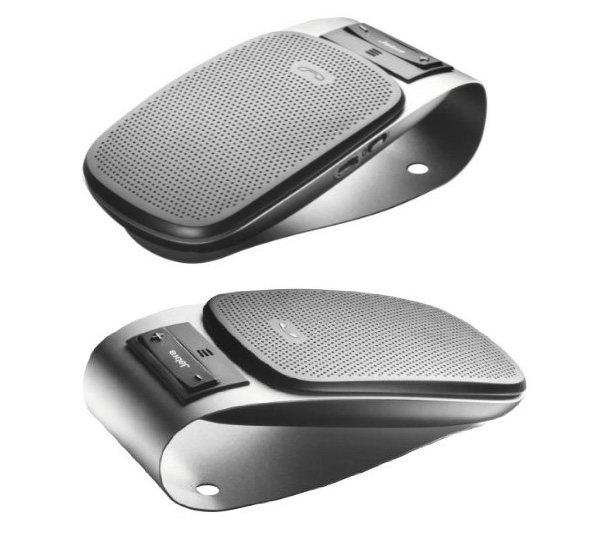
jabra-drive

Image source: hitechreview.com

Even though Jabra isn’t exactly a household name, this Bluetooth car speakerphone is an excellent buy because of its great features. It allows you to connect it to multiple devices which is ideal for people who have more than one smartphones. This is a great accessory if you spend a lot of time inside your car.

Pros

– Comes in different colors

– It has noise and echo canceling features

– Supports connection from multiple Bluetooth devices

– Automatic volume adjustment and pairing

– Allows you to get GPS directions without having to use your hands

– It can stream music

Cons

– Battery life depends on how you use it

– Automatically goes to sleep after 10 minutes

– You may face issues with auto-connectivity

– The microphone isn’t very sensitive

– You may have issues with the quality of calls

Price: $44.00

6. Sony MDR ZX550BN Bluetooth Headphones

sony-headphones

Image source: cloudfront.net

These headphones from Sony are perfect for frequent flyers as they have noise cancellation. On top of this, they also connect via Bluetooth so you won’t have to worry about annoying wires that get tangled in your purse or briefcase.

Pros

– Noise cancellation

– Great battery life

– Very light

– 30mm drivers

– Very comfortable

Cons

– They don’t come in a great variety of colors

– They don’t come with wall charger, only a USB cable

– Some may find them a bit uncomfortable

– Shorter battery life when noise cancellation is activated

– You may face issues when pairing them to certain devices

Price: $128.00

7. Pioneer Samsung Galaxy Note 4 Tempered Glass
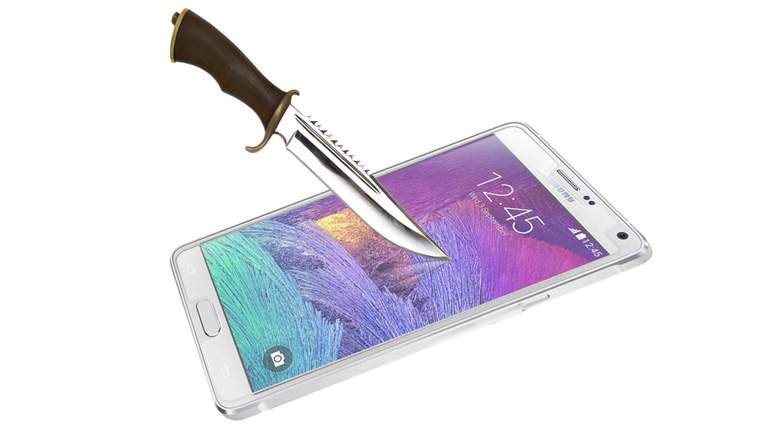
pioneer-tempered-glass

Image source: wordpress.com

Of course you can use a plastic, stick-on screen protector on your Samsung Galaxy Note 4 but they only work to protect your device against small scratches and to keep grease off of the screen. A tempered glass screen protector works great against serious impacts. If you frequently use your device while you’re on a motorcycle, bike, scooter or ATV, this screen protector adds a great level of impact protection in case of an accident.

Pros

– Tempered glass

– Anti-oil coating

– Affordable

– Comes with a cleaning cloth

– 0.3 mm thick

Cons

– Can interfere with cases

– More expensive than other screen protectors

– Doesn’t cover all of the screen

Price: $9.99

8. Samsung S Pen
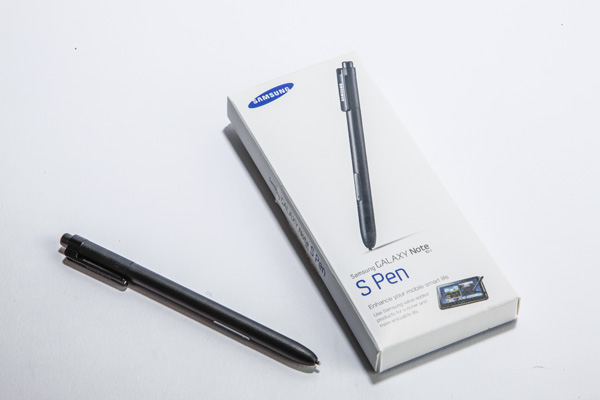
samsung-s-pen

Image source: trustedreviews.com

The S Pen is a great accessory for your Galaxy Note 4 and is partially responsible for making the device so much fun to use. If you lose the S Pen you are going to miss out on numerous awesome features. You can simply buy another S Pen in case something like this happens to you. While this is certainly not a very exciting accessory to have for your Note 4, it’s a very useful one.

Pros

– Especially designed for the Note 4

– Easy to use

– Enables shortcuts

– Comes with a kickstand

– Comfortable to hold

Cons

– Limited colors

– Easy to lose

– Other styli are less expensive

Price: $16.01

9. Spigen Case with Screen Protector
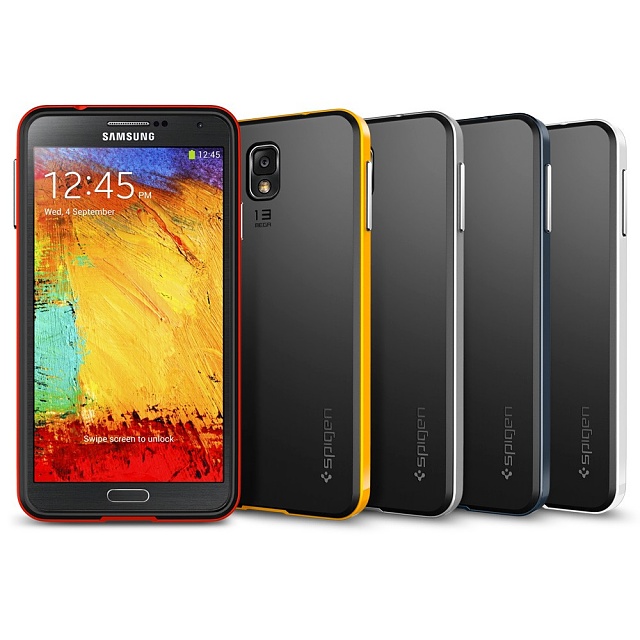
spigen-case-screen-protector

Image source: androidcentral.com

Spigen offers accessories that are well balanced between functionality, design and price. The Galaxy Note 4 case helps to protect the device against scratches and drops, has a great design and is very affordable. The case doesn’t add bulkiness to the device, so you will be able to hold it into your pocket comfortably. After you spend a lot of money on a great phone, you don’t want to go bankrupt after buying a case for it.

Pros

– Made from durable TPU material

– Works great against shocks

– Easy to grip

– Eco-friendly packaging

– Great screen protector

Cons

– It isn’t waterproof

– May seem a little too light

– It’s not built by Samsung

Price: $10.99

10. Verus Heavy Drop Protection Case

Verus-Heavy-Drop-Protection-Case

Image source: wiknix.com

This company makes great smartphone cases, and this Galaxy Note 4 is an example of what Verus is capable of doing. This case has an attractive hourglass shape that also makes the device easier to grip. It’s especially useful for people who are somewhat clumsy.

Pros

– Affordable

– Comes in five colors

– Slim design

– Easy to grip

– Easy to install

Cons

– It’s not waterproof

– May interfere with the fingerprint scanner

– Covers the microphone

Price: $15.99

Filed Under: Tech & Science Tagged With: best galaxy note 4 accessories, best note 4 accessories, galaxy note 4, galaxy note 4 accessories, galaxy note 4 screen protectors, great galaxy note 4 accessories, great note 4 accessories, note 4, note 4 accessories, samsung, samsung galaxy note 4, samsung galaxy note 4 cases

Is Apple About To Design Its Own Self Drive Car?

February 19, 2015 By Nancy Young Leave a Comment

apple_logo

A new rumour is creating waves in the technology world, that raises a big question: Is Apple about to design its own self drive car?

Apple is aiming not only to change the industry in the tech and cell phones domain but also in the automobile one. The company’s ambitions when it comes to cars is far beyond dominating dashboards with GPS and multimedia, as it is rumoured that the technology mogul is preparing a self driving electric car under the code name Titan.

The car project is supposed to be rivaling not only the auto industry but also Google, who apparently is also working on developing self driving automobiles. Last week there have been reports hinting that Apple has been circling around automakers looking for engineers and R&D specialists, for what was rumored at the time, as an advanced interpretation of CarPlay.

The CEO of Apple, Tim Cook seems to have given the green light to the project Titan about a year ago and Steve Zadesky the vice president of the company would be in charge of the plan. Cook reportedly gathered a team of 1,000 people lead by Zadesky who before joining Apple in 1999, worked at Ford, and has serious knowledge of mechanical design as was involved in the creation of the iPod and iPhone.

He was given freedom to choose his team from people in the firm and as well from outside of Apple. Many persons from the industrial design team are believed to be former designers who have previously worked for European car makers.

One of the persons Apple reportedly has added to its team is the former president and CEO of Mercedes-Benz on Research and Development, Johann Jungwirth. Also, is has been speculated that Apple has met with several contract manufacturers for luxury vehicles like Austrian Magna Steyr.

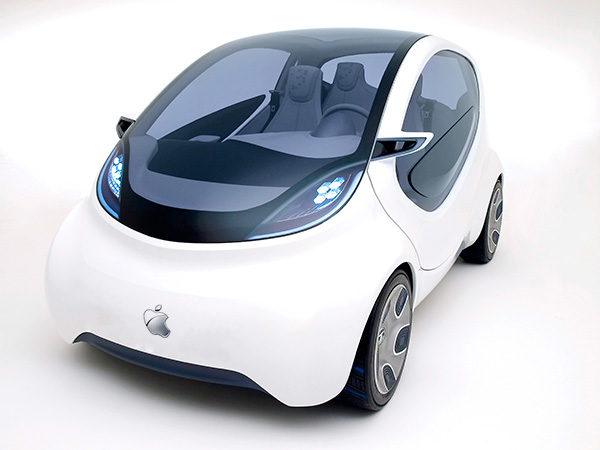
apple-car-concept

However, while Apple seems to be hunting for experts from the veterans of the car industry, the company has nothing against working along side with them. Apple is not looking for much help from the automobile makers which could suggest that they have ruled out the big names of the car industry and have gone directly to their own suppliers.

Rumours have stated that previous attempts by Google to reach the car manufacturers have been refused as the company’s demands made the producers hesitant and it appears that Google has also independently approached  the suppliers regarding the development of their self driving car.

It is assumed that Apple’s Titan project will be developed  at a location close to their current base in Cupertino. According to sources, there are being conducted studies on metals, robotics and other type of materials that could be used for automobile manufacturing.

Their main area of interest is the creation of vehicles that could offer the possibility of driving by themselves, as fully automated cars would be a technological evolution. The existing car manufacturers are easing into the development of autonomous cars by releasing first  releasing partially self driving cars. On the other hand, Apple reportedly has a great interest in all the technological means possible that would  allow a car to evolve  to the point of autonomous driving.

So far, Apple hasn’t given any comments regarding the self driving car rumours and haven’t responded to requests asking for more information on the matter.

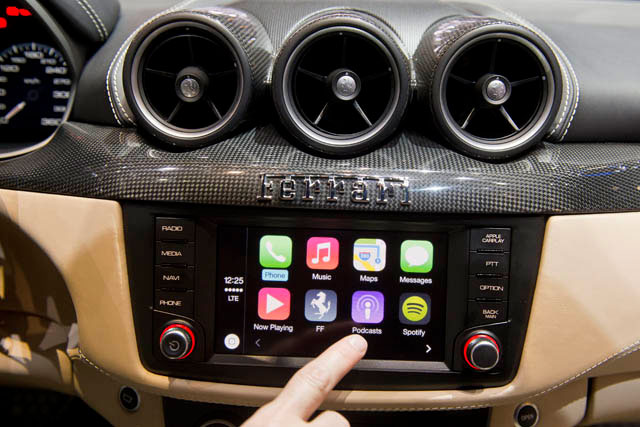
Apple-CarPlay

Actually, Apple has many ways of expanding its automobile field without having to actually produce an actual car. There is no doubt that the key in designing an autonomous car and making it function is software. For example, Ford is about to develop a system that is capable of recognising road signs and markings, Apple’s purpose could be of offering a solution that could be licensed by other companies.

The physical design of the Apple car, is supposedly of a car looking like a minivan, possibly looking like the same vehicle that was seen in the wild earlier this year, designed with a lot of cameras. At the time of appearance, there had been several opinions divided into whether that was an actual self driving prototype of was just taking panoramic street level pictures to be used in Apple Maps.

Electric cars are very attractive when referring to the fuel prices and the well being of the environment.

Even though the rumours have brought a lot of excitement, we are not going to see an Apple branded car this year or the year to come. If speculations are correct, the Apple Titan project has started for about a year, meaning that the plan is still in its incipient stages, assuming that we are really talking about a car and not another embedded system for vehicles.

An Apple car won’t be seen on the roads for the coming years so if anyone was thinking to wait for an iCar instead of buying  an Opel, should think again.

It is yet not sure if Apple is indeed working on a car prototype and if the project will make it on the market. There have been past rumoured Apple projects like the iTV which has never been released.

The idea of the existence of an Apple self driving car sounds insane but if this is the next big step in the evolution of technology Apple should definitely be involved.
Image Source: apple.com
Image Source: iDownloadBlog
Image Source: PHUKET ENGLISH NEWS

Filed Under: Tech & Science Tagged With: apple branded self driving car, apple wants to design an autonomous car, apple will create its own car, is apple releasing a car?

10 Awesome Futuristic Gadgets

February 18, 2015 By Nancy Young Leave a Comment

It’s possible that in a few years we’ll look back and remember the times when we used to manually close our shower curtains and watch movies on flat screens. There is a technical evolution happening right now. Machines may soon be able to manufacture themselves, nanoparticles may be capable of diagnosing diseases and VR headsets may soon replace television sets. Some movie studios are already working on 360-degree movies that are ideal for virtual reality.

But these high-tech gadgets are not only for the enjoyment of rich corporations. There are a lot of gadgets that have been built with the simple consumer in mind.

This is our list of 10 awesome futuristic gadgets that could make our lives easier.

1. Swarovski and Misfit Fitness Trackers

10 Awesome Futuristic Gadgets

According to a recent report done by Juniper Research, there will be almost 60 million fitness and health trackers being used by 2018. Misfit and Swarovski have partnered up in order to make fitness trackers with Swarovski jewelry, as fitness trackers aren’t used only as gym accessories by people. These new wristbands and pendants are working with the Swarovski Shine Activity Tracking Crystal and are designed in the style of Swarovski jewelry. This accessory will help the user stay in shape as well as being eye-candy.

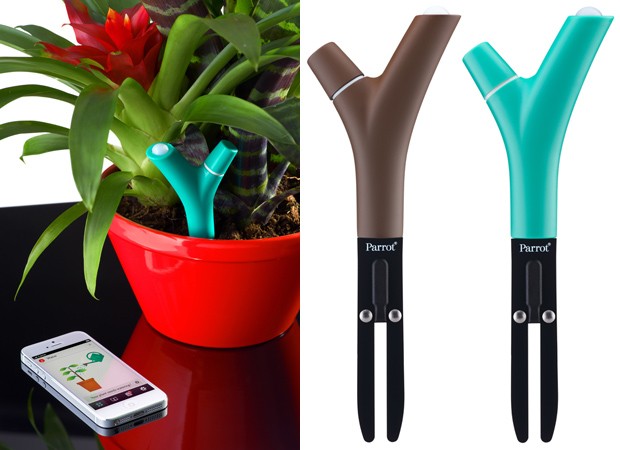
2. Parrot Flower Power

10 Awesome Futuristic Gadgets

Plants are breathing and living things, like the rest of us and now they have their own line of wearables. The branch shaped sensor called Parrot Flower Power can be put inside a plant’s soil to analyze moisture levels, temperature, sunlight and fertilizers. If the futuristic gadget detects that the plant doesn’t get enough nutrients, an app on your smartphone will alert you of that. The useful app also features data analysis and tips which will assist all plant enthusiasts and will make it virtually impossible for you to accidentally kill your plants.

3. Personal Robot

10 Awesome Futuristic Gadgets

Cortana was created by Microsoft, Siri by Apple, Alexa (Echo) was created by Amazon and Robotbase is currently on the brink of manufacturing a Personal Robot. What makes it especially cool is that unlike all the other personal assistants, the name of the Personal Robot can be given by its users.

Even though the Personal Robot from Robotbase isn’t scheduled to begin production until sometime in late 2015, the campaign on Kickstarter claims that the artificial intelligence robot will behave as a security system, camera, speaker, stylist, office assistant, household efficiency monitor and story teller. Its shape resembles a big spoon with a big round monitor on it attached to a base that can move and has a USB charger, a 3D camera and a built in speaker.

4. ChefJet

10 Awesome Futuristic Gadgets

Products such as ChefJet and ChefJet Pro may mean the end of accounts on Instagram and YouTube about fails in baking. These devices are 3D printers that use sugar instead of ink and will create not only edible but also beautiful treats.

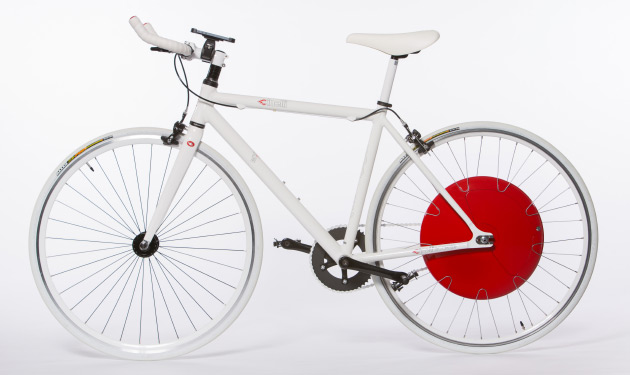
5. Copenhagen Wheel

10 Awesome Futuristic Gadgets

Steep hills and very long distances are the most common excuses to stay away from cycling. But fortunately, the Copenhagen Wheel can eliminate these kinds of excuses. As the name of the device implies, the Copenhagen Wheel is an electric wheel that replaces the back wheel on a bicycle. The device uses a motor, sensors, a control system, batteries and wireless connectivity to maximize a cyclist’s power of pedaling to get the most out of the activity.

Because the Copenhagen Wheel is geared up with wireless connectivity and numerous sensors, it can record info about the surroundings of the cyclist and about their cycling habits. If cyclists choose to share this data anonymously, it may be used to help officials enhance the infrastructure of a city and understand the environment.

6. Mint

10 Awesome Futuristic Gadgets

Mint is the newest breath analyzer from Breathometer. The device measures the quality of projected breath, instead of the quantity of consumed alcohol. Mint is small enough to keep in a purse and it is able to connect to your smartphone in order to analyze and measure the quality of your breath and the levels of hydration. This basically means that the device will let users find out if they have a refreshing minty breath or an unpleasent morning one and if their oral health improved over time.

7. Microsoft HoloLens

10 Awesome Futuristic Gadgets

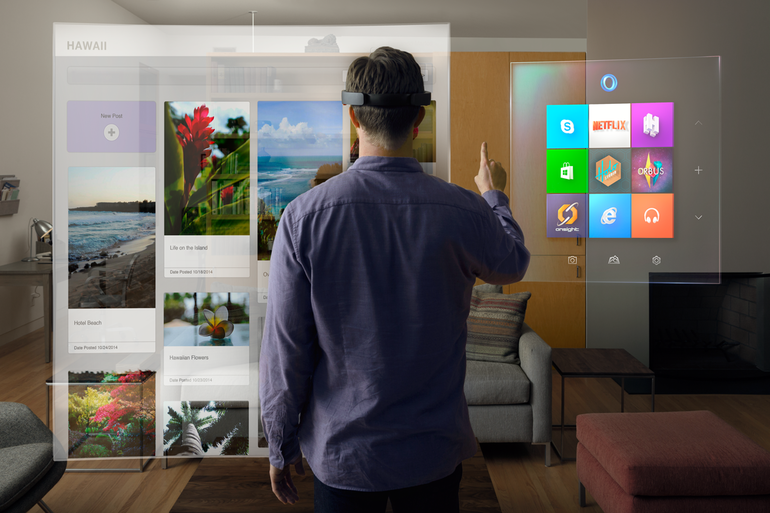
Holograms have until recently belonged only in science fiction movies and novels. However, HoloLens from Microsoft wishes to change that into reality. The new device that can “project” holograms has been revealed this January.

People will be able to interact with holograms while wearing the device. People can also create their own holograms and if they’re fond of a specific hologram they’ve created, they will be able to bring it into the physical world from the digital one with the help of the 3D printing capabilities of the device. And, along other features, people who will wear the HoloLens glasses will be capable of transporting themselves visually in another location.

8. Transparent TV

10 Awesome Futuristic Gadgets

Michael Friebe’s transparent TV is a great device that combines normal LCD with the newest TOLED technology. This kind of technology allows the creation of solid, non-transparent moving images with very rich colors and a full range of contrast ranging from deep blacks to sharp whites.

9. Ring

10 Awesome Futuristic Gadgets

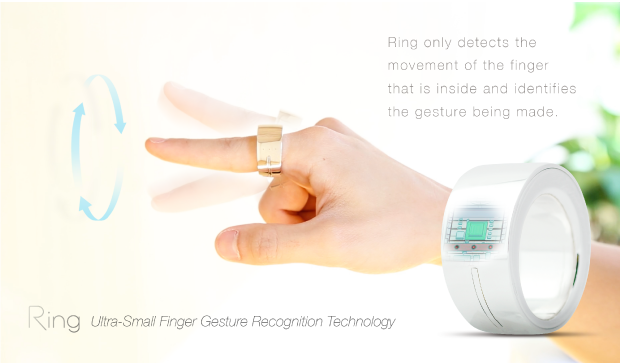
The wearable devices market is quickly gaining a lot of followers which makes room for new gadgets such as Ring from Logbar. The Ring can control your camera, social media network accounts and music. The new device is somewhat bigger than a regular ring and makes use of Bluetooth to accomplish numerous tasks with just a flick of the finger.

Ring is programmed to respond to certain default gestures, like making a checkmark in midair in order to call a cab, but people who use Ring will also be able to customize the gestures Ring will recognize with Android and iOS devices. To upload a picture, exchange your contact information with someone or to turn on the TV, you will only have to tap the touch sensor on Ring and gesture accordingly. These and many more other are tasks that can be completed with the help of Ring and there will be a lot more coming as developers can create other actions, which mean that the ways in which you could be using Ring are practically infinite.

10. WAVE Ultra Sonic Wine Refrigerator and Ager

10 Awesome Futuristic Gadgets

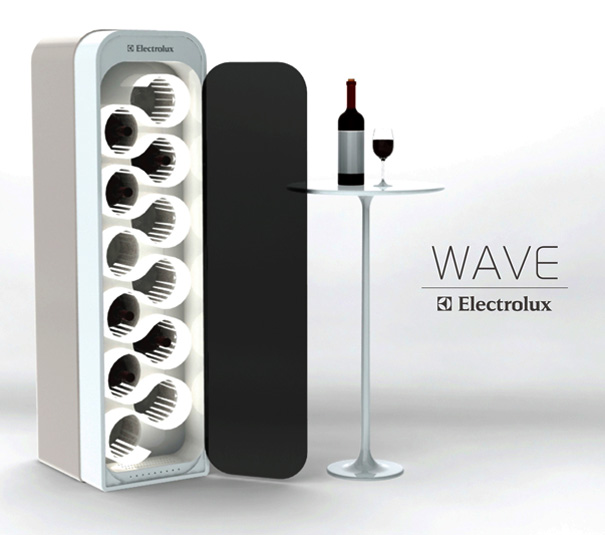
Did you ever wish you could age your wine to make it of higher quality? This isn’t a movie idea anymore as you can now do so with the help of this gadget. The device that does this incredible thing has been recently designed by Mika Yamamoto. A magnetic cooling system is being used inside the Wave that is based on a magnetocaloric effect. The magnetocaloric effect is the capability of certain materials and objects to warm up when being magnetized and cool off when they are taken out of the magnetic field. The new device increases the energy efficiency and also reduces the emissions of carbon. It is capable of cutting energy consumption by up to 40 percent and will help you cut the cost on your electricity bill.

Tech gadgets are becoming a big part of our day to day activities, such as the smartphone, which is one of the first gadgets we’ve come to be addicted with so we might as well embrace this fact. This was our list of 10 awesome futuristic gadgets. We really hope you enjoyed it.

Image sources: yankodesign.com, amazonaws.com, weirdworldfacts.com, cbsistatic.com, ndiegogo.com, aolcdn.com, wordpress.com, ageekyworld.com, blogcdn.com, ubergizmo.com

Filed Under: Tech & Science Tagged With: awesome futuristic gadgets, cool futuristic gadgets, cool gadgets, future gadgets, futuristic gadgets, futuristing accessories, gadgets, new technology, tech gadgets

Windows 10 vs Windows 7

February 16, 2015 By Nancy Young Leave a Comment

windows-10-vs-windows-7

Even in its early stages, we’ve come to the conclusion that Windows 10 is a far better deal for desktops than Windows 8. But how exactly does the new operating system stand against the very well-built Windows 7? Even though Microsoft is offering a free upgrade to the new OS if you are using Windows 7, should you take advantage of the deal and upgrade to it or not? In this guide we plan to show you who wins in the battle of Windows 10 vs Windows 7.

Windows 10 vs Windows 7 – Performance

One of the least discussed improvements brought by Windows 8 (and Windows 10) is its upgrade in terms of performance. The boot time in Windows 8 is significantly quicker than that of Windows 7. However, there are numerous other improvements such as hardware acceleration and even navigation seems a little faster in it. The power management has also been improved in Windows 8 which means that you will get more battery life out of your laptop.

Gaming performance is more evenly matched in Windows 8 and with Windows 10 we will also get access to DirectX 12. The new DirectX promises to unlock even more performance from all existing hardware.

It may not seem like a big deal, but essentially, the main reason we upgrade our operating systems is because we want better performance out of our machines. So because Windows 10 offers improvements in that area along all its other numerous features is more reason to be excited about it.

Windows 10 vs Windows 7 – Design

windows-10-vs-windows-7-design

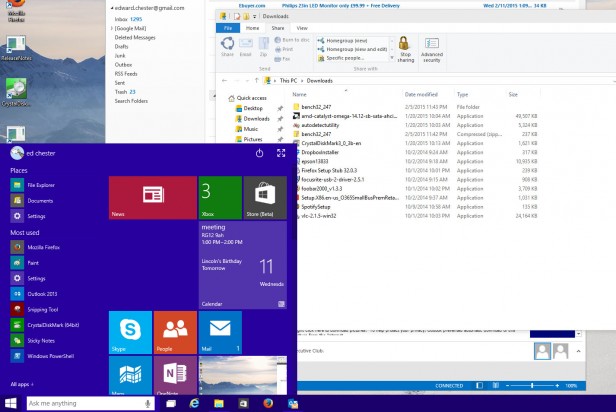
Windows 8’s design was quite a departure from what we were used to, with its bold colors and flat windows replacing the round-edged, transparent windows and 3D icons in the Windows 7. Windows 10 will continue to change the design of the operating system. The bold and flat style now takes over the icons on the desktop and other core features of the new OS. However, we’ve seen that some of the old design is still present in Windows 10, like the old icons in Control Panel.

We’re not really convinced whether the new design will be better or not but it’s definitely more “modern”. It seems that the new trend of design somehow revolves around flat objects. Apple is doing it and so are different websites. However, we’re not very sure whether or not this is in fact more pleasing in terms of aesthetics.

That being said, there are some benefits from using this kind of design. One of the main advantages is that windows take less space because they aren’t as rounded anymore and pretty much lack borders. They’re also more customizable and some aspects are a lot clearer because of the absence of transparent backgrounds.

Microsoft still has time to change its mind (for the better, we hope), however, as Windows 10 is still in the preview stage.

Windows 10 vs Windows 7 – Search

windows-10-vs-windows-7-search

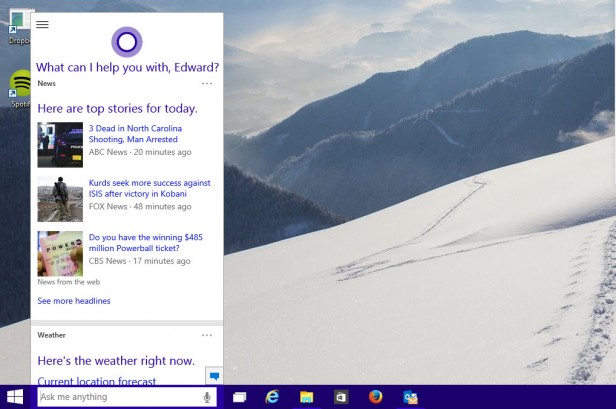
Windows 7 has a relatively powerful search feature that will quickly give results regarding documents and programs you search for. However, Windows 10 improves on this feature by adding a search for the apps in Windows Store and the web and a much more organized and improved page of results.

When you click on the search box in Windows 10 you will also receive information about the latest news headlines, weather reports and updates from your preferred sports team.

In addition to this, the new search function will also make use of Cortana, which is Microsoft’s digital personal assistant. This will add two main features into play. The first thing is that Cortana will monitor your calendar and email to give out relevant results, like when you have to leave to make it to your next appointment.

The other thing is that if you have equipped your computer with a microphone you will be able to give Cortana commands via voice. The digital personal assistant really does a great job understanding what you say and gives you appropriate search results. However, Cortana doesn’t give you the answer right in the search box, but opens a browser window to do so. But it is still a pretty cool thing to search for stuff without having to use your hands to type in what you want.

Windows 10 vs Windows 7 – File management

windows-10-vs-windows-7-file-management

While this may seem trivial at first, the fact is that the tools you use to find and manage the files in your computer are the most fundamental and often used in an operating system.

Windows 7 offered a generous selection of tools and we’ve come to be used to them by now. Still, it’s safe to say that they are not the most advanced ones and in a way or another are a slight step backwards from what we’ve seen in the past. A relevant example is the removal of the “Up” button in Windows Explorer.

This small feature pretty much sums up all what’s wrong with the file explorer in Windows 7. However, this isn’t the only problem that plagued the explorer. It was very badly designed, featuring a lot of wasted space not to mention that some of the main functions were hidden from the user’s view.

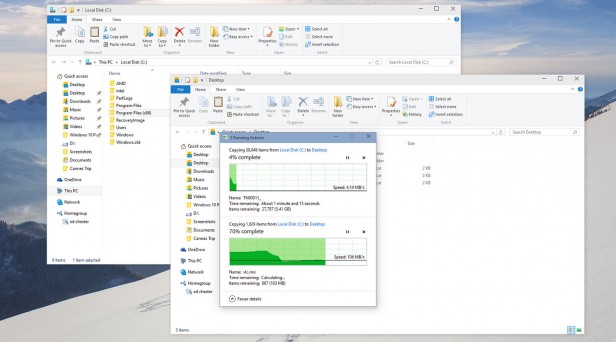
The “Up” button is back in Windows 10. And along with it, there are a series of other improvements in the file explorer. Some of them, however, already arrived in Windows 8, to be perfectly honest. The menu on top is now arranged in form of a ribbon, so the most used commands are within reach and, most important, very easy to find by novice users.

A new “Share” ribbon is now present which will let you move files between different applications such as Skype, Dropbox or Outlook with much ease. While the new file explorer is not perfect, it’s definitely a huge step in the right way.

Microsoft also improved the file copying interface along with these other improvements in the file explorer. Moving and copying tasks are now within a single window for better management. They also included a real time transfer speed monitor and you can also pause file operations, when until now you could only cancel them.

Another great addition is the Storage Spaces. This helps you group multiple hard drives to make a single logical drive. Even though this isn’t exactly revolutionary, the fact that it supports more levels of drive redundancy that will make sure all your data is backed up makes it particularly useful. This feature is entirely how swappable and supports drives in different sizes, unlike RAID systems.

All in all, Windows 10 adds a lot of nifty features in the file management section and takes very little away from it.

Windows 10 vs Windows 7 – DirectX 12 and gaming

windows-10-vs-windows-7-gaming

We said earlier that the gaming in Windows 10 hasn’t changed all that much, but now we’ll elaborate a little on the matter.

As a matter of fact, Windows 10 seems to be a tad slower than Windows 7, by about 0.5 percent, especially in some of the older games. Crisis 3, for example seems to run a little slower in Windows 10, however, there are some cases in which the results are reversed. It’s true that 0.5 percent doesn’t mean all that much so it’s not a reason to worry about.

Windows 7 was a very reliable and robust platform for gaming, even though it didn’t have many innovative features. However, it’s still a very good base on which numerous gaming tools have been built.

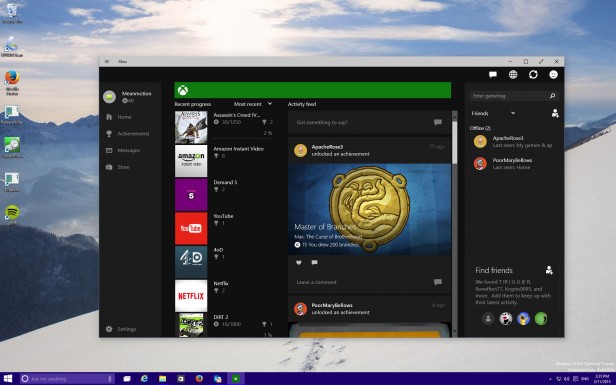
On the other hand, Windows 10 does add a bunch of new features. However, most of the new features won’t interest PC gamers, such as the option to access your account on Xbox Live, stream games from the Xbox straight to the PC and have a bunch of games that work cross-platform on Xbox and PCs. However, that isn’t to say that they’re not a welcomed addition.

The coolest new feature is probably the game capture one. You can record your gaming sessions and grab a 30 seconds snap shot that you can share with your friends. While this is not new technology, having it built right into the OS is a useful thing. Microsoft also claims that the new feature will work with every game ever made, so this mean that if you want to capture video footage from Monkey Island you can do so.

Windows 10 will also have exclusive access to the new DirectX 12, which claims to unlock performance on all existing hardware by allowing developers to have better access to the hardware’s features. However, the performance boosts are very likely to be small and dependent on certain circumstances. Nevertheless, this will probably be enough to make Windows 10 the better performing system regarding video games.

DirectX 12 will most likely offer numerous other new features but as of now Microsoft hasn’t said anything about what those features will be.

Windows 10 vs Windows 7 – The Notifications

windows-10-vs-windows-7-notifications

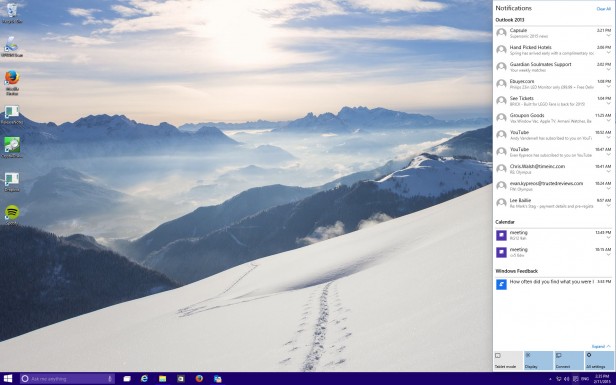
Windows always featured some sort of notification system in the form of the System Tray. In there you can find pop-up notifications from Dropbox, Spotify, Outlook and any other application that’s open in the background. However, there hasn’t been a proper place in which you could see all your notifications together along with their history.

In Windows 10 you can find a proper notification area. This is a very basic addition that brings app notifications and system messages together in one place, chronologically ordered. While it’s a very tiny addition, it’s extremely useful.

The area of notifications also has some system functions like a feature that lets you switch to the tablet mode or enter the screen settings.

Windows 10 vs Windows 7 – Workspace

windows-10-vs-windows-7-workspace

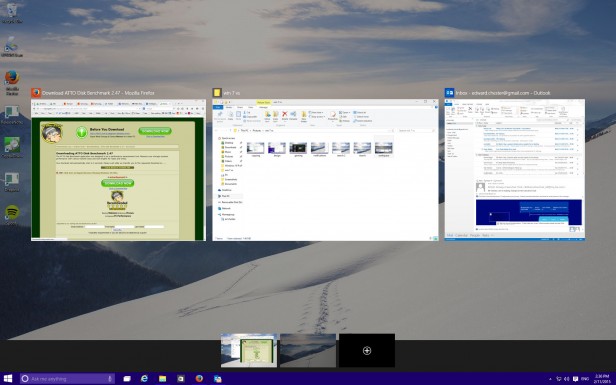
Keeping the workspace neat is very important to some users. While the users with laptops may be happy by making everything run full screen, if you use a desktop computer and have several monitors or just one very big one you will need good workspace management tools to make the best of the space you have.

Windows 7 features multi-monitor support but it’s rather limited in either allowing you to stretch the desktop across different screens or by offering a mirror mode. In Windows 7 you only had one task bar across multiple screens. It also featured a very primitive version of Snap. Snap is a feature that allows you to automatically resize windows when dragged to the sides of the screen. But that’s all that it offered.

In Windows 10, these features have been improved. You can have different backgrounds on different screens now and different slideshows. Pictures can also be set to go across all your screens. The taskbar can also be found on all the monitors you use or just on whichever monitor you’re active in. Snap now supports snapping to all four corners of the screen, instead of just the sides.

But the biggest feature is perhaps the support of a virtual desktop. Even though Windows 7 supported virtual desktops through third-party programs, Windows 10 has this feature built-in. While the implementation is rather clumsy at the moment, it’s still useful, especially for users that have laptops.

Windows 10 vs Windows 7 – The price

Even though we don’t know the exact price of a retail copy of Windows 10 at the moment, the huge news is that it will be free for people who update from Windows 7 or Windows 8 in the first year from its release.

With this in mind, if you have a copy of Windows 7, it would a silly thing not to update. Especially since we don’t know exactly how the upgrade will work, if you’ll lose your license of Windows 7 or not. But the chances are that you will still be able to downgrade to your old Windows version if you find that the new OS just isn’t right for you.

The verdict

Windows 10 offers a lot of useful new functions as well as improvements to the old ones, when compared to the old Windows 7. Even though these functions when taken separately are not reasons enough to upgrade, as a package it’s safe to say that it will be worth it.

In Windows 10 you will get a better file management system, a better windows management system, a better search system, more advanced gaming tools and many more. The only thing we’re not really keen on is the design, but this is hardly a reason to pass up the upgrade.

With Windows 10 being free as an upgrade, it would actually be a stupid thing not to at least try the new operating system. While it probably won’t be perfect, it’s still an upgrade worth getting later this year.

Images source: trustedreviews.com

Filed Under: Tech & Science Tagged With: directx 12, microsoft, microsoft windows 10, windows 10, windows 10 better, windows 10 features, windows 10 new features, windows 10 price, windows 10 release date, windows 10 vs windows 7, windows 10 windows 7, windows 7 windows 10

Facebook Creates Legacy Contact For Profiles Of Deceased People

February 13, 2015 By Nancy Young Leave a Comment

fb

A new section is about to change the future of the Facebook pages of people who have passed away as Facebook creates legacy contact for profiles of deceased persons, meaning, someone will handle their data aftewards.

Facebook has revealed a brand new tool that allows users to decide what happens to their Facebook account after they pass way,and could also be called a will for their social media pages.

The new settings will let users to decide whether their pages should be deleted for good. Or they can choose a “legacy contact” a some sort of web executor who can manage their internet data.

So far, the status of a Facebook profile after the death of the user, has been kind of foggy.  The family members of the person who had just passed away, were able to contact the social media network and ask them to take down the page or turn it into a memorial. But the road has not been steady.

There have been clients contacting Facebook to ask for the page of their deceased child to remain memorialized, but there was one family member that reached Facebook and asked them to delete the page, explained a lawyer from the Minneapolis firm, Gray Plant, James Lamm.

The new protocols would allow the user’s legacy person to update a memorial page, which includes the posting of a adapted message from the person deceased, would download that person’s posts and publish updates at the top of the profile.

Even so, Facebook will not allow access of the legacy person to the private messages sent among users.

Facebook has proved to be an amazing tool also when it comes to grieving the loss of a loved one, remembering that person and celebrating their life. These were clear signs that Facebook should put more work into supporting the grieving families and friends.

The new policy of Facebook, is a sequel of what Google did in 2013, when it started its Inactive Account Manager, a service which allows friends or family members to take over the Google belongings of the deceased person.

Users of Google are the ones deciding who will get access and to which files. For example, a woman could let her husband download all the images stored in her Google account, but could block the access to her e-mail messages from her account of Gmail.

The new tool of Facebook might be a following of the efforts of a commission of legislators from several states to adopt a law that would facilitate the access of relatives to the deceased person’s online files. The state of Delaware has passed this legislation and Massachusetts would consider it.

However Facebook and other web companies are against this legislation, as it would give the relatives of the deceased person complete access to his/hers documents. Lets say, if the family would have access to emails and messages that contain embarrassing information about the person who just died and his/hers friends. This could also have an impact on the privacy of the ones who were in contact with the dead person, for example revealing identities of members of Alcoholics Anonymous who chatted trough mails.

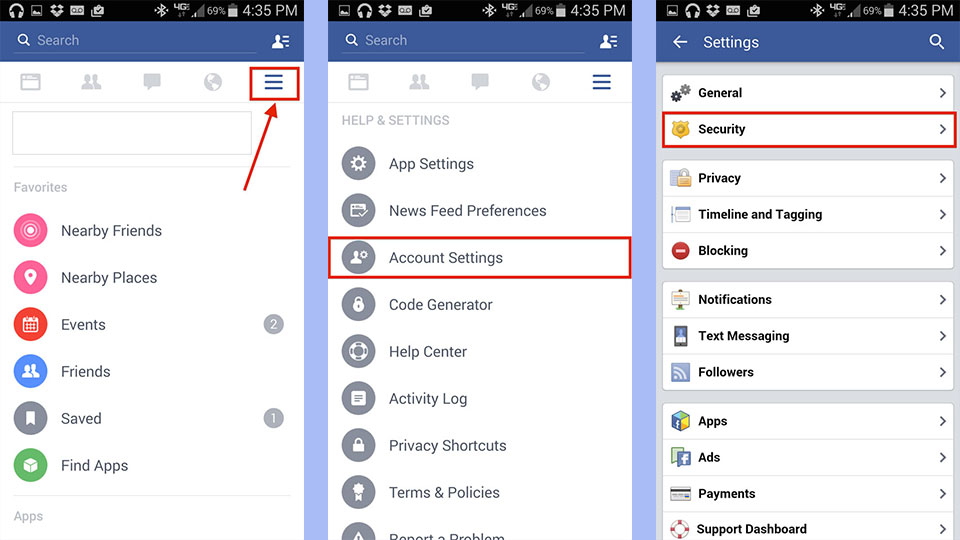
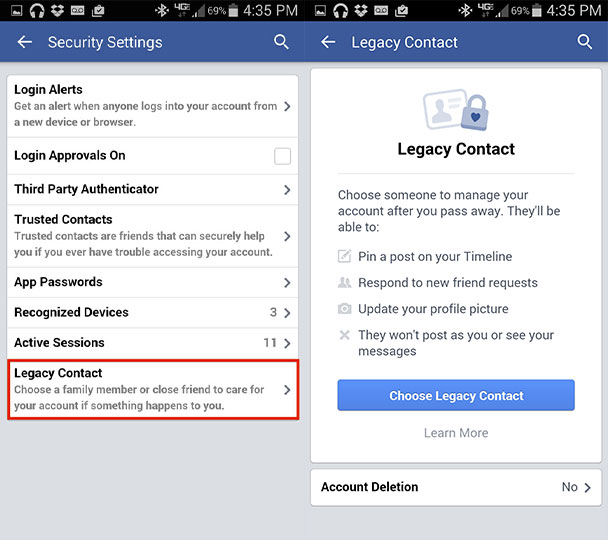
Here is how you can create your Facebook Legacy Contact

Facebook-Legacy-Contact-setting

Facebook-Legacy-Contact-setting-2

Go on Facebook and press the symbol with three bars that can be found either at the top or bottom of the page

Scroll down until you reach the section called” Help & Settings” and press on “Account Settings”

When in Settings, pick the second tab from the first setion, called “Security”

At the bottom of the security options, you will find a “Legacy contact” and there you will be informed on what your designated Legacy Contact will be allowed to do.

If you don’t wish to designate a person, you can choose for your account to be deleted after your death. Even though this option is not recommended, but it is your call.

For more information regarding the creation of a legacy contact go to Facebook’s FAQ Legacy Contact page.
Image Source: NBC news
Image Source: The Hoops News

Filed Under: Tech & Science Tagged With: Facebook Creates Legacy Contact, facebook users can choose a legacy contact to handle their facebook data after their death, legacy contact tool to handle profiles of deceased persons

The People Who Have Volunteered To Spend The Rest Of Their Lives On Mars

February 13, 2015 By Nancy Young 2 Comments

The People Who Have Volunteered To Spend The Rest Of Their Lives On Mars

Would you live Earth to live on another planet that looks exactly the opposite of our green and friendly planet? There are people who have volunteered to spend the rest of their lives on Mars, far far far away from everything they know and is familiar.

When making life changing decisions, there are a lot of things we take into consideration before taking actions. Just the thought of moving to another city, implies so many changes and make us wonder about how will our life be affected by it, let’s not talk about moving to another country, a situation that would change our whole universe.
Talking about Universe, if moving to another city or country would be challenging, how about moving to another planet, lets say Mars?

Would you be brave enough to leave Earth for good along with all the comfort that this planet offers us and move to less life hospitable conditions like the ones on Mars?
Well, if you are not brave enough to do it, there are others who would leave even this instant.
Mars One, a special travel nonprofit, is planning the next giant leap for human kind, establishing a permanent settlement for human life and after, will send people there.

WHATS THE PLAN AND HOW TO APPLY

The People Who Have Volunteered To Spend The Rest Of Their Lives On Mars
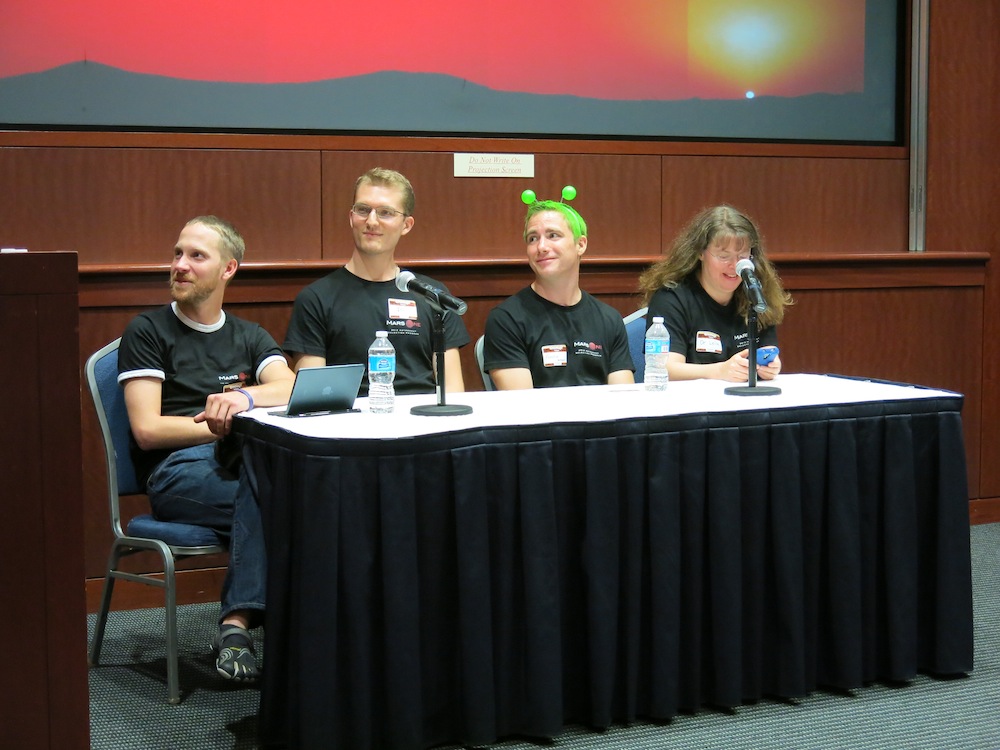
The organisation will soon start the selection of the next round of “space lovers” out of almost 700 present finalists. So far, tens of thousands of people are ready to leave their families, jobs and Earth life behind and move to Mars and never come back.
The project plans to land the very first Mars colonists by the year 2023. Applicants with the minimum age of 18, are eligible to apply, it doesn’t matter were are they from. So far, Mars One has received over 165,000 applications, so there are that many people who want to run away from this planet.

During the interview, applicants had to respond questions from the audience, concerning their main reasons they wanted to for ever go to Mars. Twenty nine years old, Aaron Hamm a hotel manager, stated that traveling to Mars has been his lifetime dream, Leila Zucker, of 45 years old, married and an emergency doctor, said that space travel has been a wish since she was a child, Austin Bradley of 32 years old, is a physics student , stated that he wanted to apply for NASA, but MarsOne could actually be his one way ticket to space.

IS SPACE TRAVEL FOR ANYBODY?

What does it take to dream so far away from Earth? Does it take tremendous courage and a great dose of crazy?
Yes, a little crazy is definitely needed, as this is not for everybody and it takes a certain type of person to deliberately choose to live the rest of their life, “prisoner” on another planet, not life friendly at all, with no breathable air, no cable television, not cell phones, no more video games, bye bye romantic walks on the beach and maybe bye bye sex.

Since the moment we started space explorations, the humans sent in outer space, have always been chosen from the smartest, the ones most physically fit and the ones having the best skills for survival in the an unfriendly environment. This criteria was mainly based on the fact that leaving Earth was a difficult task.

Astronauts had to know how to fly ships, how to fix computers, to conduct scientific experiments, and if these things weren’t hard enough as it was, they had to do all this in a zero gravity space, wearing space suits that needed also knowledge to put on and off.

But the organisation who is preparing to colonise Mars in the future, doesn’t demand such high qualifications from the people that will populate planet Mars. The present technology can help humans arrive to Mars in about nine months, a period of time close to the one spent by astronauts on the International Space Station. It doesn’t sound easy and you wont just go to bed and wake up the next morning on Mars.

mars

HOW WILL PEOPLE LIVE THERE?

Previous explorations taken by NASA’s Curiosity Opportunity and its arsenal of Rovers, experts have enough information about the conditions on Mars and what would be the demands to make human living possible. First of all people would need special spacesuits to protect themselves against dust storms and sub zero temperatures, large quantities of frozen dried food, housing capsules that could provide protection against radiation, and a huge drill to reach the water found beneath the surface of Mars. It doesn’t sound like an easy living at all, but people should manage.

One of the most difficult tasks wont be trying to stay alive but trying to remain sane. Life on Earth has provided humans with a lot of things that they might not manage to live without, and we are not talking about the vital things like water and air. Try imagining living on a planet where there are no cupcakes, no Starbucks, none of these things that are addictive and so comforting.

Moving on further, living a life without love, and since love is out of the question, living a life without sex? How many of us could go trough that and still keep his head straight and clear?The ones choosing this extreme isolation should have a great amount of weirdness in them, otherwise is tough to swallow. For those who are curious if they are fit to live on the Red Planet or if they want to get a glimpse of how life there would be like, here are some things you need to know from the Survival to Life on Mars guide.

THINGS YOU WILL HAVE TO GIVE UP

Sex- colonists are not advised to have intercourse as the supplies couldn’t support the arrival of a baby born in space
Beer- sad thing, but carbonate drinks cannot survive in low atmospheric pressure conditions
No food that cannot be freeze-dried
Your family and loved ones, if you thought internet connection on earth was bad, imagine being 35 million years away
Definitely say goodbye to your World Cup tickets from 2026.

THINGS YOU WILL NEED

A lot of curiosity and fascination for the unknown
A tablet with a lot of books, which should include Introduction to Rocket Science and Engineering by Travis Taylor and possibly How to Win a Bridge
Plenty of self esteem as there are no mirrors in outer space
Meat glue, also known as transglutaminase, to convert the pre-fab proteins they would serve in space, into an actual meal.
Maybe some good old scotch.
Lots of condoms, because who wants to have a baby in space, its difficult enough on Earth imagine how would be out there in the loneliness, and you couldn’t pass out the opportunity of space sex, could you?
Image Source: Space.com
Image Source: Z NEWS
Image Source: Space.com

Filed Under: Tech & Science Tagged With: humans that want to live on mars, mars one colonise mars, mission to colonise mars, people who have volunteered to die on mras, people will move to mars in 2023

Algorithms Might Teach Homeless Teens How To Prevent HIV

February 10, 2015 By Nancy Young Leave a Comment


homeless-teen

Algorithms might protect homeless teens from the danger of contacting the HIV virus by providing them a insistent education on the subject.

Algorithm, has turned into a word with devious meaning. The main purpose of this word it to help sites and social network platforms to anticipate and fulfill the needs of users but it has deviated to being used also to manipulate our data for advertising and turning into money every step we take online.

But no worries, algorithms can be used for more orthodox things as well. Computer experts from the University of Southern California are using their data and math knowledge to help the prevention of HIV among teens living on the streets.
Scientists from the School of Social Work and School of Engineering of USC, have designed a new algorithm called PSINET. Using artificial intelligence, the program can help agencies to find the fittest person from a homeless community that could spread very useful information about the prevention of HIV, among young people, its basis being on a mapped-out network of friendships.

These certain agencies, are generally relying on the spread of and information trough words, by educating a selected group of homeless teenagers to spread knowledge to their friends, but there are some factors which limit the success of this method. With the help of the new algorithm, 60% more information could be spread than trough the classic word of mouth activities, stated researchers.

Here it is a quick explanation on how it works: experts have mapped the friends of homeless young people at My Friend’s Place, a homeless agency from Los Angeles. Every person is represented by a knob on the map, and links between knobs indicate those persons are friends. The algorithms analyses this network, and after running trough thousands of possibilities for finding the fittest person, the one with the highest reach at one point in time and after it selects a peer head.

Once this is set, social workers would teach the leader the basic information about HIV(where they can get tested for the virus, why is so important it is to wear condoms, etc.) and would also receive information regarding their network of friendships to build on the plan.

Statistics have shown that around 2 million Americans, with the ages between 13 and 24 end up every year on the streets, out of which 11% are HIV positive( a rate ten times higher than the general population). So, sharing information and educating this demographic, might be an intimidating task.

The matter is quite complicated and holds a lot of uncertainty, but instead of picking the individual most connected to other people, the algorithm is aware of whom it chose previously and in this way it opens the doors to place yet unreached, explained researchers.

The project is somehow a mixture between the technological power and the understanding the real situation of the young homeless population. So far the plan is still at the beginning and hasn’t yet been put in practice on the field, but the algorithm is the first step to fulfilling the mission.

For the moment, experts are collaborating with partners agencies, more precisely My Friend’s Place, to design an easy to use interface for the algorithm and they are hoping that by this summer they will manage to implement it in the real world.

“This is a really promising technological solution to help us do what we do in social work and public health better,” explained co-author of the notes regarding PSINET and assistant professor at the University of Southern California.

Image Source: The Youth Booth-Youth Services

Filed Under: Health

New Samsung Galaxy S6 Release Details

February 6, 2015 By Nancy Young Leave a Comment

samsung-galaxy-s6

Image source: phonearena.com

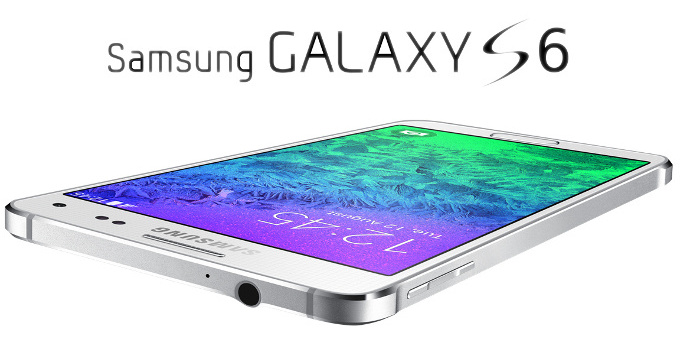
Some new Samsung Galaxy S6 release details have surfaced recently and we will present a few of them to you.

We have seen a lot of rumors regarding the Samsung Galaxy S6 in the news in the last couple of months. These rumors tease almost everything regarding the new device, from the Galaxy S6 specs and design to the Galaxy S6 release date. As we come closer to Samsung’s usual launch window, we’ve began seeing numerous rumors that hint at a very large scale launch of the device.

Some publications claim that the new Galaxy S6 will come in four different colors: blue-green, dark blue, white and gold. The Galaxy S5 was available in black and white only. It seems like the curved version of the Samsung Galaxy S6 called the Galaxy S Edge will be launched in the same four different colors. Samsung is well known for providing different carriers and retailers exclusive colors but we hope the South Korean company will make all the colors available regardless of retailer or carrier.

More and more companies are getting ready for the release of the Samsung Galaxy S6. We’ve seen numerous companies post teasers about the new device and Belsimpel (a Dutch mobile carrier) has even posted its own teaser page about rumors regarding the Galaxy S6.

Such companies are trying to get attention before the official Samsung Galaxy S6 announcement and even though the details they provide are very vague, it’s pretty obvious that companies are preparing for a huge Galaxy S6 release.

Some publications claim that the new smartphone from Samsung will feature the rumored rival of Apple Pay available on iPhones. It has been said that the Galaxy S6 will use the LoopPay mobile payment service. If this is true, we might get to see Samsung reveal the new service in March.

Samsung confirmed earlier this week an Unpacked event in Barcelona, Spain on March 1st. This event in Spain will help start the Mobile World Congress 2015 show. Samsung hasn’t yet confirmed the arrival of the Galaxy S6 but the South Korean company generally saves these events for big product releases. And if the Galaxy S6 isn’t a big release then we have no idea what a big release for Samsung actually means.

The Galaxy S6 design is believed to be a step up from the usual plastic design Samsung usually uses. The South Korean company keeps on hinting that it will use a new form factor and a premium design for its newest device. More and more rumors claim that the new Galaxy S6 will use glass, metal or a combination of both of these materials. There is a theory that states the company’s metal based designs of Galaxy Alpha and Galaxy Note 4 were trial runs for the new Galaxy S6.

Recent design leaks of the Samsung Galaxy S6 hint at redesigned buttons, a thinner design and curved edges. Many of these leaks come from an accessory maker that probably has the right dimensions of the Galaxy S6.

Samsung and other smartphone manufacturers usually offer accessory producers dimensions and molds of their products before the official launch. This allows such companies to be prepared when the device finally hits the market.  In the past we’ve seen manufacturers give out accurate details regarding the design of unreleased smartphones but there have also been occasions in which they were completely wrong.

Rumors about the new Samsung Galaxy S6 point to very powerful specifications. The smartphone’s specifications include a 20MP OIS camera, Exynos 64 bit processor and a Quad HD display. Most rumors also claim that the smartphone will be made out of premium materials such as glass or aluminum and will feature wireless charging. It’s believed that the device will launch on all major carriers in the United States including Verizon, T-Mobile, AT&T, U.S. Cellular and Sprint.

There is no indication that the South Korean company will get rid of its Super AMOLED screens so we expect the S6 to also feature one. There will probably be a boost in the resolution, however. We expect the Samsung S6 to have a resolution of at least 2,560 x 1,440.

As a matter of fact, Samsung even said that it intends to manufacture smartphones with 3,840 x 2,160 4K displays by 2015. It is quite possible that its newest device will completely ignore 2K and jump directly to 4K. But we’ll be really surprised if this will happen. It’s very likely that Samsung will save such a resolution for its Galaxy Note 5.

The Samsung Galaxy S6 may get a relatively bigger screen whether it will be QHD or not. The South Korean company has gradually been making its smartphone screens bigger and we won’t be shocked if they will increase the size of the screen even more on the S6.

There’s a slight chance that the Galaxy S6 will feature a flexible display. The company has made a lot of research regarding this type of technology and even released the Galaxy Note Edge. This phablet is a version of the Galaxy Note 4 where the display curves on one side, so it’s not entirely far-fetched to expect Samsung to do the same with its newest flagship.

It’s possible that we will get two versions of the same phone; one with a curved display and the other with a flat one. There are rumors that support this exact idea and claim there will be a Galaxy S6 featuring a normal, flat display and a Galaxy S6 Edge that will have a curved display, much as the Galaxy Note Edge.

There have also been rumors that claim the S6 will have both of its screen edges curved but not in the same form as the Galaxy Note Edge. This might mean the curves on the device will be a lot more subtle.

The S4 and the S5 launched in April 2013 and 2014 but some rumors claim that the new flagship will show up a couple of weeks earlier than usual. This means that we may get to see the new mobile phone in early April or late March.

Filed Under: Tech & Science Tagged With: galaxy s6 design, galaxy s6 details, galaxy s6 launch date, galaxy s6 release date, galaxy s6 release details, galaxy s6 rumors, galaxy s6 specifications, galaxy s6 specs, samsung, Samsung galaxy s6, samsung galaxy s6 details, samsung galaxy s6 release details, samsung galaxy s6 rumors

Microsoft Stopped Making the Windows RT Tablet

February 4, 2015 By Nancy Young Leave a Comment

windows-rt-tablet

Image source: microsoft.com

Recently, Microsoft stopped making the Windows RT tablet. A Microsoft spokesman said that the company recently decided to stop the production of the Nokia Lumia 2520 Windows RT tablet. This was the last remaining Windows RT device from Microsoft.

Windows RT was developed as an alternative to the more demanding Windows 8. Windows RT was designed for devices that use ARM processors instead of Intel x86 ones. Devices that ran Windows RT were more battery efficient and cheaper. However, the mobile operating system didn’t quite catch on and it confused a lot of potential consumers who were unable to make the difference between Windows 8 and Windows RT. Tablets that used the less demanding RT OS were unable of running desktop applications, a factor that even further damaged the consumer opinion on such devices.

Microsoft released a Surface tablet with the RT operating system in 2012. This decision led other companies that had RT devices such as Asus, Dell and Lenovo to remove them from their hardware line-up. In 2013 Microsoft lost $900 million on the RT Surface tablet. Later that same year, Microsoft also launched the Windows RT-based Surface 2 tablet but also gave that device up in order of focusing more on Intel powered tablets.

But this doesn’t necessarily mean that Windows RT has been completely left out in the cold.

In last month’s Microsoft conference regarding its new operating system, the company briefly talked about RT. The tech giant told the media that they are working on a Windows RT update as well. Microsoft said that it’s going to update the entire Surface Pro line-up to Windows 10 but that it is also working on an update for the RT version which will offer some of the features present in Windows 10.

However, it seems like the company’s dedication to the less demanding operating system is a little uncertain. Microsoft is launching its new OS to offer a common platform across smartphones, tablets and PCs. Keeping the other OS alive would be against what the tech giant is trying to accomplish with Windows 10.

The company said that even though they are no longer manufacturing Nokia Lumia 2520 Windows RT tablets, those who are interested in purchasing these devices may still do so by visiting MicrosoftStore.com, Microsoft Retail Stores and third party resellers and retailers. After the company bought Nokia in 2014, Microsoft also got custody of the Lumia series along with Nokia’s mobile business.

Filed Under: Tech & Science Tagged With: lumia 2520, microsoft stopped making nokia lumia 2520, microsoft stopped making windows rt tablet, microsoft stopped manufacturing lumia 2520, microsoft stopped manufacturing windows rt tablet, nokia lumia 2520, nokia lumia 2520 production, window rt tablet, windows rt, windows rt tablet, windows rt tablet discontinued

Exploding Kittens Kickstarter Campaign Is Huge

January 29, 2015 By Nancy Young 1 Comment

exploding-kittens-kickstarter-campaign

Image source: amazonaws.com

Exploding Kittens is a card game that involves cats that explode, lasers, magical enchiladas, meat bikinis and goats. The game sounds very fun and the Exploding Kittens Kickstarter campaign is the biggest and most backed project ever to exist on the crow funding website.

The card game which has been described as a kitten-powered Russian Roulette that is very strategic reached the goal of $10,000 in just 20 minutes and $100,000 in under an hour. The game at this moment raised over $4.6 million.

Forbes claims that the game is likely to raise around $15 million by the time the campaign will close in February. 10 days after the launch of the campaign, the game had over 117,000 backers, which are the most backers on a project in the history of the Kickstarter website. The game is also climbing in charts regarding how much money it raised. Currently the top campaign in the Kickstarter charts is the Ouya game console that raised $8.6 million.

The game is developed by Matthew Inman and video game designers Shane Small and Elan Lee. Exploding Kittens demands players to avoid the card with the exploding kitten. The exploding kitten card causes the player to explode and to die. To diffuse, players may use numerous cards like laser pointers, catnip sandwiches, kitten therapy and magical enchiladas. The cards called portable cheetah butt, thousand year back hair or the Abracrab Lincoln, Tacocat and magical meat bikinis allow players to skip a turn.

Players can also sneak a peek at the cards in the pile by consulting with the all-seeing goat wizard or by scratching the tummy of a pig-a-corn. The game is kid-friendly and very strategic, as claimed by the developers.

The developers of the Exploding Kittens card game have written on the Kickstarter page that they are grateful for all their backers and thanked the community for being the “mostestest”. Whatever that means…

The kid-friendly deck of cards is priced at $20 and the NSFW version is $35. The NSFW version allegedly contains cards that are “too horrible” to be included in the kid-friendly game. People who spend $100 on the campaign will get the collector’s edition of the game which is autographed by all the creators. There was also a $500 deal for the “Deck of Legends” that included all the things in the $100 package plus a hand drawn card by each of the game’s developers, but that is sold out.

Filed Under: Tech & Science Tagged With: exploding kittens, exploding kittens biggest, exploding kittens campaign, exploding kittens card game, exploding kittens is biggest, exploding kittens kickstarter campaign, exploding kittens most backed, exploding kittens most backed campaign, kickstarter, kickstarter exploding kittens

  • « Previous Page
  • 1
  • …
  • 22
  • 23
  • 24
  • 25
  • 26
  • …
  • 36
  • Next Page »

Subscribe to Blog via Email

Enter your email address to subscribe to this blog and receive notifications of new posts by email.

Join 11 other subscribers

Recent Articles

police handcuffs man

German Man Probed In Poisoning That Killed 21 Employees Since 2000

June 29, 2018 By Kenneth Scott Leave a Comment

Chicken wings bar

Intoxicated South Carolina Man Punches Waitress Who Refused to Serve Him Alcohol

June 29, 2018 By Karen Jackson Leave a Comment

gaming

New Zealand gamer Who Flew Halfway Across The World for Virginia Teen Gets Shots By Her Mother

June 28, 2018 By Cristopher Hall Leave a Comment

party

Former Virginia Tech Freshman Sentenced to 50 Years in Prison for Stabbing a Girl to Death

June 28, 2018 By Roxanne Briean Leave a Comment

bonfire

British Couple Sentenced to Life in Prison for Torturing and Murdering French Nanny

June 27, 2018 By Deborah Campbell Leave a Comment

pay phone

Texas Father of Girl Disappeared in the 80s Ignored by Authorities

June 26, 2018 By Cristopher Hall Leave a Comment

bottled water

San Francisco Woman Threatened to Call Police on Girl Who Sold Ice Water for Disneyland Trip

June 25, 2018 By Roxanne Briean Leave a Comment

Maplewood Park

Missouri Man Robbed by Date and Accomplice in Park

June 22, 2018 By Nancy Young Leave a Comment

coding

New York Man Sentenced in Cyberstalking Former Girlfriend, Mailing Drugs to Her Dorm

June 22, 2018 By Deborah Campbell Leave a Comment

headphones

Bose Poised to Launch Sleepbuds, In-Ear Headphones That Help You Sleep

June 21, 2018 By Nancy Young Leave a Comment

Police light

Intoxicated Female Driver in Custody for Pulling Arresting Officer by the Hair

June 21, 2018 By Kenneth Scott Leave a Comment

kitchen

Restaurant Manager Arrested and Charged in Shooting Death of Co-Worker over Negative Yelp Reviews

June 20, 2018 By Karen Jackson Leave a Comment

plastic container

Pennsylvania Couple Charged in Violent Death of Infant Discovered Buried in Cat Litter

June 19, 2018 By Cristopher Hall Leave a Comment

tailpipe

Minnesota Teen Gets Head Stuck In Oversized Tailpipe Winstock Music Festival

June 18, 2018 By Karen Jackson Leave a Comment

Pages

  • About Us
  • Contact us
  • Privacy Policy
  • Privacy Policy GDPR
  • Staff
  • Terms and Conditions

Recent Posts

  • German Man Probed In Poisoning That Killed 21 Employees Since 2000 June 29, 2018
  • Intoxicated South Carolina Man Punches Waitress Who Refused to Serve Him Alcohol June 29, 2018
  • New Zealand gamer Who Flew Halfway Across The World for Virginia Teen Gets Shots By Her Mother June 28, 2018
  • Former Virginia Tech Freshman Sentenced to 50 Years in Prison for Stabbing a Girl to Death June 28, 2018
  • British Couple Sentenced to Life in Prison for Torturing and Murdering French Nanny June 27, 2018
  • Texas Father of Girl Disappeared in the 80s Ignored by Authorities June 26, 2018
  • San Francisco Woman Threatened to Call Police on Girl Who Sold Ice Water for Disneyland Trip June 25, 2018

Categories

  • Business
  • Entertainment
  • Finance
  • Headlines
  • Health
  • Life
  • Nature
  • Science
  • Sports
  • Tech & Science
  • Travel
  • Uncategorized
  • United States
  • World

Copyright © 2026 ArgyllFreePress.com
About · Privacy Policy · Terms of Use · Contact