Argyll Free Press

Growing News Network

Thursday, April 23, 2026
Log in
  • Business
  • Finance
  • Sports
  • Tech & Science
    • HP Envy 4500 Review
    • LG Optimus 170 Review
    • iPod Touch 6th Generation Review
    • HTC One M8 Accessories Set-up
    • Surrealist Games You Must Play
    • Hisense Sero 8 Review
    • Dell Latitude e7440 Review
    • HP Laserjet 1536dnf mfp Review
    • Garmin Fenix 2 Review
    • Skype Vs Viber
    • Best Video Conferencing Software
    • Sony mdr 1r Headphones Review
    • Canon Rebel t3i Review
    • Sennheiser Momentum 2-0 Review
  • Travel
  • Headlines
  • Health
  • United States

Jolla Tablet Review – The Navigational Swipes

October 13, 2015 By Deborah Campbell 3 Comments

Jolla Tablet Sailfish 2.0The Jolla Tablet is certainly an odd one out – and not necessarily in a bad way. It’s the first of its kind ever to be released by Finnish company Jolla – an independent designer and developer of mobile devices. But the achievement that this name is more often remembered for is the developing of their Sailfish OS – a Linux-based open source operating system that has its roots in the MeeGO OS that Nokia was working on several years ago.

The company hasn’t yet gone head to head with any of the major, leading names on the market, but following their success on the Indiegogo crowdfunding website, they seem to have put that money to good use. So how far off from breaking into the market and keeping steady is Jolla? After the way their most recent Jolla Sailfish OS Smartphone was received, it was obvious there’s still a long way to go, but things seem to have improved by a large portion. The tablet has quite a bit to show for itself but let’s see how close it really is to making the cut.

Jolla Tablet Design
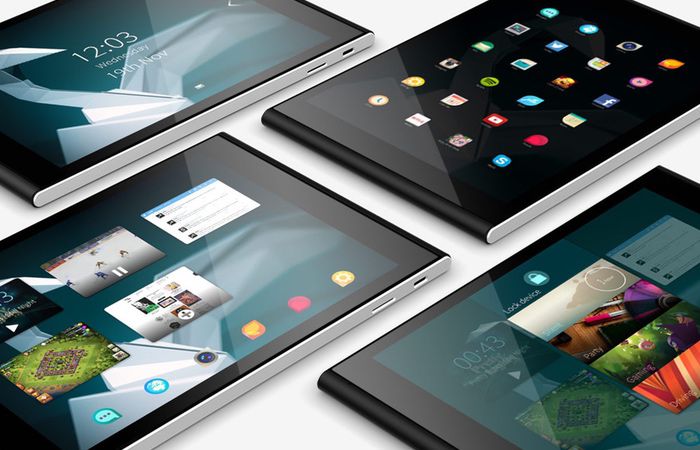
Jolla Tablet

At first glance, the Jolla Tablet may not stand out from several points of view. For a roughly 9.6 inch diagonal-sized tablet, it comes close in size to the iPad Mini 3. It’s not overly large, but given the 8.3 mm thickness and its approximately 385 grams in weight, you might have a little problem holding it with one hand, having to stretch all the way to get a firm grip on the device.

Jolla Tablet 8.3 mm thickness

The materials used to build it are not top-notch unfortunately – it’s mostly made of plastics, lacking metal components to keep it feeling sturdy. Surely that saves up on the weight a little bit, but given the aluminum alloys that are used in smartphones and tablets nowadays, I’m sure Jolla could’ve gotten away with a better selection of materials for their tablet. Regardless, it doesn’t give the device a cheap look – it may lack the smooth, classy design of the high-end tablets that Apple and Google make, but it’s not underwhelming in the way it looks.

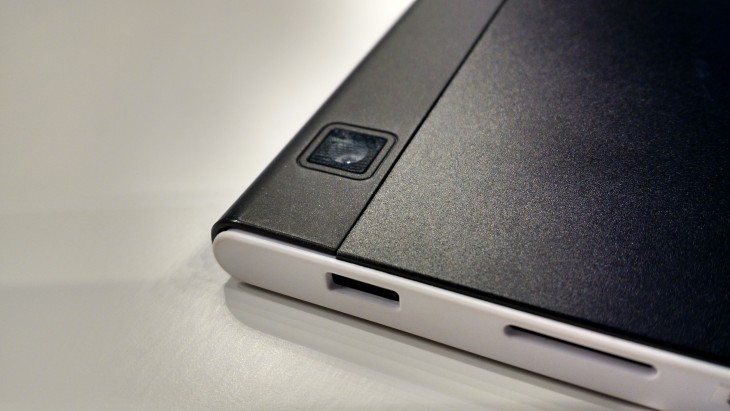
The display is tucked neatly in the frame, complimented with round edges to either side of the tablet. The top and bottom display a change in color palette as the cover switches to white. The back of the Jolla Tablet is one of the nicer parts of the device overall, having a matte black finish that holds the company logo in the center, the rear camera peeking out in the top left corner, while the bottom displays the serial number and a pair of speakers.

Jolla Tablet Matte Black Back

Jolla Tablet Camera

I found the exposed display of serial number on the back of the tablet a little out of place and slightly in bad taste given present standards – it’s way too obvious and “in your face” and the developers don’t seem to have tried to make it as small and discreet as possible. It felt detrimental to the overall look of the Jolla Tablet.

On top of that the material used on the back seems to be susceptible to quickly wearing out and the build of the tablet does have some weak points that aren’t guaranteed to survive stronger impact or might collapse under more pressure. Although no such incidents have yet to occur, it could be a problem as the device ages.

The button placement is pretty straight forward – there is none to speak of on the front side of the tablet. The power button and volume rocker can be found on the left hand side along with the headphones jack built in the corner, while the micro USB charging port and the microSD slot are on the right.
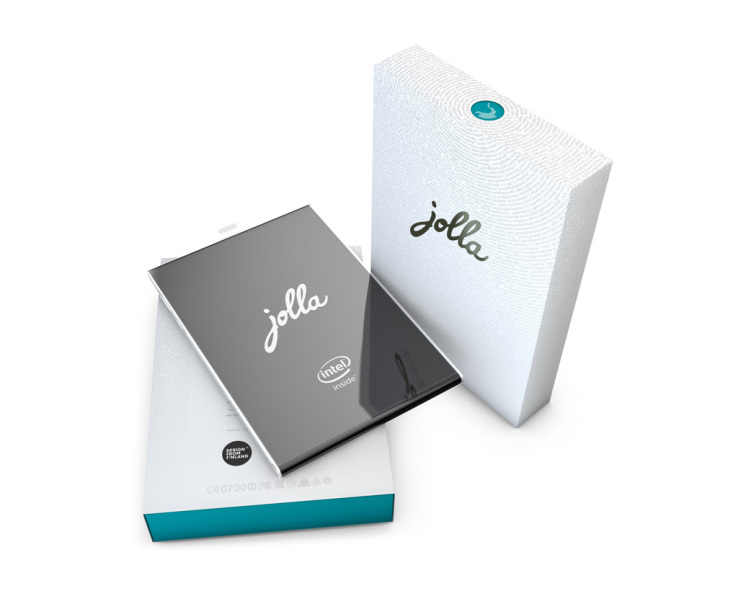
Jolla Tablet Package

Given the format and size of the tablet, you might find it impossible to find a suitable case for it which is a downside – and the producers have yet to release a personalized one.

Jolla Tablet Display
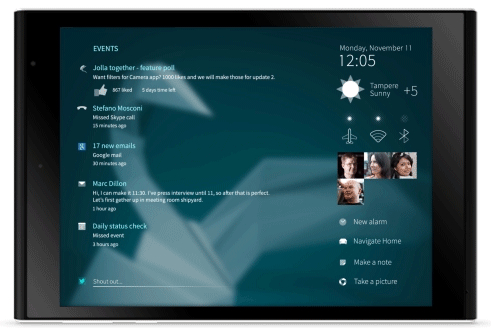
Jolla Tablet Sailfish OS UI

In spite of the similar size to the iPad Mini 3, the display of the Jolla Tablet is slightly smaller than its counterpart. The IPS LCD screen is only 7.85 inches in size but can sustain resolutions as high as 2048 x 1536. That makes for an overall 330 ppi pixel density – the images are clear, with no sign of pixellation and don’t seem to lack at all in quality.

Color pallet-wise, the IPS LCD screen isn’t up there with what an AMOLED display would normally render, falling a little behind when it comes to how vibrant images are. That could very well be an effect of the tones and nuances the OS uses – darker, richer colors that take a leap away from the common colorful patterns other operating systems use. It is not exceptionally bright but on the other hand there’s not as much saturation as you would get on the more common AMOLED builds. Contrast and black levels are decent enough and the viewing angles don’t lack at all – giving you an excellent image no matter which way you’re looking at the display.

Jolla Tablet Screen

The screen handles multitouch nicely, being able to respond to commands using up to 5 fingers – and given the gesture-driven functionality of the Jolla Tablet that we’ll be touching on more later in the review, that’s something worth mentioning.

The tablet handles video viewing very well, holding its own beautifully whenever you want to watch a movie – the contrast levels make up for very clear images no matter how bright the environment you’re in is. It can render 1080p videos at 60 frames per second.

Jolla Tablet Specs & Hardware

For a crowdfunded project, the Jolla Tablet holds its own pretty well when it comes to the hardware packed inside it. Considering its price, naturally, you shouldn’t expect a high-end, latest-on-the-market set of components. But the Intel Atom Z3735F quad-core processor along with its 2 GB of RAM are more than enough to handle nearly anything you have it do – multitasking is smooth, there’s close to no lag at all when juggling between apps and it can handle most games (albeit limited to what the store has to offer).

While on the subject, the Jolla Tablet does lack a little in terms of GPU – a medium class Intel graphics processing unit is good enough for most graphic-intensive apps out there, but it might struggle with high-end games.

The storage options are not staggering – the Jolla Tablet only comes in 32 and 64 GB models respectively, but the existence of the microSD slot will definitely help. It can hold up to 128 GB of extra hard disk memory, meaning that any kind of storage issues you may run into with the default HDD size can be overcome easily with any kind of external microSD you own.

The dual-band WiFi receiver inside the tablet provides great connectivity and Jolla can also act as an USB host. On the other hand however, it doesn’t support cellular connectivity – so to that extent, the Jolla tablet may lose a portion of its utility.

The speakers are not amazing and will, most of the time, compel you to make use of the headphones instead. The volume levels aren’t extremely high regardless and produce a rather muted sound quality.

Jolla Tablet Features & Performance

Finally, we reach the point where the Jolla Tablet can shine – for some users more than others. The feature that can help propel this tablet further up for users is its iconic Sailfish OS 2. As you can probably tell from the name itself, this is the second iteration of the operating system that Jolla tried to develop in the first place.

Placing great emphasis on privacy and not allowing third parties to monitor activity on it, The OS is open source software – meaning that, just like Linux, it bases its constant improvement on the user community. The Finnish company is open to and strongly encourages its users to provide feedback regarding the features that they wish to be implemented. Both the developers themselves and the community can help improve the system every day and bring new things to the constantly-evolving platform.

However, put into perspective, this idea may hit the same dead end that Linux did in the first place. While the idea of an open source OS appealed to some, in the end Linux remained a niche piece of software, most individuals preferring to refer to Windows or other closed source programs instead.

The way the Sailfish OS 2 tries to stand out from the rest of the market is the way it runs on gestures. There are no buttons to speak of that will allow you to interact with the operating system other than the power and volume switches. Everything you can control can be done through various swipes in various circumstances.

The company’s first attempt at this OS, which was showcased on the Jolla Sailfish OS smartphone, did not turn out amazingly well. As a matter of fact, the end result received many complaints regarding the difficulty of navigating the software to begin with. In the absence of a comprehensive and intuitive way of working your way around the Sailfish v1.0 OS, the great idea that Jolla tried to implement was a bit of a fluke in reality.

However, this time around things have changed for the better. It will still take you a considerable amount of time for you to get used to which swipe does what, but the developers have introduced a relatively easy step-by-step walkthrough to help guide you into learning how to make great use of the tablet.
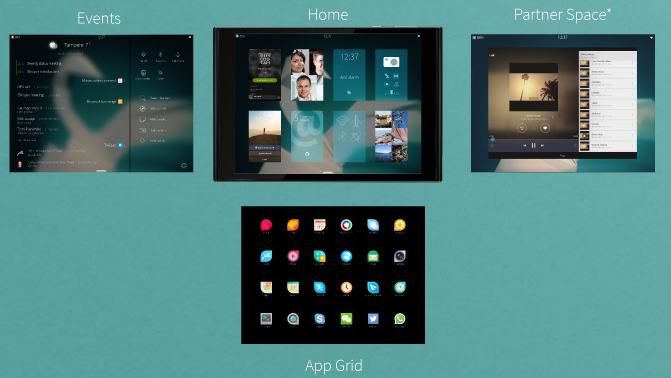
Jolla Tablet Homescreen

Staring with the home screen which you can unlock with an inward swipe, you are taken to either the notification screen – accessible with a left swipe and very similar to the notification systems found on other OSs – or to a running apps screen. This will be present right in front of you, allowing you to switch between opened apps and it looks a lot like the multitasking mode on Android and iOS devices. A swipe up will take you to the app list – designed in accordance with the Sailfish themes known as “Ambiences”. You can also find the settings here, which will allow you to set up your accounts, system and phone settings. The OS overall has a very stylish look that is at least up to par with the looks of iOS and Android’s Material Design.
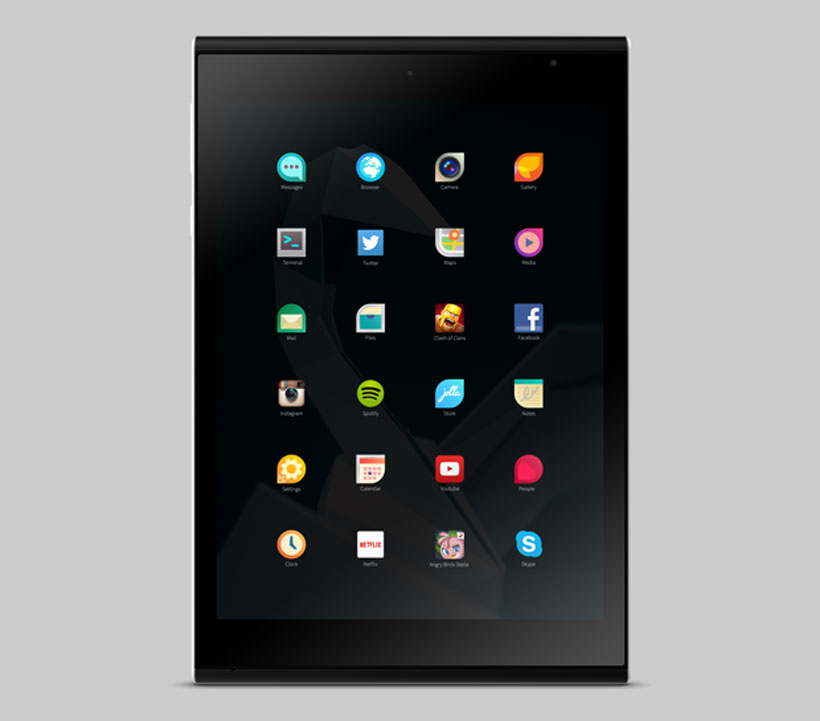
Jolla Tablet App Screen

The Jolla Tablet has Android support, meaning that you will have access to app stores such as Aptoide, Appstor and Yandex.Store but unfortunately not Google Play. Outside of the above, you also get access to the Linux-based Jolla store with personalized, although scarce apps. There is a number of very popular apps that you might encounter some trouble finding here, with the upside that you would have access to various apps that are Jolla product-exclusive.

Concerning performance, the apps that you can find on the Jolla store and are optimized for the device in question will have no problem running on this tablet. Others however might end up not doing justice to the hardware that the Jolla Tablet packs.

Jolla Tablet Camera

The camera is one area where the Jolla Tablet could’ve definitely done better. While it does feature both a front and a rear camera, their quality and performance is sub-par in comparison to other mid-range tablets on the market. The rear features a 5 megapixel 2592 x 1944 camera that has autofocus and Full HD 1080p video recording capability at 60 frames per second.

In some cases you may come to conclude that your smartphone will take better pictures than the ones the Jolla Tablet does but the camera app that comes with the Sailfish OS 2 gives you a few tools to play around with: ISO sensitivity, camera orientation and a helpful grid to allow you to align shots perfectly give you a helping hand to take photos in less than appropriate lighting conditions and will assist in dealing with photo exposure.

If you’re willing to tinker with the settings in post-editing, your photos will look good. But other, on-the-run pictures you take might not be as satisfying.

The front 2 mega-pixel camera is not that awe-inspiring but it will do fairly well for your regular video conference and selfie needs.

Jolla Tablet Battery

The non-removable Li-Ion 4450 mAh battery secures you for a day worth of power for mild usage. Watching movies and playing games will, on the other hand, have you look for the power cord after a few hours. You can get as much as 8 hours of video with a full charge with the tablet set on default brightness. There is no power saving mode to speak of, your only option being to lower the brightness manually if you want to save on battery usage a little bit.

Jolla Tablet Verdict

So after going through everything that the Jolla Tablet has to offer, we finally come to the point where we have to weigh the pros and cons of the device. While the price group that it’s part of is just a little below average, the hardware packed in it is better than that but a long way from highly performant.

The video and audio components are a little lackluster but Jolla Tablet does partially make up for them in the software that compliments it.

The selling point of the tablet remains the gesture-dictated software that some may find fun to fiddle with and a refreshing feature that may seem difficult to get used to at first, but a breeze and fun way to operate your device after you get accustomed to it.

Given that open-source operating system running on it, things are extremely likely to improve at a fast pace. Subsequently, as the platform develops so will the app support that goes with it. But that unfortunately doesn’t change the state of affairs as it is today.

The Jolla Tablet is priced at $219 for the 32 GB model and $249 for the 64 GB. However, prices may differ according to VAT and shipping taxes in your country.

To wrap up, the Jolla Tablet is a rather cheap device you can get. It will make up for the money you paid through its features if you’re willing to break away from the common user interfaces in more popular operating systems. Unless you’re an appholic and think you can live with some optimization issues here and there for the time being, the Jolla Tablet is worth a try.

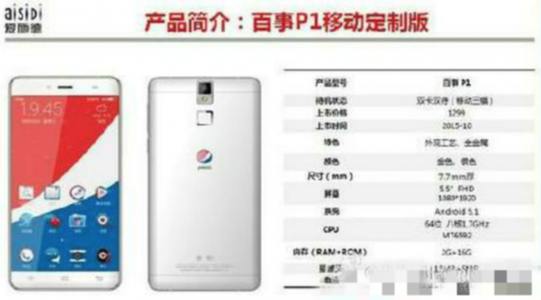
 Image source: 1, 2, 3, 4, 5, 6, 7, 8, 9, 10

Filed Under: Headlines Tagged With: Jolla Tablet, Linux-based tablet os, mid-range tablets, Sailfish 2.0, Sailfish 2.0 OS

Pepsi to Launch Mid-Budget Smartphones in China

October 13, 2015 By Cristopher Hall Leave a Comment

Pepsi to Launch Mid-Budget Smartphones in China

Pepsi to launch mid-budget smartphones in China, notes an official spokesperson. The company behind one of the most popular soft drinks on the planet  has recently confirmed that is collaborating with a partner in order to release a smartphone product line in China. When? Well, in the near future. I assume that this means sometime during 2016.

In an email interview with Reuters, a company spokesperson notes that this effort resembles what Pepsi is doing with other licensed products – like accessories and apparel. She says that there are no long-term plans for Pepsi to get into the smartphone industry. At least, not now.

Along with the Pepsi announcement we also have some info leaked regarding their first smartphone. It will be called Pepsi P1 and it will be a mid-budget device. It’s rumored to come with a 5.5-inch FHD screen at 1920 x 1080. It houses a 1.7 GHz MT6592 proc paired with 2 gigs of RAM and 16 gigs of internal storage.

Pepsi to Launch Mid-Budget Smartphones in China that will cost no more than 200 bucks

The Pepsi P1 is reportedly featuring a 13-megapixel primary rear-facing camera, and a secondary 5-megapixel front-facing unit for those special selfie moments. Finally, it has a 3000 mAh battery unit packed inside. It is more than capable of running Google’s Android 5.1. Lollipop. We don’t know if Marshmallow will roll out for the Pepsi P1 or not.

The Pepsi P1 will most likely retail at roughly $205, that’s CNY 1299.

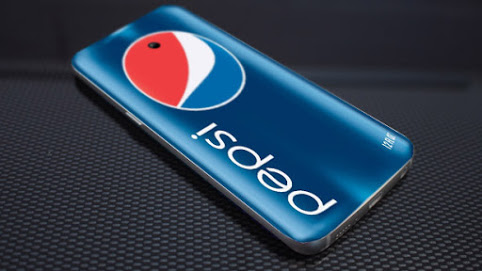
As far as we can tell, the Pepsi P1 seems to feature a metallic finishing for the case. Capacitive buttons, one fingerprint sensor and, of course, the Pepsi logo engraved on the back of the smartphone.

If you’re not interested in mobile phones, but love Pepsi to bits, you should know that the soft drink company has confirmed that accessories will be available for the Middle Kingdom. Yet, the spokesperson didn’t disclose any specifics regarding what will the company actually sell.

Pepsi to Launch Mid-Budget Smartphones in China, the Pepsi P1 has already been leaked

Pepsi to launch mid-budget smartphones in China doesn’t really come as shocking news – we expect Coca-Cola to up their game and announce their home-bred smartphone anytime soon. Take Lamborghini, they unveiled just at the dawn of 2015 their very own smartphone. It’s called the 88 Tauri and it comes with a hefty price tag of $6000. Still, it doesn’t beat the new Vertu Signature Touch smartphone that starts at a whooping $10,000 – it comes with a sort of personal valet.

Marshall, a company famous for their music gear such as amps, pre-amps and the likes, has recently announced that they too are branching out to the mobile industry with the Marshall London designed for audiophiles.

We are curious to see if Nestle or Ikea both announce their homegrown smartphone in the near future.

Anyway, would you buy a Pepsi P1?

Image Source: 1, 2, 3,

Filed Under: Headlines Tagged With: Pepsi, Pepsi P1, smartphone

The Huawei Mate S Review – A Newcomer In the West

October 13, 2015 By Roxanne Briean Leave a Comment

Huawei Mate S ModelsStraight from the Chinese telecommunications equipment manufacturer Huawei comes the latest smartphone model – Huawei Mate S – that brings more than just great functionality, a large 5.5” AMOLED display and sleek design; it is, as a matter of fact, the host of the Force Touch technology that you might have heard of before as being used by Apple in several of their products.
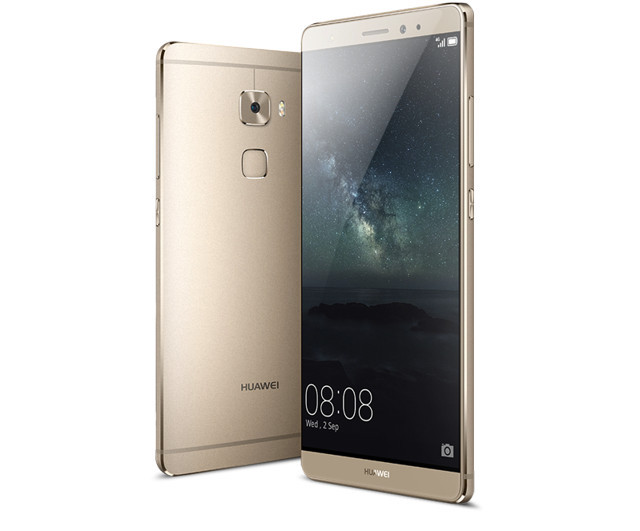
The Huawei Mate S is a successor of Huawei Ascend Mate 7 that brought the 360 degree fingerprint sensor to the series and this time around it takes it up a notch. With great incorporated utilities, a great design that will possibly take you back to the HTC One series as its source of inspiration and the hardware to back it all up – the Huawei Mate S packs everything that you would ever wish for in a smartphone destined for the European and American markets.

Taking into consideration the hardware specs that it comes with and the price range that the Huawei Mate S falls into, the model is a bold release on the smartphone market – considering that it would be competing with phones such as Samsung Galaxy Note 5 and Nexus 6P. Let’s see if the Mate S has what it takes to be considered a worthy opponent on the telecommunications equipment market of late 2015.

Huawei Mate S Design

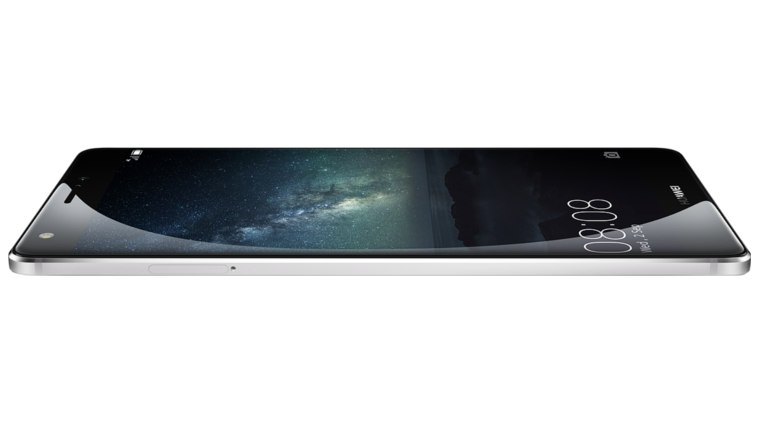
Huawei Mate S Design

Even from the first look, the design of the Huawei Mate S is undoubtedly elegant and brought to the highest western standards – coming with an extremely thin all-metal frame that despite its pretty impressive size only makes up for a 156 gram phone. Size-wise, it’s narrower and shorter than the iPhone 6 Plus even if the screen size of both models is the exact same, summing it up to a 73.9% screen to body ratio.

The sharp diamond-cut sides however are not the most comfortable aspect of the frame in spite of the visual effect on the model, having elicited a number of groans from several users. On the other hand, the curved edges and phone rear help alleviate the grip issue, giving the Mate S a good feel when held in one hand.

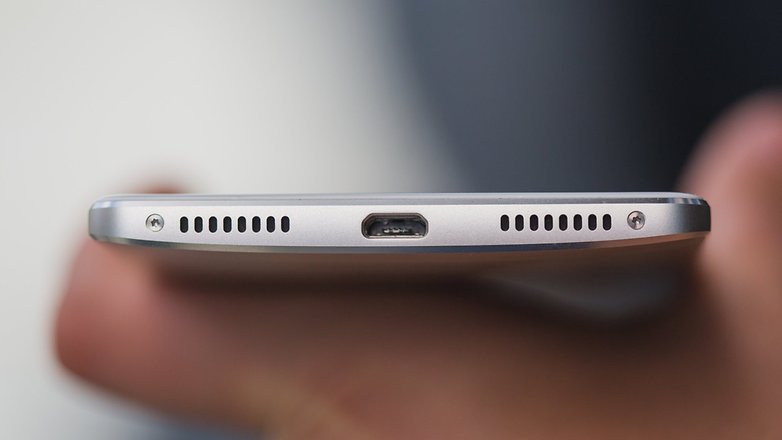
Huawei Mate S Speakers and Charging Jack
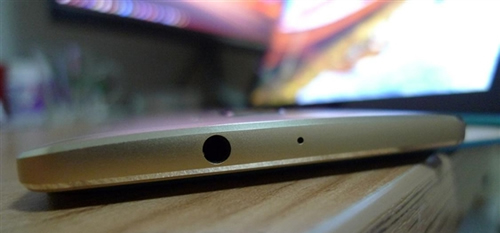
The phone has its headphone jack questionably placed on its top along with a microphone, leaving the bottom to house the unfortunately only mediocre speaker.

Huawei Mate S headphone jack

But while that might be a downside of the Mate S, the haunting problem of antenna lines on smartphones was heavily discussed even during the first showcasing of the phone and improved on: this particular model was designed to only need 2 antenna strips, built thinner than previous or competitor models (only 1.5mm thick in comparison to iPhone 6’s 2mm) but also less visible and aesthetically irritating.

Huawei Mate S showcases thinner antenna lines

Huawei Mate S antenna lines
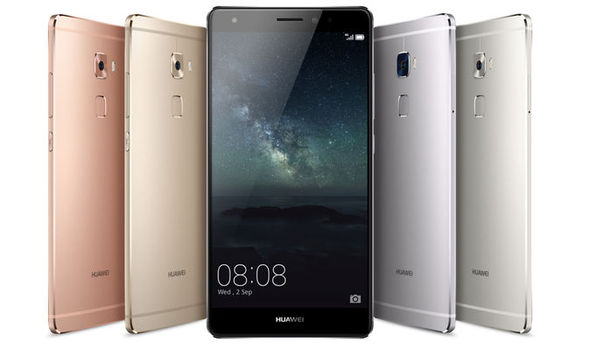
The Huawei Mate S was made available in 4 different color versions – Titanium Grey, Luxurious Gold, Mystic Champagne and Rose Gold – allowing the sleek exterior design to appeal to any taste.

Huawei Mate S Display

As mentioned before, the Mate S has a display as large as the popular iPhone 6 Plus – 5.5 inches to be precise. Here, the Chinese model falls behind its other top-end competitor handsets of the year; instead of the quad-HD panels that most of those smartphones come with, the Huawei Mate S limits itself to a 1080p display.

That’s certainly no reason to be disheartened however, as the on-screen images are still crisp and particularly detailed, with a highly-varied color range and decent contrast. The AMOLED technology helps the display produce adequately bright images that are visible even in sunlight. However it suffers a small bit on over-saturation of some colors.

It’s fairly important to mention a setting that the phone comes with – it allows you to change the screen temperature higher or lower, customizing the palette to your liking. Lastly, the panel is covered with a layer of Gorilla Glass 4 that allows great viewing angles and no gap whatsoever between the actual display and the cover. The screen has a 1920 x 1080 resolution meaning that you end up with a 401 ppi pixel density – on par with the iPhone 6.

Huawei Mate S Display
The great new feature that is incorporated in the Huawei Mate S is – as previously mentioned – the Force Touch technology. Long story short, the Force Touch is a new feature that detects the amount of pressure you apply to the screen through force sensors and provides different effects.

Even though the effects in question revolve around zooming in on images and previewing larger thumbnails, the Force Touch feature is still in its incipient stages of development meaning that there’s a limited functionality to actually making use of it. But it’s fairly certain that in the near future, when app developers shift their attention towards this sector of technology the feature will gain more and more applicability. Sure, there’s that one application that allows you to weigh objects by placing them on the screen that was showcased during the phone’s presentation but that only earns you so much.

The bad news however, is that Force Touch technology is currently only included in the 128GB version of the phone, and not on its smaller 32 and 64GB brothers respectively. Overall, the Force Touch does only currently come as a luxury feature that you probably won’t get as much as you expect from and should be taken as such.

Huawei Mate S Specs & Features

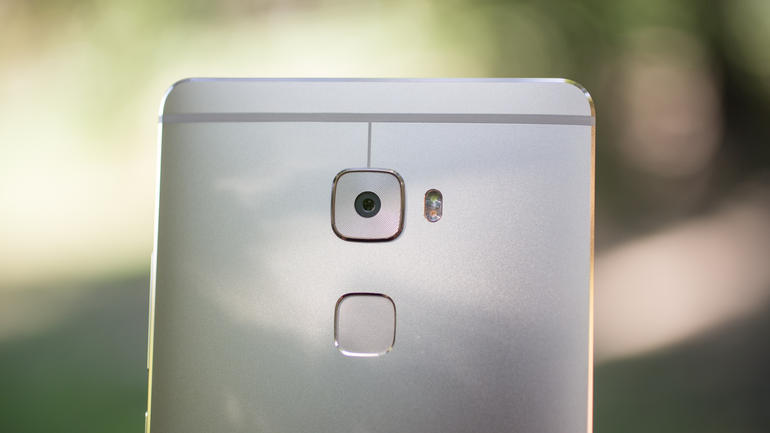
Also present in its predecessor, the Huawei Ascend Mate 7, one of the most worthwhile features to talk about is the fingerprint sensor placed on the back of the device. The company has claimed that having the sensor on the back is more convenient given the way you’re normally holding your phone and gave it several functionalities to make your smartphone operating life easier. You can tap it to trigger the camera shutter when trying to take selfies, and swiping on it in different directions can either allow you to access the notification center or navigate your photo gallery for example.

In comparison to the Ascend Mate 7, the fingerprint recognition on the Mate S has dramatically improved in both speed and sensitivity. Issues that so many other devices have with fingerprint recognition such as it being sluggish or downright unresponsive when your hands are sweaty are close to inexistent here.

In matters of hardware, the Huawei Mate S packs a Hisilicon Kirin 935 octa-core processor – meaning it is comprised of two separate quad-core processors: a 2.2Ghz and a 1.5Ghz processor respectively. Along with the octa-core processor, you get the Mali T628 MP4 graphics processing unit which, while a couple of steps behind the Adreno 330 GPU that most of the top-end smartphones of the market make use of nowadays, can still hold its own fairly well with most, if not all games and mobile apps out there.

As a further compliment to the hardware specifications of the Mate S, you get no less than 3 GB of RAM memory. With this entire arsenal of medium to high end technology, the smartphone runs exceptionally well in nearly anything you choose to have it running.

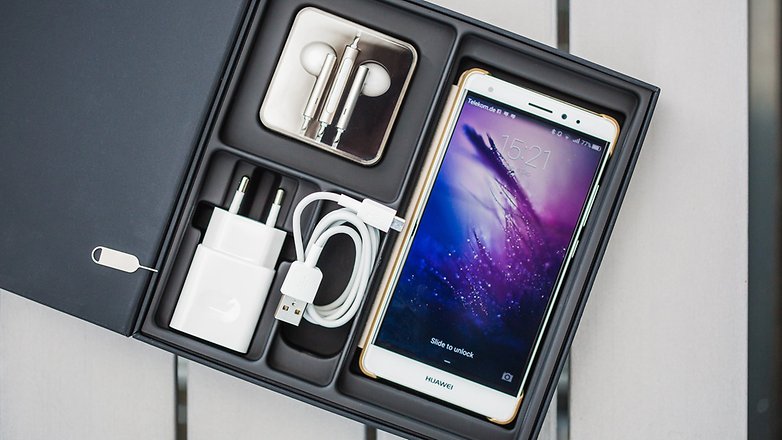
Huawei Mate S inside the box
The Mate S has nearly everything you would ever wish for in terms of connectivity – hotspot, Bluetooth and even near-field communication though the latter may be limited with devices from different manufacturers of course. The phone also has a great amount of support for photo, video and document editing.

On top of that, the Huawei Mate S packs three microphones meant to be used with its smart directional algorithm for directional audio recording. In a more user-friendly way of saying it, that means that recording is greatly improved on this model, allowing you to cut background noise as well as either automatically or manually detect audio sources to focus on – making it a great device to use as an audio recorder for interviews and such.

Huawei Mate S Camera

Like any other high-end smartphone on nowadays’ market, the Mate S graces us with two cameras – both front and rear. The rear presents a 13MP 4128 x 3096 pixel camera gifted with a four-color RGBW sensor; this is one of the features that the manufacturer proudly presented as being an addition to what other competitor smartphones have to offer when it comes to capturing vibrant photos.

To make things even better, the camera also packs a 1.2 degree optical image stabilization that helps remove shakiness from both image and video captured using the Mate S. The developers have certainly given the development of the camera a lot of thought and effort as they also implemented a color temperature LED flash with it; its purpose is to reduce the flash-generated tinge that most smartphones struggle with when capturing photos in various circumstances.

Furthermore, in terms of protection, the rear camera is covered with the same sapphire glass that is used in the Apple Watch, making it particularly durable.

Huawei Mate S rear camera
The front camera has had plenty of attention given to it too, featuring a fully-optimizable Digital SLR level sensor that can be fiddled with at the fullest using the inbuilt camera app. Selfies can be taken to the next level with no less than 8 megapixels along with the LED flash capability that makes it easier to take shots in dark environments.

Along with the beauty algorithms that you get to set up the first time when you use the front camera – destined to help with improving real-time selfies by giving you brighter eyes and smoother skin – the Mate S is a selfie powerhouse.

Both cameras support video recording in 1080p, maybe slightly disappointing to some users given that the 4k option is always the better one, but under no circumstance greatly inferior to most high-end phones in terms of performance.

Huawei Mate S Battery

The Huawei Mate S comes with a non-removable 3000 mAh power pack. While the non-removable part is not a problem and basically a trend with its own ups and downs, the power of the battery is questionable. On par with the LG G4 but smaller than the ones featured in comparable sized phones, the Mate S battery may prove to not live up to the expectations. Developers promised over a day of usage with a single charge, but results may vary depending on a number of factors. Naturally, under strenuous conditions the phone doesn’t fare that well and sadly doesn’t come remotely close to the “over a day” statement.

On the upside, however, the Huawei Mate S is fast-charging enabled meaning that you can hook it up for 10 to 30 minutes and have it keep going for another few hours. Along with a low power mode setting, the phone can go into a sort of hibernation mode when battery levels are too low for the full feature phone to keep functioning, meaning that you would only have access to calling and texting.

Huawei Mate S Software

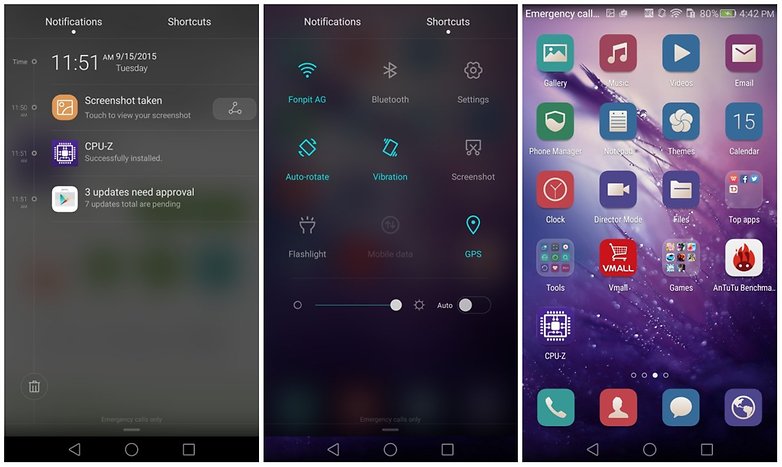
Huawei Mate S software and operating systemThe Huawei Mate S runs on the v5.1.1 Android Lollipop operating system and also incorporates the Emotion UI 3.1 feature – a trademark customization layer for all of the Chinese company’s products as a matter of fact. The user interface is made simple to navigate and provides some great usability features to the phone and it takes onto the iOS model of designing operating systems – with an accent on removing the folder and sub-folder clutter, overly complicated settings menu and stuffed UI.
However, this comes at the cost of an inexistent app tray, meaning that all of your apps will rest on your home screen like they normally do on iOS for example, taking a leap away from the things that the regular Android user may be accustomed to. There’s some more customizability available when it comes to themes and icons but that means that you’d be giving up the minimalist and tidy way things look on your regular Android device.

Huawei Mate S Verdict

On paper, the Huawei Mate S makes for a great phone altogether. The close to state-of-art components that it packs may prove to be adequate for some but not enough for others. However, given that the smartphone can be purchased for prices lower than the flagship devices on the market, this could prove to be a worthy purchase in the end.

The phone is beautifully designed and will cater to any of your needs. However, the real downside of the Mate S is that while it does everything wonderfully, it doesn’t exceed any of his competitors in anything; its purpose seems to have been to at least be as good as other smartphones of this caliber.

While one could argue that the Force Touch feature on it could make up for this to some extent, the technology is not yet much of a thing of the present and won’t bring you much consolation at the end of the day.

The Huawei Mate S costs $739 for the 32GB version and $799 for the 64GB variant. There has been no price set for the 128 GB model yet.

Image Source: 1, 2, 3, 4, 5, 6, 7, 8, 9, 10

Filed Under: Headlines Tagged With: Huawei, huawei force touch, Huawei Mate S, smartphone

Goodbye USB Cable, Welcome Xbox One PC Wireless Adapter

October 12, 2015 By Roxanne Briean Leave a Comment

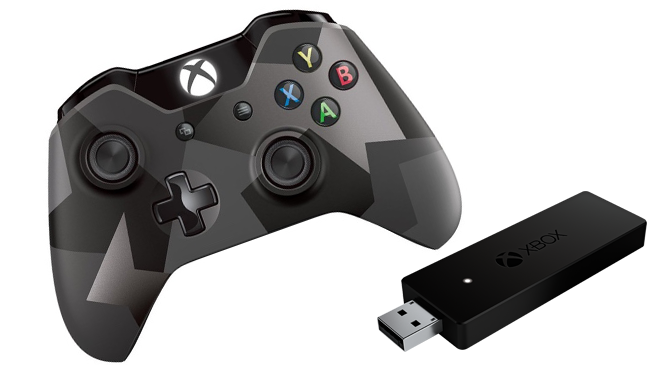
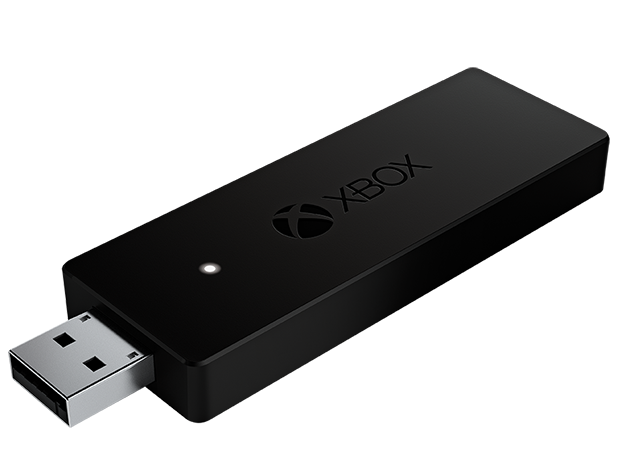
Xbox One PC wireless adapter costs $25

It’s time to say farewell to the USB cable and give a warm welcome to the Xbox One PC wireless adapter for Windows. However, not every kind of Windows. The dongle will only work on Windows 10.

Every gamer understands this – wireless is way better than wired. Yes, you do lose the constant power juice, but you get to add more points in convenience and comfortable gaming sessions. It should go without mention that going wireless also makes your room look more tidy-up, and you don’t have to worry that your roommate could trip and drag cables across the room – I’m looking at you Michael.

PC gamers didn’t really have a choice to go wireless with the Microsoft Xbox One controller. It was wired or nothing at all. Microsoft is hoping gamers will take full advantage of their new Windows 10 OS. A feat previous versions of Windows can’t uphold – the ability to make the Xbox One controller wireless.

But this doesn’t come at small price. The Xbox One PC Wireless Adapter will cost $25 and it will be available for purchase starting the 20th of October. A hefty price considering that the gamepad costs $60 alone. This puts it at $85 if you plan to purchase them both at the same time. This is assuming that you plan to buy a different one for your living room or work gaming sessions. That is, if you don’t mind just walking with one controller from point A to point B.

Xbox One PC wireless adapter is set to launch on the 20th of October

Microsoft doesn’t seem to specify if the dongle works with other versions of Windows i.e. Windows Vista, Windows 7 or Windows 8/8.1. Is there anyone out there that still uses Windows XP for uhm, anything?

We all get it that Microsoft is trying to push more units of Windows 10 – whether they are free or not; and more Xbox One exposure, but it could really be a nasty move if they don’t plan on giving some support to aforementioned Windows users.

I’m quite curious. If Microsoft does indeed limit their new dongle to work solely on Windows 10, will a community made app surface enabling the dongle to work on other Windows OSes? If that does happen, then Microsoft could face a humongous consumer backlash. You see, why not make it available for the entire Windows spectrum if the dongle is more than capable?

Yet, we at AFP suspect that Microsoft isn’t that keen to support older versions of Windows.

When the time comes, you can buy your Xbox One PC wireless adapter from the official Xbox.com store.

What are you planning to get your game on with the new Xbox One PC wireless adapter? I know that I’ll be preparing for Star Wars: Battlefront by playing some Battlefield and the likes. I’ll probably swoop into The Witcher 3 because I’m still stuck in Skellige even though I clock more than 150 hours of game time.

Image Source: 1, 2

Filed Under: Headlines Tagged With: windows 10, Wireless Adapter, Xbox, Xbox One, Xbox One Controller

BlackBerry Quits Hardware Next Year If It Isn’t Profitable

October 11, 2015 By Roxanne Briean Leave a Comment

BlackBerry quits hardware next year if it doesn't prove to be profitable

During Code/Mobile, CEO John Chen says that BlackBerry quits hardware next year if it isn’t profitable enough. He said that the company never says never to shutting down key parts of its business and focusing on something else that makes investors happy. This something else may very well be a shift of focus towards providing top-notch security services to a variety of platforms.

The company’s Enterprise Servers is fully compatible with both iOS and Android, so it wouldn’t be much of a hassle to aim more resources and time towards the mobile medium. However, they are already wetting their toes in mobile waters without displaying significant improvements.

Chen is still trying to reinvigorate the hardware business, and he doesn’t seem to want to let it die, regardless of how much he notes that BlackBerry never says never. During the Code/Mobile event, Chen took to the stage to unveil and showcase BlackBerry’s Priv. The company’s first Android product, and also the first device built by BB that doesn’t use their own OS.

Chen notes that the BB Priv aims at being a super secure smartphone, maintaining the user’s privacy at all costs. Chen says the the Priv addresses the three key factors which can make BlackBerry succeed – and to be frank, if the Priv isn’t a hit, then it might be the last BlackBerry smartphone we will ever see.

The first issue that the company has to fix is the need to do accommodate all ecosystems i.e. iOS, Android and even Windows Mobile. The second key issues is that the company needs to entice developers to build apps that are either BB exclusive or capable of running on a BB device. This shouldn’t be a huge problem now that the Priv is Android-enabled. And lastly, Chen think that BlackBerry needs to take advantage of the humongous strength it has in the security department and pump up their smartphones accordingly.

BlackBerry quits hardware next year if it isn't profitable

Chen adds that the Priv will most likely be one of the securest Android smartphones on the market, if not the securest one. He says that the only the Blackphone is equal to the Priv. Also, BB acknowledges how secure and powerful the Samsung Knox is, which Chen notes as one of Priv’s main competitors in the mobile security medium.

Yet, with the recent Stagefright vulnerabilities unveiled, the company doesn’t guarantee ultimate security. But Chen says that the company is resilient than ever, and even if their Priv will feature vulnerabilities, it won’t feature as many as other competitors.

Even though BlackBerry’s hardware part of the business is in turmoil, with removal pounding on its door, Chen is confident that their new project, as in the BB Priv, will succeed. Thus keeping the business department afloat for at least a couple of years.

Image Source: 1, 2

Filed Under: Headlines Tagged With: android, Blackberry, Priv

The DJI Osmo Camera Shoots in 4K and Stabilizes Your Footage

October 10, 2015 By Michael Turner Leave a Comment

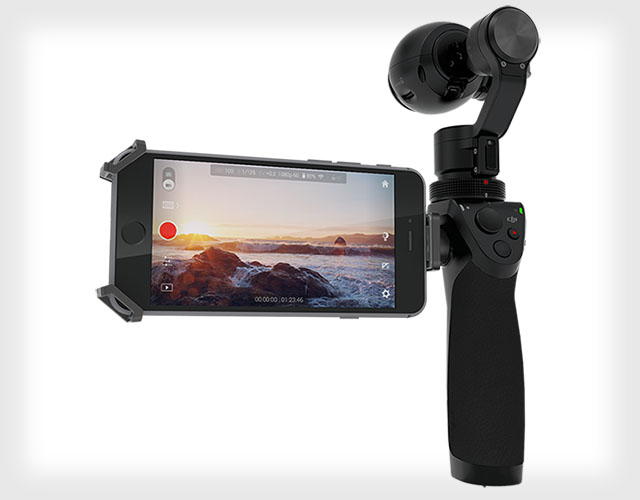
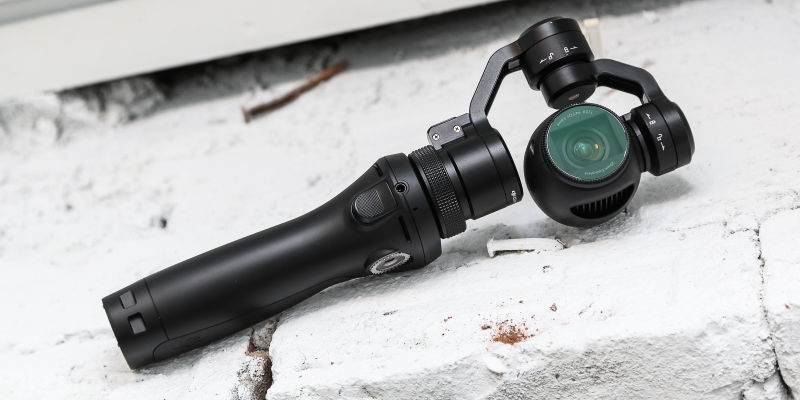
DJI Osmo Camera shoots in 4k and it retails at $650

The DJI Osmo camera shoots in 4K and stabilizes your footage, but it’s pricey as hell. Yes, it’s a selfie stick robot that resembles something out of a RoboCop or Terminator flick. No, it doesn’t follow you around and nor does it supplement your selfie-taking arm with some kind of high tech exoskeleton. Regardless of how much we would have loved it to be real.

The Wall Street Journal reports that the new Osmo camera blends the fancy and high-tech camera that DJI uses in its drones and turns it into a six-inch camera-on-a-stick.

The nasty part? The DJI Osmo camera costs $650. It would be great as a stocking stuffer for this X-Mas for you and your selfie-obsessed friends. That is, if your existence is based on selfies.

As for it being a fully fledged robot, might be a overstatement. That’s just a geeky way of describing its three-axis gimbal and motorized interiors. Don’t be scared by fancy terms, because the Osmo is just like you’re average selfie-stick. It’s really not complicated. For crying out loud, it’s just a selfie-stick.

DJI Osmo Camera shoots in 4k and it costs $650

To trigger it, just use the little button on the Osmo to show it where you want your pic to focus. The gimbal keeps the Osmo in place as you move around trying to find the perfect pose for your shot. If you want to be in the picture, then just triple-tap the button you use to trigger the camera and the Osmo will spin around and include you in your video, or pic.

The DJI Osmo camera shoots in 4K and has a ton of other fun features. Including the ability to take steady panoramic shots using the Automatic Panorama mode. This makes shooting 360 degrees panoramas super easy. You just need to hold the camera up above your head and gently tap the shutter speed. The Osmo will rotate and it will grab images as it spins around, while maintaining a steady level.

The gimbal is really useful if you have twitchy hands, like me. It comes in handy when you want to take long-exposure shots, but just can’t manage a clear one because your hands are always shaky. And more than one occasion I have been mistaken with an alcoholic SOB, but really I’m just twitchy.

DJI Osmo Camera shoots in 4k and it's the most expensive selfie-stick on the market

But enough about me, let’s talk about you and your new DJI Osmo selfie-stick camera that can shoot in 4K. It even has a phone holder attachment, so you can better see what the end pic will look like. Also, it’s Wi-Fi capable to easier connect the two. The home-bred app also let’s you switch between device modes and even send the Osmo commands.

Image Source: 1, 2, 3

Filed Under: Headlines Tagged With: 4K Camera, DJI, DJI Osmo, Osmo Camera

Elon Musk Says That Apple Hires Their Rejected Engineers

October 9, 2015 By Nancy Young Leave a Comment

Tesla founder Elon Musk claims that Apple is hiring their fired engineers

Wizkid Elon Musk is not concerned that Apple could be a potential rival in the electric car industry. He says that the Cupertino-based tech giant hires employees that were ultimately fired by Tesla.

Elon Musk told the Handelsblatt, a German publication, that Apple has only poached engineers that didn’t make it at Tesla. He continues to add that they were clearly not important to the company.

Elon Musk says that they have a running joke regarding fired engineers that join the Cupertino-based company – he dubs Apple the Tesla Graveyard. Individuals that don’t make it at Tesla, ultimately go to work for Apple.

Considering this, nobody at Tesla is worried because Apple is working on their electric car program titled Project Titan.

Elon Musk isn’t the only one foretelling Apple’s demise if the company decides to sink money into its automotive ambitions. Bob Lutz  has warned Apple that their new project may end up being a giant money pit.

The Tesla founder respects that Apple is trying to actually build something significant, but he adds that cars are way more complex than your average smartwatch or phone. He continues to explain that the giant tech company will never be able to surpass his own success, nor reproduce it. Yet, he failed to argument why.

Success is a somewhat of a relative term to Elon Musk, considering that Tesla is expected to turn a profit from 2020 upwards.

It’s not news that Apple and Tesla are battling over engineers. Regardless of how much Elon Musk wants to say that those who end up in Apple are Tesla rejects. However, Tesla is indeed getting the big end of the stick – in May, they announced an attrition rate of five to one.

Elon Musk isn't worried about Apple's Project Titan

Apple is reportedly enticing ex-Tesla employees to jump ship by offering a 60 percent salary raise and a staggering $250.000 signing bonus.

In the past couple of months Apple has been pushing aggressively on their Project Titan front. Reports earlier this year claim that almost 1.000 employees have been assigned on their electric car project. But despite how many individuals have been hired by Apple, nothing else has surfaced. We don’t expect anything to leak, because Apple keeps a contractually tight lid.

A few weeks ago reports have showcased that Apple is secretly undergoing car operations out of a hidden dedicated facility in San Jose.

Elon Musk is a respected entrepreneur, and a brilliant mind, but he seems to be putting on his poker face with these statements. We aren’t sure whether Apple’s electric car will be a hit or a not, but considering that Elon Musk is discussing Project Titan reassures us that Apple is indeed working on one.

Image Source: 1, 2

Filed Under: Headlines Tagged With: Apple, Electric Car, Elon Musk, Project Titan

Apple Pay Comes to Starbucks, Chili’s and KFC Next Year

October 9, 2015 By Roxanne Briean Leave a Comment

Apple Pay comes to Starbucks, KFCs and Chilis

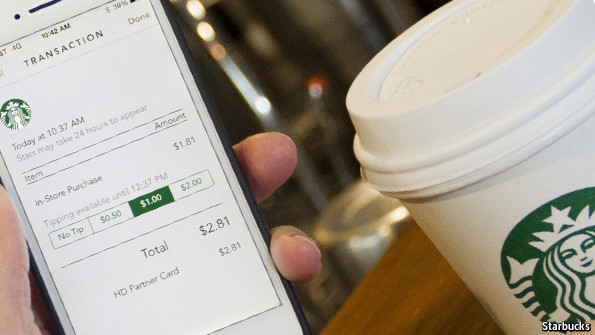
Apple Pay comes to Starbucks next year, says Apple exec. Apple Pay is also heading for Chili’s and KFC. Soon, you’ll be able to pay for your favorite latte, spicy wings and scrumptious egg rolls with your Apple Watch.

Over the the next year, Apple’s mobile payment service dubbed Apple Pay will be featured in Starbucks coffee shops, says vice president of Apple Pay Jennifer Bailey during the Code Mobile conference. However, by the end of 2015 there will be some select Apple-owned Starbucks stores rolling out the mobile payment service. Approximately 7.500 stores will be Apple Pay enabled next year.

Bailey notes that Apple Pay has gained momentum and more and more merchants are opting in. Also, more than 80 percent of Apple Watch owners are actively using it. Moreover, next spring Apple Pay will hit KFC restaurants. Chili will also opt in for the new paying system, but they company did not disclose how many restaurants will feature the new system.

The ability to turn our smartphone into a digital wallet has been hyped for the past couple of years. Yet, only now Android and Apple Pay are seemingly sparking interest in consumers. Apple was the first company to jump start the trend during last year’s venture into contactless mobile payments.

After almost 72 hours after its debut, Apple Pay witnessed over 1 million cred cards used.

Consumers using Apple Watch and newer iPhone models can pay on the go at retailers that support Apple Pay – payment is done via NFC, which is near-field communication technology. Touch ID devices like the iPad Mini 3 and the iPad Air 2 are also capable of in-app purchases. Last month’s iOS 9 update offers users the possibility of consolidating their loyalty – it also offers cards as rewards.

Apple Pay will be enabled in select Apple-owned Starbucks by the end of the year

Apple and Starbucks, sitting in a tree…

We recently talked about Apple’s tokenization system and what it entails. The bottom line is that retailers and merchants never see your data. Samsung Pay works almost the same way, but the consensus is that it’s more secure than Apple Pay.

Apple’s mobile payment service was launched in 2014. Back then, about 500 financial institutions partnered with Apple, along with 220.000 US merchant locations. As of mid 2015, over 2.500 banks support Apple Pay with 1 million retailers, restaurants, merchants accepting the mobile payment service.

Apple says that by the end of the year there will be more than 1.5 million US locations that will support their system. Yet, Google is upping up their game and bringing their hard guns into play. Also, Samsung brought their very own Pay service into the US last month.

Because Apple Pay comes to Starbucks next year, it can very well be a decisive factor which will propel the Cupertino-based company into becoming the most used mobile payment service.

Image Source: 1, 2

Filed Under: Headlines Tagged With: Android Pay, Apple Pay, mobile payment, mobile payment system

Best Video Conferencing Tool: GoToMeeting, TeamViewer and Others

October 8, 2015 By Michael Turner 4 Comments

GoToMeeting is a great video conferencing tools

Whether you work from home or you just founded a startup, you need some sort of video conferencing tool to help keep in touch with colleagues, employees and clients. Do you know which service to use? Don’t worry, you aren’t the only one scouring the interwebz for the best video conferencing software.

There are so many choices to pick from and you clearly don’t have time to try all of them. The thing is, video conferencing is a crucial element to your business – even if you’re a freelancer. Down below we’ll be reviewing Adobe Connect, GoToMeeting, TeamViewer, WebEx, Google Hangouts and other more obscure software.

1. Adobe Connect Review

Adobe Connect is an alternative to GoToMeeting

Adobe Connect is one of the best online meeting services. It basically has all of the features that an entrepreneur looks for – stable, reliable and great video conferencing quality. All enveloped in a competitive price. It has a ton of customization options such as methods to record and analyse how individuals engage with your presentation or what have you. Adobe even offers a ton of tutorials to help newcomers get as much bang out of their buck as they possibly can. Yet, first-time participants won’t have that many problems with Adobe’s software mainly because it has a friendly UI. Adobe Connect pricing is fairly cheap, when compared to other online meeting services too.

It has rich multimedia features such as share animations, audio and HD video, and of course images. Instant messaging is a given due to the fact that 99 percent of meeting services offer it. It’s compatible with Windows, Mac OS X and Linux.

You can record meetings. You can edit them afterwards with a special tool. This means that you can let the viewer decide what topic he wants to watch first.

Adobe Connect allows screen shares, as well as video and document shares. It comes with a free 30 day trial to see if it suits you needs or not, but most likely, you’ll stick with it. Why? Well because you can share an unlimited number of webcams during your meeting.

The thing is, because it has so many options to choose from, Adobe Connect’s initial setup may be a little bit overwhelming to some users. Even though it has a super friendly UI.

Our Adobe Connect test went like a charm – no lag issues with crystal clear image and sound.

Adobe Connect pricing is competitive and it comes with three plans.

  • Adobe Connect Meetings;
  • Adobe Connect Webinars;
  • Adobe Connect Learning.

Adobe Connect Meetings

For an annual plan of $45 a month per host, or a monthly plan of $55 a month per host, with no commitment and the possibility to cancel anytime without repercussions you get the full pack for digital meetings. Although, this plan allows up to 25 participants and up to 9 meeting hosts per account.

Adobe Connect Webinars

Adobe Connect Webinars focuses on marketers and their needs. Prices start at $104 a month per webinar manager for 100 participants. The next in-line plan is $375 a month per webinar manager for 500 participants. For $458 a month per webinar manager you are allowed to have 1000 participants.

Adobe Connect Learning

Adobe Connect Learning is aimed more towards online classes or huge presentations – if you’re a little startup or a freelancer, I don’t recommend going with the Learning plan. The annual plan costs $292 a month and it has space for up to 200 virtual classroom participants. It also works for mobile platforms.

Adobe Connect download is available on Adobe’s official website.

2. Google Hangouts Review

Google HangOuts one of GoToMeeting's competitors

Google Hangouts is a free service. While it is a great choice for your online meetings, it lacks a lot of features that a paid software has. However, it is Google-quality software, meaning that it has a simple and clean user interface. The biggest issue, and frankly the deal breaker for some, is that it allows a maximum of 10 users or devices at a time in a meeting. Google Hangouts is compatible with the majority of devices and operating systems available – Mac, Windows, Linux iOS and Android enabled; so collaborating with others is not a chore.

It has an reliable chat feature where users can share links – go figure, YouTube works like a charm and there’s a simultaneous video watching feature too. Special designed apps for Android and iPhone. The common share screen option, as well as share presentations and such.

The thing is, it really lags if you have a poor internet connection and unfortunately, whatever you type in the chat will not be saved a la Skype. Also, a nasty thing that is really worth noting is that Google captures user data in order to improve Hangouts features – ad targeting and such. Be warned, if you choose to share confidential and sensitive information, it may very well land in the hands of an advertiser.

The Google Hangout plugin is available in the extension store for browsers – it’s a quick free install. The Google Hangout app can be found on the Apple and Google Play Store. For the Google Hangouts desktop app please visit Google’s official website.

3. TeamViewer Review

TeamViewer is a great alternative if you don't plan on using GoToMeeting

TeamViewer is a personal favorite of mine because it has an easy initial setup, it’s simple to handle and it’s completely free for private use. Yet, if you are a business owner it entails a huge investment on your part. The service however will be yours for the entirety of either your lifetime, or TeamViewer’s. Furthermore, there are little to none complaints about TeamViewer.

If every participant has a stable internet connection – regardless if it’s a poor one or not, then meetings will go out as planned. Because it’s available for free for individuals, you can test TeamViewer before committing to the huge upfront investment. You can access the TeamViewer download page right here.

All of TeamViewer’s capabilities are available for free for individuals.

Up to 25 participants can access your meeting, it has VPN included and it works exceptionally well with Mac, Windows, Linux, Android, iPhone, iPad and the reclusive Windows Phone – including the latest TeamViewer 10 version. Also, the TeamViewer quicksupport app is available on all mobile OSs.

TeamViewer VPN features includes firewall-friendly, and able to work with NAT. It supports all of the major protocols such as L2TP, IPsec, RemoteFX and RDP. It has an automatic performance optimization feature and a Web Connector readily available if you use it on a browser. Moreover, TeamViewer VPN works on Windows 7, Vista, XP all the MacOS 10.x versions, Linux distributions, Android and iOS.

The TeamViewer portable app is the best choice if you plan on remote controlling one of your clients PCs to fix an issue or alleviate a confusion – works great in customer support.

TeamViewer pricing starts at $749 and it’s called Business. The following Premium plan costs $1499, and the most expensive one stands at $2839 and it’s dubbed Corporate. All of them are a one time payment upfront, not yearly, with  lifetime support.

4. GoToMeeting Review

GoToMeeting is one of best video conferencing tools available right now

GoToMeeting is a fantastic tool for smaller businesses that are looking for a cheap and easy to use online meeting tool. You can start meetings with just one click. GoToMeeting is developed by Citrix and it has a plethora of features such as full mouse and keyboard control, Voice over IP, screen sharing and all sorts of drawing tools. Yet, if you are a Mac user, then you won’t have that many features available. But the great thing is that the GoToMeeting free version is available for up to 3 participants.

It’s borderline easy to use with great quality HD video and audio, it allows unlimited online meetings, and you can share almost anything.

The GoToMeeting download page can be accessed via Citrix’s official website, which is gotomeeting.com.

GoToMeeting pricing is cheap, and affordable for small businesses. You can opt-in for a 30 day free trial to see what’s all the fuss about and afterwards you can choose between two plans. A $39 a month up to 25 participants, per organizer. The second plan costs $56 a month up to 100 participants, per organizer.

There’s even a Citrix GoToMeeting app which you can download for iOS and Android.

5. InterCall Review

InterCall is a GoToMeeting competitor

InterCall Online’s video conferencing platform is dubbed Unified Meeting 5. Browsing on their website will be confusing, to say the least. Solely because they sell WebEx, Adobe Connect and Microsoft Lync. It’s a little bit pricey, but you have to ask InterCall yourself for an official pricing list because it differs from contract to contract. InterCall tailors its services to best suit your company’s needs, so just listing an average price on their website would make things more confusing than they already are.

You have the majority of features present on competing meeting service platforms such as share screen, record meetings and send them to those who couldn’t participate, share presentations and documents, easily accessible via tablets and smartphones, fully compatible with iOS and Android devices. It can be used up to 150 people, but, as I said before, it seriously depends on your plan. Yet, you have a 30 day free trial period so you can test InterCall before buying it.

6. WebEx Review

The Cisco WebEx meeting service is on par with GoToMeeting

Cisco WebEx is a cheap and affordable alternative for smaller scale businesses. Their Premium 25 version is a great price to value option that offers all of the key features that you need from a meeting service platform. A WebEx meeting can be hold on multiple different OSs, and it comes quite in handy if your company is keen on using Linux for servers, Macs for video editing and Windows for every day tasks.

Join WebEx meeting with a simple click of a button.

Fancy on trying it out before committing to a plan? How about a quick WebEx test? The free basic version allows a maximum of 3 people to join.

It comes with all sorts of drawing tools and the ability to share one’s desktop and everything docs related. You can record meetings regardless of the plan you’re opting in for, but only paid versions offer HD output. Also, paid versions come with 1 gig of storage space. It syncs perfectly well with iOS and Android devices, and it offers VoIP services at no additional costs.

Unfortunately, video will display only 7 attendees at a time and you can’t expand the window interface completely. The majority of your files will be converted and displayed in PDF, which may cause some errors in the process. Video lags totally random, even if you have a stable and reliable internet connection. Its default browser is none other than the lackluster Internet Explorer – you can change it, of course.

For a free WebEx download please go to their official website.

For a maximum of 8 people, the Premium 8 WebEx price start at $24 a month per host or $19 a month for an annual subscription. Premium 25, which offers WebEx services for a maximum of 25 people starts at $49 a month per host or $39 a month for an annual subscription. Premium 100, which offers WebEx services for a maximum of 100 people starts at $89 a month per host or $69 a month for an annual subscription.

7. MegaMeeting Review

MegaMeeting falls short when compared with GoToMeeting

MegaMeeting doesn’t require any installation whatsoever because it’s a cloud based video conferencing software. Meetings can be accessed via an Android or iOS enabled device. We don’t have a concise pricing list because MegaMeeting doesn’t offer one. On their official website they only state that plans start as low as $39 a month. You must contact them yourself and see what contract they can offer you – depending on your needs prices may vary, of course.

Unfortunately, there isn’t that much love for Mac. This means that not all of the MegaMeeting features will be available on an Apple machine.

However, it has 24/7 customer support which is a big plus in my book. MegaMeeting can display up to 16 video windows during a meeting which is quite fantastic. There is even a text chat console where you can add notes and bullet points. It allows sharing of documents.

However, you don’t have any free trials, video is somewhat delayed and you have to download a bunch of extra plugins to make various features work. Their official website looks a little bit shady, but it’s genuine – genuinely old I mean.

Yet, with all of these video conferencing tools available I found myself using GoToMeeting and TeamViewer the most. Mostly because I found GoToMeeting super reliable and stable, while offering at the same time exceptional quality, and TeamViewer for when I need a strong VPN service.

If you have anything to add, a video conferencing tool that we might have missed, please feel free to post in the comments section below.

Image Source: 0, 1, 2, 3, 4, 5, 6, 7,

Filed Under: Headlines Tagged With: Adobe Connect, GoToMeeting, TeamViewer, Video Conferencing, Video Conferencing Tools

You Can Make Adidas Futurecraft 3D at Home In the Future

October 8, 2015 By Nancy Young Leave a Comment

Adidas Futurecraft 3D concept

You can make Adidas Futurecraft 3D at home in the future and according to chief executive officer Eric Sprunk of Nike, 3D printing footwear at home will be possible sooner than we thought. What is Adidas Futurecraft 3D?

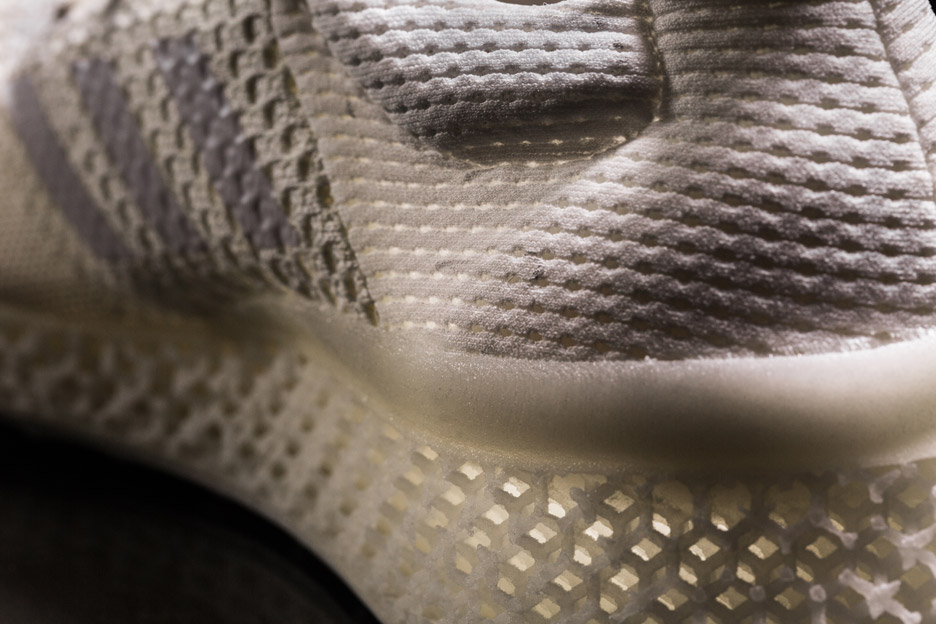
It employs the assistance of 3D printing and Adidas is here to explain the process – well, at least the midsole part. You see, Futurecraft 3D is Adidas’ new unique 3D printed running shoe midsole. It can be fully customized in order to tailor to an individual’s foot. This initiative entails that athletes will have better shoes that will suit their needs. And, of course, ordinary people like you and me will be able to design our own footwear as we see fit – in accordance with some guidelines, one may presume.

Adidas Futurecraft 3D shoes

The recently released statement has nothing to do with Nike’s plans of 3D printed footwear, but the resemblance is uncanny. A spokeswoman on behalf of Adidas notes that Paul Gaudio, who is a Portland-based creative director for the company, will be heavily involved in everything that means Futurecraft 3D.

This 3D concept means that anyone can walk into an Adidas store, do a short jog on a treadmill and get a design for 3D printed shoes that will be tailored to his, or hers needs. This is what Adidas wants to achieve – the company wants to be able to create cushioning for every foot, a breathable and flexible carbon copy of the individual’s footprint. This means that it will exactly match pressure points and contours.

Adidas Futurecraft 3D process

Currently, Adidas Futurecraft 3D is in its prototype phase. This should be taken with a grain of salt. While the idea is out there, the technology to achieve such a feat is, well, lacking. The good news is that it isn’t lacking completely.

Paul Gaudio notes that Futurecraft is the company’s sandbox. It’s a means to challenge themselves and see how much they can push the boundaries of their craft. A new approach to design – real, raw and fast; Gaudio adds. They are bringing together all the qualities that comes with hand crafting a shoe with prototyping and 3D technology.

Adidas Futurecraft 3D will be fully breathable carbon copies of your footprint

Materialise, a leading specialist in 3D printing and one of the pioneers, is Adidas’ partner in bringing 3D printed footwear to reality. Expect more news about Adidas Futurecraft 3D footwear in the upcoming six months.

Adidas Futurecraft 3D pair of shoes

3D print enthusiasts, would you buy a design of your footprint so you can make your own shoes at home? Or are you more keen to let Adidas do all the work?

Regardless of your decision, this trend will surely skyrocket before the decade ends.

Image Source: 1, 2, 3, 4, 5

Filed Under: Headlines Tagged With: 3D print, 3D Printing, Adidas, Adidas Futurecraft 3D, Futurecraft 3D

  • « Previous Page
  • 1
  • …
  • 13
  • 14
  • 15
  • 16
  • 17
  • …
  • 58
  • Next Page »

Subscribe to Blog via Email

Enter your email address to subscribe to this blog and receive notifications of new posts by email.

Join 11 other subscribers

Recent Articles

police handcuffs man

German Man Probed In Poisoning That Killed 21 Employees Since 2000

June 29, 2018 By Kenneth Scott Leave a Comment

Chicken wings bar

Intoxicated South Carolina Man Punches Waitress Who Refused to Serve Him Alcohol

June 29, 2018 By Karen Jackson Leave a Comment

gaming

New Zealand gamer Who Flew Halfway Across The World for Virginia Teen Gets Shots By Her Mother

June 28, 2018 By Cristopher Hall Leave a Comment

party

Former Virginia Tech Freshman Sentenced to 50 Years in Prison for Stabbing a Girl to Death

June 28, 2018 By Roxanne Briean Leave a Comment

bonfire

British Couple Sentenced to Life in Prison for Torturing and Murdering French Nanny

June 27, 2018 By Deborah Campbell Leave a Comment

pay phone

Texas Father of Girl Disappeared in the 80s Ignored by Authorities

June 26, 2018 By Cristopher Hall Leave a Comment

bottled water

San Francisco Woman Threatened to Call Police on Girl Who Sold Ice Water for Disneyland Trip

June 25, 2018 By Roxanne Briean Leave a Comment

Maplewood Park

Missouri Man Robbed by Date and Accomplice in Park

June 22, 2018 By Nancy Young Leave a Comment

coding

New York Man Sentenced in Cyberstalking Former Girlfriend, Mailing Drugs to Her Dorm

June 22, 2018 By Deborah Campbell Leave a Comment

headphones

Bose Poised to Launch Sleepbuds, In-Ear Headphones That Help You Sleep

June 21, 2018 By Nancy Young Leave a Comment

Police light

Intoxicated Female Driver in Custody for Pulling Arresting Officer by the Hair

June 21, 2018 By Kenneth Scott Leave a Comment

kitchen

Restaurant Manager Arrested and Charged in Shooting Death of Co-Worker over Negative Yelp Reviews

June 20, 2018 By Karen Jackson Leave a Comment

plastic container

Pennsylvania Couple Charged in Violent Death of Infant Discovered Buried in Cat Litter

June 19, 2018 By Cristopher Hall Leave a Comment

tailpipe

Minnesota Teen Gets Head Stuck In Oversized Tailpipe Winstock Music Festival

June 18, 2018 By Karen Jackson Leave a Comment

Pages

  • About Us
  • Contact us
  • Privacy Policy
  • Privacy Policy GDPR
  • Staff
  • Terms and Conditions

Recent Posts

  • German Man Probed In Poisoning That Killed 21 Employees Since 2000 June 29, 2018
  • Intoxicated South Carolina Man Punches Waitress Who Refused to Serve Him Alcohol June 29, 2018
  • New Zealand gamer Who Flew Halfway Across The World for Virginia Teen Gets Shots By Her Mother June 28, 2018
  • Former Virginia Tech Freshman Sentenced to 50 Years in Prison for Stabbing a Girl to Death June 28, 2018
  • British Couple Sentenced to Life in Prison for Torturing and Murdering French Nanny June 27, 2018
  • Texas Father of Girl Disappeared in the 80s Ignored by Authorities June 26, 2018
  • San Francisco Woman Threatened to Call Police on Girl Who Sold Ice Water for Disneyland Trip June 25, 2018

Categories

  • Business
  • Entertainment
  • Finance
  • Headlines
  • Health
  • Life
  • Nature
  • Science
  • Sports
  • Tech & Science
  • Travel
  • Uncategorized
  • United States
  • World

Copyright © 2026 ArgyllFreePress.com
About · Privacy Policy · Terms of Use · Contact