Argyll Free Press

Growing News Network

Thursday, April 23, 2026
Log in
  • Business
  • Finance
  • Sports
  • Tech & Science
    • HP Envy 4500 Review
    • LG Optimus 170 Review
    • iPod Touch 6th Generation Review
    • HTC One M8 Accessories Set-up
    • Surrealist Games You Must Play
    • Hisense Sero 8 Review
    • Dell Latitude e7440 Review
    • HP Laserjet 1536dnf mfp Review
    • Garmin Fenix 2 Review
    • Skype Vs Viber
    • Best Video Conferencing Software
    • Sony mdr 1r Headphones Review
    • Canon Rebel t3i Review
    • Sennheiser Momentum 2-0 Review
  • Travel
  • Headlines
  • Health
  • United States

Fitbit Tracker 10 Second Hack Raises Major Concerns

October 22, 2015 By Karen Jackson Leave a Comment

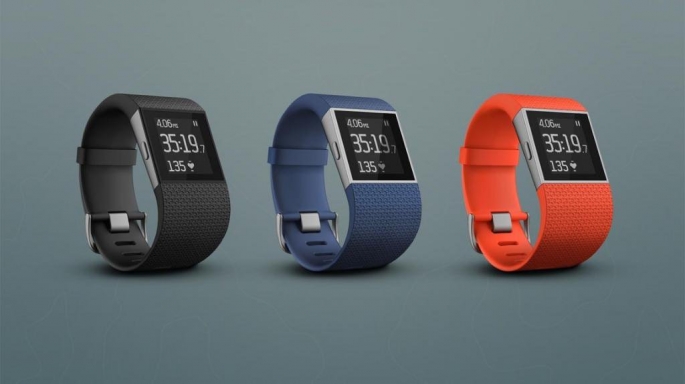
The Fitbit tracker 10 second hack causes concerns.

It looks like the unchallenged dominant position and popularity of the Fitbit company on the market might be jeopardized as major and justified concerns arise regarding their product.

I’m talking about the (supposed) Fitbit tracker 10 second hack that took place at the Hacktivity Conference in Budapest on 9-10 October this year.

That’s right, Fitbit’s fitness tracker was apparently hacked in just 10 seconds. But “fortunately” for the company, this hack was publicly announced  and performed in a well intentioned manner by a security researcher working at Fortinet, named Axelle Apvrille, who did this specifically to warn the company (and especially its users).

She used the fitness tracker’s open Bluetooth connection to send data packets to the tracker, which could then be transmitted to the computer that the user had connected the tracker to, as the day’s activities are synced.

Though she didn’t infect the device she demonstrated on with an actual, real piece of malware or virus, she claimed that the payload she could send was sufficiently large to do so (17 bytes), despite being quite small compared to today’s data storage and transfer capabilities.

So, in short, she had the freedom to send whatever she wanted to the tracker and then to the computer with no obstacle whatsoever in her way, except for the before-mentioned (sufficient) size limit.

Guillaume Lovet, a senior manager at FortiGuard, part of Fortinet, also confirmed the hack, telling CBS News that Apvrille had managed to show “that the Fitbit firmware has vulnerabilities that allowed her to plant arbitrary bytes into the Fitbit, those bytes then being, ‘reflected’ to a computer talking to a Fitbit.”

Now imagine how much more shocking it would have been to users if these vulnerabilities giving unstoppable access to strangers were announced via actual malicious hacks, as opposed to Apvrille’s gracious intervention.

Especially since, probably the most intriguing point she made, due to its security risks deriving from the Bluetooth connection and a hack taking such a small amount of time, it means that your Fitbit could be easily hacked by anyone in your vicinity, say someone who knows where you stop for a drink of water when you go out to run, or just a good-reflexes, speedy hacker that notices your Fitbit while sitting on a bench near you when you take a brief rest.

Another fun part? Apvrille said that she can also manipulate the data on the Fitbit itself (like your distance covered or number of steps taken). So if you get a hacker troll, he might mess with this data to ruin your feel-good vibe just for fun.

Axelle Apvrille will present Fitbit findings again this Thursday at the Hack.lu event in Luxembourg.

However, Fitbit disputes Apvrille’s claims.

Image source: 1.

Filed Under: Headlines Tagged With: Fitbit, Fitbit tracker, Fitbit tracker 10 second hack, Fitbit tracker hack, Fitbit tracker security risks

Pentax K3 Review – An Enthusiast DSLR at Its Best

October 22, 2015 By Cristopher Hall Leave a Comment

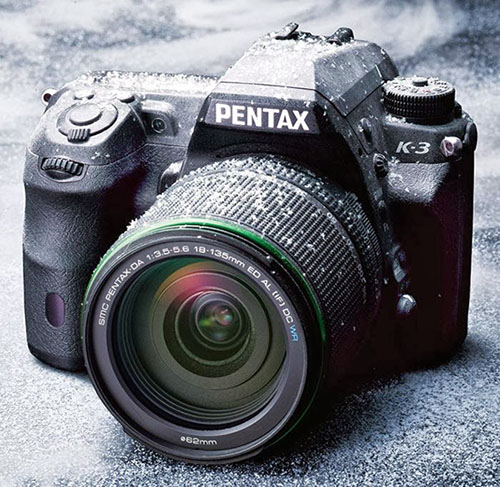
Pentax K3 Camera

From the contender of the two trademark companies that design the market leading cameras comes a new and improved DSLR – the Pentax K3. This one has gone a long way to improving over its predecessor and goes as far as deserving Ricoh’s flagship title. Its series of great features and exquisite design come in cheaper than in many other cameras of the same caliber; and while it does showcase several unique aspects that you might not find in other cameras, it’s strongly up to debate whether the Pentax K3 comes in first, before its Nikon and Canon counterparts.

Ricoh advertises their new Pentax K3 as being “the most advanced enthusiast DSLR available”; it falls into the semi-professional category and thanks to the weather resistant lens, dustproof and cold-resistant construction, this is the kind of camera that will follow you to whatever end and guarantees a long lifespan through build alone. Its shutter was designed for 200,000 releases, which is a pretty astounding number by itself when it comes to semi-professional equipment in its price range.

Pentax K3 Weatherproof Camera

The Pentax digital camera is a DSLR aimed at more experienced users – it is not particularly gentle on amateur users and can turn out to be particularly confusing given its over 30 multiple function external controls. If anything, it could very well be considered a gateway DSLR between entry-level and professional standards.

Following the success of the K-5 II in its own right, Ricoh returns with more proof of how much the series has improved and opens new roads towards exceptional imaging performance.

Pentax K3 Design

Pentax K3 Size, Weight & Materials

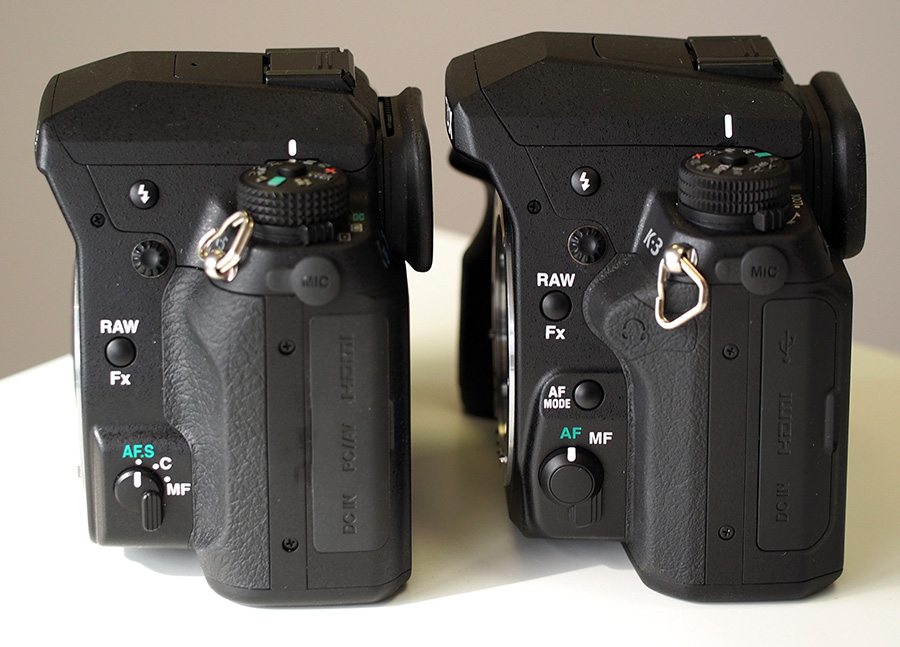
Visually, the K3 camera is very similar to the K-5 II model. The external design is about the same but spells professionalism and a straight down to business camera. The DSLR is bigger than what we’ve become accustomed to in Ricoh’s other models – with an overall size of 100 x 132 x 74 mm, it’s marginally larger than the K-5 II but smaller than the Nikon D7100.

Pentax K3 and K5 comparison

The weather-sealed magnesium alloy body of the K3 makes up for a rather heavy camera – it weighs 715 grams without loading the battery and memory card in it, and over 800 grams in full-functioning mode. Given the extra weight, the K3 has been provided with a new, slightly deeper grip coated in a rubber-base material to assure stability. It’s not the easiest task holding the camera up with one hand but the right side features a large thumb-rest allowing you to stay clear of any controls and accidentally alter the intended settings.

Following in K-5 II’s steps, the Pentax K3 is fully protected by the outer body construction: the 92 seals protect the inside from water and dust and the developers guarantee the camera’s functionality at temperatures as low as -10 degrees Celsius.

Pentax K3 Button & Control Placement

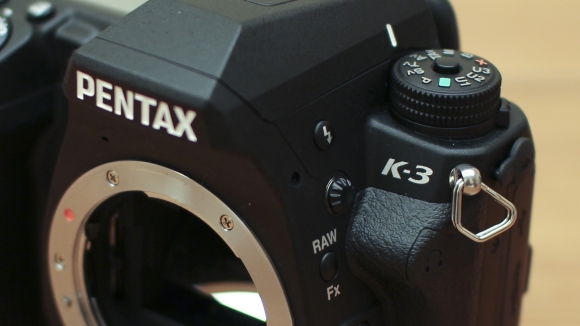
Pentax K3 close-up

When you take your first glance at the Pentax K3, there is certainly a lot to take in. There are buttons and various controls over most sides of its body and for a less experienced individual that will might turn out to be overwhelming and confusing.

The front of the Pentax K3 showcases a RAW / FX button that allows you to set the image to the RAW format that is selected in the menu system in a mere second; you can customize the functionality of this button as well, giving it access to control things like digital preview, composition adjustment and much more.

Pentax K3 Controls

The autofocus button can be located a little lower on the front of the camera and it supports 3 modes – AF-S, AF-A and AF-C – and it’s accompanied by a manual/automatic focusing switch. You can also locate the pop-up flash controller here.

The left side features I/O ports – the microphone, USB, HDMI, DC-in and a headphone socket that is meant to help monitor the audio during movie recording are all placed here. The right side is where you will find not one, but two SD / SDHC / SDXC card slots – a new addition that will certainly turn out to suffice all of your storage needs. There is also another slot on this side but it’s only for an optional wired remote control.

The bottom of the Pentax K3 hosts the battery compartment – which is lockable and keep the D-LI90 battery protected, as well as the tripod mount and contacts for the optional battery grip.

The top of the DSLR displays something that has changed since the Pentax’ previous iteration: the mode dial is slightly different than the K-5 II’s in the sense that the previous method of locking it (holding down the central button of the dial to be able to rotate it) has been replaced by a new lock switch that can be unlocked, allowing you to then freely spin the dial. It’s a lot more comfortable to use and doesn’t strain the position of your hand as much as the previous model did.

Pentax K3 Viewfinder & LCD Screen

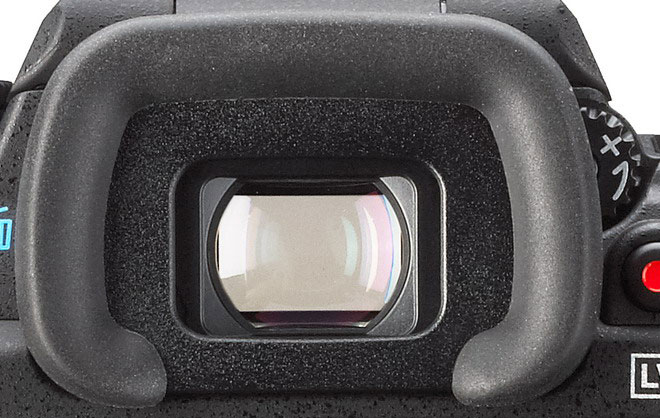
Another major improvement of the K3 model is the pentaprism optical viewfinder that aims for no less than 100% scene coverage and 0.95x magnification. This is a step up from the K-5 II which only showcased a 0.92x magnification viewfinder and allows this model to be on par with the Nikon D7100 in this respect. Only EVF and Olympus E-M1 manage to raise the bar even further.

Regardless, the viewfinder is exceptionally bright and shows you precisely what you’d be capturing. With no distortions to speak of, it has suffered a few small changes itself since the previous model – in the sense that the optics and internal coatings have been reworked and that it has received a new diopter adjustment dial.

Pentax K3 Viewfinder close-up

The camera rear is home for the 3.2 inch LCD panel – which now has a high resolution of 1,037K dots, a great viewing angle and has switched to a 3:2 aspect ratio, wildly different than the 4:3 present on the previous K-5 and K-5 II of the Pentax series. It appeared to fare extremely well in any type of environment, whether we’re talking about outdoors with high levels of brightness or indoors, in artificial lighting. In comparison to other top DSLR models, this is probably one – if not the best LCD panel you will find attached to a camera.

There’s a lot you can change about the way images are displayed on the LCD – starting with brightness, saturation and color. Those can be calibrated to match the settings of the receiving medium that your photos and videos will be ending up on.

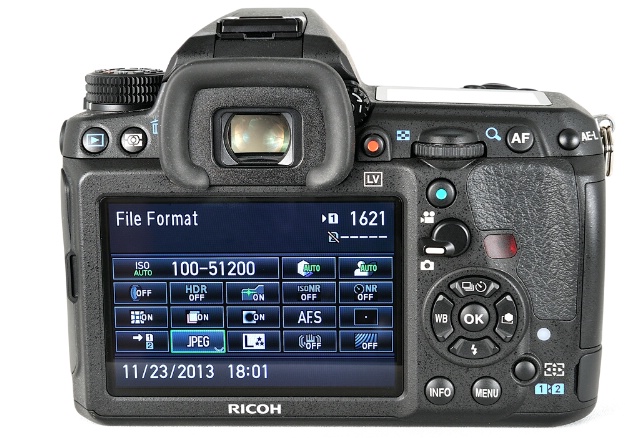
You can also find a great deal of information displayed on the LCD albeit most of it will revolve around basic shooting settings. By using the navigation pad and rear e-dial, the Pentax K3 allows you to change a large number of settings directly on the screen without having to enter the menu. This may not sound like much – and a little complicated if anything, but once you get accustomed to the way it works, it will probably save you time and make settings navigation a lot easier.

Pentax K3 Top View

The Pentax lenses incorporated in the K3 camera are a DA 18-135mm F3.5-5.6 ED AL (IF) DC WR kit.

Pentax K3 Features

Sensor – The Pentax K3 features a 23.35MP APS-C CMOS sensor manufactured by Sony, a certain hop up a few steps from the 16.2 MP sensor featured in the previous K-5 II. Although this chip accounts for slightly lower resolution that we have noticed in the predecessor, it brings with it a number of great features that make the Pentax K3 worthwhile and a great candidate for your next DSLR. The sensor’s maximum resolution is 6016 x 4000, but other viable resolutions include 4608 x 3072, 3072 x 2048 and 1920 x 1080.

Pentax K3 Camera Sample

Pentax K3 Sample Photo

Image stabilization is implemented for most Pentax K mount lenses, whether newer or older, manual focus ones; compatible lenses are Pentax K-, KA-, KAF-, KAF3-, 645-and 67-system lenses when accompanied by an adapter and other screw-mounted lenses. Image stabilization – also known as a Shake Reduction system – is a feature that helps reduce and even nullify the slight blurring of images that may occur in photos taken at slow shutter speeds. You can turn on this feature in the menu to compensate for any occurring camera shaking – you are notified if the image is shaky by a blur icon in the viewfinder that will appear regardless – even when the image stabilization mode is off.

One of the catchiest features of the Pentax K3 is probably the anti-aliasing simulator. Something that you may not find in every one of your day-to-day cameras, in the lack of an actual optical anti-aliasing low-pass filter the camera uses the image stabilization sensor-shift system to simulate the filter instead. Pentax explained that the way this works is that the anti-aliasing simulator works by applying “microscopic vibrations to the image sensor unit at the sub-pixel level during exposure” – thus creating an amount of blur equal to the one you would get if you would use an optical anti-aliasing filter. To top it off, the AA simulator also has two modes for shooting with it – Mode 1 or Mode 2 – that allow you to adjust the level of the effect.

Pentax K3 Sample Photo

The lack of an anti-aliasing filter is an improvement in resolution, but comes with one downside: an increased risk of moiré patterning. However, the discreet blur created by AA simulator also functions in that direction – and combats moiré. Pentax claims that this feature is best used with shutter speeds under 1/1000 seconds.

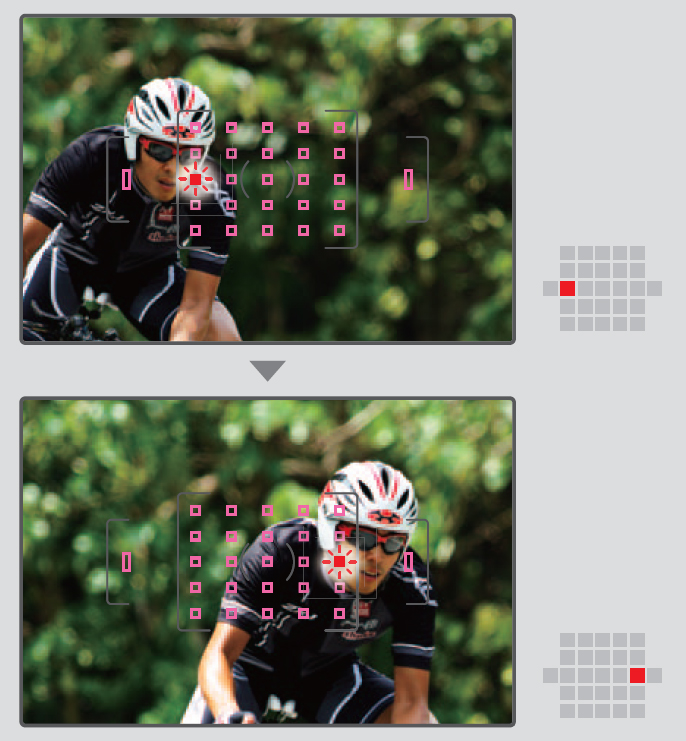
Autofocus is yet another key point of the Pentax K-3 DSLR. The camera presents a SAFOX 11 TTL 27-point autofocus system. If that is not impressive by itself, then know that no less than 25 out of 27 are cross-type sensors. Cross-type sensors feature two-dimensional contrast detection, providing higher accuracy when shooting. The other two, vertical-line sensors are positioned above and below the rest in order to detect the light flux. The AF mode button allows you to switch between manual and autofocus, while the one right below it will allow you to change between single and continuous autofocus or switch between focus modes – auto, selectable point, spot, etc. The Pentax K3 seems to be faring well to static imagery when set in continuous AF mode, but seemed to be struggling partially to subjects in motion – more specifically, subjects moving towards the camera itself – falling into the trap of taking a long time to refocus, even if the K3 detects the subject correctly.

Pentax K3 Autofocus Sample

The Pentax K3’s processing engine makes up for a continuous shooting speed of up to 8.3 frames per second: 3.0 for low, 4.5 for medium and 8.3 for high to be precise. In various testing scenarios, the K3 DSLR happened to even exceed the advertised speed, even when a RAW format was used. At high speed mode however, the camera seemed to be a little slow when it came to re-entering playback mode and restarting a new session of full-speed burst shooting. In addition, an important aspect of the Live View of the K3 when shooting at high-speed is that the LCD only displays the most recently shot photo, instead of the real-time image that is being photographed.

The image quality of the Pentax K-3 is pretty much astounding, given its self-chosen enthusiast DSLR title. Shooting in RAW naturally will earn the best results, with a shockingly great quality especially at low ISO, while shooting in JPEG doesn’t fall behind too much. Noise reduction is something that will handle itself extremely well until ISO settings of around 1600 but then becomes more than more visible, especially when the images are magnified at 100%. Shooting at night is eased by the minimum shutter speed of 30 seconds, along with the Bulb mode.

Pentax K3 Screen and controls

The D-Range featured on the Pentax K3 allows you to correct the highlights and shadows before shooting an image. It’s not necessarily something that you’ll be using all the time, given that it’s mostly meant for strongly contrasting lighting in images taken at low ISO settings, but it’s placed at your disposal as another way of improving the quality of your images. On the same note, high dynamic range capture is an option as well. This allows you to take photos with three different exposures and then combine the best exposed part of each into the final result. This, however, is a relatively tricky thing to do as photos taken in HDR mode only earn you great results when making use of a tripod or stable surface when shooting – otherwise the photo may contain blur due to movement. Similarly, HRD is not a wise choice when it comes to subjects in motion.

The dust removal mechanism incorporated in the Pentax K3 basically moves the low-pass filter that is in front of the CMOS sensor at a very high speed, removing the particles. If the cleaning is not 100% efficient, you can make use of the in-built feature called “Dust Alert” that will display your sensor on the screen, along with where the dust is located exactly. If the dust removal mechanism is not capable or removing all the dust particles, you can use the built-in sensor cleaning feature to lift the mirror and clean it manually with the use of blower brushes.

Start-up time for the Pentax K3 has also improved: the process that starts with turning the camera on and until the camera is ready to take a photo will only take roughly a second. If there’s any area where this DSLR will elicit some concerns out of you is the Wi-Fi capability. Depending on whether storage or having to immediately upload your photos is a definite must or certain not for you, this may prove to be a bit of an issue. However, the developers have designed an optional wireless SD card named FluCard that provides remote control of the camera through the use of smartphones or tablets – something that you will very rarely find as an integrated feature on most systems.

Pentax K3 ISO Button

The Pentax K3 is ultimately powered by a 1860 mAh Lithium-Ion D-LI90 rechargeable battery, the same power pack that we have seen in previous models such as the K-5s and K-7. At this power you can get as many as 720 shots with one charge, according with CIPA standards. Alternatively, there is an optional D-BG5 battery grip that you can purchase, which will allow you to either hold an additional D-LI90 or 6 AA batteries. Charging the Pentax K3 to full will take somewhere around 6 hours – making the battery a tad slow when it comes to recharging.

Lastly, the K3 also allows video shooting in 1080p which has been upgraded to the H.264 format. Audio monitoring is done through the headphone socket featured on the camera by using external microphones. There is one option that allows you to shoot frames of up to 4k resolution, namely the “Interval Movie Record”, but what it does is simply take photos at regular intervals and then combine them into a movie. With a shortest interval duration of 2 seconds, that’s a very occasional feature you’ll be using. However, the K3 will not allow you to shoot for longer than 25 minutes considering that the camera automatically turns off to avoid overheating. On the upside, the camera offers manual exposure during video capture and a partial use of the autofocus modes – you can set it up before you start shooting and it will automatically turn off once you hit the record button.

Pentax K3 Price & Verdict

The Pentax K3 is currently sold in three kits: the kit that includes the DA 18-55mm WR Lens you will find for $899 and the DA 18-133mm WR Lens version goes for a little over $1k ($1039 to be exact). There is a third variant that was built but only 2000 units of this model were released. The latter is the premium silver edition that includes a special battery grip and strap and was initially sold for $1599.

Pentax K3 AF Menu

All in all, the Pentax K3 is a great camera that heavily weighs more pros than it does cons. While the Wi-Fi issue and the fairly limited video capture capability may hinder you if that is one area where you focus your attention to, the K3 does amazingly well in every other respect. You get great, high image quality, great ergonomics, an impressive set of features and shooting optimization and an astonishing autofocus system.

The series is undoubtedly moving in the right direction with the addition of the K3, managing to create a semi-professional but modestly self-proclaimed enthusiast DSLR that give its Canon and Nikon counterparts a run for their money. In the DSLR sector, the Pentax K3 is surely a flagship that is definitely worth upgrading to and far more than just a gateway camera. However, if by purchasing it you would change systems, it’s recommended to you take all of its features in consideration before making a move.

Image source: 1, 2, 3, 4, 5, 6, 7, 8, 9, 10, 11, 12, 13, 14

Filed Under: Headlines Tagged With: enthusiast dslr, k3 dslr, pentax k-3, pentax k3, pentax k3 review

Misfit’s New Fitness Tracker And Controller Shine 2

October 21, 2015 By Deborah Campbell Leave a Comment

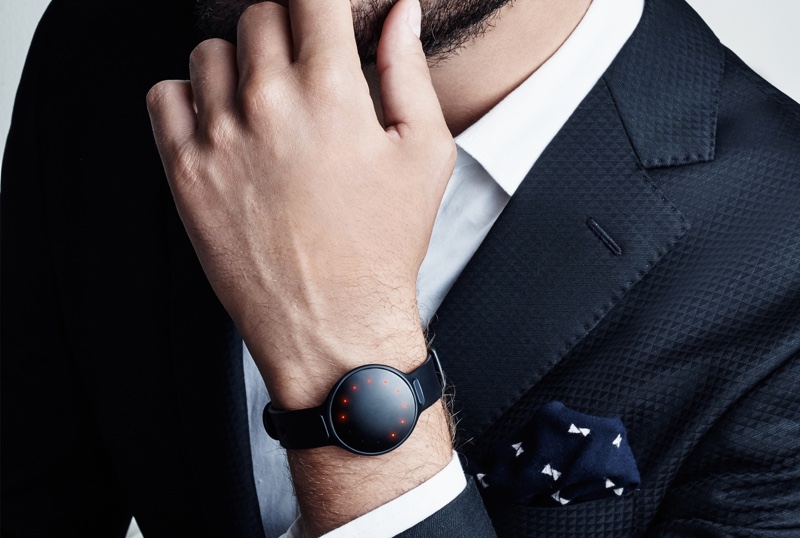
The new fitness tracker and controller Shine 2 is here.

One of the biggest competitors to the popular fitness tracking market leader Fitbit (which has a 70% share) is the Burlingame, California company Misfit, founded by Sonny Vu, who is also its current CEO. But it’s understandably difficult to compete with someone that already has such a big piece of the pie, so you have to be creative in order to try and wrest some consumers to your side.

Fortunately, you can put on your “Go underdog!” hats, because Vu seems to do a pretty good job of being creative and sticking with the fight. One of the moves he recently took was to start putting a lot more focus on sales in China. And he’s managed well, since currently a third of Misfit’s sales go there.

That probably has something to do with the fact that Misfit’s version of a fitness tracking bracelet, called Shine, is very amenable to fashion, with its sleek, metal design. Especially since competitors’ versions are usually plastic, bulkier etc. And especially since in China, visual aspect seems to be one of the higher priorities of buyers.

But that’s not the only thing Vu is doing to ramp up his sales and its not, by far, the most interesting. That honor would go to his decision to make the second version of his product, Shine 2, into more than just a fitness tracker.

Namely, Shine 2 has all the functionalities that Shine had (track certain metrics, such as calories and steps, as well as the quality of your sleep), but on top of that it is also a first step by the company in making a controller for your interactions with the objects in your environment.

You can do things with it like change the song in Spotify, turn on or off lights which it has access, simple operations like this. The way it manages to accomplish them is by using Misfit’s Link smartphone app, with which the new fitness tracker and controller Shine 2 is integrated. If the external object or service you wish to manipulate also has an interface with Misfit’s app, you’re good to go.

And the company intends to increase the number of such integrations, like for example, making it possible for you to call a car via Uber or Lyft using Shine 2, a feature they hope will be available starting in 2016.

To help such interactions and make them more powerful, the Shine 2 also has a far longer Bluetooth range than its predecessor (30 feet compared to a few feet), which was achieved by ingeniously using its metal body as an antenna.

So, all in all, it looks like Misfit is on its way to some serious and interesting innovations. Let’s hope they manage to deliver.

Image source: 1.

Filed Under: Headlines Tagged With: Misfit, Misfit new fitness tracker, Misfit's Shine 2, Shine 2, Shine 2 fitness tracker

Waze App Interface Makeover

October 20, 2015 By Cristopher Hall Leave a Comment

The Waze app interface makeover many wanted just took place.

The long-awaited necessity of an interface redesign for the popular Google-owned navigation app “Waze” has finally been met. The 4.0 version of the app brings a considerable overhaul to the way its more than 50 million users will interact with their in-traffic life-saver (though still sticking to the cartoonish look), because the congested, several popping menus approach of previous versions has been replaced with a one-touch (or as few touches as possible) philosophy in tune with the current design trends of minimalism, cleanliness and efficiency.

The changes that came with the new Waze app interface makeover are as follows.

The button for signalling events in traffic is now orange which makes it stand out more. The traffic alerts that appear at the top of the screen are also orange, for the same reason. And when pressing the orange button to create a traffic alert, it now opens into a full-screen of round easy to manipulate button for each type of alert.

The main menu button is now smaller, white and to the bottom left of the screen, in a different line than the bigger orange alert button, which brings the focus of the user’s view to the map and alert button and pop-down alerts, which are the most important in traffic. The map itself is also less cluttered.

There’s a new contacts tab which allows sending directions to you your contacts or your ETA to some location. Awesome!

Many improvements are part of the new Waze app interface makeover.

You can tap a menu in the bottom to get access to other features like alternate routes or “add a stop”, as well as a shortcut to sending your ETA to a friend or family member.

With the 4.0 version, another great new feature is that you can sync your Calendar to the app, allowing you to be reminded, through alerts, of when you have to leave, based on traffic conditions! No more stress over unexpected heavy traffic (for a given hour) to mess up your time before you actually have to leave. Now you can focus on doing other things with that time, certain that Waze will both alert you that you have an appointment (in case you forgot) and also that if you leave at the indicated hour, you’ll make it on time, despite changes in traffic.

Apart from these, there is also a claimed improvement in battery life, which can only please users, as Waze does tend to chug a fair amount of battery.

Unfortunately, the new version is only available for iOS for now. But the company claims that this discrepancy will be very short, as an Android version is already underway.

Image source: 1, 2.


Filed Under: Headlines Tagged With: redesign, Waze, Waze changes, Waze interface, Waze overhaul, Waze redesign

New Premium Content Pay-Per-View Youtube

October 19, 2015 By Roxanne Briean Leave a Comment

Youtube will soon be partially turning into a pay-per-view Youtube.

Pessimists, start rolling out your “All good things come to an end” banners and get ready to march in protest. Optimists… good luck tryin’ to convince the pessimists otherwise. Because this time, they might actually not be exaggerating.

It turns out Youtube has decided to take the big, and sadly economically predictable step of introducing premium content in the well known pay-per-view manner that is probably loved only by well-to-do people who have tons of money and don’t care how they spend them. Certainly not the riff-raff mostly teenage broke-unless-I-get-my-allowance Internauts that were and are Youtube’s main audience.

In short, only if you pay a 10$/month subscription, you’ll have the option of seeing brand new content by several media companies. So far announced: 21st Century Fox’s Fox Sports, Comcast’s NBCUniversal, A+E Networks Inc. and Time Warner’s Turner cable unit, and even a rumored Disney, which is not yet confirmed.

Youtube assures us that those who aren’t willing to pay for the subscription will still be able to see the free videos, which will be uploaded in the usual manner on the free part of the website. But as a personal opinion, this whole duality of free and pay-per-view content can only bode ill for a site whose main asset and attraction was specifically the “free”, user-created content part, even with the annoying ads that came with the deal, so that it could be economically viable.

Speaking of which, said ads will NOT be part of the subscription paying users’ experience, but everybody else will still have to bear with them. Lovely. So, in effect, Youtube has not replaced one way of getting funds (the ads) with a new one. It has added a new way of making money to the old one. A risky maneuver, considering a fair number of users employ ad blockers when using Youtube, which would imply that they are interested solely in the video-sharing that stood at the company’s foundation and not in the commercial dimensions of an ads or pay-per-view Youtube.

But Youtube seems to know what its doing and is pretty determined, judging by the fact that industry sources expected to see this subscription service launched at the end of last September. Currently, the estimated time for some of the new premium content to become live on the site is 2016, but an exact date or an explanation as to why this delay from last month occurred were not given by a Youtube representative when asked.

And granted, the 2 classes of free and paying users could coexist in this new pay-per-view Youtube, with the former simply opting to ignore the new content. If the free one lasts.

What are your thoughts on this move?

Image source: 1.
Filed Under: Headlines Tagged With: pay-per-view, pay-per-view Youtube, premium content, youtube, Youtube changes, Youtube premium content

Roku Streaming Stick Review – Streaming Strikes Back

October 19, 2015 By Michael Turner 2 Comments

Roku Streaming Stick and Remote

The Roku Streaming Stick is a nifty little device that may help you rekindle your relationship with your big screen TV. It’s not the first of its kind but certainly packs a few things to show for itself.

Television has changed a lot. Forget about the awe that everyone was engulfed by when things like TiVo came out. It really feels like cable TV is becoming a thing of the past.

First, there was online streaming – allowing you to just watch your favorite shows on your computer, without having to wait for, say, 9 PM when they would normally come on. You could just watch them when you felt like it and that was fine.

Then, the online steaming moved onto our smartphones and tablets – finally, we were able to watch shows on the go, straight off of our mobile devices. That was great.

But neither the computer screen nor our tablet can really get the job done the same as the TV in our living room. And with the way things are advancing in the way we handle and access the media available out there, Roku comes as a pretty amazing helping hand and provides us with the freedom to choose what we like, when we like it from over 2,500 apps. Literally.

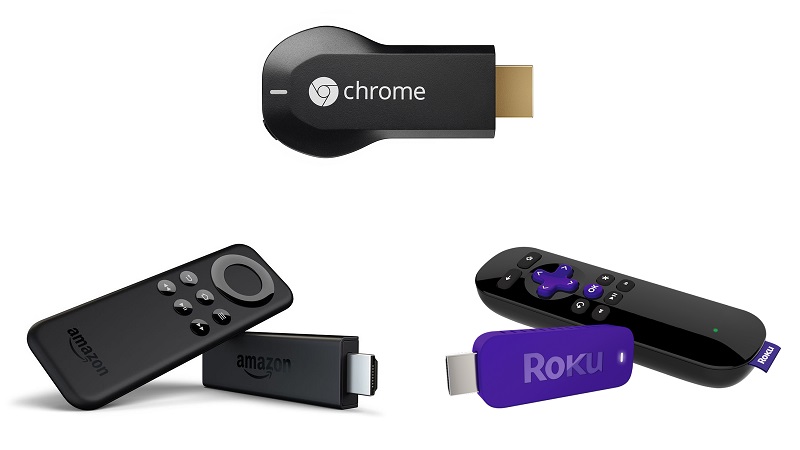
But Roku isn’t the only gadget that does that and the competition isn’t scarce – Chromecast, Amazon Fire TV Stick, Apple TV and even some of the other Roku streaming products might handle some of your needs better. Let’s take a moment and see where the Roku Streaming Stick shines and where another type of streaming device might do things better.

Roku Streaming Stick – How It Works

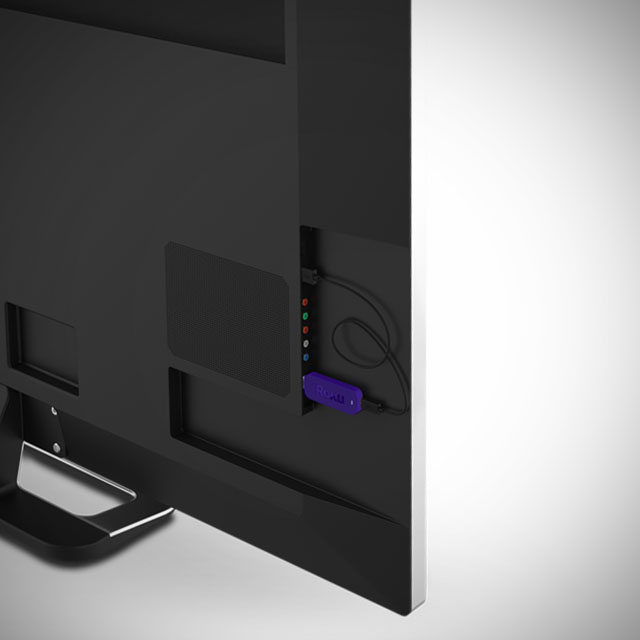
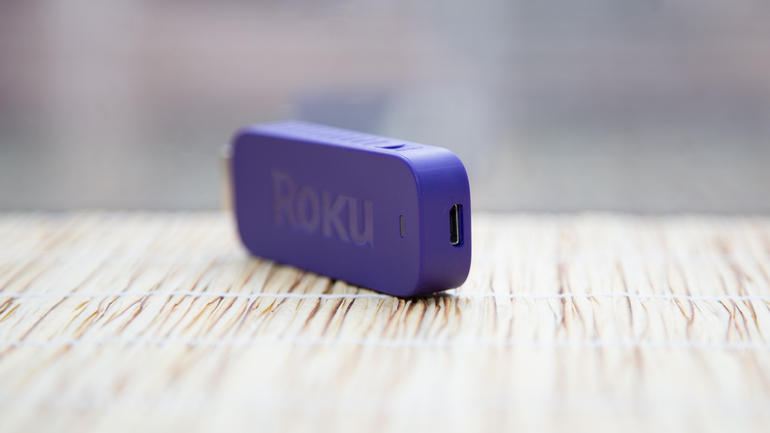
Firstly, in case you’re not fully familiar with how streaming media works, and more specifically what is Roku Streaming Stick, here’s a short heads-up. The Roku Streaming Stick is something you might mistake as a larger USB flash drive. Instead of the USB jack however, it has an HDMI plug that you can connect on the back of your TV. The other end of the stick hosts a micro USB slot which will help power the device with the 6-foot cable and adapter that are included in the box of the Roku Streaming Stick. After everything is connected and powered up, the last step is connecting your streaming stick to your WiFi through the interface and you instantly get access to thousands of apps that stream your favorite TV shows and movies.

Roku Streaming Stick HDMI Slot Placement

In essence, a streaming device will allow you to do what Smart TVs were meant to but did not convincingly achieve. Having your TV connected to the Internet in the first place seemed like a great idea – you were no longer limited to what your cable company had to offer and could refer to other media services such as Netflix or YouTube to watch your shows and movies. But in reality, that particular functionality of the Smart TVs turned out to be hard to navigate, much slower than your tablet or computer, showcasing complicated user interfaces and rarely-if-ever updated software that was not developed by companies purely specialized in it.

So enter the Roku Streaming Stick and its partners in battle, and you can turn an older TV into a smart one – without having to rely on a messy interface and compatibility issues between the model of your TV and various services.

Roku Streaming Stick Design

So now that we know what the generic idea behind the Roku stream stick is, let’s discuss it in depth in comparison to other streaming devices. The HDMI dongle is 3.1 x 1.1 x 0.5 inches in size, making it a little larger than Google’s Chromecast, but smaller than the Amazon Fire TV Stick. While there is not much difference in overall size between different models, the problem with streaming sticks in general is being dependent on the HDMI port placement on the back of your TVs.

Roku Streaming Stick microUSB

Streaming sticks were originally designed with two ideas in mind: the former was removing the cable and box clutter than larger streaming devices would come along with; the latter regarded being able to make use of streaming on your TV even if you had a wall-mounted setup and couldn’t make it work without the whole thing ending up aesthetically displeasing.

Now, the Roku Streaming Stick is made to be as small as possible, but you should take into consideration how much space you have on the back of your television set before purchasing it. Sadly, there’s no HDMI extender like the ones you get with Chromecast and Amazon Fire TV Stick.

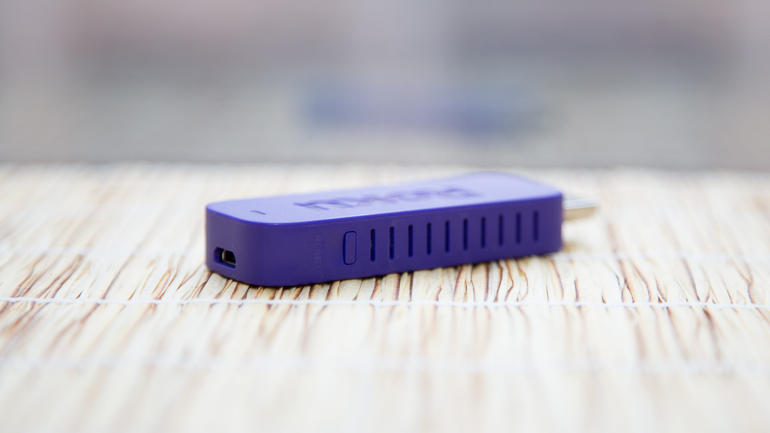
Its body is wrapped in a purple plastic-based cover that seems a little bulky and has the HDMI end directly stick out of it. This is another reason why you should check to see if your TV could host it – considering that HDMI slots on television sets’ backs were made to shelter cables that flex and are particularly thin – not bulky devices that are few times thicker than the HDMI port itself.

Roku Streaming Stick HDMI Placement TV

The weight of the Roku stick, while not exceptionally relevant, is only 18 grams – lighter than most other streaming sticks. Given the average, none of the devices would ever pose the threat of damaging or bending the HDMI slots on your TV’s back.

The Roku Streaming Stick does present one aspect that is wildly different from its counterparts. The stick’s body has vents on either side – making it particularly silent and less susceptible to overheating. Just like any other device, overheating is normally associated with low performance – so the Roku Streaming Stick does go the extra mile in that concern. We have also noticed a reset button on the side of Roku – something that is not to be found on the Amazon Fire TV Stick for example.

Roku Streaming Stick Side Vents

The Roku connectivity also seems to be better than its counterparts – featuring dual-band wireless N antennas – better than Chromecast’s single-band.

Roku Streaming Stick Applications, Services & Channels

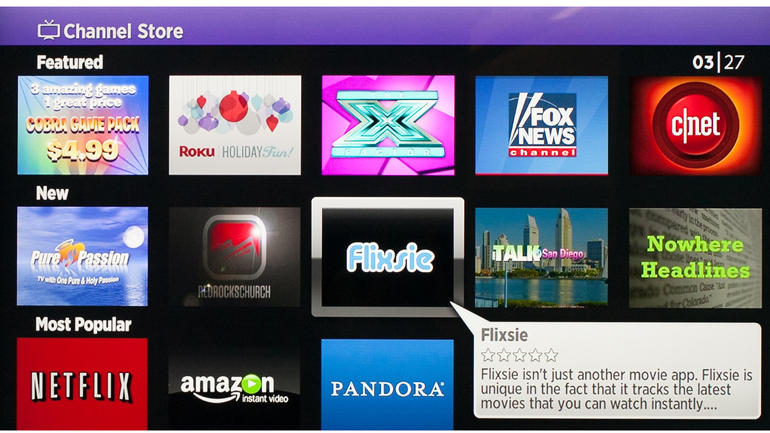
The selling point of the Roku Streaming Stick is the astounding number of apps – known as Roku channels in this case – it has. The website advertises over 2,500 apps and over 300,000 shows and movies put at your disposal. That is completely true: the Roku stick has exponentially more apps that you can access than both the Amazon Fire TV Stick and Chromecast offer. However, in realistic terms, you will probably end up settling on a few dozen of those and never touch the rest.

Roku Streaming Stick Apps

The popular apps, such as Netflix, YouTube, Hulu Plus and HBO Go will more often than not suffice for what you’re looking for. These are apps that you will surely find using any other streaming device so that is not an issue. However, there is a good chance that you will find rarer, more niche content on the Roku than on its counterparts.

Nevertheless, a rather important issue that is not to be omitted is the fact that not all of the apps that you can find on any of the streaming devices out on the market are free – some may incur extra taxes or subscription fees – but this is a generic fact.

You can not only find dozens app for any genre you are looking for – news, science, sports, apps for children and even puzzling channels such as the Pranks one or the baffling Occult Network – but the Roku Streaming Stick doesn’t fall behind on music streaming either. Spotify, Plex, Pandora and many other can be easily accessed via your Roku, just like you would with Chromecast or Amazon Fire TV.

Roku Streaming Stick Remote

Packed alongside the stick and its microUSB adapter you will find a remote. It is marginally bigger than the one that the Amazon Fire TV Stick comes with, but it eases navigating the user interface of the Roku a fair amount. Chromecast, for example, doesn’t even incorporate a native remote but it does allow using your TV’s default one or your mobile device instead.

Roku Streaming Stick 13-button Remote

The remote of the Roku Streaming Stick features a total of 13 buttons: a Home and a Back button, a 4-direction navigational arrow button, Return, Ok, Settings, Rewind, Play/Pause and Fast-Forward buttons, as well as 4 shortcut buttons to popular services – M-Go, Amazon Prime TV, Netflix and Blockbuster. Unfortunately, there’s no way of changing the functionality of the shortcut buttons; you’re stuck with only having those four popular services accessible directly off of the remote. It’s a little upsetting knowing that there is going to be at least one button that you will never touch on your remote when it could’ve had something else bound to it.

The remote feels comfortable when holding it and while the shortcut buttons may not seem like something you would die without, they’re nice to have. If there’s anything that the Roku remote lacks in comparison to Amazon Fire TV is the voice app – even if the voice search is something you only get to purchase separately with the latter, it remains a possibility. If the voice search is something that you would really look forward to when it comes to streaming devices, only the Roku 3 and 4 players offer such feature – but those are much larger and more expensive.

Sadly, the Roku remote for the streaming stick does not support motion control for games – so in the Roku vs Amazon Fire stick comparison, the latter wins the round through the dedicated gamepad sold separately.

Roku Streaming Stick vs Amazon Fire TV Stick remotes

While the remote finder doesn’t come as a default feature like in Roku 4’s case, there is an application that you can download on your smartphone or tablet off of Apple Store and Google Play alternatively that will allow you to use your mobile phone or tablet as a replacement remote. It’s certainly not a bad idea considering that it will make for a faster method of searching through content using the full QWERTY keyboard of your smartphone.

Roku Streaming Stick Phone App

Lastly, the Roku Streaming Stick remote unfortunately doesn’t include a digital audio port – a feature that you can find on the Roku 3 and 4 for example – meaning you wouldn’t be able to use a pair of headphones plugged in the remote for late night “private listening” mode and have to rely on your television set’s audio output.

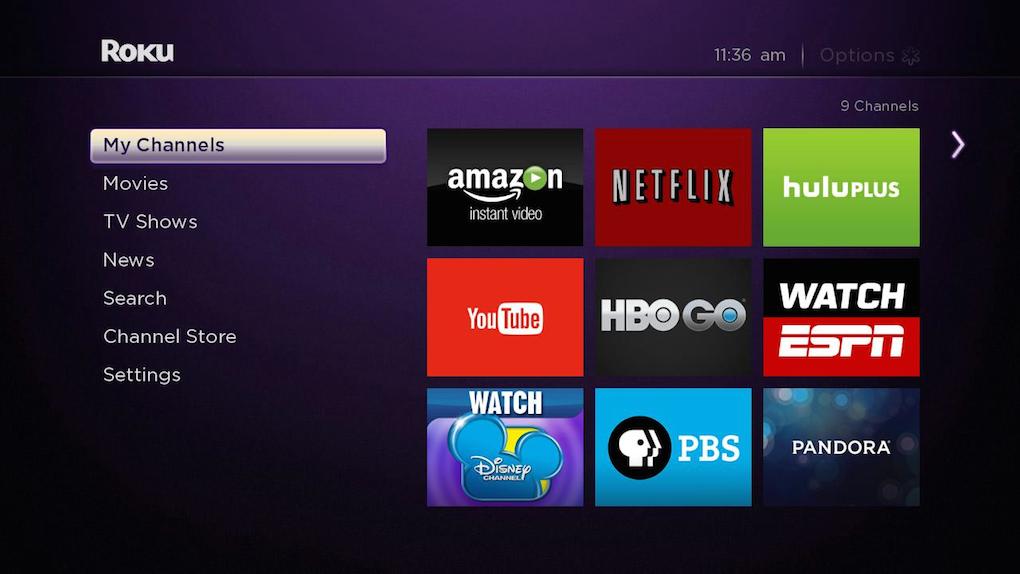
Roku Streaming Stick Interface

With a lot of apps comes the great responsibility of making them easily accessible and simple to browse through the user interface. This is one aspect where the Roku Streaming Stick (along with the other Roku set-top boxes, given that they all use the same interface) will feel superior to other UIs.

Roku Streaming Stick Interface and sub-menus

You can personalize your own list of favorites through the My Channels option that will cleanly sort it in a plain grid, according to your preferences. You can shuffle through channel priority and remove the unwanted ones from your list in matters of seconds.

The Movie Store and TV Store sub-menus underneath are short pathways into M-GO’s on-demand service – not an amazing choice for a sub-selection given that you probably won’t ever use it and even forget it’s there, opting for accessing M-GO by quickly searching for it should the need be.

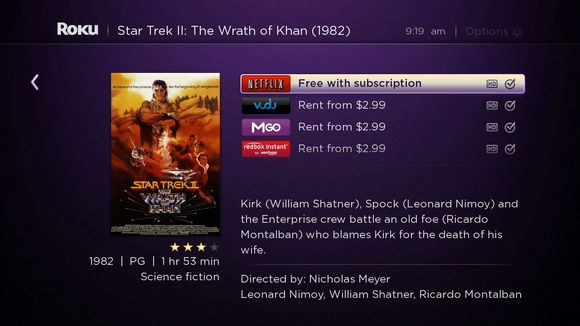
Next up is the search menu – in other words your bread and butter. Once you have installed your favorite apps, the search menu will quickly make an ample exploration of what you typed in the box and return all the results it has found. For example, if you were to type in Inception, it would list all the entries it found, regardless of the app it found it on. Every entry also lists the video quality it is available at and rental price where applicable. The Roku interface allows you to search by movie and TV show title, actor, director and much more.

Roku Streaming Stick Search Sub-menu

You can also freely browse all apps available on Roku TV using one of the sub-menus – it will take a while but you never know what you may find.

Lastly, the user interface displays a settings sub-menu that allows you to change your theme and customize a great number of aspects related to the UI.

If put in contrast with Amazon Fire TV interface for example, the Roku UI looks a lot cleaner, airier and less packed than the former.

Roku Streaming Stick Comparisons & Verdict

While the services supported are the same, you might end up realizing that there are a few things that the streaming sticks can’t perform over a set-top box. Take mirroring for example – to some degree you can convince your Roku Stick to mirror your phone screen or computer screen partially, but Chromecast and even Roku 2 and 3 can and will do it better.

Even when it comes to set-top boxes alone, take the Roku 2 vs Roku 3 comparison and you’ll find some great differences and improvements. For example you can’t get voice search unless you opt for a Roku 3 or newer model and 4k Ultra HD option is only available in the latest Roku 4 set-top box. Sure, you can grab the Roku stick, just put it in your backpack and any house and hotel in the world that has a Wi-Fi connection and a TV can feel like home in a jiffy. It’s a lot smaller and easy to transport but the performance of the stick may fall behind the one of a full-fledged Roku player simply because of the hardware that is packed in it.

If we are to compare the Roku Stick to its Amazon Fire TV and Chromecast counterparts in terms of hardware specifications, here’s what we get:

  • The processor of the Roku stick is a single-core one, just like Chromecast’s, while the Amazon Fire TV Stick features a dual-core;
  • Both the Roku and Chromecast only have 512 MB of memory while the Fire TV stick goes up to 1 GB;
  • The flash storage is a losing race for the Roku at its 256 MB – Chromecast offers 512 MB and Amazon Fire TV offers 8 GB of storage space;
  • Both the Roku Streaming and Amazon Fire TV sticks feature dual-band antennas, while Chromecast sticks to a more modest single-band.

Roku Streaming Stick vs Amazon Fire TV and Chromecast

So in essence, what do you get with the Roku Streaming Stick? You get a staggering amount of apps you can choose from, including some that may not be available on other services, such as HBO Go. You get an easier to use and more pleasant interface, a great remote and nearly everything else other comparable devices can do, but at a much smaller price.

What you lose by getting it is a small bit on the performance side, an HDMI extension and gaming support and access to various limited streaming platforms.

Put in perspective, the Roku Streaming Stick is comparable to the Roku 3 – but it’s a lot cheaper: you can get the streaming stick for $49.99 directly off of the Roku website. The more powerful Roku players are available for $99.99 for the Roku 3 and $129.99 for the latest Roku 4.

Roku Streaming Stick vs Roku 3

The Amazon Fire TV Stick will look cheaper at first ($39.99) but many of its features require extra purchases which will spike it up much higher than the Roku Streaming Stick price.

Naturally, all that we tried to accomplish here with the Roku stick review was to weigh the pros and cons – but the final decision lies in your preference.

Image Source: 1, 2, 3, 4, 5, 6, 7, 8, 9, 10, 11, 12, 13

Filed Under: Headlines Tagged With: amazon fire tv stick, Chromecast, roku 3, roku 4, roku streaming stick

Chevrolet Volt 2016 Ready to Race This December

October 16, 2015 By Roxanne Briean Leave a Comment

The Chevrolet Volt 2016 will launch this December

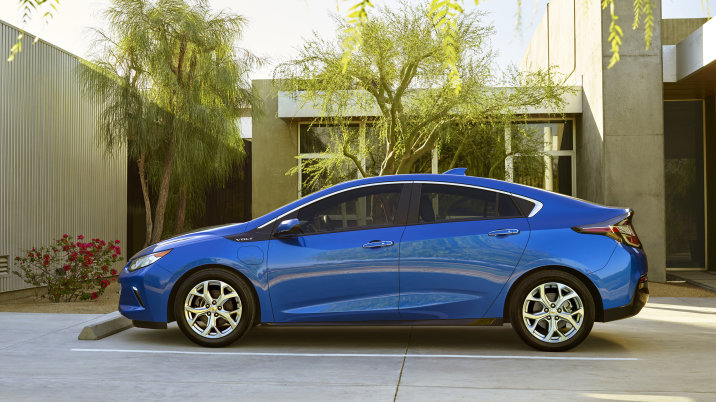
The second generation Chevrolet Volt 2016 is prepared to hit the streets this December. This time, the car-manufacturer is promising an even more satisfying driving experience. The 2016 Volt is more refined than its older brother but it still sticks to its origins. Concerning original concepts, the Chevrolet Volt 2016 is still the same beast.

Chevrolet’s new iteration doesn’t pretend to be a dragster, nor a sports car – it shouts from every nook and cranny that it is a proper 4-door sedan.

While not the best looking vehicle, the Volt 2016 looks pretty cool with a clear attitude aimed towards the family-inclined type of person. The company notes that the car’s back cargo space is more than enough to store a bike – given that you remove the front wheel and fold down the rear seats.

Darin Gesse, product manager for Chevrolet’s Volt has announced that the back of the car takes styling inspiration from the company’s Corvette car-line. While the black back panel seems to be made entirely out of glasslike materials, it’s in fact plastic. However, Chevrolet removed that god awful plastic strip located below windows. You see, first gen Volt owners usually picked dark colors to hide it – glad to hear that Chevrolet is listening to its customers.

Chevrolet Volt 2016 interior

Chevrolet Volt 2016 interior options.

There are quite a few amazing polishes on the new Volt. Take the charging connector, it’s now located on the driver’s side and it has a warm glow to it at night. The car’s curves are cordial, more peaceful than what we’ve seen on the previous model.

The car looks more like a family car now – all grown up and ready to take care of your kids.

While hatchbacks are not as popular in the US as they are in Europe, the Chevrolet Volt 2016 may very well be a pleasant surprise that will boost hatchback popularity.

2016 won’t be the year of the Monkey, as the Chinese zodiac claims, it will be the year of the Volt.

Chevrolet Volt 2016 model

Chevrolet has announced that that they have added a fifth seat somewhere in the back. While it is definitely an appreciated addition, the one sitting on the fifth seat will most likely take one for the team.

The Chevrolet Volt 2016 is priced at $33.995 and its main competitors are Ford’s C-Max Energi and Toyota’s Prius. Yet, the Volt 2016 brings a couple of displays in the front in order to take the lead – with one located just in front of the driver, and the other one found at the center.

The center one is a touch display.

Everything about the Chevrolet Volt 2016 seems to be blue – blue that, blue this. It really gives it a more fresh approach and it doesn’t hamper functionality at all.

Image Source: 1, 2, 3

Filed Under: Headlines Tagged With: Chevrolet, Chevrolet Volt, Chevrolet Volt 2016

Apple Improves iWork Apps on All Platforms

October 16, 2015 By Nancy Young Leave a Comment

Apple Improves iWork Apps on All Platforms

Apple improves iWorks apps on all platforms by adding new features. Even though the Cupertino-based company didn’t announce anything regarding their Keynote, Numbers, and Pages apps in the last few months, software devs have been hard at work trying to bring them to modern times.

Apple just rolled out a major update for the trifecta of power on all of the company’s platforms – iCloud, OS X and iOS. They have been brought to speed with the latest iOS and OS X, along with some highly anticipated features.

So, for iOS Numbers, Keynote and Pages can now work with Picture in Picture, Slide Over and Split View on the iPad. All of the multitasking features that iOS 9 delivered are now fully integrated with the big A’s apps.

It’s worth noting that VoiceOver received a well deserved polish and it’s vastly improved to better help visually impaired people.

Finally, Apple has removed the beta tag from it’s iCloud.com web apps and it has also added a lot of new features from the company’s other platforms. Users now have the ability to comment on iCloud.com – let’s see how many trolls does Apple manage to gather in 48 hours.

Apple has also added quintessential Google Docs features, and it was about time they did so.  Users can see all of their shared docs within the browser on their smartphone.

Apple Improves iWorks apps i.e. Keynote, Numbers and Pages on all platforms

With these awesome new updates, it has become a serious competitor to Google Drive apps and Office.com web productivity apps.

A really great addition is iWork 2008 and 2006 support for the latest version. It was about time if you ask me. Users have been calling Apple out for being too lazy. Other features consist of improvements for Microsoft Office docs compatibility i.e. no more random errors, and Mac finally gets OneType – amongst other awesome features.

These aren’t eye-candy additions – no new icons, or stunning visuals. These are well deserved under-the-hood polishes that we have been waiting for quite some time now. To be frank, productivity apps like the ones mentioned above don’t really need design overhauls – they just need to function better and more reliable.

Even though news is out that Apple improves iWork apps on all platforms and that the company will continue to roll out more updates in the near future, the Cali-based tech giant is keeping silent.

With these awesome new updates, it has become a serious competitor to Google Drive apps and Office.com web productivity apps.

For a comprehensive log of changes you can check the official patch notes, if you will, on their website.

See Elon Musk, Apple isn’t the Tesla Graveyard as you put it. The company actually cares about its users. It also makes profit – unlike others.

Image Source: 1, 2

Filed Under: Headlines Tagged With: Apple, Apple iWorks, iWorks

Yahoo New Email App Lets You Skip Passwords

October 15, 2015 By Cristopher Hall Leave a Comment

Yahoo new email app has begun to roll out for US-based users

Yahoo new email app lets you skip passwords and heralds a new era for the forgotten yodel company.

On the 15th of October 2015, the company has unveiled a rebranded email app. Along with it, Yahoo introduces the Account Key feature. This lets their users log into the email app without entering passwords.

The new update brings with it support for more breeds of email accounts – this includes Hotmail and Outlook.

If you enable the Account Key feature, not only will you able to log into email accounts by circumventing the input-password process, but it will also send a push notification for users to accept. This replaces the use of a password. The motive behind this somewhat crazy new idea is that users will immediately be able to refuse access to unwarranted attempts.

Yahoo claims that this is more secure than the conventional password because once activated, as in the Account Key feature, even if a crooked hacker gets hold of your credentials, he still can’t sign in because you don’t allow him to.

Dylan Casey, the company’s Vice President of product management says in a statement that this will indeed prove to be the ultimate security feature.

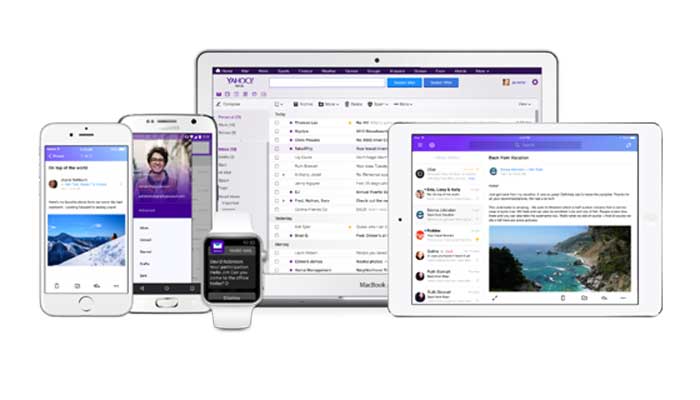
Yahoo new email app is cleaner and easier to use

While this isn’t the first time that the Yodel introduces something to decrease the dependency of passwords, it clearly is the first time it offers such a, one might say, controversial feature. The new Account Key will also succeed the on-demand email password item that was announced at the dawn of 2015 – we know realise that it was an entry level Account Key that was aimed to test the waters.

Yahoo has stated that their new feature will be available for the company’s entirety of apps in the near future – earlier for some.

The Yahoo new email app looks the part – with a more fresh and simple approach to design. It’s cleaner and easier to use than its previous older brothers and sisters. The search-engine-extinct has even simplified it by adding gestures so the user can swipe to mark a message as read, delete it and even select multiple emails at once if you press long enough on a message.

Yahoo new email app will roll out for more countries in the near future

The app’s in-house search function seems to have been vastly improved and users can filter search results by attachments and pictures.

One of the most sought-after features that Yahoo Mail users were hoping to get has finally arrived. The Yahoo new email app now supports non-Yahoo mail accounts. This includes Outlook, AOL and Hotmail – it will works while using the app and also on Yahoo’s website itself.

It’s currently available only for US-based users, but the company notes that it will begin to roll out to more countries pretty soon.

You can download the yahoo new email app for iOS and Android.

Image Source: 1, 2, 3

Filed Under: Headlines Tagged With: Key Account, Yahoo, Yahoo Email App

HP EliteBook Folio 1020 G1 Review – The Mobile Office

October 14, 2015 By Kenneth Scott Leave a Comment

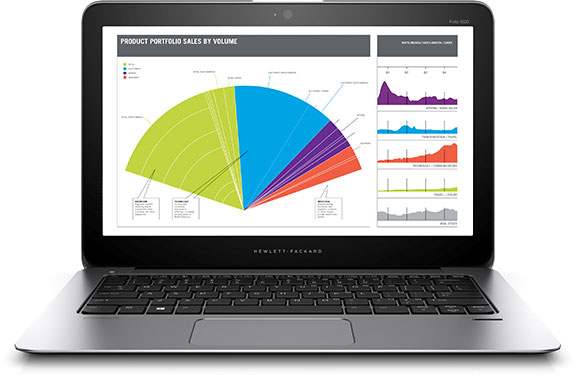
Hp EliteBook Folio LaptopThe first thing that comes to mind when you think about a business laptop would probably be one of those bulky, heavy things with an uninspired design that you use only because you have to. Take a look at the HP EliteBook Folio however and you’ll surely have a quizzical look plastered to your face once you witness the next great thing that HP has to offer in the corporate computer department.

From afar, there’s a chance you might even mistake the HP EliteBook Folio for a MacBook Air. If it wasn’t for the HP logo beautifully resting on the lid of the elite book, the thin build and aluminum chassis seem to have come straight from Apple factories. If anything, it looks more like a consumer ultrabook; it would seem that HP attempted to bring the sleek design of personal laptops in your work life as well. And the results look more than promising.

The HP Elite laptop packs not only great design, but performant hardware and architecture, as well as a number of great features suited for all of your office needs – whether we’re talking voice conference tweaks, privacy and data encryption or HP’s BIOSphere system for enterprises – meant to provide protection against malware for businesses.

Taking into consideration everything that you would ever need from a work laptop, there are quite a few candidates out there that could easily compete toe-to-toe with the HP EliteBook laptop so let’s take a closer look at every little nook and cranny of what our subject has to offer.

HP EliteBook Folio Design

HP EliteBook Folio Lid and LogoRegarding this chapter, we’ve already stated the most obvious, eye-catching detail of them all. The solid aluminum and magnesium alloy that was used to build it looks simply amazing – with a smooth texture that remains cool even after prolonged usage – so resting your palms on the bottom end will never become uncomfortable. Everything about it looks highly professional – starting with the elegant reflective logo on its lid, the carefully framed keyboard and the Hewlett-Packard inscription right above the hinge when you open it.

If there’s a word that comes to mind when you look at the HP EliteBook Folio, it is “solid”. Everything seems very well and firmly put in place, with no gaps or weak spots to speak of in the unibody. The USB ports, power, headphones, microphone jacks as well as the microSD slot are directly cut into the sides. Considering that the base is made from one piece there’s literally no danger in damaging the areas near the ports.HP EliteBook Folio Left Side

HP EliteBook Folio Right Side

One aspect that is worth mentioning is the EliteBook’s weight – at only 1.2 kilograms, this laptop is an easy winner. Not only that there’s few, if none other business laptops that even come close to such a light device, but the HP EliteBook Folio 1020 G1 even competes with some consumer laptops in terms of how light and easily manageable it is. The MacBook Air design inspiration can be effortlessly noticed in the way the EliteBook Folio thins towards the bottom edge, giving the laptop an astonishing thickness of 15.7 millimeters.

The hinge shows no sign of being susceptible to wearing out easily – thanks to the one-piece centrally-placed joint, you will probably never encounter the frustrating wobble that sets in some laptop models after a few months of usage.

As you open the HP EliteBook Folio, you will immediately notice the black-toned island-style keyboard, the power button along with the discreet speakers as well as the trackpad and the fingerprint reader.

The sides of the laptop host 2 USB 3.0 ports – one on either side – as well as an HDMI port, a separate 3.5 mm headphone jack and the microSD slot. What we originally mistook for a full SD card slot is in fact an adapter for D-SUB and Ethernet output that can also be used for many other port replicators.

HP EliteBook Folio Unibody

The bottom cover is made of magnesium alloy metal that holds the weight of the hardware inside nicely, but might prove to not be as solid as the aluminum used on the outer frame and lid as it tends to bend the tiniest bit under hard pressure. Still, it’s far from being a concern. All of the materials used for building the exterior is the HP EliteBook Folio are scratch resistant and have undergone 12 MIL-SPEC tests before being released on the market – claiming that the laptop is highly durable against humidity, dust, vibration and dropping according to the Military Specifications 810G certification.

HP EliteBook Folio Specifications & Hardware

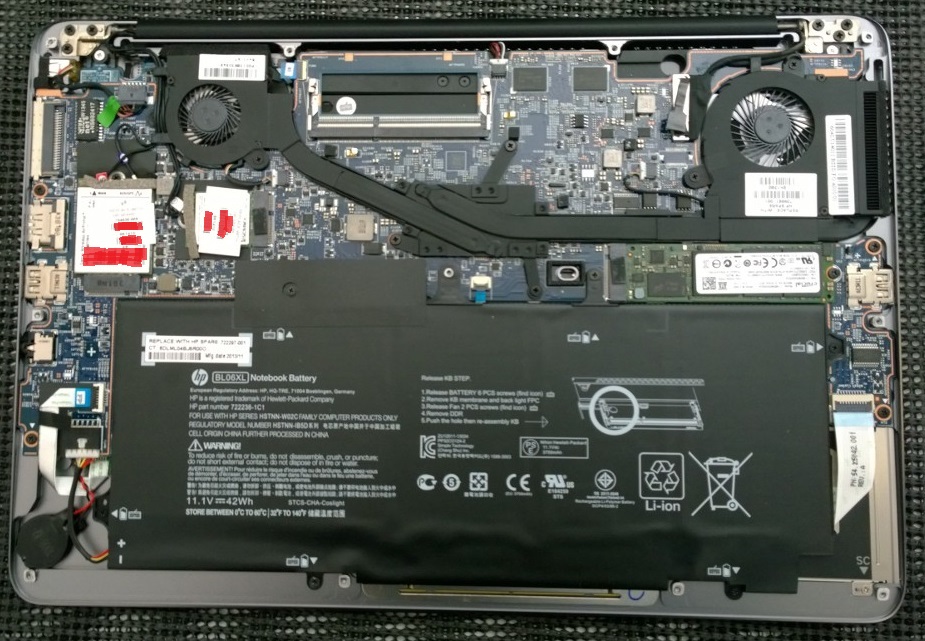
HP EliteBook Folio Under the Lid

Let’s delve a little deeper into what’s behind the beautiful exterior. Opening the notebook will allow you to remove the hard disk, the wireless card as well as battery. Nonetheless, the memory is directly connected to the board and cannot be taken out.

The HP EliteBook Folio features an Intel Core M-5Y51 processor – a two hyper-threaded core piece that is clocked to 1.1 GHz and can go up to a 2.6 GHz Turbo peak. It is not the greatest CPU out on the market, coming close when compared with the common Intel Core i5-2410M @ 2.30 GHz processor. It’s mid-range but it does its job well when it comes to any form of office work.

Along with the CPU you get the Intel’s HD Graphics 5300 integrated graphics processing unit. As long as your job does not involve video editing or heavy graphic rendering, you will not encounter any issue whatsoever. Surely, a dedicated GPU will always work better than an integrated card but that is not a feature that you will easily come across when browsing business laptops.

The HP Elite Book also packs an 8 GB LPDDR3 SDRAM at 1600 MHz RAM – which is more than plenty. You won’t encounter sluggish performance even with a dozen processes active at a given moment.

The hard-disk comes in several variations for the HP EliteBook Folio: you can either get a 128 GB, an 180 GB or an 256 GB SATA III HDD respectively on one hand, or one of the two self-encrypting drives available when purchasing – the 180 GB or 256 GB SATA III Self Encrypting Drive Opal 2 drives. While it may not be plenty of space for some users, do keep in mind that you still have the microSD slot – which nowadays can go as far as a staggering 512 extra gigabytes of storage space.

There is no CD/DVD/Blu-ray support to speak of in exchange, but the Folio features a dual-band 802.11ac wireless card as well as Bluetooth 4.0 and near field communication (NFC).

HP EliteBook Folio Features

Screen – The HP Elitebook Folio features a 12.5 inch screen that can go as far as 2560 x 1440 resolutions. Considering it’s a rather small display (or at least smaller than the more common 13” or 13.3”-sized notebooks), you will end up with no less than 235 ppi of pixel density – higher than many other comparable models, including the 13” MacBook Pro. While that is saying something, the Elite Book even goes as far as making use of a 1440p screen – superior to most ThinkPad or ZBook business laptops which feature 1080p screens.

Hp EliteBook Folio Display

One great aspect of Folio’s screen is that it sets its maximum, native resolution by default without the need for the operating system to get the best out of it. The screen has a 371-nit brightness which competes with MacBook Pro’s retina display making it extremely easy to render vivid, colorful and well-defined images even in sunlight and artificial lighting. Its 1,197:1 contrast ratio and black levels result in high image quality while the color accuracy and temperature are not as highly-rated: the screen’s color temperature is 7,823K which makes for cooler than average colors.

Sound – unless you’re making use of a separate headset and you have to rely on the HP EliteBook Folio speakers, the sound does not stand out in comparison to most laptops. Despite the carefully perforated speaker holes that can be found above the keyboard, the sound comes out at decent volume levels but may gain a certain degree of fuzziness as you turn it up to maximum. That’s something that you get from laptop speakers in general and normally only occurs at very high sound volume.

Keyboard – The keyboard of the HP Elitebook Folio 1020 G1 is probably one of the best featured in business laptops out there. With a perfect balance of responsiveness and even spacing between the keys, the keyboard is springy but may feel cramped and a little too small when you start using it. However, after you get used to the distances, it makes typing as fluent as you would have on any full-fledged keyboard. The keys caps are placed very close to the mechanism underneath, allowing the keyboard to sound muted and making it perfect for typing in quiet environments such as meeting rooms.

The keyboard does not feature a numpad. Nevertheless, the 81 keys on it are backlit and provide a good feedback when pressed.

HP EliteBook Folio Keyboard and Trackpad

HP EliteBook Folio Backlit Keyboard

One of the greatest things about HP EliteBook Folio’s keyboard is the fact that it was built to be spill-resistant. While this may sound like a generic thing laptop producers normally say with newer models, in Folio’s case it literally is spill resistant. By that we mean that the laptop has a built-in drain below the keyboard where the fluid gets quickly collected should the otherwise-catastrophic event occur. That prevents any form of damage to the data and the keyboard itself if you happen to have an accident.

Trackpad – the trackpad of the HP EliteBook Folio is also a great and nifty little detail. It incorporates one of the latest Synaptics technology known as ForcePad. It is very similar to the one used in Force Touch which you might have encountered or heard of in a number of Apple devices. The trackpad has no buttons and cannot be pressed down on, but instead it measures the amount of pressure you apply to it and responds accordingly.

HP EliteBook Folio Touchpad

Using a MacBook trackpad for the first time for example can feel a little confusing and unsatisfactory, given that you mostly rely on taps rather than the clicks that would normally mimic a mouse. Take the HP EliteBook Folio trackpad and you will find yourself in the same situation. Not only that the ForcePad provides no tactile feedback whatsoever, but it comes with an entire set of gestures and multi-finger taps that will help you navigate around your operating system. Instead of the feedback you normally get with a touchpad that you can press on, the laptop plays clicking sounds using the in-built speakers.

If navigation using the trackpad is too confusing, have no worry. The HP EliteBook Folio comes with an application that will walk you through all the things you can do with it step-by-step. It also allows you to customize the trackpad functionality according to pressure applied and different finger motions on it.

Fingerprint reader – when you first start using the HP EliteBook Folio, you are guided to start setting up your data protection by recording your fingerprint. Naturally, this is an optional feature and can, by any means, be skipped. However, should you decide to use it, it will make some things a little easier here and there. For example, once your identity has been set up and your fingerprint associated to it, you can easily access programs and features that require a log in by a simple swipe over the fingerprint reader.

Rest assured – if you, at any point, wish to stop using this feature or decide that you won’t wish for your fingerprint to be recorded, you can remove all your fingerprint credentials immediately.

Data encryption & security – the EliteBook laptop comes with several iterations of enterprise security. The TPM 1.2/2.0 (Trusted Platform Module) from Infineon is a microprocessor designed to secure hardware by integrating cryptographic keys into devices. Along with TPM, the laptop also has the latest of HP’s BIOSphere – an extra layer of protection against malware attacks such as PDoS (permanent denial of service) and provides you with a way to recover in case of BIOS malware corruption or compromise in less than 30 seconds.

HP EliteBook Folio Battery & Performance

Given the HP EliteBook Folio’s overall size, it would be pretentious of us to expect a powerhouse to run the entire thing behind it. The laptop features a four-cell 36 Wh battery, which is considerably smaller than competitor models of the same caliber. However, the Folio’s processor was built to improve and boost battery life, so with a decent mix of screen brightness and a balanced power mode, the laptop can last up to 6 to 8 hours without being plugged in. Regardless, at maximum screen brightness and a more stressful type of activity on it, you might only end up with 3 or 4 hours’ worth of power.

Charging doesn’t seem to take very long either considering that if you leave it turned off and plugged to a power outlet for roughly an hour and a half, you will have a full charge to work with afterwards.

In terms of performance, we have to be frank – the hardware packed in the EliteBook Folio is not breaking into the benchmarking tops. The Intel Core M is the best you can get for a fan-less processor that would fit in the 15.7 mm thickness that the Folio showcases. While you can fluently work with emails, documents, presentations, video conferencing and many other activities of this nature, you many end up feeling that it lags behind a little in comparison to some of the better consumer laptops.

HP EliteBook Folio Verdict

We finally come to the conclusion of the HP EliteBook review. So what are the main factors that we have to take into consideration when settling on a final opinion? On one hand you get a pretty good performance, an amazing look, a light-weight, easily transportable but sturdy and well-protected machine. On the off-side, a rather small display (albeit near excellent in render quality), a very high premium price and the boldly-stated “looks and style over performance”.

If you believe that the work you do does not involve putting your laptop up to a stress-test on a regular basis and the high price is not an issue, the HP EliteBook Folio 1020 G1 is a splendid choice.

The Folio’s pricing varies depending on the components you select when purchasing. The lowest end build will cost you a little over $1,000 while the high-end custom builds involving a more powerful processor and a touch-screen capable display can even take you up to a staggering $2,478.

The operating system of your choice (Windows 7.1 or Windows 8) and 3 years of warranty are included in the final price.

Image Source: 1, 2, 3, 4, 5, 6, 7, 8, 9, 10

Filed Under: Headlines Tagged With: business laptop, elitebook folio review, HP EliteBook Folio, office laptop, work laptop

  • « Previous Page
  • 1
  • …
  • 12
  • 13
  • 14
  • 15
  • 16
  • …
  • 58
  • Next Page »

Subscribe to Blog via Email

Enter your email address to subscribe to this blog and receive notifications of new posts by email.

Join 11 other subscribers

Recent Articles

police handcuffs man

German Man Probed In Poisoning That Killed 21 Employees Since 2000

June 29, 2018 By Kenneth Scott Leave a Comment

Chicken wings bar

Intoxicated South Carolina Man Punches Waitress Who Refused to Serve Him Alcohol

June 29, 2018 By Karen Jackson Leave a Comment

gaming

New Zealand gamer Who Flew Halfway Across The World for Virginia Teen Gets Shots By Her Mother

June 28, 2018 By Cristopher Hall Leave a Comment

party

Former Virginia Tech Freshman Sentenced to 50 Years in Prison for Stabbing a Girl to Death

June 28, 2018 By Roxanne Briean Leave a Comment

bonfire

British Couple Sentenced to Life in Prison for Torturing and Murdering French Nanny

June 27, 2018 By Deborah Campbell Leave a Comment

pay phone

Texas Father of Girl Disappeared in the 80s Ignored by Authorities

June 26, 2018 By Cristopher Hall Leave a Comment

bottled water

San Francisco Woman Threatened to Call Police on Girl Who Sold Ice Water for Disneyland Trip

June 25, 2018 By Roxanne Briean Leave a Comment

Maplewood Park

Missouri Man Robbed by Date and Accomplice in Park

June 22, 2018 By Nancy Young Leave a Comment

coding

New York Man Sentenced in Cyberstalking Former Girlfriend, Mailing Drugs to Her Dorm

June 22, 2018 By Deborah Campbell Leave a Comment

headphones

Bose Poised to Launch Sleepbuds, In-Ear Headphones That Help You Sleep

June 21, 2018 By Nancy Young Leave a Comment

Police light

Intoxicated Female Driver in Custody for Pulling Arresting Officer by the Hair

June 21, 2018 By Kenneth Scott Leave a Comment

kitchen

Restaurant Manager Arrested and Charged in Shooting Death of Co-Worker over Negative Yelp Reviews

June 20, 2018 By Karen Jackson Leave a Comment

plastic container

Pennsylvania Couple Charged in Violent Death of Infant Discovered Buried in Cat Litter

June 19, 2018 By Cristopher Hall Leave a Comment

tailpipe

Minnesota Teen Gets Head Stuck In Oversized Tailpipe Winstock Music Festival

June 18, 2018 By Karen Jackson Leave a Comment

Pages

  • About Us
  • Contact us
  • Privacy Policy
  • Privacy Policy GDPR
  • Staff
  • Terms and Conditions

Recent Posts

  • German Man Probed In Poisoning That Killed 21 Employees Since 2000 June 29, 2018
  • Intoxicated South Carolina Man Punches Waitress Who Refused to Serve Him Alcohol June 29, 2018
  • New Zealand gamer Who Flew Halfway Across The World for Virginia Teen Gets Shots By Her Mother June 28, 2018
  • Former Virginia Tech Freshman Sentenced to 50 Years in Prison for Stabbing a Girl to Death June 28, 2018
  • British Couple Sentenced to Life in Prison for Torturing and Murdering French Nanny June 27, 2018
  • Texas Father of Girl Disappeared in the 80s Ignored by Authorities June 26, 2018
  • San Francisco Woman Threatened to Call Police on Girl Who Sold Ice Water for Disneyland Trip June 25, 2018

Categories

  • Business
  • Entertainment
  • Finance
  • Headlines
  • Health
  • Life
  • Nature
  • Science
  • Sports
  • Tech & Science
  • Travel
  • Uncategorized
  • United States
  • World

Copyright © 2026 ArgyllFreePress.com
About · Privacy Policy · Terms of Use · Contact