Argyll Free Press

Growing News Network

Friday, April 24, 2026
Log in
  • Business
  • Finance
  • Sports
  • Tech & Science
    • HP Envy 4500 Review
    • LG Optimus 170 Review
    • iPod Touch 6th Generation Review
    • HTC One M8 Accessories Set-up
    • Surrealist Games You Must Play
    • Hisense Sero 8 Review
    • Dell Latitude e7440 Review
    • HP Laserjet 1536dnf mfp Review
    • Garmin Fenix 2 Review
    • Skype Vs Viber
    • Best Video Conferencing Software
    • Sony mdr 1r Headphones Review
    • Canon Rebel t3i Review
    • Sennheiser Momentum 2-0 Review
  • Travel
  • Headlines
  • Health
  • United States

New Intelligent Energy Drone Fuel Cell Boosts Range

December 15, 2015 By Kenneth Scott Leave a Comment

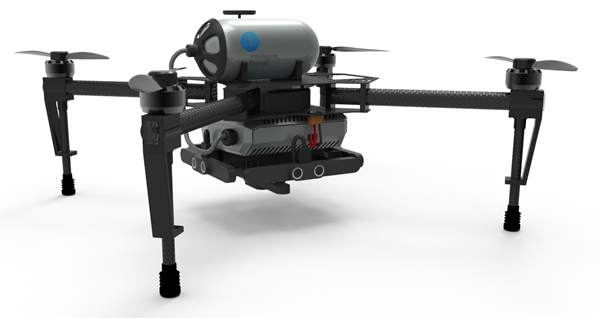
The new Intelligent Energy drone fuel cell

Intelligent Energy is a British company whose objective is to provide advanced and efficient power sources, especially fuel cells.

It has been developing such technologies since its establishment in 2001, when it acquired  Advanced Power Sources LTD, a company composed of researchers from Loughborough University (UK).

The main interest of the Loughborough University research and development team (which subsequently became Advanced Power Sources LTD), as well as that of the present-day Intelligent Energy was and is the development of Proton Exchange Membranes (PEM) fuel cells.

But the company’s academic-born past and its cutting edge technology focus means it’s interested in developing more efficient fuel cells in other domains as well, with the company holding more than 400 patents submitted or awarded by now.

For which they have prototypes or intend to develop them soon.

Like, for example, the new Intelligent Energy drone fuel cell which they recently announced.

It is a hydrogen fuel cell which can extend drone flight-time from the approximately 20 minutes that most drones are capable of today to hours.

Intelligent Energy have also promised that their upgrade will reduce charging time from the 1-2 hours usually required to mere minutes!

These results were achieved after 14 months of experimenting with drones in two power configurations: fuel cells and hybrid power systems consisting of a battery and a fuel cell that constantly charges that battery.

Both systems performed very well, and clearly better than the currently used ones which rely only on a battery.

The company said they will keep testing between these two systems to decide which is the most efficient and desirable overall.

The best part? The hydrogen fuel cell tested in both systems works by a chemical process which convert hydrogen into electricity. And there’s only one “waste” to this conversion: water! So, no pollution takes place with Intelligent Energy’s fuel cells.

Still, although the hydrogen battery is energy efficient and reliable, there is a tiny downside. It is not currently very good at quickly pumping the energy burst required when the flight conditions change quickly, for example in the case of a strong gust of head-wind that the drone might experience suddenly.

That’s why the company is testing the hybrid system as well, in which the conventional battery would compensate in such cases.

Still, if they are not ruling out the possibility of solving this minor problem and in the end presenting a solely hydrogen fuel cell powered version.

More information on these developments will be given by Intelligent Energy at the CES (Consumer Technology Association) meeting in 5-9 January in Las Vegas.

So, if you’re a drone owner you might want to follow-up on that.

Image source: 1.
Filed Under: Headlines Tagged With: Drone, drone battery, drone battery life, drone battery life extension, drone energy, drone flight-time increase, drone fuel, drone fuel cell, drone hydrogen fuel cell, drone power, drone power system, drone range extension, Intelligent Energy, Intelligent Energy drone fuel cell, Intelligent Energy drone hydrogen fuel cell

Sennheiser Momentum 2.0 Review – Excellence in Sound

December 14, 2015 By Deborah Campbell Leave a Comment

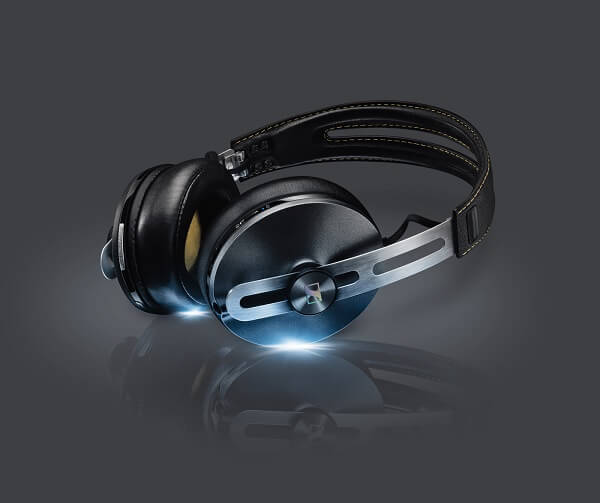
Sennheiser Momentum 2.0 Header

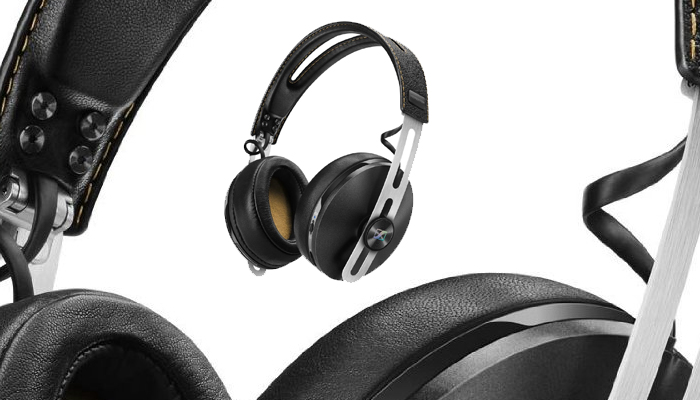
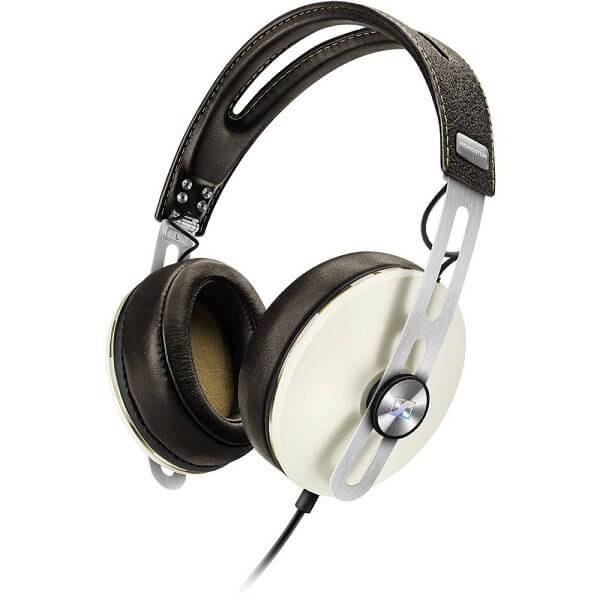
Coming as what it supposed to be an upgrade to the original Sennheiser Momentum, the Sennheiser Momentum 2.0 have heard the voice of the users and heeded to them. The users of the initial model weren’t particularly happy with the size of the ear cups and with the set’s portability. Thus, the manufacturer has changed a number of things about them – both internally but visually too.

So that is how the second iteration of the series has come to be; the end result is an even more outstanding pair of over the head headphones than the previous – featuring not only a sleek look but absolutely stellar performance too. However, it’s to be considered that this pair of headphones isn’t necessarily directed at audiophiles in particular. While their performance is nearing on the best you can get this year, they’re not meant for activities such as sound mastering or track mixing.

However, as an all-purpose set of headphones that you’ll use for both listening to music or watching movies and gaming, the Sennheiser Momentum 2.0 are absolutely outstanding. They come in both wired and wireless variants, with the latter considerably being more expensive. Do, also, make note that it comes in two models – one is an iPhone compatible version, while the other is made for Android and other phones.

Pros:

  • Stellar performance
  • Excellent sound quality, possibly one of the best on the market
  • Great design and comfort

Cons:

  • Expensive, especially the wireless version
  • Different version for iOS & Android respectively

Sennheiser Momentum 2.0 Design

Sennheiser Momentum 2.0 Black Design

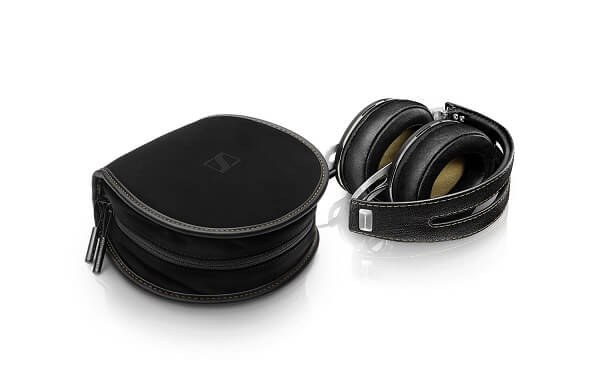
As soon as you take the Sennheiser Momentum 2.0 out of its packaging, you’ll already notice that the manufacturer has attempted to maintain the headphones to fold similarly to how their predecessors did – despite the overall increase in size. The packaging itself is done very nicely and inspires reliability: tugged into a base of sponge-like material you will find the Sennheiser Momentum 2.0 case, and inside that the headphones await in a fabric bag of their own.

Sennheiser Momentum 2.0 Headphones + Case

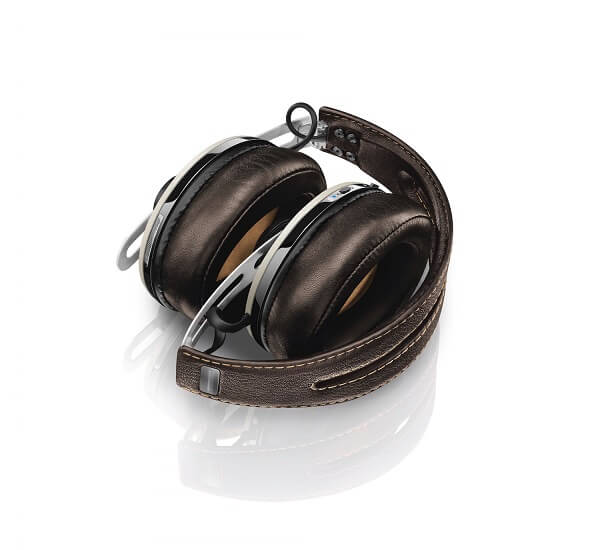
As one would expect, given the packaging, the headphones are folded neatly, similarly to how the original model did too: inwardly, parallel to the headband, stacking the ear cups on top of the other. While this is not the most space saving way to fold them, the bag and case are designed to take as little space as possible. Most likely a lot less than your usual travelling cosmetics bag! Along with the headphones themselves you also get the removable cable for your platform of choice (iOS or Android) tucked neatly in a plastic wrapper.

Sennheiser Momentum 2.0 In Case

Sennheiser Momentum 2.0 Folding

The headphones themselves employ a great overall design, mixing metal with solid-looking plastic and two types of leather. I actually enjoyed the fact that there’s not an extensive use of plastic in the headphones’ build. Normally, plastic turns out to be the most unreliable part of headphones, also being the most susceptible to wear and tear. There’s not much of that to mention here, so from that perspective you should be safe with wearing and using the Sennheiser Momentum 2.0 on ear headphones for an extended amount of time.

Sennheiser Momentum 2.0 Leather

The headband is designed beautifully, with a special vintage-looking patterned layer of leather covering the top of it, splitting down the center for a great-looking effect. Underneath the band there’s a fair amount of padding to keep the headphones resting comfortably on your head. However, they may seem a little rigid for some as the headband looks particularly thin. An effect of Sennheiser’s attempt at keeping the headphones in the “highly portable” category, given the way they fold in the first place.

Sennheiser Momentum 2.0 Headband

The headband ends with metallic caps that mask the point where it switches to the metallic headband extensions. If you look on the inside of the headphones, you’ll notice that each side is pinned using 4 small bolts so you shouldn’t worry about the sturdiness of it.

Sennheiser Momentum 2.0 Pads

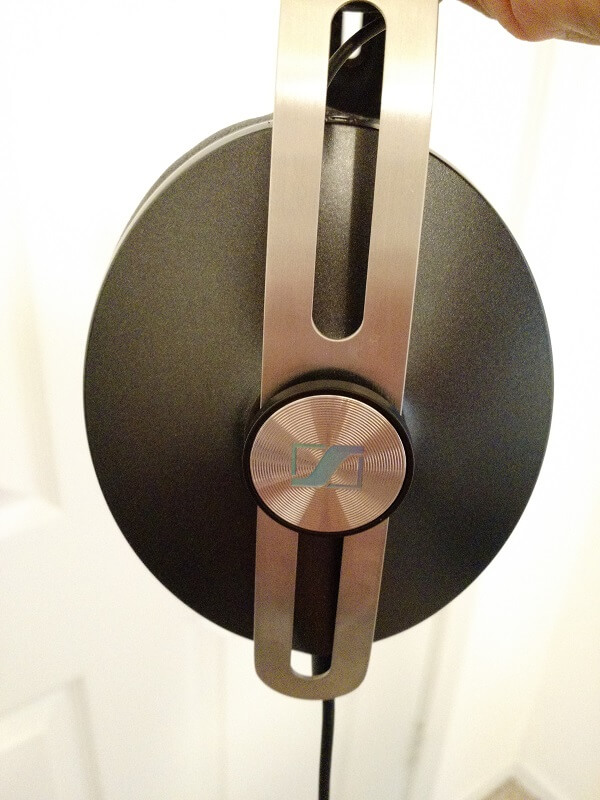
The metallic continuation of the headband features the same central slits, giving the Sennheiser Momentum a great aesthetic design. However, this time around, the specially designed brushed stainless steel is not all about looks. These serve as sliders on the headband, allowing you to adjust the overhead size of the headphones, giving a fair amount of customizability for anyone wishing to wear and use them. For this purpose, the cables that travel through the headband and to both ear cup separately are placed in such a way that not even extending the headphones will stretch them out, preventing any damage to the contacts.

The ear cups have grown in size quite a bit to say the least – that was one of the original problems with the first iteration of the Momentum series. The back of the cups features a circular pin that’s in charge of holding your size adjustment of the headband in place and features the Sennheiser logo in the middle. The exterior pads looks sort of metallic on first glance, but are actually made from a sturdy type of plastic and is coated in a smooth and shiny looking layer of paint. The metallic ring that goes all around the pads is the last eye-catching detail before the leather-covered ear pads.

Made from an amazingly soft padding, the cups are large enough for anyone. Sennheiser made a focus out of comfort, thus you won’t have any problem with the Momentum 2.0. The cups offer plenty of space without pressing down hard on your head but unfortunately lack the ability to spin sideways or swivel for some extra adjustment options. The felt-lining that covers the headphones’ drivers barely comes in contact with your ear, not only improving the way you perceive the sound emitted through them but also preventing any mishaps, were you to get a little sweatier. Considering it’s leather covering the ear cups, if you use the Sennheiser Momentum during the summer – for example – you’ll most likely end up feeling a little hot because of it. But that’s just the eternal issue of leather really.

If you look closely, you’ll notice a jack in one of the external pads of the ear cups. That is where you plug in your detachable 3.5 mm jack cable. While the new design choice of most circumaural headphones manufacturers is a great addition to the longevity of their products – by allowing you to just replace the cable if it wears out and not have to buy an entire set of headphones altogether – it comes with its own issues. There is a locking mechanism that keeps the wire in place and prevents it from being ripped out by accident. While that’s actually a great thing to have, you will always end up having to lock it in manually (that is done by twisting it in the socket). And while it’s great to not accidentally take the cable out while you’re using the headphones, I would personally prefer for the jack to pop out if I accidentally pulled on the cable (it happens more often than I’d like to admit), rather than risk damage to the inside of the wire.

The Sennheiser Momentum 2.0 headphones comes in three color variations: ivory – with cream-colored pads and light brown leather – brown and black.

Sennheiser Momentum 2.0 Features

Sennheiser Momentum 2.0 Cable

Sennheiser Momentum 2.0 Cable

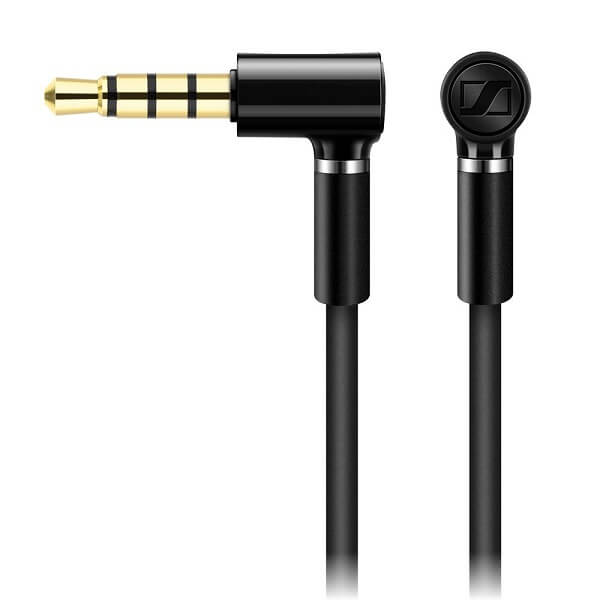
As I’ve mentioned before, there is a removable 3.5 mm jack cable that comes separately in the headphones’ package. It features gold-plated plugs on both ends of the 1.4 meters cable and features an angled design for the end that you plug into your audio device such as smartphone, music player or computer.

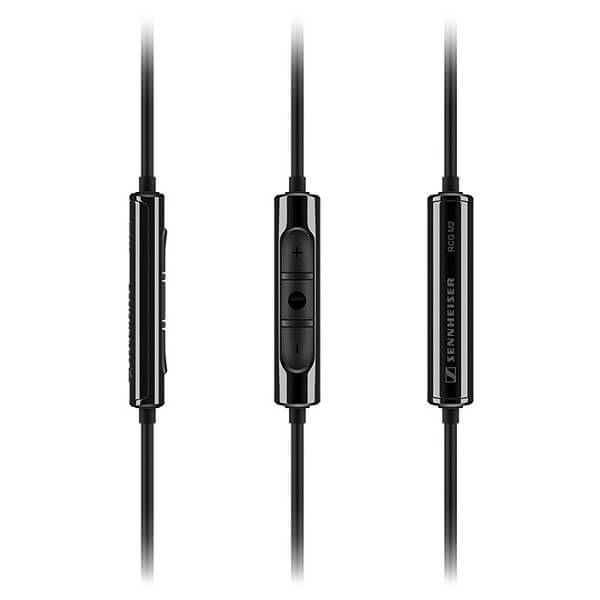
The cable features an integrated in-line remote down lower on the wire; it has 3 buttons, allowing you to both control the volume without needing to take out your phone for example, as well as play and pause your current track. I know this is wishful thinking, but I can’t wait for the day when these remotes will include a button or two for going back and forth through songs.

Sennheiser Momentum 2.0 Remote

Naturally, there’s a microphone included on the cable as well, thus allowing you to use the Sennheiser Momentum 2.0 headphones with your mobile phone, provided that you own a compatible model, according to which type of cable you purchased (iOS or Android).

Sennheiser Momentum 2.0 Sound Isolation and Noise Cancellation

The Momentum Sennheiser headphones do a great job of isolating outside sounds when you use them. Thanks to the fit design and the way they completely cover your ears, you should have a pretty good muffling of outside noises, no matter where you are or how loud they are. I personally don’t enjoy doing this to an extent due to the slight danger attached to not hearing outside noises when you’re out. Maybe it’s really just me being paranoid.

Noise cancellation is another particularly important aspect where the Sennheiser Momentum over ear headphones really shine. If you recall our recent Best Noise Cancelling Headphones of 2015 article, the original Sennheiser Momentum model made it in the top 10. Truthfully, not much has changed in that direction, with the 2.0 version offering about the same amount of noise cancellation. The NC is done through 4 exterior microphones and can actually be turned off this time around. There is a neat feature that you’ll find on these headphones thanks to the VoiceMax dual-omnidirectional microphone that will make sure to cancel the outside noise when you’re using it for phone calls. It can also playback your own voice to in order to control the volume you speak at. But personally, that is an awfully distracting thing to make use of when talking on the phone.

Sennheiser Momentum 2.0 Specs & Sound Quality

Sennheiser Momentum 2.0 Performance

The Sennheiser Momentum headphone has an impedance of 18 ohms. That is a low value, meaning it not only uses very little power but also delivers a fairly high audio level to make up for the otherwise low sound amplification that phones or other small, portable devices of the sort are usually capable of. But that also pretty much sums up the fact that you won’t and shouldn’t be looking at the Sennheiser Momentum if you’re planning to use them as your go-to music producing studio headphones pair.

The Sennheiser Momentum headphones have a frequency response of 16 Hz to 22,000 Hz, which means it’s just a bit over what the human ear can even perceive (20 to 20,000 Hz). However, just the range alone cannot atone for the headphones’ actual performance in all of the bass, mids and treble ranges.

Lows / bass: the very low frequency sounds of the Sennheiser Momentum 2.0 were particularly rich sounding without resorting to bass boosters that many other types of headphones opt for. While the bass itself is decent, if not lacking control to some degree, it’s the mid-bass that seems to shine a lot, while the sub-bass can be more or less too contained for one’s liking.

Mids: The mids of the Sennheiser Momentum could easily be considered the area of expertise of the lot; mostly complimented by the mid-bass power, mids sounded particularly rich, broad and punchy. Clarity is definitely not a weak point of the mids as they are featured by these headphones. Because of that, vocals are depicted beautifully by the Momentum, gifting them with a high degree of cleanliness, detail and clarity.

Highs / Treble: the headphones slightly start losing ground again at this level of frequencies. Because of a lingering dryness and overly felt crispiness of the highs, the Sennheiser Momentum may not end up to everyone’s liking.

The harmonic distortion in the sound of the Sennheiser Momentum doesn’t exceed 0.5%, thus only underlining the amount of clarity that the headphones are really capable of. Soundstage is depicted very well too, with a fair distinguishable difference between the instruments and expansive depth and width of the sound.

Sennheiser Momentum 2.0 Verdict

So what are the most important points of this here Sennheiser Momentum review? This pair of headphones have really brought a considerable upgrade to the previous model of the headset – exponentially improving the design in terms of comfort and portability. From that perspective you can easily say that the 2.0 version is one of the best choices you can make in terms of both home and outdoors use. They’re stable, they offer a very good amount of noise cancelling and sound isolation, making them a great pair of headphones, with their compatibility to phone calling only being another plus. Not to mention their great design.

The fact that they’re only compatible with one phone family at a time however, is something most people will frown upon, especially given the fact that Sennheiser Momentum 2.0 are anything but cheap.

You can purchase the Sennheiser Momentum 2.0 for $349.99 directly from the Sennheiser online store. The Wireless variant of these headphones is consistently more expensive however – no less than $499, making them one of the most expensive choices.

Image Source: 1, 2, 3, 4, 5, 6, 7, 8, 9, 10, 11

Filed Under: Headlines Tagged With: sennheiser circumaural headphones, sennheiser m2, sennheiser momentum, sennheiser momentum 2.0 review, sennheiser momentum headphones

Google D-Wave 2X Quantum Computer Controversy

December 14, 2015 By Karen Jackson Leave a Comment

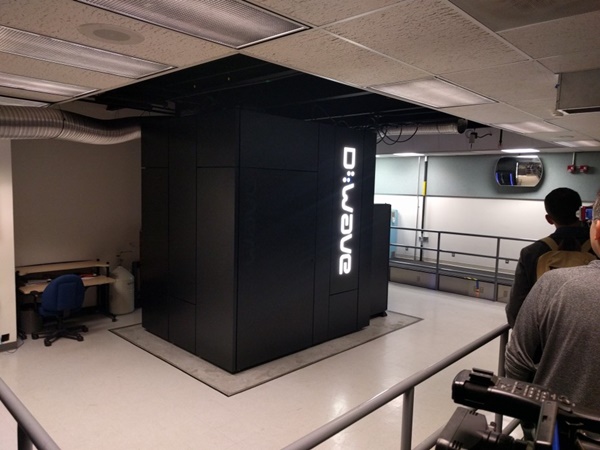
A D-Wave 2X Quantum Computer is installed at the NASA Ames Research Center

Last week, Google’s AI team announced that its tests at NASA’s Ames Research Center on the D-Wave 2X quantum computer yielded exceedingly pleasing results: it was 100.000.000 times faster at solving the problems set to it than a conventional computer using quantum annealing as opposed to the simulated annealing conventionally used for such problems.

Yes, you read that right. Google partnered with NASA, a consortium of universities (the Universities Space Research Association – USRA) and with D-Wave Systems Inc. in 2013 so that the first three organizations could test and refine the latter company’s quantum computers to further the development of AI and space travel.

Since its Orion prototype quantum computer, presented around 2007 D-Wave has gradually increased the technology’s capabilities. If the Orion prototype worked on a 16-qubit processor, the current D-Wave 2X works on one with more than 1000 qubits.

The way quantum computers are supposed to work is that, because of the strange phenomena that take place at a quantum level, qubits can have both a 0 and 1 value as well as an additional 0 and 1 at the same time value, due to superposition.

Since conventional processors operate with just 2 alternative values (1 or 0), quantum computers should theoretically be way faster.

And judging by Google’s announcement last week, the theory proved out as their AI team demonstrated these incredible speeds using the D-Wave 2X quantum computer.

Or did they? Because here’s the catch.

Ever since its first claims at having built a functional quantum computer, D-Wave has been consistently surrounded both by awe, excitement and praise, as well as by criticism, accusations and dismissal by respected scientists.

The first camp is pretty clearly defined by the Google, NASA and USRA scientists working with the computers and other non-affiliated ones.

But the second one shouldn’t be neglected either, boasting prominent names such as Umesh Vazirani (one of the founders of the theory of quantum complexity), Wim van Dam of UC Santa Barbara and Scott Aaronson of MIT, the latter proclaiming himself the “Chief D-Wave Skeptick” (with a short hiatus) for quite some time.

Making matters more confusing is that an article published in Nature in 2011, does support D-Wave’s technological claims, stating that the company’s chips do show some of the quantum mechanical properties required for quantum computing.

But does that mean that D-Wave computers actually operate on a quantum level? Wim van Dam and others believe there is no way to tell for sure at the moment. And the more hardcore critics like Varizani or Aaronson say that D-Wave misunderstood some quantum principles, that its claimed speedup flat out isn’t true and that they inflate their results.

Still, Google claims that the results are real and really quantum. And hints at future applications like fast and optimized space travel plotting, drug testing, airport coordination, encryption and many others.

Time will tell. What do you think?

Image source: 1.
Filed Under: Headlines Tagged With: D-Wave, D-Wave 2X quantum computer, D-Wave quantum computer, Google, Google AI team, Google quantum computing, nasa, Nasa Ames Research Center, quantum computer, quantum computing.
Yahoo Mail Gets Support For Gmail

December 13, 2015 By Deborah Campbell Leave a Comment

Your access to your accounts is easier now that Yahoo Mail gets support for Gmail.

Yahoo Mail gets support for Gmail, making it easier for you to access your accounts.

It seems rivalry has lost some of its importance for the good of the users. Two months ago, Yahoo Mail received an upgrade in order to support other webmail services, such as AOL Mail, Microsoft’s Outlook and Hotmail. Today, Yahoo Mail gets support for Gmail, one of the most popular platforms among users.

The announcement was made on the official Tumblr blog of the company. The latest update of the application is available globally on both the Apple Store and the Google Play Store. Yahoo made this possible by expanding its IMAP support related to servers. Users can now manage all their email accounts by using the Yahoo Mail app.

Furthermore, the feature can be accessed on desktop browsers, which gives you even more mobility. All you need to do is go to the Account Settings of Yahoo Mail and choose the options that are of use to you.

The California-based company seems to have taken this measure in order to draw more users to the email platform, as it is not as popular as it used to be. We shall see in the near future whether they will manage to reach their goal or if the people will remain loyal to other companies.

The previous update that we mentioned earlier included a new design for the application, as well as several modifications for the browser inbox. It is easier now to add pictures and videos, but also links, GIFs or whatever other files you wish to send.

Additionally, the security was improved, since Yahoo Mail was well known to receive a lot of spam. The contacts can also now feature more information, you have the option to undo the emails you have sent and you have a larger palette of filters when searching within your inbox.

Last but not least, the feature named “Yahoo Account Key” was added in order to give the possibility of syncing several email accounts on different services and mailboxes. This feature also enables you to log in by tapping a button instead of having to login using passwords every single time.

As Yahoo Mail gets support for Gmail, we are witnessing once more the evolution of both technology and trends. When you are not as successful as you used to be, you need to parlay with the enemy. You know what they say, if you can’t beat them, join them.

Image Source: 1

Filed Under: Headlines Tagged With: email application, email inbox, Yahoo Mail Gets Support For Gmail

Bose SoundLink Mini Bluetooth Speaker Review

December 12, 2015 By Cristopher Hall Leave a Comment

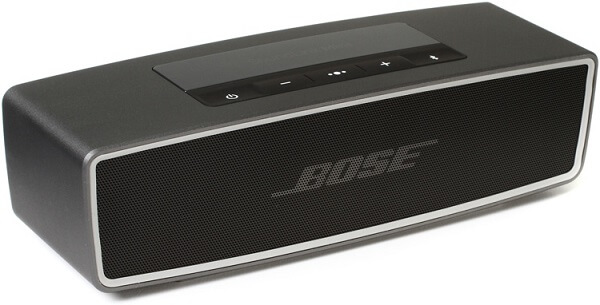
Bose SoundLink Mini Bluetooth Speaker Header

Let’s take a look at another aspect of the quality of life. Ever wished you didn’t have to invest in multiple music players so you don’t have to be in a specific room in order to listen to your favorite tunes? Or alternatively, got tired of having to carry your phone with you everywhere and be utterly disappointed at the inferior sound quality you had to put up with in the process? The Bose SoundLink Mini Bluetooth speaker is an answer to all of that and can do even more on top of it.

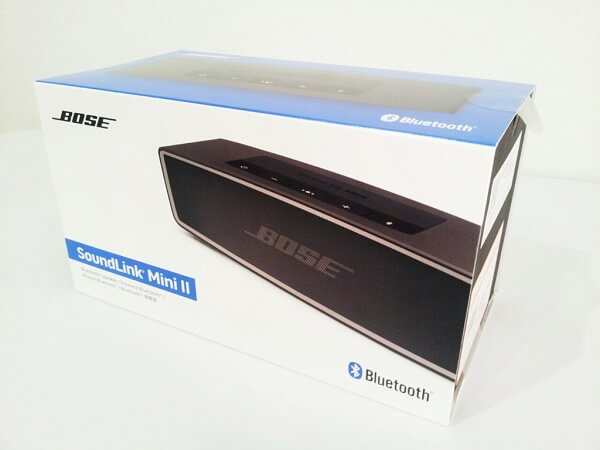
Basically, the SoundLink Mini is a portable speaker that can fit in the palm of your hand but doesn’t fail to amaze at the amount of bass and punch it can throw. It’s the second iteration of the Bose SoundLink Mini – occasionally named the Bose SoundLink Mini II – but it became the current and sole variant placed on sale soon after its release (the original cannot be found on the market anymore). Though there aren’t that many changes that were brought to the second version of the Bose SoundLink Mini Bluetooth speaker, the latest version ended up being very popular thanks to the addition of speakerphone capability.

Whether you don’t want to feel bound to a particular room in order to listen to music, your car stereo is busted or you simply need an easily transportable speaker to take with you wherever you may be going, the Bose SoundLink Mini Bluetooth speaker is one of the best choices you can make. With a reliable battery life, an unexpectedly powerful sound and wireless capability, it has pretty much everything you could ever wish for.

Pros:

  • Very powerful and high quality sound
  • Small and easy to transport or take without you
  • Compact and sturdy
  • Simple and sleek design

Cons:

  • Far from the cheapest on the market
  • Does not support near field communication (NFC) pairing
  • Doesn’t have an LCD display

Bose SoundLink Mini Bluetooth Speaker Design

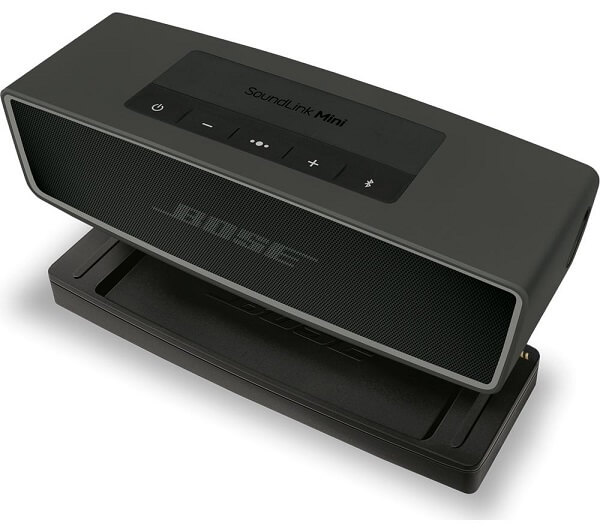
Bose SoundLink Mini Bluetooth Speaker & Dock

I won’t lie to you, my first reaction when seeing the Bose SoundLink Mini Bluetooth speaker wasn’t one of the greatest, and for a moment I wondered if I was looking at a recent device or some really outdated lone speaker. That’s mostly due to the front of the device – a perforated strip of aluminum that really resembles the one that my stereo had on its speakers… 15 years ago. I really, really wish the manufacturer had done something different with the front of the SoundLink mini speaker.

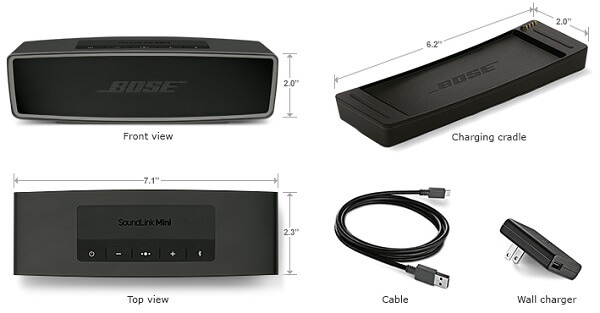
On the other hand, though, I can say that I understand the reasoning behind not employing a different design or softer material for covering the speaker’s drivers. This is supposed to be a portable speaker that you can just put in your camping bag and enjoy it when you’re there; it’s supposed to be sturdy. And that is certainly something that the Bluetooth speaker manages to pull off. The Bose SoundLink Mini Bluetooth speaker is amazingly compact, with a sound aluminum body and a very solid feel. It’s also unexpectedly heavy for its size too: at 2 x 7.1 x 2.3 inches it weighs 1.5 pounds which is really a bit of a shocker the first time you pick it up.

The sturdy and solid feel of the Bose SoundLink Mini Bluetooth speaker’s unibody is complimented by the button layout on the device’s top side. The entire area where the buttons are placed doesn’t leave any room for crevices on the sides, simply displaying the device’s logo in the very center and giving you access to 5 rubber-covered controls right below that. There is a power button, a Bluetooth button, the volume up and down controls, as well as a multifunction button. The last of the 5 handles playback and the speakerphone; for example, you can use it as a play/pause button, skip forward or backwards by 2 and 3 taps respectively, hold down on it to activate voice dial, answer or reject calls and even switch between calls.

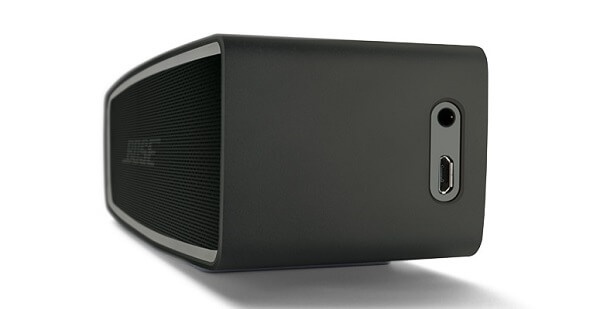
The right side of the speaker features 2 ports: a 3.5 jack input that you can use to connect any non-Bluetooth capable device to the speaker and a microUSB port that you can use as a secondary charging method. Sadly, the microUSB can’t be used to pair the speaker with various devices and can instead only be used as a charging port and connector for any kind of needed firmware update. The bottom of the device features the primary method of charging however. When connected to the charging cradle included in the box, the connectors enable charging via your nearest power socket.

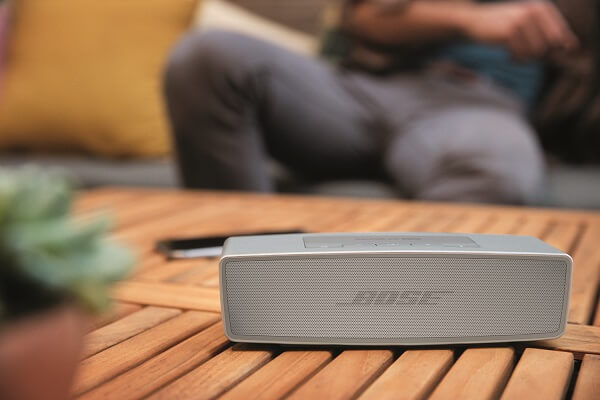
The way that the speaker was constructed suggests that you’re more likely to use this in your own home rather than anywhere else, like taking it with you on trips. Thanks to the charging cradle, you’re most likely to keep it somewhere mostly stationary, and switching its position only when you need to. Thanks to the simplistic and sleek design, you can probably place it nearly anywhere in your home and it’ll fit in just fine.

Bose SoundLink Mini Bluetooth Speaker Colors

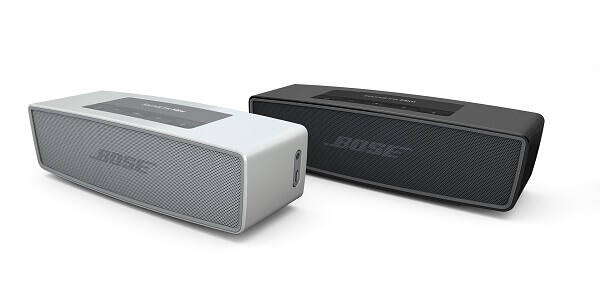
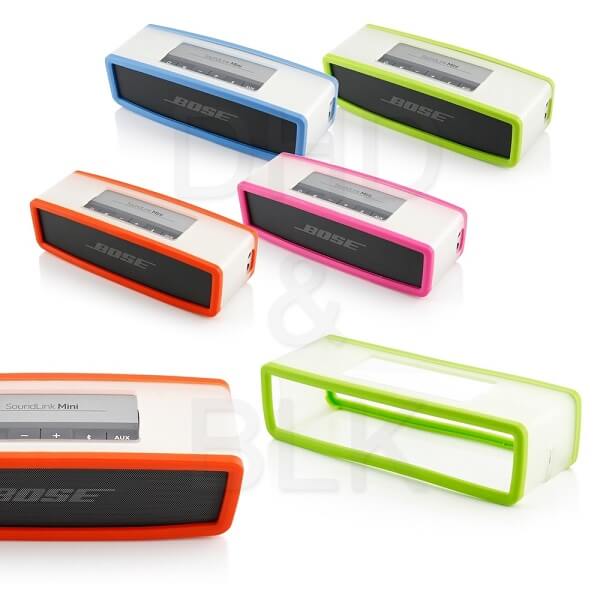
There are two color variations that you can purchase the Bose Soundlink Mini Bluetooth speaker in: Carbon and Pearl (basically black or white). However, given that the more fun and playful color variations are not being manufactured anymore, you can purchase a number of matching soft covers that will not only spike up the look of the speaker but also give it a touch of extra protection against external factors. The soft covers come in a multitude of color tones: blue, pink, red, gray, navy blue, energy green, deep red and charcoal black, thus sufficing for absolutely anyone’s tastes.

Bose SoundLink Mini Bluetooth Speaker Color Cases

Bose SoundLink Mini Bluetooth Speaker Features

Even though on first look the Bose Soundlink Mini Bluetooth speakers are pretty straight forward, it’s necessary to elaborate on just how far its base functions really go. As long as a device is either Bluetooth capable or can be connected to the speaker via the 3.5 mm jack input, the Bose SoundLink Mini will act as a relay for any sound that’s made by the host. The range on the Bose SoundLink Bluetooth speaker is about 30 feet, meaning that you don’t necessarily have to carry your paired device with you wherever you go. Or, alternatively, you don’t have to carry the speaker either.

Bose SoundLink Mini Bluetooth Speaker microUSB

The Bose SoundLink Mini Bluetooth Speaker provides feedback through an automated voice system that’s meant to fill in for the absence of any kind of LCD display. The voice system notifies you of several things: starting with the battery level when you turn on the device and ending with the names of devices connected to the speakers. If there had been a way to read out the name of the song I’m listening to, I would’ve been completely sold on this as I tend to listen to a lot of random playlists and when I like something I have to go through an entire process of finding out what I just listened to.

There’s a fair number of pre-installed languages to select from if needed.

Bose SoundLink Mini Bluetooth Speaker Playback

Once you have a device paired with the SoundLink Mini Bluetooth speaker, you can control the music volume and controls from either of the two devices, giving you a fair amount of control without being subjected to too much hassle.

Bose SoundLink Mini Bluetooth Speaker Playback

You can pair up to 2 devices simultaneously: meaning both can be connected to the Bose SoundLink speaker and listen to them alternatively. The music won’t overlap but instead it will start playing off of the device you most recently used. Say if device A is already playing and you want to start using the speakers for device B, all you have to do is pause music playback on device A and turn it on for device B; the latter will start playing in the speakers instead.

You can pair up to 8 devices to the Bose SoundLink Mini Bluetooth mobile speaker without overriding any of the records kept on the device. Any time you come in range to the Bose SoundLink Mini Bluetooth speaker with a previously paired device, it will recognize your handheld automatically and allow you to start using it immediately. Whether we’re talking your smartphone, tablets or even Bluetooth capable laptops, the SoundLink Mini can handle it all.

Bose SoundLink Mini Bluetooth Speaker Wireless

Considering there’s no display on the speaker to let you know which device is currently connected to it, you need to make use of the Bluetooth button to find out. The name of the paired device will play through the speaker. Similarly, in order to connect a mobile device from the speaker’s recorded pairing list, you need to double tap the Bluetooth button then press it once to move through to the next device until you find the correct one.

If by any chance your 8 slots have already been filled with devices and you wish to connect a new one to the Bose SoundLink Mini Bluetooth Speaker, you have to press and hold the Bluetooth button for 10 seconds until the speakers notify you that the list has been cleared.

Bose SoundLink Mini Bluetooth Speaker Speakerphone

Thanks to the microphone that has been added to this second version of the Bose SoundLink Mini Bluetooth Speaker, you can now use it as a relay for your phone calls as well. While the multifunction button serves as your main aid for most of the call functionalities, it may take a while to get used to all the tapping and holding down combinations – considering each does something different.

There is a downside to using the SoundLink speaker for taking calls however; the reason behind that is the simple fact that you pretty much have to speak into the microphone that’s included in its body in order to be heard so the hands-free, wireless ordeal is a little defeated by that. On the bright side, however, the speaker is able to identify incoming callers when they’re recorded in your contacts so you’ll be notified prior to answering the call. This feature can be turned off by pressing the – and + buttons simultaneously until you hear a notification that says that the voice prompts are off.

Bose SoundLink Mini Bluetooth Speaker Setup & Performance

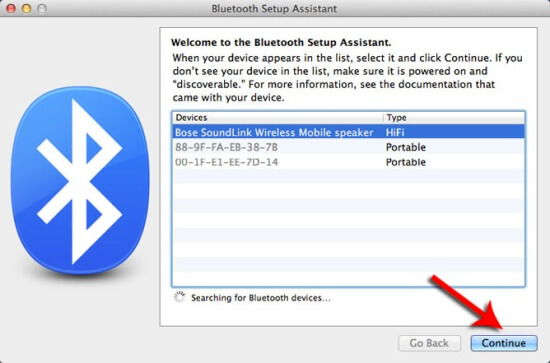
The setup process is very straight forward and doesn’t even require any application to be installed on your mobile phone or Bluetooth laptop. By simply turning on your Bose SoundLink Mini Bluetooth Speaker and turning on the Bluetooth on your phone, you can find the speaker and pair it to your smartphone; you will, in turn, be notified through the voice system that the devices have been paired.

Bose SoundLink Mini Bluetooth Speaker Setup

In terms of sound performance, the Bose SoundLink Mini Bluetooth Speaker is an undoubtedly powerful device, especially given its size and portability. The volume goes considerably high without any breaking or distortion. The bass and mid tones of the speaker are the strong point of the entire device, delivering a punchy and clear sound, with a lot of emphasis on detail. The treble isn’t particularly great, but overall the Bose SoundLink Mini Bluetooth Speaker performs well with a variety of music genres and will completely dwarf many competing models – if you can spare the extra cash for it at least.

Thanks to the passive radiators that are added in addition to the standard sound drivers, the low frequency sounds are enhanced a fair amount, thus allowing the speakers to provide an unexpected output of sound and volume, despite the small size of the SoundLink Mini. In comparison to the original Bose SoundLink Mini, not a lot has changed in terms of sound quality – the digital signal processing is mainly responsible of bringing out the best in the music you listen to; it’s not about an amazing and innovative set of hardware that’s miraculously packed inside the speaker, sadly.

Bose SoundLink Mini Bluetooth Speaker Battery

Bose SoundLink Mini Bluetooth Speaker Battery

The Bose SoundLink Mini Bluetooth Speaker contains a rechargeable battery that you can charge either via a wall socket or any USB device. The plastic charging dock that comes with the device is a nifty, nonintrusive peripheral that you can place your speaker in while you use it and either charge it at the same time or simply prevent battery usage. Without being connected to a power source, the Bose SoundLink Mini Bluetooth Speaker can last for up to 10 hours of playback time, which is a definitely improvement over the previous model which could only last up to 7. With even less worry of the device running out of juice while you’re on the road, you can really take the SoundLink Mini with you anywhere you go.

The charging cradle allows the speaker to be securely placed on top of it thanks to the pin connectors in the far right corner that keep it stable and secure. The user manual notifies the user that an increased volume will reduce the battery playback time. The device charges from 0 to 100% in roughly 4 hours if you’re not using the device in the meantime. There is also a battery saving feature that will automatically turn the device off after 30 minutes of inactivity in case you happen to forget it on.

Bose SoundLink Mini Bluetooth Speaker Verdict

Bose SoundLink Mini Bluetooth Speaker Packaging

The Bose SoundLink Mini Bluetooth Speaker is one of the most proficient and complete Bluetooth speaker you can find: with an amazing amount of power packed in the tiny box, you can enjoy your entire collection of music without being constricted to a pair of mobile phone speakers, unsatisfactory headphones or having to crank up your sound system’s volume loud enough for you to be able to hear it from a different room.

Even more so than that, you can event take the speakers with you wherever you go – 10 hours of playback time on a full charge is a lot more than one realizes. While it lacks the handier near field communication pairing that you may find in other competing models, the Bluetooth connectivity is particularly self-explanatory and really easy to use.

However, with unmistakable quality comes a higher price; and by all means, the Bose SoundLink Mini Bluetooth Speaker is not a couple of bucks more expensive. While you can get most wireless speakers for anywhere between $100 to $150, the SoundLink Mini is no less than $199. Depending on how much need you actually have for such a wireless speaker and how much you predict you’ll be using it, it falls onto you to decide if it’s worth paying that amount for it or not.

Image Source: 1, 2, 3, 4, 5, 6, 7, 8, 9, 10

Filed Under: Headlines Tagged With: Bose SoundLink Mini Bluetooth Speaker, Bose SoundLink Mini Bluetooth Speaker review, Bose SoundLink Mini Bluetooth Speakers, bose wireless speakers

You Can Now Send Money Through Text Messages

December 11, 2015 By Kenneth Scott Leave a Comment

You can now send money through text messages, thanks to Google.

Google Wallet now enables you to send money through text messages.

Ever wanted to make transactions in an easier way? Well, you can now send money through text messages thanks to Google. The technological revolution does not seem to slow down, and each day we receive news of new products, features and devices.

The payment system for mobiles has been available in the United States for quite some time now, but it required your email address. From now on, that will not be necessary. Google Wallet will allow users to directly send money to their contacts via text messages.

The announcement was made last Monday by the company. So how does it work? When you will attempt to send money, you will receive a text message containing a secure link in order to perform the transaction. All that is left afterward is to complete the form with your debit card information. The sum of money will be available in a couple of minutes to the person you sent it to.

The update for Google Wallet will be available in the App Store and Google Play Store in the next days. The team behind the application stated that they are truly thrilled about the feedback they received on their work. Furthermore, they promised to keep working continuously in order to improve the app. Should you wish to submit your feedback on the matter, you can do so via Google+, Twitter or the application itself, as the team is more than curious to know your opinions.

Google Wallet has received other updates over the past weeks. The contact suggestions have been improved, as well as a security feature that you can use to lock the application by tapping it once. Furthermore, the option of adding a second bank account is now available. Two months ago Google Wallet also received a new design and icon and several more features.

This update was released before the launch of the Android Play app, which stands for Google’s version of the Apple Pay by Apple. As you can now send money through text messages, what is the point of having two similar services? We expect lots of users to flock to Google Play, which provides them with a lot more mobility.

Image Source: 1

Filed Under: Headlines Tagged With: financial app, Google Wallet, You Can Now Send Money Through Text Messages

Fallout 4 Tips and Tricks: The Fallout 4 Survival Guide

December 11, 2015 By Roxanne Briean Leave a Comment

Fallout 4 Tips and Tricks Intro

It’s been just over a month since Bethesda finally put an end to our torment and released the much awaited Fallout 4. 7 years of pent up excitement for the continuation of the series pretty much resulted in a fair few individuals downright disappearing off the face of the planet for 2 to 3 days after leaving just one note for their friends to see: an inconspicuous screenshot of the freshly bought Fallout 4 in their Steam Library.

However, not everyone managed to get their hands on the game as soon as it came out and we’re here to help the late gamers who’re just about preparing to take their turn with disappearing into the Wastelands by providing them with our very own Fallout 4 Tips and Tricks list. The Fallout 4 world is ridiculously large, easy to get lost into, especially when you’re the kind of player who really likes to inspect every single corner of every little building, collecting everything and even taking the time to go back to the settlement to get rid of all the 1 cap value trash you picked up and refused to throw away until you became overencumbered.

The level design is even more complicated than the one we’ve seen in Fallout 3 – and that’s saying something. If you’re just preparing to start off and you don’t want to find yourself having to start over few hours into your gameplay because you’re unhappy with one thing or another, here’s our very own list of Fallout 4 Tips and Tricks. And don’t worry, we’ll keep the spoilers to a minimum.

Fallout 4 Tips and Tricks – Leveling & Perks

When I Level Up I Want to Be an Astronaut!

The entire leveling and Perks system in Fallout 4 feels familiar and yet very much different. Your base stats are still decided by the S.P.E.C.I.A.L. attribute system but the entire perk system is very much changed from the bland and unexciting list of upgrades you granted yourself when leveling up in Fallout 3.

Fallout 4 Tips and Tricks Perk Chart

Firstly, there’s no level cap and thank god for that. Unlike Fallout 3’s case, where you stopped your in-game self-improvement when you hit level 20, there’s no limit to how amazing and powerful you can get in its mighty successor. I expect that the game can get particularly dull when you’ve run out of story, things to do AND enemies to slay since they don’t scale with your level. There’s only so many times you can throw yourself off of cliffs for a laugh.

As a last mention before we dive in, be wise and make a save game file right before you ride the elevator up from Vault 111 – this marks the last chance you get to respec your character and skip the tutorial, were you to start a new game. You can’t reset the way you distribute your S.P.E.C.I.A.L. attributes nor your perks unless you resort to console-related tricks and downright cheats.

The Perks of Being a Fall…outflower

Yeah, I can’t make that title better. Instead of the very unexciting interface Fallout 3 gave us when leveling up our characters, you get an extensive perk tree screen where all of the available upgrades in the game are listed under their respective stat of the S.P.E.C.I.A.L. variety.

Before I move onto talking about perks in detail, please make note of this very important note: do not make the same mistake as I did and not realize that you can actually skill up any of your stats (strength, perception, endurance, charisma, intelligence, agility or luck) by actually clicking on their respective icons at the top of the list. Every level allows you to either level up a perk or a stat. Anyway, moving on.

Fallout 4 Tips and Tricks Charisma Attribute Perks

Each existent perk in the list can have anywhere between 2 and 5 ranks – each rank further increasing its focus or even providing some extra bonuses on top of the original one. There is a total of 10 levels of perks for each attribute in particular.

So whether you want to be an amazingly sturdy and aggressive ogre-like warrior that uses his arms and harsh language to defeat its enemies or a highly intuitive, downright ninja-like tactical analyst, it’s all up to you. Maybe you don’t want to be good at anything in particular and just have a little of each attribute perk.

It’s Not All About Perk Charts and Difficult Decisions

There are other ways for you to get access to various perks and extra S.P.E.C.I.A.L. attribute points. Though in case of the former, they’re not the same as the ones you get in the perk chart and often not as impactful.

  • Magazine Perks. These are perks that provide a smaller amount of bonuses to various aspects of the gameplay, but come with many more ranks than the ones in your perk chart. Reading an issue from each particular magazine will grant you a different effect in some cases, while in others you’ll just keep increasing in a particular trait.

For example, Issue 13 of Astoundingly Awesome Tales magazine will grant you 5% extra damage against ghouls and issue 12 allows your canine companion to permanently take 10% less damage. Meanwhile, the entire collection of the U.S. Covert Operations Manual will make it more difficult for enemies to detect you while you sneak with every issue that you read.

Fallout 4 Tips and Tricks Astoundingly Awesome Tales

  • Companion Perks. If you choose to not be a misanthrope and actually opt for a companion on your trek, any of the choices you make can ripe into a perk once you max out your relationship level with them. For example, one may give you +20% weapon damage when you’re below 25% health, while another will offer you x2 XP for conversations and location discovery.
  • Bobbleheads. There is a total of 20 collectible Bobbleheads that can either increase a particular S.P.E.C.I.A.L. attribute or improve one of the following skills to some degree: Barter, Big Guns, Energy Weapons, Explosives, Lock Picking, Medicine, Melee, Repair, Science, Small Guns, Sneak, Speech or Unarmed.

Fallout 4 Tips and Tricks – Inventory

The Winds of Change Blew in Another Direction

If you recall Fallout 3’s inventory being an absolute drag to navigate through as you got lost in the midst of small gun ammo, tins, Radroach meats and other radioactive goodies that you had no idea when you were going to use but looked important and useful (mostly because they were valued at 10 caps and not 1, be honest), Fallout 4 will be much more of a blessing for you. Or at least that’s how it would be on paper, considering all of the inventory changes.

Sadly, I can’t say that with a hand on my heart because you’ll be spending more time in the game trying to figure out what else to throw away to stop being overburdened and actually be able to fast travel back to a vendor (you can’t fast travel when you’re exceeding your carrying limit).

Fallout 4 Tips and Tricks New Inventory

Much inventory interface change. Very wow.

Regardless, your Pip-Boy has now decided to add 2 different categories of items to the default 5: Mods – the add-on thingamajigs you can use for your guns and armor – and Junk (basically everything that is junk enough to not fit in any other category because it can be stripped down into crafting materials and nothing more but not junk enough to not make it into a collectible part of the world). Considering that you’ll be carrying a lot of junk with you at all times because everything you find in the game is useful in some way, browsing through your inventory is still a relative pain; maybe a little less so considering you can at least scroll through your never-ending lists faster.

Because things end up getting so messy and clogged with all the absolute trash (absolutely useful trash I mean!) you’ll be carrying, the system allows you to rename items or set them as favorites so you don’t accidentally sell or drop them. If you want to move a particular item to list at the beginning of your list, you don’t necessarily need to scour your imagination to come up with cleverer names that are not A, AA or AAA. Instead, you just need type a dash before the name you want to give them and they’ll show up at the beginning automatically.

Fallout 4 Tips and Tricks Custom Names

You can change the color of your HUD too.

Hoarding Is Hurting… Or Is It?

Am I the only one who – when first playing Fallout 3 – made about 3 trips between Megaton and the Super Duper Mart just to make sure no cup, tin or empty milk bottle was left behind in the store? Caps, dude! While the hoarding attitude is fun and not worrying at all as long as it’s in a video game, I obviously soon began to give up simply because it was taking too long and really not worth it.

Well, come Fallout 4 and you kind of find yourself in the position where you have to be a hoarder. Everything in useful one way or another. Most scrubby weapons and pieces of armor can be stripped down to a wide variety of crafting materials, icky meats thriving on RADs can be made into less icky non-radioactive foods, and I’m sure that bent fork could play a major role in becoming my next blade-ended shotgun to shoo away the visitors from my settlement’s porch.

While that’s an obvious exaggeration of it, that’s how things really end up being. I hope you’re good at weighing the pros and cons of keeping an item or can quickly calculate whether you end up with an advantage if you’re to keep one item over another. On the go. As you loot that one ghoul. Out of the other 20 dead ghouls scattered around. Good luck!

Fallout 4 Tips and Tricks – V.A.T.S.

The Vault-Tec Assisted Targeting System is Fallout’s trademark combat system that allows you to be a lot less worse at… targeting, obviously, as well as aiming and landing critical strikes. Sure, you can try and play Fallout 4 like it was Call of Duty or like you got lost on a Knife-only Counter Strike server, but you’ll most likely end up disliking the game soon enough.

Fallout 4 Tips and Tricks New VATS

No way you’ll miss now.

V.A.T.S is great for a number of reasons – starting with cracking skulls and cracking them good and up to avoiding your imminent grenade-induced death. Here’s a rough list of reasons to use it:

  • You’re really bad at aiming and shooter games in general. Well, that’s a bit of a shame as action points usage felt a little higher so you will probably not get to enter V.A.T.S for 5 shots in a row. Plus, you wouldn’t have to enter V.A.T.S. in the first place as you can take all of the AP-available shots with one accessing of the feature. You can still use it to aim well placed critical shots at the stronger enemies out of the lot, while the rest of the time you’ll want to do your best with regular controls. Or go for a melee build and be done with it; you’ll end up 1-shooting enemies with a critical strike half-way through the game.
  • You’re not particularly good at making decisions. Thus, you require a slowing down of time in order to select your next course of action. And you get a helping hand in form of chance to hit percentages as well as the damage you’d do if the hit landed. However, do keep in mind you may not use V.A.T.S. as your designated pause button as time doesn’t stop. Just moves past a lot slower.
  • Dodge things like you’re Neo. If someone throws some potentially disastrous, dedicated, face melting device at you, you can enter V.A.T.S. to take a good shot at it and destroy it before impact. Same goes for taking out mines from a good, safe distance.

Fallout 4 Tips and Tricks – Crafting

Fallout 4 Tips and Tricks Workshop

Prepare Your Hammers and Pans

The crafting system in Fallout 4 goes beyond extensive. There’s so much stuff you can make and so many respective materials in the game that I actually nearly ended up not even bothering with it. Starting with an entire post-apocalyptic, futuristic cuisine set of skills that you can master that will allow you to turn any strange radioactive animal body part into a wide selection of buff-providing food, and ending with building – *gasp* – towns.

You can craft a huge number of things – starting with the very basic weapons and armor, up to the more Iron Man-reminiscent Power Armor, various drugs (good type of drugs), health-restoring dishes and settlements. Kind of like your very own In-Fallout Sim City… Simulator. Sadly, however, you don’t get to craft ammo out of any tin can rings.

You remember how I said you should probably hold onto your seemingly useless junk? I hope you did if you’re planning to get well-versed into the intricate arts of crafting. Nearly anything can be scrapped down into crafting materials as long as you’re in “Workshop Mode”, which you can then use in the respective crafting stations. The bright side of the crafting and workshops is that you can alleviate some of that inventory pressure by dumping all of your scrapable junk into the workshop storage every time you’re around.

Fallout 4 Tips and Tricks Getting Material

Don’t mind me, I’m just scrapping down an entire house.

Fallout 4 Tips and Tricks – Weapon Crafting

This may be a little different than you expect when you first hear of it as you don’t get to craft weapons per se, but instead you get to craft upgrades and customizations for them. You can modify guns in no less than 6 ways: the receiver, the barrel, the grip, the magazine, the sights and the muzzle. Do keep in mind however, that you won’t be able to use the Weapon Workbench until you’ve completed a quest called “When Freedom Calls”.

Fallout 4 Tips and Tricks – Armor and Power Armor Crafting

By combining different parts of armor as you progress through the game you can ultimately construct your very own power armor – with its very own level of customization such as protection, weight, stats and various resistances. Modding works the same way as it would do for regular armor – same goes for repairing.

Fallout 4 Tips and Tricks – Building your own fortress of more or less solitude

Settlement building can be as easy or as complicated as you expect – depends on your level of involvement in it. I guess you can start with planting some walls and pillars with a threatening-looking turret at the far end of it, then decide you’re playing Fallout 4 to slay enemies, not play house. Afterwards, you may hear about that thing where you can completely furnish any building you put in, as well as even decorate it, get a constant supply of those much needed resources and even hire traders and make them work for you.

Fallout 4 Tips and Tricks Building a House

Don’t mind me, I’m just building a house with the scraps I got from scrapping down the other house.

So the hype begins again and you get back to work on your little personal haven. While even some of the developers admitted that they had Minecraft as their main inspiration for the entire crafting system in Fallout 4, there’s not so much you can do to terrain limitations as some of the locations where you want to build are difficult to work around in.

As soon as you gain a decent enough level – by that I simply mean don’t go there when you’re level 2 – you can venture to the south-east corner of the map where you’ll find Spectacle Island. It’s a mainly plain piece of land where you can go wild with your settlement building simulator. The only downside of this perfect building spot is that in order to build anything in it, you’ll pretty much have to bring in the crafting materials for it; at least until you get the very basics down.

Fallout 4 Tips and Tricks – Everything else crafting

The last things left in the list now are the kitchen and your chem lab. This part of the entire crafting system is pretty much self-explanatory: you make food to keep your health bar in the green when you’re out frolicking in the wastelands. You make chems to also keep your health bar in the green while you’re out on the field, but also keep down your RADs and give yourself a great number of buffs and other time or perception altering changes.

Fallout 4 Tips and Tricks – Companions

Dogmeat & Other Buddies

Some of our older friends from Fallout 3 not only make an appearance in Fallout 4, but also get to come with you on your untimely adventures out in the Wastelands. You only get one companion to act as your bodyguard, pack mule, meat shield, conversational therapist, comic relief, potential love interest, scapegoat, punching bag, story teller or muse at a given moment. However, you can easily switch through them as well as develop romantic interests for some.

Fallout 4 Tips and Tricks Dogmeat

Dogmeat, now in HD.

What Are Companions Good For?

Well, I just listed an entire selection of things they are good for, but here goes:

  • They can carry a fair amount of junk. Considering you can find a use for everything in the game, you can ask your buddies to hold some for you instead. However, it would seem that you’re not the only hoarder in this game because they tend to collect a lot of useless bulk as you go. So if you ever stop to transfer some of your items to your companion and they don’t have any room, you may want to check how many dozens of .30mm level 2 guns they may have picked up when you were looking somewhere else.
  • They can be fearsome combatants or someone to hide behind when things get tricky. Pretty self-explanatory: while some are more proficient in bashing your enemies’ heads in such as Strong, others can provide other types of combat help.
  • They allow you to get involved in the plot more to some degree. If you don’t care about that, might as well pick the Lone Wanderer selection of perks and be done with it.

Fallout 4 Tips and Tricks – Other Tricks You May Want to Know

While everything so far was a basic overview of things to watch out for when you actually get to playing Fallout 4, there are a few more odd mentions that we couldn’t just leave behind. Some of them will improve the quality of in-game life while others are… interesting to mention at least.

Fallout 4 Tips and Tricks – The Pip-Boy Flash Light

For all the times when things get dark and you’re busy navigating the labyrinth of dimly lit caves, the game gives you access to a handy flash light that you can bring out to light your path. With default controls, you can have your Pip-Boy serve as a flash light if you hold down on the TAB key.

Fallout 4 Tips and Tricks – Saving: Is that still a thing?

It should, because you never know when things will take a wrong turn – especially when playing on Survival Mode. You should make a habit of saving your game whenever a major decision is to be taken; in addition, it’s good to know that you can save your game while you’re in a conversation with an NPC too.

Another very useful thing you can do to improve the quality of your life in this game is to set your auto saving frequency to 5 minutes if you’re slow to develop a hand twitch to your save button every time you achieve anything.

Fallout 4 Tips and Tricks – Rare Ammo and Rare Resources are called “Rare” for a reason

While I’m sure you’ll feel an unspeakable urge to use your Fusion Cores on your newly acquired Power Armor to kick some rear with style, you may want to think twice before you blow it on some trivial area that you have no power passing through. Same goes for ammo – it’s not as easily found like in regular shooter games, so you may want to use it wisely.

Fallout 4 Tips and Tricks – In-game Plastic Surgery and… Gaming

If you’re unhappy with the result of the two hours you put into your character’s appearance and think you’ve got some more spare time to make a good representation of who your in-game avatar truly is, you can always visit the barber for a new hairdo or the plastic surgeon for a new facedo. Both can be found in Diamond City.

You can actually play mini games ON your Pip-Boy while you’re in-game if you get the respective items that allow it. Gameception! You get to choose between several games such as Red Menace or Atomic Command by placing their holotapes into your Pip-Boy.

Fallout 4 Tips and Tricks In-game Game

Yo, I put a game in your game so you can game while you game.

That’s about all of the basic Fallout 4 Tips and Tricks we could think would give you a helping hand if you’re just starting to play the game or haven’t started long ago. If there’s anything else you would like to see in this article or anything we haven’t mentioned, feel free to leave us a comment below!

Image Source: 1, 2, 3, 4, 5, 6, 7, 8, 9, 10, 11, 12

Filed Under: Headlines Tagged With: fallout 4 beginner's guide, fallout 4 guide, fallout 4 tips and tricks, things to know about fallout 4

Take a Look at Karma, the New Drone From GoPro

December 10, 2015 By Karen Jackson Leave a Comment

Take a look at Karma, the new drone from GoPro.

Here is the wonderful quality the new drone from GoPro can capture.

GoPro is well known for the brilliant cameras they produce. Millions of travelers were able to better document their voyages thanks to the company. What you might not know is that you can also capture breathtaking images by using flying cameras. Take a look at Karma, the new drone from GoPro.

The drone was announced last Thursday on the official website of the company. It even has its own webpage, where those of you who are interested can subscribe in order to receives information and updates on Karma. An even better reason to sign up is that GoPro wishes to give away one hundred drones to those of you who submit their email address.

Furthermore, if you need any more convincing, you can view footage filmed with Karma on the company’s website. The video demonstrates in 61 seconds its quality and the amazing ability of stabilization of the camera. GoPro has assured the viewers that no post production editing tools have been used to enhance the video.

Unfortunately, you will not be able to consider it as a gift for holidays, because it is scheduled for release in the first half of 2016. Some reports state that GoPro is expected to sell almost one million quad-copters.

In other news, GoPro has also updated the applications it owns on both Android and iOS devices. You can connect your camera to your smartphone via Wi-Fi, in order to use it as a remote. The commands include transferring the video, as well as starting or stopping the recording.

Among the updated apps is also the Apple Watch application, which has previously disappeared after its presentation in September. The app enables the user to control cameras by using their smartwatch. However, a WiFi connection is necessary. You can also add HiLight tags in order to easier find videos when editing. Furthermore, it gives you the option to preview shots and adjust certain settings.

GoPro has added new features to its other apps, especially the editing tools. These include saving one single video frame as an image, as well as scrolling through videos. Additionally, you will be able to find specific clips much faster, as the company has improved the filtering content as well.

Overall, it is worth to take a look at Karma, the new drone from GoPro, especially if you wish to record the best images you can with the advanced technology of today.

Image Source: 1

Filed Under: Headlines Tagged With: Take a Look at Karma, the New Drone From GoPro, video cameras

Routers Will Look Beautiful Thanks to Google

December 9, 2015 By Michael Turner Leave a Comment

After such a long time, routers will look beautiful thanks to Google.

The classic, professional design of the OnHub Shell is featured in this photo.

If you lost your hope that the Internet router in your home will ever fit in with your decor, you will be pleased to find out that routers will look beautiful thanks to Google. The company has started a campaign of personalizing OnHub routers.

Due to their tech, boring look, Internet routers have always been hidden in houses, either on shelves, under the desk or even outside the room. This will no longer be necessary. The OnHub routers already have a different look from other models, with their sleek and smooth design. Google wants to take one step further and produce more colorful designs, to fit into everyone’s homes.

In this regard, the company has presented three new types of items, with prices ranging from $29 to $39 on the Google Store. The first OnHub Shell is colored very elegantly in white and gold, while the second version is black and gray. The third one looks quite different with its wood texture.

The company had the bright idea of leaving the design in the hands of creative people, instead of pursuing the challenge itself. As a result, multiple designers attempted to design their personal OnHub Shells. The outcome is wonderful and unique: the routers can now look as fruit bowls, practical objects or have all sorts of shapes and colors.

The designers used various materials such as fur, paint or plastic. Google has encouraged everyone to follow their example and thus gather a nice collection of OnHub routers. If your creation is original and inspiring it can even end up in the Maker Gallery, alongside other featured models.

How can you design your own router? Google has created the Maker Packet program with lots of patterns and guidelines for you. It even supports 3D files. After creating your design, all that is left to do is share it along with the #OnHubMakers hashtag. Now all you would need is a 3D printer, but with a bit of luck your design might be chosen and placed on the market.

Apart from giving a nice touch to your home, the new designs also have a practical use: if you don’t hide the Internet router anymore, you will surely have a stronger WiFi connection. After so many years of bearing with non-attractive designs, routers will look beautiful thanks to Google.

Image Source: 1

Filed Under: Headlines Tagged With: onhub, router design, Routers Will Look Beautiful Thanks to Google

HP Laserjet 1536DNF MFP Review – An All-Powerful Helper

December 9, 2015 By Nancy Young 2 Comments

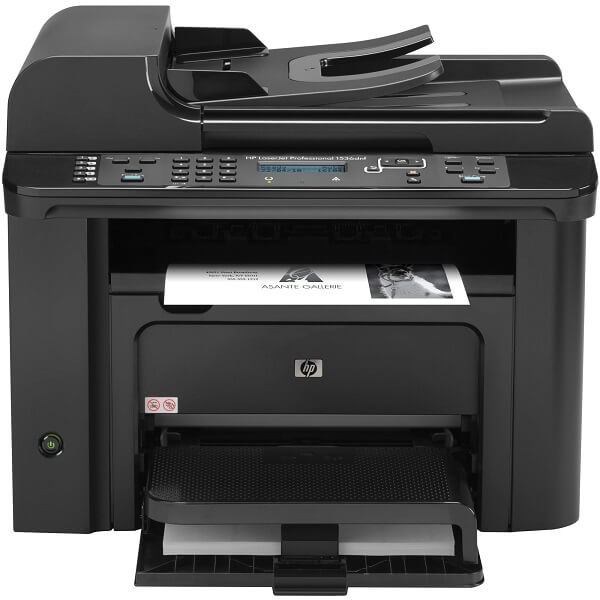
HP Laserjet 1536DNF MFP Header

I’m not sure how many people still make use of inkjet printers these days anymore. What was once a necessity now counts as more of a burden than it is a help – toner may be cheaper but it’s difficult to change because you have to do it manually, printing is slow and things get particularly unsatisfactory when you’re low on ink.

Take laser jet printers on the other hand – fast, no danger of staining or smudging the freshly printed out paper, toner lasts a lot longer and is much easier to change the tray as soon as a replacement is needed. The HP LaserJet Pro M1536DNF is a great example of an extremely reliable printer; HP renowned for the high quality products they manufacture, in particular when it comes to a number of electronics or computers.

In essence, HP LaserJet Pro M1536DNF is a highly performant printer, albeit a little limited if we’re to take into account everything that current printers are capable of. That doesn’t, however, mean that it’s not capable of plenty; whether you choose to use it at home or in your office, the M1536DNF will handle all of your printing, scanning, faxing, copying and remotely sent print jobs via the internet. Its only major downside is the fact that you won’t be able to connect any device to it wirelessly.

Pros:

  • Fast printing
  • AirPrint and ePrint support
  • Versatile
  • Good printing quality

Cons:

  • No Wi-Fi
  • Toner size is small
  • No duplex scanning
  • Not good with anything other than text documents

HP Laserjet 1536DNF MFP Design

HP Laserjet 1536DNF MFP Front

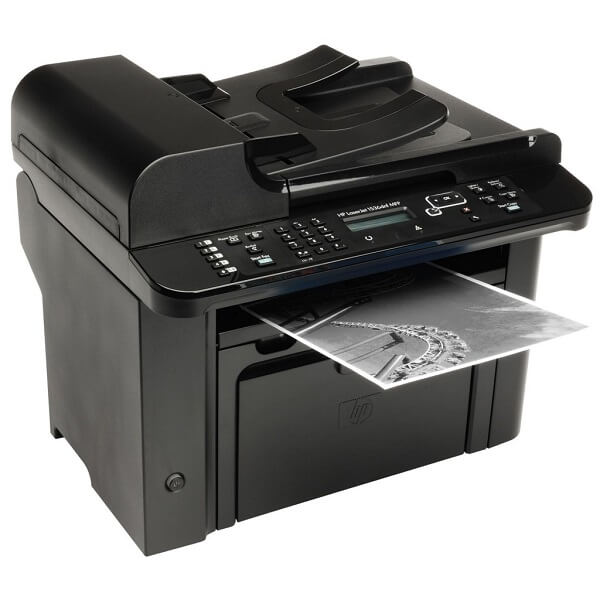
Overall, the HP Laserjet 1536DNF MFP looks plain but spells professional. This may not be your regular large office printer, but for a small one or even your home, you won’t have to hide it away. Not to mention that hiding it would be no easy feat at all: at the overall dimensions of 14.7 x 17.4 x 13.5 inches – and that is without the paper tray in the front being open – and the 25.8 lbs (11.7 kilograms) that it has in weight you should seriously consider its placement before you purchase it. It does extend a fair amount when you pull the tray out; while you won’t have to hold it extended all the time, it’s an aspect worth taking into consideration.

Visually, the HP Laserjet 1536DNF MFP remains a very professional looking printer: its exterior is mostly a patterned material with several glossy applications in certain places. It only comes in black, however, which if you ask me is not a bad part at all as it only manages to emphasize the professional look I’ve been mentioning. Sadly, however, there’s no escaping it: the exterior is made of thin plastic (that is the case with most printers) which – if you take into account all the extended pieces that the HP Laserjet 1536DNF MFP displays – may seem a little worrying. The extendable parts and trays have a slightly elastic wiggle to them that would suggest you should be a little more gentle than usual when using the printer.

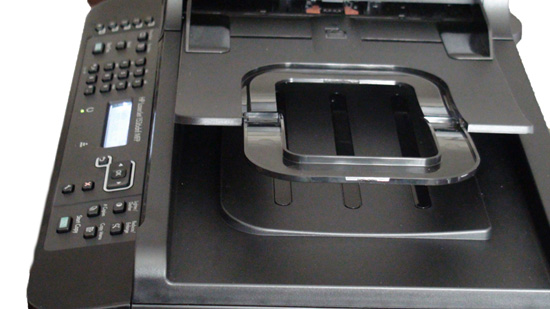
HP Laserjet 1536DNF MFP Top

The entirety of the printer’s paper path inside is easily accessible through a great number of hatches that you can use to detect and fix any potential jams the printer may have. One relatively strange aspect of the HP Laserjet 1536DNF MFP however is the fact that the printer’s output tray, which needs manual connecting to the front of the toner cartridge hatch when you unpack the printer, will detach every time you have to open the hatch, making you have to put it back after you’re done tinkering.

HP Laserjet 1536DNF MFP Cartridge Toner

HP Laserjet 1536DNF MFP Design – Control Panel, Buttons & Ports

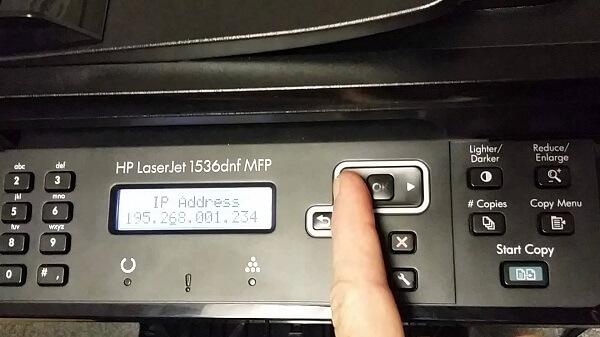
HP Laserjet 1536DNF MFP Control Panel

Thankfully, HP placed the power button on the front of the printer for a change, and switched its flip-switch design over for a regular, round button that cannot get pressed accidentally.

If you ask me, the control panel found on the top of the HP Laserjet 1536DNF MFP printer looks a lot more complicated and extensive than it really is. With no less than 30 control buttons that you can use to set up your printer without having to do it through a computer, it may feel like it’s a lot to take in when you start using it. The HP Laserjet 1536DNF MFP doesn’t have a card reader either so when it comes to printing documents alone, you won’t be able to do it via the printer controls alone, no matter how extensive HP may have made them.

HP Laserjet 1536DNF MFP Navigation Buttons

A closer look to the control panel and you’ll notice that the buttons’ layout is actually pretty well organized: you get the faxing controls to the left of the LCD screen, while the ones on the immediate right of the display are navigational and control buttons as well as customizing your copying options – such as the Reduce/Enlarge or Lighter/Darker buttons. The 3 LEDs underneath the LCD screen are notification lights; there is a toner light that that will light up when your cartridge toner is low, one that will light up when it detects a problem with the printer that will have more information about it displayed on the LCD, and the last one that will light up when the printer is ready or done processing a job.

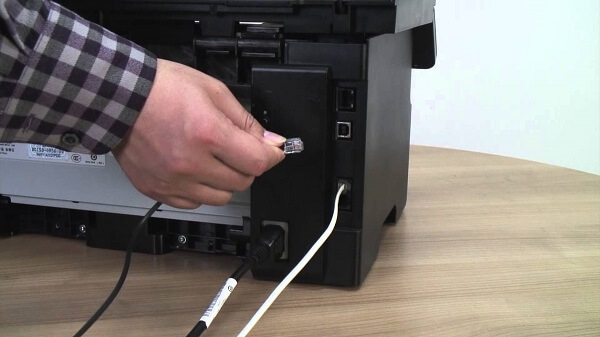
The HP Laserjet 1536DNF MFP features a 10/100 Base-T (RJ-45) network port, a single USB 2.0 port and two types of fax ports – a line and a telephone port. All of these are placed on the back of the printer, tucked in the right hand corner of it.

HP Laserjet 1536DNF MFP Back

HP Laserjet 1536DNF MFP Design – Paper tray

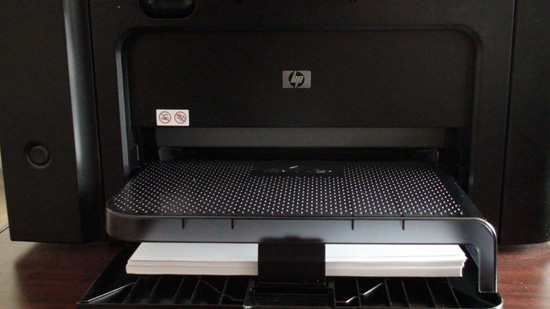
Delving deeper into the HP Laserjet 1536DNF MFP printer, you’ll notice that on top of the usual 250 sheet paper input tray there is a see-through plastic cover which acts as a separate, 10 sheet priority paper feeder. Basically, you’ll use this for special types of printouts or specialty paper when it’s needed without having to unload everything from the main tray beforehand. Whether you need to print out labels, envelopes or synthetic paper, you can just place them in the special secondary tray and the printer will detect it and load that instead of the usual by itself. On the other hand, however, the output tray can take up to 100 sheets before it gets overloaded and may begin spilling out printed paper.

HP Laserjet 1536DNF MFP Secondary Paper Tray

As a last mention, the top of the printer is the host of a 35-page automatic document feeder that allows you to leave the printer handle the copying, scanning and faxing without you having to attend to it.

HP Laserjet 1536DNF MFP Features & Performance

Naturally, as you may have gathered so far already, the HP Laserjet 1536DNF MFP is a particularly versatile machine: it can handle printing, scanning, faxing and copying altogether. While the printer itself is no light feat, compared to other comparable devices that can handle all 4 of the above, it ends up being dwarfed. However, the 1536DNF ultimately ends up holding its own pretty well.

HP Laserjet 1536DNF MFP Printing

The printer is limited to a monochrome toner; so you wouldn’t be able to use this for much outside of documents. Fliers, photos and everything else will have to fall into the responsibility of another printer. The HP Laserjet 1536DNF MFP is relatively fast: it can print out as many as 26 letter-size pages in a minute or A4-size pages at a 25 pages per minute rate. However, when you have to print of both sides of the paper, forget the entire hassle of having to wait for the first session to end in order for you to take it out and have to place it back in the tray for the printer to do the other side. The HP Laserjet 1536DNF MFP is equipped with automatic printing on both sides.

The manufacturer guarantees that the first page is out in a maximum of 8.5 seconds. Funny fact is that we’ve seen the printer go both ways – sometimes it took less than the advertised 8.5 seconds, while on occasion it could take as long as 11 seconds instead.

The printing quality shines when we’re talking text as you really shouldn’t have any issue with it unless your toner is running low. Any kind of internal business need for your office or document printing at home will earn the best results a monochrome laser printer would ever be capable of. When it comes to larger scale printing, the HP Laserjet 1536DNF MFP still manages to maintain a high enough DPI level but considering that you can only print out in black and white, I don’t expect anyone to rush to print out photos on this MFP.

Lastly, we’ve got the consumable costs. Like I’ve mentioned in the intro, the laser printer cartridge toners are considerably more expensive than inkjets but manage to last a lot longer on the upside. The default HP Laserjet 1536DNF MFP toner is rated at 2100 pages and costs between $85 to $101, depending on the source you acquire it from. However, do keep in mind that the cartridge that the printer comes with when you purchase it has a considerably lower capacity than the regular ones. The HP Laserjet 1536DNF MFP is rated at up to a maximum of 8000 pages a month, although the recommended number is found between 500 and 2000 pages. In comparison to many other competitors that was one factor that this particular printer fell behind on.

HP Laserjet 1536DNF MFP Scanning & Copying

Everything about this printer suggests that it was predominantly constructed with the ultimate purpose of office use. The 1536DNF scanner is not amazing when it comes to the quality of the resulting digital image. It can scan with a 600 x 600 dpi resolution when it comes to documents and managing to spike it up to 1200 x 1200 dpi when you attempt to scan graphic-intensive items such as pictures or color text. The greatest part about both scanning and copying is the access that you get to a 35 page ADF (automatic document feeding) – considerably more effective given that most competing models can only load up to 20 or 25 sheets of paper.

The scanning speed depends on the content that you’re planning to scan; an all-text page can be done as fast as 5 seconds, while photographs and other more complicated images will probably end up lengthier – up to 11 to 12 seconds. Still, were you to compare it to a lot of the competing models, the HP Laserjet 1536DNF MFP is unbearably fast; a lot of other MFPs can take as long as 22 seconds to scan the exact same content.

HP Laserjet 1536DNF MFP AirPrint & ePrint

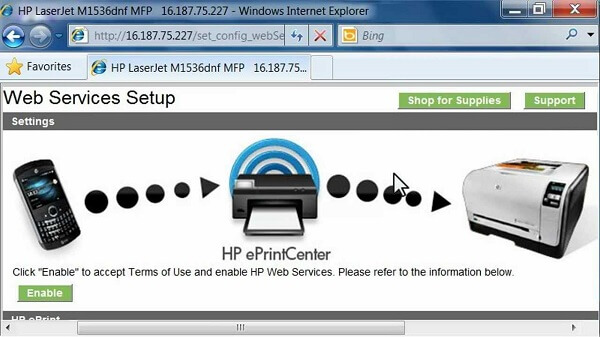
In the absence of wireless capability, you will have to connect the HP Laserjet 1536DNF MFP printer will have to be physically connected to the computer that you’re trying to print documents off of. However, with a firmware update you can allow the printer to receive the files you wish to print either via AirPrint or HP’s very own ePrint. What this entails is the fact that you can e-mail the files directly to the printer to print out, as long as you connect it as a network machine.

HP Laserjet 1536DNF MFP Interface

That way you can connect multiple units to the printer – for example if you were using this for a small or medium sized office – is through the 100 Mbps Ethernet interface, which will make it available for all of them. In addition, you can even send documents to print out via mobile device no matter where you are (as you don’t have to be in the vicinity of the printer). This is done via a printer-specific e-mail address that you send your documents to and the HP Laserjet 1536DNF MFP will print out both the mail and any attachments it may contain.

In order to make all of this possible, the HP Laserjet 1536DNF MFP comes packed with a 500 MHz processor and 128 MB of RAM memory in order to allow the printer to produce and reproduce black and white documents.

HP Laserjet 1536DNF MFP Software & Setup

The printer comes with its very own HP Laserjet 1536DNF MFP driver, which is a very straight forward process of setting everything up. Afterwards, you do have to go through the process of configuring the printer onto the local network and print out a test page just for safe measure. The driver is not compatible with any Windows version that came out before the XP, and at least MAC OS X 10.5. There is a great amount of compatible operating systems, Linux and Unix included.

HP Laserjet 1536DNF MFP Driver

HP Laserjet 1536DNF MFP Verdict

While the HP Laserjet M1536DNF multi-functional printer doesn’t necessarily innovate on anything in particular, it would bring injustice on it not to admit that this printer is actually a lot faster than many comparable printers. For any kind of business that will mostly require document printing and scanning, the HP Laserjet 1536DNF MFP will surely suit you perfectly.

Anything that involves more complicated graphics or photographs will not earn you the best performance, in which case you’re most likely to be wanting to check other models out. The only issue that you would have to be careful with if you’re planning to acquire the HP Laserjet Pro 1536DNF MFP for your office is the fact that it may not be the sturdiest, most solid printer you can find out there. But in terms of performance, this is probably one of the best office HP multifunctional printers.

You can purchase this printer for $500 from a number of online retailers or HP-native retail stores. Considering that the running costs of the HP Laserjet 1536DNF MFP falls into the average category, it makes this multi-functional printer one of the best office and business-oriented choices you can go for.

Image Source: 1, 2, 3, 4, 5, 6, 7, 8, 9, 10

Filed Under: Headlines Tagged With: HP Laserjet 1536DNF MFP, HP Laserjet 1536DNF MFP multifunctional printer, HP Laserjet 1536DNF MFP printer, HP Laserjet 1536DNF review

  • « Previous Page
  • 1
  • …
  • 5
  • 6
  • 7
  • 8
  • 9
  • …
  • 58
  • Next Page »

Subscribe to Blog via Email

Enter your email address to subscribe to this blog and receive notifications of new posts by email.

Join 11 other subscribers

Recent Articles

police handcuffs man

German Man Probed In Poisoning That Killed 21 Employees Since 2000

June 29, 2018 By Kenneth Scott Leave a Comment

Chicken wings bar

Intoxicated South Carolina Man Punches Waitress Who Refused to Serve Him Alcohol

June 29, 2018 By Karen Jackson Leave a Comment

gaming

New Zealand gamer Who Flew Halfway Across The World for Virginia Teen Gets Shots By Her Mother

June 28, 2018 By Cristopher Hall Leave a Comment

party

Former Virginia Tech Freshman Sentenced to 50 Years in Prison for Stabbing a Girl to Death

June 28, 2018 By Roxanne Briean Leave a Comment

bonfire

British Couple Sentenced to Life in Prison for Torturing and Murdering French Nanny

June 27, 2018 By Deborah Campbell Leave a Comment

pay phone

Texas Father of Girl Disappeared in the 80s Ignored by Authorities

June 26, 2018 By Cristopher Hall Leave a Comment

bottled water

San Francisco Woman Threatened to Call Police on Girl Who Sold Ice Water for Disneyland Trip

June 25, 2018 By Roxanne Briean Leave a Comment

Maplewood Park

Missouri Man Robbed by Date and Accomplice in Park

June 22, 2018 By Nancy Young Leave a Comment

coding

New York Man Sentenced in Cyberstalking Former Girlfriend, Mailing Drugs to Her Dorm

June 22, 2018 By Deborah Campbell Leave a Comment

headphones

Bose Poised to Launch Sleepbuds, In-Ear Headphones That Help You Sleep

June 21, 2018 By Nancy Young Leave a Comment

Police light

Intoxicated Female Driver in Custody for Pulling Arresting Officer by the Hair

June 21, 2018 By Kenneth Scott Leave a Comment

kitchen

Restaurant Manager Arrested and Charged in Shooting Death of Co-Worker over Negative Yelp Reviews

June 20, 2018 By Karen Jackson Leave a Comment

plastic container

Pennsylvania Couple Charged in Violent Death of Infant Discovered Buried in Cat Litter

June 19, 2018 By Cristopher Hall Leave a Comment

tailpipe

Minnesota Teen Gets Head Stuck In Oversized Tailpipe Winstock Music Festival

June 18, 2018 By Karen Jackson Leave a Comment

Pages

  • About Us
  • Contact us
  • Privacy Policy
  • Privacy Policy GDPR
  • Staff
  • Terms and Conditions

Recent Posts

  • German Man Probed In Poisoning That Killed 21 Employees Since 2000 June 29, 2018
  • Intoxicated South Carolina Man Punches Waitress Who Refused to Serve Him Alcohol June 29, 2018
  • New Zealand gamer Who Flew Halfway Across The World for Virginia Teen Gets Shots By Her Mother June 28, 2018
  • Former Virginia Tech Freshman Sentenced to 50 Years in Prison for Stabbing a Girl to Death June 28, 2018
  • British Couple Sentenced to Life in Prison for Torturing and Murdering French Nanny June 27, 2018
  • Texas Father of Girl Disappeared in the 80s Ignored by Authorities June 26, 2018
  • San Francisco Woman Threatened to Call Police on Girl Who Sold Ice Water for Disneyland Trip June 25, 2018

Categories

  • Business
  • Entertainment
  • Finance
  • Headlines
  • Health
  • Life
  • Nature
  • Science
  • Sports
  • Tech & Science
  • Travel
  • Uncategorized
  • United States
  • World

Copyright © 2026 ArgyllFreePress.com
About · Privacy Policy · Terms of Use · Contact