Argyll Free Press

Growing News Network

Friday, April 24, 2026
Log in
  • Business
  • Finance
  • Sports
  • Tech & Science
    • HP Envy 4500 Review
    • LG Optimus 170 Review
    • iPod Touch 6th Generation Review
    • HTC One M8 Accessories Set-up
    • Surrealist Games You Must Play
    • Hisense Sero 8 Review
    • Dell Latitude e7440 Review
    • HP Laserjet 1536dnf mfp Review
    • Garmin Fenix 2 Review
    • Skype Vs Viber
    • Best Video Conferencing Software
    • Sony mdr 1r Headphones Review
    • Canon Rebel t3i Review
    • Sennheiser Momentum 2-0 Review
  • Travel
  • Headlines
  • Health
  • United States

LinkedIn Finally Launched A New Design for Its App

December 2, 2015 By Roxanne Briean Leave a Comment

LinkedIn finally launched a new design for its app, and it has received positive reviews.

The new design of the app from LinkedIn looks promising.

After receiving many complaints, LinkedIn finally launched a new design for its app on both iOS and Android devices. Having more than 396 million users, the online platform is trying to get them to use the application more frequently, and not just the website. So what are the changes they made?

First of all, they changed the design a bit, using now lighter colors, such as medium blue and white. There are only five tabs, which makes it easier to navigate and find the information that you need. These tabs can be accessed through the menu found at the bottom of the screen.

The “Home” tab brings together the activity feed of your connections and the news, as well as updates and posts from companies you are following. Furthermore, it also features recommendations for jobs or simply interests, based on your settings.

The “My Network” tab includes connection requests, as well as the option of sending requests and searching for people. The messaging tab has been properly upgraded to look much more like a chat box, thus abandoning the terrible email-like design.

Your profile can be accessed through the “Me” tab, which also serves for seeing the persons who viewed it and who is sharing your content, as well as commenting on it. There is also a “Search” tab, used of course for finding information, connections or jobs. Apparently it is 300 times faster than the older version.

The Vice President of LinkedIn for products, Joff Redfern, stated that their goal was to make a faster app that is much easier to use.

However, many users have been complaining over the years. For instance, the messaging feature was heavily criticized for looking like an inbox for emails. Many people stated that they don’t even check it anymore since it usually is full of spam.

The CTO of Ocho, a social video platform, Jourdan Urbach, was one of the users who asked Reid Hoffman, one of LinkedIn’s co-founders, simply why the application is heavily unresponsive as well as confusing. This happened during the event of Fortune Brainstorm Tech in Aspen, CO, at a session of questions and answers.

Even though LinkedIn finally launched a new design for its app, only time will tell if this will bring more people to use the application or not. Even though it is equipped with everything one would need in order to fully experience LinkedIn, many users might prefer to access the platform on their personal computers.

Image Source: 1
Filed Under: Headlines Tagged With: connections, criticism, LinkedIn Finally Launched A New Design for Its App, Users

OnePlus X Review – The Best Power to Price Ratio There Is

December 2, 2015 By Deborah Campbell Leave a Comment

OnePlus X Header

OnePlus is the company that feels like it came out of nowhere, set and ready to overthrow the balance of the giants in the smartphone market and sweep them off their feet through highly competing devices but shockingly low prices. The first OnePlus was a success that managed to conquer a lot of ground by striking at the oh-so-desired phablet market by sporting comparable, high-end specs and much, much lower prices. It was not without faults however.

Just earlier this year the second phablet of the manufacturer came out – the self-proclaimed 2016 Flagship Killer that was OnePlus 2, another outstanding 5.5” phablet that looks like it will hold its ground very well against competitors – at least for the price class that it’s part of. However, OnePlus decided that it’s time to touch down on the more classic and exponentially more accessible market of smartphones. Thus the OnePlus X came to be – a smartphone that aims to achieve what its bigger brothers have, but from a different perspective this time around.

The OnePlus X has just been released earlier this month and is already available for purchase directly off of their website for the regular Onyx variant. But the means of getting your hands on one of the new OnePlus X Ceramic smartphones is far from simple. You can only get one of those if you get a select invite from a friend who is already part of the “select group” or obtain an invitation through various competitions posted online. There were only 10,000 units manufactured so far and the product is listed as out of stock at the moment on the official website.

In comparison to OnePlus’ previous productions, the OnePlus X naturally doesn’t raise the bar as high on the specs and stats spreadsheet, but still manages to pack a staggering amount of power in its 5 inches, while keeping the price as low as $249.

Pros:

  • Beautiful Design
  • Incredibly Cheap
  • Comparable to High-End Devices
  • Good Battery Life

Cons:

  • Doesn’t contain the latest hardware on the market
  • Doesn’t innovate in any way, only matches Competition
  • No Type-C USB charging
  • Difficult to acquire

OnePlux X Design

Starting with the very way the phone is built, the OnePlus X is different and still outstanding. Please correct me if I’m wrong, but I haven’t heard of any other manufacturer making use of zirconia ceramic in their smartphone builds yet. Well, this Chinese manufacturer has managed to do it. Surely, that is a limited edition of the OnePlus X, but it’s a worthy mention.

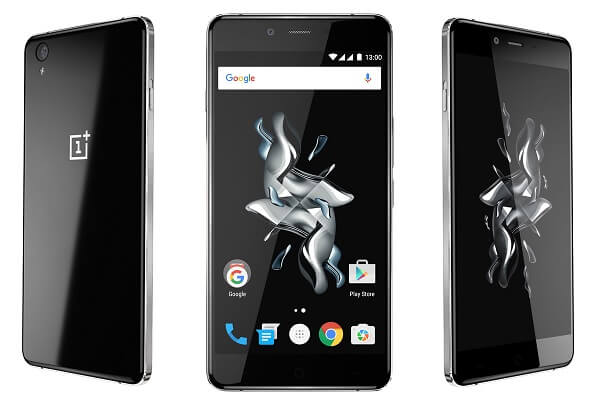
OnePlus X Front

We’ll be reviewing the regular model however, that features an anodized aluminum body with chamfered edges all around the frame. They are different that the curved glass design meaning that they’re placed there for aesthetic purposes alone. All along the edge of the phone, there is an indented metallic surface that both helps give the phone a great grip but also looks amazingly good in sunlight. While that is a mention-worthy design choice, the aluminum alloy is known to be a pretty malleable metal which, when cut so thin might suffer from damage and dents when you don’t expect it. While it hasn’t happened yet, you might be the unfortunate owner of accidental key dents in the sides of your phone following a higher impact for example.

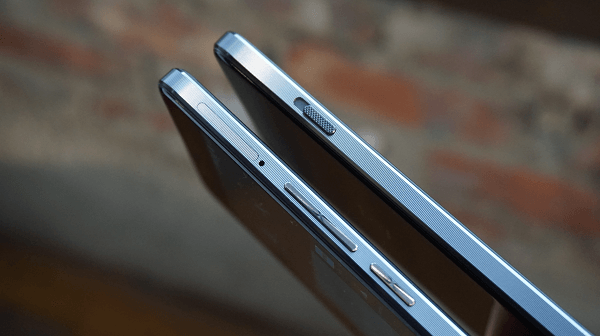
The same ridged mesh cut that was featured on the OnePlus 2 phablet buttons is present here to – and even feels even more premium class cut than before. The corners of the phone are beautifully rounded, similar to how the most recent Apple iPhone 6 was designed.

OnePlus X Edges

OnePlus X Back Logo

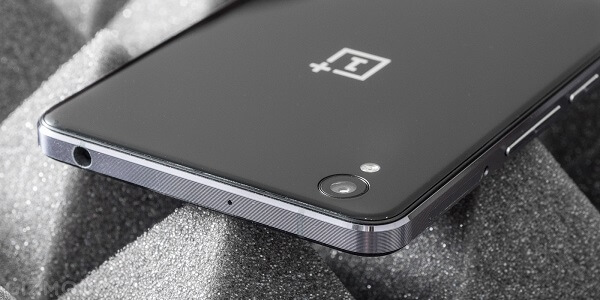
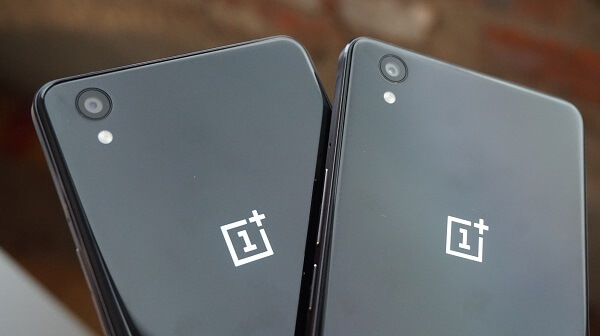
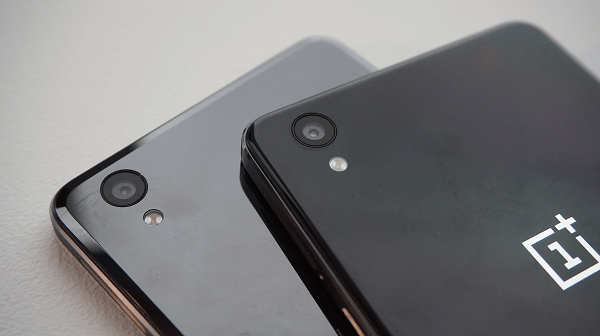
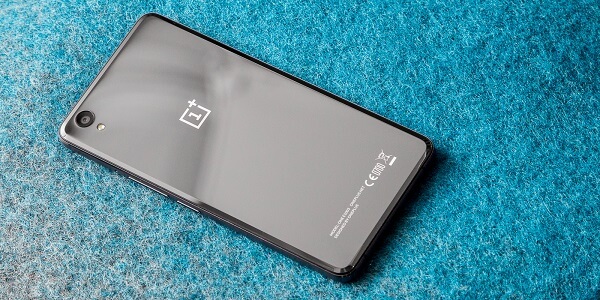
The back of the phone looks great, covered with a layer of Corning Gorilla Glass 4, giving the phone a glossy and smooth look. Behind the layer you can see the OnePlus logo shining in a contrasting color. Despite the fact that by looking at it one could think that the phone has a slippery back, that’s far from the truth. With the entire body of the phone spelling elegance and stability, there is one aspect which I found slightly disappointing.

The beautiful phone back that I’ve been praising has attracts fingerprints and smudges like there is no tomorrow. If you’re planning to put it in a case, then that should be of no concern to you, otherwise you’ll find yourself nervously wiping at it quite often to give it back its tidy, straight out of the box look. In the top-left corner of the phone you’ll find the rear camera sensor along with a LED flash.

For the 140 x 69 x 6.9 mm dimensions (or 5.51 x 2.72. 0.27 inches alternatively), the phone only weighs 138 grams (the limited edition of Ceramic build weighs 160 grams instead). Compared to the Samsung Galaxy S6, it’s the same size and comparable dimensions: slightly smaller and narrower, but adding 0.1 mm in thickness. No matter how you look at it though, the phone is outstanding in design, easy to use single-handedly, with more than a few thoughtful physical features.

In terms of button placement, everything is kept simple yet intelligent. The left side features the alert button: for the OnePlus X, it is no longer a 2 setting button. Instead, it uses 3 different settings – receive all notifications, receive only priority notifications (set up through the phone’s user interface) or not allow notifications to go through. The power button along with the volume rocker rest on the right side. In this respect, I feel like the design choices could’ve been an idea better: there is a risk that you may accidentally keep tapping the power button when you’re actually just trying to turn down the volume. The buttons are right next to each other and aren’t palpably different.

OnePlus X Buttons

Right above the power button and volume rocker you will find a combined storage slot for either a microSD card or second SIM slot – unusual for the western market but relatively common in the Chinese one. The top side is where you will find the 3.5 mm headphone jack, on the left side.

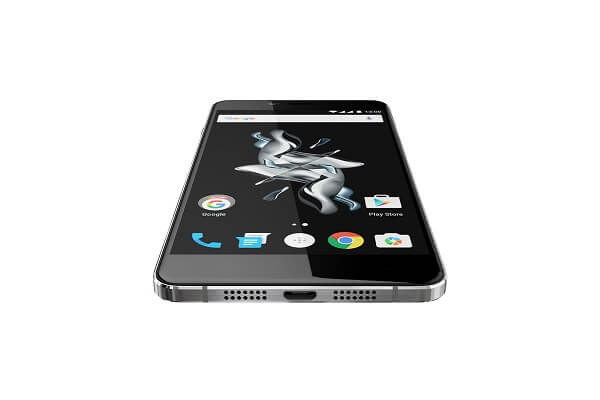
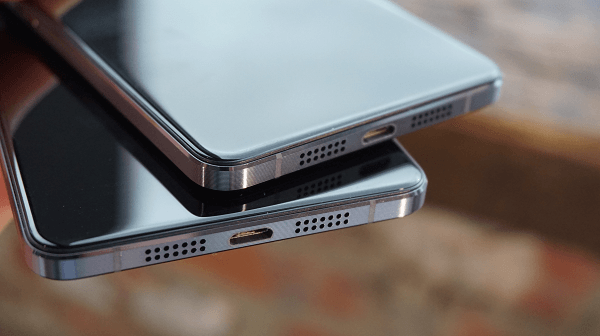
The bottom edge of the phone is once again a beautifully designed portion of the phone. To either side of the micro-USB charging port that lies straight in the middle, you will notice strips of speaker holes. However, one design flaw let’s call it even though it’s probably just a poor design decision rather is the fact that out of the two strips, only one of the actual speaker, the other being used as a microphone. That one aspect managed to create a lot of confusion on forums because of that from individuals who thought the second speaker was defective.

OnePlus X Bottom

With a ~71.3% screen to body ratio, you can imagine that the display stretches properly over the phone’s surface. It goes all the way up to the chamfered edges on its left and right, while only leaving a narrow bezel visible on the top and bottom sides of the phone. The top hosts the front facing camera, while the bottom features 3 touch buttons that assist with navigation.

Lastly, the one detail that OnePlus X has managed to achieve near perfectly is the fact that the antenna lines of the phone are almost completely hidden behind the Corning Gorilla Glass 4 layer on the smartphone’s back. The only portion where they show are the top and bottom edge of the phone.

OnePlus X Display

If you ever got your hands on the OnePlus 2 phablet, everything you loved about the display on that device you will find on the OnePlus X just as well. The exact same crisp AMOLED capacitive touchscreen display is present here too, except it is 0.5 inches smaller. At only 5 inches however, the screen still maintains an amazing resolution and inherent pixel density. The maximum resolution that you’ll be able to enjoy on the OnePlus X display is 1920 x 1080. While not the absolute maximum you find these days on handheld smart devices, it still gets a giggle out of me when I think about my older 24” monitor back home that has a maximum native resolution of 1920 x 1080 – a fact that can help us realize just how far smartphone screen technology has gone.

OnePlus X Screen

With a 441 ppi pixel density, the full HD display is as crisp as you would expect, with an outstanding level of detail. Because it’s an AMOLED build, it is particularly bright and fares well in sunlit areas. However, in order to be able to state that the display of the OnePlus X is truly bright, you do need to crank up the brightness levels to, or at least close to maximum. On default brightness, the screen doesn’t stand out that much in terms of brightness. Similarly, the black levels are deep, offering a great contrast.

Colors are vivid and crisp, making the phone absolute eye-candy – that is, if you’re willing to accept a little color oversaturation, but not a truly upsetting amount. Viewing movies or videos on YouTube is an experience as good as you would have on any other high-end smartphone of the late 2015. Viewing angles are great; however, this is becoming a less and less important thing to mention as most new smart devices have adopted high-quality display builds that support a large viewing angle.

OnePlus X Specifications & Performance

Completely remove the price tag element from the picture for a second and take a look at the OnePlus X benchmark results. The OnePlus X scored the following: 23680 points in the Quadrant Benchmark, 41125 in the AnTuTu Benchmark 5, 937 in Geekbench 3 Single-Core benchmark and 2428 in the Geekbench 3 Multi-core benchmark. Now compare them to the LG G4 scores: 26736 in Quadrant benchmark, 48947 in the AnTuTu Benchmark 5, 1134 in the Single-Core and 2428 in the multi-core Geekbench 3 respectively.

Now let me remind you that the LG G4 is a pretty successful phablet that came out this year that were you to purchase you’d pay somewhere around $500 or more for. The OnePlus X doesn’t even raise the bar to phablet standards and yet will cost you $249. With that number-heavy introduction, let’s move onto what hardware we’ll be finding inside the OnePlus X.

The processor in the OnePlus X is a quad-core 2.3 GHz Krait 400 CPU with a Qualcomm Snapdragon 801 chipset. I’ll have to give it to it, the Snapdragon 801 chipset has been around a while. And even if older models do receive some facelifts as they start to age, it’s not last gen of core processing units. Regardless, it’s more than sufficient for anything you would ever want your OnePlus X to perform.

Also contained in the chipset is the Adreno 330 graphics processing unit – featuring a 578 MHz clock rate in the Snapdragon 801. Albeit a 2013 production, the GPU will handle even more demanding games, provided of course we’re not talking about upcoming 3D 2016 games which might still work decently, with the occasional frame rate drop.

Brought to compliment the GPU and CPU of the OnePlus X come no less than 3 GB of RAM memory – plenty to handle a great amount of simultaneous processes, multitasking and not lagging behind when you aim to stress test it a little.

Ultimately, the OnePlus X comes with a default internal storage of 16 GB – unfortunately the only storage variant you get like that by default. The good news is that like not so many others (especially not the newest devices that are released these days) it features a microSD card slot which you can use to give yourself up to 128 extra GB of storage space.

OnePlus X Software & Features

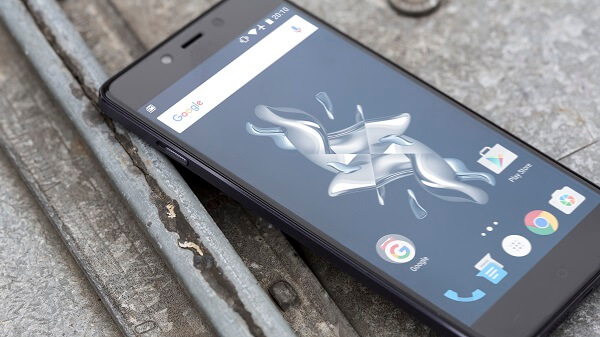
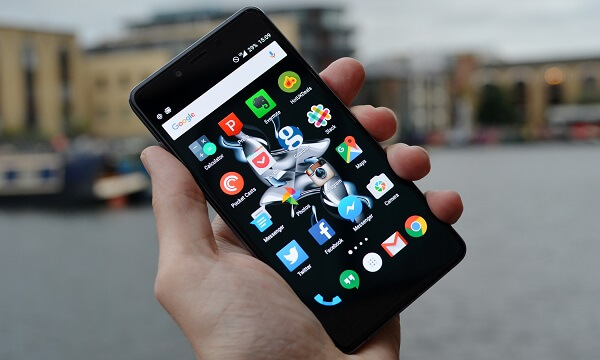
The OnePlus X runs a very basic looking Android 5.1 Lollipop operating system that’s been bestowed with the Oxygen OS user interface to spice things up and give the phone a unique look. While the OS is far from cluttered with third party apps or bloatware that one would expect with the personalized skins some manufacturers come up with, the Oxygen UI is far from it.

OnePlus X Oxygen UI

While it’s a shame that the OnePlus X, albeit a production less than a month old, did not come with the latest 6.0 Marshmallow operating system, the manufacturer has promise a rather speedy update. So current or future OnePlus X users will either start using it right away with the latest Android OS variant or won’t have to wait much longer for it (no official due date to speak of at the current time however).

The Oxygen UI overlay has a refreshing and simplistic look, only matching that in its utility. Everything is either where you expect it to be or intuitively placed; you won’t be having a hard time navigating around the operating system as a native Android user since it’s hardly different from the stock version.

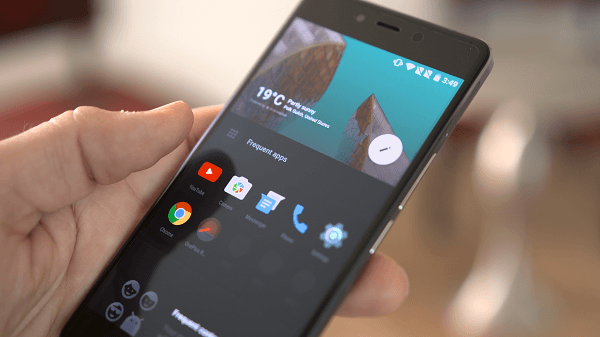
There are a few features that the UI comes with, specific to the OnePlus devices. One of the iconic things you’d be getting is the gesture menu: you don’t have to necessarily unlock your phone in order to access some of its basic apps. By tracing shapes on the screen you can gain immediate access to features such as messaging or your music. There is also no easier way to access your most common content – be it contacts, widgets, apps or whatnot – than by having it all gathered up in one window.

OnePlus X Frequent App

Customization is not a lacking aspect of the OnePlus X – or rather, the Oxygen UI which you can find on the other OnePlus devices as well – while there’s a dark and a light theme you can choose from, there are several accent colors you can choose from to personalize your phone to your own liking. On the customization note, it’s worth mentioning that the Oxygen UI keyboard (OnePlus Swiftkey) is slightly different than you may be used to but the Google Keyboard has also been included so you may at any time switch to it to enjoy the swipe typing that the latter offers.

OnePlus X Camera

It’s no surprise anymore that despite all the efforts that are put into manufacturing viable cameras for smart devices they’re still a far way off from replacing your DSLR on your next vacation. For most devices a camera (or even two cameras) have become mandatory even if they end up being underwhelming and downright unusable. Most comparable devices (in terms of price) are hardly worth mentioning in the camera aspect. However, if we’re to look at what the OnePlus X camera has to offer and weigh it against the price you would pay for the handset, you’re actually in for a treat.

The first feature that the 13-megapixel rear camera comes with that you may not find in many others is the phase detection autofocus – basically the ability to take focused shots either while you’re in motion on your subject is in motion, promising that all the detail of your photos will be captured in less than 0.2 seconds. Hilariously enough however, there was a slight lack of detail in close-up shots for some reason. Another moment where the autofocus may struggle a little more is in dim-lit environments where your photos may turn out to have a considerable amount of fuzz. Colors are vibrant and sharp and will look realistic in most cases.

OnePlus X Rear Camera

There is a solution to anything that may be amiss with your photo in terms of noise and clarity, but it comes with the camera’s software rather than actual photo capturing hardware. There is a feature called Clear Image that will allow your phone to actually take 10 different shots of a single scene and combine them afterwards into a very high quality photo. Naturally, this feature can only be used for static shots however as a moving subject immortalized through Clear Image will turn into a complete blur and nothing more.

There are plenty of other features you can enjoy on the OnePlus X camera app, but most are not that unique and you have probably seen on other smartphones – such as the Beauty, HDR or Panorama modes. To top it off, you can also shoot video with the rear camera: 1080p at 30 frames per second and 720p at 120 frames per second.

There is also a front facing 8 megapixel camera that while not impressive in its own right, does everything you would expect it to do in a timely and satisfactory manner – whether we’re talking selfies or video conferences.

OnePlus X Battery & Verdict

The battery packed in the OnePlus X isn’t outstanding in any particular sense: the Li-Po 2,525 mAh battery is a decently sized pack for a device of this level of performance, and even larger than the ones found is some competitors. The battery life is decent to say the least, a charge being able to last you 30 to 35 hours on low to average usage. It seems to be faring a little better than other smartphones when it comes to hardware-intensive activities however; watching movies for example will not burn through your charge in a couple of hours, but it will eat up about 15% of your battery every hour.

The one major downside is that the manufacturer didn’t add Type-C USB charging to the OnePlus X. It would’ve been quite the treat to not only be able to have all this technology packed into this shockingly good phone, but also have it charge on the fly. But I fear that’s a little more than just wishful thinking.

To wrap up, the OnePlus X is truly a masterpiece of Chinese manufacture. Despite the reluctance one may show at eastern smartphone producers – mostly based on experience with low-end, affordable devices – you shouldn’t look at the OnePlus X that way. Considering that it costs less than a half you would pay for most comparable devices and doesn’t skip on the design and hardware aspects either, you should consider that a plus right away.

OnePlus X Ceramic Edition

However, there’s no reason to lie to ourselves and say that the OnePlus X is the absolute best you can get: true, it is one of the best you can get for this amount of money but still a long way behind the best and newest devices out on the market.

You can get the OnePlus X for $299, provided you are part of the OnePlus club – in the sense that you received an invite – whether it’s through friends or competitions. There are no other ways of getting this smartphone as of now however, so the waiting list is not only long, but not guaranteed either.

Image Source: 1, 2, 3, 4, 5, 6, 7, 8, 9, 10, 11

Filed Under: Headlines Tagged With: oneplus x, oneplus x review, oneplus x smartphone

Garmin Fenix 2 Review – An Ultimate Sports Watch

November 30, 2015 By Michael Turner Leave a Comment

Garmin Fenix 2 Review Header

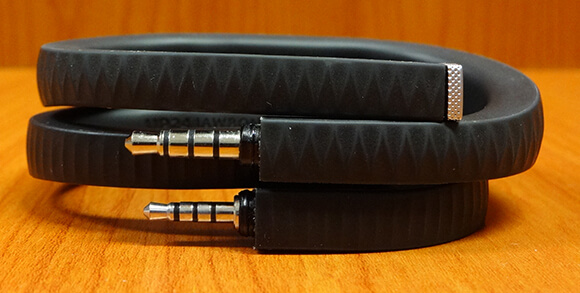
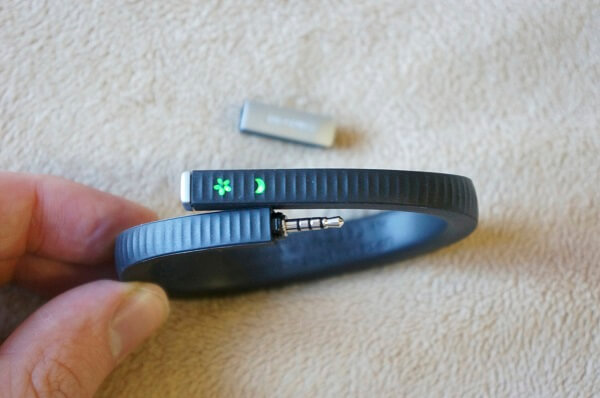
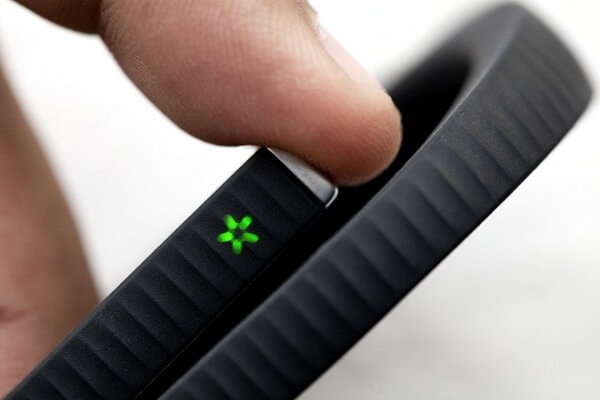
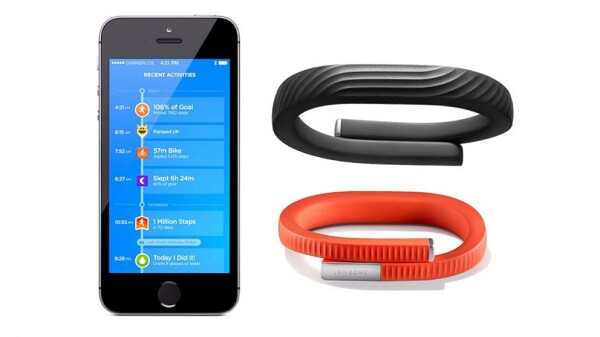
Now that we have covered a couple of entry-level fitness and activity trackers – more precisely the Jawbone UP24 and Jawbone UP 3 – it’s time to delve in more serious and advanced sports devices. More precisely, a full-fledged multi sports watch for either athletes or individuals who take fitness as seriously as one can. It’s no secret that the Garmin Fenix 2 is not your newest, high-end, state of the art sports watch – it is nearly 2 years old and has already been followed by two other models – the Garmin Fenix 3 and Fenix 4. But up to this day, it remains one of the best choices when it comes to tools that can help you track a great number of sports and activities.

With an amazingly and ample set of features and a sturdy, waterproof design, the Garmin Fenix 2 can withstand various types of sports and weather conditions. However, there maybe be one or two details about it that some may not appreciate as much – mostly the fact that its screen can only display a very limited amount of information about your activity and that most of the stats and feedback you can gather from it can be viewed via its native computer application. On the other hand however, the Fenix 2 is meant to serve as an athletic tracker, not a fashion statement or a smart watch; so to those involved that will not be the biggest of problems.

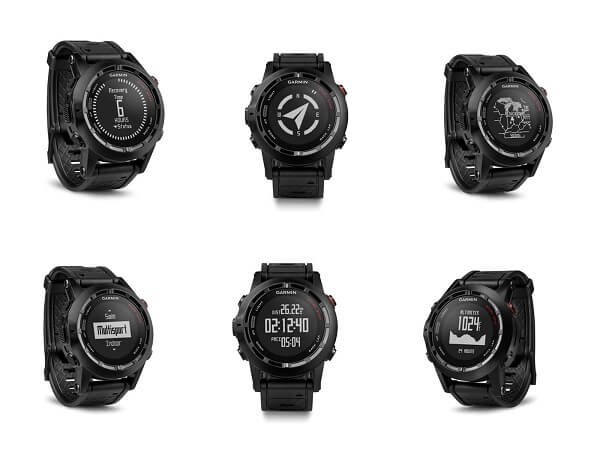
Garmin Fenix 2 Review Overview

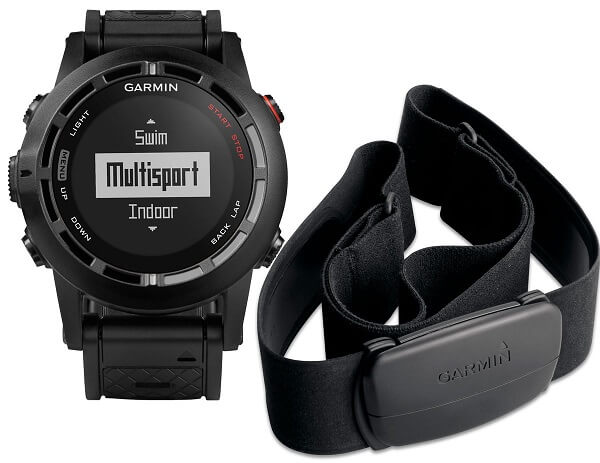
There are two variants that you can purchase the Fenix 2 in: one includes a HRM-RUN heart rate strap and monitor, while the default one does not. The difference will cost you an extra roughly $45, which falls onto you to decide whether it’s worth that much or not – depending on whether you find the heart rate monitor worth having or not.

Things are very different from how they are with activity trackers – even the way it functions and the sensors it packs are different and meant to focus on another aspect of your lifestyle. It’s undeniable that the Fenix 2 is a little more complicated to use and will require a greater portion of your time to get used to it and get the most out of it, respectively. However, let’s see what this wearable piece of technology has in stock for us through this Garmin Fenix 2 review.

Garmin Fenix 2 Review – Design

Because compared to our previously reviewed Jawbone fitness trackers, the Garmin Fenix 2 features a monochrome LCD screen, the size of the devices are hardly comparable. The Fenix 2 is particularly large and a little bulky looking, but not in bad taste. For what a sports watch would normally aim in the professional line of business, the extra bulk could easily be considered ruggedness and sturdiness. And by all means that’s what it is: coming with a relatively thick wristband that has a high level of adjustment and is extremely solid and damage resistant – not likely to wear out very soon.

Garmin Fenix 2 Review Angles

Its casing is made of metal, giving it an extra layer of protection; however, that comes at the cost of increased weight and a pretty attention-drawing device. At its weight of 85 grams and its 49 x 49 x 17 mm dimensions it exceeds the grand majority of sports trackers, even the other models manufactured by Garmin. That is not all because of the materials used in its construction however – the fact that the Fenix 2 packs a large number of sensors in order to ensure a great amount of types of tracking accounts for that as well, a 3-axis accelerometer, a barometer and even GPS being only a few examples of the entire array.

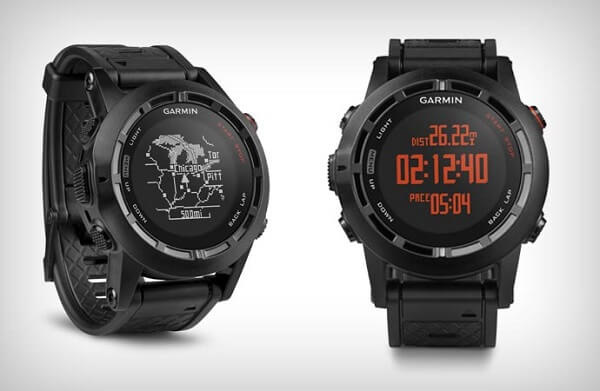
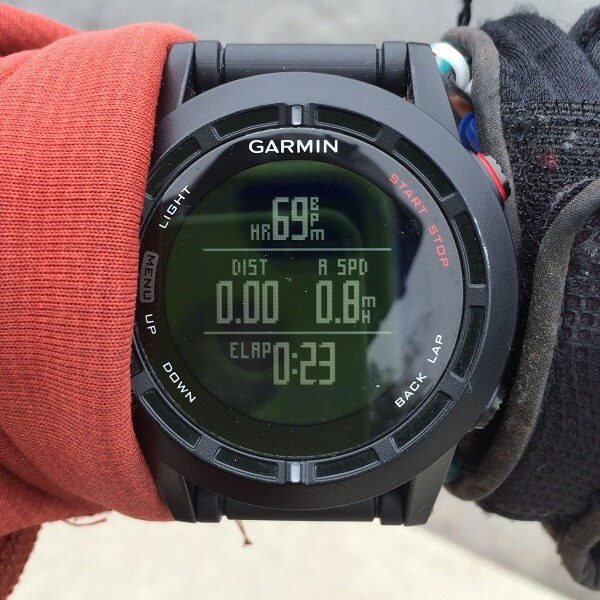
The monochrome screen is a 70 x 70 resolution one, which isn’t particularly impressive by itself considering that other devices have a much more detailed screen. The Garmin Fenix 2 however, prefers to keep things simple. Because of that, the display will not get out of its way to looks attractive and appealing like many other examples of wearable tech do, and may leave a lot of room for improvement. For example the red backlight featured inside the watch doesn’t do an amazing job at making the display clear during the evening at all. The display is, however, transflective.

Garmin Fenix 2 Review Screen

Garmin Fenix 2 Review Right Buttons

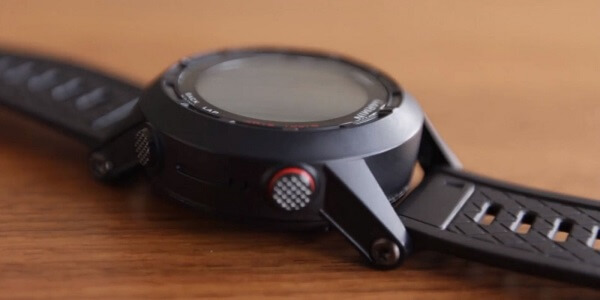
All around the screen, there is a total of 5 buttons: 3 placed on the left side and another 2 on the right side, each owning various functionalities. The red top-right button is usually responsible for turning the watch on and off or start/pause the stopwatch for example, but naturally changing the functionality to some degree, depending on the type of sport you choose.

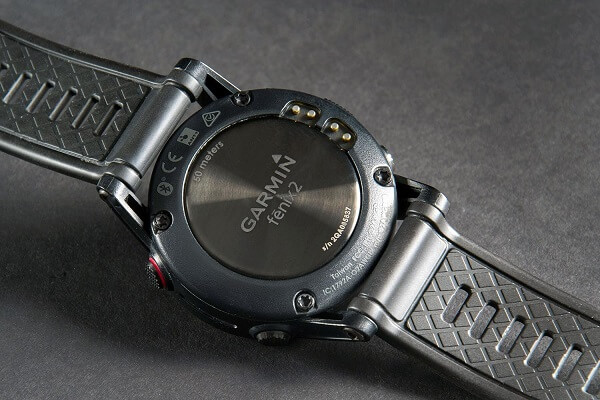
The back of the watch features a metallic surface screwed in in 4 places. On one side you’ll notice the four charging pins that can be hooked up to a special USB charger in order to keep the device running. The construction of this type of “charging port” is made to be waterproof. The charger clips on the back of the watch firmly and allows you to connect the watch to either your computer or to the power socket via an adaptor.

Garmin Fenix 2 Review Back

The strap of the Garmin Fenix 2 doesn’t come in more than one model unfortunately, but comes at a considerable length making it suitable for anyone, no matter the thickness of their wrist. it hooks up and stays in place firmly just like a regular watch, ensuring it won’t slip off when running or swimming.

Garmin Fenix 2 Review – Specs & Other Stats

Because the device isn’t very well versed in displaying graphic information regarding laps run or anything of that sort, it doesn’t require to pack too much memory in its construction. As a comparison, other sports watches such as the Epix can pack up to 8 GB of memory, whereas the Garmin Fenix 2 stops at 32 MB, out of which only 25 are actually usable. While this may sound disappointing for some, you should know that the Fenix 2 truly stops at just recording the relevant sports data – so considering that you won’t be enjoying any visual representation of your progress and statistics, there really wasn’t any need for larger amounts of memory.

I mentioned earlier that a great amount of the watch’s weight and size is responsible to its contents. That’s far from an understatement as the Garmin Fenix 2 really packs up a lot of hardware to make readings both varied and accurate. The 3 axis accelerometer that is used to get a good read of your placement and more importantly, motion, inside tridimensional space. Together with it come an altimeter, barometer, thermometer, compass, Bluetooth, and last but not least ANT+ connectivity.

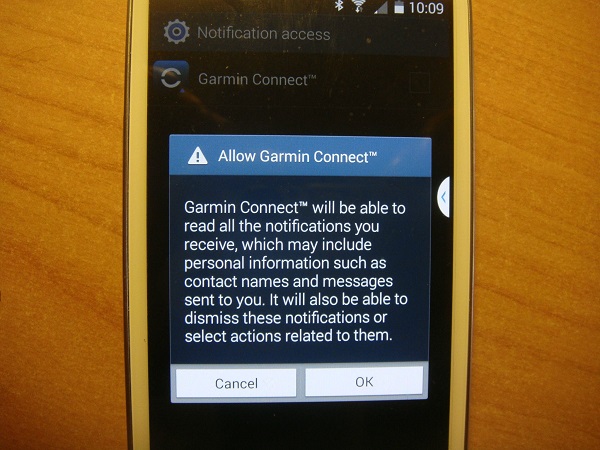
Thanks to the Bluetooth 4.0 LE capability, your Garmin Fenix watch will be able to sync with your iOS or Android device and update information regarding your activity in real time, without requiring you to get home and connect your watch to the computer in order to view your progress. As a bonus, but not a relevant aspect for athletes or individuals who are considering this watch for sports purposes only, the Garmin Fenix 2 can be hooked up to serve as a proxy notification system for your texts, emails and even phone calls when synced with a compatible smartphone.

Garmin Fenix 2 Review Heart Rate Monitor

Additionally, the Fenix 2 has multiple other capabilities. Because it is GPS-enabled, you get the opportunity to record detailed mappings of your jogging sessions, your biking trips and even skiing. Furthermore, the previously mentioned water-proofing that the watch is back up by goes a much longer way than you’d expect: it’s rated to 5 atmospheres which means that you can dive with it to a maximum of 50-meter depth.

If you purchase the variant that includes the Garmin heart-rate monitor, it can serve for an even ampler reading of the quality and progress of your training and workouts, allowing you to keep things in check by just throwing a glance to your wrist.

Garmin Fenix 2 Review – Features

The number of sports the Garmin Fenix 2 known how to track and monitor is really something. And by that we don’t mean just measuring the distance travelled, but actual detailed information regarding each specific sport. Starting with the most classic of them all – running, cycling, swimming (both open water and pool), the Garmin Fenix 2 can also go as far as help you keep track and record of your gym workouts, various types of skiing and a wide variety of other sports.

As soon as you want to begin using it, all you have to do is hit the red button on the right side and you’ll be taken into the activity menu where you pick the sport you want – either one of the preset ones or custom. This part is vital as the watch needs to know which of its sensors it has to use to give you an accurate selection of readings.

Garmin Fenix Running

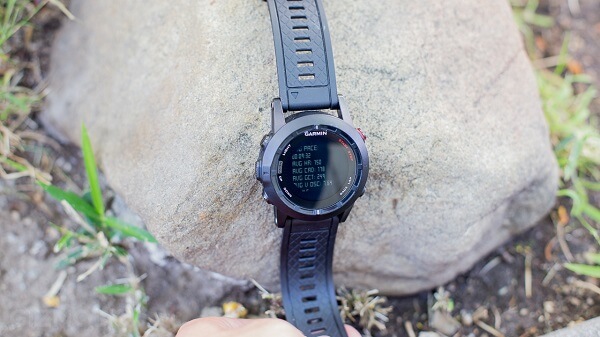
If used without the heart monitor, the watch can still provide you with a handful of useful stats regarding your running – whether it’s jogging or sprinting. To some degree, you will be able to customize what type of data you wish to see: pace, distance, time run, laps and even more advanced metrics such as cadence, vertical oscillation and ground contact time, removing the need of any other devices to track such things. The Garmin Fenix 2 has the capability to alert you based on a great number of factors. For example, if you use the heart monitor too, the watch will allow you to set up alerts to notify you when your heart rate goes above a certain threshold.

The heart rate monitor may sound like all it does is measure how fast your heart is beating, but instead it will actually provide you with a great amount of information, such as heart rate variation, calorie burn, VO2Max Estimation (the maximum amount of oxygen your body is capable of utilizing in one minute) and other types of readings. In realistic terms, most of us will probably never require this type of information, however for athletes for example, such a set of information can truly improve the quality of their training.

Garmin Fenix 2 Review Running Overview

When running, you can make use of a large number of features such as auto lap, auto pause or virtual partner. While the auto lap is just a method of keeping track of how much you’ve been running by setting a predefined distance to account for one lap, the auto pause is a clever way to make sure that your readings aren’t thrown off by the fact that your regular jogging route takes you across many intersections or stop lights: the watch will stop recording data while it detects you standing still. The virtual partner feature is basically a target pace that you can guide your running by, always knowing whether you’re behind or ahead of the speed that you set yourself to run at.

Lastly, a thing that’s worth knowing is the fact that the watch is smart enough to prevent loss of data or intermittence in readings. For example, if your jogging course takes you through a tunnel where you may lose the GPS signal, the Fenix will continue tracking by switching to the accelerometer, and switching back once you’re back out.

Garmin Fenix Cycling

The Garmin Fenix 2 gives you an ample set of readings when cycling too. With high customization levels that allow you to get accurate stats by setting up the wheel size and crank length for example, you can record your performance regardless of the bike you are using. You can either wear the watch on your wrist or set it up on your bike as well, by using a rubber mount for your bar which you can purchase for about $10.

You can set up the Garmin Fenix 2 to display a series of stats while you’re cycling, such as average speed, distance, time, average or maximum power and so on. The watch is usable with indoor, static bikes too but it requires a prior notification to using it so it may switch from the GPS sensor to the ANT+ speed and cadence one instead.

Garmin Fenix Swimming

This type of activity is split into two types of swimming – open water and pools, each earning you a different set of statistics recorded. You can switch between them after selecting swim in the activity menu, then opting for the appropriate sub-activity.

In terms of pool usage, the Fenix 2 will make use of the accelerometer, so it’s irrelevant whether the pool is somewhere indoors or outdoors. It does require some setting up in terms of recording pool length: the watch has a number of default pool sizes which you can select from but allows you to type in a custom size just as well. Once set up, you can go ahead and begin your session and only mark the task as complete once you’re done.

In terms of open water swimming, the Garmin Fenix watch uses both the GPS and accelerometer sensors in order to track your movements when underwater and above water level. However, because of the constant switch you may find that the readings are not 100% accurate and you will most likely end up using them as estimates rather than taking them for granted. Similarly to how you can set up the watch to count laps when you run, you can do with open water swimming: but instead use a starting and a finishing point as the base for the count.

Advanced workouts & Outdoor Information

The device will allow you to create custom workouts according to your routine in order to keep track of your daily performance. However, this can be done only via the Garmin Connect app and contain an endless number of activities – each with its own targets and durations.

Depending on what you’re planning to do, the Garmin Fenix 2 has a number of interesting details about the outdoors. For example if you’re out on an exploration adventure in the wilderness, the Garmin Fenix GPS watch will tell you the exact sunrise and sunset times so you have enough time to make it back before it gets dark. Similarly, it can display the hunting and fishing calendar.

Additionally, there is a number of features that can come in handy when trekking into unknown territory such as the area calculation that will record data as you walk or the breadcrumb mapping of your movements so you don’t get lost when you go hiking or travelling through less populated areas with the Fenix Garmin watch on your wrist.

Garmin Fenix 2 Review – Mobile App & Garmin Connect

Garmin Connect Mobile (GCM)

The greatest portion of your stats, set ups, and highly detailed information you will be able to view and customize via the Garmin Connect website variant. However, the mobile app – more commonly known as Garmin Connect Mobile – is the watch’s application that will require an Android 4.4 KitKat or iPhone 4S and above device. The application is free to download and is compatible with multiple Garmin products as well as several other.

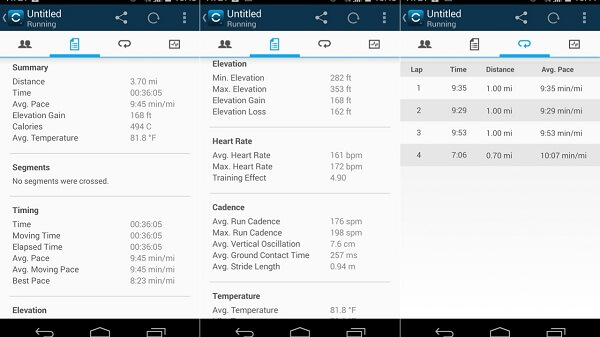
The mobile application integrates with the larger host hub that is the online site Garmin Connect. However, as soon as you open it you will be able to see a short summary of tracked information, mostly consisting of step count, distance walked and calorie burn. The menu is accessible via the icon on the left side; here you’ll be able to find the Home, Community, Devices and LiveTrack submenus.

Garmin Fenix 2 Review Garmin Connect Mobile

The “Community” tab allows you to add and manage your friends, as well as view their posted information and stats as well as providing access to the Leaderboards. The online aspect is not transparent, meaning that you will be able to restrict the amount of information that others can view regarding your activity.

“Devices” not only gives you an extensive list of compatible devices to sync to, but also lists each device you have already paired up with the phone, allowing you to see separate sets of stats for each. There’s also a decent amount of configuration you can do to your device of choice regarding data upload.

“LiveTrack” allows you to make your data visible while you perform it, provided of course that you’re also carrying your phone with you on your workouts, also making it visible to select individuals following you. This way, your mobile app can help with giving you a more accurate reading of your running tracks, directly onto a satellite rendered map.

Garmin Fenix 2 Review Mobile Activity Summary

Garmin Connect Website

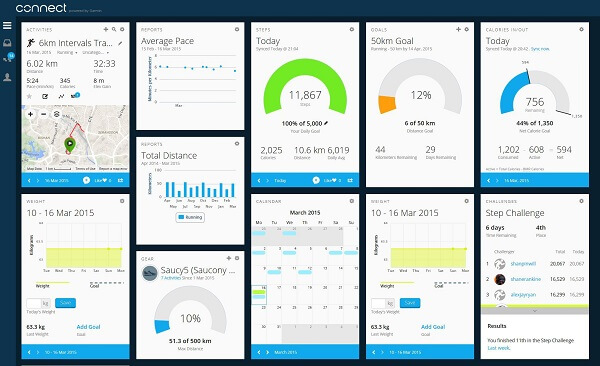
Every single statistic and piece of information recorded by your Garmin Fenix sports watch ultimately ends up here, on the Garmin Connect hub, accessible via your computer or tablet – provided it has an USB port. Once connected, the Garmin Express app will handle anything regarding data uploading and updating your Fenix 2’s firmware in order to make sure you make use of the latest features and fixes added to it.

The Garmin Connect dashboard has an undoubtedly steep learning curve, meaning that your first few experiences will most likely leave you not only confused but also having missed on numerous aspects and details the program can provide you with. There is a ridiculous amount of information that can be displayed in the program, which coupled with the fact that there’s no real tutorial that will teach you how to make use of all of it might make you reluctant at delving in it deeper than you have to.

Garmin Fenix 2 Review Home

Each activity recorded has a personalized list of records and details. For example a jogging session will display a Google Map-rendered depiction of your track, plenty of details regarding speed, timing, elevation, calorie burn – each being able to expand in a separate graph displaying progress over the entire length of the activity, and many other options such as comparing it to other activities, saving a log of it or even printing the details out.

Furthermore, each graph has a certain degree of customization of the data field that you wish to see, allowing you to pinpoint the areas of interest to you when the output of data gets confusing.

Garmin Fenix 2 Review Graphs

Garmin Fenix 2 Review – Battery Life

The Garmin Fenix 2’s battery life really depends on the power mode you select for it as well as the activity you undergo when using it. For example, activities that make extensive use of the GPS which updates your data every second and thus making for the most accurate set of readings, the battery will drain a lot faster than when the Fenix only uses the accelerometer for example. Factors such as losing GPS signal which forces the watch to try and regain it also end up draining the battery faster than usual.

So at high performance settings, you will most likely get somewhere between 15 to 16 hours of uptime with a full charge. On power saving mode – which consists of GPS updates at one minute intervals – you can get as much as 55 hours of uptime with a full charge. For anyone concerned, there is a portable battery pack that Garmin offers throughout their product selection that you can take with you.

Garmin Fenix Review – Final Conclusions

The Garmin Fenix 2 sports watch is overall a device that feels extremely capable, storing a high level of versatility in it. It is not the type of device most people will look forward to because it’s more so inclined towards intense fitness activity. The watch is ideal for users such as professional athletes or individuals who heavily invest in fitness, and not so much for occasional sport practices. Don’t get me wrong, you can very well use it for that as well, but it would be a waste of money for you considering that the Fenix 2 doesn’t come in cheap.

The watch itself comes with a particularly sturdy build, made for all intents and purposes, making it able to withstand a number of conditions for a wide array of activities. The high number of sensors make for an amazingly long list of sports and activities, allowing you to record very ample sets of details regarding each. The only real downside to the watch is the relatively confusing at first dashboard of the Garmin Connect website. It’s a lot to take in and even more to get used to until you can truly make use of the application properly.

You can purchase the Garmin Fenix 2 for $399.99 for the basic version and $449.99 for the Performer Bundle which includes the HRM-RunTM heart rate monitor. Any additional accessories for the watch such as mounts, cables, adapters, batteries etc. can be found on the Garmin website.

Image Source: 1, 2, 3, 4, 5, 6, 7, 8, 9, 10, 11, 12

Filed Under: Headlines Tagged With: fenix 2 multi sports watch, fenix 2 sports watch, garmin fenix 2, garmin fenix 2 review

Sony MDR-1R Headphones Review – Elegant and Powerful

November 28, 2015 By Nancy Young Leave a Comment

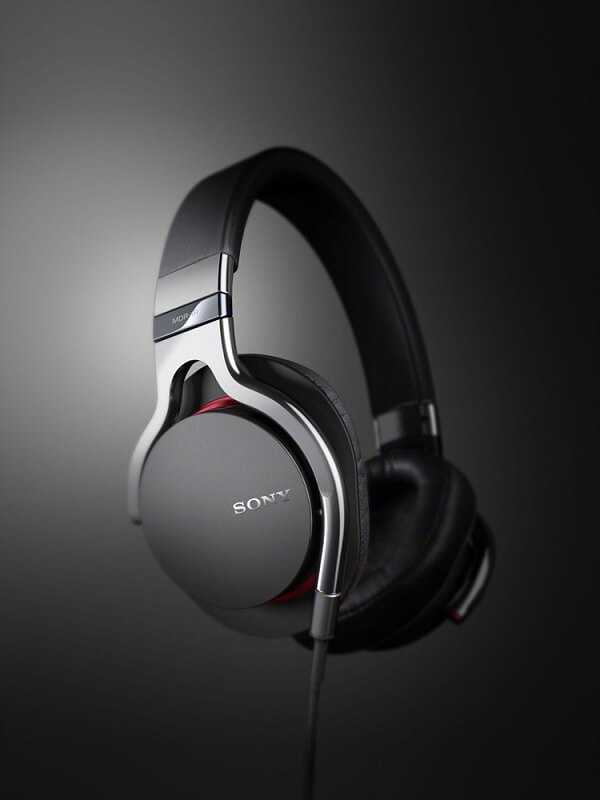
Sony MDR-1R Header

For all of your devices that lack in sound quality or the entire capability to speak of, we have found one of the neatest products that will put an end to your troubles. This time around we will be taking a look at the Sony MDR-1R set of over-the-ear headphones – which shines when their ability is taken to music more than any other kind of activity such as movies or video games. Though it’s certain that they would do a great job in that aspect just as well.

The reason we chose the Sony MDR-1R for review is the fact that they’re special for a number of reasons. The way Sony has made them special is by not trying to make them special and instead focus on every other bit of the music experience through headphones. Everything relating to comfort, sound quality and a thoughtful build are included in the Sony MDR-1R prestige headphones. Unlike other types of headphones that make an immensely huge deal out of boosting bass or offering very ambiguous basic features that sound good on paper but don’t hold as much applicability in a real life scenario, the Sony MDR-1R keeps is simple and professional.

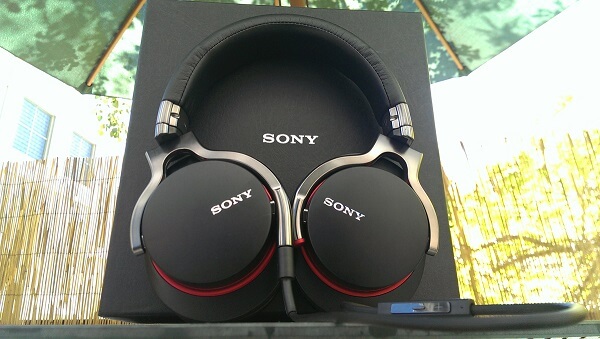
Sony MDR-1R Package

If there’s any area where this pair of headphones may fail, it’s probably professional music production: they are not meant for professional use; in the end they are only for consumer oriented use or leisure and entertainment. The sound quality is up there, however, only to be additionally complimented by an outstanding design.

As a last note, depending on how much you’re normally willing to pay for a pair of headphones you will only be using for entertainment purposes, the Sony MDR-1R have a really good chance of seeming more expensive than they should.

Sony MDR-1R Pros: Amazing design, Great sound, Decent noise cancellation, Accurate & Comfortable

Sony MDR-1R Cons: Pricy, Not proficient in bass quantity, Cannot fold for transport

Sony MDR-1R Design

The Sony MDR-1R are not the only pair of an exquisitely designed products from the Sony MDR headphone family, but it is apparent that there was a fair amount of effort put into making them as premium as possible – in both quality and looks.

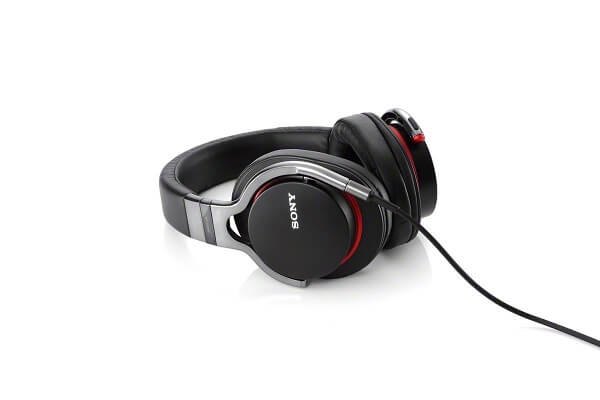
The MDR-1R headphones are full-sized and go over the ear, covering and encompasses your ears completely, giving off an amazing amount of noise cancelling. It’s not complete however, so depending on how you’re looking to use them that can be either a good or bad thing. I personally am not a great fan of wearing full over-the-ear headphones when I’m out due to the dangers of traffic and whatnot when strolling through the city. They do a great job at muffling the sounds of a neighbor fixing things or drilling walls next door though.

Sony MDR-1R Over-the-Head

Noise isolation is excellent, however, letting very little to no sound outside the ear muffs – which means you can easily use them when in a room of strangers, waiting in a line or even a public library without bothering anyone.

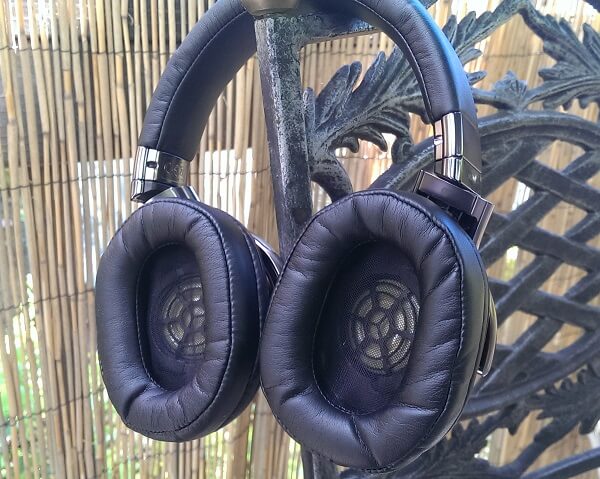
The ear cushions are designed in an oval shape, made of particularly soft and malleable materials to ensure they manage to cover the entirety of your ear no matter the size and shape. The cushions are covered in synthetic leather, giving the finish a soft and classy feel. While the material is susceptible to creases over time, it seems sturdy enough to not break and chip off with prolonged usage which comes as a great plus. There is one issue with wearing this pair of headphones in hot and humid weather as you’re bound to get sweaty because of the material.

Sony MDR-1R Drivers

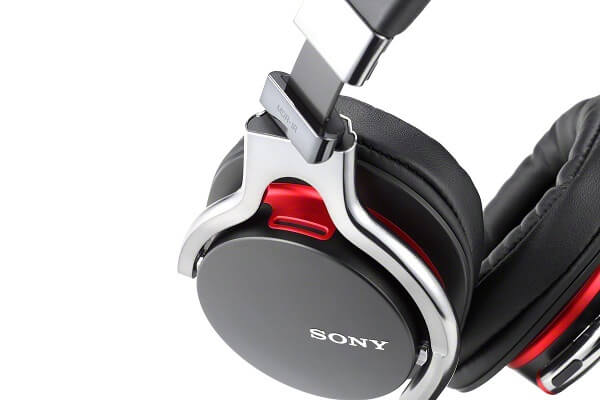
In order to seal a deal on the universal availability for all sizes and shapes of ears, the metal ear cups pivot on a two-axis direction for a fair amount of distance. The metal skeleton behind the fabrics feels considerably sturdy and solid, giving the entire build a great and secure feel. The circum aural ear pads can also swivel themselves flat in order to make the pair of headphones easier to pack or store.

Sony MDR-1R Pivot

Inside the ear cups lie – naturally – the headphones’ drivers. These are offset at an angle meant to mimic the way sound would be captured if the source was right in front of you, improving the way in which your ear captures the sound, making it as even as it possibly can. This is a design that’s surprisingly rare to find in a great number of full headphones on the market, from most professional manufacturers since a more common approach is to let the drivers remain parallel to your ears.

The thick headband is padded in the same cushion material featured in the ear cups, covered with another layer of synthetic leather. With a comfortable and near 0 pressure feel on the top of your head, the Sony MDR-1R headphones are also amazingly easy to adjust to the size of your head by using an even and smooth stop-click system which will allow you to create an equal amount of distance of both sides and assure comfort.

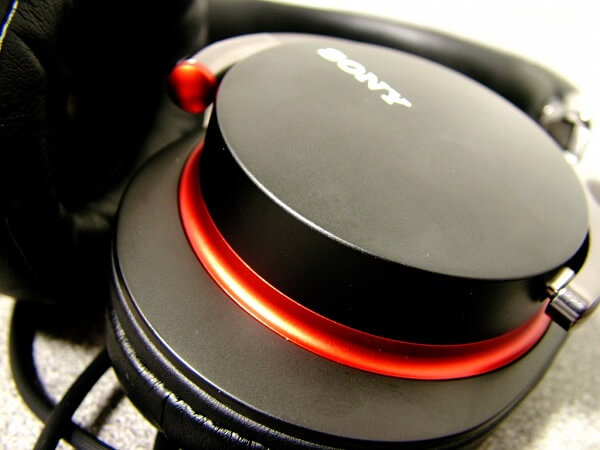
The materials used in the overall build of the MDR-1R are mainly metal and plastic. However, all of the plastic parts (for example the ear cup covers) look anything but cheap and lacking good taste. They’re polished, beautifully designed and beautifully integrated in the design by the metallic skeleton of the headphones. The covers also feature the Sony logo on either side, embossed into the surface.

The entire set of headphones weighs an average of 240 grams – that is without any of the cables plugged in. I wish more full headphones manufacturers adopted this trend, considering that it reduces a great amount of risk of tangling when travelling; there is also a certain level of risk of damage to the interior cables that may occur were you to accidentally pull on them.

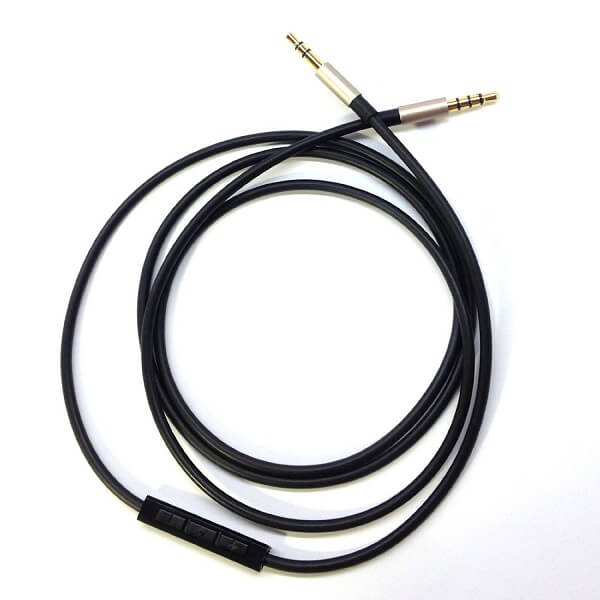
The MDR-1R package contains 2 different cables that you can hook up to the headphones: a regular headphone cord and an additional cord with inline remote and microphone for mobile devices. Both cords are straight at the end that you plug into the headphones, and end into a gold-plated L-shaped stereo mini 3.5 mm jack. The microphone featured on the latter of the two is omni-directional meaning that you shouldn’t have any issue with sound capture when you’re using the microphone.

Sony MDR-1R Cabled

Sony MDR-1R Cable & Microphone

There are two color variants for the Sony MDR-1R headphones – black and white. The black variant features red lines curving around the ear cup covers on the back and the audio jack is also red-tipped. The second variant features a white finish for the pieces made of metal or plastic, while all of the synthetic leather used for the cushions and headband are brown. For this model, the audio jack is tipped in red as well. Both cables are 4 feet in length.

Sony MDR-1R White Variant

The MDR-1R headphone family expands into more types of products – such as the MDR noise-cancelling headphones model MDR-1RNC or the even more advanced Sony Bluetooth Noise Cancelling headphones.

Sony MDR-1R Sound Quality

There are two ways in which we can discuss sound quality presented by the Sony MDR-1R prestige headphones. One is a more generic, overall opinion while the second will refer to the sound in more detail, splitting it into bass, high-mids and treble levels.

As an overview, the headphones are extremely clear and produce crisp, high quality sound. While the manufacturer suggests that the MDR-1R have a frequency rate of 4 to 80,000 Hz, that’s not necessarily a fact that you should concern yourself with that much considering that the human hearing is limited to the range of 20 to 20,000 Hz. However, that does highlight the fact that the headphones have an amazing reach of frequencies in both directions. Because of that all tracks of a song will have an outstanding clearness and allow you to hear the deepest bass sounds there are.

Sony MDR-1R Hardware

Coupled with 105 dB of high sensitivity, the MDR-1R headphones can pack quite the volume. The 1,500 megawatts of power output will prevent damage to the speakers when you use the full potential of the volume button – if that is really ever the case.

The bass of the headphones is outstanding – the headphones manage to depict extremely low levels of base without making it sound bloaty or boost it in an unnatural manner like so many other devices have an undying passion to do. In retrospect however, this may be one of the reasons the bass feels like it lacks a little detail at times, despite packing quite the punch. It is only something you may end up noticing in certain songs however, so the overall bass levels should remain good and unaffected on average.

For what mids are concerned, the headphones bring a very full level of sound to them. It seems like mid levels are actually one of the most outstanding capability of the MDR-1R, as they truly end up excelling in that department. With a great amount of attack and richness, the sound gains a lot of musicality and fullness to it in a great number of genres. Vocals also seem to be quite outstanding and pleasant to listen to on the MDR-1R headphones, if not for a certain degree of sibilance that tends to occur at times.

The high, treble levels are definitely not the highlight of the sound quality in what the Sony MDR-1R are concerned. By no means is treble underwhelming – it has a good extension and doesn’t sound harsh or forced and distorted. But they don’t quite come up to the same level as the mids; however, it doesn’t tax too much on the overall sound quality.

So overall, it feels like the Sony MDR-1R headphones are most suitable for music genres that highlight musicality and vocals, while still being able to distinguish different instruments perfectly to the point where you can differentiate between the various tracks of a song and discern all the small instrumental details. For low bass, punchy tunes coming from genres such as dubstep or drums n’ bass, this is not quite what you may be looking for since it lacks in quantity but not in quality.

In terms of the best way you can make use of the Sony MDR-1R headphones, it depends on a few things. Because of the medium amount of outside noise cancellation that the default version (naturally, the dedicated noise cancellation model MDR-1RNC being considerably better at that), you can consider them equally good and bad at the same time for outdoors. Sure, sitting at a table somewhere and wanting to tune out the street noise for example is great. Using them in traffic or while on a stroll not so much.

Cabled Silver Sony MDR-1R

While the Sony MDR-1R spell quality and audio prowess, they cannot get up there on the pro level. The headphones will lack on several levels when it comes to mixing songs or mastering tracks so by adding some extra few bucks to this pair’s price you could possibly get something else that’s proficient in that particular area.

Watching movies and playing video games will score relatively high with the MDR-1R headphones thanks to the open sound that it renders and the very accurate positioning of the sound source. While they can be used for online gaming and voice communication as well when connected to a compatible device, they once again cannot score too high in this concern, professional gaming headsets such as various SteelSeries or Razer models bringing a lot of proficiency in this regard instead.

Sony MDR-1R Verdict

No matter how you look at it, there’s no denying that the Sony MDR-1R headphones are a quite outstanding piece of audio architecture. With an elegant design and a huge amount of capability to make the best of most music genres, they are an excellent choice for anyone looking to purchase a pair of headphones mostly meant for listening to music. However, the one aspect which may make more than a few individuals putting off purchasing them or even opting for another manufacturer or model is the high price range that they come at.

You can purchase the Sony MDR-1R in most Sony retail centers or via a number of online retailers such as Amazon and eBay for $299. However, the Sony MDR-1RNC Premium Noise-Cancelling Headphones model will take you up to $499, and the Sony MDR-1RBT Premium Bluetooth Over-the-head Style Headphones would cost $399.

Image Source: 1, 2, 3, 4, 5, 6, 7, 8, 9, 10

Filed Under: Headlines Tagged With: mdr-1r, sony mdr-1r, sony mdr-1r headphones, sony mdr-1r review

The Best Tech and Electronics Black Friday Deals 2015

November 26, 2015 By Nancy Young Leave a Comment

Best Black Friday Deals 2015

It is nearly here, folks! The day that marks the beginning of the holiday season as well as one of the best chances you’ll get to do some shopping and grab yourself some great deals is right around the corner. There are numerous retailers who will have their doors open starting tonight at midnight, while others are offering discounts and deals the entire week. And what better chance is there to grab yourself some of those much desired gadgets than with the occasion of this year’s Black Friday sales?

Considering that Thanksgiving is here already, you’ve probably haven’t had the time to check out what long awaited discounts you can find this year. And because, as we all know, things get pretty hectic with this occasion and the prospect of waiting in lines in the most crowded stores just to see if you can find yourself something useful is far from appealing, you should always be prepared.

To make things easier for you, we’ve compiled a shopping and deals guide for you with the most appealing offers we’ve found out there, from the most accessible retailers –  no matter where you are.

1. Walmart Black Friday Deals 2015

Best Walmart Black Friday Deals 2015

Walmart has really put together a great set of services for their sales and deals for this year’s Black Friday. Considering the deals and promotions alone weren’t enough, Walmart is offering the free Walmart App that you can find the nearest Walmart store with, wherever you may be as well as an extensive browsing and shopping experience.

Not only that, but they’re offering online specials for you in case you won’t be able to make it there in person in time. Some of the products can be shipped to your home while others will be put on reserve and have you travel to the store of choice to pick them up instead.

Also the famous 1 Hour Guarantee Black Friday 2015 Deals are back: Walmart promises 5 offers for the people still in line when and if the store runs out. These offers come with delivery by Christmas and include the iPad Air 2, Beats Studio Headphones, LG 55” Class Smart 4k UHD TV, Xbox One 500 GB Gears of War Bundle with a $30 Walmart Gift Card and the 15” HP Touch Laptop.

The sale starts today at 6 PM and will last throughout the entirety of Friday. Online sales begin Thursday 3:01 AM EST / 12:01 AM PST.

In terms of tech and gadgets that you’ll be able to find at Walmart for this Black Friday, here’s what we gathered.

Television Sets

  • Emerson 50” LED 1080p TV $269 (original pricing $398);
  • Emerson 40” LED 1080p TV $149;
  • Hisense 55” 4K UHD TV $448 (original pricing $548);
  • Vizio 60” 4K Class LED Smart HDC 2160p TV $898 (original pricing $1,098);

Smartphones & Tablets

  • Samsung Galaxy Tab 3 Lite $79 (original pricing $139);
  • iPad mini 2 16 GB $199 (original pricing $269);
  • iPad Air 2 Gold 16 GB $399;
  • Samsung Galaxy S5 Straight Talk Wireless $299;
  • Apple iPod Touch 16 GB $165 (original pricing $199);

Other Gadgets

  • Fitbit Flex Wristband $59 (original pricing $99);
  • Nighthawk X4 Router by Netgear $149 (original pricing $199);
  • Chromecast Streaming Media Player $20 (original pricing $35);
  • HP 15” Touch Laptop $249 (original pricing $319);

2. Best Buy Black Friday Deals 2015

Best Best Buy Black Friday Deals 2015

Best Buy has its fair share of deals you can enjoy this year – over 300 products will be available for purchase with various percentages off. While for some smaller items you may save $20, there are full-fledged ultra HD television sets on offer that you would be saving up to $2,000 on.

Similarly to how Walmart chose to handle things, Best Buy will be making their Black Friday prices available today at 5 PM. The stores will close at 1 AM on Friday only to reopen again at 8 AM. In addition, online shopping will be available throughout the entire duration, with a variety of items limited to Thursday.

There is a small amount of products you can already order online right now for the same price that they will be available for when Black Friday comes. They include $100 – $125 off on iPad Air 2 prices, 40” HDTV Insigna television set for $159 and the 55” variant for $349, the 27” iMac and 13” MacBook with $150 off as well as a promotional $250 Gift Card when you purchase the Galaxy S6.

As a last note, My Best Buy members who have either Elite or Elite Plus status and will be spending more than $1,500 in purchases can benefit from early access to Black Friday deals right now.

3. Apple Black Friday Deals 2015

Best Apple Black Friday Deals 2015

As of right now, there is no Apple Ad showing up on their website or stores. However, if we were to judge on past experience, instead of opting for the usual promotions where you can get products at reduced prices, Apple switches it up a little by offering Gift Cards with the purchases you make with them. At least that’s what they’ve done in 2014.

However, your better chances of getting reduced prices on targeted Apple products are actually in other stores such as Radio Shack, Best Buy and Walmart.

While for example Walmart has already listed discounts between $35 and $70 for a number of Apple tablets, you shouldn’t get your hopes up for getting any of the iPhones on discount there. It seems that most retailers only offer reduced prices for the iPads and iPods only. Best Buy is one example where you’ll be able to buy the iPhone 6S and 6S Plus with a 2-year contract with Sprint starting at $99 and $199 respectively for the 1-Day Deal they offer.

At Sam’s Club you can get the 64 and 128 GB models of the iPad Air 2 for prices nearly $150 lower than usual. Target offers $80 to $250 Gift Cards for iPhone 6S/6S Plus, Apple Watch, iPad Air, iPad Air 2, iPad Mini 2 and iPad Mini 4.

4. Amazon Black Friday Deals 2015

Best Amazon Black Friday Deals 2015

This year, Amazon is doing what it knows and does best. Considering there are no physical stores and lines to wait in, it might be a lot more suitable – provided of course that you manage to grab a thing or two off the website.

Amazon’s Black Friday deals have already started earlier this week through limited-time Lighting Deals and a separate set of Deals of the Day for each day of the week up until Friday included. The website advertises that new deals may appear every 5 minutes depending on stock.

Visiting the Black Friday page on the Amazon website will show you different sections where you can find a variety of deals of all kinds. The current Black Friday Device Deals include:

  • Amazon Echo $149 (17% off);
  • Fire Tablet $34.99 (30% off);
  • Fire TV Streaming Stick $24.99 (38% off);
  • All-New Kindle Paperwhite $99.99 (17% off);
  • Fire Kids Edition $84.99 (15% off);
  • Fire HD 6 $69.99 (30% off);
  • Fire Entertainment Bundle $69.99 (30% off);
  • Kindle Voyage Essentials Bundle $249.97 (11% off);

5. Sam’s Club Black Friday Deals 2015

Best Sam's Club Black Friday Deals 2015

Sam’s Club is also already open for business, mostly because it’s one of the few stores who does not open on Thanksgiving Day in order to allow its employees to stay home with their families. The Sam’s Club Black Friday sales have already started at 7AM and if you move fast enough you might get another chance at grabbing yourself a few electronics or gadgets.

Those deals are offered both via samsclub.com and in-club and come at prices that will be valid through November 29th, at least as long as supplies last. Here are a few examples:

  • Sony PS4 Uncharted Bundle $299;
  • Xbox One 500 GB Gears of War Ultimate Edition Bundle $299;
  • Guitar Hero Live Bundle for PS4 $69.98;
  • $175 Off on Apple iPad 2 Cellular 64 GB & 128 GB Tablets;
  • $100 Google Play Gift Card for $79.4 only;

In addition, however, starting Monday 30th, Sam’s Club begins its very own Cyber Week – the first day of it being the most important. The Sam’s Club Cyber Week 2015 sale will kick off on their website at 12:01 AM CST. A few of the deals that were already announced for Cyber Monday include free shipping:

  • Sony PS4 Uncharted Bundle $369 (Valid Monday Only);
  • JVC 32” LED HDTV $149.88;
  • Vizio 65” 1080p LED Smart TV $749;
  • Dell Desktop Bundle with 20” Monitor (I3647-2311BK Intel Core i3-4170, 4GB Memory, 1TB Hard Drive, Windows 10), includes Keyboard and Mouse $399;
  • Dell 2 in 1 FHD Touchscreen Convertible 13.3” Notebook (I7359-4331 SLV, Intel Core i5-6200U, 8GB Memory, 500GB Hard Drive, 8GB SSD, Windows 10) Event Price $499.

6. Sprint, Verizon, AT&T, T-Mobile Black Friday Deals 2015

Black Friday Deals come to phone carriers too. While that might not reflect so much through price plans, they still are one of your most reliable retailer for mobile phones and other handheld devices. All three of the most popular mobile phone carriers in the United States have come up with something of their own this year; if you hurry you might get your hands on some pretty neat yet super limited deals.

Sprint Black Friday Deals 2015

Best Sprint Black Friday Deals 2015

  • 50% off a Samsung Galaxy S6 – an offer for both already existing customers and new ones, provided that they add a new line; the phone comes with a 2-year commitment contract but also gains you access to Amazon Prime when you activate your phone.
  • A new type of contract will be available for a limited amount of time known as iPhone Forever: it will allow you to upgrade to the latest iPhone as soon as it’s available, including it in your monthly price. This means you’ll get prioritized for your iPhone orders as well as offering you a one-time chance to get the iPhone 6S as low as $1/month.
  • A treat for already existing customers only: the new LG G4 from Sprint Offer comes for $18 a month via Spring Easy-Pay lease and purchasing it will earn you a few 24-inch LG HDTV worth $179.
  • Sprint will also be offering $30-$40 discounts on a large number of the headphones, health and fitness trackers they sell. LG Tribute 2 will be available for $99 and the LG G Flex 2 completely free provided that you open a new line with Sprint.
  • $100 service credit will be offered for anyone who buys the Galaxy Note 5. $50 service credit will come with any purchase of a pre-owned phone.

Verizon Black Friday Deals 2015

Best Verizon Black Friday Deals 2015

  • Savings on smart phones such as the Galaxy S6, Galaxy Note 5, LG V10. $3/month for Galaxy S6, $7/month for Galaxy S6 Edge and $12.33/month for the Galaxy Note 5;
  • Up to $500 credit for customers who switch carriers to Verizon and trade in their old phone. On the same note, trading in older phones will earn you more than usual for the Black Friday promotion: $200 off select Verizon smartphones and $300 for select phones from other carriers;
  • New Ellipsis 10-inch tablet – available for $49.99 ($149 off) with a 2-year contract;
  • FitBit Charge for $89;
  • Mophie charging power stations for $99 ($50 off);

Offers last starting 26th through 30th of November, both on Verizon website and in Verizon retail stores.

AT&T Black Friday Deals 2015

Best AT&T Black Friday Deals 2015

AT&T takes a little leap away from the classic discount of phones business to offer you some other types of special deals on the kind of products that you may not expect.

  • Savings on a great number of accessories: $10 to 40% savings on LG Tone Pro Bluetooth headphones, Braven BRV-1 Bluetooth speaker, BodyGuardz screen protectors, Belkin home and car chargers, Otterbox phone cases, Pelican cases, ZAGG screen covers, speakers and portable chargers;
  • Samsung Gear S smartwatch for $0.01 with a 2-year contract;
  • Samsung Galaxy View 18.4-inch Android tablet 64 GB and 4F LTE for $99 if you sign up for DirecTV for 2 years (tablet normally priced at $499).
  • Free Galaxy S6 Active or Samsung Galaxy Note 5 Gold with a 2-year agreement for AT&T Next.
  • Flying Drones for $99.

AT&T will also begin a new sale starting December 1st, continuing the trend of vastly reduced prices on accessories and other deals.

T-Mobile Black Friday Deals 2015

Best T-Mobile Black Friday Deals 2015

The Black Friday deals that T-Mobile offers mark the beginning of the holiday season – some of the offers they make will only be available for a limited time while others will continue until the holidays. Some of the most appealing things T-Mobile will be offering both its already existing and new or potential customers that we found are:

  • Simple Choice plan users will be provided with unlimited 4G LTE for 3 months of trial (only supported by LTE devices), complete free of charge. Only available for customers already on the plan.
  • Free Galaxy S6 or Alcatel OneTouch Pixi 7-inch Android tablet: by trading in your old phone and signing up for 18 months of T-Mobile Jump On-Demand plan, you can get the Galaxy S6 or the Alcatel OneTouch Pixi tablet free of charge; however, once the 18 months expire you either have to pay off the remaining balance to keep using them or return them.
  • iPhone 6S Upgrade. T-Mobile offers its existing customers a completely free upgrade from your iPhone 6S or 6S Plus from the 16 GB models to the 64 GB. Additionally, the 128 GB model will cost what the current 64 GB one does. This offer only available for Cyber Monday – November 30th.

Following the Black Friday offers, T-Mobile will begin another 3 weeks of deals, 1 new deal every week that will be mostly targeted towards customers from other carriers.

7. RadioShack Black Friday Deals 2015

Best RadioShack Black Friday Deals 2015

Yet another Black Friday early bird, RadioShack has already begun its sale yesterday. However, the entire array of deals will last through Saturday, November 28th, while supplies last. Most offers can be grabbed either in retail stores or via their website, however a small number of items can benefit from the discounts only in stores.

  • Amazon Fire 7-inch tablet with 8 GB memory, 32 GB memory card and free case $54.99;
  • Apple TV 32 GB for $149.99, 64 GB for $199.99;
  • Pro-652 desktop digital radio scanner $279 ($120 off);
  • Pro-649 200-channel handheld radio scanner $99.99 (original pricing $119.99);

Making purchases in stores may come with some benefits however: customers who make purchases of $50 or more on any kind of items minus the Amazon Fire Tablet will be given a free Hovermaxx UFO.

Image Source: 1, 2, 3, 4, 5, 6, 7, 8, 9, 10, 11

Filed Under: Headlines Tagged With: best deals black friday, best deals black friday 2015, black friday 2015, black friday deals 2015, thanksgiving deals 2015

Microsoft Surface Pro 4 Review – The Great Aspect of Hybrids

November 24, 2015 By Cristopher Hall 2 Comments

Microsoft Surface Pro 4 Overview

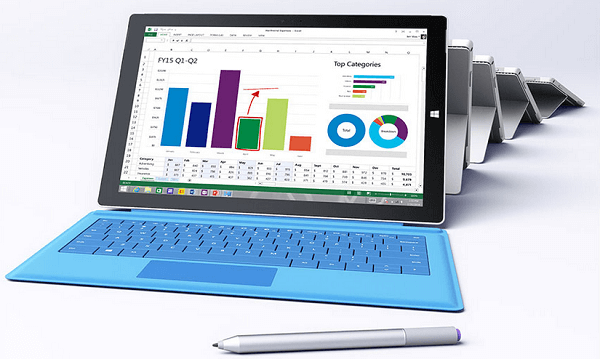
It’s already general knowledge what the Microsoft Surface Pro line of tablets is trying to achieve. While “innovative” is most likely an overstatement when attempting to describe what Microsoft did with the series, it still comes relatively close to that. Ever since its inception 3 years ago, the Microsoft Surface Pro attempted to bring something new while other tablets were focused on making things slimmer and better looking. Manufacturers believed that while a tablet was comfortable and easy to use for a series of activities, you would still have to switch to a laptop or full-fledged computer for a number of others. And because on-screen typing can only be so efficient, adding the possibility of using a keyboard and something that does what a mouse would do, except better, turned out to appeal to a great amount of people.

Thus the Microsoft Surface Pro 4 came to be – a highly useful hybrid that mixes the comfort of owning a tablet, with the utility of having a device that can handle your work just as well. But this time around, Microsoft made a point of focusing more on turning the tablet into an exquisite device than insisting on the hybrid aspect of it. And that is simply because it really feels like the Microsoft Surface Pro line of tablets has managed to nail it with the third iteration of it and now are just attempting to polish what they had already achieved with the Surface Pro 3.

Having been released less than 2 weeks ago, the Microsoft Surface Pro 4 has a lot to show for itself and you can be sure that you would be getting some of the latest components and a performance to match. But how can it appeal to people who are looking for just a tablet? Or otherwise – just looking for something that would replace their laptops?

Microsoft Surface Pro 4 Design

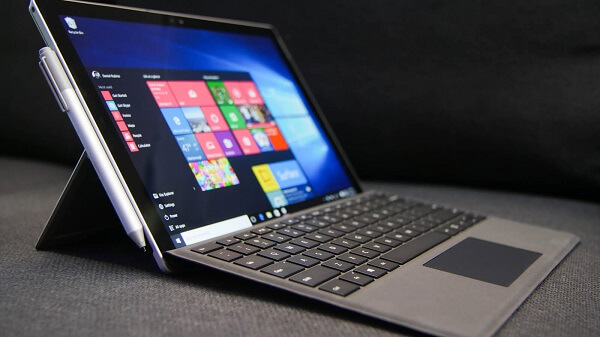
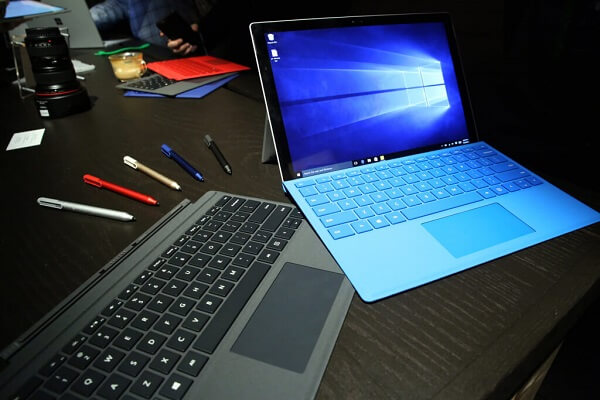
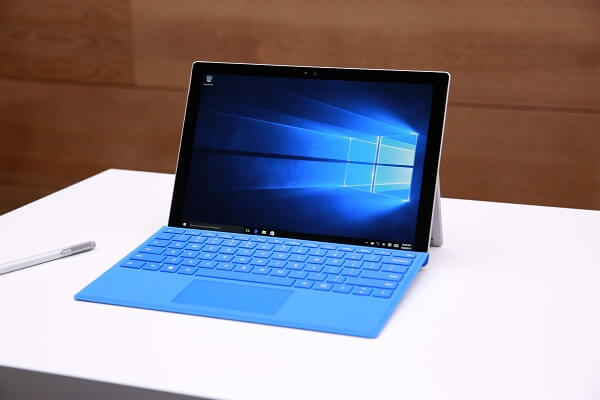
Microsoft Surface Pro 4 Type Cover and Stylus

Put the Microsoft Surface Pro 4 right next to its predecessor, the Surface Pro 3, and for a second you won’t see that big a difference. In accordance to the changes that we normally see on newer devices, the hybrid has lost some thickness and upgraded its screen size thanks to the reduction in size the bezel has gone through. Even when separated from its detachable keyboard, the Surface Pro 4 looks much sleeker and more elegant than its predecessor. Its overall dimensions of 292 x 201 x 8.45 mm are highly comparable to Surface Pro 3’s 292 x 201 x 9.1 mm but because of the new design choices the tablet just feels better thought out overall.

Surprisingly, especially given that the hardware packed in it is punching out more power than the predecessor, the Surface Pro 4 has also lost some weight – while not much, but it’s only a minimum of 766 grams in weight, having 32 grams less than its previous iteration; the larger versions (only larger in terms of hardware, not physically) score 786 grams in weight. However, as far as tablets are concerned, the Microsoft Surface Pro 4 will feel very large and hard to wield, at least for entertainment purposes, where the separate keyboard does not suffice as an excuse. Its primary method of usage seems to be more so oriented towards business and work, generally; however, making it a little more difficult to one-hand and use as an eBook reader or something to watch movies on when you’re relaxing in bed is a small price to pay when considering the extra juice you’ll find on it.

Microsoft Surface Pro 4 Bottom

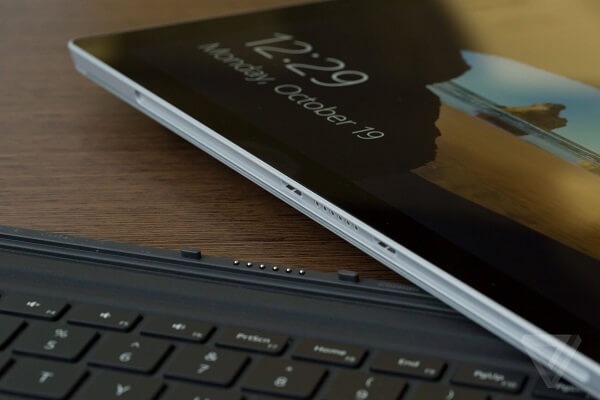
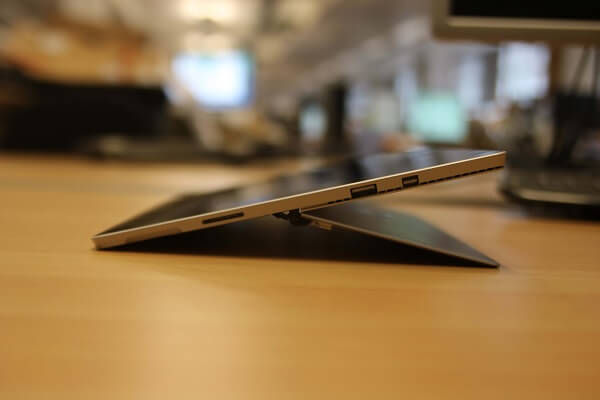
Design and button placement-wise, things haven’t changed that much. The face of the tablet features the front-facing camera at the top, while the rear is host to a bigger, better 8-megapixel camera. The area all around the edges however has seen some considerable change. For all the placements that will follow, we’ll consider that the normal orientation to hold the tablet in is landscape mode: the power button and volume rocker are placed at the top, on the left hand side, while the left side only hosts a 3.5 mm headphone jack, the rest of the area being left for the Surface Pro 4 Stylus to magnetically, but firmly attach to. On the opposite side, there are 3 ports – the full-fledged USB 3.0 port, a mini DisplayPort and the microSD card reader a little lower below. The bottom of the Microsoft Surface Pro 4 features several connector ports – here known as SurfaceConnectTM – that allows you to connect the detachable keyboard to the tablet.

Microsoft Surface Pro 4 Side

Microsoft Surface Pro 4 Back

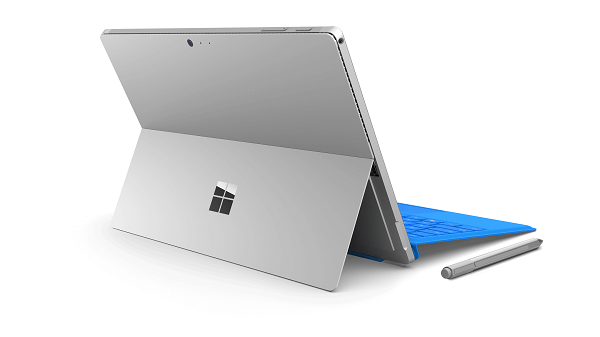
The device features a unibody made of magnesium alloy and only comes in a silver finish at the moment. The back of the Microsoft Surface Pro 4 features a particularly sleek design – with the Microsoft Logo resting on the bottom half, seemingly made of black-tinted glass. This portion of the Surface Pro 4 can be parted from the rest of the body at the bottom, thus turning into the kickstand – capable of opening up to a maximum of more than 120 degrees giving you an ample choice of surfaces you can keep the Surface Pro 4 inclined on. Even though the hybrid is designed to be used mostly on flat surfaces, it will manage to remain stable even in your lap.

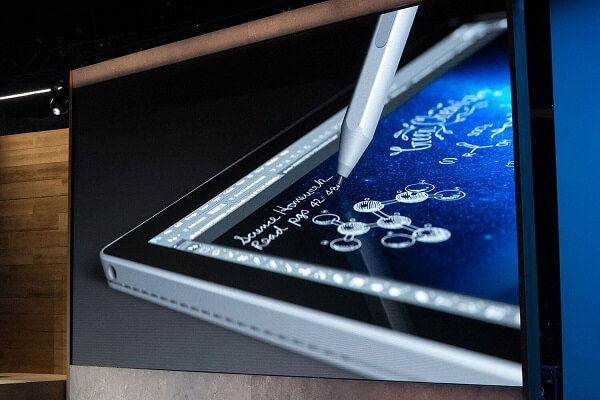
Microsoft Surface Pro 4 Stylus

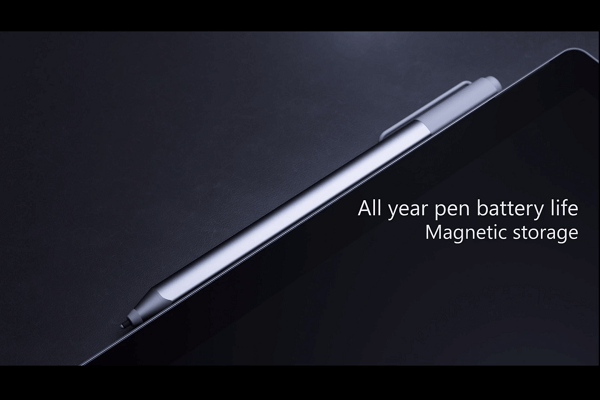
Even if visually the stylus that comes with this tablet-laptop hybrid hasn’t changed much, it comes with a lot of improvements over its predecessor. The fact that its default placement on the tablet is finally somewhere where it won’t complicate your life and that the magnetic attachment actually feels stable and sturdy this time around is only the beginning.

Microsoft Surface Pro 4 Stylus Attachment

However, while the tablet’s side is a good place to store the stylus when you’re using the keyboard, it wouldn’t be as advisable to keep it there when you’re carrying it in a bag or moving around with the tablet. In the lack of a physical clip to keep it in place, there’s a high chance the stylus will detach or get accidentally kicked off and get lost in the process. Clipping it into the Type Cover is a much better alternative to prevent the above from occurring.

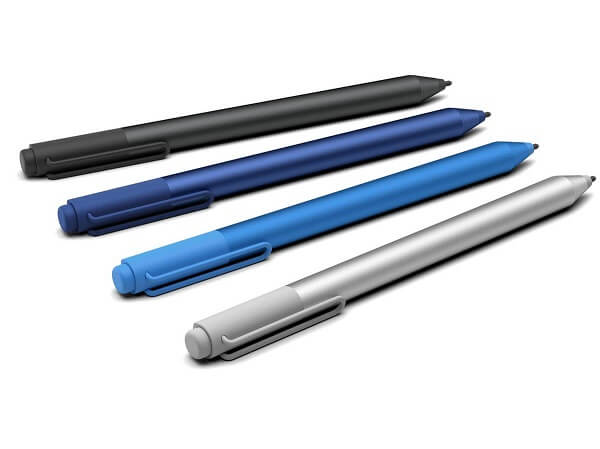
The stylus itself has gone through some improvements of its own: the first of which is the greatly increased sensitivity. Its pressure sensitivity has gone up to 1024 levels, which makes it mimic what a real pen would feel like on paper amazingly well. One part of it that stands out is the eraser that has forgotten the use of a button like it did in the case of the older Microsoft Surface Pro 3 and actually feels as real as an actual pencil eraser.

Microsoft Surface Pro 4 Stylus Models

You can still use the button on it to launch either Cortana or OneNote but the only real downside of it is the fact that it has a lifespan of only about a year. Considering that charging it is not possible, if you’re using it intensively for sketching and drawing on the tablet, do take into account the fact that you will have to purchase a replacement at a future point throughout the tablet’s lifetime.

While the stylus works great in any of the Windows-supported or inherent applications, it may prove to have a rather troublesome existence and utility for others; a lot of third party applications and games will prove to have a lot of difficulty in detecting the pen altogether.

Microsoft Surface Pro 4 Type Cover

Before we dive into praising the new and improved Type Cover to high heavens, we’ll get the bad parts out of the way. The most iconic of them all is the fact that the new detachable keyboard does not come in the basic price of the tablet. As a matter of fact, you will be forced to whip another $130 for it if you intend to truly use your Microsoft Surface Pro 4 as a replacement for your laptop.

Microsoft Surface Pro 4 Detachable Keyboard

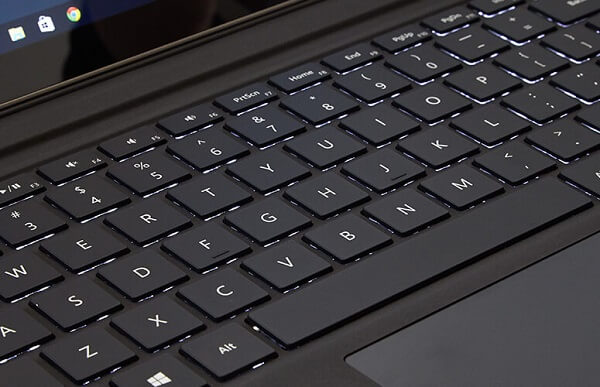
Alright, now that we got that out of the way, the new Type Cover brings the much needed fixes that its previous version asked for. It’s a great thing considering that it can very well be used with the Microsoft Surface Pro 3 just as well. The most important difference that you’ll immediately notice in this keyboard is the fact that the buttons have a considerable amount of room between each other now – no longer packed tightly together, making typing difficult due to it being tricky to distinguish between the keys.

The keys were redesigned to be raised but silent, with a very good responsiveness and travel – with the only downside that it might feel a little strange typing on it given that the keyboard won’t be resting directly on a flat surface and instead be elevated. While the Type Cover doesn’t seem that frail, it would be advisable to not hammer on the keyboard either so you don’t risk any damage to the platform.

One of the most appraised changes to the Microsoft Surface Pro 4 Type Cover is the track pad. Easily an underwhelming aspect on the previous variant of the keyboard, this time around it’s been considerably improved. Exceeding in smoothness thanks to the glass coating, much larger than its older brother and multi-touch capable (up to 5 fingers), the track pad will do a great job at replacing a mouse when you choose not to use the touch screen display.

Microsoft Surface Pro 4 Display

As previously mentioned, despite the Surface Pro 4’s unchanged dimensions, the display managed to grow from 12 inches to 12.3 – all thanks to the thinning of the now better looking bezel. However, if even that doesn’t seem like such a drastic change, the screen’s maximum resolution has also increased to a whopping 2,736 x 1,824; this counts as a great improvement over the 2,160 x 1,440 display we saw in the Surface Pro 3. This translates into an increase from the previous 216 ppi pixel density all the way to 267 pixels per inch.

Microsoft Surface Pro 4 Screen

The smoothness and vividness of the display is known as PixelSense – the Microsoft version of what Apple calls Retina Display – meaning that the screen shows no sign of pixelation or blocky-looking images. The Microsoft Surface Pro 4 Display excels when it comes to brightness and black levels – rewarding the user with a high contrast ratio – 940:1. The aspect ratio that the Surface Pro 4 brings to the table is 3:2 – not particularly amazing for enjoying media such as movies (which will end up letterboxed) but wide and tall enough for any type of internet navigation or work handling.

To only add a little insult to injury for those who hope to use the Microsoft Surface Pro 4 for entertainment, the color accuracy is not the best, but it hardly scores much lower than competition. While the grayscale reproduction is up there with the best laptops and hybrids on the market, color accuracy scores relatively low – another downside for watching movies for example.

Microsoft Surface Pro 4 Specifications & Customization

Given its hybrid status, the Microsoft Surface Pro 4 packs some hardware that you are not very likely to find in most other classic tablets. From that perspective, you can say that you would be getting your money’s worth. As a laptop replacement, it’s natural for it to come with a high level of hardware customization that will give you the opportunity to nail the perfect setup for you in terms of processor, RAM or hard disk size.

Microsoft Surface Pro 4 Benchmarks

The classic, low end rig that the Surface Pro 4 will come with consists of an Intel Core m3 processor, no less than 4 GB of RAM memory and a storage size of 128 GB.

I wouldn’t call the Intel Core m3 CPU underwhelming or downright bad, but instead will choose to refrain to stating that there’s a lot of room for improvement. While benchmarks would suggest that the Intel Core m3 manages to exceed the performance of the Intel Core i5 in terms of GPU Clock Speed for example, it would be a far-fetched act to say that it’s better. However, that being said – in realistic terms you’ll find the Intel Core m3-6Y30 processor to handle itself pretty well in most activities you choose to undergo. Any type of work-related activity won’t cringe or lag at all, faring well with multitasking by all means. The Surface Pro 4 is meant to replace a laptop and you can be sure that it will hold up to its promise

While the 4 GB of RAM may seem like too little on paper, it’s hardly true: unless you’re planning to run extremely demanding applications such as video editors or the most recent games you can find on the app store, 4 gigabytes of memory should suffice for your system’s needs as well as anything else that concerns your work or entertainment. Nevertheless, do keep in mind that this is the lowest amount you are able to get when you purchase the hybrid.

The base model also comes with Intel HD graphics 515 – the integrated graphics processing unit is inherent to the Skylake generation of Core m-series processors. It is not one of the newest pieces of technology, only managing to come close to older GPUs such as the AMD Radeon HD 6730M or the nVidia NVS 5400M. Because of that, coupled with the fact that it is after all just an integrated GPU, you won’t get outstanding graphic performance out of the Microsoft Surface Pro 4.

While the base model only offers a default amount of 128 GB of storage space in form of solid state drive (SSD), you can naturally improve that number by referring to the microSD slot available on the tablet’s side. However, you will only be able to use the card for storing data and not much else.

Luckily, the Microsoft website offers a wide range of customization you can bring to your own Microsoft Surface Pro 4. There is a series of setups you can opt for when purchasing the hybrid, thanks to the compatibility offered by the components. While the Intel Core M processor can only handle 4 GB of RAM and a 128 GB SSD hard drive, the Intel Core i5 variant of the Surface Pro 4 can take up to 16 GB of RAM. Lastly, the high end Intel Core i7 Processor can go up to 256 GB in storage space for the 8 GB of RAM and an amazing 1 TB for the 16 GB version.

Considering that the cameras on the hybrid are by far not its strongest point, we will just limit the review to mentioning that the front facing camera is a 5 megapixel HD one – not an outstanding piece of hardware, but surely one that will oblige for your video conferencing needs when your job asks for it. The rear camera, scoring 8 megapixels, does at least feature autofocus and a potential of up to 1080p HD video recording at 30 frames per second.

Microsoft Surface Pro 4 OS – Windows 10

Users rejoice for the blight of Windows 8.1 has lifted. While I would admit the harshness of that bold statement, it’s incontrovertible that the previous version of Windows presented a great number of aspects that were either unsatisfactory or downright frustrating; maybe less so when it came to smartphones and tablets. Nevertheless, the Microsoft Surface Pro 4 comes with the new and highly improved Windows 10 Pro version, including a great amount of features such as Cortana. Purchasing the Surface Pro 4 will also provide you with a free 30 day long Office trial, afterwards requiring a subscription or full program purchase in order to continue using it.

Microsoft Surface Pro 4 Operating System

The tablet, or in this case hybrid version of the latest Windows 10 operating system fells almost the same on the Microsoft Surface Pro 4. However, at a closer inspection you realise that there are many aspects where this version of the Windows 10 that spell handheld smart device. once of them is the fact that there is a number of applications that you cannot use unless you download them from the Windows store (for example most social media). Regardless, the operating system feels as sturdy as it does on desktops and even gives you a start button to work with as well as the exact same intuitive user interface you can find on any Windows 10 desktop.

The Start menu displays a list of commonly used or default Windows 10 applications and gives you a high level of customizability. You can drag in app icons in order to make them more accessible, create and rename app groups and gain access to the most useful shortcuts to a number of services such as News, the Xbox Live services, News and so on. The system runs on the Microsoft Surface Pro 4 smoothly and unhindered by bloatware of any kind.

Microsoft Surface Pro 4 Battery & Verdict

While the Microsoft website advertises the Surface Pro 4 battery to last to up to 9 hours of video playback, things are not that plain and simple. And unfortunately not that true either; the battery seems to drain a lot faster from strenuous activities such as video watching, especially when the brightness is set on default and above. Furthermore, there’s a distinct decrease in battery life with a series of factors such as keeping the device powered on for a long time; if you use the hybrid for watching videos while it’s plugged in to charge for example, not only that it will be unhealthy for the device on the long run, but charging will be slow and ineffective and you will risk some degree of overheating – in turn associated with slow performance. To wrap up though, the Microsoft Surface Pro 4 will most likely last you through the day without needing charging with a mild usage – working, web browsing, sending e-mails and so on.

Microsoft Surface Pro 4 Preview

As a finishing note to our Microsoft Surface Pro 4 review, I think we can agree that the Microsoft Surface Pro 4 can indeed replace your laptop if, however, you use it for work-inclined types of activity. Gaming for example will not be the most enjoyable of experiences, especially when you try to take it at a higher level. Using the Surface Pro 4 as a medium for your entertainment works out well enough, if for a few hindrances such as the tablet being hard to hold with just one hand. Otherwise, with the improvements that were brought to the Type Cover and the Stylus, together with the implementation of the Windows 10 operating system, the Microsoft Surface Pro 4 is a great addition to the hybrid class, if not one of the best. However, as a downright considerable downside, the price you would have to pay to have a highly operable hybrid is very high – at times making you wonder if you shouldn’t just spend less and stick to either a laptop or a tablet.

You can purchase the low end Surface Pro 4 configuration for $899, while the highest specifications available for the system will take you up to a shocking $2,699 – which scores higher than most high-end, professional laptops.

 Image Source: 1, 2, 3, 4, 5, 6, 7, 8, 9, 10, 11, 12

Filed Under: Headlines Tagged With: microsoft surface pro 4, surface pro 4 laptop, surface pro 4 review, surface pro 4 tablet, surface pro hybrid

9 Great Things About the New Xbox One Experience

November 23, 2015 By Roxanne Briean 2 Comments

New Xbox One Experience Xbox One

One of the most exciting updates that we’ve been waiting for on our Xbox One consoles is finally here: the fabled upgrade to Windows 10 has made it live and thankfully, it’s full of great things. Most likely, even skeptics will find one or two things to be enthusiastic about regarding this interface change. Now to clarify, the Xbox One will not be running Windows 10 per se, but instead a new and improved dashboard that is powered by the Windows 10 software – originally showcased in a beta version back at E3 in 2015.

There are a lot of things to discuss regarding this new dashboard; it brings numerous improvements to navigation as well as an obvious knack for performance. Also known as New Xbox One Experience, it’s great to look at it and realize just what a long way the dashboard has gone; and considering this is only the beginning of a long series of improvements that will be coming to it in the next months, Xbox One owners should rejoice.

Features don’t run short on it either. In addition to the superior functionality of the new dashboard, there’s a multitude of benefits console gamers will be getting with it – one that we find a dire need to mention straight from the start being the compatibility with older Xbox 360 games. But there’s much more than that cooked into the new interface and we’ve compiled a list of some that we found the most useful to know about beforehand.

1. An easily accessible visual heaven.

The user interface of the Xbox was never the aspect that you looked at and said “yeah, this is the best thing about it”. As a matter of fact – and I speak from personal experience here – I found the Xbox 360 UI relatively complicated and unnecessarily confusing, at least in comparison to its PlayStation counterpart. This is surely not the case here: as soon as you turn your Xbox on, you are greeted by the Home Page where you’ll find quick access links to your recently accessed content. There are separate windows to the Community, OneGuide and the Store at the top of your screen, while the left side is home to your options, friends and much more.

New Xbox One Experience UI

Home screen. Accessing any of your recent games via the home screen takes you to its personal hub of information: generic information about the game, a feed tab where you can find any sort of news regarding the game. Afterwards, there is an achievements tab where you can find unlocked titles as well as what else is left for you to do, plus personal stats such as Enemies Killed, Game Progress, Time Played and so on. Lastly, you will find a Friends tab where you can not only find out who else plays your game of choice but their progress in it as well, and a final tab named “Captures” where you’ll find everything you have recorded and immortalized so far in that particular game – be it image or video.

Pins and shortcuts. What easier way to access your content than by having a nice list of shortcuts added and bound to your controller’s RT? After you’ve set up your list of favorites that might not show up on your recent activity, you can easily access your entire list of games and services you think you will use more often by a simple tap of your right trigger directly from the home screen. You can set up a maximum of 28 pins for quicker access and a quick LT tap will bring you back up to the home screen.

Where are my settings? Everything regarding your Xbox One’s settings, friends and chats are now comfortably placed on the side panel, right underneath your profile name and picture on the home screen. Opening it will take you directly to your friends list, party creation interface, chats, notifications as well as a clean and simple menu to your settings. This way you can also access a great number of applications on your console, such as the media player, Microsoft Edge, OneGuide and the general Achievements panel. You don’t even have to try very hard to get to it such as using the D-Pad until you’ve scrolled through everything else until you get to the side and so on: all you need to do is do a double tap on the Xbox logo button of your controller.

2. OneGuide on the New Xbox One Experience – Streaming and TV in one place.

Considering we have already divulged one way of accessing the OneGuide interface, I’ll start by saying that the new and improved app is now smoothly incorporated into the system, and not separate as it was before. By tapping RB twice from the home screen, you’ll be taken straight to OneGuide – the place where you can find all of your streaming services, as well as a direct link to anything you may have recorded yourself. There is a considerable number of services that you can use to watch TV shows or movies, starting with YouTube and ending with Netflix.

New Xbox One Experience UI

Scrolling down a little will take you to a list of recommended content such as various channels and genres, displaying the icons of their respective top hits. The great news about it is that you get to customize these recommended selections so you don’t have to navigate through entire rows of comedies if you’ll be using the Xbox One to watch science fiction movies.

3. The store is within a button tap. Well, three taps.

The OneGuide is not the only part of the New Xbox One Experience that got a major makeover. In order to not make things too difficult, you can access it by tapping RB three times in order to reach an extensive list of games, apps, music, movies and TV shows which you can purchase directly from here.

New Xbox One Experience Store Interface

The games section is separated into recommended, new releases, top-rated and genres. There is a “Browse All” option that will allow you to browse more than just games – expansions, add-ons, subscriptions and a box where you can enter codes already in your possession can be found here too, making your navigation as easy as possible.

4. Backwards compatibility, at last.

The most painful part of upgrading from an Xbox 360 to an Xbox One was the extremely limited number of titles you got to play with it when it first came out; especially at the cost of giving up the games you used to play on 360. Sure, maybe some of you only purchased an Xbox One because of exclusive titles such as Halo 5: Guardians, hoping that more content wasn’t a long way away from being released on it while you kept returning to the 360 for everything else. That, and waiting for remasters of older series on the new console is a thing of the past. Now, if anyone wishes to truly argue that one console is better than the other in the never-ending argument of Xbox vs PlayStation, the former has one huge advantage over the latter.

New Xbox One Experience 360 Compatibility

The way it’s all done is via an Xbox 360 emulator inbuilt into the software that comes online as soon as you insert a compatible Xbox 360 DVD into the tray. Any 360 titles that you may have attached to your account will show up in your library directly, branded by an Xbox 360 logo strip on its left side.

The best part of it all is the fact that you won’t even have to give up on your Xbox One’s features when you play older games – as you get full access to most of the great features X1 has to offer even with 360 titles. There is, however, a limited amount of things you won’t be able to enjoy – such as recording videos or taking screenshots of it. Still, it is a relatively small price to pay considering we can probably put our 360s on the shelf now.

5. Console fans unite with PC gamers.

For any of the non-exclusive titles out there that own a PC version as well, say hi to your friends directly off of your Xbox even if they’re playing off of their desktops. Currently, there is only one such titles that has been announced – and the first of its kind – that you’ll be able to enjoy with your PC gamer friends: Fable: Legends.

 New Xbox One Experience Via Various Platforms

6. The talking secret of New Xbox One Experience.

Originally accidentally found on the New Xbox One Experience interface, Cortana made a shocking appearance without any clear, previous mentions by the developers other than “it will happen sometime in the future”. When a few users stumbled upon what looked and felt like an alpha version of Cortana implemented in their Xbox One, developers finally started giving us some more information about it.

New Xbox One Experience Cortana

While accessing her nowadays cannot be done without employing some rather unclear tricks (scrolling up in your settings menu while tapping A several times), Cortana will become a reality to Xbox One Kinect users and Xbox One headsets alike. However, just like the mobile device Cortana, it will be controlled via voice recognition systems and not gestures as you would expect. With her assistance, you’ll be able to not only quickly access your games and apps, but use various other verbal commands too such as information queries.

7. Play from anywhere in your house.

If your couch is not your favorite spot to roll your games from anymore, nobody can stop you from playing your Xbox titles off of another device. Because of the new definition that streaming is given by the New Xbox One Experience, you can now play your exclusive titles off your any other device that runs Windows 10. If you’re running the new Windows version on your computer for example, you can sync it to your Xbox via the console interface or the other way around – wirelessly too.

New Xbox One Experience Streaming to PC

Sure, by using a cable to connect the two will provide you the better experience, but if your setup allows it, you can do it without its aid just as well. All you’ll need afterwards is for you to connect a wired Xbox controller to your PC. The company has already released a wireless USB adapter which you can use to connect either your Xbox 360 or Xbox One controllers to your PC – without the need for you to purchase a separate one meant for desktops and laptops alone.

8. The perks of DirectX 12 on the New Xbox One Experience.

Yup, that’s right, the latest DirectX is supported by the hardware of your Xbox One and you’ll be able to start making use of it with the DirectX 12 compatible games that are being released. You get plenty of perks by making use of the DirectX 12 – such as using Asynchronous shaders which are meant to improve the speed of graphic rendering of post-processing effects to a high degree. Thanks to DX12 you’ll also finally be able to make use of your Xbox One’s 32 MB of eSRAM – meant to optimize and reduce memory bandwidth usage, boosting the performance of your system.

New Xbox One Experience DX12

There is a certain improvement being cooked up for the graphic performance of your games. The DirectX 12 comes with some considerable solutions for the resolution issues some games may have had so far. Last but not least, thanks to the DirectX 12 that the New Xbox One Experience brings, everything will be made smoother and faster overall – not limited to your games, but extended to the navigation speed in the user interface too.

9. Keep proof of and mark your most epic moments.

Something that I have mentioned so far, but without elaborating on it – the New Xbox One Experience allows you to immortalize your fondest moments of your gaming sessions by not only taking screenshots but also downright recording your game as you play. Done via the Upload Studio, an application that requires 1 GB of storage space that anyone can get regardless of whether they have an Xbox Live Gold subscription or not, you can afterwards start editing the footage that you recorded. And because the New Xbox One Experience is a community-oriented interface, you’ll be able to share your recordings to your friends or followers, as well as even upload it to your SkyDrive account, accessible off of your PC.

New Xbox One Experience Screenshot

There’s no denying that the New Xbox One Experience is one packed with plenty of things to get excited about. The user interface that is New Xbox One Experience is finally not a drag to use, performance is expected to hike up a fair bit with the help of DX12 and considering this isn’t even its final form, that makes it even more enticing.

Image Source: 1, 2, 3, 4, 5, 6, 7, 8, 9, 10

Filed Under: Headlines Tagged With: new xbox one experience, Xbox One, xbox one compatibility, xbox one interface upgrade, xbox one ui upgrade, xbox one windows 10

eBay Offers More Purchase Options for Nintendo

November 23, 2015 By Cristopher Hall Leave a Comment

eBay offers new options for Nintendo buyers.

Nintendo has just opened its personal store on the eBay auction website.

As the Christmas holidays are approaching, eBay offers more purchase options for Nintendo in the U.S. Even though the company has its own official online store, it is now expanding to the realm of eBay. The new store will offer games, consoles and accessories for Nintendo fans. Additionally, buyers can rest assured that all of their purchases are 100% safe.

But what is it that makes the eBay store different? Buyers will find products that are not available outside the America stores of Nintendo. To many it would seem that Nintendo’s actions have no particular reason, but the company has stated on their website that it is a calculated step, since the official store lacks customer patronage.

Endgadget expressed its opinion on the matter. In their view, Nintendo will have a better visibility with eBay than with its personal store only, as eBay is a very popular online marketplace which also functions very well. Furthermore, it becomes easier for people to use only one platform for buying various products, since they will also be able to buy from the eBay Nintendo store with their eBay account. Nintendo’s timing is also well calculated, as the gift season for Christmas is just starting.

So what can you find in the new Nintendo store? At the moment, the hardware category features Remote Plus controllers from Wii, as well as 2DS systems. Games are also in the spotlight, with New Super Mario Bros. and Super Mario 3D Land. For the moment, those who are interested can find one product on sale, the Wii Fit U, along with another 34 items at a retail or refurbished price.

Another important aspect is that the store will provide refurbished consoles. This type of consoles came hard to find, and buyers had to search for those on websites such as Amazon or Craigslist, where often the deals looked dubious. Users are much more at ease when they buy from official stores, where the risk of being tricked is practically non-existent.

As eBay offers more purchase options for Nintendo, with many items that are harder to come by, all of us are sure to find some exclusive gifts for our loved ones this Christmas. This time, without fearing scams like losing our money or getting a fake product.

Image Source: 1
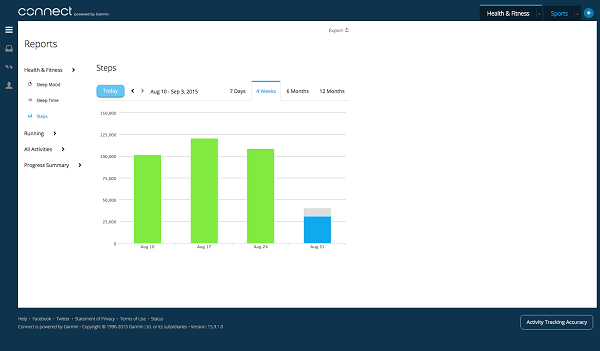
Filed Under: Headlines Tagged With: consoles, eBay offers more purchase options for Nintendo, new online store, Super Mario, video-games

Jawbone UP 3 Review – Taking Fitness UP A Notch

November 21, 2015 By Michael Turner 1 Comment

Jawbone UP 3 Header

Yesterday we took a good long look at what one of the first Jawbone fitness tracker had to offer. Things haven’t changed so much in terms of utility since the series began with the Jawbone UP and Jawbone UP24 iterations of the activity tracker wristband. However, the much newer Jawbone UP 3 has some considerable new upgrades that might just coax you into choosing it over its predecessor – despite being considerably more expensive.

Design-wise, the Jawbone bracelet has gone a really long way. Not only that it looks a lot more sleek and elegant than it used to, but the inside face of it features some new elements that we’ll touch down on some more, later. But it’s safe to say that the Jawbone series has been upgraded from simple wristbands to actually fashionable devices that can actually inspire wearable tech. However, the series still doesn’t feature a screen to display at least basic information; because some things never change, for some it will be good news to see that Jawbone hasn’t given up on its simplistic ideal. For others, the lack of a design that screams tech may prove to be a groan-inducing issue.

In comparison to the Jawbone UP 2 however, the Jawbone 3 comes with a major upgrade in terms of utility: heart rate tracking. And because the original generation of UP3 first came with a few issues that buyers reported with the clasp not holding, a second generation of the third Jawbone fitness tracker soon followed, improving on what it had lacked before.

Jawbone UP 3 Design

Jawbone UP 3 Simplistic Design

Put the Jawbone UP3 right next to the Jawbone UP24 that we have recently reviewed and things look drastically different. While the Jawbone wristband still doesn’t come visually close to wearable tech without displaying any sort of LED or LCD screen, it could very well be mistaken for a regular bracelet. The Jawbone UP wristband is still encased in medical-grade, hypoallergenic rubber. It looks and feels considerably more flexible than its predecessors did, despite still being limited on how far you can bend it. However, because the new design contains all of the underlying technology inside a central area of the wristband, the straps remain perfectly flexible. The top and bottom casings use anodized aluminum in their build.

Jawbone UP 3 Hardware

In terms of size and weight, the new Jawbone UP 3 doesn’t come in more than one model; instead, thanks to the adjustable clasp, there is only one size that will most likely fit anyone and feel as light and unobstructive as any of the previous Jawbone models – scoring only 29 grams in weight. The band can go from 140 mm diameter up to 190 mm. According to the principles that Jawbone has made all of their devices so far, the intention of a discreet device is still there, making this a very appealing gadget for some.

There are a lot more color variations than the company offered for previous models too: you can either pick one of the 6 regular colors – black twist, ruby cross, silver cross, sand twist, teal cross or indigo twist – or even aim for one of the two limited versions: black gold twist or twilight cross. Probably self-explanatory to a degree from the names of the models themselves, there are two patterns that you can get the UP 3 in: one is a padded 4-cross design on its front while the other depicts 4 lines snaking diagonally from bottom to top. Both are pretty fashionable and thought out in good taste.

Jawbone UP 3 Color Variants

There is one brand new detail that you will recognize if you’ve either used older Jawbone UP fitness trackers or read yesterday’s review of the UP24: the inside of the wristband features several metallic thumbs placed all around the inner circle. These are the sensors responsible for the Jawbone heart rate monitor – the way they work is a little different than the one you normally find on similar devices. The bioelectrical impedance technology packed in it – also one very similar to the one used to detect body fat levels – basically measures the resistance of body tissue to very small electric currents, something that is normally employed in EKG tests.

If worn correctly – and by that we mean that the 5 sensors should be in contact with your skin at all times for a good reading – the Jawbone UP 3 can do more than just measure your heart rate. Respiration rate, cardiovascular health levels, galvanic skin response and many others are just a few of how far the UP 3 can really go in terms of monitoring.

Jawbone UP 3 Heart Rate Sensors

One last thing that you will notice on the inside of the Jawbone UP3 is a very small magnetic surface that is used for charging the device via a USB charging cable that you can plug into your computer. Sadly the cable is abysmally small and may create a lot of discomfort when having to charge the wristband. Similarly to the Jawbone UP24, but considerably more stylish – there are LEDs hidden behind the rubber surface of the wristband’s front: this time around you can find 3 LED lights that display the current mode of operation – whether it’s sleep or activity. These LEDs only light up when you tap on the central part of the wristband several times so there isn’t a considerable amount of battery power used on a regular basis.

Jawbone UP 3 Magnetic Charger

Jawbone UP 3 Battery Charging

Last but not least, in terms of waterproofing it seems that the Jawbone UP 3 is faring a little better than its older brother, the UP24, but still not amazingly great. While it is not declared that it is splash proof, a more intense exposure to sources of water will prove highly detrimental to the hardware that the band has inside.

Jawbone UP 3 Features & The Jawbone App

Similarly to what its predecessors did in terms of fitness tracking, the UP 3 can do it just as well and most likely do it better too. It will keep track of how much and how often you move, walk or run, it will maintain a good reading of your sleeping patterns, give you a good idea of how your current lifestyle affects the health of your heart as well as give you an extensive list of ways to improve every of the above aspects of your life.

Considering the extremely minimal amount of interaction you can have with the band itself, most of the comprehensive information the Jawbone UP 3 will provide you will be done through the mobile application. Similarly to its brother, the Jawbone UP24 also requires an Android 4.4.3 device or beyond or at least an iPhone 4S or its successors in order for you to be able to download the free app. In addition to the iPhone, you can also get the app on the iPod Touch 5th Gen, as well as iPad 3rd Gen, iPad Mini or iPad Air.

Jawbone UP 3 Social and Stats

One of the best additions to the Jawbone devices that were adopted was Bluetooth connectivity. In the absence of a screen and direct interface that you can interact with to read your daily statistics, all of the control will reside in the mobile app. Thanks to Bluetooth connectivity, not only will it be done in a continuous, real time fashion, but it will also not require you to update your information manually – making it easier for you to keep track of your goals and make sure you reach them too.

Smart Coach

The one aspect that the Jawbone UP 3 fitness tracker once again stands out with is the “coach engine”, now known as Smart Coach. The most recent Jawbone update added some particularly clever features to it that give you an even more ample control of your progress. While the goal menu – titled “Today I Will” is pretty much the same as before, complimented by the Insight Engine that not only sends you notifications of your progress as well as give you constant personalized advice, there are some new things that we hadn’t seen before on the UP24.

The weight and mood tracking are sadly not something the UP 3 will detect by itself – having to either type them in manually or allow the Jawbone app to extract the information form compatible third party apps. However, the two are factors that are relevant to the app detecting patterns in your behavior that may interfere with your health on long term. Just like you could with the UP24, you can set various types of reminders via your smartphone that the app will handle by itself: you can either set it to notify you via light vibrations when you’ve sat down too long, or simply remind you that you still have 2 more miles to run in order to hit your daily goal.

One of the most important new features supported by the Jawbone UP 3 is the social aspect of it all. Now, you can create a team consisting of you and your friends and throw in the element of competition as motivation to perform better. Add the existence of leaderboards where you can view your friends’ scores, and the effect is multiplied. There is even a duel your friends to a common goal – over the length of 24 hours, 3 days or even 1 week. While competing with your friends can result in an overall improvement of your motivation, there is still a wide array of privacy settings that you can whip out to limit what you share.

Jawbone Heart Rate Monitor

When the original Jawbone UP 3 came out, its functionalities were limited. Following a Jawbone firmware update however, the device – surely, together with the app – became capable of monitoring both resting heart rate and passive heart rate. This means you will be able to monitor your heart activity as well as your cardiovascular levels continuously, giving you a better idea of this aspect of your health.

Jawbone UP 3 Application

However, there are two downsides to it: one is the fact that, naturally, you would have to wear the watch on at all times in order to get a good and relevant reading. Secondly, there is one occasional issue that may occur with the wristband not waking up automatically, forcing you to have to tap it to wake it up manually. Because of the way the algorithms work, setting it on the correct state is highly important. That is something that you may forget to do to begin with and is a relatively important part of getting accurate results.

Jawbone Sleep Tracking

The sleep tracking element of the Jawbone UP 3 hasn’t changed much since we’ve last seen it on the UP24. By using accelerometer-based sensors, it will detect when you have fallen asleep as well as when you wake up during the night. While the accelerometer is responsible for detection of the four stages of sleep (Wake, REM, Light and Deep), the bioimpendance sensors are responsible for keeping track of your respiration rate, heart rate, galvanic skin response as well as the temperature of your body.

Jawbone UP 3 Sleep Monitoring

Everything considered, you will not only be able to figure out why the quality of your sleep may be suffering as well as receive a helping hand in the shape of advice and encouragement on how to improve this aspect of your health.

Jawbone Fitness

The most basic feature that all fitness trackers have started off from was the simple count of daily steps and distance walked. Naturally, you are greeted to this part of the app from the main screen already, displaying a series of bars that tell you how much you have walked that day, followed by personal streaks and milestones. There are various parts of the app that will give you a better understanding of how to keep active as well as give you a nudge in the right direction.

Jawbone UP 3 Fitness Stats

The Jawbone 3.0 app makes it much easier to study the effectiveness of your workouts – whether we’re talking simply jogging or various more intense kind of sports. The app employs heavily detailed methods of calculating calories burned and displaying your own performance back to you – either directly or via personalized feedback.

Jawbone UP 3 App

The App employed to compliment the fitness tracker onto your mobile handheld device hasn’t changed a considerable amount since the Jawbone UP 3 release date. It has been getting a streak of constant improvements ever since it came into action, though most of its feature remain in place.

Tracking your diet works the same way as it did on the previous Jawbone devices: by scanning their bar codes, by browsing for them in the Jawbone database or entering them manually – via text or photo. If you put in the effort of keeping track of what you eat every time you do, you can be returned a comprehensive color code-based history of your dietary habits.

There is a wide variety of things you can track with the app and even more statistics you will receive as a result. It feels like the levels of optimization and personalization the app is capable of are highly extensive – giving you ample methods of calibrating the wristband to suit your typical habits. Considering the price to pay is the lack of a digital display to make it easier for you to track your stats on the go, I feel like the mobile application makes up for it tenfold.

Jawbone UP 3 Battery Life & Verdict

With the lack of said display, you can rest assured for the battery life on the Jawbone UP 3 is much longer than on competitors’ activity trackers. The 38 mAh battery packed inside the Jawbone tracker will normally last you about a week. While the short cable that is magnetically attached to the back of the band may feel very uncomfortable to hook up and keep level while charging, this won’t hinder you for too long as the charging process lasts very little – about 2 hours for a 0 to 100% charge.

Once again, I have to return to what we originally discussed about the Jawbone UP24. Whether this device is for you or not lies purely in what you expect from it. In terms of professional sports tracking, the Jawbone will not do – only being capable of a more casual approach to your daily activity, gathering information about your sleep patterns, your diet and other factors as well on top of the actual fitness statistics. Secondly, there’s also the issue of design: the Jawbone UP 3 makes a conscious effort to remain as subtle and discreet as possible – with no flashy design, no digital display or anything of the sorts, you wouldn’t be able to bask too much in the pride of wearable tech.

You can purchase the Jawbone UP 3 directly off of the manufacturer’s website for $179.99. the Limited Editions of the Jawbone activity tracker do require a preorder and they can take up to 3 weeks to be shipped to their destination.

 Image Source: 1, 2, 3, 4, 5, 6, 7, 8, 9, 10, 11

Filed Under: Headlines Tagged With: jawbone 3, jawbone up 3, jawbone up 3 activity tracker, jawbone up 3 fitness tracker, jawbone up 3 review, jawbone up3

Jawbone UP24 Review – First Steps of a Healthy Life

November 20, 2015 By Michael Turner Leave a Comment

Jawbone UP24 Header

Coming as an aid for your fitness life and more recently, the quality of some other aspects as well, the Jawbone UP24 is a particularly clever activity tracker wrist band. It comes as a new and upgraded version of the Jawbone UP – featuring upgrades such as Bluetooth Smart syncing with your Apple or Android smartphone.

While you could argue that anything regarding your work out sessions could very well be handled by your health app on your phone, you are only partly correct. Most phones, including the most recent ones and their respective operating systems do indeed count your steps and even your heart rate in some circumstances. But in reality, the data depicted by these devices is valid only for the times that you actually took your phone with you wherever you went.

In case of the Jawbone UP24, things are a bit different. Naturally, as long as you’ll have the wristband equipped as you go around your daily business, data will be recorded; so you can get a better and more accurate reading of your daily activity. Furthermore, the Jawbone UP24 is equipped to do more than just count steps: it can monitor your sleeping cycles and help you when it comes to your diet just as well. All in all, the Jawbone UP24 is up and out to help you gain a better understanding and control of your health.

The UP24 comes as an upgrade to the previous Jawbone UP, for a $29.99 increase in price. The perks that we found in the Jawbone UP vs Jawbone UP24 battle? Viewing data in real-time. If anything, the UP24 provides a more complete experience in comparison to its original variant. But before anything, let’s go through everything that the Jawbone UP24 has to offer, and which of its features are worth considering it for.

Jawbone UP24 Design

Aesthetically, the Jawbone UP24 can be considered one of the better options that you get in terms of fitness trackers. That highly depends on taste however: do you prefer your fitness tracker to take on the form of a watch or do you prefer a simple band that you can camouflage along with your other jewelry or clothing instead?

Jawbone UP24 Color Variants

While we can’t say that the UP24 is a fashion statement by itself, the reason it may win over other products of this class is its very simplistic and smooth design. With either a textured rubber exterior, featuring swirls or simple wavy lines or the more classic smooth design, the Jawbone UP24 is made to be simple and discreet. There are 3 variants when it comes to the Jawbone UP24 sizing you can choose from, and each comes with a different design. The smallest displays a line pattern that snakes from top to bottom, while the medium and large variants hold onto the plain and smooth design.

Thanks to the very light build, you won’t even notice it when you have the Jawbone UP24 equipped: the small version weighs 19 grams, while the medium is 22 and the largest is 23 grams respectively. That’s considerably lower than many of the competing gadgets – an explainable fact given that most other fitness trackers out there have opted for various types of on-band displays. This is one aspect that some people may not be particularly happy about – even on the latest iterations of the Jawbone wristbands, Jawbone UP3 or UP4, a screen has yet to be implemented, underlining the company’s attempt at keeping things as subtle as possible.

Jawbone UP24 Sizing

The Jawbone UP24 is made of medical-grade rubber which has been treated with a number of hypoallergenic substances in order to ensure nobody has any unfortunate side effects when starting to wear the band. However, even if all of the technology is neatly hidden inside the rubber exterior, this particular fitness tracker has not yet become water proof. This comes as a tremendous downside for some considering that you should always make a mental note of taking it off because going into the pool or even the shower. Furthermore, if by any unfortunate incident it happens to rain outside while you’re on your morning jog, you should be wary.

Part of the reason the band has yet to be made waterproof is the end of the wristband that hides the 2.5 mm charging connector underneath a metallic door. That, along with the other end of the fitness tracker that hides the syncing button, are not made to resist to fluids entering beneath them yet. And that can surely mess up with the system just like it would with any other electronic device.

Jawbone UP24 Charging pins

In the absence of any sort of display that would give you the chance to view at least the status of your wristband, most of the controls over the wristband will be done via its mobile app. There are, however, two green LEDs hidden behind the external rubber layer that will light up when you press the sync button – a moon and a flower for off and on respectively.

Jawbone UP24 LEDs

Jawbone UP24 LED

Jawbone UP24 Features & Utility

So what are the most basic functions of the Jawbone UP24? Besides the actual activity monitor that is responsible for tracking daily physical activity, the UP24 makes a point of giving you a more ample type of control over the health aspects of your life. Allegedly a tool that was made to give you a method of starting to take ownership of your life and not one that professionals and most advanced fitness fans will opt for, the Jawbone UP24 now turns its attention to the other factors of health too. You can use it, surely along with the application that it comes with, to track the intake of calories you score on a daily basis as well as get a good overview of how well you’re sleeping. Thanks to its extensive app, you can set yourself goals and targets that you can slowly make your way into.

Jawbone UP24 Features

The way that the data is recorded is via a tri-axis accelerometer – the same technology that is adopted in many of the other types of fitness trackers. Basically, what it does it measure acceleration in a tri-dimensional space, being able to differentiate between the moments when for example you’re in your car and when you’re walking or running. The same kind of sensor is used to track your sleep too – but that part may prove to be a little less accurate than you would expect. While this is a fact that is present in all kinds of fitness trackers, you may find that your Jawbone UP24 may not always detect the correct state you are in – whether you’re asleep or not.

Once the motion sensor detects you’re asleep, it can do as much as map an entire diagram of your sleeping cycles – however, only based on predefined algorithms, and not a direct method of measuring it. One previous that has, to some degree, been fixed was the fact that you had to manually set your UP24 on sleep mode when you went to bed and, similarly, take it out once you awoke in order to get a good reading of your sleep cycles. With the Jawbone UP24, you get the Sleep Recovery Mode which acts as sort of a backup for the times when you forget to sync your wristband with the mobile app in order to track data.

One of the greatest parts of what the Jawbone UP24 and the upgrades it brings over the classic UP is that it allows all the data to be exchanged with the host device via Bluetooth Smart syncing. By not having to use either your Internet traffic or, even worse, a cable to sync your data regularly and manually, the app will always be up to date with your daily progress thanks to the real-time updating of the information received.

Jawbone UP24 App

Not so much regarding the device but the app that it comes with, but one of the most iconic features of the Jawbone UP24 is the Insight engine – something that you will get all the chances of experiencing via your mobile phone. What this particular aspect of the app does is analyze your personal data, tracks and recordings in order to offer you a list of recommendations based on your particular habits and wishes. These recommendations range from more default or generic-oriented kind of knowledge towards actual methods of improving your health and life through various things the app picks up from your usual eating behaviors or sleeping patterns.

Another thing that the developers put a high degree of thinking in in order to maximize your experience is not only bringing its own input of motivation for the wearer as well as giving him or her the chance of phrasing their own wishes and expectations. Things such as amount of time you sleep, the time you go to bed, the amount of water you drink or how long you spend doing exercise are all valid goals you can set yourself via the app, together with settings alarms and notifications to give you a nudge to do so when the time comes.

All in all, the UP24 Jawbone makes a great effort to not only convince you to pick up good habits, but hold onto them as well and discipline you in order to develop a proactive type of thinking in this regard. As an extra method of providing you continuous feedback regarding your performance and progress, you can set up your account to also send you a weekly report of your step count and status of your sleep. And while some may not find this small detail as useful, you can also set the wrist band to send you nudges by vibrating when you haven’t been moving for long – for example when working on the computer, thus prompting and reminding you to take a 5 minute break every hour or so and stand up.

Jawbone UP24 App

Every single ounce of information and control you will get over this fitness wristband can be seen and managed through the Jawbone UP24 Android or iOS application. That means that any device running anything beyond Android 4.3 Jelly Bean as well as any device that is iPhone 4S and above (including iPads and iPods) will be compatible with the Jawbone 3.0 app. One downside is that there is no way for you to install the application on your computer for example. The only available download is an updater that is meant to upgrade the wristband’s firmware when connected to the computer via USB.

Jawbone UP24 Main Screen

Setting up your app is relatively easy. Once you have set up an account via e-mail and turned Bluetooth on for your phone, you can sync the two devices. There is one detail that some may find a bit of a nuisance: the way the Jawbone UP24 hard reset is done doesn’t allow you to start the data collection from scratch, and sadly if you want to start over completely you will require a new account – which in turn means you will need to use another e-mail too.

As soon as you turn the app on, you are prompted to press the sync button on the band once you’ve enabled Bluetooth. Once the two devices are connected, you will be presented with the main screen of the app. Here you will be able to find the step count and sleeping bars, followed by personal records that you’ve acquired up to that moment. On the left side you can scroll down through an entire menu of options starting with profile and ending with settings. Here is where you will be able to view your overall statistics, set up alerts, goals and trends.

Jawbone UP24 App Overview

It’s great that the application actually allows you to import information from a large number of other health-centric applications, thus providing you with a central hub for all of your information that you can afterwards observe. Even Jawbone itself has started releasing auxiliary applications that you can track other aspects of your life with such as caffeine intake.

The way the app keeps track of your calories intake is not automatic and instead has you basically keep a log of the things you consume, only to have the app provide you with the information if it has it recorded; otherwise, it will allow you to set it up manually. You can upload information regarding your diet by either scanning a product, typing it its name, uploading an image of it or looking through the database that is already built into the app.

Jawbone UP24 App

Jawbone 24UP Battery & Verdict

The first thing that came to mind when I first heard of the Jawbone UP24 was, for some reason, the iWatch that also attempted integrating features of a fitness tracker in its operating system. Then I recalled the disappointing battery life on it and for a second considered that the UP24 might have the same issue.

Thankfully, it’s nowhere near the battery life of a smart watch. Mostly because it has no display to speak of and minimal power consumption because of the Bluetooth Connectivity over other means, you will find yours lasting you from a few days to a week. Only powered by a 32 mAh Lithium-Ion Polymer battery hidden inside, not only that charging it won’t be something that you’ll keep having to remind yourself on a regular basis, but charging generally shouldn’t take longer than an hour and a half, meaning you can very well do it while you’re taking a bath and getting ready for bed or watching your favorite show.

The Jawbone UP24 is the kind of fitness tracker that, as we have mentioned before, is more so aimed at people who are just beginning to brush up on their lifestyles from a health perspective. By no means insufficient in terms of data provided and assistance with keeping healthy, but this particular fitness wristband falls behind in the Jawbone UP24 vs Fitbit Flex battle, or when put up against the more advanced, professional Garmin Vivoactive. It’s not a device meant for an intensive sports life, but instead attempts to help you keep up with your needs for a healthy lifestyle when you live a busy schedule.

Furthermore, in comparison to other fitness trackers, you will find that the Jawbone UP24 is more on the affordable end of the deal. While professional sports wearables can take you as far as $350 depending on their capabilities and technology packed, the UP24 will only go as far as $129.99.

So as a final note, if you feel that you don’t need an advanced piece of gadgetry just to keep track of what you eat, how well you sleep and how much you move on a daily basis, there is literally no reason to go for a bigger alternative and should instead give the Jawbone 24UP a glance. If that is not the case, however, you may want to look towards something else – and prepare to whip out a few extra bucks for it too of course.

Image Source: 1, 2, 3, 4, 5, 6, 7, 8, 9, 10, 11

Filed Under: Headlines Tagged With: Fitness Tracker, jawbone activity tracker, jawbone fitness tracker, jawbone up24, jawbone up24 review

  • « Previous Page
  • 1
  • …
  • 7
  • 8
  • 9
  • 10
  • 11
  • …
  • 58
  • Next Page »

Subscribe to Blog via Email

Enter your email address to subscribe to this blog and receive notifications of new posts by email.

Join 11 other subscribers

Recent Articles

police handcuffs man

German Man Probed In Poisoning That Killed 21 Employees Since 2000

June 29, 2018 By Kenneth Scott Leave a Comment

Chicken wings bar

Intoxicated South Carolina Man Punches Waitress Who Refused to Serve Him Alcohol

June 29, 2018 By Karen Jackson Leave a Comment

gaming

New Zealand gamer Who Flew Halfway Across The World for Virginia Teen Gets Shots By Her Mother

June 28, 2018 By Cristopher Hall Leave a Comment

party

Former Virginia Tech Freshman Sentenced to 50 Years in Prison for Stabbing a Girl to Death

June 28, 2018 By Roxanne Briean Leave a Comment

bonfire

British Couple Sentenced to Life in Prison for Torturing and Murdering French Nanny

June 27, 2018 By Deborah Campbell Leave a Comment

pay phone

Texas Father of Girl Disappeared in the 80s Ignored by Authorities

June 26, 2018 By Cristopher Hall Leave a Comment

bottled water

San Francisco Woman Threatened to Call Police on Girl Who Sold Ice Water for Disneyland Trip

June 25, 2018 By Roxanne Briean Leave a Comment

Maplewood Park

Missouri Man Robbed by Date and Accomplice in Park

June 22, 2018 By Nancy Young Leave a Comment

coding

New York Man Sentenced in Cyberstalking Former Girlfriend, Mailing Drugs to Her Dorm

June 22, 2018 By Deborah Campbell Leave a Comment

headphones

Bose Poised to Launch Sleepbuds, In-Ear Headphones That Help You Sleep

June 21, 2018 By Nancy Young Leave a Comment

Police light

Intoxicated Female Driver in Custody for Pulling Arresting Officer by the Hair

June 21, 2018 By Kenneth Scott Leave a Comment

kitchen

Restaurant Manager Arrested and Charged in Shooting Death of Co-Worker over Negative Yelp Reviews

June 20, 2018 By Karen Jackson Leave a Comment

plastic container

Pennsylvania Couple Charged in Violent Death of Infant Discovered Buried in Cat Litter

June 19, 2018 By Cristopher Hall Leave a Comment

tailpipe

Minnesota Teen Gets Head Stuck In Oversized Tailpipe Winstock Music Festival

June 18, 2018 By Karen Jackson Leave a Comment

Pages

  • About Us
  • Contact us
  • Privacy Policy
  • Privacy Policy GDPR
  • Staff
  • Terms and Conditions

Recent Posts

  • German Man Probed In Poisoning That Killed 21 Employees Since 2000 June 29, 2018
  • Intoxicated South Carolina Man Punches Waitress Who Refused to Serve Him Alcohol June 29, 2018
  • New Zealand gamer Who Flew Halfway Across The World for Virginia Teen Gets Shots By Her Mother June 28, 2018
  • Former Virginia Tech Freshman Sentenced to 50 Years in Prison for Stabbing a Girl to Death June 28, 2018
  • British Couple Sentenced to Life in Prison for Torturing and Murdering French Nanny June 27, 2018
  • Texas Father of Girl Disappeared in the 80s Ignored by Authorities June 26, 2018
  • San Francisco Woman Threatened to Call Police on Girl Who Sold Ice Water for Disneyland Trip June 25, 2018

Categories

  • Business
  • Entertainment
  • Finance
  • Headlines
  • Health
  • Life
  • Nature
  • Science
  • Sports
  • Tech & Science
  • Travel
  • Uncategorized
  • United States
  • World

Copyright © 2026 ArgyllFreePress.com
About · Privacy Policy · Terms of Use · Contact