Argyll Free Press

Growing News Network

Monday, November 23, 2026
Log in
  • Business
  • Finance
  • Sports
  • Tech & Science
    • HP Envy 4500 Review
    • LG Optimus 170 Review
    • iPod Touch 6th Generation Review
    • HTC One M8 Accessories Set-up
    • Surrealist Games You Must Play
    • Hisense Sero 8 Review
    • Dell Latitude e7440 Review
    • HP Laserjet 1536dnf mfp Review
    • Garmin Fenix 2 Review
    • Skype Vs Viber
    • Best Video Conferencing Software
    • Sony mdr 1r Headphones Review
    • Canon Rebel t3i Review
    • Sennheiser Momentum 2-0 Review
  • Travel
  • Headlines
  • Health
  • United States

Search Results for: cloud war

Nexus 6 Features Review: Design, Camera, Battery: Google’s Best Android Phone

November 20, 2014 By Roxanne Briean 1 Comment

The wait is finally over. As we are nearing the end of a year that has been particularly eventful in the area of mobile device hypes, Android lovers can rejoice with one of the most awaited launches – the powerhouse that is Google Nexus 6.

As it is no surprise to the well-versed of the mobile world, the newest Nexus launch – in essence Moto X’s bigger, sleeker brother – is the first one to sport the latest Android 5.0 Lollipop operating system and has officially leapt out of the trend set by the previous Nexus devices.

It’s huge, it’s powerful, and the first smart device pertaining to the Nexus family to have also been built to be water resistant, which will be a quiet relief for most of us. Take note however, that “water resistant” is not the same as “waterproof”, so refraining from taking your phone for a swim might be a good call.

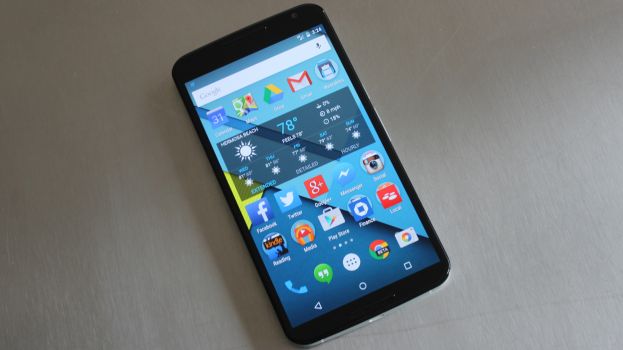
The Qualcomm Snapdragon 2.7 GHz Quad-Core processor and 3 gigabytes of RAM are beautifully contained in a 0.4 inch slim device with a shameless display of no less than 6 inches; well, alright, 5.96”. It comes in either the 32 GB or 64 GB versions, sadly with no possibility of adding any memory card to it.
nexus-6-review-phone-623-80

This Midnight Blue or Cloud White wonder however, surprises us with the price that it has been listed at: $649 for the 32 GB version, or alternatively $699 for the 64 GB, undoubtedly a courageous jump up from its predecessor’s price on launch ($349). The ambitious design definitely takes the Nexus 6 out of the modest class of mobile devices and sets it to battle the biggest names in the industry. Sure, it’s got a lot to say for itself, no doubt, but let’s see if the spiked up price can justify itself through the features it provides.

Full Specs:

  • CPU: 2.7GHz Qualcomm® Snapdragon™ 805 with quad-core CPU (APQ 8084-AB), Adreno 420 GPU
  • Memory (RAM): 3 GB
  • Storage (ROM): 32 GB & 64 GB
  • Dimensions: Height: 159.3mm ( 6.27 inches); Width: 83.0 mm ( 3.15 inches); Curve: 3.8-10.1mm (0.15-0.39 inches)
  • Weight: 184 grams (6.49 ounces)
  • Display: 5.96” AMOLED, 1440×2560, 16:9 aspect ratio, 493 ppi, Corning® Gorilla Glass® 3
  • Battery: 3220 mAh; Mixed usage up to 24 hours; Qi Wireless charging support
  • Water Resistant: Yes
  • Rear Camera: 13 MP IMX 214 Image Sensor, f/2.0 aperture, Optical Image Stabilization, Ring flash with dual LEDs, 4K UHD video capture 2160p (4K) UHD, 1080p HD and 720p HD video capture modes (30fps) 4X digital zoom, HDR+, Panorama, PhotoSphere and Lens Blur​
  • Front Camera: 2 MP
  • SIM Card: Nano-SIM
  • Connectivity: Micro USB, 3.5mm headset jack; Bluetooth version 4.1 LE; Wi-Fi 802.11ac 2×2 (MIMO)
  • Speakers: Dual Front Facing Stereo Speakers
  • Video Capture: 1080p HD and 2160p Ultra HD Video, 30fps (MPEG4, H.264)
  • NFC: Yes

Nexus 6 Design

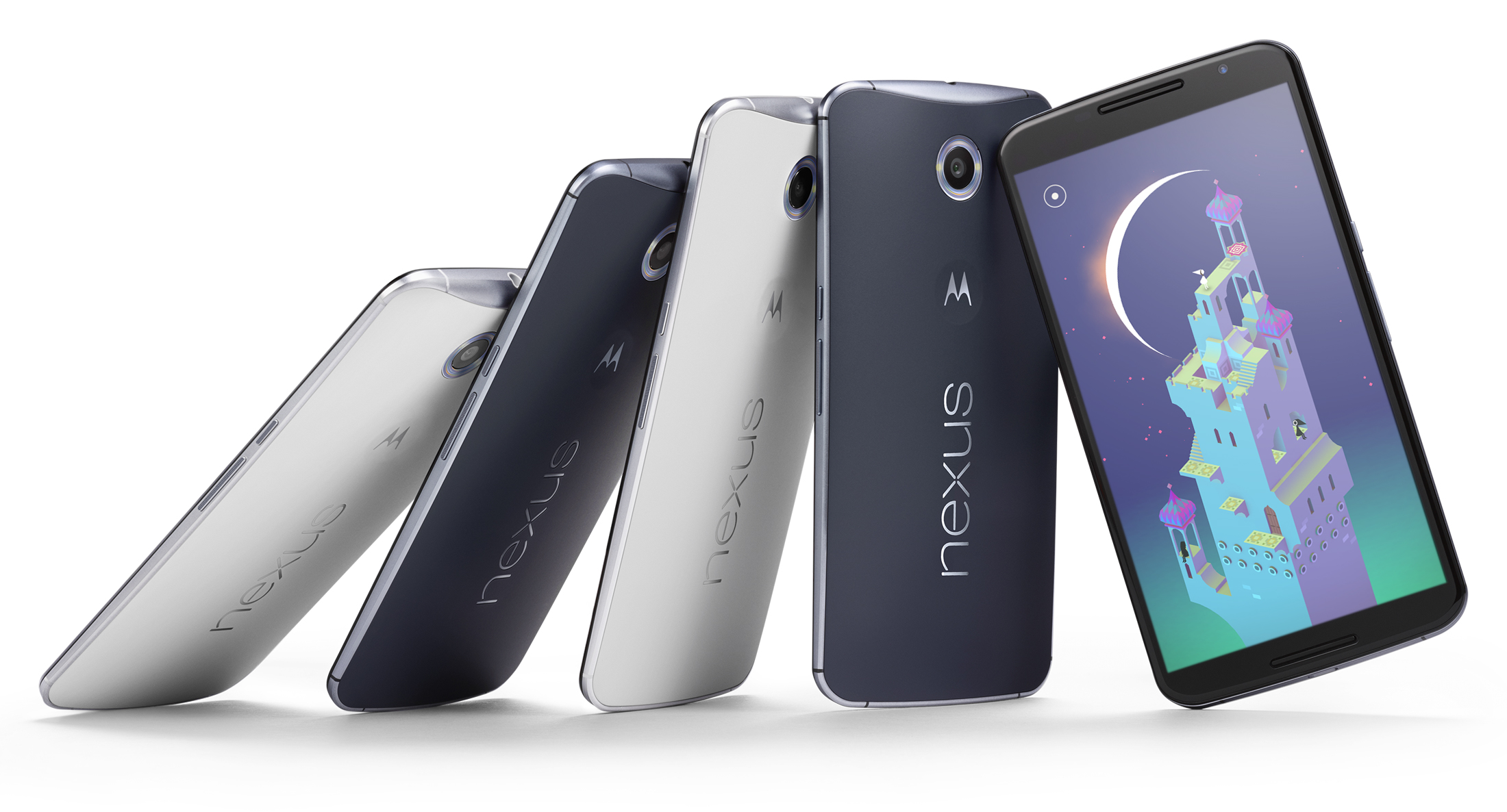
The shockingly huge device stands out as soon as it is taken out of the box. As mentioned before, the Nexus 6 will immediately remind you of Moto X, both in shape and looks. The edge-to-edge display presents a glass insert molding with 2.5D curved glass – the best choice for all of your swiping needs and a perfect fit represented through slightly rounded glass edges around the device screen, perfectly integrating into the side metal frame.

The hard plastic back of the Nexus 6 adopts the familiar Moto class curve, making the phone comfortable to hold and fit in the palm of your hand. Surely, the mere size of the phone might make handling it two-handed a more effective way of doing it, but the materials used for the outer layer of the phone prevent slipping and ensure minimal smudging.
n6-moreeverything-1600

Outside of that, the design of the phone is simple and effective: the volume and power buttons rest on the right-hand side of the edge, the latter presenting a textured surface to easily differentiate itself from the former and prevent slipping when keeping it held down.

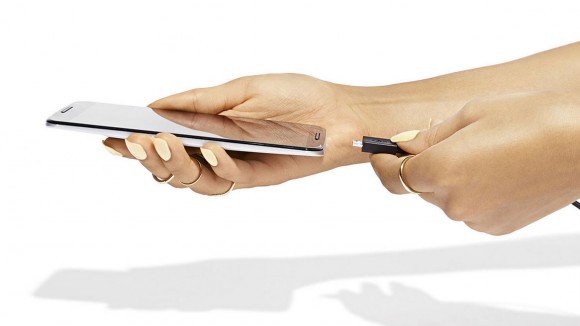
The top of the phone is home to the headphone jack, comfortably placed for your hands-free experience and the insert slot of the nano-SIM. The charging socket is a comfortable micro-USB, further supporting the ultra-thin model design of the device.

Nexus 6 Display

What is a 6-inch display without more impressive numbers to match? The Nexus 6 surely has a few things to show off with. With a more-than-decent 493 pixels per inch and 2560 x 1440 resolution, it matches most high-end LG and Samsung devices, permitting you to enjoy games and videos alike in vivid colors and 1080p HD quality.

We will admit that we’ve never been particular fans of ‘phablets’, because they are difficult to use with one hand. However, the multitude of features packed in the Nexus 6 justify the size of the device. The multi-touch display fares exceptionally well even in sunlight and doesn’t fade or blur out to the eye when the device is angled.

As a combination of utility and efficient power usage, the display does light up on partial brightness when the phone is picked up and is protected with Corning Gorilla Glass 3, making it resistant to damage without having to trade on thinness.

Is the Nexus 6 too Large?

Some will say yes, while others will answer no. That’s because it ultimately depends on personal preference. If you’ve never held a smart-phone in your life you will become accustomed to the Nexus 6 with great difficulty. On the other hand, phablet enthusiasts will quickly adjust to the Nexus 6.

Also, it seems that huge devices are the latest trend nowadays (see Apple’s iPhone 6 models and Samsung’s Note line-up). We are happy that the selection extends to the Nexus 6 as well.

Camera

The rear camera is respecting itself with no less than 13 megapixels and up to a resolution of 4128 x 3096 pixels and a circular dual-LED flash meant to light up the entire area photographed uniformly. The upgrade from previous Nexus models is easily tangible in quality and a powerful zoom that will capture details with surprising accuracy and a keen fluency in video recording at the same time, at a 2160p quality with 30 frames per second.

The application accompanying the camera does not present any new, state-of-the-art particularities but will provide sufficient editing tools for a regular mobile device, a strong panorama tool and HDR capabilities.
Nexus6-Press-03-580-90

The front camera does limit itself to 1080p quality and 2 megapixels, but in terms of its regular usage, it’s still one of the strongest out there and will provide excellent video conferences, albeit grainier and more darkened when used in low lit environments.

Both cameras do however present the optical image stabilization technology and with the help of plenty editing tools available on the App Store, your Nexus 6 can easily replace a regular camera in most situations.

Nexus 6 Performance

The powerful Quad-core 2.7 GHz Snapdragon processor and 3 gigs of RAM memory, along with the dedicated Adreno 420 GPU certainly do the work and bring the device closely to the specifications of a tablet.

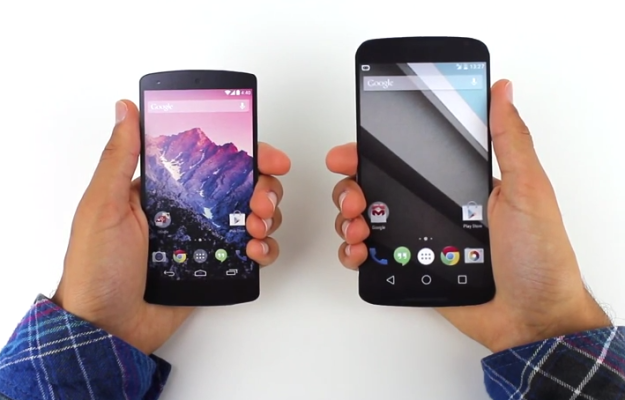
Unmistakably, the effort that Motorola put into this particular device brings it up to par with the most powerful mobile phones on the market right now – more specifically the Samsung Galaxy Note 4, iPhone 6 Plus and Samsung Galaxy S5 – ranking second in the Geekbench 3 benchmarking test with a score that once again nearly places it in tablet territory.
screen-shot-2014-10-03-at-12-40-21-pm

Navigation through the system is incredibly fluid, Android v5.0 Lollipop also helping out in the matter. Nexus 6 can easily run multiple applications at the same time with minimal, if any slowdown of the system, performance marginally suffering when the device is either very low on battery or nearing a full HDD – which after all is understandable for every single gadget and piece of technology out there in 2014, not just mobile devices.

The multitasking capability of the phone is made easier to explore through the familiar Recent Applications functionality and does not seem to hiccup even when put to a stress test.

In terms of connectivity, Nexus 6 has been given everything you would ever expect from a new-generation mobile device: 4G capability – including the long-term evolution (LTE) technology – dual-band Wi-Fi, Hotspot capability, GPS, Bluetooth and even the practical and on-the-go near field communication feature; the receivers are solid and thus interference reduced to a minimum.

Lastly, the device is equipped with sensors such as accelerometer, gyro, proximity, compass and a barometer to enhance the mobile experience wherever you are.

Nexus 6 Interface

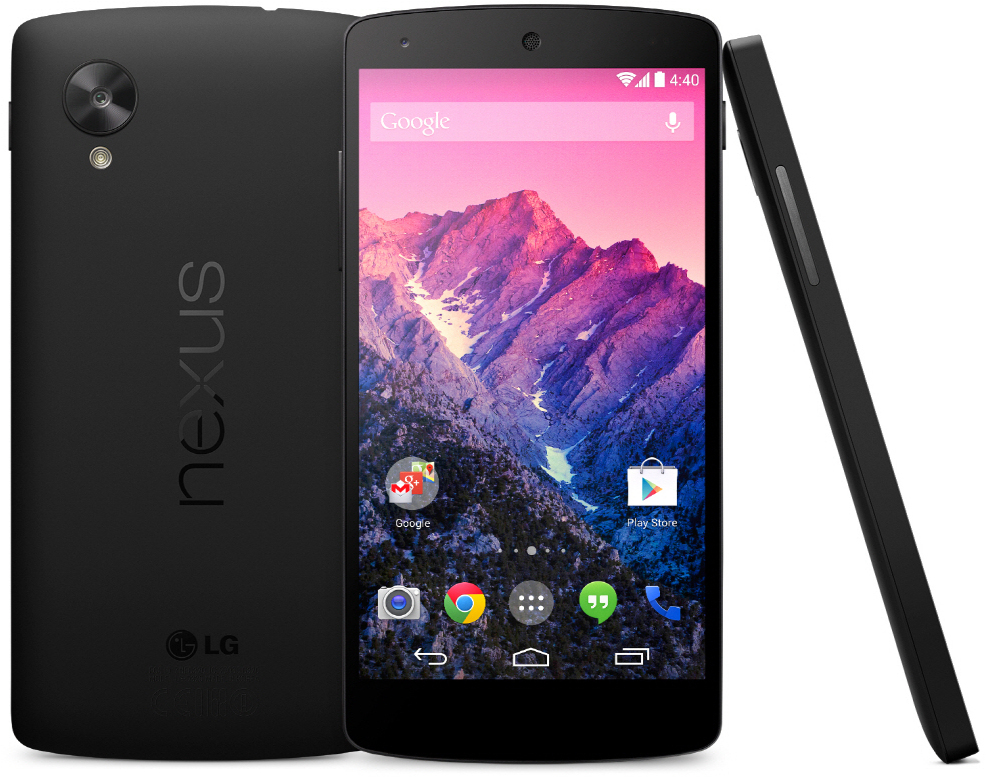
With the addition of the Android v5.0 Lollipop OS, the user interface of the Nexus 6 has kept its basic functionalities that we are all accustomed to, while giving the system a refreshed, less loaded feel. The new look sported by the latest Nexus prodigy goes under the name of Material Design, with a few modifications that we greatly enjoyed.

The interface has been slightly altered to give it a more tridimensional look, featuring shadows and ambient lights, while maintaining a flat design look for the menu itself. The functionality of the lock screen has been revamped, now presenting a drop-down like menu for the notifications, replacing the hidden swipe-down function of older Android OS versions, thus making important information easily accessible without even having to unlock your phone.
google-nexus-5-by-lg

The new notification system is highly customizable in regards to the type of alerts you want your phone to prioritize, means of notifying and even muting said notifications for pre-determined periods of time.

Quick Settings are easily accessible by typing the keyword of what you are looking for, and many other clumps of information have been finally made easier to view rather than being forced to navigate through multiple sub-menus to find out your current memory or network usage.

Certainly, this is mostly on behalf of the new operating system that comes with the device, but the specs of the device run in perfect tandem and are subject to improvements and optimizations via the constant updates that Google does not hesitate to deliver. They are onto a new approach to interacting with your mobile device and Nexus 6 is a living proof.

Nexus 6 Battery

Nexus 6 is equipped with a 3220 mAh battery that stands out through overall battery life but still will encounter medium amount of time you can spend happily tapping away at your mobile phone before you will have to look for a power socket. The battery is however sealed away in the phone and cannot be removed and/or changed, unlike almost all of the Android predecessors. The operating system has put emphasis on battery optimization itself and has so far received highly positive feedback.

We kept the best for the last. Qualcomm has come up with a very clever piece of technology, which luckily is included in this device. They call it QuickCharge 2.0 and basically allow you to ensure at least 6 hours of battery life in only 15 minutes of charging using the special adaptor.

This charger comes included in the package so no additional expenses for this nifty gadget are even necessary. So if you expect yourself to be heavily using your phone, keeping this portable charger with you can turn out to be quite the life saver.

Nexus 6 Verdict

Though it was originally rumored that the Nexus lineage was going to come to an end after the Nexus 5 launch, reality turned out to be quite the opposite, Motorola surprising us with what turned out to be a top competitor for high-end devices on the market right now.

The price of this miracle worker may be worrisome for some, but in the end it still falls short in comparison to other devices of same statistics and capability. For those who are worried about device size, Google promises that one week with the 5.96-inch display will help users adjust and never want to go back to a smaller device. Ultimately, it falls down to personal preference and expectations from the phone that will follow you around for a while.

nexus-6-review-phone-623-80

In our opinion, everything about the Nexus 6 is better than previous models. Its predecessors, the Nexus 5 and 4, were designed with usability and affordability in mind. Motorola decided to step up its game and provide with a smart-phone that could easily compete with other high-end models on the market. It succeeded beautifully.

So as a last note, here’s a list of pros and cons we could gather after a close look over everything that the Nexus 6 has to offer.

Pros:

  • Sleek design and maneuverability;
  • High-end hardware specifications;
  • Excellent display for media and applications;
  • Fast-charging technology;
  • Superior camera capabilities;
  • The first host of the new and improved Android v5.0 Lollipop OS

Cons:

  • The price range that it falls into is not as accessible as Nexus fans are accustomed to;
  • The size can prove to be a disadvantage as well;
  • Changes to functionalities might prove to be harder to deal with in the beginning;
  • Battery life is better than predecessors but still average.

This concludes our review of the Nexus 6. Do you own such a device? Have you had the chance to play around with it? We would love to hear your impressions about it in the comment box below.
Filed Under: Tech & Science Tagged With: Google, Google Nexus 6, Nexus 6, Nexus 6 review, Review

iOS 8.1 Update on iPad Mini 2 Performance: To Install or not to Install?

November 14, 2014 By Roxanne Briean Leave a Comment

Statistics show that only 56% of iPad and iPhone users have upgraded their devices to the iOS 8 operating system. This news is extremely confounding, especially considering that Apple has rolled out the iOS 8.1 version on October 20. iOS 8.1 contains several stability improvements and several fixes, but owners are worried that the new and ‘improved’ operating system will not work as well as the iOS7.

As a matter of fact, several reviews say that iOS8 and iOS 8.1 are disappointing compared to the earlier versions of the operating system.

iOS 8.1 on iPad Mini

Over 40% of devices remain on iOS7, which is considered by many the best operating system for smart-phones. iPhone owners probably feel that the iOS 8.0.1 caused more problems than it solved. Among other issues, it seems that phones lost mobile signals and fingerprint Touch ID scanner was unusable. For several weeks, developers and engineers worked on the system to remove bugs and fix problems. In mid-October, Apple finally announced the release of iOS 8.1, which managed to remove some of the biggest problems, but failed to get rid of them all.

“We apologize for inconveniencing you if you were affected by the bug in iOS 8.0.1″ – Apple on its support page

Although the company has had a bad start with its latest operating system and customers are still skeptical about the 8.1 version, reports show that the latest version has not had any severe problems yet. Apple believes that users can rest easy and ‘set about moving forward’.

We were extremely interested in testing the latest operating system for Apple on the iPad mini 2. After having used iOS 8.1 for a couple of weeks we are ready to give you a clear answers on an extremely important question: Is it worth upgrading the iPad mini 2 to iOS 8.1? 

Countless of iPad and iPhone users are conflicted. They are still unsure whether or not they wish to upgrade their devices to the latest operating system. If you waited until now to decide, you probably made the right choice. In general iOS problems are resolved two to four weeks after initial release. In other words, even if you are experiencing small issues with your devices, they will be quickly resolved.

On the other hand, if you have yet to upgrade your iPad Mini 2 to the latest operating system, we hope that the following review will help you decide. Here’s a quick look at all the features and functions available on the iPad mini 2 with iOS 8.2.

iOS 8.1 Initial Review & Disclaimer

iOS 8.1 on iPad Mini

We have spent a generous amount of time testing and reviewing Apple’s latest operating system. Until now it has performed decently. However, we wish to note that behavior of devices and features may vary from person to person according to device mileage and model. In addition to this, each gadget is unique if you take into consideration apps installed, usage of internet, handling etc. You should definitely take into consideration these aspects before reaching a final decision. However, if you decide to upgrade to iOS 8.1, there are a few things you should do before you begin:

  • Back-up your data: It is always a good idea to backup data from your devices. This is not because an operating system is flawed, simply because you don’t know what will happen during installation. Store all your photos and data on a cloud platform or laptop.
  • Make sure your device is compatible: Only several devices can be upgraded to iOS 8.1. They include iPhone 4S and above, iPad Mini and above, iPod Touch (fifth generation), iPad 2 and above.
  • Upgrade with iTunes: The best way to update is by using iTunes. This way you will dramatically reduce the amount of storage required for update. Before you begin installation make sure that you have the latest version of iTunes installed.

Why You Should Update to iOS 8.1 

iOS 8.1 on iPad Mini

Apple’s iOS 8.1 may not be a perfect operating system right now, but it’s better to update than others. Assuming that you have already updated to iOS8.0.1 or iOS 8.0.2, you should definitely upgrade to version 8.1 to eradicate bugs.

If you decided to stick with iOS7, it is still a good idea to upgrade, otherwise you will remain stuck on old features. It is always a good idea to update your device in order to be fully protected from malware and security holes. The return of Camera roll and Apple Pay may also sway you into updating to the 8.1 version.

Review of iOS 8.1 on iPad Mini 2

There are a few key aspects that you should take into consideration when evaluating the performance of an operating system. We are referring to connectivity Wi-fi & Bluetooth, bugs & issues, battery life, overall speed and performance of applications. Let’s discuss each aspect separately.

Battery Life of iPad Mini 2 with iOS 8.1 

We’ve been using two iPad Mini 2 tablets in parallel. One of them has iOS 7.1.2 and the other uses iOS 8.1. There are no notable differences between the performance of these two devices. In general, you will get a full day of battery if you are switching between Wi-Fi and LTE. Wi-Fi is set as the primary connection, because LTE has a habit of sucking battery life dry on most devices.

There aren’t any massive battery changes between updates. Mobile Apple devices have always performed well. If your iPad Mini 2 remains in standby for several hours, it will not lose any battery at all. All in all, iOS updates were never meant to solve any battery issues of iPhones and iPads. In general, battery problems are associated with applications and opened tasks. As long as you don’t have too many apps running you will have no problems with battery life.

Bugs and Issues of the iPad Mini 2 with iOS 8.1 

iPhone-6-no-service-iOS-8.0.1

It is true that the iOS 8.0.1 and 8.0.2 updates had severe problems. The good news is that most of them have been resolved with the 8.1 update. We haven’t experienced any issues while using the iPad Mini 2. In general, glitches and bugs occur on iPhones. The keyboard has never disappeared and the screen was never stuck in landscape mode, as reported on several websites.

However, this doesn’t mean that problems won’t appear. As we already mentioned, each device is different. Some bugs remain dormant and emerge when users least expect them. If anything happens you should definitely consult Apple’s bug fix page for iOS 8.1.

App Performance on iPad Mini 2 with iOS 8.1 

Too many apps may significantly shorten you battery life. At the same time, bad apps may negatively impact your experience with iOS 8.1. As we already mentioned, the new operating system bugs have been reported, mostly, on iPhone 5 and iPhone 6. iPads generally perform well with iOS 8.0.1 and iOS 8.1. Reviewers have reported that they have had very solid experiences with the new OS on their iPads.

For example, Facebook and Netflix have always been problematic apps on iPhone. The latest Apple upgrade is testament to the advancements made by developers. We frequently use Twitter, Facebook, Netflix, Instagram, Chrome, Youtube and Google Hangouts on our iPad mini 2 devices and we have never encounters issues.

The key is to make sure that you have automatic updates turned on. If you have just upgraded to iOS 8.1 you definitely have to update your apps as well, because they will probably experience compatibility issues. Once you have updated your apps, you shouldn’t encounter any more problems.

Connectivity on iPad Mini 2 with iOS 8.1 

There have been several complaints regarding Wi-Fi and Bluetooth performance across iOS 8 devices. While they may have been true, the vast majority of them have been resolved in 8.1. Developers were extra careful to solve any connectivity issues because they know important it is for Apple users to have access to the internet.

LTE connectivity works beautifully on iPad Mini 2: pages load quickly and signal can be found in the unlikeliest of places. As far as Wi-Fi is concerned, the connection remains fast and stable. In some instances, Bluetooth behaved bizarrely on iOS 8.0.2, but this was usually because devices are incompatible. Regardless of the reason for bugs, they have been resolved in iOS 8.1.

Speed & Performance on iPad Mini 2 with iOS 8.1 

ipad_mini_vs_airWhile the new operating system operates well on the iPad Mini 2, we noticed several issues on its larger sibling, the iPad air. In several instances, the iPad air performed sluggishly, while the iPad mini 2’s transitions were fast and fluid. Nevertheless, lag issues may not have anything to do with the operating system. Overall performance is satisfactory. All in all, performance on the iOS 8.1 on iPad Mini 2 is consistent with all the other operating systems.

Interesting Features on iOS 8.1

Now that we’ve covered the performance features of iOS 8.1 on iPad Mini 2, let’s take a look at several features that you should definitely take into account before upgrading.

Without a doubt the best news is the return of Photo Roll. Photo Roll is one of the operating system’s most used features. It was removed in 8.0, and re-implemented in iOS 8.1. Thank god!

Considering that there is a mobile payment war going on between retailing companies right now (companies are trying to decide if bar-code payments or mobile payment systems such asApple pay will pave the way for electronic purchases), we will assume that you have probably already heard about Apple Pay. Apple Pay is currently not available on iPad Mini but we have reasons to believe that it will be implemented soon.

Another feature that you might enjoy is the iCloud Photo Library as well as the ability to send and receive SMS/MMS messages from the iPad and Mac.

Wrapping Up…

We must admit that the new operating system has experienced several hiccups along the road, but it is currently performing beautifully on the iPad mini 2. You should upgrade your mini tablet knowing that you will preserve the unparalleled performance of iOS7 while also receiving iOS 8’s awesome new features.

There is honestly not a very big difference between iOS 8.1 and iOS 7.1.2 (besides the new features). The iPad mini 2 is one of the few devices that were designed to perform seamlessly regardless of OS.

iPad Mini 2 review (3)-580-100

You Don’t Need to Install iOS 8.1 Now

We believe that iOS 8.1 performs very well across most Apple devices. We also feel the need to inform you that you don’t need to install the update right now. First of all, you should know that it isn’t possible to downgrade from iOS8 to iOS7. In addition to this, iOS 8.1.1 will be released in the near future. If you are still concerned about iOS 8.1. you can wait for the 8.1.1. update to roll out.

iOS 8.1 Installation 

As noted above, the installation process for iOS 8.1 on iPad Mini 2 is extremely simple if you choose to do it with the help of iTunes. In order to complete the installation process successfully you will require a stable and secure internet connection. The process should take around 15-20 minutes on good internet connection. You will also have to wait a bit for updates and unexpected issues.

If you happen to run into any issues, although we believe that will not be the case, you should contact the Apple team or check for bug fixes on support forums.

Filed Under: Tech & Science

iOS 8 Jailbreak on iPhone 5, 6, iPad: Top 5 Expected Features to Arrive

October 28, 2014 By Karen Jackson Leave a Comment

iOS 8 is available for download along with the most recent v8.1 update. Now that the new iOS have arrived, users are waiting for jailbreaks tweaks so that they can access its new features. In the previous year, a lot of iOS 7 jailbreaks tweaks were rolled out which showed that there is still a huge demand for tweaks. Hence, new jailbreaks tweaks are also expected to come to iOS 8. Here are some of the tweaks users can look forward to

Personalized Notification Center Widgets

The Notification Center on the iOS 8 has been improved. It now allows the users to add widgets to the Notification Center which makes it possible to give the users an instant access wide range of information. So, without opening the dedicated apps, one can simply access to the notification center to see updates like latest news, weather forecasts, and more.

iOS-7-Release-New-Features-Notification-Center
So, what will the iOS 8 Jailbreak tweak will do for the Notification Center? Well, it will let you do more with the widgets in the Notification Center. iOS 8 only allows you to place only supported widgets in the Notification Center. After jailbreaking the iOS 8, users will be able to add even those widgets that are not supported yet. It could even allow arrival of those standalone widgets that can let users give access to varied information of the handset. For instance, a new widget may allow quick access to information like battery status and processor usage.

More Features for iMessage

iMessage is the default message for creating texts on iOS 8. It now allows users to quickly send media files like pictures, video clips and audio files to other iPhone users. The iOS 8 jailbreak would certainly introduce new features to the iMessage. As of now, it only allows users to send one photo at a time. The jailbreak tweak will make it possible to share multiple photos at a time.

iOS-8-iMessage-Stole-Features-from-WhatsApp-Snapchat-and-Facebook-Messenger-444972-3

There may be some other features like scheduled SMS that may come to iMessage. We are not sure what new features may come forth but it is certain that the iMessage will certainly receive enhancements with iOS 8 jailbreaks tweaks.

Third Party NFC

The Android and Windows Phone powered devices have been featuring the NFC chip since quite some time. However, Apple has introduced the NFC chip in the newer iDevices that have released in this year. The iPhone 6, the iPhone 6 Plus, the iPad Air 2 and the iPad Mini 3 all feature the NFC chip.

With the NFC chip onboard, users can make payments by flashing their handsets at the payment terminal at shopping centers. Apple has launched an exclusive mobile payment service called the Apple Pay with which only the new iPhones can be used for making payments.

Apple_Oct_2014_220

iOS 8 jailbreaks tweaks will certainly bring a whole lot of new capabilities for the NFC chip. It will let users to sue NFC tags and touch NFC enabled devices with each other to perform data transfer like sharing photos wirelessly.

The NFC which stands for Near Field Communications has been one of the most desired features that was expected to come to iPhones since several years and it is only this year that the Cupertino company has made the feature available on the iDevices released this year. Few months down the line, Apple may allow third parties to build different kinds of NFC related apps but it is not going to happen any time soon. Until then, the iOS 8 jailbreaks tweaks will unlock the NFC chip to support third parties unofficially.

File Explorer for iCloud Drive

Apple has introduced iCloud Drive feature with the new iOS 8. Even the OS X Yosemite comes with the very same feature. iCloud Drive is Apple’s answer to competitors like Google Drive and Dropbox.

On the OS X Yosemite, users can easily access any files from the iCloud Drive, add and remove files form it conveniently. On the iCloud Drive app for iOS 8, such things cannot be done. Sadly, even the service is called iCloud Drive, users are not actually able to use as a ‘’Drive”.

ios-8-icloud-drive

So, what is missing is a file explorer feature for iCloud Drive. By the way, there used to be dedicated called the iCloud File Explorer which allowed users to browse the files present on the cloud storage from Apple but app was quietly removed by Apple from the app store.

Since there is a need for a file explorer, Apple may introduce an official file explorer app for iCloud Drive for iOS 8 users. However, the chances of it happening are miniscule. Since it is a much needed feature, chances of arriving through iOS 8 jailbreaks tweaks are quite high. If it happens, it may force Apple to launch the official app for said feature soon.

Activate Siri All the Time

Apple iOS 8’s virtual assistant feature called Siri can be launched only when the user says “Hey Siri” to the device. This activates the feature and from then it starts listening to what user says. Cool thing is that users do not touch the handset to access the dedicated app to launch Siri.

Shazam-Siri

By the way, in order to quickly start the Siri voice assistant app by calling out “Hey Siri”, users are required to keep the device plugged to a power source. Well, the cool feature does not sound cool anymore.

iOS 8 jailbreaks tweaks are waiting to get unleashed. Users would surely want to access Siri by calling out it even when it is not connected to a power outlet. We are not sure when would release an update that would keep Siri always listening irrespective of the fact that the device is connected to wall socket or not. We strongly feel that the iOS 8 jailbreaks tweaks may introduce this feature so that users can make the best use of Siri.

Filed Under: Tech & Science

Moto X 2014 Review: Features, Affordable Price on AT&T, T-Mobile, Verizon by Motorola

October 20, 2014 By Karen Jackson Leave a Comment

Moto X 2014 is an upgraded edition of the Moto X handset that came out in August 2013. The best thing about Moto X is that each owner of the device can personalize the device before placing an order. The Moto Maker is the feature that that allows you to choose the colors and options which will help in giving a customized appeal to the device.

moto-x

The original Moto X was born last year when Motorola was taken over by Google. The new Moto X 2014 is one of the ending products from Motorola before it moves over to Lenovo. Here is the detailed review of Moto X 2014:

Design

When it comes to design, the Moto X 2014 surely does well in pleasing the audience. The handset appears slightly curved. The older Moto X came with a plastic body. However, the manufacturers have replaced it with a premium looking metallic frame.

01moto-x-2014

The metal frame looks good but one of the major features of Moto X 2nd gen is that the rear cover can be replaced by custom covers by using the Moto Maker feature. The handset measures 140.8 x 72.4 x 10 mm and weighs 144g.

Below the display of Moto X, you can find a single speaker that produces impressive sound output. The handset is available in black and white colors. The rear panel can be replaced with custom back panels.

Display

Moto X 2014 comes with a 5.2-inch AMOLED screen that is protected by Gorilla Corning Glass 3 protection. Last year’s Moto X came with 4.7-inch display that supported 720p. However, the new Moto X 2014’s display supports full HD display resolution and offers 424 ppi. By this the Moto X slots itself among the likes of LG G3, HTC One M8 and Sony Xperia Z3.

The display is very clear and offers rich colors and the viewing angles are also very good. Under bright sunlight, users will have no problems in reading the contents of the display.

Processor, RAM and Storage

Motorola Moto X 2014 is powered by Snapdragon 801 chipset. It includes a Krait 400 quad-core processor that clocks at 2.5 GHz and Adreno 330 graphics. The handset is equipped with 2GB RAM. The handset may not be high on performance specs but it does manage to support 3D intensive games easily. On the performance front, the Moto X tries its best to be on par with any other popular Android flagship smartphone.

09moto-x-2014

The Moto X 2014 comes in two storage options, namely 16GB and 32GB. Out of the 16GB, Motorola has made 12GB available for users to store their files. One of the downsides of the 2nd gen Moto X is that it does not feature a microSD card slot.

Camera, Connectivity and Sensors

Moto X from 2013 came with 10 megapixel camera. However, Motorola has now upped the number of megapixels on the new Moto X. It comes with a rear camera of 13 megapixels. It can record videos of 2160p and 1080p quality. The front-facing camera of the Moto X is of 2 megapixels. It can also record 1080p videos. The rear camera is enabled with the first ever ring flash which does well in illuminating the subject.

newmotoxlead

Moto X 2014 comes with numerous connectivity features. It includes Wi-Fi, 3G, Bluetooth, aGPS and GLONASS. It includes a host of usual sensors such as accelerometer, gyroscope, proximity sensor, compass, and barometer.

Software Features

Moto X is powered with Android v4.4.4 KitKat and it will be one of the first devices to get the yet to arrive Android L OS update. The exclusive Moto features will surely impress the audience. The Moto Assist features allows the handset to show you relevant information depending on the time of the day, whether you are in a meeting or driving your vehicle.

Moto Display is a cool feature that allows you to see up to three notifications on the display on the standby screen. You can view alerts without turning on the display as the screen is equipped with four IR sensors around the display.

The Moto Voice feature allows you to use your Moto X handset without touching the device. In other words, you can use customized voice commands to activate certain features of the device. The Moto Actions lets you use gestures to respond to carry various on the device such as swiping on the display to silence a phone call or flicking the wrist two times would make the handset start the camera app.

Apart from these Moto features, the handset does not include any bloatware. The Moto X 2014 does well in delivering the pure Android experience to the audience. Google Drive is offering 50GB of free cloud storage for Moto X users.

Battery

The Moto X 2014 comes housed with 2300mAh battery. It is a non-removable battery. Last year’s Moto X came with a 2200mAh battery. It takes around 170 minutes to fully charge the battery and is capable of delivering up to 6 hours of talk time on 3G. Motorola claims that the battery of the Moto X can last for 24 hours.

Pricing and Carriers

The Moto X is currently available with two carriers in the US, AT&T and T-Mobile

vzwmotox2014

AT&T Moto X

On contract with AT&T, the Moto X is available with a one time payment of $70. As of now, AT&T Next deals are not available for Moto X 2014. Without contract, the Moto X 2nd gen can be purchased for $545.

T-Mobile Moto X

T-Mobile is selling unlocked Moto X for $350. The T-Mobile Moto X is currently out of stock through the official website of Motorola.

Verizon Moto X

Verizon Moto X can be availed for $50 along with a two-year contract. Without contract, the Verizon powered Moto X is available for $500.

Moto X Developer Edition is only available on Verizon. It can be purchased for $400. With zero down payment, buyers can either choose to pay in six months, twelve months or eighteen months.

Filed Under: Tech & Science

Apple iPhone 6 vs Samsung Galaxy Note 4: Best iOS vs Best Android Phone Comparison

September 24, 2014 By Karen Jackson Leave a Comment

The iPhone 6 has been the most awaited smartphone of the year. Though Samsung has been trying its best to defeat the iPhone brand in the US, the popularity of the iPhone models has been always exceptional in the US.

Apple has always been manufacturing iPhones that featured smaller displays. Apple always claimed that small-sized handsets are quite pocket-friendly but now since most of the Android counterpart brands are sporting larger displays, finally even the new iPhone 6 models are sporting larger displays.


The iPhone 6 and the iPhone 6 Plus sport larger displays of 4.7-inch and 5.5-inch, respectively. By this, these handsets become the largest iPhones ever. Though other brands like HTC, Motorola and Sony have produced powerful smartphones in the recent past. The iPhone models are always compared with the handsets from the South Korean tech giant, Samsung.

Apple had launched the iPhone 6 and the iPhone 6 Plus along with the Apple Watch on Sept 9 by holding a media event at the Flint Center at Cupertino, CA. The very first day when Apple had begun the iPhone 6 pre-orders, Apple servers went down for couple of hours and then Apple announced that a record-breaking number of more than 4 million units of the iPhone 6 and the iPhone 6 Plus handsets were pre-ordered.

The iPhone 6 which sports a 4.7-inch display screen is the successor model of 2013’s iPhone 5S and iPhone 5C. The stocks of the iPhone 6 Plus are quite less as reported by multiple tech site sources. So, it is quite evident that the iPhone 6 will be competing against the Note 4 in the coming weeks.

Galaxy Note 4 is the fourth Note series phablet iteration from Samsung. Since 2011, Samsung has been launching Note phablet handsets every year. It is the first handset that comes out a hybrid of a smartphone and a tablet featuring a word-class stylus called the S-Pen.


The Galaxy Note 4 was announced alongside its new variant, the Galaxy Note Edge. Before both the handsets were unveiled at the Unpacked 2014 Episode 2 event during the IFA event week, the rumor mill reported a lot about the Galaxy Note 4 it failed to reveal Samsung was going to launch two phablet models. Samsung managed to keep the Note Edge under the wraps pretty well.

Though Samsung had revealed several forthcoming products like the Note Edge, Gear VR virtual reality headset and the Samsung Gear S smartwatch, the major talk of the show was the Galaxy Note 3 successor, the Note 4 and the Note Edge which sports a curved display on its right edge.

Samsung has not revealed when the Note Edge would be available for purchase but the Samsung Galaxy Note 4 release date is October 17 as revealed by Samsung and its carrier partners. Samsung currently does not want to talk about the Note Edge which shows that it would be arriving probably by the end of the year in the US and early by next year in other countries.

iPhone 6 Release Date

The iPhone 6 release date of September 19 has already passed and many consumers who did not delay even a second to book it when the iPhone 6 pre-orders began on September 12 have already received their handsets. Since the stock of the iPhone 6 Plus handsets are less, consumers are not able to find it easily at the Apple Stores and through its carrier partners.


Samsung Galaxy Note 4 Release Date

The Samsung Galaxy Note 4 release date is October 17. All the four leading carriers of the US have announced when they would start shipping the pre-ordered Galaxy Note 4 handsets. AT&T, Verizon, Sprint and T-Mobile will release the Galaxy Note 4 on October 17.

As far as the Note fans in the UK are concerned, the Galaxy Note 4 will release on October 10. Already some of the retail shops in the UK have started with the Galaxy Note 4 pre-orders. It is arriving one week earlier than the US. Also, in China and Korea, the Galaxy Note 4 is expected to release on September 26.

iPhone 6 Specifications and Features

The iPhone 6 is a 4.7-inch display screen sporting device. It supports a display resolution of 1334 x 750 pixels and offers a pixel count of 326ppi.

he iPhone 6 measures 138.1 x 67mm and it weighs 129g. As far as thickness is concerned, the iPhone 6 measures only 6.9mm.

The Apple iPhone 6 is powered with a dual-core 64-bit A8 processor and 1GB RAM. The iOS 8 is the new edition iOS operating system that will come preloaded with the iPhone 6 and the iPhone 6 Plus.

The iPhone 6 will be available in different storage versions like 16GB, 64GB and 128GB. The rear features an 8MP camera whereas on the front there is a 1.2MP camera. The other iPhone 6 features include Touch ID sensor, NFC, and connectivity options like Wi-Fi and 4G LTE.

Galaxy Note 4 Specifications and Features

The Galaxy Note 4 sports a massive quad HD display of 5.7-inch. It supports a display resolution of 1440 x 2560 pixels and a pixel count of 515ppi.

The new phablet is powered with Snapdragon 805 chipset that includes an Adreno 420 graphics. It is running on the latest edition of Android v4.4.4 KitKat OS.

The Note 4 is available in only one storage option of 32GB. It supports up to 128GB of microSD card on its external storage slot.

The rear features a 16MP camera equipped with features like Optical Image Stabilization and 2160p video recording. The front facing 3.7MP camera has been designed to shoot high quality selfies.


The Note 4 comes with a fast charging 3220mAh battery. Some of the other notable features of the Note 4 include 4G LTE Cat.6 and Wi-Fi connectivity, sensors like fingerprint sensor, UV sensor and heart rate sensor, NFC and S-Pen stylus.

The Note 4 is larger, wider and heavier than the iPhone 6 and offers a larger display that can be used for enjoying high-end games and carrying out various kinds of works and browsing on the web. The camera on the Note 4 features OIS which prevents shakiness while snapping photos and videos. This feature is unavailable with the iPhone 6.

iPhone 6 is not an inferior device at all. It sports a very impressive display and can be easily carried along by inserting in your pockets. The iPhone 6 does not feature an external slot whereas the Galaxy Note’s external storage can detect up to 128GB of microSD.

Both the handsets feature massive batteries. The Galaxy Note 4’s battery can be replaced easily by uncovering the back cover. On the other side, the iPhone 6 features a non-removable battery,
i

Phone 6 Unique Features

Both the iPhone 6 and the Galaxy Note 4 are filled with distinctive features which make them competitive enough to pit against each other:

NFC and Apple Pay

This year, Apple has introduced a new program on the iPhone 6, iPhone 6 Plus and Apple Watch. The NFC chip which is embedded inside the iPhone 6 and the iPhone 6 Plus works with the Apple Pay program for initiating payments at the payment counter. The customer only needs to show the handset at the payment terminal and the credit card authentication will be done and payment will be done

Touch ID

Touch ID fingerprint which was introduced on the iPhone 5S now comes embedded beneath the Home button on the new iPhone 6 models. The feature not only allows the user to unlock the device using fingerprint detection but also for authenticating login credentials on various websites.


Colors

The very look at the new iPhone 6 will make you feel that you are looking at something premium. Instead of launching in colors like yellow, green and so on which featured on the iPhone 5C, Apple has produced the iPhone 6 handset in marvelous color variants like gold, white and gray.

Software

The new iPhone 6 and the iPhone 6 Plus features the all new iOS 8 which appears quite similar to the predecessor iOS 7. Apart from the transition effect and it is blessed with plenty of features and enhancements like notification center, Handoff, iCloud Photo Library, iCloud Drive, Quicktype keyboard, Siri, Health App and many more.

The iOS appears different and even performs in a different manner as compared to the latest edition of Android, the v4.4.4. KitKat which comes preloaded on the Note 4. The iPhone 6’s iOS 7 does not come with additional skins from third-party app makers

Galaxy Note Edge Unique Features

Curved Display

Unlike the Galaxy Note Edge which sports a curved display, the Note 4 does not feature it but still houses a quad HD display screen which is not available in any of the smartphones available in the market except for LG G3. The specs of the Note 4 are more powerful than that of LG G3.

S-Pen

It goes without saying the S-Pen stylus is the most famous feature of the Galaxy Note 4. This is what sets it apart from any of the smartphones available in the market. The S-Pen provided with the Note 4 has more sensitivity compared to the one that came with the Note 3. The Note 4’s S-Pen can be used in different angles for drawing and handwriting. Early reviews claim that it functions more or less like a stylus that comes with professional tablets.


Sensors

The Galaxy Note 4 features new and exciting sensors. The fingerprint sensor which was only available on the Galaxy S5 has arrived on the Note 4. Moreover, the handset is equipped with the heart rate sensor that is capable of tracking the pulse rate of the user. The Note 4 also comes enabled with UV sensor which can track UV radiation and is a wonderful feature that can help protecting the skin of the user from getting damaged by the harmful UV rays.

Software

The Android v4.4.4 KitKat on the Note 4 has been overlaid with the TouchWiz skin. On the software front, the Multi-Window is a splendid feature that makes it possible to launch and use two apps at the same time and on the same screen. It even lets the user to minimize an app that is already in use into an icon.

Filed Under: Tech & Science

Setting Up iOS 8 Family Sharing: FAQs And Process

September 20, 2014 By Kenneth Scott Leave a Comment

The following steps will tell you the procedure to set up iOS 8 Family Sharing from an iPhone, iPad or Computer.

Apple incorporated a new feature in iOS 8 which will allow you to share Apps, movies, music and locations with your family. Moreover, it also includes an option for the creation of an iTunes account for your kid. Every time your child want to purchase something from apps he needs your permission.

You are required to install iOS 8 update on all the devices in order to avail this feature. The organizer would be the person who sets up the Family Sharing. However, he can also add other family members and kids accounts.


Everyone can view the items bought since several last years from the family accounts. It is retroactive that means the entire family can download this app if one of your family members is in it.  The procedure to set up iOS 8 family sharing is mentioned below.

iOS 8 Family Sharing Questions:

Generally, people look for the answers of some basic question to begin Family sharing. Foremost, it is not essential that the whole family lives in the same home to get benefit from this service. However, every single purchase will be charged from your credit or debit card. Therefore, it is preferable not to add any of your friend or neighbors in this list.

You can make a child iTune account to restrict purchases. It requires an adult or guardian account which will approve all the purchases.

There is also an option to veil the purchases that you do not wish to show your Family members.

iOS 8 Family Sharing Setup Guide:

This process merely takes a few precious minutes from your life. Moreover, it is not necessary that the entire family sits in the same room to accept the invitation.

You can set up Family Sharing from computer, iPhone or iPad. We will illustrate you how to set up the service from iPhone 6 that functions on iOS 8. However, iPhone 6 is not vital, you can install it in any of the device.

Go to Settings in order to start iCloud.  There is a Family Sharing option on the top of the page. A single tap on it will begin the setting of Family Sharing from your iPhone.

Tap continues to arrange the family and verify your credit card and other settings.

Afterwards, confirm that you wish to share iTunes, iBooks and App Store Purchses. Then tap continue if you are in your required account. It will direct you to the credit card that you are using to purchase apps, however you can modify it later as well. Presently, you just need to tap.


Now you can select whether you wish to share your location with Family members. It will make things easier for Find My Friends app and will enable your family to see each other.  Although it is not obligatory.


After that a list of Family members and an invite sent or resend option will appear on the screen.The app will notify you  as soon as the other members accept the request. Moreover,  You can mark them as a parent or guardian in order to get approval for them.


This screen will also allow you to add or remove other family members. You can also change the settings of  Shared Payment Method from this screen. A security code is required for the completion of this procedure.

Finally, You can to App Store Updates and Purchased and can view all the previous purchases. Furthermore, it will give access to the books, music and movies to your family.

Filed Under: Tech & Science

Upgrading iPhone 5 & iPhone 5s To iOS 8- Features, Performance, Update, Apps

September 18, 2014 By Deborah Campbell Leave a Comment

At last, iO8 is officially released and people have begin the installation of this new update. iOS 8 comes with some really exciting new features such as various keyboard options, better messaging and much more.

The owners of iPhone 5s are using this new iOS update for a week. Therefore, an early review related to the performance of iOS 8 can be easily given for the convenience of the future users. The review is entirely based on the working and other factors of iOS 8 especially  on iPhone 5s. It will certainly assist users to make up their mind whether they should install iOS 8 update on their iPhone 5s or not.

Once people installed iOS 8 versions on their phones, they would not be able to switch back to iOS 7.1.2. They have to wait till Apple releases a new bug fix update of iOS 8 or till the time it  offers any other thing that can resolve  some major issues of iOS 8.

There is a possibility of the emergence of some sort of big issue in iOS 8 update since it has loads of new features and modified apps.

We will inform you about each and every tiny thing associated with the update of iOS 8 on iPhone 5s.

Installation:

Obviously, it is very difficult to get hold of iOS 8 update on the day of its release. It will surely consume a lot of time due to the fact that millions of people want to install it on the same day. The preferable method to prevent this problem is to install iOS 8 manually. Nevertheless, if you can wait for a few more days then it would be the best time to download this update.

Most of the users faced the storage problem of iOS 8 because they were not aware that it would require nearly 5.8 GB to update this  software. However, the size of iOS 8 update is only 1.1 GB but still it needs a lot more free storage.

If you really believe that everything in your iPhone is very important and you cannot delete it.  Then you should plug- in to iTunes for the less storage installation option of iOS 8.


iOS 8 Performance on iPhone 5s.:

Shortly after the installation, we carried out a few really significant tests for your ease. These tests gave a really good insight about the features that run perfectly on iPhone 5s. These tests were particularly focused on the battery life, connectivity to WiFi and LTE of iOS 8. Basically, we were on the look out of any issue which might arise soon after the installation of iOS 8 update.


Apps:

There is a good news for the people interested in utilizing all the features of iOS 8 app update. Some of the updates have already touched the new version iOS 8.

However, the chief issue for the users would be the new predictive keyboard tool of iOS 8. It wraps some buttons on apps which is typically located at the top of the keyboard. User will need to shift it up everytime when the predictive text is on.

One of the other minor problems is the unusual control of share options in apps such as Alien Blue. If a user wishes to submit a link to view a Sidebar  in this Reddit app on the iOS 8 GM, it would not do anything. This problem probably occurs because of some slight alteration in sharing methods which is expected to be fixed soon.

Whereas, the rest of the apps like social media, stream music, videos and Fantasy Footable are functioning well on iOS 8 on the iPhone 5s.

The fantastic addition on iOS 8 is the facility of Touch ID and Safari Extension. Users merely  need to install LastPass and turn on its extension then it will easily allow users to open LastPass through the Safari share button. Afterwards, users can unlock it with Touch ID and then tap to log in to a web page.The same thing goes with numerous other apps.

iOS 8 Battery Life on iPhone 5s:

Various people are worried about the battery life of iOS 8. It is pretty understandable because a new update usually takes a lot of battery to run.

Battery life works quite well in this last version of iOS 8. Though, you have to charge your phone everyday if you are talking on it for more than one hour.

Users can go to iOS 8 battery usage tool and find out the apps that are using up  a lot of battery of iPhone 5s.  People can easily perform this action through the following action.

(Settings -> General -> Usage -> Battery Usage)


Connectivity:

Generally, new version of iOS crashes the Wi-Fi or LTE of the iPhone or iPad. The good news is that iOS 8 update does not bring any WI-Fi issue along with it.

Both the LTE and Bluetooth run fine on iOS 8. The problems might occur on the phone calls, but it is definitely not linked to the iOS 8 update. It is most likely associated with the coverage.

Bugs & Problems:

On whole iOS 8 is secure and does not contain many bugs. Some of the trivial issues are related to apps such as FaceTime Audio. Face Time Audio does not work that well when you switch from Wi-Fi to LTE. Moreover, it drops several times even when it is connected to a great connection of Wi-Fi.

We will keep on observing the working of iOS 8 on the iPhone 5s.

Speed:

iOS may lessen the speed of some old models of devices.  Even then we do not come across any performance issue of iOS 8 while opening and closing apps of iPhone 5s.

Should I Install iOS 8?

The answer to this question is positively “YES” but still do not install it one the very first day of its release.  Normally first day releases, invites various download and update issues.

Some extremely attractive iOS 8 features are mentioned below that gives better connectivity and great functionality of the iPhone. Shortly, Apple will launch OS X Yosemite that will enable the users to answer calls on Mac, read and reply messages from your computer.

iOS 8 Features:

The top 10 features of iOS 8 are stated below. There are loads of tempting iOS features on the iPhone 5s ,including new Time Lapse camera mode. Time lapse camera mode promises excellent video quality.

  1. Texts, Calls, Hotspot & Handoff:  Calls and messages will be displayed on Mac and iPad. User can switch to other devices and effortlessly transfer your work on them.
  2. Notification:  You can instantly reply to notifications while using the apps.
  3. Messages: Now you can send both video and voice message without leaving and disconnecting individual Group Message threads
  4. Keyboard features & Third Party Keyboards: Luckily, this time Apple makes an addition of predictive text and offers some keyboard choices.
  5. iCloud Photo Library:  You can retrieve all your photos and videos in full resolution from everywhere. You just need to pay $99 cents per month for a 20 GB storage.
  6. Family Share: No you do not need the same Apple ID and approval of App purchases to share apps, movies and other stuff.
  7. Siri Always active: Just say “ Hi Siri’ and it will pop up on your phone for your help.
  8. Smart Sharing: User can share items outside the Apple’s stock list. This alteration depends on the apps user installed.
  9. Face Time Call Waiting: You can switch calls without any difficulty through Face time Call Waiting feature of iOS 8.
  10. Touch ID Support for Apps: Finally, Apple permits third party apps in iOS 8 through which it is easier to secure apps.

iOS 8 VS iOS 7 walkthorugh:

The iOS 8 slideshows demonstrates a complete comparison of iOS 7 and iOS 8 with the help of different photos.

The Slide show will begin from the iPhone home screen since it is the first thing user come in contact with after the installation of iOS 8.

These screens are really significant since it appears every time you switch on your iPhone .As it is evident that there is not a massive alteration in the home screen of iOS 8 and iOS 7. Apple merely modified the status bar in IOS 7.

Filed Under: Tech & Science

iPhone 6: 10 Features to Expect as Release Date Nears

September 17, 2014 By Karen Jackson Leave a Comment

iPhone 6 Release Date

The Apple iPhone 6 launch date is set to September 9. iPhone 6’s major rival, the Galaxy Note 4 has been released. The Samsung Galaxy Alpha release date is set to September 12. Now, its Apple’s turn to roll out the new iPhone 6 models of 2014.

The iPhone 6 will be launched amidst the issue of a hacker gaining unauthorized access to iCloud accounts and leaking nude photos of celebrities online. The iPhone 6 launch event will take place at the Flint Center for Performing Arts which are located at Cupertino, California.

Traditionally, Apple has a habit of releasing new iPhone ten days after launching it. Hence, the expected iPhone 6 release date is September 19. In the US, the four major carriers, AT&T, Verizon, Sprint and T-Mobile will be the first ones to offer the iPhone 6.

The details on the on-contract pricing have not been disclosed yet. The iPhone Air premium phablet with sapphire display may come out with an expensive price tag. Both the handsets will be available in three color variants like grey, silver and gold

Expected Top 10 iPhone 6 Features

Here the top 10 features that we can expect from the iPhone 6:

Two New iPhone 6 Models

Rumors are rife that Apple will be rolling out two iPhone 6 models. The 4.7inch iPhone 6 would come as a replacement for the existing iPhone 5S and the 5.5inch iPhone 6 will be a new phablet model that allows Apple to compete with Android smartphones that come with 5inch and above display screen. The 5.5inch iPhone 6 is referred to as iPhone 6L and iPhone Air by various tech sites

Sapphire Crystal Display

In the previous month, rumors of iPhone 6 will adorn a sapphire display instead of the usual glass display screen.

Sapphire displays don’t come for cheap, but they are highly durable to scratch and cannot be broken easily. Rumors claim that the sapphire crystal display is more suitable for an iPhone that comes with higher specifications. This indicates that the iPhone Air phablet may feature the sapphire crystal display.


Rumors coming from some other sources claim that since Apple is facing production issues, the company won’t provide sapphire crystal displays on iPhone 6 but it may be offered on future products.

Sharper Display

iPhone models are yet to support full HD resolution. The iPhone 5S came with a display resolution of 640 x 1136 pixels. Android smartphones are offering full HD and quad HD displays to the audience, but this does not seem to bother Apple as the 4.7inch iPhone 6 is expected to feature a sharper resolution of 1704 x 960 pixels or 828 x 1472 pixels.
If the iPhone Air phablet wants to compete with the likes of LG G3, Galaxy Note 4, Sony Xperia Z3 and HTC One M8, it should come out with full HD or quad HD resolution display screen.

A8 Processor

The A8 processor is a successor chip for A7. Most of the Android smartphones have switched to quad-core processors. The new A8 processor is a 64-bit dual-core chip which can produce a processing speed of 2GHz. The A7 processor can deliver a performance of 1.3GHz.


Moreover, the iPhone 6 is also rumored to feature a Phosphorous co-processor. The iPhone 6 will feature couple of sensors like air pressure and barometer and the job of this co-processor would be able to accumulate data from this processor to the main A8 processor and then the information will be displayed on the screen to the user.

iOS 8

The all new iOS 8 will come preloaded with the iPhone 6. In appearance, the iOS 8 hardly differs from the iOS 7. However, software developers at Apple have done a great job in adding numerous features and enhancements to the new operating system.


The new iOS 8 will allow seamlessly use the iOS 8 running iPhone 6 and other iDevices with Mac OS X Yosemite. This will allow users to receive calls and read text messages through Mac. The Handoff feature will allow users to start a task one device and continue it on other device. There are other host of other features like HealthKit and HomeKit to name a few.

Storage

The iPhone 6 is heavily speculated to come out with a new internal storage option of 128GB. It is also in the news that the iPhone 6 won’t feature a 32GB variant.

Some other rumor reveals that the 4.7inch edition will feature the same old storage options like 16GB, 32GB and 64GB and the 128GB option will be exclusively available on the premium iPhone Air model.

Camera

The iPhone 6 is rumored to feature an improved camera over the 8MP camera that came on iPhone 5S. It will be sporting a new lens from Sony. However, it is not sure whether it will house a 13MP or 16MP camera. One of the major features to come equipped with is Optical Image Stabilization (OIS). The inbuilt sensors would be able to capture bright and high quality images.


Touch ID

It is highly speculated that the iPhone 6 will feature an improved Touch ID fingerprint sensor. Rumors claim that the sensor will perform more accurately and will be able to read fingerprint impressions quite quickly.

NFC

The Near Field Communication (NFC) is a feature which allows two NFC enabled devices to establish wireless communication between each other when they are touched together or brought very close to each other. It can be used to share contents, play games, making payments at groceries and so on.

Many Android smartphones come with NFC feature but none of the existing iPhones feature NFC. The forthcoming iPhone 6 is expected to feature NFC.

Battery

As far as battery life is concerned, the iPhone 6 is expected to feature a powerful battery to support the sharper display screen and the new A8 processor.


Through leaks it has been known that the 4.7inch iPhone 6 will be featuring an 1810mAh battery. The iPhone Air will house a larger battery of 2915mAh battery. Comparatively, the iPhone 5S came with a smaller battery of 1560mAh. Like the one inside iPhone 5s, the iPhone 6’s battery is going to be super thin in size

Filed Under: Tech & Science

IBM introduces “Watson Analytics” stores huge data with natural data tools

September 16, 2014 By Kenneth Scott Leave a Comment

The reports stated that today the IBM company announced Watson Analytics, an advance and natural language-based cognitive service that can give immediate access to powerful predictive and visual analytic tools for businesses.

According to market analysts, only a little group of business people uses potent analytics tools as part of their decision making today that is why Watson Analytics is planed to make advanced and extra polative analytics easy to get and use.

The initial release of Watson Analytics will comprise a freemium version of its cloud-based service planned to run on desktop and mobile gadgets, it also presents a full variety of self-service analytics, together with access to easy-to-use data improvement and information warehousing services that make it easier for business clients to obtain and organize data further than simple spreadsheets for analysis and visualization that can be acted upon and interacted with.

In a press release explains that the Watson Analytics generates results that give details why things happened and what’s possible to happen, all in common business terms and as business experts work together with the results, they can constantly fine tune questions to get to the heart of the matter.

The company head said that users can input a certain amount of data for free of charge and it’s not being restricted to IBM customers, Our objective is to target any line of business client across huge, medium, and small organizations, who desire to get benefit from this great latest invention capability and we really want the entire world to be capable to bask in this because we developed it so it has the capability to have that natural language dialogue and because we’ve been partnering with consumers all along, so we’ve got lots of client validation.

The company leading head also said that “For us, what we’re doing with Watson Analytics is very applicable to a market problem out there, and it’s hard for the normal person to get the benefit and fully grab up the power of the average BI product, because the products don’t automatically guide them, or make sure that they use the accurate method of visualizing for representing and telling the story around data.

The IBM company is trying to release Watson Analytics in the market by the end of the year.

Filed Under: Tech & Science

XBOX One Vs. PlayStation 4: Which One To Go With?

September 16, 2014 By Nancy Young Leave a Comment

Overview

Many years have passed since the release of their predecessors, so consequently both companies have had enough time to research what needs to be omitted and what needs to be added.  Because of this reason both  consoles are head to head with each other. Being a runner up is not an option here.  You can buy either of the consoles and you would most likely be happy in the end, but there are some features for one system that may prove more advantageous for you, than the other system. Both the consoles are fully capable of running HD games and playing multimedia files, but in the end one console is better suited to function as a multimedia device while the other console is better suited as a purely gaming console. Gamers have been eager for both consoles to be released, but choosing the right console for you can be difficult, especially because of the differences and the similarities these two consoles offer. Choosing the console that had the highest sales could be a wrong buying strategy, since it does not necessarily mean that it is the better of the two for the specific purpose you want it for.  We have created a detailed rundown on these two consoles. We will compare these consoles head to head based on various aspects of the consoles. The breakdown is to help you decide which console is best for you, and whether you should buy it right now or wait for later releases. The rundown is based on the current market knowledge of both consoles. The Xbox One and the PlayStation 4 both are absolutely great and bring something different to the table.  A suggestion for the reader of this post is to have a notepad and pencil out.  As you go through this post with a comparison of all the features and functions of both consoles, as you read a new section, write down in your notes which console has the advantage in your eyes, of that specific feature, and what that feature is.  When you complete the post, go over your notes and see if one console comes out more dominant in your notes than the other.  If they are about 50/50, take a look at the features, and prioritize which features are the most important to you, down to what is less important.  This should help your decision making process immensely.

Design

On the front, PlayStation 4 has two USB ports while on the back of the console are several ports which include:

  • A HDMI out port
  • Digital out (optical) port
  • A LAN port
  • An AUX port
  • The Power supply port

The Xbox One on the other hand, is shaped like a rectangular box. It is not as showy, but blends in well with the existing electronics in the room. It gives a retro look, which many have compared to that of a VCR. Its dimensions are 34.3 x 26.3 x 8 cm.  It looks menacing and is larger than the PS 4. The design is very retro, yet somehow futuristic as well.  It weighs in at 7 pounds and just like the PS 4, it also incorporates both glossy and matte materials, just like the PlayStation 4 to give it the next-gen look.  One element to keep in mind is that the Xbox One console should not be set up vertically. It has been created to sit only horizontally on a surface. The Xbox One is larger in size due to it having larger vents and a bigger fan than its predecessor. This was done to eliminate the “red ring of death” fault the previous Xbox models possessed.

As compared to the PlayStation 4, Xbox One has many more ports on the back. These ports include:

  • Power input port
  • HDMI output and HDMI input ports
  • 2 USB 3.0 ports
  • Digital out (optical) port
  • Kinect 2 sensor port
  • Ethernet port

Both the consoles have done well l to cancel the noise that usually comes from electronic gadgets that have cooling fans. Neither of the consoles is loud per se, but there is a slight difference in both. In comparison the Xbox One is more silent than the PlayStation 4. Then there is the heating issue. The PlayStation 4 gets less heated than the Xbox One after continued operation.  However, the Xbox One has better ventilation and a bigger cooling fan. The heat activity does not affect the console’s operations.

Hardware

The hardware for both consoles are very similar. Both run on AMD GPU’s and both possess Blu-ray optical drives.  Both allow users to change their internal hard drives, though it is a lot easier to do so in the PlayStation 4 which requires no extra tools to open.  Both can support 4K resolution. The only thing that gives PlayStation 4 an edge over the Xbox One is their use of a different RAM than the Xbox One. Both use 8GB of RAM but the RAM used is different. The PlayStation 4 uses GDDR5 RAM, whereas Xbox One uses GDDR3 RAM. The Xbox One tries to make up for it by having a smaller choice of super-fast ESRAM than the PlayStation 4. Out of the 8GB RAM, Xbox uses 3GB for itself leaving developers with 5GB of RAM, whereas PlayStation 4 uses 3.5GB of RAM leaving users with 4.5GB of actual RAM. Both the standard versions give 500GB of internal memory to be used by the user.  Both play Blu-ray discs, and allow users to insert USB’s, and both have 8 core CPU’s embedded in them. The only difference in the core, is that the PS 4 uses cores provided by AMD, while Xbox One uses cores provided by AMD but modified by Microsoft themselves. The GPU inside PlayStation 4 is capable of producing speeds of up to 1.84 Teraflops, while the GPU inside the Xbox One is capable of producing speeds of up to 1.31 Teraflops, which in the end makes a huge difference. PlayStation 4 has more graphical power than the Xbox One.

Controller

Having a good controller for a gamer is very important and is one of the most important features of a console. A good controller allows for better control and quicker response time.  Let’s face it; if your controller is sub-par in quality, this will be a source of frustration and you will lose a lot of games.

Microsoft’s Xbox One controller is almost a duplicate of its earlier version, whereas the designers at Sony have gone for a completely new look for the PlayStation 4 controllers. Both systems have amazing controllers as compared to their predecessors, and Sony has done quite well to keep up with Microsoft’s controller; especially since their Xbox controller was said to be an achievement in the gaming world.

When it comes to the battery portion, the PlayStation 4 has chargeable internal batteries just like the PlayStation 3 did, while the Xbox One controller has a battery pack just like the controller for Xbox 360 did, but this time around the battery pack is not external. Though this is a huge change in design, it also poses more problems for a user to change the batteries. A fully charged PlayStation 4 controller has a shorter battery life as compared to fully charged Xbox One controller running on good rechargeable batteries.

The PlayStation 4 controller allows you to place your fingers a lot closer to the buttons and gives you a better grip due to its ergonomic design. It is weightier than the Dual Shock 3 controller and definitely sturdier.  It weighs 7.4 ounces and is available in two different colors. The buttons are larger and more pronounced than that of the PS 3 controller. The design on the underside of the handles lets you rest your fingers more conveniently and the indented analog sticks give your thumbs a place to rest, unlike the controller for the PlayStation 3. The Dual Shock 4 controller is a great improvement when compared to the Dual Shock 3 controller. Sony has added great features to the controller apart from redesigning it. Some features are:

1. A clickable touchpad that can be used as a cursor for online browsing just like a laptop’s touchpad.

2,  A mono speaker that relays audio from games directly to your controller.

3.  A head-jack to allow gamers to attach headphones or earphones.

4. A share button that allows you to record and share videos and screenshots directly to the internet.

The only flaw that users are facing when using the PlayStation 4 controller is the huge color changing light-bar, which creates a distraction because of the light reflecting directly on to the TV. The light cannot be dimmed and further decreases the already short battery life of the PlayStation 4 controller. The only way to solve this problem is to cover the light-bar with something to completely stop the light from showing.

PlayStation 4 only allows 4 controllers to be connected at once, whereas the Xbox One allows you to connect up to 8 controllers at once.

The Xbox One controller on the other hand is quite similar to the Xbox 360 controller and so feels familiar. Instead of completely changing the look, Microsoft decided to perform a few tweaks on the controller. Only slight changes have taken place and the controller has almost no flaws whatsoever. It weighs in at 9.9 ounces with batteries and is only available in black.   It just feels great in hand. The grooves between the front and rear buttons allow users to place their index finger comfortably in position. The analog sticks have been revamped along with the direction pad. These changes now allow the users to apply less force than before when inputting commands.

One great feature that Microsoft has added to the Xbox One controller is the addition of rumble motors. These motors allow more vibrations and a better haptic feedback, which is linked directly to some in-game actions. Microsoft has also added 2 new buttons to the controller. These buttons are:

View Button: Allows user to change view or view more information regarding a game or an application.

Menu button: Allows users to bring up context-specific menus regarding games or applications.

The controllers that were given with a console on the first day of the release have “DAY ONE 2013” written on the center of the controller, right above and between the D-pad and the analog stick.


Camera & Motion Control

Both consoles have a motion sensor accessory.  Microsoft’s Kinect 2 comes bundled in with the Xbox One, while Sony’s PlayStation Camera is sold separately.   The camera allows users to log in via facial recognition and also to control the console via gestures.

Sony’s PlayStation Camera formerly known as PlayStation Eye is not as good as the Kinect 2. Its voice command and facial recognition software is not as efficient as the Xbox One’s. It is sleeker in design as compared to the Kinect 2, but is not critical to the PlayStation gaming experience, and so can be regarded as just an optional accessory. There are almost no famous games that have incorporated the PlayStation camera feature into their games. The PlayStation camera has 2 highly sensitive cameras that can record at 720p along with 4 microphones for better sound recording and recognition.

Motion control on the PlayStation 4 console can be done via PlayStation’s Move controller. The Move controller lets a user interact with a game physically by using certain gestures.  Move controllers are the same that was used in PlayStation 3 and have had no changes brought in to them.

The Xbox One Kinect 2 on the other hand, is a lot better than the PlayStation camera. It is an important part of the Xbox One gaming experience.

Though it is not perfect, it still is better than the PlayStation camera at recognizing voice commands and faces. The camera in Kinect 2 is capable of recording at 1080p and also has the infra-red feature that allows for gaming even at night.   Compared to its previous version, the Kinect 2 has a better field of view, and can recognize up to 6 people simultaneously. It can even take your pulse rate.  It can be used to control the console via hand gestures, which after a while tends to become boring, since controllers are a faster way of controlling the console.  It works well in both small and large environments and can also be used for voice chat on Skype, which is only available in the Xbox One console.

Second Screen Feature

A second screen is something that can be used for your console rather than the TV itself. This allows you to play games or view other media on your second screen, while someone else enjoys other programs on the TV. This comes in handy, especially when you only have 1 TV and a large family that loves watching TV.

The PlayStation 4 has a feature called Vita Remote Play. This feature is only handy if you actually own a PS Vita. This allows you to play your games directly on the PS Vita via Wi-Fi. The change in controls may cause some difficulty in playing, but it is a cool feature.  One drawback of remote playing is that it only works when both the console and the PlayStation Vita are connected to the same network. Another drawback is that it works smoothly only if you have a super-fast internet connection, otherwise you face the problem of lag time.

Sony also offers an app called the PlayStation app that enables the second screen function in some supported games such as ‘The Playroom’ which comes pre-installed with the console. This app allows users to use their device as a keyboard to input data easily into the PlayStation 4. With this app you can get notifications and invitations from friends and will also allow you to chat with them. One special feature of the app is that it lets an eager user buy a game from the PlayStation Store, then push the ‘download to install button’ on the PlayStation 4, so that the downloaded game would be ready to play immediately.

On the other hand, Microsoft’s Xbox One has an app called SmartGlass which is available on a variety of devices. This app allows users to control the dashboard directly from the device, as well as other apps, such as Xbox Music. The app also works with some titles such as ‘Dead Rising 3′ to give users a unique gaming experience. The app also lets the device that it’s run from, be used as remote control for movies, music and other entertainment.

Power Supply

  • When it comes to the power supply, there is a great difference in the consoles. The PlayStation 4 has an incorporated power supply, whereas the Xbox One needs to be operated on an external power brick.  Microsoft not incorporating an internal power supply is a surprising element,  since they are aware that the power brick is something users do not like carrying around.
  • With the large difference in size, it seems evident that Microsoft was planning on having an internal power supply, but that was not the case.  PlayStation therefore is far easier to transport than the Xbox One, since the power brick requires extra space to fit in.
  • When compared against each other for power consumption, Microsoft’s Xbox One was the clear winner.  It uses 110 watts when being run at its maximum gaming performance, whereas Sony’s PlayStation 4 consumed 140 watts, creating a difference of 30 watts. When performing simpler tasks like accessing Netflix or just browsing the internet, Xbox One consumed 74 watts, whereas the PlayStation 4 consumed 90 watts for performing similar operations.  The only time when PlayStation 4 consumed fewer watts than Xbox One, was when they both in standby mode.  In standby mode the PS 4 console consumed 9 watts as compared to the 18 watts that the Xbox One console consumed.

Hardware Failures

Both consoles experience some sort of hardware failures at times, despite being in the research and development stage for so many years. The good thing about the failures this time around, is that it has only affected a very small number of consoles, unlike the hardware failures of Xbox 360 and PlayStation 3.  The hardware failures of the Xbox 360 and the PlayStation 3 affected a larger number of consoles, which then had to be returned back to the seller in order to get fixed.  A definite hassle no one likes to experience.

The hardware failure in Xbox One is popularly known as ‘disc drive of doom’. This hardware failure prevents the Blu-ray from being read by the console, thus is makes grinding sounds in the attempt. There is no do it yourself fix for this flaw, and requires you to get in contact with customer service. You may be able to use all other features of the console except for the optical drive.

The hardware failure in the PS 4 is popularly known as ‘blue light of death’. This hardware failure prevents the console from operating at all. The color changing LED strip turns blue and starts pulsating. Just like the Xbox One, this flaw has also only affected 1% of total customers. Sony released a fix for the problem, but that does not ensure a perfect fix.

Game Titles

What is the use of a console without having an exclusive or an outstanding game title?  Nothing but a piece of electronic that lets you play mp3’s and mp4’s.   Gamers look for something new in a console, as well as a game. A good game is one that utilizes nearly all the features a console provides. Both the Xbox One and the PlayStation 4 have a good share of multi-platform games between them. Since a console is long term investment, users want to see good games being released for the console they have chosen.  Games for both consoles can either by be downloaded via their respective networks, or bought from gaming stores in the form of Blu-ray discs, which both consoles play very easily.

What about gamers who are following a particular series, and that particular series has no plans of upgrading to the next console?  Should they wait till a release is announced, or buy the console right away in hopes of seeing their favorite game’s next part being released on these next-gen consoles?

One such title includes the famous Tekken series that is published by Namco.   Many games have been released on both platforms but only some have proven to be successful.  Since its still early in the console wars, we will surely see many great games being released for both models.  Popular games currently available on both the consoles areCall Of Duty: Ghosts

  • Battlefield 4
  • Assassin’s Creed IV: Black Flag
  • FIFA 2014
  • The Lego Movie Videogame
  • NBA 2k14
  • Need For Speed: Rivals
  • Rayman Legends
  • Tomb Raider: Definitive Edition
  • Thief

 Exclusive Game Titles

Exclusive games are a big issue in the console wars.  Exclusive games are games that can only be played on either one of the console. Exclusive games are an important factor when choosing a console. According to a survey held at the Eurogamer Expo of 2013, game exclusivity was the number one reason  people gravitated to specific console, over the competition’s version. Second most important reason was the price, and least important factor was the device’s functionality as a multi-media device.

A casual gamer may have little difficulty choosing a console, but the hard core gamer that has been following an exclusive game series, will only buy the console on which that particular game’s next version will be released. Exclusivity allows both Microsoft and Sony to bring something new to the table and keeps the gaming scene fresh and ready to be explored.

Popular games exclusive to the Xbox One and already released include:


  • Dead Rising 3
  • Forza Motorsport 5
  • Killer Instinct
  • Ryse: Son Of Rome
  • Titanfall

Exclusive games yet to be released include:

  • Untitled Gears Of War game
  • Untitled Halo game
  • Quantum Break

Popular games exclusive to the PlayStation 4 and already released include:

  • Dead Nation
  • Flower
  • Killzone: Shadow Fall
  • Resogun


 Exclusive games yet to be released include:

  • Deep Down
  • Drive Club
  • Final Fantasy XV
  • InFamous: Second Son
  • Shadow Of The Beast
  • The Order: 1886
  • The Witness
  • Uncharted 4

As evident from the list, PlayStation has more exclusive titles coming up as compared to the Xbox One.  Exclusive titles as mentioned earlier, are a key factor for the purchase of a particular console over another. Xbox has done well in its exclusive category, but not as much as PlayStation 4 has.

 Indie Games

These are games that are created by individuals or small teams, and generally lack the financial support given big name games. These games are generally distributed digitally and achieved fame in the latter half of 2000. Indie games are important to both consoles since such games are generally free for the user to download, and in many cases Indie games have proved to be rather successful. Both Sony and Microsoft allow developers to publish games themselves, although in the earlier stages of the console wars, Microsoft had said they would not allow indie games without a proper publisher.  The only difference is that the Xbox One acts as developer kit in itself, whereas developers have to buy expensive developer kits for them to develop something for PlayStation. This may be the only difference but in the end it is a large one. Developers will surely find it easier to work on the Xbox One, rather than the PlayStation 4, which requires expensive kits to perform developer functions

Cloud Gaming

Both consoles give users an opportunity to benefit from their cloud gaming services. Both have cloud services, but the differences in service are large. Microsoft’s cloud technology is called ‘Azure’ and Microsoft has poured billions of dollars into making their cloud service one of the best. They have placed data centers throughout the world for users to have the ultimate, uninterrupted gaming experience. Having a great cloud service is important since Xbox Live will mostly be running from the Azure cloud platform. Microsoft has promised to provide dedicated servers to users, and this will greatly benefit the customer in the long run. PlayStation 4 on the other hand, will offer cloud services though Gaikai which they acquired some time ago.  Gaikai is nowhere near Azure in terms of development yet, and the number of servers, but still packs a punch.

Software, Operating System & User Interface

A good operating system and an intuitive user interface are necessary for a good, all round gaming experience. The software of a console allows a person to install apps and games, and also lets them to switch between those apps and games easily.  Good software allows users the ability to view and sort various types of popular media formats so they can use their files everywhere. Both Xbox One and PlayStation 4 have highly interactive, functional operating systems, and user interface; but there is a noticeable difference in both consoles.  Both systems do not allow backward compatibility which is a flaw.

The Xbox One’s operating system is ‘Windows 8′ inspired which is evident from the tiles available on the dashboard also known as the home screen.  It not only looks pleasing, but is well organized which lets a user manage everything on the screen with ease. On the home screen a user is allowed to choose from various tabs such as Pins, Home, Games, Music, and Apps etc.

Microsoft allows users to pin their favorite apps according to their own liking. These pins automatically change according to which user has logged in. Another great option added to the operating system is the Snap feature which allows someone to run two apps side by side. Using the Snap feature you can browse the web or Skype, while playing a game. You can also select any app or game using voice commands or hand gestures using the Kinect 2.

Added to a list of apps is the ‘Friends App’ that allows a person to follow a friend’s achievements, recorded clips, or images;  just like Twitter you can also follow celebrities who are using the Friends app.  Not only can you play games and run apps, but you can also connect your cable or satellite box directly to you Xbox One and watch your favorite channel through the console itself.

PlayStation 4 has also got an upgrade to their operating system which is quite different from PlayStation 3’s operating system. PlayStation 3 had an XMB bar and now replacing it is the Dynamic Menu, which is more visually appealing and keeps things simple. This menu allows users to quickly switch between apps and games and to navigate between them with ease. The home screen has 5 different tabs initially, but they increase in number as different apps and games are installed.

The Xbox One and PlayStation4 hit the marketplace November 2013, and both have seen good sales. They both generated many alterations, new features, more strength, and many other attributes over their earlier versions.

Sony displayed emphasis on more power, remote gaming via the ‘PS Vita’, and the complete Hi-Def gaming participation.

Microsoft it seems, the goal is not exclusively gaming, but a comprehensive entertainment structure able to interact with TV boxes.  It also provides many entertainment services, if you have Xbox Live Gold. Both systems where very popular and received good reviews for their improvements,  but as almost everything is, not perfection.

There were problems and challenges that impacted both the Xbox One and PlayStation 4.  Issues ranging from hardware fails, to software difficulties, faults, and more.  Software application (firmware) patches or updates are fairly routine.   Both Microsoft and Sony released new fixes for the consoles.

Sony held to its common firmware schedule update for PS4,  similar as with the updates for the PS Vita and PS3. They released minor update on a regular basis, with not many details as to what the updates were actually doing. A more major update called 1.60, brought more enhancements to the system.

Microsoft dropped the slow update processes seen on previously on Xbox 360 for a more rapid way, in response to comments from buyers. They also released some fixes to streamline friends system, party chat, and minor operating system details.

Sony plans to remove HDCP encryption from the HDMI connection (as they stated they would last year), and improve Twitch broadcasting.   This would let users save videos or screenshots on a USB, instead of only social network systems.

Microsoft, plans address enhancements to the friends structure.  Kinect sensor, or the Game DVR system has improvements coming  on the horizon.  Firmware updates not be important to some folks, but it can be a good indicator if a corporation is responsive to the needs of their customers, or not.  Time will tell.

Performance & Graphics

In relation to specifications, it’s a toss up between PS4 and Xbox One. Both consoles possess a 500GB hard drive, an x86-64 AMD Jaguar CPU,  and AMD Radeon GPU.  Xbox One’s CPU measures a speed of 1.7-GHz, and PS4’s comes in at 1.6-GHz CPU.

Both consoles contain 8GB of RAM memory.  PlayStation 4 is packed with advanced GDDR5 RAM, which is suited for giving great graphics performance, and XBox One has DDR5.   PlayStation 4’s hard drive is removable while XBox One’s is not, so those who do modifications can fit all their games on the system in a simpler way.

Maneuvering through XBox One system’s interface is quicker than navigating the PS4. The system came in at 2381.7ms on the Javascript Sunspider test, while beating PlayStation 4’s time of 4538.3ms.  What this is measuring is browser execution.

Both of the consoles are given better load & install times than earlier versions.  Having to wait 15 minutes or so, for an update or an install is now a thing of the past, thankfully.   This is due mostly to the ability of each system to do installs and downloads in the background.

Even though many advances has been made to this next-gen era of gaming, truly stunning graphics are still fairly rarely found.   ‘Killzone: Shadow Fall’ on PlayStation 4 and ‘Forza Motorsport 5’ on Xbox One,  yield impressive graphics, but many others seem like someone just increased the resolution of the previous-gen’s version.

Online Play & Social Media

Gaming is one thing, but having to play online is something that many users now look forward to. Playing online with friends or other people has become one of the important elements of having a complete gaming experience.

Users demand a smooth and flawless system that can allow online gaming without the lease bit of lag. Both Xbox One and PlayStation 4 have great online services, and are still developing this area in order to give users an even greater experience. Playing a game or using an app like Netflix both require internet connection, and for that the online service provided must be outstanding. The Xbox One’s online service is called ‘Xbox Live’ and PlayStation 4 uses ‘PlayStation Plus’. In the past Xbox has been known to have the better provider of online services for users, compared to the PlayStation Network.

An Xbox Live Gold subscription costs $60 per year and includes access to apps like Netflix and Hulu. The subscription also allows people to play games online with friends and family. With Xbox Live Gold you can get up to 2 free games per month. The roster for free games changes constantly, but not as often as it does on the PlayStation Network. The games you download remain with you even if you unsubscribe from the network. Microsoft earlier made promises to enhance the user’s experience of multiplayer gaming by adding more dedicated servers. Along with offering a variety of online features such as party chat, Microsoft also offers discounts to members having the Xbox Live Gold subscription.

Xbox One comes with some great apps like Friends and Skype that allows users to connect with their friends. Also coming in the future will be the Twitch app that will allow users to share video footage of their gameplay directly online. For the time being Xbox One users can share video but only to their Xbox Live friends. The Xbox One allows a video buffer of the last 5 minutes so that you can share the last 5 minutes of your gameplay, or of yourself while playing on Kinect 2 if you wanted to do so. The video is recorded at 720p. When about to be shared, Xbox One gives the users a chance to trim the video according to their liking.

The PlayStation Network offers ‘PlayStation Plus’ service which like ‘Xbox Live Gold’ gives users a variety of online features in addition to offering discounts and free games. The free games listed are changed more frequently than the ones on the Xbox Network. The only drawback is that these games do not remain with you once you unsubscribe from the network.  The cost of the subscription is $50, which is $10 less than the subscription for the Xbox Live Gold. One great feature of the PlayStation Network comes from Sony’s acquisition of Gaikai. This cloud gaming company was acquired by Sony even before they launched the console. This lets users  stream demos and games directly from internet onto their console, without installing the game first. Users that get PlayStation Plus subscription also get to download a popular game called Resogun for free onto their consoles.

PlayStation 4 is integrated with Facebook that allows you to see a friends ID along with their gaming ID. Like the Xbox One, the PS 4 console also records at 720p. The video buffer on the PlayStation 4 console allows it to record the last 15 minutes of gameplay.  By using the share button, you can simply share it with your friends on Facebook as a video, or on Twitter in the form of a screenshot. Just like the Xbox One, it also allows users to trim and edit the video before actually uploading it. One great feature of the PS 4 is that it permits simultaneous streaming of your current gameplay directly on to Twitch.

In the standard version of the Xbox One console you get a 14-day free trial of the Xbox Live Gold membership and with PlayStation you get a 30-day subscription to PlayStation Plus.

Applications

Not long ago it was easier to compare consoles, since all they did was run games. No internet, no apps, no multimedia playback, made it fairly simple for users to compare consoles against each other.  Nowadays, users expect their console to do much more than just play games. They want multimedia playback. They want to access the internet. They want to install and use apps that can give them a great experience.

Both consoles are able to install some apps created especially for the operating system the consoles are operating on. One such app that has created a lot of hype is the Netflix app. The Netflix app will be available on both the consoles. This app allows users to watch their favorite movies or TV shows on their TV sets, via their consoles. The only difference that arises is that on the Xbox One console you need to have an Xbox Live membership in order to run the app, whereas you need no membership on the PlayStation 4 to run Netflix.

Apps for PlayStation 4 can be downloaded via the PlayStation Store. All you need to do is select the app, press X on the download button and you are done. The system lets you know when the app is installed and ready to play. Apps for the Xbox One can be downloaded in similar fashion to that of PlayStation 4. Select the app you want to install by simply pressing the select button. The app will ask you whether you want to install the app, hit yes and you are done!

Apps on the Xbox One are much better than the ones on the PlayStation 4. One big difference in the long list of available apps is that of Skype. Skype is only available on the Xbox One and the ability to use Skype while playing a game, using the Snap feature, is like the icing on top. More apps that are exclusive to the Xbox One include:

  • HBO Go
  •  YouTube
  • NFL
  • ESPN
  • Machinima
  • FX Now

These apps fulfill all your entertainment needs and have no great alternate currently.

Backward Compatibility

Neither consoles allow backward compatibility. Backward compatibility is a great feature as it allows users to play their favorite games on the previous consoles, on the new consoles that have been upgraded to. There are always some games that a gamer never gets tired of and wants to play again and again.  Sony during the initial unveiling revealed that PlayStation will have backward compatibility but soon changed its course when they saw that the Xbox One did not have this feature.

Game Cases

The cases for games have been similar for both the predecessors of the consoles apart from the difference in color, but this time around Microsoft has gone the other way.  Instead of placing the game disc on the right, they have now put it on the left side.  Cases for Xbox One games are thinner and green in color, whereas those of the PlayStation 4 are thicker and blue in color. Cases for both the console games are made from a transparent plastic material and both contain booklets for the game along with the Blu-ray disc.

Bundles

Bundles are special packs that contain some extra features compared to the standard version of the console. The bundles may or may not help you save money.  Bundles may include a game or online pass. Some special bundles have customized consoles with decals that match the game that is being sold with the bundle.  Both consoles were available in bundles at leading gaming stores. Two bundles that stood out include:

1.  The Xbox One Ultimate Bundle: this bundle includes an Xbox One console, 2 wireless controllers, an Xbox Live 12-Month Gold membership, Microsoft Complete for Xbox One, your choice of 3 Xbox One games and a digital download of the Forza Motosport 5 game. The bundle is still available and costs $799.99.

2.  PlayStation 4 Ultimate Bundle: this bundle includes a PlayStation 4 console, 2 wireless controllers, PlayStation Camera and the new Killzone game in blu-ray form. This bundle costs $745.

Public appearance

Microsoft Xbox One and Sony PlayStation 4 both made their first public play through at the Comic Con 2013 event. The crowd was allowed to play a variety of games on both consoles. The event had a lot of hype created for it, and was one of the most awaited events of the Comic Con.

Price

Price is a very important factor for decision making when it comes to buying consoles. Everyone wants value for their money, especially when they are going to make a larger purchase.  Price might be the deciding factor for many people.

At the time of the launch Microsoft released their Xbox One for $499 which included a Kinect as well, whereas Sony released their PlayStation 4 for $399 which did not include the PlayStation Move which is the competition of Microsoft’s Kinect for the Xbox.  This difference in price was only because of Microsoft’s bundling the Kinect with the Xbox One. Both the consoles were sold without any bundled games. The games had to be bought separately.

The current price (at the time of this writing) for Microsoft’s Xbox One is $469 while Sony’s PlayStation 4 is still $399. The PlayStation Camera costs $60 which makes the PS 4 slightly more expensive than the Xbox One. The prices stated are for the standard editions of both consoles. The standard edition consoles are both black in color and doesn’t include any free games, but what they do include is a free limited time online pass.

The standard edition of the PS 4 includes:

PlayStation 4 gaming console

  • 1 Dual-Shock 4 wireless controller
  • 1 Power cable
  • 1 HDMI cable
  • 1 USB charging cable
  • 1 Wired mono headset
  • Booklets and manuals


The standard edition of the Xbox One includes:

  • Xbox One gaming console
  • 1 Kinect sensor
  • 1 Wireless controller
  • 1 HDMI cable
  • 1 Wired headset
  • 1 Power supply
  • Booklets and manuals

Conclusion

Getting the perfect console can be difficult since new software and hardware upgrades usually come up and change the entire scene, but we hope that the rundown we made might have provided you a clearer answer as to what you should choose as your next generation console. There is no wrong choice here since as mentioned earlier, both the consoles are great.


  • If you want a console that is solely focused on running games then definitely go for the PlayStation 4. It is the stronger of the 2 when it comes to graphic prowess. It is sleeker and more edgy in design as compared to the Xbox One.
  •  If you are a hard core gamer and care about nothing else then this console is the right one for you. PlayStation 4 is the only console that can actually run games at 1080p making you utilize every bit of your HD TV. The PlayStation 4 was made entirely for gaming, making it a pure breed.  Sony is also working on it cloud based services alongside its PlayStation Network to give users a complete gaming experience.
  •   The PlayStation is $100 cheaper because of the PlayStation Camera not being added and to be honest, is completely unnecessary if you are a serious gamer.  PlayStation 4 provides the right amount of eye candy along with performance. The touchpad on the controller is something to look forward to when developers start incorporating the feature into games.
  • Sony’s PlayStation 4 has a better and sharper user interface than Microsoft’s Xbox One. It is not only easy on the eye but is also easier to navigate. The PS 4 looks like something that will stay in the future for a long time with even more great games coming its way. The PS 4 does not require a subscription to view apps, unlike the Xbox One console.
  • If you’ve made a list of pros and cons on a notepad while reading through this, now is the time to evaluate your list.  Does one out weigh the other?  Rank your priority qualities and see which one tips the scale.  Hopefully, you will have found this guide useful to deciding which console is the best fit for YOU.

Filed Under: Tech & Science

  • « Previous Page
  • 1
  • …
  • 6
  • 7
  • 8
  • 9
  • 10
  • 11
  • Next Page »

Subscribe to Blog via Email

Enter your email address to subscribe to this blog and receive notifications of new posts by email.

Join 10 other subscribers

Recent Articles

police handcuffs man

German Man Probed In Poisoning That Killed 21 Employees Since 2000

June 29, 2018 By Kenneth Scott Leave a Comment

Chicken wings bar

Intoxicated South Carolina Man Punches Waitress Who Refused to Serve Him Alcohol

June 29, 2018 By Karen Jackson Leave a Comment

gaming

New Zealand gamer Who Flew Halfway Across The World for Virginia Teen Gets Shots By Her Mother

June 28, 2018 By Cristopher Hall Leave a Comment

party

Former Virginia Tech Freshman Sentenced to 50 Years in Prison for Stabbing a Girl to Death

June 28, 2018 By Roxanne Briean Leave a Comment

bonfire

British Couple Sentenced to Life in Prison for Torturing and Murdering French Nanny

June 27, 2018 By Deborah Campbell Leave a Comment

pay phone

Texas Father of Girl Disappeared in the 80s Ignored by Authorities

June 26, 2018 By Cristopher Hall Leave a Comment

bottled water

San Francisco Woman Threatened to Call Police on Girl Who Sold Ice Water for Disneyland Trip

June 25, 2018 By Roxanne Briean Leave a Comment

Maplewood Park

Missouri Man Robbed by Date and Accomplice in Park

June 22, 2018 By Nancy Young Leave a Comment

coding

New York Man Sentenced in Cyberstalking Former Girlfriend, Mailing Drugs to Her Dorm

June 22, 2018 By Deborah Campbell Leave a Comment

headphones

Bose Poised to Launch Sleepbuds, In-Ear Headphones That Help You Sleep

June 21, 2018 By Nancy Young Leave a Comment

Police light

Intoxicated Female Driver in Custody for Pulling Arresting Officer by the Hair

June 21, 2018 By Kenneth Scott Leave a Comment

kitchen

Restaurant Manager Arrested and Charged in Shooting Death of Co-Worker over Negative Yelp Reviews

June 20, 2018 By Karen Jackson Leave a Comment

plastic container

Pennsylvania Couple Charged in Violent Death of Infant Discovered Buried in Cat Litter

June 19, 2018 By Cristopher Hall Leave a Comment

tailpipe

Minnesota Teen Gets Head Stuck In Oversized Tailpipe Winstock Music Festival

June 18, 2018 By Karen Jackson Leave a Comment

Pages

  • About Us
  • Contact us
  • Privacy Policy
  • Privacy Policy GDPR
  • Staff
  • Terms and Conditions

Recent Posts

  • German Man Probed In Poisoning That Killed 21 Employees Since 2000 June 29, 2018
  • Intoxicated South Carolina Man Punches Waitress Who Refused to Serve Him Alcohol June 29, 2018
  • New Zealand gamer Who Flew Halfway Across The World for Virginia Teen Gets Shots By Her Mother June 28, 2018
  • Former Virginia Tech Freshman Sentenced to 50 Years in Prison for Stabbing a Girl to Death June 28, 2018
  • British Couple Sentenced to Life in Prison for Torturing and Murdering French Nanny June 27, 2018
  • Texas Father of Girl Disappeared in the 80s Ignored by Authorities June 26, 2018
  • San Francisco Woman Threatened to Call Police on Girl Who Sold Ice Water for Disneyland Trip June 25, 2018

Categories

  • Business
  • Entertainment
  • Finance
  • Headlines
  • Health
  • Life
  • Nature
  • Science
  • Sports
  • Tech & Science
  • Travel
  • Uncategorized
  • United States
  • World

Copyright © 2026 ArgyllFreePress.com
About · Privacy Policy · Terms of Use · Contact