Argyll Free Press

Growing News Network

Monday, November 23, 2026
Log in
  • Business
  • Finance
  • Sports
  • Tech & Science
    • HP Envy 4500 Review
    • LG Optimus 170 Review
    • iPod Touch 6th Generation Review
    • HTC One M8 Accessories Set-up
    • Surrealist Games You Must Play
    • Hisense Sero 8 Review
    • Dell Latitude e7440 Review
    • HP Laserjet 1536dnf mfp Review
    • Garmin Fenix 2 Review
    • Skype Vs Viber
    • Best Video Conferencing Software
    • Sony mdr 1r Headphones Review
    • Canon Rebel t3i Review
    • Sennheiser Momentum 2-0 Review
  • Travel
  • Headlines
  • Health
  • United States

Search Results for: cloud war

How to Transfer Files From Your PC to Your Windows Tablet!

May 11, 2015 By Karen Jackson Leave a Comment

Transfer Files through Cloud

Whether it is your latest mixtape, or those sweet Summer pictures, everyone wants to be able to transfer files from their Windows PC to their Windows tablet, and vice-versa. The faster the better, but you wouldn’t want to lose data on the way so you’re looking for something stable too.

Don’t know how? You’ve come to the right place. Via USB or Cloud, we have a couple of options for you!

OTG Cable With USB to Micro-USB
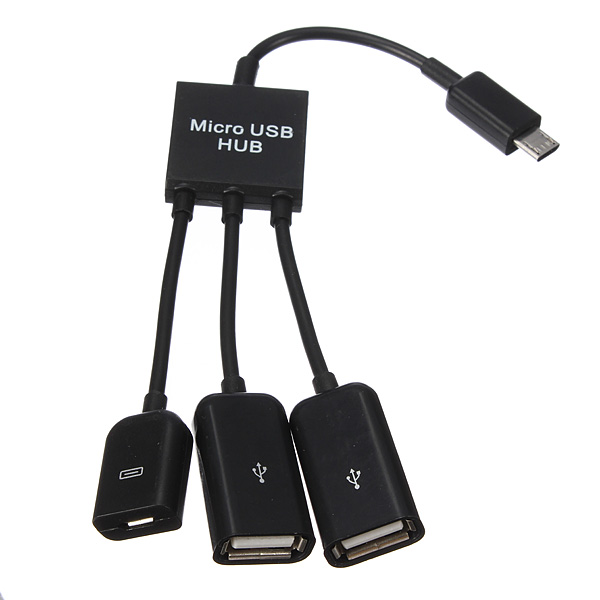
Transfer Files with an OnTheGo Cable

The most common way is by connecting the two devices through a USB to Micro-USB OnTheGo Cable. It’s no rocket science – plug it in and your Windows PC will prompt you whether you want to open the new device that has been paired with, or not. From then on you have access to your tablet – as in, you can paste anything you want on your Windows-based device: songs, pictures, movies, and even wallpapers.

Amazon has some affordable, and reliable cables for sale:

  • Option 1

– Price $7

– Compatible with Samsung, HTC, Asus, and OTG devices

  • Option 2

– Price $7

– Compatible with all OTG devices

  • Option 3

– Price $2

– Compatible with all OTG devices

Through Cloud

Now, this alternative may seem a little bit tricky, but in reality it’s super easy to use.

  • OneDrive

Transfer Files via Cloud

OneDrive is a file hosting service that allows its users to upload and sync files to any device that can run OneDrive. We’re talking about Windows-based devices here so there’s no need to clarify this issues.

OneDrive offers up to 15 GB free for new users, and once you’ve installed the software on your preferred devices you can synch photos, music, movies, and other personal information. You’ll always have them on the cloud. Let’s say you buy a new Windows-based tablet, and you want to get all of your memories from your old rusty PC before it breathes its last. Just install OneDrive on your new device, log into your account and voilà – the magic is done!

Additional storage can be bought:

– 100 GB for $2 a month

– 200 GB for $4 a month

– 1 TB for $8 a month
  • DropBox

Transfer Files via Cloud

It works exactly like OneDrive, and you can install it on any device you want – even if it doesn’t have a Windows OS.

It offers free 2 GB storage – not much if you ask me, but it’s a way to transfer files.

– 1 TB for $12 a month

You can also select the DropBox for Business option. For $14 a month per user, you can get all the storage space you desire, file recovery, and unlimited support.
  • Google Drive

Transfer Files via Cloud

My favourite way to transfer files is by Google Drive. I already have a Google account paired with Gmail, YouTube, and now Drive.

It offers free 15 GB of storage for everything you want – and you can set it to back-up what files you need to be kept safe, and out of reach.

– 100 GB for $1,99 a month

– 1 TB for $9,99 a month

– 10 TB for $99,99 a month

– 20 TB for $199,99 a month

– 30 TB for $299,99 a month


These are the best options. I’ve used them, and I was happy with the services provided. If you have any other app, cable model, or even method, please tell us in the comments section below.

Every day you learn something new!
Image Source: 1, 2, 3, 4, 5


Filed Under: Headlines Tagged With: Cloud FIle Hosting Services, DropBox, Google Drive, OneDrive, OTG Cables, Transfer Files

Asus EeeBook X205TA Review

May 6, 2015 By Roxanne Briean 1 Comment

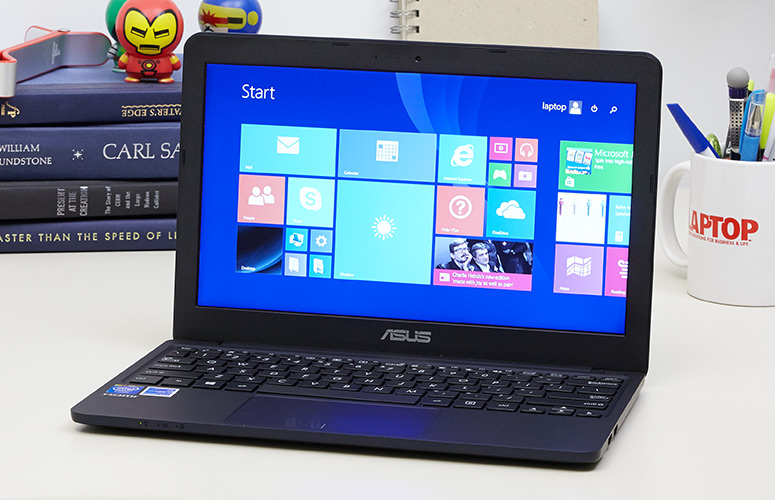
The Asus EeeBook X205TA comes with Windows 8.1, which means that it will allow you to run all the applications that you’re familiar with and while the X205TA is by no means powerful, it does get the job done for its cost. Here is our Asus EeeBook X205TA review.

Let’s take a quick look at the specifications of the Asus EeeBook X205TA first.

Asus EeeBook X205TA Review

Specs

  • Hardware: Intel Atom BayTrail-T Z3745D CPU and Intel HD Graphics
  • Memory: 2GB RAM
  • Storage: 32GB Flash
  • Screen: 11.6 inch 1,366×768 non touch screen display
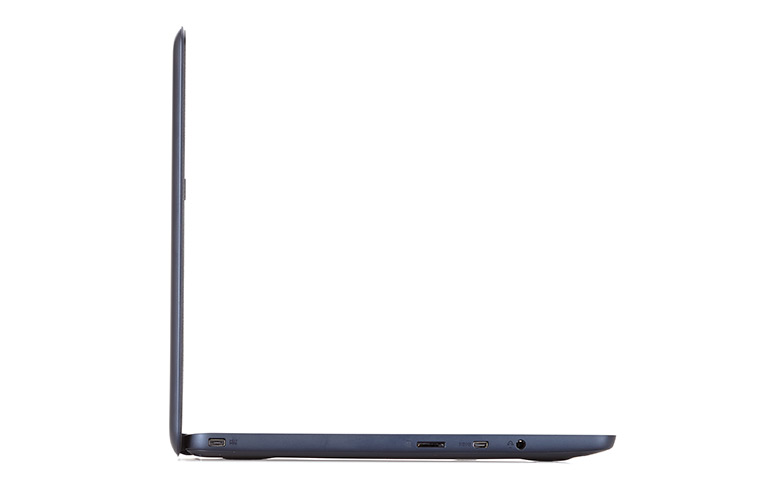
  • Ports: 2x USB ports, microSD card reader, headphone jack, proprietary PSU, micro-HDMI
  • Connectivity: Wireless N, Bluetooth
  • Battery: 38Wh
  • Operating System: Windows 8.1
  • Size: 288mm x 196mm x 18mm
  • Weight: 954g (2.1 pounds)

Hardware

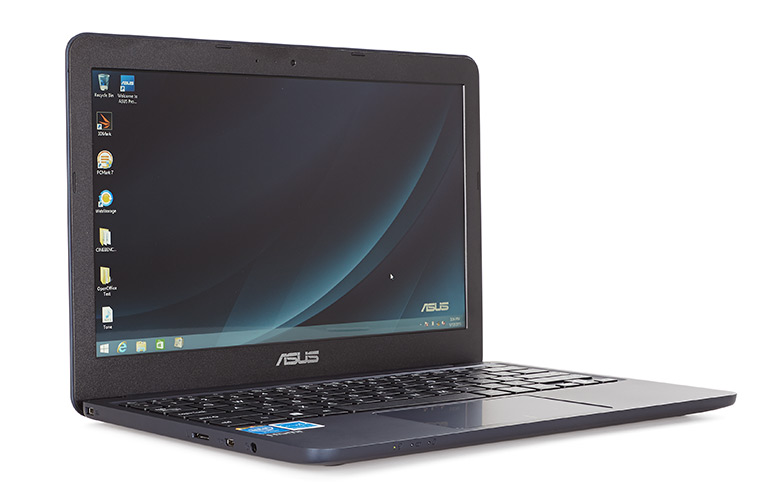
Asus EeeBook X205TA Review

The Asus EeeBook X205TA is primarily designed for everyday use. The laptop will handle pretty well your web browsing between numerous tabs, listening to music and watching videos and editing documents. The laptop comes with a trial version of Office, which means that it will handle Microsoft Office just fine. The release version of the laptop will come with a 12 month subscription of Office 365 Personal and if you choose so, Adobe Photoshop. However, make sure you don’t ask too much of this machine when using Photoshop. It will get the job done but it will hiccup here and there, especially if you’re working with very complex images.

This is mostly due to the fact that the Asus EeeBook X205TA is built with high-efficiency low-power hardware. The laptop comes with an Intel Z3745D CPU, 2GB RAM and 32GB of storage. However, because the eMMC and the RAM are both soldered to the motherboard, this will become really annoying, really fast.

You will be left with very little storage space after the installation of the operating system (around 14GB), which means that Asus had to cut corners in order to make this laptop as affordable as it is. This will leave you with two options: you will either have to use the cloud space offered by Asus for free in the WebStorage environment or expand the storage of the machine by using a microSD card.

To be perfectly honest, I was very disappointed that the Asus EeeBook X205TA doesn’t support standard SD cards. This would have been very useful for transferring photos from cameras while on the run. However, this probably isn’t such a big deal for most people. All in all, the Asus EeeBook X205TA is a pretty capable notebook and it will be able to handle most things.

It comes with pretty punchy and loud speakers that are located on the belly of the laptop. The experience is even greater due to the fact that the machine doesn’t have any movable parts in it or any fans to make noises.

The Wi-Fi chip on the laptop is pretty good as well. While it won’t match your Internet speed if you have a great connection, it won’t lose its signal either when you move away from the router. We were able to stream 1080p YouTube videos on it without having to wait for the buffer or having to download the media file without any hiccups. So in my opinion, this is amazing for a computer that sells for only $199.

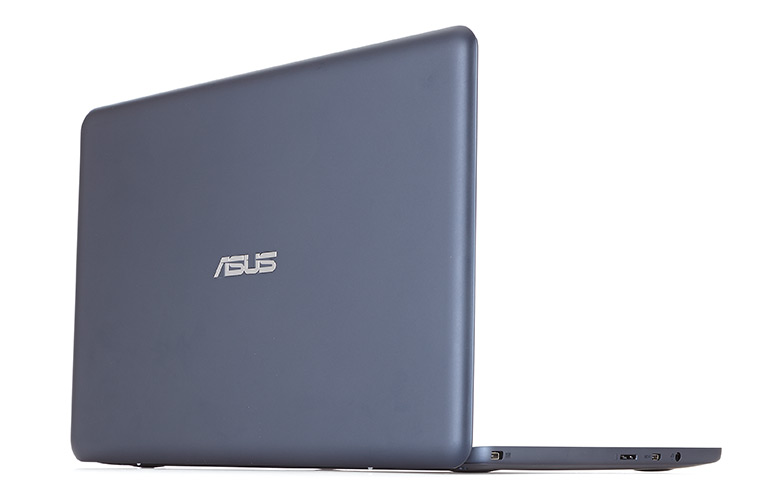
The belly of the laptop doesn’t have any cuts for cooling in it and, as a matter of fact, it doesn’t even need any. Because it doesn’t have any cuts in it, this leads to a very beautiful and simple design. You can access all the internals of the laptop by simply unscrewing the Philips screws on its back.

That being said, gaining access to all the internal things in the laptop won’t be of much help to you because everything is soldered on to the motherboard. As a matter of fact, the motherboard is pretty small as it is, most of the space inside the laptop being used for the battery. The good thing is that the battery is also held in place by some screws and, if needed, it can be easily replaced.

It would have been great to be able to update its storage but there is no dedicated storage stick inside the machine. This means that you won’t be able to upgrade that 32GB of internal storage. This is pretty annoying, seeing how most of that space will be occupied just by Windows. To be fair, you can use Linux on the laptop and Mint or Ubuntu will probably work just fine on the laptop, but if you’re not such a huge fan of that particular operating system, you will be stuck with Windows.

The case of the Asus EeeBook X205TA remains pretty cool under everyday use and won’t get very hot when putting the laptop through a lot of stress either. The internals reach around 80 degrees Celsius under a lot of stress and both the GPU and CPU will run under the default frequencies. However, you should keep in mind that the Asus EeeBook X205TA is designed for everyday activities and not demanding multitasking and other chores.

Keyboard and Trackpad

Asus EeeBook X205TA Review

The typing experience isn’t all that bad on the Asus EeeBook X205TA because the keyboard is pretty good and the position is comfortable. The laptop has a very generous palm rest which will allow you to type easily on it.

The keys on the Asus EeeBook X205TA are pretty firm and have a decent feedback and travel, considering the size of it but they do feel somewhat cheap. The layout is also cramped vertically because Asus chose to use rectangular keys on the device and not square ones. The arrow keys are also very small, but this is to be expected as we’ve seen this issue in other Asus laptop reviews.

But because the keys are smaller, this will leave a lot of space for the palm rest and the trackpad. While I did face some issues with the trackpad in everyday use, most of the times it worked just fine. However, sometimes it does double click by itself and will occasionally send your cursor flying on the screen but this generally happens when you put the laptop under a lot of stress.

That being said, this is one of the issues that definitely need tweaking on the Asus EeeBook X205TA. But seeing how the erratic cursor is most of the times a software issue, it could be resolved by future updates.

Asus EeeBook X205TA Review

Design and Build Quality

The Asus EeeBook X205TA weighs just less than 1kg and also has a compact footprint along being very thin. It will easily fit in a bag or a backpack and the laptop is also pretty tough and has a nice design. If you grab the machine and give it a little squeeze it will make some creaks, which are usually associated with cheap plastic laptops, but considering how little money this computer costs I have to say that it’s pretty well built and has a really nice finish to it.

The case is made out of soft matte plastic that is present on the interior, the lid and the belly of the laptop. While the bezel around the screen is the only thing that remains black on this laptop, Asus offers the device in various other colors. The materials used to build the laptop feel very pleasant to the touch and there aren’t many things you could complain about the quality of the finish either.

But to be fair, there are two things that can annoy you regarding the laptop. The case catches finger oil and smudges pretty easily and will be very visible if you purchase the dark blue model of the laptop and the lid flexes a bit. While this doesn’t really affect the integrity of the screen, if you do press a little harder on the lid you will see some ripples on its screen. This means that you should consider purchasing a sleeve for it and you should be very careful when carrying it in a backpack.

Display

The laptop comes with an 11.6 inch non touchscreen display with a resolution of 1,366×768, a glossy finish and a TN panel. This means that it has pretty poor vertical viewing angles and the colors will quickly fade when viewing it from awkward angles, but this is to be expected with such low priced screens. That being said, if you look at the laptop heads-on, you shouldn’t be very bothered by this aspect.

The screen leans to around 140 degrees to the back, which is pretty good, but not perfect. The laptop is lifted on two plastic feet which will leave more space under the laptop for cooling and will raise the keyboard for a better position for typing.

The display is pretty decent despite the following measurements:

  • Panel Hardware ID: AU Optronics AUO235C;
  • Coverage: sRGB 58%, AdobeRGB 43%, NTSC 41%;
  • Measured Gamma: 2.3;
  • Maximum brightness in the middle of the screen: 247cd/m2;
  • Contrast at maximum brightness: 90:1;
  • White point: 7900K;
  • Black on maximum brightness: 2.78cd/m2;
  • Average Delta: 4.37 calibrated, 8.48 uncalibrated;

The screen does have some problems displaying very accurate blacks when used at a high brightness and the colors might sound a little awful but the fact is that the display isn’t as bad as the numbers above would suggest. Asus could have chosen to equip the laptop with a matte screen, since the display is not touchscreen but they chose to make it glossy which will prove to be problematic when using the laptop in bright sunlight.

Battery

The laptop comes with a 38Wh battery which will give you around 10 hours of battery life in everyday use. This includes editing documents, browsing the web, listening to music and watching YouTube videos with Wi-Fi turned on. The laptop was also capable of lasting for around 9 hours on 60% brightness when looping a 720p mkv file in WMP-HC. The laptop ran for 8 hours when looping a 1080p video on YouTube.

The laptop will last for weeks in stand-by and the Always Connected feature from Intel will make sure that all your emails and updates will be ready for you when you wake the machine up. The Asus EeeBook X205TA comes with a compact 10Wh power brick and a pretty long cable. You will be able to charge the battery from 5% to 99% in around 2 hours and 15 minutes.

Asus EeeBook X205TA Review

Wrapping up…

All in all, Asus did a pretty good job with the Asus EeeBook X205TA. After using the computer for some time, there was only one thing that annoyed me the most: its trackpad. Also, the microSD and micro-HDMI slots can prove to be problematic along with the fingerprint magnet case, but these are in no way huge problems. The storage space should be neatly organized and probably left only for Windows.

However, this is pretty much it. You can’t really complain about a $200 laptop that performs and looks as good as this one does. Because it’s so sturdy and light and also because it lasts so long on a single charge, the Asus EeeBook X205TA can be a really nice travel companion. It can also be a great laptop for kids, because it’s so cheap and you won’t mind if they break it. The Asus EeeBook X205TA can also be a good pick for someone who is looking for an inexpensive and small computer that can handle Windows 8.1 and all the software that is compatible with the operating system.

That being said, you should keep in mind that the Atom CPU inside the machine won’t be able to handle very demanding tasks and hardcore gaming. But if you plan to only use the laptop for daily activities, you really can’t go wrong with this $199 machine.

PROS

It’s very light and sleek.

It has a decent keyboard.

It is able to handle multimedia activities and most daily tasks.

It lasts for a very long time on a single charge.

It’s very affordable.

CONS

It comes with miniaturized ports.

The touchpad is pretty erratic.

It has limited internal storage.

So there you have it. This was our Asus EeeBook X205TA review. Make sure you check our other Asus laptop reviews if you plan on buying an Asus computer.

Images source: 1, 2, 3, 4, 5


Filed Under: Tech & Science Tagged With: asus, asus eeebook review, Asus EeeBook X205TA, Asus EeeBook X205TA Review, asus laptop review, asus laptop reviews, asus laptops reviews, eeebook, eeebook x205, eeebook x205ta, EeeBook X205TA Review

A Quick List of Affordable Laptops

April 21, 2015 By Michael Turner Leave a Comment

Variety of Affordable Laptops to choose from

Whether you’re a student, a stay at home mom or just looking for affordable laptops you’ve come to the right place!

It’s not easy scouring the internet and reading review after review, searching for the most okay laptop that also fits in your budget. Some of us have taken to searching in stores, meddling with its physical state before deciding on whether we want to buy it or not, but I am also aware of the fact that we don’t all have this luxury – the luxury of free time.

Let’s break the ice with:

Affordable Laptops #1 – HP Chromebook 11 

HP Chromebook design
HP Chromebook 11 screen

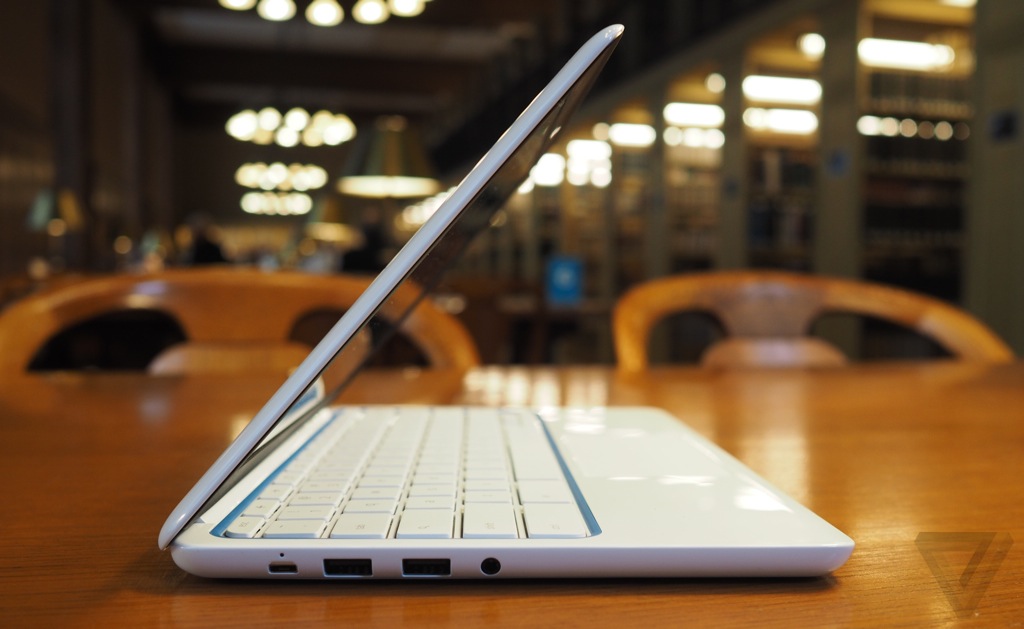
It goes for $299, and it’s already available in stores – so no need to wait for it to be released. It sports a slim and stylish design, with an 11-inch IPS display that stands at a resolution of 1366×768 – and it makes the Chromebook feel like a premium laptop.

The killer feature that I want to start this mini review with is that HP has built into its laptop a 4G LTE modem that frees it from the tight grip, and limitations, of WiFi coverage. It’s shocking that not all laptops come bundled with the 4G LTE modem, and its more shocking that we don’t see a trend starting. A shame really.

Moving on, the Chromebook is built from a magnesium alloy frame clad enveloped in glossy white plastic. It doesn’t look tacky, or cheap, but when you put your hands on it you can feel the low quality builds – it’s not a deal breaker, but it’s something worth noting. You can also have it in blue, red, yellow and green, but to be honest, white is more good looking.

The keyboard is slightly smaller due to the laptop being small in size, but the keys aren’t cramped together, and you can easily type all day without stressing yourself. Because it uses Chrome OS, you’ll see Chrome specific keys function keys on the top of the keyboard – a dedicated search key where caps lock used to be, and of course no Windows key. The multitouch trackpad doesn’t excel in any way, and if you used a trackpad before, there’s nothing new to it – this doesn’t mean it’s faulty, or falls down in this department, it’s quite a nifty piece that keeps the laptop feeling premium.

It makes use of a great, and unique feature that involves the power charger – it uses a microUSB connector like the majority of smartphones and tablets. Besides the power charger port, it is also equipped with 2 USB 2.0 ports, a 2-in-1 microphone and headphone jack and that’s about it. No, unfortunately it doesn’t have a HDMI port, but the microUSB connector supports SlimPort and you can use an adapter to output HDMI.

Chromebooks usually don’t have much local storage – this one has only about 16GB – but it comes paired with 100GB of free space on Google Drive.

Performance wise it’s fitted with a 1.7GHz dual-core ARM Samsung Exynos 5250 processor, 2 GB of RAM.

  • Pros

Battery life that consists of 10 hours.

4G LTE capabilities

Great IPS display

Cool design

  • Cons

Low port selection

Not too much local storage – 16GB

Affordable Laptops #2 – Acer Chromebook C720P-2600

Acer C720P 2600 Chromebook
Acer C720P 2600 Chromebook touch screen
Acer C720P 2600 Chromebook size

The MSRP price puts it at $299, but the lowest price I’ve seen it sell was about $310 – not that big of a difference, but when you’re on a budget everything counts.

Made out of a polycarbonate chassis, and sporting a similar style like the previous discussed Chromebook 11, it stands out as a sleek design laptop that you can’t be ashamed with. The keyboard ain’t really that bad – it’s easy and comfortable; and the trackpad isn’t small, but it isn’t what you’re most likely used to on flag-ship devices.

Sporting a 11.6-inch, 1366×768 resolution, and a 10-point touch screen, it feels like a new kind of beast comparing it to its predecessors. You don’t have to worry about not seeing the screen while using the laptop in a darkened room, nor one filled with light, because glare control is fully present, and blended with the system’s IPS screen makes it a hard foe to keep down.

Regarding local storage, you don’t have much – only 32GB. But you can add more storage by adding an SD card – although I don’t recommend keeping it plugged throughout the day, because users have reported problems with it. The card slot is poorly made, and the SD card will stick out of your laptop making it a huge inconvenience. You get 100GB of free storage place on Google Drive – but it’s only free for your first two years.

Port wise you get 1 USB 2.0, 1 USB 3.0, a HDMI port, and that’s about it. Nothing else in this department.

I can’t say I’m excited about it’s performance capabilities, but for $299 I don’t expect much. A Haswell-based Intel Celeron 2955U processor, and 2GB of DDR3L RAM. Its just perfect for surfing the web, and you can also watch 720p and 1080p movies without a hitch.

Battery life isn’t really that great, and it can only last you about 7 hours and 30 minutes.

  • Pros

Quick boot time

Great anti-glare display

Weighs under 3 pounds

  • Cons

No 4G/LTE option

Low battery life

SD card sticks annoyingly out of the laptop

Affordable Laptops #3 – HP Stream 13

HP Stream 13 design
HP Stream 13 size
HP Stream 13 keyboard

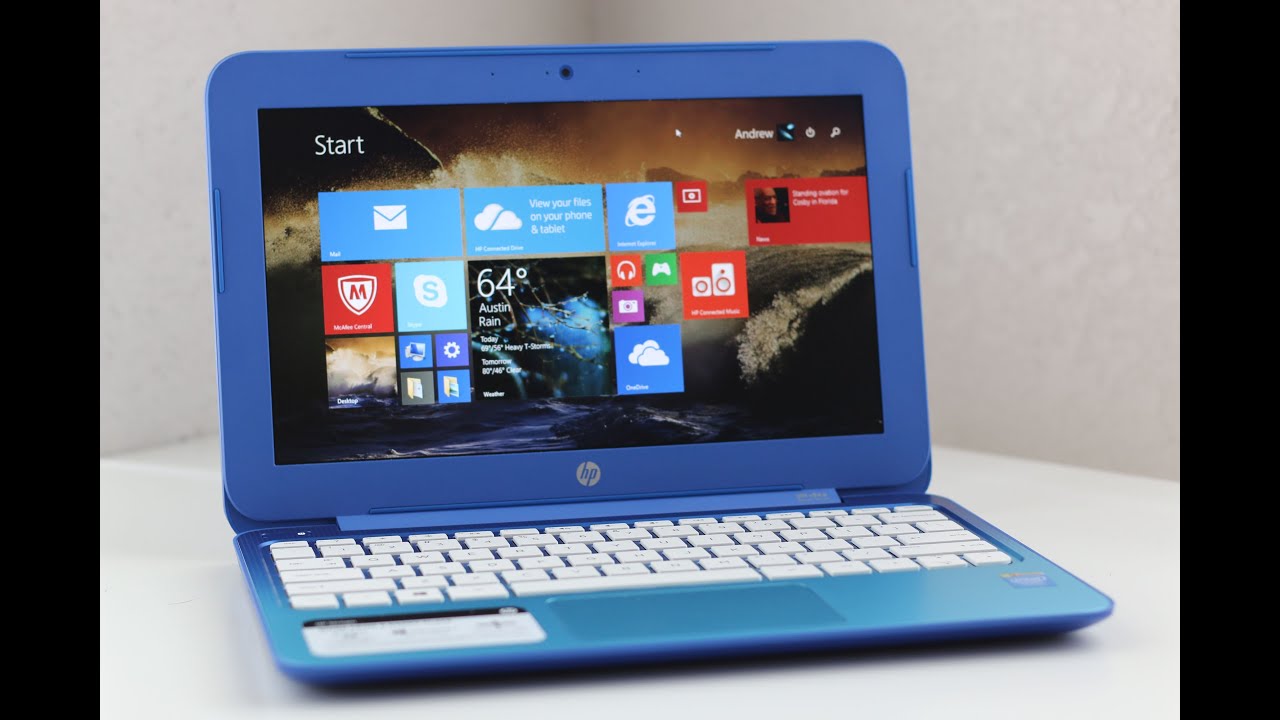
HP’s laptop is being sold at the shockingly low price of $229, and it’s meant to compete with Chromebooks. It’s a perfect choice for those who can’t stand browser based laptops, and want something on that price range – it fully supports Windows 8.1.

It weighs about 3.3 pounds, and measuring about 0.77 by 13.25 by 9 inches, it perfectly fits your airplane, or bus tray, making it even more desirable.

Its design is quite handsome, but you can clearly distinguish it as a cheaper laptop, even though at first touch the plastic feels of a higher quality. The standard model sports, what HP loves to call, Horizon Blue – it also comes in Orchid Magenta. The one-piece touchpad is fully responsive, and the keyboard is pretty great constructed and it won’t bring you to the brink of throwing it out the window like some cheaper models have the tendency to do – also a tendency to bring out our hidden rage.

The 13.3-inch display handles a 1366×768 resolution and its just enough for usage in a normal lit room. I have encountered a couple of minor problems when the room had more than average lighting, and also some viewing angles are just awkward, and narrow – would not recommend watching movie marathons on it, unless you keep it near you.

The IPS screen is the the same one as the Chromebook 11, but somehow, while watching the screen from its sides or too far vertically speaking, the colors seem washed out or just simply put dark – of course, the text isn’t that fine and smooth.

Its tiny speakers are kind of low quality to be honest. They are good if you are in a slightly small room, but don’t expect anything to be heard if there are people talking in the room.

Storage space isn’t overwhelming and it stands at 32GB – but don’t fret, you can add more storage space by using a USB drive, or the system’s microSD card slot. If that doesn’t say anything to you, wait until you hear this. HP offers 1TB of online cloud storage with Microsoft’s OneDrive – available for free only in the first year. Besides having a microSD card slot it also sports a HDMI port, a headset jack, two USB 2.0 ports, and single USB 3.0.

HP’s laptop isn’t the best high-performance laptop out there, but it does its job well. A 2.16GHz Intel Celeron N2480 processor with integrated Intel HD graphics isn’t something gamers want to hear, but the system’s SSD helps things run more faster, and better.

Battery life is somewhat on the margins of greatness – 9 hours and 9 minutes.

  • Pros

Really cheap for what it offers

Kinda great battery life

Free 1 TB OneDrive storage for a year

  • Cons

Viewing angles are somewhat of a deal breaker

Tiny speakers that are simply not enough

Affordable Laptops #4 – Asus Chromebook C300

Various models
Asus Chromebook C300 design
Asus Chromebook C300 various colours

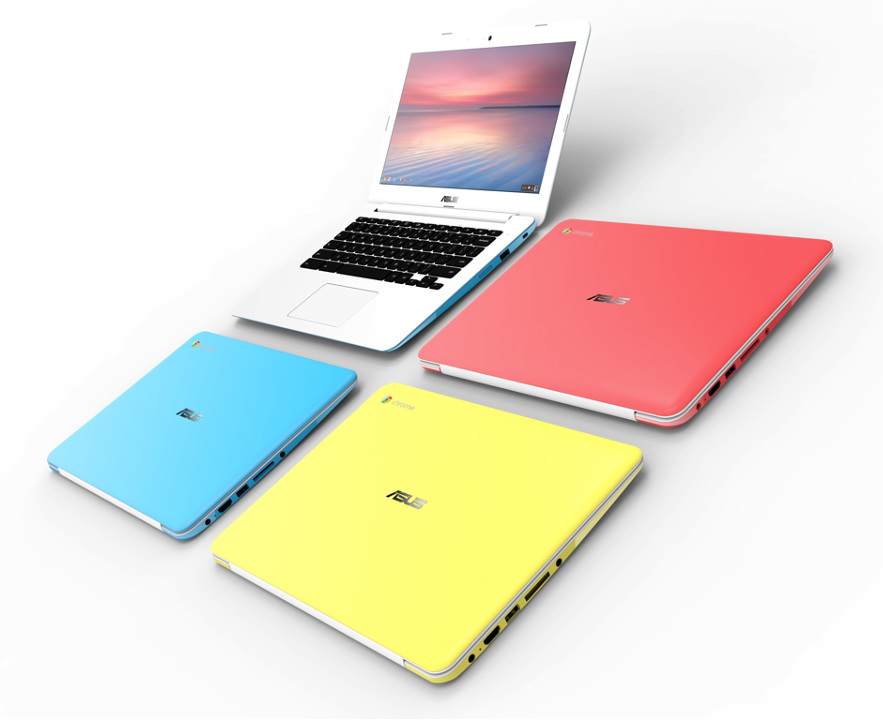
The MSRP price puts it at $249, but I’ve seen it at the low price of $199. It has a larger screen than the Chromebook 11, but with almost the same performance capabilities.

The 13-inch laptop sports a quite beautiful and nice textured design, enveloping the polycarbonate top lid and keyboard deck. Unfortunately the plastic looks cheap, and it shines giving it a tacky look, but if you don’t mind this factor, then by all means it’s kinda great.

Let’s talk ports. You get a HDMI port, headset jack, AC power adapter, SD card reader, single USB 2.0 port, or USB 3.0 port.

Keyboard isn’t half bad either, and it feels comfortable typing hours on it, and the touchpad supports multitouch – two fingers swipes aren’t problematic, and the touchpad does its job well.

Google offers are also include with your purchase. Free two year subscription to 100GB of storage on Google Drive, and and a 60-Day Google Play All Access subscription.

Cloud storage is a must when we’re talking about Chromebook. It’s local storage is a measly 16GB – you can add more storage with a SD Card though.

The 13-inch Asus Chromebook has a resolution of 1366×768. Even though the LCD display is top notch, it doesn’t reach the standards of an IPS screen. Trying to see what’s going on on the screen from the sides, or even vertically, isn’t going to accomplish you anything.

Performance wise it comes with an Intel Celeron N2830 dual-core processor with Intel HD Graphics, and 2GB of RAM. Not at all for gaming, but browser based games run smoothly.

Battery life is really great – 11 hours of pure joy surfing the interwebz, watching movies, listening to music, or just playing Angry Birds.

  • Pros

Pretty large screen for a Chromebook

Great battery life

Comfortable keyboard and touchpad

  • Cons

The plastic looks tacky and cheap

Can’t add more RAM to the existing 2GB

Affordable Laptops #5 – Acer Aspire E3-111-C1BW

Acer Aspire E3-111-C1BW design
Acer Aspire E3-111-C1BW keyboard
Acer Aspire E3-111-C1BW screen

Selling at $300, this Acer Aspire is one of the best laptops that supports Windows at the $200-$400 price range – that is dominated by Chromebooks. It has a really great design, and colour scheme that some people will absolutely love, while others will hate.

Acer calls the colours Rhodonite Pink – it would scream pink out of it lungs, if it had any. This is one major problem with the laptop. While it has been proven that some shoppers are quite fond of strong colors like Pink, others seems to run away. I for one fall in the latter part of the group – it’s not just the fact that I can’t stand pink because I see it as really tacky; it’s because I would rather prefer white, a cyan-blue, or a dark-red laptop.

The plastic laptop weighs about 2.84 pounds making it super easy to pick and go – more so if you live a hectic day to day life.

It has a 11.6-inch display that holds a resolution of 1366×768. It’s not that great to be honest, as it doesn’t even have a touch screen, but at this price, it’s pretty okay. The speakers on the Acer while do providing a mediocre quality, output low volume and absolutely no bass whatsoever.

Surprisingly the keyboard is really great, and your fingers won’t go numb typing away that report that is due in 2 hours – and it also looks apart combined with the Rhodonite Pink. The touchpad is quite big 4.1 inches across – and it also fully supports Windows 8.1 gestures.

It comes packed with 3 USB ports – 1 USB 3.0, and 2 USB 2.0; a SD card reader, an HDMI-out port, and a 2-in-1  headphone, and microphone jack. Also, you have a Kensington lock slot.

Now, regarding its storage space it is the big daddy of this round-up. It has a 500GB hard drive, at 5,400 rpm. Even though Acer bundles in a couple of software, you won’t feel like storage space is taken away from you – you’ll get 30 day trials for McAfee LiveSafe Security Suite and Microsoft Office 365, also apps like Amazon Kindle Reader, Netflix, HuluPlus, AccuWeather. Plus a collection of game samples from WildTangent.

Now if we take a look at its performance capabilities the Acer Aspire E3 offers an Intel Celeron N2930 processor and 4GB of RAM. Like all budget laptops, this one ain’t for gaming, but it does good if you want to write a paper on it, watch a movie, stream something, and surf the internet. But you’ll indeed notice that it’s technical capabilities are lacking – slow performance all around will most likely frustrate you to smithereens.

Battery life ranks up to 5 hours – yikes!

  • Pros

Some people love Rhodonite Pink, and the laptop’s design

Tiny size that can fit anything

  • Cons

Some people definitely hate Rhodonite Pink, and the laptop’s design

Low battery life

Weak performance

No touch screen

Affordable Laptops #6 – HP Stream 11

HP Stream 11 closed
HP Stream 11 screen
HP Stream open

At #3 we talked about the HP Stream 13 and its capabilities. Now it’s time for the Stream 11.

Cheaper than its larger brother, the HP Stream 11 is selling for about $175.

It’s another laptop designed specifically to compete with Chromebooks – but unfortunately it falls short in almost every category.

The plastic body screams I’m cheap, buy me for one hour tonight – because that’s probably how much it will take you to try it out, then feel regret and never make eye contact with devices ever again. The standard Orchid Magenta colour is just shockingly ugly on the low quality plastic. It’s somehow similar to the previous Acer we talked about, but without any of its redeeming qualities. Luckily, you can get it in Horizon Blue.

The sound quality of its speakers is somewhat decent – probably due to the fact of the sound being enhanced with DTS Studio Sound. The volume won’t be enough even when watching a movie. This means that listening to music through the laptop’s speakers is out of the question. If I were to give it a rating, I would give it 2 stars out of 5.

Keyboard is exactly like its older brother, but somewhere in the production line, the touchpad was left out, and didn’t get the same treatment. It’s way too over-sensitive, and anything that approaches its edges will make it go berserk and swipe like crazy, and open apps that you had no intention of starting them up in the first place. Turning off edge swipes in the Synaptics control panel will alleviate the problem, but you shouldn’t be doing this at all – you bought a product for its features, not to turn them off due to crazy bugs. You don’t see them in the HP Stream 13, and we hope that with some sort of driver update, the touchpad will work normally.

Don’t expect variety regarding ports, they are fairly basic, like the laptop’s entirety. So we have 2 USB ports – USB 2.0, and USB 3.0; an HDMI port, a headset jack, the power connector and an SD card slot.

Local storage consists of a shy 32GB SSD, and it tries to win you over with its cloud storage offers. 1TB of Microsoft OneDrive cloud storage that will be available for free in the first year.

The HP Stream 11 also comes bundled with free apps for you to enjoy – one free year of Office 365 Personal, Netflix, Skype, and other HP branded apps like HP Connected Drive, HP Connected Photo, and of course HP Connected Music. Everything is connected at HP – even their simplicity in picking names.

The only great thing that seems to come out of this whole ordeal is that it runs Windows 8.1. Now, I said that it runs it. I didn’t specify that it works good, it just works.

Now performance wise, it is fitted with a 2.16GHz Intel Celeron N2840 processor, and 2 GB of memory. Not much. These are borderline low specs.

Now, battery life is incredible – ranks 9 hours and 30 minutes of runtime.

  • Pros

Runs Windows 8.1

Great battery life

  • Cons

Lacks performance, and lags when surfing webpages

Buggy touchpad

Feels cheap and tacky; not only due to its Rhodonite Pink


Affordable Laptops #7 – Toshiba Satellite Radius 11


Toshiba Satellite Radius 11 modes
Toshiba Satellite Radius 11 size
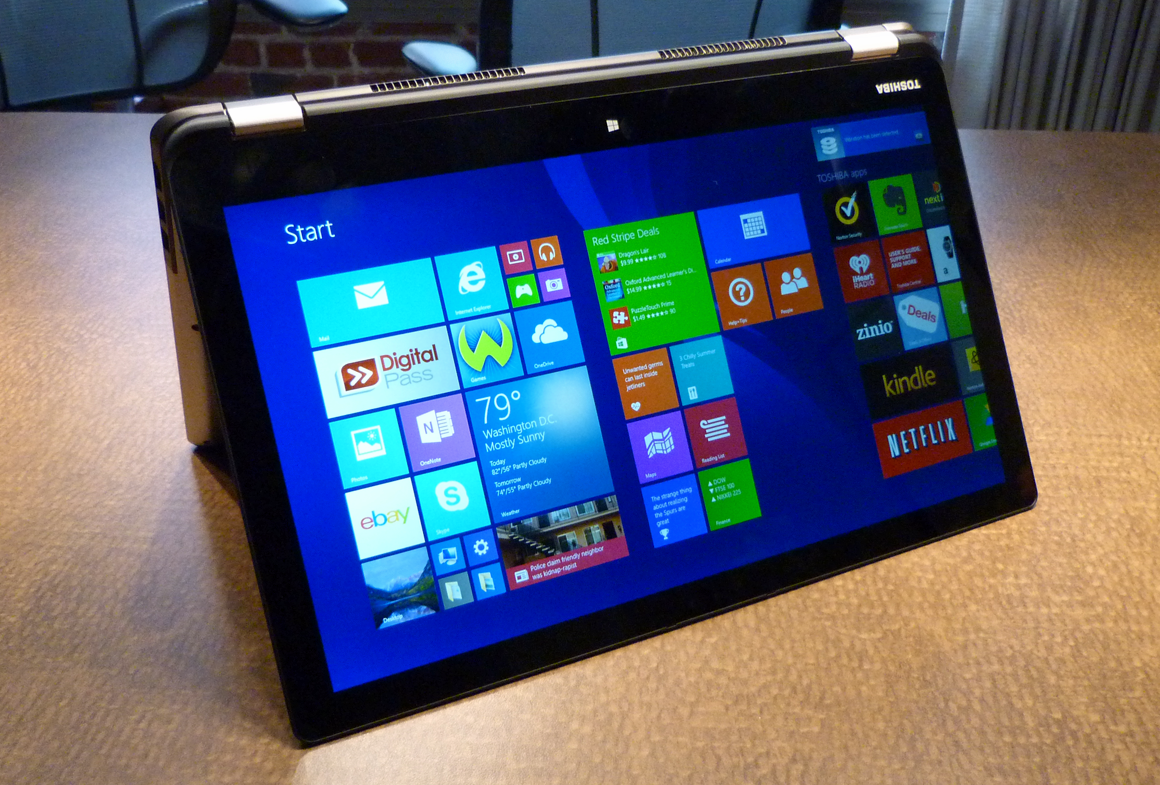
Toshiba Satellite Radius 11 tablet mode

The last entry in our quick list of affordable laptops will be held by the Toshiba Satellite Radius 11. Lowest price $330.

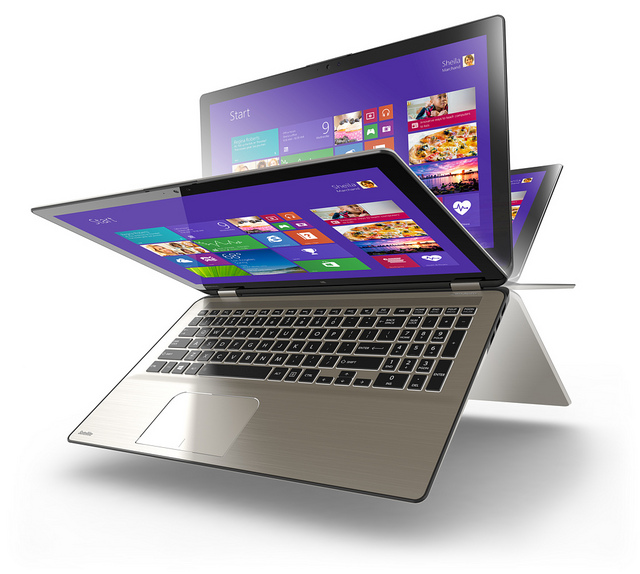
It’s not just a laptop, it’s a hybrid – meaning that it can also turn into a tablet at your will. Its Toshiba’s way of making themselves known in the hybrid market – a place dominated by Lenovo, and Asus.

The 2-in-1 design looks crisp and premium. You have 4 modes in which you can use the device – Laptop, Tablet, Tabletop meaning its folded flat, Presentation when it’s propped up like a tent, and Audience when the touch screen shown with keyboard is folded back as a base. Weighing at 2.9 pounds, you won’t have problems carrying it around, and using its 4 modes.

The 11.6-inch screen holds up a resolution of 1366×768 – nothing special if you ask me, but it’s worth noting that it will keep it in Laptop and Tablet mode. It also offers 10-finger touch support and edge-to-edge glass.

The keyboard is comfortable but there is no backlight available – it can be a pain for those who don’t know a keyboard, but it’s definitely not a deal breaker.

It comes outfitted with a USB 2.0 port and a headset jack, along with a Kensington lock slot and physical buttons for volume control, a full-size HDMI-out port, a USB 3.0 port, and an SD card slot, a power connector and an ON/OFF button.

Storage wise, you can also call it one of the top dogs in the list. It boasts a 500GB HDD. Toshiba pre-installs several apps for your enjoyment, of course. 30-day trials of McAfee Live Safe 2014 and Microsoft Office 365, Adobe Reader, Google Drive, Amazon Kindle reader, retail apps like Amazon, and Ebay, Netflix, Hulu Plus, Spotify, iHeart Radio, and sample games from WildTangent.

It does rather well in the performance department with an Intel Celeron N2840 processor and 4GB of RAM. But take this with a grain of salt – it has performance issues, but they are nothing compared with what you can find at this price range.

Battery life doesn’t shine. It doesn’t shine at all. It only lasts up to 5 hours and 10 minutes.

  • Pros

Hybrid laptop for $330

Variety regarding ports

More than enough storage space

  • Cons

Really short battery life

A ton of pre-installed apps


Hopefully you’ll manage to buy a device that will make you happy. If you have something in mind, whether it is a question regarding one of the devices in our affordable laptops list, or one device that didn’t made the list, feel free to post in the comments section below.


Image Source: 1, 2, 3, 4, 5, 6, 7, 8, 9, 10, 11, 12, 13, 14, 15, 16, 17, 18, 19, 20, 21, 22

Filed Under: Headlines Tagged With: Acer Aspire E3-111-C1BW, Acer Chromebook C720P-2600, Affordable Laptops, Asus Chromebook C300, HP Chromebook 11, HP Stream 11, HP Stream 13, Toshiba Satellite Radius 11

Samsung Galaxy S6 Review

April 10, 2015 By Roxanne Briean 1 Comment

Samsung Galaxy S6 Review

After more than two years without producing anything of notice on the mobile phone market, Samsung finally managed to draw some attention with their new Galaxy S6. The device has greatly improved software, a brand new design and unique hardware construction, when compared with their previous products. Everything adds up for this to be the best Samsung smartphone ever released.

Samsung announced, during the 2015 MWC, that they will be releasing their new flagship device on April 10, 2015. The Samsung Galaxy S6 will be available in a few different colors, including gold, blue, white and black.

To be frank, I didn’t expect this phone to be so incredibly good, but, as it stands, it is a masterpiece. This is my review of the Samsung Galaxy S6.

Pricing

In the US, depending on which carrier you chose the price will slightly vary but, of course, you can pick the offer that suites you the best.

T-Mobile

They will sell the 35 GB Galaxy S6 for $0 upfront but with a 24 month contract that costs $28,33/month, while the full retail version will cost $679,92.

The 64 GB model is priced at $99,99 initial fee and another $32,49 each month for 24 months, or $759,99 full retail.

You can also purchase the 128 GB version for $199,99 upfront and $27,50 per month with a 24 months contract, while the full retail version will cost you $859,99.

At T-Mobile the device will be available for purchase in three colors: gold, white and black.

In order to attract more customers, they are also offering a free, one year subscription to Netflix to anyone that preordered the phone before April 12.

AT&T

They will sell the 32 GB Galaxy S6 for $199,99 with at two year contract, while the 64 GB model will cost $299,99, and the 128 GB version will sell for $399,99.

Under AT&T’s “Next 24” payment plan, the 32 GB Galaxy S6 sells for $22,84/month, while the 64 GB model will cost $26,17/month and the 128 GB version will be available for 29,50/month, for 30 months.

Under the “Next 18” payment plan, the 32 GB Galaxy S6 will cost $28.55, the 64 GB model will cost $32.7 and the 128 GB version will cost $36.88, for 24 months.

Unlocked, the 32 GB Samsung Galaxy S6 will set you back $684.99, while the 64 GB model will cost you $784.99 and the 128 GB version will sell for $884.99.

Sprint

Here, the Samsung Galaxy S6 will  cost you $199,99 for the 32 GB version, 299,99 for the 64 GB one and 399,99 for the 128 GB model, with a two-year contract.

You can get all of the S6 models for free if you chose the “Sprint Unlimited Plus” plan. The 34 GB model will cost you $80/month, the 64 GB version will cost you $85/month, while the 128 GB model will cost you $90/month. Customers will also get a $20/month credit, that they can use to upgrade their phone, which they will be able to use after a period of 12 months.

If you want to get the unlocked version from Sprint, then you will have to pay 684,00 for the 34 GB model, $786,00 for the 64 GB one and $864,00 for the 128 GB version.

Verizon

At Verizon, you can purchase the 32 GB Samsung Galaxy S6 for $199,00, the 64 GB Galaxy S6 for $299,99 and the 128 GB Galaxy S6 for $399,99, with a two year contract. Here, you will get a $50 discount.

If you are interested in the “Edge” program, then you will pay $24,99/month for the 34 GB model, $29,60 for the 64 GB one and $33,33 for the 128 GB version, with a 24 months contract.

The full priced version at Verizon will cost you $599,00 for the 34 GB model, $699,99 for the 64 GB one and $799,00 for the 128 GB version.

U.S Cellular

At US Cellular you can get the 34 GB phone for $199,99 and the 64 GB one for 299,99, with a two year contract.

Under their installment pricing plan, you will have to pay $34/month for the 32 GB model, or $38,59/month for the 64 GB version, and the contract will last for 20 months.

They also offer the unlocked version of the phone. The 32 GB Galaxy S6 will sell for $680,00, while the 64 GB Galaxy S6 will cost $770,00.

You can also buy the Samsung Galaxy S6 at the following retailers: Best Buy, Cricket Wireless, Amazon, Boost Mobile, Metro PCS, Sam’s Club, Costco, Walmart and Target.

Design

Finally, Samsung threw away that plastic cover that they used on their previous models and replaced it with a metal one, following Apple’s example. The case is made out of strong glass with an all-metal band that give the smartphone an extremely robots feel.

As far as looks go, Samsung kept their design heritage, after all they are a company that love to cling on to their tradition. The front of the phone reminds me of the Samsung Galaxy S4, with round corners combined with a oval shaped home button.

Samsung Galaxy S6 Review

Samsung Galaxy S6 Design

The most curious fact about the design of the S6 is that they left out the microSD card slot. I believe that this was nothing more than a marketing scheme, again, taken from Apple’s business playbook. Nowadays, a 64 GB microSD card is roughly $30, so everybody would have purchased the less expensive 32 GB model and added a card to it afterwards. Apple has been doing this for some time now and marketing research shows that there are a lot of customers that are willing to buy the 128 GB phones. I think that Samsung wants a piece of that action as well. Some of their fans will surely be annoyed by this, but the majority of people will simply be happy with the 34 GB model.

When you are holding the Samsung Galaxy S6 in your hand, you will feel like you are holding premium quality device. It is elegant, yet compact and the 5,1 inch screen, that takes up most of front of the device, look really good.

As far as build quality goes, we can finally acknowledge that Samsung has indeed created a device worthy to stand next to the iPhone 6 and the HTC One M9.

The metal bands that go around the sides of the phone are split by small plastic strips in order to allow the antenna and other devices to make their connections. If this seems familiar to you, it’s because the exact same design was applied to the iPhone 6. The strips are necessary for the phone’s signal to get trough. However, because of the glass back and front I was a bit surprised to see them put in.

Just like before they placed the power button on the left side of the device and the volume buttons on the right side. This alignment worked very well in the past, so why change something that is good? Finally, they’ve upgraded the home button, so now, when you press it, it will give a very sturdy click.

A less attractive element is the placing of the back camera. If you were to hold the phone sideways, then you will see that the camera sticks out a bit. It’s not very aesthetically pleasing and, at the same time it is very much exposed to scratching. They have done this in order to allow a more powerful optical system and by the end of this review you will see that it was totally worth it.

As I’ve mentioned above, the Samsung Galaxy S6 is available in four different colors: blue topaz, gold platinum, white pearl and finally, my personal favorite, black sapphire.

Samsung Galaxy S6 Review

The available colors for the Samsung Galaxy S6

Hardware

If you were to look under the hood, then you will see that it packs an octa-core processor, made out of two quad-core processors, the Quad-core 1.5 GHz Cortex-A53 plus the Quad-core 2.1 GHz Cortex-A57. It also has a Mali-T760 graphics processor unit (GPU) and 3 GB of RAM. This is by far, the most powerful phone ever made.

The Screen

Samsung has always had good screen technology and the Samsung Galaxy S6 makes no exception.  The Super AMOLED display provides a clear image, with pure blacks against crisp whites, that makes even the darkest of scenes to be shown perfectly.

It is quite a big screen, 5,1 inch to be more precise, with more pixels than before and a 1440 x 2560 resolution, which matches the Galaxy Note 4 but the Galaxy S6 has a higher PPI (577).  This indicates that you are looking at the sharpest display on the market.

Samsung Galaxy S6 Review

Samsung Galaxy S6 Screen

LG has started the QHD level of screen in 2014, when they released the G3, but that phone’s screen was based on LCD technology that left the display a bit dark and made it power hungry, as every pixel added extra pressure on the battery.

After that, Google Nexus 6 came along and impressed everybody with its bigger screen, that despite its wide display, it still looked awesome. The Note 4 was released next, with the same resolution and the bar was set for future smartphones.

You would think that by combining the number of pixels from the Note 4 with a more compact screen should result in a superb display, but sadly it doesn’t. I do not mean to say that the screen of the Galaxy S6 looks bad, because it really does not, I just want to point out that the QHD resolution is rather pointless, without adding much to the mix, especially with its high power requirements. I must admit, that optimized videos do look better on this screen and when you hold both devices side by side, it is very noticeable that the display of Galaxy S6 is superior to a normal, run of the mill full HD display.

I think that brightness, contrast and accuracy are a lot more important than pixel count, and here, the S6 really delivers. When you set the brightness mode to manual, the screen will do exactly what we would expect from an AMOLED display and ramp up to 347 cd/m2, but if you set it to auto-brightness then it will go up to 560 cd/m2 in order to compensate for sun glare during those warm, sunny days. If you turn down the brightness slider to its minimum, then the screen will dim to 1,92 cd/m2.

The contrast is perfect and it will help a lot when watching TV programs and movies, and the photos will give you the illusion that they are popping out of the screen.

The most impressive aspect of this screen is its incredible color reproduction.

We are used to see these kind of results from professional monitors and not a smartphone’s display. It is truly a remarkable feat of engineering.

The Special Features

Among the basic features of the Galaxy S6 there are two functions that are worth mentioning. The wireless charging and the fingerprint sensor.

The fingerprint scanner is not really a new feature, for it was also present within the Samsung Galaxy S5, but this time it is a lot better. The swipe of the screen gesture was completely replaced with a touch-based, flawless and fast sensor.

The second special feature I’ve mentioned, was the in-built wireless charging feature. The wireless charging plate does not come with the Galaxy S6, but it will work with any standard QI charger.

Software

The Samsung Galaxy S6 comes with the 5.0.2 version of the Android OS, also known as Lollipop. Just like the previous models, it uses the TouchWiz UI, but greatly improved. They have removed a lot of unnecessary buttons and made its structure a little bit more logical. The design team has made the TouchWiz more intuitive and a lot simpler to use. Just after a few hours of “playing” with the device, I can safely say that the new “skin” is more fluid, lean and light.

Samsung has invested a lot in colors and animations for their new TouchWiz. It is more bright and colorful than ever. Now, for the first time ever you have the ability to remove pre-loaded apps. You cannot uninstall the manufacturer’s applications, but, for the most part, you have to option to disable them. For example, all pre-loaded Google apps can be disabled, except for the Google Settings. The same situation applies for other apps too. You can’t uninstall Skype, OneNote, OneDrive, WhatsApp, Messenger of Facebook, but you sure can disable them.

Audio

The first thing that you will notice when you see a Samsung Galaxy S6 for the first time, is that the speaker is located at the bottom front of the device, but it is still better than having it on the back of the device. If you are looking for a superior audio experience, with front-facing stereo speakers, then I recommend that you get the Xperia Z3, or the HTC One M9.

Samsung Galaxy S6 Review

Samsung Galaxy S6

For unknown reasons, Samsung dropped the ball when it comes to audio quality. The only way you can get a stereo sound is by using headphones.

It is rather unfortunate that you will be able to play mobile games with top-quality graphics and get frustrated by the audio. The placement of the speaker is also a downside. Imagine playing a game and holding your phone in a landscape position. I can guarantee you that most of the time you will be holding your hand over the speaker, blocking the sound.

The S6 speaker is 50% louder than its predecessor, the Galaxy S5, but it doesn’t sound any better.

The Camera

The Samsung Galaxy S6 has a 16 MP camera on its back and a 5 MP one on its front. Both of them have real-time HDR and wide-angle lenses, that are very useful when taking pictures in low-lighting condition areas. The primary camera comes with “Optical Image Stabilization” and an amazing “Pro Mode” for those of you that want to use manual settings.

Samsung Galaxy S6 Review

The back camera of the Galaxy S6

The back camera is yet again equipped with selective focus, it features an infrared sensor for creating better white balance and for color correcting images. It also features rapid activation and also delivers a wide number of interesting modes, including 4K, fast motion, panoramas  slow motion and many, many more. You can quick access the camera by double-tapping the home button, even if the phone is locked.

The Battery

They have taken a huge risk by adding a small, non-removable, Li-Ion, 2,550 mAh battery. It would have been better if they kept the 2,800 mAh removable battery found in the Galaxy S5. Most state of the art smartphones on the market have a 3,000+ mAh battery.

The lifespan of this battery for an average user is anywhere in between 16 and 18 h.

The Samsung Galaxy S6 supports PMA and WPC protocols for wireless recharging. This makes the phone compatible with almost all wireless chargers available on the market today, and at the same time this standard, universal wireless support is 1,5 times faster than on the Samsung Galaxy S5.

Like the Moto Maxx and Nexus 6 before it, it has successfully implemented the fast recharge feature. You must plug it in for only 10 minutes and it will have enough juice for 4 hours of usage.

Technical Specifications

Type: Phone

MANUFACTURER: Samsung

Model: SM-G920

Dimensions: 143.4 x 70.5 x 6.8 mm

Weight: 138 g

Screen Size: 5.1 inch

Battery: Non-removable Li-Ion 2550 mAh

Display Technology: AMOLED

Screen and Resolution: 2560 x 1440 pixels (576 PPI)

Back Camera: 16 megapixels

Front Camera: 5 megapixels

Flashlight: LED

U.I.: TouchWiz

O.S.: Android v5.0.2 (Lollipop)

RAM: 3 GB

Storage Space: 32 GB/ 64 GB/ 128 GB

Removable Storage: not available

Chipset: Exynos: 7420

CPU: Quad-core 1.5 GHz Cortex-A53 + Quad-core 2.1 GHz Cortex-A57 (octa-core)

Maximum Clock Speed: 2.1 GHz

Connectivity: Bluetooth 4.1, NFC, LTE and HSPA

Conclusion

For the first time ever, I can say that I love using TouchWiz. It underwent trough significant changes and all of them are for the better.

The Galaxy S6 is breath of fresh air in the Galaxy S line and it is by far the best Samsung phone ever made.

Its two defining characteristic are: no removable battery and no microSD slot. They made up for those changes with fast recharging battery, software and processor optimizations and superior memory technology.

Even if you get the 128 GB model, storage will still be a problem while filming in 4K and you will have to save your videos to Google’s cloud.

Perhaps the most important thing, is that they improved the features that really matter the most and stopped adding new, useless ones.

This may be an expensive smartphone, but in my honest opinion, it is the best available on today’s market.

Pros

Great new design, made out of metal and glass

Fast charging feature

Incredible screen

Very good UI

Good camera performance in low-light situations

Excellent processor

Cons

It is not waterproof

The camera lens sticks out

The speaker is mounted at the bottom

There is no microSD card

It is rather expensive

Image source: 1, 2, 3, 4, 5,6

Filed Under: Tech & Science Tagged With: galaxy s6, galaxy s6 review, s6, s6 review, samsung, samsung galaxy s6 review, samsung galaxys s6, samsung review

The biggest games this year have been confirmed for E3 2015

April 8, 2015 By Roxanne Briean Leave a Comment

2014 Sony Conference

The E3 event for gamers is like opening up gifts 6 months prior to Christmas – but at the end of the day you have to put them back in the box.

The Electronic Entertainment Expo is an event that takes place every year in Downtown Los Angeles.

If you build it, they will come – every year developers, publishers, fans, gamers, and geeks all around the world, gather so they can witness the future of the gaming industry.

There are some big names confirmed to appear at this years E3 – some new entries, and some older ones that appeared last year also. But the thing is, we just have a fraction of the list at this moment, and it’s a huge list. See for yourself:

  • Assassin’s Creed Victory
  • Developer: Ubisoft Quebec
  • Publisher: Ubisoft

Video footage has already been leaked on-line, but it’s incredibly low quality and I don’t recommend you spoil this beauty. Just wait a little bit more, and you’ll definitely not be disappointed. Hint: the story is going to take place in 19th century London.

  • Crackdown
  • Developer: Cloudgine
  • Publisher: Microsoft

 Crackdown had a short video teaser last year at E3, and it’s making a comeback this year – we expect a release date, and more awesome videos.

Sony exclusive

  • The Division
  • Developer: Massive Entertainment
  • Publisher: Ubisoft

Well, I’ve been waiting for this one since its first announcement back in 2013. Ubisoft has stated that The Division will be released in 2015, but for the love of God, we are hoping that this title won’t endure the same chaos that plagued Watch Dogs – it had so much potential, but the developers just destroyed it. I’m blaming Ubisoft and their horrendous deadlines for the mischief. Anyway, if you want to see a game-play trailer for The Division, you can do it right here.

  • Doom
  • Developer: iD
  • Publisher: Bethesda

To be honest, I’m not entirely sure what to expect from this E3 entry. I loved the last re-hashed version of Doom, but its expansion was poorly made, and it felt lackluster.

Fable Legends

  • Fable Legends
  • Developer: Lionhead Studios
  • Publisher: Microsoft

I remember being a wee child when the first Fable was released, and it was tons of fun. So much freedom to do whatever you want – it was exhilarating.

  • Forza Motorsport 6
  • Developer: Turn 10 Studios
  • Publisher: Microsoft

We don’t know if the game will be playable on the floor, but it’s great that Microsoft announced the game for E3.

  • Gears of War
  • Developer: Black Tusk Studio
  • Publisher: Microsoft

The trailer will most certainly be played at Microsoft’s press conference. Gears of War has been an important exclusive franchise for Xbox, and later on for PC.

Guardians

  • Halo 5: Guardians
  • Developer: 343 Industries
  • Publisher: Microsoft

I’m a little bit saddened, still, that Bungie has moved on to create other amazing titles. Hopefully 343, who are the new sovereign lords above Halo, will not fail us. It has been said that the developers will focus more on the story, rather than the multiplayer side.

  • Mass Effect 4
  • Developer: BioWare
  • Publisher: EA

Last year EA teased us with screenshots – now we expect more. But, come to think of it, why expect more? Its in EA’s hands, and everything that EA touches turns to copper. I would be more than happy with other publishers taking up the Mass Effect franchise. I still have to play the 3rd installment.

  • Minecraft: Story Mode
  • Developer: Telltale Games
  • Publisher: Telltale Games

I’m really loving Telltale Games. I adored the first season of The Walking Dead, blazed in a day through the season one DLC, and I waited like a pup in front of a Doggy Treat store for each new episode of season 2. Tales from the Borderlands is really great, but I’m not digging their Game of Thrones series – and I’m a huge GoT fan. But I have confidence that the bright minds at Telltale will not disappoint us.

EA published

  • Mirror’s Edge 2
  • Developer: Dice
  • Publisher: EA

Rhianna Pratchett, the writer of the first installment, isn’t going to work on the sequel and that somehow makes me lose faith in the whole project. I said it before, and I’m going to say it again – I don’t trust EA one bit.

 A Thief's End

  • Uncharted 4: A Thief’s End
  • Developer: Naughty Dog
  • Publisher: Sony

We are not mad that it was pushed back to Spring of 2016 – we are glad that they take so much time to offer a great end-product. Naughty Dog hasn’t failed us yet, and there is no reason to believe they will be starting now.


This is just but a fraction of the huge list – that hasn’t even been fully announced yet. E3 2015 will begin on the 16th of June and it will end on the 18th of June.


Are you planning on attending this year? What games are you excited for? How about unannounced ones?


Image Source: 1, 2, 3, 4, 5, 6


Filed Under: Headlines Tagged With: Assassin's Creed Victory, Crackdown, Doom, E3 2015, Electronic Entertainment Expo, Electronic Entertainment Expo 2015, Fable Legends, Forza Motorsport 6, Gears of War, Hallo 5: Guardians, Mass Effect 4, Minecraft Story Mode, Mirror's Edge 2, The Division, Uncharted 4: A Thief's End

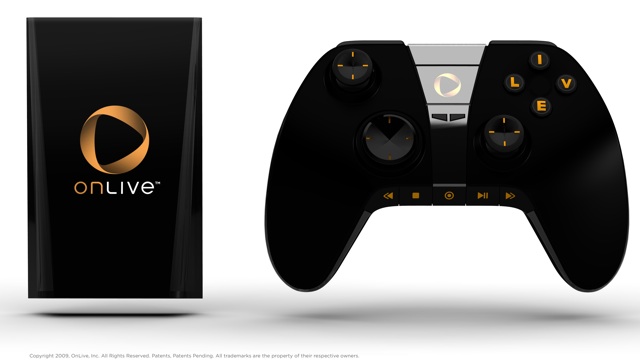
OnLive has been acquired by Sony

April 3, 2015 By Roxanne Briean Leave a Comment

Acquired by Sony

Amongst the first pioneers of on-line cloud gaming, OnLive is to be acquired by Sony and it will shut down its gates on the 30th of April.

Why would Sony acquire all assets of OnLive only to close the shop? Is this a hint to some sort of new streaming service that Sony will announce soon? According to the announcement on the OnLive website, it seems so – ” After five years of uninterrupted service, the OnLive Game Service will be coming to an end. Sony is acquiring important parts of OnLive, and their plans don’t include a continuation of the game service in its current form.”

Services will remain throughout the 30th of April, but with extremely limited coverage for customer service over the next 27 days.

The phrasing is definitely a major hint – ” in its current form” tells us that the service will continue, but we will most likely see a re-branding, or a complete makeover. More detailed information about the takeover can be read on OnLive’s support page right here.

“As the first-ever game streaming service of its kind, everyone who has ever played a game using OnLive has contributed to the technology and its evolution in some way. We’re immensely proud of what’s been achieved and extend our heartfelt gratitude to you for being a part of the OnLive Game Service.” – ended the announcement.

After 5 years, users that have purchased hardware, acquired subscriptions, and even games will not receive a refund – states the FAQ sheet. But if you purchased a Steam game, that certain game will still be playable by using your Steam account.

With the closing on the 30th of April, everything will be deleted – from payment data to game achievements.

It’s sad to see such a great pioneer company go away in the nether. Shortly after its launch in 2010, the company filed for bankruptcy. OnLive was founded by Steve Perlman – who has also worked for giants of the industry like Microsoft and Apple.

In 2012 OnLive was being used by 1.75 million users world-wide – with a monthly subscription of $9.99, users could have played any game available in their roster by streaming the whole thing on their PC’s. It’s hard to believe that such a great idea has ended – hopefully, Sony will not let us down and they will continue Perlman’s work in another form.

Image Source: 1

Filed Under: Headlines Tagged With: OnLive gaming, OnLive gaming service, OnLive gaming service shutting down, Sony acquires OnLive

Galaxy Samsung S6 to be Released in Stores Next Month + Details

March 29, 2015 By Roxanne Briean 342 Comments

After at least a couple of months without making a splash in the smart phones’ huge market, Samsung has finally presented to fans all around the world its newest model: Samsung Galaxy S6. The product comes with a new design, original components integrated in it and a more lean software and accessibility than the previous models that had Samsung’s TouchWiz interface, all these contributing to the most amazing phone that the company has created in years.

The passionate clients were very eager to evaluate this new smart phone, so read below about all the necessary details regarding the highly anticipated Galaxy S6.

Samsung Galaxy S6 Release Date and Price Plans

As predicted, Samsung launched its new leading smart phones at the most recent technology show in Barcelona, Spain: the Samsung Galaxy S6 and the S6 Galaxy Edge. Moreover, these mobile phones are an important forward leap for Samsung regarding style and development, the Galaxy S6 offering a steel and glass carcass similar to the iPhone 4, and the attention to details which were missing from its previous devices.

sss2

The device will be sold probably starting on April 10 in European countries the price tags are pretty much at the level that was anticipated. The new Samsung Galaxy S6 will be significantly more costly than the conventional models released before it, and remarkably will be available only in the 64GB and 128GB editions through formal channels.

The 64GB version will have a price of around $750 SIM free, while the 128GB model is yet to have an established price on the producer’s website. The standard Galaxy S6 (without some of the advanced options, such as leading software) will cost $600 for the 32GB version, while a 64GB or 128GB version has yet to receive an official price.

The Samsung Galaxy S6 will be available from April in more than 20 countries, with the phone being released in more regions thereafter. Vodafone has confirmed already it will be storing the S6 and is now getting preorders, and we anticipate all other significant high end dealers to do the same.

Vodafone is getting preorders for the Galaxy S6 Edge too, and is offering free package and a trade-in contract. Clients who pre-order the Galaxy S6 on the Vodafone Red L, XL, or XXL plans will get the free Samsung Wi-fi Charging Pad and case; while those who choose Red L plan will get $5 off the cost per month when they change their old Samsung mobile phone. These plans start at $45.50 a month with no advance fee, and $35.50 a month with $199 in advance.

AT&T has its pre-orders on the Samsung Galaxy S6 from $49.50 per month with a $89.99 fee in advance. Preorder now and you will have a free wireless charger.

T-Mobile offers the Galaxy S6 for $45 per month. For this, you receive 1,000 minutes, 4,000 text messages and the starting offer of 1GB of information.

Sprint’s suggested plans for the Galaxy S6 cost $53.49 per month with $40.99 fee in advance. The deal offers you 4GB of 4G information, countless phone calls and text messages and a wireless charger. The Samsung Galaxy S6 has Wi-Fi calls when bought through Sprint.

All other high-end shops and mobile providers will be getting pre-orders starting next month, and clients who have pre-orders can receive the new cell phone one day before its launch in the stores on April 10.

Samsung Galaxy S6 Design

Regarding the style, though, these new mobile phones really look the part. Samsung Galaxy S6 is rather eye-catching: just like a Samsung Galaxy Note, it has a rounded screen; but compared to the Note, its shapes run down on both ends of the screens, which makes for a more consistent and modern look.

Anyway you look at it, the Samsung Galaxy S6 is a thing of beauty. The double curves provide an exclusive overall look, and this goes together with the Gorilla Glass 4 covered and colored steel back panel, to create a device that truly is different from the others.

sss4

The S6 is offered in four colors: black and white – as usual – plus green and blue, and all of them feel and look excellent. Despite all the glass and metal, it has more compact dimensions than the previous Samsung Galaxy S5, being 142mm high, 70mm wide and 7mm thin, while weighing only 132g. The S6 provides the best compromise between monitor dimension and one-hand convenience.

Samsung’s designing teams have been able to even to prevent the mistake of having to move the control buttons around, like it was the case with the Galaxy Note. Here, on the Galaxy S6, the volume or power buttons are located in their normal positions on its right and left sides, incorporated in a slim silver metal structure.

However, there are a few disadvantages to this design. First, the detachable back panel, exchangeable battery and microSD port for memory expansion have been banished. Second, the Galaxy S6 does not have IP rating, meaning it is not water or dirt proof like the Samsung Galaxy S5. Third, the glass back panel can be easily affected by fingerprints. If you own these mobile phones, you are going spend a lot of time cleaning them to be spotless.

Samsung Galaxy S6 Display

The S6 has a 5.1” quad-HD AMOLED display of 1,440 x 2,560, and there is absolutely no question that it provides an extremely high quality of the images and videos. Since these performances are packed into a bit more compact screen than its competitors, the Samsung Galaxy S6’ resolution is also higher, attaining an incredible 576ppi.

However, color precision, lighting and contrast are more important than actual pixel density, and in this regard, we have assurance that the S6 display will be a hit. The screen surely looks excellent, with shiny, brilliant colors and ideal contrast (as you would expect from its AMOLED display). Elsewhere, there is a super resistant Gorilla Glass 4 on the top side, so the Galaxy S6 is capable to resist to major damages even better than the models before.

Samsung Galaxy S6: Camera, Sound and Call Quality

The S6 digi cam does not have extreme updates. It has a resolution of 16-megapixel, the same as the Galaxy S5 and maintains a super-fast detect auto-focus, the new model provides a broader aperture and visual picture stabilization.

These do not seem like major changes, but in reality, they make an impressive difference to the S6’s pictures and video performances. The camera is now capable to capture amazing pictures and sleek, constant videos clips. Noise is noticeable when filming cloudy things in low lighting, but even then, you will have decent results in difficult conditions.

The digital camera also features new options on the application front side. There is a new fast release function, which allows double-clicking the button to use the camera in just 0.7 seconds, according to the producer. The program has been simplified, making it easy to select all the various configurations. Samsung S6 has turned taking selfies into a fun and accessible activity: you can now tap a heart rate indicator on the back to capture self-portraits.

Samsung Galaxy S6: Operating System

The Galaxy S6 is the first real mass-market smart phone running on Android with a 64-bit processor. It will still need some time to have important NDK applications modified to 64-bit and then we do anticipate it to run with some problems due to the multi tasking on Android. The S6 is said to take an innovative approach by not using the Qualcomm Snapdragon system, since Samsung is choosing a new road and will instead force its own Exynos SoC.

Qualcomm has the reputation of making a customized CPU core, and in recent years, it has always been caught off guard by Apple’s 64-bit programs. In order to be more competitive against the ever-growing adversaries from Apple, Samsung Galaxy S6 will not be produced with these customized Qualcomm cores.

samsung galaxy s6

The Galaxy S6 is all about returning to the fundamentals. After a few flourishing and carefree periods of development, Samsung had to go back to the designing panel to re-think the ‘next big thing’, so this new model does not look so large, after the company’s product sales tumbled and the S5 model had lower reviews than the S4.

A lot of the story development regarding Samsung so far is not least due to the fact that Apple has delayed its product launching, for many years the clients complaining about their large-sized iPhones. Now, that we finally have both of them on an established market and a variety of powerful promoters from the communication firms, Samsung is beginning to feel the pressure, and now it is serious business for everyone. One thing is certain: the Samsung Galaxy S6 will be a very different smart phone, trying to demonstrate the best of the concept in just one device.

Image source: www.businessinsider.com

Filed Under: Headlines Tagged With: Samsung galaxy s6, samsung galaxy s6 news, samsung s6 edge

8 Must Have Apps this Year

March 29, 2015 By Roxanne Briean Leave a Comment

Nowadays mobile device apps are the most common form of media used on the market. The traditional forms of media stand no chance to them because the apps are online, easy to download, easy to install and most of all, easy to use.

Let’s take a quick look at all the must have apps of this moment.

Soundcloud

Must Have Apps

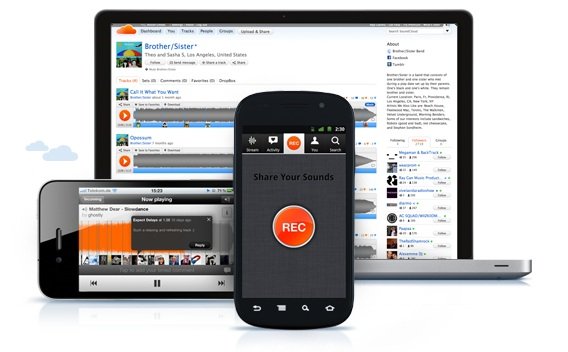
Since its start in 2007 Soundcloud proved to be the definition of music lovers and producers’ basic and most urgent needs. Using unlimited storage, free to listen options, easy to access streaming and easy to upload options, Soundcloud is THE music application out there.

The Sounds can be classified into playlists, favorites, and by artist. There is literally no one in contemporary music, whichever the genre that doesn’t have a Soundcloud profile, even if it is fan made. The other great advantage of this app is that it hosts musical works which are not necessarily included on the artists’ albums, that’s why on Soundcloud one can easily find live recordings from DJ sets and remixes.

FlashScore

Must Have Apps

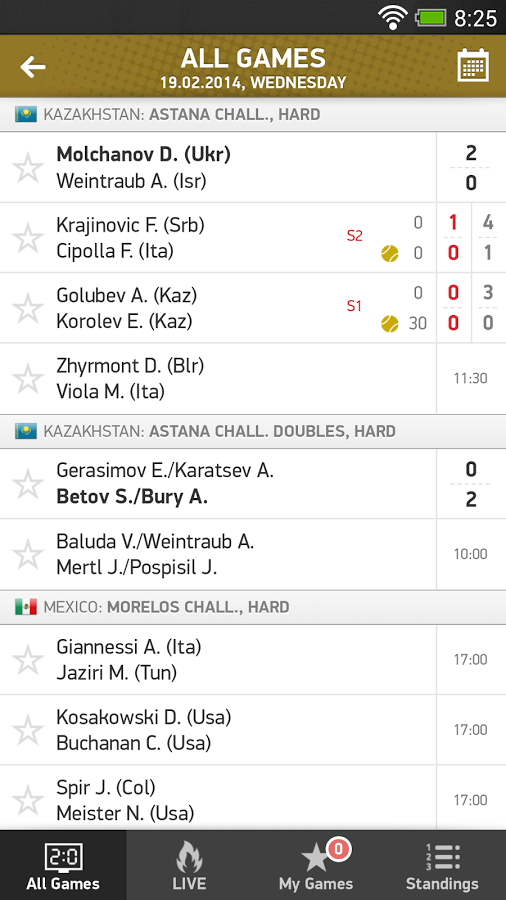
FlashScore is out there for all the sport betting enthusiasts and sports fans alike. Covering about all official sports, individual and team sports, the application provides full real time details for all competitions, from football to cricket and water polo. In the same time, those interested can find fixtures, season tables, top goal scorer statistics, team line-ups, head-to-head past results comparisons, and options to choose and add favorite competitions.

For those interested in betting, FlashScore gives away offers from all the big names in sports betting agencies, such as Paddy Power, William Hill or Bet-at-Home. The options include simple 1×2 tips and more complex number of scored goals odds.

Tinder

Must Have Apps

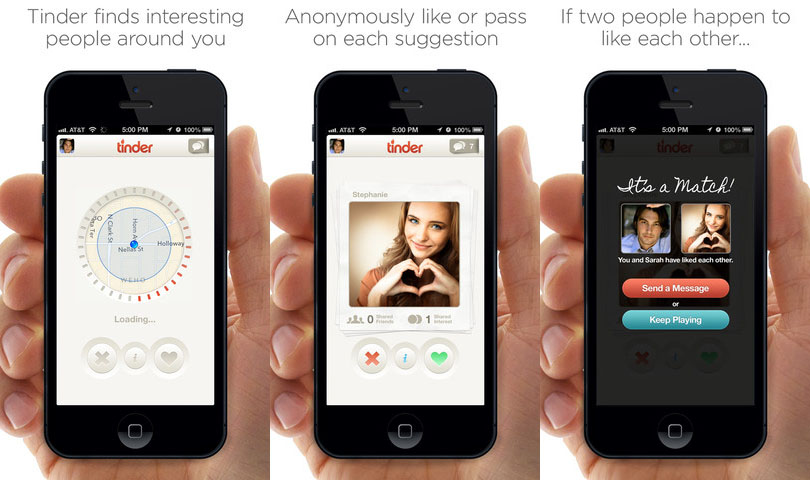
Nothing comes handier for a quick romantic fix in a world dominated by technology than Tinder. The app’s immense success is shown by its over 50 million users worldwide. The innovation brought by Tinder is the search for matches based on the physical proximity. The location is given by the GPS of the mobile device -Tinder is only to be used on mobile devices- and the (very) basic info on the profile (not a greater amount of information offered by a 2000s Yahoo profile) is provided by the user’s Facebook account (first name, age and a limited number of photos).

The “dating” process is very quick and simple. If one profile is liked, you have to sweep right on that profile, if not, the other way. If 2 users chose the “right side” they will be “matched” and that’s where the social aspect of the application steps into scene. You can start chatting right away avoiding interaction with other contenders; it’ll be just you and the person that catches your attention. It is a more synthetic version of Facebook, concentrated on one major purpose – one night stand dating and maybe even more.

MoovIt

Must Have Apps

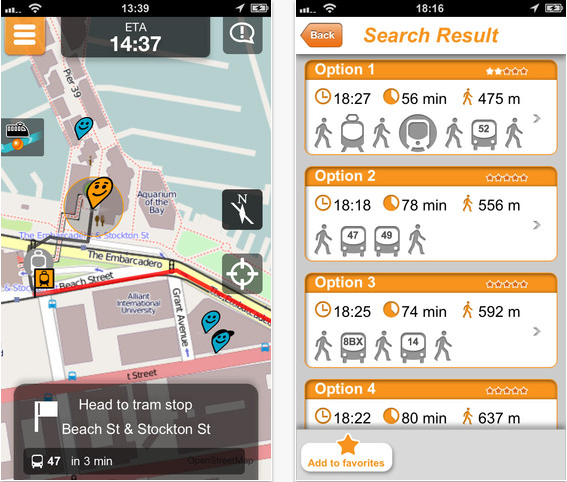
This urban traveler’s real time guide is simply a treasure. It is a free application using data gathered from official sources and from the people who travel using buses, trams, subway trains, intercity trains, ferryboats and/or other means of transportation. The fact that it is crowd sourced is a major plus for MoovIt. The users learn from those who were there before about schedules, stations, delays, the quality of the ride, alternative means of transportation and fares.

MoovIt was founded by 3 Israeli innovators and the idea for it came from a different crowd sourced application called Waze, used mostly by car drivers to ease their rides.

Launcher

Must Have Apps

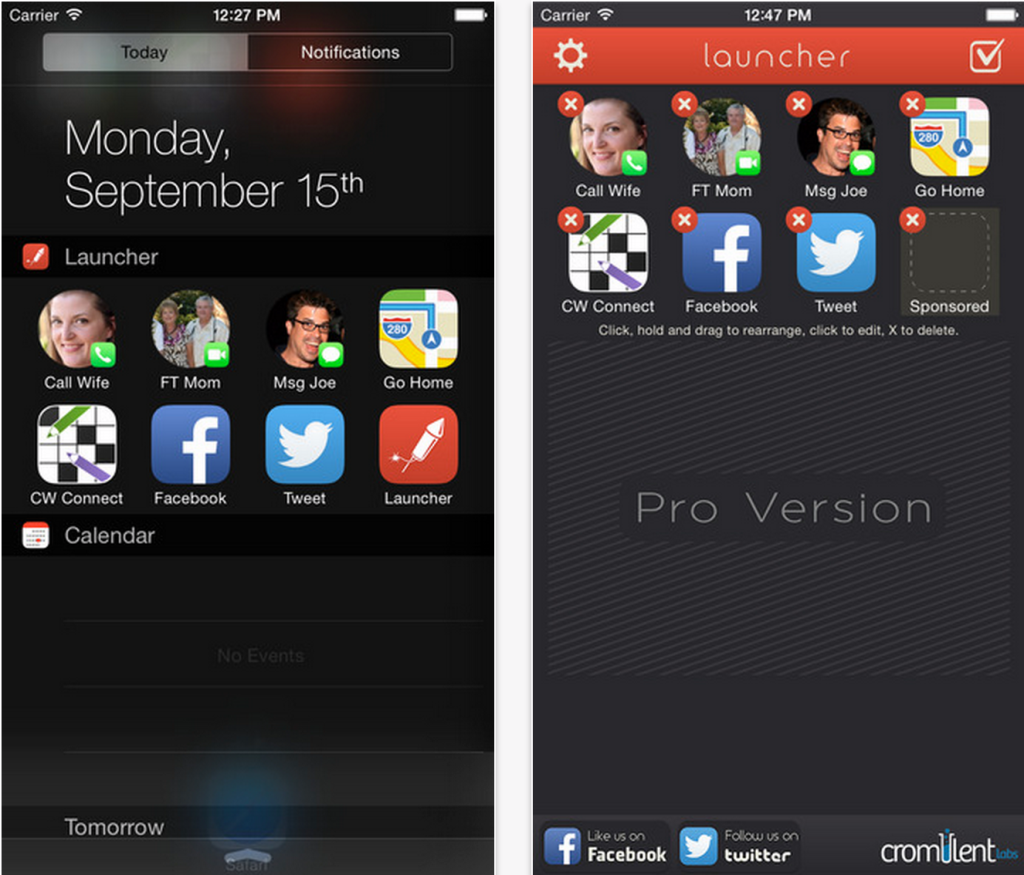
iOS users don’t get to customize their home screens as those who use Android. But Launcher comes really close in letting Apple users do that. The app uses the notification center in iOS 8 to let users place shortcuts of apps in their today panel. The app allows you to have widgets that you can customize. For example, you can add a shortcut for Twitter that will open the app directly on the “compose new tweet” page. You can upgrade the app and make it a lot more customizable for just $3.99.

You can have a Google Maps shortcut that you can customize in such a way that when you launch it, it will give you directions to reach your home address.

Mr. Jump

Must Have Apps

This game is very challenging as bad timing can ruin everything. The game is pretty straightforward: you have to make Mr. Jump reach the end of every level by avoiding the spikes and other obstacles. While the game doesn’t look that difficult, timing is crucial and it is very challenging for a simple game.

At the end of every round you will be presented with information regarding how many attempts you’ve had and for how far you’ve survived. If you’re stuck in a level you can skip it with an in-app purchase. Also, make sure you listen to the soundtrack as it is pretty whimsical.

Atari Fit

Must Have Apps

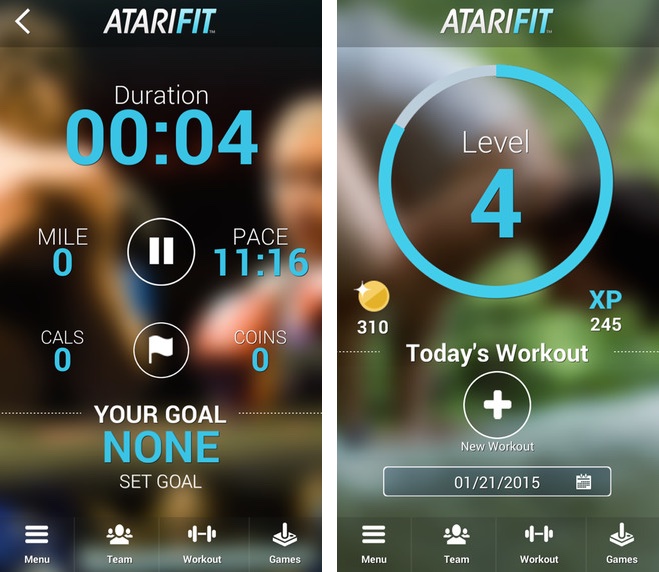
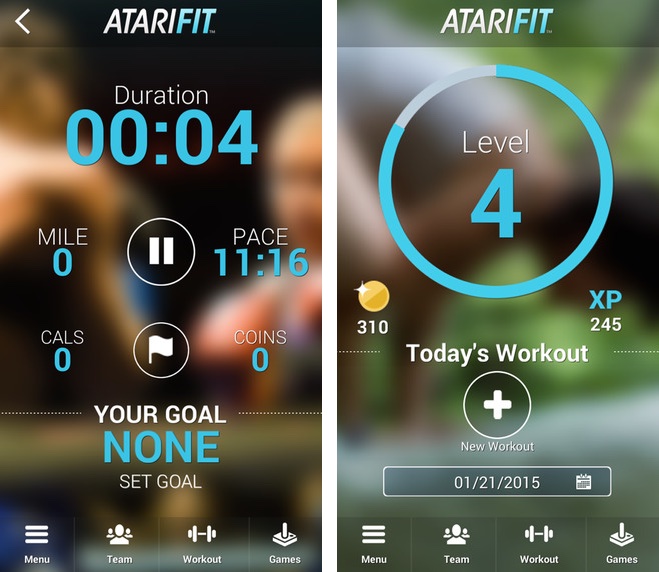
The designers from Atari made a fitness app that centers on games like Centipede, Pong and other retro jewels. Based on what your fitness goals are, the app will offer you numerous exercise plans. Exercises will earn you coins that you can then use in order to play games like Super Breakout, Centipede and Pong.

The app also includes social features that will let you compete with your friends. If you connect Atari Fit and Apple Health, the app will retrieve information from your wearable devices and other apps such as RunKeeper.

LinkedIn Job Search

LinkedIn finally decided to make an app for their website. You can search jobs in the numerous listings and apply directly from the application. The app works well with notifications and it will tell you when something opens up in a company or a field you’re interested in. The recommendations in the app will only get better as you search for more jobs and view more listings. LinkedIn Job Search also considers your skill and experience so keep your profile up to date.

Enlight

Must Have Apps

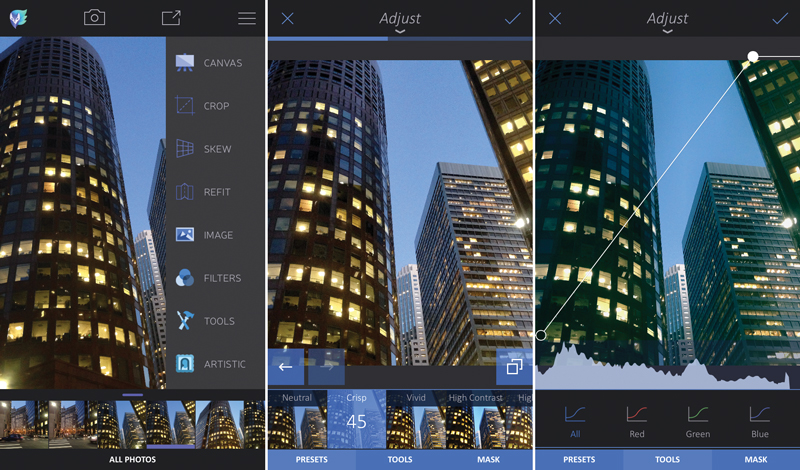
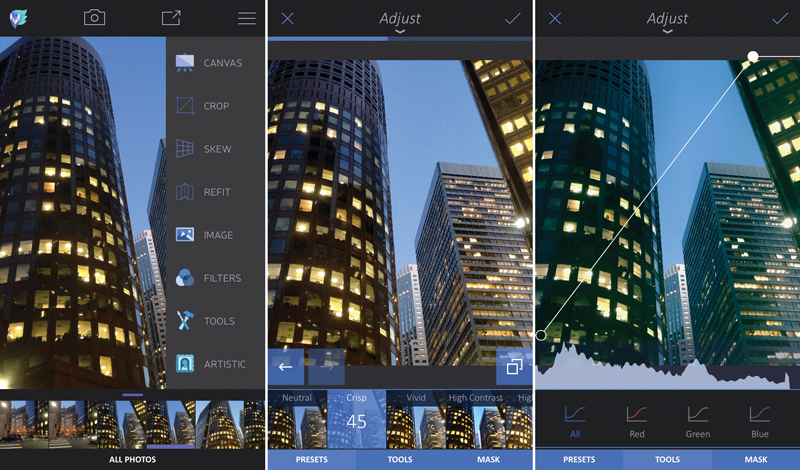
Enlight is the latest photo editing application from the same developers that brought us Facetune. The app is in many ways the dream app of every iPhone photographer. It features a great balance between artistic effects and filters and Photoshop controls. The app has a lot preset filters that you can choose from and you can also adjust elements of your images manually. The app also has a great and sophisticated curves control.

You can use the mask feature in the app to only apply effects to a certain part of the image and trust us when we say that it’s full of great artistic effects.

So there you have it. This was our list of recent must have apps.

Images source: 1, 2, 3, 4, 5, 6, 7, 8, 9

Filed Under: Tech & Science Tagged With: android, apps, atari fit, enlight, flashscore, Google, google play store, google store, great new apps, ios, ios apps, launcher, linkedin, moovit, mr jump, must have apps, new apps, soundcloud, tinder

Microsoft apps to be bundled with Android tablets

March 26, 2015 By Roxanne Briean Leave a Comment

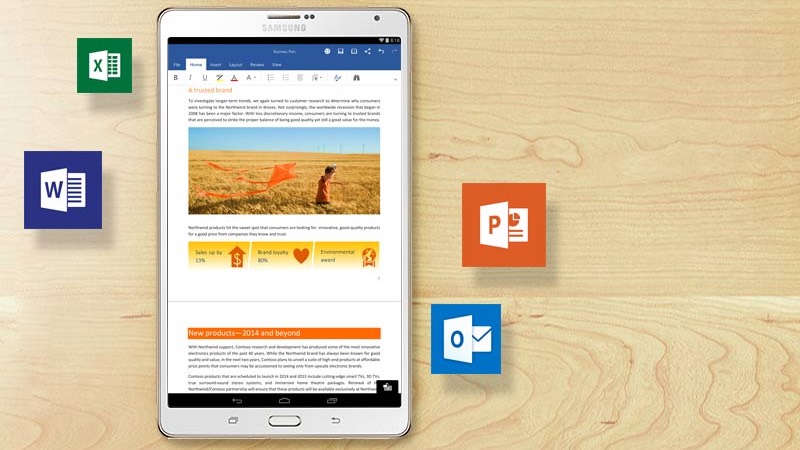
Microsoft Office appsGood news for Microsoft and Android lovers. Maintaining the ideas of CEO Satya Nadella of prioritizing mobiles, and cloud services, some upcoming Samsung tablets will come with pre-installed Microsoft apps – Word, Excel, PowerPoint, OneNote, OneDrive and Skype. Also by purchasing the Galaxy S6 and the Galaxy S6 Edge, owners will have immediate access 100 GB of free storage on OneDrive.

There will be 3 versions of Microsoft’s Office 365 available, not only for business customers, paired with Samsung’s Knox security software suite:

  • Business
  • Business Premium
  • Enterprise

Striking a deal with Samsung isn’t enough for Microsoft, and this strategy will most likely be a worthy attempt at dominating the already saturated marketplace. By 2016, Microsoft is planning on offering Dell owners, and other OEMs from various countries, the same deal – free Microsoft apps, pre-installed. They will most surely be extending to countries as Canada, Germany, Portugal, Italy, Russia, Turkey, Pakistan, and some countries in Africa.
Peggy Johnson, executive vice president of Microsoft’s business development, sees a bright future not only for Microsoft, but for OEM’s also. ” For OEMs, these deals will increase the value of and enrich people’s experiences on Android devices. Original device manufacturers are important because they extend Microsoft services to the ecosystem. More specifically, they help to reach a greater number of other device manufacturers, resulting in even more choice for customers around the world.”

Forbes has stated that Microsoft is in advanced talks with CyanogenMod about bringing their pre-installed apps to them. CyanogenMod is currently trying to ” Put a bullet through Google’s head” by taking a hold of the OS chess table, currently dominated by Android and iOS. Raising 80$ mil from investors as Twitter, Qualcomm, Telefónica, and media entrepeneur Rupert Murdoch, their goal is make their way, slowly, but surely, towards an even playing field.

“These deals demonstrate how we are working with hardware partners in new ways to deliver rich experiences through their scale,” says Johnson. “We’ve proven that we’re not afraid to look outside ourselves to reinvent ourselves.”

It’s unclear at this point how Microsoft is playing the game, how are they planning to get a profit from offering free software, but the alternative would be to let Google, who is already offering for free Google docs, sheets, and slides, to snowball in an area that Microsoft was head-dog – software.

Image Source: 1

Filed Under: Headlines Tagged With: Android Tablets, Microsoft apps, Microsoft free apps, Microsoft Office, Samsung Tablets

Newest Virtual Reality Gadgets at the Beginning of 2015

March 24, 2015 By Roxanne Briean Leave a Comment

If you are looking for an experience as close as possible to the real world, then a Virtual Reality gadget is the only thing you need. None if the activities that you are seeing or hearing are really happening while you are wearing a virtual-reality device, but you could swear that you are already there.

In such scenarios, you are affected by these immersive destinations and all of them are unveiling right in front of you. To the outside viewers, you are only a person with a technological system who sees the world through it.

1. Google Cardboard

The more down-to-earth device based on VR experiences that we encounter is Google Cardboard. It is, simply put, a virtual-reality headset designed for anyone of us. And it allows everyone else to have fun while being lost in their own world for just a little while, but without spending a lot of cash.

Virtual Reality Google Cardboard

Google Cardboard is designed for use in brief sessions, so it does not have attaching straps to keep it on for a longer interval. Its viewing experience is also shown on your smart phone’s display. Different sounds come from the main sound system designed into the phone and it is functioning with the Android operating program and devices based on it, such as Android version 4.1 (Jellybean) and newer, and software especially designed for Google Cardboard.

The iOS from Apple is also working, but it is not fully supported, so activities might vary for different users. In addition, there are more then 250 applications for Cardboard available in the Google Play store, in contrast to a much wider variety of iOS programs listed in App Store especially for VR devices.

Rather than being designed from high-end components and materials, Google Cardboard carcass is made from darkish and corrugated pieces of cardboard and a few elements that can be bought in any shop. The DIY users can follow online tutorials for making one of their own. Complete offers, with a set of recommendations printed right onto the carcass, can be found in the specialized stores on the Internet.

Google specialists designed this device during their freethinking time — the time when the company encourages its employees to spend it for creative projects that present an interest to them.

Virtual Reality Google Cardboard

In the place where the smart phone is used to perform as a VR viewer, Google Cardboard has its near field communication (NFC). When the telephone with NFC is inserted in the slot, the tag is able to recognize it. A distinct sound beeps in the Cardboard application that is used, and the software immediately switches on viewer mode, displaying two images on the stereoscopic landscape’s viewpoint. The phone is kept in its place with a Velcro band that is attached to the VR device.

2. Gear VR

Gear Virtual Reality, or Gear VR, has a large fan base in gamers or techies who are willing to pay for the latest gadgets, since they analyze every detail about devices like Galaxy S6 or Facebook’s Oculus Rift. VR technologies like these are advanced, for the passionate ones and might cost up to a couple of hundred dollars — but starting at reasonable prices without the extra elements —, while headsets from other top companies are still in a developing stage.

Gear VR is a gadget used in the tests presented in tech conferences and it is incredibly fun during its use. You can experience exclusive trips like walking through places in different locations at your choice and doing fun stuff live driving sports cars and traveling in entire unknown places.

Virtual Reality Google Cardboard

The resolution and perception problems found in the previous versions of Samsung’s VR devices are reduced in the latest edition of Gear VR. While, at a brief glance, this new version does not seem to be very different from the others compatible with Galaxy Note 4, after the device is attached to its owner, the experience is indeed much improved.

To begin with, the whole device is significantly lighter, due to the aspect that Galaxy S6 is weighing less than Galaxy Note 4. The ties are more relaxed but still fit firmly, and there is a release on the left part of the headsets that decreases lens’ clouding. Overall, the company has really achieved the sensation of complete comfort for the person wearing it.

The other main problems resolved by VR Gear and Facebook’s Oculus is improving the display’s quality, which is a serious problem for all creators of VR devices, since there is needed a larger resolution for today’s gadgets, and even more in the future. But, for now, the 1440p in Gear VR looks really excellent.

Galaxy S6 has 5.1” screen that is smaller than its 5.7” predecessor inserted into the Galaxy Note 4, but this improvement indicates the pixels’ density is clearly greater — a 577 ppi in comparison to only 515. It might not seem like a lot, however it makes quite a difference when it is used in real life.

3. Morpheus

Last but not least, Sony reveals a prototype for a new VR headset, called Morpheus, that will be launched in 2016, this being model of the ear phones that will bring significant developments as opposed to previous models that have been released last year.

This version model has an improved display RGD OLED of 1920 x 1080 with a refresh rate of 120Hz for very low latencies and more ergonomic appearance for a simpler and relaxed use.

The gadget will be functioning with the PlayStation 4 console. The company is normally looking for creating a VR game that can be compatible with their Project Morpheus and they already have a VR movie studio room.

Virtual Reality Google Cardboard

As a little drawback shown for this prototype is that things can bring light headaches sometimes when they are used, and redirecting in some programs can be a bit tricky without some experience.

Plus, the VR software might be consuming for the owner due to its massive technological advancements.

Image Sources: 1, 2, 3, 4

Filed Under: Tech & Science Tagged With: Google cardboard, Google VR, Sony Morpheus, virtual reality, virtual reality gadgets

  • « Previous Page
  • 1
  • …
  • 4
  • 5
  • 6
  • 7
  • 8
  • …
  • 11
  • Next Page »

Subscribe to Blog via Email

Enter your email address to subscribe to this blog and receive notifications of new posts by email.

Join 10 other subscribers

Recent Articles

police handcuffs man

German Man Probed In Poisoning That Killed 21 Employees Since 2000

June 29, 2018 By Kenneth Scott Leave a Comment

Chicken wings bar

Intoxicated South Carolina Man Punches Waitress Who Refused to Serve Him Alcohol

June 29, 2018 By Karen Jackson Leave a Comment

gaming

New Zealand gamer Who Flew Halfway Across The World for Virginia Teen Gets Shots By Her Mother

June 28, 2018 By Cristopher Hall Leave a Comment

party

Former Virginia Tech Freshman Sentenced to 50 Years in Prison for Stabbing a Girl to Death

June 28, 2018 By Roxanne Briean Leave a Comment

bonfire

British Couple Sentenced to Life in Prison for Torturing and Murdering French Nanny

June 27, 2018 By Deborah Campbell Leave a Comment

pay phone

Texas Father of Girl Disappeared in the 80s Ignored by Authorities

June 26, 2018 By Cristopher Hall Leave a Comment

bottled water

San Francisco Woman Threatened to Call Police on Girl Who Sold Ice Water for Disneyland Trip

June 25, 2018 By Roxanne Briean Leave a Comment

Maplewood Park

Missouri Man Robbed by Date and Accomplice in Park

June 22, 2018 By Nancy Young Leave a Comment

coding

New York Man Sentenced in Cyberstalking Former Girlfriend, Mailing Drugs to Her Dorm

June 22, 2018 By Deborah Campbell Leave a Comment

headphones

Bose Poised to Launch Sleepbuds, In-Ear Headphones That Help You Sleep

June 21, 2018 By Nancy Young Leave a Comment

Police light

Intoxicated Female Driver in Custody for Pulling Arresting Officer by the Hair

June 21, 2018 By Kenneth Scott Leave a Comment

kitchen

Restaurant Manager Arrested and Charged in Shooting Death of Co-Worker over Negative Yelp Reviews

June 20, 2018 By Karen Jackson Leave a Comment

plastic container

Pennsylvania Couple Charged in Violent Death of Infant Discovered Buried in Cat Litter

June 19, 2018 By Cristopher Hall Leave a Comment

tailpipe

Minnesota Teen Gets Head Stuck In Oversized Tailpipe Winstock Music Festival

June 18, 2018 By Karen Jackson Leave a Comment

Pages

  • About Us
  • Contact us
  • Privacy Policy
  • Privacy Policy GDPR
  • Staff
  • Terms and Conditions

Recent Posts

  • German Man Probed In Poisoning That Killed 21 Employees Since 2000 June 29, 2018
  • Intoxicated South Carolina Man Punches Waitress Who Refused to Serve Him Alcohol June 29, 2018
  • New Zealand gamer Who Flew Halfway Across The World for Virginia Teen Gets Shots By Her Mother June 28, 2018
  • Former Virginia Tech Freshman Sentenced to 50 Years in Prison for Stabbing a Girl to Death June 28, 2018
  • British Couple Sentenced to Life in Prison for Torturing and Murdering French Nanny June 27, 2018
  • Texas Father of Girl Disappeared in the 80s Ignored by Authorities June 26, 2018
  • San Francisco Woman Threatened to Call Police on Girl Who Sold Ice Water for Disneyland Trip June 25, 2018

Categories

  • Business
  • Entertainment
  • Finance
  • Headlines
  • Health
  • Life
  • Nature
  • Science
  • Sports
  • Tech & Science
  • Travel
  • Uncategorized
  • United States
  • World

Copyright © 2026 ArgyllFreePress.com
About · Privacy Policy · Terms of Use · Contact