Argyll Free Press

Growing News Network

Wednesday, November 11, 2026
Log in
  • Business
  • Finance
  • Sports
  • Tech & Science
    • HP Envy 4500 Review
    • LG Optimus 170 Review
    • iPod Touch 6th Generation Review
    • HTC One M8 Accessories Set-up
    • Surrealist Games You Must Play
    • Hisense Sero 8 Review
    • Dell Latitude e7440 Review
    • HP Laserjet 1536dnf mfp Review
    • Garmin Fenix 2 Review
    • Skype Vs Viber
    • Best Video Conferencing Software
    • Sony mdr 1r Headphones Review
    • Canon Rebel t3i Review
    • Sennheiser Momentum 2-0 Review
  • Travel
  • Headlines
  • Health
  • United States

Search Results for: cloud war

Google has Started a Cloud War!

May 20, 2015 By Michael Turner Leave a Comment

Cloud Computing

The cloud wars are real, and they are being fought on common ground – or at least, that’s what Google hopes!

Google has just cut down on prices for its Compute Engine by 30 percent, and has made Amazon, its primary challenger, re-consider their strategies.

The big G has also introduce a new a new Preemptible Virtual Machine – it’s able to deliver short-term computing capacity at a low, and fixed price. If Amazon doesn’t change its tactics immediately, they will most likely lose a ton of clients to Google.

The Google Cloud Platform Blog states that – ” Compared to other public cloud providers, Google Cloud Platform is now 40 percent less expensive for many workloads. Starting today, we are reducing prices of all Google Compute Engine Instance types as well as introducing a new class of preemptible virtual machines that deliver short-term capacity for a very low, fixed cost.”

This means that in the US a standard instance will be 20 percent cheaper, and a micro-instance will be 30 percent less. Europe, and Asia haven’t received the same treatment yet, and the price reduction will come in the near future, maybe even next month.

Google Cloud Computing

Google states that their clients have the upper-hand when it comes down to saving money – they will be paying 40 percent less than what other individuals are paying using a competitors services wink wink Amazon.

Microsoft, and Amazon are most likely to counter Google’s offer, so be patient and don’t move just yet from a service to another. Most analysts think that the services will get even more cheaper in the years to come, eventually leading to it being completely free.

Now, Google introduced their Preemptible Virtual Machines, that cost $0.015, and they are 70 percent cheaper than their non-preemptible siblings. But there is a catch to this. Google doesn’t guarantee that their VM’s will run continuously. This shouldn’t pose as a problem, because you use them only in a cluster, and if one drops, the cluster won’t suffer – also, you’ll receive a notification 30 seconds prior to it going offline.


Image Source: 1, 2

Filed Under: Headlines Tagged With: Amazon, Cloud Computing, Google, microsoft, Virtual Machines

Exoplanet has Clouds Made of Vaporized Jewels

December 13, 2016 By Kenneth Scott Leave a Comment

bright orange exoplanet

Gas giant exoplanet has clouds made of vaporized jewels.

When you consider how vast the Universe really is, then the possibilities for various scenarios and extreme or just weird conditions on planets are likely to be discovered by scientists. One such strange discovery is that of a giant exoplanet with extreme weather conditions and clouds made of vaporized jewels.

Scientists analyzing data provided by NASA’s Kepler space telescope have discovered a huge alien planet. What makes it particularly interesting is that it has powerful winds consisting in bright clouds made from various types of vaporized jewels formed due to the high temperatures.

The exoplanet named HAT-P-7b has been under extensive observation between 2009 and 2013. Scientists conducted several studies regarding the strange conditions of the planet and determined that it is 40 percent bigger than Jupiter while being around 1,040 light-years away from Earth.  Researchers observed that the planet completes a trip around its star every 2.2 Earth-days and has an average temperature of 4,180 degrees Celsius.

A fascinating aspect of the exoplanet is its clouds. They are mainly composed of corundum which is a material that forms sapphires and rubies. Corundum is also a colorless material which condenses at temperatures found on the day side of the planet. However, scientists are more excited that they have discovered another gas giant with weather outside our solar system.

The lead author of the study, David Armstrong, from the University of Warwick, England has stated that their results show how strong winds circle around the planet and transport its unique clouds to the day side from its night side. The speeds of the winds can change dramatically which leads to huge cloud formations that eventually dissipate. This phenomenon is what causes the high brightness of the planet which can be visually stunning when viewed from up close.

Based on the amount of light reflected over time, scientists determined that the exoplanet presents evidence of an atmosphere. However, since the planet is just a gas giant it does not have any land which makes it unsuitable for human exploration in the future. The scientists’ study was published in the journal Nature Astronomy on December 12, 2016.

What do you think about the discovery of this planet with clouds of vaporized jewels?

Image credit: University of Warwick

Filed Under: Science

Apple Saves Your Call History to the iCloud

November 19, 2016 By Roxanne Briean Leave a Comment

Apple store

Apple saved your call history to the iCloud.

Smartphones are able to record large amounts of data about your activity including your call history. A new report shows that Apple started saving your call logs in the iCloud for some time now, without properly informing iPhone users. This allows them to easily share your private information with government agencies if they are requested to do so.

A software forensics company based in Russia, Elcomsoft have revealed that their new Phone Breaker software is able to retrieve a smartphone’s user personal call history data which was saved on iCloud. Additionally, the report also reveals that Apple has also been saving FaceTime logs. More specifically, Apple records to the iCloud detailed information such as phone numbers, the dates and times of each call you made or received, their durations. They can even keep data about your ignored or missed calls.

This situation is what most privacy experts have warned against. If Apple decides to share your personal information with government authorities, then they could easily do so thanks to their large databases of each user’s call history of up to four months. There no specific options to disable this function without directly disabling the iCloud Drive service.

According to the Elcomsoft report, the syncing of your call history to the iCloud can happen in real-time, or just in a few hours. The company’s software managed to retrieve information dating back to four months ago.

Although Apple’s actions seem like a violation of your privacy, the company only decided to implement the function for iCloud as an essential aspect of cross-device functionality. It’s doubtful that the company wants to really spy on their users. If it really did want to, then Apple should have given the FBI access to the iPhone of the San Bernardino shooter. Additionally, keeping all your call history data provides a backup point in case you lose your phone.

Nonetheless, users should have the option to choose for themselves if they really want their call history and personal information to be saved on the iCloud. A change in the company’s policy about sharing information with authorities could easily occur in light of new circumstances.

What do you think about Apple saving your call history?

Filed Under: Tech & Science

Bermuda Triangle Mystery Is Not Explained by Hexagonal Clouds

October 26, 2016 By Nancy Young Leave a Comment

Bermuda triangle mystery shown on map

The Bermuda Triangle mystery has been “solved” many times throughout history.

A team of scientists discovered a strange formation of hexagonal clouds at one of the tips of the triangle and immediately attributed the Bermuda Triangle mystery to air bombs created by the strange clouds. The scientific community does not agree with the scientists and believes that there is much more to the disappearances than strong winds. Officially, the Bermuda Triangle is still puzzling researchers, no complete explanation for the phenomenon being provided.

A recent documentary that was aired on the Science Channel attributed the eerie nature of the Bermuda Triangle to hexagonal cloud formations. The peculiar clouds were spotted by meteorological satellites over the Bahamas area.

The strange shape of the clouds attracted the attention of both scientists and meteorologists. Normally, the edges of a cloud are irregular, as they are formed out of gaseous matter that easily gets dispersed in thinner areas. However, the hexagonal cloud formations presented straight edges, a very bizarre trait.

The clouds in question measured up to fifty miles in diameter and had also been spotted through time across Europe and the North Sea. Scientists believe that the formations can create air bombs, a sort of air microbursts that originate from the bottom of the clouds and travel towards the ground at impressive speeds. When the clouds are located over a water mass, the air bombs can generate colossal waves and increase the speed of winds at up to 170 miles per hour.

The Science Channel documentary claimed to have solved the Bermuda Triangle mystery with the discovery of the hexagonal clouds. However, most members of the scientific community do not agree with the theory.

Meteorologists declared that the hexagonal clouds occur on a global scale and they were never linked to aircraft or boat disappearings.

Others stated that the way in which the air bomb phenomenon was explained made it look like it was a major scientific breakthrough when, in fact, they were not new occurrences for meteorologists.

Kevin Corriveau, a meteorologist at NBC, stated that the hexagonal clouds that were photographed on top of the Bahamas were not capable of producing air bombs. According to him, the air bombs only occur during a sizeable thunderstorm. Moreover, the clouds should not present an opening in the middle.

Unfortunately, the Bermuda Triangle mystery remains unsolved.

Image source: Wikipedia 

Filed Under: Tech & Science

Alienware X51 Review – The Smallest Gaming Powerhouse

January 8, 2016 By Roxanne Briean Leave a Comment

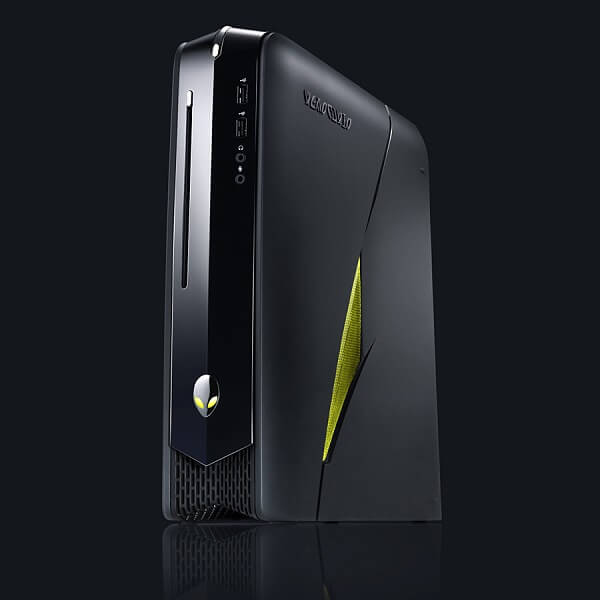
Alienware X51 Mini Gaming Desktop

The first time I ever saw the Alienware X51, I briefly reminisced another device this one strikes an uncanny resemblance to that I couldn’t quite put my finger on. After a 5-minute trek down the memory lane, it turns out that the mysterious device was none other than another Alienware product – the Alienware Alpha. How anticlimactic. Then again, who else manufactures such amazingly looking gaming gadgets?

However, its purpose isn’t quite the same than the Alpha held. While the latter was meant as a sort of portable computer that you could pretend was a console and hook it up to your living room TV, the X51 is just a mini gaming desktop. Whether its user is a professional gamer looking for an easier to carry desktop to take with them at their next tournament or you’re simply just tired of stuffing 20 pounds worth of gaming technology into or underneath your desk, the Alienware X51 is the choice.

The X51 line of mini gaming desktops has been around for a while – long enough to now reach its third iteration (the X51-R3 to be more exact). And truthfully, it has so far managed to impress just how much power you can compress into as little space as you can; and for professional gaming nonetheless, the place where half measures just don’t work.

But no computer manufacturer has yet managed to create the perfect device and the Alienware X51 is not without its faults, for sure. But there seems to be a steady growth rhythm that has been going on since the first X51 was first released.

So is the Alienware X51 the gaming PC you need? Or is it more of a hipster gadget than a truly useful thing to have? And actually, only after answering the above, the true question arises: does the Alienware brand offer truly outstanding gaming equipment or is it just that – the brand? If it succeeds in truthfully being outstanding, what it is that makes it outstanding?

For all intents and purposes, all the information found in the review below concern the latest X51-R3 model and not any of its predecessors.

Pros:

  • Amazing power to size ratio
  • Capable of 4K graphics with an optional amplifier
  • Amazing design
  • Default model is relatively affordable
  • Portable

Cons:

  • The truly high end specifications are in another castle, Mario!
  • Special design motherboard with native limitations
  • Difficult and expensive to replace or upgrade parts
  • The high-end models of the X51 are ludicrously expensive

Alienware X51 Design

Alienware X51 Gaming Desktop Design

I don’t want anyone to believe I’m being biased when I say this as I personally own a custom rig gaming PC at home and my entire history with an Alienware desktop can be summed up to reviewed products they sell. However, I really and most sincerely believe that Alienware is the most entitled company to gloat and be self-satisfied when it comes down to design. At this point, the company’s brand is a truthfully great representation of their gadgets.

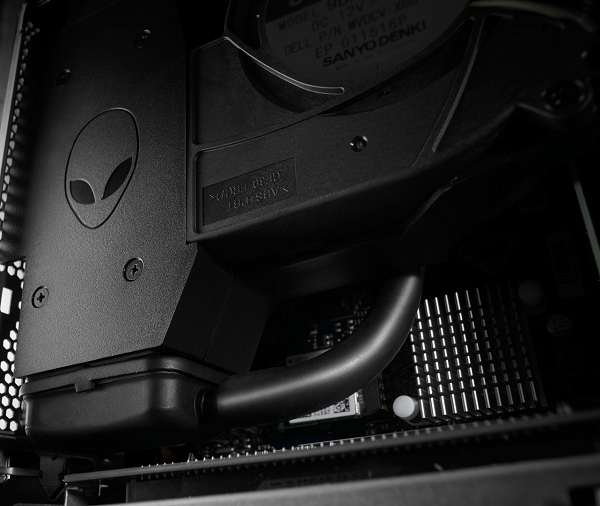
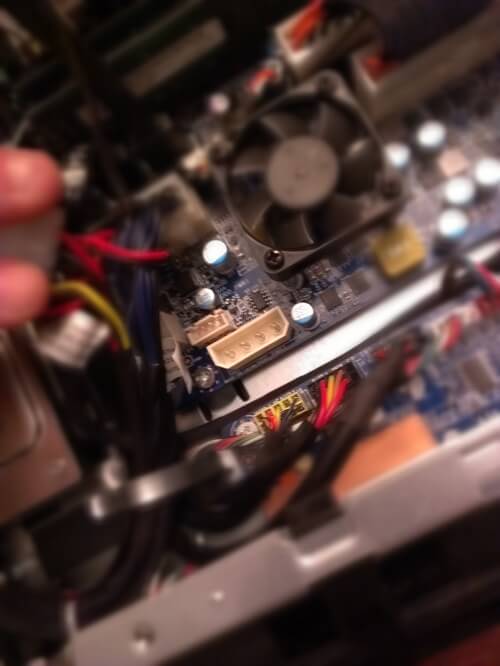
And it doesn’t even stop at the exterior design either. Open up one of these babies (once your warranty allows you to do so, of course) and you’ll see what I mean.

Alienware X51 Water Cooler Design

Going back to what I’d started, however, the Dell Alienware X51 dimensions are laughable – in a positive way – if you’re to compare it to your regular gaming desktop. Compare it to the Alienware Alpha PC / console hybrid or any PlayStation or Xbox you have lying around, and it doesn’t seem so small anymore. Its exact dimensions are 13.5 x 12.5 x 3.7 inches and it weighs somewhere around 12 lbs. It’s definitely not console sized, but once again – still a huge difference from your regular gaming desktop.

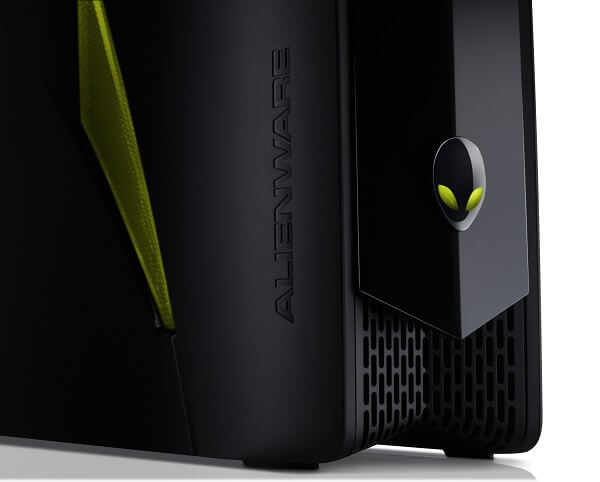
The Alienware X51 case is incredibly slim and features the wildly sleek design that most, if not all Alienware computers have. You’ll immediately notice that its exterior is composed of several plates that are made from different materials. While the sides are matte black, the central, front plate is glossy and extends all over the front and top of the tower, curving gently at the edge where the power LED and button is at.

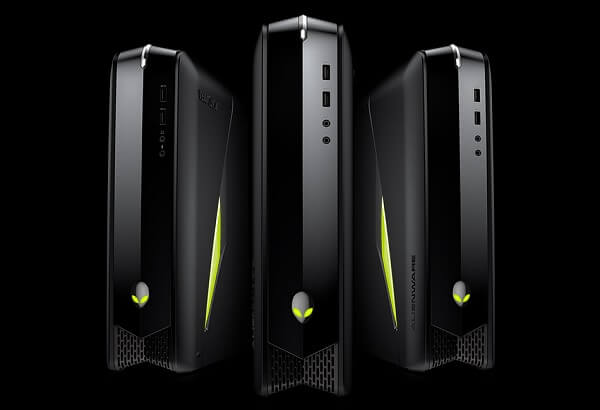
Alienware X51 Mini Gaming PC Design

The trademark Alienware logo and slowly shifting colors can be found here too. The logo rests on the front of the computer while two lit panels rest on either side of the tower. All of the above elements can be set to shuffle through the color spectrum or be set to a static hue, similarly to how the Razer DeathAdder can, for example. The Alienware name isn’t missing either: you’ll find it sleekly engraved in either side plate of the computer.

Alienware X51 Ports

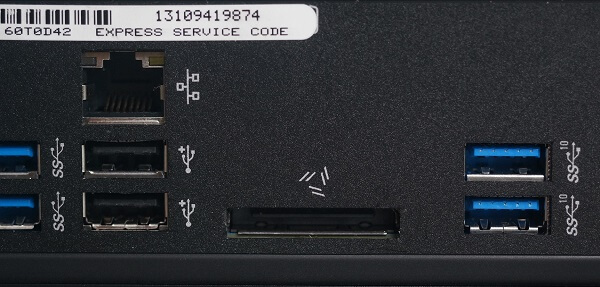
When they made the Alienware X51, they really took all the peripherals you would ever need for your gaming experience into consideration. Frankly, if I hadn’t built my personal PC to include a couple extra USB slots, the X51 would’ve dwarfed my computer in that department. There is a total of 8 USB slots of various types – 6 on the rear and two on the front of the computer. 4 of them are SuperSpeed USB ports (3.0 USB), 2 are Hi-Speed USB (2.0 USB) while the last two are SuperSpeed USB 10 Gbps models (3.1 second generation USB).

Alienware X51 USB Ports

The rear also features a 1.4 HDMI output port at the very top, making it possible for you to connect your computer to any monitor or television set. Sadly, there isn’t a DisplayPort available as an alternative on the X51 but then again, chances are you won’t find that technology on many monitors that aren’t as recent.

On the back of the Dell Alienware desktop, an RJ-45 Gigabit Ethernet port can be found and comes as a second means of internet connectivity on top of the wireless card that the Alienware X51 R3 has been gifted with. That way you can get either the freedom of Wi-Fi or the irreplaceable juice that a direct connection can give you with the Dell gaming desktop.

You’ll find the regular three separate ports for an entire 5.1 sound system, subwoofer included on the rear. The AC power input is as small as one you would find on any single laptop out there. This felt a little worrying at first as I originally suspected a weaker and lower-usage power supply to be behind it. Turns out I was right as the entire rig is powered with a 330 Watt AC power supply that is rather questionable when it comes to full-fledged gaming computers. I guess that’s the state of affairs when it comes to mini gaming computers.

To wrap up, you will be able to find the headset mic in and headphone out ports on the front of the thing, making it perfectly accessible to plug in and out whenever you wish without even having to get off your chair.

Alienware X51 Specs & Available Configurations

Alienware X51 Hardware

I literally got lost on the Dell website trying to get a good custom rig built just to see how far the X51-R3 can really go with the absolute best components out there. Now, this isn’t particularly reflective of how good the Alienware X51 is as a gaming computer, but it’s something that you will have to put up with if you wish to go through the regular build-it-yourself ordeal. The website is confusing and offers sadly limited information on various components.

Regardless, the basic Alienware X51 that Dell offers you was shockingly less powerful than what you are normally led to believe. As a matter of fact, I’ve concluded that the components fell into the medium tier; medium enough to not exactly justify the $699 Alienware price tag on it.

To make a quick summary of the specs you’d get for that amount of money: Intel Core i3-6100 3MB Cache @3.7 GHz CPU (6th Gen Skylake model), the nVidia GeForce GTX 745 @4GB DDR3 GPU, 8GB Dual Channel DDR4 @2133 MHz RAM, 1 TB of storage space on a 7200 RPM SATA HDD, the Intel 3165 1×1 802.11ac Wi-Fi Wireless LAN card and pre-installed Windows 10 Home 64bit. That’s about it in terms of tech specs, although you do also get a dual layer 9.5 mm DVD burner buried somewhere in that too.

Let’s start off by talking a little about the CPU. It’s not an old unit or anything (if memory serves, it was released sometime in mid-2015 and it’s even part of the 6th generation of Intel Core i3 processors) but it won’t throw you off balance in computing power. With only two cores to work with, things are handled in the same way as a quad-core or beyond would. Then again, I’ll go ahead and remind both you and myself that this is a small-scale computer and not the gaming monster I have back at home.

Out of everything, I think the GPU was the part I was disheartened by the most. The nVidia 700 series is 2 years old! Or at least the GTX 745 that you’ll find in it is. Normally, when I’m about to invest in a gaming computer, my thinking is “hey, that hole that I just burned into my wallet that I’ll feel for a couple of months at least better last me more than this year”. Buying something that has 2-year old releases in it is not something I’d recommend. Sure, if you’re going to use this as a portable computer for LAN tournaments I’m sure League of Legends, Counter Strike: Global Offensive, DotA 2 and any other popular e-Sport will run fine on it but otherwise, I’d definitely pick something newer. You don’t want your Dark Souls 3 to be capped at 30 fps when it comes out in April, do you?

How to make it better

Once you manage to get your head around working the Alienware website, building your very own X51 ia a process that will take a fair amount of customization. Though the company refuses to appeal to my OCD regarding the power source and literally doesn’t allow me to select another one (meaning that if you DO want to change it, you’ll have to do it via third parties after your warranty period is over), everything else seemed like something I could work with.

The CPU you can upgrade up to an i7-6700 8MB cache 4.0 GHz with hyper threading included. The Dell website is nice enough to allow you to pick your favorite GPU out of either the AMD Radeon R9 370 @4GB GDDR5 or its nVidia counterpart, the GTX 960 @2GB GDDR5. You can even put in up to 16 GB of dual channel DDR4 @2133 MHz RAM memories (2 x 8GB). The Alienware X51 motherboard can only go up to 16 GB RAM regardless, so there’s not much more upgrading you can do after that.

Shockingly, I couldn’t find an SSD hard drive alternative to the SATA one unless you’re opting for the model that starts off at $1,469.99 that has a 256 GGB solid state HDD and a 2 TB 7200RPM SATA. On a regular X51 model, that one would also have to be done through third parties, not to mention that everything inside the Alienware X51 is really well packed together and even quite difficult to take apart component by component. There is literally no room for two hard drives in there.

When everything was said and done and I felt a little better about the specs I’d managed to put in the new X51 computer, I realized there’d been a major flaw in my thinking and that now the computer’s price had gone up to $1,488.99. Oh well.

Alienware X51 Performance

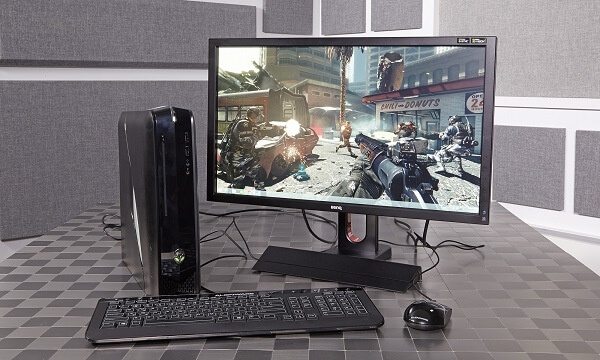
Alienware X51 Gaming Performance

The power of the X51 is really just the capability found in the sum of its parts. To reiterate on something that I said earlier into the review, the Alienware X51 R3 is not a computer you buy because it’s time for an upgrade and you want to be able to play anything coming out this year on Ultra graphics settings. You buy it for its portability potential; you buy it because it won’t make the floorboards or the desk curve under its weight. And yet, games looked great on it, FPS was skyrocketing to inhuman values and I really felt like the little guy was great at fooling me into thinking I was using a regular gaming desktop.

Now, remember when I said all the components inside it are really well packed together and it’s difficult to even pull them out of their metallic confines? The greatest advantage of this computer turns out to also be its greatest enemy. Because everything is so compact, there’s little to no space for the unit to get properly cooled and the components’ own coolers can only do so much. There is a case cooling unit too but its buzzing attempts felt laughable to say the least.

I have to admit it didn’t happen to me, but I’ve seen countless of people complaining that the system overheats, usually leading into a forced shut down, blue screens when BIOS decides the computer has had enough and so on. I trust that this only starts happening after a certain amount of usage and heavily depends on how you use the X51 too. On the other hand, the PC is extremely quiet.

I’ve only gone through a few minutes of several older DX11 games such as BioShock Infinite, Metal Gear Rising: Revengeance, Sleeping Dogs etc. and I’ve found 0 reasons to be unhappy. I cranked up the graphics settings all the way to maximum and the X51 didn’t even hiccup once. The Witcher 3: Wild Hunt and Fallout 4 testing didn’t go as well and actually made me want to turn down the settings a fair amount because I’d already got used to the crazy unlocked FPS in the other titles and the X51 had already started stuttering.

Alienware X51 Included Peripherals & Paid Upgrades

When you order the Alienware X51 off the Dell website, you also get to choose whether you want to indulge in the complimentary Alienware mouse and keyboard. Neither of the two is an amazing peripheral by itself – in what gaming is regarded at least. The mouse is a meager 1200 DPI with no extra buttons and no special power to speak of. Similarly, the keyboard is a regular multi-media membrane model, featuring a numpad, several media controls and shortcut buttons to things such as your email, calculator, Windows Explorer and so on.

The website offers two critical items that are aimed to enhance your gaming experience. One of them is the ‘cutting edge liquid cooling’ system; purely optional, it will make CPU overclocking possible without setting fire to your house. This alternative to the cooling system is only available for the $1.469.99 model, however, so it doesn’t come cheap.

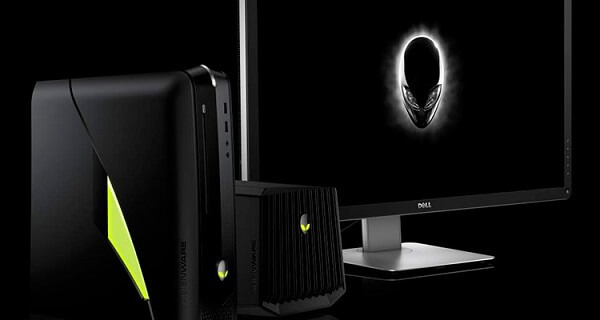
Alienware X51 Graphics Amplifier

Secondly, you can also opt for an Alienware Graphics Amplifier. Available for any X51 you choose but also coming for at least an extra $200, the amplifier is basically an external box that adds a secondary, usually stronger GPU. A full-fledged, gaming desktop GPU. It also gives you a few connectivity perks such as allowing you to connect another HDD in there as well as some of your other peripherals. While the lowest price end you can get is $200, the highest is an astonishing $1,499.98 – you get the amp plus a PNY GeForce GTX Titan X @12 GB GDDR5 video card in it. That way you can push your games to 4K HD resolutions, outstanding graphics quality and it even takes some weight off of the X51 with the overheating.

It’s a tough call to make, but it’s an alternative.

Alienware X51 Software & Features

If you order the Alienware X51 with an operating system included, you’ll get it preinstalled when the unit is shipped to you. You can only choose between Windows 10 64bit Home or Pro editions or the Windows 8.1 Pro.

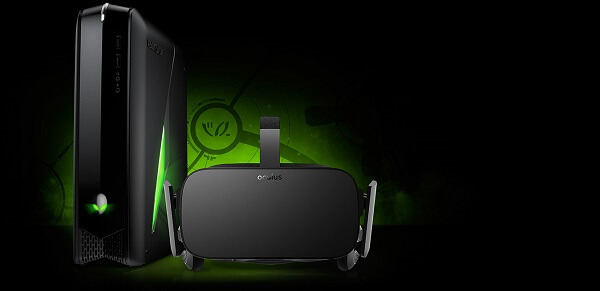
Apparently, any X51 R3 model is VR ready but that simply means they’re good enough to run virtual reality gear such as the Oculus Rift whether you ever choose to use one.

VR-Ready Alienware X51

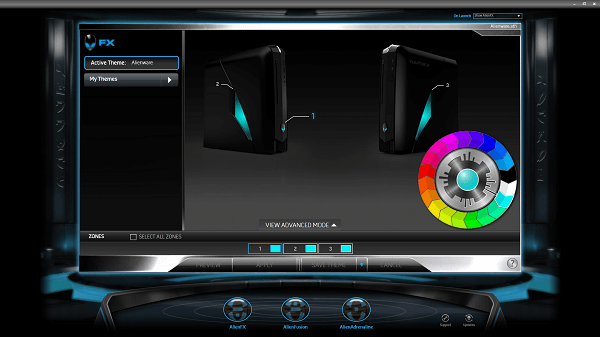
If there’s anything about native brand software that’s usually included in these computers that I can appreciate, it’s the Alienware Command Center 4.0. The program is basically the central hub of controls and customizations you can do to your Alienware X51, starting with the lighting controls up to GPU, CPU and memory monitoring, tweaking and clocking. It’s a very nice selection of controls you can use for a perfectly personalized experience; I’d like to say that it’s lightweight too, but it’s not, really.

Alienware X51 Software

Similarly, your Alienware X51 will come with Alien Autopsy preinstalled – a piece of software that will attempt its best at assisting you with any issues that may arise with your computer; both hardware and software related.

Alienware X51 Verdict

So we’ve taken a really good look at everything you can do with the Alienware X51 R3 default model. At least as much as you can tell by only giving the computer a spin for a short time. Maybe some of my opinions would have changed if I’d been using the Alienware Graphics Amplifier for example, or I’d done a more extensive game test.

The Alienware X51 is a good gaming computer, especially when you look at its overall size. It manages to run plenty of titles at great performance and only starts struggling when really put to a stress test. If you truly need the portability that the X51 holds with it or you’re not planning to use it as your next main gaming desktop, it can handle itself very well; and it most cases it will be able to excuse its high price tag.

If you wish to truly be up to date with what the gaming technology has to offer and ready for this year’s upcoming titles, I would not make the X51 the first recommended computer off the top of my head for it. Even if you upgrade it to the absolute highest specs you could ever ask for, Alienware x51 I7, amplifier included and everything, it would be ultimately end into a waste of money. The same money that you can use to get a better full-sized gaming desktop and even save up some for a 144 Hz monitor on the side for example.

Image Source: 1, 2, 3, 4, 5, 6, 7, 8, 9, 10

Filed Under: Headlines Tagged With: alienware mini gaming desktop, alienware x51, alienware x51 gaming desktop, alienware x51-r3

Nextbit Robin – A Cloud-First, Design-First Smartphone

September 1, 2015 By Michael Turner Leave a Comment

Nextbit Robin

Scott Croyle has been credited for pushing the boundaries of what smartphones should look and feel like. When he was in charge of HTC’s design department, as commander-in-chief, the One series witnessed a critically acclaim never-before-seen by the company.

Now, with the Nextbit Robin, Croyle wants to push boundaries even further.

He departed HTC last year, in April, to join a highly-intriguing start-up called Nextbit. They were initially aiming at developing software, not hardware.

Croyle had his way and he gathered a team that would be eager to develop awesome things for our pockets.

Today marks the day Croyle showcases what he has been working for such a long time. The Nextbit Robin is what he likes to call the design-first, cloud-first smartphone.

Croyle has told The Verge that he was more than tired of pleasing mobile carriers instead of the end consumer. With Nextbit, he doesn’t have to go through all of the hassle. He feels more liberated and in power.

Nextbit will sell directly to consumers, and because they are a small start-up they can experiment and prioritize to better fit consumers – aesthetics, originally, freshness in design and, of course, tactile appeal.

Nextbit Robin - Launches on Kickstarter Soon

Their main goal was to look the part. It’s pretty hard to build a poorly designed smartphone nowadays, he adds. Because of this, they wanted to avoid the conventional and boring look.

I wanted to kind of zig and maybe zag.

When you first lay your eyes on the Nextbit Robin, you don’t know how to react. It’s simple but not really. Its rectangle shape doesn’t convey that natural sense at all. It has a spartan approach, notes Croyle.

Spartan symmetry to be accurate.

Designing a phone is to Croyle as is symmetry to Wes Anderson and Kubrick. They just fit together.

Everything is as it should be with the Robin. You got a bezel above the screen, and below it – both are identical. The cameras are positioned on opposite sides, but they mirror their placement.

However, we do not know how much difference this will make in the eyes of the end-user. But, it’s a pretty nice when considering how much thought and work Croyle and his team put in the smartphone’s design.

It features a Snapdragon 808 proc, which is a derivative of the 810 but without all that nonsense regarding thermal issues. The 5.2-inch 1080 display was a no-brainer, adds Croyle.

The Nextbit Robin will be launched on Kickstarter pretty soon. That’s where users who want to support the brand new smartphone-maker Nextbit will have the posibility of choosing a battery life and other components.

Image Source: 1, 2

Filed Under: Headlines Tagged With: Nextbit, Nextbit Robin, Robin, Scott Croyle

10 Free Photo Editing Software for Entrepreneurs

December 21, 2014 By Roxanne Briean Leave a Comment

If you own small business or are an individual, leading photo editing software may be a bit out of your price range but you most likely still need to edit your images for websites or just for offline use.

The following photo editing software are our favorite tools for editing photos that are just as capable of editing images by adding filters and effects as more expensive and “brand-name” software. Many of them are also available for free and the rest of them are pretty affordable.

We’ve gathered 10 of the best photo editing software out there. Our list includes several software that are usable in your web browser so they don’t require any installation on your computer and can be used anywhere and anytime.

If you are trying to figure out which software you want to use we made your job a little easier by putting together a list of our personal favorite photo editing software. So without further ado, here are our favorite software available for free or for very little money.

1. Fotor

Fotor was launched in 2012 and is a very easy to use and powerful tool for editing photos. You can quickly adjust brightness, saturation, lighting, sharpness, contrast and many more with the help of numerous tools available in the software.

1

Fotor can alter how your pictures look with effects built into the photo editing software such as color splash, tilt-shift, mosaic, blur, stickers and Lomo. The software also has a number of photo retouching features such as tools for blemish removal, photo reshaping, skin smoothing and more.

It has a very extensive library of professional features and a very tidy and user friendly interface that will let you quickly edit all your images.

Fotor is available on Android, iOS, Windows and MacOS.

Price: Free

2. Pixlr

Pixlr is available on the web, mobile systems and desktop ones. It allows you to accurately control all aspects in the process of editing your images.

2

Pixlr can be used to edit your images any way you like with the use of effects like halftone, dapple and crosshatch and offers hundreds of borders, overlays and unique stickers. It has well known blending modes with overlays and double exposures and also masks that will allow you to control even better the editing process. Pixlr can be used to apply radial or linear masks on images and you can edit photos offline as well as online.

Pixlr Express is also available on Android and iOS and is a great tool you can use to easily fine tune, crop and rotate any image on your mobile phone or tablet.

Price: Free, Pixlr Membership $14.99/year

3. BeFunky

BeFunky is a great photo editing software that lets the user resize, crop, add frame and can be easily used to adjust the brightness, color, contrast, sharpness and saturation of a photo.

3

The tools available in the software include clone, reduction of red eyes, blemish fix and a lot more. There are literally hundreds of effects in the photo editing software that you can choose from to improve your photos in any way you want. You can use the software to edit images stored on your computer or on Flickr, Facebook, Picasa or Photobucket as well as taking a new picture with the use of your webcam.

BeFunky is available on mobile devices for Android and iOS and the apps let you easily edit your images on the move. The Gallery has numerous images in categories such as nature and style that can very well inspire you.

Price: Free, Professional $99.95/year

4. Online Photo Editor

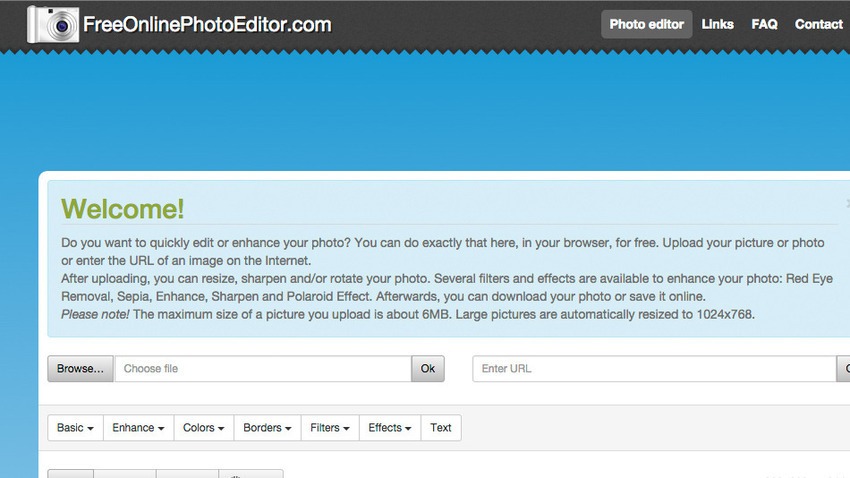
You can quickly improve or edit images right in your web browser with the use of the Free Online Image Editor website. Enter the address of an image online or upload a photo stored on your computer to quickly and easily rotate, sharpen and resize your image.

4

The Free Online Photo Editor offers numerous filters such as Lomo, Polaroid, sepia, tilt shift and vintage and also has editing tools like crop, blur, contrast, brightness, sharpness and red eye removal. You can also add text to your image which you can rotate and change color and size.

When you finish editing your image you can save the result as PDF, GIF, JPG and PNG. The Free Online Photo Editor also lets you print your result or email it.

Price: Free

5. Adobe Photoshop Express

The Adobe Photoshop Express is an editing application based on Flash that is available online or on Android, iOS and Windows.

5

You can use the application to make your photos look beautiful and offers a series of options including quick fixes, creative enhancements and corrections along several more advanced effects. Adobe Photoshop Express has a lot of user friendly features and tools such as rotate, crop, auto correct, saturation, exposure and red eye removal.

Together with allowing you to make adjustments on your images, Photoshop Express also lets you add numerous effects like hue, pixelate, tint, black and white, distort and sketch. It’s one of the best photo editing software for quick and easy image editing.

Price: Free

6. LunaPic

LunaPic is an online photo editing software that lets you upload images stored on your computer or use images from Dropbox, Facebook and Picasa and save the results on Tumblr, Imgur or send them to an email address. The software doesn’t use Java, Flash or any other plug-in you need to install to make the software work. It boasts a large variety of effects and tools you can use to create some very beautiful images.

6

The moment you import a file into the software you can make use of standard tools like paint, zoom, draw, rotate, crop and gradient to change how your images look. LunaPic can also be used to create animations, add effects to your animation and change the speed of the loop and removing or adding frames to it.

Price: Free

7. FotoFlexer

FotoFlexer is an online photo editing software that is pretty advanced and complex. You can edit images stored on your computer or from online web pages such as Flickr, Facebook or Photobucket.

7

Together with standard editing tools like flip, resize, red eye removal and crop there are numerous more complex tools such as morph, curves, cutout, recolor, scissors and smart resize. FotoFlexer’s interface is split up into several tabs that contain eight to 20 different effects that allow you to fix mistakes made on the image, add borders and save the result in either PNG or JPG when you are done editing the image.

FotoFlexer is also available on Android, free to try which will allow you to edit your photos on your mobile device.

Price: Free

8. Ribbet

Ribbet is an online photo editing software that provides free storage on the cloud for all the images you add and edit. Because Ribbet works inside a web browser, there is no need for any installation of software even though you can choose to install a Chrome browser app, Facebook app or Toolbar.

8

The history of your edits is stored and you can undo, delete elements or move them around the image, add text and components to your images imported via webcams, social media networks or from any web address.

Ribbet allows you to quickly fix your images with just a click and adjust them with the use of more advanced controls along more basic ones such as filters, effects, rotate, resize and crop. You can also add the editing software into your own application or website by making use of the Ribbet API without the need for any registration or API key.

Price: Free

9. Picadilo

This is an online photo editing software that features a variety of tools that include a number of effects, text, selections, brushes and a lot more.

9

The moment you upload an image into Picadilo you can use the photo editing software to retouch, crop, resize, add filters and text to the image and even surround the image with borders and frames. Picadilo offers more than a hundred fonts, 19 tools for retouching, 140 stickers and 40 effects. Picadilo has more than enough features that you can use to quickly and easily edit your images. You can modify the exposure on your image which is particularly useful for very dark images or very bright ones. Especially useful is also the Magnify tool which you can use to zoom any portion of your image.

Picadilo lets you put captions onto your images and send your photos directly to Facebook or print the image from within the web browser.

Price: Free

10. GIMP

I think everybody working with images has heard of the Photoshop alternative called GIMP. GIMP is a very versatile photo editing software that lets you personalize the view of the application and its behavior to best suit your preferences.

10

In the widget theme you can edit the icon sizes, the spacing of widgets and change colors. You can also customize the sets of tools contained in the photo editing software. The user interface is split into docks that you can pile and has full screen function that makes it a lot easier and better to view your image.

Enhancements to the image are done very easy with healing and cloning tools, batch processing, distortion correction and numerous others. GIMP is a very comprehensive and expandable photo editing software that has a very well designed complex interface used for scripting that allows everything from basic tasks to very advanced manipulations of your image to be completed with ease.

Price: Free

So there you have, these were our favorite free or cheap photo editing software. We hope our list made your job of choosing a better and cheaper photo editing software a lot easier.

Image Credits: Photo 1, Photo 2, Photo 3, Photo 4, Photo 5, Photo 6, Photo 7, Photo 8, Photo 9, Photo 10

Filed Under: Tech & Science Tagged With: best photo editing software, photo editing software, photo editing software for entrepreneurs, photo editing software top, small business photo editing software

In Depth Comparison of iPhone 6 With HTC M8: Features, Camera, Specification, Software

September 29, 2014 By Karen Jackson Leave a Comment

Nowadays, it is very difficult for buyers to decide which smartphone they should purchase. Obviously, no one can make the decision on your behalf, but we can compare iPhone 6 Plus and HTC One M8 for your convenience.

HTC launched HTC One M8 at the beginning of this year, whereas Apple unveiled iPhone 6 Plus in the month of September. Many people might prefer iPhone 6 since it is recently released.  However, it is really foolish to choose the device on the basis of their release date. Buyer should closely look at all the features and spec of this both the devices ahead of the purchase.

Size:

Some People really get irritated when their phone cannot fit in their pockets and they have to keep it all the time in hands. Therefore, size is one of the most key features of any device.

Apple launched iPhone 6 Plus with a screen of 5.5 inches. Though the size is relatively bigger than all the previous iPhones, but still it cannot beat HTC One M8. Moreover, the round edges of the iPhone 6 Plus  plays a vital role in the thinness of the device. iPhone 6 Plus is of almost 0.27 inches thin that is a pretty remarkable thing. This size makes the device more attractive and stylish.

On the other hand, the HTC One M8 is larger if we compare it to the iPhone 6 Plus. However, the device appears pretty slim, but it is almost 35 percent thicker than the iPhone 6 Plus. The device is 0.37 inches thick and gives a really rock like feeling when you hold it in your hand.


Design:

As far as design is concerned, everyone has its own choice.  However, you would not notice much difference in the design of the two devices. Both iPhone 6 Plus and HTC One M8 offers a metal casing along with rounded edges.

The iPhone 6 Plus has an aluminum casing whereas the HTC One M8 has a pure metal case. iPhone 6 Plus certainly gives a delicate and slippery feeling when you hold it.

Both iPhone 6 Plus and HTC One M8 comes with a 1080 HD display, which is almost similar to the HDTV of your living room.


iPhone 6 Plus Vs HTC One M8 features:

Apple has powered iPhone 6 Plus with an A8 processor, which comes along with an M8 motion co processor. Usually, Co-processor helps a lot in saving the battery of your device, therefore M8 co processor of iPhone 6 Plus is certainly a big benefit for the users.

Moreover, the device has a 1.4 GHz dual core processor with a 1GB of internal storage. Apple generally offers three different storage options instead of slot for a MicroSD card.  Obviously, the price of the iPhone 6 Plus is directly related to the storage of the device. If you want more storage then you have to spend more money for it. The three storage options of iPhone 6 Plus are 16 GB, 64 GB and 128 GB.

iCloud is the only option to expand the storage of your iPhone 6 Plus.

On the other flip, HTC offered HTC One M8 with a Qualcomm Snapdragon 801 processor. However, HTC One M8 is not equipped with any additional processor except the usual Adreno 330 graphic processor. When it comes to storage HTC One M8 is way better since it has a 2 GB of internal RAM along with the option of Micro SD card.  The device is available in the 16 GB and 32 GB of storage options.

Users will have countless storage options in HTC One M8 due to the micro SD card of the device. Although there is not any co processor in HTC One M8, but its option of high storage will make it possible for your device to work more efficiently.


Camera:

As per the statement of Apple, the company has enhanced the 8 megapixel rear camera of iPhone 6 Plus through 1.5 micron pixels.  This novel camera comes with an iSight sensor along with focus pixel that help a lot in the process of autofocus phase detection. Optical image stabilization is one of the most exciting features of the camera of iPhone 6 Plus. The optical image stabilization has the ability to bear the shakes of your camera. In simple words, now you do not have to worry if you cannot keep your hand still while making a video. Optical Image Stabilization will take care of all these problems.

Whereas, HTC has not modified the camera of HTC One M8 that much this year. It has a 4 Ultrapixel rear camera with relatively larger pixel size. Ultrapixel sensor with the help of large sensor pixel improves the quality of a low light image. It is an extremely noteworthy feature for 3D images.

Specification:

Specs are the most important thing when you go to purchase a mobile phone. Therefore, it is impossible to ignore the specs of any device. Following are the specs of iPhone 6 and HTC One M8:

Apple launched iPhone 6 Plus with an A8 1.4GHZ dual core SoC Imagination Technologies. Undoubtedly, it is pretty forceful but still it is beatable. There are several other devices in the market that are comparatively more powerful than iPhone 6 Plus.

The company has really enhanced the connectivity of iPhone 6 Plus, since it comes with a LTE Cat 4 support. The company has also offered a bigger battery in iPhone 6 Plus which is definitely because of the large size of the device. However, the exact battery size of iPhone 6 Plus is 2,915 mAh.

On the other hand, HTC One M8 beats iPhone 6 Plus in terms of battery. HTC launched HTC One M8 with 2600mAh battery that is considerably bigger than the battery of iPhone 6 Plus.


Software:

It is really foolish to compare the software of the two devices since one runs on Android and the other on iOS.

iPhone 6 Plus works on the most recent version of iOS that is iOS 8. This latest update brings loads of alluring features such as Apple Pay, better iCloud, a brand new Health app, improved notification and facility to make use of the third party keyboard. The Health app of iOS 8 is really beneficial for health conscious people since it gather all your fitness details from different apps at a single place.

In comparison HTC One M8 works on Android 4.4 Kitkat along with HTC Sense 6. It adds more functionality in the lock screen of the device. It allows user to make shortcuts on the lock screen such as the HTC text message app, HTC browser and much more. Motion Launch that consists of five really useful features like you can launch BlinkFeed just by swiping down the phone to the right.

Filed Under: Tech & Science

Windows Phone 8.1 VS iOS8: The War Of Betterment

September 27, 2014 By Karen Jackson Leave a Comment

Currently, there are thousands of users who have their iPhones in their hands. They are really enthusiastic and giddy. You must be thinking that they are excited about their new iPhone 6 and iPhone 6 Plus. However, this is not the case they are excited about the new iOS 8.

Apple has already installed iOS 8 in iPhone 6 and iPhone 6 Plus. Whereas, the users of other iPhones need to install the new version of iOS in order to get benefit from its new features.

However, iOS 8 is not that much new update since it has the same interface which is present in iOS 7. It is merely software to show how much progress iOS 8 has made up till now. We have compared the iOS 8 update to the Windows Phone 8.1 to figure out which one is more suitable for our users.


Developers:

Microsoft’s Windows Phone 8.1 operating system has lots of similar features of iOS and Android. Although the company has not states anything but still the likeness in two operating systems cannot be ignored.

Generally, Windows Phone provides a closed app network. This closed app network puts a restriction on the options of users.

The chief difference is in the way the two software deal with the developers. Shortly after the release of iTunes App Store, Apple has opened its forum for the developers. Now developers could form apps and the company will definitely add them in the iPhones. On the other hand, Windows Phone is always frank with the developers. The developers can effortlessly communicate with the operating system. For instance, developers can make an addition of commands to their apps in the Windows Phone’s speech recognition system. This option is surely not available for the developers in the iPhone.


However, this time Apple has designed iOS 8 in a manner to fill the gap between the developers and the company. iOS 8 app developers can create whatever they want to from widgets to predictive keyboards. This is just not the end; Apple has also provided iPhone hardware access to game developer so that they can make faster and improved games. In short, iOS 8 is entirely depends upon the techniques of how developers use it.

Ecosystem:

Companies such as Apple and Microsoft are not designing all these features to generate revenue. They want the customers to enter into the world of their company and spend money on different items.

One of the best methods to attract customers is to make certain that the smartphone they manufacture match with their other items. Apple has an ecosystem of iPhone for several years. People can merely run and enjoy the music which they buy from their stores on their devices. Same is the case with videos


Continuity:

The feature of Continuity comes only for the users of iOS 8 and Mac OS X Yosemite. The company stated that they are relatively more concerned about the issues people experienced than the addition of new features.

Therefore, Continuity is released to fill the space that is present between the functionality of your iPhone and your Mac. User can also view the message of iPhone on Mac, but it is essential that users have installed iOS 8 on both the devices. Even user can answer a phone call on the iPhone and then continue to talk on Mac. These are all the advantages of this new feature known as Continuity.

Windows Phone struggle really hard to provide the same kind of functionality on their devices as well. However, Skype is the only app which can support all the devices that runs on Windows operating systems. Microsoft has added app syncing, credential saving and favorites syncing, but still it seems like something is missing in these features. Microsoft is really trying hard to introduce an app that works exactly like continuity but in vain.


Spotlight:

The Spotlight is a feature that lets users instantly find a file in their computers. Users can easily look for locations, apps, documents, video, and music through this search facility.

On the flip side, Microsoft has also offered a search feature but it does not work like Spotlight. Cartona is a feature that will permit users to search things in their Phones through a voice command. It offers all the information of your device such as contacts, apps, emails, videos and much more.

Cartona surely give a tough competition to Spotlight since Microsoft has added a voice assistant in it. However, the feature merely required a bit more organization.


iCloud Drive:

Apple released iCloud drive in order to replace Drop box. You just need to upload the things there to transfer them to your other devices. Some people consider it as a great rival of Microsoft’s One Drive service,

In general, both the two services are certainly equivalent in terms of performance on the mobile phones. OneDrive act like iCloud Drive when it comes to the syncs of pictures and videos.


Final Thought:

Indeed, there are various differences and tricks in Windows Phone 8.1 and iOS 8 but still they are quite same.  If iOS offered HealthKit for the fitness of users than Windows Phone has bing Health & Fitness for the same purpose.

Nonetheless, if you want a one word answer for the comparison of the two operating systems, then iOS 8 is way better than the Windows Phone 8.1. The reason behind this is the well developed Apple stores and apps.

Filed Under: Tech & Science

Two Factor Authentication in iCloud- Steps, Guide and Precautions

September 24, 2014 By Roxanne Briean Leave a Comment

Apple lately added two factor authentications in order to increase the security of the customers’ iCloud account. It will let users to protect their backups of iPhone and iPads with something better than a password. Therefore, it is a suitable time to enable two factor authentication.

These measures have been taken after hackers attacked the celebrities account and leaked some of their personal photos. People begin to worry about their iCloud accounts shortly after this incident. Thus, Apple made an expansion in the security of the iCloud accounts through two-factor authentication.

We will tell you the entire procedure to enable it on your Apple iCloud account.

Two Factor Authentication:

Users should have some knowledge about the performance and working of this feature before updating it.

Two factor authentication is a comparatively latest method of securing several web accounts of users by means of more than a single password. It requires a normal password along with a confirmation code and will send it to users’ devices like smartphones or iPads. All the users who have enabled two factor authentication on their accounts want these two codes to get access to their iCloud accounts.

It is certainly a more safe and sound way to use iCloud since from now on the hacker will need various things to slip into your iCloud account. It would make a really difficult task for hackers to steal your precious data from iCloud.


Fortunately, the company has launched this two factor authentication for users’ iCloud account.

How to Set Up iCould Two-Factor Authentication:

Initially, you are required to log into your Apple ID account through applied.apple.com and then click onManage your Apple ID. You would be able to log in from there by using identification.

As soon as you are logged in click on Password and Security that is present on the left side of the sidebar. There you are required to answer a few security questions to get an entry in this section. These questions are the ones which users set when they sign up for an Apple ID.


After you give answers to all these security questions, you will view a page from where you can start the process of two factor authentication. The company named it “Two-Step Verification” as there are some other names for this feature as well.

The page will give you a short introduction about the working of two factor authentication when you click on Get Started. Users can then and there end up the process if he read something which they do not want to set on his iCloud account.

However, if you wish to carry on the process, then Click Continue.


Apple will ask you to give three days time for the set up of two factor authentication. It sounds really annoying, but it acts like a real road block for hackers.  Therefore, if you want to get benefit from this service then you have to wait till three days.


When these three days passed by then go back and follow the same process of Logging in and Get started.

The foremost thing is to add your phone number which can receive the verification SMS text messages.  It is not essential to give your personal iPhone number for this step. You can also enter the number of your close friend or any family member.

Afterwards, you will get a confirmation code on that number which you will have to enter on the website. After that the website will include your phone number in the list of customers.


It is pretty noteworthy that the iOS devices which have already Find My Phone app are permitted to be used as a trusted device with two factor authentication.

Then click Continue and from there you can verify every single iOS device you own. One more time, clickContinue togo to the next stage of the setup.

Subsequently, print out or write down the given Recovery Key. Then Apple will ask you to re-type it in order to confirm that you have copied it somewhere safely.


Click Confirm to enter into the next phase.

The final thing is to agree with the terms and condition of two factor authentication to get advantage from this service. Insert a mark on the box present at the side of condition and then click Enable two step verification.


Then the screen will inform you that you have successfully enabled the feature Click Done to complete the process.

Filed Under: Tech & Science

  • 1
  • 2
  • 3
  • …
  • 11
  • Next Page »

Subscribe to Blog via Email

Enter your email address to subscribe to this blog and receive notifications of new posts by email.

Join 10 other subscribers

Recent Articles

police handcuffs man

German Man Probed In Poisoning That Killed 21 Employees Since 2000

June 29, 2018 By Kenneth Scott Leave a Comment

Chicken wings bar

Intoxicated South Carolina Man Punches Waitress Who Refused to Serve Him Alcohol

June 29, 2018 By Karen Jackson Leave a Comment

gaming

New Zealand gamer Who Flew Halfway Across The World for Virginia Teen Gets Shots By Her Mother

June 28, 2018 By Cristopher Hall Leave a Comment

party

Former Virginia Tech Freshman Sentenced to 50 Years in Prison for Stabbing a Girl to Death

June 28, 2018 By Roxanne Briean Leave a Comment

bonfire

British Couple Sentenced to Life in Prison for Torturing and Murdering French Nanny

June 27, 2018 By Deborah Campbell Leave a Comment

pay phone

Texas Father of Girl Disappeared in the 80s Ignored by Authorities

June 26, 2018 By Cristopher Hall Leave a Comment

bottled water

San Francisco Woman Threatened to Call Police on Girl Who Sold Ice Water for Disneyland Trip

June 25, 2018 By Roxanne Briean Leave a Comment

Maplewood Park

Missouri Man Robbed by Date and Accomplice in Park

June 22, 2018 By Nancy Young Leave a Comment

coding

New York Man Sentenced in Cyberstalking Former Girlfriend, Mailing Drugs to Her Dorm

June 22, 2018 By Deborah Campbell Leave a Comment

headphones

Bose Poised to Launch Sleepbuds, In-Ear Headphones That Help You Sleep

June 21, 2018 By Nancy Young Leave a Comment

Police light

Intoxicated Female Driver in Custody for Pulling Arresting Officer by the Hair

June 21, 2018 By Kenneth Scott Leave a Comment

kitchen

Restaurant Manager Arrested and Charged in Shooting Death of Co-Worker over Negative Yelp Reviews

June 20, 2018 By Karen Jackson Leave a Comment

plastic container

Pennsylvania Couple Charged in Violent Death of Infant Discovered Buried in Cat Litter

June 19, 2018 By Cristopher Hall Leave a Comment

tailpipe

Minnesota Teen Gets Head Stuck In Oversized Tailpipe Winstock Music Festival

June 18, 2018 By Karen Jackson Leave a Comment

Pages

  • About Us
  • Contact us
  • Privacy Policy
  • Privacy Policy GDPR
  • Staff
  • Terms and Conditions

Recent Posts

  • German Man Probed In Poisoning That Killed 21 Employees Since 2000 June 29, 2018
  • Intoxicated South Carolina Man Punches Waitress Who Refused to Serve Him Alcohol June 29, 2018
  • New Zealand gamer Who Flew Halfway Across The World for Virginia Teen Gets Shots By Her Mother June 28, 2018
  • Former Virginia Tech Freshman Sentenced to 50 Years in Prison for Stabbing a Girl to Death June 28, 2018
  • British Couple Sentenced to Life in Prison for Torturing and Murdering French Nanny June 27, 2018
  • Texas Father of Girl Disappeared in the 80s Ignored by Authorities June 26, 2018
  • San Francisco Woman Threatened to Call Police on Girl Who Sold Ice Water for Disneyland Trip June 25, 2018

Categories

  • Business
  • Entertainment
  • Finance
  • Headlines
  • Health
  • Life
  • Nature
  • Science
  • Sports
  • Tech & Science
  • Travel
  • Uncategorized
  • United States
  • World

Copyright © 2026 ArgyllFreePress.com
About · Privacy Policy · Terms of Use · Contact