Argyll Free Press

Growing News Network

Sunday, May 3, 2026
Log in
  • Business
  • Finance
  • Sports
  • Tech & Science
    • HP Envy 4500 Review
    • LG Optimus 170 Review
    • iPod Touch 6th Generation Review
    • HTC One M8 Accessories Set-up
    • Surrealist Games You Must Play
    • Hisense Sero 8 Review
    • Dell Latitude e7440 Review
    • HP Laserjet 1536dnf mfp Review
    • Garmin Fenix 2 Review
    • Skype Vs Viber
    • Best Video Conferencing Software
    • Sony mdr 1r Headphones Review
    • Canon Rebel t3i Review
    • Sennheiser Momentum 2-0 Review
  • Travel
  • Headlines
  • Health
  • United States

20000 Android Malware Apps Lookout

November 6, 2015 By Deborah Campbell Leave a Comment

20000 android malware apps lookout going on after discovery by mobile security firm

Merriam Webster defines “lookout” as:

: a person who watches an area and warns others if there is danger, OR : a high place or structure from which you can see a wide area

And luckily for Android users, there is not only one lookout by the first meaning of the word, but many. As in, the employees of the “Lookout” mobile security firm (former “Flexilis”) with its headquarters in San Francisco.

And boy did they fulfill their function as a lookout. Because they recently announced that they have discovered 20,000 apps that are in fact malware just posing as apps. And which are capable of routing your device automatically and performing their installation all by themselves, with the possibility of also installing other software or apps if so desired by their makers.

These bogus apps or the additional software that they install are, of course, malicious content. Meaning that their purpose is to do something else than what you desired them to do when you downloaded, instead doing what their creator intended. On your device and affecting your data and rights.

Lookout pointed out that at the moment, these apps’ function is to just present you with unwanted ads, with three major families of such adware being identified as possibly working together due to the similar procedures employed when they infect the device. They are: ShiftyBug (Kemoge), Shuanet, and GhostPush (or Shedun), just so you know.

To make things even worse, these malware apps are so good at exploiting the vulnerabilities that exist in the Android operating system that when they root the device and install themselves, they give themselves and other apps or pieces of software that serve their purpose elevated permissions.

In short, they ensure that your system integrity is permanently compromised and the only way to get out of this fix is to reflash the operating system (by yourself or with the help of the company you got the device from), or even the more drastic solution of abandoning your device altogether and getting a new one – an advice that even Lookout agreed might be useful as a last resort.

To make it clear, no, a simple factory reset will not get rid of these nasty apps. They will still be there afterwards.

So the sad part is the fact that even if everybody is now aware to be on a 20000 android malware apps lookout, it doesn’t mean that there is much you can do if one of them manages to infect your mobile.

The only good news is that Lookout says that these apps are predominantly present in other app-stores than Google Play, the latter being relatively safe. For now. Because they estimate the popularity, subtlety and complexity of such apps to grow and spread more, once more hackers realize their lucrative potential.

Image source: 1.
Filed Under: Headlines Tagged With: Lookout, Lookout 20000 malware apps, malware, malware app

Google and ASUS Release A New OnHub Wireless Router

October 30, 2015 By Deborah Campbell Leave a Comment

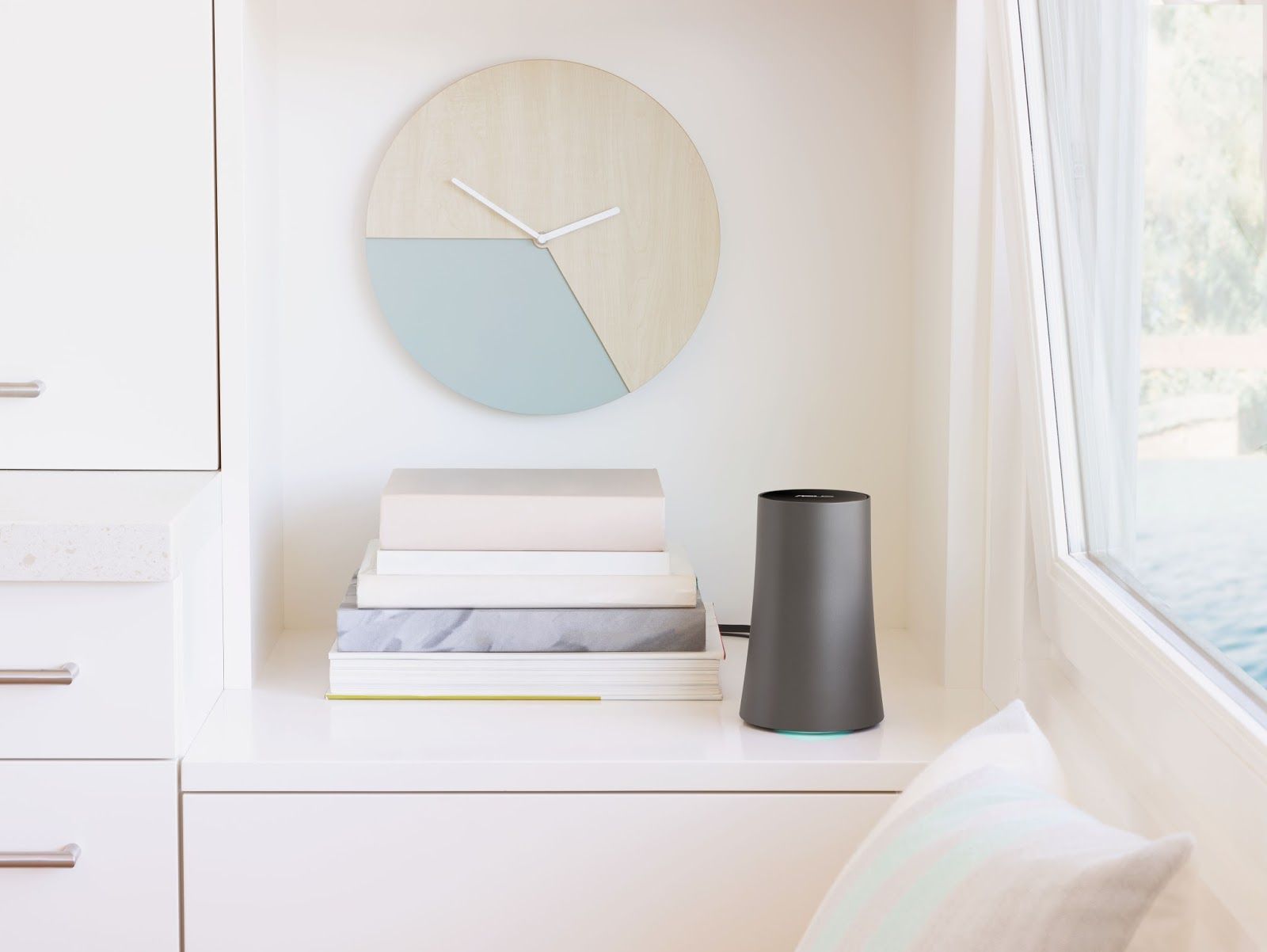
The New OnHub Wireless Router from Google in partnership with ASUS was released.

Google has just released a second OnHub wireless router in what is envisaged to be a “growing OnHub family”, as the company states on its website. This time, their partners were ASUS, while the first OnHub wireless router was created in partnership with TP-Link and released this past summer, in August.

That first one represented a bold step forward as regards design and functionality. Because due to its minimalist design and sleek vase-like appearance it means it does not have to be placed out-of-sight. Like regular routers tend to be, in an attempt to hide what many homeowners consider ugly antennae and messy cables sprouting from them like the tentacles of a small alien kill-bot.

From a functionality point of view, this first OnHub was created with the purpose of having an easy to setup, mobile app controlled router that can better manage the wi-fi signal distribution to all your devices in accordance with their actual needs, as opposed to traditional routers which use proximity to them as the criteria.

So, the first OnHub’s fixed that problem by allowing you to prioritize a single device, making sure it gets the fastest speed as well as sporting a front-facing antenna reflector that could boost signal range in that direction.

So if the first OnHub did that, why did Google and ASUS release a new OnHub wireless router so soon?

Because this new version, apart from having all the general characteristics of its predecessor, replaces its one direction boost approach to the signal distribution problem with an even better one. You can now boost wi-fi on any particular device with a wave of the hand over the top of the unit, giving you complete control which device you boost, not just in one direction, but wherever it is in the house at the time.

And even when not boosting a particular device, the new OnHub wireless router “will intelligently select the best combination of antennas to direct Wi-Fi to your devices, based on their location and orientation” using proximity sensors.

The unit comes with a power adapter and an Ethernet cable. Once powered and with the Ethernet cable connected to your Internet-giving source, all you have to do is install the Google On app and set up the router (easily done).

After that, the Google On app takes care of everything. It shows you your network’s status: if everything is working ok (and suggestions to help if not), how many devices are connected, how much wi-fi they each use. With one tap, it reveals your password and “lets you text or email it to friends”. And it automatically updates your router software “when your network is quiet so it won’t interrupt your connection”.

OnHub ASUS sells for 219.99 $ and can connect up to 128 devices at one time.

Image source: 1.

Filed Under: Headlines Tagged With: asus, Google, Google OnHub, Google OnHub ASUS, Google second OnHub, new Google OnHub ASUS

Misfit’s New Fitness Tracker And Controller Shine 2

October 21, 2015 By Deborah Campbell Leave a Comment

The new fitness tracker and controller Shine 2 is here.

One of the biggest competitors to the popular fitness tracking market leader Fitbit (which has a 70% share) is the Burlingame, California company Misfit, founded by Sonny Vu, who is also its current CEO. But it’s understandably difficult to compete with someone that already has such a big piece of the pie, so you have to be creative in order to try and wrest some consumers to your side.

Fortunately, you can put on your “Go underdog!” hats, because Vu seems to do a pretty good job of being creative and sticking with the fight. One of the moves he recently took was to start putting a lot more focus on sales in China. And he’s managed well, since currently a third of Misfit’s sales go there.

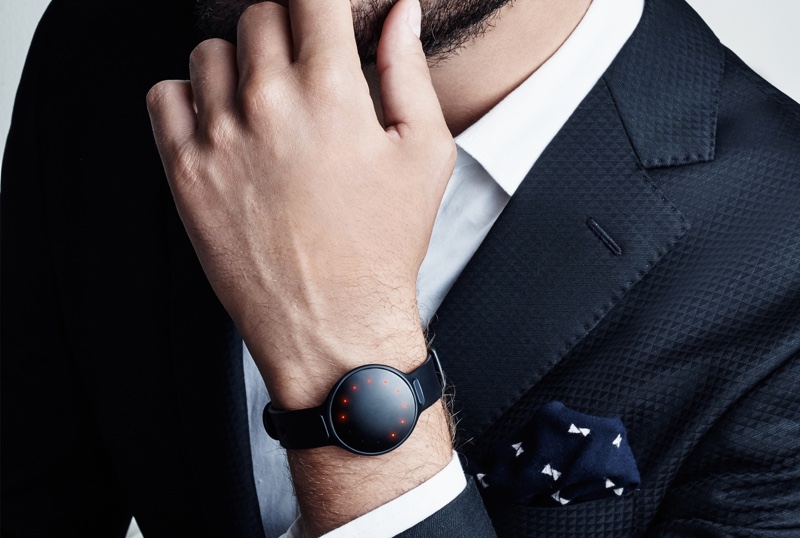
That probably has something to do with the fact that Misfit’s version of a fitness tracking bracelet, called Shine, is very amenable to fashion, with its sleek, metal design. Especially since competitors’ versions are usually plastic, bulkier etc. And especially since in China, visual aspect seems to be one of the higher priorities of buyers.

But that’s not the only thing Vu is doing to ramp up his sales and its not, by far, the most interesting. That honor would go to his decision to make the second version of his product, Shine 2, into more than just a fitness tracker.

Namely, Shine 2 has all the functionalities that Shine had (track certain metrics, such as calories and steps, as well as the quality of your sleep), but on top of that it is also a first step by the company in making a controller for your interactions with the objects in your environment.

You can do things with it like change the song in Spotify, turn on or off lights which it has access, simple operations like this. The way it manages to accomplish them is by using Misfit’s Link smartphone app, with which the new fitness tracker and controller Shine 2 is integrated. If the external object or service you wish to manipulate also has an interface with Misfit’s app, you’re good to go.

And the company intends to increase the number of such integrations, like for example, making it possible for you to call a car via Uber or Lyft using Shine 2, a feature they hope will be available starting in 2016.

To help such interactions and make them more powerful, the Shine 2 also has a far longer Bluetooth range than its predecessor (30 feet compared to a few feet), which was achieved by ingeniously using its metal body as an antenna.

So, all in all, it looks like Misfit is on its way to some serious and interesting innovations. Let’s hope they manage to deliver.

Image source: 1.

Filed Under: Headlines Tagged With: Misfit, Misfit new fitness tracker, Misfit's Shine 2, Shine 2, Shine 2 fitness tracker

Jolla Tablet Review – The Navigational Swipes

October 13, 2015 By Deborah Campbell 3 Comments

Jolla Tablet Sailfish 2.0The Jolla Tablet is certainly an odd one out – and not necessarily in a bad way. It’s the first of its kind ever to be released by Finnish company Jolla – an independent designer and developer of mobile devices. But the achievement that this name is more often remembered for is the developing of their Sailfish OS – a Linux-based open source operating system that has its roots in the MeeGO OS that Nokia was working on several years ago.
The company hasn’t yet gone head to head with any of the major, leading names on the market, but following their success on the Indiegogo crowdfunding website, they seem to have put that money to good use. So how far off from breaking into the market and keeping steady is Jolla? After the way their most recent Jolla Sailfish OS Smartphone was received, it was obvious there’s still a long way to go, but things seem to have improved by a large portion. The tablet has quite a bit to show for itself but let’s see how close it really is to making the cut.

Jolla Tablet Design

Jolla Tablet

At first glance, the Jolla Tablet may not stand out from several points of view. For a roughly 9.6 inch diagonal-sized tablet, it comes close in size to the iPad Mini 3. It’s not overly large, but given the 8.3 mm thickness and its approximately 385 grams in weight, you might have a little problem holding it with one hand, having to stretch all the way to get a firm grip on the device.

Jolla Tablet 8.3 mm thickness

The materials used to build it are not top-notch unfortunately – it’s mostly made of plastics, lacking metal components to keep it feeling sturdy. Surely that saves up on the weight a little bit, but given the aluminum alloys that are used in smartphones and tablets nowadays, I’m sure Jolla could’ve gotten away with a better selection of materials for their tablet. Regardless, it doesn’t give the device a cheap look – it may lack the smooth, classy design of the high-end tablets that Apple and Google make, but it’s not underwhelming in the way it looks.

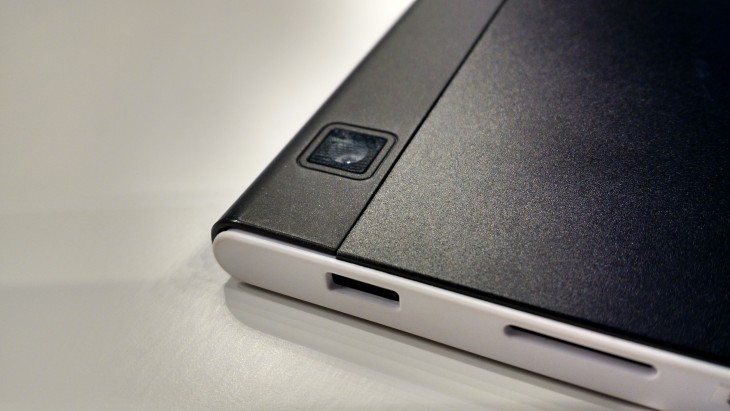
The display is tucked neatly in the frame, complimented with round edges to either side of the tablet. The top and bottom display a change in color palette as the cover switches to white. The back of the Jolla Tablet is one of the nicer parts of the device overall, having a matte black finish that holds the company logo in the center, the rear camera peeking out in the top left corner, while the bottom displays the serial number and a pair of speakers.

Jolla Tablet Matte Black Back

Jolla Tablet Camera

I found the exposed display of serial number on the back of the tablet a little out of place and slightly in bad taste given present standards – it’s way too obvious and “in your face” and the developers don’t seem to have tried to make it as small and discreet as possible. It felt detrimental to the overall look of the Jolla Tablet.

On top of that the material used on the back seems to be susceptible to quickly wearing out and the build of the tablet does have some weak points that aren’t guaranteed to survive stronger impact or might collapse under more pressure. Although no such incidents have yet to occur, it could be a problem as the device ages.

The button placement is pretty straight forward – there is none to speak of on the front side of the tablet. The power button and volume rocker can be found on the left hand side along with the headphones jack built in the corner, while the micro USB charging port and the microSD slot are on the right.

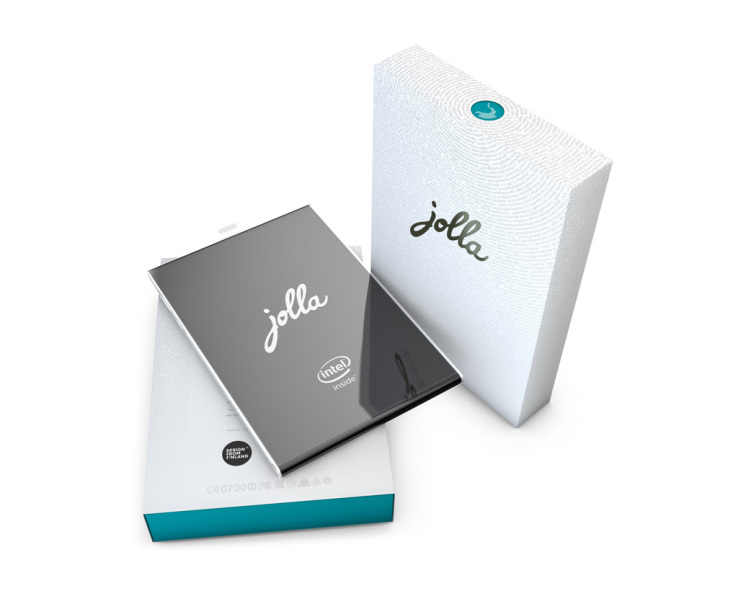
Jolla Tablet Package

Given the format and size of the tablet, you might find it impossible to find a suitable case for it which is a downside – and the producers have yet to release a personalized one.

Jolla Tablet Display

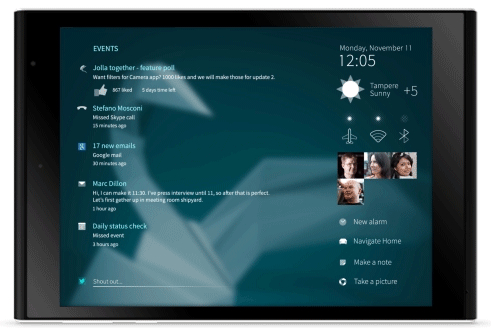
Jolla Tablet Sailfish OS UI

In spite of the similar size to the iPad Mini 3, the display of the Jolla Tablet is slightly smaller than its counterpart. The IPS LCD screen is only 7.85 inches in size but can sustain resolutions as high as 2048 x 1536. That makes for an overall 330 ppi pixel density – the images are clear, with no sign of pixellation and don’t seem to lack at all in quality.

Color pallet-wise, the IPS LCD screen isn’t up there with what an AMOLED display would normally render, falling a little behind when it comes to how vibrant images are. That could very well be an effect of the tones and nuances the OS uses – darker, richer colors that take a leap away from the common colorful patterns other operating systems use. It is not exceptionally bright but on the other hand there’s not as much saturation as you would get on the more common AMOLED builds. Contrast and black levels are decent enough and the viewing angles don’t lack at all – giving you an excellent image no matter which way you’re looking at the display.

Jolla Tablet Screen

The screen handles multitouch nicely, being able to respond to commands using up to 5 fingers – and given the gesture-driven functionality of the Jolla Tablet that we’ll be touching on more later in the review, that’s something worth mentioning.

The tablet handles video viewing very well, holding its own beautifully whenever you want to watch a movie – the contrast levels make up for very clear images no matter how bright the environment you’re in is. It can render 1080p videos at 60 frames per second.

Jolla Tablet Specs & Hardware

For a crowdfunded project, the Jolla Tablet holds its own pretty well when it comes to the hardware packed inside it. Considering its price, naturally, you shouldn’t expect a high-end, latest-on-the-market set of components. But the Intel Atom Z3735F quad-core processor along with its 2 GB of RAM are more than enough to handle nearly anything you have it do – multitasking is smooth, there’s close to no lag at all when juggling between apps and it can handle most games (albeit limited to what the store has to offer).

While on the subject, the Jolla Tablet does lack a little in terms of GPU – a medium class Intel graphics processing unit is good enough for most graphic-intensive apps out there, but it might struggle with high-end games.

The storage options are not staggering – the Jolla Tablet only comes in 32 and 64 GB models respectively, but the existence of the microSD slot will definitely help. It can hold up to 128 GB of extra hard disk memory, meaning that any kind of storage issues you may run into with the default HDD size can be overcome easily with any kind of external microSD you own.

The dual-band WiFi receiver inside the tablet provides great connectivity and Jolla can also act as an USB host. On the other hand however, it doesn’t support cellular connectivity – so to that extent, the Jolla tablet may lose a portion of its utility.

The speakers are not amazing and will, most of the time, compel you to make use of the headphones instead. The volume levels aren’t extremely high regardless and produce a rather muted sound quality.

Jolla Tablet Features & Performance

Finally, we reach the point where the Jolla Tablet can shine – for some users more than others. The feature that can help propel this tablet further up for users is its iconic Sailfish OS 2. As you can probably tell from the name itself, this is the second iteration of the operating system that Jolla tried to develop in the first place.

Placing great emphasis on privacy and not allowing third parties to monitor activity on it, The OS is open source software – meaning that, just like Linux, it bases its constant improvement on the user community. The Finnish company is open to and strongly encourages its users to provide feedback regarding the features that they wish to be implemented. Both the developers themselves and the community can help improve the system every day and bring new things to the constantly-evolving platform.

However, put into perspective, this idea may hit the same dead end that Linux did in the first place. While the idea of an open source OS appealed to some, in the end Linux remained a niche piece of software, most individuals preferring to refer to Windows or other closed source programs instead.

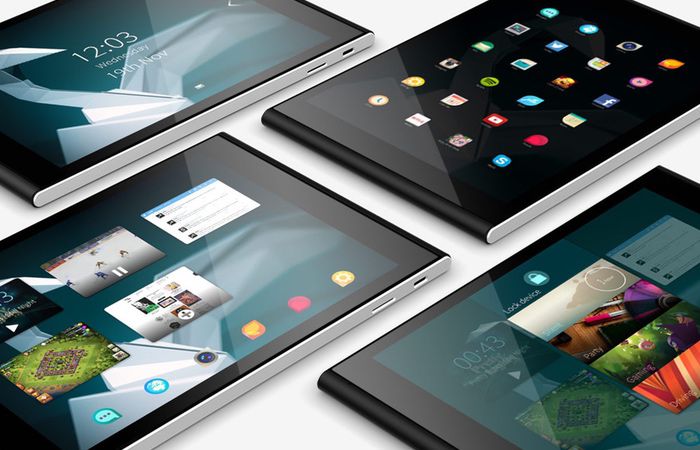
The way the Sailfish OS 2 tries to stand out from the rest of the market is the way it runs on gestures. There are no buttons to speak of that will allow you to interact with the operating system other than the power and volume switches. Everything you can control can be done through various swipes in various circumstances.

The company’s first attempt at this OS, which was showcased on the Jolla Sailfish OS smartphone, did not turn out amazingly well. As a matter of fact, the end result received many complaints regarding the difficulty of navigating the software to begin with. In the absence of a comprehensive and intuitive way of working your way around the Sailfish v1.0 OS, the great idea that Jolla tried to implement was a bit of a fluke in reality.

However, this time around things have changed for the better. It will still take you a considerable amount of time for you to get used to which swipe does what, but the developers have introduced a relatively easy step-by-step walkthrough to help guide you into learning how to make great use of the tablet.

Jolla Tablet Homescreen

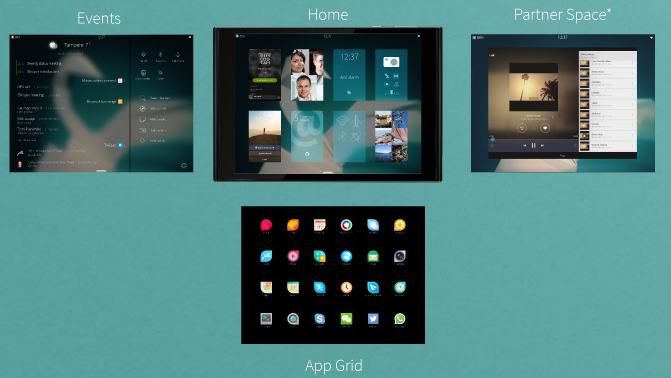
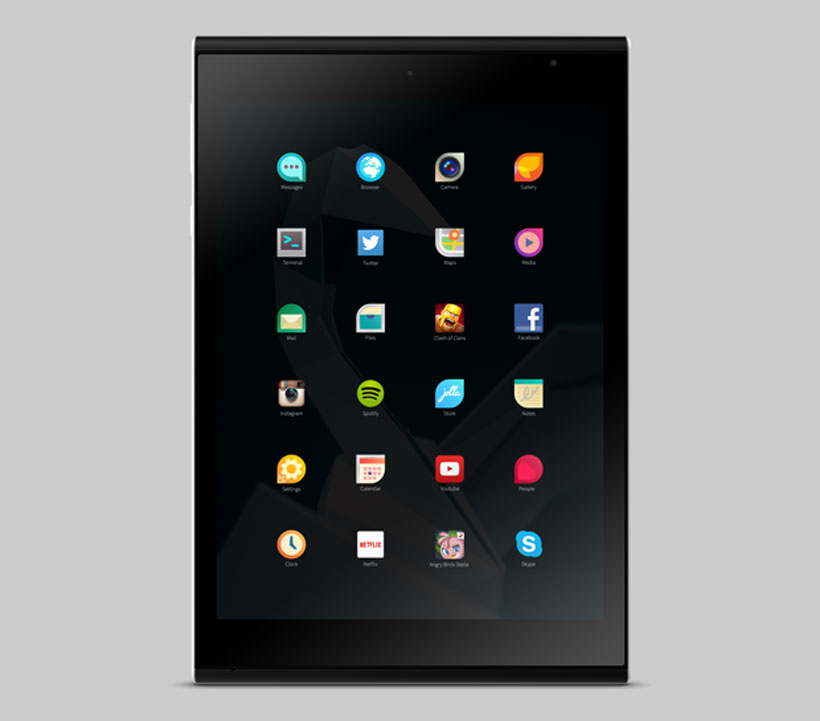
Staring with the home screen which you can unlock with an inward swipe, you are taken to either the notification screen – accessible with a left swipe and very similar to the notification systems found on other OSs – or to a running apps screen. This will be present right in front of you, allowing you to switch between opened apps and it looks a lot like the multitasking mode on Android and iOS devices. A swipe up will take you to the app list – designed in accordance with the Sailfish themes known as “Ambiences”. You can also find the settings here, which will allow you to set up your accounts, system and phone settings. The OS overall has a very stylish look that is at least up to par with the looks of iOS and Android’s Material Design.

Jolla Tablet App Screen

The Jolla Tablet has Android support, meaning that you will have access to app stores such as Aptoide, Appstor and Yandex.Store but unfortunately not Google Play. Outside of the above, you also get access to the Linux-based Jolla store with personalized, although scarce apps. There is a number of very popular apps that you might encounter some trouble finding here, with the upside that you would have access to various apps that are Jolla product-exclusive.

Concerning performance, the apps that you can find on the Jolla store and are optimized for the device in question will have no problem running on this tablet. Others however might end up not doing justice to the hardware that the Jolla Tablet packs.

Jolla Tablet Camera

The camera is one area where the Jolla Tablet could’ve definitely done better. While it does feature both a front and a rear camera, their quality and performance is sub-par in comparison to other mid-range tablets on the market. The rear features a 5 megapixel 2592 x 1944 camera that has autofocus and Full HD 1080p video recording capability at 60 frames per second.

In some cases you may come to conclude that your smartphone will take better pictures than the ones the Jolla Tablet does but the camera app that comes with the Sailfish OS 2 gives you a few tools to play around with: ISO sensitivity, camera orientation and a helpful grid to allow you to align shots perfectly give you a helping hand to take photos in less than appropriate lighting conditions and will assist in dealing with photo exposure.

If you’re willing to tinker with the settings in post-editing, your photos will look good. But other, on-the-run pictures you take might not be as satisfying.

The front 2 mega-pixel camera is not that awe-inspiring but it will do fairly well for your regular video conference and selfie needs.

Jolla Tablet Battery

The non-removable Li-Ion 4450 mAh battery secures you for a day worth of power for mild usage. Watching movies and playing games will, on the other hand, have you look for the power cord after a few hours. You can get as much as 8 hours of video with a full charge with the tablet set on default brightness. There is no power saving mode to speak of, your only option being to lower the brightness manually if you want to save on battery usage a little bit.

Jolla Tablet Verdict

So after going through everything that the Jolla Tablet has to offer, we finally come to the point where we have to weigh the pros and cons of the device. While the price group that it’s part of is just a little below average, the hardware packed in it is better than that but a long way from highly performant.

The video and audio components are a little lackluster but Jolla Tablet does partially make up for them in the software that compliments it.

The selling point of the tablet remains the gesture-dictated software that some may find fun to fiddle with and a refreshing feature that may seem difficult to get used to at first, but a breeze and fun way to operate your device after you get accustomed to it.

Given that open-source operating system running on it, things are extremely likely to improve at a fast pace. Subsequently, as the platform develops so will the app support that goes with it. But that unfortunately doesn’t change the state of affairs as it is today.

The Jolla Tablet is priced at $219 for the 32 GB model and $249 for the 64 GB. However, prices may differ according to VAT and shipping taxes in your country.

To wrap up, the Jolla Tablet is a rather cheap device you can get. It will make up for the money you paid through its features if you’re willing to break away from the common user interfaces in more popular operating systems. Unless you’re an appholic and think you can live with some optimization issues here and there for the time being, the Jolla Tablet is worth a try.

 Image source: 1, 2, 3, 4, 5, 6, 7, 8, 9, 10

Filed Under: Headlines Tagged With: Jolla Tablet, Linux-based tablet os, mid-range tablets, Sailfish 2.0, Sailfish 2.0 OS

The Apple Watch Hermes Collection is Now Available

October 6, 2015 By Deborah Campbell Leave a Comment

The Apple Watch Hermes Collection is Now Available

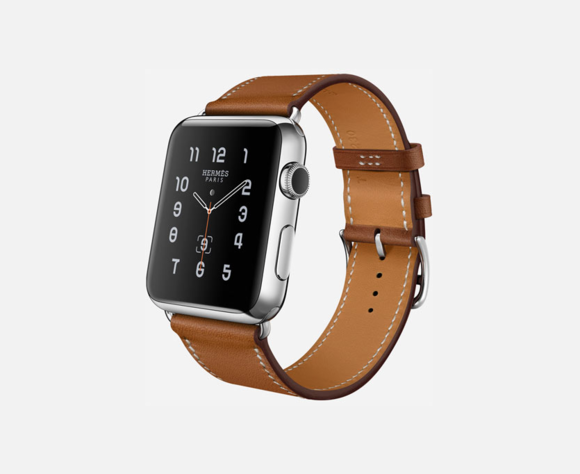
The Apple Watch Hermes collection is now available and it ranges from $1,100 to $1,500 – it comes with Hermes-infused colors, bands and clock faces.

Apple’s new Watch collection was announced in September during the big iPhone 6s event. The Apple Watch Hermes collection is now available in select Apple and Hermes stores. Locations include Los Angeles, Toronto, Miami, New York, San Francisco and several other cities in Asia and Europe.

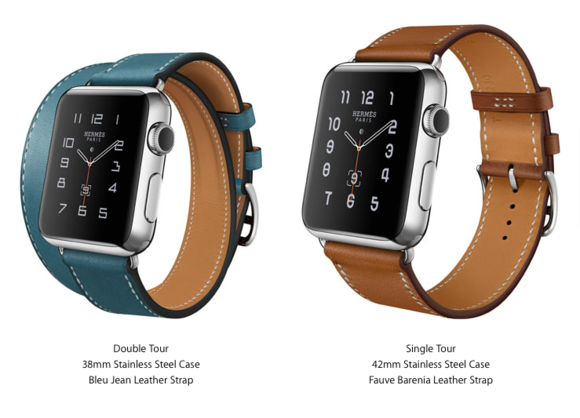
Depending on the style of the band and how big you want it to be, the Hermes collection will vary in price. The special French-designed Watch comes in three completely different styles and five exquisite colours – this leads to ten different looks to choose from.

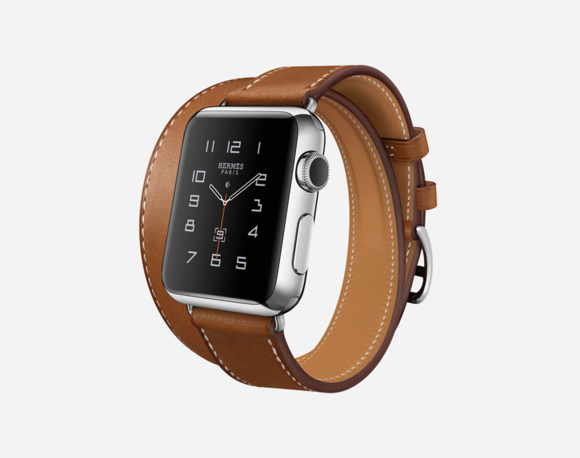
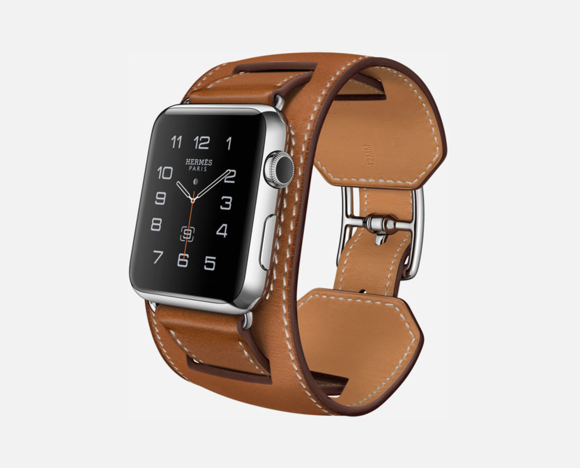
Apple’s new collection will showcase three new leather band designs. Cuff, who is the bulkier of the bunch is inspired by equestrian fixtures, notes Apple. Single Tour follows the same equestrian style and Apple says that the buckle resembles the one found on the straps of a horse’s girth. The last design is the Double Tour, which is exactly what you’re thinking of – you can wrap the band two times around your wrist.

Size really matters when it comes to Apple Watch.

The Apple Watch Hermes Collection features the Double Tour Model

The Double Tour Model

Take the 38mm Double Tour – it comes in four colours such as Brown – Fauve, Grey – Etain, Light Brown – Capucine and Blue – Bleu Jean.

The Apple Watch Hermes Collection showcases the Single Tour model.

The Single Tour Model

The 38mm Hermes-designed Single Tour can be bought in Fauve, Capucine, Black – Noir, while the bigger 42mm model of Single Tour is only available in Fauve and Noir.

The Apple Watch Hermes Collection showcases the bulkiest model, called The Cuff.

The Cuff Model

The last one of the bunch, and the bulkiest one too, is The Cuff. It’s available only in 42mm sizes with a Brown strap. It’s also the most expensive Hermes-Apple Watch model you can buy – it costs $1,500.

According to sources close to Apple and Hermes, their alliance has started way before Apple announced their first Watch iteration. All of the smartwatches included in the Apple Watch Hermes Collection have special new clock faces designed by the luxury brand, as well as their logo stapled on the back.

Worth noting is that this is the first time Apple has allowed so much material branding from an outsider on one of their products. We kinda figured that 2015 and 2016 will be the cornerstone for Apple, but we didn’t thought that they are keen on redesigning themselves so fast.

In all fairness, the Hermes branding is done in traditional Apple style – keeping everything simple and elegant.

Target will be selling the Apple Watch starting with the 25th of October, but it won’t have the new Hermes collection in store. At least, not for now.

Hermes brings more elegance and a certain style to Apple’s smartwatch don’t you think?

Image Source: 1, 2, 3, 4

Filed Under: Headlines Tagged With: Apple, apple watch, Hermes, Smart Watch, Smartwatches

Get Ready for Minecraft on Oculus Rift

September 28, 2015 By Deborah Campbell Leave a Comment

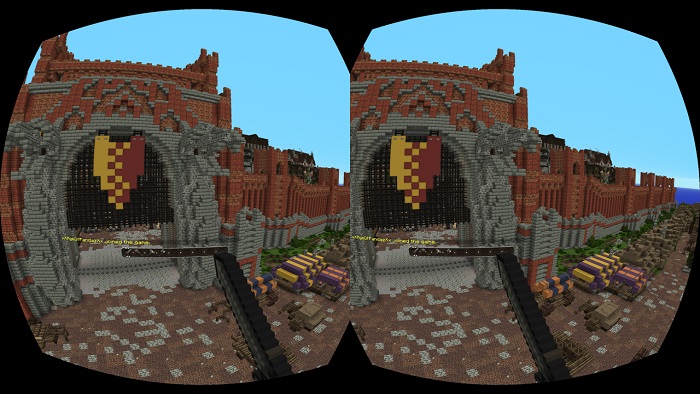
Minecraft on Oculus Rift has been officially announced

Get hyped – Minecraft on Oculus Rift just got real.

According to Palmer Luckey, founder of Oculus Rift, Minecraft is headed towards the highly-anticipated VR platform this spring. The built-it-yourself game is popular than ever and its growth doesn’t seem to dwindle.

During the Oculus Connect event that took place in Hollywood this morning, Luckey went on stage and unveiled some of their plans for 2016, Gamasutra reports. However, fans that wish to play Minecraft on Oculus Rift will need the game’s Windows 10 Edition, according to Lydia Winters of Mojang.

It looks like our fantasies of digging huge caves and battling mythical blocky nether-drakes just got real – well, virtually speaking.

This hints at a new step forward for the gaming industry. Luckey took to explaining how we move, slowly but surely, to the metaverse i.e. an intense virtual reality world. With the help of Minecraft, Rift will build a sturdy foundation for VR enthusiasts.

Microsoft’s Hololens also takes to Minecraft to help them sell their headset – which is a fusion between augmented reality and virtual reality, but with more AR elements present.

There are a ton of devs that work on gearing up games so they can be easily played in VR. Yet, the majority of titles that are set to be released in 2016 feature realistic worlds that use small amounts of space. We are more than curious to see how VR developers are going to make exploring a virtually limitless world with minimal issues from the get-go.

Luckey and his team seem to be excited about the whole virtual reality trend and this gives us some sort of assurance that the end product will at least be passion-driven.

Minecraft on Oculus Rift

Fighting dinosaurs in ARK sounds superb, and flying an airplane in War Thunder is more than rad, but there’s something about exploring Minecraft with a VR headset that just makes me want to jump up and down out of pure excitement.

Oculus Rift is shaping up to be a huge ecosystem filled with all sorts of virtual reality experiences.

However, let’s not jump on the bandwagon so fast. Next year will be all about VR and VR pioneers trying to take a huge chunk out of the virtual pie. In theory, Minecraft sounds awesome, but we don’t really know how this will equate to real world standards. It has to be fun, and more importantly, it has to be comfortable and easy to use.

There’s a reason why Kinect failed – nobody wants to commit to standing up just to play a video-game when they can just jump on the couch and relax after a hard day’s work.

Yet, Wii was a huge success, mainly because it is gimmicky.

Regardless if it’s going to be a hit or miss, I can’t wait to try Minecraft on Oculus Rift when the time comes.

Image Source: 1, 2

Filed Under: Headlines Tagged With: Minecraft, Oculus Rift, virtual reality, VR, Windows 10 Edition

Vertu New Signature Touch Smartphone Price and Availability

September 24, 2015 By Deborah Campbell Leave a Comment

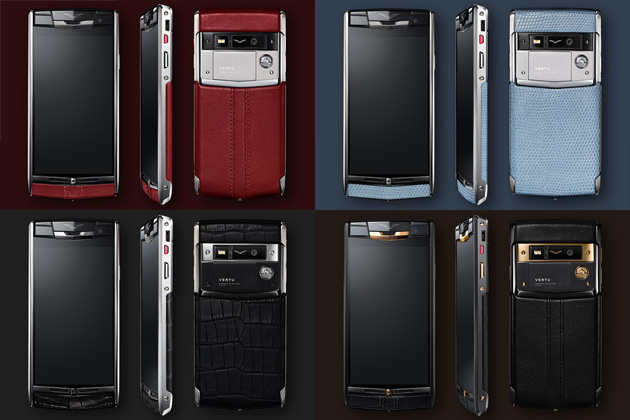
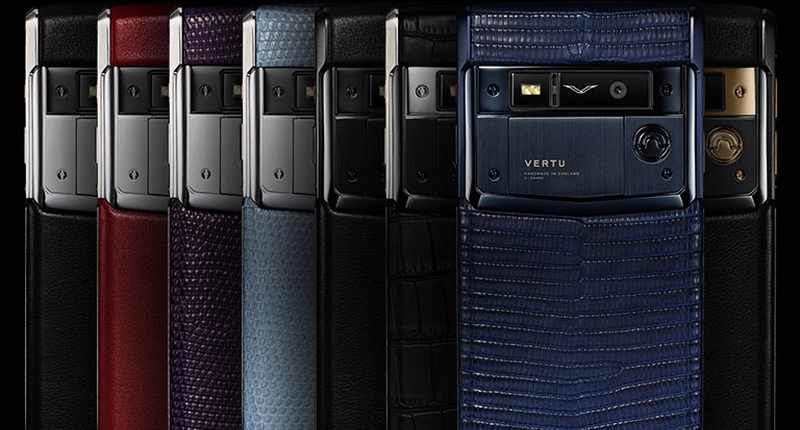
Vertu New Signature Touch Smartphone Costs 10,000 dollars

The Vertu New Signature Touch smartphone makes Apple’s iPhone 6S look like the greatest bargain smartphone on the market.

The British-based smartphone manufacturer that was once a part of Nokia has hinted that they are more than keen to go into the wearable line. During the unveiling of their latest product called the Vertu New Signature Touch device, CEO Max Pogliani said that wearables might be an interesting space for the company.

This probably means a new diamond-encrusted sapphire-polished product line.

However, Pogliani has the task of making the company’s latest smartphone a hit if they want to move forward. A tough goal, considering that the phone costs $10,000. Vertu is slowly reaching brand maturity and they have to capitalize on their position if they don’t want to lose crucial market shares, Pogliani adds.

But Vertu isn’t the only one developing wearables. We have Apple and Samsung, both witnessed a huge popularity in 2015. However, it that has started to dwindle mainly because its novelty wore off pretty quick. Among them we observe countless other heavy hitters form the tech and fashion industry that try to make it in this fairly new market.

Pebble isn’t suffering, or at least the company doesn’t show it.

And on the other hand you have fitness trackers with Fitbit leading the trend.

There are a couple of luxury brands that have formed an alliance with Apple – Tag Heuer and Hermes; but we don’t have sufficient data to say if their strategy was worth it or not.

Vertu New Signature Touch Smartphone is 4K Capable

The big issue here is where would Vertu place their wearable line, Pogliani says. It can’t resemble any other device on the market, it has to have a full serving of design, functionality and materials. Or so Pogliani would like to.

To better understand what Pogliani is trying to achieve, we have to take a look at the company’s latest Vertu New Signature Touch smartphone.

For starters, it runs Google’s Android – we assume that it’s capable of running Marshmallow, if not, at least the latest Lollipop update. It comes with premium materials – alligator skin, sapphire crystal display, and probably the hand of God along with it. But that’s not the highlight of Vertu’s new device. It comes equipped with a one-touch-to-access feature that employs a human concierge to do the user’s bidding.

The company promises users that this service will meet their wildest dream – within common sense and, of course, whatever laws people should abide.

Vertu New Signature Touch Smartphone Has a 21-megapixel Camera Unit

Pogliani adds that while he does wear a luxury smart watch, it’s not a fitness tracker. He sees them as toys – as gimmicky little devices. They are interesting, but at the end of the day, a high-class man, or woman, doesn’t get out of these mediocre devices the highly sought-after elegance they require and need.

The 4k-capable, 130-carat encrusted, 21-megapixel smartphone will go on sale globally from the middle of October.

Is there anyone among us that will buy the Vertu New Signature Touch smartphone?

Image Source: 1, 2, 3

Filed Under: Headlines Tagged With: Luxury Smartphone, New Signature Touch, Vertu, Vertu New Signature Touch, Wearables

GoPro Has Started Selling Odyssey, A 16-camera VR Rig

September 12, 2015 By Deborah Campbell Leave a Comment

Odyssey Footage from New York

The crazy 16-camera VR rig which GoPro announced at this year’s Google I/O conference is now available for purchase. Its official name is Odyssey and it costs $15,000.

However, not everyone can buy it.

Not because of its hefty price. You see, GoPro only sells it to a particular clientele. Customers need to submit an application on their website. If you aren’t a professional content creator or a producer, you’re out of luck.

Is Odyssey worth the bulky price tag?

For $15,000 you get a pretty great amount of gear. Buying the Odyssey entails that you own 16 top-shelf GoPro Hero 4 Black, a high-quality microphone, the essential rig with all the cables you need for film-making and a warranty in case something breaks.

You’ll also receive a Pelican case to carry the Odyssey in.

This is a great option for a new VR studio that isn’t looking to build a rig themselves. Yet, the fact that you need to submit an application to buy it seems a little bit annoying.

GoPro Odyssey 16-camera VR rig

We’ve witnessed a huge frustration on tech forums regarding the OnePlus 2 and its stupid invite system. We know it’s a marketing stunt, and we know that it keeps the price down, but still – people want to buy it and they can’t.

This frustration may very well be present within the VR enthusiast community.

Odyssey is the first VR rig built for Google’s Jump platform announced at this year’s I/O conference. Jump will be the first VR ecosystem that will make VR development easy and its content consumption within a click away. At least, that’s the plan that Google envisions.

I think they will be a little bit out of luck when Steam catches on with their SteamVR headset and VR store.

Regardless, Jump will  eventually lead to its inclusion within YouTube. Considering the addition of 360-degree videos earlier this year, this may very well be what the company is thinking.

Frustration aside, Google’s strategy for Jump is pretty tight. Not everyone is looking for this kind of machine. Only a certain type of company, or individual, is going to want to cough up $15,000. This means that Google and GoPro will not have to wade through countless beginner VR vids before they reach the ones that deserve to be featured on Jump.

This ensure that we won’t witness badly made, or downright boring, VR experiences in the first few months, years, of the Jump.

Both companies want to go further into the VR medium and will do so by outputting exceptional quality.

Image Source: 1, 2

Filed Under: Headlines Tagged With: 16-camera VR Rig, Google Jump, GoPro, Jump, Odyssey, VR Camera Rig, VR Rig

Turn Your Smartphone Into a Glorified VHS Camcorder

August 23, 2015 By Deborah Campbell Leave a Comment

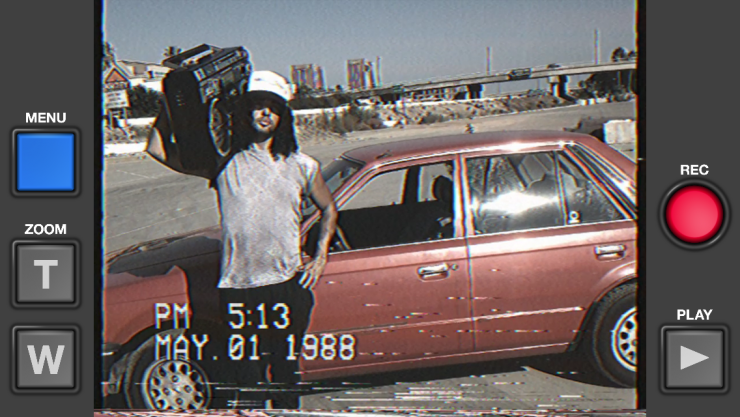
VHS Camcorder turns your iOS device into an 80s camcorder

Are you one of those people who glorifies vintage objects? Do you keep a keytar under your bed waiting for it to become hip again? Then this VHS Camcorder app is perfect for you.

The VHS Camcorder app will take your sweet modern 2015 videos to the 80s – only for the iOS!

Complete with the time and date stamp to give it that home video feel, Rarevision launched the VHS Camcorder app today on iOS. It costs $3.99, and it will run on devices that have iOS 8 or higher.

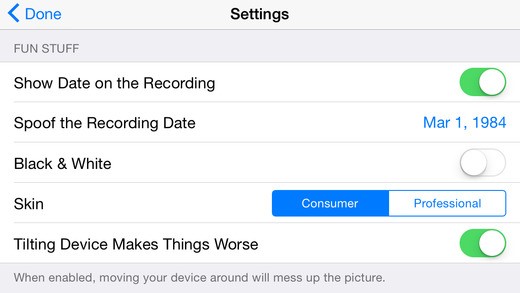
The time and date are editable, so you’ll be able to spoof them and prank your friends into thinking you were actually there for the 89 David Hasselhoff Berlin Wall Concert. Developer Rarevision even added that white play on the top left of the video’s corner so it sports a more authentic feel.

Give your kids lousy home videos and degrade the video picture even more. Drag your finger across the screen or shake your device to do so. For audio, you have a low-quality setting.

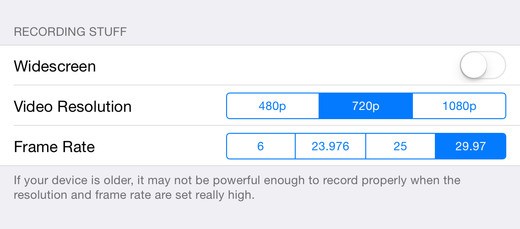
VHS Camcorder settings

Settings

The grainy video is perfect for a 1980s themed party. Or if you are a super-bored jaded stay-at-home dad.

After you have your vintage footage, don’t forget to tell everyone what you’ve done by sharing it to social media – Facebook, Vine, and Instagram. It all worked as Rarevision advertised.

VHS camcorder Fun Stuff Settings

Even More Settings

The equivalent of a latte, the VHS Camcorder app is quite the bargain. More so, the buzz will most likely last longer than your morning cup of coffee.

Features!

  • Great tape noise, tracking distortion and static
  • Editable date and time stamps
  • Fake zoom lens that that cheesy factor
  • Control how much noise you add
  • Sound is exactly as you want it to be – crap
  • Easily shareable vids
  • Clip-viewer for editing and playbacks
  • It can even record in widescreen –  but why would you want to use it in the first place?!
  • Pick your framerate – 30, 25 or 24!
  • Recording in HD for iPhone 4s or newer devices
  • 1080p is only available for iPhone 5 or higher

Want a taste? Check out this video from YouTuber Rich DeMuro.

Do yourself a favor and download it from the App Store right now!

Image Source: 1, 2, 3

Filed Under: Headlines Tagged With: Camcorder, VHS, VHS Camcorder, VHS Camcorder App

Corvette Brakes Disabled by Texting Its Dongle

August 12, 2015 By Deborah Campbell Leave a Comment

Corvette Brakes Disabled by Texting Its Dongle

Another day, another drama in the world of car hacking. After we’ve all been blown away by how hackers can gain access to a car’s Telematic Control Units, four researchers from the University of California hit the pedal to the metal and proved there is an even easier way to hack a Chevrolet Corvette. They stopped the cars’ breaks by texting its dongle.

The researchers are not pointing their finger and shaking their heads only at Corvette. According to them, most cars that have a dongle plugged in their dashboard show the symptoms of this Achilles’ heel. Using the dongle to track a vehicle for insurance purposes might not be the smartest way, as demos keep pointing out.

The cars can be extremely vulnerable and controlled remotely without much hassle. More than a simple bug, these security deficiencies can lead to disastrous outcomes if not contained in time. By simply sending a text message directly to the dongle attached to the car, hackers can gain access to some of the vehicle’s parts.

Insurance companies use such dongles to keep an eye on the cars’ location, their performance and their speed. Researchers were able to carry out a test and hack a cheap dongle attached to a Corvette.

Corvette Brakes Disabled by Texting Its Dongle

By texting its dongle, they managed to send commands to the vehicle’s internal network which has control over its physical driving parts. This move enabled them to take control over some parts of the car. They were able to turn on the Corvette’s windshield wipers and disable the brakes.

The experiment was carried out on a 2013 Corvette. The researchers claimed the brake trick only succeeded at low speeds because of some limitations in the vehicle’s computer functions.

Even so, they strongly believe the attack can be molded and adapted for almost any car. This translates into hackers being able to gain control to your car’s locks, steering and even transmission controls. How did the dongle manufacturer react?

Corvette Brakes Disabled by Texting Its Dongle

According to the researchers, they contacted Metromile in June and told them about the cars’ vulnerable spot that can be activated by simply texting its dongle. The dongle distributor seems to have wirelessly distributed a security patch to its gadgets, stating they treated the issue very seriously from the very beginning.

Uber, who uses the same dongles that were hijacked in the researchers’ experiment said their Metromile gadgets have been brought up to date and any existing flaw has been removed.

At the same time, the group of researchers begs to differ. They hold their ground saying the vulnerable spot can be found in vehicles all around the world, from federal agencies to government cars.

As long as a car uses a gadget connected to the internet, hackers can remotely controll it by texting its dongle, leaving the car exposed to the hijacker’s plans.

Image sources 1, 2, 3

Filed Under: Headlines Tagged With: corvette, dongle, hijack

  • « Previous Page
  • 1
  • …
  • 13
  • 14
  • 15
  • 16
  • 17
  • …
  • 31
  • Next Page »

Subscribe to Blog via Email

Enter your email address to subscribe to this blog and receive notifications of new posts by email.

Join 11 other subscribers

Recent Articles

police handcuffs man

German Man Probed In Poisoning That Killed 21 Employees Since 2000

June 29, 2018 By Kenneth Scott Leave a Comment

Chicken wings bar

Intoxicated South Carolina Man Punches Waitress Who Refused to Serve Him Alcohol

June 29, 2018 By Karen Jackson Leave a Comment

gaming

New Zealand gamer Who Flew Halfway Across The World for Virginia Teen Gets Shots By Her Mother

June 28, 2018 By Cristopher Hall Leave a Comment

party

Former Virginia Tech Freshman Sentenced to 50 Years in Prison for Stabbing a Girl to Death

June 28, 2018 By Roxanne Briean Leave a Comment

bonfire

British Couple Sentenced to Life in Prison for Torturing and Murdering French Nanny

June 27, 2018 By Deborah Campbell Leave a Comment

pay phone

Texas Father of Girl Disappeared in the 80s Ignored by Authorities

June 26, 2018 By Cristopher Hall Leave a Comment

bottled water

San Francisco Woman Threatened to Call Police on Girl Who Sold Ice Water for Disneyland Trip

June 25, 2018 By Roxanne Briean Leave a Comment

Maplewood Park

Missouri Man Robbed by Date and Accomplice in Park

June 22, 2018 By Nancy Young Leave a Comment

coding

New York Man Sentenced in Cyberstalking Former Girlfriend, Mailing Drugs to Her Dorm

June 22, 2018 By Deborah Campbell Leave a Comment

headphones

Bose Poised to Launch Sleepbuds, In-Ear Headphones That Help You Sleep

June 21, 2018 By Nancy Young Leave a Comment

Police light

Intoxicated Female Driver in Custody for Pulling Arresting Officer by the Hair

June 21, 2018 By Kenneth Scott Leave a Comment

kitchen

Restaurant Manager Arrested and Charged in Shooting Death of Co-Worker over Negative Yelp Reviews

June 20, 2018 By Karen Jackson Leave a Comment

plastic container

Pennsylvania Couple Charged in Violent Death of Infant Discovered Buried in Cat Litter

June 19, 2018 By Cristopher Hall Leave a Comment

tailpipe

Minnesota Teen Gets Head Stuck In Oversized Tailpipe Winstock Music Festival

June 18, 2018 By Karen Jackson Leave a Comment

Pages

  • About Us
  • Contact us
  • Privacy Policy
  • Privacy Policy GDPR
  • Staff
  • Terms and Conditions

Recent Posts

  • German Man Probed In Poisoning That Killed 21 Employees Since 2000 June 29, 2018
  • Intoxicated South Carolina Man Punches Waitress Who Refused to Serve Him Alcohol June 29, 2018
  • New Zealand gamer Who Flew Halfway Across The World for Virginia Teen Gets Shots By Her Mother June 28, 2018
  • Former Virginia Tech Freshman Sentenced to 50 Years in Prison for Stabbing a Girl to Death June 28, 2018
  • British Couple Sentenced to Life in Prison for Torturing and Murdering French Nanny June 27, 2018
  • Texas Father of Girl Disappeared in the 80s Ignored by Authorities June 26, 2018
  • San Francisco Woman Threatened to Call Police on Girl Who Sold Ice Water for Disneyland Trip June 25, 2018

Categories

  • Business
  • Entertainment
  • Finance
  • Headlines
  • Health
  • Life
  • Nature
  • Science
  • Sports
  • Tech & Science
  • Travel
  • Uncategorized
  • United States
  • World

Copyright © 2026 ArgyllFreePress.com
About · Privacy Policy · Terms of Use · Contact