Argyll Free Press

Growing News Network

Sunday, May 3, 2026
Log in
  • Business
  • Finance
  • Sports
  • Tech & Science
    • HP Envy 4500 Review
    • LG Optimus 170 Review
    • iPod Touch 6th Generation Review
    • HTC One M8 Accessories Set-up
    • Surrealist Games You Must Play
    • Hisense Sero 8 Review
    • Dell Latitude e7440 Review
    • HP Laserjet 1536dnf mfp Review
    • Garmin Fenix 2 Review
    • Skype Vs Viber
    • Best Video Conferencing Software
    • Sony mdr 1r Headphones Review
    • Canon Rebel t3i Review
    • Sennheiser Momentum 2-0 Review
  • Travel
  • Headlines
  • Health
  • United States

Google Wants To Solve Excessive Sweating With An Innovative Device

February 18, 2015 By Deborah Campbell Leave a Comment

body-odour

Have you ever thought that a device cold replace your everyday deodorant? Well a giant technology company has. Google wants to solve excessive sweating with an innovative device.

If you have never been a huge fan of wearing deodorant and you have always dreamed about some sort of invention that would make sweet disappear, you have to know that Google researchers are working on making your wish come true.

google

Google is working on a device that is supposed not just to avoid clothes from getting those annoying white armpit stripes but that would also keep you dry and free of unwanted odours no matter how much your body sweats at work or when going out. The device would also help you no to run into anyone you know while sweating.

Imagine managing to avoid the hot guy you have a crush on or your boss as you are running late to work from lunch, and outside there are 90 degrees and you forgot to put on deodorant as you were in a rush to leave the house.

The invention, called “ odor removing device”, a Google patent filed by four Google employees, on August 31st, 2012 could be based on an activity sensor, a communication area that would allow access to one or several social networks and would permit communication with network contacts and a route suggestion feature, which would offer users an alternative route to take.
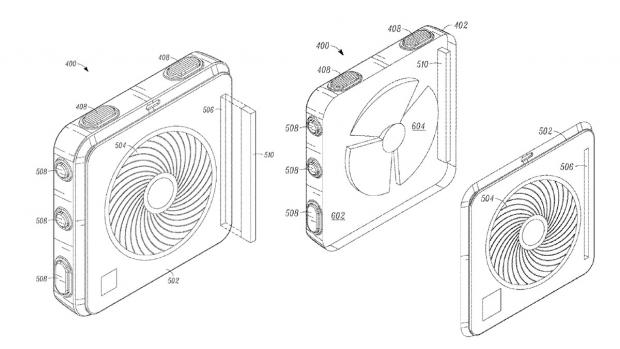
google_odour_device_open_case_

In this way, if your body is dripping sweat you would be spared the embarrassment of being seen by anyone in your social circle that is traveling on the same route as you are. The device will notify the user that his/hers contacts are in the area and would provide an additional route for them to take in order to avoid him/her and the unpleasant odors to meet with his/hers social contacts.

The technology will use Google services like Google Maps, RTM or Google Earth. RTM should be used for supplying the alternate route, according to the patent document.

So, yes, the whole idea of this project is that Google wants to help you avoiding to met people that you know and gross them out with the smell of your sweat. Apart from these features the device may also include a “parameter detector”, but also an accelerometer, a galvanic skin response monitor, an environmental sensor, a biometric sensor, context, a location sensor and also a camera.

Yes, it sounds a little strange and it may take some time to adjust to the idea, but this is indeed a future Google project.
The odor removing invention is aimed to do much more than to help you not to affect the ones around you with your smelly sweat. The device may track down when you are sweating, analyse your medical history and would offer a spraying and heating device and would also spray out a fragrant substance according to a prediction signal but the user would have control of it.

So basically this would work as a digital deodorant that detects physical movement and automatically emits a pleasant fragrance but would also detect a rise of temperature and humidity informing you about high sweat levels and body odors.

The user would also receive a warning before the smell is emitted, allowing them to disable the option if the don’t desire to release the fragrance, for example when being at the gym or at home.
smart spray

Like it goes with all patents, Google may not be releasing the product in the near future or maybe it wont release it at all.
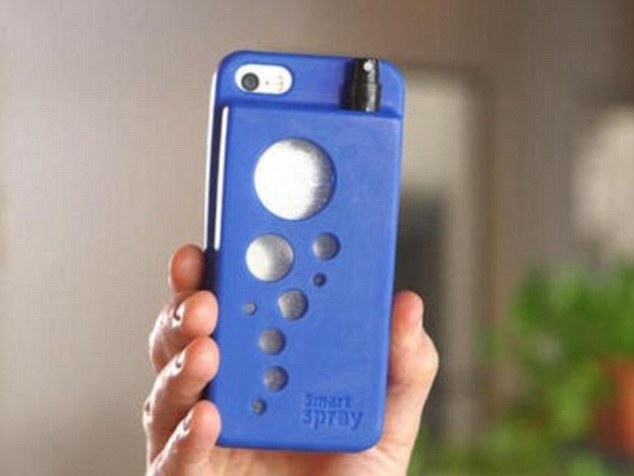
However, there is an alternative for those who are keen on the idea. It is called The Smart Spray accessory and it is a smart phone case adjusted with a tiny flask created to hold any type of liquid.

The small bottle could be filled with perfume, sun tan lotion, breath spray, insect repellent substance and so on. The tap comes out from the back of the case and can be hidden when not being used.
Image Source: ndtv
Image Source: The American GeniusImage Source: PC PRO
Image Source: Daily Mail
Filed Under: Health, Tech & Science Tagged With: device that solves body odours, google digital deodorant, google to release device that helps excessive sweating, google will create device that will tell you how much you sweat

Amazon Sends More Invites for Echo

January 19, 2015 By Deborah Campbell Leave a Comment

amazon-echo-4

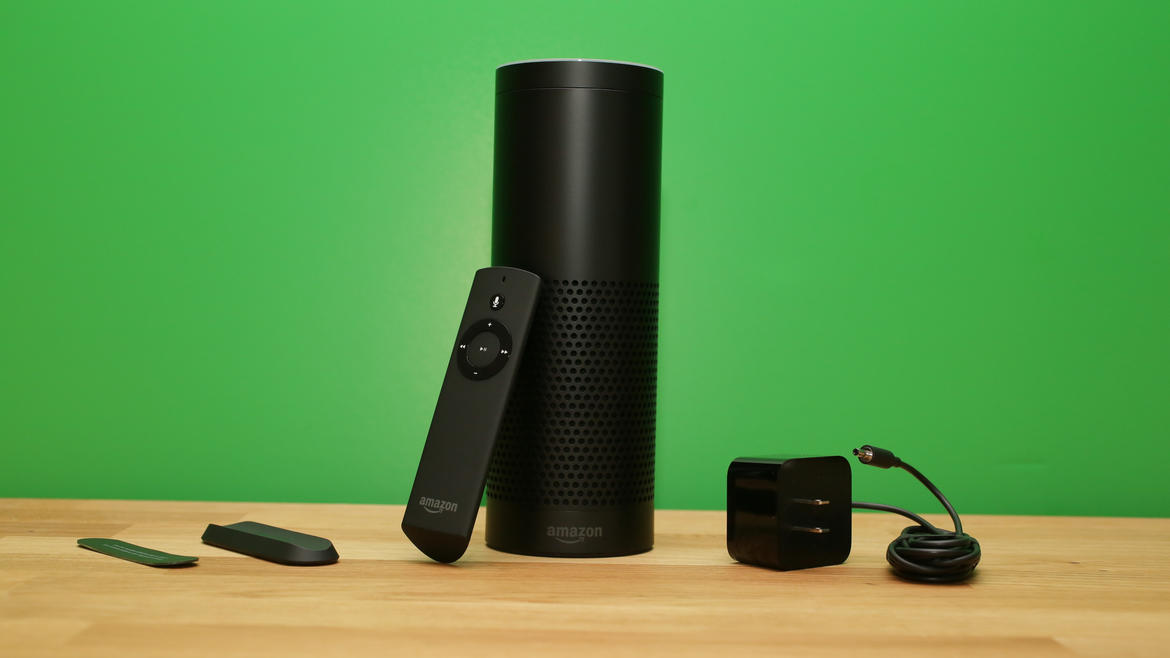
Amazon announced the Echo back in 2014 and customers that were interested in buying the device were put on a waiting list. Now, the giant online retailer sent out more invites for Echo and is attracting customers to buy it. The Amazon Echo is a sort of personal assistant and functions as a cylinder-shaped speaker as well.

Some of these devices were already shipped and Amazon even sent out more invitations on Tuesday.

The Amazon website, however, states that the Echo won’t ship out until June, either because the inventory is low or there is a very high demand for it. But customers must decide pretty soon if they choose to purchase the Echo because the invites last for only seven days.

Amazon Echo plays music, tracks news, keeps track of your shopping list, gives you a weather report and can even tell jokes and is considered to be Amazon’s first try at entering the smart home market. The company could also learn a lot from feedback from the users who buy the device by making it available only for a few people at a time and thus, they could polish the device before making it available for everyone.

We had our hands on one of these devices and can give you a short review of what you can expect from it.

amazon-echo-3

The Amazon Echo uses Alexa, which is the voice behind it. The device is voice activated and relies on a cloud to perform different tasks as your personal assistant. Even though she’s pretty limited as of now, she still has some nice functions. Yes, we will call Alexa a “she” from now on, not an “it”.

Even though there are a few problems with voice recognition, it’s still one of the best voice controlled devices we’ve used. It does a good job in understanding what you are saying and it’s even better than Apple’s Siri, Google Now and Microsoft’s Cortana personal assistants.

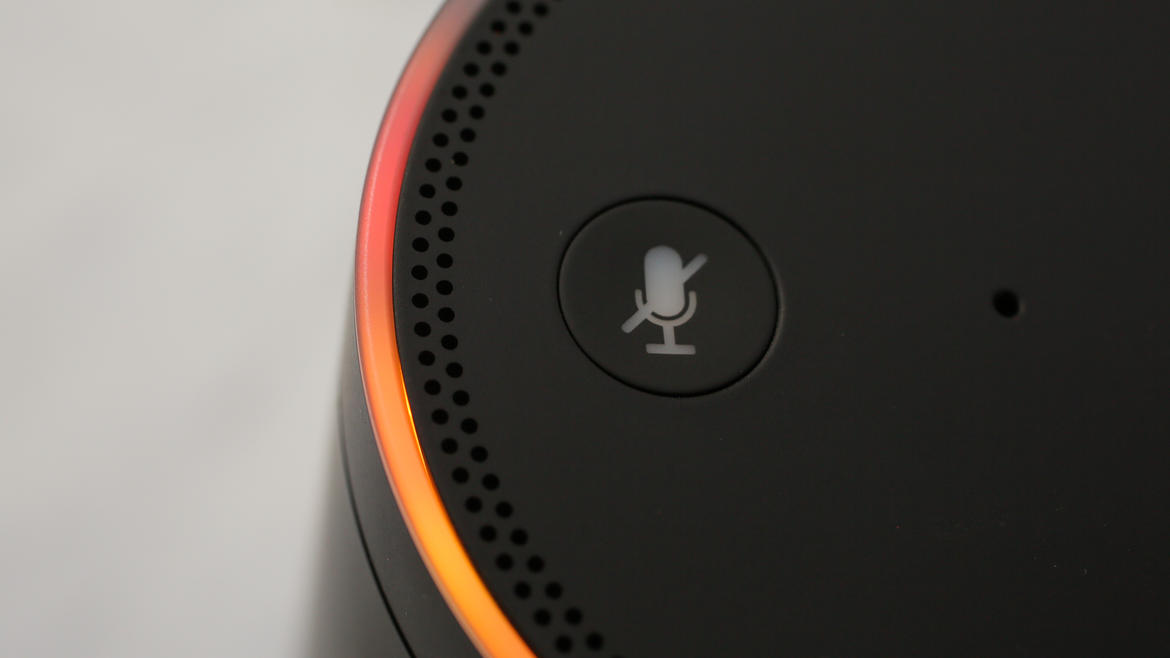
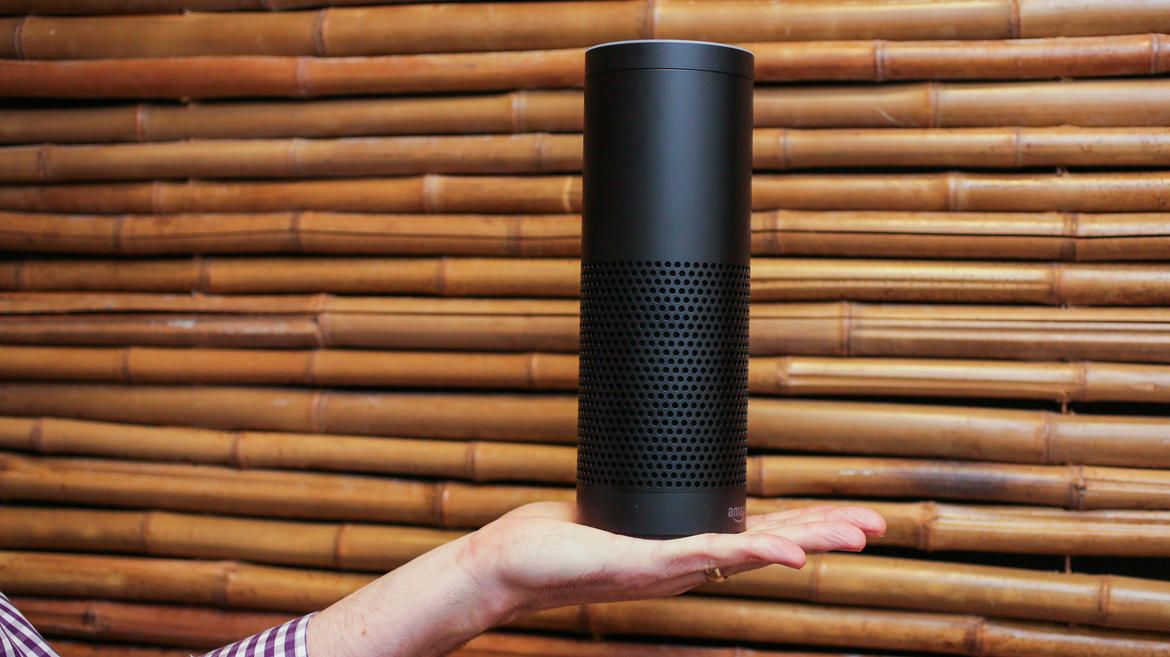
It features seven microphones inside the 9.25 inch cylinder casing. The ring which controls volume on top of the Amazon Echo lights up when you say the word “Alexa”. The light means the device is ready to hear your command and we can honestly tell you that Alexa understood most of the commands we gave to her. You can also say “Amazon” before giving commands but that doesn’t really seem natural. There is no way you can change the gender of the voice or the wake word as of now.

amazon-echo-2

To start using it, you have to connect the Amazon Echo to a Wi-Fi network with the use of an app available on the Amazon Fire, Android, Apple and desktop devices. You can connect directly to it via Bluetooth and use the device as a wireless speaker as well. Unfortunately, even though the device holds seven microphones, we couldn’t use it as a hands free device for our phones. To be fair, it’s still in its early days and this function will probably be made available later.

The Amazon Echo works especially well for receiving a weather forecast both for just one day or the whole week. The device can also tell you the time, set up a timer or alarm, manage a shopping list and give definitions on various words. Alexa can even tell jokes.

The device has to always be plugged in as it doesn’t have a battery of its own. You can move it around your house as long as it can still connect to the Wi-Fi network. If you move it in a place where there is a different network than the one you used before you will have to go through the setup process once more. It’s not very difficult, but it’s inconvenient.

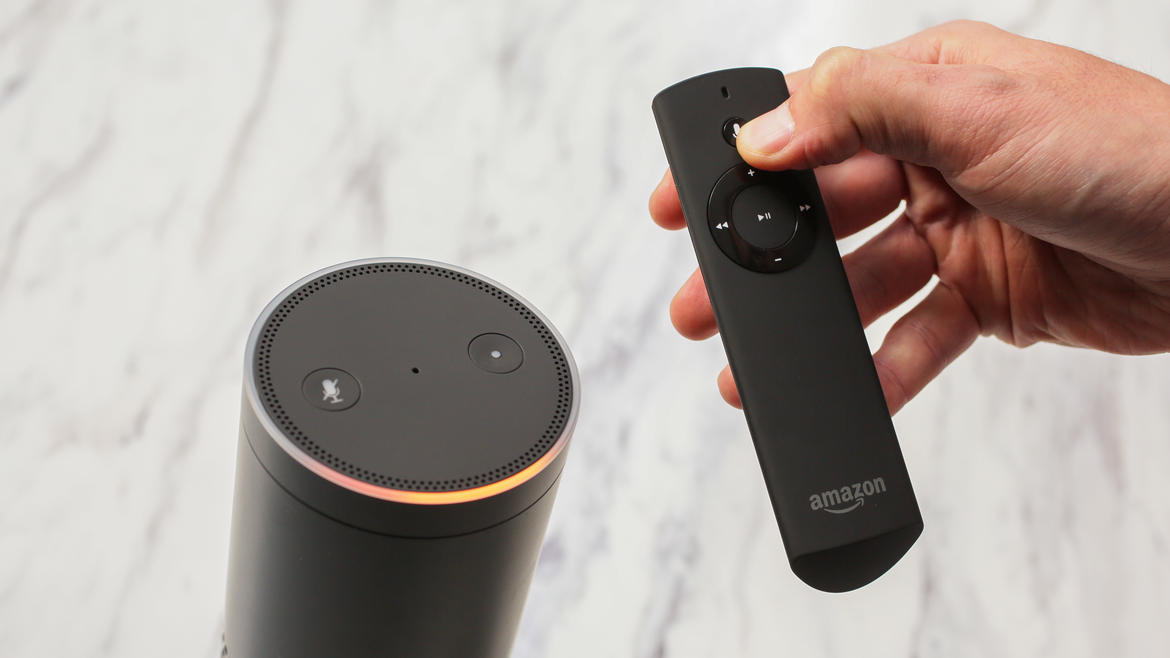
You also get a remote that has a microphone built in it so you can speak to Alexa when you’re very far away from the microphones or the room is very noisy. That being said, we were able to tell Alexa to turn the volume down when music was playing quite loudly, so the internal microphones work really well, partially because they have a noise cancellation feature.

amazon-echo-1

A great limitation at this point is the fact that Alexa can only use Wikipedia and a few other data bases, but not Google or Bing. The device will send a Bing link to your smartphone or tablet if she won’t be able to find what you’re looking for, however.

Alexa is expected to get a lot smarter in the future. She is capable of learning your voice better and there is also a tool for speech-training, but we’re uncertain of how the app works exactly considering that numerous people will talk to her, not just one.

The sound also seems to get distorted on higher volumes despite the speaker being able to produce good bass and projecting the sound at a 360 degree. But the sort of poor sound quality is probably because the speaker is designed mostly with Alexa’s voice in mind. The speaker works great for background music but it most likely won’t be your go to source of entertainment. It’s really hard to listen to music above the 60 percent volume mark as the sound will become very distorted. It’s very possible that the Amazon engineers will fiddle around with the EQ in the future to make it sound better but this is just our assumption.

At a price of $199, Amazon Echo isn’t much of a bargain and while it’s not without its quirks, we do see the potential in the device and there will probably be a time in the future when we will come to use it more. But that depends solely on Amazon and what they decide to improve on it.

Images source: cnet.com

Filed Under: Tech & Science Tagged With: alexa, alexa personal assistant, amazon alexa, amazon echo, amazon echo alexa, amazon echo invites, amazon echo review, amazon sends invites for echo, echo invites, invites for echo

The Weirdest and Worst Inventions at CES 2015

January 14, 2015 By Deborah Campbell Leave a Comment

The International Consumer Electronics Show, or CES as it is widely known, is a tech and electronics trade show where major companies come to show off their newest inventions to the world. Sometimes those inventions and innovations end up being amazing and also amazingly useful, as you can see in our top gadgets from CES 2015, but other times, companies would come up with products that leave us scratching our head and wondering what on Earth they were thinking. Keep in mind that this year, there were more than 20,000 products on display, so it was quite tough choosing. Here are the weirdest and worst inventions that CES 2015 brought forth, so prepare yourselves!

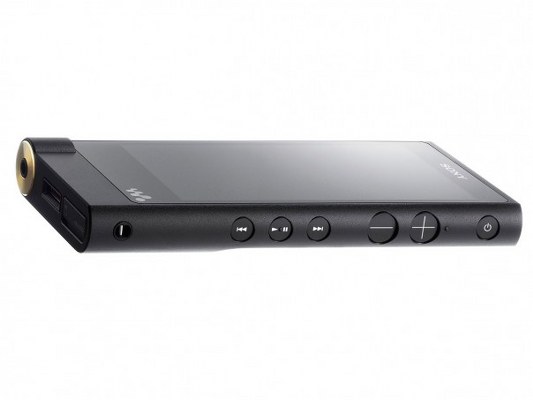
Sony Walkman NW-ZX2sony walkman

Yes, Sony came out with a Walkman at the CES 2015, but it’s no ordinary Walkman. It’s a bulky, and quite expensive Walkman that can play high resolution audio playback. If we had to express an opinion about it, we would say that it’s unnecessary and that there aren’t enough people in the world who are passionate about hi-res sound in order to keep this product alive.

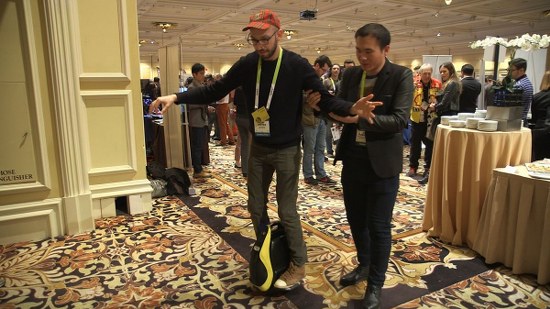
InMotion V3 Electric Unicycleinmotion

The InMotion V3 Electric Uncyle just seems like an accident waiting to happen. Why would anyone want to make an electric unicycle is beyond us?! Aside from the fact that it take a lot of practice to be able to ride it, it’s also quite expensive and saying that we’re not seeing a market for it would be the understatement of the day.

LuminetteLuminette

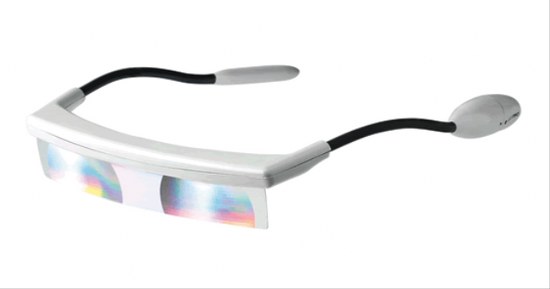
Luminette has a great idea behind it: it offers light therapy to all those people who are affected by the lack of light during the colder seasons. It is meant to help increase energy levels and it does it by regulating internal rhythms. Sounds great, we know, but the device itself is bulky and unappealing. They should have put more thought into designing it!

Communication Androidcommunication android

Tech fans love robots, but this year at the CES 2015 there were so many that you felt a little bit uneasy, especially around this humanoid. Her voice was freaky and her stare was nightmare material. We would not want this android in our homes, no sir!

InBodyinbody band

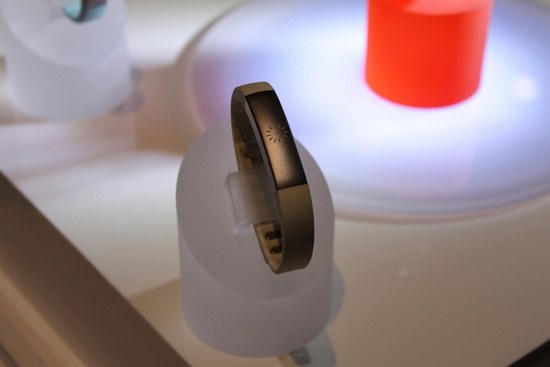
InBody is a health bracelet that tell your body fat percentage, body water balance and segmental muscle distribution. It’s a pretty advanced device, but the charts it puts out are so complex, that it is definitely going to put off many people off it. Unfortunately, the average consumer wants smart and easy gadgets and InBody is just smart. Really smart!

OkuOku

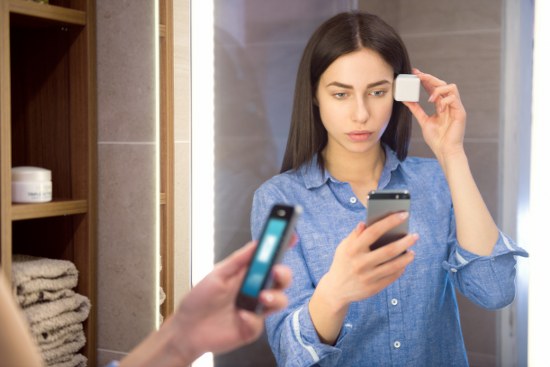
Oku is a personal skin scanning device that can be hooked up to your iPhone and see the damage done to your skin by the sun. Oku shared its premise with us: You wear a device to track your steps, sleep and heart rate. What if you had something that could track your skin health and help you develop a customized anti-aging regimen and motivate you to stay on track?

Bluetooth Air2 Speakerfloating bluetooth speakers

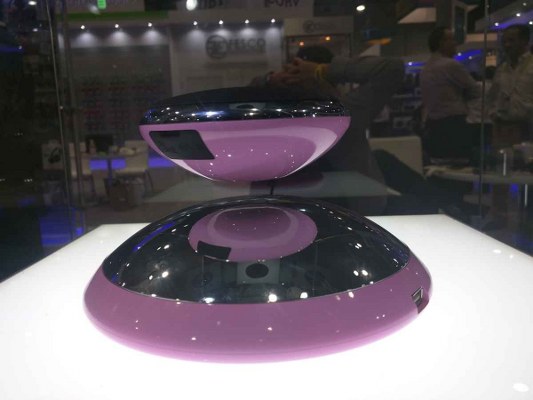
These Bluetooth speakers are quite good, but that’s not what sets them apart from your standard Bluetooth speakers. What’s so cool about them is that they can levitate. With the help of repelling magnets, the smaller speaker floats above the larger one while it is playing music. Pretty awesome, we know, but we think it’s one feature you’re going to get tired of quite quickly.

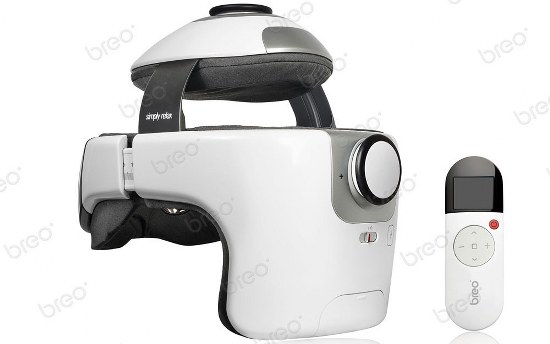
Breo Dream3 Head and Eye Massagerbreo 4

A head and eye massager is the last need anyone on this planet needs. But that didn’t stop Breo from making this expensive device which uses vibration and compressed air to massage the wearer’s head, eyes and neck. We’ve gathered that the device gives rough massages! Ouch!

Innerlyinnerly

Innerly is a smart pendant whose purpose is to help consumers relax and take back control of their lives. This device will record your voice and all you need to do is press a little button; the memos are then sent to app where you can add photos and text. The thing that makes this device pretty useless is the lack of a camera. If you want to record a memo, why not just use your smartphone?!

Brother’s The Dream Machinedream machine

You can’t look at this machine and not be amazed by it. It is a smart sewing machine that has an HD display, useful for making embroidery plans. It would make such a cool gift for any DYI enthusiast, until you look at the price. Brother’s The Dream Machine is $15,000! Can you really think of anyone you know who would shell out $15,000 for a sewing machine? Neither could we.

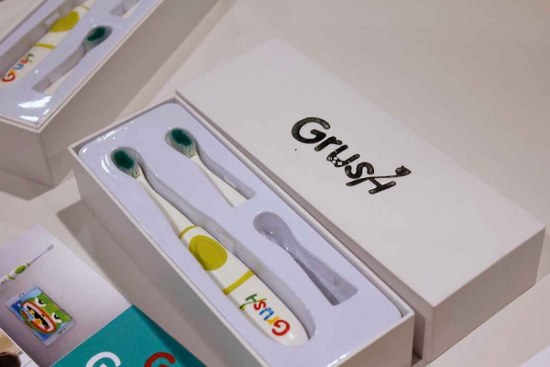
Grush Gaming Toothbrushthegrush

The Grush is a smart toothbrush that can be connected to a smartphone and with the help of sensors, it mimics their brushing technique and incorporates it into an interactive game. While the idea behind this contraption is quite a nice one (encouraging children to brush their teeth), it does send out the wrong message.

Swissvoice L7 Telephoneswiss voice l7 phone

Are you tired of your smartphone giving you all the information you needed in a matter of seconds? Are you upset with the fact that you can be connected at all times with the help of a pocket-sized phone? Swissvoice has heard your desperate cry for help and it is giving you  the best of the seventies to home phone in 2015. That’s right, it’s an old-school phone! Good luck with that, Swissvoice!

Robo-Rump Shakerrobo rump shaker

We couldn’t believe our own eyes when we saw this contraption! Hey Robo-Rump Shaker, the 40’s called and they want their gadget back! Do people still believe that shaking your jiggly bits will cause you to lose weight? Even though similar machines have been making a comeback every decade or so, we have faith that this one won’t catch on. Or at least we strongly believe that it won’t and that people have smartened up by now about this type of workout.

What is your favorite invention from this year’s Consumer Electronics Show?

Filed Under: Tech & Science Tagged With: CES 2015, tech, weird CES 2015, weird inventions

iOS 8.1.3 The Update We’ve All Been Waiting For – Rumor Roundup

January 13, 2015 By Deborah Campbell Leave a Comment

ios 8.1.3

iOS 8.1.3 is coming our way and rumors are saying that it’s going to become available to all users somewhere at the end of this week or at the beginning of the next week. When exactly that’s going to happen, we don’t know, because Apple does not confirm or infirm any rumors. Today we’re going to take a look at the rumors that have been circulating online and we’re going to discuss when exactly the iOS 8.1.3 update is going to happen. We’re also going to take a look at some reasons why you should upgrade and at some reasons why you shouldn’t.

iOS 8 was an eagerly awaited operating system update from Apple. It was launched to the public on September 17, 2014 and it featured some massive changes to the interface. The Notification Center was completely overhauled, making it much easier for users to rely to texts and mails. Also, iOS 8 saw the introduction of widgets, which expanded it capabilities tremendously.

But iOS 8 also had some bug issues, bugs and problems. It was the most plagued operating system from Apple to date. At one point thousands of people couldn’t make phone calls and Apple had to pull an all-nighter just to release an update the following day to fix that issue. It was also the first time when Apple allowed a rollback, which gave people the possibility to roll back to a previous version of the operating system.

The iOS 8.1.2 fixed most of the bugs, but it is far from being perfect. It is because of this that we believe Apple is eager to move on to the next level and by that we mean iOS 8.2 or even iOS 9. Just like Microsoft has done with Windows 9, which never came after the massive disappointment that was Windows 8. Instead, the tech giant released Windows 10 in hopes it would distance itself from the flop.

iOS 8.1.3 – When and What

Apple is believed and expected to release and slowly roll out its latest update to their operating system, iOS 8.1.3 at the end of this week or at the beginning of the next one. The release of iOS 8.1.3 is aimed at fixing little issues ahead of the bigger and more important iOS 8.2 update, which is going to take place somewhere in the following months.

BGR reported the following:

We’ve been told that Apple is planning on releasing an iOS 8 software update sometime next week. Whether it’s a beta seed or a public release, our source couldn’t confirm, but the company is currently planning on making a move around Tuesday or Wednesday.

There is another piece of clear information, rather than just a rumor, that is pointing at a release of iOS 8.1.3 in the coming days: it appears that there was a spike of web traffic that came from devices running iOS 8.1.3 on Apple’s networks. Some believe that this is proof that the update was made available to some select employees last week. This can only mean that Apple is getting ready to release the iOS update.

Another clue that might point towards the release of iOS 8.1.3 and not the bigger iOS 8.2 is the fact that Apple doesn’t beta test the smaller releases. Our advice is to keep an eye out in your Settings icon to notice if a notification pops up.

Plenty of people were put off by iOS 8, with its issues and people have been quite reserved about upgrading. According to Apple, the latest operating system, iOS 8 is installed on 63% of active iOS devices. This figure is slowly rising, thanks to people giving in and upgrading their devices or simply buying new ones that are already running iOS 8.

Update to iOS 8.1.3 or Not?

This question is on everybody’s mind! Naturally, it is up to you whether you update or not, but you should know a few things before going ahead and downloading and updating the operating system of your Apple device.

  • If you are still using an iPhone 4s or iPhone 5, an update is probably going to slow your iPhone down, which is going to be quite terrible. Because Apple doesn’t allow any rollbacks, it means that you’re stuck with the new operating system update for eternity.
  • If you are using a jailbroken phone, then updating will erase the jailbreak and you’re not going to be able to use your phone the way you used to in the past. If Apple releases iOS 8.1.3, then you’re probably going to be able to jailbreak it again, but if they release iOS 9, there is no change a jail break is going to be available soon.
  • Also, we don’t know what issues the operating system update is going to fix, or what problems it is going to create. So, before rushing ahead and updating, we recommend you wait a couple of days and keep an eye online and see what folks have to say about the update. If the feedback is good, then you can go ahead and update, although you never know if your experience is going to match other people’s experience.

iOS 9 – Could We Get That Instead of iOS 8.1.3 or iOS 8.2?

There have been some very recent rumors that were saying that Apple wasn’t going to continue updating their iOS 8 and that it was going to jump straight to iOS 9 and release it in the near future. While there is some little bit of information online that is pointing into this direction, we’re a bit reserved when it comes to expecting that the next iOS release is going to be iOS 9.

Final Thoughts

Well, one thing’s for sure: iOS 8.1.3 is going to come before Apple Watches and iOS 8.2, which is most likely going to happen this week. So get ready to either download it or avoid it as much as you possibly can. It’s up to you if you update or not!

Filed Under: Tech & Science Tagged With: Apple iOS, Apple iOS 8.1.3 update, Apple iOS 9, iOS 8.1.3, iPhone iOS

Android Updates Including Android 5.0.2 Lollipop Update for Nexus

January 5, 2015 By Deborah Campbell 28 Comments

Google released an update to their Android Lollipop operating system, Android 5.0.2 for Nexus 7 Wi-Fi 2012 edition users. The update is meant to fix some major bugs, but the reviews so far haven’t been very favorable. Today, we’re going to take a look at the Android 5.0.2 Lollipop update for Nexus and we’re going to reveal what Android users should expect from the new Lollipop update.

android 5.0.2

Android Lollipop

Google revealed their new operating system, Android 5.0 Lollipop on June 25, 2014 during the Google I/O and became available to the masses over-the-air at the end of the previous year, on November 12, 2014 for Google Nexus and Google Play edition devices. The operating system update for Google Nexus included the following devices: Nexus 4, Nexus 5, Nexus 6, Nexus 9 and Nexus 10. Naturally, Lollipop saw many improvements to the Android OS, but also delivered quite a few bugs and problems.

The first update for Lollipop, Android 5.0.1, came soon after the initial launch and it was made available for Nexus, 4, Nexus 5, Nexus 6, Nexus 7 (2013 edition), Nexus 9 and Nexus 10. Unfortunately, the update was not available for users of Nexus 7 2012 Wi-Fi edition.

Android 5.0.2 Update for Nexus

Now, Google has released another update to their operating system, Android 5.0.2 Lollipop, and it’s only available for the Nexus 7 Wi-Fi 2012 version. It appears that Google wanted to make amends for those users, but this very specific update left many other users, such as the Nexus 7 3G 2012 ones, quite frustrated. They’re still using Kit Kat and they’re not very happy about it.

The thing is that this update might just be a very targeted update, for the Nexus 7 Wi-Fi 2012 model only. There is still no news about other devices, so before you get any more excited than you already are, keep this in mind and rejoice only if you’re a proud Nexus 7 2012 owner. Also, Nexus 7 2013 edition doesn’t seem to be getting the Android 5.0.2 update any time soon.

All this fragmentation between updates is going to make Android lose some of its users. The fact that there is no universal availability of Android 5.0 Lollipop in 2015 is something most users find unacceptable.

The update rollout is coming at a snail’s pace, but it is coming, so keep an eye out for it or for Google’s announcement. Aside from design changes, expect major bug fixes, such as battery drain. Tech blog, Naked Security, revealed that:

Google recently confirmed a fix for the memory issues causing app crashes on Android 5.0 Lollipop. The company says that the fix has been approved for a future Android update though the company did not say what the update might entail. It’s possible that we’ll see it arrive with an Android 5.0.3 update or we could see it arrive with the rumored Android 5.1 update. Nothing is confirmed and it could take months for Google to roll out a fix.

Lollipop Massive Memory Leak

Many of those folks who did manage to get an update to their Android are now complaining of bugs. More bugs than anyone ever imagined, unfortunately. As mentioned above, the Nexus 7 2012 version didn’t get a 5.0.1 update, but a 5.0.2 one, which means that the vast majority of Android users are still using Android 5.0.1. The bug that seems to be really wreaking havoc in Android these days is a software bug that affects RAM memory. The operating system causes memory to simply leak; for example, when you are running 5 apps at the same time, your phone is going to decide at one point that it is at a critical point and that it is running too many apps and it is going to close some apps just to free up some resources.

No matter how much memory your smartphone or tablet has, if you are running Android 5.0.1 there is a chance that your system will run out of memory, which is never a great thing to be around.

This is by far the most annoying and common bug that Android 5.0.1 has offered the world so far. Android 5.0.2 didn’t fix anything because it wasn’t a targeted update, but Google is expected to release Android 5.0.3 Lollipop any time soon.

Tech blog, Naked Security, revealed:

The thread on the issue tracker is hard to follow as there are lots of complaints and there is lots of general unhappiness, but little in the way of official comments from Google or Android developers. However it does now seem that Google has agreed that this is a bug, and that it has been fixed in the source code.

Until something is done to help all those affected by the bug, nothing is going to change, apparently:

What that means is that the latest source code used to build Android doesn’t leak memory. However that doesn’t actually help affected users at the moment. The next step is for Google to make a new release of Android, probably Android 5.0.3 Lollipop, with this and other bug fixes. However there is no news on when that will be. Let’s hope it will be soon.

Until the new Android 5.0.3 update comes along, all you can do is wait patiently and try not to get annoyed by the whole situation. If you’re experiencing a memory leak and nothing seems to help, then we suggest you file an official complaint with Android and wait for them to reply and maybe give you a few pointers on the issue.

Have you experienced any issues with Android 5.0.1 or Android 5.0.2? Drop us a line in the comment section below and tell us about your experience.

Filed Under: Uncategorized Tagged With: android 5.0.2, android lollipop, nexus 7 android update

Lenovo Unveils New ThinkPad Laptops and ThinkPad Stack System at CES 2015

January 5, 2015 By Deborah Campbell Leave a Comment

The International CES 2015 trade show hasn’t even officially started and companies have begun releasing information about new lines. The International Consumer Electronics Show (CES) 2015 is going to commence tomorrow, 5 January, in Las Vegas, Nevada, USA. This year’s CES will be showcasing more than 3,500 exhibitors (suppliers, developers and manufacturers of consumer tech hardware and content) and around 160,000 people from more than 140 countries are expected to attend.

Lenovo couldn’t wait any longer and unveiled eight new ThinkPad laptops and a ThinkPad Stack System that is going to generate quite a commotion, we believe. Let’s take a look at those ThinkPads and the ThinkPad Stack System!

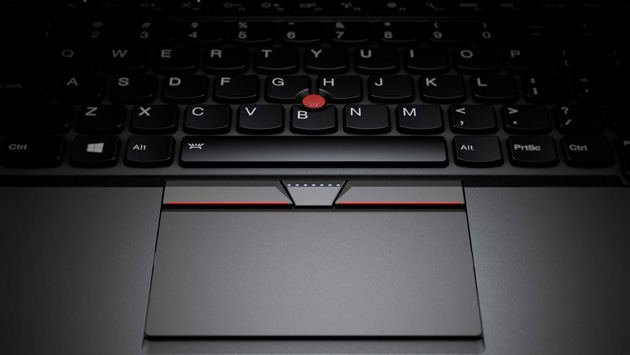
Before we begin, we would like to announce one of the most important changes that Lenovo made to their ThinkPad 2015 laptop line: the physical function keys are back! Last year, Lenovo replaced the physical buttons with an adaptive panel with touch-sensitive buttons and the users weren’t at all happy with that. Also, the touchpad sees the return of two right and left clickers.

Lenovo ThinkPad Laptops

thinkpad laptops

The new Lenovo ThinkPad line has two Ultrabooks that are the company’s flagship products and they are both getting updated for the New Year. The Lenovo ThinkPad X1 Carbon is a portable 14-inch laptop that has a high-resolution touch screen (optional feature, naturally) with a light but rigged case that weighs just 2.9 pounds. The Lenovo ThinkPad X1 Carbon starts at $1,249 and will be available for purchase later this month.

The other flagship Lenovo laptop that the company unveiled at the CES 2015 is the Lenovo ThinkPad X250, a 12.5-inch laptop that weighs just 2.8 pounds and is only 0.8 inches thick. This laptop works with Lenovo’s Power Bridge technology which is a dual battery system that allows the user to configure the laptop for traveling for maximum battery life but also lowest weight. The Lenovo ThinkPad X250 starts at $1,149 and will be available for purchase starting February 2015.

The Lenovo ThinkPad 450 series has three new laptops: the Lenovo T450s, the Lenovo T450 and the Lenovo L450. The Lenovo ThinkPad T450s has a 14-inch display, weighs only 3.5 pounds and is 0.83 inches thick. It is compatible with Lenovo’s Power Bridge that can extend battery life when one needs it. The price starts at $1,099.

The Lenovo ThinkPad T450 also has a 14-inch display, but it is a bit heavier than the T450s model: it weighs 4 pounds and is 0.88 inches thick. The price stars at $849.

The Lenovo ThinkPad L 450 laptop has a 14-inch display that does not have a touch screen option, like all the other in the 450 line do. It’s also the heaviest and thickest: 4.25 pounds and 0.96 inches thick. The price starts at $699. All three Lenovo ThinkPad 450 series laptops will be available starting February 2015.

Lenovo also thought of those folks who prefer larger displays on their laptops when it created the new Lenovo T550. You can choose from two sizes: you can either get a 15.6-inch display or a 15.5-inch display with the high resolution of 2880×1620. The T550 comes with a RAM memory of up to 16GB, up to 1TB of HDD or 512GB of SSD and features all the ports and jack one needs to turn it into a desktop replacement. It weighs 5 pounds and is 0.88 inches thick. The Lenovo T550 will be available in February 2015 and the price starts at $999.

The Lenovo E ThinkPad line has two brand-new laptops: the Lenovo ThinkPad E550 and the Lenovo ThinkPad E450. The E550 has a 15.6-inch display, weighs 5.2 pounds, is 0.94 inches thick and starts at $599. The E450 has a 14-inch display, weighs 4 pounds, is 0.87 inches thick and starts at $599.  Neither of the E laptops are available with a touch screen, but they do have optional optical drives. The internal storage for both laptops can be configured up to 1TB of HDD or 128GB of SSD. Both laptops will be available for purchase in February 2015.

Lenovo ThinkPad Stack System

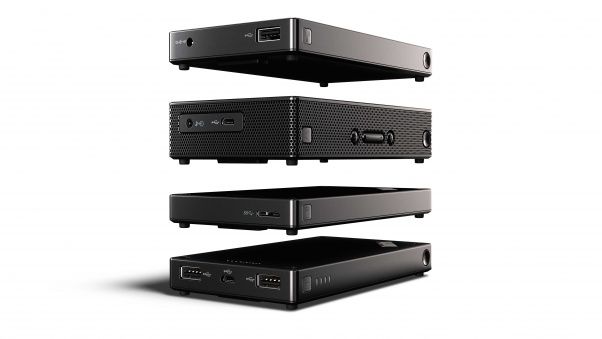
thinkpad stack system

Lenovo also launched a new and exciting ThinkPad Stack System, an accessory system line compatible with their ThinkPad laptop line. This system is designed to help you be more organized and get rid of any desk clutter. But there is a trick to them! What separates these accessories from the classic docks and external drives is the fact that the new Lenovo ThinkPad Stack accessories are stackable! That’s right, you can stack them on top of each other to achieve the neatest desk on the block.

This new innovative, albeit weird-looking system isn’t just a pretty way to stack things, because the devices connect to each other, while stacked, eliminating cabling. Get all four devices, stack them on top of each other and only use one single cable or just get one or two, they work perfectly as a team, as well as individual devices.

Here are the four ThinkPad Stack modules that Lenovo unveiled at CES 2015, available starting April 2015:

  1. Bluetooth Speaker. It costs $89.99 and it is meant for audio and conference call handling. 3.5 mm micro USB.
  2. Power Bank. This device costs $49.99, has dual USB, microUSB and 10,000 mAH.
  3. HDD. This HDD costs $199.99 and features 1TB of internal memory, USB 3.0 and password security.
  4. Access Point. This one also costs $199.99 and it is a LTE data hotspot.

Lenovo is taking a big chance with these four devices, mainly because they’re quite strange-looking and secondly, because their stackability is something that the users need to grow accustomed to. Whether this whole system will take off, we don’t know, but we’re betting a lot of people are going to try it!

Are any of these ThinkPad Laptops or devices from the ThinkPad Stack System seem appealing to you? Drop us a line in the comment section below and share your thoughts with us.

Filed Under: Tech & Science Tagged With: bluetooth speakers, CES 2015, external hard drive, lenovo, Lenovo thinkpad, lenovo x1 carbon, thinkpad laptops, ThinkPad stack

Gaming Laptop Review for the MSI GT72 Dominator Pro

December 27, 2014 By Deborah Campbell 1 Comment

Using the Nvidia’s new and powerful Maxwell graphics, the new Dominator Pro has much improved internally since the last generation of laptops from MSI. The Dominator Pro has a price of $1,799 and could rise to a steep price of $2,999 for the configured version of the MSI GT72 Dominator laptop.

This laptop even has an amazing number of four SSDs that are astoundingly fast along with the amazing Nvidia 980M GPU, one of the best keyboards found on a laptop and incredible audio capabilities. This is our MSI GT72 Dominator Pro review.

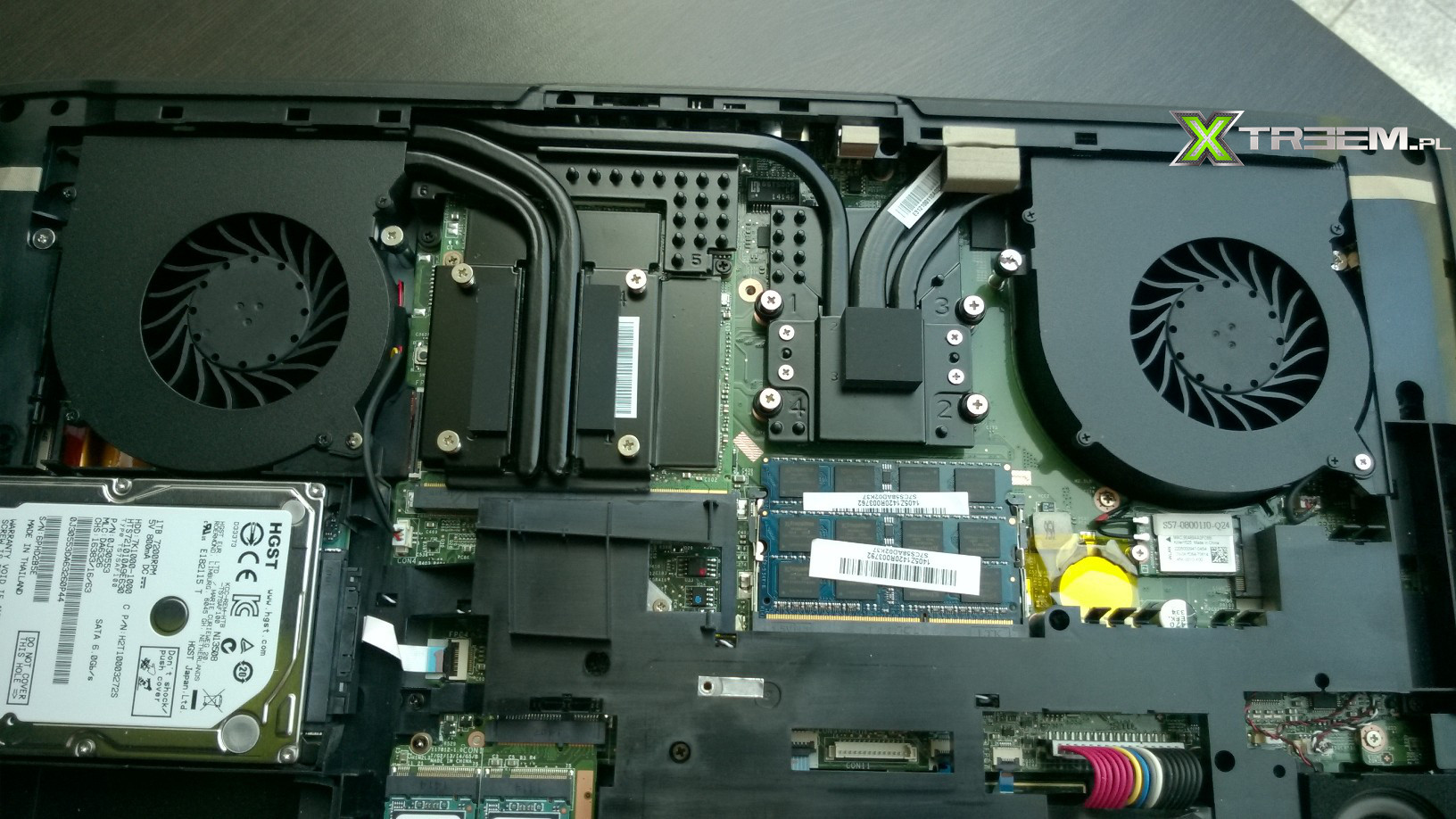
MSI-GT72-Dominator-Pro

MSI GT72 Dominator Pro Design

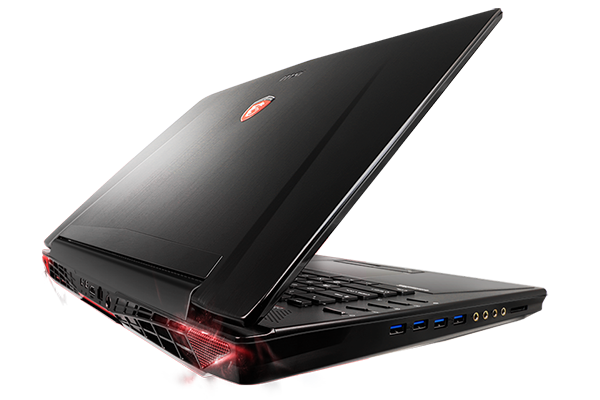
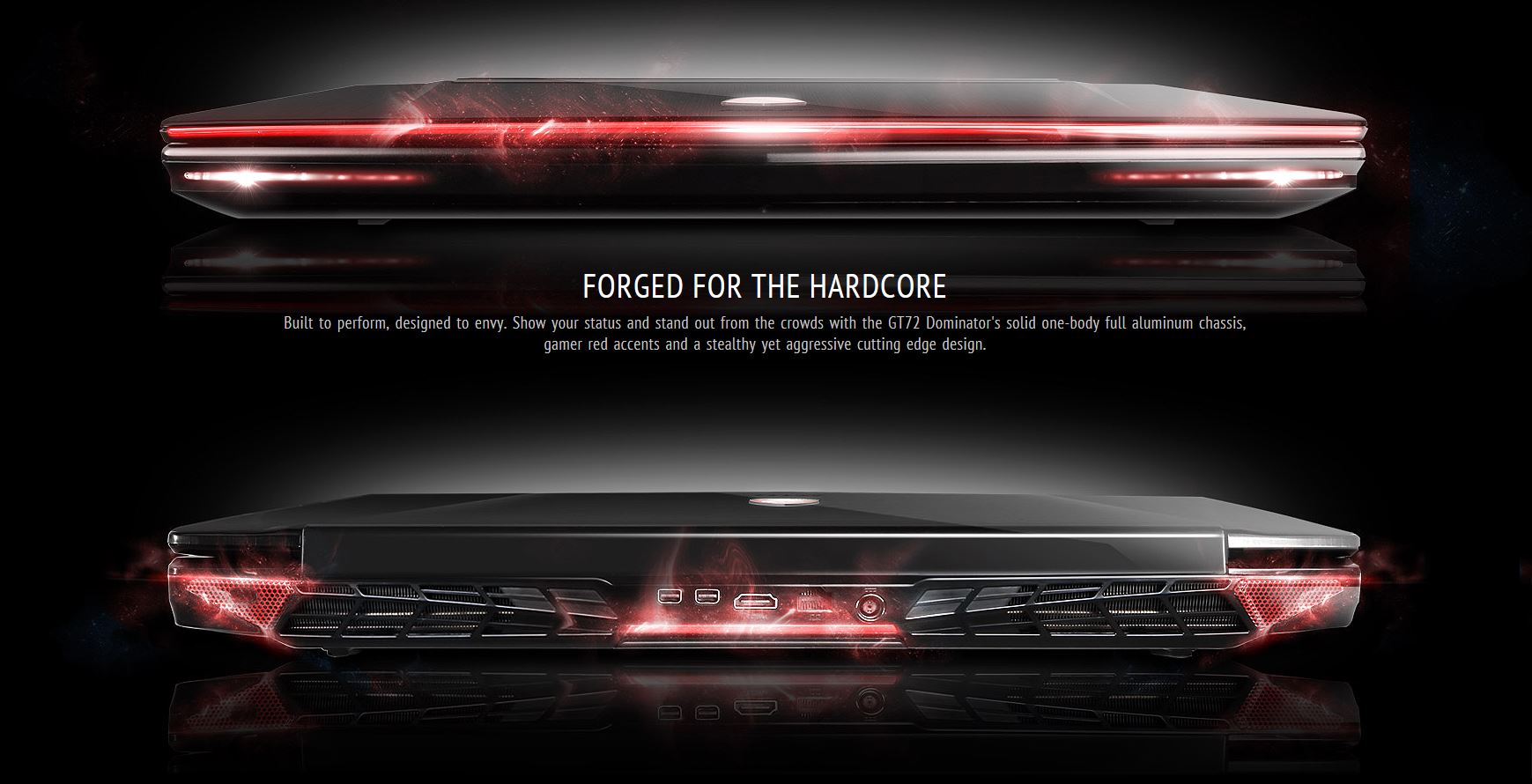
Even though The Dominator Pro isn’t the most beautiful laptop we’ve ever seen, we wouldn’t exactly kick it off our desk. The black aluminum lid of the laptop is quite pretty and we really like the red emblem in the center. MSI added LED strips on the front of the laptop, which reminds us of the Alienware laptops and on the bottom of the laptop, MSI put some very large red vents.

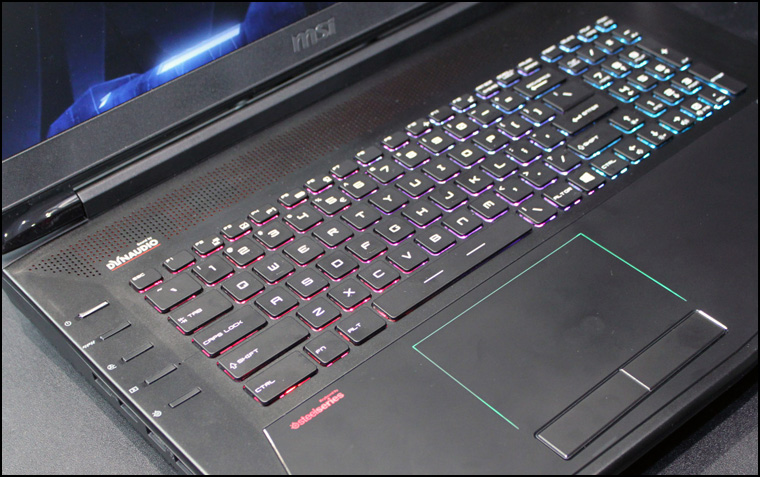
The MSI GT72 Dominator’s interior deck is covered in black aluminum which we believe is quite a nice touch. On the left side of the keyboard there are buttons for the control panel of the SteelSeries Engine, XSplit GameCaster, Fan, Gpu and, of course, power.

The colors on the MSI GT72 Dominator keyboard can be customized by the user, the palm rest on the laptop is a little raised from the rest and made of a black glass and there are little LED lights that surround the touchpad.

MSI GT72 Dominator Pro Keyboard

The Dominator, like most notebooks designed for gaming, has a full size keyboard. Even though the keyboard is quite bright because of its backlight and the spacing is really good, we were a little disappointed. The Dominator’s keys had a travel of 1.7 mm but at a lower actuation of 50 grams which means the typing was a pretty mushy experience on the laptop’s keyboard.

As with previous generations, MSI’s Dominator Pro features a customizable keyboard that makes use of the SteelSeries Engine. The SteelSeries software offers elements of the control panel on Razer’s Synapse 2.0 and of the Command System software on Alienware devices.

1402311893_MSI-GT72-2PE-Dominator-Pro-002

Image Source: Notik.ru

You can create different profiles for use in different applications as well as customizing effects and colors on different zones on the keyboard. Users can designate specific actions to every key found on the keyboard, which is a feature similar to the one offered by the Synapse 2.0. The laptop’s interface also analyzes the way in which a gamer uses the keyboard, showing what keys are being used most.

Our favorite part about the MSI software is the ability to set up a light show. The software features seven effects, such as Gaming, Breathing and Wave. These effects split the keyboard in three sections. The SteelSeries software also offers the ability to create four color levels in one profile.

MSI GT72 Dominator Pro Touchpad

The laptop’s touchpad really has a nice feel to it, mostly because of its pseudo-glass and has a measurement of 4.3 by 2.5 inches. The laptop responded accurately and very quickly as we went between different applications, launched Internet Explorer by pressing three fingers on the touchpad and rotated a few images. There was, however, some issues when highlighting and scrolling down. Every try ended up in arrhythmic movements that quickly become very annoying.

The mouse buttons were, however, very firm and delivered a good feedback.

MSI GT72 Dominator Pro Display

Even though the 17.3 inch Full HD display on the laptop is not bad per se, it isn’t as colorful or as bright as the displays found on its rivals.

The GT72 Dominator reproduced just 88.5 percent of the sRGB scale. This result hardly beats the 88.4 percent by the Krypton and is well behind the 97.2 percent average of a desktop replacement. The Alienware 17 scored 106 and the G751JY from ASUS scored a 99.1.

MSI GT72 Dominator Pro img04

Image Source: HwiGroup

On the test that measures the accuracy of color, the Delta-E test, MSI’s GT72 Dominator scored a very disappointing 10.3, barely beating the Krypton’s 10.2. The Alienware scored a 0.6 and the ASUS G751JY scored a 2. In the Delta-E test the perfect score is a 0.

For brightness, the MSI laptop scored 255 nits, below the average of 276 nits. The Alienware 17 scored 288 nits and the Krypton and G751JY tied at 304 nits.

Audio Capabilities

OLYMPUS DIGITAL CAMERA

Image Source: NotebookItalia

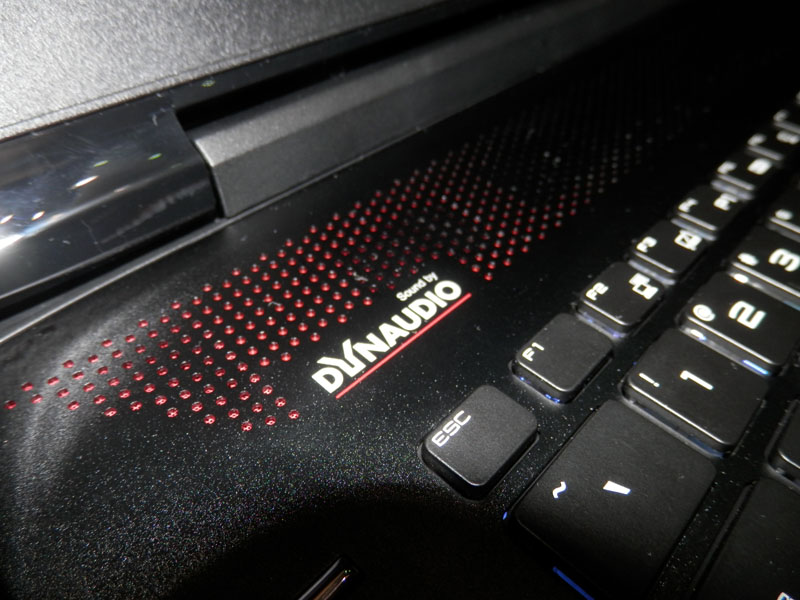
No doubts here; the MSI GT72 Dominator is very loud. In the Laptop Mag Audio Test it hit 93 decibels. It went right by the average of 88 decibels and beat the scores of the ASUS G751JY of 78 dB and the Digital Storm Krypton of 82 dB. Alienware 17, however, was able to hit 99 decibels.

But it’s all about the sound, right? Well, the MSI Dominator Pro really produced balanced and loud audio able to fill the whole audio space.

MSI GT72 Dominator Pro Graphics

The desktop-level Nvidia GeForce GTX 980M GPU has an impressive 8GB of video memory. The GPU produced an incredible 67 FPS on ultra settings of 1080 pixels while playing Lord of the Rings: Shadow of Mordor.

In the 3DMark Fire Strike test, the MSI GT72 Dominator performed amazing as well and scored 8,228. This score was significantly higher than the 4,861 average of a desktop replacement. The Krypton and the Alienware 17, both equipped with Nvidia GeForce GTX 880M GPUs scored 5,527 and 5,389. The Nvidia GeForce GTX 980M on the ASUS G751JY, however, scored a slightly higher 8,367.

GT72_chlodzenie

Image Source: NHL

BioShock Infinite on the highest settings reached an average of 85 frames per second, way more than the 63 frames per second on the Alienware 17 and 59 frames per second on the Krypton. The ASUS G751JY, however, reached a higher average of 92 frames per second.

However, the Metro: Last Light on the maximum settings was the true test. The Digital Storm Krypton and the Alienware 17 were only able to give 24 frames per second and 20 frames per second. The MSI GT72 Dominator, however, was capable of hitting 34 fps, while the ASUS G751JY hit 37 fps.

MSI GT72 Dominator Pro Performance

The Dominator is equipped with a 2.5 GHz Intel Core i7-4710HQ CPU and 32GB of RAM.

On Geekbench 3, the Dominator scored a 13,018 which is higher than the 12,336 average on the desktop replacement. The Alienware 17, which has a 2.9 GHz Intel Core i7-4910MQ CPU, scored 14,009, the Digital Storm Krypton, with a 2.8 GHz Intel Core i7-4810M CPU, scored 13,774 and the ASUS G751JY, which has the same CPU as the Dominator Pro, scored 12,582.

The Dominator transfers easily huge amounts of data because of its four 128GB SSDs in Raid 3. The Dominator also features a great 1TB 7,200 rpm hard disk drive.

Capture 02

Image Source: GenTechPCForums

In the File Transfer Test, the Dominator duplicated several media files of 4.97GB in only 8 seconds. This means it has a transfer speed of 636.3 MBps, the average being 260 MBps. The Alienware had a transfer speed of 463 MBps and the G751JY had a speed of 339.3 MBps. Hardly worth mentioning, under the circumstances, is the Krypton which was only able to show a transfer speed of just 159 MBps.

In the OpenOffice Spreadsheet Macro Test, the Dominator tied with the ASUS and matched 20,000 addresses and names in just 3 minutes and 53. The average is 4:54 but neither the G72 nor the G751JY were faster than the Alienware 17 at 3:29 and the Krypton at 3:33.

How’s the Heat?

Once we started playing Shadow of Mordor, the temperature on the touchpad increased to 83 degrees Fahrenheit and the part between the H and G keys increased at 86 degrees. The undercarriage of the laptop rose at 102 degrees.

Streaming on Hulu for 15 minutes increased the temperature on the touchpad to 79 degrees and the space between the H and G keys at 89 degrees. These temperatures are still below the comfort threshold of 95 degrees in Laptop Mag.

Other Features

1. Webcam

The Dominator’s 2 megapixel camera is not the greatest in terms of color and detail. In a picture we took, the colors looked very washed out and the individual strains of hair look very blurry and bad.

2. Ports

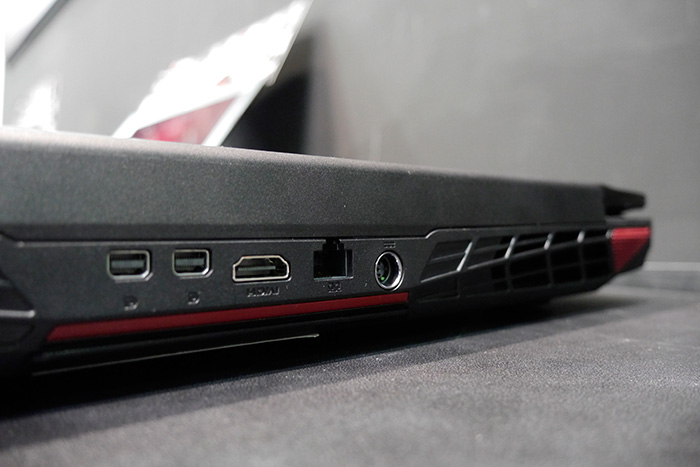
Next to the laptop’s Blu-ray reader there is a pair of USB 3.0 ports and there are four more USB 3.0 ports on the laptop’s left side. The left side of the Dominator Pro also features gold plated jacks for audio, microphones, headphones and S/P-DIF and a 2 in 1 card reader. On the back of the laptop there are an HDMI port, a gigabit Ethernet port and two mini DisplayPorts.

GT72_2PE_Dominator_Pro_back_conect

Image Source: HardwareZone

3. Battery Life

Even though the MSI is very powerful it doesn’t offer very much battery life. The MSI GT72 Dominator Pro lasted just 3 hours and 14 minutes in the Laptop Mag Battery Test. The Alienware 17 lasted on the same test 4:06, the ASUS G751JY lasted 3:53 and the Krypton lasted 2:54.

4. Configurations

We reviewed the $2,999 version of the MSI GT72 Dominator Pro laptop which comes equipped with a 2.5 GHz Intel Core i7-4710HQ CPU, 32GB of RAM, Nvidia GeForce GTX 980M GPU with 8 GB of video memory, 1 TB 7,200 rpm hard disk drive and four 128GB SSDs in Raid 3.

MSI also offers a $1,799 version which has a 2.5 GHz Intel Core i7-4710HQ, 12 GB of RAM, Nvidia GTX 970M GPU with 3 GB of video memory and a 1 TB 7,200 rpm hard disk drive.

Here is a more detailed specs list:

CPU: 2.5-GHz Intel Core i7-4719HQ processor

Operating System: Windows 8.1

RAM: 32GB RAM

Hard Drive Size: 128GB

Hard Drive Type: Quad SSDs

Secondary Hard Drive Size: 1TB

Secondary Hard Drive Speed: 7,200 rpm

Secondary Hard Drive Type: SATA Hard Drive

Display Size: 17.3

Native Resolution: 1920×1080

Optical Drive: BD-R/DVDRW DL

Optical Drive Speed: 8X

Graphics Card: Nvidia GeForce GTX 980M

Video Memory: 8GB

Wi-Fi: 802.11ac

Wi-Fi Model: Killer Wireless-n/a/av 1525 Wireless Network Adapter

Bluetooth: Bluetooth 4.0

Touchpad Size: 4.3 x 2.5 inches

USB Ports: 6

Ports: Mini DisplayPort, HDMI, USB 3.0 Ports, S/PDIF

Card Slots: 2-1 card reader

Warranty: 2 Year Limited Warranty

Size: 16.85 x 11.57 x 1.89 inches

Weight: 8.2 pounds

Wrapping Up…

PROS

– Fast file transfer speeds, great graphics performance, great audio, low heat, customizable keyboard

– Very capable gaming laptop

CONS

– Display lacks brightness and color accuracy

– Very expensive

The Verdict

The MSI GT72 Dominator Pro offers some of the greatest performance we’ve even seen in a laptop designed for gaming. The $2,999 version of the laptop offers a very fast hard drive configuration, a customizable keyboard, Nvidia 900 series GPU, i7 Core CPU and great audio quality. However, we can’t help but wish the display on the laptop was of the same quality as the rest of the laptop’s components.

For $500 less you can buy the ASUS G751JY which offers pretty much the same performance, a more vivid and sharper display and a somewhat longer battery life. But all in all, users that are searching for an absolute monster of a gaming machine should consider buying the MSI GT72 Dominator Pro laptop.

Filed Under: Tech & Science Tagged With: gaming laptop review, gt 72 dominator, gt72 dominator, gt72 dominator pro, gt72 dominator pro gaming laprop, msi, MSI GT72 Dominator Pro Review, msi gt72 dominator review

Clinton Calls For AIDS Free Generation

November 18, 2014 By Deborah Campbell Leave a Comment

Former President of America, Bill Clinton has called for the first AIDS-free generation by increasing the scale of HIV prevention and treatment across the globe. Clinton has said that the biggest issue for defeating AIDS would be early detection. Speaking about the issue, he said:

“New data from 51 countries suggests 70 percent of HIV-related deaths could have been prevented. The evidence continues to build that early treatment helps prevent further transmissions.”

The comment came at the 20th International AIDS Conference in Melbourne, Australia. Clinton also went on to note that:

“We are here on this 20th anniversary of the conference to celebrate so much of the progress that has been made because the world has made the right decision to fight against AIDS and to create a generation free of it.”

Currently, there are over thirty million people with HIV, across the globe, but less than a third of these people have access to treatment that has any chance of working – most notably antiretroviral treatment.

According to reports, approximately two million people are infected with HIV on a yearly basis; roughly 20,000 of these are infants and children.

Throughout Clinton’s speech, there was a protest calling for the implementation of a so called ‘Robin Hood’ tax.  This is a small tax on financial transactions such as trade in bonds, currency, shares and derivatives.

The protestors, who carried banners that read “End AIDS with Robin Hood Tax”, have cited economic experts that have said such a tax would not harm financial markets and would be simple to design and implement. One of the protestors said:

“The Robin Hood tax would finally ensure that the rhetoric on ending AIDS would become reality. People with HIV and communities at greatest risk of HIV infection around the world are waiting for life-saving treatments and services but global leaders are failing to act.”

Filed Under: Health

iPhone Update: Turn-On “Hey Siri” On Your iPhone

September 30, 2014 By Deborah Campbell Leave a Comment

In the past few years, the method of communication with video game consoles, cars and smart phones has altered a lot. Although touch screens and buttons are still quite a trustworthy manner, but gradually voice activations are taking their places.

It is more convenient to active your device through your voice. Therefore, Apple launched the feature of “Hey Siri” in the latest version of mobile operating system that is iOS 8.

The only requirement for the activation of this feature is a plug in device. Now, instead of pressing home button you just have to say “Hey Siri” to wake up your Apple devices.  It will let you control your device without touching the screen.


The entire activation process of Hey Siri is mentioned below

The foremost thing that users should know is that this feature comes along with iOS 8 and works on iPhones, iPads and the iPod Touch.  Therefore, it is essential to update the newest version of iOS in order to set up Hey Siri. If you are one of those buyers who have not updates iOS 8 then it is the right time.

Plug your iPhone into a power outlet. After that, make sure that your device is connected to Wi-Fi. Then go into settings in for the purpose of downloading iOS 8.  The time of entire process depends upon the speed of your internet connection. Thus, it is better to have a good connection to save your precious time.

Apple already installed iOS 8 in iPhone 6 and iPhone 6 Plus. Therefore, the owners of iPhone 6 do not need to make an extra effort. Let’s start

Unlock your iPhone the way you usually do it. You will easily locate the setting apps on the home screen. Users who have reorganized their apps should look for settings in any of the folders.


As soon as you reach the Setting screen, you can find the Hey Siri feature within the Siri’s settings. Sadly, the company did not display it outside. Therefore, you need to scroll down the screen a bit. Then tap General.

Tap Siri.


Hunt for the Allow “Hey Siri” field and then turn the switch to the left side of it. It is a nice time to alter any other settings related to Siri. These options will also permit you to change Siri’s voice and include some of your basic information such as first and last name.


How to Use Hey Siri

At last, You have turned on Hey Siri. Now you should learn some fundamental things related to Hey Siri. First of all, few people consider it as a substitute for communicating with your iPhone that is wrong. You still need to use your fingers in order to interact with your iPhone.

Apple has put a limitation on the usage of Hey Siri to secure your battery. Therefore, it only runs when you are plugged in.  You need to purchase a spare lighting cable if you wish to make use of Hey Siri in your car.

Once your iPhone is plugged in you can utilize Hey Siri.

Your phone will be all set to follow your orders as soon as you say “Hey Siri”. It will allow you to play a particular artist, album or song from your music library just by saying “Play”. Siri will play the selected song through iPhone speakers if the Bluetooth Stereo is not present in your car.

Unfortunately, Apple has only offered Hey Siri for latest iPhones. Devices such as iPhone 4 and the first generation Apple iPad can not avail this exciting feature.

Filed Under: Tech & Science

iPhone 6 VS HTC One M8: Which One Is The Best Choice For Buyer?

September 24, 2014 By Deborah Campbell 1 Comment

Finally, Apple launched the most awaited device of 2014 iPhone 6. The phone has already touched the shelves of the markets and available for the customers. Users have begun to evaluate all the features and options available on iPhone 6 and iPhone 6 Plus.

On the other hand, HTC flaunted HTC One M8 which is the best Smartphone of the year in March. Shortly after its release Apple launched the biggest rival of HTC one M8 that is iPhone 6. Unquestionably, there is a wide range of smartphones available in the market, which makes decisions a lot more difficult task. We have mentioned some key features of iPhone 6 and HTC One M8 below for the convenience of potential buyers.

The sales of iPhone 6 marked it as the most successful device in the history of Apple. The product relatively has few really big modifications as compared to the previously launched iPhones. The two devices iPhone 6 and iPhone 6 Plus has a really sleek and unique design.

On the other hand, HTC One M8 is a device that is all covered with an aluminum frame.

Buyers will see several options when they visit the market in order to purchase a new Smartphone. The phones that will instantly get the attention of customers would be iPhone 6 and HTC One M8.


Truthfully, no one can make a decision on your behalf. Moreover, the needs, preferences and budgets vary from one buyer to another. We can merely fill you up with some significant information to make the decision a bit easier.

Design:

The most surprising thing is that both iPhone 6 and HTC oneM8 has a remarkable metal design. Hence, customers have to think a lot for choosing any one of them. Keep in mind that iPhone 6 is going out of stock so it is better to make a quick decision. Nevertheless, we will give a brief information related to the design of the two phones.

HTC has enhanced some main areas of the smartphone, but the overall design is pretty similar to the last model. The HTC One M8 comes with a unibody aluminum frame along with some plastic pieces near the back of the radios.

Whereas, iPhone 6 has a more rounded edges, unlike all the previous versions of iPhones. However, the most noteworthy thing is that these round edges are certainly different from other iPhones, but quite similar to the HTC One M8. Undoubtedly, the device is easier to hold, but it is also very slippery and can get damaged without the case.

The back of iPhone 6 is all wrapped with aluminum design. Moreover, these back cuts are packed with plastic for the radios and antennas. It is considered as the second largest iPhone that comes with a sleek design.


Apple and HTC are the companies that manufacture relatively better hardware as compared to LG and Samsung. Therefore, buyers can blindly trust them for the built and design of smartphones.

The front speaker of the HTC One M8 is the only thing which makes it different from iPhone 6. As far as the speaker of iPhone 6 is concerned, they have definitely great sound, but still it cannot beat the speakers of HTC One M8.

Display:

The display is the foremost thing that a buyer looks in a Smartphone. Although iPhone 6 contains a 4.7 inch screen, but HTC One M8also has a large display. However, the large display of HTC One M8 has not increased the size of the Smartphone.

Earlier, Apple used to criticize on Samsung for such big devices. At last, the company breaks the tradition due to the high demand of customers and manufactured iPhone 6 with a 5.5 inch display screen. It is positively a very sensible decision of Apple since iPhone 6 generated a large revenue up till now.


The other key factor is the screen size and resolution of iPhone 6 and HTC One M8. The iPhone 6 has a display of 4.7 inch 1334 x 750 (720p) HD whereas HTC One M8 comes with a 5 inch screen. Consequently, HTC One M8 will provide better pictures, videos and visual as compared to the iPhone 6.

Specs:

It is really unwise to compare the spec of iPhone 6 with HTC One M8 as one is Android and the second is iOS. Therefore, we would not get into the argument of dual core and quad core. Following is a comprehensive discussion about the specs and size of the two products. Though one device is larger than the other, but still the sizes are quite similar.

HTC One M8 Specs:

  1. 5-inch 1920 x 1080p HD display
  2. 2.3 GHz Quad-core Snapdragon 801 with 2GB RAM
  3. 32GB internal storage (Micro-SD expansion support)
  4. 4 Ultrapixel camera (new second Duo Camera) and 5MP front, dual flash
  5. Android 4.4.4 KitKat with Sense 6
  6. Front facing speakers, infrared port for remote
  7. Brushed aluminum design
  8. 2,600 mAh battery
  9. 146.4 x 70.6 x 9.4 mm and 160 grams


iPhone 6 Specs:

  1. 4.7-inch 1334 x 750 HD IPS Retina Display
  2. 1.4 GHz Dual-core Apple A8 processor with 1GB of RAM
  3. 16/64/128GB storage, no micro-SD
  4. 8 Megapixel rear and 1.2 front facing cameras
  5. Meal design all around
  6. Apple iOS 8
  7. Fingerprint scanner with TouchID
  8. 1,810 mAh battery
  9. 138.1 x 67 x 6.9 mm and 129 grams

Undoubtedly, it seems like HTC has specially designed HTC One M8 to compete with Phones like iPhone 6 and Samsung Galaxy S5. There is only the difference of a few mm in the height of iPhone 6 and HTC One M8.  However, the device has fairly some additional width and weight.

Potential buyers must look at the option of storage of HTC One M8 and iPhone 6. The chief reason behind this warning is that Apple never provides a slot for a micro SD card, whereas HTC has offered the option of expandable storage in the device. The micro SD card will definitely come at a lost cost than the extra storage iPhone 6. Although you can effortlessly get hold of 16, 64, 128 GB of iPhone 6 but in HTC One M8 you have countless storage options.

Price:

The price is the main fear for budget conscious people. The brand new iPhone 6 would certainly cause a lot of burden on your pockets. Customers need to pay a lot of extra money in order to get more storage, which is not a big problem in HTC One M8. The breakdown of the price is given below:

  1. iPhone 6 16GB – $199 on contract
  2. iPhone 6 64GB -$299 on contract
  3. iPhone 6 128GB – $399 on contract
  4. HTC One M8 32GB – $149 on contract (Verizon)

Following are the prices for the customers who intend to purchase a off contract device.

  1. iPhone 6 16GB – $649
  2. iPhone 6 64GB – $749
  3. iPhone 6 128GB – $849
  4. HTC One M8 32GB – $599

The HTC One M8 provides additional storage at a reasonable on contract price. However, if you even purchase a 64 GB micro-SD card for it, it would be still cheaper than 128 GB iPhone 6. It is recommended that all the budget conscious people should opt for HTC One M8.


Camera:

Generally, the camera of Apple product offers excellent result. Same is the case with iPhone 6, it has a 8 megapixel camera, but the company has improved it to give better result of images and videos.

On the other hand, HTC One M8 contains a dual 4 megapixel cameras that are present on the back of the device. Some people will go for the iPhone due to the less megapixel camera of HTC One M8.


However, the camera of HTC One M8 is incredibly fast, accurate and performs pretty well. Moreover, the company has added two sensors that promise good images and videos.

The has a remarkable camera, therefore all the camera lovers should go for iPhone 6. However, it is suggested to check the camera of both the devices in the stores.

Apple tried to beat HTC One M8 with its True Tone flash and 240 FPS slow-motion video capture. Nevertheless, HTC gave a tough competition to the camera of iPhone 6 with the option of record 4K video along with some new editing choices.

Conclusion:

It is completely foolish to judge iOS against Android as there is a lot of fan following of both of them. The buyer should focus on the price, carrier, availability, requirements and needs. Eventually, buyer has to use the phone according to his needs.

Filed Under: Tech & Science

  • « Previous Page
  • 1
  • …
  • 16
  • 17
  • 18
  • 19
  • 20
  • …
  • 31
  • Next Page »

Subscribe to Blog via Email

Enter your email address to subscribe to this blog and receive notifications of new posts by email.

Join 11 other subscribers

Recent Articles

police handcuffs man

German Man Probed In Poisoning That Killed 21 Employees Since 2000

June 29, 2018 By Kenneth Scott Leave a Comment

Chicken wings bar

Intoxicated South Carolina Man Punches Waitress Who Refused to Serve Him Alcohol

June 29, 2018 By Karen Jackson Leave a Comment

gaming

New Zealand gamer Who Flew Halfway Across The World for Virginia Teen Gets Shots By Her Mother

June 28, 2018 By Cristopher Hall Leave a Comment

party

Former Virginia Tech Freshman Sentenced to 50 Years in Prison for Stabbing a Girl to Death

June 28, 2018 By Roxanne Briean Leave a Comment

bonfire

British Couple Sentenced to Life in Prison for Torturing and Murdering French Nanny

June 27, 2018 By Deborah Campbell Leave a Comment

pay phone

Texas Father of Girl Disappeared in the 80s Ignored by Authorities

June 26, 2018 By Cristopher Hall Leave a Comment

bottled water

San Francisco Woman Threatened to Call Police on Girl Who Sold Ice Water for Disneyland Trip

June 25, 2018 By Roxanne Briean Leave a Comment

Maplewood Park

Missouri Man Robbed by Date and Accomplice in Park

June 22, 2018 By Nancy Young Leave a Comment

coding

New York Man Sentenced in Cyberstalking Former Girlfriend, Mailing Drugs to Her Dorm

June 22, 2018 By Deborah Campbell Leave a Comment

headphones

Bose Poised to Launch Sleepbuds, In-Ear Headphones That Help You Sleep

June 21, 2018 By Nancy Young Leave a Comment

Police light

Intoxicated Female Driver in Custody for Pulling Arresting Officer by the Hair

June 21, 2018 By Kenneth Scott Leave a Comment

kitchen

Restaurant Manager Arrested and Charged in Shooting Death of Co-Worker over Negative Yelp Reviews

June 20, 2018 By Karen Jackson Leave a Comment

plastic container

Pennsylvania Couple Charged in Violent Death of Infant Discovered Buried in Cat Litter

June 19, 2018 By Cristopher Hall Leave a Comment

tailpipe

Minnesota Teen Gets Head Stuck In Oversized Tailpipe Winstock Music Festival

June 18, 2018 By Karen Jackson Leave a Comment

Pages

  • About Us
  • Contact us
  • Privacy Policy
  • Privacy Policy GDPR
  • Staff
  • Terms and Conditions

Recent Posts

  • German Man Probed In Poisoning That Killed 21 Employees Since 2000 June 29, 2018
  • Intoxicated South Carolina Man Punches Waitress Who Refused to Serve Him Alcohol June 29, 2018
  • New Zealand gamer Who Flew Halfway Across The World for Virginia Teen Gets Shots By Her Mother June 28, 2018
  • Former Virginia Tech Freshman Sentenced to 50 Years in Prison for Stabbing a Girl to Death June 28, 2018
  • British Couple Sentenced to Life in Prison for Torturing and Murdering French Nanny June 27, 2018
  • Texas Father of Girl Disappeared in the 80s Ignored by Authorities June 26, 2018
  • San Francisco Woman Threatened to Call Police on Girl Who Sold Ice Water for Disneyland Trip June 25, 2018

Categories

  • Business
  • Entertainment
  • Finance
  • Headlines
  • Health
  • Life
  • Nature
  • Science
  • Sports
  • Tech & Science
  • Travel
  • Uncategorized
  • United States
  • World

Copyright © 2026 ArgyllFreePress.com
About · Privacy Policy · Terms of Use · Contact