Argyll Free Press

Growing News Network

Saturday, May 2, 2026
Log in
  • Business
  • Finance
  • Sports
  • Tech & Science
    • HP Envy 4500 Review
    • LG Optimus 170 Review
    • iPod Touch 6th Generation Review
    • HTC One M8 Accessories Set-up
    • Surrealist Games You Must Play
    • Hisense Sero 8 Review
    • Dell Latitude e7440 Review
    • HP Laserjet 1536dnf mfp Review
    • Garmin Fenix 2 Review
    • Skype Vs Viber
    • Best Video Conferencing Software
    • Sony mdr 1r Headphones Review
    • Canon Rebel t3i Review
    • Sennheiser Momentum 2-0 Review
  • Travel
  • Headlines
  • Health
  • United States

Google Pixel C Review – A True Competitor to Hybrids

December 31, 2015 By Kenneth Scott Leave a Comment

Pixel C Review

When it comes to hybrid tablets, there isn’t a huge amount of models existent out on the market to truly make a selection out of. Ask anyone to name a few off the top of their heads and they’ll probably mention the Microsoft Surface Pro and the rather new iPad Pro release. While they are not the only ones available, having Dell, HP, Toshiba and Lenovo following suit with several of their own models, it’s not a lightly known fact that the most famous ones have that status for a reason.

Not only that each of the two major names pioneered something in the trade, but they also had the previous desktop-related experience in order to be able to sustain a hybrid that aims to replace your laptop. Then the Google Pixel C comes along and there’s a reason it manages to wildly draw our attention. Starting with a premium, amazing look, some particularly good aesthetic and practical choices and a good adaptation of what Google had into a great final product.

But spend a while with the Google Pixel C and the Microsoft Surface Pro 4 side by side and your excitement might start to slowly dwindle. And it’s not because the hybrid falls behind as a product overall, but simply because in the end it might feel a little lackluster on the software aspect of it. It’s the Android operating system you may have got used to on other Samsung devices for example, but it’s applied on a piece of tech that’s supposed to act as a laptop; in other words, a portable near-full computer experience.

So the issue that arises is the extent that the Google Pixel C manages to perform well to. Nevertheless, being mostly an operating system-related issue only – susceptible to numerous upgrades and even downright facelifts – chances are it’s not that huge of a reason to be worried.

Pros: premium build, amazing design, great keyboard, high tier hardware, stock Android

Cons: software isn’t cut out for laptop-like activity yet, limited amount of software you can download and use on it

Google Pixel C Design
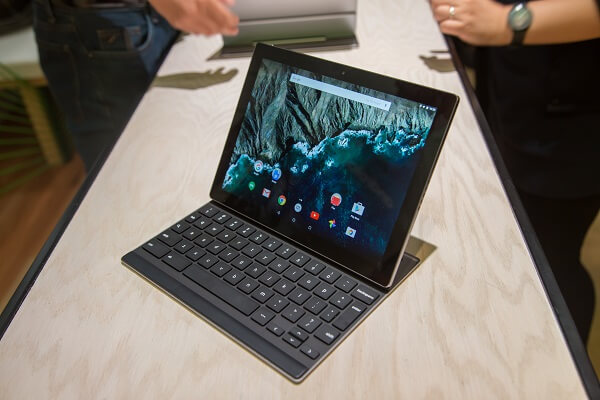
Pixel C Design

Google Pixel C Tablet

At the risk of over-praising the Pixel C right off the bat in the first section of the review and not having that much else to say on the following ones, I believe the hybrid deserves the attention. Aesthetically, I can’t even express into words how pleased I was with the end result. The Google Pixel C has a strong, premium feel, carefully cut and put together. No matter how much I turned it around on all sides and checked every nook and cranny of the body, I couldn’t find any sign of weakness.

The anodized aluminum build would normally account for a lighter device altogether. However, for its 242 x 179 x 7 mm dimensions, it weighs a little over a pound – 0.517 kilograms or 1.13 pounds to be exact – without the keyboard attachment. That’s still a lot lighter than the much larger iPad Pro and only 0.1 mm thicker. The robust design makes way for a sharper approach to its corners and edges than you may have seen on models such as the Samsung Galaxy Tab S2. That one is mostly noticeable in the corners of the device which have a relatively small degree of curving and comes off a little more rigid than one would expect. Other than that, I sincerely don’t see any reason anyone would find a flaw in terms of aesthetics.

Button placement-wise, I’ve found the Google Pixel C very… symmetrical and tidy looking. If we consider landscape to be the default orientation, you get the power and/or sleep button on the left side at the top, the volume rocker on the left side, at the top and the Type-C USB charging slot at the bottom. The right side hosts the 3.5 mm headphone jack. 2 sets of 5 punctured speaker holes rest on either side of it. You’ll also find 4 near miniscule holes at the top that serve as the quad noise-cancelling microphone of the Google Pixel C.
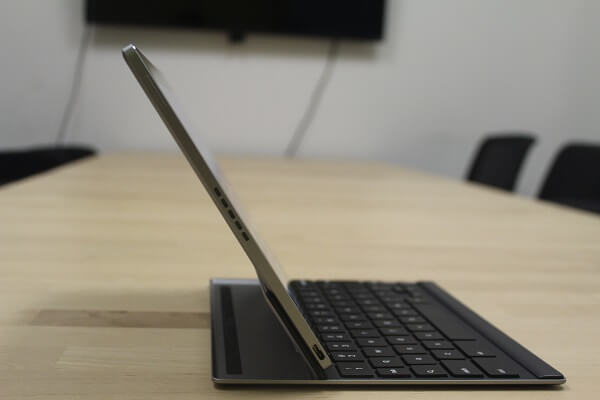
Pixel C Design - Side

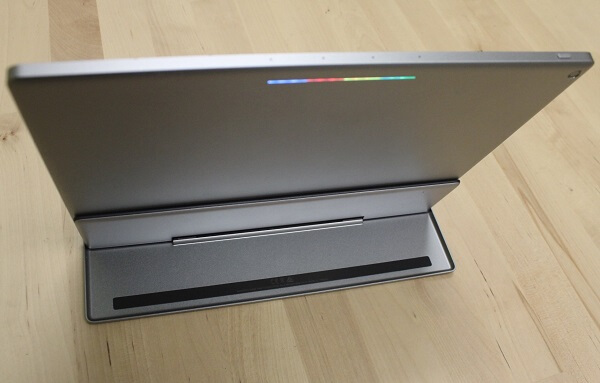
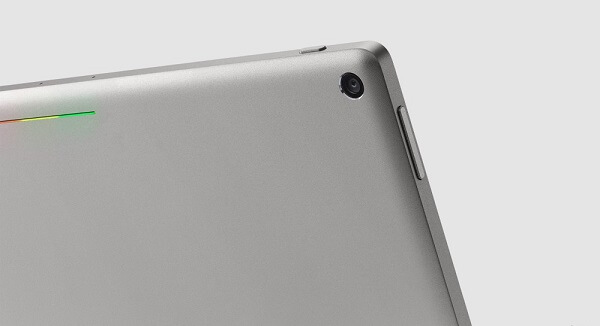
Even the back of the tablet is amazingly simplistic in design: the circular camera sensor resting in the top right corner is only accompanied by the trademark Google colors in a slim light strip at the top.
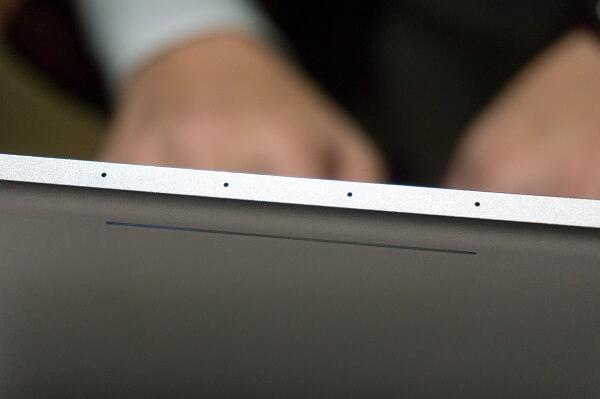
Pixel C Design - Top

Pixel C Design - Back

Google Pixel C Keyboard

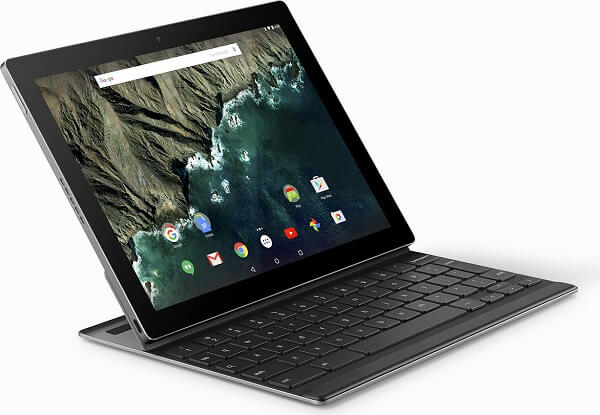
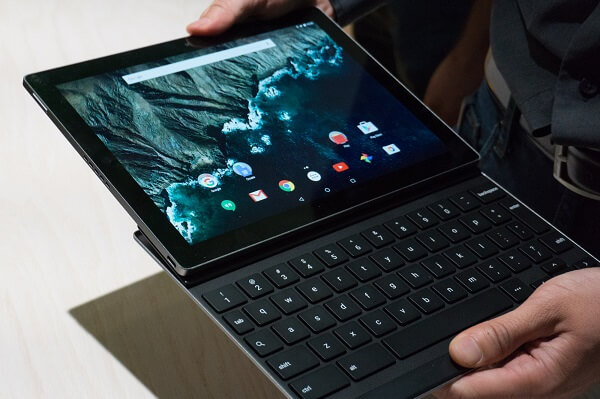
Since you have to purchase the Bluetooth keyboard separately, I’ll also talk about it in a separate segment. It’s already something we’ve grown accustomed to, seeing as Microsoft is doing the same with their Surface Pro 4. For an extra $150 that the keyboard is worth, you will find the same aluminum outer case gracing the back of it. However, to my surprise, the keyboard turned out to be very heavy – at least as far as hybrid keyboards go. Weighing a hefty 0.87 pounds (395 grams) all by itself, when attached to the tablet, the entire device ends up feeling a lot heavier than it looks like it should be.
Pixel C Keyboard

Given the Pixel C overall smaller dimensions, when compared to the Microsoft Surface Pro 4 for example, naturally the keyboard ends up being a little more cramped than some individuals would like. Getting used to typing on it may take a fair bit, but the appendage makes up for that detail through 1.4 mm of travel on its keys that feel good and responsive even for fast typing. The top side of the keyboard is a mobile portion that relies on magnets to keep the tablet connected and immediately starts charging the keyboard whenever it is connected. It rotates somewhere around 90 degrees up and has a surprisingly good grip on the tablet until you try to force it to tilt it to more than vertical position.

That is one downside that I’ve found and some people may be annoyed by. Once you try to tilt it to more than that, chances are the tablet will just pop off from its magnetic grip leaving you with it hanging in your hand. While tilting it up and down on the kickstand feels good and stable, the hybrid tends to lose a little of that feeling when you attempt to use it anywhere else than a hard, horizontal surface. Typing on it when it’s in your lap will have you question whether the tablet portion is truly stable in the magnetic grip.

The keyboard can be placed on top of the tablet and used as a cover – very similar to how laptops do. A huge disappointment of the keyboard is the lack of a trackpad. What that means is that you’re forced to use the touch screen as your only means of actually navigating everything. That may not be such a huge problem for some, but it may end up feeling a little awkward when the tablet is sitting upright and you don’t want to press too hard on it and make it tilt backwards.

Lastly, if you’re looking for the aid of a stylus to serve for your navigational concerns, it’s sad to say that there’s no such thing included in the package here.

Google Pixel C Display
Pixel C Display

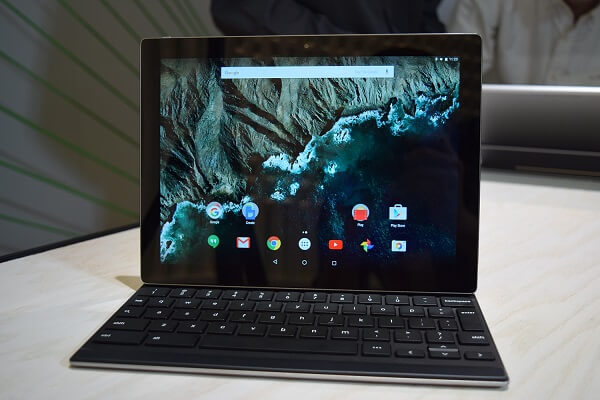
The Google Pixel C features an outstanding 10.2-inch display. It’s not much larger (if at all) than the sizes you find on regular tablets. It is, however, smaller than the two direct competitors – the 12.9 inch iPad Pro and 12.3 inch Microsoft Surface Pro 4 respectively.

However, with a native resolution of 2560 x 1800, the Google Pixel C has a rather odd feeling aspect ratio. It’s not one I’ve found on many other devices, if ever, and can only be summed up into the same proportions of an A4 sheet of paper. That means that it doesn’t fall into the wide screen category, scoring a relatively large height to begin with. Because of that, movies may feel a little strange to watch as they will get letterboxed a little awkwardly at times. As a side note, while we’re still on the topic of resolution, the Google Pixel C has a pixel density of 308 ppi pixels per inch, higher than both the Microsoft Surface Pro 4 and the iPad Pro, by an even larger margin.

But image crispness is not the only great feature the display of the Pixel C has to show for itself. Brightness levels are particularly high, making it great for viewing regardless of lighting conditions and even faring well in direct sunlight. Wide viewing angles and accompanied by vibrant and appealing colors, as it is expected from a LTPS LCD screen.

Google Pixel C Hardware & Performance

Take a look inside the Google Pixel C and it will immediately spell a threat to the components of tablets such as the iPad Pro. It features the latest nVidia X1 quad-core processor clocked at 1.9 GHz that proved highly superior to the A8X chipsets, especially in terms of graphic performance – 3D gaming more specifically. Along with the outstanding CPU, you also get 3 GB of RAM memory and 32 GB of storage space on the default version.

The nVidia Tegra X1 is an 8 CPU-core, 64-bit ARM CPU that features a quad-core A57 2 MB L2 cache and another quad core A53 512 KB L2 cache brother. It employs 20 nm ARM CPU architecture that attempts to improve battery life but also deliver high efficiency. Packed in the chipset is the nVidia Maxwell 256-core, DirectX 12 ready graphics processing unit. The unit alone succeeds in delivering one of the best gaming experiences I’ve ever had on a tablet. 3D, graphic-intensive games work perfectly smooth, without experiencing frame drops of any kind.

Pixel C nVidia GPU Gaming

In an attempt to suitably compliment the outstanding CPU of the Google Pixel C, you also get 3 GB of LPDDR4 memory. That is more than enough a hybrid would need for a smooth performance that feels as speedy and responsive as a full-fledged laptop would elicit for the user.

The storage space that the Pixel C offers is that one aspect where the tablet will hiccup. The default version only offers 32 GB of space, while the only other alternative is a maximum of 64. Without an SD or microSD card expansion availability, you will pretty much be stuck with that particular amount. At least until they release larger storage space options – if that ever happens.

Google Pixel C Software & Features
Pixel C Software

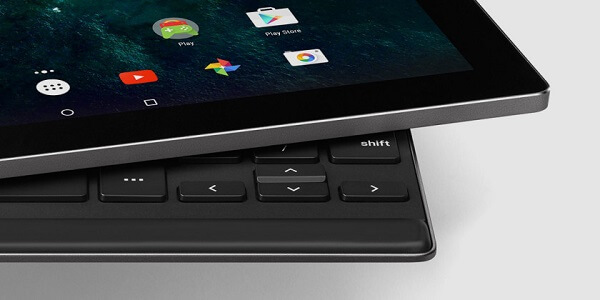
Good news, everyone! Anyone willing to purchase the Google Pixel C hybrid will be granted with full access to the stock version of the Android 6.0 Marshmallow operating system and allowed to enjoy the greatest extent that Android software has ever gone to. Every single feature of the 6.0 Marshmallow OS can be found here, along with a handful of classic apps and utilities.

Along with the processor improvements to battery life, the 6.0 Marshmallow operating system throws its own input into the fray. The feature in question is called Doze, with the sole purpose of maintaining the device’s activity to a minimum when not being actively used.

Thanks to the inbuilt microphone in the top side of the Google Pixel C, you get a fair amount of voice support too, meaning you get to make use of Google Now. Even the Google Now app itself has seen some improvements by also adding Now on Tap; this basically allows you to view even more information than the vocal Google Now offers you with a simple tap.

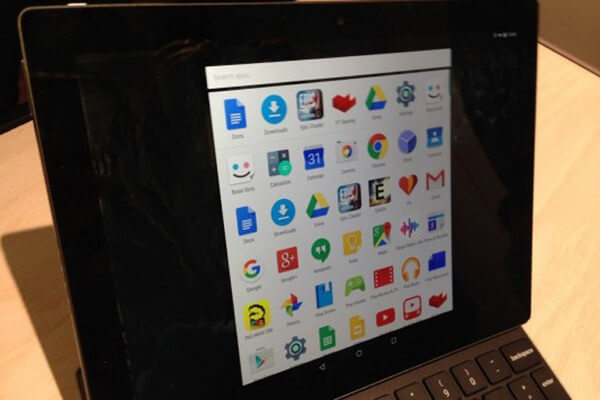
Hangouts, Google Plus, Play Store, even Google Drive installed on it straight out of the factory will greet you as soon as you open the app tray. However, this is where the problems start – even if they’re not an ultimatum and will only take some time to get fixed. While there are loads of apps you can get for the Google Pixel C that will work with it wonderfully, there’s also a great number of popular apps that aren’t yet optimized for this particular type of device or aspect ratio.
Pixel C Software & Apps

As a last note regarding the feel of the Google Pixel C as a true hybrid, you’ll find some split opinions out there. While the hardware does its absolute best you can expect from a tablet in terms of performance, it feels as if the software isn’t up there to compliment the hybrid’s capabilities of truly replacing a laptop. Most of the fault actually falls onto 6.0 Marshmallow’s ability to function as a desktop operating system replacement. Most of the time, using the Pixel C will certainly not fool you into thinking it’s just like using a laptop and you’ll probably always remain fully conscious that you’re just using a tablet with a keyboard strapped on it. Regardless, considering the Pixel C is probably set at the top of the software update priority list, it’s near certainty that this will change in the future.

Google Pixel C Camera & Battery

There are two cameras planted on either face of the Pixel C tablet – an 8 megapixel one on the rear and a 2 megapixel one on the front. The front camera you’ll probably only end up using for video conferences, and even then it’ll probably be out of necessity and not out of the wish to do so. To be frank, cameras are probably the most unexciting bit of the entire tablet, with a more practical approach to photo and video shooting rather than quality.

The 8 megapixel rear camera you may find difficult to use when you realize that even aiming it to get a good shot is particularly problematic when wielding a pound-heavy tablet. Not to mention that in the absence of a LED flash, shooting photos and video in low light conditions is out of the question. Not even the Camera app offers much reason to be excited as it only gives you several modes to shoot in, video included. Focus is not the best and your end result when taking shots – you should keep in mind – result in awkwardly shaped pictures.
Pixel C Camera

When it comes to the battery however, you’ll find it to be quite the treat. The 34.2 WHr power pack is rated to last up to 10 hours of video playback. In reality, I’d call that a bit of an exaggeration as I could only get up to 9 at most. However, that’s an amazing amount to begin with. Mild usage of the tablet will earn you literal days of uptime, while heavy usage will still last you up to 15 hours.

And considering it makes use of Type-C USB charging, getting your battery from 0 to 100% will be an unusually fast process.

Google Pixel C Verdict

In the end, I think our verdict depends on how you look at the Google Pixel C. if you intend to use it as a pure tablet that happens to have a keyboard as a purchasable extension to ease your typing, then you’re most likely making a great choice and this is the best Android tablet you could ever get. Great hardware and performance are only matched by outstanding design and a particularly strong battery.

As a hybrid – and more specifically a device that is meant to replace your laptop – I don’t think the Google Pixel C really has what it takes. The interface doesn’t succeed in convincing me of its potential in that direction, but that’s left to question as things may improve in the more or less near future.

You can purchase the Google Pixel C for $500, along with the separate keyboard that comes for $150.
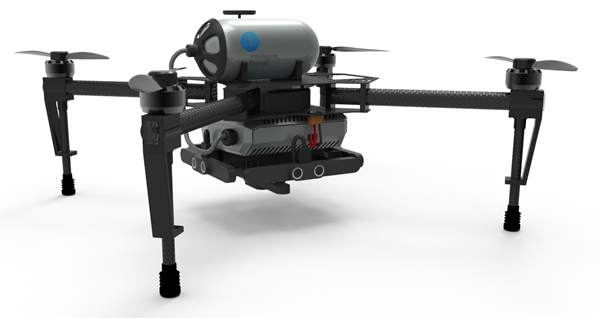
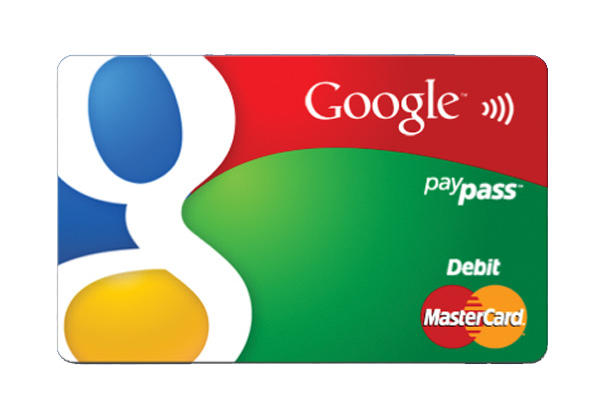
Image Source: 1, 2, 3, 4, 5, 6, 7, 8, 9, 10, 11

Filed Under: Headlines Tagged With: google pixel c, google pixel c review, pixel c hybrid, pixel c tablet

New Intelligent Energy Drone Fuel Cell Boosts Range

December 15, 2015 By Kenneth Scott Leave a Comment

The new Intelligent Energy drone fuel cell

Intelligent Energy is a British company whose objective is to provide advanced and efficient power sources, especially fuel cells.

It has been developing such technologies since its establishment in 2001, when it acquired  Advanced Power Sources LTD, a company composed of researchers from Loughborough University (UK).

The main interest of the Loughborough University research and development team (which subsequently became Advanced Power Sources LTD), as well as that of the present-day Intelligent Energy was and is the development of Proton Exchange Membranes (PEM) fuel cells.

But the company’s academic-born past and its cutting edge technology focus means it’s interested in developing more efficient fuel cells in other domains as well, with the company holding more than 400 patents submitted or awarded by now.

For which they have prototypes or intend to develop them soon.

Like, for example, the new Intelligent Energy drone fuel cell which they recently announced.

It is a hydrogen fuel cell which can extend drone flight-time from the approximately 20 minutes that most drones are capable of today to hours.

Intelligent Energy have also promised that their upgrade will reduce charging time from the 1-2 hours usually required to mere minutes!

These results were achieved after 14 months of experimenting with drones in two power configurations: fuel cells and hybrid power systems consisting of a battery and a fuel cell that constantly charges that battery.

Both systems performed very well, and clearly better than the currently used ones which rely only on a battery.

The company said they will keep testing between these two systems to decide which is the most efficient and desirable overall.

The best part? The hydrogen fuel cell tested in both systems works by a chemical process which convert hydrogen into electricity. And there’s only one “waste” to this conversion: water! So, no pollution takes place with Intelligent Energy’s fuel cells.

Still, although the hydrogen battery is energy efficient and reliable, there is a tiny downside. It is not currently very good at quickly pumping the energy burst required when the flight conditions change quickly, for example in the case of a strong gust of head-wind that the drone might experience suddenly.

That’s why the company is testing the hybrid system as well, in which the conventional battery would compensate in such cases.

Still, if they are not ruling out the possibility of solving this minor problem and in the end presenting a solely hydrogen fuel cell powered version.

More information on these developments will be given by Intelligent Energy at the CES (Consumer Technology Association) meeting in 5-9 January in Las Vegas.

So, if you’re a drone owner you might want to follow-up on that.

Image source: 1.

Filed Under: Headlines Tagged With: Drone, drone battery, drone battery life, drone battery life extension, drone energy, drone flight-time increase, drone fuel, drone fuel cell, drone hydrogen fuel cell, drone power, drone power system, drone range extension, Intelligent Energy, Intelligent Energy drone fuel cell, Intelligent Energy drone hydrogen fuel cell

You Can Now Send Money Through Text Messages

December 11, 2015 By Kenneth Scott Leave a Comment

You can now send money through text messages, thanks to Google.

Google Wallet now enables you to send money through text messages.

Ever wanted to make transactions in an easier way? Well, you can now send money through text messages thanks to Google. The technological revolution does not seem to slow down, and each day we receive news of new products, features and devices.

The payment system for mobiles has been available in the United States for quite some time now, but it required your email address. From now on, that will not be necessary. Google Wallet will allow users to directly send money to their contacts via text messages.

The announcement was made last Monday by the company. So how does it work? When you will attempt to send money, you will receive a text message containing a secure link in order to perform the transaction. All that is left afterward is to complete the form with your debit card information. The sum of money will be available in a couple of minutes to the person you sent it to.

The update for Google Wallet will be available in the App Store and Google Play Store in the next days. The team behind the application stated that they are truly thrilled about the feedback they received on their work. Furthermore, they promised to keep working continuously in order to improve the app. Should you wish to submit your feedback on the matter, you can do so via Google+, Twitter or the application itself, as the team is more than curious to know your opinions.

Google Wallet has received other updates over the past weeks. The contact suggestions have been improved, as well as a security feature that you can use to lock the application by tapping it once. Furthermore, the option of adding a second bank account is now available. Two months ago Google Wallet also received a new design and icon and several more features.

This update was released before the launch of the Android Play app, which stands for Google’s version of the Apple Pay by Apple. As you can now send money through text messages, what is the point of having two similar services? We expect lots of users to flock to Google Play, which provides them with a lot more mobility.

Image Source: 1

Filed Under: Headlines Tagged With: financial app, Google Wallet, You Can Now Send Money Through Text Messages

Rez Infinite is Coming to PS4, and It will Support VR

December 7, 2015 By Kenneth Scott Leave a Comment

Rez Infinite is Coming to PS4, and It will Support VR

Rez Infinite is coming to PS4, and it will support VR as well.

Rez Infinite is a classic Dreamcast and PS2 video-game. It’s set to launch on Sony’s PlayStation 4 in the following days. Old-timey gamers, please, manage your excitement, as the internet has already gone bonkers. The VR version will have a solid 120 frames per second, and it will also boast fully detailed 3D audio. In its default screen mode, Rez Infinite will manage 60 frames per second at 1080p quality – 7.1. surround sound is all-present.

The remastered version will come with a brand new level.

Sony is trying to promote their VR setup, but, to be frank, this isn’t a new game. It’s just a PlayStation 2 remake, which is a HD remastered as well.

The early version of the game was, admittedly, eye-candy with stunning visuals. Developed by HexaDrive for Dreamcast, the Rez had some audio problems, as it wasn’t that well built-in and players could notice that sounds were not properly synched with attacks.

Unfortunately, the overworked music and visuals ended up hurting the gameplay, and it offered a lackluster experience. The Team Andromeda members worked really hard on the game, but, at the end of the day, big fans of Rez were left with a nasty after taste – which, hopefully, we won’t encounter this time around.

This unending stream of remakes is worrying. Even though these games made the PS2 so popular, nobody wants to be stuck in the past. While video game consoles have evolved, so have game mechanics and the way a game dev tells a story. Think of early day Fallout and The Elder Scrolls games, and compare them to the latest titles in the franchise, as in: Fallout 4 and Skyrim. There’s a huge difference in the way the developer conveys a story and grips the gamer to the edge of the seat.

Remakes are great, nostalgia is needed, but how much is too much?

This year marks PlayStation’s 20th anniversary. The Japanese-based company has officially announced that there will be 8 PS2 games available on PS4 consoles.

These PS2 titles can be purchased directly from the European and the American PlayStation Stores. Games will be up-rendered in 1080p with features you would expect a PS4 game to come with.

Be prepared for the following games: War of the Monsters, Twisted Metal: Black, both for $9.99 each. Grand Theft Auto Sand Andreas, Vice City and III for $14.99 each. Rogue Galaxy, Dark Cloud and Mark of Kri also for $14.99 each.

PaRappa the Rapper 2 and The King of Fighters 2000 will be added in the near future.

All of these PS2 classics will have Trophies enabled.

Image Source: 1

Filed Under: Headlines Tagged With: PlayStation 4, Project Morpheus, sony, virtual reality, VR

The Mac App Store Just Lost Sketch

December 2, 2015 By Kenneth Scott Leave a Comment

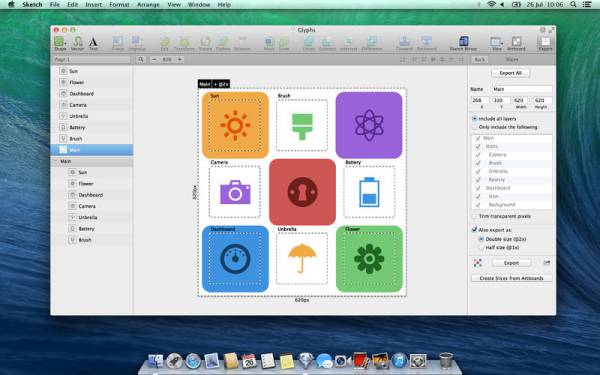
The Mac App Store just lost Sketch, an editing application.

The Apple Store is starting to lose more developers.

The Mac App Store just lost Sketch, an application for professional digital design for Apple. This is expected to have a negative effect on the company, even though it is not the first application to be pulled from the store. However, other developers have started to voice their discontent.

Sketch has been pulled from the store by Bohemian Coding for several reasons. First of all, the time required for an update to be submitted and approved was very long and unprofitable. Secondly, there are not many pricing options for updates. Lastly, the guidelines on sandboxing have a lot of technical limitations from Apple, like the access an app can have to programs or systems.

However, users who have bought the Sketch application will have the option to download it from the official website of Sketch, in order to receive further updates.

Bohemian Coding is a very important partner for Apple. It has already won two of its awards for design. Furthermore, Apple was relying on the developer for wireframing WatchOS apps, as it was also providing them with templates.

The team from Sketch stated in a blog post that they have been thinking about their options and this is the conclusion. As the application recorded great progress over the last year, the same cannot be said about the customer experience for the Apple Store. By selling their application directly from their website, the company will remain easily-approachable and responsive, and will ensure a better experience for its customers.

Sketch is not the first app to be pulled from the Mac Store. BBEdit from Bare Bones Software was removed because of the sandboxing restrictions, as well as the lack of pricing options for updates. The App Store support provided by Quicken also left for pricing reasons, while Coda, a web development tool from Panic was pulled from the store because of the restrictions regarding sandboxing. But the list doesn’t stop here. Parallels Desktop, TextExpander, Paragon NTFS and Hazel were removed for similar reasons.

As the Mac App Store just lost Sketch, we can expect other developers to remove their applications. Apart from the reasons mentioned above, the developers are also quite upset about the fact that they have to give 30% of their revenues for apps to Apple. Maybe it is time for the company to make a change.

Image Source: 1

Filed Under: Headlines Tagged With: Apple, design, developers, The Mac App Store Just Lost Sketch

Code.org Hour Of Code Minecraft Tutorial

November 16, 2015 By Kenneth Scott Leave a Comment

The Hour Of Code Minecraft Tutorial has been designed by Code.org and Microsoft

Code.org is a relatively new but now popular organization (founded in 2013) whose purpose is to not only motivate people all over the world, especially school children, to learn how to code, but to also help them do so by giving free coding lessons online.

They do this via their eponymous website (www.code.org) where anyone can take free lessons of his or her choice from the offered curriculum.

But another important part of their efforts is the Hour of Code challenge. Which they first held in December 2013, during Computer Science Education week (9th of December to 15th of December) when they launched the concept. The Hour of Code consists of a tutorial that teaches the basics of computer science to anyone who is interested, in under one hour, using a visual programming language called Blockly.

Since its launch in 2013, a new tutorial teaching the same concepts was modeled for each year. In 2014, for example users could learn to make and then customize their own Flappy Bird game.

And now, in 2015, the Hour of Code tutorial is Minecraft-oriented. Meaning that potential learners will use Blockly to give instructions to one of two characters of their choice Steve (male) or Alex (female) so that they can perform increasingly difficult tasks over the course of 14 levels in an interface visually similar to the Minecraft environment.

The emphasis behind this being that Minecraft uses the same basic programming and computer science concepts being taught in the Hour of Code, this enticing potential learners because of Minecraft’s huge popularity and appeal, a fact which incidentally has been consistently confirmed by learner’s requests that Code.org kept receiving to make a Minecraft-themed tutorial up to now.

And speaking of enticing learners, Code.org designed the last of the 14 levels in this Hour Of Code Minecraft tutorial to be a free play experience, without a pre-determined set of tasks to do, similar to Minecraft, allowing them to choose from several actions and make their own decisions, in the hope that it would have replay value and they would return to play.

But this would not have been possible without Microsoft (who owns Minecraft, having bought it last year). Because Microsoft, apart from being one of Code.org’s high-profile and generous backers (along with Obama, Mark Zuckerberg and Facebook, Apple and others), with more than 3 million $ donated to Code.org so far, gave the company the right to use the Minecraft name without charge. And also pitched in with a few developers of its own to write this new tutorial.

It also says it was more than happy to help make this tutorial a reality because they had the intention of somehow using Minecraft for education since January and this is a perfect opportunity.

Image source: 1.

Filed Under: Headlines Tagged With: Code.org, Hour of Code, Hour of Code Minecraft Tutorial, microsoft, Minecraft, Minecraft tutorial

Netgear NightHawk X4S D7800 Review

November 13, 2015 By Kenneth Scott 2 Comments

Netgear NightHawk X45

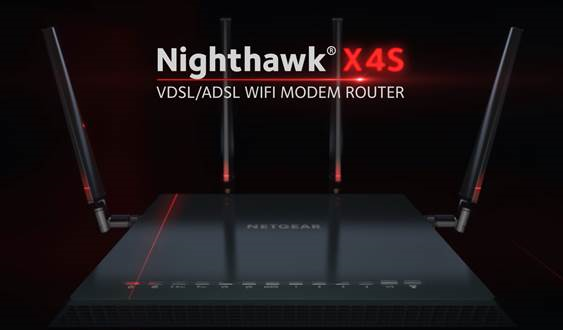
From manufacturer Netgear comes a router that aspires to be much more than the consumer market has seen before in this respect. With the addition of the Netgear NightHawk X45 D7800 router, which contains some impressive hardware and specs in the four-antenna box, we actually have to stop and ask ourselves if this router is not, by any chance, too good for its own good.

The reason behind that is that the technology employed in its construction earns results way better than most consumer computers and devices can actually handle – thus only taking advantage of the router’s power partially. And not in the most impressive percentage either. Because of that, one must ask themselves if the same performance they get with the Netgear NightHawk X45 D7800 couldn’t easily be achieved by means of another, less expensive router.

Depending on the type services your ISP provides as well as the devices you’d be using it on, chances are you’ll have to wait until one or two computer upgrades are done in order for you to enjoy this router’s full, high-speed 5 GHz rates.

Netgear NightHawk X4S D7800 Design

Netgear NightHawk X45 Front

The times when the router was literally the most aesthetically displeasing portion of your desk are long gone. Lately, manufacturers have been paying a little more attention to this aspect as well so you’re not forced to hide away your routers behind extra layers of walls or shelves that would end up taking a toll on the overall performance.

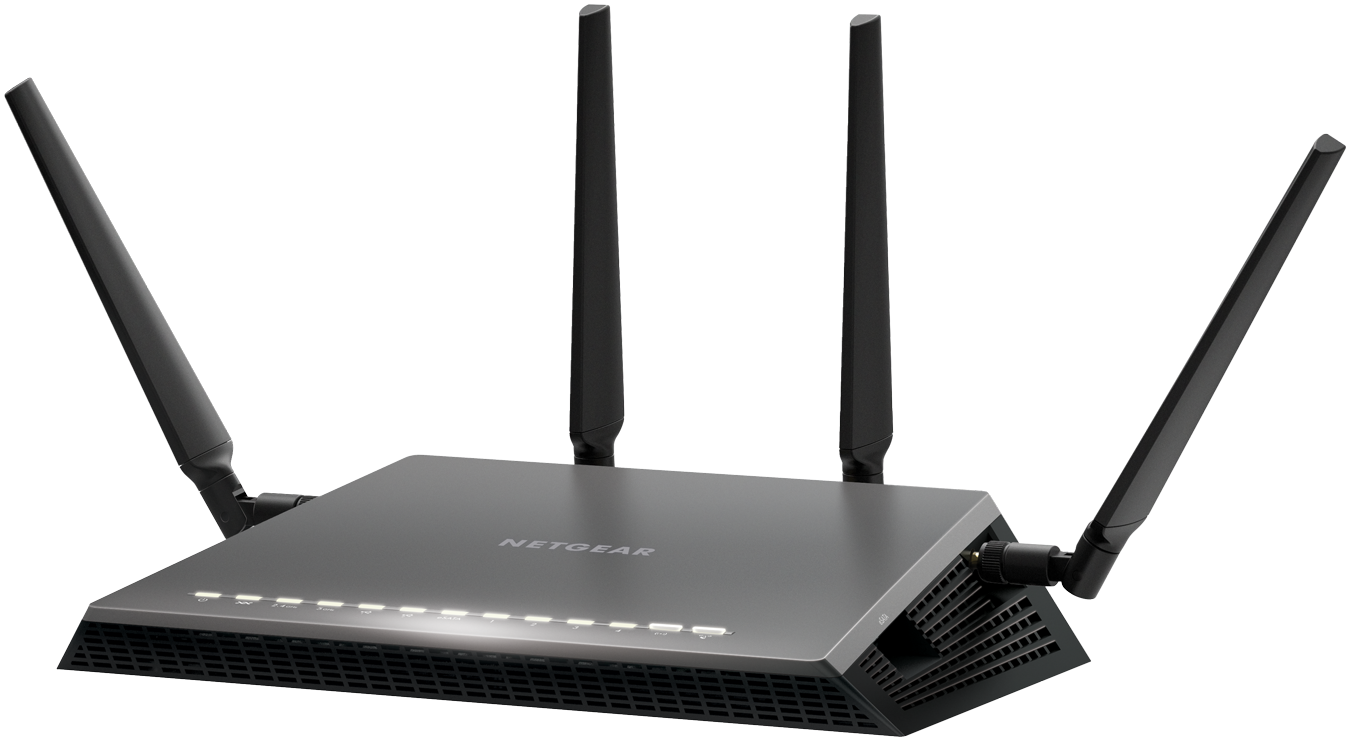
The Netgear NightHawk X4S D7800 is one the best examples in that regard: with a black matte finish, sharp angles and an irregular shape design, the router is made to both look professional and ensure an ergonomic build for its users. The bottom of the router is padded with patches of rubberized material to prevent it from slipping on smooth surfaces and maintaining stability.

The front of the Netgear NightHawk X4S D7800 features 13 LEDs associated with different connectivity features of the router, letting you know which of its functions are currently active – power, Ethernet cables connected and so on. While under normal circumstances they shouldn’t be a problem, in the case that you find them unnerving or distracting, you can turn most of them off using a switch button on the back of the router, thus allowing you to only maintain the power button on at all times and remove the flickering issue.

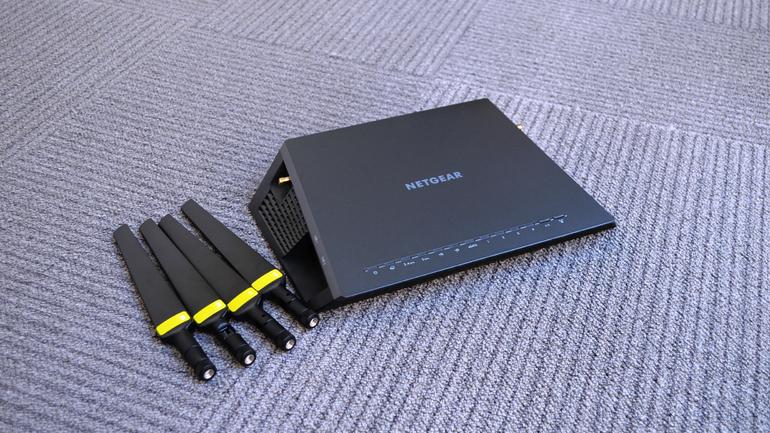
Netgear NightHawk X45 Antennas

The Netgear NightHawk X4S D7800 router’s power is complimented by the four external antennas. One on each side of the device and two protruding from the back. They can be tilted vertically up to 360 degrees – occasionally limited by construction of course – but not sideways. Considering that the Netgear NightHawk X4S D7800 is a considerably large device – measuring 285 x 185 x 50 mm and a hefty 840 grams in weight, so finding a good location to place it without restricting some of its signal might prove difficult.

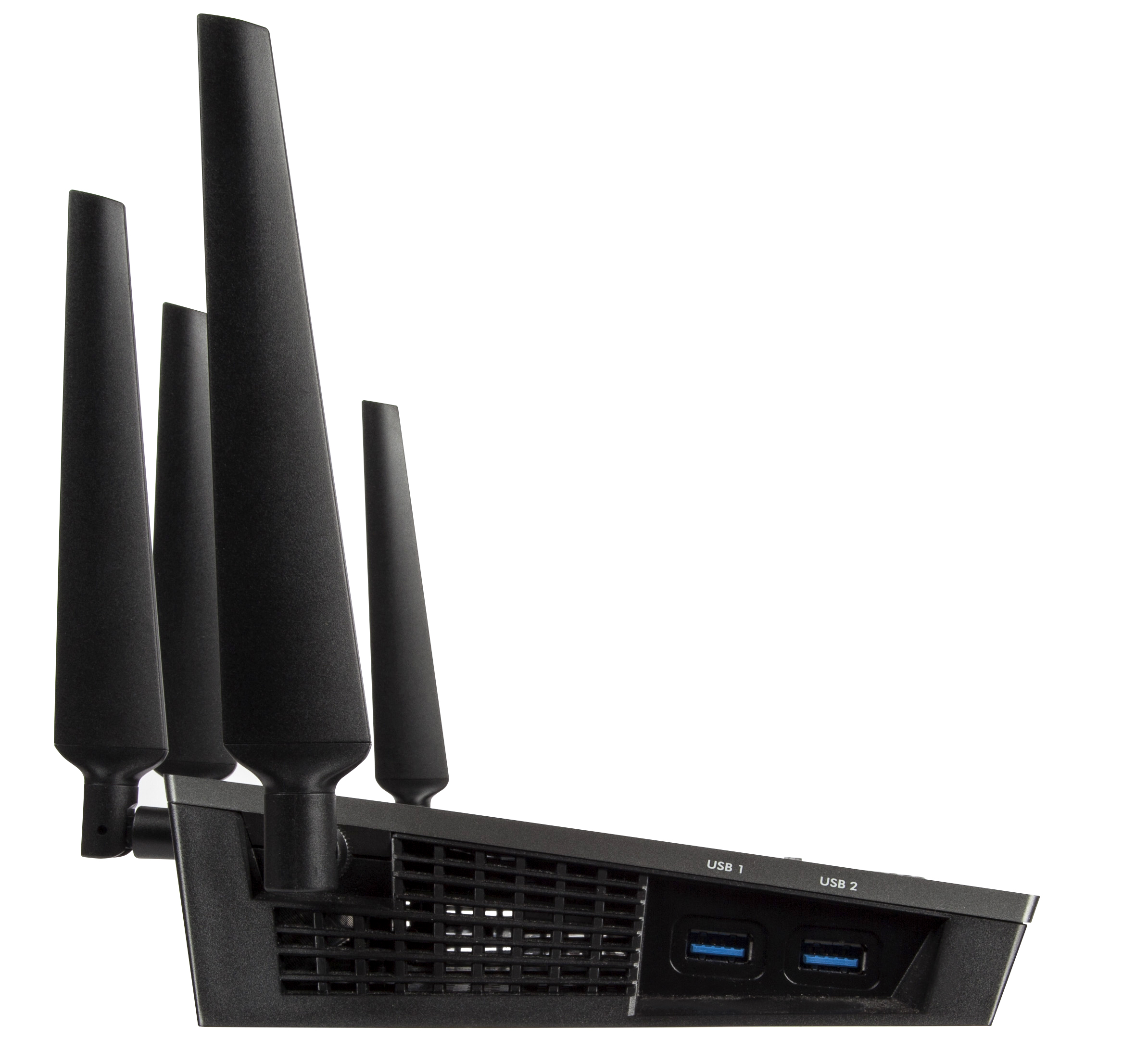
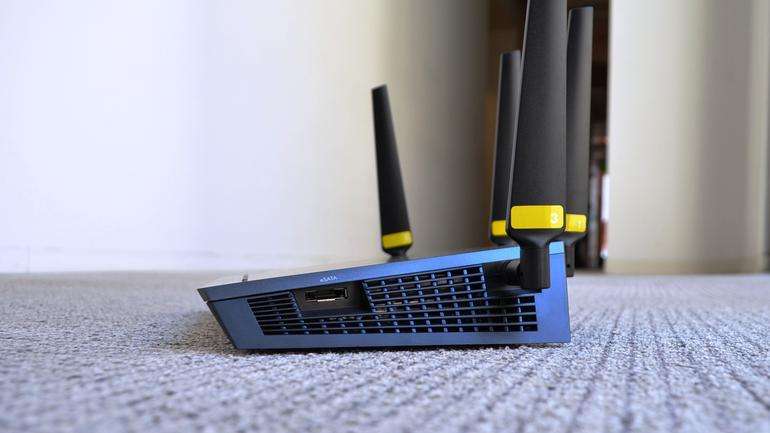
There is a number of ports you will be able to find on this model of the Netgear NightHawk. The left hand side feature two USB 3.0 ports that can be used to stream data via external hard disks, memory sticks or other sources of storage that can connect via USB. On the opposite side lies an eSATA port – a hybrid of an external serial ATA and a universal serial bus port – which can be used as an alternative.

Netgear NightHawk X45 Left Side

Netgear NightHawk X45 Right Side

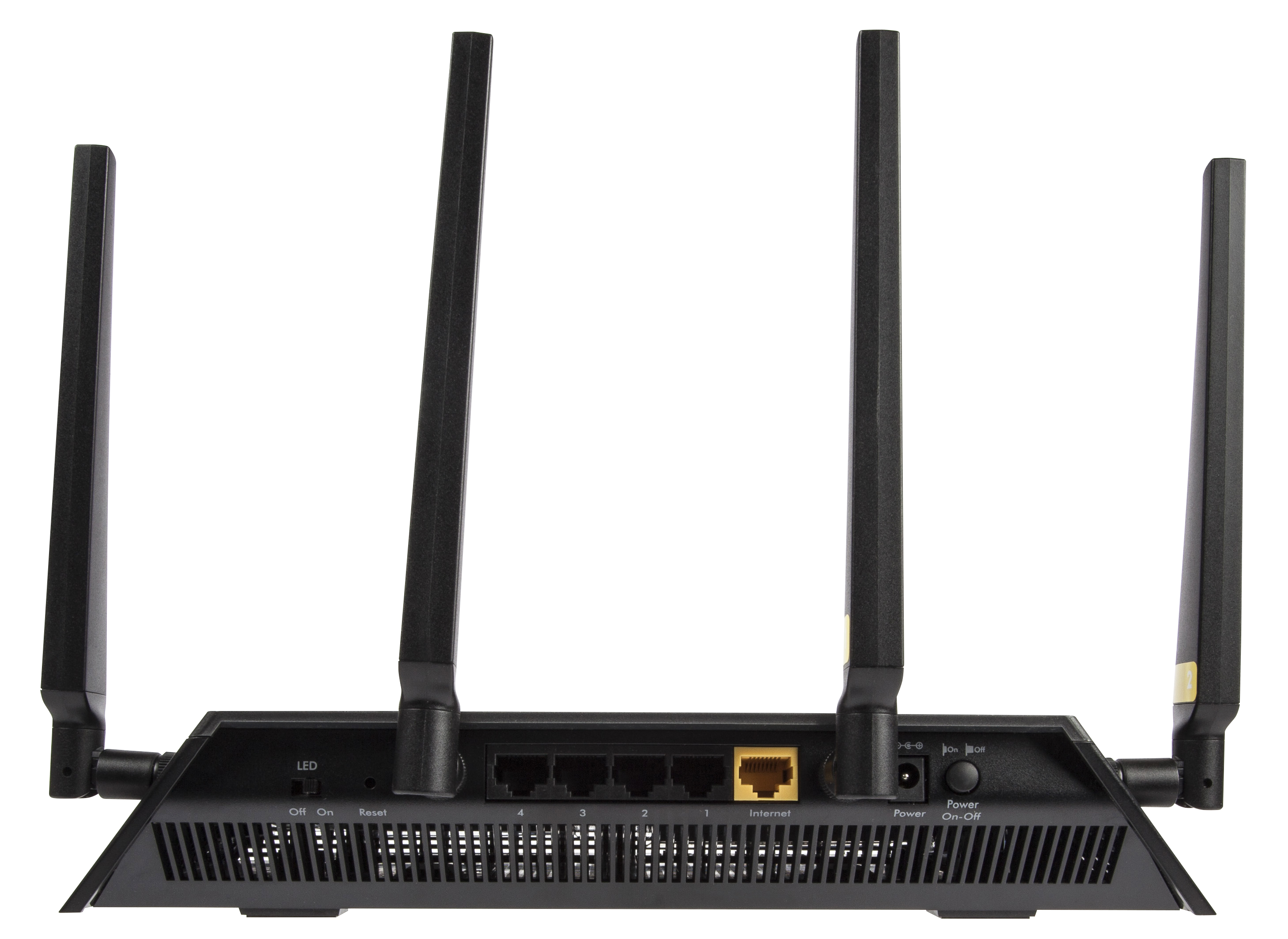
The rear of the Netgear NightHawk X4S D7800 hosts the LED switch that we mentioned earlier, a small reset button that you can only access by using a thing tool to press it, the power socket as well as a dedicated power button to turn the device on or off, the five 10 / 100 / 1000 Ethernet ports – 4 LAN and 1 WAN.

Netgear NightHawk X45 Rear

All of the hardware packed inside is kept cool via the vented sides – all around the sides of the X4S router, there are vents stretching from one edge to another, only leaving whole physical parts where the ports or buttons are located. This is a great addition to not only the design of the router but its performance too, considering it has quite a fair amount of hardware that can, with time, overheat, subjecting the device to a lower performing power and even some damage or wearing out over time.

Netgear NightHawk X4S D7800 Setup & Software

There are two methods of setting up your new Netgear NightHawk X4S. One is, naturally via your browser of choice, the other one – and the overall better variant – via the router’s native software, the Netgear Genie.

Netgear NightHawk X45 Software

If you choose to do it the good old classic way, by entering the IP address into the browser address bar, you are greeted by a “strictly necessary” type of interface that you can do your basic setup in: creating your wireless home network, setting up a name and password, etcetera can all be done from here just as well but otherwise, you’ll be fairly limited.

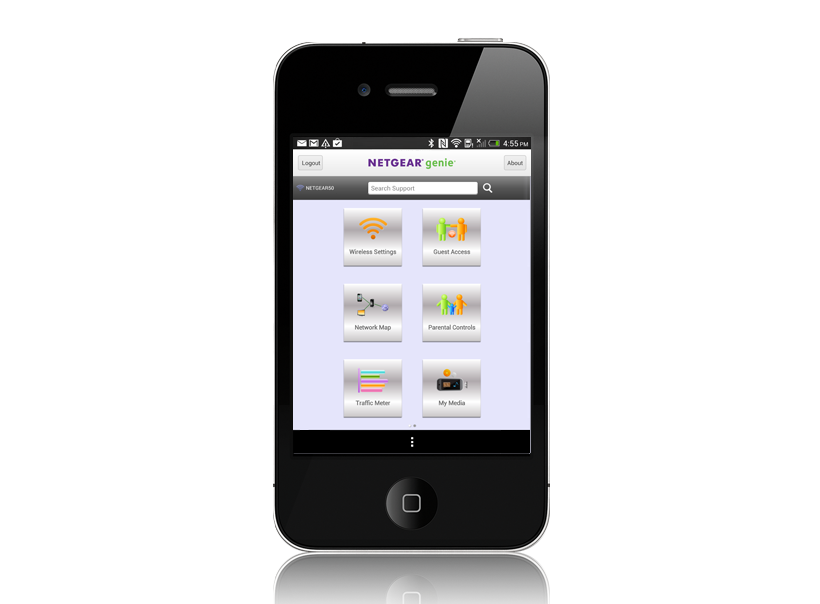
However, the advisable method of getting everything set up and in place is via its dedicated wizard software. As soon as you connect the X4S to a computer for the first time, you will be prompted to follow through a few, mostly automated steps that will ensure you’ve connected the device correctly, that the router is receiving the signal correctly and possible issues when the setup is unsuccessful. In this phase you will also be offered to install the Netgear Genie – a program that can be installed on both your desktop and laptop – Windows or Mac, as well as your mobile devices. The app can be downloaded for free via App Store, Google Play and Amazon Appstore.

While the Netgear Genie application serves more than just a few Netgear products, with a wide range of functionalities depending on device, for your Netgear NightHawk X4S D7800 router you gain all the control you would ever need over you home network.

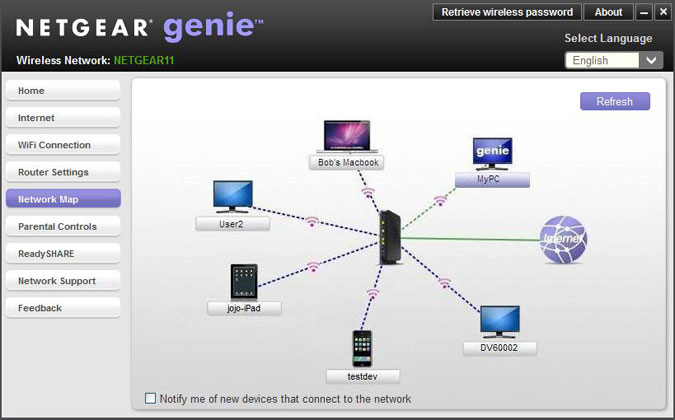
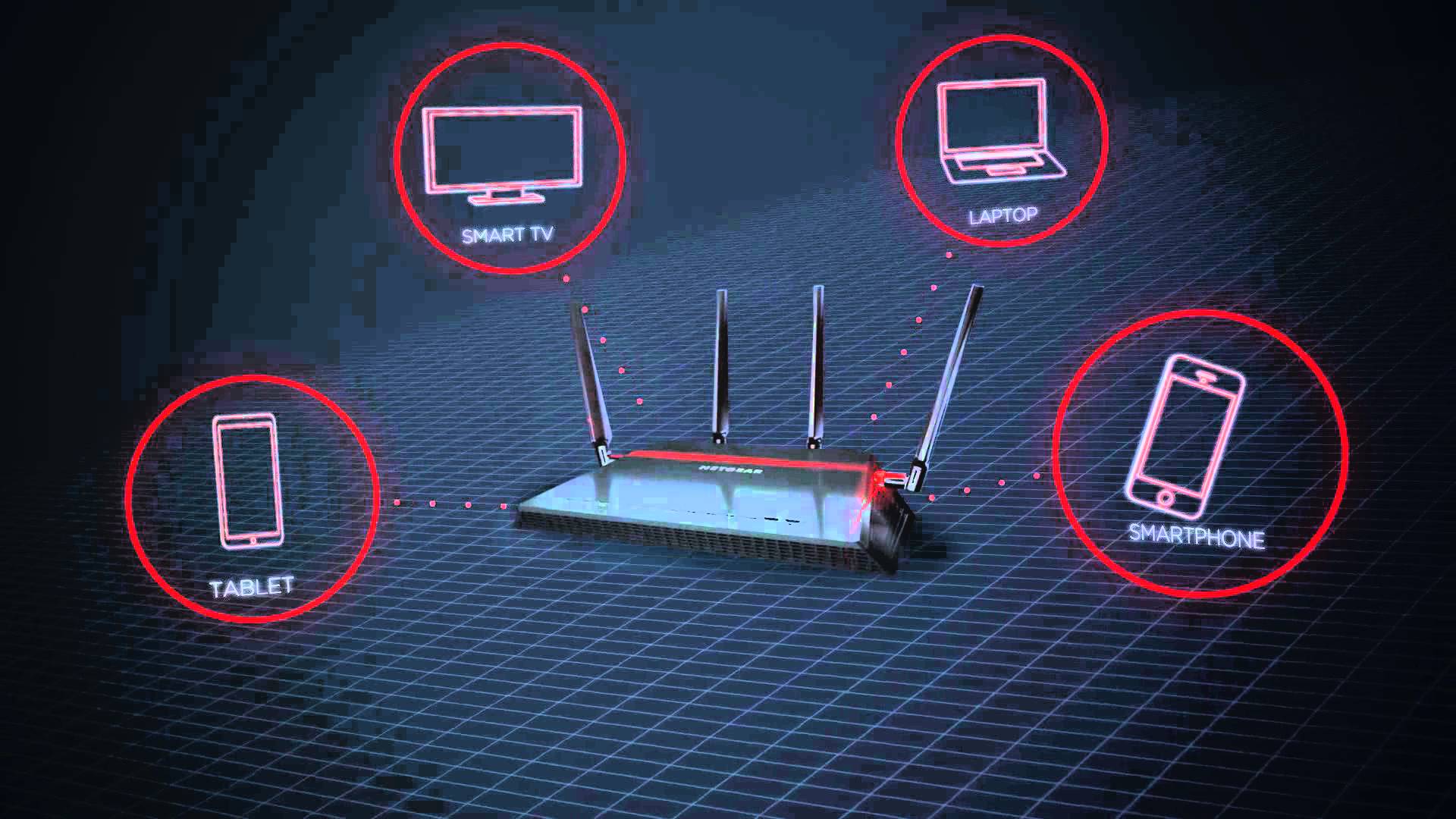
On your Home screen you get to see an overview of your router’s current activity – internet connection strength, status of your Wi-Fi signal, a shortcut to your router settings, a representative mapping of your currently network setup (including devices currently connected, intermediary devices or other third party signal boosters), the parental control feature as well as Netgear’s very own ReadySHARE. While most of the features found in the program are pretty much self-explanatory, there are some things that you can do with the Netgear Genie software that is not as transparent.

Netgear NightHawk X45 Network Map

Enabling and using QoS (Quality of Service) for your Netgear NightHawk X4S D7800 router can be done via the genie as well. More specifically, you can set up bandwidth priorities for various services you will use; for example, you can prioritize video streaming bandwidth usage over content downloading if you want to never lose quality of your gaming stream over other network demands that are made in the same home. While you can manually set up all of your QoS preferences, it is set to prioritize video streaming and gaming by default.

Netgear NightHawk X45 Genie iOS

The Network Genie also offers a highly intuitive troubleshooting system that allows you to verify any potential communication issues you might be having between your router and connected devices, complimented by many types of solutions that the software will provide you in order to deal with more basic issues.

Netgear NightHawk X4S D7800 Technical Specifications

In essence, the reason the Netgear NightHawk X4S D7800 router really exceeds the standards that your average device sets is the fact that it’s a simultaneous dual-band build that uses the 802.11ac Wi-Fi technology. The two bands – a 5 GHz and a 2.4 GHz, promise to offer up to 1,733 and 800 Mbps respectively to a total of 2.53 Gbps maximum speed. Again, this is a maximum value and may differ on different builds and computer or device specs. The numbers translate into download speeds of 216 Mbps and 100 Mbps respectively, summing up a total of 316 megabytes per second at a given moment.

In addition to its AC2600 WiFi Router role, one of the greatest aspects of the Netgear NightHawk X4S D7800 is the fact that it’s capable of being used as a DSL modem too, and it’s compatible with VDSL, VDSL2, ADSL, ADSL2 and ADSL2+. This means that most of the time you may not even need the model kit provided by your ISL, and instead just use the X4S.

Another centric technology that you’ll find in the Netgear NightHawk X4S D7800 is the MU-MIMO – more explicitly Multi-user Multiple-input and Multiple-output. This is responsible with allowing more than one device communicate with the router at the same time, without hindering the single each one receives in turn. It’s also known as space-division multiple access because the technology separates users that transmit at the same time and/or frequency by using their different spatial signatures. From one perspective, using many devices with this router becomes its greatest upside if you lack the hardware to make the best of it. Instead of focusing its entire power into one device, you can instead make use of a great portion of its power on several.

Netgear NightHawk X45 Features

The new IEEE Wi-FI 802.11ac generation came with the Beamforming+ technology that allows the router to send radio signals in the direction of the device that accesses it in order to create a stronger and more reliable wireless communication. This reduces a fair amount of lag and stuttering that may occasionally occur in Wi-Fi signals due to external factors, and also ultimately provides a longer range of action.

While during normal usage you won’t really be even noticing its use or functionality, the Netgear NightHawk X4S D7800 incorporates a dual-core 1.4 GHz processor. In the basic function of routing, you won’t be noticing any difference between this and a lower-performing processor as usually, your internet connection size will be limiting the amount of data you can send and receive a long time before the router’s CPU can do so.

The RAM memory however, is slightly more important as it allows the router to use it to convert data from Ethernet to DSL and hold packets while it performs the conversion – so the 512 MB of RAM memory that the Netgear NightHawk X4S D7800 offers are particularly useful and even more speed-oriented. The RAM is complimented by an additional 128 NB of Flash Memory.

Netgear NightHawk X4S D7800 Features & Performance

There seems to be a considerable focus on network performance when it comes to video and gaming streaming when it comes to the Netgear NightHawk X4S D7800. Considering it has default optimizations to detect and improve the quality of this particular type of activity will considerably be an interesting feat for individuals who use or plan to use streaming services such as Twitch or Hitbox. Thanks to the MU-MIMO technology, you shouldn’t experience any hindrance in stream smoothness even when the network is being solicited somewhere else.

There is a particularly interesting feature that the Netgear NightHawk X4S D7800 offers regarding sharing. By using the USB and eSATA ports on either side of the router, you can send data to the devices connected to it throughout your home in order to stream various types of media directly from the source.

When connected through the ReadySHARE feature of the X4S router, you can use any wireless printers directly from your mobile devices such as mobile phones and tablets. The ReadySHARE Vault – an auxiliary service offered – is a free software that allows you to automatically backup your PC to an USB hard drive that you connect to the router.

In terms of performance, any numbers you might be getting will depend on both the internet speed your ISP provides as well as the Wi-Fi – or alternatively Ethernet cards – your hardware contains. Using 3 different types of laptops and devices may, in turn, earn you 3 different sets of results. With that note out of the way, let’s move onto some basic tests that have been run on the Netgear NightHawk X4S D7800.

The numbers that we got on the 5 GHz band as opposed to the 2.4 GHz counterpart differed a great amount. Disregarding the usual decrease in speed and performance that all routers experience as you’re nearing the end of their maximum range, the download speed was approximately 5 times lower at close range and about 8 times lower at long range.

Running some speed tests when situated right next to the router by using the 5 GHz band kept a stable 70 to 80 Mbps speed on the test K55 gen Asus laptop. Moving a couple of rooms away and the signal wasn’t exceeding an average of 55 Mbps. Given the rather modest specs of the laptop used and the maximum 216 Mbps speed that the Netgear NightHawk X4S D7800 is capable of on paper, that is a considerably good result. Towards the very far end of the apartment where the signal was becoming intermittent, we still got peaks of 10 Mbps.

The 2.4 GHz band connectivity doesn’t stand out in comparison to a great number of routers on the market – and more specifically models that are part of a much lower price category. At a 15 Mbps speed at close range and an unflattering 4-5 MBps average at long range, devices that are not compatible with the 5 GHz bands will not benefit greatly from the huge potential of this outstanding router.

Regardless, when and if possible, using the internet by connecting your device directly through LAN port cables will usually provide much better results in a great number of devices. There is also the USB networking variant which turned out to be relatively strong and even come close to the speeds that the 5 GHz band test got.

Netgear NightHawk X4S D7800 Verdict

All things considered, the Netgear NightHawk X4S D7800 is a particularly powerful device that is very likely to even exceed the power that your hardware and devices can hold. Depending on the type of activity you undergo in your home, you can either opt for the X4S in favor of its features and optimizations for various types of uses, or sacrifice the extra capabilities and choose a cheaper mid-range router.

Netgear NightHawk X4S D7800 Verdict

The fact that its performance on the 2.4 GHz band at long range are less than satisfactory, you should take into heavy consideration what type of device you would be needing the internet signal on. If your home or location where you wish to use the router is spacious and you don’t have a central point to place the router in, it’s for the best if you look into alternatives.

If your devices are capable of using 5 GHz, the speeds, ranges and possibilities expand exponentially, and the Netgear NightHawk X4S D7800 remains a router that you will most likely be using for a long time, probably improving at the same time as you start upgrading your hardware.

You can purchase the Netgear NightHawk X4S D7800 for $270 from various retailers – both online and in tech equipment stores.

Image Source: 1, 2, 3, 4, 5, 6, 7, 8, 9, 10, 11

Filed Under: Headlines Tagged With: 802.11ac, ac2600 router, netgear nighthawk x4s d7800, netgear router, nighthawk x4s router

New Range Rover Evoque Convertible Produced

November 9, 2015 By Kenneth Scott Leave a Comment

The Range Rover Evoque Convertible has been produced and set to sale in 2016.

The British car company Jaguar Land Rover (owned by Tata Motors, of India) have kept the promise that they made in 2012 when they presented the concept for a new addition to their Evoque series. Because now, the Range Rover Evoque Convertible is a reality with sales set to begin by the middle of 2016.

Despite the fact that this model of car is, in essence, a luxury convertible rover, which is an interesting combination in itself, there should be no shortage of buyers. Because the company declared that what kept them motivated to deliver, from 2012 to now was the many very positive reactions they had back then at the Geneva Motor Show, at the mere concept of the car.

And it’s understandable what all the hype is about. Because this car delivers the power of an off-road vehicle, with the luxurious and comfortable interior not customary for off-road vehicles along with the option to use it in every weather, from the scorching desert to some snowy mountains, due to it’s detachable roof.

This roof is automatized (you don’t need to manually fold it or open it), and is sturdy enough and powered in such a way that you can actually operate it at speeds up to 30 miles per hour. And if you’re wondering about how a frail detachable roof can protect occupants in case of a rollover (which is a risk when taking an off-road vehicle, well… off-road), you can rest easy.

The Range Rover Evoque’s Convertible features protective bars that will automatically snap into position to secure the roof in conjunction with the already permanently reinforced windshield bars, in case the car detects an imminent rollover (also automatically). All this in under a tenth of a second.

And, with the roof detached, you get a storage space of approximately 9 cubic feet in the back.

As for Land Rover’s reputation for making cars that are off-road not only in name, but in performance as well, the makers say that nothing has changed, with the Evoque Convertible model being very capable to handle whatever you might decide to throw at it.

As regards what makes this car rumble, it is powered by a turbocharged 240 horsepower engine with 4 cylinders. It also has all wheel drive and an automatic transmission with 9 speeds, just like it’s previous, non-convertible counterpart from the same automaker.

The price tag for the Range Rover Evoque Convertible is, according to the company, going to begin at around 50,000 $ when it launches in 2016, making it a relatively accessible luxury car, considering also its hybrid luxury-off road-convertible nature.

Image source: 1.

Filed Under: Headlines Tagged With: Jaguar Range Rover, New Range Rover, Range Rover, Range Rover Convertible, Range Rover Evoque Convertible

NHTSA Automatic Emergency Breaking Recommendation

November 3, 2015 By Kenneth Scott Leave a Comment

The NHTSA's automatic emergency breaking recommendation will apply starting with 2018 built vehicles.

The technological advances in the automotive industry seem to come at a brisk pace, with Google, Nissan and others announcing that smart, self-driving cars will soon be a reality on the streets of the world somewhere before 2020.

If that happens, it is estimated that car accidents will decrease drastically to the point of being practically non-existent, all due to the (supposedly) infallible, fast-processing, not-distractable computer brains that such cars will have.

But there’s good news regarding car safety until that happens as well. Because technological advances in the automotive industry have not focused only on self-driving cars. Actually, there are some new technologies out there meant to aid human drivers too. And they are pretty awesome and effective.

Like the one that the National Highway Traffic Safety Administration in the USA wants to see implemented the most. And fast. Due to all of the increasing and increasingly distracted drivers on the road.

Starting with 2018 models, the NHTSA will include automatic emergency breaking (AEB) on the list of criteria for a five-star safety rating. More than that, this September, the NHTSA reached agreements with 10 car companies for them to include the AEB technology as a standard feature in their cars! Way to go NHTSA.

How the technology works is that using radar and camera sensors, the car itself keeps an eye out for possible collisions, in case the driver isn’t paying attention. If such a collision is detected, there are two subsystems that come into play, depending on the scenario.

If the driver is aware that a collision will happen and brakes sufficiently, the AEB technology is not activated. If he is aware, but brakes insufficiently, the first subsystem called the dynamic break support (DBS) does its part by dynamically adjusting the brake intensity, i.e. braking more, if necessary to avoid a collision.

If the driver is not aware and doesn’t break at all, the crash imminent braking (CIB) system comes online, applying the brakes without any input or command from the driver.

The NHTSA estimates that with this technology a standard on all cars, the 1,700 yearly deaths by rear-end collision could be reduced by up to 80%, which is a staggering figure in terms of the significant loss of life that could be avoided.

Which is also why apart from the automatic emergency breaking recommendation and agreements discussed above, the NHTSA has also taken to educating the public at large (and other car makers) about AEB by creating both a website and a video about this technology.

And that’s still not all. Because the NHTSA also has its eye on imposing other advanced safety ensuring technologies like: lane departure warnings and forward collision warnings and electronic stability control (ESC).

Image source: 1.

Filed Under: Headlines Tagged With: AEB, AEB recommendation, automatic emergency breaking, automatic emergency breaking recommendation, car safety, National Highway Traffic Safety Administration, NHTSA, safety, vehicle safety rating, vehicle safety recommendation

New Chromecast Audio Google Dongle

October 23, 2015 By Kenneth Scott Leave a Comment

The Chromecast Audio Google dongle was recently released.

As per the definition given on Wikipedia, a dongle is a small piece of hardware that attaches to a computer, TV, or other electronic device in order to enable additional functions, which functions are available just as long as the dongle is attached.

Google’s first released Chromecast device allows you to connect your phone (iPhone, Android), laptop (Mac and Windows) or tablet (iPhone, Android) to any TV you own, as long as it supports HDMI, through a dongle, in just 3 steps.

You just plug in the dongle, allow Chromecast to access your Wi-Fi on the phone, tablet or laptop you’re using and then press the cast button in Chrome to … well, cast whatever Chromecast supported app you want to the TV. And you can send a whole lotta stuff to your TV from: TV and movie sites like HBO now, to music from Spotify, Pandora and others, to photos and videos like Youtube, all the way up to games and even simple chrome tabs to search what you want. All of this for 35$.

Well, following on the success of the first one, the new Chromecast Audio Google dongle recently released, also for 35$, is identical regarding ease of installation and mode of operation to the one above (same supported platforms, same 3 easy steps).

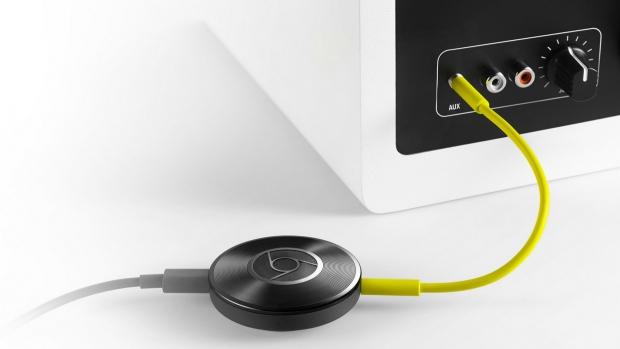
It only differs in focus, being oriented, as the name implies, towards audio systems instead of TV. Which means it no longer has the HDMI connection and instead can connect only to an audio system via the following inputs: 3.5mm, RCA and optical. Once connected, the same logic applies as above: you can play whatever you want (from phone, laptop or tablet to your cool audio system) as long it’s supported by Chromecast (and many things are).

Also good to know is that it works with practically any type of speakers, even older hi-fi ones.

The dongle is powered by a micro-USB, but in the box you receive from Google you also get a 5-inch auxiliary cord and a power adapter.

Ty Pendlebury of CNET, points out that according to the tests they made, the maximum for the digital output is 28 bit/48 kHz, despite the fact that Google claims it could go up to 28 bit/96 kHz.

Another problem discovered by Chris Davies of SlashGear is that sometimes there was a little syncing delay between the YouTube video on the screen and the sound being played through the speakers.

But these two issues are minor compared to the versatility and great audio quality that Chromecast audio offers for the very affordable price of 35$. Value-for-money wise, this tiny dongle is a pretty big deal.

Image source: 1.

Filed Under: Headlines Tagged With: Chromecast, Chromecast Audio, dongle, Google, Google Chromecast Audio, Google Chromecast Audio dongle

  • « Previous Page
  • 1
  • …
  • 10
  • 11
  • 12
  • 13
  • 14
  • …
  • 33
  • Next Page »

Subscribe to Blog via Email

Enter your email address to subscribe to this blog and receive notifications of new posts by email.

Join 11 other subscribers

Recent Articles

police handcuffs man

German Man Probed In Poisoning That Killed 21 Employees Since 2000

June 29, 2018 By Kenneth Scott Leave a Comment

Chicken wings bar

Intoxicated South Carolina Man Punches Waitress Who Refused to Serve Him Alcohol

June 29, 2018 By Karen Jackson Leave a Comment

gaming

New Zealand gamer Who Flew Halfway Across The World for Virginia Teen Gets Shots By Her Mother

June 28, 2018 By Cristopher Hall Leave a Comment

party

Former Virginia Tech Freshman Sentenced to 50 Years in Prison for Stabbing a Girl to Death

June 28, 2018 By Roxanne Briean Leave a Comment

bonfire

British Couple Sentenced to Life in Prison for Torturing and Murdering French Nanny

June 27, 2018 By Deborah Campbell Leave a Comment

pay phone

Texas Father of Girl Disappeared in the 80s Ignored by Authorities

June 26, 2018 By Cristopher Hall Leave a Comment

bottled water

San Francisco Woman Threatened to Call Police on Girl Who Sold Ice Water for Disneyland Trip

June 25, 2018 By Roxanne Briean Leave a Comment

Maplewood Park

Missouri Man Robbed by Date and Accomplice in Park

June 22, 2018 By Nancy Young Leave a Comment

coding

New York Man Sentenced in Cyberstalking Former Girlfriend, Mailing Drugs to Her Dorm

June 22, 2018 By Deborah Campbell Leave a Comment

headphones

Bose Poised to Launch Sleepbuds, In-Ear Headphones That Help You Sleep

June 21, 2018 By Nancy Young Leave a Comment

Police light

Intoxicated Female Driver in Custody for Pulling Arresting Officer by the Hair

June 21, 2018 By Kenneth Scott Leave a Comment

kitchen

Restaurant Manager Arrested and Charged in Shooting Death of Co-Worker over Negative Yelp Reviews

June 20, 2018 By Karen Jackson Leave a Comment

plastic container

Pennsylvania Couple Charged in Violent Death of Infant Discovered Buried in Cat Litter

June 19, 2018 By Cristopher Hall Leave a Comment

tailpipe

Minnesota Teen Gets Head Stuck In Oversized Tailpipe Winstock Music Festival

June 18, 2018 By Karen Jackson Leave a Comment

Pages

  • About Us
  • Contact us
  • Privacy Policy
  • Privacy Policy GDPR
  • Staff
  • Terms and Conditions

Recent Posts

  • German Man Probed In Poisoning That Killed 21 Employees Since 2000 June 29, 2018
  • Intoxicated South Carolina Man Punches Waitress Who Refused to Serve Him Alcohol June 29, 2018
  • New Zealand gamer Who Flew Halfway Across The World for Virginia Teen Gets Shots By Her Mother June 28, 2018
  • Former Virginia Tech Freshman Sentenced to 50 Years in Prison for Stabbing a Girl to Death June 28, 2018
  • British Couple Sentenced to Life in Prison for Torturing and Murdering French Nanny June 27, 2018
  • Texas Father of Girl Disappeared in the 80s Ignored by Authorities June 26, 2018
  • San Francisco Woman Threatened to Call Police on Girl Who Sold Ice Water for Disneyland Trip June 25, 2018

Categories

  • Business
  • Entertainment
  • Finance
  • Headlines
  • Health
  • Life
  • Nature
  • Science
  • Sports
  • Tech & Science
  • Travel
  • Uncategorized
  • United States
  • World

Copyright © 2026 ArgyllFreePress.com
About · Privacy Policy · Terms of Use · Contact