Argyll Free Press

Growing News Network

Monday, May 4, 2026
Log in
  • Business
  • Finance
  • Sports
  • Tech & Science
    • HP Envy 4500 Review
    • LG Optimus 170 Review
    • iPod Touch 6th Generation Review
    • HTC One M8 Accessories Set-up
    • Surrealist Games You Must Play
    • Hisense Sero 8 Review
    • Dell Latitude e7440 Review
    • HP Laserjet 1536dnf mfp Review
    • Garmin Fenix 2 Review
    • Skype Vs Viber
    • Best Video Conferencing Software
    • Sony mdr 1r Headphones Review
    • Canon Rebel t3i Review
    • Sennheiser Momentum 2-0 Review
  • Travel
  • Headlines
  • Health
  • United States

Asus MG279Q Review – A Monitor for Gamers

November 12, 2015 By Nancy Young Leave a Comment

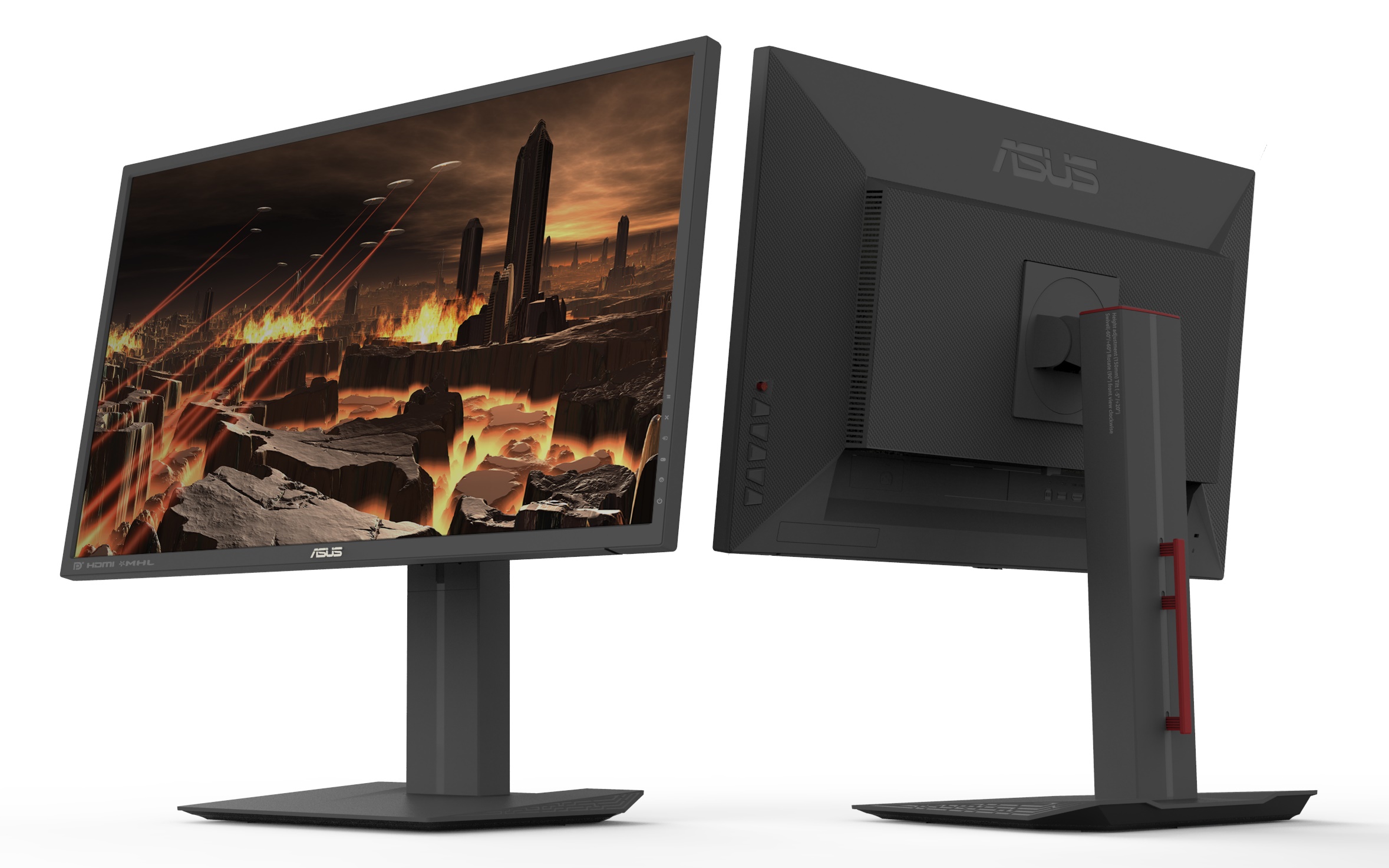
Asus MG279Q Front and Back

While for most individuals a monitor is a necessary peripheral device but not one that you’d spend a huge amount of time picking out once you’ve decided on the size of it and its design, things are a bit different for gamers. Professional or otherwise, for gamers the performance of a monitor is nearly as important as the power of your graphics processing unit and processor. The Asus MG279Q is a great example to begin with – one that can truly compliment your gameplay.

As a matter of fact there is so much more at stake when it comes to video games than just the diagonal of your screen or how pretty the colors are. One of the latest but most important aspects of your monitor that can really dictate the difference between a normal graphic rendering of your games and one that can actually allow you to step up your game is the refresh rate. I’m saying it’s new because the LCD monitor technology has been stuck at 60 Hz since its inception until only 2 years ago. The Asus MG279Q monitor is not the first to employ this new technology, but it packs up a lot of quality and backing aspects that will attend to your gaming and graphic-intensive needs.

Asus MG279Q Overview

The importance of 144 Hz

So the same technology that your television set has that makes movies look eerily natural in motion translates into a lifesaving aspect when it comes to gaming. If you do not already know, the purpose of higher refresh rates is to provide fluidity with which the data that translates into the image you see on your computer. Most of the computer and video games you play will not feel the brunt of the 60 Hz refresh rate because they are limited to 60 frames per second. However, various e-sports or other online shooter games where precision is one of the most important factor, having a low refresh rate will cap the amount of frames, giving you a certain degree of accuracy loss.

Still, the monitor you get is not solely responsible for the fluidity of your games – a hardware to match is necessary to make the best of it. The Asus MG279Q is not the kind of investment you make for an average gear setup because you won’t get that much out of it. So unless you’re planning on upgrading to meet the requirements before, you should consider it thoroughly before.

Made by the Gamers, For the Gamers

Your Asus MG279Q doesn’t stop at just that however. Considering it’s dedicated at a very specific market of gaming monitors, it has a number of features that are destined for that kind of activity. Firstly, it aims to improve the quality of your gaming sessions by allowing you to switch between personalized screen modes depending on the type of game you are playing.

Secondly, the MG279Q is also one of the proud hosts of the AMD FreeSync technology – meant to improve the smoothness of your gameplay by reducing image tearing and frame losses by easening the communication between the GPU and the monitor itself.

A Size to Behold and a Price to Match

The Asus MG279Q monitor is a variant of the 27 inch diagonal monitors – a considerable feat when it comes to gaming. While some may find the extra eye movement that you need to invest in such a large display tiring over long periods of time, everything showed on this monitor is extremely clear, to the smallest detail.

Asus MG279Q All Side View

When 27” monitors first came out, most of the feedback they received was filled with disappointment at the image clarity – because they lacked the resolutions and pixel density to produce clear images with no visible pixellation. Asus MG279Q does not fall in that category – being one of the latest generations of 144 Hz monitors, it employs 1440p resolutions, thus filling up all of the extra space with a keen knack for detail.

The pricing of the Asus MG279Q, however, is not forgiving. If you want to enjoy your gaming hobbies to the full with this monitor, you will have to whip out no less than $599. That’s considerably more than the $350 average price you would pay for a 24 inch 120 Hz variant.

Asus MG279Q Setup & Design

If taken right out of the package, there’s a bit of setting up that must be done before you can actually put the Asus MG279Q to use. The packaging should contain 3 main components – the base, the panel and the upright that connects the two. Thankfully, the setup is one of the easiest possible and doesn’t even require any kind of tools such as screwdrivers. Not many other monitors actually offer this innovative kind of setting up, removing a lot of the trouble that comes associated with it, especially when you order it online for example.
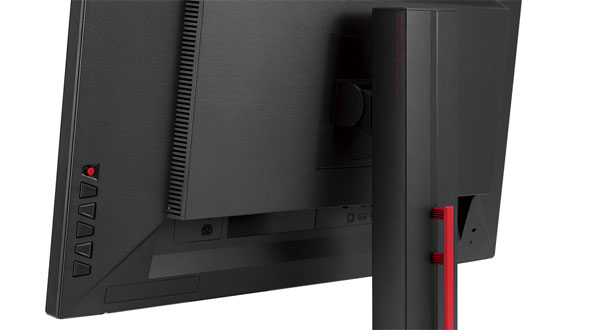
Asus MG279Q Upright

The panel can be snapped onto the upright and adjusted afterwards by making use of the slider switch – for a total of 150 mm of height adjustment. Additionally, the panel can be spun around into portrait mode, as well as tilted left and right or well as inwards or upwards. That is a lot of functionality added into just one simple design idea that will ensure that you don’t risk accidental damage to the monitor when trying to move it further away on your desk or tilt it sideways without having the base move as well. Everything is done with ease, in fluid motions with no need to force the components to move in the direction you want them to.
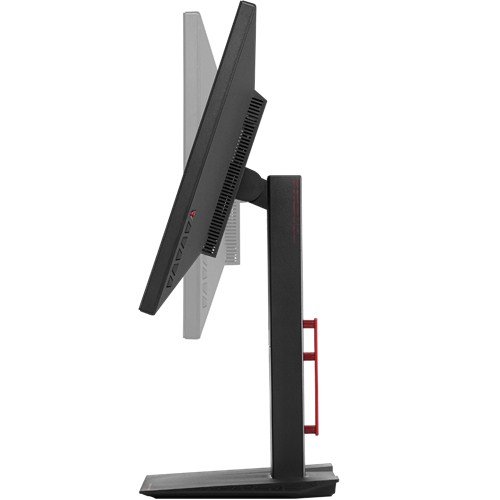
Asus MG279Q Screen Tilt

The entire design of the monitor is based on straight lines, giving it a highly professional and top end-look. The bezel of the Asus MG279Q is particularly thin, giving you the opportunity to implement it into multi-monitor setups. On the bottom right hand side rest the setting and control buttons on the rear of the monitor, described by the icons displaying along to each button separately on the front side. There is also a mobile button that you can use to make navigation through the menu easier as if you were using a mouse to move diagonally across the feature.

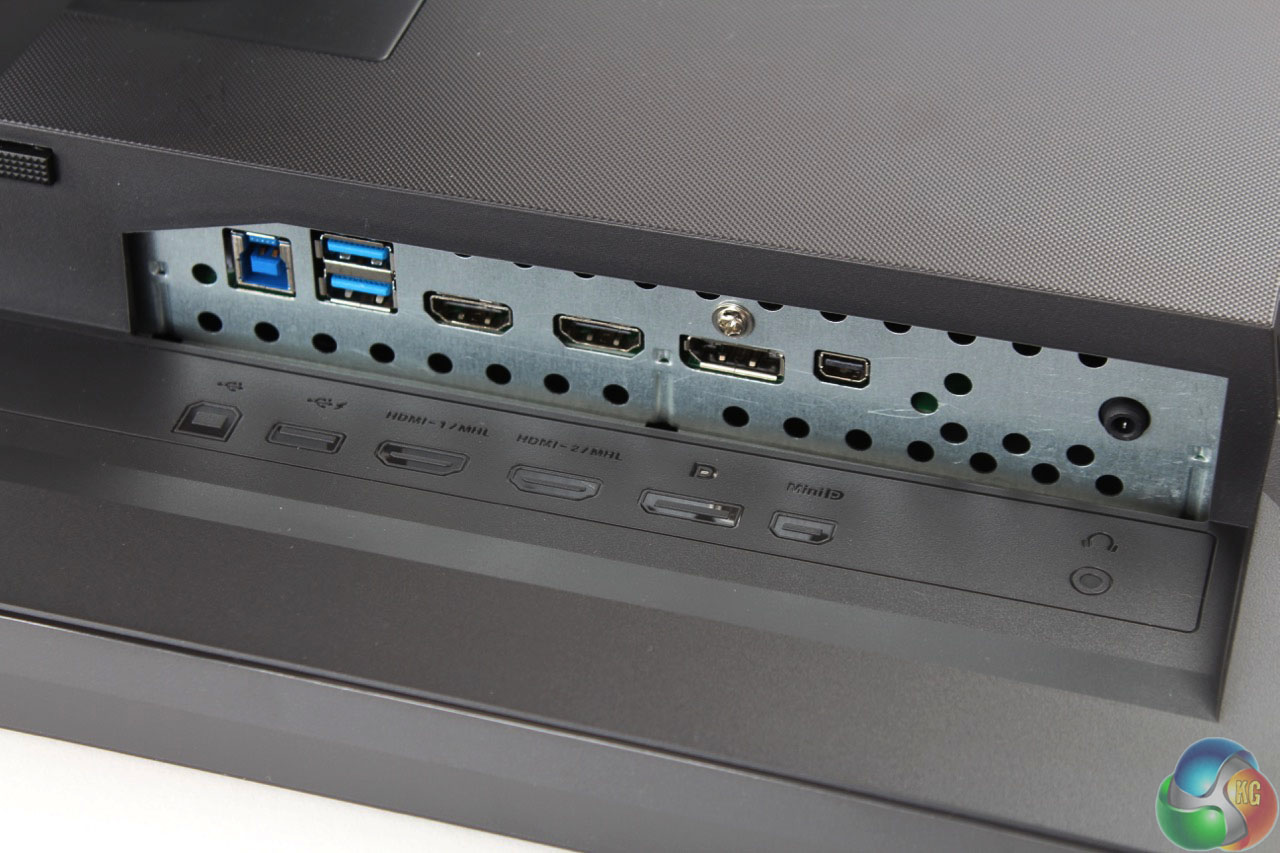
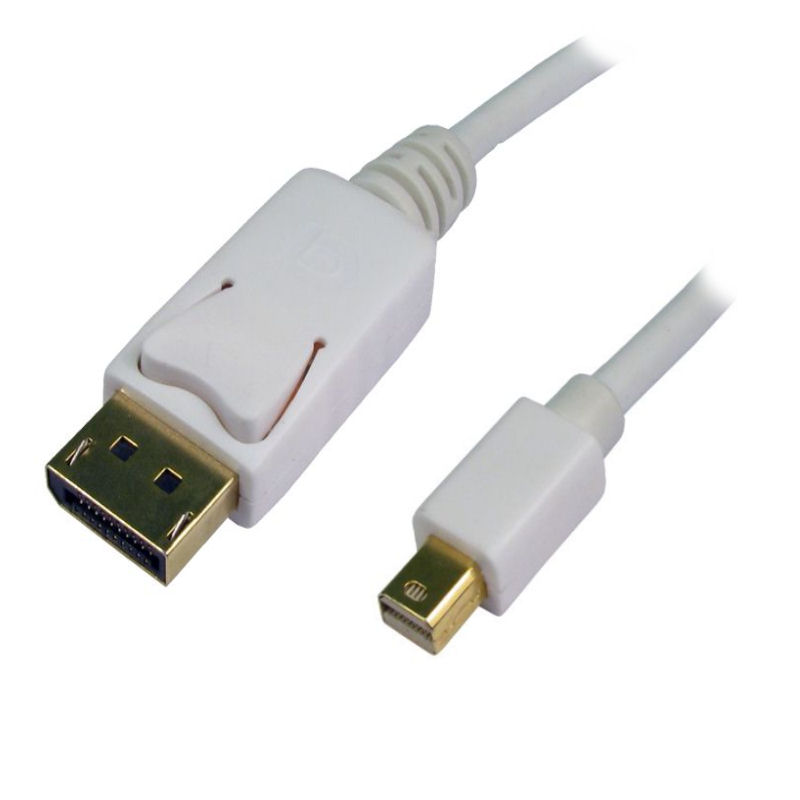
The back of the MG279Q is where you can find the vents that are responsible for keeping the monitor cool. They’re part of a secondary construction placed and connected to the main body of the panel, giving it a lot of room for the cooling process to be truly effective. The box also features the power and other ports that ensure the MG279Q’s connectivity. On this note, there is an IEC power chord port separated from the rest of the slots, a mini DisplayPort as well as a normal DisplayPort output, 2 HDMI ports and 2 USB ports. The two USB 3 ports that the monitor presents are also placed on the back, making them a little more difficult to reach if only used occasionally. However, the monitor’s OSD allows you to keep the USB slots powered even when the Asus MG279Q is turned off or in stand-by, so you can easily just use them as a power source for other devices.
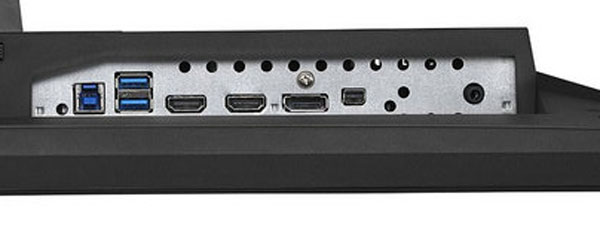
Asus MG279Q Ports

Asus MG279Q DisplayPort and Mini DisplayPort

The entire Asus MG279Q has a uniform matte finish on its entire body. The base is made stable by the material used underneath, which was specifically design to spare your desk of any marks that could be left by the monitor.

The entire construction weighs 7.3 kilograms, at an overall physical dimension of 625 x 559 x 238 mm.

Asus MG279Q Specs

To list what this monitor is capable of on paper is not really merely enough. Once again, no matter how impressive the specs and capabilities of a monitor are, some would need backing up through hardware – mostly reliant on the graphics processing unit (GPU).

The Asus MG279Q is a 1440p monitor meaning that its maximum resolution has been pushed up to 2560 x 1440, making for the more classic 16:9 aspect ratio that most games employ nowadays without the need of letterboxing.

The monitor is an IPS W-LED build. The IPS panel technology is one of the best currently employed in monitors because they offer an impressive color accuracy and are some of the brightest builds out there. Because of that, IPS panels have an amazing viewing angle – the Asus MG279Q listing 178 degrees on its specification sheet. However, the price of IPS upsides is that blacks are relatively poor – the TN panel alternative offering richer blacks – and that the former is not as fast and responsive as a TN alternative. The response time of the Asus MG279Q is 4ms G2G (gray to gray switch).
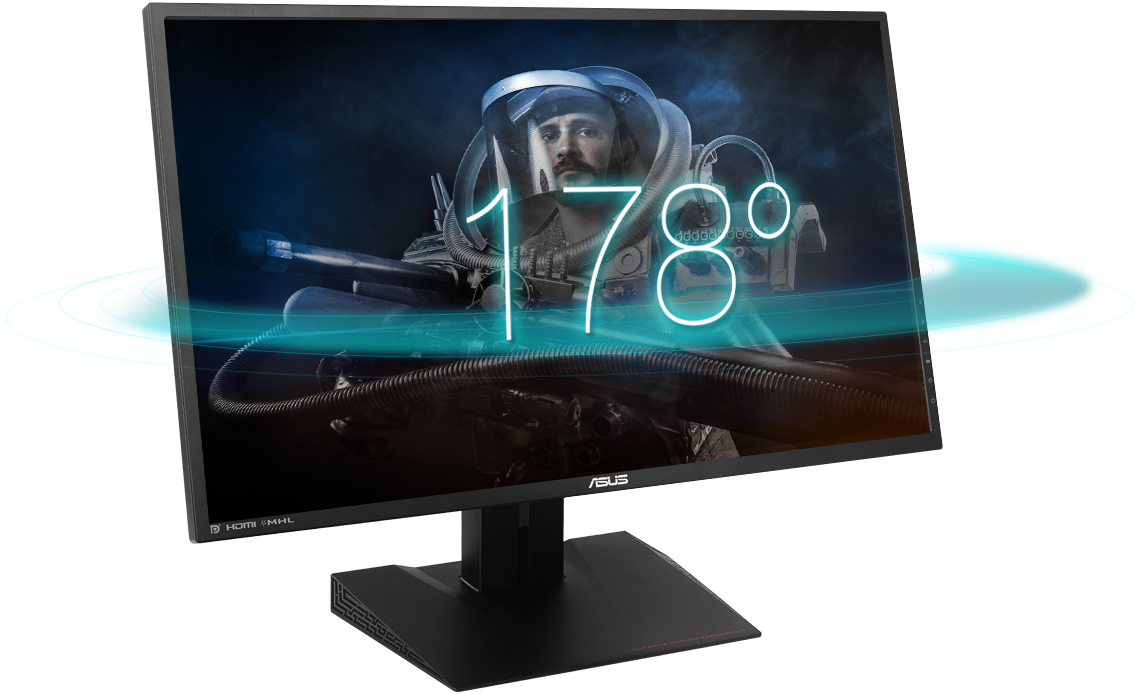
Asus MG279Q Viewing Angle

The backlight technology that powers up the IPS panel is W-LED (stands for white light emitting diode). The LED technology allows for thinner displays to be built, in favor or LCD. The overall brightness of the Asus MG279Q is scored at 350 cd/m2. Thankfully, the screen doesn’t lack an antiglare coating, meaning that it should withstand in high luminosity environments – however, most of the time you’ll want to not have a source of light behind you when using it as the quality still suffers a fair amount.

The Asus MG279Q is capable of 1000:1 static contrast ratio and 100 million:1 dynamic contrast ratio. Together with the 144 Hz refresh rate, you will not only get a highly responsive display from an information perspective, but from a color accuracy one too.

Asus MG279Q Features

There is a number of special features that you will find in the Asus MG279Q; namely, the AMD FreeSync technology that has been implemented in some AMD GPUs recently, the game modes feature and its very own OSD calibration.

AMD FreeSync

AMD developed a new type of technology that is meant to fluidize the communication between your monitor and graphics processing unit in order to eliminate image tears and motion choppiness. Its counterpart is nVidia’s G-Sync, but it presents a series of advantages over the latter. Firstly, it doesn’t affect the overall performance of your computer and thanks to its ability to reduce the panel’s refresh rate when the screen is static, it allows to lower power usage. The AMD FreeSync feature is implemented in the Asus MG279Q, but that means that you will require a FreeSync capable GPU to take advantage of it, using the DisplayPort cable that comes with the monitor.

Screen Modes

The purpose of the screen modes that the Asus MG279Q comes with is to ensure different types of adjustments for various video game genres. It’s inconclusive how much of utility is really holds and to what degree you’ll be using this actively. For example the FPS mode boosts brightness and contrasts in order to make it easier to see in dark areas in the game. While that purpose alone is fulfilled, it turns out to be relatively taxing on other aspects of the display such as color temperature. The RPG and RTS mode brings a boost to the color richness, and the vividness of the display overall, making for powerful, contrasting images. There is also a Racing mode that your screen will be using as default that reduces input lag as its first priority.
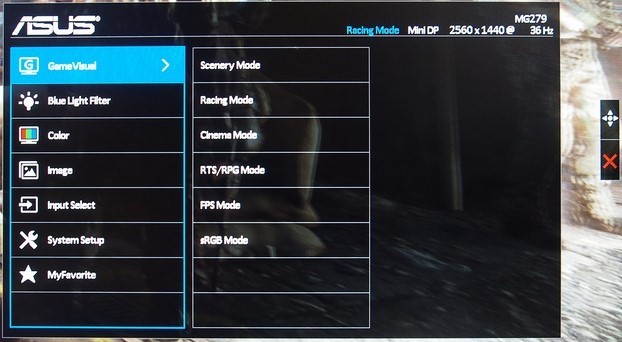
Asus MG279Q OSD Screen Modes

There are other modes that the screen is capable of that are not gaming-centric: Cinema, Scenery and Eco Mode. The first of the three is supposed to improve your movie-watching experience; the most obvious change to this mode was however an increase of color temperature resulting in increased blue levels. The Scenery mode is there to help with photo viewing and provides some extra color saturation – which may not turn out to be the best thing in some cases. Lastly, the Eco Mode considerably lowers the screen’s brightness, reducing power consumption down to 30W. While that is only an 8W decrease from its default 38, the number is still a very decent value in comparison to most other gaming monitors of this scale.

OSD Calibration

The Asus MG279Q on screen display calibration is very straight-forward and allows you to set up your preferred selection of screen settings directly. The system consists of 7 categories of sub menus: GameVisual, Blue Light Filter, Color, Image, Input Select, System Setup and MyFavorite.

The first of them all is the menu that you select your Screen Modes that we’ve just elaborated on from. The Blue Light Filter is in charge of modifying the image’s warmness by lowering blue levels. The Color sub menu contains all of your controls for brightness, contrast, saturation, color temperature and skin tones. The image sub menu has to do with a lot of tweaks to screen sharpness and edge enhancements.
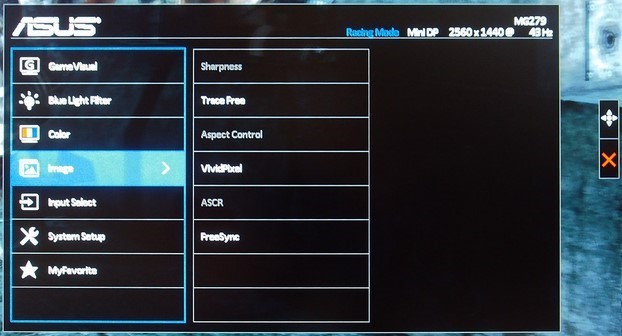
Asus MG279Q OSD Settings

While Input Select is self-explanatory as being the place where you select which signal you want to display on your screen – via either one of the HDMI ports or the DisplayPort/Mini DisplayPort – the System Setup feels like a sub menu where “everything else” was put in. Key Lock, very basic monitor information, Power Indicator, Power Key Lock, USB Charging as well as a complete setting reset option all reside here.
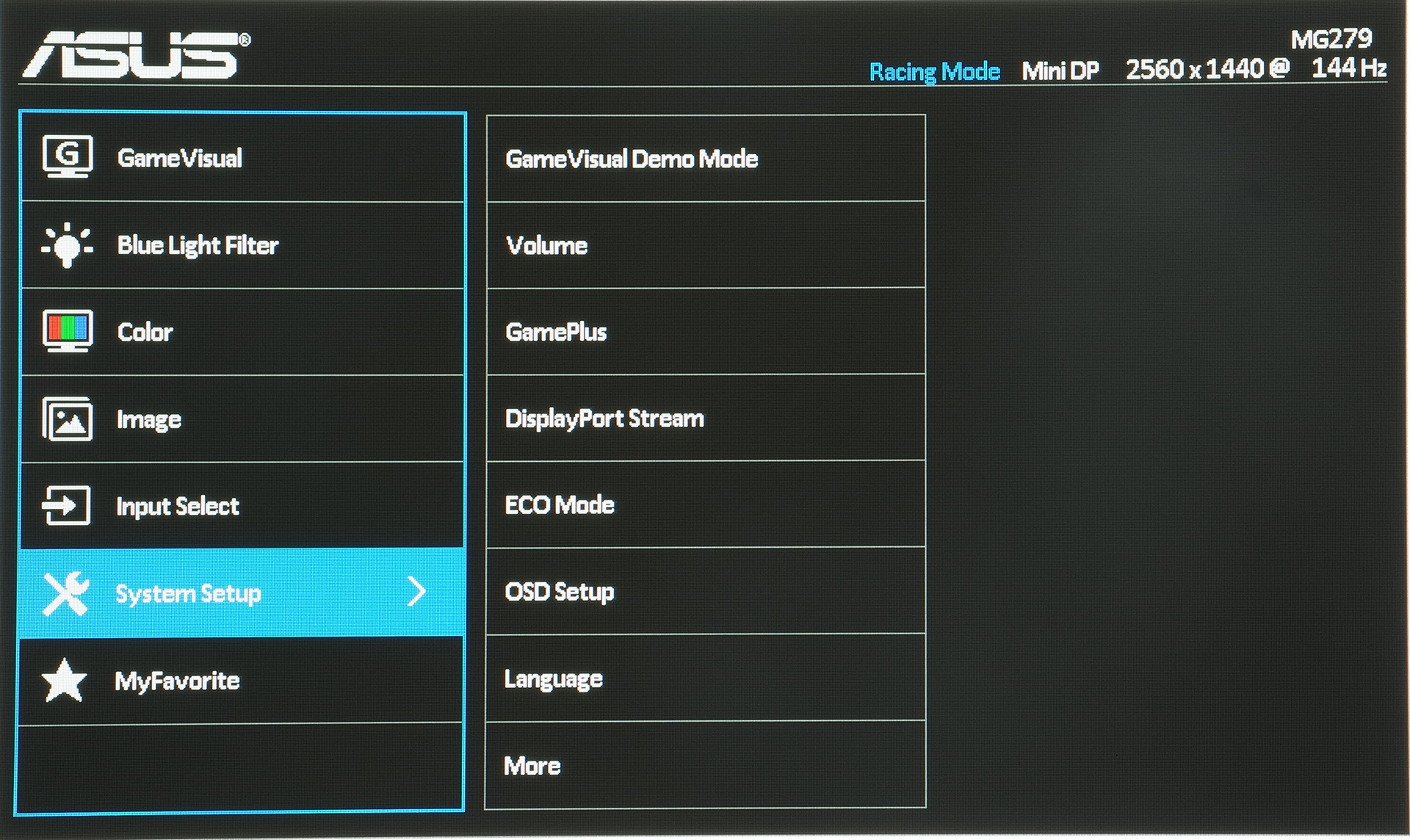
Asus MG279Q System Setup OSD

Lastly, the MyFavorite sub menu allows you to create 4 different profiles that you can switch from whenever you feel like it: say for example you’ve set up your screen with a certain selection of brightness and contrast levels for a particular game that doesn’t look as good in another. You can save it under one of the profiles and come back to use it again next time you need it without having to redo each setting in particular.

Asus MG279Q Verdict

Overall, the Asus MG279Q monitor is a very solid choice. It offers an amazing image quality, high quality materials and a few features that you may not find in other monitors of the same scale on the market. But on the same level, many other monitors out there offer their own selection of feats and special optimization tweaks which you won’t find on the Asus MG279Q. it’s a fair balance, everything included, and its price – while high – is pretty much on par with the prices of the competitors’. The AMD FreeSync is a great thing to have, but somewhat limits you to what your current hardware is.


Image Source: 1, 2, 3, 4, 5, 6, 7, 8, 9, 10

Filed Under: Headlines Tagged With: 144 hz asus monitor, 144 hz monitor, 27" monitors, Asus MG279Q, Asus MG279Q monitor, asus monitor

Google About Me Tool Makes Privacy Easy

November 11, 2015 By Nancy Young 2 Comments

Google just launched a new privacy tool called About Me

In their ongoing efforts to make their services better, the mammoth tech company Google have come up with a great and handy new addition to their services.

In case you’re confused as to what services those are, considering that Google is currently being involved in many projects from areas as diverse as robotics, internet infrastructure to genetics, the services in question are the Internet related ones that it offers its users like the search engine that made Google into the hugely successful company it is today, Youtube, Gmail, Maps etc.

And the mentioned addition is the new Google About Me tool which just solved the problem of privacy regarding all the disparate data that Google had collected from users from the various above-mentioned services.

Before this new tool, users couldn’t easily see, in one place, all their collected personal information that was shared to other users across the various services.

But now, the Google About Me tool makes it a reality. You just have to go there and you can not only see everything in one place, but you can edit the date and, most importantly, remove it. With certain limitations.

For example, you cannot remove your photo or your entire name. You can only remove the last name if you desire. But your first name is mandatory. This is probably because Google uses your photo and name to identify you as opposed to other users.

Another no-no is deleting your entire birthday. You can hide the year if you want, but the day and month will remain inaccessible. This probably has to do with Google wanting to monitor the activity of its underage users.

Of course, if you’re not interested in deleting personal information that others see, you can go the opposite way and add information. And Google will give you prompts of what it thinks would be useful like: where you work and where you were educated, contact info etc.

The Google About Me app change came because Google no longer requires users to have a Google+ account in order to access its services (as it did), so since there are now those who do have an account (and could see their visible personal info there) and those who do not, yet personal information is collected from both, it was necessary to find an efficient, fair solution.

Which they did through this neat tool.

Another feature of the tool currently in development is to let you see how other users see you across Google’s services with a preview option in the About Me app, called “View as public”.

Overall a welcome change and another step towards efficiency and simplification.

Image source: 1.

Filed Under: Headlines Tagged With: Google, Google About Me, Google tool, New Google About Me tool, new Google tool, new Google tool About Me

The Lytro Immerge Will Revolutionize VR Moviemaking

November 8, 2015 By Nancy Young Leave a Comment

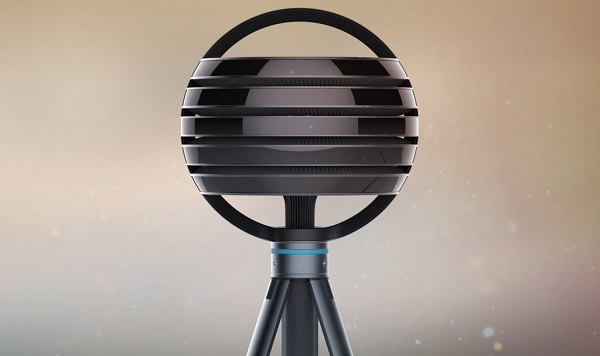
Lytro Immerge

Lytro has unveiled a ferociously complex camera for virtual reality moviemaking. Called the Lytro Immerge, this borderline sci-fi camera rig was designed specially for virtual reality from the ground up.

It seems like Lytro wants to be ahead of GoPro and even take an ambitious leap to be known as a leader in the VR industry. A tough goal to accomplish considering that GoPro and Microsoft are in the ring, boasting their muscles at anyone that dares threaten their alliance. What can a start-up like Lytro do?

It can do more damage than you can possibly think.

You see, the alien ball-shaped camera has hundreds of tiny image sensors and lenses built-in. With the help of Lytro’s signature optical tech, called light field, it can record the colour and intensity of light along with the direction it’s travelling.

That’s just fantastic – not only does it offer much needed capabilities for VR filmmaking, but it’s one of the most innovative camera we’ve seen this decade.

However, don’t think of the Lytro Immerge as just a camera. It comes packed with a plethora of VR production goodies such as – editing tools, the possibility of streaming straight from the cloud, consumer dedicated apps for VR headsets and a server.

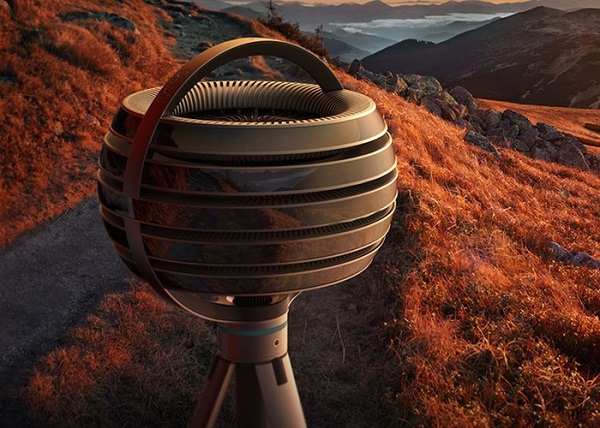
Lytro Immerge VR Camera

Lytro CEO Jason Rosenthal has told Mashable that this is the very first light-field-powered system that can create cinematic high-quality live action VR-ready footage – that was a mouthful. Nobody has thought this through, he says, from end to end – starting with how a camera should function, to storage, how you can edit footage in post production and even playback.

There are no competitors to the Lytro Immerge – at the moment, there’s no camera on the market capable of doing what the Immerge does. Google Jump might prove to be a competing platform, but a) it hasn’t been released yet, and b) it blends a plethora of existing cameras.

Even though we are inclined to think that users that wish to use the Lytro Immerge should definitely own a ten thousand dollar PC rig, the camera is more than capable to streamline its controls to an iPad.

The server, which is comprised of several terabytes, can hold only about an hour of footage.

Lytro Immerge virtual reality camera.

And here, you can see the Lytro Immerge in its own habitat, pondering on whether to film the world or destroy it…

Given its huge capabilities, it’s going to sport an astronomical price tag. Lytro has noted that it will be available starting with January of 2016 and the Immerge will retail at hundreds of thousands of dollars. Clearly, it’s aimed at VR studious and companies, and not your average VR enthusiast.

Yet, Rosenthal has noted that there will be a sort of leasing program in place, considering how expensive it is to buy the Immerge. Companies will the possibility to rent the camera for a much lower cost.

Image Source: 1, 2, 3

Filed Under: Headlines Tagged With: Immerge, Lytro, Lytro Immerge, virtual reality, VR, VR Camera

Get Your NewsON

November 5, 2015 By Nancy Young Leave a Comment

If you want local news, maybe you should get your NewsON app.

You’re probably one of the many people who have slowly become disinterested with cable and satellite TV to the point of dropping the subscription to these services and preferring to go instead for streaming services on your home TV set and/or just using the PC, laptop or mobile phone to cater for your information and entertainment needs.

If you’re not, trust me, they not only exist, but their number is growing, as “traditional” cable and satellite subscriptions are becoming obsolete.

If you are and you live in the U.S., you can rejoice, because practically the only imaginable problem of cancelling said subscriptions would be that you can no longer easily benefit from the local news coverage that was part of them. Until now.

Because NewsON, a recent initiative from five major broadcast TV groups, aims to solve specifically this problem by bringing local news to you on mobile devices, certain smart TVs and even Roku, via an app designed for this purpose.

The service boasts content (including live coverage) from 118 stations, across 75% of the United States in 90 markets.

The app is free for consumers, but ad-supported and is available for devices running both iOS and Android. Apart from the ad-based revenue, it also makes money from the monthly fees it charges station affiliates.

By this system of dual income sources which excludes charging consumers, it is estimated the service will be viable economically in the long-term, which means they can keep it free for consumers in the future as well, which in turn means it will be more appealing to the public.

So, if you want to get your NewsON app, you can do so now for free, by simply clicking the download link on the company’s website.

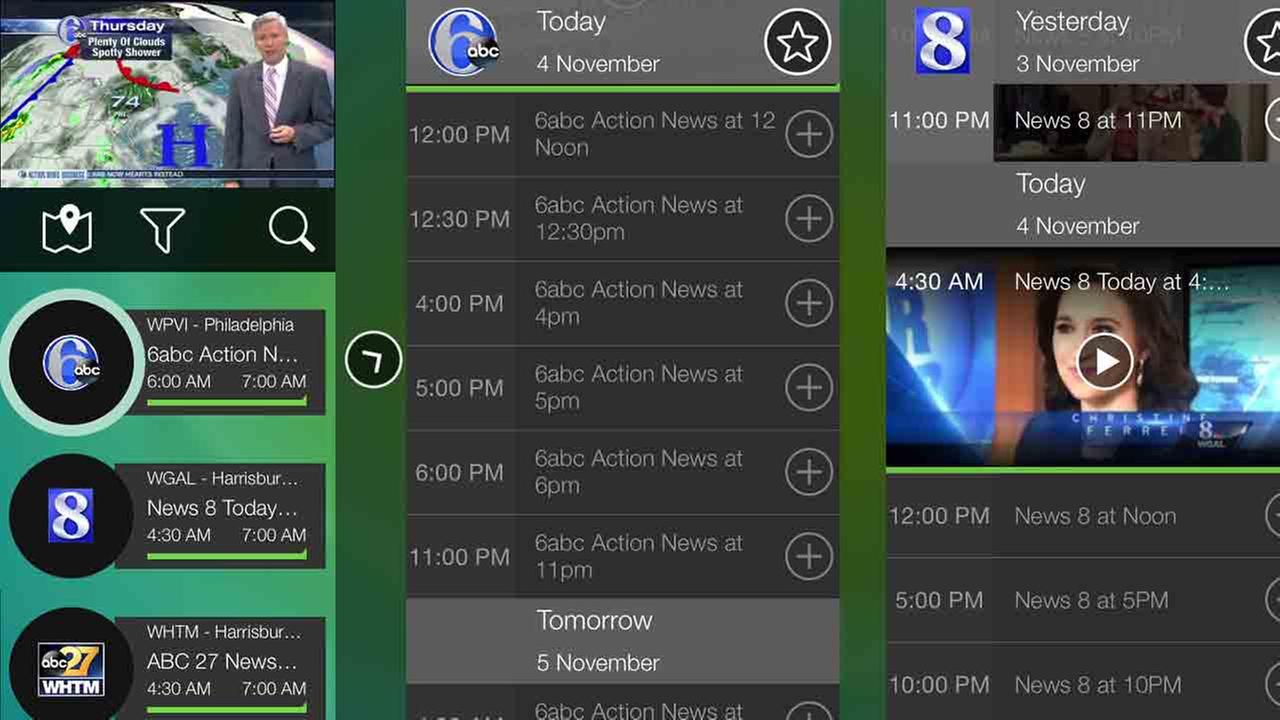
NewsON has a series of interesting functionalities and features. It allows you to chose what station the clips you are watching come from, be it from your home market or another that you might be visiting. It has a built-in timeline viewing tool which allows you to locate exactly which part of the broadcast you want to watch (weather, sports etc.) and an interactive map which helps you find the stations that should be most relevant to you, taking into consideration where you are.

Possibly the coolest feature is that you can send tweets about the news you are watching in real time and you can, naturally, view others’ posts.

Though, like any app, opinions vary regarding the the way it performs the above mentioned functions and regarding the design. So, it’s up for each user to decide whether this app truly solves the local news problem or not.

Image source: 1.

Filed Under: Headlines Tagged With: local news, local news app, newsON, newsON local news app

Chrome OS is Here to Stay, Says Google

November 3, 2015 By Nancy Young Leave a Comment

Chrome OS is here to stay, says Google

Google has announced that Chrome OS is here to stay, and that the company doesn’t have any plans to let the software get rusty. However, the big G has plans to mix and match Chrome OS with the beloved Android.

At the end of October, The Wall Street Journal has surfaced that the search engine giant’s line of Chromebooks would feature a fusion between its Android OS and Chrome OS.

Chromebooks are low-cost laptops animated by Chrome OS.

Google, which is now part of the Cali-based Alphabet, is backing Chrome OS and the company is throwing their full support. The software is unique in more than one way – it takes advantage of the cloud in order to run.

Don’t mistake Chrome OS with the Chrome browser – while they may seem to be exactly the same, these two pieces of software are fundamentally different.

Hiroshi Lockheimer, the head of Chrome OS and all of the company’s Android projects, has announced Monday that they have no plans to falter development. In his statement, he continues to add that Chrome OS is here to stay.

However, even if Chromebooks will be equipped with a ChromeOS/Android blend, how many users will notice the difference? Chromebooks are quite popular among students that look for budget laptops.

Google notes that Chrome OS is here to stay

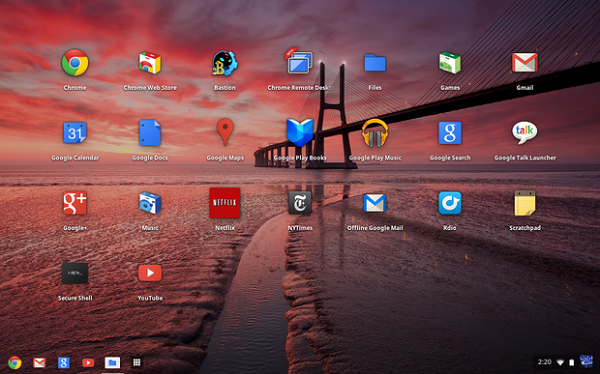
Chrome OS interface

These low-cost laptops have received good to great reviews in the past, but, unfortunately for Google, their product line ranked only for three percent of last year’s laptop shipments.

This is according to market research firm International Data Corporation, or IDC for short.

Chromebooks don’t usually make their way to homes or offices. Schools seem to favor their low retail price – $150; and students who need a lightweight laptop for projects, essays and casually browsing the interwebz.

Google notes that more than 30,000 new Chromebooks are brought to life in classrooms every day across the US. According to IDC, in the 2014 education market, Chromebooks comprised almost 30 percent of laptops.

Lockheimer has said that Chromebooks fans shouldn’t worry that their laptop will go obsolete. This mainly because Google is working to develop their software even further, attempting to bridge the gap between Chrome OS and Android.

Google is planning to release a brand new media player for Chrome, along with a visual rebranding in order to make it look more like the company’s other products.

After TWSJ has published their piece last week, Lockheimer has publicly come out to defend the company’s stance on Chrome OS. He even tweeted that Google is more than committed to their software.

The bottom line is that, Chrome OS is here to stay – one way or another.

Image Source: 1, 2

Filed Under: Headlines Tagged With: Alphate, Chrome OS, Chromebooks, Google, Hiroshi Lockheimer

Facebook Other Folder Soon To Be Replaced

October 28, 2015 By Nancy Young Leave a Comment

A change regarding the Other folder is coming.

Facebook just announced a soon to be implemented change to its service that is a double-edged sword which surely has the potential to polarize its users.

The big deal is about the Facebook Other folder, specifically because this feature(?) has been no big deal at all so far. Those who’ve never even seen it before (in the Desktop version, it’s in the messages tab next to Inbox, if you look carefully), as well as those who knew of it but never used it or used it very rarely are the crushing majority of Facebook users.

The Facebook Other folder will soon disappear.

This happens because the Other folder is the place where all the messages from people who you are not friends with go. And the rationale behind it was that if you wanted to receive messages from those persons, you could always make them FB friends. If not, Facebook was protecting your privacy and helping you not get spammed by just any stranger by putting all such messages in a folder separate from your main (Inbox) one in which you chat.

However, the many real situations of out-of-touch or unknown relatives trying to contact each other, or those messages coming from people you just met at a party or business meeting yesterday or those from a helpful stranger trying to return something to you presented a genuine problem that sometimes meant missing out on opportunities you would have liked to seize.

Also problematic is that in the case of mobiles, which is how a large proportion of users access Facebook, the Other folder is not even integrated in the Messenger app or messenger tab of the original app.

So, the company decided to introduce a new level of “openness where you can get in touch with anyone in the world but still have the control yourself of who contacts you and who can’t.” And in the words of the head of Messenger, David Marcus, they plan to do that by replacing “privacy by obscurity” with “openness with control”.

In short, the Facebook Other folder will be replaced by a new feature called Message Requests, which presumably will act like the Friends Requests feature works, only for messages, by placing those coming from non-friends (meaning any of the ~1.5 billion FB users) in your Inbox pending your review.

From here, if you delete or ignore one such Message Request you will no longer see messages from that person in the future. FB will also factor in the sender’s previous messaging behavior and whether you typically approve Message Requests. And Facebook’s spam detection systems that flag recently created accounts with few friends will also be part of Message Requests’ safety measures.

Image source: 1, 2.

Filed Under: Headlines Tagged With: Facebook, Facebook change, facebook new feature, Facebook Other folder, Other folder

Fourth GM Recall For Fire Risks Targets 1.4 Million Cars

October 27, 2015 By Nancy Young Leave a Comment

The fourth GM recall for fire risks is now happening.

Third time’s apparently not the lucky charm, as General Motors (GM) have issued a fourth recall for fire risks of some of their cars already on the roads. These risks have to do with drops of oil on the exhaust manifold. And the very worrying and eyebrow-raising part is that ~1.4 million GM cars are this time affected by the issue worldwide and the last time that General Motors recalled cars for fire risks was not so long ago. Namely, in 2008.

The company’s own admission gives some “interesting” statistics: “19 cases of reported minor injuries over the last 6 years” and “luckily, no crashes or fatalities”. Still, 19 injuries in 6 years due to an issue that apparently wasn’t covered after the first three recalls meant to deal with fire risks is a pretty bad figure. Plus, the property damage (like garages that caught fire) added to this also doesn’t help. Especially when the total number of reported fires due to cars supposed to have been repaired in earlier recalls reaches 1,345 cases!

Of course, there’s a rational, company-saving explanation for what looks like a pretty big mishandling of affairs: “aging and wear to the valve cover and valve cover gasket can allow oil seepage.”, which nullified the previous repairs, according to a GM spokesman called Alan Adler.

And the magical temporary solution that he foresees the company asking owners to adopt until their cars are recalled? Quite simple, sirs and ladies. Just don’t park in garages, ok?

Worth mentioning as well is that the first recalls (May 2008), did not come entirely at GM’s initiative, but were rather prompted by an investigation from the National Highway Traffic Safety Administration, which at the time looked at 138 reports of such fires in GM vehicles.

As the typical scenario involved these fires starting 5 to 15 minutes after a vehicle was parked, GM gave owners the same advice, to not park their cars in the garage until a fix is given.

So, you have to wonder, just about how many times should an issue that causes such an inconvenience, property damage, potential injuries to customers and a fairly consistent amount of costs to GM themselves have to pop-up and be dealt with until it is actually fixed?

Customers are probably hoping that 4 sounds like a pretty good number, and that this GM recall for fire risks will be the final one.

In the meantime, get your cars ready for recall if they are one of the following models: 1997-2004 Pontiac Grand Prix, 2000-2004 Chevrolet Impala, 1998-1999 Chevrolet Lumina and 1998-2004 Chevrolet Monte Carlo, 1998-1999 Oldsmobile Intrigue and 1997-2004 Buick Regal.

Image source: 1.


Filed Under: Headlines Tagged With: car fire, General Motors, General Motors car fire, General Motors recall, GM, GM recall

Apple Improves iWork Apps on All Platforms

October 16, 2015 By Nancy Young Leave a Comment

Apple Improves iWork Apps on All Platforms

Apple improves iWorks apps on all platforms by adding new features. Even though the Cupertino-based company didn’t announce anything regarding their Keynote, Numbers, and Pages apps in the last few months, software devs have been hard at work trying to bring them to modern times.

Apple just rolled out a major update for the trifecta of power on all of the company’s platforms – iCloud, OS X and iOS. They have been brought to speed with the latest iOS and OS X, along with some highly anticipated features.

So, for iOS Numbers, Keynote and Pages can now work with Picture in Picture, Slide Over and Split View on the iPad. All of the multitasking features that iOS 9 delivered are now fully integrated with the big A’s apps.

It’s worth noting that VoiceOver received a well deserved polish and it’s vastly improved to better help visually impaired people.

Finally, Apple has removed the beta tag from it’s iCloud.com web apps and it has also added a lot of new features from the company’s other platforms. Users now have the ability to comment on iCloud.com – let’s see how many trolls does Apple manage to gather in 48 hours.

Apple has also added quintessential Google Docs features, and it was about time they did so.  Users can see all of their shared docs within the browser on their smartphone.

Apple Improves iWorks apps i.e. Keynote, Numbers and Pages on all platforms

With these awesome new updates, it has become a serious competitor to Google Drive apps and Office.com web productivity apps.

A really great addition is iWork 2008 and 2006 support for the latest version. It was about time if you ask me. Users have been calling Apple out for being too lazy. Other features consist of improvements for Microsoft Office docs compatibility i.e. no more random errors, and Mac finally gets OneType – amongst other awesome features.

These aren’t eye-candy additions – no new icons, or stunning visuals. These are well deserved under-the-hood polishes that we have been waiting for quite some time now. To be frank, productivity apps like the ones mentioned above don’t really need design overhauls – they just need to function better and more reliable.

Even though news is out that Apple improves iWork apps on all platforms and that the company will continue to roll out more updates in the near future, the Cali-based tech giant is keeping silent.

With these awesome new updates, it has become a serious competitor to Google Drive apps and Office.com web productivity apps.

For a comprehensive log of changes you can check the official patch notes, if you will, on their website.

See Elon Musk, Apple isn’t the Tesla Graveyard as you put it. The company actually cares about its users. It also makes profit – unlike others.

Image Source: 1, 2

Filed Under: Headlines Tagged With: Apple, Apple iWorks, iWorks

Elon Musk Says That Apple Hires Their Rejected Engineers

October 9, 2015 By Nancy Young Leave a Comment

Tesla founder Elon Musk claims that Apple is hiring their fired engineers

Wizkid Elon Musk is not concerned that Apple could be a potential rival in the electric car industry. He says that the Cupertino-based tech giant hires employees that were ultimately fired by Tesla.

Elon Musk told the Handelsblatt, a German publication, that Apple has only poached engineers that didn’t make it at Tesla. He continues to add that they were clearly not important to the company.

Elon Musk says that they have a running joke regarding fired engineers that join the Cupertino-based company – he dubs Apple the Tesla Graveyard. Individuals that don’t make it at Tesla, ultimately go to work for Apple.

Considering this, nobody at Tesla is worried because Apple is working on their electric car program titled Project Titan.

Elon Musk isn’t the only one foretelling Apple’s demise if the company decides to sink money into its automotive ambitions. Bob Lutz  has warned Apple that their new project may end up being a giant money pit.

The Tesla founder respects that Apple is trying to actually build something significant, but he adds that cars are way more complex than your average smartwatch or phone. He continues to explain that the giant tech company will never be able to surpass his own success, nor reproduce it. Yet, he failed to argument why.

Success is a somewhat of a relative term to Elon Musk, considering that Tesla is expected to turn a profit from 2020 upwards.

It’s not news that Apple and Tesla are battling over engineers. Regardless of how much Elon Musk wants to say that those who end up in Apple are Tesla rejects. However, Tesla is indeed getting the big end of the stick – in May, they announced an attrition rate of five to one.

Elon Musk isn't worried about Apple's Project Titan

Apple is reportedly enticing ex-Tesla employees to jump ship by offering a 60 percent salary raise and a staggering $250.000 signing bonus.

In the past couple of months Apple has been pushing aggressively on their Project Titan front. Reports earlier this year claim that almost 1.000 employees have been assigned on their electric car project. But despite how many individuals have been hired by Apple, nothing else has surfaced. We don’t expect anything to leak, because Apple keeps a contractually tight lid.

A few weeks ago reports have showcased that Apple is secretly undergoing car operations out of a hidden dedicated facility in San Jose.

Elon Musk is a respected entrepreneur, and a brilliant mind, but he seems to be putting on his poker face with these statements. We aren’t sure whether Apple’s electric car will be a hit or a not, but considering that Elon Musk is discussing Project Titan reassures us that Apple is indeed working on one.

Image Source: 1, 2

Filed Under: Headlines Tagged With: Apple, Electric Car, Elon Musk, Project Titan

You Can Make Adidas Futurecraft 3D at Home In the Future

October 8, 2015 By Nancy Young Leave a Comment

Adidas Futurecraft 3D concept

You can make Adidas Futurecraft 3D at home in the future and according to chief executive officer Eric Sprunk of Nike, 3D printing footwear at home will be possible sooner than we thought. What is Adidas Futurecraft 3D?

It employs the assistance of 3D printing and Adidas is here to explain the process – well, at least the midsole part. You see, Futurecraft 3D is Adidas’ new unique 3D printed running shoe midsole. It can be fully customized in order to tailor to an individual’s foot. This initiative entails that athletes will have better shoes that will suit their needs. And, of course, ordinary people like you and me will be able to design our own footwear as we see fit – in accordance with some guidelines, one may presume.

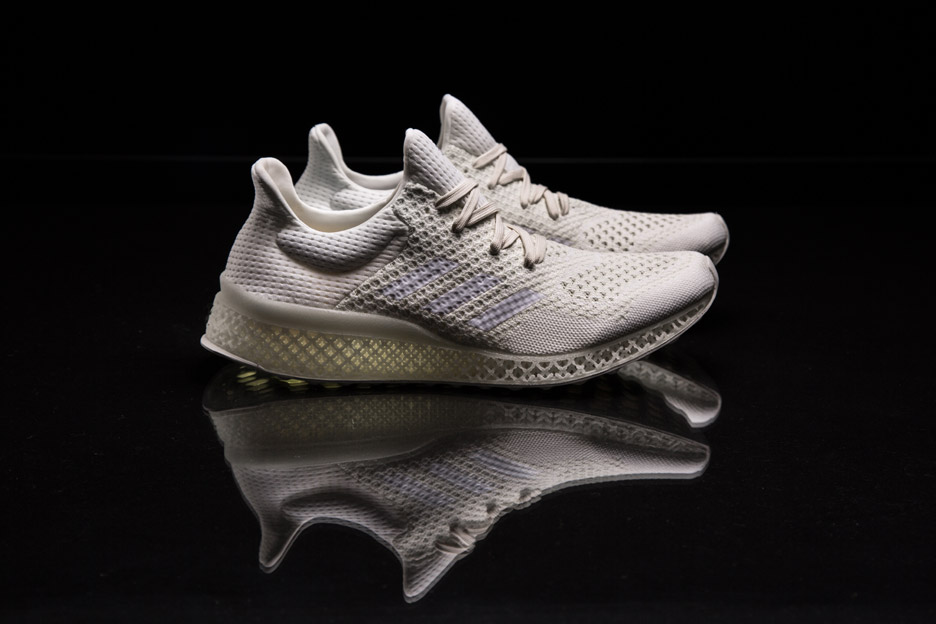
Adidas Futurecraft 3D shoes

The recently released statement has nothing to do with Nike’s plans of 3D printed footwear, but the resemblance is uncanny. A spokeswoman on behalf of Adidas notes that Paul Gaudio, who is a Portland-based creative director for the company, will be heavily involved in everything that means Futurecraft 3D.

This 3D concept means that anyone can walk into an Adidas store, do a short jog on a treadmill and get a design for 3D printed shoes that will be tailored to his, or hers needs. This is what Adidas wants to achieve – the company wants to be able to create cushioning for every foot, a breathable and flexible carbon copy of the individual’s footprint. This means that it will exactly match pressure points and contours.

Adidas Futurecraft 3D process

Currently, Adidas Futurecraft 3D is in its prototype phase. This should be taken with a grain of salt. While the idea is out there, the technology to achieve such a feat is, well, lacking. The good news is that it isn’t lacking completely.

Paul Gaudio notes that Futurecraft is the company’s sandbox. It’s a means to challenge themselves and see how much they can push the boundaries of their craft. A new approach to design – real, raw and fast; Gaudio adds. They are bringing together all the qualities that comes with hand crafting a shoe with prototyping and 3D technology.

Adidas Futurecraft 3D will be fully breathable carbon copies of your footprint

Materialise, a leading specialist in 3D printing and one of the pioneers, is Adidas’ partner in bringing 3D printed footwear to reality. Expect more news about Adidas Futurecraft 3D footwear in the upcoming six months.

Adidas Futurecraft 3D pair of shoes

3D print enthusiasts, would you buy a design of your footprint so you can make your own shoes at home? Or are you more keen to let Adidas do all the work?

Regardless of your decision, this trend will surely skyrocket before the decade ends.

Image Source: 1, 2, 3, 4, 5

Filed Under: Headlines Tagged With: 3D print, 3D Printing, Adidas, Adidas Futurecraft 3D, Futurecraft 3D

  • « Previous Page
  • 1
  • …
  • 17
  • 18
  • 19
  • 20
  • 21
  • …
  • 36
  • Next Page »

Subscribe to Blog via Email

Enter your email address to subscribe to this blog and receive notifications of new posts by email.

Join 11 other subscribers

Recent Articles

police handcuffs man

German Man Probed In Poisoning That Killed 21 Employees Since 2000

June 29, 2018 By Kenneth Scott Leave a Comment

Chicken wings bar

Intoxicated South Carolina Man Punches Waitress Who Refused to Serve Him Alcohol

June 29, 2018 By Karen Jackson Leave a Comment

gaming

New Zealand gamer Who Flew Halfway Across The World for Virginia Teen Gets Shots By Her Mother

June 28, 2018 By Cristopher Hall Leave a Comment

party

Former Virginia Tech Freshman Sentenced to 50 Years in Prison for Stabbing a Girl to Death

June 28, 2018 By Roxanne Briean Leave a Comment

bonfire

British Couple Sentenced to Life in Prison for Torturing and Murdering French Nanny

June 27, 2018 By Deborah Campbell Leave a Comment

pay phone

Texas Father of Girl Disappeared in the 80s Ignored by Authorities

June 26, 2018 By Cristopher Hall Leave a Comment

bottled water

San Francisco Woman Threatened to Call Police on Girl Who Sold Ice Water for Disneyland Trip

June 25, 2018 By Roxanne Briean Leave a Comment

Maplewood Park

Missouri Man Robbed by Date and Accomplice in Park

June 22, 2018 By Nancy Young Leave a Comment

coding

New York Man Sentenced in Cyberstalking Former Girlfriend, Mailing Drugs to Her Dorm

June 22, 2018 By Deborah Campbell Leave a Comment

headphones

Bose Poised to Launch Sleepbuds, In-Ear Headphones That Help You Sleep

June 21, 2018 By Nancy Young Leave a Comment

Police light

Intoxicated Female Driver in Custody for Pulling Arresting Officer by the Hair

June 21, 2018 By Kenneth Scott Leave a Comment

kitchen

Restaurant Manager Arrested and Charged in Shooting Death of Co-Worker over Negative Yelp Reviews

June 20, 2018 By Karen Jackson Leave a Comment

plastic container

Pennsylvania Couple Charged in Violent Death of Infant Discovered Buried in Cat Litter

June 19, 2018 By Cristopher Hall Leave a Comment

tailpipe

Minnesota Teen Gets Head Stuck In Oversized Tailpipe Winstock Music Festival

June 18, 2018 By Karen Jackson Leave a Comment

Pages

  • About Us
  • Contact us
  • Privacy Policy
  • Privacy Policy GDPR
  • Staff
  • Terms and Conditions

Recent Posts

  • German Man Probed In Poisoning That Killed 21 Employees Since 2000 June 29, 2018
  • Intoxicated South Carolina Man Punches Waitress Who Refused to Serve Him Alcohol June 29, 2018
  • New Zealand gamer Who Flew Halfway Across The World for Virginia Teen Gets Shots By Her Mother June 28, 2018
  • Former Virginia Tech Freshman Sentenced to 50 Years in Prison for Stabbing a Girl to Death June 28, 2018
  • British Couple Sentenced to Life in Prison for Torturing and Murdering French Nanny June 27, 2018
  • Texas Father of Girl Disappeared in the 80s Ignored by Authorities June 26, 2018
  • San Francisco Woman Threatened to Call Police on Girl Who Sold Ice Water for Disneyland Trip June 25, 2018

Categories

  • Business
  • Entertainment
  • Finance
  • Headlines
  • Health
  • Life
  • Nature
  • Science
  • Sports
  • Tech & Science
  • Travel
  • Uncategorized
  • United States
  • World

Copyright © 2026 ArgyllFreePress.com
About · Privacy Policy · Terms of Use · Contact