Argyll Free Press

Growing News Network

Sunday, May 3, 2026
Log in
  • Business
  • Finance
  • Sports
  • Tech & Science
    • HP Envy 4500 Review
    • LG Optimus 170 Review
    • iPod Touch 6th Generation Review
    • HTC One M8 Accessories Set-up
    • Surrealist Games You Must Play
    • Hisense Sero 8 Review
    • Dell Latitude e7440 Review
    • HP Laserjet 1536dnf mfp Review
    • Garmin Fenix 2 Review
    • Skype Vs Viber
    • Best Video Conferencing Software
    • Sony mdr 1r Headphones Review
    • Canon Rebel t3i Review
    • Sennheiser Momentum 2-0 Review
  • Travel
  • Headlines
  • Health
  • United States

Lyft Gets $500 Million from General Motors

January 4, 2016 By Nancy Young Leave a Comment

Lyft Gets $500 Million from General Motors

Lyft gets $500 million from General Motors and joins the race for the first consumer-ready self-driving car system.

Lyft is valued at $5.5 billion due to financing from GM, Saudi Arabia’s Kingdom Holding CO., Japanese e-commerce giant Rakuten Inc. and Janus Capital Management.

This is the first time a large automaker joins forces with a ride-sharing company. Considering that they are a huge threat to auto sales, as more and more urban commuters prefer to hail a ride from Uber or Lyft rather than owning a car, an alliance doesn’t seem so shocking.

With Google, Uber, Tesla and Apple heading towards autonomous vehicles, the industry is trying to adapt and reshape itself.

General Motors have announced that it would work closely with Lyft on developing a self-driving car system that would let customers order a vehicle via their smartphone, tablet or personal computer, and have said car arrive at their door step with no driver.

General Motors President Dan Ammann has said in an interview that the very first large-scale deployment of self-driving cars will be in demand on ride-sharing platforms – as in Uber and Lyft.

GM is known to have already started developing autonomous cars, and that it plans on testing a fleet of vehicles at their Detroit technical center in 2016, but there’s no news regarding on the phase of development with Lyft. Ammann has declined to comment on the status.

The fleet of vehicles will be comprised of 2017 Chevrolet Volts.

Also, GM has confirmed that their Super Cruise tech, which has been in development since 2012, will be finally available in the 2017 version of the Cadillac CT6.

In the following months, the car-manufacturer giant plans to build a series of rental-car centeres where Lyft drivers have the possibility of renting vehicles at lower, discounted prices.

Lyft had previously managed to raise about $1 billion from investors across the world including hedge-fund behemoth Carl Icahn, Middle Kingdom-based ride-hailing company Didi Kuaidi Joint Co., Tencent Holding Ltd., Alibaba Group Holding Ltd., US-located Founders Fund, Coatue Management and Andreessen Horowitz.

After receiving funds from Carl Icahn, back in May of 2015, Lyft was valued at $2.5 billion.

Even though that seems to be quite huge, its direct competitor, Uber, has raised a total of about $12 billion both in equity and debt.

Uber Technologies have also managed to raise, roughly, the same funds as Uber, but the Cali-based ride-sharing company is valued at $64.6 billion – higher than even GM’s market value, which stands at $53 billion.

Image Source: 1
Filed Under: Headlines Tagged With: General Motors, GM, Google, Lyft, Self Driving Cars, uber

Samsung’s Tizen-Powered Remote Will Control Your Smart Home

January 4, 2016 By Nancy Young Leave a Comment

Samsung's Tizen-Powered Remote Will Control Your Smart Home

Samsung’s Tizen-powered remote will control your smart home – in the future, that is.

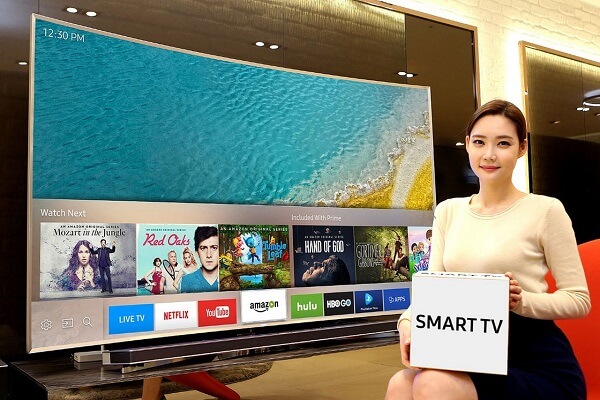
Simplicity is a core facet of Samsung’s 2016 line of Smart TVs. Building an universal remote control and an improved  Smart Hub user interface might just make the Korean company the choice for many smart home enthusiasts.

Even now, there are quite a few modern living rooms that have several devices connected to a big screen TV – a gaming console, a Blu-Ray player, a video-streaming box and other gadgets. Controlling all of them means that the consumer has to manage, let’s say, more than five remotes.

Samsung understands that this is just absurd and comes with the solution in the form of the Tizen-powered device. This will serve as the sole controller for every device that connects to a Samsung Smart TV.

The company claims that it can immediately detect set-top boxes that are connected via the HDMI port, among other devices.

However, the Korean-based company doesn’t say if the remote control will ship with 2016 Samsung Smart TVs, or if consumers will have to acquire the controller separately.

Yet, if it is indeed included in the box, then it could very well put Logitech’s department of third-party universal remotes out of business.

Samsung also revealed at the end of 2015 that they will be making their Smart TVs fully compatible with IoT – the Internet of Things; via SmartThings. This means that you will be able to control everything connected in your home, from light bulbs to thermostats, via the Tizen-powered device.

This turns Samsung’s Smart Control into a direct competitor to Logitech’s Harmony Remotes.

Samsung has announced that the company is trying to bring a more unified approach to its TV OS. It intends to make it easier for users to switch from a content service to another, as well as between devices. Take linear TVs, gaming consoles – read, Microsoft’s Xbox One, Sony’s PlayStation 4 and Nintendo’s Wii U; and set-top boxes.

This means that users will be able to search for content across all of their devices via a single search box.

Samsung has also announced that they will be present at this year’s CES event in Las Vegas. The Consumer Electronics Show is the biggest tech event in the world, and it’s going to start on January the 6th. Until then, we can only speculate how awesome the tech giant’s new device will be. Stay tuned as we will report the biggest and most thrilling devices from this year’s CES event.

Image Source: 1
Filed Under: Headlines Tagged With: ces, CES 2016, Internet of Things, IoT, samsung, Smart TV's

WhatsApp Court Ordered 48 Hour Service Shutdown

December 17, 2015 By Nancy Young Leave a Comment

Brazilian Flag And WhatsApp Logo

In another example of controversy and law and social media clashing, the 1st Criminal Court of São Bernardo do Campo located in São Paulo, Brazil, decided yesterday to shutdown WhatsApp’s services in all of Brazil.

This ban will last for 48 hours and has already affected the market standing of Whatsapp against its biggest competitor there, Telegram.

In the first three hours since the shutdown went into effect, 500,000 new Brazilian users signed up for Telegram. After four hours of shutdown in total, the number had swelled to 1,000,000. And soon after jumped to 1,500,000.

Telegram was very pleased by the upheaval and determined to make the best of it.

Mark Zuckerberg of Facebook (which owns WhatsApp) and WhatsApp founder Jan Koum were not so pleased. The latter posted the following on Facebook, and Zuckerberg liked the post:

We are disappointed in the short-sighted decision to cut off access to WhatsApp, a communication tool that so many Brazilians have come to depend on, and sad to see Brazil isolate itself from the rest of the world.

However, the WhatsApp court ordered 48 hour service shutdown isn’t something that came out of the blue. A judicial court order was issued on the 23rd of July, that WhatsApp did not comply with. They received another notification of the order on the 7th of August, when they had still not complied, and were also issued a fine.

Then, yesterday, Judge Sandra Regina Nostre Marques took note that WhatsApp is still not complying so, within the boundaries of the powers she wields under Brazilian law and according to its Internet legislation, ordered the shutdown.

All of the Brazilian phone companies were instructed to block WhatsApp’s texting and Voice Over IP (VOIP) services.

SindiTelebrasil is one of these and has obeyed the order with stringency and zeal.

It comes as no surprise, considering that Brazilian phone companies have kept trying to control companies like WhatsApp and Telegram.

They claim VOIP services are similar to those offered by them and are in fact competition that undermines them.

As such, Brazilian phone companies claim that companies like WhatsApp should be considered telecommunications companies and subjected to Brazilian law, just like SindiTelebrasil and others are.

The staggering fact is that a report shows 93% of the 110,000,000 people using the internet in Brazil used WhatsApp prior to the shutdown.

That’s why there is an economic battle on top of the legal battle, with competitors like Telegram and the Brazilian phone companies respectively, trying to get in on WhatsApp’s action.

Still, the legal battle remains at the core. The Brazilian Network Band News TV claims that the court’s insistence towards the shutdown stems from an investigation focusing on a drug trafficker linked to one of the biggest and most dangerous criminal gangs in São Paulo who used WhatsApp in his dealings.

Image source: 1.

Filed Under: Headlines Tagged With: Braziian court order, Brazilian court, Brazilian court orders WhatsApp shutdown, court, court order, court ordered, whatsapp, WhatsApp 48 hour shutdown

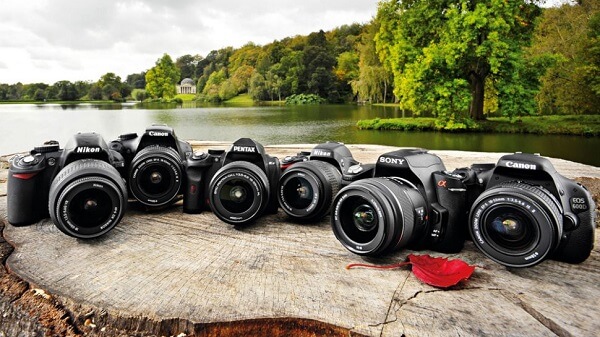
Top 7 Best Entry Level DSLR Cameras – A Guide to Begin With

December 16, 2015 By Nancy Young Leave a Comment

Best Entry Level DSLR Cameras

If you’re planning to shelf your smartphone and its camera after finally deciding there’s only so much you can do with it and pick up photography and take your skills to the next level, then it’s probably the proper time to start considering purchasing your first DSLR.

If you take into account the fact that the transition between amateur means of taking photos and actual cameras that don’t just advertise themselves through the number of pixels is a pretty confusing and overwhelming process, you shouldn’t just jump in and straight out purchase a professional camera right away. Not only that the learning curve is rather steep, but most professional cameras will most likely shake you of a great portion of your savings too.

Entry level DSLRs may lack some of the advanced features that you only get with professional gear but they will serve you as a gateway device a fair amount of time. However, choosing one that is right for you isn’t very straightforward: no matter how hard you try, you won’t be able to find that one camera that can serve you perfectly in every single aspect or type of photography one can do. Instead, there is a number of factors and types of builds you can use and should consider before making the big purchase.

We’ve taken the liberty of making a small summary of what you should be looking out for when looking to buy a DSLR – be it entry level or professional.

  • Brand

A critically acknowledged factor that we tend to guide most if not all of our purchases on, it applies to DSLRs too. In the trade of photography, there are two major brands that basically lead the market; as you probably already know, the ones in question are Nikon and Canon. And there’s no doubt about it – they are the most popular for a reason, whether we’re talking about seniority in the market, the quality of their products or even things that go as far as innovation.

Best Entry Level DSLR Lead Brands

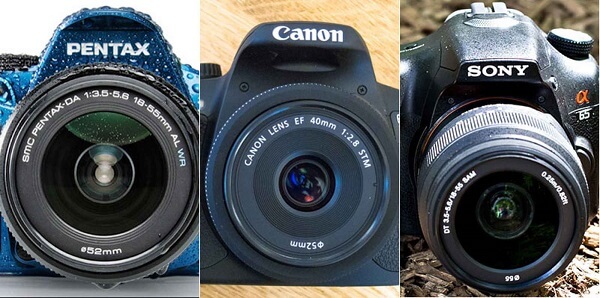
While the first natural intention would be to lean towards one of the Nikon or Canon DSLRs, it doesn’t mean that you should completely disregard cameras that come from lesser competitors. There is a number of manufacturers that manage to pull off fairly impressive devices which might get overlooked simply because they lack a popular tag to go along with. Some companies that make great cameras which you should take a fair look at are also names such as Pentax or Sony.

  • Price

In terms of price, if you’re just starting up in the ways of photography, you have a few choices. Most new entry-level DSLRs won’t come cheap and take you as far as $1,000 in the worst case scenario, while staying in the $500 range in the best case scenario. If you find yourself on a budget and you want to stick to cheap DSLR cameras, however, you can either opt for a slightly older model – say, a year or a little older than that in order to not miss on the greatly important, newer features that the best entry level DSLR cameras come with – or choose whether you go for a kit lens or body-only purchase.

Buying only the body will be cheaper, at least to begin with. But you still require a lens purchase afterwards which won’t be particularly cheap but which – on the upside – you can choose according to what kind of photography you’re interested in. There won’t be a considerable difference in price unless you go for a less impressive set of lens and honestly, most of the time it’s better if you stick to the default kit lens that you get with the DSLR when you purchase it. It will most probably cover a fair amount of zoom range and is a more generic tool to start yourself off with while still being able to experiment. You should, however, take into consideration the fact that you shouldn’t expect the greatest of image qualities to come out of a basic kit lens, as they’re usually not that great when it comes to taking photos in more difficult conditions.

  • Sensor

The sensor is more often than not responsible of how the photos you want to take are captured: starting with resolution and going as far as the way it handles the scene you want to take a photo of in terms of lighting. The larger the sensor, the better, at least in most cases. Because the sensor in your camera is responsible for capturing light and using it to create the image itself, one could argue that it is the most important part of the camera altogether.

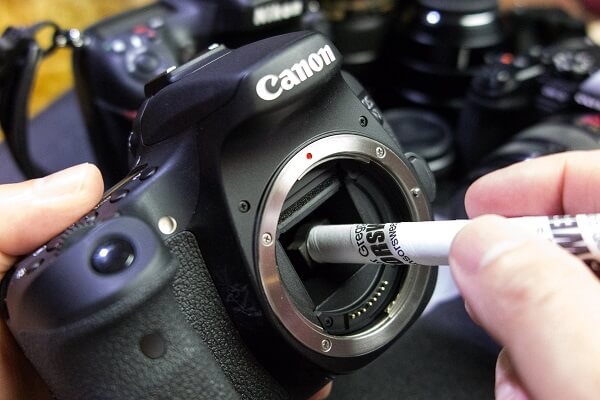
Best Entry Level DSLR Cleaning Sensor

Sensors come in many types but the most popular you’ll find in entry-level DSLRs are the APS-C sensors – with a crop factor of 1.5x to 1.7x and an usual size of 23.6 x 15.6 mm they remain relevant in terms of ultimate picture quality without sacrificing too much on the space they take. In the end, there are a lot of aspects of the sensor that you should be taking into consideration when browsing for what is to become the best entry level DSLR for you.

  • Shutter speed

This particular factor should never end up overlooked. Much of your photos’ clarity is granted thanks to the shutter speed in close collaboration with the auto-focus feature. Faster shutters are proficient at letting the camera capture photos much faster, together with the burst speed value and the number of AF sensors. If you’re studying your potential DSLR market, you should consider looking for cameras that have burst speeds of 5 frames per second and 1/4000 or above maximum shutter speed.

  • Autofocus sensors

Making use of the two types of autofocus sensors provides a much higher accuracy in focusing your subjects when you’re taking shots. The two types I’m referring to are vertical sensors and cross-type sensors. The difference between the two are the fact that the former only detect and focus on contrast along a vertical line while the latter are two dimensional contrast focus points. Basically, the more the merrier; they grant your camera to be able to detect and focus on each subject in the picture separately, bringing out the different interest points in it.

  • Megapixel value

As you might have been able to tell by my comment related to it in the intro, megapixels are a touchy subject. While this particular aspect is just as important as any other, there is a bad trend that has been adopted by most smartphone manufacturers who advertise their products’ cameras based on the megapixel count alone. In reality, this number only accounts for the maximum resolution that your camera is capable of; and just because the camera can shoot photos in huge resolutions doesn’t also mean the pictures are great.

The list could sincerely go on, counting in every single feature that you may find on some of the best cameras for beginners out there and how they could become something important for you to guide your purchase and beyond. Depending on the type of photography you‘re planning to try out, some things may turn out to be better than others for you and you alone. Knowing every single little thing your future camera can do, however, is never a bad thing.

Now that we’ve taken a short trip down all the aspects that you should be looking at when picking a camera, we’ve compiled a list of the best entry level DSLR cameras that we could find on the market based on an average of stats and features. Do remember that it falls down to you to decide which is the best. But here are some good options nevertheless.

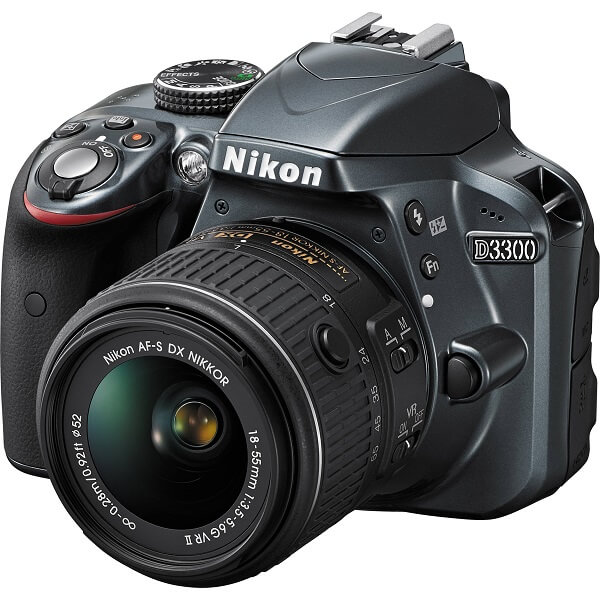
Best Entry Level DSLR Choice #1 – Nikon D3300

Best Entry Level DSLR Choice #1 – Nikon D3300

One of the first choices that came to mind – and for good reason – is the Nikon D3300, actually known as one of the superior entry level DSLR out there. The reason behind that is the very good image quality that it can render, thanks to the fast shutter speed, an antialiasing filter, 1080p at 60 frames per second shooting and even a Guide Mode for beginners. In all sense, the Nikon D3300 is a particularly solid choice when it comes to a DSLR camera for beginners and by extrapolating, probably the best entry level Nikon DSLR.

The Nikon D3300 comes at a price of $399.99, making it very cheap compared to what one would expect.

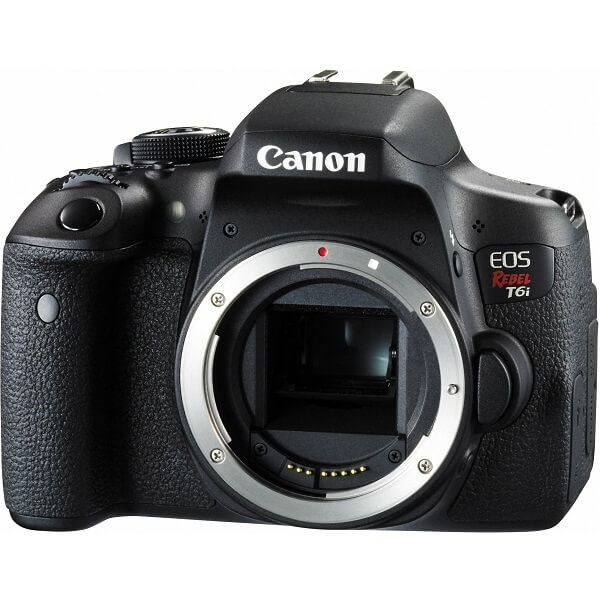
Best Entry Level DSLR Choice #2 – Canon EOS 750D Rebel T6i

Best Entry Level DSLR Choice #2 – Canon EOS 750D Rebel T6i

The Canon EOS 750D Rebel T6i is one of the cameras that has adopted a 3 inch 1,040k dot vari-angle touchscreen to make your life easier when having to shoot from different angles without a tripod. While that by itself is a great thing to have, especially in a DSLR for beginners, that’s not what makes this particular model great. Instead, it adopts a 19-point all cross-type autofocus system, making it an amazingly accurate and fast photo capture device. It sticks to the average 5 frames per second shooting rate, but all things considered, this is probably one of the best entry level Canon DSLR.

You can purchase the Canon EOS 750D Rebel T6i for $950, making it one of the more expensive options.

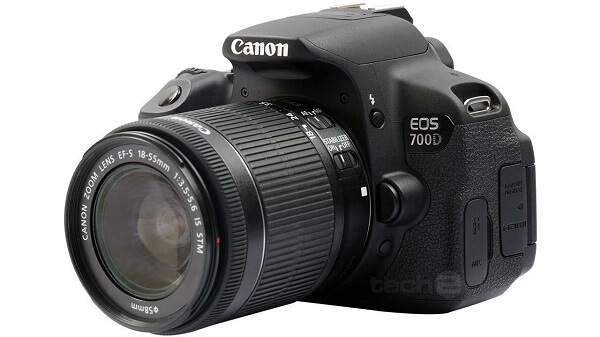
Best Entry Level DSLR Choice #3 – Canon EOS 700D Rebel T5i

Best Entry Level DSLR Choice #3 – Canon EOS 700D Rebel T5i

The immediate predecessor of the Rebel T6i, the Canon EOS 700D Rebel T5i is a slightly more affordable variant of the above, still featuring an articulated screen. In retrospect however, looking at the 700D, you’ll notice that it only has a 9 point autofocus system and also lacks the Wi-Fi capabilities of its successor. However, given that this particular beginner DSLR is not one of the newest cameras (it was released in 2012), it remains a more or less risky choice. It may lack some of the newer features that you get with the latest DSLRs but it’s still a reliable tool for anyone just starting off in photography.

This particular model is priced at $899.99.

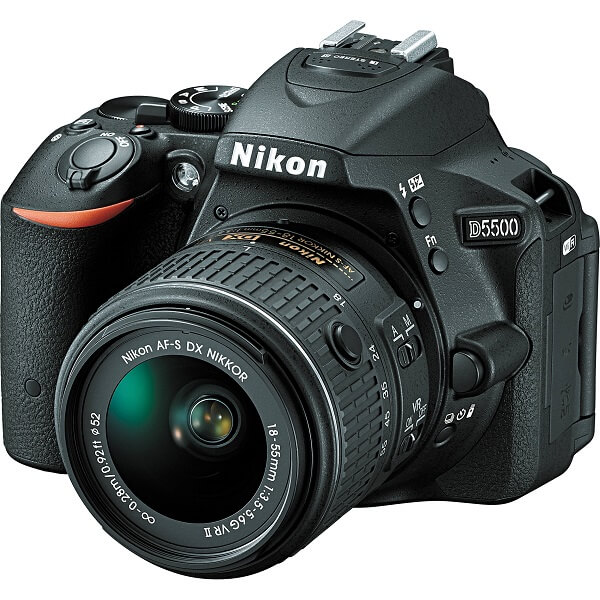
Best Entry Level DSLR Choice #4 – Nikon D5500

Best Entry Level DSLR Choice #4 – Nikon D5500

Not an immense improvement over its predecessor, but the Nikon D5500 has a few things that may catch your attention – starting with an articulated touchscreen. It has no less than an autofocus system consisting of 39 points, out of which 9 are cross type. It can capture up to 5 frames per second and can shoot video in 1080p at 60 frames per second for a maximum duration of 20 minutes.

Sadly, it falls into the rather expensive category. Being a rather recent release, having been released in February this year, its price hasn’t gone down from $850.

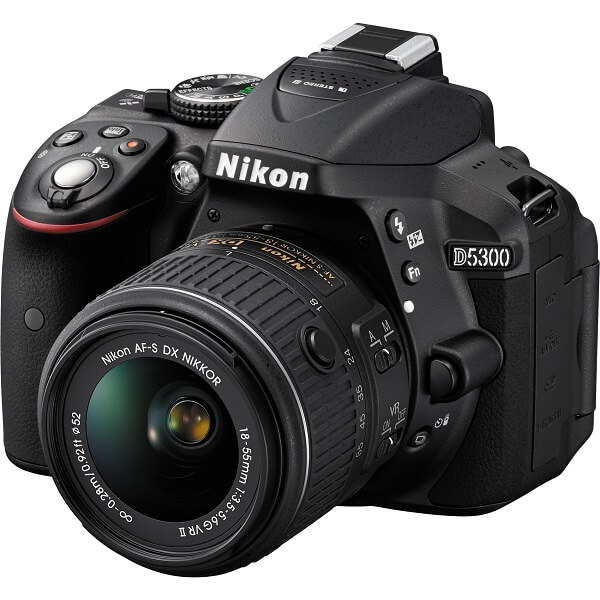
Best Entry Level DSLR Choice #5 – Nikon D5300

Best Entry Level DSLR Choice #5 – Nikon D5300

Having come out more than a year prior to the Nikon D5500, the D5300 doesn’t have as much to show for itself, but can easily count itself as a great all-purpose DSLR for beginners. To count some things you’d be missing on by picking the D5300 over the D5500, that would probably be very little to mention to be frank. It has the same 9 out of 39 cross type sensor autofocus system, the same 5 frames per second burst shooting, same video shooting quality. However, the camera is slightly different from a visual perspective and the Nikon D5300 hasn’t been gifted with a touchscreen even though it can still swivel and flex for easy shooting.

As one would expect, the Nikon D5300 is slightly cheaper than the D5500, listed at $750.

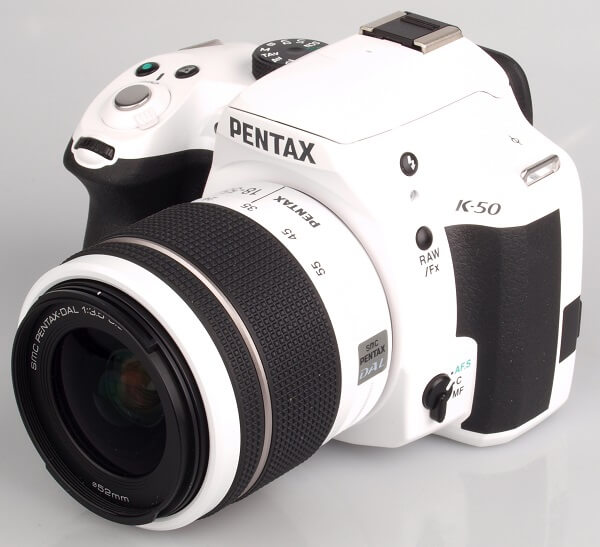
Best Entry Level DSLR Choice #6 – Pentax K-50

Best Entry Level DSLR Choice #6 – Pentax K-50

The Pentax entry level series features one of the iconic aspects of all of their cameras and that is a weather-sealed build. While this may not account for much in terms of actual camera performance, it does however account for a highly reliable and sturdy camera for you to start off on. It doesn’t come very close in terms of performance when you bring its direct competitors in the picture (Canon and Nikon that is). It only features a 11 point autofocus system with 9 out of 11 cross-type sensors. Surprisingly, it goes up to 6 frames per second in continuous shooting, exceeding the performance of the previously listed DSLRs.

The listed price for the Pentax K-50 is $779.97.

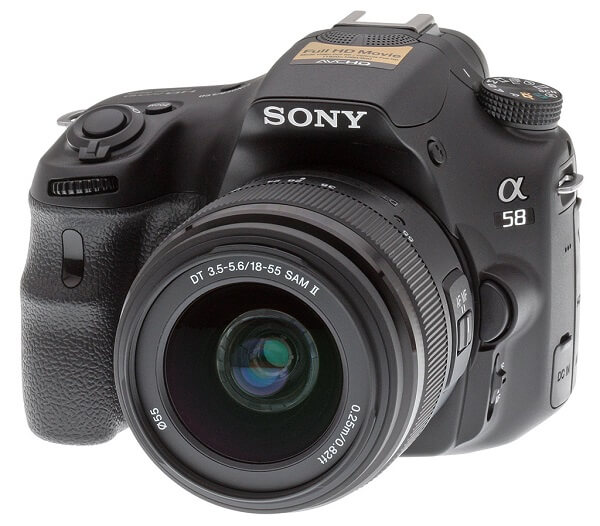
Best Entry Level DSLR Choice #7 – Sony Alpha a58

Best Entry Level DSLR Choice #7 – Sony Alpha a58

Last but not least, I felt like the Sony Alpha a58 deserved a mention. If not for its performance, at least for the outstanding price to quality ratio, which is pretty good to say the least. It features an electronic viewfinder and outstanding autofocusing speed when you’re looking at the scene in live view. Surprisingly to say the least, while the Sony Alpha a58 isn’t closely as good as the previous mentions, it does manage to pull of 8 frames per second in continuous shooting speed.

The Sony Alpha a 58 is ne of the cheapest camera in the best entry level DSLR list – you can get it for $499 from the manufacturer and probably even less from other 3rd party retailers.

Image Source: 1, 2, 3, 4, 5, 6, 7, 8, 9, 10

Filed Under: Headlines Tagged With: best beginner dslr, best entry level dslr cameras, picking the first dslr, top entry level digital slr

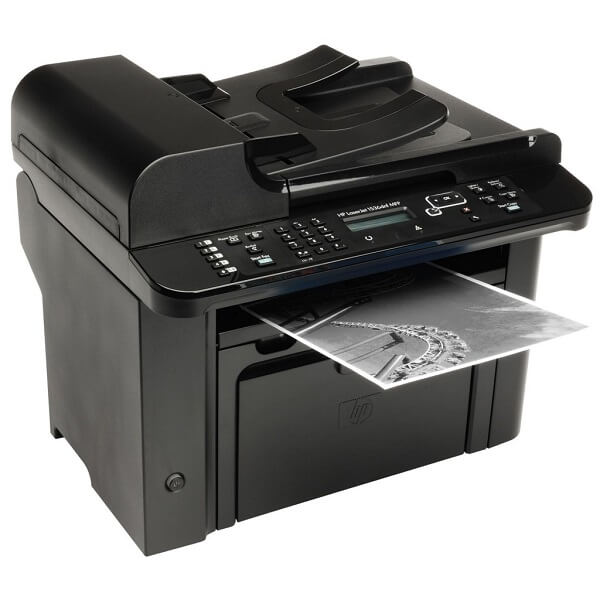
HP Laserjet 1536DNF MFP Review – An All-Powerful Helper

December 9, 2015 By Nancy Young 2 Comments

HP Laserjet 1536DNF MFP Header

I’m not sure how many people still make use of inkjet printers these days anymore. What was once a necessity now counts as more of a burden than it is a help – toner may be cheaper but it’s difficult to change because you have to do it manually, printing is slow and things get particularly unsatisfactory when you’re low on ink.

Take laser jet printers on the other hand – fast, no danger of staining or smudging the freshly printed out paper, toner lasts a lot longer and is much easier to change the tray as soon as a replacement is needed. The HP LaserJet Pro M1536DNF is a great example of an extremely reliable printer; HP renowned for the high quality products they manufacture, in particular when it comes to a number of electronics or computers.

In essence, HP LaserJet Pro M1536DNF is a highly performant printer, albeit a little limited if we’re to take into account everything that current printers are capable of. That doesn’t, however, mean that it’s not capable of plenty; whether you choose to use it at home or in your office, the M1536DNF will handle all of your printing, scanning, faxing, copying and remotely sent print jobs via the internet. Its only major downside is the fact that you won’t be able to connect any device to it wirelessly.

Pros:

  • Fast printing
  • AirPrint and ePrint support
  • Versatile
  • Good printing quality

Cons:

  • No Wi-Fi
  • Toner size is small
  • No duplex scanning
  • Not good with anything other than text documents

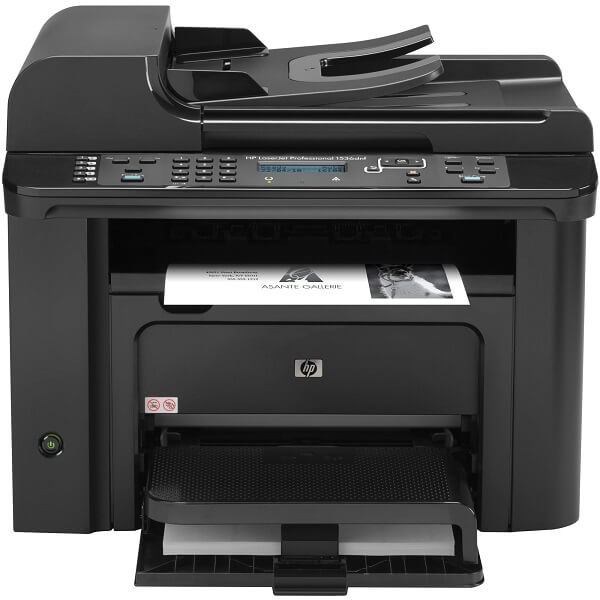
HP Laserjet 1536DNF MFP Design

HP Laserjet 1536DNF MFP Front

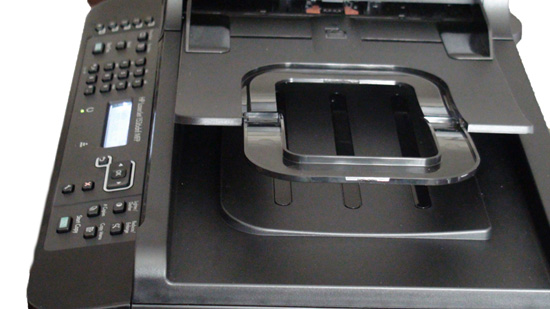
Overall, the HP Laserjet 1536DNF MFP looks plain but spells professional. This may not be your regular large office printer, but for a small one or even your home, you won’t have to hide it away. Not to mention that hiding it would be no easy feat at all: at the overall dimensions of 14.7 x 17.4 x 13.5 inches – and that is without the paper tray in the front being open – and the 25.8 lbs (11.7 kilograms) that it has in weight you should seriously consider its placement before you purchase it. It does extend a fair amount when you pull the tray out; while you won’t have to hold it extended all the time, it’s an aspect worth taking into consideration.

Visually, the HP Laserjet 1536DNF MFP remains a very professional looking printer: its exterior is mostly a patterned material with several glossy applications in certain places. It only comes in black, however, which if you ask me is not a bad part at all as it only manages to emphasize the professional look I’ve been mentioning. Sadly, however, there’s no escaping it: the exterior is made of thin plastic (that is the case with most printers) which – if you take into account all the extended pieces that the HP Laserjet 1536DNF MFP displays – may seem a little worrying. The extendable parts and trays have a slightly elastic wiggle to them that would suggest you should be a little more gentle than usual when using the printer.

HP Laserjet 1536DNF MFP Top

The entirety of the printer’s paper path inside is easily accessible through a great number of hatches that you can use to detect and fix any potential jams the printer may have. One relatively strange aspect of the HP Laserjet 1536DNF MFP however is the fact that the printer’s output tray, which needs manual connecting to the front of the toner cartridge hatch when you unpack the printer, will detach every time you have to open the hatch, making you have to put it back after you’re done tinkering.

HP Laserjet 1536DNF MFP Cartridge Toner

HP Laserjet 1536DNF MFP Design – Control Panel, Buttons & Ports

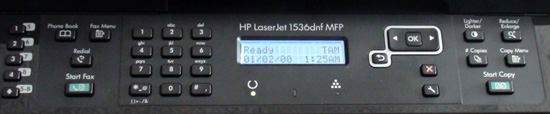
HP Laserjet 1536DNF MFP Control Panel

Thankfully, HP placed the power button on the front of the printer for a change, and switched its flip-switch design over for a regular, round button that cannot get pressed accidentally.

If you ask me, the control panel found on the top of the HP Laserjet 1536DNF MFP printer looks a lot more complicated and extensive than it really is. With no less than 30 control buttons that you can use to set up your printer without having to do it through a computer, it may feel like it’s a lot to take in when you start using it. The HP Laserjet 1536DNF MFP doesn’t have a card reader either so when it comes to printing documents alone, you won’t be able to do it via the printer controls alone, no matter how extensive HP may have made them.

HP Laserjet 1536DNF MFP Navigation Buttons

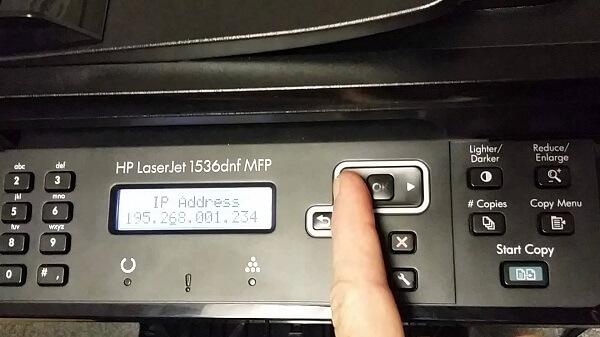
A closer look to the control panel and you’ll notice that the buttons’ layout is actually pretty well organized: you get the faxing controls to the left of the LCD screen, while the ones on the immediate right of the display are navigational and control buttons as well as customizing your copying options – such as the Reduce/Enlarge or Lighter/Darker buttons. The 3 LEDs underneath the LCD screen are notification lights; there is a toner light that that will light up when your cartridge toner is low, one that will light up when it detects a problem with the printer that will have more information about it displayed on the LCD, and the last one that will light up when the printer is ready or done processing a job.

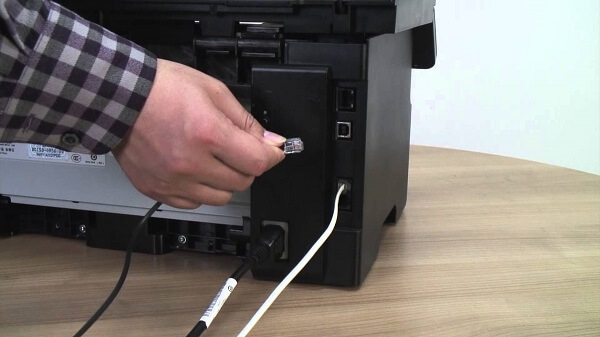
The HP Laserjet 1536DNF MFP features a 10/100 Base-T (RJ-45) network port, a single USB 2.0 port and two types of fax ports – a line and a telephone port. All of these are placed on the back of the printer, tucked in the right hand corner of it.

HP Laserjet 1536DNF MFP Back

HP Laserjet 1536DNF MFP Design – Paper tray

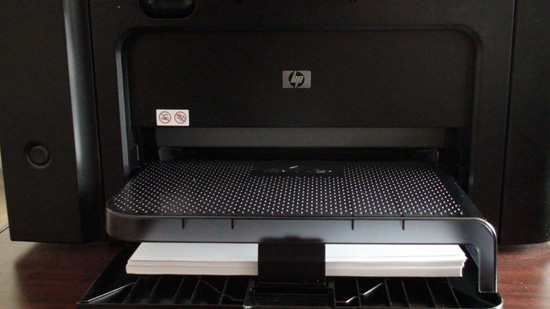
Delving deeper into the HP Laserjet 1536DNF MFP printer, you’ll notice that on top of the usual 250 sheet paper input tray there is a see-through plastic cover which acts as a separate, 10 sheet priority paper feeder. Basically, you’ll use this for special types of printouts or specialty paper when it’s needed without having to unload everything from the main tray beforehand. Whether you need to print out labels, envelopes or synthetic paper, you can just place them in the special secondary tray and the printer will detect it and load that instead of the usual by itself. On the other hand, however, the output tray can take up to 100 sheets before it gets overloaded and may begin spilling out printed paper.

HP Laserjet 1536DNF MFP Secondary Paper Tray

As a last mention, the top of the printer is the host of a 35-page automatic document feeder that allows you to leave the printer handle the copying, scanning and faxing without you having to attend to it.

HP Laserjet 1536DNF MFP Features & Performance

Naturally, as you may have gathered so far already, the HP Laserjet 1536DNF MFP is a particularly versatile machine: it can handle printing, scanning, faxing and copying altogether. While the printer itself is no light feat, compared to other comparable devices that can handle all 4 of the above, it ends up being dwarfed. However, the 1536DNF ultimately ends up holding its own pretty well.

HP Laserjet 1536DNF MFP Printing

The printer is limited to a monochrome toner; so you wouldn’t be able to use this for much outside of documents. Fliers, photos and everything else will have to fall into the responsibility of another printer. The HP Laserjet 1536DNF MFP is relatively fast: it can print out as many as 26 letter-size pages in a minute or A4-size pages at a 25 pages per minute rate. However, when you have to print of both sides of the paper, forget the entire hassle of having to wait for the first session to end in order for you to take it out and have to place it back in the tray for the printer to do the other side. The HP Laserjet 1536DNF MFP is equipped with automatic printing on both sides.

The manufacturer guarantees that the first page is out in a maximum of 8.5 seconds. Funny fact is that we’ve seen the printer go both ways – sometimes it took less than the advertised 8.5 seconds, while on occasion it could take as long as 11 seconds instead.

The printing quality shines when we’re talking text as you really shouldn’t have any issue with it unless your toner is running low. Any kind of internal business need for your office or document printing at home will earn the best results a monochrome laser printer would ever be capable of. When it comes to larger scale printing, the HP Laserjet 1536DNF MFP still manages to maintain a high enough DPI level but considering that you can only print out in black and white, I don’t expect anyone to rush to print out photos on this MFP.

Lastly, we’ve got the consumable costs. Like I’ve mentioned in the intro, the laser printer cartridge toners are considerably more expensive than inkjets but manage to last a lot longer on the upside. The default HP Laserjet 1536DNF MFP toner is rated at 2100 pages and costs between $85 to $101, depending on the source you acquire it from. However, do keep in mind that the cartridge that the printer comes with when you purchase it has a considerably lower capacity than the regular ones. The HP Laserjet 1536DNF MFP is rated at up to a maximum of 8000 pages a month, although the recommended number is found between 500 and 2000 pages. In comparison to many other competitors that was one factor that this particular printer fell behind on.

HP Laserjet 1536DNF MFP Scanning & Copying

Everything about this printer suggests that it was predominantly constructed with the ultimate purpose of office use. The 1536DNF scanner is not amazing when it comes to the quality of the resulting digital image. It can scan with a 600 x 600 dpi resolution when it comes to documents and managing to spike it up to 1200 x 1200 dpi when you attempt to scan graphic-intensive items such as pictures or color text. The greatest part about both scanning and copying is the access that you get to a 35 page ADF (automatic document feeding) – considerably more effective given that most competing models can only load up to 20 or 25 sheets of paper.

The scanning speed depends on the content that you’re planning to scan; an all-text page can be done as fast as 5 seconds, while photographs and other more complicated images will probably end up lengthier – up to 11 to 12 seconds. Still, were you to compare it to a lot of the competing models, the HP Laserjet 1536DNF MFP is unbearably fast; a lot of other MFPs can take as long as 22 seconds to scan the exact same content.

HP Laserjet 1536DNF MFP AirPrint & ePrint

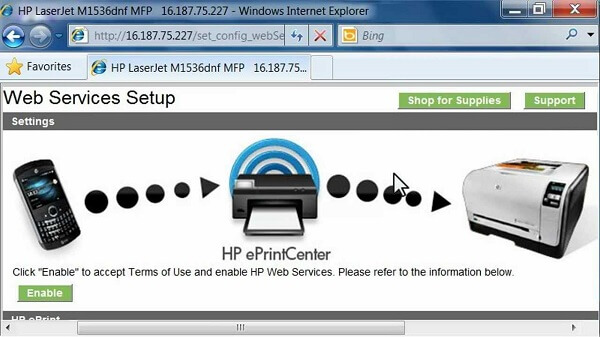
In the absence of wireless capability, you will have to connect the HP Laserjet 1536DNF MFP printer will have to be physically connected to the computer that you’re trying to print documents off of. However, with a firmware update you can allow the printer to receive the files you wish to print either via AirPrint or HP’s very own ePrint. What this entails is the fact that you can e-mail the files directly to the printer to print out, as long as you connect it as a network machine.

HP Laserjet 1536DNF MFP Interface

That way you can connect multiple units to the printer – for example if you were using this for a small or medium sized office – is through the 100 Mbps Ethernet interface, which will make it available for all of them. In addition, you can even send documents to print out via mobile device no matter where you are (as you don’t have to be in the vicinity of the printer). This is done via a printer-specific e-mail address that you send your documents to and the HP Laserjet 1536DNF MFP will print out both the mail and any attachments it may contain.

In order to make all of this possible, the HP Laserjet 1536DNF MFP comes packed with a 500 MHz processor and 128 MB of RAM memory in order to allow the printer to produce and reproduce black and white documents.

HP Laserjet 1536DNF MFP Software & Setup

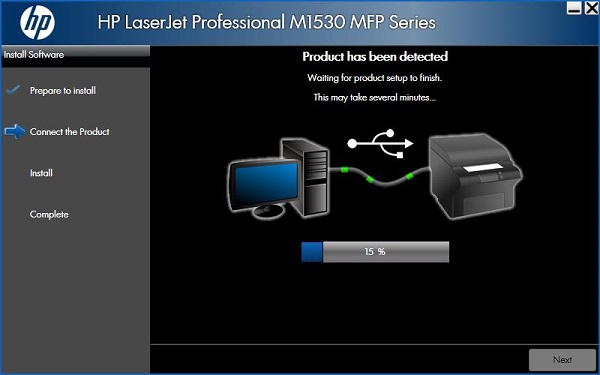
The printer comes with its very own HP Laserjet 1536DNF MFP driver, which is a very straight forward process of setting everything up. Afterwards, you do have to go through the process of configuring the printer onto the local network and print out a test page just for safe measure. The driver is not compatible with any Windows version that came out before the XP, and at least MAC OS X 10.5. There is a great amount of compatible operating systems, Linux and Unix included.

HP Laserjet 1536DNF MFP Driver

HP Laserjet 1536DNF MFP Verdict

While the HP Laserjet M1536DNF multi-functional printer doesn’t necessarily innovate on anything in particular, it would bring injustice on it not to admit that this printer is actually a lot faster than many comparable printers. For any kind of business that will mostly require document printing and scanning, the HP Laserjet 1536DNF MFP will surely suit you perfectly.

Anything that involves more complicated graphics or photographs will not earn you the best performance, in which case you’re most likely to be wanting to check other models out. The only issue that you would have to be careful with if you’re planning to acquire the HP Laserjet Pro 1536DNF MFP for your office is the fact that it may not be the sturdiest, most solid printer you can find out there. But in terms of performance, this is probably one of the best office HP multifunctional printers.

You can purchase this printer for $500 from a number of online retailers or HP-native retail stores. Considering that the running costs of the HP Laserjet 1536DNF MFP falls into the average category, it makes this multi-functional printer one of the best office and business-oriented choices you can go for.

Image Source: 1, 2, 3, 4, 5, 6, 7, 8, 9, 10

Filed Under: Headlines Tagged With: HP Laserjet 1536DNF MFP, HP Laserjet 1536DNF MFP multifunctional printer, HP Laserjet 1536DNF MFP printer, HP Laserjet 1536DNF review

Amazon Launches A New Tablet for Readers

December 7, 2015 By Nancy Young Leave a Comment

Amazon launches a new tablet for readers, just in time for Christmas.

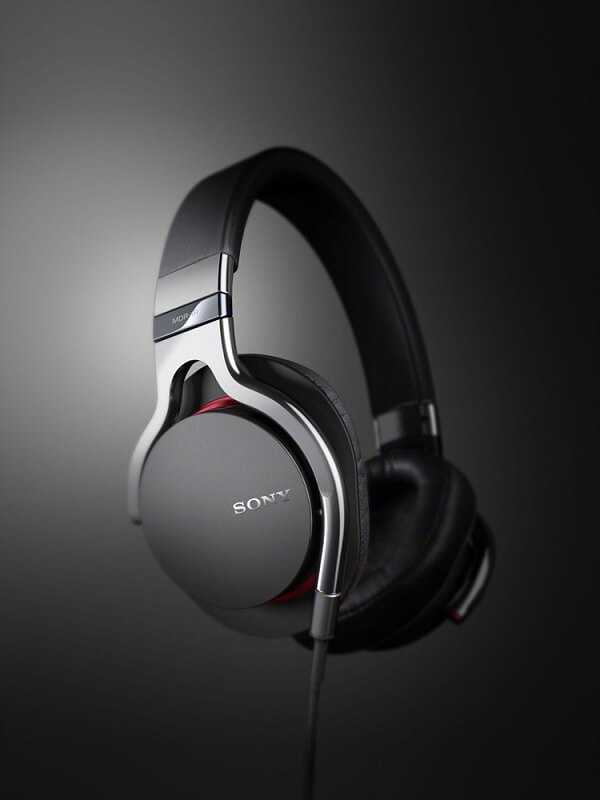
Those of you who enjoy reading on electronic devices can rejoice, as Amazon launches a new tablet for readers: the “Fire HD 8 Reader’s Edition”. The new tablet comes with Kindle Unlimited and costs about $250. It can be pre-ordered at the moment, and will start to ship on December 8. Is it worth the price or are there better options on the market?

The Fire HD 8 was first introduced three months ago in September and is equipped with a leather cover. You have to be fast to get it though, because the cover comes in limited edition. The profitable feature seems to be the unlimited access to Kindle, which normally costs $10 per month. However, the normal edition of Fire HD 8 costs $150, so the offer doesn’t seem too profitable at the moment.

Furthermore, the tablet also has the “Blue Shade” feature that Amazon announced a week ago. This feature changes the color temperature to other colors rather than blue, in order to assure a pleasant reading experience in dark environments. The color blue tends to impair sleeping. In spite of this fact, the feature is available on other tablets. Again, the offer does not look very tempting.

The tablet also includes the Bookerly font and Word Runner which have the purpose of making reading more easy on electronic devices. The two are also available on cheaper products. In the end, the only thing that customers do receive for free is the leather case, and they’ll have to be quick to get their hands on it.

So what is the purpose of Amazon launching a new product? Timing. The Christmas holidays are approaching and many of us might be tempted to buy something brand new for our loved ones. It will be particularly attractive because its screen has colors compared to the basic Kindle devices which come in black and white. Barnes & Noble, Kobo and Samsung have also produced lines of hybrid tablets aimed at avid readers.

As Amazon launches a new tablet for readers, it might be your chance to surprise you family or friends this Christmas with a nice gift. However, if you are not impressed by expensive electronic devices with little to offer, there are always cheaper and more practical options. We mustn’t be fooled by marketing campaigns which try to sell the products of big companies. There are always smarter ways of getting what we want without going bankrupt.

Image Source: 1
Filed Under: Headlines Tagged With: Amazon Launches A New Tablet for Readers, Fire HD 8 Reader's Edition, Kindle

Sony MDR-1R Headphones Review – Elegant and Powerful

November 28, 2015 By Nancy Young Leave a Comment

Sony MDR-1R Header

For all of your devices that lack in sound quality or the entire capability to speak of, we have found one of the neatest products that will put an end to your troubles. This time around we will be taking a look at the Sony MDR-1R set of over-the-ear headphones – which shines when their ability is taken to music more than any other kind of activity such as movies or video games. Though it’s certain that they would do a great job in that aspect just as well.

The reason we chose the Sony MDR-1R for review is the fact that they’re special for a number of reasons. The way Sony has made them special is by not trying to make them special and instead focus on every other bit of the music experience through headphones. Everything relating to comfort, sound quality and a thoughtful build are included in the Sony MDR-1R prestige headphones. Unlike other types of headphones that make an immensely huge deal out of boosting bass or offering very ambiguous basic features that sound good on paper but don’t hold as much applicability in a real life scenario, the Sony MDR-1R keeps is simple and professional.

Sony MDR-1R Package

If there’s any area where this pair of headphones may fail, it’s probably professional music production: they are not meant for professional use; in the end they are only for consumer oriented use or leisure and entertainment. The sound quality is up there, however, only to be additionally complimented by an outstanding design.

As a last note, depending on how much you’re normally willing to pay for a pair of headphones you will only be using for entertainment purposes, the Sony MDR-1R have a really good chance of seeming more expensive than they should.

Sony MDR-1R Pros: Amazing design, Great sound, Decent noise cancellation, Accurate & Comfortable

Sony MDR-1R Cons: Pricy, Not proficient in bass quantity, Cannot fold for transport

Sony MDR-1R Design

The Sony MDR-1R are not the only pair of an exquisitely designed products from the Sony MDR headphone family, but it is apparent that there was a fair amount of effort put into making them as premium as possible – in both quality and looks.

The MDR-1R headphones are full-sized and go over the ear, covering and encompasses your ears completely, giving off an amazing amount of noise cancelling. It’s not complete however, so depending on how you’re looking to use them that can be either a good or bad thing. I personally am not a great fan of wearing full over-the-ear headphones when I’m out due to the dangers of traffic and whatnot when strolling through the city. They do a great job at muffling the sounds of a neighbor fixing things or drilling walls next door though.

Sony MDR-1R Over-the-Head

Noise isolation is excellent, however, letting very little to no sound outside the ear muffs – which means you can easily use them when in a room of strangers, waiting in a line or even a public library without bothering anyone.

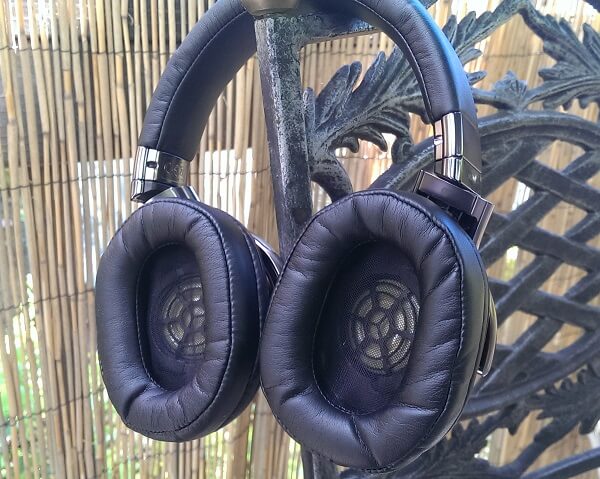
The ear cushions are designed in an oval shape, made of particularly soft and malleable materials to ensure they manage to cover the entirety of your ear no matter the size and shape. The cushions are covered in synthetic leather, giving the finish a soft and classy feel. While the material is susceptible to creases over time, it seems sturdy enough to not break and chip off with prolonged usage which comes as a great plus. There is one issue with wearing this pair of headphones in hot and humid weather as you’re bound to get sweaty because of the material.

Sony MDR-1R Drivers

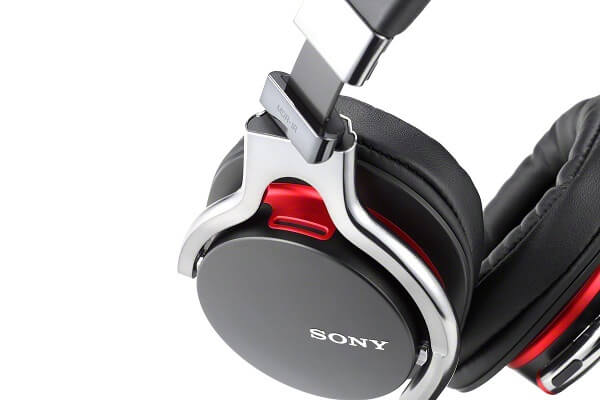
In order to seal a deal on the universal availability for all sizes and shapes of ears, the metal ear cups pivot on a two-axis direction for a fair amount of distance. The metal skeleton behind the fabrics feels considerably sturdy and solid, giving the entire build a great and secure feel. The circum aural ear pads can also swivel themselves flat in order to make the pair of headphones easier to pack or store.

Sony MDR-1R Pivot

Inside the ear cups lie – naturally – the headphones’ drivers. These are offset at an angle meant to mimic the way sound would be captured if the source was right in front of you, improving the way in which your ear captures the sound, making it as even as it possibly can. This is a design that’s surprisingly rare to find in a great number of full headphones on the market, from most professional manufacturers since a more common approach is to let the drivers remain parallel to your ears.

The thick headband is padded in the same cushion material featured in the ear cups, covered with another layer of synthetic leather. With a comfortable and near 0 pressure feel on the top of your head, the Sony MDR-1R headphones are also amazingly easy to adjust to the size of your head by using an even and smooth stop-click system which will allow you to create an equal amount of distance of both sides and assure comfort.

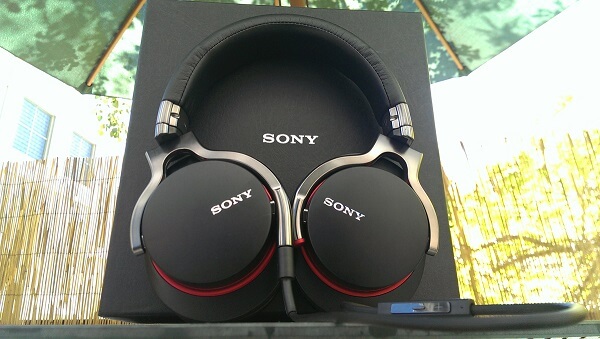
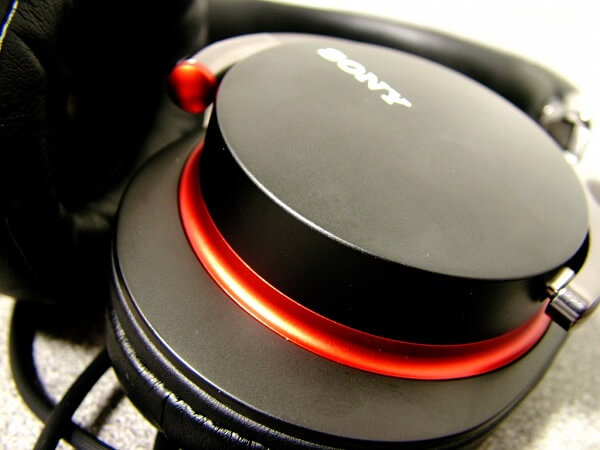
The materials used in the overall build of the MDR-1R are mainly metal and plastic. However, all of the plastic parts (for example the ear cup covers) look anything but cheap and lacking good taste. They’re polished, beautifully designed and beautifully integrated in the design by the metallic skeleton of the headphones. The covers also feature the Sony logo on either side, embossed into the surface.

The entire set of headphones weighs an average of 240 grams – that is without any of the cables plugged in. I wish more full headphones manufacturers adopted this trend, considering that it reduces a great amount of risk of tangling when travelling; there is also a certain level of risk of damage to the interior cables that may occur were you to accidentally pull on them.

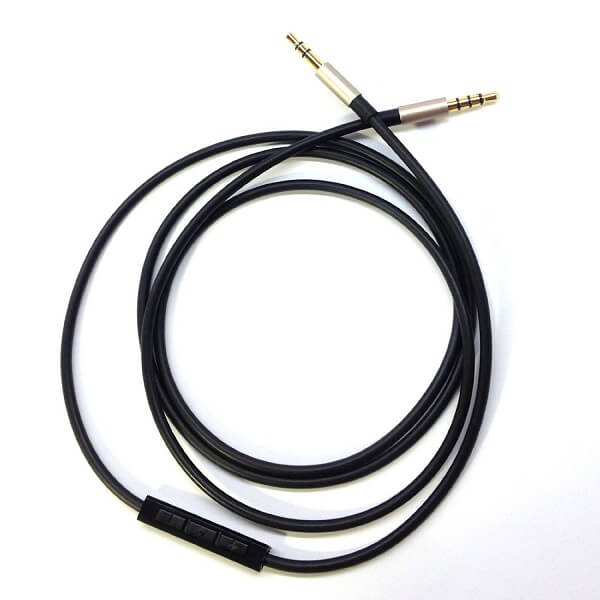
The MDR-1R package contains 2 different cables that you can hook up to the headphones: a regular headphone cord and an additional cord with inline remote and microphone for mobile devices. Both cords are straight at the end that you plug into the headphones, and end into a gold-plated L-shaped stereo mini 3.5 mm jack. The microphone featured on the latter of the two is omni-directional meaning that you shouldn’t have any issue with sound capture when you’re using the microphone.

Sony MDR-1R Cabled

Sony MDR-1R Cable & Microphone

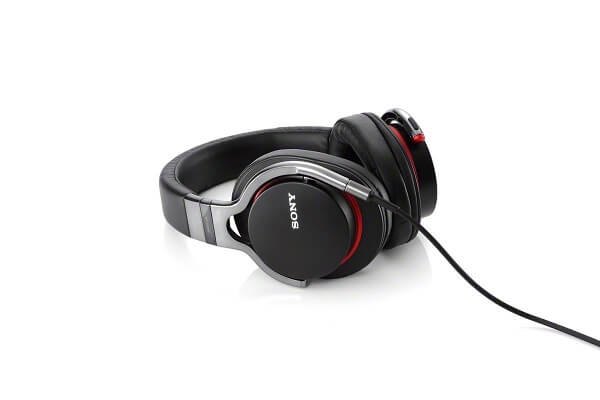
There are two color variants for the Sony MDR-1R headphones – black and white. The black variant features red lines curving around the ear cup covers on the back and the audio jack is also red-tipped. The second variant features a white finish for the pieces made of metal or plastic, while all of the synthetic leather used for the cushions and headband are brown. For this model, the audio jack is tipped in red as well. Both cables are 4 feet in length.

Sony MDR-1R White Variant

The MDR-1R headphone family expands into more types of products – such as the MDR noise-cancelling headphones model MDR-1RNC or the even more advanced Sony Bluetooth Noise Cancelling headphones.

Sony MDR-1R Sound Quality

There are two ways in which we can discuss sound quality presented by the Sony MDR-1R prestige headphones. One is a more generic, overall opinion while the second will refer to the sound in more detail, splitting it into bass, high-mids and treble levels.

As an overview, the headphones are extremely clear and produce crisp, high quality sound. While the manufacturer suggests that the MDR-1R have a frequency rate of 4 to 80,000 Hz, that’s not necessarily a fact that you should concern yourself with that much considering that the human hearing is limited to the range of 20 to 20,000 Hz. However, that does highlight the fact that the headphones have an amazing reach of frequencies in both directions. Because of that all tracks of a song will have an outstanding clearness and allow you to hear the deepest bass sounds there are.

Sony MDR-1R Hardware

Coupled with 105 dB of high sensitivity, the MDR-1R headphones can pack quite the volume. The 1,500 megawatts of power output will prevent damage to the speakers when you use the full potential of the volume button – if that is really ever the case.

The bass of the headphones is outstanding – the headphones manage to depict extremely low levels of base without making it sound bloaty or boost it in an unnatural manner like so many other devices have an undying passion to do. In retrospect however, this may be one of the reasons the bass feels like it lacks a little detail at times, despite packing quite the punch. It is only something you may end up noticing in certain songs however, so the overall bass levels should remain good and unaffected on average.

For what mids are concerned, the headphones bring a very full level of sound to them. It seems like mid levels are actually one of the most outstanding capability of the MDR-1R, as they truly end up excelling in that department. With a great amount of attack and richness, the sound gains a lot of musicality and fullness to it in a great number of genres. Vocals also seem to be quite outstanding and pleasant to listen to on the MDR-1R headphones, if not for a certain degree of sibilance that tends to occur at times.

The high, treble levels are definitely not the highlight of the sound quality in what the Sony MDR-1R are concerned. By no means is treble underwhelming – it has a good extension and doesn’t sound harsh or forced and distorted. But they don’t quite come up to the same level as the mids; however, it doesn’t tax too much on the overall sound quality.

So overall, it feels like the Sony MDR-1R headphones are most suitable for music genres that highlight musicality and vocals, while still being able to distinguish different instruments perfectly to the point where you can differentiate between the various tracks of a song and discern all the small instrumental details. For low bass, punchy tunes coming from genres such as dubstep or drums n’ bass, this is not quite what you may be looking for since it lacks in quantity but not in quality.

In terms of the best way you can make use of the Sony MDR-1R headphones, it depends on a few things. Because of the medium amount of outside noise cancellation that the default version (naturally, the dedicated noise cancellation model MDR-1RNC being considerably better at that), you can consider them equally good and bad at the same time for outdoors. Sure, sitting at a table somewhere and wanting to tune out the street noise for example is great. Using them in traffic or while on a stroll not so much.

Cabled Silver Sony MDR-1R

While the Sony MDR-1R spell quality and audio prowess, they cannot get up there on the pro level. The headphones will lack on several levels when it comes to mixing songs or mastering tracks so by adding some extra few bucks to this pair’s price you could possibly get something else that’s proficient in that particular area.

Watching movies and playing video games will score relatively high with the MDR-1R headphones thanks to the open sound that it renders and the very accurate positioning of the sound source. While they can be used for online gaming and voice communication as well when connected to a compatible device, they once again cannot score too high in this concern, professional gaming headsets such as various SteelSeries or Razer models bringing a lot of proficiency in this regard instead.

Sony MDR-1R Verdict

No matter how you look at it, there’s no denying that the Sony MDR-1R headphones are a quite outstanding piece of audio architecture. With an elegant design and a huge amount of capability to make the best of most music genres, they are an excellent choice for anyone looking to purchase a pair of headphones mostly meant for listening to music. However, the one aspect which may make more than a few individuals putting off purchasing them or even opting for another manufacturer or model is the high price range that they come at.

You can purchase the Sony MDR-1R in most Sony retail centers or via a number of online retailers such as Amazon and eBay for $299. However, the Sony MDR-1RNC Premium Noise-Cancelling Headphones model will take you up to $499, and the Sony MDR-1RBT Premium Bluetooth Over-the-head Style Headphones would cost $399.

Image Source: 1, 2, 3, 4, 5, 6, 7, 8, 9, 10

Filed Under: Headlines Tagged With: mdr-1r, sony mdr-1r, sony mdr-1r headphones, sony mdr-1r review

The Best Tech and Electronics Black Friday Deals 2015

November 26, 2015 By Nancy Young Leave a Comment

Best Black Friday Deals 2015

It is nearly here, folks! The day that marks the beginning of the holiday season as well as one of the best chances you’ll get to do some shopping and grab yourself some great deals is right around the corner. There are numerous retailers who will have their doors open starting tonight at midnight, while others are offering discounts and deals the entire week. And what better chance is there to grab yourself some of those much desired gadgets than with the occasion of this year’s Black Friday sales?

Considering that Thanksgiving is here already, you’ve probably haven’t had the time to check out what long awaited discounts you can find this year. And because, as we all know, things get pretty hectic with this occasion and the prospect of waiting in lines in the most crowded stores just to see if you can find yourself something useful is far from appealing, you should always be prepared.

To make things easier for you, we’ve compiled a shopping and deals guide for you with the most appealing offers we’ve found out there, from the most accessible retailers –  no matter where you are.

1. Walmart Black Friday Deals 2015

Best Walmart Black Friday Deals 2015

Walmart has really put together a great set of services for their sales and deals for this year’s Black Friday. Considering the deals and promotions alone weren’t enough, Walmart is offering the free Walmart App that you can find the nearest Walmart store with, wherever you may be as well as an extensive browsing and shopping experience.

Not only that, but they’re offering online specials for you in case you won’t be able to make it there in person in time. Some of the products can be shipped to your home while others will be put on reserve and have you travel to the store of choice to pick them up instead.

Also the famous 1 Hour Guarantee Black Friday 2015 Deals are back: Walmart promises 5 offers for the people still in line when and if the store runs out. These offers come with delivery by Christmas and include the iPad Air 2, Beats Studio Headphones, LG 55” Class Smart 4k UHD TV, Xbox One 500 GB Gears of War Bundle with a $30 Walmart Gift Card and the 15” HP Touch Laptop.

The sale starts today at 6 PM and will last throughout the entirety of Friday. Online sales begin Thursday 3:01 AM EST / 12:01 AM PST.

In terms of tech and gadgets that you’ll be able to find at Walmart for this Black Friday, here’s what we gathered.

Television Sets

  • Emerson 50” LED 1080p TV $269 (original pricing $398);
  • Emerson 40” LED 1080p TV $149;
  • Hisense 55” 4K UHD TV $448 (original pricing $548);
  • Vizio 60” 4K Class LED Smart HDC 2160p TV $898 (original pricing $1,098);

Smartphones & Tablets

  • Samsung Galaxy Tab 3 Lite $79 (original pricing $139);
  • iPad mini 2 16 GB $199 (original pricing $269);
  • iPad Air 2 Gold 16 GB $399;
  • Samsung Galaxy S5 Straight Talk Wireless $299;
  • Apple iPod Touch 16 GB $165 (original pricing $199);

Other Gadgets

  • Fitbit Flex Wristband $59 (original pricing $99);
  • Nighthawk X4 Router by Netgear $149 (original pricing $199);
  • Chromecast Streaming Media Player $20 (original pricing $35);
  • HP 15” Touch Laptop $249 (original pricing $319);

2. Best Buy Black Friday Deals 2015

Best Best Buy Black Friday Deals 2015

Best Buy has its fair share of deals you can enjoy this year – over 300 products will be available for purchase with various percentages off. While for some smaller items you may save $20, there are full-fledged ultra HD television sets on offer that you would be saving up to $2,000 on.

Similarly to how Walmart chose to handle things, Best Buy will be making their Black Friday prices available today at 5 PM. The stores will close at 1 AM on Friday only to reopen again at 8 AM. In addition, online shopping will be available throughout the entire duration, with a variety of items limited to Thursday.

There is a small amount of products you can already order online right now for the same price that they will be available for when Black Friday comes. They include $100 – $125 off on iPad Air 2 prices, 40” HDTV Insigna television set for $159 and the 55” variant for $349, the 27” iMac and 13” MacBook with $150 off as well as a promotional $250 Gift Card when you purchase the Galaxy S6.

As a last note, My Best Buy members who have either Elite or Elite Plus status and will be spending more than $1,500 in purchases can benefit from early access to Black Friday deals right now.

3. Apple Black Friday Deals 2015

Best Apple Black Friday Deals 2015

As of right now, there is no Apple Ad showing up on their website or stores. However, if we were to judge on past experience, instead of opting for the usual promotions where you can get products at reduced prices, Apple switches it up a little by offering Gift Cards with the purchases you make with them. At least that’s what they’ve done in 2014.

However, your better chances of getting reduced prices on targeted Apple products are actually in other stores such as Radio Shack, Best Buy and Walmart.

While for example Walmart has already listed discounts between $35 and $70 for a number of Apple tablets, you shouldn’t get your hopes up for getting any of the iPhones on discount there. It seems that most retailers only offer reduced prices for the iPads and iPods only. Best Buy is one example where you’ll be able to buy the iPhone 6S and 6S Plus with a 2-year contract with Sprint starting at $99 and $199 respectively for the 1-Day Deal they offer.

At Sam’s Club you can get the 64 and 128 GB models of the iPad Air 2 for prices nearly $150 lower than usual. Target offers $80 to $250 Gift Cards for iPhone 6S/6S Plus, Apple Watch, iPad Air, iPad Air 2, iPad Mini 2 and iPad Mini 4.

4. Amazon Black Friday Deals 2015

Best Amazon Black Friday Deals 2015

This year, Amazon is doing what it knows and does best. Considering there are no physical stores and lines to wait in, it might be a lot more suitable – provided of course that you manage to grab a thing or two off the website.

Amazon’s Black Friday deals have already started earlier this week through limited-time Lighting Deals and a separate set of Deals of the Day for each day of the week up until Friday included. The website advertises that new deals may appear every 5 minutes depending on stock.

Visiting the Black Friday page on the Amazon website will show you different sections where you can find a variety of deals of all kinds. The current Black Friday Device Deals include:

  • Amazon Echo $149 (17% off);
  • Fire Tablet $34.99 (30% off);
  • Fire TV Streaming Stick $24.99 (38% off);
  • All-New Kindle Paperwhite $99.99 (17% off);
  • Fire Kids Edition $84.99 (15% off);
  • Fire HD 6 $69.99 (30% off);
  • Fire Entertainment Bundle $69.99 (30% off);
  • Kindle Voyage Essentials Bundle $249.97 (11% off);

5. Sam’s Club Black Friday Deals 2015

Best Sam's Club Black Friday Deals 2015

Sam’s Club is also already open for business, mostly because it’s one of the few stores who does not open on Thanksgiving Day in order to allow its employees to stay home with their families. The Sam’s Club Black Friday sales have already started at 7AM and if you move fast enough you might get another chance at grabbing yourself a few electronics or gadgets.

Those deals are offered both via samsclub.com and in-club and come at prices that will be valid through November 29th, at least as long as supplies last. Here are a few examples:

  • Sony PS4 Uncharted Bundle $299;
  • Xbox One 500 GB Gears of War Ultimate Edition Bundle $299;
  • Guitar Hero Live Bundle for PS4 $69.98;
  • $175 Off on Apple iPad 2 Cellular 64 GB & 128 GB Tablets;
  • $100 Google Play Gift Card for $79.4 only;

In addition, however, starting Monday 30th, Sam’s Club begins its very own Cyber Week – the first day of it being the most important. The Sam’s Club Cyber Week 2015 sale will kick off on their website at 12:01 AM CST. A few of the deals that were already announced for Cyber Monday include free shipping:

  • Sony PS4 Uncharted Bundle $369 (Valid Monday Only);
  • JVC 32” LED HDTV $149.88;
  • Vizio 65” 1080p LED Smart TV $749;
  • Dell Desktop Bundle with 20” Monitor (I3647-2311BK Intel Core i3-4170, 4GB Memory, 1TB Hard Drive, Windows 10), includes Keyboard and Mouse $399;
  • Dell 2 in 1 FHD Touchscreen Convertible 13.3” Notebook (I7359-4331 SLV, Intel Core i5-6200U, 8GB Memory, 500GB Hard Drive, 8GB SSD, Windows 10) Event Price $499.

6. Sprint, Verizon, AT&T, T-Mobile Black Friday Deals 2015

Black Friday Deals come to phone carriers too. While that might not reflect so much through price plans, they still are one of your most reliable retailer for mobile phones and other handheld devices. All three of the most popular mobile phone carriers in the United States have come up with something of their own this year; if you hurry you might get your hands on some pretty neat yet super limited deals.

Sprint Black Friday Deals 2015

Best Sprint Black Friday Deals 2015

  • 50% off a Samsung Galaxy S6 – an offer for both already existing customers and new ones, provided that they add a new line; the phone comes with a 2-year commitment contract but also gains you access to Amazon Prime when you activate your phone.
  • A new type of contract will be available for a limited amount of time known as iPhone Forever: it will allow you to upgrade to the latest iPhone as soon as it’s available, including it in your monthly price. This means you’ll get prioritized for your iPhone orders as well as offering you a one-time chance to get the iPhone 6S as low as $1/month.
  • A treat for already existing customers only: the new LG G4 from Sprint Offer comes for $18 a month via Spring Easy-Pay lease and purchasing it will earn you a few 24-inch LG HDTV worth $179.
  • Sprint will also be offering $30-$40 discounts on a large number of the headphones, health and fitness trackers they sell. LG Tribute 2 will be available for $99 and the LG G Flex 2 completely free provided that you open a new line with Sprint.
  • $100 service credit will be offered for anyone who buys the Galaxy Note 5. $50 service credit will come with any purchase of a pre-owned phone.

Verizon Black Friday Deals 2015

Best Verizon Black Friday Deals 2015

  • Savings on smart phones such as the Galaxy S6, Galaxy Note 5, LG V10. $3/month for Galaxy S6, $7/month for Galaxy S6 Edge and $12.33/month for the Galaxy Note 5;
  • Up to $500 credit for customers who switch carriers to Verizon and trade in their old phone. On the same note, trading in older phones will earn you more than usual for the Black Friday promotion: $200 off select Verizon smartphones and $300 for select phones from other carriers;
  • New Ellipsis 10-inch tablet – available for $49.99 ($149 off) with a 2-year contract;
  • FitBit Charge for $89;
  • Mophie charging power stations for $99 ($50 off);

Offers last starting 26th through 30th of November, both on Verizon website and in Verizon retail stores.

AT&T Black Friday Deals 2015

Best AT&T Black Friday Deals 2015

AT&T takes a little leap away from the classic discount of phones business to offer you some other types of special deals on the kind of products that you may not expect.

  • Savings on a great number of accessories: $10 to 40% savings on LG Tone Pro Bluetooth headphones, Braven BRV-1 Bluetooth speaker, BodyGuardz screen protectors, Belkin home and car chargers, Otterbox phone cases, Pelican cases, ZAGG screen covers, speakers and portable chargers;
  • Samsung Gear S smartwatch for $0.01 with a 2-year contract;
  • Samsung Galaxy View 18.4-inch Android tablet 64 GB and 4F LTE for $99 if you sign up for DirecTV for 2 years (tablet normally priced at $499).
  • Free Galaxy S6 Active or Samsung Galaxy Note 5 Gold with a 2-year agreement for AT&T Next.
  • Flying Drones for $99.

AT&T will also begin a new sale starting December 1st, continuing the trend of vastly reduced prices on accessories and other deals.

T-Mobile Black Friday Deals 2015

Best T-Mobile Black Friday Deals 2015

The Black Friday deals that T-Mobile offers mark the beginning of the holiday season – some of the offers they make will only be available for a limited time while others will continue until the holidays. Some of the most appealing things T-Mobile will be offering both its already existing and new or potential customers that we found are:

  • Simple Choice plan users will be provided with unlimited 4G LTE for 3 months of trial (only supported by LTE devices), complete free of charge. Only available for customers already on the plan.
  • Free Galaxy S6 or Alcatel OneTouch Pixi 7-inch Android tablet: by trading in your old phone and signing up for 18 months of T-Mobile Jump On-Demand plan, you can get the Galaxy S6 or the Alcatel OneTouch Pixi tablet free of charge; however, once the 18 months expire you either have to pay off the remaining balance to keep using them or return them.
  • iPhone 6S Upgrade. T-Mobile offers its existing customers a completely free upgrade from your iPhone 6S or 6S Plus from the 16 GB models to the 64 GB. Additionally, the 128 GB model will cost what the current 64 GB one does. This offer only available for Cyber Monday – November 30th.

Following the Black Friday offers, T-Mobile will begin another 3 weeks of deals, 1 new deal every week that will be mostly targeted towards customers from other carriers.

7. RadioShack Black Friday Deals 2015

Best RadioShack Black Friday Deals 2015

Yet another Black Friday early bird, RadioShack has already begun its sale yesterday. However, the entire array of deals will last through Saturday, November 28th, while supplies last. Most offers can be grabbed either in retail stores or via their website, however a small number of items can benefit from the discounts only in stores.

  • Amazon Fire 7-inch tablet with 8 GB memory, 32 GB memory card and free case $54.99;
  • Apple TV 32 GB for $149.99, 64 GB for $199.99;
  • Pro-652 desktop digital radio scanner $279 ($120 off);
  • Pro-649 200-channel handheld radio scanner $99.99 (original pricing $119.99);

Making purchases in stores may come with some benefits however: customers who make purchases of $50 or more on any kind of items minus the Amazon Fire Tablet will be given a free Hovermaxx UFO.

Image Source: 1, 2, 3, 4, 5, 6, 7, 8, 9, 10, 11

Filed Under: Headlines Tagged With: best deals black friday, best deals black friday 2015, black friday 2015, black friday deals 2015, thanksgiving deals 2015

Parrot Bebop 2 Drone

November 18, 2015 By Nancy Young Leave a Comment

Photo of the Parrot Bebop 2 Drone in flight.

Parrot, a US company founded in 1994 whose purpose is to create cutting edge products for smartphones and tablets, has recently released the second model of its original Bebop drone: the Bebop 2.

The basic design from the original Bebop was kept, meaning that the Parrot Bebop 2 drone is also a cylindrical main body which houses the camera and processor etc. and 4 arms extending from this body on the ends of which the propellers sit.

But despite the same overall look, the Bebop 2’s 12.9 inch by 12.9 inch span only results in a weight of 17.6 ounces.

And despite being this light, the Parrot Bebop 2 drone features a 14 megapixel camera with a fish-eye lens that is capable of a 180 degree view angle and also benefits from built-in 3-axis stabilization.

All of the drone’s functions can be controlled through an Android or iOS smartphone by downloading an easy to use free app. This includes adjusting the angle of the camera (which you can do with a few taps), taking 4:3, 16:9 and fish-eye ratio photos and 1080p video (which get sent directly to your phone’s screen) as well as actually flying the drone, the latter of which being made simple because of what the company claims is an intuitive, user-friendly interface.

For example, there is a button you can tap which controls the take-off and landing of the Parrot Bebop 2 drone.

Of course, if you want to make an upgrade, you can pay extra and get the Parrot Skycontroller which, along with allowing you to control the drone with even more ease and “feel”, by joysticks, and extending the range at which it responds to controls to 6,561 feet from the 984 feet it is capable of when it is controlled by smartphone.

And speaking of flight capabilities, the Parrot Bebop 2 drone can, in 14 seconds, reach top speeds between 13 -37 mph, depending on whether it is flying vertically or horizontally, respectively. It also stops pretty fast, meaning 4.5 seconds. And if you make it go vertically, it can reach 330 feet in a matter of just 18 seconds.

As a bonus, when controlling it by smartphone, you can pay 20$ extra to purchase, inside the app, a feature that allows you to plan your flights in advance.

And if anything happens to go wrong during said flight, the Bebop 2 also has a neat safety system in place, so that if its propellers hit anything they stop completely and automatically.

Possibly the most important upgrade from the original Bebop, its successor can fly for 25 minutes before its battery runs out, as opposed to the original Bebop’s 10 minutes. A marked improvement, indeed.

And the price tag for all the pluses that the Parrot Bebop 2 drone brings is 549.99 $ if you buy it without the controller, just 50$ extra from the Bebop 1. If you buy the drone + controller bundle, it costs 799.99 $.

Image source: 1.

Filed Under: Headlines Tagged With: Bebop, Bebop drone, Parrot, Parrot Bebop, Parrot Bebop 2 drone, Parrot Bebop Drone

Canon Rebel T3i Review – Photography 101 DSLR

November 16, 2015 By Nancy Young Leave a Comment

Canon Rebel T3i Overview

One of the largest names in the digital SLR camera market, Canon, returns with another iteration of their best entry-level cameras: the Canon Rebel T3i, also commonly known as EOS Rebel T3i / 600 D. It comes as a follow-up to the EOS Rebel T2i / 550 D iteration of the beginner-friendly camera that had come out a little more than just a year before.

Affordable and with an extensive list of improvements and features meant to serve as an accessible gateway into professional photography and videography, the Canon Rebel EOS T3i is very much resembling the Canon EOS 60D bigger brother. However, it comes at a much lower price than its counterpart and is directed at a different consumer segment – classifying as an entry-level camera, as opposed to the mid-range category that the EOS 60D falls into.

However, it’s vital to mention that put right next to its previous generation counterpart – the Canon EOS 550D / Rebel T2i, there’s not much change in terms of hardware and technical specifications. While this may come as a surprise to some, it seems like the reasoning behind that is the fact that it packs some extra attention to detail when it comes to video recording instead. If anything, it feels like the Canon Rebel T3i is more of a transition camera between the T2i and the EOS 60D who aims to ease the way of new photographers into the trade and giving them the chance to learn everything step by step without sacrificing the huge amounts of money that you would otherwise have to spend.

Canon Rebel T3i Design

Canon Rebel T3i Size, Weight & Material

In terms of dimensions, the Canon Rebel T3i is a little larger than its predecessor, the Rebel T2i / 550 D, but pales in comparison to the mid-range EOS 60 D. While the entry-level DSLR features a 133.1 x 99.5 x 79.7 millimeter W/H/D size, larger than the 550 D which is only 128.8 x 97.5 x 75.3, the 60D expands all the way to 144.8 x 104.1 x 78.7. As a result, the weight has changed a small degree as well, as the 600 D gained 58 grams over its predecessor – from 525 grams to 583.

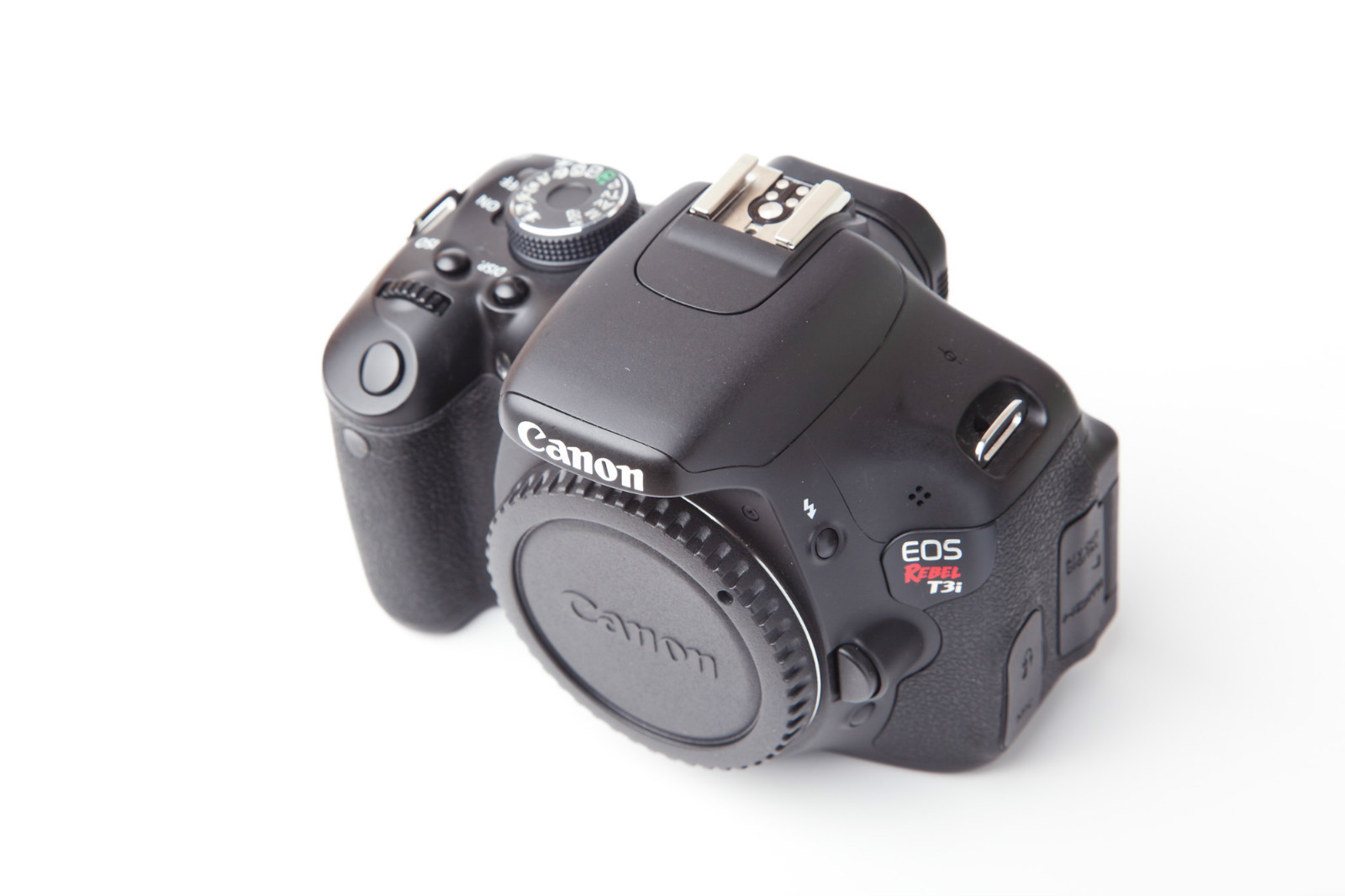
The body of the Canon Rebel T3i / 600D is made of various alloys and materials, but remains along the same lines of the build of its predecessor: polycarbonate covers the stainless steel skeleton of the camera, while fiberglass made up the more delicate portions of the device. The sides of the camera are covered in patterned leather patches to improve the grip dramatically – also slightly distinctive in comparison to the 550D which only featured leather on right hand side. There is also another portion covered in leather on the camera back right on top of the thumb rest that is meant to prevent any accidental button pressing when using the camera – it’s narrower and differently shaped than the one on the Rebel T2i.

The sensor has been bestowed with an anti-static coating on its surface. In order to help with dust reduction, there is a low-pass filter vibration that starts when you turn on the camera which you can interrupt manually, as well as an entire dust-removal program included in the camera. By recreating a realistic mapping of the specks of dust present on the sensor, the program notifies you if there is any remaining dirt that it didn’t manage to remove by itself and allows you to do it yourself manually once you pinpoint the exact location.

Canon Rebel T3i Button & Control Placement

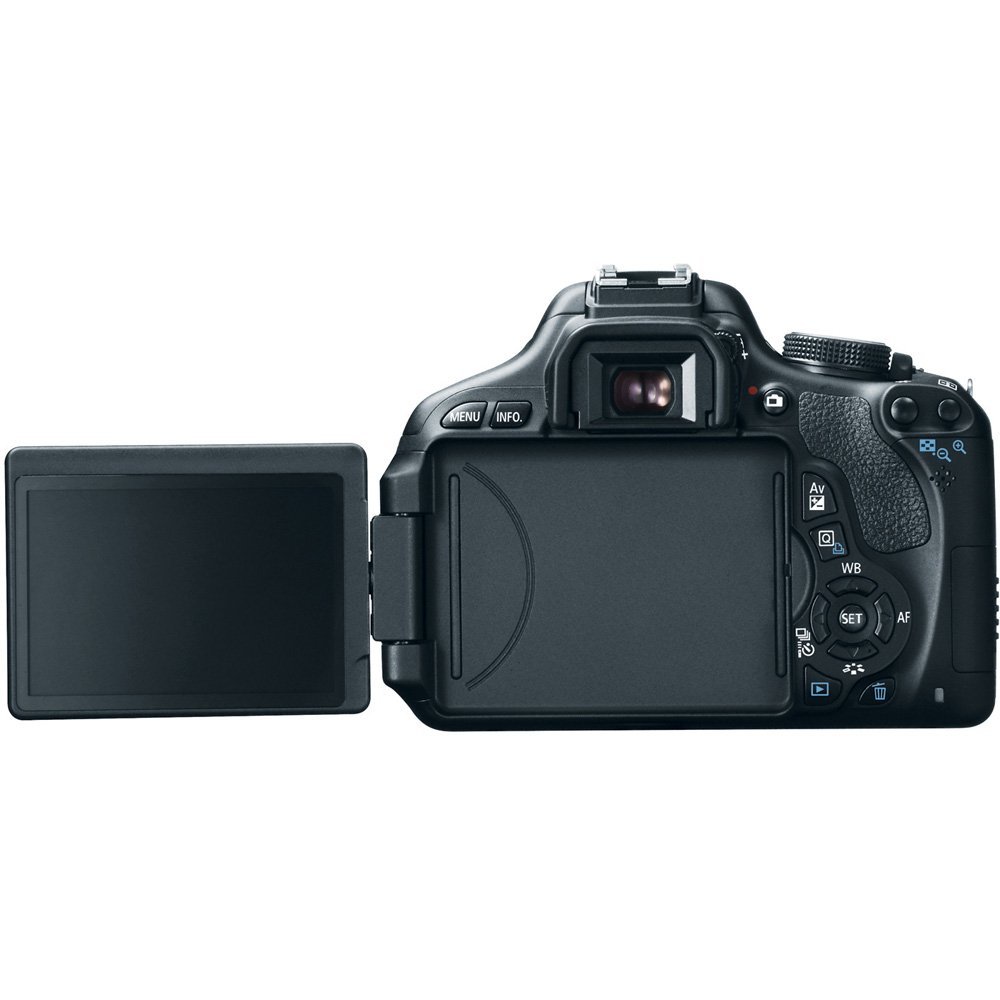
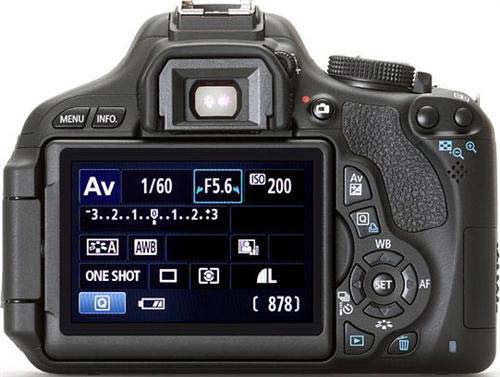
Given that the Rebel T3i has brought an articulated screen as one of the major improvements over the T2i, the layout and positioning of all the buttons and controls on the back of the camera have changed in the slightest bit. Because of the screen handle that digs into the area that previously held two controls, everything has been shrunk a little and moved slightly to the side. The 4 directional controls are clumped closer together around the Set button and the Delete control has changed shape and moved closer towards the screen.

Canon Rebel T3i Front

As a last mention regarding the camera back that has suffered changes, the Menu and DISP buttons that were previously present on the T2i have now turned into Menu and Info; the DISP button has been moved on the top area of the camera and serves as an ON/OFF function for the screen while the Info control provides you the ability to cycle through a number of display options and other types of information.

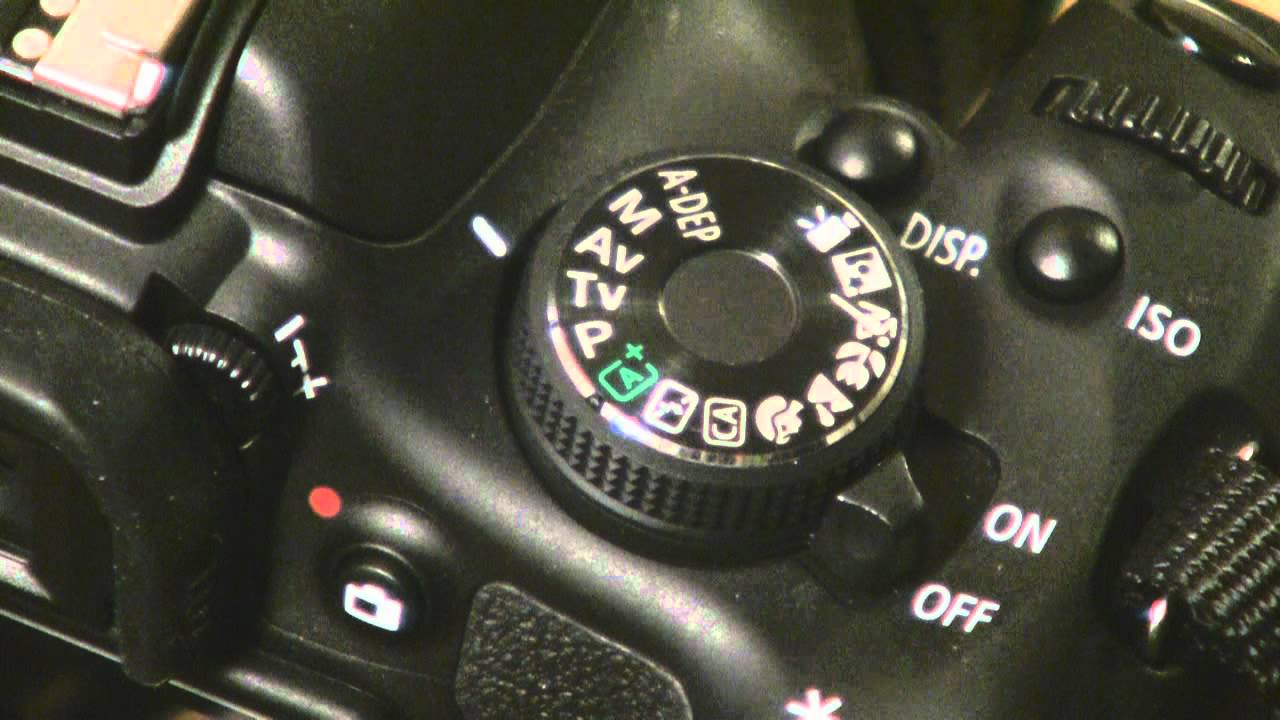
The top of the camera feels narrower than the 550D despite the dimensions saying otherwise. Because of the way it’s constructed and the addition of the DISP button, it gives the Canon Rebel T3i DSLR a more clumped feel, but a rounder look to the edges when seen from above. There is a noticeable increase in depth on the 600D, making it longer back to front. The mode dial is nearly identical to the 550D model but features smaller indents going all around the wheel, making it easier to turn and use. The set of options present on the mode dial is the same as we’ve seen on the 550D, with the small exception that Creative Auto has been moved and that we get a new icon: A+, also known as Scene Intelligent Auto.

Canon Rebel T3i Top View

Canon Rebel T3i Viewfinder, Screen & Other Components

The viewfinder of the Canon Rebel T3i maintains the pentamirror build that we could find in its T2i predecessor, which however has suffered a very small decrease in magnification – from 0.87x to 0.85 – which is hardly noticeable in realistic terms. The viewfinder is good and does its job well, while it may lack a little in comparison to the more expensive pentaprism viewfinders. In terms of the information that it displays, things have remained identical to the EOS 550D. To give you the complete list: AF information, shutter speed, aperture value, ISO speed, AE lock, expore level, spot metering circle, exposure warnings, AEB, flash status, high-speed sync, FE lock and exposure, red-eye reduction light, white balance correction, SD card information, maximum burst and highlight tone priority.

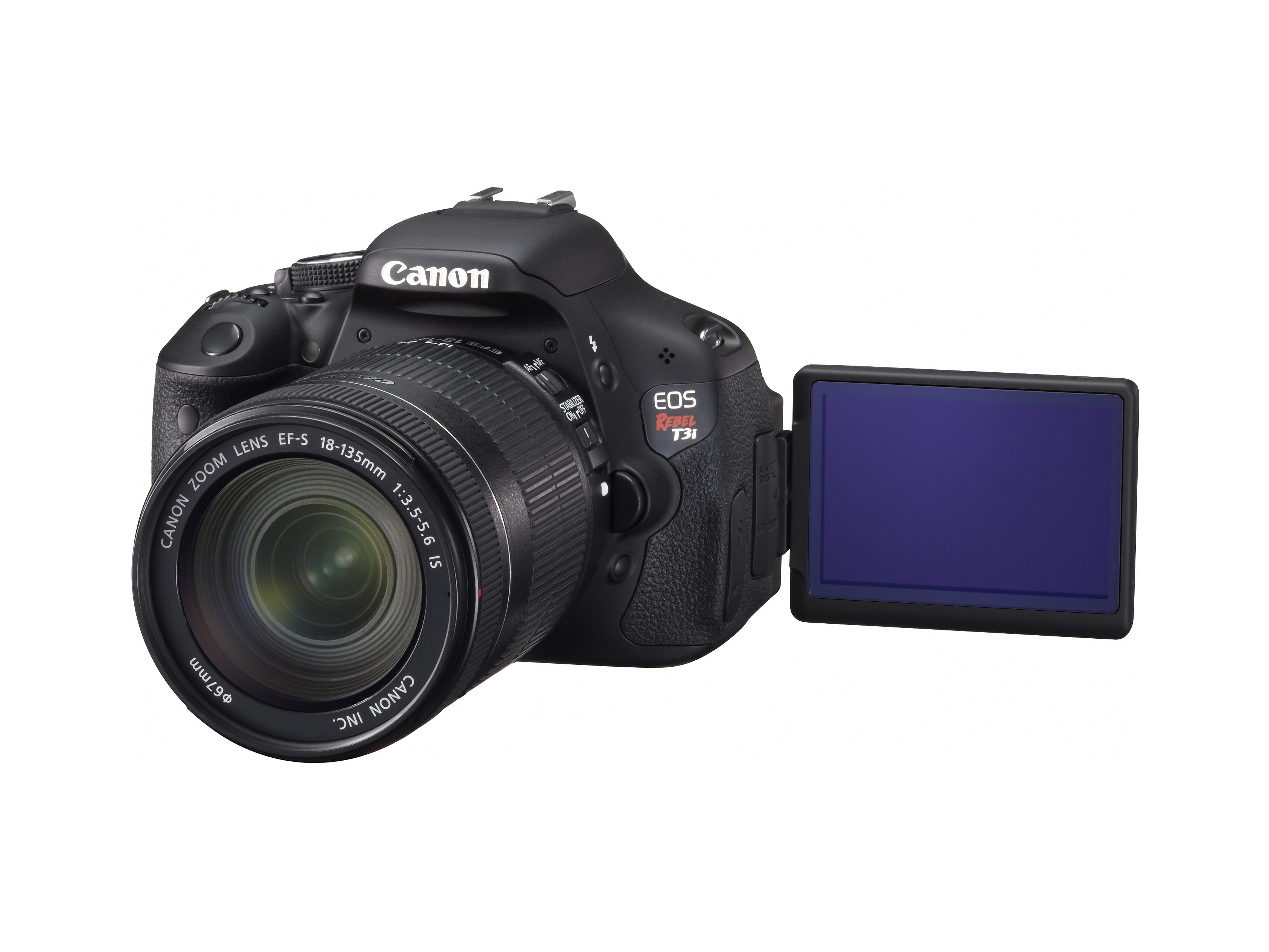
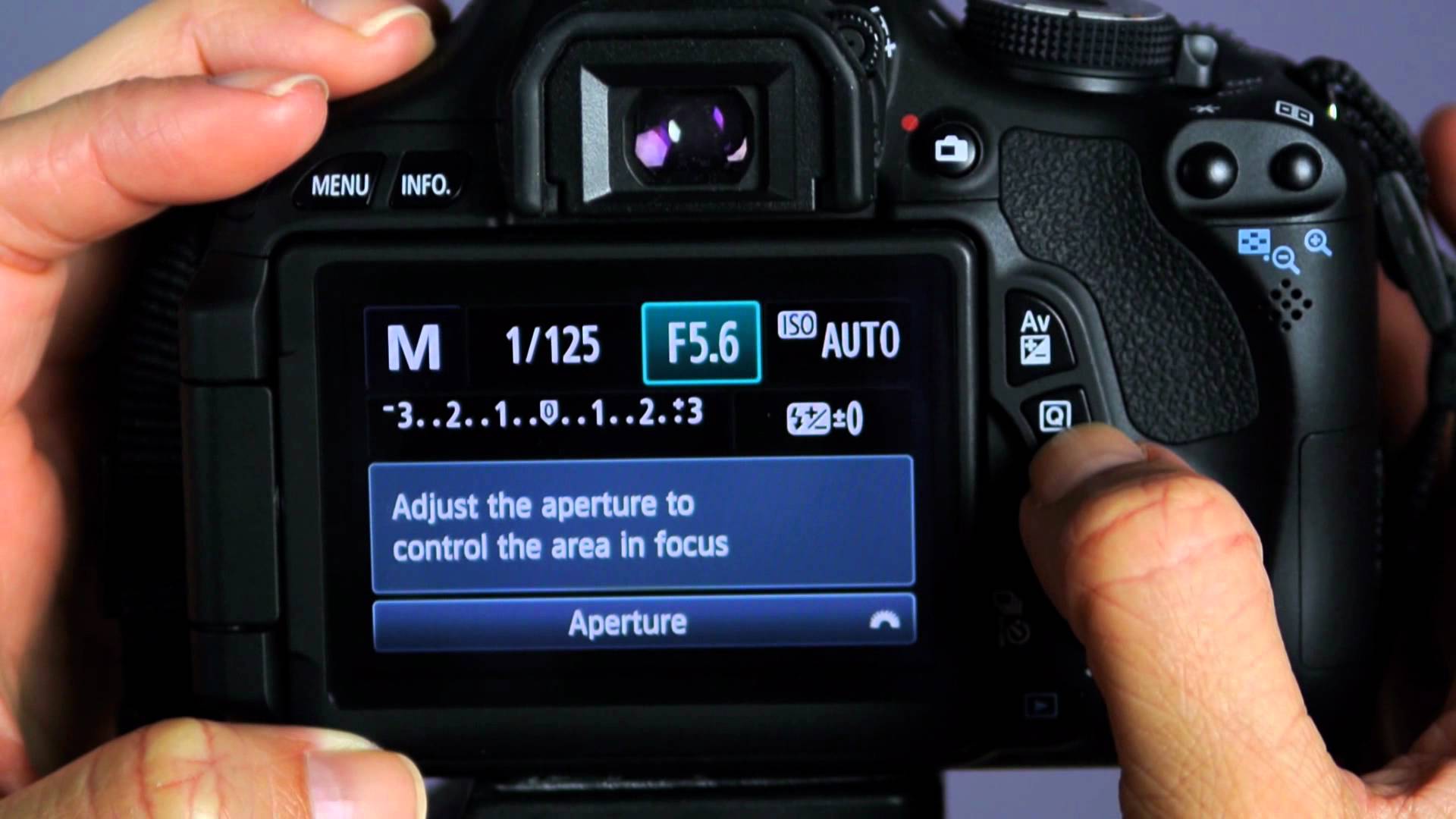
The articulated screen is one of the main focuses of the Canon Rebel T3i. One of the features that Canon started using again only a few years ago, it is particularly useful for a number of situations. With a 3:2 aspect ratio and a 1040k dot display, the screen can be swiveled and tilted at pretty outstanding angles that will allow you to use the camera from more unorthodox positions and even when situated on a tripod.

Canon Rebel T3i Side

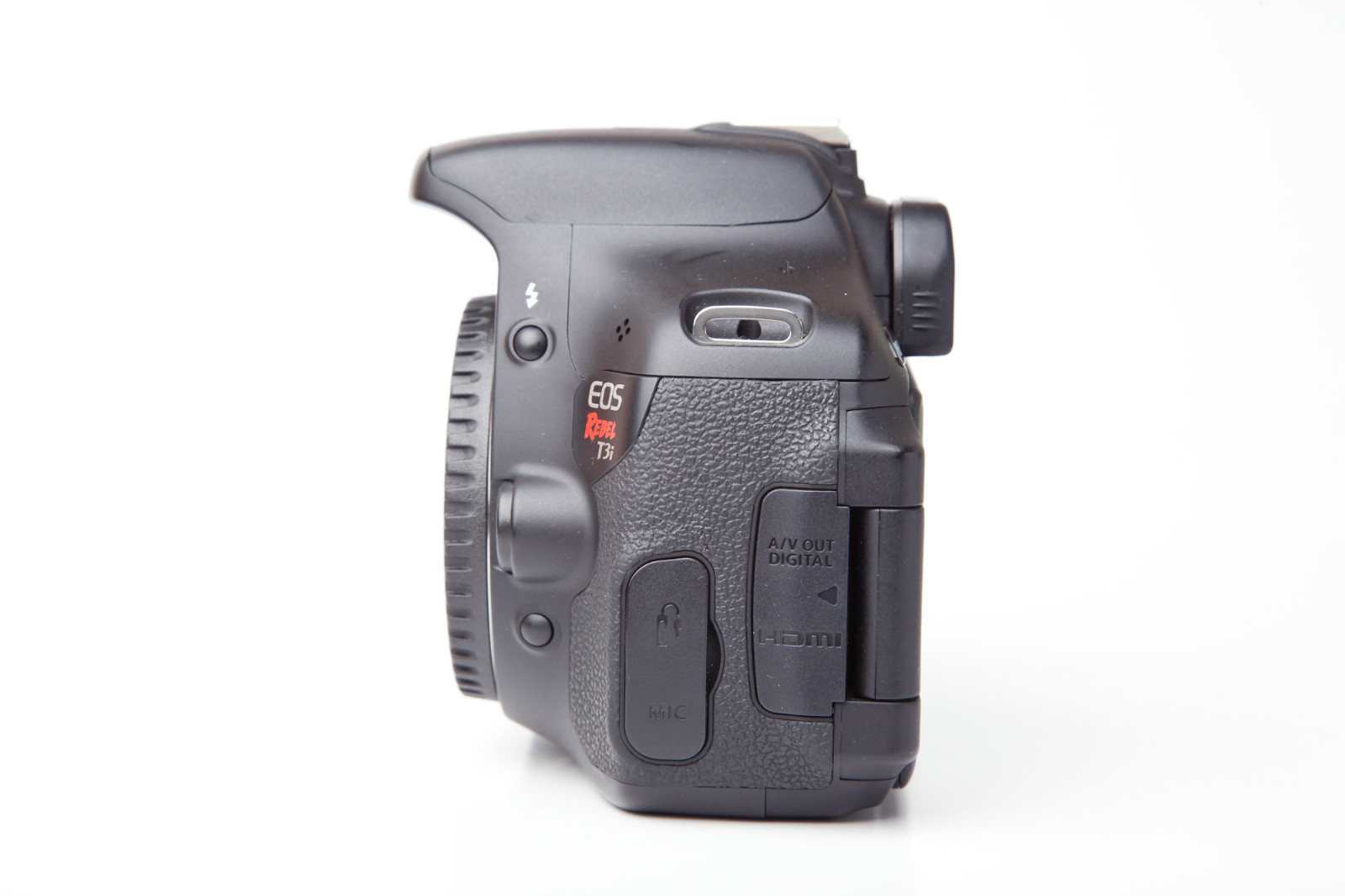
Taking a tour around the other parts of the camera, we can find the Canon Rebel T3i battery door at the base of the camera that encloses in it a LP-E8 battery pack. Moving upwards on the right hand side you find a memory card slot that is compatible with SD, SDH and SDXC memory cards. On the opposite side there are two ports hidden behind a rubber flap – one is a regular 3.5 mm headphone jack while the other is a custom RS-60E3 port destined for wired remote control. A little further to the right on this side and you can find the A/V OUT USB and AV combined socket and a mini-HDMI under another rubber flap.

Canon Rebel T3i Features

Hardware. In terms of hardware the EOS 600D hasn’t changed a lot since its previous iteration, the 550D. The Canon Rebel T3i maintains the same DIGIC 4 image processor that we’ve seen in its predecessor, which allows capturing 14-bit RAW imaged. There are no changes to the sensor to speak of; the same 18 MP APS-C CMOS sensor has been used in the Canon Rebel T3i, which comes with a sensitivity range of ISO 100-6400. As a side note for those interested, the range is expandable to 12,800. That makes up for a maximum image resolution of 5,184 x 3,456, at a pixel pitch of 4.3 micrometers. The Canon Rebel T3i can shoot up to 3.6 frames per second in L/F JPEG or RAW formats, the count lowering to 3.3 frames per second when shooting RAW+L/F JEPG.

Canon Rebel T3i Menu

Autofocus. The 11-point CMOS sensor that the Canon Rebel T3i packs doesn’t come close to the AF levels of professional cameras. It has a working range of -0.5 to 18 EV at low ISO and can predict movement in order to increase the speed of the autofocus for distances of up to 8m. There is only one cross-type focus point at the center, and given the small number of points overall, this camera will be more proficient in shooting still images than very dynamic video capture such as filming sports. The longest focus duration that the sensor takes is 3 to 4 seconds when the camera is in Live Mode.

Canon Rebel T3i Sample

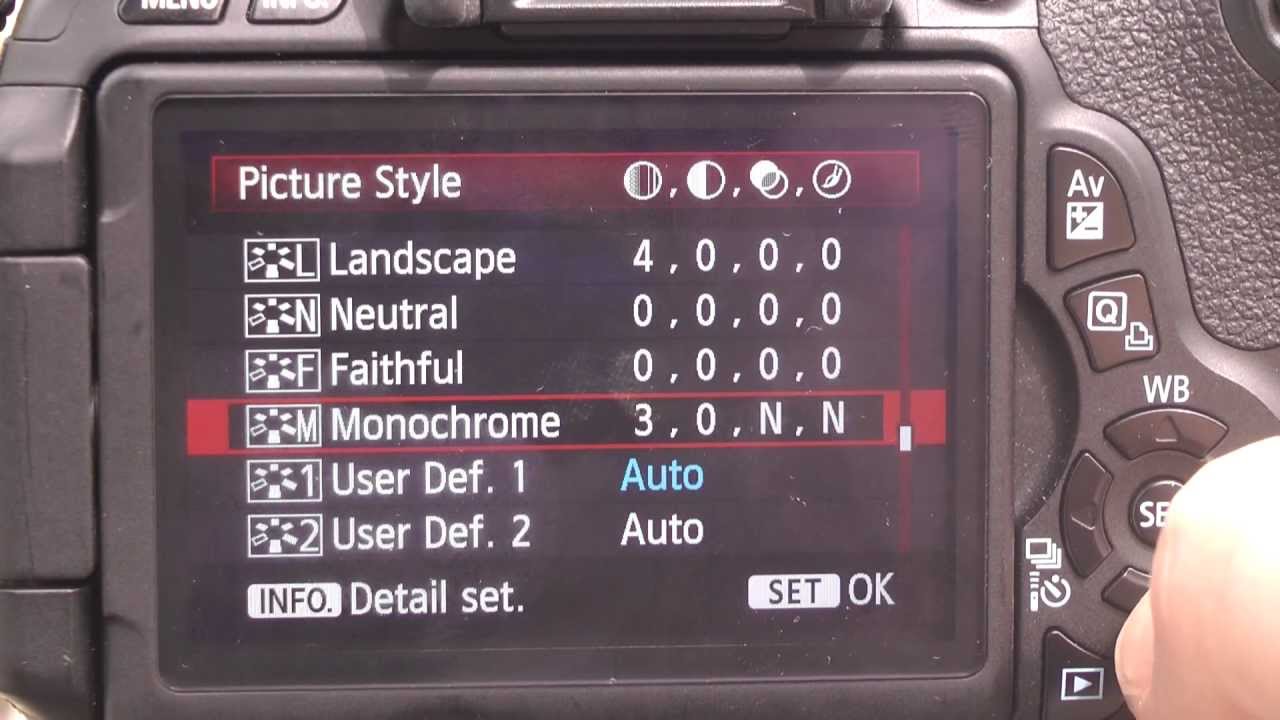
CA & A+. Something that we have mentioned earlier in the design section is a modification that we’ve noticed on the mode dial that now displays an A+ icon. This is something that replaces the old Green Zone Auto icon; you will find here information regarding Autofocus, Auto White balance, the Auto Lighting Optimizer and Picture Style Auto.

Canon Rebel T3i Dial

The CA interface is similar to its design on the previous Canon Rebel version, being the place where you can control a number of settings for your shooting session. You can adjust the exposure, type of flash, resolution, drive mode and picture style in this section. There is a certain degree that suggests why this camera is directed at entry-level photography: the menu is made easily accessible and more intuitive for the new user by switching the names of various concepts into simpler ones – aperture becomes exposure level that you can set from brighter to darker, and things such as shutter speed are translated into how blurry you wish for your background to be.

Canon Rebel T3i System

Image processing. There is a number of features that we can add under this rather generic feature – some of which we have mentioned in the previous point. While most are also supported by the Canon Rebel T2i, there are two new additions to the 600D: creative filters and Basic+.

There are various post-editing you can do to the photos you take with this camera. Highlight tone priority is a feature that has increasing the effective dynamic range of the camera as its purpose. This is done by providing extra protection in highlights and maintaining a more level amount of exposure.

Canon Rebel T3i Image Processing

The Auto Lighting Optimizer is something that will prove to be particularly useful, especially when shooting still images that contained shadowed areas. What it does is simply bring out details and increase the contrast in shadowed areas that were caught in the picture, making those portions look less dark post-processing. The CanonRebel T3i Auto Lighting Optimizer comes in 4 levels.

Peripheral Illumination Correction is a feature that automatically applies corrections for each lens you use for the camera according to a recorded database in order to remove vignetting – a darkening effect produced by some lens towards the corners of the image due to the way the lens are constructed. You can manually disable or enable various profiles if the camera does not detect the correct one automatically.

Creative filters are one of the new features you’ll find in addition to the classic 550D ones and native to the more advanced Canon 60D. To list a few of the filters that you would be able to use on the Canon Rebel T3i: Soft Focus, Toy Camera, Miniature Effect, Fisheye mode, Grainy Black & White and more. The fisheye mode for example is a filter that tries to replace the distortion created by a fisheye lens and translate it into a digitally-rendered effect.

Canon Rebel T3i Image Settings

Custom functions. One feature that is really worth mentioning in this section is the ISO expansion which you can do via the custom function – which will pump up the maximum ISO to a value of 12,800. It’s also good to know that the Canon Rebel T3i also offers a much wider exposure compensation range in comparison to other comparable cameras: +/- 5.0 EV.

Multi-aspect. Also a feature incorporated into the Canon Rebel T3i that most aspiring photographers will appreciate is multi-aspect – basically the ability to shoot in a wide variety of aspect ratios. Because it removes a lot of the effort of having to work with post-processing and cropping, many beginners and even professionals will approve of being able to shoot in 3:2, 4:3, 16:9, and even 1:1, highlighting the image format clearly as soon as you start shooting. On the Rebel T3i camera, it’s known as Multi Aspect Mode.

Flash. The flash packed in the Rebel 600D is an auto pop-up E-TTL II auto flash, not very different in quality next to what we have seen so far in DSLRs. While it features a guide number of 13 meters at ISO 100 and an X-sync of 1/200 second, it lacks a number of possibilities that a professional camera would not forget in its construction. The Canon EOS Rebel T3i DSLR flash is capable of functioning as a wireless flash controller; this is something some of you may have already seen on more advanced Canon DSLRs. Also known as Integrated Speedlite Transmitter, it is a relatively new feature that allows you to control a maximum of two groups of flashes – not as proficient as the 3 groups we find on the more advanced cameras – which you can select from a total of 4 channels and a radio spread of 8:1 to 1:8.

Physically-wise, the flash of the Rebel 600D is placed higher in order to not create as little shadowing as possible with larger classes of lenses. Additionally, the hot shoe that older users will have already been accustomed to on Canon DSLRs is present here as well and compatible with a number of flash units.

Movie recording. Thankfully, the Canon Rebel T3i is capable of recording movies as well – and while not much has really changed as the Rebel camera family progressed, there are some thing worth mentioning about this aspect. Firstly, similarly to the point that we’ve discussed about auto-focus to begin with, the process that the camera requires in order to focus on the subjects of what you’re about to shoot takes a considerable amount of time. The camera does considerably worse with moving subjects or heavily dynamic settings, having a hard time at focusing on a subject even after detected.

The Canon Rebel 600D is limited to roughly 30 minutes of video capture or 4 GB size. Depending on whether you choose to shoot in 720p or 1080p, the video may vary more than you expect, as you can shoot approximately 12 minutes in the higher quality setting. While shooting in 720p can be done at 60 frames per second, 30 fps is the limit when shooting in 1080p. Alternatively, the camera has its own protection system that will automatically turn it off if it’s overheating (normally something that occurs during long periods of video shooting).

Audio level control is yet another feature that you can make use of on the Canon 600D – there is a total of 60 volume levels that you manually select through to minimize sound distortion and clipping. There are two stereo channels in charge of audio capture and the audio level of both can be controlled on the spot. In addition, there is also a Wind Filter setting that you can enable or disable for videos that you shoot outdoors when necessary.

Canon Rebel T3i Price & Verdict

There is a great number of things a less experienced photographer will find on the Canon Rebel T3i that can not only ease their way into professional photography but also give individuals a good chance to experience with various aspects of the trade in a user-friendly manner. While it doesn’t come close to its bigger brothers in terms of DSLRs, it does pack a lot of features and capability that you wouldn’t expect in an entry-level device.

As the most iconic downsides however, auto-focus is relatively lackluster in terms of consumer expectations; because of it, video quality has a lot to suffer as well in some situations and shooting photos will imply a considerably longer setup phase.

Canon Rebel T3i Lens

There are a few variations you can get the Canon Rebel 600D in: body-only, it will cost you $799.99, however the price will differ depending on which Canon Rebel T3i lenses you choose. You can purchase the Rebel T3i with the 18-55mm IS II kit lens for $899.99, but the 18-135mm IS kit lens will spike up the price to $1,099.99.

Image Source: 1, 2, 3, 4, 5, 6, 7, 8, 9, 10, 11

Filed Under: Headlines Tagged With: canon eos 600D, canon eos rebel t3i, canon rebel t3i, canon rebel t3i review

  • « Previous Page
  • 1
  • …
  • 16
  • 17
  • 18
  • 19
  • 20
  • …
  • 36
  • Next Page »

Subscribe to Blog via Email

Enter your email address to subscribe to this blog and receive notifications of new posts by email.

Join 11 other subscribers

Recent Articles

police handcuffs man

German Man Probed In Poisoning That Killed 21 Employees Since 2000

June 29, 2018 By Kenneth Scott Leave a Comment

Chicken wings bar

Intoxicated South Carolina Man Punches Waitress Who Refused to Serve Him Alcohol

June 29, 2018 By Karen Jackson Leave a Comment

gaming

New Zealand gamer Who Flew Halfway Across The World for Virginia Teen Gets Shots By Her Mother

June 28, 2018 By Cristopher Hall Leave a Comment

party

Former Virginia Tech Freshman Sentenced to 50 Years in Prison for Stabbing a Girl to Death

June 28, 2018 By Roxanne Briean Leave a Comment

bonfire

British Couple Sentenced to Life in Prison for Torturing and Murdering French Nanny

June 27, 2018 By Deborah Campbell Leave a Comment

pay phone

Texas Father of Girl Disappeared in the 80s Ignored by Authorities

June 26, 2018 By Cristopher Hall Leave a Comment

bottled water

San Francisco Woman Threatened to Call Police on Girl Who Sold Ice Water for Disneyland Trip

June 25, 2018 By Roxanne Briean Leave a Comment

Maplewood Park

Missouri Man Robbed by Date and Accomplice in Park

June 22, 2018 By Nancy Young Leave a Comment

coding

New York Man Sentenced in Cyberstalking Former Girlfriend, Mailing Drugs to Her Dorm

June 22, 2018 By Deborah Campbell Leave a Comment

headphones

Bose Poised to Launch Sleepbuds, In-Ear Headphones That Help You Sleep

June 21, 2018 By Nancy Young Leave a Comment

Police light

Intoxicated Female Driver in Custody for Pulling Arresting Officer by the Hair

June 21, 2018 By Kenneth Scott Leave a Comment

kitchen

Restaurant Manager Arrested and Charged in Shooting Death of Co-Worker over Negative Yelp Reviews

June 20, 2018 By Karen Jackson Leave a Comment

plastic container

Pennsylvania Couple Charged in Violent Death of Infant Discovered Buried in Cat Litter

June 19, 2018 By Cristopher Hall Leave a Comment

tailpipe

Minnesota Teen Gets Head Stuck In Oversized Tailpipe Winstock Music Festival

June 18, 2018 By Karen Jackson Leave a Comment

Pages

  • About Us
  • Contact us
  • Privacy Policy
  • Privacy Policy GDPR
  • Staff
  • Terms and Conditions

Recent Posts

  • German Man Probed In Poisoning That Killed 21 Employees Since 2000 June 29, 2018
  • Intoxicated South Carolina Man Punches Waitress Who Refused to Serve Him Alcohol June 29, 2018
  • New Zealand gamer Who Flew Halfway Across The World for Virginia Teen Gets Shots By Her Mother June 28, 2018
  • Former Virginia Tech Freshman Sentenced to 50 Years in Prison for Stabbing a Girl to Death June 28, 2018
  • British Couple Sentenced to Life in Prison for Torturing and Murdering French Nanny June 27, 2018
  • Texas Father of Girl Disappeared in the 80s Ignored by Authorities June 26, 2018
  • San Francisco Woman Threatened to Call Police on Girl Who Sold Ice Water for Disneyland Trip June 25, 2018

Categories

  • Business
  • Entertainment
  • Finance
  • Headlines
  • Health
  • Life
  • Nature
  • Science
  • Sports
  • Tech & Science
  • Travel
  • Uncategorized
  • United States
  • World

Copyright © 2026 ArgyllFreePress.com
About · Privacy Policy · Terms of Use · Contact