Argyll Free Press

Growing News Network

Thursday, April 23, 2026
Log in
  • Business
  • Finance
  • Sports
  • Tech & Science
    • HP Envy 4500 Review
    • LG Optimus 170 Review
    • iPod Touch 6th Generation Review
    • HTC One M8 Accessories Set-up
    • Surrealist Games You Must Play
    • Hisense Sero 8 Review
    • Dell Latitude e7440 Review
    • HP Laserjet 1536dnf mfp Review
    • Garmin Fenix 2 Review
    • Skype Vs Viber
    • Best Video Conferencing Software
    • Sony mdr 1r Headphones Review
    • Canon Rebel t3i Review
    • Sennheiser Momentum 2-0 Review
  • Travel
  • Headlines
  • Health
  • United States

Secure Islands Make Microsoft Azure Security Better

November 10, 2015 By Michael Turner Leave a Comment

Microsoft Azure Security just got better with Microsoft acquiring Secure Islands.

In case you’re not familiar with Microsoft Azure, it is a cloud computing platform who uses a global network of data centers managed by Microsoft or hosted by its partners to allow its users to build, deploy and manage services and applications through it.

It was formerly named Windows Azure in 2010 when it was released, and then it was changed to Microsoft Azure in 2014, though you will find it referred to as Microsoft Azure Cloud Services on the net as well.

Regarding how Microsoft protects the data that circulates on this cloud computing platform, it’s worth mentioning right at the start that the company had acquired not one but two security firms already to deal specifically with cloud security. This September, Adallom for 300 million $ and last year, for 200 million $, Aorato, a startup. Both of them Israeli.

But apparently, Microsoft is taking this issue really serious, judging by their most recent, third, acquisition, the also Israeli based company Secure Islands, which they confirmed on the 9th of November.

Thought the exact sum Microsoft paid for the company has not been disclosed and only rumors of a range from 77 million $ to 150 million $ exist, the fact that Secure Islands make Microsoft Azure security better is clear, judging by the credentials it has for using its technology to keep data safe and sound, as evinced by Credit Suisse and Vodafone entrusting Secure Islands with this task.

Add to that the fact that Secure Islands already had products designed to work for Microsoft Sharepoint and Microsoft Exchange and it looks like the move that Microsoft made to acquire them was a very logical one that benefits both companies and ensures a smooth and efficient transition.

Because Microsoft will get a new division which already took Microsoft’s products into account and knows how they work, making the creation, design and implementation of future products much easier. While Secure Islands gets the chance to greatly enlarge its existing customer base, by now catering to Microsoft customers world-wide and benefiting from the resources and innovation that Microsoft has at its disposal.

The reason for Microsoft acquiring three web security companies in a relatively short time-frame is clear to anyone interested in the tech industry which has been monitoring the recent news: hacks have been taking place, breaches have been exploited, data lost and vulnerabilities revealed (sometimes by security experts themselves) on a regular basis recently.

And the frequency of such troubles as these attacks pose seems to be getting higher, not lower.

So, the fact that Microsoft is fortifying its defenses should not be seen as an exaggeration, but as a sign of maturity and justified caution to be applauded.

Image source: 1.

Filed Under: Headlines Tagged With: Microsoft Azure, Microsoft Azure Cloud, Microsoft Azure Cloud Services, Microsoft Azure Security, Secure Islands, Secure Islands Microsoft Azure

New Range Rover Evoque Convertible Produced

November 9, 2015 By Kenneth Scott Leave a Comment

The Range Rover Evoque Convertible has been produced and set to sale in 2016.

The British car company Jaguar Land Rover (owned by Tata Motors, of India) have kept the promise that they made in 2012 when they presented the concept for a new addition to their Evoque series. Because now, the Range Rover Evoque Convertible is a reality with sales set to begin by the middle of 2016.

Despite the fact that this model of car is, in essence, a luxury convertible rover, which is an interesting combination in itself, there should be no shortage of buyers. Because the company declared that what kept them motivated to deliver, from 2012 to now was the many very positive reactions they had back then at the Geneva Motor Show, at the mere concept of the car.

And it’s understandable what all the hype is about. Because this car delivers the power of an off-road vehicle, with the luxurious and comfortable interior not customary for off-road vehicles along with the option to use it in every weather, from the scorching desert to some snowy mountains, due to it’s detachable roof.

This roof is automatized (you don’t need to manually fold it or open it), and is sturdy enough and powered in such a way that you can actually operate it at speeds up to 30 miles per hour. And if you’re wondering about how a frail detachable roof can protect occupants in case of a rollover (which is a risk when taking an off-road vehicle, well… off-road), you can rest easy.

The Range Rover Evoque’s Convertible features protective bars that will automatically snap into position to secure the roof in conjunction with the already permanently reinforced windshield bars, in case the car detects an imminent rollover (also automatically). All this in under a tenth of a second.

And, with the roof detached, you get a storage space of approximately 9 cubic feet in the back.

As for Land Rover’s reputation for making cars that are off-road not only in name, but in performance as well, the makers say that nothing has changed, with the Evoque Convertible model being very capable to handle whatever you might decide to throw at it.

As regards what makes this car rumble, it is powered by a turbocharged 240 horsepower engine with 4 cylinders. It also has all wheel drive and an automatic transmission with 9 speeds, just like it’s previous, non-convertible counterpart from the same automaker.

The price tag for the Range Rover Evoque Convertible is, according to the company, going to begin at around 50,000 $ when it launches in 2016, making it a relatively accessible luxury car, considering also its hybrid luxury-off road-convertible nature.

Image source: 1.
Filed Under: Headlines Tagged With: Jaguar Range Rover, New Range Rover, Range Rover, Range Rover Convertible, Range Rover Evoque Convertible

Nexus 6P Review – The Metallic Flagship

November 9, 2015 By Cristopher Hall Leave a Comment

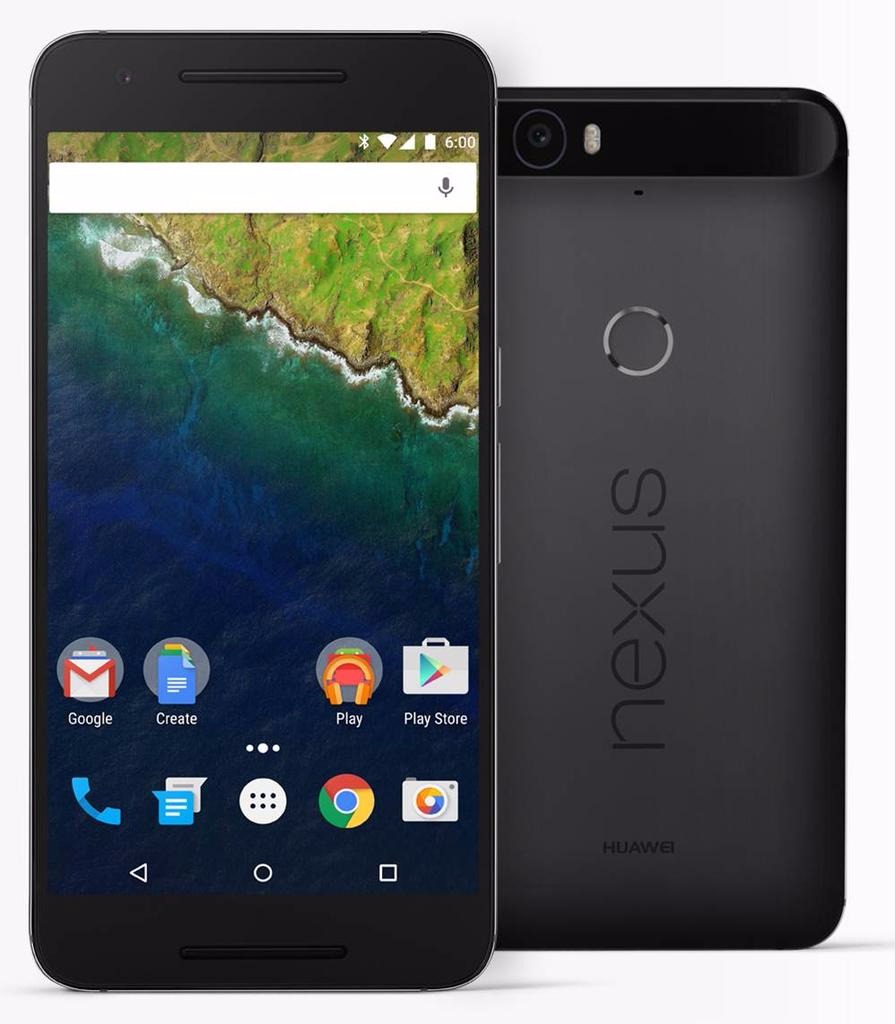
Nexus 6P Front & Back

This time of year is particularly busy when it comes to the mobile phone industry. And because it’s nearing the end of 2015, smartphone developers all over the world take their final plunges in terms of innovation in technology. The result? Jaw-dropping flagship devices, entire powerhouses of hardware that only get larger and slimmer. And the Nexus 6P is one of our best examples.

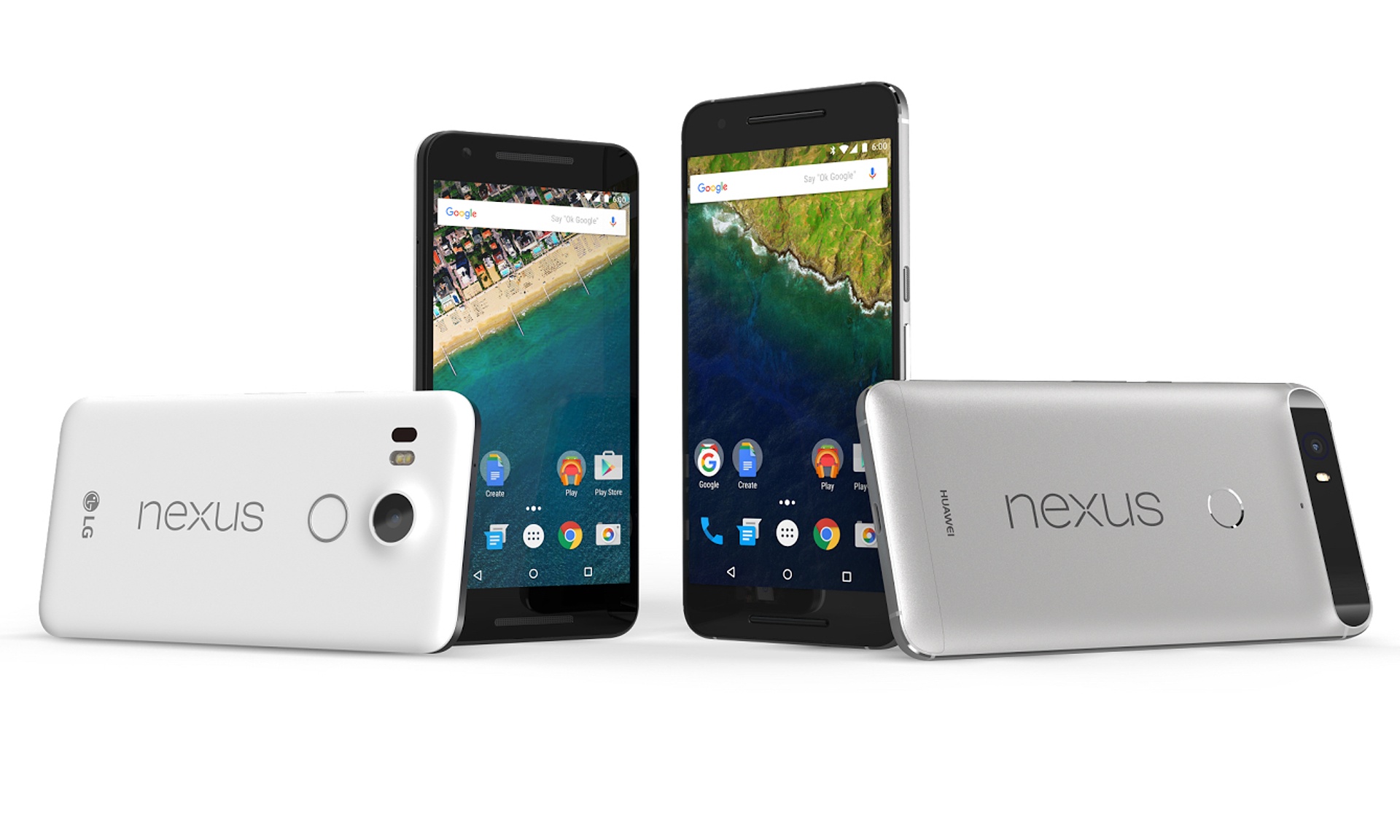
However, coming as a surprise to some, the Nexus 6P is not of Motorola design like its predecessor. Nor does it have the LG logo sporting the brand; this time around, Chinese manufacturer Huawei has taken it upon themselves to make a phablet phone that would appeal to the western market. And with a sigh of relief, I have to say that not only the experiment was a great success, but the Nexus 6P ended up a masterpiece indeed.

This latest iteration of a long series of Google Nexus phones is one of the first hosts of the new Android operating system, Android 6.0 Marshmallow. Everything involved, it comes to battle other phablets of the market toe-to-toe; and it’s got an entire arsenal to do battle with. Being one of the most ambitious projects we’ve seen so far in the Nexus family, there’s a lot of things that have changed for the better to allow it to surpass the limitations known to the brand until now.

Lastly, it’s a great thing to know that despite a hefty number of improvements, Nexus has yet to put down its crown of value prices: despite it being an excellent piece of technology that has definitely surpassed previous Nexus devices and can actually compete with other top-tier smartphones, its price still falls in the same, average category.

Judging by everything that Google and Huawei have attempted to do in case of the Nexus 6P, the story is slightly reminiscent of another device that set out on its own path to overthrowing the competition through an absolutely outstanding construction that would not burn an entire series of holes in your wallet. That is the story of OnePlus 2 – the self-proclaimed 2016 Flagship Killer.

Nexus 6P Design

Google is proud to present a brand new phablet-constructed smartphone under the Nexus tag that is metallic. The plastic case trend has been left behind in favor of anodized aluminum – an alloy that is stronger than the ones we’ve seen in phones so far in terms of outside protection. Because of the materials used in its construction, the Nexus 6P is incredibly light despite its enormous size, suitable for a phablet – no more than 178 grams. That’s 14 grams less than the iPhone 6s Plus but a very small amount heavier than the OnePlus 2 – which weighs 175.

Considering that the Nexus 6P measures 159.3 mm in height and 77.8 mm in width, that makes for an impressive thickness of only 7.3 mm, matching the Apple counterpart but setting a new personal slimness record. The phone is really quite the sight – similar to the feeling of switching from a 22” monitor to a 27” after a few years of usage, the entire 5.7 inches wide screen feels large enough to suck you in if you’re using a phablet for the first time in your life. It may not come close to its direct predecessor – the Motorola Nexus 6 – which extended to the staggering display size of 5.96”, but some people may find this change adequate. 6″ in particularly difficult to handle for most individuals.

Nexus 6P vs 5

Because of its outstanding slim build, the phone is very comfortable to hold one-handedly; but naturally, just like any other phablet you will need the use of both of your hands to navigate it and use it to its full potential. As a downside to this bewildering-sized phablet, there is no stylus hidden anywhere in its frame to allow a minimal amount of stretching from one end of the screen to the other when using the features or apps you install. Everything you do, you will have to do by yourself, and unless you have unnaturally long thumbs, it will be a real feat stretching towards the top-most corners of the screen without having to switch the position of the phablet in your hand every time you have to reach another part of it.

The issue of holding the phone has a lot to do with the shape of its back too, where slightly curved makes for a more comfortable and secure grip. In Nexus 6P’s case, the edges – albeit extremely narrow – are cut straight and abruptly lead into the slightly curved back. That does not particularly help with securing your grip on the phone, and together with the impressive size may lead to quite the challenge for the device to actually feel good and fit in your hands.

Nexus 6P Back & Side

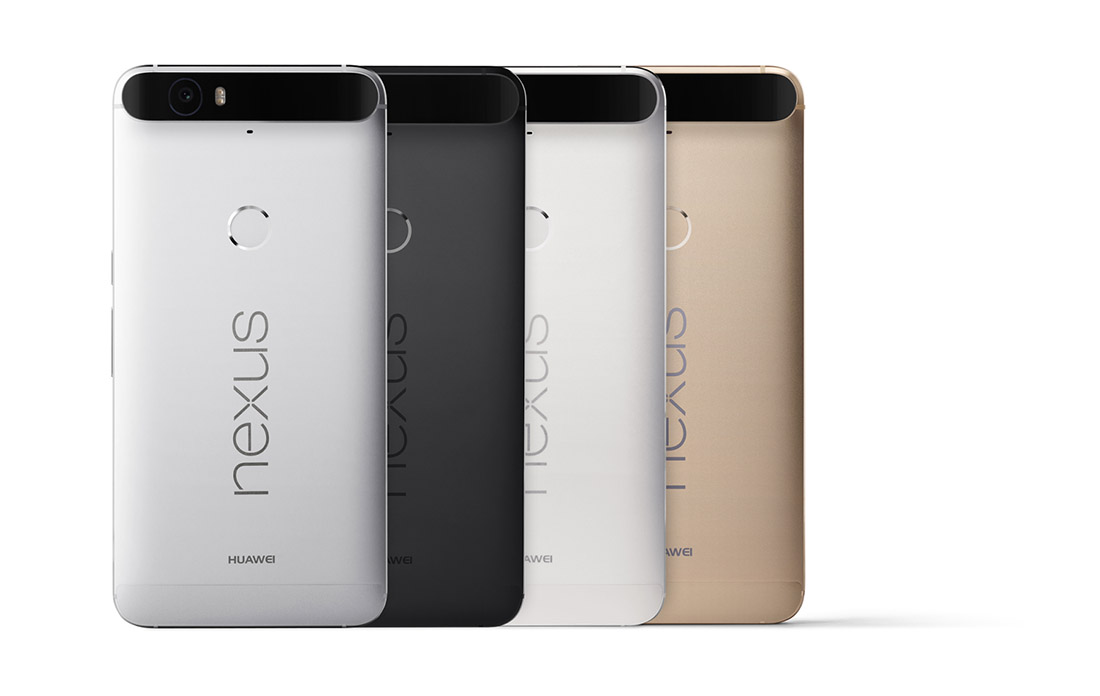
Nexus 6P Color Variants

The unibody of the Nexus 6P is extremely minimalistic and looks sleek and elegant as a result. The designers have only released 3 color variants for this beauty, fitting for a device that speaks distinguished elegance and professionalism: aluminum, graphite and frost – more realistically called silver, black and white. There is a limited edition gold variant available in Japan for anyone interested. It keeps things pretty simple, unlike the OnePlus 2 that has a rather eccentric but distinctively classy selection of patterned back-covers – such as hardwood or granite mosaic patterns, on top of the classic matte black.

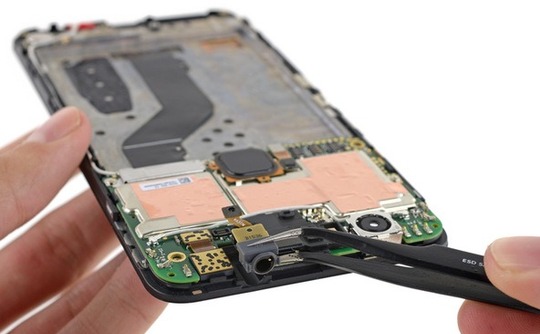
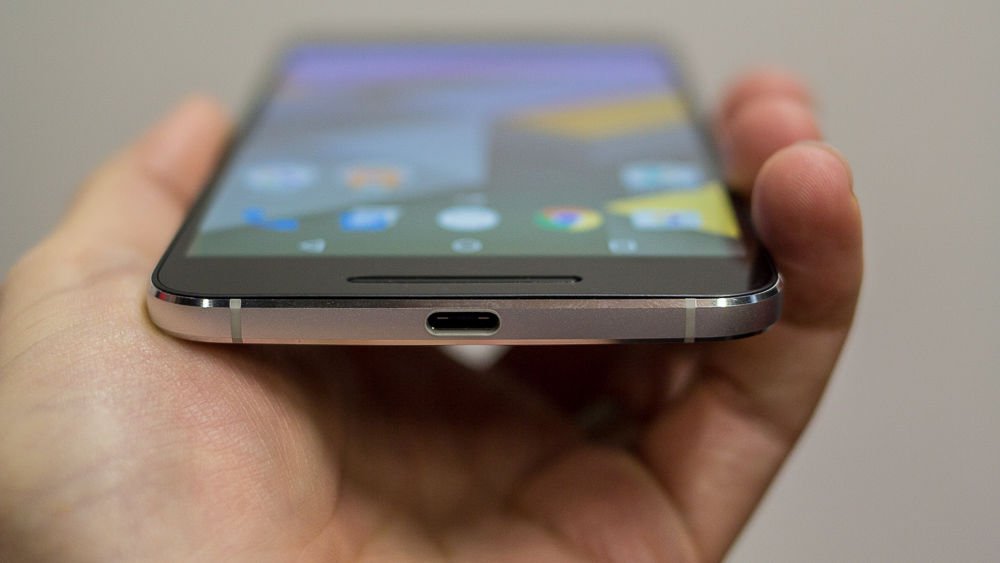
There is close to no unnecessary clutter on it either – you can find the power button and volume rocker on the right hand side of the phone, the former covered with a unique texture that will make it easy to differentiate from the latter. The bottom makes room for only one slot for the new and improved reversible USB Type-C charger. The classic 3.5 mm headphone jack is placed on top of the phone: while this is probably an internal space-related placement, I still feel like placing it on the bottom of the phone makes a lot more sense for people who normally put their phones in their pockets when they’re not using them. Each manufacturer has their own beliefs and reasoning I guess.

Nexus 6P Fingerprint Reader & Camera

The back of the Nexus 6P is the focal point of design innovations and their resulting flaws. Firstly, the good news is that there is a fingerprint reader available for the users of this fabulous phablet; the bad news is that its placement is about 3 quarters of the phone up. While the entire idea of placing your fingerprint reader button on the back turned out to be a pretty neat idea after Huawei experimented with it in their Mate S, having it all the up closer to the top makes for a huge stretch of your hand to even reach it.

Nexus 6P Side-view

Secondly, the good news is that the phone is really slim, right? Their respective bad news is the only way Huawei managed to find room to stick its impressive camera into the 7.3 mm worth of space is by letting it jut out just slightly in the back. While the contrasting-colored strip is not half bad when you look at it, the fact that there’s a considerable area of the phone literally sticking out at the top of the phone feels and looks strange.

But there is at least another piece of good news that came out of this: the antenna lines that have haunted and daunted manufacturers for so long are handled pretty well by the Nexus 6P – hardly noticeable on the sides and hidden underneath the strip that incorporates the camera sensor on the top half of the phone.

Nexus 6P Display

The AMOLED screen goes no lower than 5.7 inches, as previously specified. It’s a capacitive touchscreen that makes up of 71.4% screen-to-body ratio and goes up to a staggering 518 ppi pixel density, featuring a more pleasant 16:9 aspect ratio. It is covered with a layer of Corning Gorilla Glass 4, featuring oleophobic coating. Along with the mind blowing quad HD 1440 x 2560 resolution that the phone is actually capable of, the display is unmistakably an amazing piece of hardware. The images are extremely vivid and colorful, yet particularly saturated; the image quality has improved considerably since last year’s Nexus 6, but still depicts unnatural looking hues of colors in some circumstances.

Nexus 6P AMOLED Display

There is a difficult to explain tendency for smartphone and tablet manufacturers to start reverting to the older IPS display builds – the iPhone 6S and Sony Xperia Z5 Premium are two examples of comparable devices that make use of IPS technology – marginally inferior to AMOLED and LCD. The OnePlus 2 for example employs the LTPS LCD technology with is in essence very much similar to AMOLED, coming with a series of ups and downs. LCDs are exponentially better in color accuracy and hue precision, very bright and power-efficient; on the other hand AMOLED displays are particularly skilled in displaying true black but falling a little behind when outdoors.

There is a feature that changes the brightness of the screen according to the amount of light present in its environment. It adapts to dimmer-lit rooms by reducing brightness and vice-versa when exposed to bright environments. Strangely enough, the maximum level of brightness the phone is capable of is not one that your Nexus 6P will reach by itself using the adaptive brightness. But on the same note, viewing angles are great nor does the image suffer too much in sunlit situations.

The brightness is not the only adaptable feature of the screen however. The same adaptive display that we have noticed in the Motorola Nexus 6 is present here too – making your phone respond when the sensors notify it that you picked it up by displaying a grayscale notification lock-screen.

Nexus 6P Specifications:    Performance & Comparison

To only sum up the hardware that the Nexus 6P packs inside the 7.3 millimeters of space is a disgrace to the power that really lies inside. The shortlist includes an octa-core processor, at least 32 GB of storage space and 3 GB of RAM. There are a lot of similarities in build and specifications with the OnePlus 2 once again – the phablet that was meant to overthrow the market after its release. Even more so, taking everything it packs into account, the Nexus 6P manages to exceed expectations and even run two steps ahead of its counterparts.

Nexus 6P Hardware

The Nexus 6P features one of the latest Qualcomm Snapdragon 810 octa-core processors. Featuring 64-bit computing, it’s a highly advanced piece of hardware that allows a smooth transition of smartphones into downright tablet and laptop replacements. The 8 CPU core chipset is LTE capable and allows a wide range of activities – starting with streaming 4K Ultra HD videos and handling 3D games smoothly, Qualcomm has made more efforts towards reducing battery usage along with increasing the power in this piece.

The processor is basically constructed from 2 quad-cores CPUs: a 1.55GHz Cortex-A53 and a Cortex-A57 that can go as high as 2.0 GHz. The same CPU is featured in the OnePlus 2 – and exceeds expectations far more than the Apple A9 dual-crore 1.84 GHz Twister featured in the latest iPhone 6s Plus. Nevertheless. it really does fall behind when it comes to the Exynos 7420 CPU featured in Samsung Galaxy S6 and Galaxy Note 5.

Along with the Snapdragon 810, there is a dedicated Adreno 430 graphics processing unit that improves the quality of life considerably for users who do actually enjoy graphic-heavy interactions with your phone. That means more than just extremely high quality video viewing: chances are any new 3D-rendered smartphone game that comes out by the end of this year and up to Q1 of 2016 will not even stutter. Both benchmark results and real life stress testing place the Adreno 430 GPU above both the Mali-T760MP8 and Apple’s PowerVR GT7600 six-core graphics card, making both the Nexus 6P and OnePlus 2 the better choices once again.

To bring an extra ounce of compliment to everything that we’ve listed so far, the Nexus 6P also features 3 GB of RAM memory – possibly one aspect where the phablet does not go as far as it possibly could, the OnePlus running the extra mile to reach the 4 GB milestone on its 64 GB HDD version, just like the Samsung Galaxy Note 5. Out of all the models that we’ve used for our comparison so far, the iPhone 6s Plus is the only one that stops at a meager 2 GB of RAM, most of them including at least 3.

Storage space is plenty to find inside the Nexus 6P. There are 3 variants of the phablet – 32, 64 or 128 GB worth of storage space respectively. The reason behind it is the lack of any kind of microSD aid – there is no microSD slot to speak of meaning that you’ll have to make use of either physical storage space or cloud services to keep things neat. Considering none of our studied models include said microSD storage option, the Nexus 6P offers the most space on average.

While some processors may exceed the Snapdragon 810 in terms of performance, the Nexus 6P fared ridiculously well with a series of tasks. It’s undeniably fast and a lot smoother than it proved to be when it first came on the market, featured in the LG G Flex 2. Still, there’s no denying that some newer processors are faster and perform better when complimented with other pieces of hardware that are at least on par with them.

Naturally, under heavy stress, the GPU tends to heat up a fair amount but without it becoming upsetting – a rather normal aspect of minimized yet powerful hardware. Depending on what you expect from a phone – or a phablet, rather – the 3 GB of RAM shouldn’t bother you the slightest bit considering multitasking didn’t seem to be minded the tiniest bit on the Nexus 6P. Now try to grasp everything and mix it with a price that is considerably lower than the ones you would normally pay for its Apple or Samsung comparable counterparts. Up to this point at least, the Nexus 6P is worth every cent.

Nexus 6P Software & Features

Rejoice, for the Android 6.0 Marshmallow is here, and the Nexus 6P has got it all. The operating system has brought a fair few improvements to both user interaction and performance. There’s a promised improvement to battery life thanks to the phablet’s ability to manage its power when on standby.

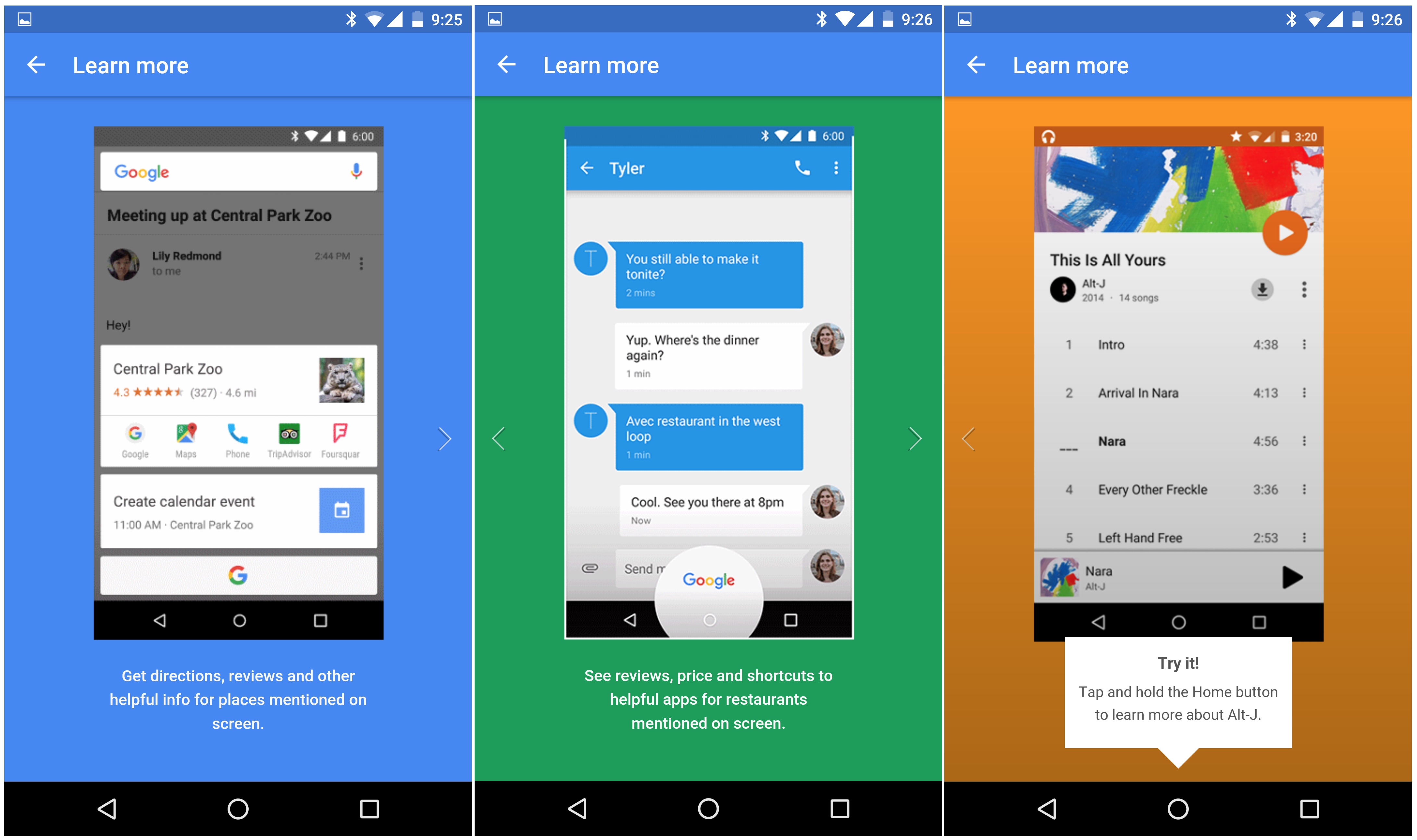
One of the most revolutionizing features of the 6.0 Marshmallow OS is Google Now. Its purpose is rather simple: whatever you are doing at a given moment, whether you’re reading something, listening to a song or watching a video of something, by using Google Now you will basically be able to read more about the topic. You can bring out the Google Now feature by holding down on the home button that can be found on your main screen; doing so is equivalent to googling something without physically having to visit the website and typing in the thing you’re interested in.

Nexus 6P Google Now

Nexus 6P App Tray

Marshmallow hasn’t made any radical changes to the operating system, so anyone who is used to your regular stock Android OS will familiarize with it immediately. One distinction that will be a little confusing for former Android users is that the app tray is navigated through by swiping up and down instead of left and right. On the bright side however, you get to store some recently used apps at the top of the screen to at least not have to scroll all the way up and down to find YouTube or Twitter for example.

The Google Imprint feature, made reality through the fingerprint reader on the back of the Nexus 6P gives you an ample method of securing your phone – up to 5 fingerprints. The reader however feels very forced from some respects; at the current moment its only purpose is to unlock your phone easily, where “easily” can be an exaggeration if your hands are as small as mine – needing you to stretch huge lengths to get it done. The fingerprint reader is not a button as well, such as the iPhone 5 and above variant, so it can’t be pressed, giving that entire part of the phone a rigid and lackluster feel. Still, unlocking your phone via the fingerprint reader is considerably faster than using a PIN – which requires you to swipe first then enter the pin using the keypad.

Nexus 6P Camera

You’d think that there’s no good excuse for Huawei to design the phone with a part of it jutting out in the back. As a matter of fact, there actually is. The manufacturer claims that the camera incorporated in the Nexus 6P is by far a milestone in the technology it has used so far. The reality of it is that it’s pretty good and definitely comes with some neat improvements – but it doesn’t go as far as being absolutely mind-blowing.

The rear camera – and the only real culprit basically – is a 12.3 MP camera that captures 1.55 micron pixels. In case that’s a new aspect of cameras that you have not heard of before, you should know that the standard pixel size is 1.4 and below (the iPhone 6s Plus has 1.22 only); this feature is responsible for making Nexus 6P’s camera a lot more proficient in taking shots indoors and low-light conditions, making it a great choice for night shots for example.

Nexus 6P Back Design

The photos taken with this camera are mostly realistic when translating real colors into an image and remain particularly loyal. All of the test photos that we took felt warm in terms of color crispiness, with a very good set of contrast levels. The autofocus allows you to take pictures on the run, without any prior preparation thanks to the speed it detects subjects in the image and removes the blur.

The Nexus 6P rear camera can also record video in 4k at 30 frames per second, which is a pretty awe-inducing feature of mobile phone cameras in general. On top of that, you can also record slow-motion video that can capture as many as 240 frames per second and the phone also provides you with a number of editing tools.

The front camera is not to be trifled with either; your selfies will be undoubtedly amazing in quality, considering you’ll be shooting using an 8 MP camera. Video calling is incredibly smooth too, being able to sustain a very high frames per second score.

The software that compliments both cameras will certainly give you a lot to play with. Switching between shooting modes, including file types or photo versus video is made incredibly smooth and easy and there is a large number of filters and post-editing you can do. Panoramic shooting, Photosphere and Burst Mode are present here as well, with the latter being able to shoot as many as 30 frames per second and allowing you to compile a GIF file afterwards.

Nexus 6P Battery & Verdict

Firstly, we need to elaborate on the way the Nexus 6P is charged. It is one of the first phablets that make use of the reversible Type-C charger. That means that you can plug it into the phone facing either way, so the curse of the USB and microUSB is now broken. On the downside, however, there aren’t a lot of other devices that use this type of charger so losing it or forgetting it will result in no way to charge up your 6P. However, hoping that no such situation would ever occur, charging your phone with the Type-C USB charger takes incredibly little to do – on average, about an hour and a half. The phone also notifies you of how long it still has until it is fully charged.

Nexus 6P Type-C USB Charger

Thanks to the power saving features of the Android 6.0 Marshmallow OS, your Li-Po 3450 mAh battery can last as long as 11 to 12 hours with mild to heavy usage.

There’s a lot to weigh if you’re considering purchasing the Nexus 6P. Overall, it is just shy of becoming one of the absolute best phablets on the market. The hardware is powerful, but not the most powerful. Aesthetically, the phone is absolutely gorgeous – just like its very similar brother in arms OnePlus Two. But considering both of these phablets will be coming for a price that is similar in range, you get a considerable perk with the Nexus 6P – you can actually experience the Marshmallow OS instead of waiting for the update to hit other Android or Android-inspired systems. For its price, the 6P is definitely worth its money and won’t disappoint.

You can get the Nexus 6P at $499 for the 32 GB version, $549 for the 64 GB and $649 for the 128 GB model respectively.

Image Source: 1, 2, 3, 4, 5, 6, 7, 8, 9, 10, 11, 12

Filed Under: Headlines Tagged With: huawei nexus 6p, nexus 6p, nexus 6p review, nexus 6p vs oneplus 2

The Lytro Immerge Will Revolutionize VR Moviemaking

November 8, 2015 By Nancy Young Leave a Comment

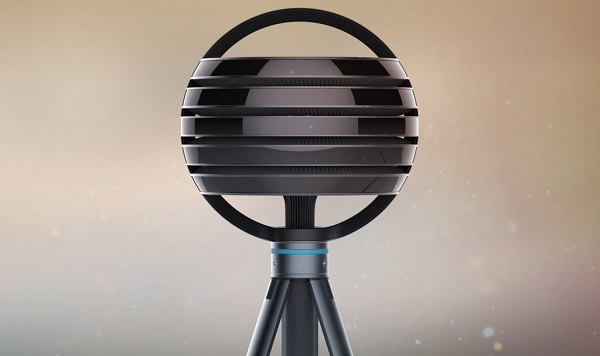
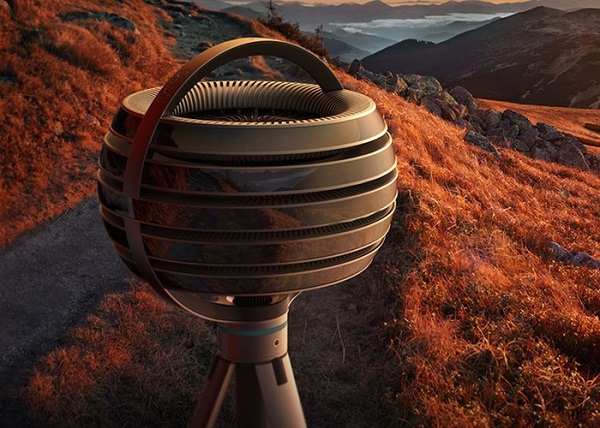
Lytro Immerge

Lytro has unveiled a ferociously complex camera for virtual reality moviemaking. Called the Lytro Immerge, this borderline sci-fi camera rig was designed specially for virtual reality from the ground up.

It seems like Lytro wants to be ahead of GoPro and even take an ambitious leap to be known as a leader in the VR industry. A tough goal to accomplish considering that GoPro and Microsoft are in the ring, boasting their muscles at anyone that dares threaten their alliance. What can a start-up like Lytro do?

It can do more damage than you can possibly think.

You see, the alien ball-shaped camera has hundreds of tiny image sensors and lenses built-in. With the help of Lytro’s signature optical tech, called light field, it can record the colour and intensity of light along with the direction it’s travelling.

That’s just fantastic – not only does it offer much needed capabilities for VR filmmaking, but it’s one of the most innovative camera we’ve seen this decade.

However, don’t think of the Lytro Immerge as just a camera. It comes packed with a plethora of VR production goodies such as – editing tools, the possibility of streaming straight from the cloud, consumer dedicated apps for VR headsets and a server.

Lytro Immerge VR Camera

Lytro CEO Jason Rosenthal has told Mashable that this is the very first light-field-powered system that can create cinematic high-quality live action VR-ready footage – that was a mouthful. Nobody has thought this through, he says, from end to end – starting with how a camera should function, to storage, how you can edit footage in post production and even playback.

There are no competitors to the Lytro Immerge – at the moment, there’s no camera on the market capable of doing what the Immerge does. Google Jump might prove to be a competing platform, but a) it hasn’t been released yet, and b) it blends a plethora of existing cameras.

Even though we are inclined to think that users that wish to use the Lytro Immerge should definitely own a ten thousand dollar PC rig, the camera is more than capable to streamline its controls to an iPad.

The server, which is comprised of several terabytes, can hold only about an hour of footage.

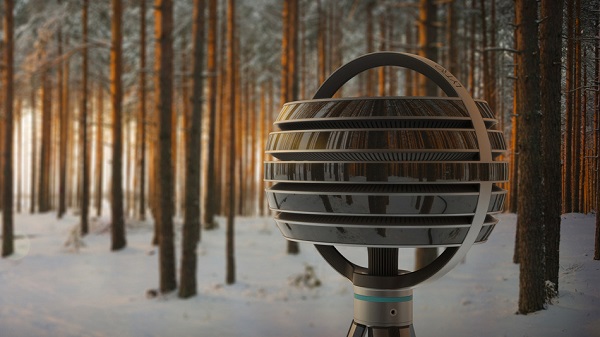
Lytro Immerge virtual reality camera.

And here, you can see the Lytro Immerge in its own habitat, pondering on whether to film the world or destroy it…

Given its huge capabilities, it’s going to sport an astronomical price tag. Lytro has noted that it will be available starting with January of 2016 and the Immerge will retail at hundreds of thousands of dollars. Clearly, it’s aimed at VR studious and companies, and not your average VR enthusiast.

Yet, Rosenthal has noted that there will be a sort of leasing program in place, considering how expensive it is to buy the Immerge. Companies will the possibility to rent the camera for a much lower cost.

Image Source: 1, 2, 3

Filed Under: Headlines Tagged With: Immerge, Lytro, Lytro Immerge, virtual reality, VR, VR Camera

Assassin’s Creed Syndicate PC Requirements Surface

November 7, 2015 By Roxanne Briean Leave a Comment

Assassin’s Creed Syndicate PC Requirements Revealed

The Assassin’s Creed Syndicate PC requirements have been revealed by Ubisoft, and let me tell you, this new AC title is one high-maintenance chick.

Assassin’s Creed Syndicate is going to be released this month for the PC medium and Ubisoft has thought that it’s best to prepare players for not only disappointment – I keed I keed; but to have time to upgrade their rig.

Assassin’s Creed Syndicate Minimum PC requirements are the following.

  • Intel Core i5 2400 at 2.5GHz or
  • AMD FX 6350 clocked at 3.9GHZ
  • 6 gigs of RAM is a must
  • Windows 7 and upwards
  • nVidia GeForce GTXD 660 GPU or
  • AMD Radeon R9 270
  • 2 GB of VRAM and Pixel Shader 5.0 ia must for both GPU recommendations.

It’s somewhat manageable, but wait until you take a look at the recommended specs. I’m just going to spit it out – you need 3 gigs of VRAM in order to play at a full HD resolution. The following settings can be slightly changed, but VRAM is out of discussion.

Assassin’s Creed Syndicate Recommended PC requirements are the following.

  • Intel Core i7-3770 clocked at 3.5 GHz or
  • AMD FX-8350 clocked at 4.0 GHz
  • 8 gigs of RAM
  • nVidia GeForce GTX 760 with 4 gigs of VRAM or
  • nVidia GeForce GTX 970 with 4 gigs of RAM or
  • AMD Radeon R9 280X with 3 gigs of RAM

Assassin’s Creed Syndicate PC Requirements Surface.

Installation space, regardless of whether you are running the game on minim or recommended settings, will chug about 50 gigs.

Ubisoft’s Assassin’s Creed Syndicate is released on the 19th of November 2015 for PC.

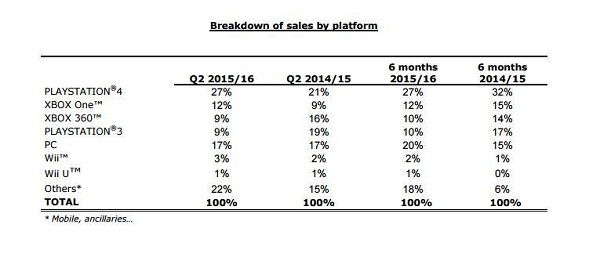
On the console front, it seems like Syndicate is doing pretty great with Sony’s PS4 leading sales. Ubisoft revealed their latest earnings report and we noticed that PS4 games sales are more than double of those coming from Microsoft’s Xbox One – as you can see below.

Assassin’s Creed Syndicate PC Requirements Surface along with Ubisoft's latest earnings.

And according to Metacritic.com, reviews from critics are generally favourable, but the user score falls under 70 points with mixed feelings about this new Victorian-London assassin.

Some fans are even saying that Ubisoft should considering stopping the franchise at least for a while – others vehemently state that AC is dead and gone and the series should stop all together. Users have also reported a ton of bugs on PS4 and Xbox One, which is worrying to say the least.

However, graphics are just outstanding, and I can’t even imagine how beautiful they could get on the performance-hog PC. Considering that the the GTX 660 is almost as powerful as the PS4 (hence the minimum settings), we are in for a treat.

Are you planning on acquiring Assassin’s Creed Syndicate for PC or are you fed up with the franchise? I know I’m going to give it a go, but I’m waiting for some sort of discount.

Image Source: 1, 2, 3

Filed Under: Headlines Tagged With: Assassin's Creed, Assassin's Creed Syndicate, Ubisoft

20000 Android Malware Apps Lookout

November 6, 2015 By Deborah Campbell Leave a Comment

20000 android malware apps lookout going on after discovery by mobile security firm

Merriam Webster defines “lookout” as:

: a person who watches an area and warns others if there is danger, OR : a high place or structure from which you can see a wide area

And luckily for Android users, there is not only one lookout by the first meaning of the word, but many. As in, the employees of the “Lookout” mobile security firm (former “Flexilis”) with its headquarters in San Francisco.

And boy did they fulfill their function as a lookout. Because they recently announced that they have discovered 20,000 apps that are in fact malware just posing as apps. And which are capable of routing your device automatically and performing their installation all by themselves, with the possibility of also installing other software or apps if so desired by their makers.

These bogus apps or the additional software that they install are, of course, malicious content. Meaning that their purpose is to do something else than what you desired them to do when you downloaded, instead doing what their creator intended. On your device and affecting your data and rights.

Lookout pointed out that at the moment, these apps’ function is to just present you with unwanted ads, with three major families of such adware being identified as possibly working together due to the similar procedures employed when they infect the device. They are: ShiftyBug (Kemoge), Shuanet, and GhostPush (or Shedun), just so you know.

To make things even worse, these malware apps are so good at exploiting the vulnerabilities that exist in the Android operating system that when they root the device and install themselves, they give themselves and other apps or pieces of software that serve their purpose elevated permissions.

In short, they ensure that your system integrity is permanently compromised and the only way to get out of this fix is to reflash the operating system (by yourself or with the help of the company you got the device from), or even the more drastic solution of abandoning your device altogether and getting a new one – an advice that even Lookout agreed might be useful as a last resort.

To make it clear, no, a simple factory reset will not get rid of these nasty apps. They will still be there afterwards.

So the sad part is the fact that even if everybody is now aware to be on a 20000 android malware apps lookout, it doesn’t mean that there is much you can do if one of them manages to infect your mobile.

The only good news is that Lookout says that these apps are predominantly present in other app-stores than Google Play, the latter being relatively safe. For now. Because they estimate the popularity, subtlety and complexity of such apps to grow and spread more, once more hackers realize their lucrative potential.

Image source: 1.
Filed Under: Headlines Tagged With: Lookout, Lookout 20000 malware apps, malware, malware app

Apple iWatch Review – Necessity vs Fashion Statement

November 6, 2015 By Cristopher Hall Leave a Comment

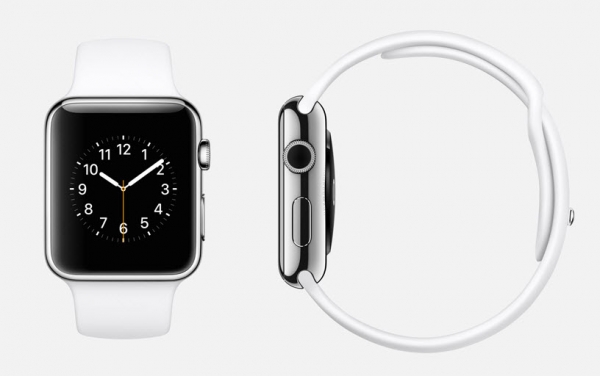
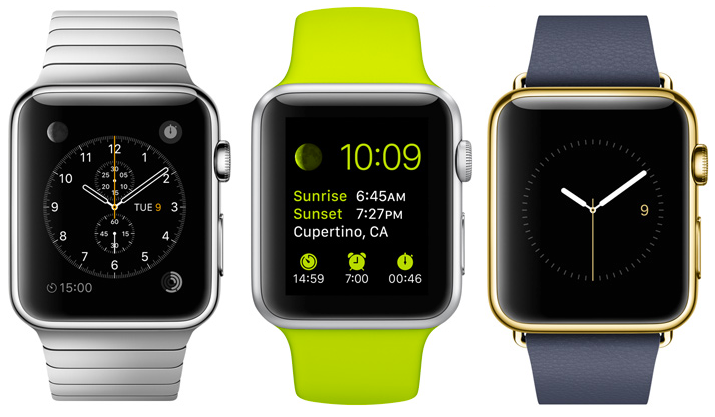
Apple iWatch Front & Side

Anyone knows or has heard before of the upcoming big thing in terms of technology. Or one of them at least. What we’re referring to here is the growing industry of smartwatches. On paper, they sound like an incredible thing to have: a portable, wireless extension of your mobile phone. In reality however, at least judging according to what we have seen so far, there’s a lot of room for improvement – and that’s still being polite about it. In the months we’ve had since Apple iWatch release date and now, we’ve come to learn a few things about it.

Don’t get us wrong, the Apple iWatch is far from an underwhelming construction – in fact it’s probably an epitome of mobile technology altogether. But the actual utility that lies within an Apple iWatch is highly debatable. As you can probably tell from the title, we’ve been trying to figure out whether this little contraption holds more ground than just being a pretty, quite expensive fashion statement, or whether it has some realistic application in our day to day lives. At least enough to excuse the $349 to $17,000 Apple iWatch price range.

Apple iWatch Overview

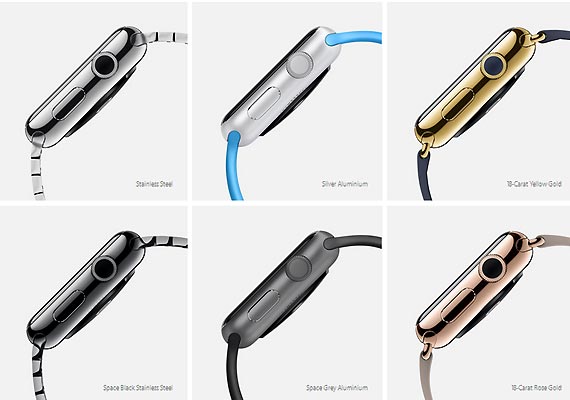
Looking at the Apple iWatch, also recognized under the name of iWatch, we are reminded of a few other Apple products: the iPod Nano is the first that comes to mind in terms of format, size and build. It’s worth mentioning that the iWatch comes in various models – there’s a total of 3 models and 2 different sizes that you can pick from and coupled with 6 types of finishes along with a vast series of wristbands. Regardless, the Apple iWatch aspires to be much more than the iPod Nano was.

Apple iWatch Types

Apple iWatch Overview

While it can be used as an iPod, coming with a decent amount of storage space that you could use to save up your music and take it with you wherever you go, the iWatch’s functionality does not resume to just that. In essence, the Apple iWatch is an extension of your iPhone mobile phone. And this is the first concern that we have to direct our attention towards: the Apple iWatch is not an independent gadget – it not only requires another Apple product to sync it with, but it only works with iPhone 5 and above on top of that and cannot sync with your iPad tablet.

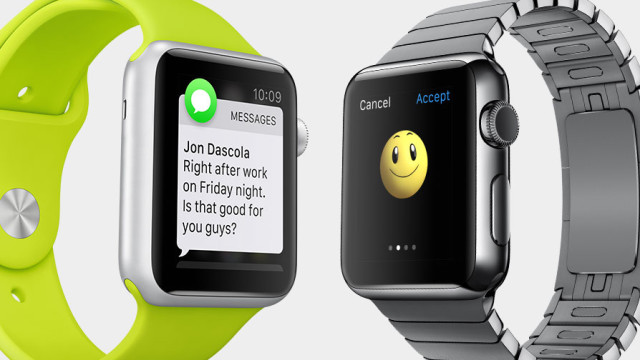
To make a generic summary of what the Apple iWatch can do, the most important features that are worth mentioning are using it as an outlet of your mobile phone notifications and a minimal news and updates feature, health, activity and workout monitoring, listening to music, sending and receiving texts, mail, tweets or updates on various social media, making use of Siri like never before and a lot of functionalities that rely on voice commands. The last item in the list is probably the most exciting part of it all – allowing you to dictate your desired message to your watch thanks to the speech to text feature.

In comparison to the original presentation of the device, the iWatch seems to be capable of doing a little less than we expected, but not less than one would expect from smartwatch technology. The market is not yet full to the brim with smartwatches of all kinds; nevertheless, it’s not the first of its kind and in some respects, the Apple iWatch may even feel like it doesn’t bring anything special to the table. And most unfortunate, we won’t be playing with any kind of hologram projection using the iWatch either; we still have to wait for another couple dozen years for that it would seem.

Apple iWatch Design

If there’s anything that the Apple iWatch specializes in, similarly to any other apple product as a matter of fact, it’s looks. There’s really no denying that the iWatch brings a very elegant design featuring stainless steel casing, a sapphire crystal layer that protects the display and ceramic glass on its back – where the heart monitor is situated. Overall, the watch looks great from every single point of view – the curved edges dim the sharp and rugged impression the watch gives off. However, as far as wristwatches go, you shouldn’t expect the Apple iWatch to replace your Rolex.

Apple iWatch Classic

Both of the iWatch variants are rectangular, so the pleasant round aspect of classic wristwatches won’t be gracing your arms with this smartwatch. The watch itself is relatively thick – no less than 11.5 mm – which accounts for an exponentially thicker device than your usual smartphone and tablet, which have gone as low as 5.6 mm. However, thanks to the slightly curved body of the watch, the effect is not ghastly – and instead manages to not stand out too much and look very much like a regular sized watch – as much as its shape allows it to.

Despite the materials used in its construction, it would seem that the edges of the Apple iWatch are not particularly scratch resistant. Because of the slightly large-piece build, especially on the 1.7 inch model, you may risk accidental scratches to its edges. On top of that, the IPX7 water resistance certification that the Apple iWatch comes with only accounts for exposure to rain and other types of light accidental subjection to water. That means that running with it in light rain will probably not damage the watch; forgetting to take it off when you go into the shower however may end up in a catastrophe.

Apple iWatch Wheel & Button

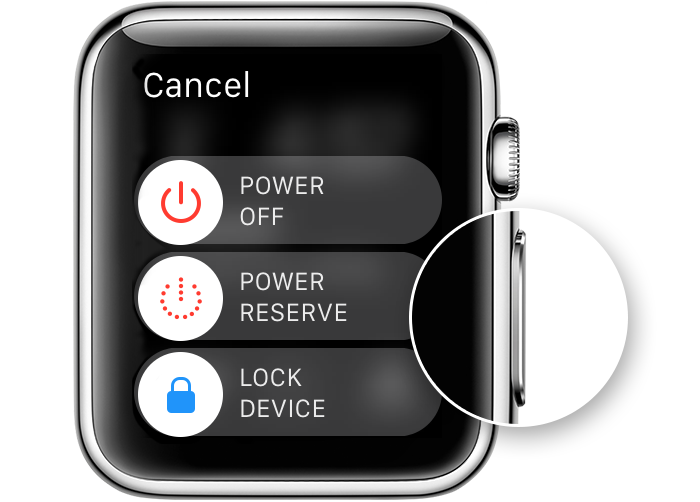
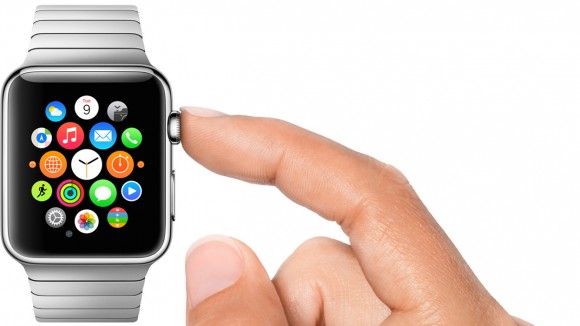
On the side of the Apple iWatch rest 2 buttons – one is a button similar to the home button you can normally find on your regular iPhone; the second one is something that resembles a winding wheel that used to be featured on older and vintage watches. The former is used similarly to how you would use the home button – it allows you to return to the main screen and can be used as a back button, a quick access of your contacts or to Apple Pay – via a double tap.

The wheel is the basic mean of navigation – you will be using it for zooming in and out in various applications as well as navigating through some parts of the interface. It replaces the pinch to zoom functionality of touch screens given the small area you get to operate on, but also provides different effects when tapped. It also serves as an alternative to swiping when you want to scroll down menus, messages or notifications.

Apple iWatch Wheel

The top and the bottom of the Apple iWatch feature clasps for your wristband of choice. The way that both the clasps and the bands are fabricated turn the process of switching between wristbands particularly simple.

The back of the Apple iWatch features a round area that contains a number of photodiode sensors, as well as green and infrared LEDs and an outlet for your Apple Magnetic Charging Cable. The infrared sensors are responsible for measuring your heart rate – by constantly measuring the amount of blood travelling underneath your skin. In order for this feature to function properly however, you need to ensure that the iWatch is fit snugly to your arm, and not loosely placed or results will be inconclusive, inconsistent or downright false.

The entire body of the watch is made from aluminum alloy, resulting in a particularly light device – only 70 grams and easily forgettable on your wrist.

As a last note, the screen and the body of the watch per se are not one piece: there is a distinct, yet thin gap between them where the screen is applied. While this doesn’t necessarily spell into a risk of damage with time to the body of the watch, it may lead to grime and dirt buildup if not cared for properly.

Apple iWatch Display

Once we get over the fact that the present model of the Apple iWatch is unfortunately rectangular, the display itself is a pretty impressive piece of technology. For a 1.5” or 1.7” wide screen respectively, the level of sensitivity and responsiveness is as good as any other Apple product. The screen is a flexible OLED build, a change from the classic LCD that Apple has been employing for its products for a while. However, the pride and glory that is the trademark Retina Display feature is incorporated in the iWatch’s screen as well, making for an extremely ample viewing angle, assuring that you will be able to read whatever your watch is showing regardless of lighting conditions and direction that you are looking at it from.

In terms of image quality, the Apple iWatch comes with no less than 322 ppi pixel density. That accounts for a particularly impressive number for such a small screen; as a comparison, the iPhone 6 has a 326 ppi pixel density and the iPhone 6 Plus goes up to 401 ppi. This makes up for an incredibly detailed image; additionally, the color accuracy and vividness are top notch. Brightness has never been lackluster on any of the Apple products in the past and the iWatch is no different.

Apple iWatch Screen

The designers have also added a discreet ambient light sensor within the Apple iWatch: it detects the amount of light there is in your environment and dims or brightens the display accordingly, giving you a particularly clear view of your screen regardless of where you are or what time of the day it is as well as stabilizing battery usage.

Force Touch is present on the Apple iWatch too. In case you are not familiar with the way it works, Force Watch is a rather new technology that allows the screen to detect the difference between light and hard presses, providing a multitude of new functions to play around with. For example a hard tap on the notification screen will allow you to mark them all as read and remove them from the tray, opposed to lightly tapping them to tab to them. It does take a considerable amount of time to get used to all the functionalities of Force Touch, which kind of tap does what, where and when – but once you get used to it, it’s a pretty neat thing to have. Not to mention the hidden “perks” you can get from this feature when texting sensory messages to other Apple iWatch users (we’ll touch more on that later, under the features chapter).

Apple iWatch Specifications & Performance

Given that it’s only an accessory and not a full-fledged, independent device, you can’t expect an entire powerhouse worth of hardware stuck in the 1.7 inch body. Even so, the Apple iWatch features the new S1 processor designed by the company; the processor incorporated in the 1.5” and 1.7” versions slightly differs as well, but only marginally, going to up 520 MHz.

In addition to the performant processor, the iWatch is actually gifted with a dedicated GPU – something that is sometimes lacking on gadgets as large as tablets, so it’s a pretty impressive feat to see it on here. The PowerVR SGX543 GPU is also accompanied by 512 MB of RAM memory and 8 GB of internal storage – considerably more than the iPod nano, but unrealistically listed as 8 – considering you only get to use approximately 6 GB of it, the rest being the space allocated to the operating system and necessary applications.

Connectivity on the Apple iWatch is done through 3 methods: via the Wi-Fi 802.11 b/g/n card, Bluetooth v4.0 or near-field communication. In the absence of a headset jack on the body of the watch, the only way you will be able to pair your headphones with it is via Bluetooth – if your headset is Bluetooth compatible that is.

The overall performance of the Apple iWatch did not seem to be as flawless as you would expect from a high-end Apple product. There were some slight signs of lag when scrolling down notifications at times, some apps would run or open slowly and there is still a hefty amount of bugs left to fix with the future versions of the WatchOS.

Apple iWatch Features & Software

The Apple iWatch comes with the default Watch OS 1.0 preinstalled, but it can be upgraded to the latest version – currently WatchOS 2.0.1. as soon as you take it out of the box and turn it on for the first time, you are greeted by the long and unfortunately harrowing setup process. Considering that as a standalone device, the smartwatch won’t be anything more than a fashion statement – and not the most handsome out there – that’s a lot of setting up that must be done. Setting up your Apple iWatch consists of not only selecting your preferred settings and setting up your Wi-Fi connection as you would do with your mobile phone. Instead, there’s a whole process of linking your watch to your smartphone, coupled with the level of synchronization you want to go for and many other tiny steps.

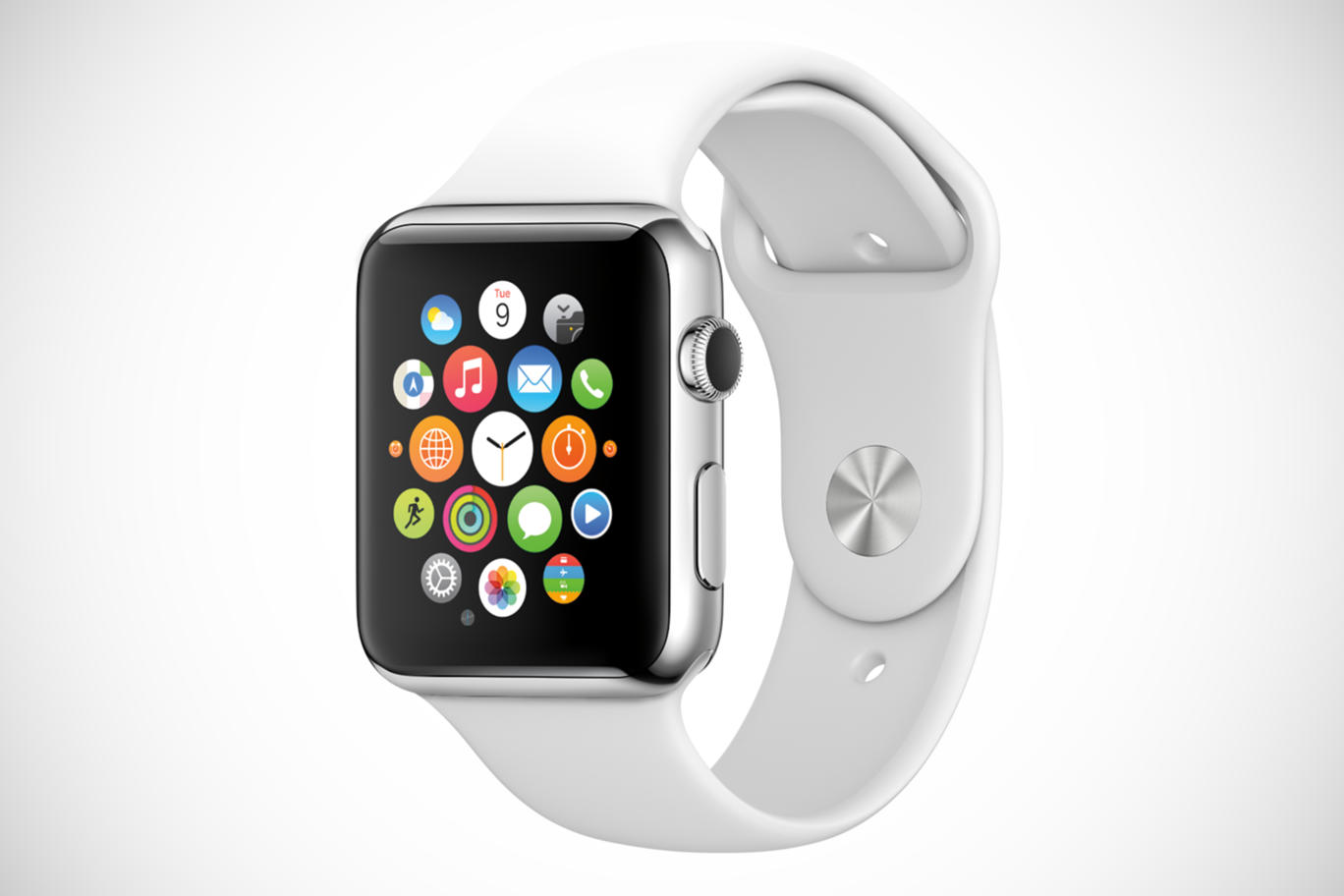
Apple iWatch App Tray

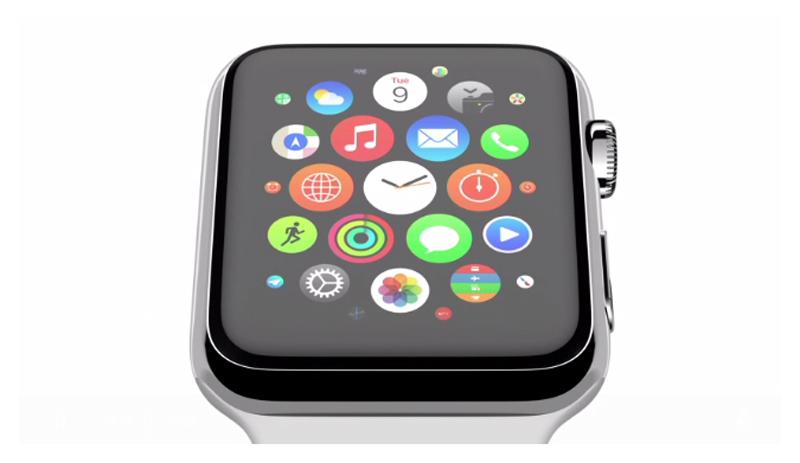
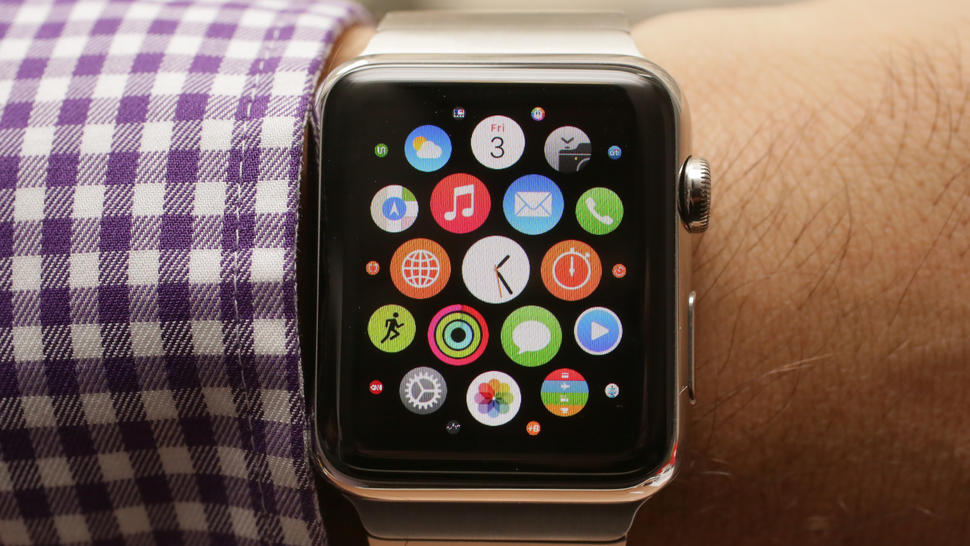
Once it’s all set and done, the Apple Watch main screen consists of a multitude of icons, similar in design to the ones we’ve seen on our iPhones, but they are round-shaped this time around. The animations of the main screen are one aspect that it pretty neat: the apps are clumped up together as bubbles, with less used ones displaying as minimized circles towards the edge of the main batch. These are perfectly customizable via your phone – allowing you to rearrange them any way you like it on the larger screen if your iPhone. Some individuals may find it difficult to aim and access particular apps directly from the app tray – considering that you need high precision to tap on the specific icon, especially when in a rush.

However, Siri finally plays a huge role in this case: more often than not, you will use it more out of necessity rather than comfort. Accessible by saying “Hey Siri” into the watch, she seems to have received some upgrades, making voice recognition even better than it was in preceding Apple products. Just like your iPhone, Siri can do nearly anything for you – a downright blessing when scrolling with the tiny wheel or having to tap on your screen is difficult and tricky to achieve.

Apple iWatch Communication

Communication via the Apple iWatch comes with a series of unexpected features. Speech to text recognition is one thing – the feature that allows you to tell the smartwatch what to write down in your text. But the perk of you and your close ones owning it is… interesting to say the least. Taking upon a very romantic approach, the Apple iWatch allows you to send doodles, your heartbeat and actual taps to your receiver. Forget expressing yourself through texts that notify your friends through audio – just give them a nudge instead through the device strapped to their wrist. Go for a non-verbal way of expressing yourself if need be. Fun? Definitely. Useful? Very much not.

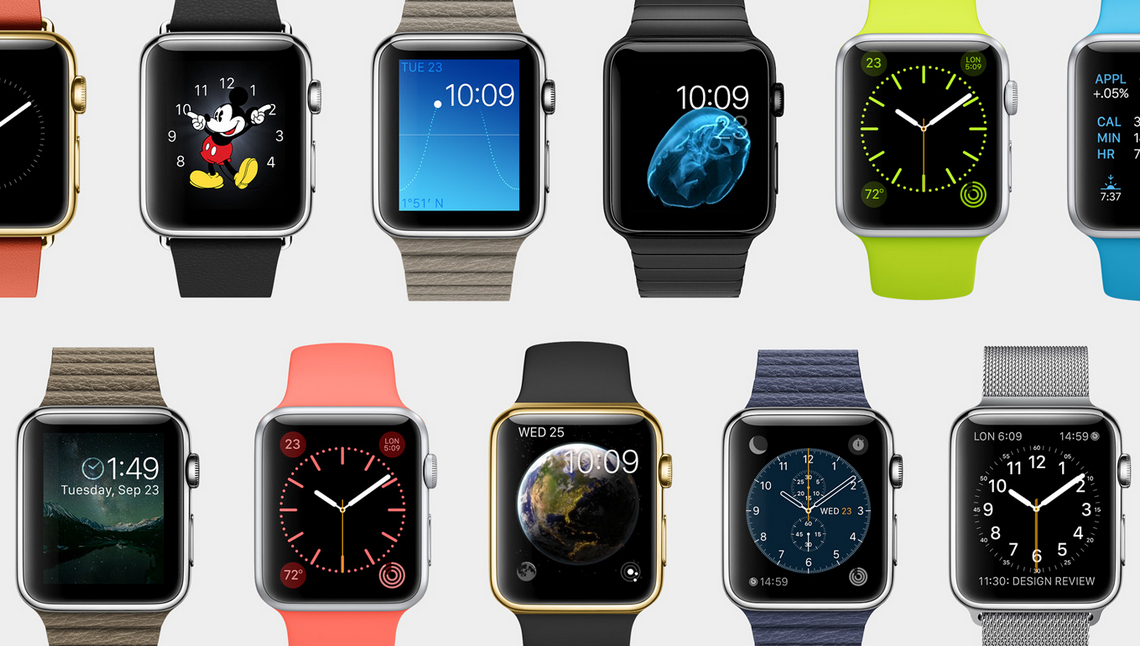
The system allows you to pick from a wide variety of watch faces that mix style with utility. There are several clever watch faces that you can use that have hidden applicability within them. For example the one depicting our Solar System is a realistic depiction of the Earth’s and Moon’s position in relation to the Sun. The chronometer face can be turned into a stopwatch immediately through a simple tap. The list goes on and allows further customization by allowing you various ways to display information such as the time (yes, it actually shows the time too) the way you wish. The only current downside of the WatchOS is that it’s extremely limited or downright restrictive of third-party software.

Apple iWatch Faces

There is a large amount of in-built apps that handle health and fitness in a fashionably designed way. There are trackers that are in charge of your movements – distance ran or walked, number of times you stood up, steps taken and much more. Considering that the Apple Watch is more likely to act as a more reliable source of such information given that you’ll be spending more time with it on your wrist than you would with your iPhone in your hand, you can easily make use of it when leaving for your daily jog or to monitor your heart rate when working out.

Apple iWatch Battery & Verdict

The Apple iWatch has a very innovative method of charging. In lack of a classic charging port of any kind present on the sides of the watch, the way you do it instead is via the back port. Inside the iWatch box you will find a magnetic charging cable that you can plug into a power outlet or an USB port alternatively. It attaches to the back of the watch the same way MacBook charging cables do. There’s no hit and miss or misuse of the adaptor; it goes in smoothly and connects almost automatically to the watch.

The battery life of the iWatch is not the best you can expect. Unfortunately, the iWatch seems to run through its battery charge much faster than you would hope for; while it is advertised that one full charge would last you up to 22 hours of mixed usage, that still means that you will end up leaving it to charge on a daily basis, overnight. On average, it takes about two hours and a half to charge the smartwatch from 0 to full.

As a final note to add to everything we’ve discussed regarding the Apple iWatch, I don’t feel like it brings anything worthwhile in addition to what other technology developers have done so far. Even more so, the smartwatch industry in general feels particularly lackluster nowadays. If you are fine with only using the Apple iWatch as a quick way to check your notifications or reply to texts, or alternatively to use it as an aid for your workout sessions, then that’s fine. Otherwise it remains a flashy gadget and a statement, and not much else, especially considering the Apple iWatch cost.

You can buy the new Apple iWatch for $349 for the default, Apple Sport Watch edition, $549 to $1049 for the 1.5” version with different variations and types of wristbands and $599 to $1099 for the 1.7” variant.

Image Source: 1, 2, 3, 4, 5, 6, 7, 8, 9, 10

Filed Under: Headlines Tagged With: apple iwatch, apple iwatch review, apple smartwatch, iwatch, smartwatch

YouTube Virtual Movie Theatre for Android

November 6, 2015 By Roxanne Briean Leave a Comment

YouTube Virtual Movie Theatre platform for Android.

The YouTube Virtual Movie Theatre is a means to bridge more users to join the ever-growing virtual reality fan-base. With the Virtual Movie Theatre for Android, which is available for everyone as of today, comes a new and awesome feature that plans to immerse the audience into the VR medium even more.

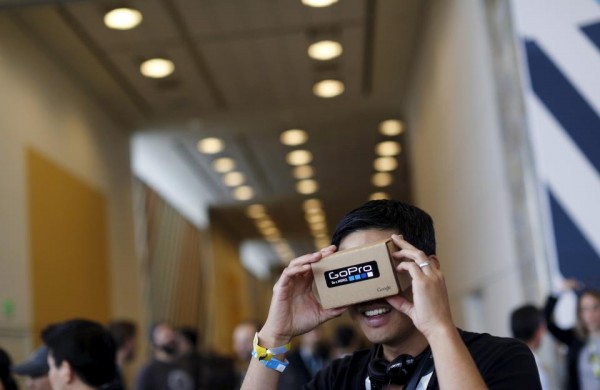
Now, users can experience 3D videos while streaming them on YouTube – via Google’s Cardboard.

This isn’t the first time YouTube has meddled with 3D videos. At the dawn of 2015, it introduced support for 360-degree vids on their platform. YouTube’s entire library is up for grabs to whomever wishes to stream videos in VR straight to their Google Cardboard – read, every user-uploaded content available.

To use YouTube’s new Virtual Movie Theatre feature, just tap on the Cardboard option and slide your smartphone into the headset so it can start streaming. The video you’ll be watching is going to be presented in the manner of a movie theatre. It will adjust accordingly to your position.

YouTube brags that it has a massive amount of 360-degree videos. Ranging from incredible concert experiences, movie trailers, short walks in the nature – read, a day at the beach, a lovely stroll in the forest and so on.

Basically, everything that the world has to offer can come right to your uhm, face, I guess.

These video techniques that YouTube uses, the company claims, are akin to how an individual, just like yourself, perceives his, or hers, surroundings. If an object is far far away, then it will appear so. If sound is coming from within a box, then it will be perceived as muffled.

YouTube has its own VR curated video playlist filled with world jumps, movie trailers – The Hunger Games; a music video – Waiting for Love by Avicci; and, one of my personal favourites, walking inside Minecraft.

Yet, unfortunately, these new features are only available for users that have an Android smartphone. The company has announced that it will roll their VR experiences to the iOS medium soon – but we don’t have an exact date.

Considering that there are more than 1 million Google Cardboard owners, we should expect more VR experiences from YouTube.

Guess what? The New York Times is shipping 1.3. million Google Cardboard headsets during this weekend because their new VR documentary, called The Displaced, is about to make its big début.

This opens up another door – one for advertisers. Meaning that from an economic point of view, VR is a potentially huge market, so it makes sense for big tech companies to pump cash into content creation. The more companies willing do create high-quality content, the better the competition.

Things are shaping nicely for virtual reality – also with the help of the new YouTube Virtual Movie Theatre platform.

Image Source: 1

Filed Under: Headlines Tagged With: 360-degrees videos, virtual reality, youtube, YouTube Virtual Movie Theatre

Get Your NewsON

November 5, 2015 By Nancy Young Leave a Comment

If you want local news, maybe you should get your NewsON app.

You’re probably one of the many people who have slowly become disinterested with cable and satellite TV to the point of dropping the subscription to these services and preferring to go instead for streaming services on your home TV set and/or just using the PC, laptop or mobile phone to cater for your information and entertainment needs.

If you’re not, trust me, they not only exist, but their number is growing, as “traditional” cable and satellite subscriptions are becoming obsolete.

If you are and you live in the U.S., you can rejoice, because practically the only imaginable problem of cancelling said subscriptions would be that you can no longer easily benefit from the local news coverage that was part of them. Until now.

Because NewsON, a recent initiative from five major broadcast TV groups, aims to solve specifically this problem by bringing local news to you on mobile devices, certain smart TVs and even Roku, via an app designed for this purpose.

The service boasts content (including live coverage) from 118 stations, across 75% of the United States in 90 markets.

The app is free for consumers, but ad-supported and is available for devices running both iOS and Android. Apart from the ad-based revenue, it also makes money from the monthly fees it charges station affiliates.

By this system of dual income sources which excludes charging consumers, it is estimated the service will be viable economically in the long-term, which means they can keep it free for consumers in the future as well, which in turn means it will be more appealing to the public.

So, if you want to get your NewsON app, you can do so now for free, by simply clicking the download link on the company’s website.

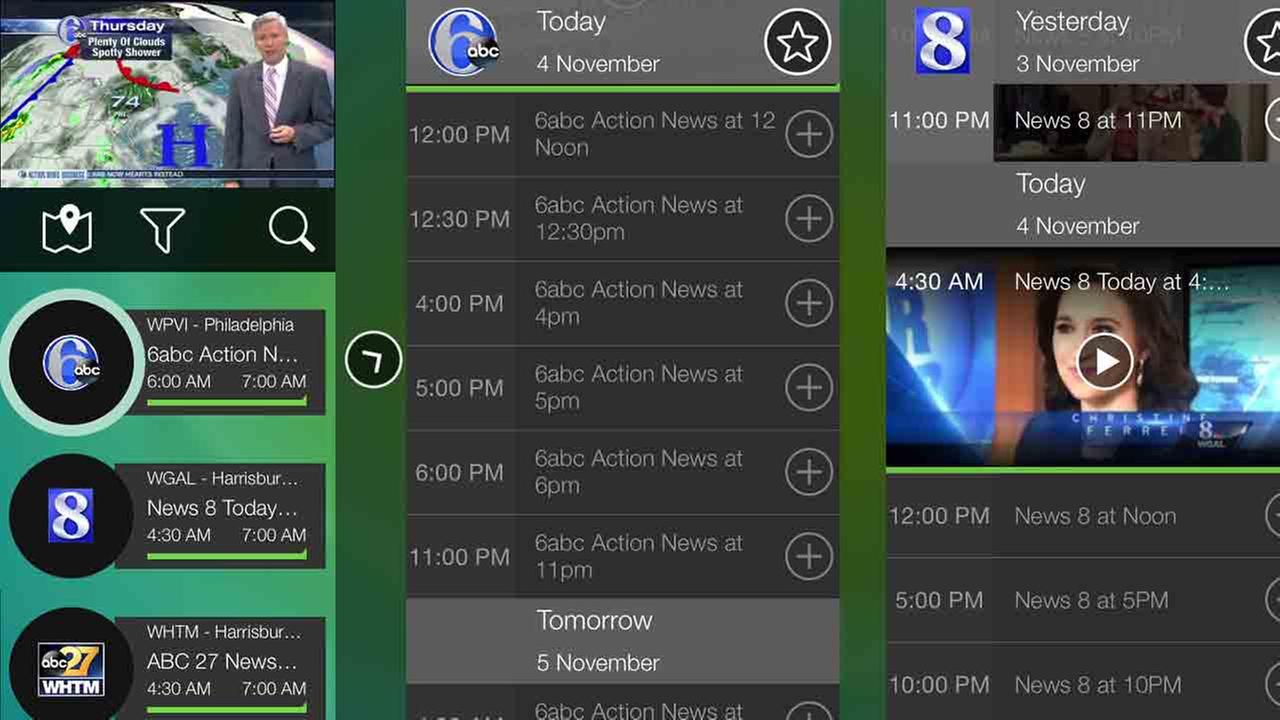
NewsON has a series of interesting functionalities and features. It allows you to chose what station the clips you are watching come from, be it from your home market or another that you might be visiting. It has a built-in timeline viewing tool which allows you to locate exactly which part of the broadcast you want to watch (weather, sports etc.) and an interactive map which helps you find the stations that should be most relevant to you, taking into consideration where you are.

Possibly the coolest feature is that you can send tweets about the news you are watching in real time and you can, naturally, view others’ posts.

Though, like any app, opinions vary regarding the the way it performs the above mentioned functions and regarding the design. So, it’s up for each user to decide whether this app truly solves the local news problem or not.

Image source: 1.
Filed Under: Headlines Tagged With: local news, local news app, newsON, newsON local news app

Tesco Hudl 2 Review – An Affordable Bundle

November 5, 2015 By Karen Jackson Leave a Comment

Tesco Hudl 2 Tablet Review

By no means a particularly recent launch in matters of tablets, the Tesco Hudl 2 can still make the top purchase lists for at least one reason: a good quality to price ratio. While it is in no way a powerhouse and a collection of all the state of the art components, even going by 2014 standards (as the Tesco Hudl release date was October 2014), its only goal was to appeal to the market with a budget tablet that can run an Android operating system and still be worth its price.

The Hudl 2 comes from a vaguely odd and unexpected producer: none other than the British supermarket chain Tesco. It’s not even the first of its kind as it’s preceded by an earlier iteration of the series – the Hudl 1 – which despite the original suspicion and reticence customers had shown towards a Tesco produced gadget, ended up as the little tablet that could.

There’s a lot to praise about the Tesco Hudl 2 tablet, especially given the price that it comes at. Unlike most of the “professional” tablets out there, the Hudl 2 is genuinely directed at family use – not only integrating an easy to use interface but also featuring a number of child safety measures.

So, on we go with the Tesco Hudl tablet review.

Tesco Hudl Design

Tesco Hudl 2 Tablet Variants

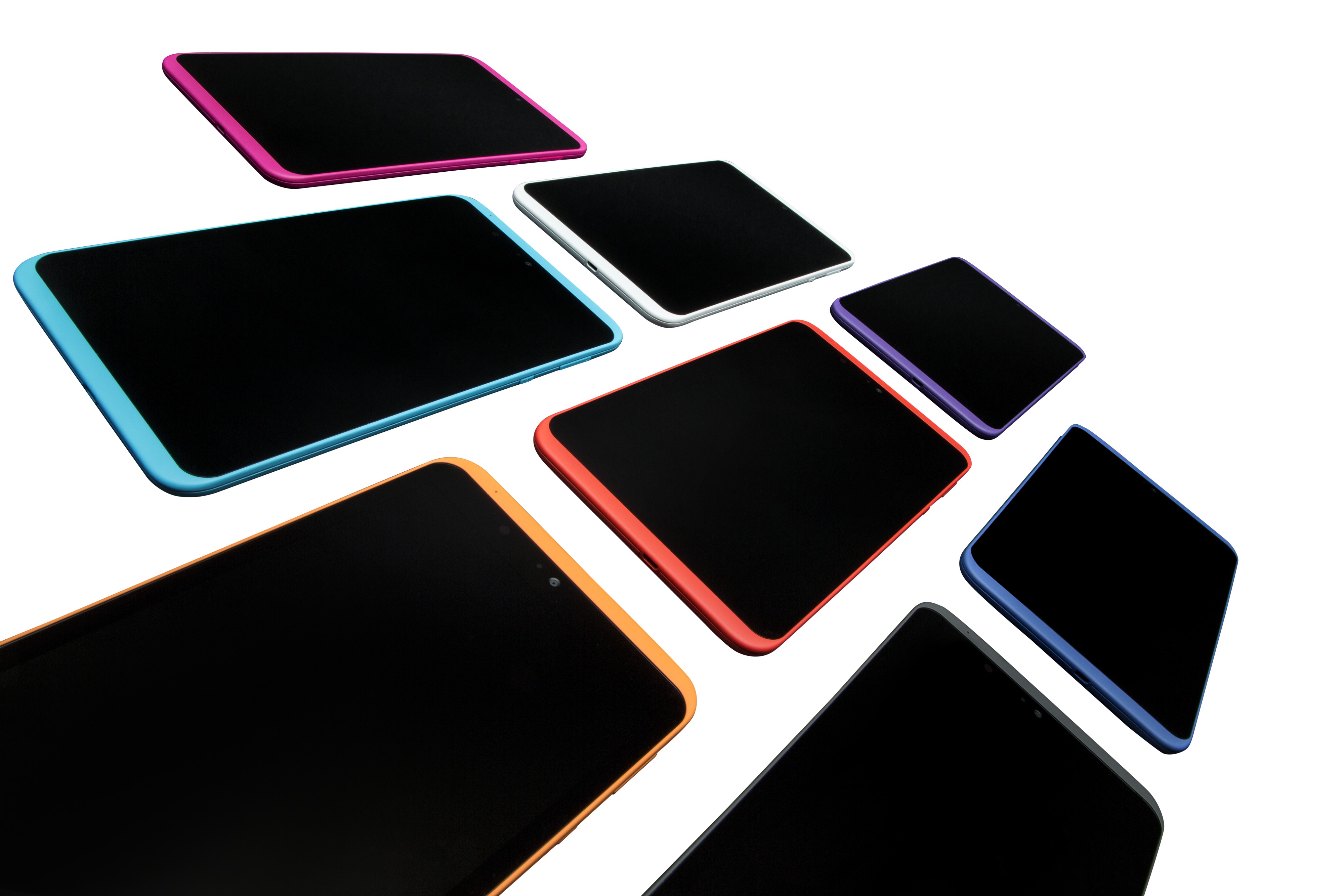
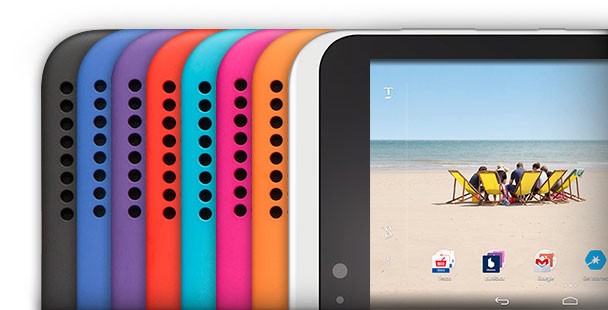
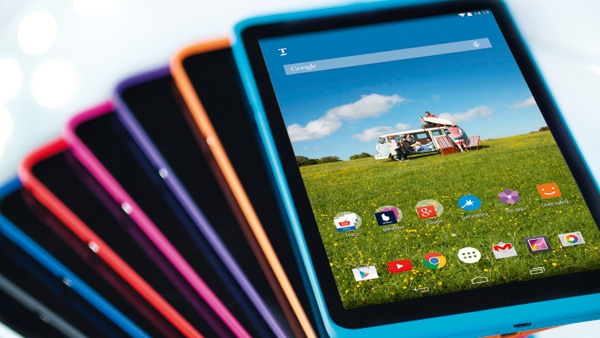
There’s a very distinctive look to the Tesco Hudl 2. The designers have taken a leap from the colors that you’d normally be accustomed to when it comes to gadgetry: if you thought the iPhone 5C was a wild way to go in terms of color palette, the Hudl 2 is the wildest piece in the store. You can get this tablet in no less than 8 color variations: white, orange, magenta, turquoise, red, purple, blue and black. And I would do a major injustice to the tablet if I didn’t mention that it’s a very attractive looking one.

Sure, it may not make the Apple visual designers cower in fear of a contender, but for its price class the Tesco Hudl 2 is pretty much a sight for sore eyes. In terms of format, the Hudl 2 is much larger and definitely classier than its predecessor, measuring 224 x 128 x 9 mm. Having grown a whole 1.3 inches in display, it is not only larger but slimmer and sleeker than the Hudl 1. Regardless, it is still 9mm thick – almost 3 mm more than the iPad Air 2 and more than 4 mm thicker than the Samsung Galaxy Tab S2 – only as a comparison.
Tesco Hudl 2 Color Variants

The aspect ratio seems to have changed for the better as well, now opting for a 16:9 one over the previous 16:10. That only means that landscape viewing is now better on the Hudl 2 – making it a joy to watch movies and other forms of media directly on it. It has, however, gained a bit in weight – 410 grams to be exact. That’s only 40 extra grams in comparison to the Hudl 1, but a hefty 145 grams more than the Samsung Galaxy Tab S2.

Regardless, in realistic terms that’s no reason to be concerned. The overall construction is most effective when held with both hands, things becoming a little more difficult – yet not impossible – when attempting to hold it single-handedly. In fact, thanks to the plastic material that was used on the tablet’s back, holding it turns out to be quite pleasant and easy to do. The tablet is fully covered in said material with the mere exception of the display – that is neatly tugged into the frame, stretching nearly corner to corner.

Tesco Hudl 2 comparison to Hudl 1

The plastic build however does come with a few downsides. One of the most worrisome of issues is the fact that plastic bends; that is very much noticeable in the Tesco Hudl 2 as it may risk some permanent damage when held under too much pressure. On the upside is the fact that a more rubbery build makes the tablet a little better in terms of being child-proof and resistant to minor impact.

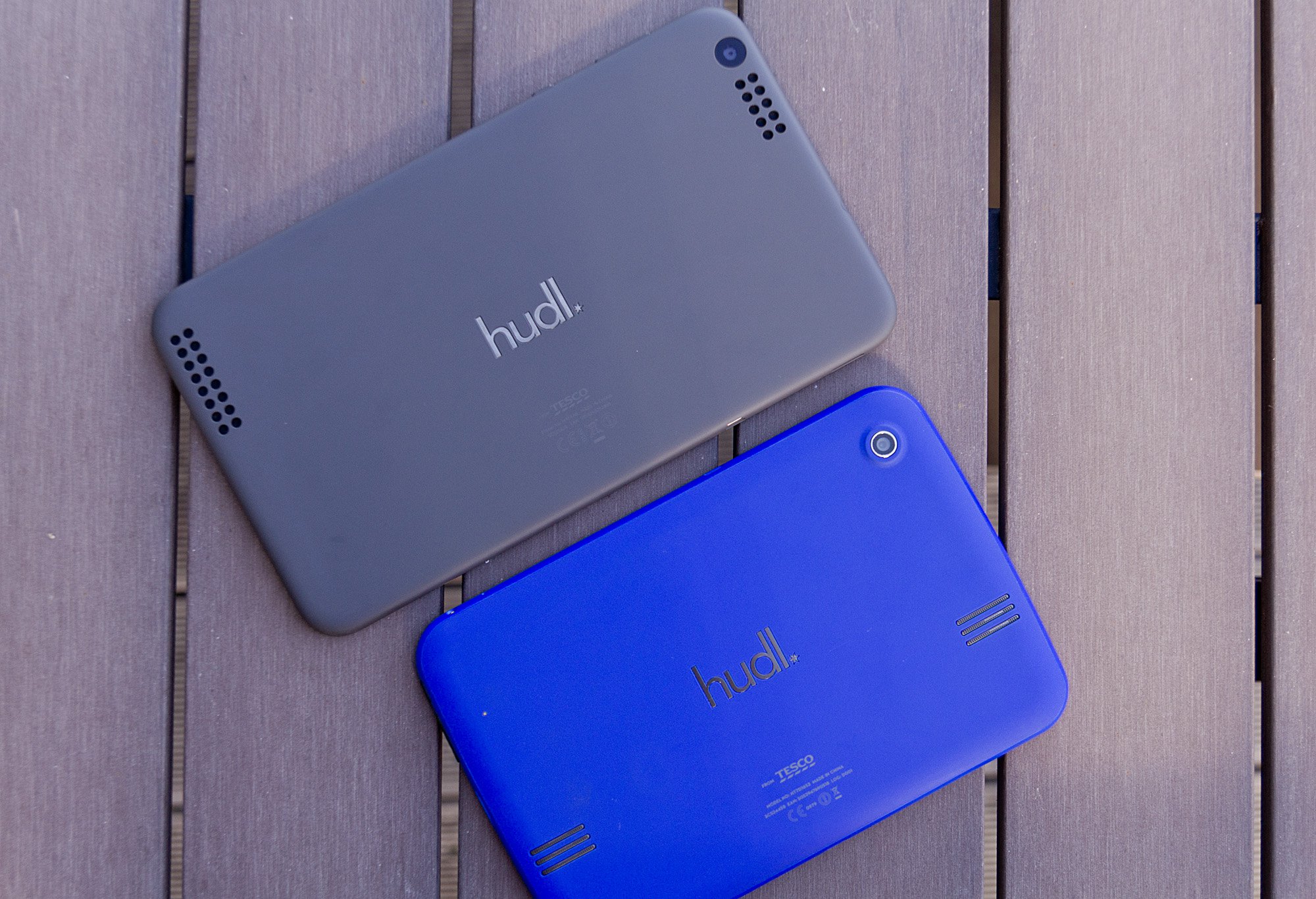
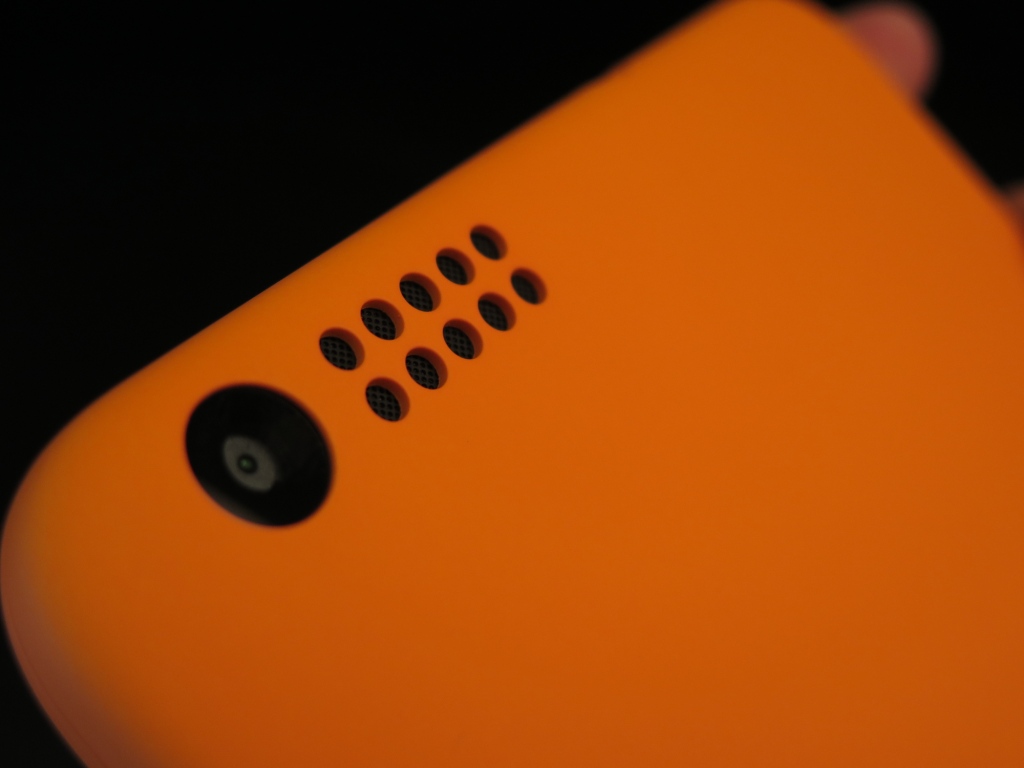
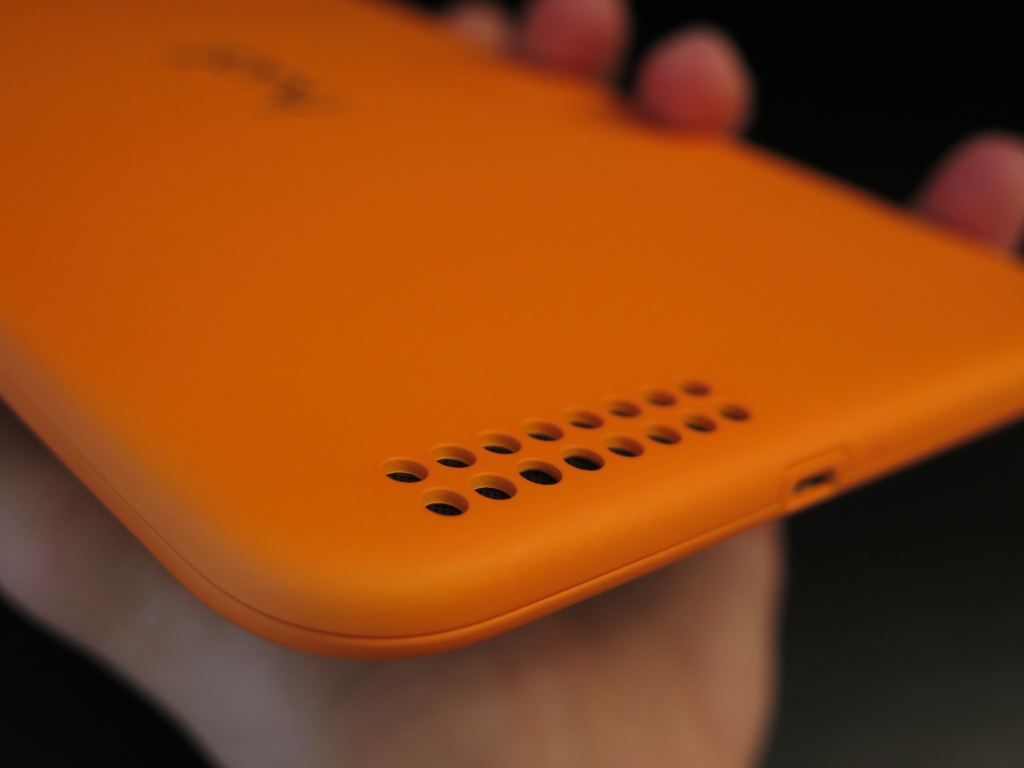
The back of the Tesco Hudl 2 is home to a series of speakers: a larger one situated closer to the bottom edge and a smaller one right next to the camera. Both of them feature tidily drilled holes – a design that looks much better, if not a little too blatantly obvious. You’d think that the large holes made for a better sound quality but the ultimate effect is really just something that would have looked better with a punctured design instead. The back is also adorned with the tablet name logo, embossed and polished into the mold in the very center, along with the serial number a little lower on the back.

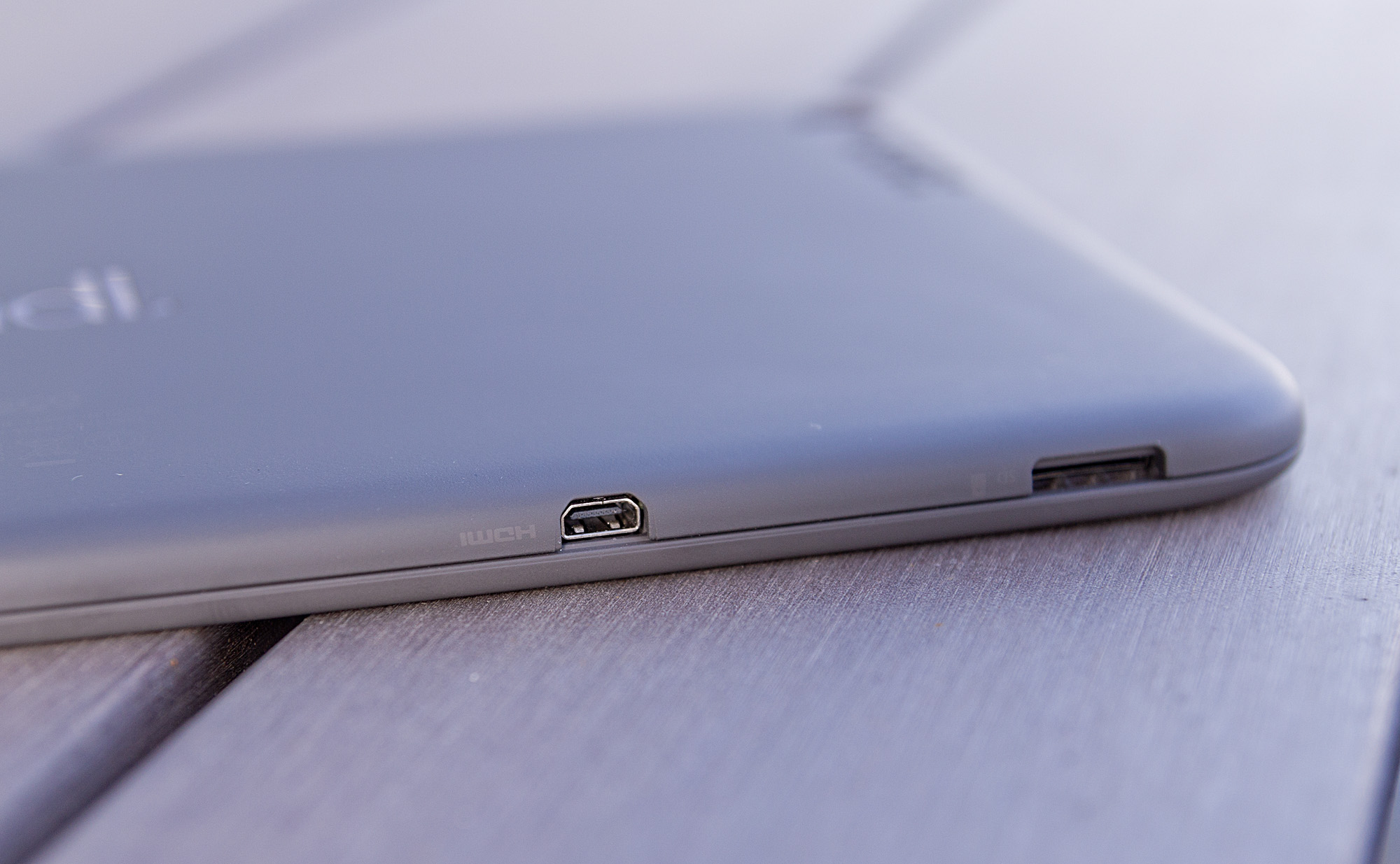
The edges of the Hudl 2 are home to the power button and volume rocker on the right hand side, along with several ports scattered around the other sides. Firstly, charging is done through the micro USB – found on the bottom edge. In addition, the Hudl 2 comes with a micro SD card slot that can take up to 48 GB of extra storage space in addition to the inbuilt amount.  The left edge of the tablet is where you can find a standard 3.5 mm headphone port.

Tesco Hudl 2 microHDMI and microSD

There is also a detail that you don’t find on every tablet on the market: the Tesco Hudl 2 has been bestowed with a micro HDMI port – allowing you to view whatever is on your tablet’s screen on a bigger, HD TV instead. Hilariously enough though, the micro HDMI cable does not come with the tablet – you will have to purchase it separately.

Tesco Hudl Display

The screen of the Tesco Hudl 2 is one of the largest hype-inducing features it comes with. The reason? The major overhaul of the screen quality. The Hudl 2 display aims for no less than a Full HD 1920 x 1200 ISP LCD build that brings the new model justice. In comparison to the previous iteration of the Hudl tablet, this one is exponentially better in a number of aspects. The mentioned resolution into an 8.3 inch display translates into 265 ppi pixel density. That makes for an amazingly sharp image rendering that goes a long way in comparison to the Hudl 1.
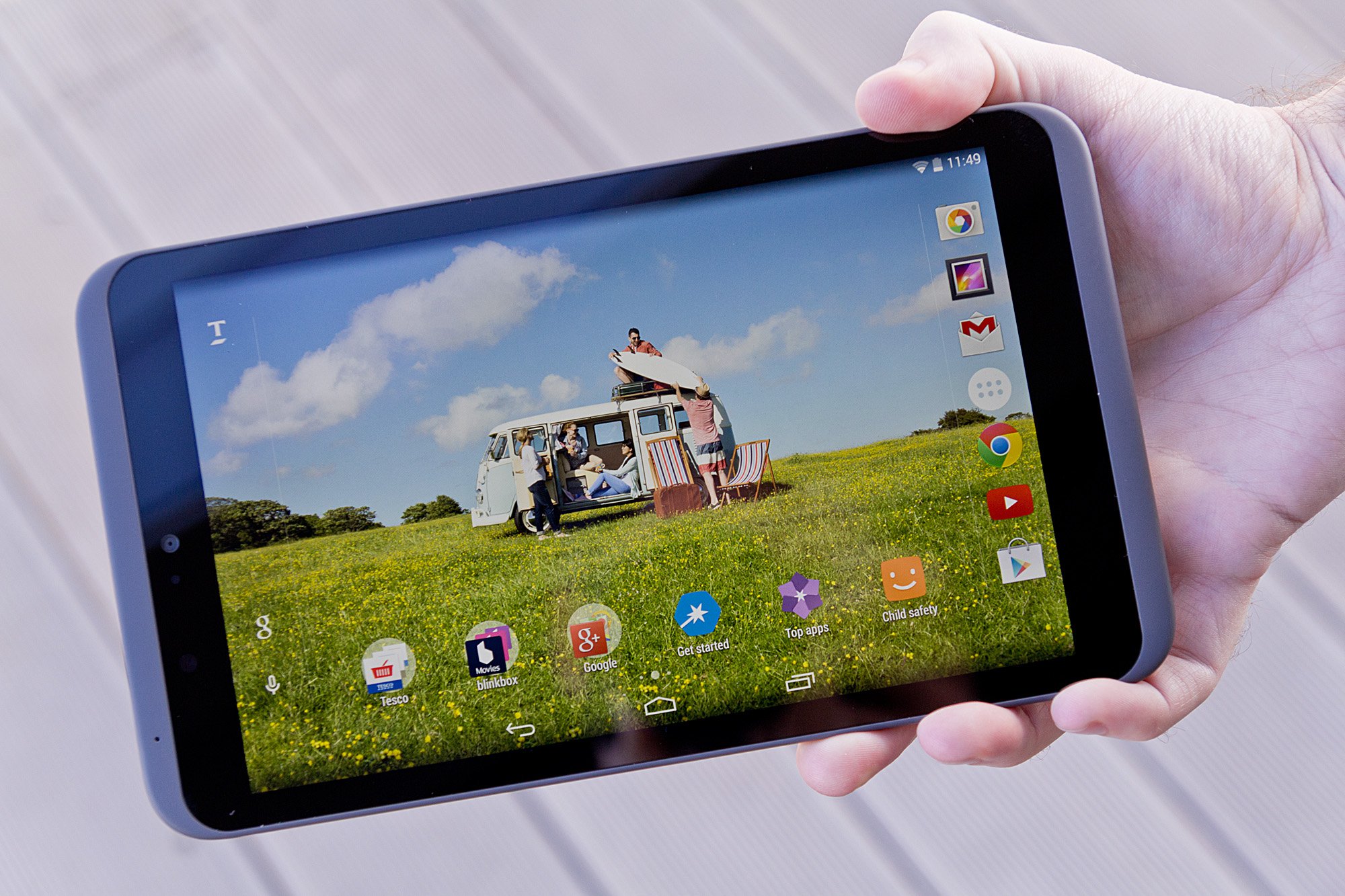
Tesco Hudl 2 Screen

There are several ways in which the Hudl 2 does fall behind in terms of display. First and foremost, the IPS choice for the screen is not as performant as an AMOLED counterpart would be. In that concern, colors tend to be a little less vibrant and rich. Brightness can only take you so far and ends up being moderate even on high settings. Because of that, there is a tangible impact on the contrast levels that the tablet is ultimately capable of.
On the upside, the viewing angles do not suffer with the IPS display at all – images and videos can be viewed from any angle without losing clarity. The Hudl 2 fares particularly well in any light condition too – both sunlight and artificial light without losing much, if any of the quality of the display.

If you weigh everything in balance with the price that the Tesco Hudl 2 tablet comes at, the ratio is extremely high – there are not many other devices that could pack up so much at such a low price class.

Tesco Hudl Specification & Performance

To begin with, the Tesco Hudl 2 is not meant to be the kind of tablet that will rock the latest full HD, 3D games at the highest quality in a perfectly smooth manner. Instead, its target public is families along with other types of activities – such as watching movies, storing your photographs, less demanding games that you can enjoy with your small ones and so on.

Taking that into consideration, the Tesco Hudl 2 packs an Intel Atom quad-core processor that can go up to 1.83 GHz. It’s not even remotely close to the octa core type of hardware that we’ve started seeing in the flagship tablets on the market today, but if you stop to think about it a little, you’ll realize it’s not sub-par at all. Falling behind the Nexus 7’s Snapdragon by a small degree, the Intel processor is worth every cent of your money.

The memory is the one thing where I believe Tesco could’ve stuffed a little more in. Then again, this tablet is a 2014 release after all – 3 GB of RAM memory was the most you could even get at that time and for some prices to match. The Hudl 2 only has 2 GB worth of memory; while you’d think that’s not nearly enough, a little pragmatism will prove you otherwise. In our tests, the tablet handled itself extremely well, no matter how many apps we’d run at a time and how demanding they were. Navigating through the operating system was a breeze and switching between apps suffered little to no detectable delay.

Something that has not occurred on our model but has been experienced by other people using the Tesco Hudl 2 is the fact that the startup process may not launch very occasionally. Similarly, the device sometimes refuses to turn off; in both cases a system reset is necessary. It’s not clear whether this is a software conflict or a physical one, but does not seem to be a long-term concern as there are no other implications to speak of.

The Intel z3735D chipset integrated into the tablet is responsible of the graphics rendering of the tablet too. That means that no dedicated GPU will be handling your games and heavier apps – that might be a bit of a disappointment for a number of users; the tablet is certainly lagging behind when put up to stress tests through the latest games. And while it might not prove it can pack that big of a punch together with the Intel processor, you can actually enjoy a great amount of games with no stutter, lag, framerate drop or other hiccups.

The one aspect that may not appeal to many users but which is, unfortunately, inherent to all mobile devices out there is that the Hudl 2 tends to overheat when stressed out with graphic-intensive applications. In the absence of a dedicated GPU to handle difficult graphic rendering of videos and games alike, the chipset ends up being stressed more than it should – thus increasing the device’s temperature and consequently resulting in slightly lower performance.

As a final note, the default hard disk storage space is a very disappointing 16 GB. No other variants and no chances to upgrade. And on top of that, you might be a little disappointed to find that a great amount of that base storage space will be taken by your operating system and user interface (report go as far as saying that about 6 GB of your precious space might be clogged by must-have apps and operating system). On the bright side however, the Tesco Hudl 2 does incorporate the micro SD card slot that can prove to be an absolute lifesaver for storing your data and keeping your device clean for any app you might want to get and use.

Tesco Hudl 2 Software & features

A great relief for potential buyers out there is that the Tesco Hudl 2 comes with pre-installed Android 4.4.2 KitKat version. It’s a relief because it’s fully optimized and perfectly compatible with an Android operating system. It’s not that much of a reason to be excited that the OS cannot be upgraded to newer versions nor shows signs of that being possible in the near future. While we’re waiting for the Android M to show up on the horizons for our mobile devices, chances are the little Tesco Hudl 2 tablet might not even see sight of the Lollipop 5.0 update anytime soon.

However, given its potential chance at success, Tesco might consider allowing an upgrade sometime.

Tesco Hudl 2 Main Screen

Similarly to how Internet Explorer is a limb that’s downright impossible to detach from Windows, so is Hudl 2’s My Tesco launcher. Basically, by using an Android foundation, Tesco has snuck its own software variant into the tablet to highlight their own brand. Luckily, similarly to how you can turn your back on IE and never use it again after you’ve hit the download button on Chrome or Firefox, you can do the same with your Hudl Launcher – simply download and install another one and make it default and disable the Tesco variant.

In terms of interactivity, the Tesco Launcher is sadly a little lackluster in performance and only seems to drag the device down if anything. It may prove to be occasionally laggy or making your swipes stutter marginally. Outside of that, you will be able to find everything you would ever wish for from an Android device: all of the native apps are there or downloadable through the Google Play store. Along with the default Android apps, you will find an entire collection of Tesco-related ones – such as Tesco Direct, Tesco Photo or Tesco Bank.

For people who are not used to the Android system or this type of devices however, the Tesco Launcher does an amazing job of introducing you to its world through an extremely user friendly and step-by-step setup of your system and settings, teaching you how to make use of it as you go. The interface is particularly bright and cheery, making it a very inviting interface for anyone – well-versed in everything that is technology or not.

The operating system does not differ from the KitKat we’ve grown accustomed to on other devices: you can pull down the notification tab by a downward swipe from the top left, add or remove widgets by holding down onto the screen, access your settings directly by swiping down from the top right. In essence, it’s everything you would expect from your stock Android interface.

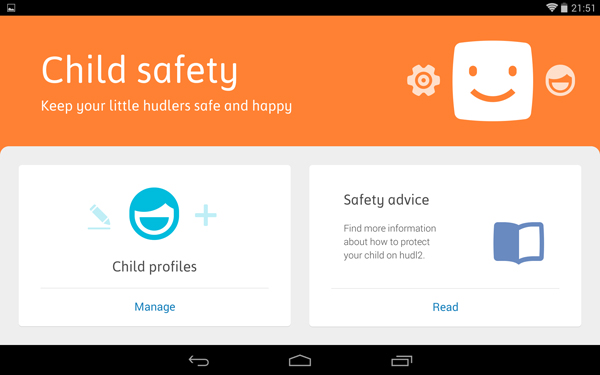
Also worth mentioning is the Tesco Hudl’s Child Safety feature that allows you to create different user profiles that come with a default safety feature for different age intervals: <5, 5 – 8, 8 – 11 and so on, each coming with a predefined set of restrictions and conditions that browsing and accessing various parts of the tablet depends on. That way, you can easily switch between your profile and your child’s and let him or her make use of it just as well without risking exposure to harmful or inappropriate content. Another feature of the Child Safety system is the fact that you can use parental controls such as time limit – only allowing a particular profile to make use of the tablet between specified time periods.

Tesco Hudl 2 Child Safety Feature

Tesco Hudl 2 Camera & Sound

I keep feeling compelled to compare this variant of the Hudl tablet to the previous in order to really give it the credit it deserves. On paper, the Tesco Hudl 2 camera is anything but satisfactory: with only a 5 megapixel sensor on the rear camera and the 1.2 megapixel front facing camera, it doesn’t feel like you’ll be using it for anything too soon.

Tesco Hudl 2 Rear Camera

Truth be told, you are most likely better off using your mobile phone camera any day, any time. But finding yourself in the situation where your smartphone won’t do, the Hudl 2 camera is not that underwhelming. Your photos won’t make it to the next photography exposition but they won’t turn out that bad either. There’s a major improvement brought to the camera’s focus – at least for the rear camera, but colors could do with a few more ounces of vibrancy and better defined contrasts.

On the bright side however, the cameras are accompanied by a number of great new modes to shoot in as well as a high degree of post-editing that you can do. It also supports video shooting in up to 1080p HD format with the rear camera and 720p with the front one (that also accounting for video conferencing as well) but the post-editing is inexistent and the image is relatively grainy.

Last but not least, there are a few mentions regarding the in-built speakers of the Tesco Hudl 2. Firstly, they are proudly self-announced as Dolby-powered stereo speakers that will honestly impress you much more than most other tablets – some of the most powerful ones included in the count. This addition really enhances your movie watching and enjoying your favorite games a huge deal. The Dolby speakers really deliver on Hudl’s primary dedicated usage – families. Audio is impressively immersive and detailed, but may start losing some degree of its quality when turned all the way up.

Tesco Hudl 2 Bottom Speakers

Tesco Hudl 2 Battery

The ads and papers state that the Tesco Hudl 2 will last you up to 8 hours of usage. Something that is native to any kind of device that has ever existed, battery life depends on a series of circumstances. The way in which you use your tablet is one of them – your battery could very well last even more than 8 hours with mild to low usage such as periodically checking your mail, typing a message and checking your Twitter. Otherwise, the battery could last even less than 4 hours when you subject the Hudl 2 to intensive game playing or movie watching – especially when transmitted to a TV through the micro-HDMI port.

Overall, the Tesco Hudl 2 should keep you going for a day of normal usage. A blatant downside of the battery is its lack of optimization through the operating system – there is no power saving option to speak of. The fact that there’s no turbo charging option either doesn’t make things at all better. As a matter of fact you may come to realize that charging the tablet is considerably slow.

Tesco Hudl 2 Verdict

In order to actually give the Tesco Hudl 2 a final grade and a decisive verdict, one has to weight their expectations when it comes to tablets. The tablet comes at the abysmal price of $199 – you probably cannot find a cheaper option. The quality that it packs in the 200 bucks is astounding however and definitely worth getting if you have that amount to spare.

You can easily consider this tablet the perfect gift for Christmas, especially given the Tesco promotional prices that you can get it for if you find yourself abroad in the United Kingdom – directly purchasable from Tesco supermarkets at various offers and different percentages taken off when you do your shopping there.

Image Source: 1, 2, 3, 4, 5, 6, 7, 8, 9, 10

Filed Under: Headlines Tagged With: hudl 2 review, hudl 2 tablet, hudl tablet, tesco hudl, tesco hudl 2, tesco tablet

  • « Previous Page
  • 1
  • …
  • 10
  • 11
  • 12
  • 13
  • 14
  • …
  • 58
  • Next Page »

Subscribe to Blog via Email

Enter your email address to subscribe to this blog and receive notifications of new posts by email.

Join 11 other subscribers

Recent Articles

police handcuffs man

German Man Probed In Poisoning That Killed 21 Employees Since 2000

June 29, 2018 By Kenneth Scott Leave a Comment

Chicken wings bar

Intoxicated South Carolina Man Punches Waitress Who Refused to Serve Him Alcohol

June 29, 2018 By Karen Jackson Leave a Comment

gaming

New Zealand gamer Who Flew Halfway Across The World for Virginia Teen Gets Shots By Her Mother

June 28, 2018 By Cristopher Hall Leave a Comment

party

Former Virginia Tech Freshman Sentenced to 50 Years in Prison for Stabbing a Girl to Death

June 28, 2018 By Roxanne Briean Leave a Comment

bonfire

British Couple Sentenced to Life in Prison for Torturing and Murdering French Nanny

June 27, 2018 By Deborah Campbell Leave a Comment

pay phone

Texas Father of Girl Disappeared in the 80s Ignored by Authorities

June 26, 2018 By Cristopher Hall Leave a Comment

bottled water

San Francisco Woman Threatened to Call Police on Girl Who Sold Ice Water for Disneyland Trip

June 25, 2018 By Roxanne Briean Leave a Comment

Maplewood Park

Missouri Man Robbed by Date and Accomplice in Park

June 22, 2018 By Nancy Young Leave a Comment

coding

New York Man Sentenced in Cyberstalking Former Girlfriend, Mailing Drugs to Her Dorm

June 22, 2018 By Deborah Campbell Leave a Comment

headphones

Bose Poised to Launch Sleepbuds, In-Ear Headphones That Help You Sleep

June 21, 2018 By Nancy Young Leave a Comment

Police light

Intoxicated Female Driver in Custody for Pulling Arresting Officer by the Hair

June 21, 2018 By Kenneth Scott Leave a Comment

kitchen

Restaurant Manager Arrested and Charged in Shooting Death of Co-Worker over Negative Yelp Reviews

June 20, 2018 By Karen Jackson Leave a Comment

plastic container

Pennsylvania Couple Charged in Violent Death of Infant Discovered Buried in Cat Litter

June 19, 2018 By Cristopher Hall Leave a Comment

tailpipe

Minnesota Teen Gets Head Stuck In Oversized Tailpipe Winstock Music Festival

June 18, 2018 By Karen Jackson Leave a Comment

Pages

  • About Us
  • Contact us
  • Privacy Policy
  • Privacy Policy GDPR
  • Staff
  • Terms and Conditions

Recent Posts

  • German Man Probed In Poisoning That Killed 21 Employees Since 2000 June 29, 2018
  • Intoxicated South Carolina Man Punches Waitress Who Refused to Serve Him Alcohol June 29, 2018
  • New Zealand gamer Who Flew Halfway Across The World for Virginia Teen Gets Shots By Her Mother June 28, 2018
  • Former Virginia Tech Freshman Sentenced to 50 Years in Prison for Stabbing a Girl to Death June 28, 2018
  • British Couple Sentenced to Life in Prison for Torturing and Murdering French Nanny June 27, 2018
  • Texas Father of Girl Disappeared in the 80s Ignored by Authorities June 26, 2018
  • San Francisco Woman Threatened to Call Police on Girl Who Sold Ice Water for Disneyland Trip June 25, 2018

Categories

  • Business
  • Entertainment
  • Finance
  • Headlines
  • Health
  • Life
  • Nature
  • Science
  • Sports
  • Tech & Science
  • Travel
  • Uncategorized
  • United States
  • World

Copyright © 2026 ArgyllFreePress.com
About · Privacy Policy · Terms of Use · Contact