Argyll Free Press

Growing News Network

Thursday, April 23, 2026
Log in
  • Business
  • Finance
  • Sports
  • Tech & Science
    • HP Envy 4500 Review
    • LG Optimus 170 Review
    • iPod Touch 6th Generation Review
    • HTC One M8 Accessories Set-up
    • Surrealist Games You Must Play
    • Hisense Sero 8 Review
    • Dell Latitude e7440 Review
    • HP Laserjet 1536dnf mfp Review
    • Garmin Fenix 2 Review
    • Skype Vs Viber
    • Best Video Conferencing Software
    • Sony mdr 1r Headphones Review
    • Canon Rebel t3i Review
    • Sennheiser Momentum 2-0 Review
  • Travel
  • Headlines
  • Health
  • United States

Withings Activite Review

March 8, 2015 By Nancy Young Leave a Comment

The Activite activity tracker from Withings isn’t about notifications and small distractions disguising themselves as help. A wearable is sometimes best when it simply doesn’t get in your way. This is exactly what the French developer had in mind when it created its Activite device. On top of this, these activity trackers have something pretty unique: the devices have classic dials and round faces, so they don’t really look like any activity tracker we’ve seen so far. The Activite from Withings isn’t exactly a traditional fitness device, nor is it entirely a smartwatch. We love this aspect but you should be aware that these devices are probably not for everyone.

Here is our Withings Activite review.
Withings Activite review

Hardware

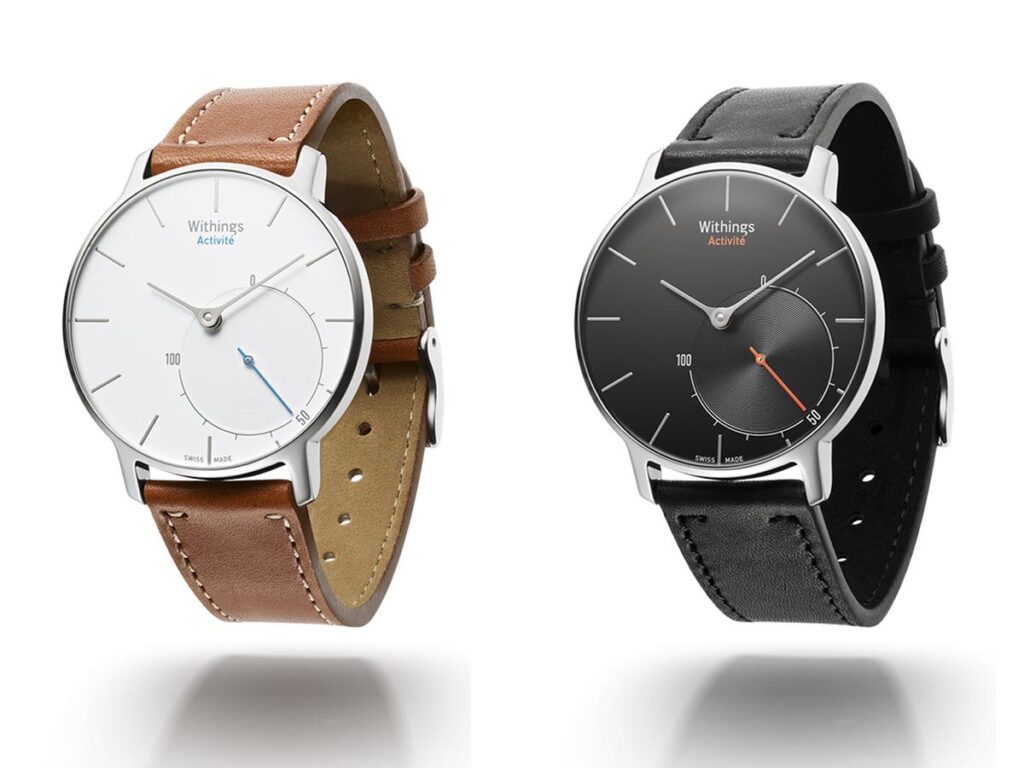
The devices come in two versions, Activite and Activite Pop. The normal Activite is the more expensive of the two and costs $450. We had on our hands a unit that came with a black face and black leather strap. But if this isn’t your style, you’ll be happy to know that the device also comes with a brown band and a blue trim. They feel like they would be more suited to wear while going out than to the gym but the silicone strap included in the package really helps when you’re working out.

It’s pretty cool that the company decided to include the silicon strap with the device but the leather one looks more elegant and my wrist got very sweaty under the plastic strap.

The normal Activite is very elegant, while the Activite Pop looks more like a Swatch watch. This isn’t necessarily a bad thing as the Activite Pop does all the things the regular one does but in a more colorful body and a less expensive build. The Pop comes with a silicon strap that you can remove and replace with another one with the help of a very simple latch. The less expensive material used to build the Pop is pretty much the only thing that is different from the premium version. Activite is built with a shiny alloy and the Pop uses a PVD treated stainless steel. The glass on the Pop is made out of mineral glass and the premium version uses a sapphire that’s also scratchproof.

The Pop is not as comfortable as the premium version, mainly because of the silicone strap, but if your wrist doesn’t get particularly sweaty you’ll be just fine wearing it for long periods of time.

The Activite will show you how many steps you’ve taken with the use of a small dial on its face. The default goal is 10,000 steps but you can change this with the help of the companion app. It’s obvious that Withings tried to make a very useful device without stuffing it with a surplus of somewhat unnecessary features. The device comes with different watch faces and Withings built them thinking about both genders. While it would have been cool to have a more dazzling and larger design, the device gets the job done.

The device doesn’t come with a charger and instead, the company decided to use a button-cell battery. Withings claims that a battery can last around eight months before you need to change it.

Software

Because the two watches don’t really do all that much by themselves, Withings made a companion app called Withings Health Mate that helps the two devices. The app is pretty much the display the watch lacks. You can use the companion app to program your fitness goals, weight and height and then Withings Health Mate combines all your movement, sleep data and heart rate into a neat single feed. While this works well, you might find yourself a little confused by the tiny graphs and numbers that fill the screen of your smartphone.

The Activite collects a lot of data and one of the most awesome tricks the app has up its sleeve is the possibility to check your heart rate with the use of your iPhone’s camera. The app detects your heart rate with the help of the LED light. While this is pretty accurate, trying to find out your heart rate in a very bright room can be pretty tricky as the Health Mate app detects your pulse through the skin of your finger pressed against the bright LED light.

While sleeping with something on your wrist may not attract you all that much, Activite does a good job of analyzing your sleep hours. However, it does seem overly pessimistic when it comes to sleep cycles. Some nights the app reported I didn’t get as much sleep as I did. It probably matters how well you sleep but it did make me wonder if it’s all that accurate at all. While the app isn’t probably as accurate as you’d want it to be, it did tell me that I needed more sleep. (I already knew that, but it did remind me of it.)

There are some design decisions that don’t really seem that great. You earn badges when you complete some challenges but this doesn’t show up in your profile page where they should normally appear, instead, they show up in your timeline. It’s true this isn’t a major problem but it’s pretty annoying nonetheless.

One bigger problem is the alarm clock. When you set an alarm, you have to drag a bar down and up the screen to choose when the alarm will set off. When you first look at it, it seems kind of cool but when you want to set an alarm for eight hours (or more) since that moment, you have to drag the bar to the edge of your smartphone’s screen and wait for the app to cycle until the slider lands on your desired time. A much easier solution would have been to implement a text box. Fitbit and Jawbone are definitely winners when it comes to the design of their companion apps. It would be nice to see some improvements in the updates to come.

The competition

Withings Activite review

The Activites from Withings are both great devices but there are other great smartwatches on the market. Fitbit’s devices such as the Surge and the Flex are great for everyone and the $100 Flex imposes quite the competition for the Activite. The Flex tracks your sleep and steps, just as the Activite, but at a smaller price.

For the price you would pay on Activite you could choose a fancier Android Wear smartwatch. The Moto 360 and the LG G Watch cost less than the device from Withings and do a lot more.

Wrapping up

PROS

– Good materials and beautiful design

– User friendly interface

– Step counter works really well

CONS

– Very expensive

– The companion app isn’t very polished

– The smartwatches don’t have a lot of features

Verdict

If you want a wearable that’s both a fashion statement and an activity tracker, consider buying the Withings Activite. The device is built with premium materials, such as stainless steel, leather for the strap and a sapphire crystal. However, its looks are overshadowed by its limited functionality other than to count your steps and show you the time. The $450 Withings Activite is definitely a beautiful device and you won’t feel embarrassed by wearing it but you will definitely feel somewhat poorer.

Images source: 1, 2

Filed Under: Tech & Science Tagged With: activite pop review, activite pop smartwatch, activite review, activite smartwatch, withings, withings activite pop review, withings activite review, withings smartwatch

The Best of Mobile World Congress 2015

March 8, 2015 By Roxanne Briean 2 Comments

The big announcements of this year’s Mobile World Congress have been revealed.

It’s safe to say that MWC15 was probably the biggest one ever. When we decided to make a list of the best of Mobile World Congress 2015 it was actually pretty difficult to include just 10 things.
The top pick is obviously Samsung’s line of S6 devices but we’ve seen a lot of great smartphones, a couple of tablets and some wearables.

It seems like the big subject this year was security. We saw the Samsung Knox, Qualcomm’s Sense ID, a very advanced finger print scanner and the Blackphone 2 from Silent Circle, which is an incredibly secure smartphone.

Here is our list of the best of Mobile World Congress 2015. Enjoy

1. Samsung Galaxy S6 and Samsung Galaxy S6 Edge

Best of Mobile World Congress 2015

For numerous years, Samsung has been the ultimate ruler of the Mobile World Congress. This time, Barcelona was filled with huge Samsung billboards, which have shown us who the big dog is. Samsung’s flagship launch was probably the most important one the company has had in years, because it came after a drop in the mobile market and a very poor financial quarter for the company.

The strategy of the company for 2015 seems to cover more ground, as Samsung released two new devices, the traditional Galaxy S6 and the slightly more curved Galaxy S6 Edge. The devices are quite impressive in different aspects, and almost everyone agreed that they’re steps ahead of the Galaxy S5 released last year, despite the Galaxy S6 line not being waterproof.

2. HP Spectre x360

Best of Mobile World Congress 2015

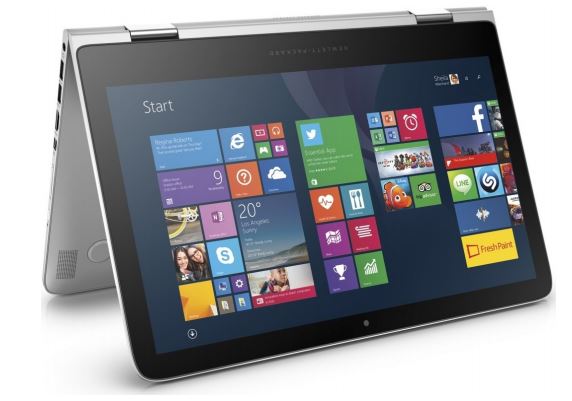
HP showed its latest 13.3 inch foldable tablet laptop combo, the HP Sprectre x360. The device offers premium specs and is made of aluminum. The laptop has different prices, depending on what you want, and starts at $999.

Probably the most important thing about the laptop/tablet is that it’s already available on the company’s website.

3. Samsung Pay

Best of Mobile World Congress 2015

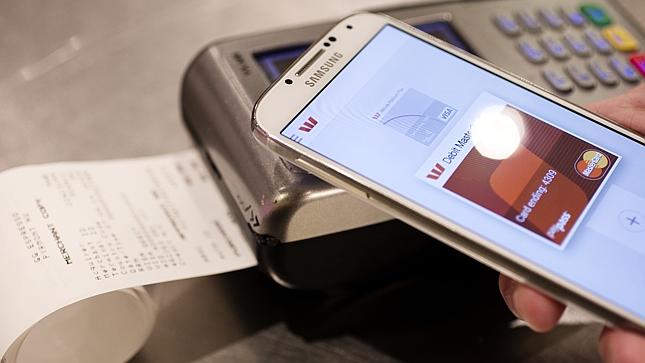
While it’s true that Apple Pay had a head start, the mobile payment system included on both the Galaxy S6 models has an advantage. The system works even with retailers that use magnetic strip cards and not NFC technology.

We can’t exactly tell you how well the system works for now and its security hasn’t been tested yet but the mobile payment system certainly looks promising. We’re very excited to see how consumers from South Korea and the United States will embrace this new system.

4. Sony Xperia Z4

Best of Mobile World Congress 2015

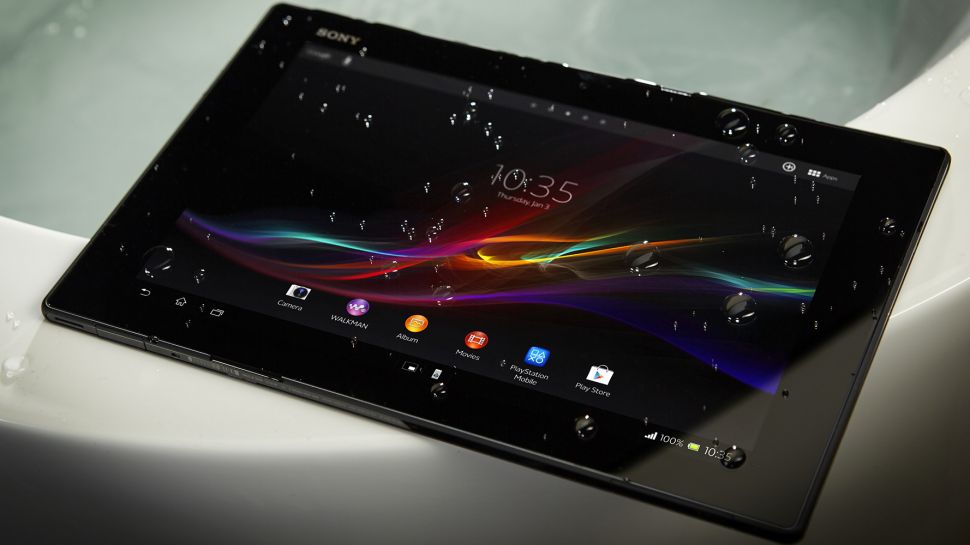
Tablets are sort of declining right now and some analysts even predicted that this category will disappear completely in the near future. We haven’t seen many tablets at the MWC2015, it’s true. This, however, is what makes the Xperia Z4 from Sony a winner. It also helps that the device is very light, thin and waterproof. If you want a new 10 inch tablet that runs on Android, Sony has your back.
5. Huawei Watch

Best of Mobile World Congress 2015

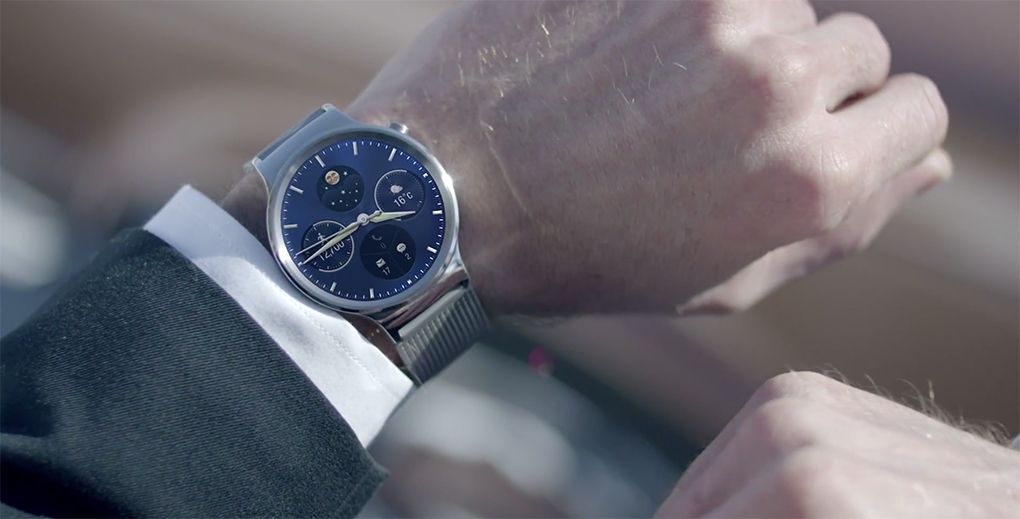
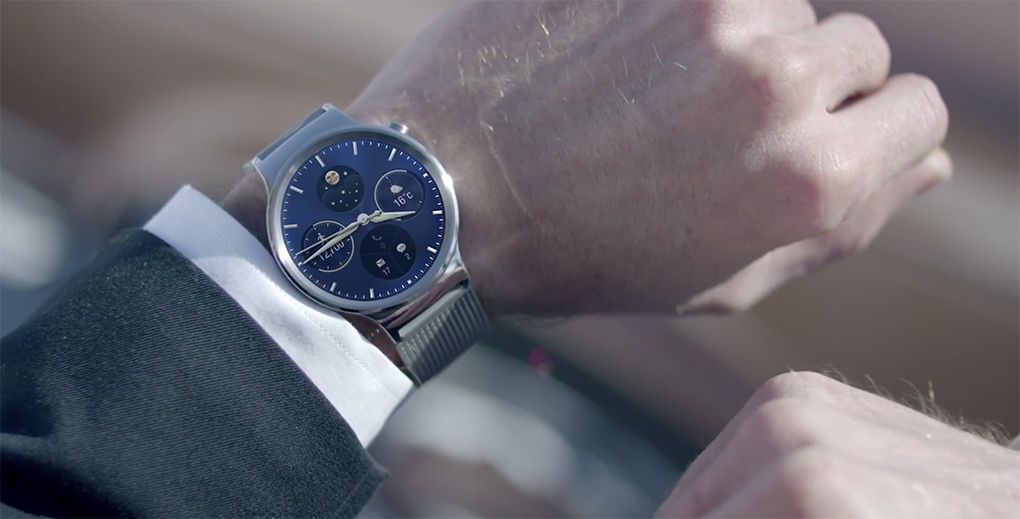
Smartwatches were pretty fancy this year. Before the launch of the Apple Watch, it seems that manufacturers did their best to release elegant watches that had classical appearances. The Huawei Watch is definitely one of the most elegant smartwatches we’ve ever seen and we certainly wouldn’t mind wearing one to any occasion.

6. Qualcomm Sense ID

Best of Mobile World Congress 2015

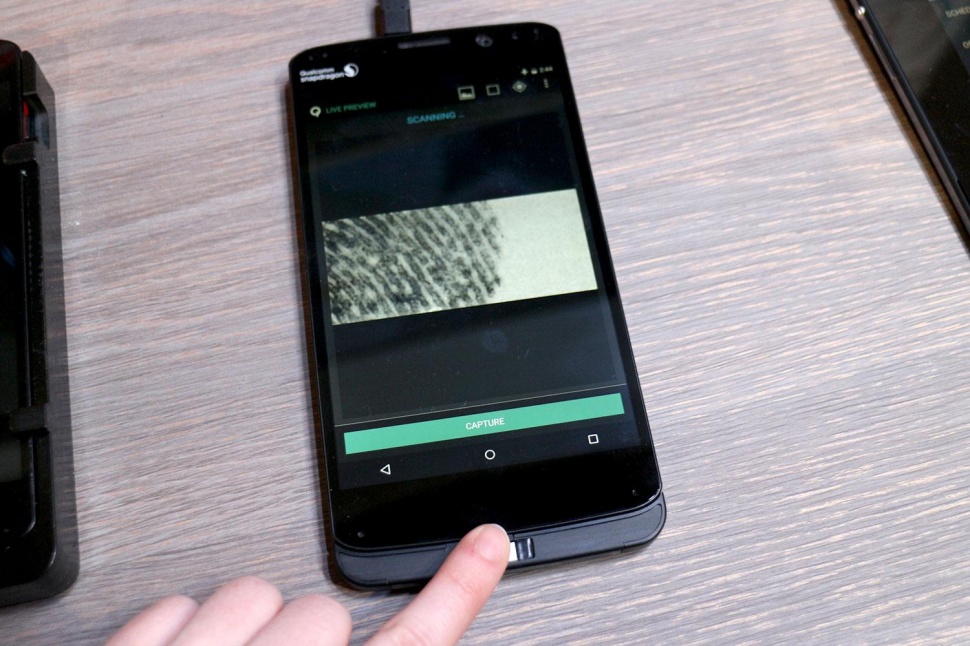
The fingerprint ID systems found in smartphones now are very convenient but aren’t exactly perfect. The new fingerprint scanning technology from Qualcomm named Sense ID resolves many of the problems found in traditional fingerprint scanners. The technology recognizes your finger even if it’s dirty or greasy and it can be installed on any part of a smartphone.

But the most important aspect is that the system uses ultrasonic sound technology which scans the fingerprints in 3D. This means that the scan is a lot more detailed than in traditional systems and makes the technology more secure, claims Qualcomm.

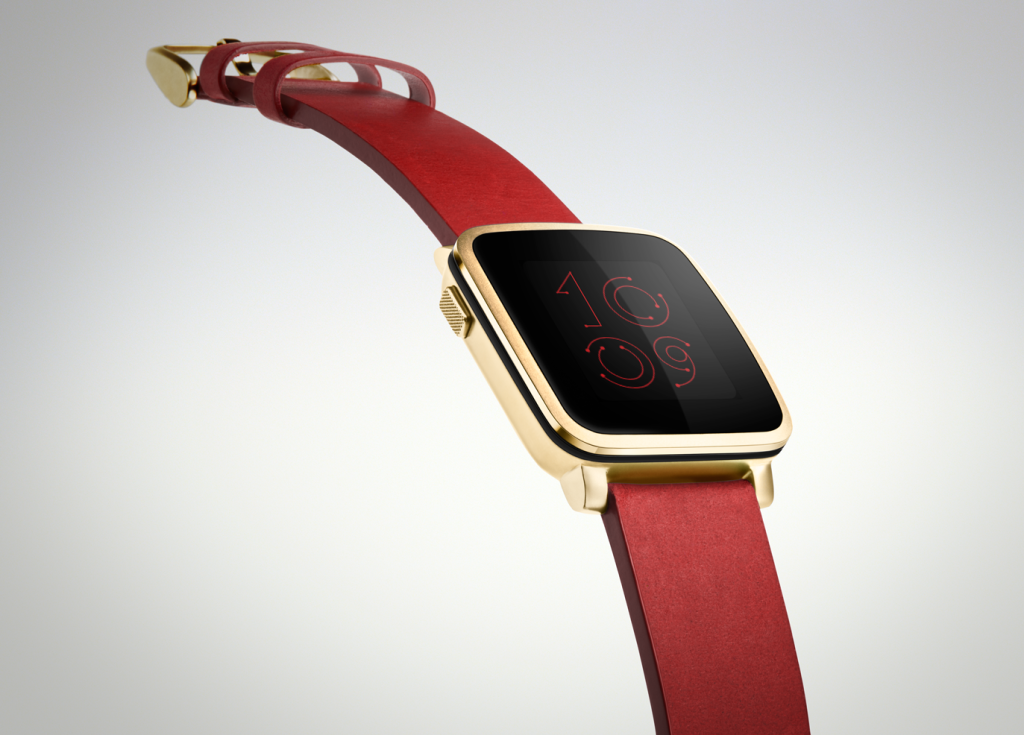
7. Pebble Time Steel

Best of Mobile World Congress 2015

Pebble broke records on the crowdfunding website Kickstarter with its future smartwatch, the Pebble Time. The company revealed a premium model of the watch at the Mobile World Congress 2015.

The Pebble Time Steel is a beautiful watch, it feels very solid and the company promises it has a battery life of 10 days. Pebble also launched a platform called Smart Straps, which lets developers create advanced and beautiful looking straps for the Pebble Time smartwatch.

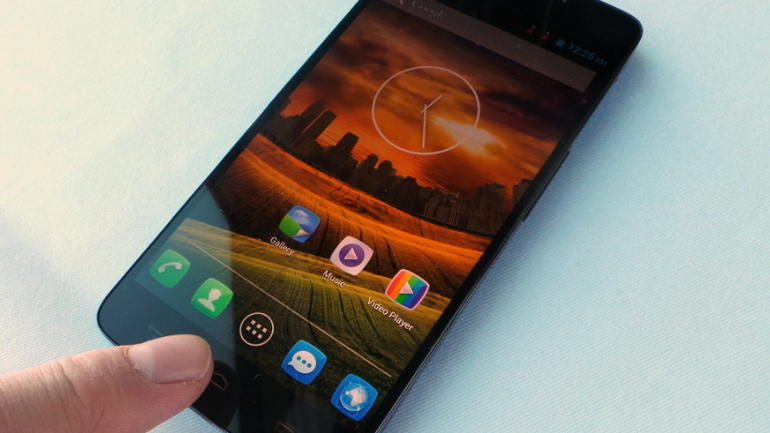
8. Alcatel Idol 3

Best of Mobile World Congress 2015

It’s pretty amazing to have a smartphone that allows you to call someone even when it’s upside down. But what’s even more amazing is that you can buy a smartphone that has top of the line specs for only $249 off-contract.

While we tested the Alcatel Idol 3 and its smaller brother, we can say that the devices didn’t have that premium feel found on the iPhone 6 or on the Galaxy S6. They weren’t as fast either but you can buy these phones for your entire family for what you would pay on just a single iPhone, contract-free. This looks like a great deal to us.

9. HTC Re Vive

Best of Mobile World Congress 2015

You can definitely tell that a product is in its very early stages when the company that’s making said product isn’t even sure how it’s called at the moment. Going on the official website of the VR headset manufactured by HTC you will find out that the device is referred to as both HTC Vive and HTC Re Vive. The headset developed with Valve is a very intriguing one. It has more than 70 lasers and sensors that will guide you through virtual reality.

Valve and HTC announced their own VR headset and apparently it’s developed for PCs. The HTC Re Vive stands out from an overly populated crowd by making it a lot better than the Oculus Rift and the Project Morpheus from Sony. The room where the Re Vive was demoed was practically empty. There was only just one piece of furniture where the controller and headset were. While it’s clearly still a prototype, we were quite impressed by the HTC Re Vive.

It’s expected to make its way to stores in time for this year’s holiday season.

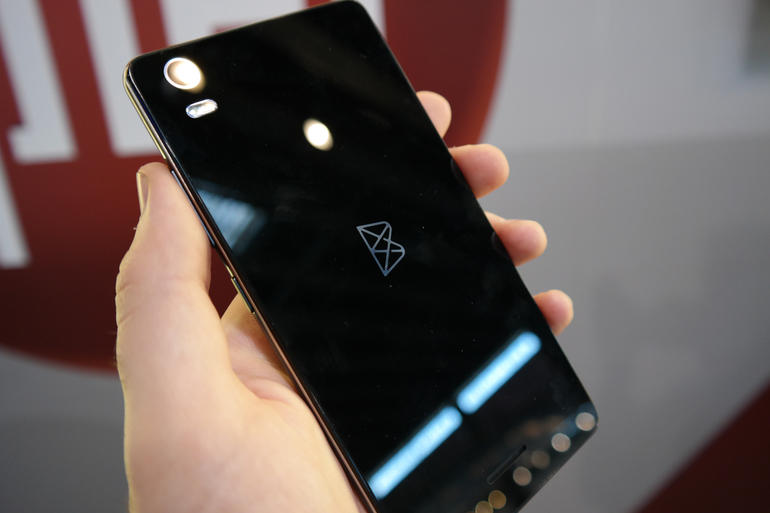
10. Blackphone 2 and Blackphone Plus

Best of Mobile World Congress 2015

Silent Circle definitely had a lot to show and to say at this year’s edition of Mobile World Congress. The company really tried to show just how serious it is about security and shared with the audience a very big number. Apparently Silent Circle had $750 million in orders for the first product they’ve made, the Blackphone.

The Blackphone, however, was a mid-level device. The Blackphone 2 will come with top of the line specs, which means that people looking for privacy and security can also make use of a very powerful smartphone. The 7 inch tablet from the company, called Blackphone Plus will arrive later this year.

There were a lot of devices at this year’s MWC and some of them are really worth honorable mentions. We saw HTC’s new HTC One M9, which is a beautiful smartphone but just wasn’t too different from the device we saw last year and we aren’t very excited about it. If you’re hoping for an entirely new generation of smartphones from the company, you will be disappointed.

We also saw e-bike prototypes from Ford and a brand new wireless service from Google but these were very lacking in details to get too excited about.

So there you have it. This was our list of the best of Mobile World Congress 2015.

Images source: 1, 2, 3, 4, 5, 6, 7, 8, 9, 10

Filed Under: Tech & Science Tagged With: best of mobile world congress 2015, best of mwc 2015, best of mwc2015, mobile world congress, mobile world congress 2015, mobile world congress 2015 best, mobile world congress best, mwc, mwc 2015, mwc 2015 best, mwc2015, mwc2015 best

Nvidia Shield Set-Top Box Hands On

March 7, 2015 By Nancy Young Leave a Comment

Nvidia Shield Set-Top Box Hands On

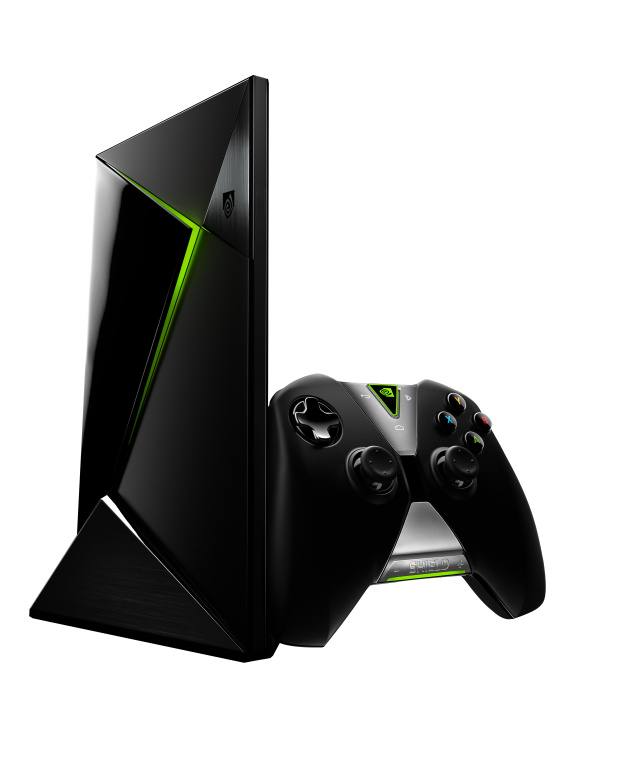
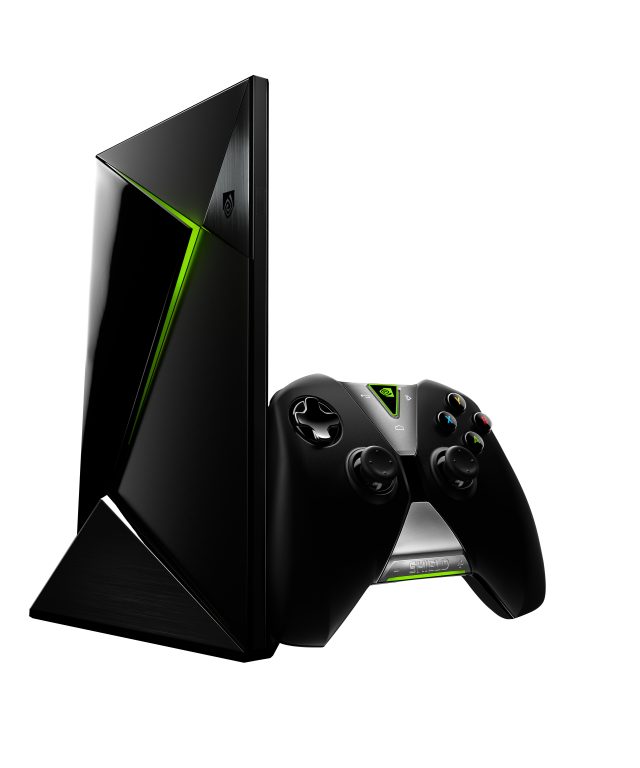
Nvidia’s latest Shield is an Android top box that makes use of the company’s latest Tegra chip. The device streams games over a platform called GRID, it can stream games from your PC and also supports Twitch streaming at the same time. Here are our Nvidia Shield set-top box hands on impressions.

However, the question is: Is this device any good? And the answer is: Kind of.

Having recently used the device it’s safe to say that it’s a pretty nifty peace of hardware. However, being a streaming device it’s uncertain how it will perform after its official release.

Nvidia’s Shield is powerful, small and looks similar to other set-top boxes we’ve used. The Shield box will be very familiar if you’ve ever used the Fire TV from Amazon. The device offers a lot of apps and digital content from Netflix and Hulu to Google Play and YouTube. The Shield features voice search and a microphone is built right in the gamepad.

But I’m sure you don’t care as much about Android TV as you do about the game streaming, so let’s get to that.

Does the game streaming actually work? Well, yes, it really does. But will game streaming work right in your home? We can’t tell you for sure at this time. The fact is that this feature depends on your internet connection as well as how well the servers from Nvidia will perform after the official release.

This is what we played on the device:

A match in Ultra Street Fighter IV streamed from Nvidia’s GRID
Around five minutes of Dying Light, also streamed from GRID
A very short section from Doom 3: BFG Edition played locally


Let’s start with the most relevant game from the list. Doom 3 looks and feels exactly as Doom 3 should feel and the only difference is that the game now plays on Android and its graphics are a little nicer. The game performs really smooth and it’s very pretty. However, whether Doom 3 is exciting or not depends solely on you and what kinds of games you like to play. What we can confirm is that the game actually runs on Shield and, supposedly the new device can also play Crysis 3 locally. We weren’t able to play the game, however, mainly because Crytek didn’t want the press to test the game for now. Nevertheless, we did get a look at Crysis 3 on the Shield and we can say that what we saw was indeed Crysis 3 and actually played like the game, albeit somewhat laggy.

When we played Ultra Street Fighter IV and Dying Light we didn’t sense any lag. To be fair, we only played the games for a short period of time and game streaming should be tested at home to see exactly how well it performs.

We’ll make a full review of the device when it launches but for now we can say that it definitely looks promising. It’s safe to say that if this $200 machine will perform great after its official release, it will become a serious competition for the PlayStation 4 and the Xbox One. But to pay this kind of money just to stream video content doesn’t seem like a great idea. There are great set-top boxes out there that cost less than half its price.

Image source: Photo 1

Filed Under: Tech & Science Tagged With: nvidia, nvidia android box, nvidia console, nvidia gaming console, nvidia set-top box, nvidia shield, nvidia shield set-top box, nvidia shield top box, nvidia top box, shield

Hello Barbie, New Doll That Will Have Conversations With Kids

March 5, 2015 By Kenneth Scott Leave a Comment

Barbie

The new Barbie doll that is going to be released sound very exiting. Hello Barbie, new doll that will have conversations with kids.

America’s most popular doll, Barbie is getting an improvement, and the next generations of Barbie will join the expanding connected toys category. The company behind the doll, Mattel, has teamed up with ToyTalk to create Hello Barbie, which is aimed to be a doll that can have a conversation trough Wi-Fi and voice recognition technology. The new Barbie is still under development, but Mattel is planning to release it in stores before the holiday season.

Apparently, the idea of the talking Barbie, came after little girls all over the world said that they wanted to have a conversation with Barbie. And this new technology, will allow Barbie to have a two way conversation with the girls.

Even tough a talking doll is not something new to the market, this certain Barbie will be brought to the 21st century, with several features. One of them is the fact that Hello Barbie, will remember the responses of the users and will arrive to know them better with time, similar to Cortana or Siri.

For example, if a child was to tell her they like a specific singer, Barbie might refer to that in the future. Also, Hello Barbie, will be updated periodically trough an internet access.

SAMSUNG CSC

The doll will require a Wi-Fi connection and its battery can last up to an hour, on a single charge. The necklace of the doll, will have incorporated the microphone and the speaker, but also the two LED lights. The rechargeable batteries will be placed in its legs and will connect to a wall mounted charger. The price of the Hello Barbie will be of $74.99.

A prototype of the talking Barbie has been displayed at the Toy Fair that took place New York. Presently, the doll is able to hold just a few minutes of conversation, which is only about her being at the Toy Fair and some things about herself. In the upcoming months, ToyTalk will be working on the further development of the doll, giving it the ability to discuss on various topics.

Barbie

The main idea is that they are going to bring out the things that kids aspire to be and the career direction that Barbie represents, starting from a scientist, a mathematician, painter, surfer, all of the things that Barbie has been along the time, explained ToyTalk, CEO Oren Jacob. Adding that, kids and Barbie will talk about feelings and why not, fashion, since it’s Barbie we are talking about. The company will be seriously analysing Barbie and what girls and boys who love to play with the doll want to do, and the things they want to ask her.

The plan of Mattel seems a pretty good one, since the sales of Barbie have lately suffered a decline. But their idea does rise some privacy questions, especially since the doll will be remembering what the kid is interested in. There is also a greater fear. Theer are concerns that the doll might be hacked and set to say things that are not suitable for children, something which has happened before with connected dolls.

Image Source: Our Muddy Boots,tom’s GUIDE, TIME

Filed Under: Tech & Science Tagged With: barbie that can have a conversation trough Wi-Fi and voice recognition technology, barbie that can talk, hello barbie, hello barbie talking doll, new barbie will be able to van a conversation with kids, talking barbie, talking barbie connected to wi-fi

Runcible Hands On: Smartphone features with a Quirky Design

March 5, 2015 By Roxanne Briean Leave a Comment

Runcible Hands On

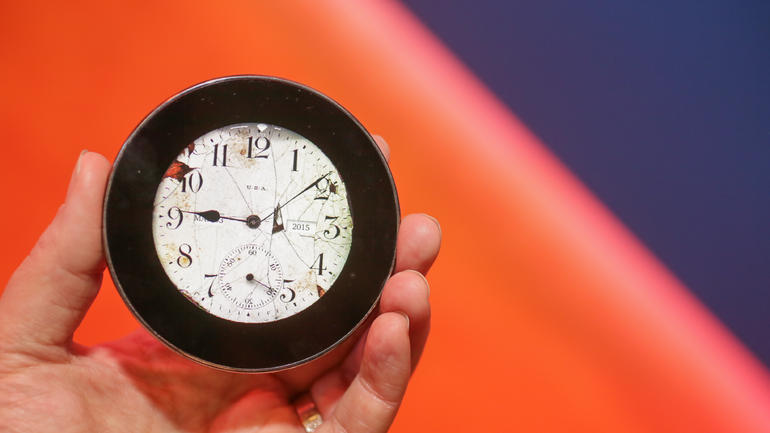
The Runcible is one of the most intriguing and strangest devices we’ve seen at this year’s Mobile World Congress. It has a lot of the same features found on a smartphone but its design makes it look like it belongs in a vintage shop. Monohm, the creator of the device wants Runcible to challenge the common smartphones which constantly give the user streams of notifications. Here are our Runcible hands on impressions.

The founder and CEO of the company, Aubrey Anderson wants its device to be a lot “quieter” and hopes that it will be able to help people live the moment and relax, all while still remaining connected with others.

Runcible tries to simplify the overload of the Internet. Google Glass, smartwatches and other wearable devices try to make notifications a lot more manageable with just small glances of the bigger notifications on your smartphone. Runcible, however, is a standalone device. The smart device runs the Firefox OS from Mozilla and lets the user browse the Internet, ask for directions and make calls. So when you’re going out you don’t have to bring your smartphone along with you in order to avoid constantly checking on your Snapchat, Twitter or Facebook accounts.

The developers at Monohm have been working on the Runcible for 10 months, which means that the software on the device is still in the early stages. Aubrey Anderson didn’t really give a lot of details about the apps (Anderson calls them “faces”) available for the device but we can see where it is heading. One of the watch faces has colored bubbles that get bigger when there is a lot of activity on social networks and there is also a compass face that only gives you a direction and the distance to the destination you chose. While these faces aren’t as informative or as complex as the apps found on a normal smartphone, they are unique and help with the charm of the device.

Runcible Hands On

It’s because of this simplicity that the device has such a distinctive shape. The developers at Monohm wanted to make a relaxing and quiet product and they drew their inspiration from compasses, old pocket watches and other round things that individuals carried at some point inside of their pockets. The device has a circular, flat display on its front side and a curved wooden back. Anderson said that only by holding the device you can see how calming it is.

The Runcible is a new category of products that is situated somewhere between smartphones and wearables. The device features all the connectivity found on modern handsets such as NFC, Bluetooth, WiFi and LTE and fits snuggly inside of your pocket. Monohm wants people to look at the Runcible as a pocket watch and pass it down in their families as a modern heirloom.

Because technology moves really fast, the Runcible has been designed in such a manner that it can be easily upgradeable and fixed. It’s not exactly project Ara, but the CEO hopes this is enough to make the Runcible useful and relevant for the future years to come. He said that just because the camera on the device gets a little old doesn’t mean that you will have to throw the entire thing out. You will be able to upgrade different parts of the new wearable.

It’s true that the Runcible is a very weird product but Monohm’s daring move should be admired. It’s a very different look on the modern smartphone and it’s very refreshing to see such a device on a market that’s currently being populated by a lot of flat, thin smartphones built from glass and metal.

The Japanese carrier KDDI is financially backing the company which means that the Runcible will probably see the light of day for the first time in Japan and won’t disappear from the surface of the planet like so many Indiegogo and Kickstarter projects. It’s true that this new device will be very difficult to market but it will definitely stand out in the crowd.

Images source: Photo 1, Photo 2

Filed Under: Tech & Science Tagged With: monohm, runcible, runcible hands on, runcible impression, runcible impressions, runcible review, runcible smartwatch, runcible wearable, the runcible

14 Educational Sites That You Should Know About

March 3, 2015 By Deborah Campbell 3 Comments

title

If you are a fan of online course and you love constantly improving your knowledge, there are 14 educational sites that are a must you know about.

Learn More, Study Less: Video Course

learn

What if you were to find out that everything you know about learning and studying methods and how to be successful in school was wrong, well if you learn like most of the people, you most probably are. Learn More Study less, is a course aimed to help people learn faster and is directed towards students, professionals, and self learners. People have stated that this course has been very helpful and might help you as well. It is worth checking it out!

GCF LEANFREE.ORG

2

This site has the base in North Carolina and its owner is Goodwill Industries. The main purpose of the site is to create technological skills, mathematical and literacy for people all over the world.The site offers free classes and has also mobile apps that people can use no matter where they are located. For now, the site offers over 700 lessons free of charge and teaches a multitude of subjects, ranging from simple matters and reaching to Microsoft Office.

 SCITABLE

scitable_logo-color

Scitable is a site created by Nature Education. The site is focused around science, learning and education. It offers many science eBooks and articles that which visitors can study to learn more about science. Also, visitors of the site can ask and learn from science passionate who are looking to pursue a career in the scientific field.

 University Of The People

University_of_the_People_Logo

The educational site is the creation of Shai Reshef. It is a non profit institution, tuition free, that offers degrees in courses in computer science and business administration. It is a developed online institution that works together with Catalyst Initiative, New York University, Hewlet Packard and Yale. These systems offer opportunities to students to do their practicums, research and more studies. The site focuses mostly on developing countries but can also take in other countries as well. All you require, is to apply!

SAYLOR

saylor

Saylor is an educational site which was created in 2008. It offers up to 200 online courses the majority of which are mostly focused on the highest enrollment majors in USA. The site also gives learners the chance to participate in discussion forums, track courses and print manuscripts.

 Textbook Revolution

textbook-revolution

Textbook Revolution is one of the many sites that allow users to have access to free books. The site has a lot of textbooks on many different subjects which every learner could fin beneficial. The site is not one of the most popular ones, but it is a site created to help students.

University Of Reddit

reddit-logo

Many people who are navigating the internet frequently, may be familiar with reddit, but not so much with the University of Reddit. The site gives visitors the chance to share their skills and knowledge with the help of videos and class lectures. For now, the site offers learning material in different fields which include, math, science, philosophy and social studies.

Engineering for Change

E4C

Unlike the others sites mentioned until now, which offer educational lessons and videos, this site offers the possibility for live collaborations. Participants can interact and learn from other people, on topics which concern engineering matters. A fresh new topic is introduced every month on the site and lets users ponder about it. People who are interested in learning more on engineering and sign up and browse trough the services they offer.

MENTORMOB

4

Mentormob is a site that gathers educational information from other sites, and puts them in order and then shares them. Visitors can enjoy the option of creating their educational resources or browse trough existing collections created by other users.

The Faculty Project

The-Faculty-Project

The Faculty Project gives learners the chance to access professors and lecturers from famous institutions like, Vassar and Northwester. The site covers a big variety of courses out of which, learners can pick the courses they desire to follow. The site is still at the beginning, but has started to grow rapidly as it provides a good assortment of learning resources that students can study trough Power Point, PDF and educational articles.

LEARNTHAT

learnthat

Learnthat is an awesome site, where users can learn from tutorials regarding technology, finance and business. The site offers hundreds of educational videos and articles that help students improve their digital marketing aptitudes, management and other types of subjects.

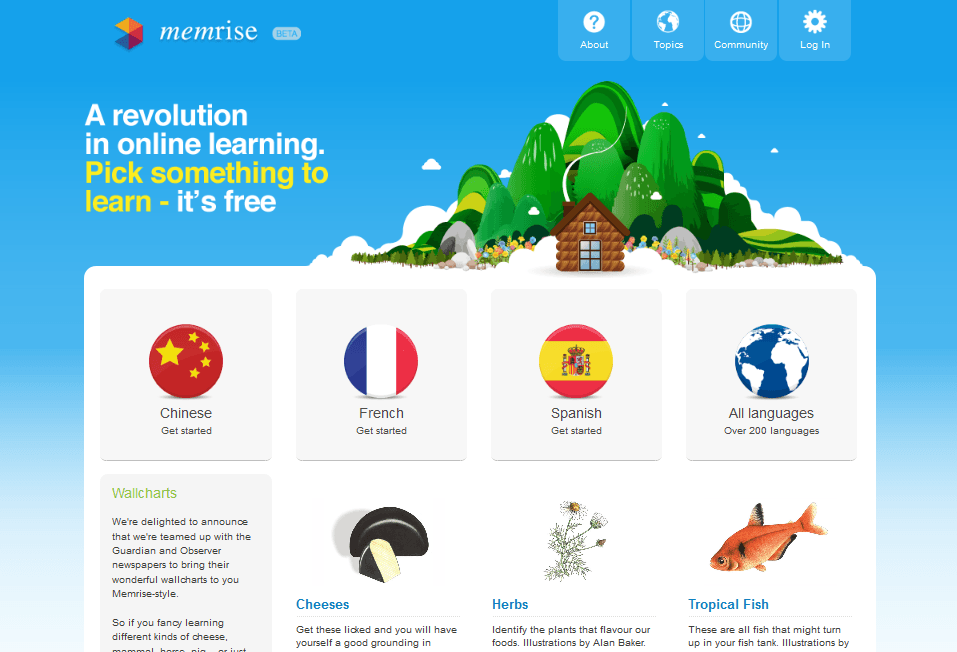
MEMRISE

Memrise


Memrise is a site that is using a mixture of fun, brain science and community that is aimed to help people learn. Most of the content displayed is very visual and based on games. Visitors of the site can boost their skills in a broad range of fields, such as, languages or topics like foodstuffs.

ALISON

alison

Alison has specially created in 2007, to help people learn from free online courses. On the site can be found over 300 courses in 10 different groups. People from all over the world can get certified courses on subjects like, legal studies, human resources and project management. The materials provided are free of charge. The only fee you have to pay is $20 when receiving a copy of your certificate.

LEARNERSTV

LearnersTV-Biology

LearnersTV is a site that puts together publications, science animations, audio lectures, videos and online tests. Users have access to a large area of subjects from which they can learn. The site will help you with all the material you need, no matter if you are looking for in depth research or just a simple study.

Image Source: metacafe, edge, techcrunch, wikipedia, open colleges, the zombie army, FAMOUS LOGOS, BRADLY BROWN, The Digital Scoop, celsias, Dig.do, live lingua, skilled, snip view, WSRP

Filed Under: Tech & Science Tagged With: best educational courses educational sites, best educational sites, best free educational sites, best free online course sites, best free technology courses, online courses, science online courses

Google Launched “Android For Work” To Separate Business From Personal Life

February 28, 2015 By Kenneth Scott Leave a Comment

ANDROID

Android is trying to make it inside the business oriented app, and Google launched Android for Work, meant to separate business from personal life.

Google has revealed an brand new set of apps and services that were created specially to promote the use of Android for work.
The newly developed system includes work profiles, which were created to with enhanced security but also specific apps like”Work Mail”, “Work Calendar” and so on.

For most of the workers, smartphones and tablets are not used in the work place as much as they should. Their potential when it comes to business and innovation remains largely unexplored, stated Google in a blog post. They announced the release of the Android for Work program to start exploring that potential.

With the help of a group of partners, Google is helping business bring more devices at work by managing, securing and innovating on the Android platform.
Basically the app allows users to take their personal phones to work and use them in a manner that is separate from their own personal apps and services on their phone. For example, users can use their regular Gmail app for personal use and then they can use “Work Mail” to receive emails intended for work only.

Along the time, Google has seriously struggled to present Android’s position in the work environment. Devices running on iOS have slowly, but very effectively made their way into the workplace presented as professional devices.

Microsoft has also been known for its business oriented devices for quite some time now. However, Google has to make a bigger effort than its competitors to manage establishing Android as an operating system that can be used professionally at the workplace.

Google has started to develop the technology for Android for Work, after it bought a startup named Divide.

Place in body part

Even so, Android for Work app is much more complex than it sounds as it is something more like and app for apps.
Main idea, is that, when Android for Work is launched, it develops a “Work Profile”, which basically allows users to separate apps and data that are used for work, from data used for personal purposes.

“IT can deploy approved work apps right alongside their users’ personal apps knowing their sensitive data remains secured.”explained Google.

Adding that, people could use their personal apps as they are aware that their employee is only handling work data and will not erase or have access to their personal content.

In order for the new system to be deployed effectively, Google has made partners with several companies and vendors, which include companies that help businesses to manage mobile devices and smartphone producers such as Samsung and HTC.

The work profiles are already compatible with Android Lollipop, and Google said that, they will be also available on the previous versions of Android, by using the Android for Work application.

Work profiles are already compatible with the new Android Lollipop, but, Google says that they will be available on older versions of Android using the Android for Work app. Android for Work will be available for devices which are running the Android versions from 4.0 and up.

Image Source: android

Filed Under: Tech & Science Tagged With: android for work, android running devices to be sued at work, Google launched Android for Work, meant to separate business matters from personal life

Astro Xbox One Headphones Review

February 28, 2015 By Nancy Young Leave a Comment

Astro

Those who are into this kind of gadgets will surely want to find out everything about them. Check out the Astro Xbox One headphones review and decide for yourself.

Until recently, if you wanted a pair of gaming headphones you had to buy a set of purpose made cans. Gladly, thanks to the way the PlayStation 4’s and Xbox One’s controllers are created, that isn’t an issue anymore.

To use your favourite headphones with Xbox, all you need is a $35 adapter.

But how does Astro compete, a company known for its luxury gaming headsets?

The $200 A40 Xbox One Edition headsets is way better than its competitors, but encountered serious competition from an unexpected area: other headphones made by Astro.
Astro products have always been pretty expensive, but the trick with them is that they are an investment, not just any purchase. But, since the release of Playstation 3 and Xbox 360, the company has released just a handful of models.

Rather than becoming out dated like many other headsets, with the release of PS4 and Xbox One, Astro instead created updates to make the wireless MixAmp modules and the A50 match the new system.

astro 40

What does the A40s has to offer that the old ones don’t?

One of its biggest extensions is the M80 MixAmp that can be plugged in directly into the controller of Xbox One. It stands as a replacer for the console’s previous mentioned adapter, but mainly it performs the same duties: voice/game audio balance and a single button muting.

The difference stands in the different EQ settings offered by the M80,meaning no bass, medium bass and lots of bass and the 3.55mm headphone input has been replaced with an approximately 4 foot linguini cable and a 3.5 mm headphone jack that can be plugged into the bottom of the left ear cup.

astro 1

Another quality is that the mute button/volume know combo is very big and is very easy to reach even when not looking at the controller. The setup is a piece of cake as well, all you have to do is to plug the M80 into the controller and the cable into the headphones and all is set. One single wire and no frustrations.

Reviews of the MLG edition A40s headphones have given very high rates. The headphones sound great for practically anything, even voice transcription and some consider it the top of the top. They are unpretentious, very comfortable to wear for long periods of time and very easy to use.

The new model of A40s are different on that matter, but only from a superficial point of view. Instead of an all black design, they are light grey with baby blue accents. This design should be a total success for the Detroit Lions fans, but others might not find their looks so appealing.

Functionally speaking, not many things have changed. You can still switch the boom mic from one earcup to another and the magnetic earcup covers*named officially “speaker tags”) can be removed and customized however you wish too.
When it comes to the audio quality, the headphones deliver the clear earcup vibration expected to hear from Astro gear.
No matter what choosing to listen with these headphones, the sound provided is to die for.

Frankly, they kind of betray the stereo only nature of any audio output by the Xbox One controller. When plugging the A40s into the official headset adapter of the Xbox One, the comparison is useless. The sound was fuller, and felt like the sound was traveling all around the back of the head, as opposed to being heard exclusively on the side of each ear.

A pleasant surprise was how the different EQ modes applied when having incoming voice chat. It was very easy to create a serious mix between game and chat audio and even manage to adjust the sound mode settings without looking away from the TV.

This is another aspect, Astro has always been very good at compared to others who didn’t manage to reach expectations, as they tried to pack to many buttons into a small area. In that sense, it is much easier to use, than Microsoft’s adapter.

If we were to look for a downside, that would be that the M80 sucks dry you controller’s battery life., as it is taking its power from the gamepad itself, which makes the Xbox One controller power use to be a complete turn off.

With a fresh set of AAs, after 12 hours of use and three gaming session, the battery warned to be low.
When analysing all of these criteria, we cannot help but ask ourselves if investing $200 in it would worth it, taking into consideration that you already own other Astro headsets.

This matter is slightly relative as it all depends on what your priorities are. You could purchase a pair of A50s and dispose of 7.1 audio and wireless chat for the amount of $100 extra. On the other hand, with $250 you could get a set of classic A40s, the wireless MixAmp Pro(which has 7.1 surround and Dolby Digital audio), but for chat you would require a wire. With this, you get stereo and a built-in am all in a discreet packaging.

Astro says that if the Xbox One would ever start to output two channel virtual surround with the help of the controller, the M80 can deliver that. Even so, this is limited to analog sound, which is not just as accurate as digital sound.
Bottom line, the A40s is a good recommendation, but the price gets a lot harder to justify when looking at the rest of the company’s line of products, especially if owning more than just the Xbox One.

Its would be advisable that, if you cat spare the $50, save some money for a bit more time, and buy the vanilla A40s.
Image Source: Best stuff, OXCGNs, GAMEZONE

Filed Under: Tech & Science Tagged With: astro a40 headset, astro a40 headset review, astro headphones, astro xbox one a40 headphones, astro xbox one A40 review, astro xbox one headphones, astro xbox one headphones review, review of astro xbox one A40 headphones

YouTube Introduces Trim Video Feature for Android Users

February 28, 2015 By Michael Turner Leave a Comment

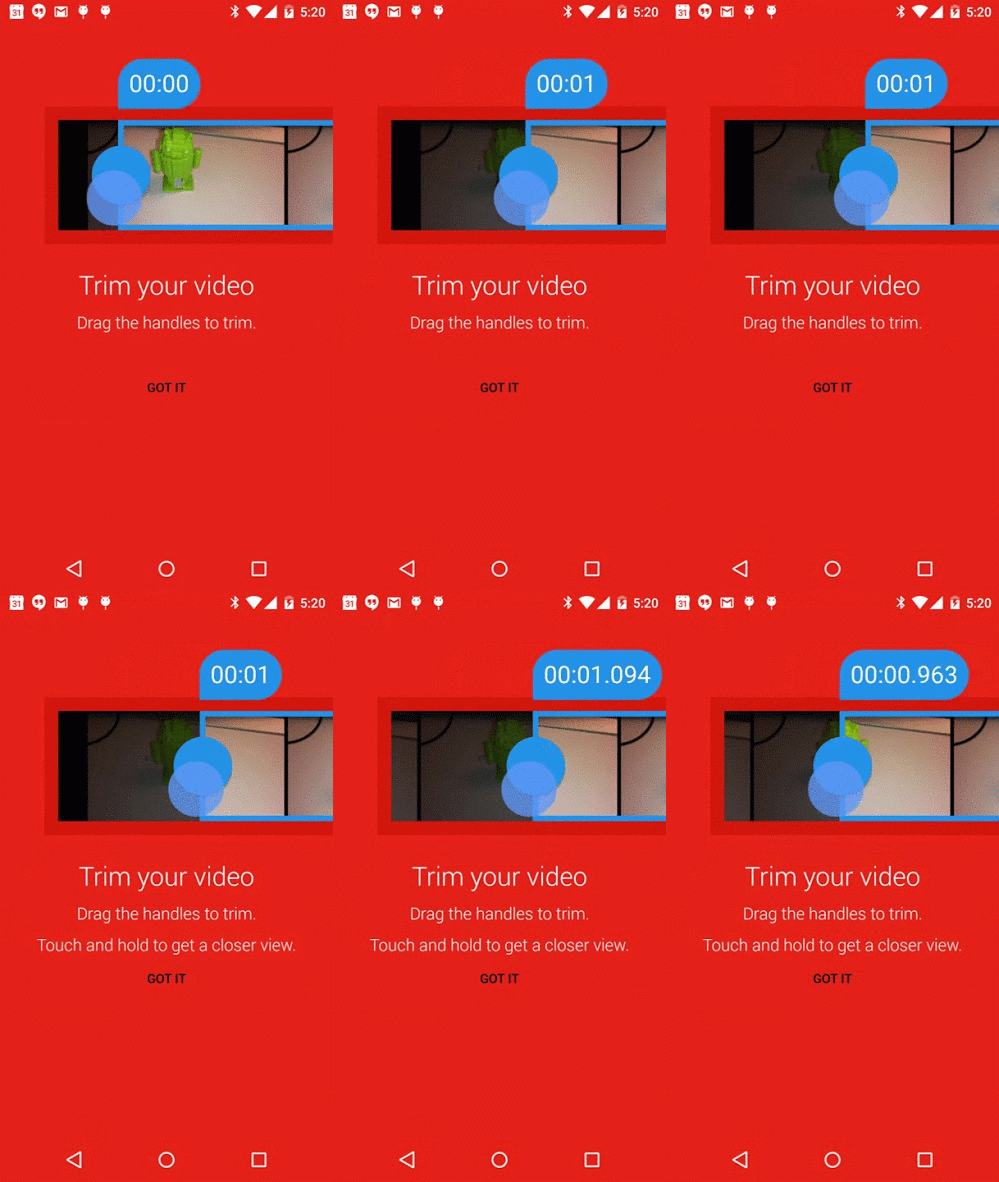
Trim Video FeatureA new trim video feature introduced by YouTube has just made video uploading that much easier for Android smartphone users. By editing a lengthy video and trimming out excess footage, users can now simply upload the essential portions of their footage to YouTube.

This most recent feature has been provided to Android users paired up with inline video preview, so that users can have a better understanding of the video they intend on sharing. YouTube has made the announcement on Friday, noting that the two features could become quite necessary especially for users wanting to keep up with the times. Many Android users would wish to quickly upload their precious footage to YouTube, however, lengthy videos often take up much too long so they ultimately back out.

But the website’s team has found a way to solve that issue. When filming important moments, such as baseball matches, little funny cats, a baby’s first steps or the possible next YouTube sensation, always remember that users don’t want to see the long moments of excess footage before the precise moment when the action is taking place. So this snipping tool is exactly what Android users need: they first trim those portion of the video they wish to share and then review the material in order to make sure that they share exactly what they intended to.

This new feature allows the smartphone user to select two key points of the video: the beginning and the ending, much as any other trimming tool currently available. However, the app also allows its users to view their video frame by frame, so that they can precisely capture the starting and ending point. When selecting the specific frames, all users have to do is to touch their screen and hold down the frame they wish to select.

One pre-requisite, however, is that the video which is about to be uploaded be shot in portrait mode.

The application can be downloaded from Google’s Play Store.
Image Source: 9to5google

Filed Under: Tech & Science

LG G Flex2 Review

February 27, 2015 By Nancy Young Leave a Comment

LG G Flex2 Review

Almost everyone said that curved displays are just gimmicks but it seems that they are here to stay. LG’s new phone is sleeker, smaller and a lot prettier than the previous model.

Here is our LG G Flex2 review.

Hardware

LG G Flex2 Review

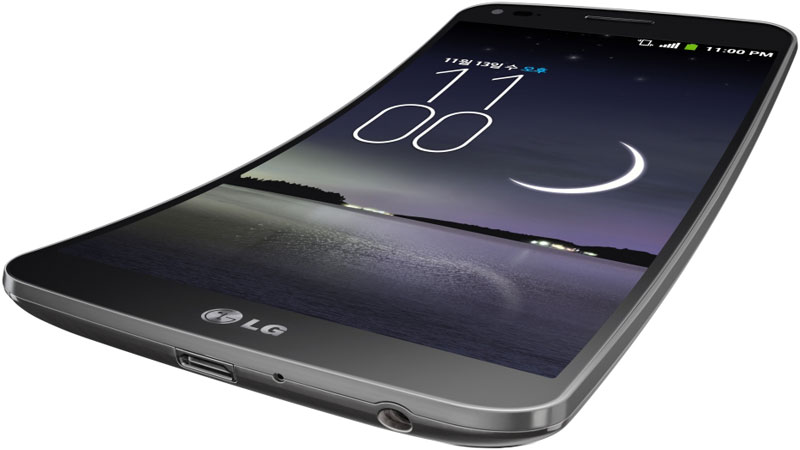
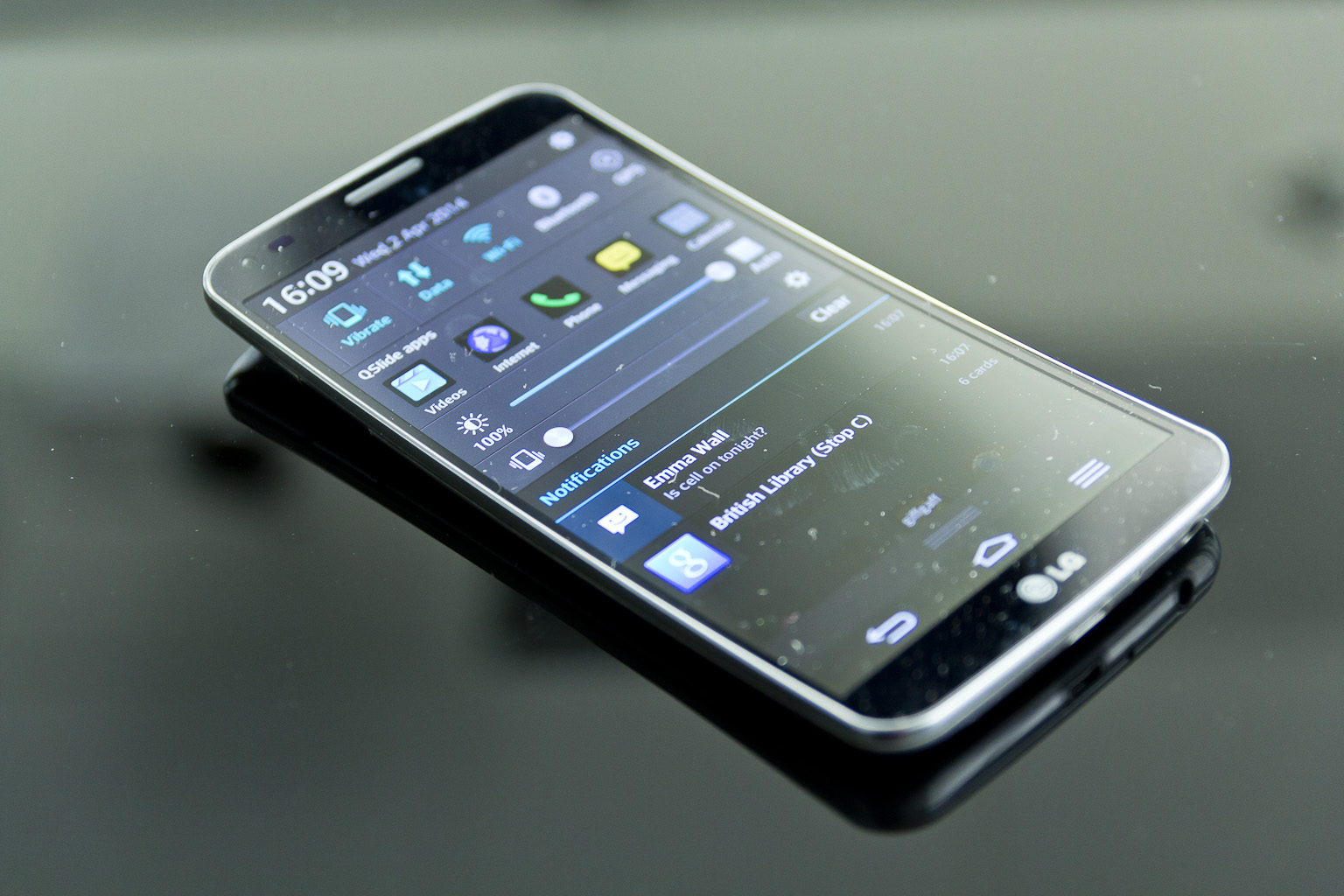
It’s easy to see LG’s first G Flex as a device made to fire back at the company’s rival Samsung. Once all the novelty of a curved display smartphone wore off, however, we were left with a device that felt like it needed improvement. And the company definitely improved it. The G Flex2 is a lot better than the original G Flex. It’s improved every aspect of the original one and it is the greatest curved smartphone we’ve used to date.

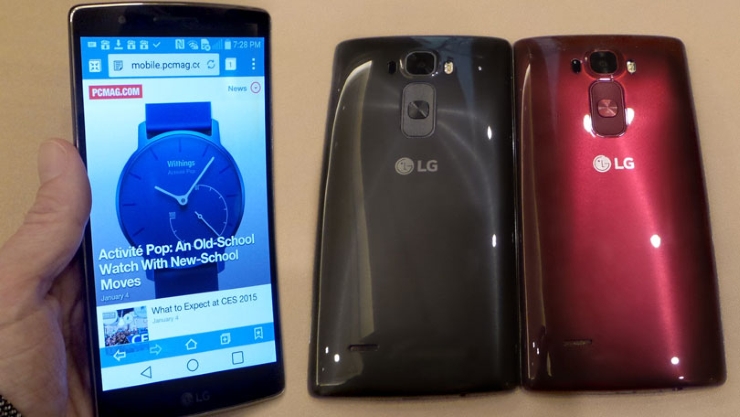
It may look like calling it the greatest curved smartphone isn’t such a big deal but let’s face it, the device will always be primarily known for its curviness instead of everything else it has to offer. The mobile phone actually stands out in a crowd as it is something that people never saw (or rarely saw) before. We tested the “Flamenco Red” model and the burgundy finish looks amazing. However, it’s still its curviness that stands out the most.

But if you look past its design, you will find a lot of things that you’ll love. The edges on the Flex2 are completely empty other than the headphone jack, microphone, the tiny IR blaster and the micro-USB port. LG once again put the volume control and the power button on the back of the Flex2, under the 13MP camera with laser autofocus. It takes a while to get used to the placement but after this you will wonder why other manufacturers don’t do the same thing with the button placements. Your index finger naturally stands on the back of the phone which makes the button placement feel natural.

There is a micro-SD card slot next to the micro-SIM tray on the back of the smartphone, under the back plate. This might not seem like a big deal but it’s good to know you can pop in a memory card in case you run out of storage and want to watch that whole season of Game of Thrones you like so much. We’ve had on our hands the 32GB model but there is also a 16GB one.

Because of its curviness, the G Flex2 embraces your face more comfortably than any other phone we’ve tested. The G Flex 2 hugged so very neatly my thigh that at times I almost forgot I was carrying it. This is excellent news if you are sick of smartphones that resemble bricks constantly pressing down on your leg. The G Flex2 feels a lot more comfortable than the previous model, mostly because LG decided to put a slightly smaller 5.5 inch P-OLED display on it but with a higher resolution than the previous Flex.

It’s obvious that the device is curved. But the question is: does it flex? And this is the answer: kind of. You could flatten the device if you wanted to but that’s obviously not what LG wants you to do with it on a regular basis. Even though LG didn’t say how much weight the device can take, at the CES briefing we saw someone from the staff at LG throw the smartphone on the floor and jump on it. Our test wasn’t as dramatic, however, but the results were practically the same. I sat on it many times and didn’t feel like it was about to get damaged and I mushed it a couple of times. It’s obvious that you don’t have to treat it with a lot of care but this doesn’t mean you should put it through very dangerous scenarios.

The Flex2’s self-healing back also works great. LG said the back can repair itself if it has minor scratches in around 10 seconds. We didn’t have an old Flex to compare but LG was right on the money. Tiny scratches that appear on the smartphone from daily use quickly repair themselves. However, don’t expect miracles if you drop the device.

Display

LG G Flex2 Review

The best decision LG made was to get rid of the 6 inch display on the old G Flex. They replaced the screen with a curved 5.5 inch P-OLED 1080p one and it is definitely better than the one found on the 2013 model. It’s a huge difference and comes as kind of a surprise seeing how young this kind of technology was just a couple of years ago. Not to mention how expensive it was to have this kind of screen on a device. While it isn’t as crisp as the display on the G3, you won’t see any individual pixels on the screen of the G Flex2.

It’s true that these things would mean nothing if the screen was lousy at all the rest. But be rest assured, the screen is amazing. The display is very bright and crisp and has deep blacks with great colors. You can even choose between “Natural” and “Vivid” color schemes in the presets from the settings menu on the smartphone. The display looks amazing in the “Vivid” color preset and looks more saturated without being overly violent.

The viewing angles on the screen are great as well. Whites will, however, get sort of a bluish look when you look at it from very awkward angles. The curve of the screen is what makes it great for visibility but it’s not as revolutionary as LG claims it is. You won’t really notice the curve if you are very close to the screen so it’s not as immersive as the company claims it is. There’s not really a great difference between the G Flex2 and other smartphones with big screens.

There is a single speaker on the back of the G Flex2 and it’s not as bad as we expected it to be. There is a lack of depth because of the single speaker setup and there are parts on tracks that overshadow others but it’s actually pretty good. The speaker is pretty loud and music and YouTube videos sound really great on the device.

Software

G Flex2 certainly turns heads but LG also kind of played it safe regarding software on the device. The G Flex2 has about the same features as the G3. They basically do the same things. You can pin two apps on the bottom and top halves of the display for easy multitasking and a double-tap on the device’s screen will wake it up from sleep mode. If you don’t really like this you can customize it with your own Knock Code. It’s also great for helping you get off the couch. The LG Health is a great addition and counts all the steps you take on a map for later analysis. Long story short, even though this is a new phone, you get the old interface.

Smart Notice, the Google Now competitor is back but it doesn’t look to be any smarter. It’ll let you know the weather is bad and remind you of birthdays but doesn’t do much more than that out of the box. However, Smart Notice will pick up on your habits in a few days of using it. For instance, if you call an unsaved number more than a few times it will ask you if you want the contact saved. I also had a conversation with the QVoice assistant, even though I faced some issues. The voice of the digital assistant sounds pretty natural.

Glance View lets you have a quick view at the notifications and time without draining your battery. Instead of tapping the lock button to light the whole screen up, you can swipe down to get a peek at all the important information. This only lights about a quarter of the screen in order to save power.

The new LG G Flex2 runs Android 5.0.1 Lollipop and the device comes with some software that LG didn’t develop such as Material Design UI. But some of the features in Lollipop can be a hassle to find. Usually manufacturers put their own print on the Android OS before they ship the device, but Google made some major changes in Lollipop and it can be a little frustrating to find all the features.

Camera

The camera on the original G Flex wasn’t really great. Rather than trying to improve the camera, LG simply put the same camera on the new G Flex2 that you can find on the G3. This is a great move from LG. The impressive 13MP camera in combination with the laser autofocus system is really great. All the photos we’ve taken were very detailed and crisp and very well exposed. The G Flex2’s camera performs surprisingly well even in darker environments. The optical stabilization is pretty good too and will save your shots if you have shaky hands.

The camera app is also quite straightforward and intuitive. There are only a back button and a small overlay that shows you the recent photos. You just have to tap on the screen to take a photo. However, if you enter the Settings menu you can turn the camera app into something else. You can set it to focus when you tap on the screen and you will have to tap the shutter button to capture a photo. There aren’t a lot of options to choose from, other than the grid, HDR, timer and the ability to shoot a panorama. You can also take a shot with both of the cameras simultaneously.

Even though the front –facing camera isn’t amazing, it does have some interesting features. If you make a fist at the camera it will start the timer. Once the photo is shot, when you move closer to the camera, the phone automatically enters gallery mode for you to view your photo. It’s a pretty nifty feature.

Battery life and performance

LG G Flex2 Review

There are some premium components inside the LG G Flex2. The smartphone has a Qualcomm Snapdragon 810 octa-core CPU clocked at 2GHz. Even though this chipset was reported to heat pretty badly and Samsung even ditched it, the G Flex2 is the first smartphone to use it. In Korea there were some reports that the chipset is indeed running pretty hot, but some also said that it’s cooler than the previous chipsets from Qualcomm.

In our tests the phone didn’t feel all that hot and I have only great things to say regarding its performance. The top half of the G Flex2 got a little warm when being put through very demanding games but it wasn’t uncomfortable.

Sometimes the homescreen performed slowly and while disabling the Smart Notice widget worked wonders on the performance, it still hiccupped a few times. It seems that 2GB of RAM sometimes simply aren’t enough.

The Flex2 can be a little flaky at times and it did refuse to connect to my Wi-Fi network because it reported it as being a poor connection, despite the fact that moments before it showed it had excellent signal. These are small quirks and aren’t all that important as it happened just once.

The battery life is pretty good. It kept on going for 13 hours on a single charge when being moderately used. We did make a video rundown test and the LG G Flex2 held its head up high for 10 hours and 12 minutes on a continuous 720p video loop. The phone charges from 0 to 50 percent in around an hour and the full charge completed in just under an hour from that.

Wrapping up…

PROS

– Beautiful design

– Good camera

– Battery charges very fast

– Great video and gaming performance

CONS

– LG’s UI seems a little sluggish at times

– Some stock features in Lollipop are missing

– Weak front camera

Verdict

The LG G Flex 2 isn’t perfect. Certain features in Android have been removed and it can be a little sluggish sometimes. Some may want a better battery life and will complain about the Snapdragon chipset inside the device but the balance between performance and style on the device is pretty spot-on.

Images source: cartridgeservice.ro, pcmag.com, trustedreviews.com, allinallnews.com

Filed Under: Tech & Science Tagged With: g flex 2 review, g flex2 review, lg, lg g flex 2, lg g flex 2 review, lg g flex2, lg g flex2 review, review lg g flex 2, review lg g flex2

  • « Previous Page
  • 1
  • …
  • 52
  • 53
  • 54
  • 55
  • 56
  • …
  • 114
  • Next Page »

Subscribe to Blog via Email

Enter your email address to subscribe to this blog and receive notifications of new posts by email.

Join 11 other subscribers

Recent Articles

police handcuffs man

German Man Probed In Poisoning That Killed 21 Employees Since 2000

June 29, 2018 By Kenneth Scott Leave a Comment

Chicken wings bar

Intoxicated South Carolina Man Punches Waitress Who Refused to Serve Him Alcohol

June 29, 2018 By Karen Jackson Leave a Comment

gaming

New Zealand gamer Who Flew Halfway Across The World for Virginia Teen Gets Shots By Her Mother

June 28, 2018 By Cristopher Hall Leave a Comment

party

Former Virginia Tech Freshman Sentenced to 50 Years in Prison for Stabbing a Girl to Death

June 28, 2018 By Roxanne Briean Leave a Comment

bonfire

British Couple Sentenced to Life in Prison for Torturing and Murdering French Nanny

June 27, 2018 By Deborah Campbell Leave a Comment

pay phone

Texas Father of Girl Disappeared in the 80s Ignored by Authorities

June 26, 2018 By Cristopher Hall Leave a Comment

bottled water

San Francisco Woman Threatened to Call Police on Girl Who Sold Ice Water for Disneyland Trip

June 25, 2018 By Roxanne Briean Leave a Comment

Maplewood Park

Missouri Man Robbed by Date and Accomplice in Park

June 22, 2018 By Nancy Young Leave a Comment

coding

New York Man Sentenced in Cyberstalking Former Girlfriend, Mailing Drugs to Her Dorm

June 22, 2018 By Deborah Campbell Leave a Comment

headphones

Bose Poised to Launch Sleepbuds, In-Ear Headphones That Help You Sleep

June 21, 2018 By Nancy Young Leave a Comment

Police light

Intoxicated Female Driver in Custody for Pulling Arresting Officer by the Hair

June 21, 2018 By Kenneth Scott Leave a Comment

kitchen

Restaurant Manager Arrested and Charged in Shooting Death of Co-Worker over Negative Yelp Reviews

June 20, 2018 By Karen Jackson Leave a Comment

plastic container

Pennsylvania Couple Charged in Violent Death of Infant Discovered Buried in Cat Litter

June 19, 2018 By Cristopher Hall Leave a Comment

tailpipe

Minnesota Teen Gets Head Stuck In Oversized Tailpipe Winstock Music Festival

June 18, 2018 By Karen Jackson Leave a Comment

Pages

  • About Us
  • Contact us
  • Privacy Policy
  • Privacy Policy GDPR
  • Staff
  • Terms and Conditions

Recent Posts

  • German Man Probed In Poisoning That Killed 21 Employees Since 2000 June 29, 2018
  • Intoxicated South Carolina Man Punches Waitress Who Refused to Serve Him Alcohol June 29, 2018
  • New Zealand gamer Who Flew Halfway Across The World for Virginia Teen Gets Shots By Her Mother June 28, 2018
  • Former Virginia Tech Freshman Sentenced to 50 Years in Prison for Stabbing a Girl to Death June 28, 2018
  • British Couple Sentenced to Life in Prison for Torturing and Murdering French Nanny June 27, 2018
  • Texas Father of Girl Disappeared in the 80s Ignored by Authorities June 26, 2018
  • San Francisco Woman Threatened to Call Police on Girl Who Sold Ice Water for Disneyland Trip June 25, 2018

Categories

  • Business
  • Entertainment
  • Finance
  • Headlines
  • Health
  • Life
  • Nature
  • Science
  • Sports
  • Tech & Science
  • Travel
  • Uncategorized
  • United States
  • World

Copyright © 2026 ArgyllFreePress.com
About · Privacy Policy · Terms of Use · Contact