Argyll Free Press

Growing News Network

Thursday, April 23, 2026
Log in
  • Business
  • Finance
  • Sports
  • Tech & Science
    • HP Envy 4500 Review
    • LG Optimus 170 Review
    • iPod Touch 6th Generation Review
    • HTC One M8 Accessories Set-up
    • Surrealist Games You Must Play
    • Hisense Sero 8 Review
    • Dell Latitude e7440 Review
    • HP Laserjet 1536dnf mfp Review
    • Garmin Fenix 2 Review
    • Skype Vs Viber
    • Best Video Conferencing Software
    • Sony mdr 1r Headphones Review
    • Canon Rebel t3i Review
    • Sennheiser Momentum 2-0 Review
  • Travel
  • Headlines
  • Health
  • United States

10 Great Galaxy Note 4 Accessories

February 21, 2015 By Nancy Young Leave a Comment

The best Samsung Galaxy Note 4 accessories are the ones that add more productivity and value to the device without being very expensive and making it bulkier and harder to use. We’ve made a list of 10 great Galaxy Note 4 accessories after we’ve used the device for some time at work, on the road and at home.

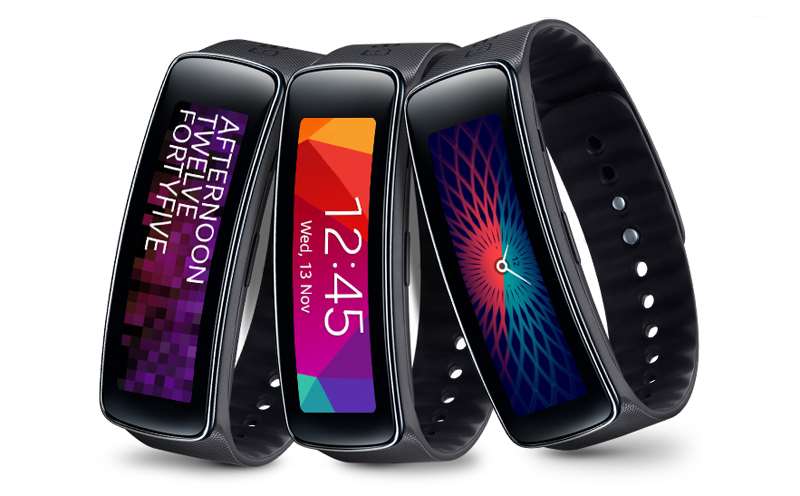
1. Samsung Galaxy Gear Fit
samsung-galaxy-gear-fit

Image source: clove.co.uk

The Galaxy Gear Fit is the slimmest watch of the Galaxy Gear series. The smartwatch allows the user to track the heart rate and quickly react to notifications. You can customize the look of the Galaxy Gear Fit, which makes it more personalized. The Galaxy Gear Fit paired with the Galaxy Note 4 will help you with your fitness goals and aid you in losing some weight.

Because the device is a year old, you will probably be able to find all sorts of discounts for it.

Pros

– Dustproof and waterproof

– It measures hear rate

– Give real time coaching

– Very light

– Works with numerous Samsung devices

Cons

– The orientation of the display is a bit limiting

– Past a certain depth, the device is not waterproof

– Not shockproof

– Screen is a tad sensitive and it automatically turns on by accident

– Short battery life

Price: $159.95

2. Targus Universal Foldable Keyboard

targus-universal-foldable-keyboard

Image source: gottabemobile.com

Targus makes a great universal keyboard designed to work with Android devices. The foldable keyboard also works with the Galaxy Note 4. If you ever need to use your device as a laptop, the keyboard will allow you to do so. The Targus keyboard is a foldable full sized keyboard and a must have accessory for all business executives, travelers and writers.

Pros

– Good brand

– Foldable

– Affordable

– No need for batteries

– The case can be used as a stand

Cons

– You may need to buy another stand

– A power pack may be needed to charge the keyboard on the go

– Limited options of color

– Devices that run Android 3.1 or earlier won’t work with the keyboard

– You may experience issues when charging the keyboard

Price: $35.81

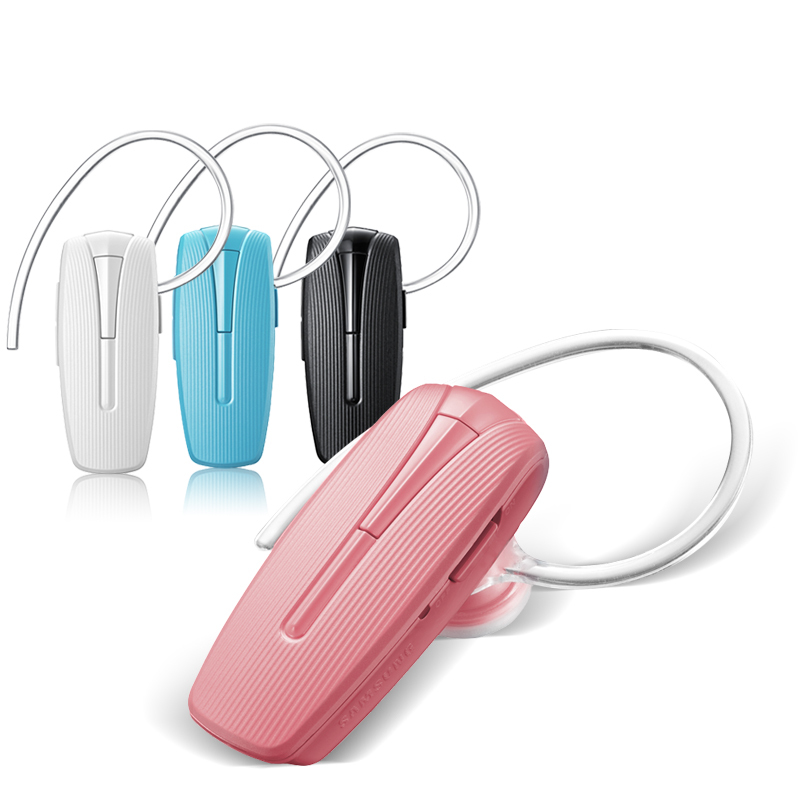
3. Samsung HM1300 Bluetooth Headset
samsung-hm1300

Image source: aliimg.com

The Samsung HM1300 Bluetooth headset has a battery life of 8 hours which makes it great to use with the Galaxy Note 4, especially for people using their phone for business travels and calls. The headset also offers a standby time of 300 hours. Its design is very attractive and comes with three ear tips. This device is a great choice if you want a great affordable Samsung headset.

Pros

– Clean design

– Comes in six different colors

– You can use it with more devices

– Very light

– Great brand

Cons

– No noise reduction

– No voice commands

– Calls sometimes sound echo-y

– Audio may seem a bit quiet

– Ear piece holder may break

Price: $16.99

4. i-Blason Slim Leather Wallet

i-Blason-samsung-galaxy-note-4-leather-book-folio-wallet-case

Image source: i-blason.com

The size of the Galaxy Note 4 makes a lot of people use wallet-style cases to protect it. This case lets you store all your credit cards and ID inside it. The wallet-style case also turns into a stand you can use for video conferences. This case is perfect if you want a great all-in-one product for your Galaxy Note 4.

Pros

– The leather is vegan

– Great storage

– Also works as a stand

– Looks very professional and well-polished

– Affordable

Cons

– This sort of leather sometimes cracks or peels

– Won’t work with previous Galaxy Note smartphones

Price: $16.99

5. Jabra DRIVE In-Car Speakerphone
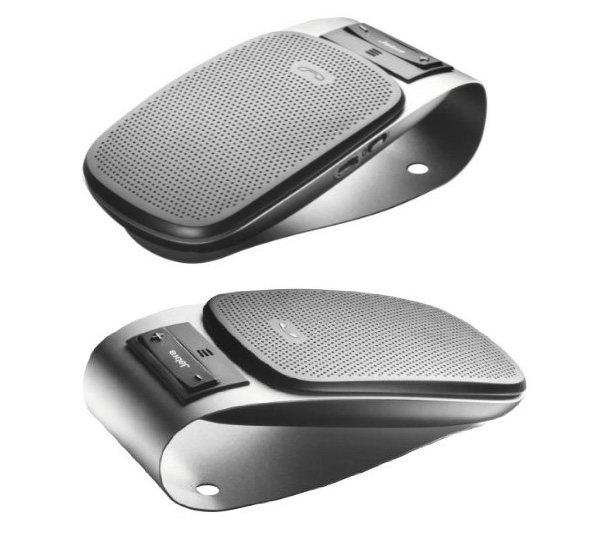
jabra-drive

Image source: hitechreview.com

Even though Jabra isn’t exactly a household name, this Bluetooth car speakerphone is an excellent buy because of its great features. It allows you to connect it to multiple devices which is ideal for people who have more than one smartphones. This is a great accessory if you spend a lot of time inside your car.

Pros

– Comes in different colors

– It has noise and echo canceling features

– Supports connection from multiple Bluetooth devices

– Automatic volume adjustment and pairing

– Allows you to get GPS directions without having to use your hands

– It can stream music

Cons

– Battery life depends on how you use it

– Automatically goes to sleep after 10 minutes

– You may face issues with auto-connectivity

– The microphone isn’t very sensitive

– You may have issues with the quality of calls

Price: $44.00

6. Sony MDR ZX550BN Bluetooth Headphones

sony-headphones

Image source: cloudfront.net

These headphones from Sony are perfect for frequent flyers as they have noise cancellation. On top of this, they also connect via Bluetooth so you won’t have to worry about annoying wires that get tangled in your purse or briefcase.

Pros

– Noise cancellation

– Great battery life

– Very light

– 30mm drivers

– Very comfortable

Cons

– They don’t come in a great variety of colors

– They don’t come with wall charger, only a USB cable

– Some may find them a bit uncomfortable

– Shorter battery life when noise cancellation is activated

– You may face issues when pairing them to certain devices

Price: $128.00

7. Pioneer Samsung Galaxy Note 4 Tempered Glass
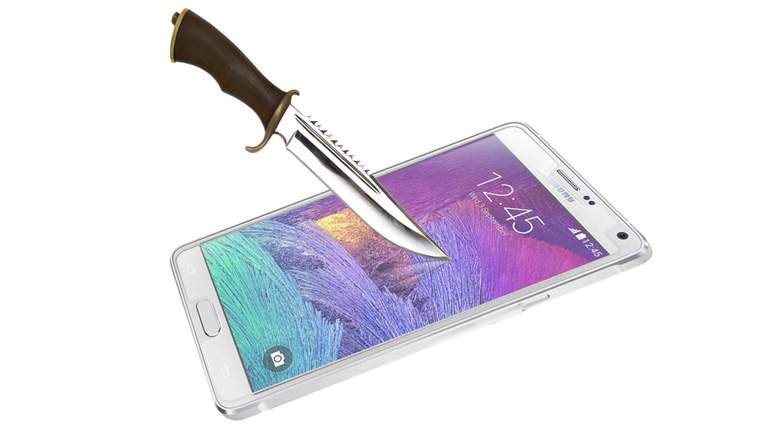
pioneer-tempered-glass

Image source: wordpress.com

Of course you can use a plastic, stick-on screen protector on your Samsung Galaxy Note 4 but they only work to protect your device against small scratches and to keep grease off of the screen. A tempered glass screen protector works great against serious impacts. If you frequently use your device while you’re on a motorcycle, bike, scooter or ATV, this screen protector adds a great level of impact protection in case of an accident.

Pros

– Tempered glass

– Anti-oil coating

– Affordable

– Comes with a cleaning cloth

– 0.3 mm thick

Cons

– Can interfere with cases

– More expensive than other screen protectors

– Doesn’t cover all of the screen

Price: $9.99

8. Samsung S Pen
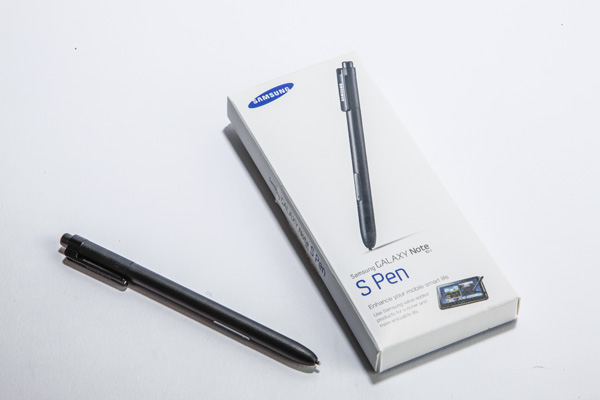
samsung-s-pen

Image source: trustedreviews.com

The S Pen is a great accessory for your Galaxy Note 4 and is partially responsible for making the device so much fun to use. If you lose the S Pen you are going to miss out on numerous awesome features. You can simply buy another S Pen in case something like this happens to you. While this is certainly not a very exciting accessory to have for your Note 4, it’s a very useful one.

Pros

– Especially designed for the Note 4

– Easy to use

– Enables shortcuts

– Comes with a kickstand

– Comfortable to hold

Cons

– Limited colors

– Easy to lose

– Other styli are less expensive

Price: $16.01

9. Spigen Case with Screen Protector
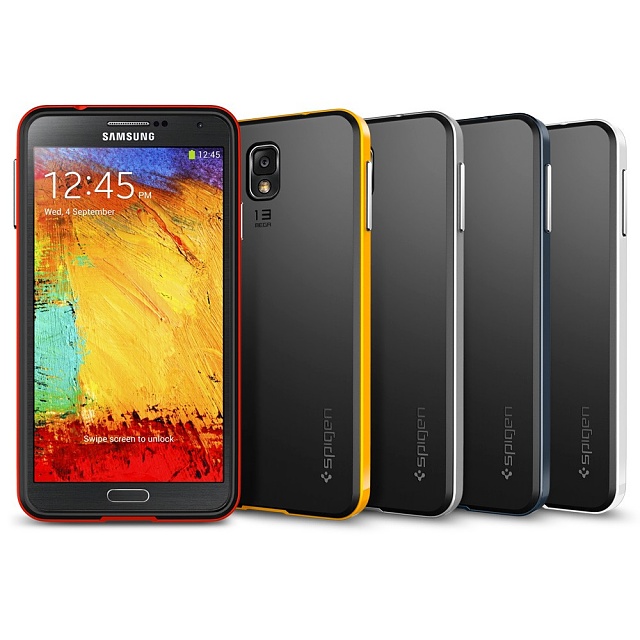
spigen-case-screen-protector

Image source: androidcentral.com

Spigen offers accessories that are well balanced between functionality, design and price. The Galaxy Note 4 case helps to protect the device against scratches and drops, has a great design and is very affordable. The case doesn’t add bulkiness to the device, so you will be able to hold it into your pocket comfortably. After you spend a lot of money on a great phone, you don’t want to go bankrupt after buying a case for it.

Pros

– Made from durable TPU material

– Works great against shocks

– Easy to grip

– Eco-friendly packaging

– Great screen protector

Cons

– It isn’t waterproof

– May seem a little too light

– It’s not built by Samsung

Price: $10.99

10. Verus Heavy Drop Protection Case

Verus-Heavy-Drop-Protection-Case

Image source: wiknix.com

This company makes great smartphone cases, and this Galaxy Note 4 is an example of what Verus is capable of doing. This case has an attractive hourglass shape that also makes the device easier to grip. It’s especially useful for people who are somewhat clumsy.

Pros

– Affordable

– Comes in five colors

– Slim design

– Easy to grip

– Easy to install

Cons

– It’s not waterproof

– May interfere with the fingerprint scanner

– Covers the microphone

Price: $15.99

Filed Under: Tech & Science Tagged With: best galaxy note 4 accessories, best note 4 accessories, galaxy note 4, galaxy note 4 accessories, galaxy note 4 screen protectors, great galaxy note 4 accessories, great note 4 accessories, note 4, note 4 accessories, samsung, samsung galaxy note 4, samsung galaxy note 4 cases

Star Wars Force Trainer II Hologram Experience

February 19, 2015 By Roxanne Briean Leave a Comment

force-trainer ii

What does a fan of Star Wars want to do more than anything in the world? Use the Force, of course.

There is something in real life that provides a small dose of the Jedi capabilities in a toy that called the Force Trainer II Hologram Experience, which is basically a mind control headset.

This is a hologram monitor in the shape of a pyramid that lets the user play video games by analyzing the brain waves. The manufacturer worked with NeuroSky, a well-known builder of bio sensors.

This is the follow up to another toy from Uncle Milton based on the Force and it’s quite a respectable upgrade to it. The first Force Trainer only allowed users to levitate a ball inside a cylinder. Also, it came with a remote, so the toy wasn’t exactly capable of using mind control.

The tasks in Force Trainer II rely on great focus. The clearer the user’s mind is, the better he or she will perform in a task.

The toy features 10 Jedi challenges that have all been part of the movies. Players can battle with Darth Vader or try to run far away from a wampa. The user can also try to lift an X-Wing in the Dagobah swamp, just like the way Luke tries to in The Empire Strikes Back.

We tried the Force Trainer II and we can honestly say that despite the fact that it has a very simplistic design the game will most likely amuse a Star Wars fan.

Here is what I had to do. I had to use rubbing alcohol on my earlobe and forehead to clean them, and put a headset on. I had to clear my mind and try to focus on a very repetitive and simple thing. I concentrated on two items in my list of shopping and repeated them constantly.

And just after a few tries I was able to lift up the X-Wing that Luke Skywalker failed to do so in the swamp.

Because the system relies on an app to function and because the app can be updated, we’re sure we will see more games inside it in the future. Also, the system works with an iPad, Amazon or Samsung tablet which means that there could be more games that will use the headset.

The new Force Trainer II will arrive in fall 2015 and costs about $120.

Image source: twimg.com

Filed Under: Tech & Science Tagged With: force trainer, force trainer 2, force trainer ii, force trainer ii hologram, force trainer ii hologram experience, force trainer ii toy, star wars, star wars force trainer ii, star wars force trainer toy, uncle milton

Is Apple About To Design Its Own Self Drive Car?

February 19, 2015 By Nancy Young Leave a Comment

apple_logo

A new rumour is creating waves in the technology world, that raises a big question: Is Apple about to design its own self drive car?

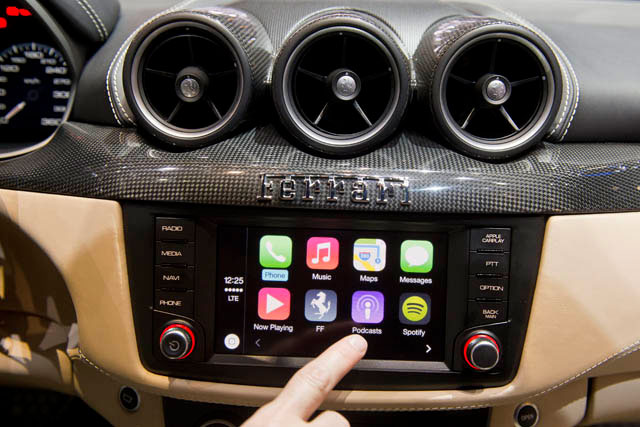
Apple is aiming not only to change the industry in the tech and cell phones domain but also in the automobile one. The company’s ambitions when it comes to cars is far beyond dominating dashboards with GPS and multimedia, as it is rumoured that the technology mogul is preparing a self driving electric car under the code name Titan.

The car project is supposed to be rivaling not only the auto industry but also Google, who apparently is also working on developing self driving automobiles. Last week there have been reports hinting that Apple has been circling around automakers looking for engineers and R&D specialists, for what was rumored at the time, as an advanced interpretation of CarPlay.

The CEO of Apple, Tim Cook seems to have given the green light to the project Titan about a year ago and Steve Zadesky the vice president of the company would be in charge of the plan. Cook reportedly gathered a team of 1,000 people lead by Zadesky who before joining Apple in 1999, worked at Ford, and has serious knowledge of mechanical design as was involved in the creation of the iPod and iPhone.

He was given freedom to choose his team from people in the firm and as well from outside of Apple. Many persons from the industrial design team are believed to be former designers who have previously worked for European car makers.

One of the persons Apple reportedly has added to its team is the former president and CEO of Mercedes-Benz on Research and Development, Johann Jungwirth. Also, is has been speculated that Apple has met with several contract manufacturers for luxury vehicles like Austrian Magna Steyr.

apple-car-concept

However, while Apple seems to be hunting for experts from the veterans of the car industry, the company has nothing against working along side with them. Apple is not looking for much help from the automobile makers which could suggest that they have ruled out the big names of the car industry and have gone directly to their own suppliers.

Rumours have stated that previous attempts by Google to reach the car manufacturers have been refused as the company’s demands made the producers hesitant and it appears that Google has also independently approached  the suppliers regarding the development of their self driving car.

It is assumed that Apple’s Titan project will be developed  at a location close to their current base in Cupertino. According to sources, there are being conducted studies on metals, robotics and other type of materials that could be used for automobile manufacturing.

Their main area of interest is the creation of vehicles that could offer the possibility of driving by themselves, as fully automated cars would be a technological evolution. The existing car manufacturers are easing into the development of autonomous cars by releasing first  releasing partially self driving cars. On the other hand, Apple reportedly has a great interest in all the technological means possible that would  allow a car to evolve  to the point of autonomous driving.

So far, Apple hasn’t given any comments regarding the self driving car rumours and haven’t responded to requests asking for more information on the matter.

Apple-CarPlay

Actually, Apple has many ways of expanding its automobile field without having to actually produce an actual car. There is no doubt that the key in designing an autonomous car and making it function is software. For example, Ford is about to develop a system that is capable of recognising road signs and markings, Apple’s purpose could be of offering a solution that could be licensed by other companies.

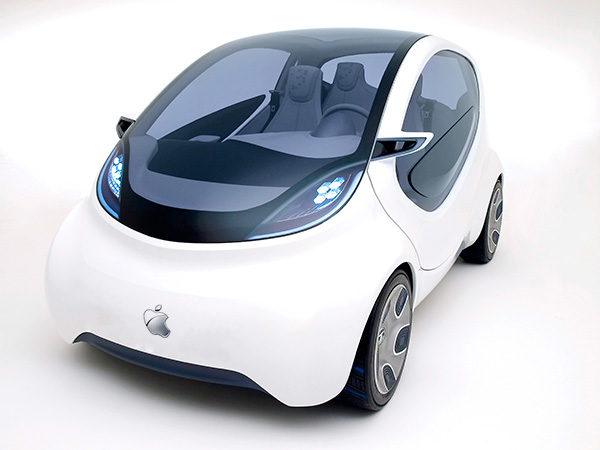
The physical design of the Apple car, is supposedly of a car looking like a minivan, possibly looking like the same vehicle that was seen in the wild earlier this year, designed with a lot of cameras. At the time of appearance, there had been several opinions divided into whether that was an actual self driving prototype of was just taking panoramic street level pictures to be used in Apple Maps.

Electric cars are very attractive when referring to the fuel prices and the well being of the environment.

Even though the rumours have brought a lot of excitement, we are not going to see an Apple branded car this year or the year to come. If speculations are correct, the Apple Titan project has started for about a year, meaning that the plan is still in its incipient stages, assuming that we are really talking about a car and not another embedded system for vehicles.

An Apple car won’t be seen on the roads for the coming years so if anyone was thinking to wait for an iCar instead of buying  an Opel, should think again.

It is yet not sure if Apple is indeed working on a car prototype and if the project will make it on the market. There have been past rumoured Apple projects like the iTV which has never been released.

The idea of the existence of an Apple self driving car sounds insane but if this is the next big step in the evolution of technology Apple should definitely be involved.
Image Source: apple.com
Image Source: iDownloadBlog
Image Source: PHUKET ENGLISH NEWS

Filed Under: Tech & Science Tagged With: apple branded self driving car, apple wants to design an autonomous car, apple will create its own car, is apple releasing a car?

Google Wants To Solve Excessive Sweating With An Innovative Device

February 18, 2015 By Deborah Campbell Leave a Comment

body-odour

Have you ever thought that a device cold replace your everyday deodorant? Well a giant technology company has. Google wants to solve excessive sweating with an innovative device.

If you have never been a huge fan of wearing deodorant and you have always dreamed about some sort of invention that would make sweet disappear, you have to know that Google researchers are working on making your wish come true.

google

Google is working on a device that is supposed not just to avoid clothes from getting those annoying white armpit stripes but that would also keep you dry and free of unwanted odours no matter how much your body sweats at work or when going out. The device would also help you no to run into anyone you know while sweating.

Imagine managing to avoid the hot guy you have a crush on or your boss as you are running late to work from lunch, and outside there are 90 degrees and you forgot to put on deodorant as you were in a rush to leave the house.

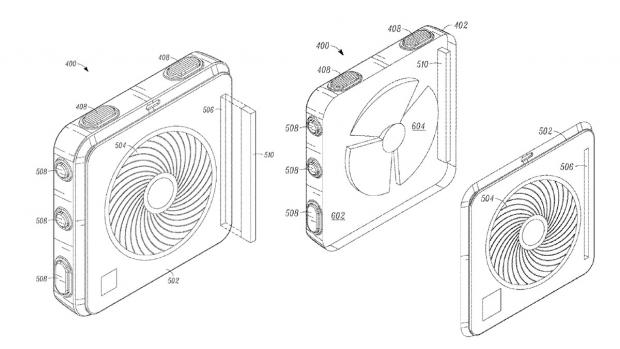
The invention, called “ odor removing device”, a Google patent filed by four Google employees, on August 31st, 2012 could be based on an activity sensor, a communication area that would allow access to one or several social networks and would permit communication with network contacts and a route suggestion feature, which would offer users an alternative route to take.

google_odour_device_open_case_

In this way, if your body is dripping sweat you would be spared the embarrassment of being seen by anyone in your social circle that is traveling on the same route as you are. The device will notify the user that his/hers contacts are in the area and would provide an additional route for them to take in order to avoid him/her and the unpleasant odors to meet with his/hers social contacts.

The technology will use Google services like Google Maps, RTM or Google Earth. RTM should be used for supplying the alternate route, according to the patent document.

So, yes, the whole idea of this project is that Google wants to help you avoiding to met people that you know and gross them out with the smell of your sweat. Apart from these features the device may also include a “parameter detector”, but also an accelerometer, a galvanic skin response monitor, an environmental sensor, a biometric sensor, context, a location sensor and also a camera.

Yes, it sounds a little strange and it may take some time to adjust to the idea, but this is indeed a future Google project.
The odor removing invention is aimed to do much more than to help you not to affect the ones around you with your smelly sweat. The device may track down when you are sweating, analyse your medical history and would offer a spraying and heating device and would also spray out a fragrant substance according to a prediction signal but the user would have control of it.

So basically this would work as a digital deodorant that detects physical movement and automatically emits a pleasant fragrance but would also detect a rise of temperature and humidity informing you about high sweat levels and body odors.

The user would also receive a warning before the smell is emitted, allowing them to disable the option if the don’t desire to release the fragrance, for example when being at the gym or at home.

smart spray

Like it goes with all patents, Google may not be releasing the product in the near future or maybe it wont release it at all.
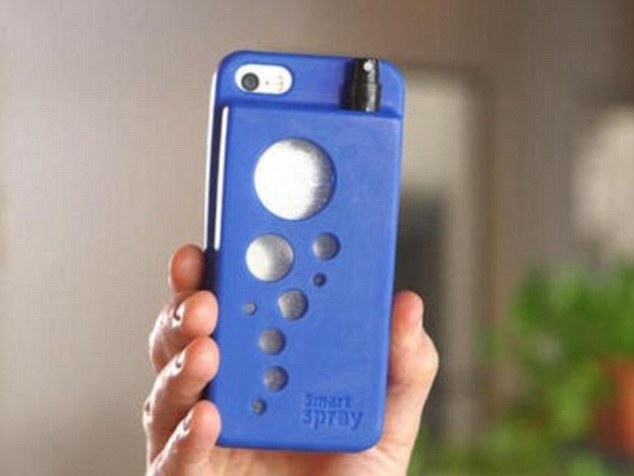
However, there is an alternative for those who are keen on the idea. It is called The Smart Spray accessory and it is a smart phone case adjusted with a tiny flask created to hold any type of liquid.

The small bottle could be filled with perfume, sun tan lotion, breath spray, insect repellent substance and so on. The tap comes out from the back of the case and can be hidden when not being used.
Image Source: ndtv
Image Source: The American GeniusImage Source: PC PRO
Image Source: Daily Mail

Filed Under: Health, Tech & Science Tagged With: device that solves body odours, google digital deodorant, google to release device that helps excessive sweating, google will create device that will tell you how much you sweat

Smart Homes: On Their Way Into our Daily Lives

February 18, 2015 By Roxanne Briean Leave a Comment

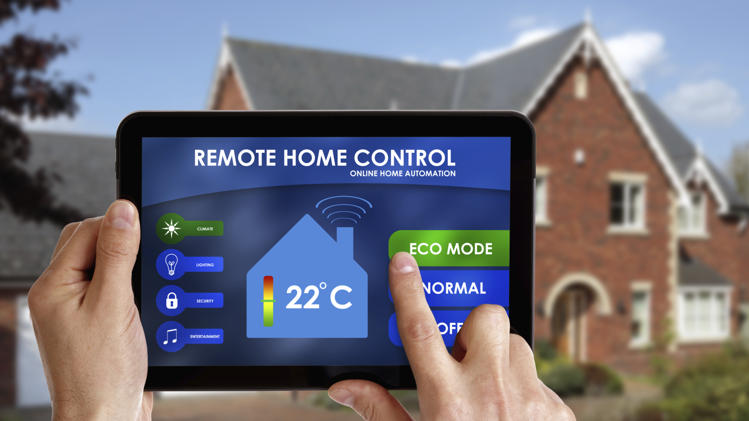
It is time to say goodbye to all those thoughts regarding whether or not you forgot your stove or coffee maker on. The era of smart homes is finally ascending and the thought of having devices around your house that can not only communicate with each other but with you as well is more tangible than ever.

Even though many people have heard about rich people spending outrageous amounts of money to build their own smart homes (such as Bill Gates), it is time for people with average incomes to be able to afford such a system in their home. Be prepared, the era of smart homes is finally set to start and make its way into our everyday lives.

What is a smart home?

A smart home is basically a house with electrical devices that are able to transmit certain information to one another, through digital networks. For example, you will never have to check every morning for your milk’s expiration date, a smart refrigerator will be able to announce you on the expiration dates of your products and will even be able to send texts on your phone reminding you that you need to buy milk or other products on your way home.

smart home

Afraid you left your stove o? A smart stove will be easily accessed through your smartphone or tablet and monitored. Same goes with the air conditioning system, cookware, video monitors and even you smart home lock.

Yes, a smart home lock exists! It looks like and can be used also as an ordinary lock but this smart home lock has a unique system incorporated. By using your smartphone as your eKey, you can lock and unlock the door with the touch of your finger. This product has received mixed reviews and it can be considered kind of sketchy due to security reasons but it sure is a step forward when it comes to smart homes.

How does a smart home work?

The success in the area of smart homes is also due to the increasing popularity of smart phones and tablets. We are living in an era where almost everyone owns at least a smartphone or a tablet. It is quite easy to understand why pretty much all our future technology will involve digital networks with smartphone access.

Smart homes have been around for quite some time even though not many people noticed it. One of the first companies which started to develop a concept of communicating devices is called X10 and their products are still available on the market nowadays, even though they came up with the idea back in 1975. However, X10 products communicate with each other though power lines which was a major set-back because of the “noise” contained by the lines when they are powering more than one device at a time.

smart home

Recent smart home developers have started using radio waves instead of power lines so that you want have a problem with the connection anymore. Radio waves are the same waves that power up you Bluetooth and WiFi connections and also the waves your cell phone uses in order to be able to operate.

Two of the most used radio networks when it comes to smart homes are Zigbee and Z-Wave which are both mesh networks. A mesh network is a network that allows you to send a message to a certain destination through more than one way. You can also opt for a double-mesh network using Insteon which allows your devices to communicate either with you or with each other through both radio waves and power lines, so that if you are unable to use the mesh network to send a message at some point, you can also try sending it through the power lines.

How can I get started?

As a starter kit for a smart home you need to take into consideration what you actually want to be able to do with your smart devices.

If you know you are not home a lot and want to be sure your house is safe while you are away, you should opt for a motion sensor which is able to tell the difference between pets and thieves and it is also able to send a message on your smart phone whenever there is motion around your house.

smart home

Source

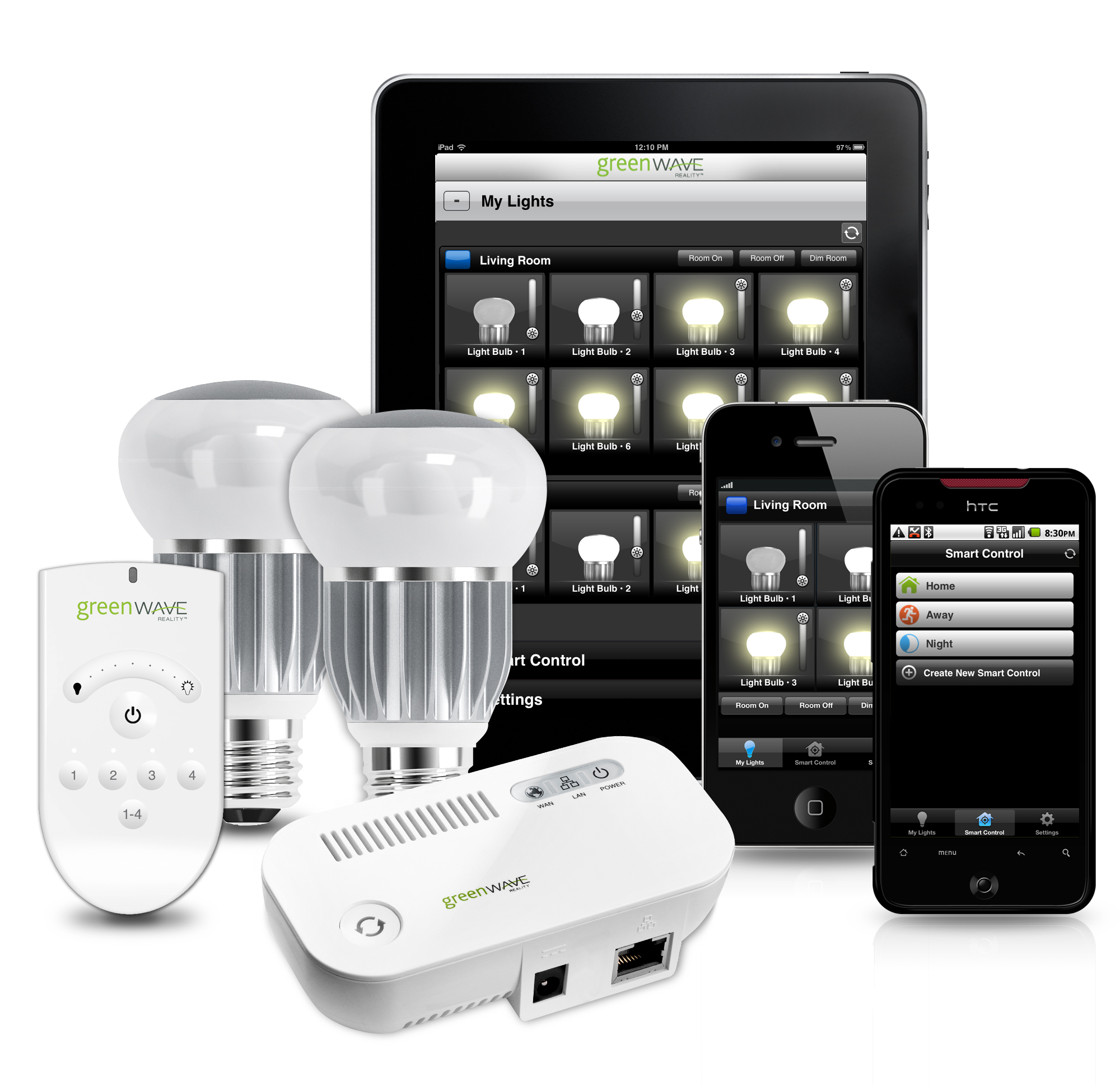
If you are a person well integrated into his or her comfort zone and do whatever it takes to not be forced to leave it, you should consider buying lights that can be turned on and off from your smartphone even though you are in another room.

If you don’t want to feel cold in the morning you can set your heater to start at a certain hour through your smartphone so that you can reach both warm feet and heat efficiency. You can even turn on your coffee maker without having to get out of bed.

There is a ton of products out there ready to be bought by people and given the fact that the increase of popularity means a decrease in the price of products, smart home devices are now more affordable than ever.

What are the upsides and downsides?

The upsides are quite obvious: you will be able to do everything easier and without having to worry so much about the little things that go around your house, such as the expiration date on your milk carton or your feet feeling cold in the morning.

However, this can be considered both an upside and a downside. People generally tend to choose the easy way out and forget to enjoy the little things. Such a change in technology will definitely change people as well. We already experience more and more people getting addicted to technology and losing grip to reality. Imagine how life is going to look like in twenty years from now. Are we ready to give up on all the little things in our lives just because it is easier to use technology?

Don’t get me wrong, of course technology is the main reason that sets us apart from any other living creature on this planet and giving up on it will mean giving up on evolution but some things are better to remain just the way they are. I think none of use wishes to become a tech zombie by the age of 40.


Filed Under: Tech & Science Tagged With: smart home, smart homes, technology

10 Awesome Futuristic Gadgets

February 18, 2015 By Nancy Young Leave a Comment

It’s possible that in a few years we’ll look back and remember the times when we used to manually close our shower curtains and watch movies on flat screens. There is a technical evolution happening right now. Machines may soon be able to manufacture themselves, nanoparticles may be capable of diagnosing diseases and VR headsets may soon replace television sets. Some movie studios are already working on 360-degree movies that are ideal for virtual reality.

But these high-tech gadgets are not only for the enjoyment of rich corporations. There are a lot of gadgets that have been built with the simple consumer in mind.

This is our list of 10 awesome futuristic gadgets that could make our lives easier.

1. Swarovski and Misfit Fitness Trackers

10 Awesome Futuristic Gadgets

According to a recent report done by Juniper Research, there will be almost 60 million fitness and health trackers being used by 2018. Misfit and Swarovski have partnered up in order to make fitness trackers with Swarovski jewelry, as fitness trackers aren’t used only as gym accessories by people. These new wristbands and pendants are working with the Swarovski Shine Activity Tracking Crystal and are designed in the style of Swarovski jewelry. This accessory will help the user stay in shape as well as being eye-candy.

2. Parrot Flower Power

10 Awesome Futuristic Gadgets

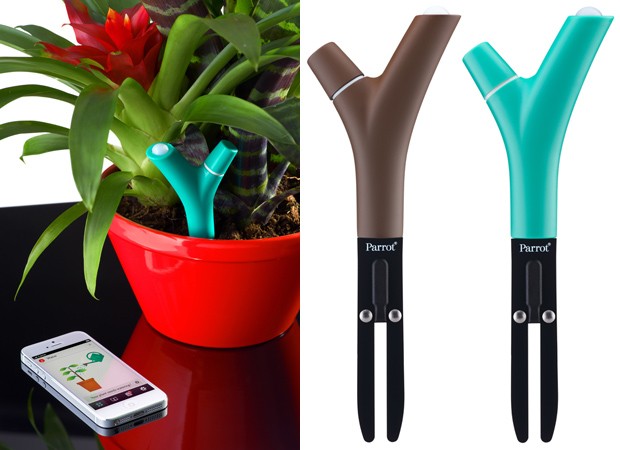
Plants are breathing and living things, like the rest of us and now they have their own line of wearables. The branch shaped sensor called Parrot Flower Power can be put inside a plant’s soil to analyze moisture levels, temperature, sunlight and fertilizers. If the futuristic gadget detects that the plant doesn’t get enough nutrients, an app on your smartphone will alert you of that. The useful app also features data analysis and tips which will assist all plant enthusiasts and will make it virtually impossible for you to accidentally kill your plants.

3. Personal Robot

10 Awesome Futuristic Gadgets

Cortana was created by Microsoft, Siri by Apple, Alexa (Echo) was created by Amazon and Robotbase is currently on the brink of manufacturing a Personal Robot. What makes it especially cool is that unlike all the other personal assistants, the name of the Personal Robot can be given by its users.

Even though the Personal Robot from Robotbase isn’t scheduled to begin production until sometime in late 2015, the campaign on Kickstarter claims that the artificial intelligence robot will behave as a security system, camera, speaker, stylist, office assistant, household efficiency monitor and story teller. Its shape resembles a big spoon with a big round monitor on it attached to a base that can move and has a USB charger, a 3D camera and a built in speaker.

4. ChefJet

10 Awesome Futuristic Gadgets

Products such as ChefJet and ChefJet Pro may mean the end of accounts on Instagram and YouTube about fails in baking. These devices are 3D printers that use sugar instead of ink and will create not only edible but also beautiful treats.

5. Copenhagen Wheel

10 Awesome Futuristic Gadgets

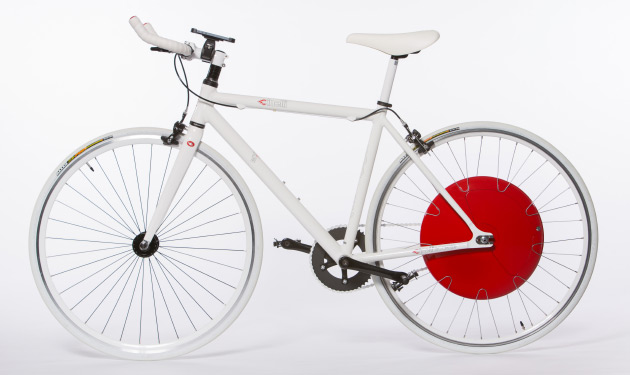
Steep hills and very long distances are the most common excuses to stay away from cycling. But fortunately, the Copenhagen Wheel can eliminate these kinds of excuses. As the name of the device implies, the Copenhagen Wheel is an electric wheel that replaces the back wheel on a bicycle. The device uses a motor, sensors, a control system, batteries and wireless connectivity to maximize a cyclist’s power of pedaling to get the most out of the activity.

Because the Copenhagen Wheel is geared up with wireless connectivity and numerous sensors, it can record info about the surroundings of the cyclist and about their cycling habits. If cyclists choose to share this data anonymously, it may be used to help officials enhance the infrastructure of a city and understand the environment.

6. Mint

10 Awesome Futuristic Gadgets

Mint is the newest breath analyzer from Breathometer. The device measures the quality of projected breath, instead of the quantity of consumed alcohol. Mint is small enough to keep in a purse and it is able to connect to your smartphone in order to analyze and measure the quality of your breath and the levels of hydration. This basically means that the device will let users find out if they have a refreshing minty breath or an unpleasent morning one and if their oral health improved over time.

7. Microsoft HoloLens

10 Awesome Futuristic Gadgets

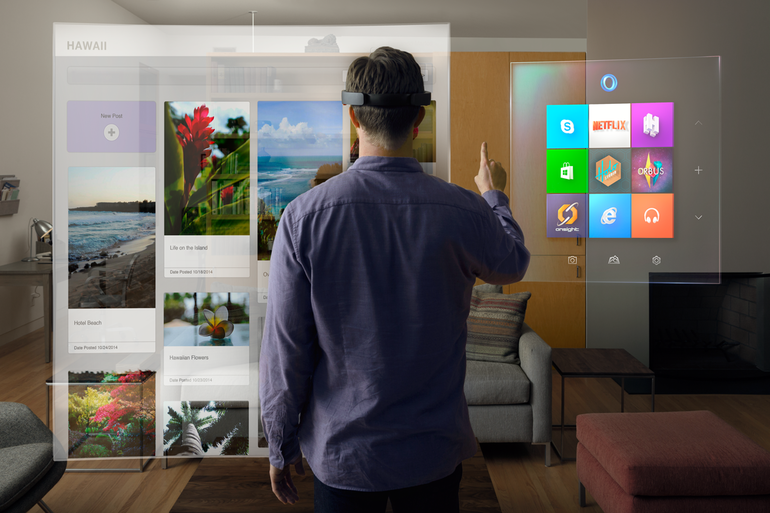
Holograms have until recently belonged only in science fiction movies and novels. However, HoloLens from Microsoft wishes to change that into reality. The new device that can “project” holograms has been revealed this January.

People will be able to interact with holograms while wearing the device. People can also create their own holograms and if they’re fond of a specific hologram they’ve created, they will be able to bring it into the physical world from the digital one with the help of the 3D printing capabilities of the device. And, along other features, people who will wear the HoloLens glasses will be capable of transporting themselves visually in another location.

8. Transparent TV

10 Awesome Futuristic Gadgets

Michael Friebe’s transparent TV is a great device that combines normal LCD with the newest TOLED technology. This kind of technology allows the creation of solid, non-transparent moving images with very rich colors and a full range of contrast ranging from deep blacks to sharp whites.

9. Ring

10 Awesome Futuristic Gadgets

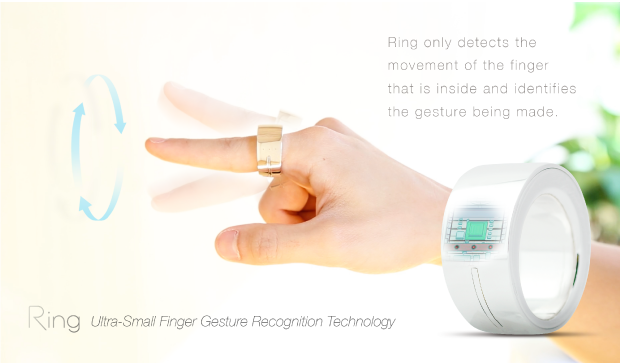
The wearable devices market is quickly gaining a lot of followers which makes room for new gadgets such as Ring from Logbar. The Ring can control your camera, social media network accounts and music. The new device is somewhat bigger than a regular ring and makes use of Bluetooth to accomplish numerous tasks with just a flick of the finger.

Ring is programmed to respond to certain default gestures, like making a checkmark in midair in order to call a cab, but people who use Ring will also be able to customize the gestures Ring will recognize with Android and iOS devices. To upload a picture, exchange your contact information with someone or to turn on the TV, you will only have to tap the touch sensor on Ring and gesture accordingly. These and many more other are tasks that can be completed with the help of Ring and there will be a lot more coming as developers can create other actions, which mean that the ways in which you could be using Ring are practically infinite.

10. WAVE Ultra Sonic Wine Refrigerator and Ager

10 Awesome Futuristic Gadgets

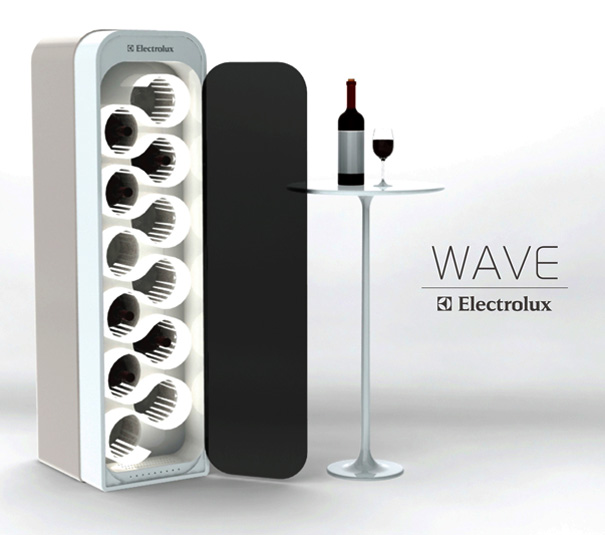
Did you ever wish you could age your wine to make it of higher quality? This isn’t a movie idea anymore as you can now do so with the help of this gadget. The device that does this incredible thing has been recently designed by Mika Yamamoto. A magnetic cooling system is being used inside the Wave that is based on a magnetocaloric effect. The magnetocaloric effect is the capability of certain materials and objects to warm up when being magnetized and cool off when they are taken out of the magnetic field. The new device increases the energy efficiency and also reduces the emissions of carbon. It is capable of cutting energy consumption by up to 40 percent and will help you cut the cost on your electricity bill.

Tech gadgets are becoming a big part of our day to day activities, such as the smartphone, which is one of the first gadgets we’ve come to be addicted with so we might as well embrace this fact. This was our list of 10 awesome futuristic gadgets. We really hope you enjoyed it.

Image sources: yankodesign.com, amazonaws.com, weirdworldfacts.com, cbsistatic.com, ndiegogo.com, aolcdn.com, wordpress.com, ageekyworld.com, blogcdn.com, ubergizmo.com

Filed Under: Tech & Science Tagged With: awesome futuristic gadgets, cool futuristic gadgets, cool gadgets, future gadgets, futuristic gadgets, futuristing accessories, gadgets, new technology, tech gadgets

Here Are The Best GoPro Alternatives Cameras

February 18, 2015 By Kenneth Scott Leave a Comment

Here Are The Best GoPro Alternatives Cameras

If you are passionate about taking pictures and capturing videos but yet don’t own a GoPro, you have to immediately buy one as it is the it camera to have of the moment. Here are the best GoPro alternatives cameras.

There is no doubt that GoPro cameras have created a frenzy in the world of video filming but also when it comes to personal use as it has completely changed the meaning and way of taking a selfie. The capacities of the camera are incredible, being packed with advanced features, like connectivity to Wi-Fi, being waterproof and owning impressive video abilities. GoPros are also the camera of choice for flying drones both as a hobby and professionally.

Like everything else in this world, the better quality the product is the higher the price. There are many seeking high quality features in a camera but the steep price keeps them from buying one. Don’t worry, here are some cameras on the market that offer the same high end features but retail for a more convenient price.

Here is a list with the best alternatives for a GoPro that are presently available on the market.

iON Air Pro 3 Wi-Fi Action Camera

Here Are The Best GoPro Alternatives Cameras

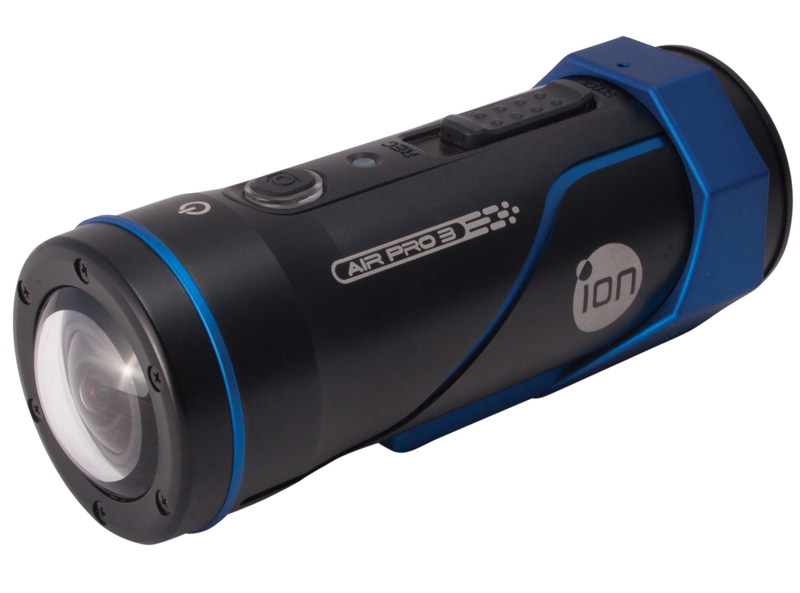
The iON Air Pro 3 Wi-Fi is a nicely designed action camera that offers amazing image quality. As its name suggests, users can connect their cameras trough Wi-Fi from an iOS app or an Android one, or trough the web. The connection to the browser allows the functionality of only few features, like accessing the camera’s memory card for copying and deleting data. The use of iOS and Android apps, offers an easier way to share content on social media. The camera sells for $239 on Amazon.

Contour Roam3 Action Camera

Here Are The Best GoPro Alternatives Cameras

Like Roam 2, the Contour Roam 3 Action Camera has the ability to capture videos of 1080p at 30fps. Its lens can rotate at 270 degrees which delivers a field of view of 170 degrees, and it can be accustomed trough the laser level. The camera has the capacity of surviving 30 feet under the water without the need of an externak case. One important feature is the instant-on record switch, which permits the camera to start recording once it is turned on. With a price of $199 on Amazon, the Contour Roam3 Action Camera comes also with an 8GB memory card.
Replay XD Prime X Wi-Fi Action Camera

Here Are The Best GoPro Alternatives Cameras

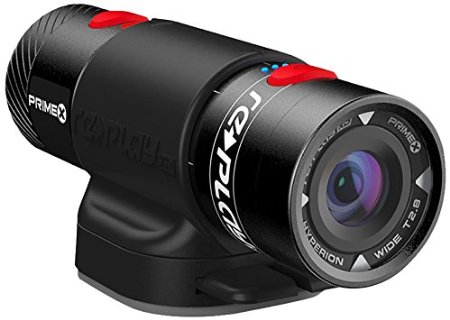
The Replay XD Prime X camera is among the smallest, lightest full HD cameras that are waterproof, currently available on the market. It has a sensor of 16MP CMOS, Hyperion CinePrime Lens,from 3 to 3.5 hours of battery life and Wi-Fi. It can record videos of close to 1080p at 60fps and also 720p at 120fps. It is also able of capturing cinema settings for 24 and 48 fps. On Amazon, the camera can be found for $279.

Garmin VIRB Elite Action Camera

Here Are The Best GoPro Alternatives Cameras

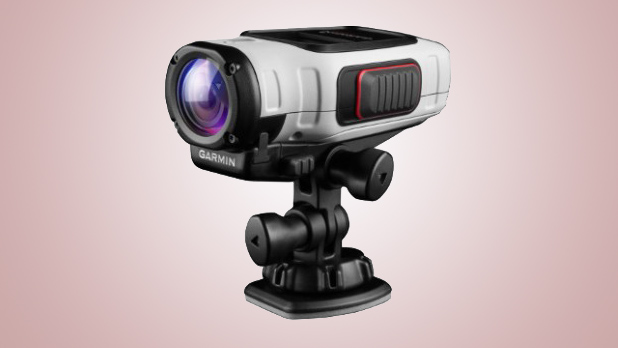
The VIRB Elite has a size of 4.7×2.2×1.6 inches and has an aspect similar to a mixture between a wine stopper and a flashlight. Almost the entire exterior of the camera is covered in a rough rubber coating. Its waterproof design allows it to resist under water for half an hour, at almost one meter deep. The waterproof feature it is valid only for accidentally dropping the camera inside the water. Those who wish to film underwater with this camera can buy the optional dive case which costs $40. The camera doesn’t come with a Wi-Fi remote like GoPro Hero 3 Black Edition and can communicate trough Wi-Fi with the help of a tablet or smart phone. The price on Amazon is of $238.

Drift HD720

Here Are The Best GoPro Alternatives Cameras

Drift HD720 is appreciated for its sleek and lightweight design. It has an LCD screen of 1.5 inches, remote radio frequency and 4X digital zoom lens which can rotate at 300-degrees and 130 degrees of wide angle capturing. It can also capture time lapse videos up to 60fps. Among other features there are a built in microphone, the Drift mounting system and rechargeable battery. Also, the camera comes with a waterproof case. On Amazon this camera sells for $121.90.
Image Source: habrahabr, Videomaker, multi, Amazon, Trusted Reviews, truly net

Filed Under: Tech & Science Tagged With: best GoPro alternatives cameras, best GoPro cameras, best prices for GoPro cameras, GoPro cameras at accessible prices, high resolution GoPro cameras

Windows 10 vs Windows 7

February 16, 2015 By Nancy Young Leave a Comment

windows-10-vs-windows-7

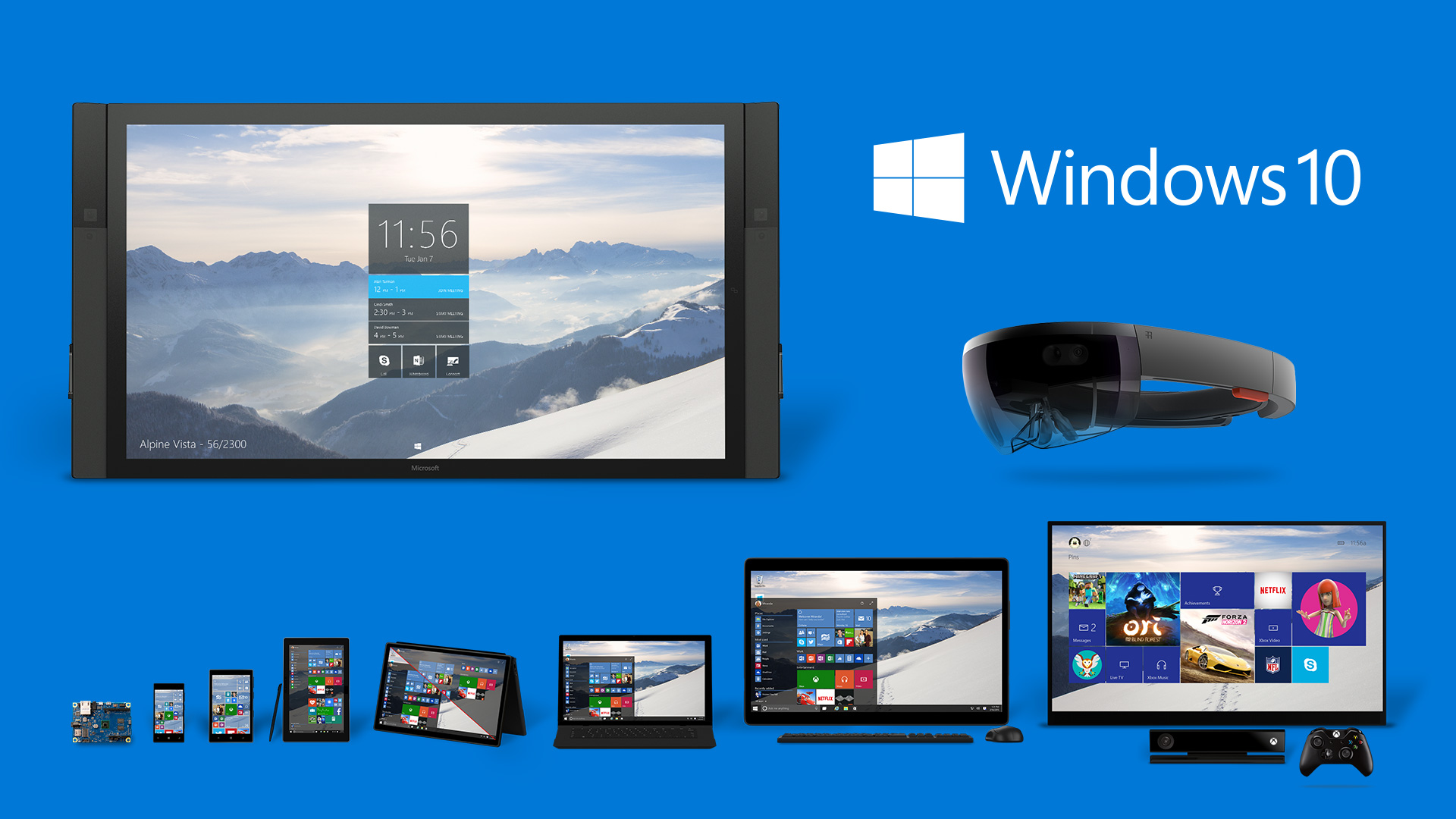
Even in its early stages, we’ve come to the conclusion that Windows 10 is a far better deal for desktops than Windows 8. But how exactly does the new operating system stand against the very well-built Windows 7? Even though Microsoft is offering a free upgrade to the new OS if you are using Windows 7, should you take advantage of the deal and upgrade to it or not? In this guide we plan to show you who wins in the battle of Windows 10 vs Windows 7.

Windows 10 vs Windows 7 – Performance

One of the least discussed improvements brought by Windows 8 (and Windows 10) is its upgrade in terms of performance. The boot time in Windows 8 is significantly quicker than that of Windows 7. However, there are numerous other improvements such as hardware acceleration and even navigation seems a little faster in it. The power management has also been improved in Windows 8 which means that you will get more battery life out of your laptop.

Gaming performance is more evenly matched in Windows 8 and with Windows 10 we will also get access to DirectX 12. The new DirectX promises to unlock even more performance from all existing hardware.

It may not seem like a big deal, but essentially, the main reason we upgrade our operating systems is because we want better performance out of our machines. So because Windows 10 offers improvements in that area along all its other numerous features is more reason to be excited about it.

Windows 10 vs Windows 7 – Design

windows-10-vs-windows-7-design

Windows 8’s design was quite a departure from what we were used to, with its bold colors and flat windows replacing the round-edged, transparent windows and 3D icons in the Windows 7. Windows 10 will continue to change the design of the operating system. The bold and flat style now takes over the icons on the desktop and other core features of the new OS. However, we’ve seen that some of the old design is still present in Windows 10, like the old icons in Control Panel.

We’re not really convinced whether the new design will be better or not but it’s definitely more “modern”. It seems that the new trend of design somehow revolves around flat objects. Apple is doing it and so are different websites. However, we’re not very sure whether or not this is in fact more pleasing in terms of aesthetics.

That being said, there are some benefits from using this kind of design. One of the main advantages is that windows take less space because they aren’t as rounded anymore and pretty much lack borders. They’re also more customizable and some aspects are a lot clearer because of the absence of transparent backgrounds.

Microsoft still has time to change its mind (for the better, we hope), however, as Windows 10 is still in the preview stage.

Windows 10 vs Windows 7 – Search

windows-10-vs-windows-7-search

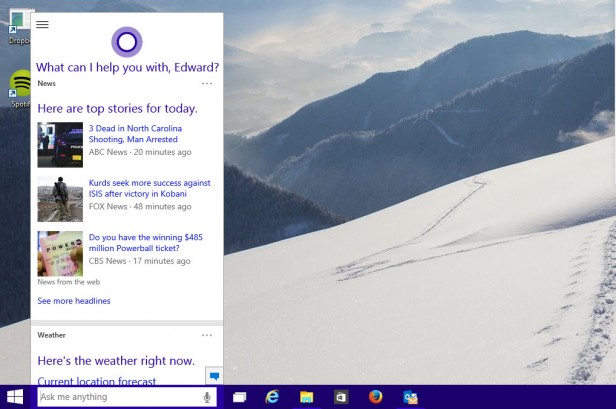
Windows 7 has a relatively powerful search feature that will quickly give results regarding documents and programs you search for. However, Windows 10 improves on this feature by adding a search for the apps in Windows Store and the web and a much more organized and improved page of results.

When you click on the search box in Windows 10 you will also receive information about the latest news headlines, weather reports and updates from your preferred sports team.

In addition to this, the new search function will also make use of Cortana, which is Microsoft’s digital personal assistant. This will add two main features into play. The first thing is that Cortana will monitor your calendar and email to give out relevant results, like when you have to leave to make it to your next appointment.

The other thing is that if you have equipped your computer with a microphone you will be able to give Cortana commands via voice. The digital personal assistant really does a great job understanding what you say and gives you appropriate search results. However, Cortana doesn’t give you the answer right in the search box, but opens a browser window to do so. But it is still a pretty cool thing to search for stuff without having to use your hands to type in what you want.

Windows 10 vs Windows 7 – File management

windows-10-vs-windows-7-file-management

While this may seem trivial at first, the fact is that the tools you use to find and manage the files in your computer are the most fundamental and often used in an operating system.

Windows 7 offered a generous selection of tools and we’ve come to be used to them by now. Still, it’s safe to say that they are not the most advanced ones and in a way or another are a slight step backwards from what we’ve seen in the past. A relevant example is the removal of the “Up” button in Windows Explorer.

This small feature pretty much sums up all what’s wrong with the file explorer in Windows 7. However, this isn’t the only problem that plagued the explorer. It was very badly designed, featuring a lot of wasted space not to mention that some of the main functions were hidden from the user’s view.

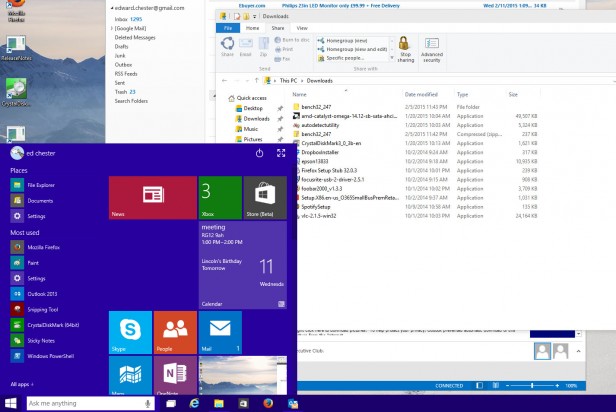
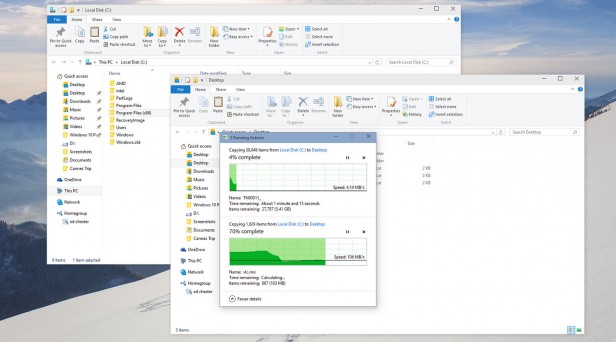
The “Up” button is back in Windows 10. And along with it, there are a series of other improvements in the file explorer. Some of them, however, already arrived in Windows 8, to be perfectly honest. The menu on top is now arranged in form of a ribbon, so the most used commands are within reach and, most important, very easy to find by novice users.

A new “Share” ribbon is now present which will let you move files between different applications such as Skype, Dropbox or Outlook with much ease. While the new file explorer is not perfect, it’s definitely a huge step in the right way.

Microsoft also improved the file copying interface along with these other improvements in the file explorer. Moving and copying tasks are now within a single window for better management. They also included a real time transfer speed monitor and you can also pause file operations, when until now you could only cancel them.

Another great addition is the Storage Spaces. This helps you group multiple hard drives to make a single logical drive. Even though this isn’t exactly revolutionary, the fact that it supports more levels of drive redundancy that will make sure all your data is backed up makes it particularly useful. This feature is entirely how swappable and supports drives in different sizes, unlike RAID systems.

All in all, Windows 10 adds a lot of nifty features in the file management section and takes very little away from it.

Windows 10 vs Windows 7 – DirectX 12 and gaming

windows-10-vs-windows-7-gaming

We said earlier that the gaming in Windows 10 hasn’t changed all that much, but now we’ll elaborate a little on the matter.

As a matter of fact, Windows 10 seems to be a tad slower than Windows 7, by about 0.5 percent, especially in some of the older games. Crisis 3, for example seems to run a little slower in Windows 10, however, there are some cases in which the results are reversed. It’s true that 0.5 percent doesn’t mean all that much so it’s not a reason to worry about.

Windows 7 was a very reliable and robust platform for gaming, even though it didn’t have many innovative features. However, it’s still a very good base on which numerous gaming tools have been built.

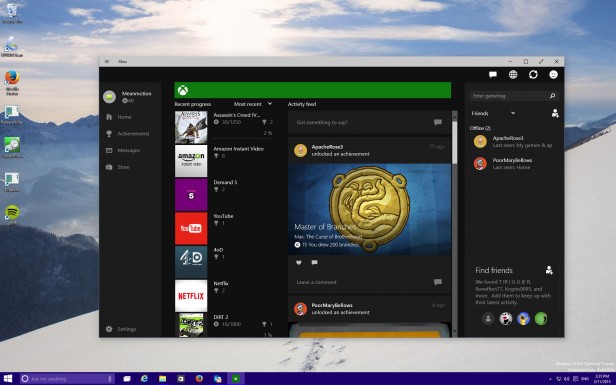
On the other hand, Windows 10 does add a bunch of new features. However, most of the new features won’t interest PC gamers, such as the option to access your account on Xbox Live, stream games from the Xbox straight to the PC and have a bunch of games that work cross-platform on Xbox and PCs. However, that isn’t to say that they’re not a welcomed addition.

The coolest new feature is probably the game capture one. You can record your gaming sessions and grab a 30 seconds snap shot that you can share with your friends. While this is not new technology, having it built right into the OS is a useful thing. Microsoft also claims that the new feature will work with every game ever made, so this mean that if you want to capture video footage from Monkey Island you can do so.

Windows 10 will also have exclusive access to the new DirectX 12, which claims to unlock performance on all existing hardware by allowing developers to have better access to the hardware’s features. However, the performance boosts are very likely to be small and dependent on certain circumstances. Nevertheless, this will probably be enough to make Windows 10 the better performing system regarding video games.

DirectX 12 will most likely offer numerous other new features but as of now Microsoft hasn’t said anything about what those features will be.

Windows 10 vs Windows 7 – The Notifications

windows-10-vs-windows-7-notifications

Windows always featured some sort of notification system in the form of the System Tray. In there you can find pop-up notifications from Dropbox, Spotify, Outlook and any other application that’s open in the background. However, there hasn’t been a proper place in which you could see all your notifications together along with their history.

In Windows 10 you can find a proper notification area. This is a very basic addition that brings app notifications and system messages together in one place, chronologically ordered. While it’s a very tiny addition, it’s extremely useful.

The area of notifications also has some system functions like a feature that lets you switch to the tablet mode or enter the screen settings.

Windows 10 vs Windows 7 – Workspace

windows-10-vs-windows-7-workspace

Keeping the workspace neat is very important to some users. While the users with laptops may be happy by making everything run full screen, if you use a desktop computer and have several monitors or just one very big one you will need good workspace management tools to make the best of the space you have.

Windows 7 features multi-monitor support but it’s rather limited in either allowing you to stretch the desktop across different screens or by offering a mirror mode. In Windows 7 you only had one task bar across multiple screens. It also featured a very primitive version of Snap. Snap is a feature that allows you to automatically resize windows when dragged to the sides of the screen. But that’s all that it offered.

In Windows 10, these features have been improved. You can have different backgrounds on different screens now and different slideshows. Pictures can also be set to go across all your screens. The taskbar can also be found on all the monitors you use or just on whichever monitor you’re active in. Snap now supports snapping to all four corners of the screen, instead of just the sides.

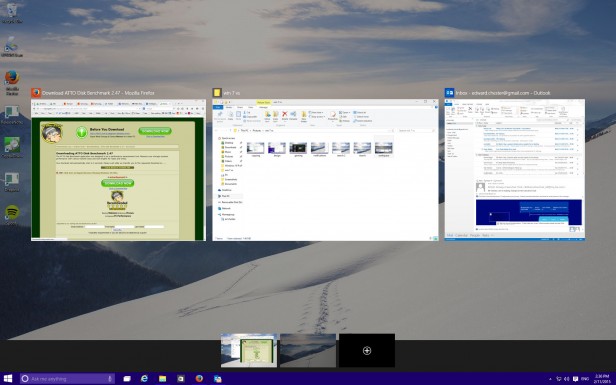
But the biggest feature is perhaps the support of a virtual desktop. Even though Windows 7 supported virtual desktops through third-party programs, Windows 10 has this feature built-in. While the implementation is rather clumsy at the moment, it’s still useful, especially for users that have laptops.

Windows 10 vs Windows 7 – The price

Even though we don’t know the exact price of a retail copy of Windows 10 at the moment, the huge news is that it will be free for people who update from Windows 7 or Windows 8 in the first year from its release.

With this in mind, if you have a copy of Windows 7, it would a silly thing not to update. Especially since we don’t know exactly how the upgrade will work, if you’ll lose your license of Windows 7 or not. But the chances are that you will still be able to downgrade to your old Windows version if you find that the new OS just isn’t right for you.

The verdict

Windows 10 offers a lot of useful new functions as well as improvements to the old ones, when compared to the old Windows 7. Even though these functions when taken separately are not reasons enough to upgrade, as a package it’s safe to say that it will be worth it.

In Windows 10 you will get a better file management system, a better windows management system, a better search system, more advanced gaming tools and many more. The only thing we’re not really keen on is the design, but this is hardly a reason to pass up the upgrade.

With Windows 10 being free as an upgrade, it would actually be a stupid thing not to at least try the new operating system. While it probably won’t be perfect, it’s still an upgrade worth getting later this year.

Images source: trustedreviews.com

Filed Under: Tech & Science Tagged With: directx 12, microsoft, microsoft windows 10, windows 10, windows 10 better, windows 10 features, windows 10 new features, windows 10 price, windows 10 release date, windows 10 vs windows 7, windows 10 windows 7, windows 7 windows 10

20 Apple Watch Features

February 16, 2015 By Roxanne Briean Leave a Comment

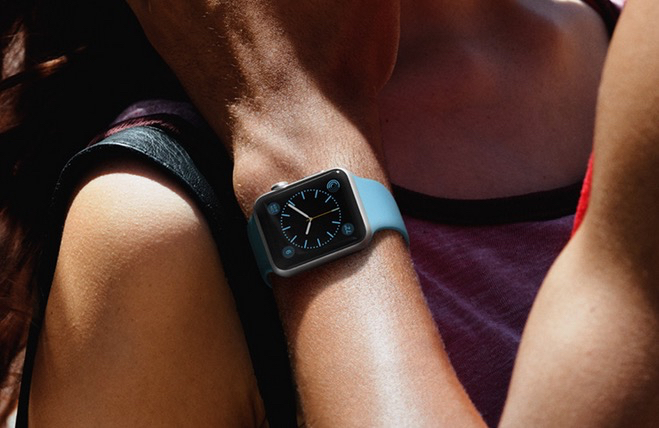
The Apple Watch is a new smartwatch that will connect to your iPhone and accomplish numerous tasks. You’re probably very familiar with the new device’s name that’s coming out soon by now, but you want to know more about the things you can do with it, am I right? The Apple Watch release date will be set in April and until then we want to share with you 20 Apple Watch features that we believe are the best and most exciting.

More Apple Watch features are sure to be reveled in the near future in an event where the company will share the exact release date of the new device and its full specifications. Even though there are a lot more features we don’t know about the Apple Watch, we do know some things this new smartwatch can do as the company revealed much of them in 2014.

The price of the Apple Watch starts at $349 for the Sport edition but we expect that the high-end models to reach up to and over $1,000.
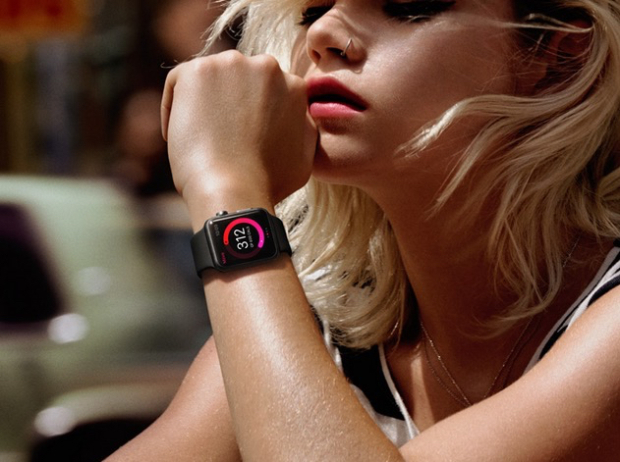
To use the Apple Watch you will need an iPhone, of course, because many of the things that you will be able to do with the smartwatch rely on the connectivity between the two devices. This smartwatch won’t replace the iPhone; it just offers a way to access more quickly your daily activities. Even though this device is not the first smartwatch on the market and not even the first to connect to an iPhone, it’s still the most anticipated one.

To help you decide whether the Apple Watch is a great investment or not, we made a list of 20 Apple Watch features that we believe are the best and most useful.

1. Answer calls

answer-calls

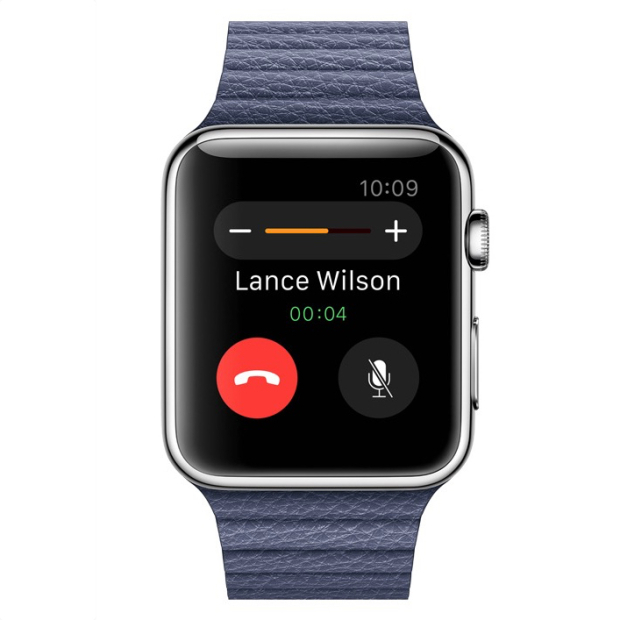
You can use the Apple Watch to answer calls by using it as a Bluetooth speaker. However, after using the Samsung smartwatch that has a similar feature, we now know that you should only use this for small conversations and never answer calls that you wouldn’t take on speakerphone either.

2. Monitor your heart rate

monitor-your-heartrate

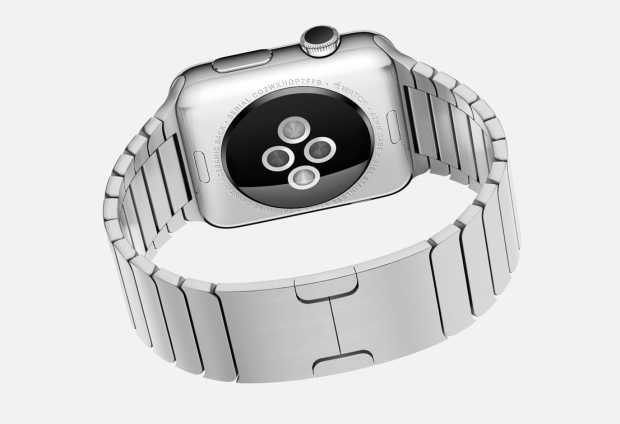
The Apple Watch has sensors on its back that can monitor your heart rate. However, it’s still not clear whether the smartwatch will record your resting heart rate or not, so the usefulness of this feature will definitely depend on how regular the watch will monitor it. We really hope to find out more about this feature at an event held by Apple in 2015.

3. Glances

glances

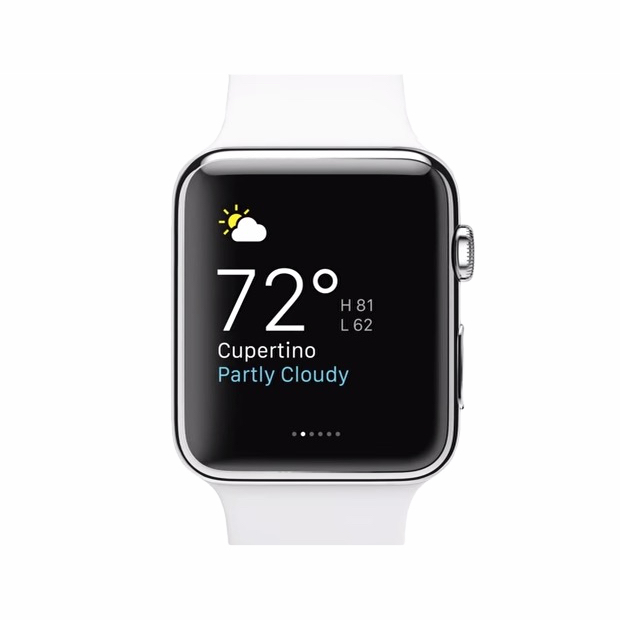
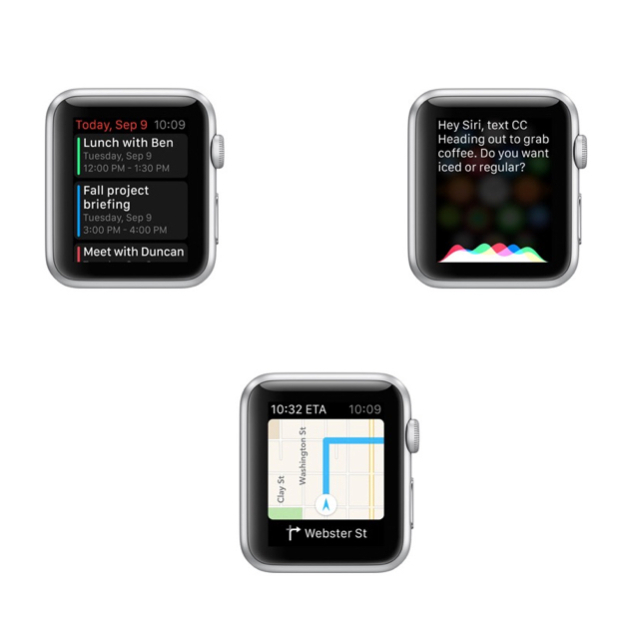
The smartwatch has a feature called Glances. These are small pieces of info that you can look and swap through on your Apple Watch. They can include sports scores, maps, stocks, meetings and the weather. They aren’t the same thing as the notifications on your iPhone, but are similar in nature to the Today panel in Notification Center on your phone. Third party apps can also share Glances on the screen of your watch.

4. Change the watch faces

change-watch-faces

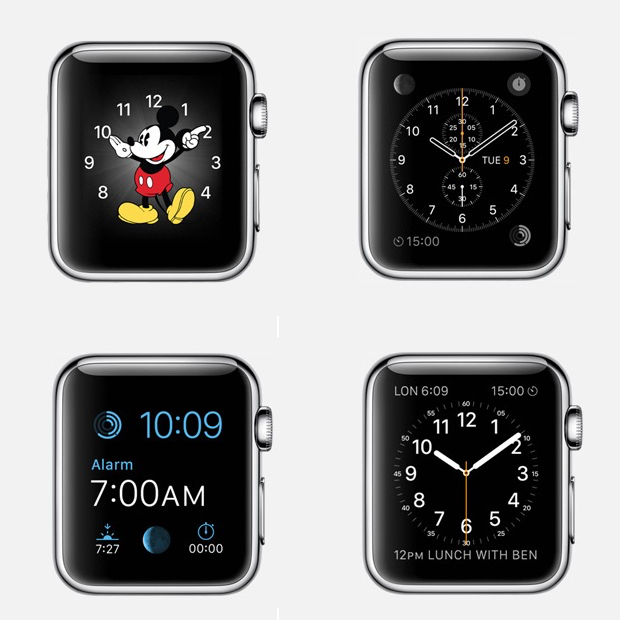
You can pick a new face for you Apple Watch to be relevant to the event you’re taking part of. We’ve seen 12 faces that range from functional and fitness to formal. There is a classic analog look, a face with Mickey Mouse, numerous digital ones and others that include info from the calendar and details such as the sunset and sunrise.

5. Track your fitness activity

track-fitness

The smartwatch from Apple makes use of numerous sensors to track your movement and your fitness activity progress. You will be able to see your progress in three categories: exercise, time spent standing and movement. Your fitness activity information will also be available on your iPhone.

6. Tickets on your Apple Watch

tickets-apple-watch

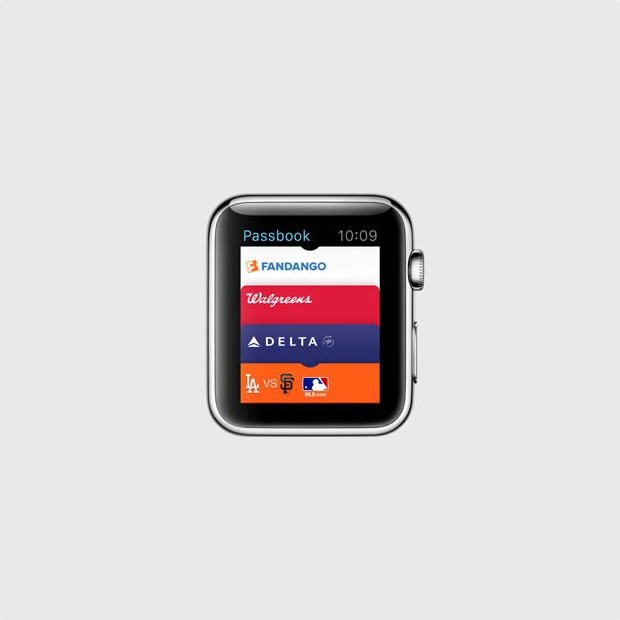
With the Passbook app on your Apple Watch you will be able to have tickets and loyalty cards right on your wrist. When you will need a ticket you will only have to show your watch to the gate agent or cashier and you will be all set to go.

7. Find your iPhone

find-iphone

You can find where your misplaced iPhone is with your Apple Watch, as long as it’s connected to it. However, you can’t find a stolen or lost iPhone, or even one that’s out of the Bluetooth range but it’s still a pretty useful feature for those who are constantly misplacing their phones.

8. Remote viewfinder for your iPhone camera

remote-viewfinder

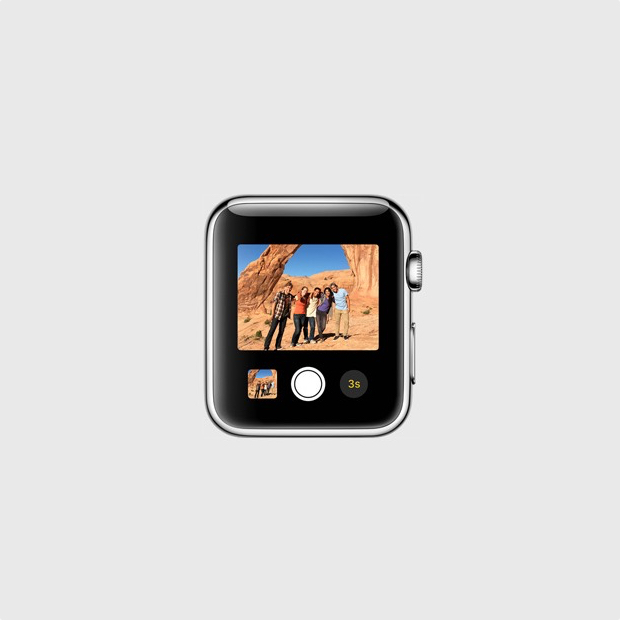
You can use your smartwatch as a remote viewfinder for the camera on your iPhone. By using this function you can place your iPhone somewhere, then get into frame and take the shot. It’s a way easier and better way of taking your own shot without the front facing camera or with the help of a selfie stick.

9. View and reply text messages

view-reply-text-messages

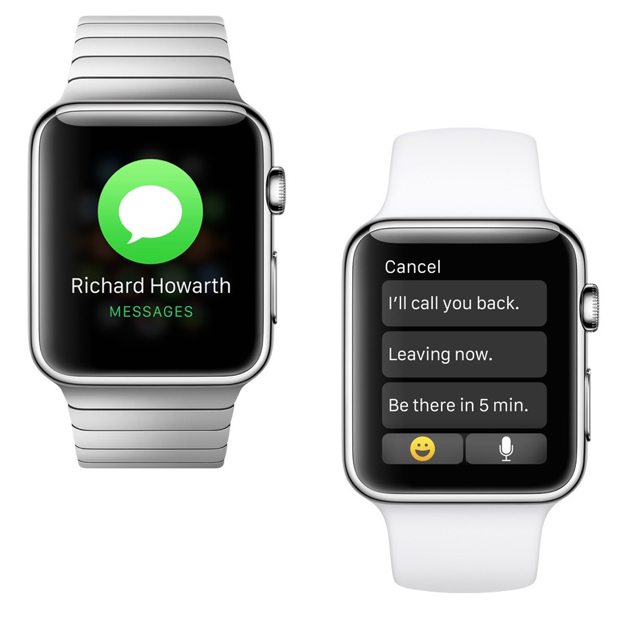
You can see the iMessages or text messages you receive on your wrist with the help of the Apple Watch. You may also reply to them with template messages. It’s a pretty useful feature that will save you the trouble of constantly taking out your iPhone out of your pocket. On top of this, you will also be able to use Siri to compose messages.

10. Check your emails

check-your-emails

You can get email notifications on your Apple Watch. You will also be able to flag, delete or read them on the watch or open them on your iPhone for full view. This features works with the Mail app on the iPhone and it’s unclear at the time whether it will work with third party apps too, or not.

11. Browse through all your Apple Watch apps

browser-apple-watch-apps

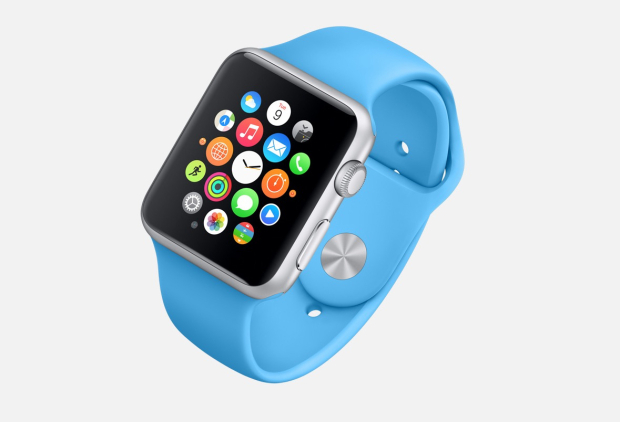
There will be a lot of apps that you will be able to install on your Apple Watch even though it may be a while until a vast library of apps will be available for it. However, the apps will appear as small circles on the screen of the watch and you will be able to browse through them by using the small Digital Crown on the side of the smartwatch to leave the screen empty for better viewing.

12. Send Emoji

send-emoji

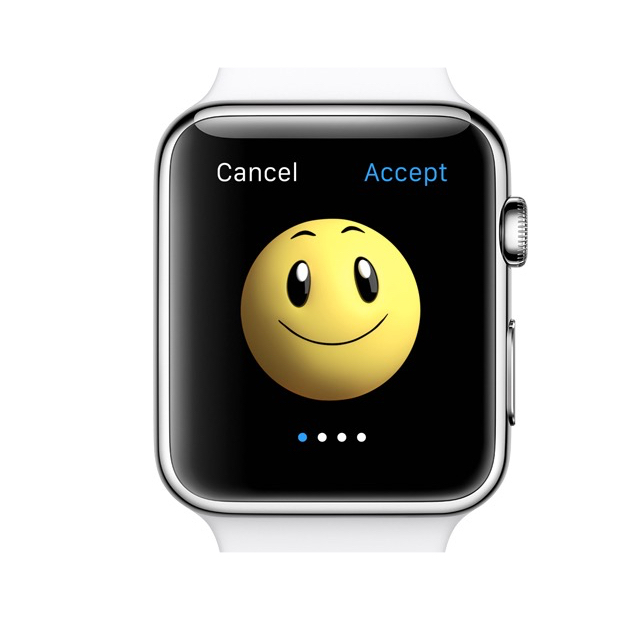
If you’re a big fan of Emoji on your iPhone, you’ll be glad to find out that you will be able to send better, bigger and animated Emoji from your watch.

13. Get notifications from your iPhone

get-notifications

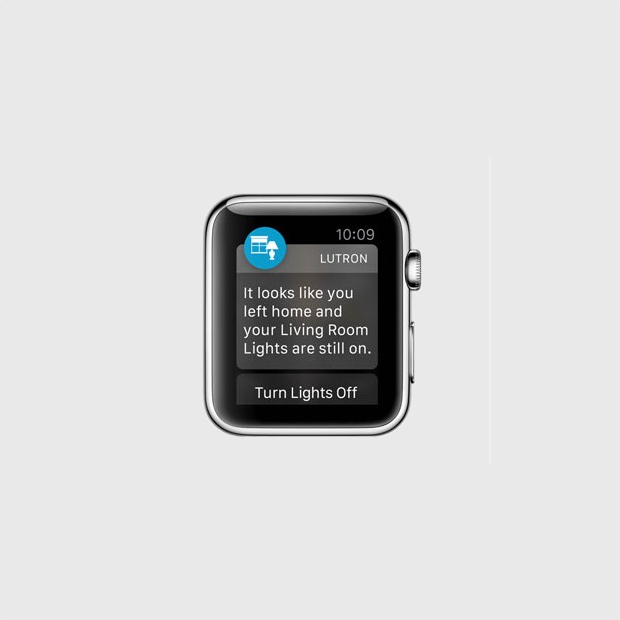
The smartwatch can display the notifications from your iPhone. This includes notifications from third party apps such as Gmail, Facebook and pretty much anything you can think of. You can customize the notifications you will receive so you won’t be overwhelmed by invites from Candy Crush and other apps that send annoying, frequent notifications.

14. Share your heartbeat with other Apple Watch users

share-your-heartbeat

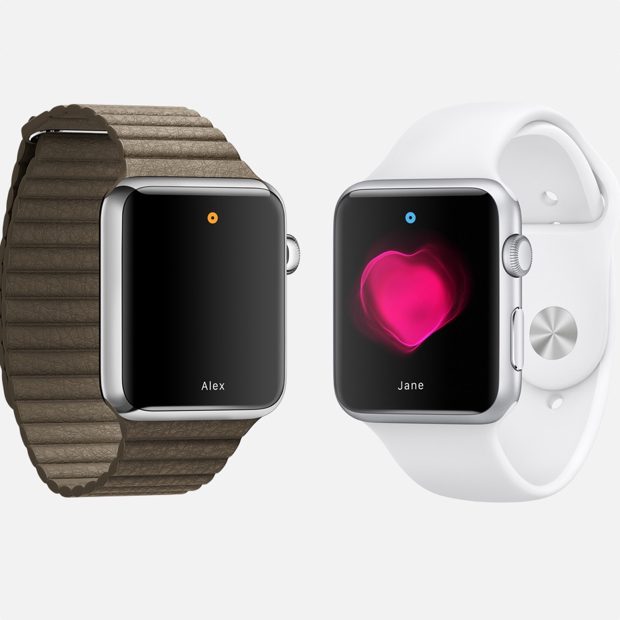
The smartwatch can track your heart rate and fitness activity, but this is not all it can do. If you want, you can share your heartbeat with a friend that also has an Apple Watch. When you share this with a close friend, an animation will appear on the other person’s watch that will show your heartbeat. Apple says that this is an intimate way of showing someone how you feel.

15. Use Apple Pay

use-apple-pay

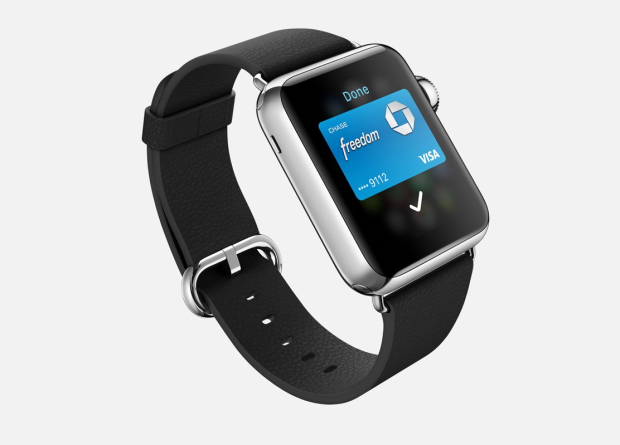
You won’t need to take your iPhone out of your pocket to make a payment through Apple Pay; you can do so just with the help of your watch. Apple Pay allows you to add multiple credit cards in the service so you won’t have to worry about carrying them with you. The service allows you to pay with your Apple Watch in stores that support this kind of payment.

16. Exercise reminder

exercise-reminder

If you’re getting a little lazy and you’ve been sitting around doing nothing for quite some time, Apple Watch will remind you it’s time to get up. While this isn’t the first smartwatch to do this thing, it’s a very nifty feature.

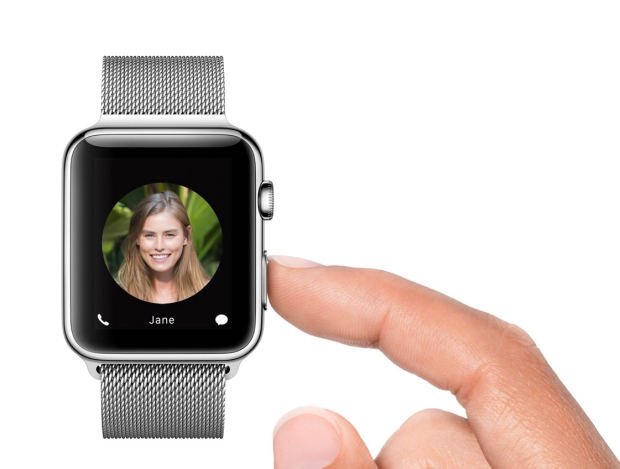
17. Access contacts

access-contacts

You can push a small button next to the Digital Crown on your Apple Watch to quickly access all your contacts. By doing this, you can select a contact to send a message to or call. This is also how you send your heartbeat to someone, a tap or a drawing. The tap feature is similar to the Facebook poke.

18. Use Siri

use-siri

You can access Siri on your Apple Watch by saying “Hey Siri” or by holding down the Digital Crown button. To use this feature you will have to have your Apple Watch connected to your iPhone.

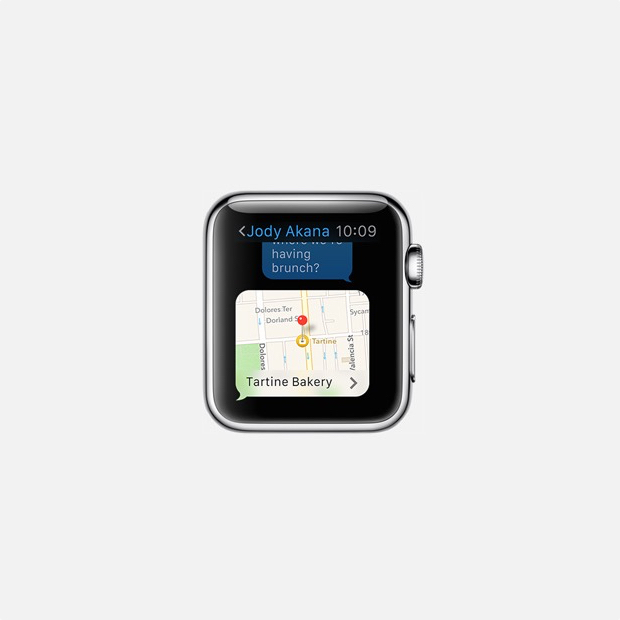
19. Share your current location

share-current-location

Apple Watch can be used to share your current location with a friend. This feature is already available in Messages on the iOS 8 and makes it easier for people to know where you currently are and in the near future you will be able to do the same thing through your Apple Watch.

20. Control your music and Apple TV

control-music-apple-tv

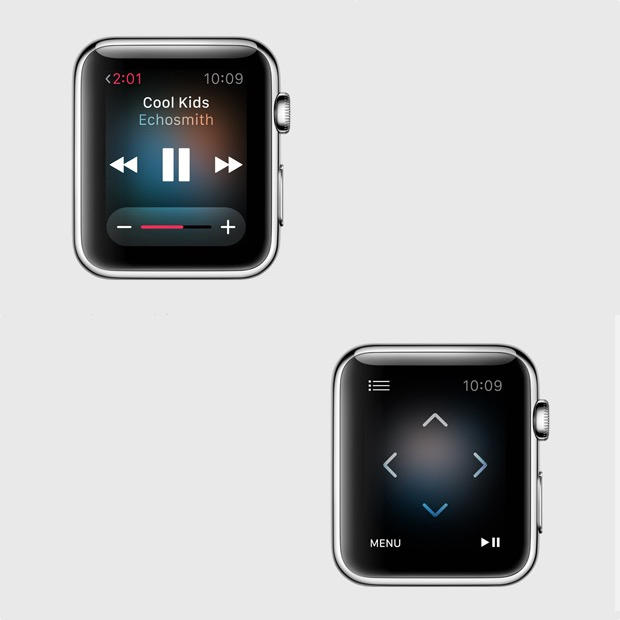
You can use the smartwatch as a remote control for iTunes and Apple TV. This is a pretty cool feature as it’s almost never easy to find that small remote and you sometimes really need to pause the music or TV when you can’t do so by using the iPhone Apple TV remote app. You can use the Apple Watch to browse through lists, menus, choose the movies you want to see and listen to the radio or music on iTunes.

So there you have it. This was our list of the best 20 Apple Watch features so far.

Images source: gottabemobile.com

Filed Under: Tech & Science Tagged With: Apple, apple smart watch, apple smartwatch, apple watch, apple watch details, apple watch features, apple watch price, apple watch release date, apple watch rumors, iphone watch, iwatch

Samsung Galaxy S6 Is Believed To Have Intelligent Cameras And Wraparound Display

February 16, 2015 By Michael Turner Leave a Comment

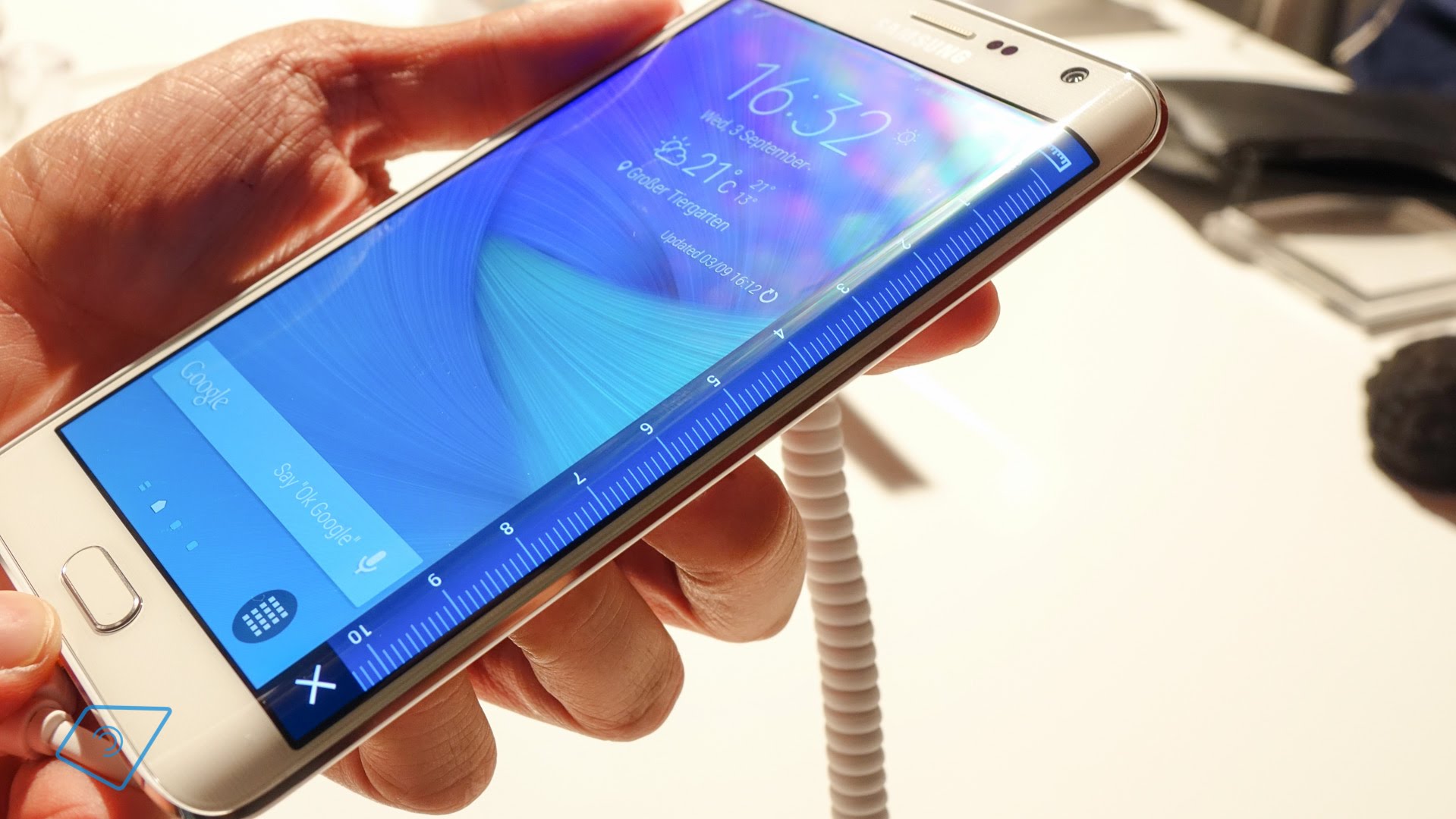
samsung-galaxy-note-edge-britischer-haendler-bestaetigt-hoeheren-preis-tabtech-de

Samsung might be this years revelation when it comes to smartphones. Samsung Galaxy S6 is believed to have intelligent cameras and wraparound display. The company wont be releasing just one model, but two.

It seems that Samsung will be releasing two versions of Samsung Galaxy S6 smart phones, next month. The exterior of both of the phones are rumored  to have full metal bodies a Samsung Exynos 7420 processor and a screen of 5.1 inches. One of the versions of Galaxy S6 is supposed to have a display that curves down the both sides of the screen while the other version should have a frontal facing display.

Last year, the company released Galaxy Note Edge, the first Samsung device owning a multiple sided screen. The Note Edge has a display of 5.6 inches and the screen stretches down towards the right side. That screen can be used for interactions  with app shortcuts and notifications from a different angle.

At the beginning of this month, Samsung published by mistake on their web site, support pages for Galaxy S6 (SM-G920X) and for S6 Edge(SM-G925X). The support pages didn’t incorporate any pictures or specifications. Even so, the support pages confirmed the sources of Bloomberg that two versions of the phone will be released.

More on the hardware of the future phones, the Galaxy S6 smart phones are expected to have 3GB RAM, a camera of 20 megapixels, close to 128 GB of storage and a display of 2K. When referring to software, Samsung seems to have returned to Touch Wizz Android skin, and the apps from the Galaxy S6 and Galaxy S6 Edge. Most probable, users will be able to eliminate the software apps of Samsung, that they do not need or wish on their phones.

MORE CAMERA SPECIFICATIONS

The previous year, Samsung integrated very powerful  cameras of 16 megapixels on the back and 2 megapixels on the frontal cameras for the Galaxy S5, this means that the Galaxy S6 will surely own improved camera specifications. Sources from SamMobile.com, have managed to get their hands on a prototype of Galaxy S6 and declared that it was fitted with a rear camera of 20 megapixels with optical image stabilization and a frontal camera of 5 megapixels. The backside camera would take pictures in 20MP at resolutions of (5952×3348), also 15MP (4464×3348), 11MP (3344×3344), to 8MP (3264×2448), but also 6MP (3264×1836) and 2.4MP (2048×1152).

According to SamMobile, the frontal camera should be the same as the one made for the Galaxy A series. Also, they added that Samsung is using APISs, which appeared with Android 5.0 Lollipop to attempt a “Pro” mode. This specification will allow users to choose from three focus modes, including one that is manual and can be found in apps such Manual Camera. In this manner users will manage to save RAW images and have control on the shutter speeds.

Lets not forget that, what SamMobile saw was a prototype and for the final version Samsung might have given up the 20 megapixels camera, depending on the price range and the ability to mass produce the needed quantities.

DongHoon Jang, the senior vice president of Samsung and head of the Camera R&D Group form IT&Mobile Communications, a detailed blog post regarding the progress of their smart phone cameras.

He stated that they are meticulously evaluating every single facet of the smart phone cameras by taking more than 10,000 pictures in every lighting environment possible. The same work and dedication has been put into creating the cameras to be released for the 2015 flagship model. The phones will be very intelligent and it will do all the thinking for their owners, letting them take astonishing pictures no matter what the conditions are, and worrying about nothing but pressing the shutter button.

Most likely, Samsung will present both of their new devices, at the Mobile World Congress event taking place in Barcelona, Spain, on the 1st of March.  When sending the press invitations to the event in March, Samsung has given a subtle hint about wraparound screens.
Image Source: tabtech

Filed Under: Tech & Science Tagged With: samsung galaxi s6 5 megapixels front camera, samsung galaxy s6 20 megapixels camera, samsung galaxy s6 release, samsung galaxy s6 rumours

  • « Previous Page
  • 1
  • …
  • 54
  • 55
  • 56
  • 57
  • 58
  • …
  • 114
  • Next Page »

Subscribe to Blog via Email

Enter your email address to subscribe to this blog and receive notifications of new posts by email.

Join 11 other subscribers

Recent Articles

police handcuffs man

German Man Probed In Poisoning That Killed 21 Employees Since 2000

June 29, 2018 By Kenneth Scott Leave a Comment

Chicken wings bar

Intoxicated South Carolina Man Punches Waitress Who Refused to Serve Him Alcohol

June 29, 2018 By Karen Jackson Leave a Comment

gaming

New Zealand gamer Who Flew Halfway Across The World for Virginia Teen Gets Shots By Her Mother

June 28, 2018 By Cristopher Hall Leave a Comment

party

Former Virginia Tech Freshman Sentenced to 50 Years in Prison for Stabbing a Girl to Death

June 28, 2018 By Roxanne Briean Leave a Comment

bonfire

British Couple Sentenced to Life in Prison for Torturing and Murdering French Nanny

June 27, 2018 By Deborah Campbell Leave a Comment

pay phone

Texas Father of Girl Disappeared in the 80s Ignored by Authorities

June 26, 2018 By Cristopher Hall Leave a Comment

bottled water

San Francisco Woman Threatened to Call Police on Girl Who Sold Ice Water for Disneyland Trip

June 25, 2018 By Roxanne Briean Leave a Comment

Maplewood Park

Missouri Man Robbed by Date and Accomplice in Park

June 22, 2018 By Nancy Young Leave a Comment

coding

New York Man Sentenced in Cyberstalking Former Girlfriend, Mailing Drugs to Her Dorm

June 22, 2018 By Deborah Campbell Leave a Comment

headphones

Bose Poised to Launch Sleepbuds, In-Ear Headphones That Help You Sleep

June 21, 2018 By Nancy Young Leave a Comment

Police light

Intoxicated Female Driver in Custody for Pulling Arresting Officer by the Hair

June 21, 2018 By Kenneth Scott Leave a Comment

kitchen

Restaurant Manager Arrested and Charged in Shooting Death of Co-Worker over Negative Yelp Reviews

June 20, 2018 By Karen Jackson Leave a Comment

plastic container

Pennsylvania Couple Charged in Violent Death of Infant Discovered Buried in Cat Litter

June 19, 2018 By Cristopher Hall Leave a Comment

tailpipe

Minnesota Teen Gets Head Stuck In Oversized Tailpipe Winstock Music Festival

June 18, 2018 By Karen Jackson Leave a Comment

Pages

  • About Us
  • Contact us
  • Privacy Policy
  • Privacy Policy GDPR
  • Staff
  • Terms and Conditions

Recent Posts

  • German Man Probed In Poisoning That Killed 21 Employees Since 2000 June 29, 2018
  • Intoxicated South Carolina Man Punches Waitress Who Refused to Serve Him Alcohol June 29, 2018
  • New Zealand gamer Who Flew Halfway Across The World for Virginia Teen Gets Shots By Her Mother June 28, 2018
  • Former Virginia Tech Freshman Sentenced to 50 Years in Prison for Stabbing a Girl to Death June 28, 2018
  • British Couple Sentenced to Life in Prison for Torturing and Murdering French Nanny June 27, 2018
  • Texas Father of Girl Disappeared in the 80s Ignored by Authorities June 26, 2018
  • San Francisco Woman Threatened to Call Police on Girl Who Sold Ice Water for Disneyland Trip June 25, 2018

Categories

  • Business
  • Entertainment
  • Finance
  • Headlines
  • Health
  • Life
  • Nature
  • Science
  • Sports
  • Tech & Science
  • Travel
  • Uncategorized
  • United States
  • World

Copyright © 2026 ArgyllFreePress.com
About · Privacy Policy · Terms of Use · Contact