Argyll Free Press

Growing News Network

Thursday, April 23, 2026
Log in
  • Business
  • Finance
  • Sports
  • Tech & Science
    • HP Envy 4500 Review
    • LG Optimus 170 Review
    • iPod Touch 6th Generation Review
    • HTC One M8 Accessories Set-up
    • Surrealist Games You Must Play
    • Hisense Sero 8 Review
    • Dell Latitude e7440 Review
    • HP Laserjet 1536dnf mfp Review
    • Garmin Fenix 2 Review
    • Skype Vs Viber
    • Best Video Conferencing Software
    • Sony mdr 1r Headphones Review
    • Canon Rebel t3i Review
    • Sennheiser Momentum 2-0 Review
  • Travel
  • Headlines
  • Health
  • United States

Apple Reportedly Will Launch Streaming TV Service This Fall

March 18, 2015 By Nancy Young Leave a Comment

When it comes to Apple we expect nothing but high quality products and inovative ideas. It seems that the company wishes to enter the cable TV world just like it entered the music one, with iTunes.Rumors have it, that Apple reportedly will Launch streaming TV service this fall.

No one can argue the fact that Apple is unbeatable and its technological empire keeps expanding in much more areas. So far we have been used to hearing about Apple smartphones, Apple laptops, Apple computers, Apple watches, and even future Apple cars.

This just makes us wonder what technological segment will Apple hit next? There’s no doubt that Apple has made top products and has excelled in all the devices it has created, but do you think is possible Apple might do the same when it comes to television?apple-tv-streaming-service
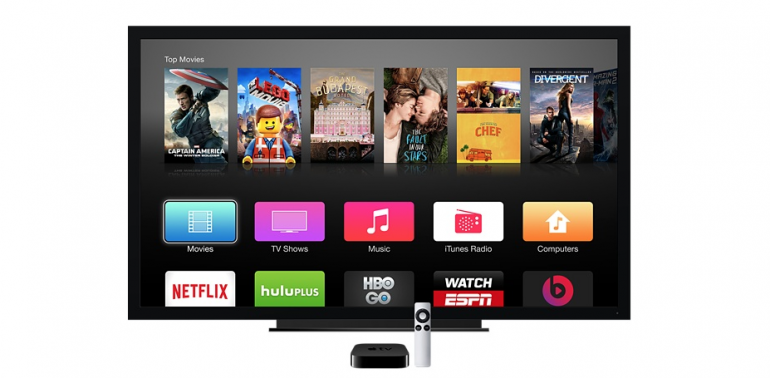
According to The Wall Street Journal, from what it looks like, the company is aiming to give it a try, as Cupertino is negotiating with TV content providers to offer a small pack of tv channels trough online streaming, that might happen this fall.

Even though the cited sources have not been named, the newspaper stated that services provided by Apple TV, would consist of  around 25 channels, which will include classic channels such ABC, FOX and CBS.

But so far the discussion with the program suppliers didn’t include NCBUniversal, and have excluded channels like USA and Bravo, because of a fall out between Apple and the founder company of NBCUniversal, Comcast, stated the Journal.

It has been once rumored that Apple and Comcast were talking about a potential partnership, and Comcast clients would be allowed to access the content of the cable provider with the help of an Apple TV set top box. But, it appears that their relationship has presently turned colder.

But, even without having NBC in the plan, Apple is reaching Walt Disney, CBS, and other smaller popular channels, like FX and ESPN.

The monthly price for the Apple tv package would cost between $30 and $40,a pretty high price, if we think about the extremely packed streaming and on demand market.

However, for example, HBO NOW costs $14.99 a month and the new Sling TV, costs $20 a month, they are both offering much cheaper packages, but none of them is providing such a large channel selection like Apple is believed to be planning.

Other networks, such CBS and NBC, offer on demand programming for monthly fees and the prices vary between $3 to $6, while Hulu Plus, has a price of 47.99 per month.

Apple has not given any comments concerning the reports. But apparently, the technology mogul, is planning to unveil all this in June, before  the launch from September. The TV service will be compatible with all the iOS devices, Iphones, iPads and Apple TV boxes, included.

Before going for the, what just might be the next big Apple thing, the company is partnering with HBO for the launch the following streaming service, called HBO NOW.

The HBO NOW app is set to be released in April, and the subscription will have a price of $14.99 per month, and will allow subscribers to watch all The Game of Thrones or Girls series they want on their iPhone, Ipad, iPod Touch and Apple TV, but also on a PC trough HBONOW.com.

The partnership of Apple on HBO NOW  is reportedly an exclusive deal, but according to Cablevision’s announcement of this week, HBO NOW will also be offered to the Optimum Online Customers, living in the New York area.

Image Source: ibtimes

Filed Under: Tech & Science, Uncategorized Tagged With: appl tv streaming, apple launcehs tv streaming service this fall, apple tv streaming service, apple will launch tv streaming service, apple will launch tv streaming service with 25 channels

iPhone 6s Display Rumors

March 18, 2015 By Roxanne Briean Leave a Comment

iPhone 6s Display Rumors

iPhone 6s rumors are beginning to surface and several details regarding the iPhone 6s display have already started to make their way on the Internet.

The new Apple smartphone saw the biggest upgrade regarding its screen, increasing its size from a 4-inch display to the current 5.5-inch one present on the iPhone 6 Plus and the 4.7-inch display on the iPhone 6. Despite this change in size, the screen uses the same LCD found in previous models, meaning that consumers are pretty excited about a possible change in technology in the new iPhone 6s.

Here are some exciting iPhone 6s display rumors.

iPhones were always built with great displays and were one of the first smartphones to have high resolutions, ever since the iPhone 4 which launched in 2010. Since that model, Apple offered the Retina display in all its phones, the biggest one being the 1080p Full HD one inside the iPhone 6 Plus.

Now it seems like things are about to get even more exciting as a lot of rumors are regarding the display inside Apple’s next generation phone.

OLED Technology

There are rumors that Apple will use an OLED display inside the iPhone 6s. It’s a known fact that OLED displays are better than LCD ones but they cost more to make. Time will only tell how the price of the new iPhone 6s will be affected by the possible use of an OLED display.

OLED displays use a technology that allows each pixel on the screen to be built with an organic material that lights up when electrical current passes through it. This means that OLED displays (Organic Light-Emitting Diode) don’t need any backlighting and thus are a lot lighter and thinner than traditional LCD ones. This also means that OLED displays can be curved and bent, which will allow Apple to experiment with numerous designs.

This kind of technology is more popular nowadays and many TVs use OLED screens as well as some smartphones. That being said, it’s still a new technology and it’s understandable that Apple waited a bit before using it in its iPhones. However, this might be the perfect time for Apple to use this screen inside the iPhone 6s.

iPhone 6s Force Touch

Many people claim that this technology included in Apple Watch will also be used inside the new iPhone.

Force Touch on the Apple Watch lets users trigger actions depending on how much pressure they apply to the screen. For example, a light tap can be used to select an item, while a heavy press can display a menu or a set of options. It’s pretty similar with how a right and left click function on a mouse and it wouldn’t be surprising if Apple decides to use this technology in its new smartphone.

A similar technology was revealed earlier this week in the new MacBook. The laptop’s trackpad was improved upon and even though it’s manufactured out of glass, it’s now pressure sensitive which will allow the user to click anywhere on its surface. Up until now, the user could have only clicked from one side on the trackpad.

This technology is used by Apple for what it calls “force clicks” which, for example, will let users click harder on an address inside the Mail app to get a location of said address. Apple also showed how you can use it inside Finder to get a preview of what a folder contains.

It looks like Apple is expanding this new technology to be used inside different devices and it wouldn’t come as a surprise if it will also make its way onto the new iPhone 6s.

Glasses Free 3D

To be fair, this is pretty far-fetched, but it’s not entirely impossible. There have been rumors that the next generation iPhone will feature a glasses-free 3D display.

The new report claims that this kind of technology can’t be used with the display found in the iPhone 6, which means that an entirely different screen must be used in order to take advantage of it. It’s unlikely that Apple will redesign the iPhone this year and it’s safe to assume that if in fact a glasses-free 3D technology will be used inside the iPhone, it won’t be used until 2016 when the iPhone 7 will be released.

A 3D screen is possible but if the Amazon Fire Phone has taught us something is that consumers aren’t all that excited about this kind of technology. The Amazon Fire Phone wasn’t such a great hit.

It’s a rumor that has to be taken lightly but Apple did experiment a bit with 3D with the Parallax Effect option present in iOS7 and iOS8. The Parallax Effect gives the illusion that the display is 3D and it was first introduced in Apple’s iOS 7 and was eventually used in iOS 8 as well.

It seems a bit odd that Apple would wish to put this technology inside its iPhone, seeing how consumers aren’t all that keen on it. However, the company is known to improve upon technologies in such a way that they become unique and useful to the user. That being said, it’s not completely crazy to expect a next generation iPhone to come with a glasses-free 3D display.

So there you have it. This was our list of iPhone 6s display rumors. Only time will tell if Apple will indeed use any of these inside its new smartphone or not.

Image source: 1

Filed Under: Tech & Science Tagged With: Apple, iPhone, iphone 6s, iphone 6s display, iphone 6s display rumors, iphone 6s new display, iphone 6s new features, iphone 6s new screen, iphone 6s rumors, iphone 6s screen, rumors iphone 6s

Apple Watch Differences between Models

March 17, 2015 By Roxanne Briean Leave a Comment

Apple Watch Differences

Apple recently released some details regarding their upcoming new device called the Apple Watch. The company also confirmed the rumors that they will manufacture 18k gold watches that will cost more than $10,000, but what are the Apple Watch differences?

On March 9 at the Spring Forward event, the tech giant said that Apple Watch Sport will retail at a price of $349 for the version for smaller wrists at 38mm and $399 for larger wrists at 42mm.

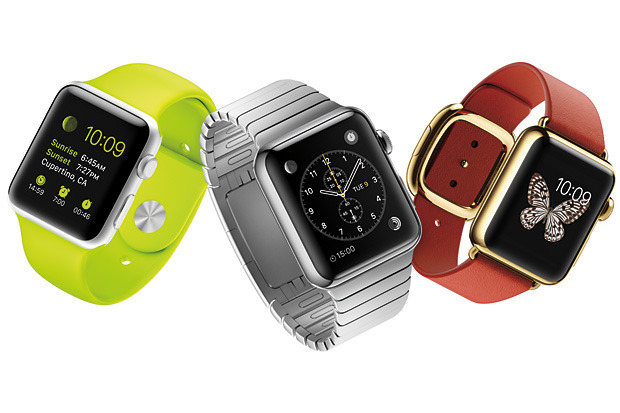
The Apple Watch Sport is made out of anodized aluminum which the company claims it’s as light as normal aluminum but significantly stronger. Its screen is made out of an ion strengthen glass and the back of the watch is built out of plastic. Apple Watch Sport comes with a wrist band made out of fluoroelastomer which comes in five different colors: black, white, pink, green and blue.

The Apple Watch Sport comes with a magnetic charging cable, two wrist bands, a USB adapter, three months of technical support and a year of hardware warranty. For an extra fee, the user will be able to extend the technical support to two years.

The 38mm Apple Watch will cost $549 and the 42mm one will cost $599. The bands will determine how much it will cost. The prices listed above are for the models with a white or black band. You can also buy an Apple Watch with a Milanese loop or a classic buckle for $649 for smaller wrists or $699 for the bigger 42mm model.

The 42mm Apple Watch is also available with a stone, light brown, black leather or bright blue leather loop for $699. The bands on the Apple Watch are made out of Venezia leather which will be handcrafted in Italy. The 38mm model also comes with a modern buckle for $749. The buckle is made in France and has an inner coating made out of Vectran weave. This is the same material NASA used for the airbags used for landing on the Mars rover. The buckle comes in black, brown, soft pink and midnight blue.

There is also a link bracelet made from the same material Apple used for the case of the watch and the 38mm one costs $949 while the 42mm one is $999. The black model will cost $1,049 for smaller wrists and $1,099 for larger ones.

The Apple Watch has a sapphire screen and a back made out of ceramic, just as the Apple Watch Edition.

The smaller version of the Apple Watch Edition will retail at $10,000, while the larger one will cost $12,000. These are the prices for the watches that come with a simple white or black fluoroelastomer band. The 42mm Apple Watch Edition also comes with a classic buckle for the price of $15,000 and the smaller one is also available with a rose gray or bright red modern buckle and it will cost $17,000.

The Apple Watch Edition comes with an 18k yellow or rose gold case, a ceramic back and a sapphire crystal screen. These models will come with all the accessories included with the other models as well as a two year warranty that will cover technical support and hardware repair.

All the Apple Watch models are water resistant and feature Force Touch and Retina display. The Apple Watch also features an ambient light sensor, a gyroscope, an accelerometer, a digital crown and a heart rate sensor. All the models come with a microphone and speaker which can be used for dictating messages and answering calls. The Apple Watch also has Bluetooth and Wi-Fi built in. You can get up to 18 hours of battery life on a single charge. This is better than most people anticipated but it will still require the user to charge the Apple Watch every night.

Apple demonstrated some of the functions in the event, such as using the Apple Watch as a TV remote, checking stocks, browsing through Instagram, dictating notes on Evernote and unlocking a Starwood Hotel room door.

You will be able to pre-order all the models on April 10 and Apple will start to sell the models on April 24.

If you’re curious about the Apple Watch price we’ve made a list of all the models, complete with their specific prices:

  • 38mm Apple Watch Sport – $349
  • 42mm Apple Watch Sport – $399
  • 38mm Apple Watch (Fluoroelastomer Band) – $549
  • 42mm Apple Watch (Fluoroelastomer Band) – $599
  • 38mm Apple Watch (Classic Buckle) – $649
  • 42mm Apple Watch (Classic Buckle) – $699
  • 38mm Apple Watch (Milanese Loop) – $649
  • 42mm Apple Watch (Milanese Loop) – $699
  • 38mm Apple Watch (Modern Buckle) – $749
  • 42mm Apple Watch (Leather Loop) – $699
  • 38mm Apple Watch (Stainless Steel Link) – $949
  • 42mm Apple Watch (Stainless Steel Link) – $999
  • 38mm Apple Watch (Black Stainless Steel Link) – $1,049
  • 42mm Apple Watch (Black Stainless Steel Link) – $1,099
  • 38mm Apple Watch Edition 18k Yellow/Rose Gold (Fluoroelastomer Band) – $10,000
  • 42mm Apple Watch Edition 18k Yellow/Rose Gold (Fluoroelastomer Band) – $12,000
  • 42mm Apple Watch Edition 18k Yellow Gold (Black/Midnight Blue Classic Buckle) – $15,000
  • 38mm Apple Watch Edition 18k Rose Gold (Rose Gray Modern Buckle) – $17,000
  • 38mm Apple Watch Edition 18k Yellow Gold (Bright Red Modern Buckle) – $17,000

Image source: 1

Filed Under: Tech & Science Tagged With: Apple, apple watch, apple watch differences, apple watch gold, apple watch model, apple watch model differences, apple watch models, apple watch price, apple watch prices, differences apple watch, iwatch, price apple watch

Is Hello Barbie A Threat For Children?

March 17, 2015 By Deborah Campbell Leave a Comment

barbie

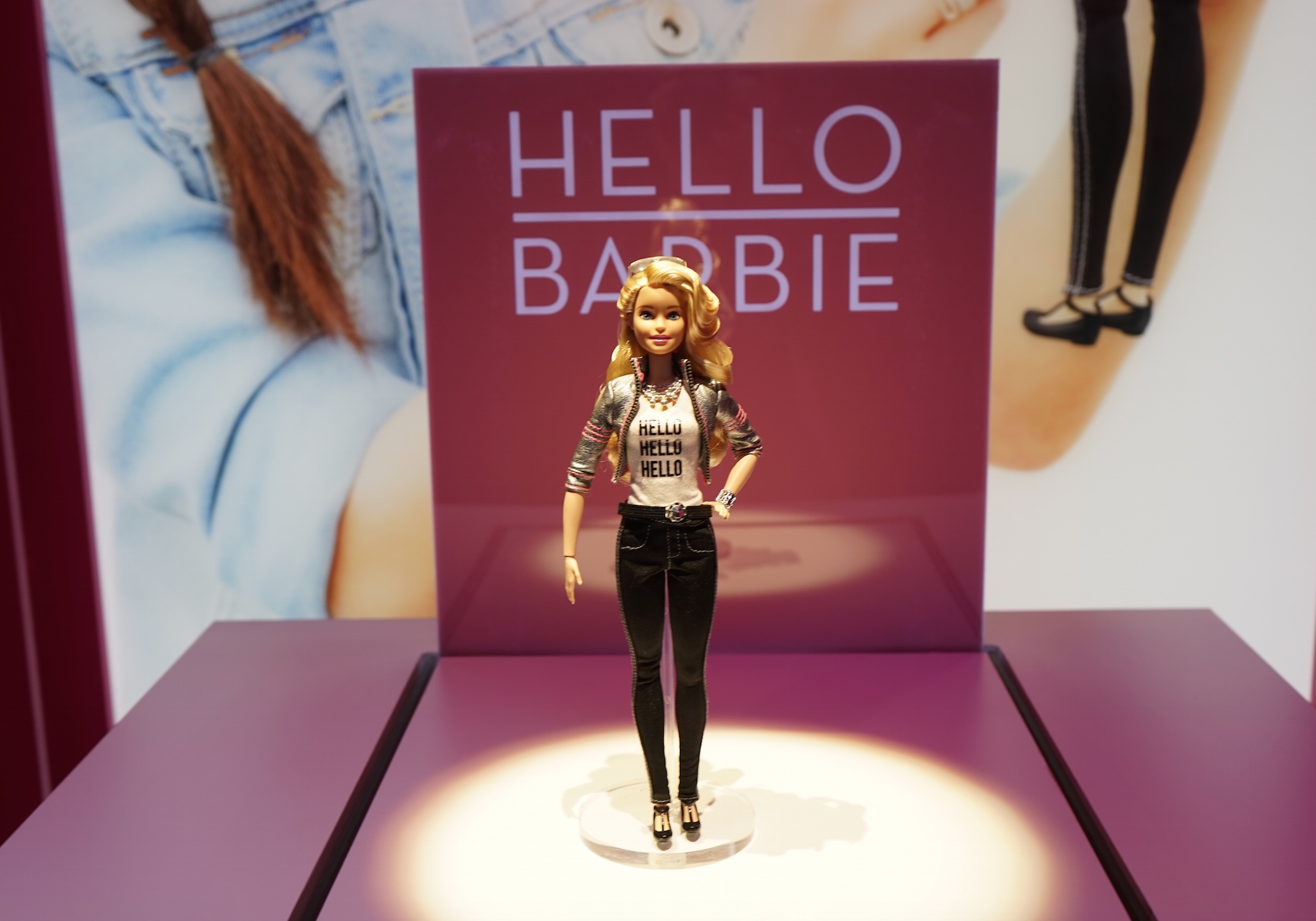
Mattel’s new “Hello Barbie” might be more than just a beautiful toy that talks to children and there are opinions asking for the doll to be removed. These reactions to the talking doll, only makes us wonder: Is Hello Barbie a threat for children?
By pressing just one button, Barbie’s integrated microphone turns on and starts recording the voice of the child that is playing with her. After that, the recordings are being uploaded to a cloud server where the voice detection technology helps Barbie make sense of the information.

What’s the result? An analytical Barbie who remembers the name of your dog and opens the subject of your favourite hobbies in your next conversation.

However, the doll which has just been presented at the 2015 American International Toy Fair, has been asked to be removed by privacy activists. The children that are using Hello Barbie, are not just talking to a doll, but they are talking directly to the toy industry which is taking advantage of this to make more money, stated the director of Campaign for Commercial-Free Childhood, Susan Linn.

The Campaign for a Commercial-Free Childhood, has started a petition against Mattel, and is worried about the fact that the toy makes children extremely vulnerable to the sneaky advertorial efforts of the mogul toy company.
In the demo presented by Mattel, the doll asks many questions that would be answered with a lot of information about a child, her family and her interests. All this information about the child, could be a great value to advertisers and could be used to be marketed immorally to children.

hello-Barbie

Even though, in 2013, Mattel’s toy sales have risen to $7.1 billion, its profits have been declining and the company is facing growing competition coming from the digital games and toys area.

To give Barbie her voice, Mattel, has made partners with ToyTalk, a startup based in San Francisco. ToyTalk has designed iPad games in which children have a conversation with digital animals, calls itself “an award winning” family and entertainment company that creates talking characters.

The CEO of ToyTalk, Oren Jacob, has insisted in saying that the toy will not use the audio recording of the child for marketing purposes and added that the information is never used for things related to marketing and publicity, or any other of these things. That is out of the question.

However, beyond the marketing purpose of a giant corporation having access to a kid’s inner thoughts, the voice recognising doll, brings many other concerns for privacy advocates, mainly because parents of the children can receive weekly emails containing audio files of the conversations the child has had with Hello Barbie.

Oren Jacob, has explained that this specific feature is created to ensure parents that they are in control of their family information all the time, Susan Linn believes that this added layer of transparency could mean trouble. According to her, children trust their toys a lot, and when they have a conversation with the dolls or the stuffed animals they are playing, they reveal a lot of information about themselves.

The voice recognition technology has become very reliable, and we have become comfortable with seeing this feature in our devices, from good humoured mobile assistant like Siri, to the new smart home gadget created by Amazon, called Amazon Echo.
But, the difference stands in the fact of an adult deliberately giving their information to a company, and a child is unconsciously playing with a data collecting doll. Another person, who has showed concerns regarding the Hello Barbie, is Golan Levin, an associate professor at Carnegie Mellon University, whose study area are the new methods of interactive expression.

He admitted that, to him, this situation is creepy and that the difference between Siri and this Barbie, is that he is an adult who has given his consent about giving his information to Apple.
Mattel declared that they are “committed to safety and security”, and Hello Barbie follows the rules established by the government standards.
But with all these serious threats when it comes to online data, not everyone is convinced that is entirely true.

“They’re toy makers, not a cyber security company”.  “Why don’t they talk to Sony about cyber security vulnerabilities?”, stated Levin.

Until its launch on the market, which has been planned for this fall, people will have plenty of time to decide whether they want or not to buy Hello Barbie, which will sell for $74.99.

Image Source: FAST COMPANY,CHIPCHICK

Filed Under: Tech & Science Tagged With: can hello barbie record the conversations with children, hello barbie, hello barbie a threat for children privacy, hello barbie talking to children, is hello barbie a threat for children, talking barbie, talking barbie records the conversations with children

Lollipop Update for Sony Xperia Z Coming Soon

March 14, 2015 By Roxanne Briean 1 Comment

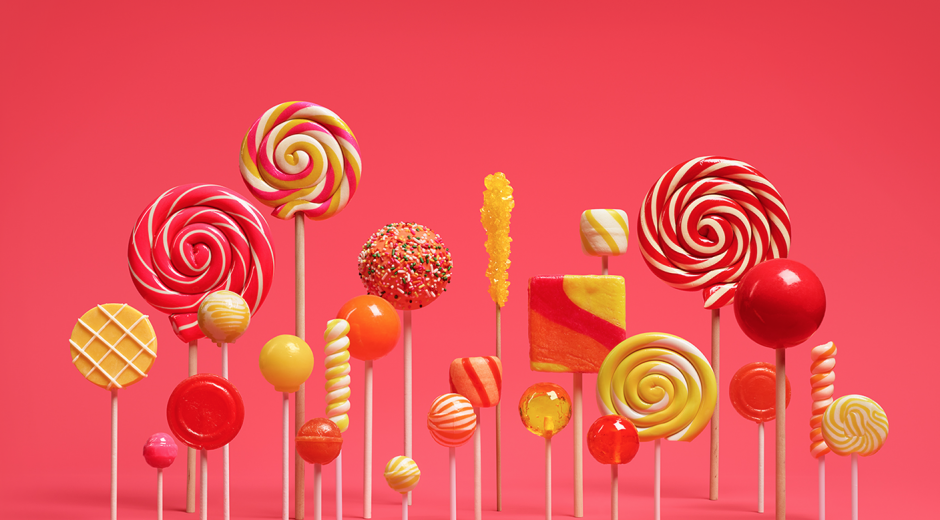
People who own Sony smartphones other than the Xperia Z series may be restless because the long awaited Android 5.0 Lollipop won’t be coming to their phones. However, the Lollipop update for the Sony Xperia Z line will be coming very soon. Those who own the Xperia Z2, Xperia Z3 Compact and the Xperia Z3 in the United States will receive the Android 5.0 Lollipop update sometime in March, this year.

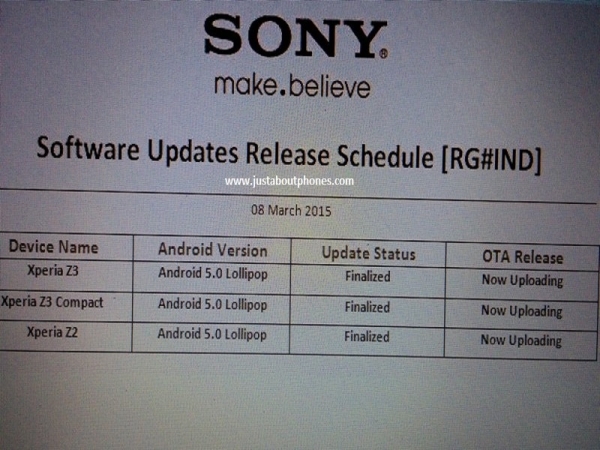
This information comes from the R&D team of the company in India, which has leaked the information to an online publication. The publication managed to get a hold on Sony’s schedule of update release and it is dated March 8.

Lollipop Update for Sony Xperia Z

The schedule reveals that the Xperia Z2, Xperia Z3 Compact and Xperia Z3 have the Android 5.0 update status finalized. The OTA panel shows that the update is currently uploading. This means that we can safely assume that the Andoird 5.0 Lollipop is currently being loaded on Sony’s servers and the release is quite imminent.

The team has also shared that the size of the update for the Sony Xperia Z2 will be 517.86MB and for the Xperia Z3 will be 630.23MB. The update is scheduled to come pretty soon for users that own Xperia Z devices and they will get to take advantage of great enhancements and new features.

The official Sony Mobile Indonesia Facebook page shows that Xperia Z devices in that region will get the Lollipop update after week 12, which means post March 16. Sony also revealed some new features such as multi-user support, better screen lock, optimal storage and intelligent user interface. These features will be available when the Android 5.0 Lollipop will make its way to Xperia Z devices. People who own these kinds of devices will also get the ability to move apps from the internal storage to the SD card.

This update is said to be 1.2GB large and take around 20 minutes to install.

Some other Xperia devices that are believed to benefit from the Android 5.0 Lollipop update, other than the Xperia Z2, Xperia Z3 Compact and Xperia Z3, include the Xperia ZR, Xperia Z, Xperia Tablet Z, Xperia Z1 Compact, Xperia Z1, Xperia ZL and Xperia Z Ultra.

Xperia owners who will get the Lollipop update will need to make sure they have at least 50 percent battery life left on their device and at least 640MB free storage space before downloading the software update.

So there you have it. The Lollipop update for Sony Xperia Z devices is coming very soon.

Image source: 1

Filed Under: Tech & Science Tagged With: android lollipop, android lollipop update, android lollipop update sony, lollipop update for sony xperia z, lollipop update sony, lollipop update sony xperia z, sony lollipop, sony lollipop update, sony update, sony xperia z, sony xperia z lollipop, xperia lollipop update, xperia z, xperia z lollipop update

Settings to Change on the Nexus 6

March 14, 2015 By Roxanne Briean Leave a Comment

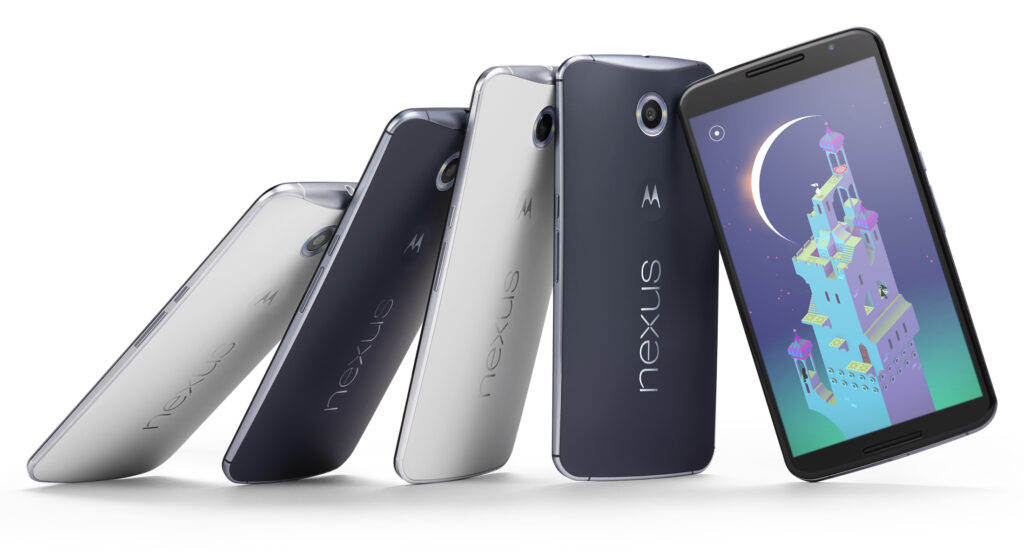
Google finally announced late last year its new smartphone called the Nexus 6 along with the Nexus 9 tablet, Android 5.0 Lollipop and the Nexus Player. While Lollipop and the new smartphone do have a lot to offer we present to you some settings to change in the Nexus 6.

There are numerous reasons to get a Nexus 6 instead of an iPhone or a Samsung Galaxy S5, especially hardware wise. There are also some software, features and settings that also make this quite an impressive smartphone. Here are some settings to change on the Nexus 6.

These settings can really improve the battery life, experience and will help you take full advantage of your new Nexus 6. Increasing the font on the phone, enabling the battery saver setting and adding some additional security are only a few of the numerous settings you can change on the Motorola-made Nexus 6.

Google announced yesterday that the new Android 5.1 Lollipop will be coming to the Nexus 6. While our Nexus 6 isn’t running the latest software, the device will do so in the near future. It’s highly unlikely that the settings and options we present to you will change so there’s no need to panic. With that being said, let’s dive right in.

The Nexus 6 has a great 2K 6 inch display that everyone will love. You can really enjoy watching a movie on the huge screen and because of the dual speakers on the front of the device. Not to mention that this is the first Nexus that comes with great battery life. While there definitely are numerous things you can love about the device, there are some that may be improved on it.

Settings to Change on the Nexus 6

Font size

The large display of the Nexus 6 combined with the very high resolution of 2,560 x 1,440 means that the text may appear small to some people. Even though every graphic and line is clear and crisp, some people will still find that the text is a little too small for the screen. But thankfully, there is a way to change the font size on the Nexus 6 and it doesn’t even require any effort.

Inside the app browser, go to Settings or swipe two fingers downward on the screen then select the settings menu. After you select it, tap on Display. Search for a setting called Fonts and tap on it. There you will find four different options to choose from: Huge, Large, Normal (this one is the default) and Small. While most people tend to use Normal, the Large one may suit you better.

Disable the emergency broadcast alerts

It’s true that this isn’t the most in your face feature available on the new smartphone, but when you have to deal with it, it can get a little annoying. I’m talking about the emergency broadcast alerts, of course. This will make your phone start an alarm out of nowhere, in full volume, regardless of what settings you use. Most of the times, this is to alert you of severe weather conditions, Amber alerts or other broadcasts sent out by your city or state.

You may want to keep some of them enabled just for emergencies, but they tend to be very loud and annoying so make sure you disable the ones that you don’t want to have anything to do with.

Go into Settings and tap on More, then on Emergency broadcasts. From this menu simply deselect all the ones you don’t need. I left the Extreme alerts still turned on but I’ve turned off all of the rest, mostly because I don’t want my phone to scare me half to death when I least expect it. Make sure you also deactivate the vibration option as it will vibrate for a long time and very loud, at full power.

Enable battery saver mode

The huge display on the new smartphone is the biggest battery killer. Even though the Nexus 6 has a 3,220 mAh battery and a Turbo Charge feature that allows you to use the phone for 6 hours with only a 15 minute charge, sometimes this is simply not enough. Google added a Battery Saver option in the Android Lollipop and you’ll definitely want to turn this on from time to time.

Go into Settings, then Battery at the bottom, tap on the three dots on the right of the upper part of the screen and tap on Battery Saver. Even though this isn’t a setting that you should use permanently, it does come in handy occasionally. The Battery Saver option kills background data and lowers the brightness of the screen to give you more battery life.

It’s true that you won’t be allowed to do most things but your Nexus will last for a very long time and you will be able to make phone calls or send texts. It’s a very useful feature that you should be aware of. Make it enable itself when your battery reaches 15% and it will automatically do so, giving you enough battery life when you absolutely need it.

Security

Android is great for syncing your Gmail account and other features but it generally lacks one important thing: security. You can set up a pattern lock or a passcode in under one minute which will protect your smartphone against strangers in the event that you lose it or that it’s stolen. Android 5.1 even brings a new security feature that’s called device protection. When this feature is enabled, even after a factory reset, your phone won’t be able to be used unless your Google account is signed in. This being said, you will want to secure your smartphone.

Slide the notification bar down and go to settings then Security, Screen Lock and from that select PIN, Password or Pattern.

In this menu there’s also an option called “Owner info” that will appear on the lockscreen. You can add your phone number, Facebook account or any other information. Be sure to fill in some information that will help you get your phone back in case an honest person finds it.

There are two more useful security options that you should be aware of. Go to the Google Play Store and enable the password protection for in-app purchases in the settings menu. This will make sure that you won’t get billed with app purchases in case you lose your phone. Also, your kids won’t be able to make purchases without your permission. Go to the Android Device Manager and prepare your smartphone for the services. By doing this, you will be allowed to lock, call and erase the data on your phone in case you lose it or it’s stolen.

Many people should think about securing their devices, but most of them don’t. This is the first thing you need to make sure when using a new device and the Nexus 6 is no exception.

Disable ambient light

A cool feature on the Moto X and many Motorola smartphones called Active Display (Moto Display) is the ability of the phone to pulse off and on with information and notifications. This was also added to the Nexus 6 but it was renamed Ambient Display. The phone knows when you pick it up and will give you a black and white screen with recent notifications and it’ll turn itself off shortly after. While this is a great feature, a single tap of the screen will fully light it up and you’ll often pocket dial people and will cause your screen to be on when you don’t need it which will drain the battery.

The feature is pretty cool in theory but it was one of the first features I turned off on the Nexus 6. Slide the notification bar down and tap the settings button. Go to Display and you will find the setting there. Tap on the Ambient Display option and you will turn it off. That’s the only thing you need to do to get rid of the feature.

This is a great feature and I really like it but Google should update this to be more precise or I’ll always keep it turned off.

Change default text messenger app

The default text messenger app was changed to Hangouts ever since Android KitKat. The new Nexus 6 also uses the Hangouts app as the default one but you may want to change this. You will be happy to know that you can actually do this.

To change the default app head to Settings and then More. Tap on the Default SMS option and you will see all the apps that are installed on your device. I personally like Textra SMS but feel free to use whatever you want if the stock one isn’t to your liking.

This is all that you have to do to change the default text messenger app.

Conclusion

There are numerous options, features and settings you can change on the Nexus 6 running on Android Lollipop. A few other features you might be interested in are the Do Not Disturb Notification options, the Smart Lock option and several other new ones in the Lollipop operating system.

The Nexus 6 is certainly a great device but everyone has different needs and you will have to play around with its settings to see what works for you. This was our list of settings to change on the Nexus 6.

Image source: 1

Filed Under: Tech & Science Tagged With: android lollipop, change nexus 6 settings, Google, Google Nexus 6, improve nexus 6, lollipop, Nexus 6, nexus 6 settings, settings on the nexus 6, settings to change on the nexus 6

The Newest Update for HTC (M8) comes from Android

March 14, 2015 By Cristopher Hall Leave a Comment

Finally, Verizon clients with an HTC (M8) in their pocket will have the opportunity of testing the new Android Lollipop 5.0 Update, simply by accessing their smart phone at

the touch of a finger and without any additional costs. With a delay of more than 90 days, HTC finally launches in collaboration with Verizon’s most recent smart phone an update that responds to Google’s operating programs.

Verizon’s has released the Lollipop update after its competitors, while AT&T subscribers with HTC One (M8) can wait for their upgrade, since they are still operating with Android KitKat 4.4.4.

Android Lollipop 5.0 update has already been sent to the company’s clients so they can receive the immediate facilities for its installation. The users who still do not have been informed about it, can observe the options of their cellular phone (simply by accessing Settings -> About -> Updates -> Check) and then individually downloading the update program from there.

Android Lollipop

The new Android Lollipop brings a series of exciting fresh modifications for a HTC One (M8). The update provides the Material Design, a facility offering an amazing animation and highly effective 3D display. The design and style were combined with Sense 6.0 UI and, in addition, there can also be found a 64-bit ABI support for a clearly improved runtime. Customers will receive their card-based notifications and the app modifying system. All these, along with home screen notifications and lock-screen, that shows the notification s with just one vertical swipe, displaying the Quick Notifications after the second run.

But, the improvements do not end here. Moreover, the clients will find new features that have been developed solely for the HTC One (M8). Customers will appreciate the improved 3-way calling options and a smooth synchronization for Google Settings and different tones in Call Settings. The Android Lollipop update also offers an improved search option for the clients who are in a hurry and want to quickly access and change various options on their device.

Recent Apps has been enhanced with Card View and Grid View, this recent function being unique for HTC One (M8), since the other cell smart phones operating with the Android Lollipop 5.0 still do not possess it. Moreover, the entire performance developments or bug fixing, as well as an increased life span for the battery power pack, are all coming with these new programs as well.

Filed Under: Tech & Science Tagged With: Android Os update, Lollipop update for HTC, MTC M8 Lollipop

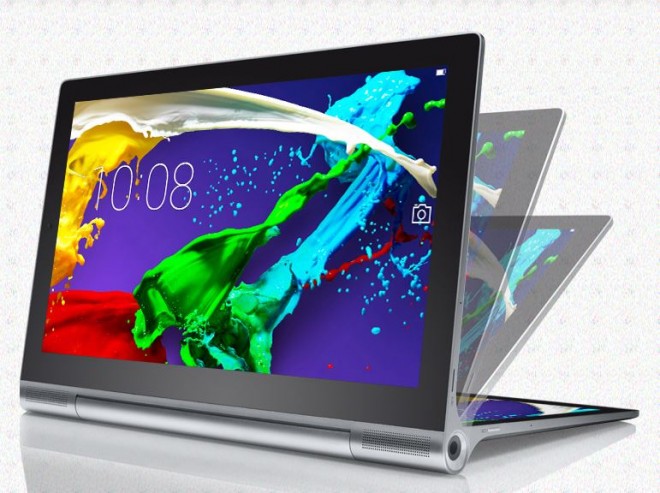
Review: the Lenovo Yoga Tablet 2 with Windows (13”)

March 12, 2015 By Roxanne Briean 1 Comment

PC aficionados who dig new tech breakthroughs will be wooed with the Lenovo Yoga Tablet 2 with Windows 13-inch. Takes a moment to be seduced and a lifetime to earn high fidelity, but this one of a kind device is the ultimate must-have and must-use when it comes to exploring the great value and productivity relationship.

The Yoga Tablet 2 with Windows 12-inch is a rough $599 and is purely awe-inspiring if you’re looking for the comfort of using a tablet with PC capacities. The first thing that pops your eye is its outstanding aesthetics. It is an object of desire. However, on the long run, the technical benefits versus looks can be quite downsized, especially for somebody who needs more than a beautiful object with a handful of capacities. We’ll start here with its barrel-like edge and continue with depicting its outstanding design, while analyzing its solid points and more arguable characteristics.

Lenovo Yoga Tablet 2 Design

Well, she’s for sure got the look! The Lenovo Yoga Tablet 2 with Windows 13 is has a charming simplicity in design, which obviously gives it loads of bonus points. First of all, the Lenovo Yoga Tablet 2 with Windows 13 is packed with everything such a device needs to be in order to provide their owner with lots of mobility and multitasking facilities. It basically takes user friendly to a higher ground. First of all, it is quite a glory box. It’s metallic, so it will eventually be prone to scratches if it hits some rough surface, but otherwise, it does have a solid feel and appearance. Do handle with care!

Convertible-Tablet_Yoga-Tablet-2-Pro_13_W_Bluetooth-keyboard_01

The metal barrel that stands for the bottom of the Lenovo Yoga Tablet 2 with Windows 13, containing literally anything users might need from the tablet. The display sits above a circular area of a sharp 13-inch high-definition display with a 2560 x 1440 display. It also comes packed with a frontal web camera that makes it as easy to use as a smart phone or tablet. USB’s and other essential port are located at the bottom of the barrel, while the headphone jack and microHDMI are seated on the right. The left edge provides a circular power button, a microUSB port and the volume control.

Pretty good yet, isn’t it? However, it only features one full-size USB port, and most of us will go for two or three, just for safety. Think charging the phone while downloading data to an external hard drive and wanting to plug in a card reader as well for that matter. Not very versatile in that way, indeed. The Windows button can be quite confusing too, as one might be tempted to shut it down from the round power spot. When it comes to the keyboard of the Lenovo Yoga Tablet 2 with Windows 13, it’s large and has physical keys that would make you comfortable with using them, at least in theory. However, it may lack other essentials. To be more precise, the Lenovo Yoga Tablet 2 with Windows 13 is all about Bluetooth.

Which translates into this: when you won’t turn it off, you’ll need  to charge it from the Yoga Tablet 2 itself with a cable. Which is fine, also. Except for one issue. If both devices are power dry at the same time, you’re literally off the map. The keyboard also doesn’t provide any underneath support, which makes it a tad too flexible. It bounces when you click on things and easily goes out of hand as you type considerably. It also has magnet touch, as Microsoft built strong magnets into their tablets, but it’s not strong enough, and the keyboard may simply drop when you are carrying the device around.

Specs, Pricing and Performance

This is by far more than a tablet. Its capacity is extremely vast. With its Intel Atom processor that’s capable of boosting all the way to 1.86 GHz and 4GB of RAM that powers the Lenovo Yoga Tablet 2 with Windows 13-inch, this gadget may seem a breakthrough. It comes packed with a fine 64GB of storage and the option to add more through a microSD card slot. To complete the package, add the front-facing web camera and a battery able to keep it running for 15-hours. However, the Yoga Tablet 2 with Windows 13-inch doesn’t really fall, with all these, under regular tablet standards and regulations. The Yoga Tablet 2 with Windows 13-inch runs a full version of Windows. Luckily, unlike other tablets, this makes it proper for running desktop apps.

Convertible-Tablet_Yoga-Tablet-2-Pro_13_W_Bluetooth-keyboard_01

Miles and miles of HD streaming and Kindle-like feel

This device promises entertaining and powerful user engagement. A full HD screen and a mile stone in providing an exhilarating experience when it comes to reading, as the rounded edge of the Yoga Tablet 2 with Windows 13 inch makes the portrait book format more accessible than other tablets. Readers will love this. It’s like a more interactive Kindle. Video watching in high-definition, and video playback time are also upgraded, with a span of up to nine hours of video streaming and web browsing. It is less than the company was said to deliver, but this only may occur when brightness level is kept at its highest. Basically, same as your smart phone does.

But when it comes to pricing, we’re not in Kansas anymore. The Yoga Tablet 2 with Windows 13 inch costs a rough $599. A fair price you’d say – for all the beautiful tweaks it comes along with – but that is still clearly more expensive than any basic notebooks that were equipped with better processors. Running the Google Chrome browser with a couple of tabs in it can actually slow down the machine.

While everything would open quickly at first, the tablet will eventually start to load browsers very slowly. And that can be maddening. It’s super attractive and neat, but, in all truth, there are full-cost notebooks out there that provide better performance for that money. Sometimes looks are not everything and here is definitely that case.

With all the naturally mixed feelings towards the Yoga Tablet 2 with Windows 13 inch, our recommendation addresses certain niches. You will really enjoy this if you have to work remote, travel light, work around with media or reading from a comfortable device. Its design and facilities make it a complete go-for. Unless you are looking for a super self sufficient computer, you’ll be actually happy with this purchase. It’s a marvelous hybrid. It has downsides, of course. Sometimes you’ll find maddening that it doesn’t have a better relationship with your mouse or can’t give you the option to plug in more than just one cable.

Convertible-Tablet_Yoga-Tablet-2-Pro_13_W_Bluetooth-keyboard_01

You might accidently turn it off and the keyboard may turn out slippery. But those of you who are all about generous display, reading, viewing and entertainment mode, this might do the job. Keep in mind that there are resourceful or cheaper other options and look into all the traits that interest you thoroughly. After all, a top rated 2 in 1 may be the match made in Haven for you or your business’s needs, or it could be just a nice to have gadget that helps you out in a wide array of situations.

Image Sources: ibtimes, Arstechnica, Source 3

Filed Under: Tech & Science Tagged With: Lenovo Tablet, Lenovo Yoga Tablet 2, Review for Yoga Tablet, Yoga Tablet 2 Review

HTC One M9 Preview

March 10, 2015 By Roxanne Briean Leave a Comment

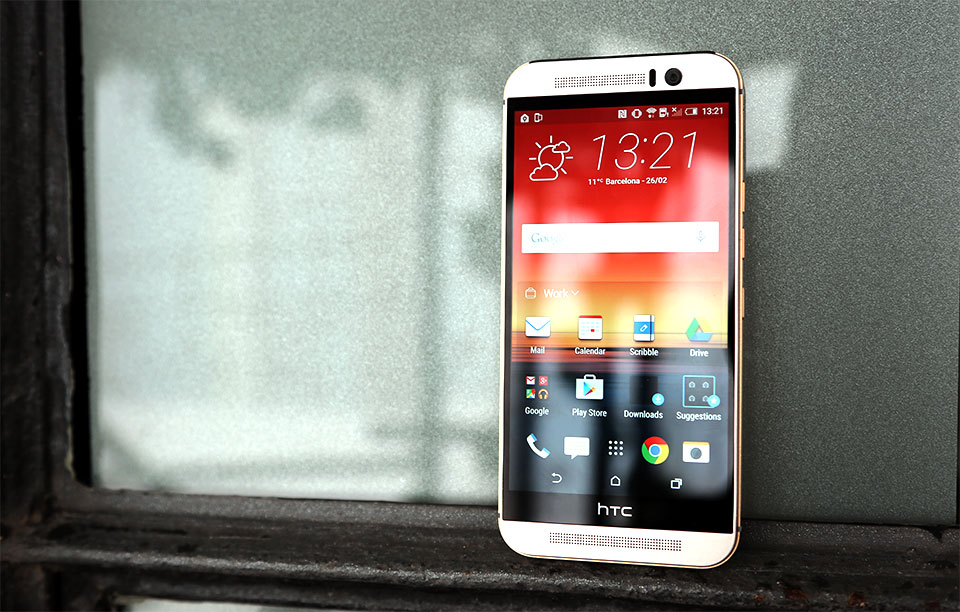
HTC One M9 Preview

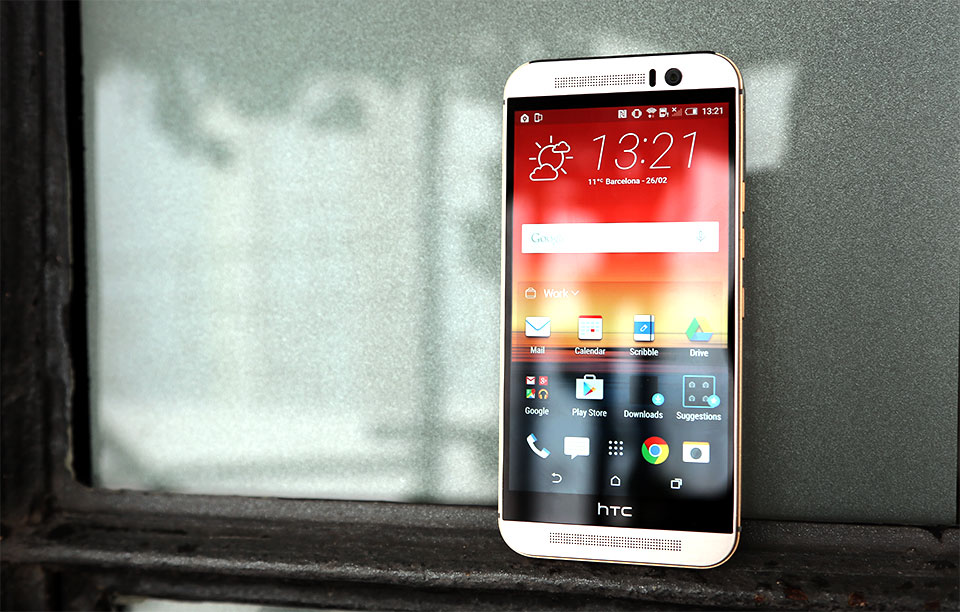
The first thing you will probably notice about the HTC One M9 is that it looks the same as the previous model. It’s probably because of the fact that HTC knows when they’re doing a great job and don’t wish to change the design too much. In short: If it’s not broke, don’t fix it.

But what exactly is new inside the HTC One M9 if the design looks the same, you might ask. Well, there are quite a few changes made to the new smartphone but not all of them are for the better.

Here is our HTC One M9 preview.

The build quality on the HTC One M9 is, as always, great. The new generation smartphone is a tiny bit narrower, fatter and shorter than the previous M8 model. The chassis of the new mobile phone is great. It’s very fast and we didn’t face any problems with the HTC smartphone, even though it uses the same Snapdragon 810 chip found in LG’s G Flex2 (but to be fair, we haven’t encountered any serious issues with LG’s mobile phone, either). The device performs really well, mostly because it has 3GB of RAM which made browsing the web and switching between apps a walk in the park.

An annoyance regarding its design is the metal lip running around the phone’s edge. This was put there by HTC to help you get a better grip of the device. It’s nice that HTC actually listened to the feedback from its customers but the metal lip can feel awkward at times, especially when it sticks into your palm. Small design touches like this one seem very strange and foreign when you’re used to the more comfortable HTC One M8.

These little touches are what the philosophy of the One M9 design is. The company tried to make a more premium smartphone but the M8 was such a good phone that it didn’t need any serious changes. HTC moved the power button under the right edge of the M9 and the volume rocker was split into two buttons. A MicroSD slot can still be found above. The company also made one of the speaker grilles smaller in order to make room for the somewhat bigger front facing camera.

HTC felt there wasn’t much to change in terms of design and we mostly agree with its decision to keep things clean and familiar.

However, there are some changes that we don’t really agree with. One of these changes is the 20MP camera on the back of the M9. The company decided to move the UltraPixel technology on the front facing camera and use a 20MP Sony sensor on the back. Our early tests have shown that the new camera seems a bit worse than the camera found on the previous generation. Color temperature and white balance seem inferior right out of the box. Photos taken with the M8 were a lot better than the ones we took with the new M9. Using the M9 in good lighting conditions proved to work a lot better and we hope that future software updates will fix all the issues with the camera.

Speaking of software, HTC made a lot of changes to the Sense Seven UI. We’ve always enjoyed the Sense user interfaces but it looks like they’re losing momentum seeing how several other phone manufacturers are making their own UIs. The new UI seems to go on uncharted territories for the company but the changes are actually some of the best we’ve seen from HTC.

BlinkFeed is still present and it’s still filled with news from your preferred sources but now it will also analyze your past preferences and location to give you more accurate suggestions. Also, the apps you download go inside a folder called Downloads rather than on your home screen. This is truly a nice touch, seeing how the home screen can get a little messy.

HTC One M9 Customization Features

What’s more important is that now you can customize the themes on your phone. You can customize pretty much everything from the icon sets to the launcher to the wallpaper in order to meet your desires.

HTC offers some themes to choose from directly out of the box but the company wants us to start sharing, making and even selling our own themes to others. When I first heard of this I wasn’t exactly sure how to react, seeing how in the past we saw how tweaking with the design can turn a standard look into an unrecognizable mess. If you don’t know what I’m talking about, just think about MySpace.

But this isn’t the case. If you scramble around tiny parts from the official themes you end up with something that looks pretty bad but not entirely horrible. The best results we’ve had were when we loaded an existing theme and swapped only small things around, such as the icon sets and the keyboard.

The Sense Home widget raises the most important question mark for now. This is a widget that allows you to quickly access the apps it thinks you’re going to need, depending on where you currently are: Out, Work or Home.

There is a folder called Suggestions that highlights apps you may find useful, based on your history of usage. However, HTC didn’t make it clear if it’s going to partner with third parties to offer you suggestions that have been sponsored. If this is the case, the widget may prove to be somewhat useless.

We don’t want to get into too much detail, seeing how we only tested the device for a small period of time and we’ll have to wait until we get our hands on a review unit to make a full HTC One M9 review. Nevertheless, it looks like HTC clearly went for polish instead of progress in this year’s generation of HTC One.

This seems only fair, seeing how we can’t expect companies to completely redesign everything from scratch year after year. The HTC One M9 is a really good smartphone but it’s not all that impressive. I guess only time will tell if these small improvements/differences will mean something to those considering purchasing one.

Image source: 1

Filed Under: Tech & Science Tagged With: HTC, htc one, htc one m9, htc one m9 camera, htc one m9 design, htc one m9 hands-on, htc one m9 impressions, htc one m9 review, htc one m9 software

Microsoft Lumia 640 Review

March 9, 2015 By Roxanne Briean Leave a Comment

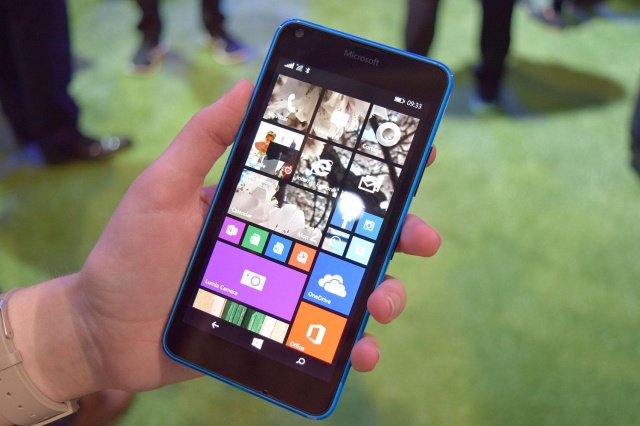
Microsoft Lumia 640 review

Microsoft really does a great job when it comes to building a budget smartphone. The company’s latest line of Lumia smartphones, the Lumia 640 and the 640 XL are very attractive and also have reasonably powerful specs, even though they’re relatively cheap.

The new Lumia smartphones from Microsoft are very similar in terms of design to the previous Nokia models. It’s true that neither of the two smartphones is to die for but they are pretty nice, not to mention that they’re both ready for the new Windows 10.

Here is our Microsoft Lumia 640 review.

Design

Microsoft Lumia 640 review

Microsoft tried to stay true to the styling of Nokia on every Lumia smartphone they released under its name and the Lumia 640 is definitely not an exception. The smartphone comes with a colorful case that can be removed and replaced with another from the line-up offered by Microsoft. It’s made of a very sturdy and nice plastic that doesn’t look like it’s going to break or flex when put under a small stress. This is good news, seeing how most mid-range devices suffer from this problem.

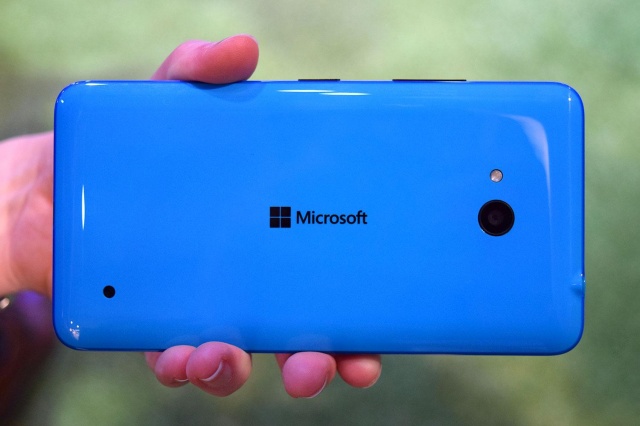
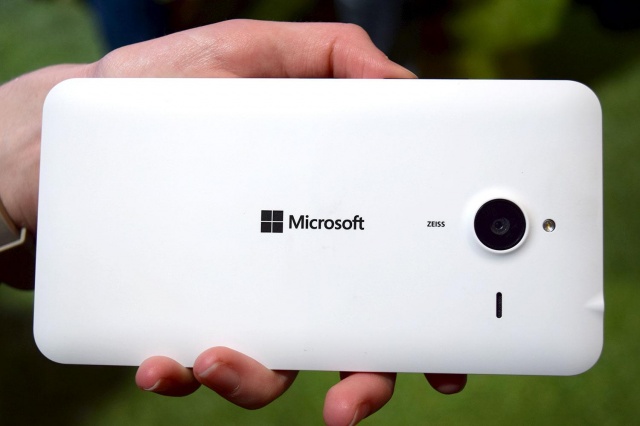
The Lumia 640 XL comes only in a matte finish, but there are plenty of colors to choose from, such as black, white, cyan, bright orange and neon green. The Lumia 640 comes in a two toned shiny plastic and is available in all of the colors listed above. The cyan back of the smaller Lumia 640 viewed in different lightings looks like it has different blue shades. The edges of the smaller smartphone also appear to be darker than its body.

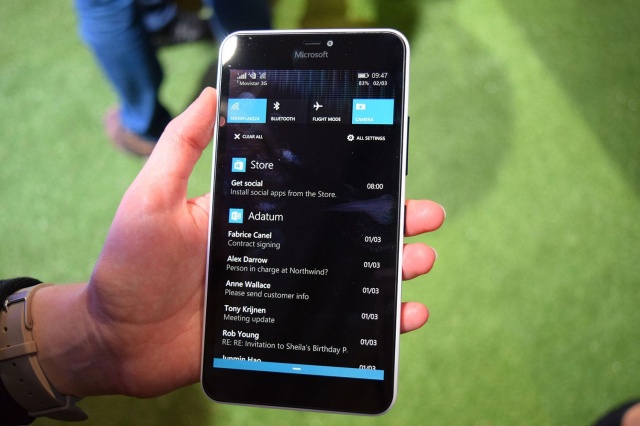
However, the two-toned effect on the back of the Lumia 640 comes with a downside. The shiny look makes it a fingerprint magnet. If you’re easily upset by fingerprint smears and dust then you would be better off choosing the matte version. Other than this, the only major design distinction between the two smartphones is their size. The Lumia 640 XL comes with a 5.7 inch display, which makes the 5 inch Lumia 640 seem rather tiny by comparison. The Lumia 640 XL is the same height as Apple’s iPhone 6 Plus.

Microsoft Lumia 640 review

The two Lumias are relatively thin and light, mainly because of their plastic casings but they do feel a little chunkier when compared to other smartphones from Nokia. This time, however, it’s Microsoft’s name that is branded on the devices, not Nokia’s. The tech-giant put its name on the back of the Lumia 640s and on their front top.

Based on looks, the Lumia 640 and the Lumia 640 XL are right at home between the existing line-up. While the colors may not be for everyone, there is always the possibility to buy a simple black or white back. Also, the cyan back looks very nice on the smaller device.

Hardware

It’s true that the specs on these smartphones aren’t exactly top-notch, but they are mid-range, to say the least. Both phones are powered by a quad-core 1.2GHz Qualcomm Snapdragon chip and come in two different options: 8GB of storage with 1GB RAM and 16GB storage with 2GB RAM. Both options offer a MicroSD card slot and you can expand the storage capacity by 128GB.

Both Lumias seemed responsive and fast when we tested them. Animations were really smooth, browsing was fast and everything seemed to work well. Both smartphones come with the full Office app installed and both offer OneDrive storage. On top of this, Microsoft is also offering 1TB OneDrive storage and a full year of Office 365 when buying either one of these two devices.

At this time, to have a powerful smartphone you don’t necessarily need the fastest processor on the market. This is why mid-range smartphones like these ones are very attractive. If you want a very reliable mid-range mobile phone and you don’t care if you have the best processor on the market, shiny features and a great screen resolution, the Lumia 640 may be the right choice for you.

Battery

We can’t really say if the battery will last as long as Microsoft claims it will but the batteries inside the two smartphones are quite big. The Lumia 640 XL comes with a 3,000 mAh battery and the smaller one comes with a 2,500 mAh one. Microsoft claims that the battery life on both Lumias will last for two days.

Camera

The Lumia line-up has always been great at taking shots. While the Lumia 640s don’t have incredible cameras, they both take pretty decent photos, mainly thanks to the camera software. You can adjust lighting, control exposure and have several effects at your disposal and you can also create living pictures that will show you the changes you’ve made to your image from start to finish in a format resembling GIF.

Lumia 640 shoots lesser quality photos, however. For some reason, the smaller Lumia comes with weaker cameras. It comes with an 8MP camera on the back and a 1MP camera on its front. Seeing how selfies are the new trend right now, we can’t understand why Microsoft chose to put such a small front-facing camera on its device.

Microsoft Lumia 640 review

The bigger Lumia 640 comes with far better cameras. It features a 13MP camera on the back and a 5MP camera on its front. The Lumia 640 XL is very capable of taking sharp selfies with its front-facing camera and great pictures with its back camera.

Windows 10

Both devices are running Windows 8.1 as Windows 10 is not yet available for mobile phones. However, both the Lumia 640 and the 640 XL are ready for Windows 10. The update to Windows 10 will come to these two devices as soon as Microsoft launches its new OS. The two smartphones perform very smoothly in Windows 8.1 and the Lumia Denim update works really well.

Wrapping up

PROS

– Great quality of plastic

– Compatible with Windows 10

– Great specs

– Lumia 640 XL has great cameras

– Both smartphones are affordable

CONS

– The devices are still running on Windows 8.1

– Lumia 640 doesn’t have great cameras

Verdict

Even though the two new Lumias from Microsoft aren’t high-end they are definitely nice. For their low prices, Microsoft clearly made some good mid-range devices.

Images source: 1, 2, 3, 4

Filed Under: Tech & Science Tagged With: lumia, lumia 640, lumia 640 review, lumia 640 xl, lumia 640 xl review, microsoft, microsoft lumia, microsoft lumia 640, microsoft lumia 640 xl, microsoft lumia 640 xl review, microsoft lumia 649 review, microsoft lumia review, nokia

  • « Previous Page
  • 1
  • …
  • 51
  • 52
  • 53
  • 54
  • 55
  • …
  • 114
  • Next Page »

Subscribe to Blog via Email

Enter your email address to subscribe to this blog and receive notifications of new posts by email.

Join 11 other subscribers

Recent Articles

police handcuffs man

German Man Probed In Poisoning That Killed 21 Employees Since 2000

June 29, 2018 By Kenneth Scott Leave a Comment

Chicken wings bar

Intoxicated South Carolina Man Punches Waitress Who Refused to Serve Him Alcohol

June 29, 2018 By Karen Jackson Leave a Comment

gaming

New Zealand gamer Who Flew Halfway Across The World for Virginia Teen Gets Shots By Her Mother

June 28, 2018 By Cristopher Hall Leave a Comment

party

Former Virginia Tech Freshman Sentenced to 50 Years in Prison for Stabbing a Girl to Death

June 28, 2018 By Roxanne Briean Leave a Comment

bonfire

British Couple Sentenced to Life in Prison for Torturing and Murdering French Nanny

June 27, 2018 By Deborah Campbell Leave a Comment

pay phone

Texas Father of Girl Disappeared in the 80s Ignored by Authorities

June 26, 2018 By Cristopher Hall Leave a Comment

bottled water

San Francisco Woman Threatened to Call Police on Girl Who Sold Ice Water for Disneyland Trip

June 25, 2018 By Roxanne Briean Leave a Comment

Maplewood Park

Missouri Man Robbed by Date and Accomplice in Park

June 22, 2018 By Nancy Young Leave a Comment

coding

New York Man Sentenced in Cyberstalking Former Girlfriend, Mailing Drugs to Her Dorm

June 22, 2018 By Deborah Campbell Leave a Comment

headphones

Bose Poised to Launch Sleepbuds, In-Ear Headphones That Help You Sleep

June 21, 2018 By Nancy Young Leave a Comment

Police light

Intoxicated Female Driver in Custody for Pulling Arresting Officer by the Hair

June 21, 2018 By Kenneth Scott Leave a Comment

kitchen

Restaurant Manager Arrested and Charged in Shooting Death of Co-Worker over Negative Yelp Reviews

June 20, 2018 By Karen Jackson Leave a Comment

plastic container

Pennsylvania Couple Charged in Violent Death of Infant Discovered Buried in Cat Litter

June 19, 2018 By Cristopher Hall Leave a Comment

tailpipe

Minnesota Teen Gets Head Stuck In Oversized Tailpipe Winstock Music Festival

June 18, 2018 By Karen Jackson Leave a Comment

Pages

  • About Us
  • Contact us
  • Privacy Policy
  • Privacy Policy GDPR
  • Staff
  • Terms and Conditions

Recent Posts

  • German Man Probed In Poisoning That Killed 21 Employees Since 2000 June 29, 2018
  • Intoxicated South Carolina Man Punches Waitress Who Refused to Serve Him Alcohol June 29, 2018
  • New Zealand gamer Who Flew Halfway Across The World for Virginia Teen Gets Shots By Her Mother June 28, 2018
  • Former Virginia Tech Freshman Sentenced to 50 Years in Prison for Stabbing a Girl to Death June 28, 2018
  • British Couple Sentenced to Life in Prison for Torturing and Murdering French Nanny June 27, 2018
  • Texas Father of Girl Disappeared in the 80s Ignored by Authorities June 26, 2018
  • San Francisco Woman Threatened to Call Police on Girl Who Sold Ice Water for Disneyland Trip June 25, 2018

Categories

  • Business
  • Entertainment
  • Finance
  • Headlines
  • Health
  • Life
  • Nature
  • Science
  • Sports
  • Tech & Science
  • Travel
  • Uncategorized
  • United States
  • World

Copyright © 2026 ArgyllFreePress.com
About · Privacy Policy · Terms of Use · Contact