With YouTube Gaming and now the new GeForce Experience from Nvidia, streaming has never been easier!
There are two modes of game streaming. The first one is streaming via a video feed that showcases what you do inside the game. The second one is about how you can play a game remotely through another device that streams the experience.
Nvidia is well aware that both of these modes are becoming more and more popular with each passing year. That’s why they are introducing a new GeForce Experience, which lets users do both things much more easily.
It has begun rolling out in beta form, but I would recommend patience on your behalf. They still need to polish everything before it’s suitable for the end-consumer.
The update that introduces an on-screen overlay will be available for all of your games. You don’t need to set anything prior to your gaming session. All your tools are already there, if you want to use them of course. You can access it via a keyboard shortcut.
If you don’t want to use this feature, just don’t. It won’t stand in your way, it’s totally unobtrusive.

Instant replay and video recording resemble Nvidia’s ShawdoPlay function. Basically, that’s exactly what they are, but in a more straightforward and intuitive format.
The max res you can use is 4k at 60 frames per second, this means that for an hour of recording you’ll need roughly 60 gigs of free space.
You have the option to let the Nvidia GPU run a DVR service in your background. It automatically records the last 30 seconds – you can set it to as long as 20 minutes. Afterwards, they are available for replay.
The most important feature is the sharing element. The new overlay is so much more easier to use and uploading is reliable and quick. Trim your video as you like and then upload it to YouTube.
Those of use who have done gameplay walkthroughs or Let’s Play vids know how trimming a video is a huge chore. There are no settings you need to tweak before-hand. The new GeForce Experience might just be a knight in shining armor.
Play a match of LOL, record it, and upload a high-quality video to YouTube. Just Fantastic.
There’s also a broadcast to Twitch option. Yet again, Nvidia emphasizes quick access – click one button named Start to get your session live.
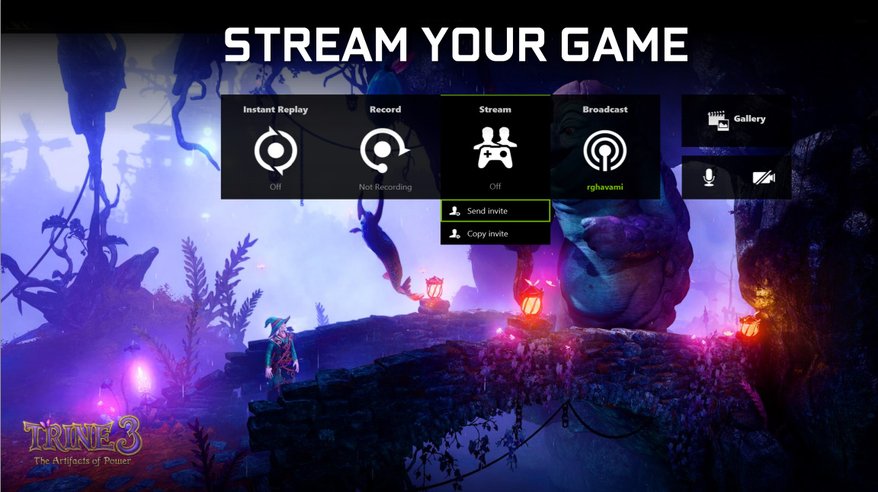
The last feature, that we know of so far, adds the possibility of inviting your friends to join your game via e-mail or a shareable URL. When and if they accept your invite, they will be able to either watch your session, play with you in co-op games or game in your place.
Everything will be done in a 720p res at 30 frames per second and your mates will need to run Chrome and a plug-in – on PC or Mac.
Unfortunately, there is no Chromebook support at the moment, but who knows what the future holds for us?
I’m quite curios on how this will evolve. What about you?

Michael Turner