Argyll Free Press

Growing News Network

Tuesday, May 5, 2026
Log in
  • Business
  • Finance
  • Sports
  • Tech & Science
    • HP Envy 4500 Review
    • LG Optimus 170 Review
    • iPod Touch 6th Generation Review
    • HTC One M8 Accessories Set-up
    • Surrealist Games You Must Play
    • Hisense Sero 8 Review
    • Dell Latitude e7440 Review
    • HP Laserjet 1536dnf mfp Review
    • Garmin Fenix 2 Review
    • Skype Vs Viber
    • Best Video Conferencing Software
    • Sony mdr 1r Headphones Review
    • Canon Rebel t3i Review
    • Sennheiser Momentum 2-0 Review
  • Travel
  • Headlines
  • Health
  • United States

Here’s How to Play the New Doom Level, Created by John Romero

January 18, 2016 By Roxanne Briean Leave a Comment

Here's How to Play the New Doom Level, Created by John Romero

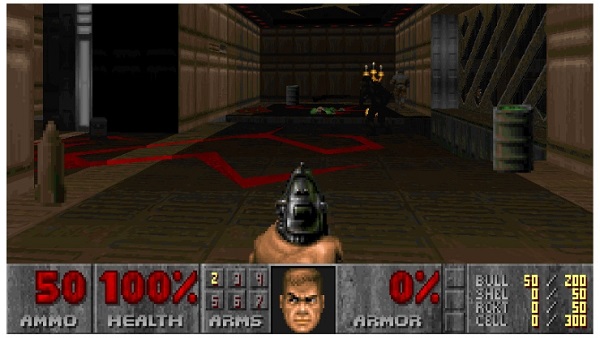
Here’s how to play the new Doom level, created by John Romero co-developer of the first Doom title. Roughly 21 years after the original Doom greeted us with its awesome destruction, Romero decided to jump on its revival bandwagon after fans across the world tried to port it to unlikely platforms – think of the Apple Watch and Apple TV.

The level boasts a new area where the player can shoot monsters and villains.

It took two weeks of Romero’s spare time to build the level, according to him. The game developer used the 1990’s Id Software modding tool, Doom WAD, in building the new level, as to be in touch with the same restriction and capabilities as back then.

Romero calls the level E1M8B – which is the boss level replacement for the level E1M8 almost 22 years later, says the developer.

It’s the 8th and last map of Knee-Deep in the Dead – the first episode of Doom.

In order to play it, you need the original Doom game, and ZDoom or similar software and tools. The new map can be played in deathmatch, co-op and solo. You can buy the game from Steam.

  1. Download the free Zdoom port.
  2. Copy the Doom.wad file to the Zdoom directory. Remember to unzip the installation package first.
  3. Drag and drop the new level – e1m8b.wad on top of the .exe, thus launching the game with the new level.

Romero is not part of the dev team that’s working on continuing the popular franchise. Bethesda took control over the series, and it plans on releasing a new modern Doom game sometime in 2016. There is no info on when that’s going to happen, but due to Amazon and the company’s confused bunch of employees, a potential leak was displayed a while back – June 30th, 2016.

Given the recent development – fans trying to port it to smartwatches, Bethesda revitalizing the franchise and Romero building another level, it’s quite impossible to see that Doom will die out anytime soon.

Did you know that there’s a dedicated gaming community called DoomWorld that has been modding and playing the game for about 20 years now?

Talk about loyalty.

The 2004 Doom 3 achieved Gold status, and it witnessed a huge popularity with fans and critics considering it a great sequel to the series. In 2012 Bethesda released a much improved Doom 3 version called Doom 3 BFG Edition – stylized as D00m 3 BFG Edition.

What we’ve seen so far, the Doom 2016 builds on top of the franchise, steering away from the 2004 title, but just slightly.

Download the new Doom level e1m8b.zip right here.

Image Source: 1
Filed Under: Headlines Tagged With: Classic Doom, Doom, Doom Game, Doom Video Game, Game, John Romero, New Doom Level

Microsoft HoloLens to be Wireless, and Last Up to 5.5 Hours

January 18, 2016 By Roxanne Briean Leave a Comment

Microsoft HoloLens to be Wireless, and Last Up to 5.5 Hours

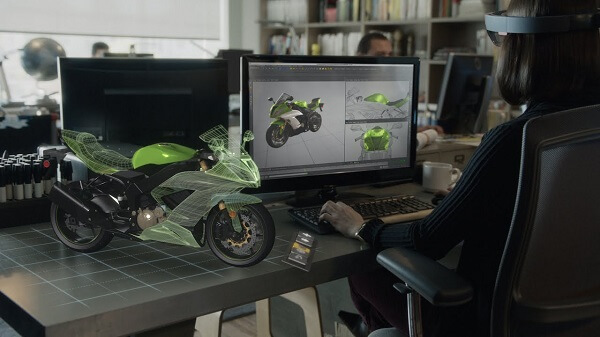
Microsoft HoloLens to be wireless, and last up to 5.5 hours on a single charge. The company will start shipping the Developer Edition of the HoloLens within the next couple of months. The price? Hope you’re sitting down for this – $3,000.

Microsoft Bruce Harris spoke about Microsoft’s augmented reality headset during an event in Tel Aviv. He notes that any universal Windows 10 app will work on the device, adding that if developers want to take advantage of all of the headset’s features, they will have to build 3D apps.

Harris says that the headset will also be connected to the internet and other units. This means that if you have friends that own a HoloLens you can all interact with each-other in the same virtual world.

The AR headset is expected to go under the 2.5 hour mark for more demanding tasks so game sessions, or whatnot, will be somewhat short for early adopters. The device’s battery life is quite disappointing, but considering how powerful the machine is, it isn’t shocking news. The machine projects hologram-like images that looks like they were projected against real-life objects in the consumer’s room.

According to Harris, battery life will be improved with time, and the projections from the device will look exactly like watching videos on a 15-inch screen from 2 feet away.

Unlike the device’s rivals, the HoloLens will be completely wireless, and the device uses Bluetooth and Wi-Fi to function. Also, there will be no wired-version of the device, says Harris.

We thought that $600 for a virtual reality machine – Oculus Rift; was incredibly steep, and the rumored $800 for PlayStation’s VR was just downright insulting, but $3,000 for the HoloLens dev kit has put things in perspective.

Yet, still, we don’t want to jump on the band-wagon and bash Microsoft’s developer kit just yet. We have to see it in action first. The hefty price tag will most likely drop a few pounds, and bring it to more affordable levels, but we are quite shocked given this initial price confirmation.

The first Oculus Rift dev kit was priced at $300 – with re-sellers putting it on Amazon and Ebay at well over $1,000.

At the moment of writing this, Microsoft has not specified a release date for the consumer-ready model of the HoloLens.

Will the HoloLens be even more costly when it will hit its consumer street date? Or will we see a drop in price? Regardless, we hope that Microsoft’s HoloLens will have enough content to make use forget that humongous price.

Image Source: 1

Filed Under: Headlines

Dell Latitude E7440 Review – The Office Ultrabook

January 15, 2016 By Roxanne Briean Leave a Comment

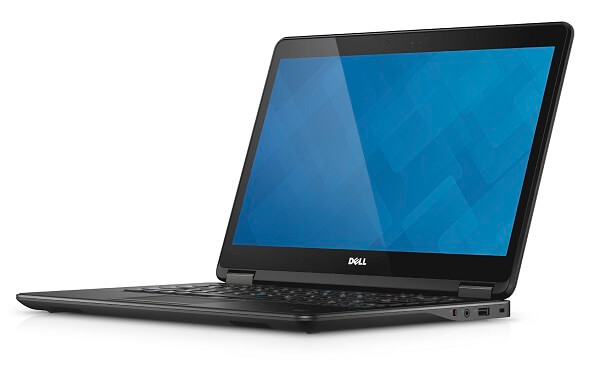
Dell Latitude E7440 ReviewDell is well known for its ability to produce high quality laptops and ultrabooks that can compete head to head with most portable computers that were designed for business purposes and less so when it comes to entertainment. The way they achieve that is through the very way ultrabooks are constructed – with the basic principle that they employ high-end specifications at the price of battery life.
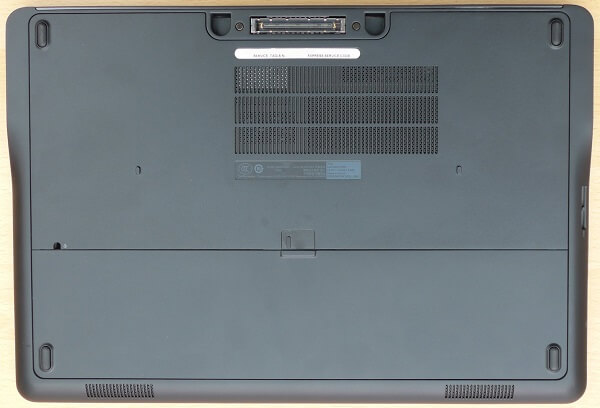
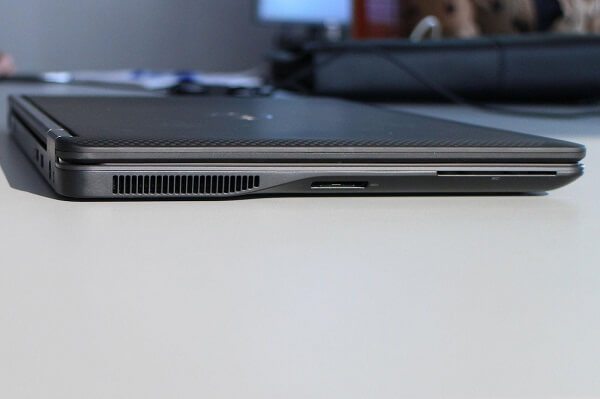
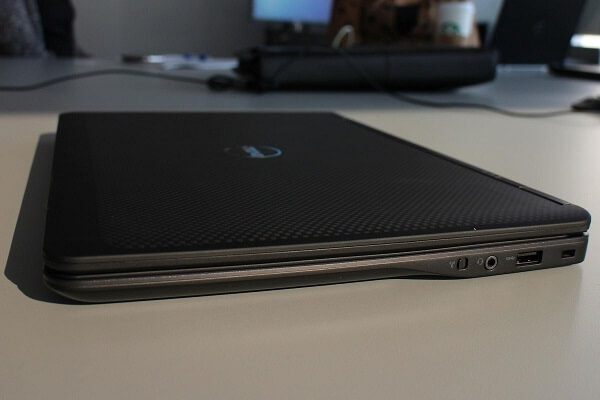
The Dell Latitude E7440 is no exception and is actually forced to face these issues head-on on a number of fronts. It finds itself in the midst of a market that – although not lacking popularity and demand – is not void of many other competitors. Many titles such as Sony Vaio, Lenovo and HP bring their own take of capable hardware into the fray and come at a point where it’s hard to differentiate between the various models.

It is also a general rule that most ultrabooks don’t go easy on the price tag either so picking one out for your office-related tasks and needs may be a relatively tricky thing to do. So let’s take a closer look at the Dell Latitude E7440 and see if it has what it takes to come out superior to all the other highly successful models that are present on the market.

Pros:

  • Great hardware specifications
  • High build quality
  • Sturdy
  • Replaceable battery
  • HD display

Cons:

  • Expensive, especially when diving into the optional features
  • Rather poor battery life with no alternatives,
  • Not many security options unless you’re willing to pay extra

Dell Latitude E7440 Design

When it comes to the Dell Latitude E7440’s design, opinions may very well be split into two definite categories. On one hand we can obviously see the build quality and how the way the device is made simply inspires sturdiness. Coming with a durable aluminum exterior, featuring a powder-coated base only hides the real titan that is underneath. The chassis of the Dell Latitude E7440 is composed of a tri-metal compound that has undergone and passed intensive MIL-STD-810G testing.

Dell Latitude E7440 Design

Then, on the opposite end of the rope, you will find opinions of the individuals who prefer devices more like the HP Elitebook Folio 1020 G1. Ultra slim, smooth and sleep looking, the kind that most likely takes its design inspiration from Apple devices. Compare the Dell Latitude E7440 to one of those and the ultrabook suddenly feels bulky, heavy and thick. Even if the numbers do not necessarily pertain to these impressions.

The overall dimensions of the Dell Latitude E7440 are 13.2 x 9.1 x 0.8 inches in width, height and thickness, weighing a total of 1630 grams with the battery included. Compare it to HP EliteBook Folio 1020 G1’s dimensions: 12.2 x 8.27 x 0.62 inches and 1200 grams in weight. The difference is not immense and yet, the overall feel of the Dell is a lot different than the one of the HP.

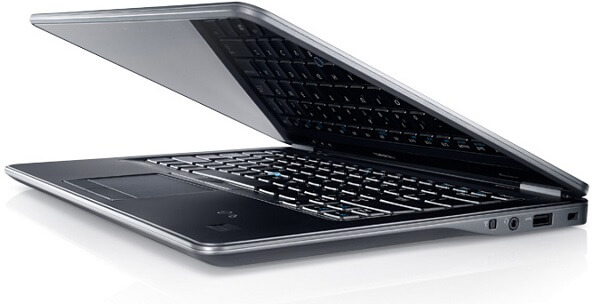
The outer shell featuring metal and carbon-composite materials used in its construction doesn’t exactly spell out sleekness and a suave coat of delicacy hiding the great power that the ultrabook has inside. It goes for a matte black finish instead (at least on the default model). The lid is made of a soft-touch carbon fiber material with a rugged surface. The hinges that connect the lid to the body of the Dell Latitude E7440 ultrabook are made of reinforced steel and allow the lid to open up to a satisfactory angle.
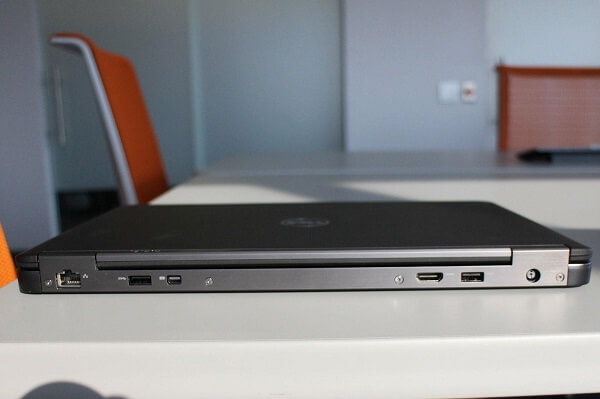
In terms of port placement and more specifically the types of ports that the Dell Latitude E7440 offers its user, it’s obvious that the ultrabook takes upon its role of a business laptop seriously. You can find an USB 3.0 port on the right hand side, along with the wireless switch and a 3.5 mm headphone jack slapped in between the two. On the opposite side you can find the SD and smart card ports. On first look you’d think that’s about it, but the back edge of the Dell Latitude E7440 hosts many surprises. You’ll find another 2 3.0 USB ports, a mini-DisplayPort (surprisingly to say the least), an HDMI output and a full-fledged Ethernet port to allow direct connectivity to the internet.

Dell Latitude E7440 Left Side Design

Dell Latitude E7440 Right Side Design

While the mere presence of an Ethernet port is something extremely well received on laptops in general and – to some degree – excuses some of that extra thickness that the Dell Latitude E7440 packs, the decision to place some of these ports on the back of the E7440 is not optimal. The HDMI and mini-DisplayPort were wise to be placed there, but you may find that USBs are not that pleasant to reach and operate when on the back of the ultrabook.

Dell Latitude E7440 Back Design and Ports

For some reason, the designers decided to place the LEDs that signify whether the laptop is on and/or connected to power on the back too, which is a bit of a baffling fact for me.

Dell Latitude E7440 Display

Dell Latitude E7440 Screen

Probably part of the reason the Dell Latitude E7440 jumps so high up on the price scale on some of the configurations as there is an optional touchscreen capability included in the list. On the other hand, the default model only hosts a matte finish display that helps reduce glare and makes for a fairly bright screen scoring 351 nit brightness peak.

The 14” display is undeniably a strange size to go for, being marginally larger than the classic 13.3” but not quite as large as the 15” version that laptop models usually aim for. However, the display can go up to a resolution of 1,920 x 1,080, giving anything you view on it an amazing amount of sharpness and detail.

Some figures suggest that the Dell Latitude E7440 display isn’t quite the perfect tool for color accuracy – scoring an average DeltaE of 7.6. In other words, any kind of work regarding graphic design that relies heavily on color hues would not render you amazingly great results if you were to use the E7440 for it.

The display is a LED-backlight LCD which means that although you get a great, crisp quality along with it, it is one of those devices that are particularly power hungry and tax your battery a lot more. You may find yourself tinkering with the display’s brightness settings to manually reduce power consumption when on the road for example.

If you opt for the touchscreen capable display, the price does spike up a fair amount, but you’ll find the screen to be responsive and resilient. Covered from edge to edge with a layer of Corning Gorilla Glass NBT, the display doesn’t seem to collect smudges and fingerprints.

Dell Latitude E7440 Specs & Configurations

Dell Latitude E7440 Hardware

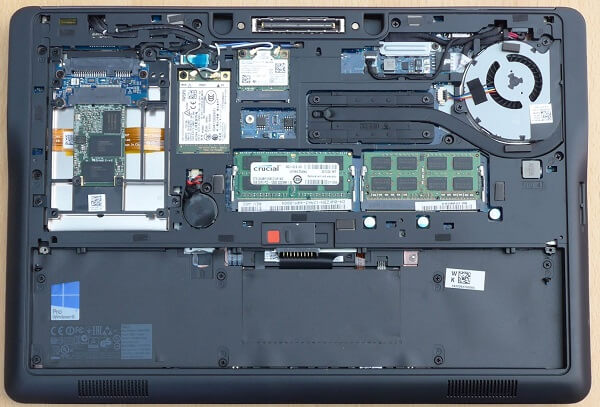
There is a fair amount of tweaking you can do before you purchase one of the Dell Latitude E7440 ultrabooks in the sense that they offer a variable setup depending on how much power you are truly looking for in a business laptop.

The basic model will offer you a 4th generation Core i5 processor (either the 4310U, 4300U or the 4210U versions), 4 GB of DDR3L @1600 MHz RAM memory, Intel Integrated HD Graphics 4400 and a regular 500 GB SATA hard drive. If we are to take only that amount of specifications into account, then you’ll find that the Dell Latitude E7440 ultrabook has more than it would ever need for a business laptop. Depending what your line of work really implies, but the hardware that has been put into the 0.8 inches of thickness should more than suffice your office work smoothly and without interruption. While the core processing unit is a relatively old piece (released somewhere in 2013), it’s still a fairly fast processor that makes use of an internal, integrated GPU to handle the graphic rendering of programs and applications.

That being said, this is not the kind of laptop you’ll be using to handle graphic design or music production as it will turn out to be quite overwhelmed by that degree of hardware requirements. However, all office work-related types of activity will have little to no problem being handled by it. Multitasking capability is empowered thanks to the generous amount of RAM and the highly capable processor, however. While I have mentioned this before, the fact that Dell Latitude E7440 offers you Ethernet connectivity is something that you rarely find on laptops and notebooks alike these days and will give you the best an internet connection can ever offer.

The Dell website lists the best configuration that the Dell Latitude E7440 ultrabook can go up to as being a setup that makes use of aan Intel Core i7 4600U model, up to 16 GB of DDR3L @1600 MHz of RAM and a 512 GB Solid State hard drive. While the addition of an ultra fast SSD hard drive into the fray is something that any user will be thankful for, there doesn’t seem to be any possible upgrade to the graphics processing unit. Meaning that neither does the integrated GPU receive an uplift on the high-end version of the Dell Latitude E7440, but there is no option to add a dedicated card either.

Dell Latitude E7440 Features

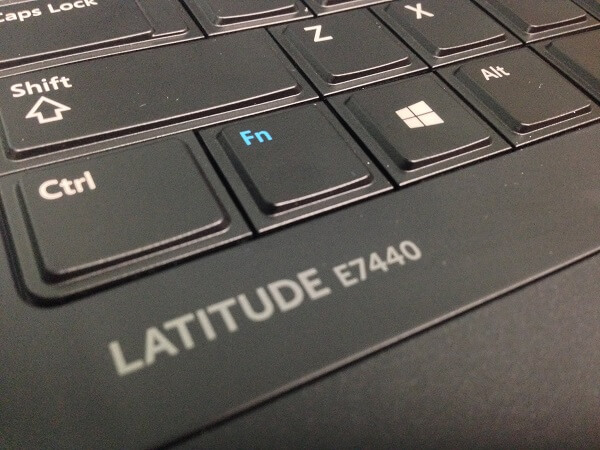
Dell Latitude E7440 Keyboard

Dell Latitude E7440 Keys

The keyboard that the E7440 ultrabook comes with is a fairly capable addition to the laptop, albeit it lacks a full format – the type that incorporates a num pad on it too. You do, however, still get all the necessary utilities on it, along with basic controls made available through the function button. There is also a tiny, blue pointing stick in the middle of the keyboard that will allow you control things from that side just as well.

The keys are separated from one another, improving your accuracy by a decent amount. The buttons overall feel punchy and responsive without being noisy. There is a small issue with the central part of the keyboard as it tends to feel bouncy and a little too flexible. However, that has not felt like a huge hindrance from a proper typing experience so far.

The most notable part of the keyboard is the existence of backlighting possibilities. Once again, the type of feature you don’t realize the true benefit of until you’ve tried it, but backlit keyboards can be a lifesaver in multiple situations. And because the backlighting has 4 separate levels, you can adjust it as needed to reduce power usage for example.

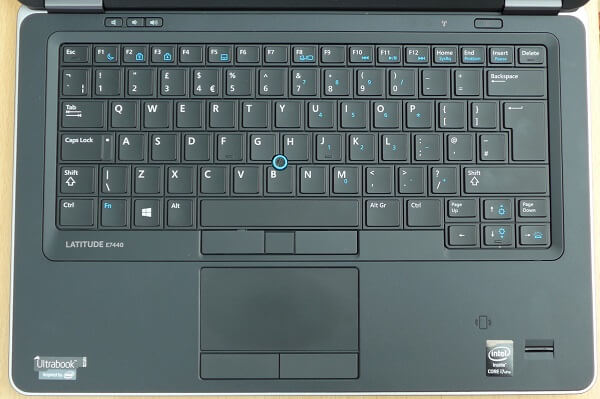
Dell Latitude E7440 Touchpad & TrackPoint

Dell Latitude E7440 Above View

One of the biggest issues that anyone who has ever used a laptop will most likely report will be the accidental tap they may do onto a touchpad without realizing while editing a document, resulting in multiple moments of frustration. While the Dell Latitude E7440 didn’t seem to display such an issue with the trackpad, there is a chance you may fall in a similar trap with the track point instead.

Dell Latitude E7440 Trackpoint

Regardless, the trackpad itself feels smooth and highly responsive and comes with the better alternative of two separate buttons placed at its bottom that will mimic their correspondents on a mouse. It’s been built to support Windows 8’s gestures so you will be able to make use of some degree of multitouch control.

Dell Latitude E7440 Security features

Because no ultrabook can truly be taken seriously as a business laptop unless it offers some degree of security, the Dell Latitude E7440 has brought its own input in this perspective with both default and optional security options. The ultrabook is equipped with the latest Intel vPro technology which allows both secure activity as well as remote access and control features.

Encryption, contact-less smart card readers, secure credential storage thanks to a FIPS 140-2-certificed TPM, Dell ControlVault meant to apply another layer of hardware security – all these are security features that you can make use of on the Dell Latitude 7440.

Unfortunately, however, most of them do not come by default and will only be able to be obtained as an optional purchase or only available on the higher end models of the Dell Latitude E7440. A very good example is the feature that allows remote data deletion through an Intel vPro extension.

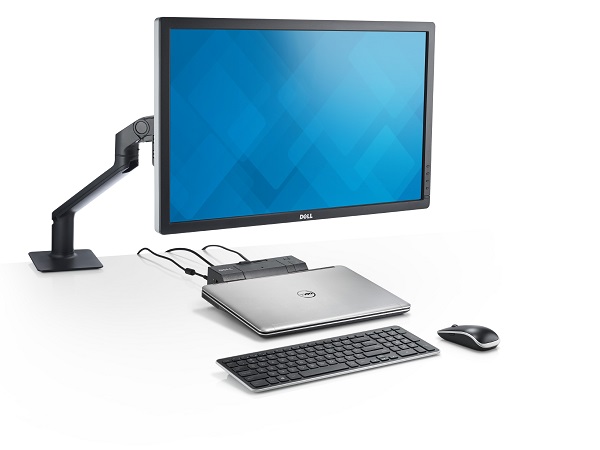
Dell Latitude E7440 Docking Station

Dell Latitude E7440 Docking Station

And while we are on the topic of optional purchases, Dell offers a docking port that is priced at somewhere around $270 which will allow you laptop to connect wirelessly to peripherals such as mice and keyboard as well as monitors. While this is one way to not have to rely on external cables, it is not as highly performant as a straight out, cabled connection.

Dell Latitude E7440 Battery Life

The battery life of a portable computer, and an ultrabook meant for business purposes at that, is one of the most important aspects that you should worry yourself with. Sadly, the 4-cell 45 Whr Lithium Ion battery did not seem to fare amazingly well. With brightness set on medium and basic office work usage, an entire charge lasted somewhere around 7 hours at best.

And it’s quite a shame that you can’t exchange your battery for a stronger power pack either as the 45 Whr seems to be the most capable available pack on the Dell website. Charging, however, seems to be fast enough as it will most likely take between an hour and an hour and a half to get a full charge back on this Dell Latitude Laptop.

Dell Latitude E7440 Verdict

All in all, the Dell Latitude E7440 seems to be a very sturdy choice for anyone willing to purchase a business ultrabook. The website and qualified retailers seem to offer a fair amount of customization along with it, even though two major aspects of it are bluntly left out. More specifically, the GPU and the battery power pack.

The downside of the laptop in question is, however, its pricing. While a lower end model of it won’t take you much higher than $850, the high-end spec versions can go to as much as $2,000. Surely, most of that would be caused by things such as touchscreens and other optional features, but it’s still something to take into account, especially given the fact that you’re not exactly getting the absolute best hardware specs out here with the Dell E7440. However, in the end it comes up as being superior to many other Dell business laptops, thanks to the Latitude E7440 specs but design and resilience too.

Image Source: 1, 2, 3, 4, 5, 6, 7, 8, 9, 10, 11

Filed Under: Headlines Tagged With: dell business laptop, dell business ultrabook, Dell Latitude E7440, dell latitude e7440 review

The Tale and Gadgets of CES 2016

January 13, 2016 By Roxanne Briean Leave a Comment

CES 2016 Consumer Electronics Show

The Trends of CES 2016

It’s virtually impossible to attempt to cover every crazy little thing and gadget that happened and was showcased at CES 2016. Every single year seems to maintain a linear level of wacky, but that’s only because we always compare it to what we’ve seen last time. Last year we had weird, smart pacifiers and portable photo printers, this year we have wireless pregnancy tests and a completely wireless phone charger that is making me as excited as it’s making me uneasy. See what I mean?

The world moves forward and while we may be able to adapt to the changes at an amazing rhythm, the Consumer Electronics Show is still one of those places where we’re truly given reasons to marvel. And considering we live our days throughout the year having most of these things spoiled by nosy internet diggers and various types of leaks and rumors alike, that’s saying something for sure.

So CES 2016 has finally come to an end and there are some trends that we can define the year by. The most prominent of them all is the presence of car technology. This may not be new as geeks and automotive developers alike turn into excited kid-in-a-candy-shop-like creatures at the mere mention of beautifully lit autonomous cars that talk back to you in a pre-recorded voice of an attractive, British accented young lady. Or handsome young man, take your pick. 2016 is definitely a year where automobiles shined once again and showcased us where we should expect the industry to be in 5 years and 15 years from now, respectively.

Drones in all sizes and pocket gadgets were omnipresent too, whipping past the visitors’ ears in the never ending undertone of buzzing tech and the distinct smell of heavily polished devices. Full-fledged men looking awfully lost and confused from far away, making unexplainable hand motions, turned out to be lost in virtual reality as many of the showcased sets of headgear awed and gave way to a new age of gaming.

And because the market seems to always be able to handle a few more fitness trackers that come in a huge number of shapes and sizes, you could find a whole bunch of those too. And because you also need to store all that healthy food that the fitness trackers tell you to eat in order to lose weight, Samsung came up with a smart fridge that gives you a little piece of its computerized mind too.

CES 2016 Showroom

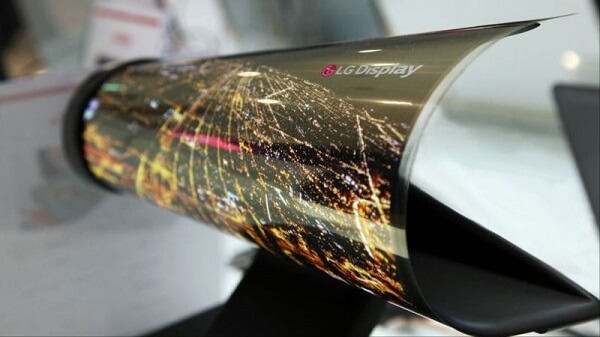
And what kind of electronics show doesn’t have robots in it? Without an unfeasible amount of HD and Ultra HDTVs beaming colorful images and vibrancy that goes way ahead of how things look in real life? Not to mention that one that everyone agrees was an absolutely convincing proof that we are living in the future – the rollable LG display.

It’s hard to choose which of these gadgets and new-gen devices were the most outstanding. It would be simply unfair to have to take our pick of, say, 5 or 10. Because of that, we’ll leave it as an open, unlimited list of the many, many things that deserve a mention following the shows at CES 2016.

The Baffling Gadgets of CES 2016

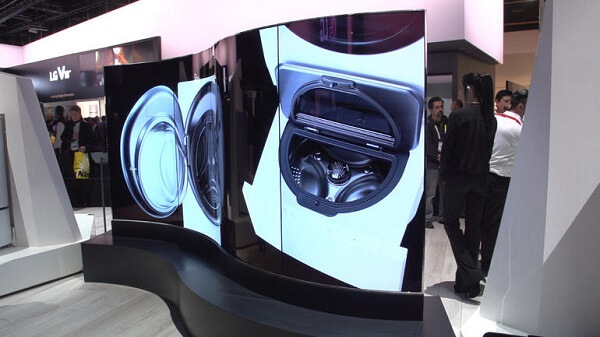
  1. CES 2016 – LG’s Dual-Sided OLED Video Wall and the Fabled Rollable Display

We’re adding them both here because they’re both products of LG and because they kind of resemble each other to some extent.

The dual-sided video wall is probably one of the craziest ideas for a TV anyone could have ever come up with. And frankly, I’m unsure to what length of applicability it could ever go to. While the design of it all is downright outstanding and really something you would expect to see in some Sci-Fi piece of work, I’m not sure who would consider this one a viable option for their homes.

CES 2016 1.	LG’s Dual-Sided OLED Video Wall

And that is simply because I don’t exactly see why you would want to watch anything on this squiggly display that is bound to make things look a little strange. Same goes for the ability to watch anything on either side of the TV. Most likely, this will make it into a great advertising tool for brands and companies – I can totally see these gracing malls and shopping centers everywhere.

Then there’s the LG rollable display that made the technology headlines for about 3 days after it first made it into daylight. It is basically an 18 inch super thin, super flexible sheet of a display that shows ridiculously large amounts of potential for the development of mobile devices in the not-so-far future. Does this mean we should be expecting rolls o’ screen to be the kind of thing you take with you along your portable, wireless mouse and keyboard? Chances are that yes.

CES 2016  LG rollable display

  1. CES 2016 – The Batmobile. I mean the Faraday Future FFZero1 Concept.

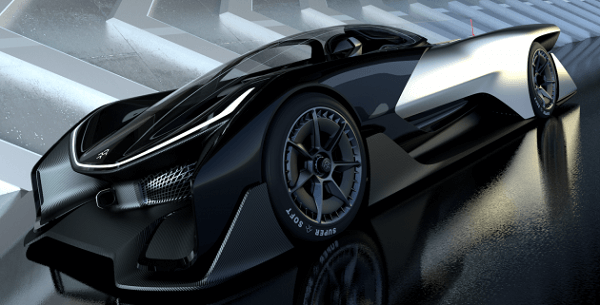
This is pretty much as close as anyone can get to a real Batmobile. No kidding either, even the interior has a striking resemblance to the way it look in the 90s series of the Batman Animated Series. The vehicle is, naturally, only a concept and not fully functional (sadly), but it’s fully electric, can hit 60 mph in about 3 seconds and can go as fast at 200 mph. But it can’t shoot missiles or eject the driver through the roof with the use of parachutes. Yet.

CES 2016 Faraday Future FFZero1 Concept

In all seriousness, however, the company that produced it – Faraday Future – announced that they plan to start mass producing this car sometime this year.

  1. CES 2016 – Nanoleaf Aurora

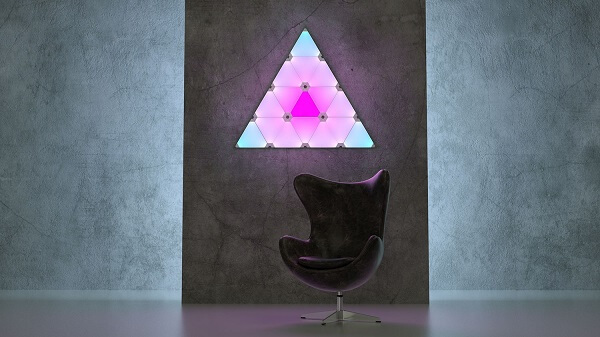
Maybe it’s not that awe-inducing as one would expect but it’s certainly the first of its kind and an amazingly great touch of futuristic to your home. The Nanoleaf Aurora that was showcased at CES 2016, despite only being a prototype, is a fully functional set of LED panels that have a very simple method of connecting to one another in order to allow you full freedom in the way you set them up on your wall.

CES 2016 Nanoleaf Aurora

The purpose is not much more than just a very creative way of lighting and decorating your home. Each panel can light up into a number of colors, allowing you to choose every single detail of what the final product is going to look like – whether you decide to control it through your phone or the clever looking hub. And the best thing about it is that it’ll become available for purchase later this year and it’s not even horribly expensive (somewhere around $150 for a set of 10 LED panels).

  1. CES 2016 – Daqri’s AR Helmet

Ah, it’s happening again. All those projects that got inspired by Google Glass’ take on augmented reality don’t always have a whole lot of utility outside giving you some degree of hands-free access to various sources of information. Now, the Daqri is actually taking it to the next level by giving it a purpose in the field of industry.

CES 2016 Daqri’s AR Helmet

It basically incorporates things such as blueprints, details and instructions that would otherwise require to either be held or stored within arms’ reach and away from getting lost or destroyed in hazardous scenarios. That way, the person using it could be guided to the source of a leak, directed through the process of fixing it and so on.

The AR helmet will be made available for purchase for enterprises sometime in Q1 of 2016 and it will come in bundles for a pretty spiky price – somewhere around $10,000 a piece.

  1. CES 2016 – Segway Ninebot

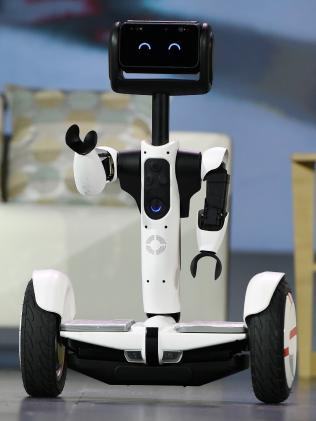
It’s certainly cute. And it’s certainly equally creepy. Also not tilting the utility scales either; but it’s certainly something that can see plenty other improvements in the future. The Segway Ninebot was made through a partnership between Intel, Segway and Ninebot and ultimately resulted in a really friendly device that can carry you around.

Featuring a simple display that acts as the little robot’s eyes which constantly blink and seem to turn into a very happy expression most of the time it’s idle (you wouldn’t like carrying people around on your back all the time either, would you?), I kind of expected a very different voice to be used for it. Even if it seems to have a great sense of humor.

CES 2016 Segway Ninebot

The robot can stream video through its front camera, has voice recognition, can check things out for you such as find out why your home alarm just went off while you were away and has an attachable set of arms. And while his hands have no opposable thumbs, the developer says that the Segway Ninebot can even pick things up.

  1. CES 2016 – EHang 184 Passenger Drone: The Flying Taxi

This is basically a flying car; well, I guess not so much since it has no wheels to roll down happily down the road. What it does have, however, is eight blades that give it its octocopter title. The developer – EHang – claims this is the world’s first electric personal autonomous aerial vehicle. So that has me wondering: there is a company that is capable of making a flying vehicle that can take from place A to place B without you touching a thing and yet autonomous cars are still on the to do list for 2020 and beyond.

CES 2016 EHang 184 Passenger Drone

I guess an independently functioning car in the midst of New York’s crazy traffic is a little different and more dangerous than a take to the skies. Entering a collision course with another vehicle is potentially more problematic that entering a collision course with a sparrow for sure.

And yet, here we are. The EHang 184 can fly for 23 minutes on a full charge, it will probably require your lifetime savings as it’s priced at $300,000 and is illegal to fly in the United States right now too. So the hour of personal flying cars is still probably really far away.

  1. CES 2016 – Immersit: Indoor Roller Coaster

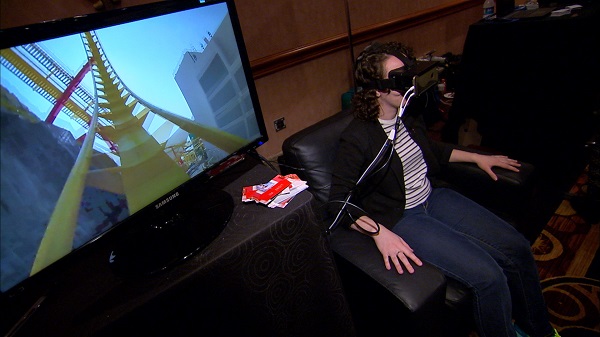
No, okay, it’s not exactly a real roller coaster, but it makes you think it is. Afraid of heights? Terrified of your adrenaline levels going haywire in a potentially unsafe environment? Why not get over your fear of roller coasters in the safety of your own home? By making use of virtual reality gear and a rocking chair, Immersit can give you a rather realistic experience of what those Disney crazy rides would be like.

When I said rocking chair, I didn’t refer to one of those things you’d most likely be setting on your porch or by the fireplace, but something that looks very much like a regular – and particularly comfortable – leather armchair that does a little of those things that massage chairs do; but a little more intense than that.

CES 2016 Immersit

There’s no pricing currently available for the Immersit, not any clear news of when this will be made available.

  1. CES 2016 – Genworth Aging Suit

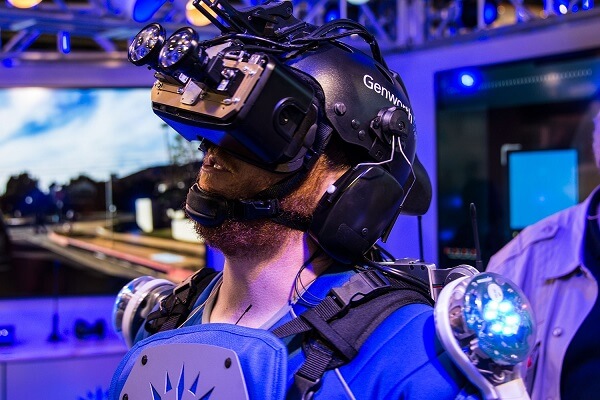
Occasionally referred to as the Aging Exoskeleton, this is one of those inventions that simply elicited a “why?!” from me. But then I thought that this may actually show some interesting use in other fields such as preparing astronauts for space travel. That one is simply a personal hunch though.

Regardless, the Genworth Aging Suit is an entire exoskeleton that simulates the way aging would affect your life and body. It’ll make you experience joints that aren’t as flexible as you’re used to, vision and hearing loss, muscles that feel like you’re carrying double your weight and so on.

CES 2016 Genworth Aging Suit

I’m pretty sure this one was not made to increase sympathy towards the elderly, but has a medicinal and scientific purpose. Still, it seemed to be a particularly popular gadget at CES 2016.

  1. CES 2016 – The Smartest Fridges Out There: brought to you by Samsung and LG

Samsung has showcased its own take on the smart fridge technology with its Family Hub – a fridge that’s equipped with cameras inside and a generous display on the outside. You can check what you have inside without ever having to open the door. And if you sync it to your phone, you can do this all the way from the supermarket too. Given its huge LCD display, it can act as a part-time entertainment center for you while you cook for example.

CES 2016 Samsung Family Hub Refrigerator

The LG’s refrigerator is not as smart but insanely perceptive. It can tell when you’re standing in its vicinity and knows to open the door by itself. Similarly, it’ll turn on its inside lights when you knock on its glass panel too.

CES 2016 LG Smart Fridge

Image Source: 1, 2, 3, 4, 5, 6, 7, 8, 9, 10, 11, 12, 13

Filed Under: Headlines Tagged With: CES 2016, CES 2016 gadgets, CES 2016 technology, CES 2016 trends

Alienware X51 Review – The Smallest Gaming Powerhouse

January 8, 2016 By Roxanne Briean Leave a Comment

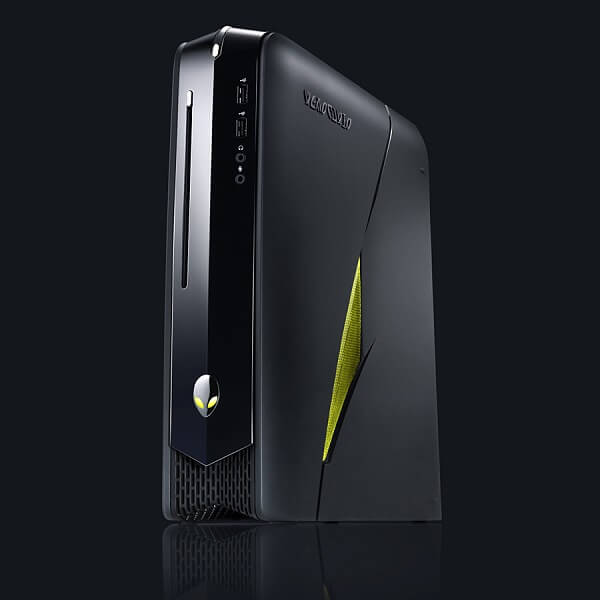
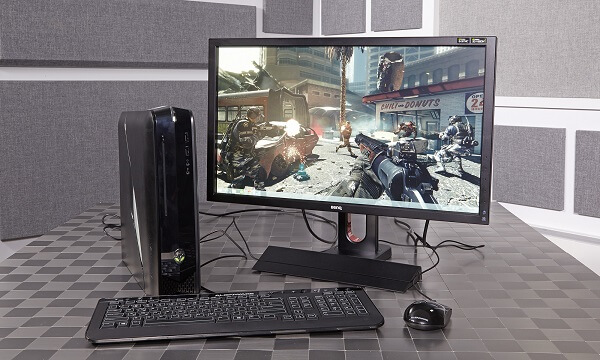
Alienware X51 Mini Gaming Desktop

The first time I ever saw the Alienware X51, I briefly reminisced another device this one strikes an uncanny resemblance to that I couldn’t quite put my finger on. After a 5-minute trek down the memory lane, it turns out that the mysterious device was none other than another Alienware product – the Alienware Alpha. How anticlimactic. Then again, who else manufactures such amazingly looking gaming gadgets?

However, its purpose isn’t quite the same than the Alpha held. While the latter was meant as a sort of portable computer that you could pretend was a console and hook it up to your living room TV, the X51 is just a mini gaming desktop. Whether its user is a professional gamer looking for an easier to carry desktop to take with them at their next tournament or you’re simply just tired of stuffing 20 pounds worth of gaming technology into or underneath your desk, the Alienware X51 is the choice.

The X51 line of mini gaming desktops has been around for a while – long enough to now reach its third iteration (the X51-R3 to be more exact). And truthfully, it has so far managed to impress just how much power you can compress into as little space as you can; and for professional gaming nonetheless, the place where half measures just don’t work.

But no computer manufacturer has yet managed to create the perfect device and the Alienware X51 is not without its faults, for sure. But there seems to be a steady growth rhythm that has been going on since the first X51 was first released.

So is the Alienware X51 the gaming PC you need? Or is it more of a hipster gadget than a truly useful thing to have? And actually, only after answering the above, the true question arises: does the Alienware brand offer truly outstanding gaming equipment or is it just that – the brand? If it succeeds in truthfully being outstanding, what it is that makes it outstanding?

For all intents and purposes, all the information found in the review below concern the latest X51-R3 model and not any of its predecessors.

Pros:

  • Amazing power to size ratio
  • Capable of 4K graphics with an optional amplifier
  • Amazing design
  • Default model is relatively affordable
  • Portable

Cons:

  • The truly high end specifications are in another castle, Mario!
  • Special design motherboard with native limitations
  • Difficult and expensive to replace or upgrade parts
  • The high-end models of the X51 are ludicrously expensive

Alienware X51 Design

Alienware X51 Gaming Desktop Design

I don’t want anyone to believe I’m being biased when I say this as I personally own a custom rig gaming PC at home and my entire history with an Alienware desktop can be summed up to reviewed products they sell. However, I really and most sincerely believe that Alienware is the most entitled company to gloat and be self-satisfied when it comes down to design. At this point, the company’s brand is a truthfully great representation of their gadgets.

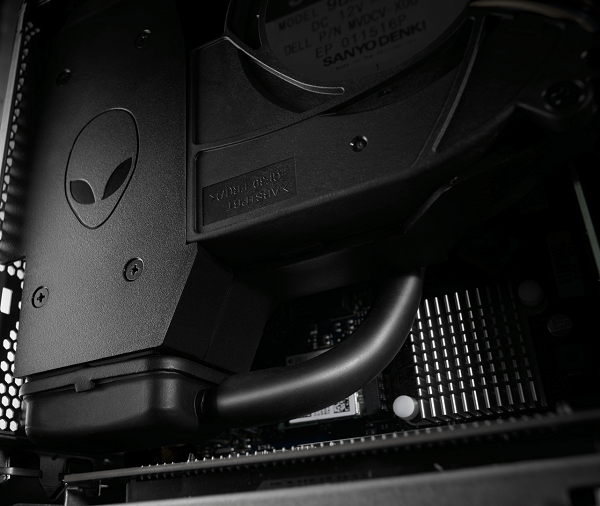
And it doesn’t even stop at the exterior design either. Open up one of these babies (once your warranty allows you to do so, of course) and you’ll see what I mean.

Alienware X51 Water Cooler Design

Going back to what I’d started, however, the Dell Alienware X51 dimensions are laughable – in a positive way – if you’re to compare it to your regular gaming desktop. Compare it to the Alienware Alpha PC / console hybrid or any PlayStation or Xbox you have lying around, and it doesn’t seem so small anymore. Its exact dimensions are 13.5 x 12.5 x 3.7 inches and it weighs somewhere around 12 lbs. It’s definitely not console sized, but once again – still a huge difference from your regular gaming desktop.

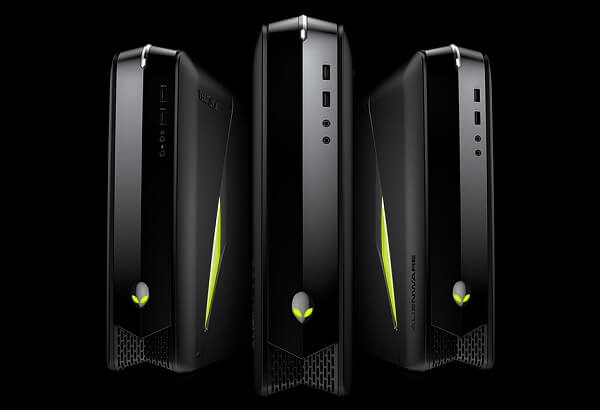
The Alienware X51 case is incredibly slim and features the wildly sleek design that most, if not all Alienware computers have. You’ll immediately notice that its exterior is composed of several plates that are made from different materials. While the sides are matte black, the central, front plate is glossy and extends all over the front and top of the tower, curving gently at the edge where the power LED and button is at.

Alienware X51 Mini Gaming PC Design

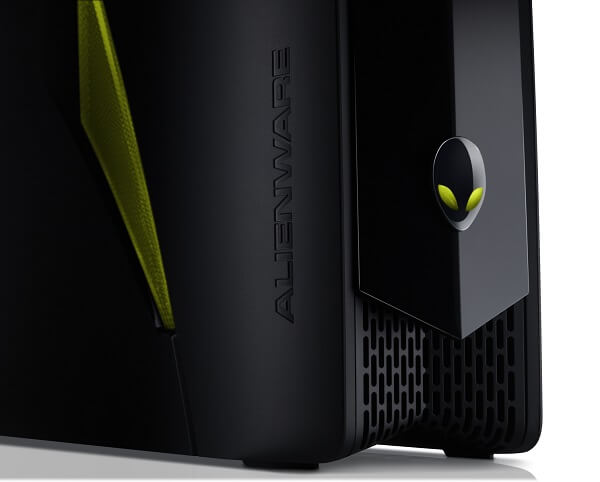
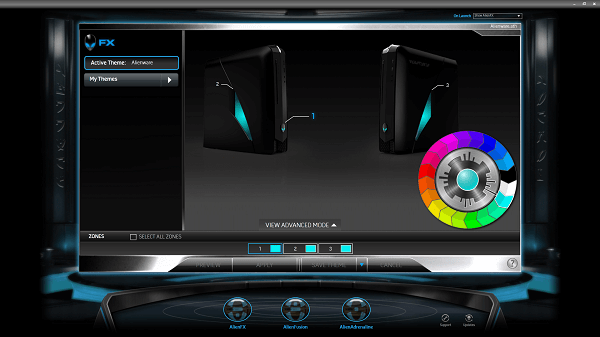
The trademark Alienware logo and slowly shifting colors can be found here too. The logo rests on the front of the computer while two lit panels rest on either side of the tower. All of the above elements can be set to shuffle through the color spectrum or be set to a static hue, similarly to how the Razer DeathAdder can, for example. The Alienware name isn’t missing either: you’ll find it sleekly engraved in either side plate of the computer.

Alienware X51 Ports

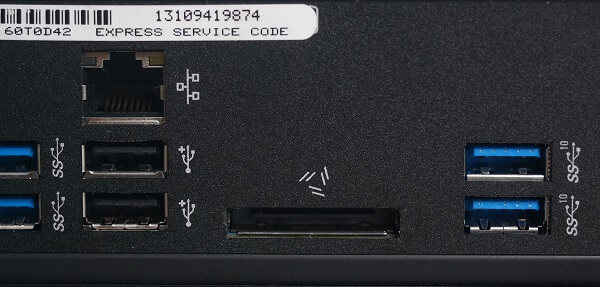
When they made the Alienware X51, they really took all the peripherals you would ever need for your gaming experience into consideration. Frankly, if I hadn’t built my personal PC to include a couple extra USB slots, the X51 would’ve dwarfed my computer in that department. There is a total of 8 USB slots of various types – 6 on the rear and two on the front of the computer. 4 of them are SuperSpeed USB ports (3.0 USB), 2 are Hi-Speed USB (2.0 USB) while the last two are SuperSpeed USB 10 Gbps models (3.1 second generation USB).

Alienware X51 USB Ports

The rear also features a 1.4 HDMI output port at the very top, making it possible for you to connect your computer to any monitor or television set. Sadly, there isn’t a DisplayPort available as an alternative on the X51 but then again, chances are you won’t find that technology on many monitors that aren’t as recent.

On the back of the Dell Alienware desktop, an RJ-45 Gigabit Ethernet port can be found and comes as a second means of internet connectivity on top of the wireless card that the Alienware X51 R3 has been gifted with. That way you can get either the freedom of Wi-Fi or the irreplaceable juice that a direct connection can give you with the Dell gaming desktop.

You’ll find the regular three separate ports for an entire 5.1 sound system, subwoofer included on the rear. The AC power input is as small as one you would find on any single laptop out there. This felt a little worrying at first as I originally suspected a weaker and lower-usage power supply to be behind it. Turns out I was right as the entire rig is powered with a 330 Watt AC power supply that is rather questionable when it comes to full-fledged gaming computers. I guess that’s the state of affairs when it comes to mini gaming computers.

To wrap up, you will be able to find the headset mic in and headphone out ports on the front of the thing, making it perfectly accessible to plug in and out whenever you wish without even having to get off your chair.

Alienware X51 Specs & Available Configurations

Alienware X51 Hardware

I literally got lost on the Dell website trying to get a good custom rig built just to see how far the X51-R3 can really go with the absolute best components out there. Now, this isn’t particularly reflective of how good the Alienware X51 is as a gaming computer, but it’s something that you will have to put up with if you wish to go through the regular build-it-yourself ordeal. The website is confusing and offers sadly limited information on various components.

Regardless, the basic Alienware X51 that Dell offers you was shockingly less powerful than what you are normally led to believe. As a matter of fact, I’ve concluded that the components fell into the medium tier; medium enough to not exactly justify the $699 Alienware price tag on it.

To make a quick summary of the specs you’d get for that amount of money: Intel Core i3-6100 3MB Cache @3.7 GHz CPU (6th Gen Skylake model), the nVidia GeForce GTX 745 @4GB DDR3 GPU, 8GB Dual Channel DDR4 @2133 MHz RAM, 1 TB of storage space on a 7200 RPM SATA HDD, the Intel 3165 1×1 802.11ac Wi-Fi Wireless LAN card and pre-installed Windows 10 Home 64bit. That’s about it in terms of tech specs, although you do also get a dual layer 9.5 mm DVD burner buried somewhere in that too.

Let’s start off by talking a little about the CPU. It’s not an old unit or anything (if memory serves, it was released sometime in mid-2015 and it’s even part of the 6th generation of Intel Core i3 processors) but it won’t throw you off balance in computing power. With only two cores to work with, things are handled in the same way as a quad-core or beyond would. Then again, I’ll go ahead and remind both you and myself that this is a small-scale computer and not the gaming monster I have back at home.

Out of everything, I think the GPU was the part I was disheartened by the most. The nVidia 700 series is 2 years old! Or at least the GTX 745 that you’ll find in it is. Normally, when I’m about to invest in a gaming computer, my thinking is “hey, that hole that I just burned into my wallet that I’ll feel for a couple of months at least better last me more than this year”. Buying something that has 2-year old releases in it is not something I’d recommend. Sure, if you’re going to use this as a portable computer for LAN tournaments I’m sure League of Legends, Counter Strike: Global Offensive, DotA 2 and any other popular e-Sport will run fine on it but otherwise, I’d definitely pick something newer. You don’t want your Dark Souls 3 to be capped at 30 fps when it comes out in April, do you?

How to make it better

Once you manage to get your head around working the Alienware website, building your very own X51 ia a process that will take a fair amount of customization. Though the company refuses to appeal to my OCD regarding the power source and literally doesn’t allow me to select another one (meaning that if you DO want to change it, you’ll have to do it via third parties after your warranty period is over), everything else seemed like something I could work with.

The CPU you can upgrade up to an i7-6700 8MB cache 4.0 GHz with hyper threading included. The Dell website is nice enough to allow you to pick your favorite GPU out of either the AMD Radeon R9 370 @4GB GDDR5 or its nVidia counterpart, the GTX 960 @2GB GDDR5. You can even put in up to 16 GB of dual channel DDR4 @2133 MHz RAM memories (2 x 8GB). The Alienware X51 motherboard can only go up to 16 GB RAM regardless, so there’s not much more upgrading you can do after that.

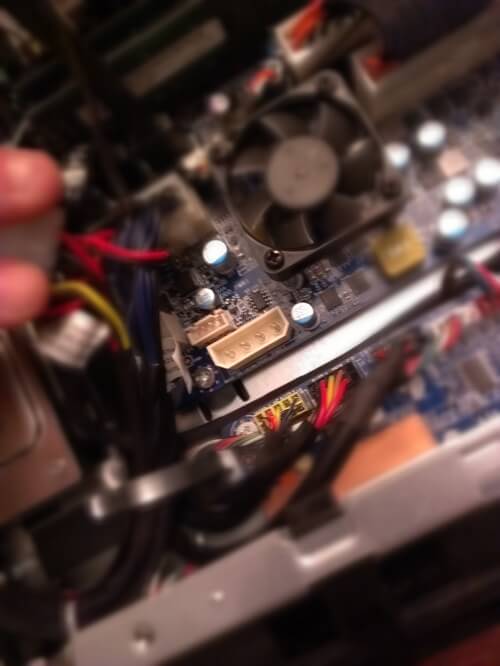
Shockingly, I couldn’t find an SSD hard drive alternative to the SATA one unless you’re opting for the model that starts off at $1,469.99 that has a 256 GGB solid state HDD and a 2 TB 7200RPM SATA. On a regular X51 model, that one would also have to be done through third parties, not to mention that everything inside the Alienware X51 is really well packed together and even quite difficult to take apart component by component. There is literally no room for two hard drives in there.

When everything was said and done and I felt a little better about the specs I’d managed to put in the new X51 computer, I realized there’d been a major flaw in my thinking and that now the computer’s price had gone up to $1,488.99. Oh well.

Alienware X51 Performance

Alienware X51 Gaming Performance

The power of the X51 is really just the capability found in the sum of its parts. To reiterate on something that I said earlier into the review, the Alienware X51 R3 is not a computer you buy because it’s time for an upgrade and you want to be able to play anything coming out this year on Ultra graphics settings. You buy it for its portability potential; you buy it because it won’t make the floorboards or the desk curve under its weight. And yet, games looked great on it, FPS was skyrocketing to inhuman values and I really felt like the little guy was great at fooling me into thinking I was using a regular gaming desktop.

Now, remember when I said all the components inside it are really well packed together and it’s difficult to even pull them out of their metallic confines? The greatest advantage of this computer turns out to also be its greatest enemy. Because everything is so compact, there’s little to no space for the unit to get properly cooled and the components’ own coolers can only do so much. There is a case cooling unit too but its buzzing attempts felt laughable to say the least.

I have to admit it didn’t happen to me, but I’ve seen countless of people complaining that the system overheats, usually leading into a forced shut down, blue screens when BIOS decides the computer has had enough and so on. I trust that this only starts happening after a certain amount of usage and heavily depends on how you use the X51 too. On the other hand, the PC is extremely quiet.

I’ve only gone through a few minutes of several older DX11 games such as BioShock Infinite, Metal Gear Rising: Revengeance, Sleeping Dogs etc. and I’ve found 0 reasons to be unhappy. I cranked up the graphics settings all the way to maximum and the X51 didn’t even hiccup once. The Witcher 3: Wild Hunt and Fallout 4 testing didn’t go as well and actually made me want to turn down the settings a fair amount because I’d already got used to the crazy unlocked FPS in the other titles and the X51 had already started stuttering.

Alienware X51 Included Peripherals & Paid Upgrades

When you order the Alienware X51 off the Dell website, you also get to choose whether you want to indulge in the complimentary Alienware mouse and keyboard. Neither of the two is an amazing peripheral by itself – in what gaming is regarded at least. The mouse is a meager 1200 DPI with no extra buttons and no special power to speak of. Similarly, the keyboard is a regular multi-media membrane model, featuring a numpad, several media controls and shortcut buttons to things such as your email, calculator, Windows Explorer and so on.

The website offers two critical items that are aimed to enhance your gaming experience. One of them is the ‘cutting edge liquid cooling’ system; purely optional, it will make CPU overclocking possible without setting fire to your house. This alternative to the cooling system is only available for the $1.469.99 model, however, so it doesn’t come cheap.

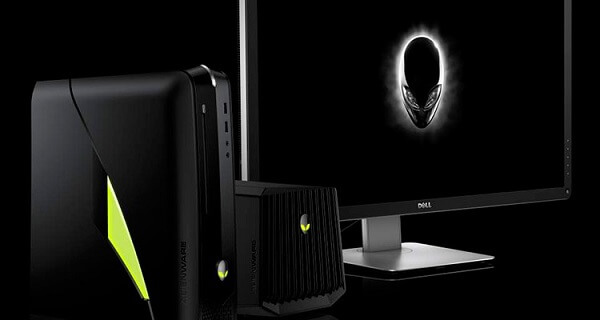
Alienware X51 Graphics Amplifier

Secondly, you can also opt for an Alienware Graphics Amplifier. Available for any X51 you choose but also coming for at least an extra $200, the amplifier is basically an external box that adds a secondary, usually stronger GPU. A full-fledged, gaming desktop GPU. It also gives you a few connectivity perks such as allowing you to connect another HDD in there as well as some of your other peripherals. While the lowest price end you can get is $200, the highest is an astonishing $1,499.98 – you get the amp plus a PNY GeForce GTX Titan X @12 GB GDDR5 video card in it. That way you can push your games to 4K HD resolutions, outstanding graphics quality and it even takes some weight off of the X51 with the overheating.

It’s a tough call to make, but it’s an alternative.

Alienware X51 Software & Features

If you order the Alienware X51 with an operating system included, you’ll get it preinstalled when the unit is shipped to you. You can only choose between Windows 10 64bit Home or Pro editions or the Windows 8.1 Pro.

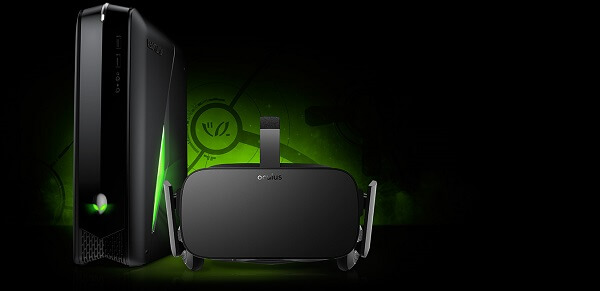
Apparently, any X51 R3 model is VR ready but that simply means they’re good enough to run virtual reality gear such as the Oculus Rift whether you ever choose to use one.

VR-Ready Alienware X51

If there’s anything about native brand software that’s usually included in these computers that I can appreciate, it’s the Alienware Command Center 4.0. The program is basically the central hub of controls and customizations you can do to your Alienware X51, starting with the lighting controls up to GPU, CPU and memory monitoring, tweaking and clocking. It’s a very nice selection of controls you can use for a perfectly personalized experience; I’d like to say that it’s lightweight too, but it’s not, really.

Alienware X51 Software

Similarly, your Alienware X51 will come with Alien Autopsy preinstalled – a piece of software that will attempt its best at assisting you with any issues that may arise with your computer; both hardware and software related.

Alienware X51 Verdict

So we’ve taken a really good look at everything you can do with the Alienware X51 R3 default model. At least as much as you can tell by only giving the computer a spin for a short time. Maybe some of my opinions would have changed if I’d been using the Alienware Graphics Amplifier for example, or I’d done a more extensive game test.

The Alienware X51 is a good gaming computer, especially when you look at its overall size. It manages to run plenty of titles at great performance and only starts struggling when really put to a stress test. If you truly need the portability that the X51 holds with it or you’re not planning to use it as your next main gaming desktop, it can handle itself very well; and it most cases it will be able to excuse its high price tag.

If you wish to truly be up to date with what the gaming technology has to offer and ready for this year’s upcoming titles, I would not make the X51 the first recommended computer off the top of my head for it. Even if you upgrade it to the absolute highest specs you could ever ask for, Alienware x51 I7, amplifier included and everything, it would be ultimately end into a waste of money. The same money that you can use to get a better full-sized gaming desktop and even save up some for a 144 Hz monitor on the side for example.

Image Source: 1, 2, 3, 4, 5, 6, 7, 8, 9, 10

Filed Under: Headlines Tagged With: alienware mini gaming desktop, alienware x51, alienware x51 gaming desktop, alienware x51-r3

Uber Got a Laughable Fine and a Slap on the Wrist

January 7, 2016 By Roxanne Briean Leave a Comment

Uber Got a Laughable Fine and a Slap on the Wrist

Uber got a laughable fine and a slap on the wrist – $20.000 for a company that is worth $50 billion is just despicable.

Uber has been fined just $20.000 for their God View tool, which tracks users, and also for the company’s security practices, data hack.

The popular ride-hailing company came under scrutiny after an investigation from, get this, Buzzfeed. The way the firm handles the sensitive user data is worrisome but it doesn’t appear so to the judge ruling the case.

Considering that in 2014 a security breach exposed the data of 50.000 drivers across the US, just sanctions were not taken.

Besides the mere fine, Uber was forced to agree on adopting more rigorous security and privacy practices. This means that from now on, all of their riders will have their geo-location data encrypted, as well as being password-protected.

The security breach started when an Uber engineer uploaded an access ID to the firm’s 3rd party cloud service onto popular Git repository hosting service GitHub – unbeknownst to the Uber employee that it was available to the public. This happened on, or sometime surrounding, the date of May 12, 2014.

Yet, Uber reported the incident on February 26, 2015, and that’s because they received a tip from a former employee of a competitor, which noted that the competing company had full access to a Uber security key.

Talk about being super sloppy.

The ride-sharing company claims that it took immediate action to revoke said existing access ID from their system, and issued a new one. The firm notes that, since then, it has implement a variety of encryptions and other such authentication controls, as well as hiring additional security personal and offering more, and better security training.

Because it has failed to announce this security breach, Uber received a $20.000 slap on the wrist for ” unreasonable delay”.

In other news, Yellow Cab, which is San Francisco’s largest taxi company, has just filed for bankruptcy due to competition from Lyft and Uber, as well as including several unresolved court cases.

It seems that ride-hailing companies will most definitely surpass the traditional taxi’s popularity. GM stands by that statement, and has funded Lyft with $500 million, thus helping them with their development of self-driving cars, which General Motors thinks is the future.

As reports start pouring that autonomous vehicles will be a thing by 2030, more and more car manufacturers start jumping on the bandwagon with either development or funding companies that have already begun the process.

Apple, Google, and Tesla are among the first and considered top competitors in the autonomous vehicles industry.

Image Source: 1

Filed Under: Headlines Tagged With: God View Tool, uber, Uber Fine

Microsoft Band 2 Review – An Activity Smartwatch?

December 29, 2015 By Roxanne Briean 2 Comments

Microsoft Band 2 Header

Update 1/4/2016: Replying to texts on the Microsoft Band 2 can be done both via voice command and on-screen interaction.

You don’t need to spend too much time with the Microsoft Band 2 to start wondering what the purpose the developers had in mind when they designed it. If you’ve seen any other activity tracker device out there such as the Jawbone UP 3, Jawbone 24UP, FitBit, Garmin Fenix 3 and so on, you’ll certainly immediately notice the difference.

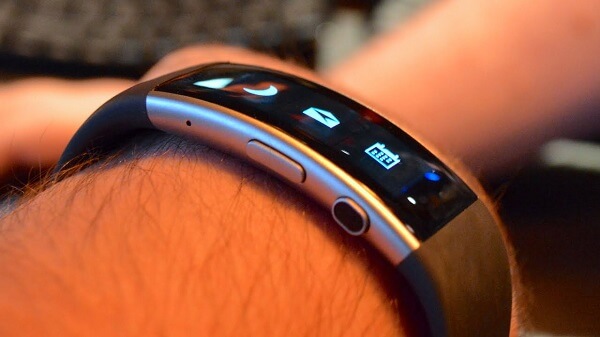
If anything, the Microsoft Band 2 – and its predecessor of course – resemble something that we would call an attempt to breach the smartwatch market more than appealing to the ever-increasing need of activity tracker features market. While usual fitness trackers either aim for a minimalistic and subtle build or go full on the tracking utilities and interface, the Microsoft Band 2 graces us with what seems to be a responsive and stylish looking touchscreen; similar to what the Android Wear and Apple iWatch would, no?

There’s no denying that the new Microsoft Band 2 has a great potential to appeal to the professional activity tracker market as well, thanks to all the sensors that have been packed in. But the question remains just to what extent you can truly rely on it in that particular role, and how much of it is simply Microsoft’s version of wearable tech?

Pros:

  • Particularly stylish
  • Plenty of methods to track your activity and fitness sessions
  • Simple to use
  • Great screen

Cons:

  • Obvious wear and tear early into using it
  • Not a great amount of support for iOS and Android
  • High battery usage
  • Expensive for a fitness tracker

Microsoft Band 2 Design & Display

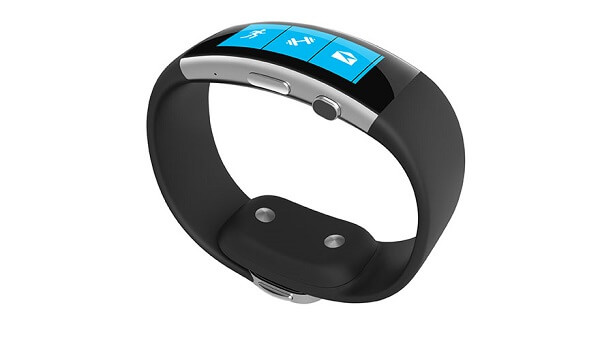
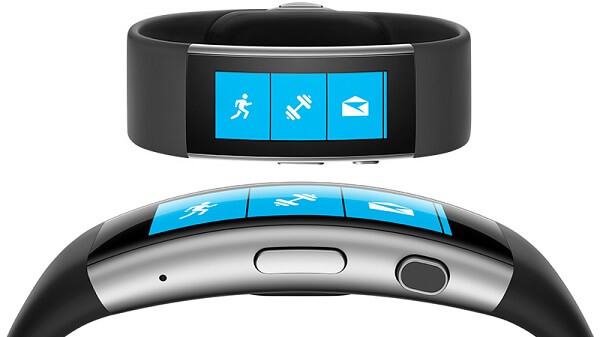
Microsoft Band 2 Bottom and Front

Out of all the wearable tech units we’ve reviewed so far, the Microsoft Band 2 is one of the best looking ones by far, regardless of what you use it as – whether you prefer it as a smartwatch or an activity tracker. It doesn’t actively hide the fact that it’s wearable tech like the Pebble Steel, nor does it scream fitness tracker like the Garmin Fenix. At least in what the front of the Microsoft Band 2 is concerned, it looks sleek and stylish.

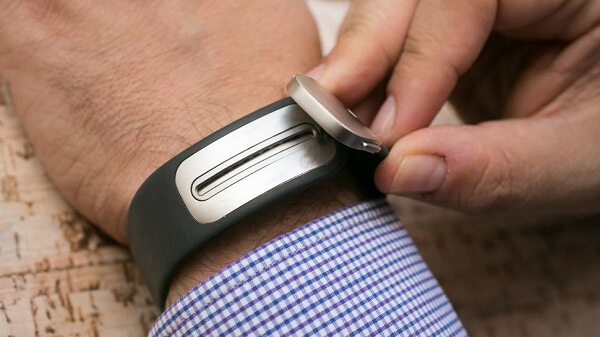
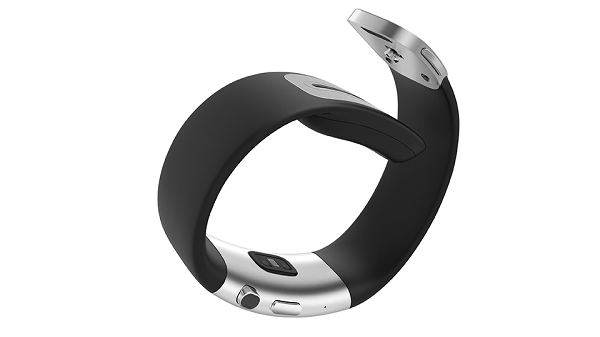
Turn it around however to where the clasp is located and things don’t remain so impressive still. Overall, the band of the device is not particularly slim and even feels a little too wide for comfort around the metallic clasp part. Because of the method it employs of keeping the band fit around your wrist, you’ll often find the clasp rubbing against the desk when you’re working at the office and in various degrees of danger of it accidentally clinching to various surfaces. That brings us to the sad realization that the Microsoft Band 2 may end up looking older and more worn out than it should. Especially when that occurs mere weeks into using it.

Microsoft Band 2 Clasp

On the bright side, however, it would seem that the comfort issues that many users reported with the original Microsoft Bands weren’t here to stay. Other than the rather elevated angle at which your arm will rest on a flat surface when you rest it on the armband is probably the only hindrance at perfect comfort when using it casually. Considering the way its body is built, with flexible bands and a slightly curved but firm display, some individuals may find it slightly uncomfortable around the top, depending on the shape of their wrist. On the bright side, however, the device comes in three separate sizes (with an attached online guide on how to decide which one is for you) that you can choose from so there’s a good chance one of the models will fit you just the way you wish.

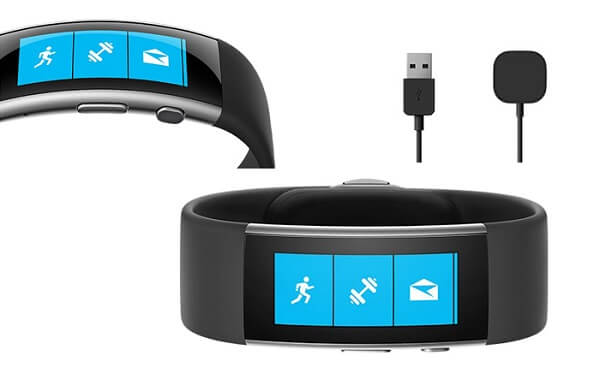
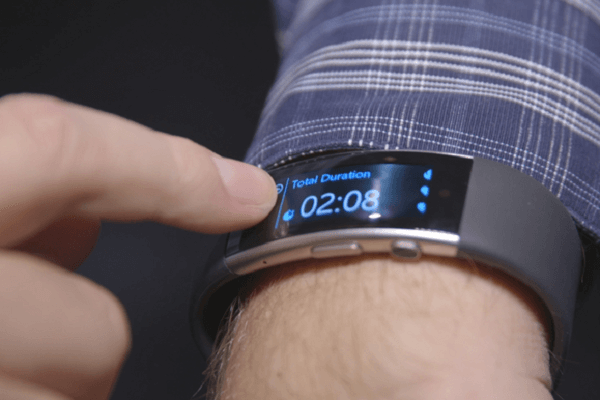
In terms of button placement, the design of the Microsoft Band 2 is relatively simple. By that meaning that there’s not much to interact with physically; most of the controls will be done via the touchscreen display. However, at the bottom of the display, beneath the band’s edge you will find two separate buttons: the on/off/sleep button and the activity button. On the rear of the display you will find the sensors that are in charge of tracking heart rate. The charging slot is slightly difficult to find at first but it turns out to be a comfortably subtle and overall great placement: on the back of the clasp.

Microsoft Band 2 Buttons and Sensors

The Microsoft Band 2 has a 12.8 x 32 mm display, slightly curving around the wrist. The actual display is surrounded by a relatively wide bezel, but the entire area is covered with a layer of Corning Gorilla glass, giving the device a great and glossy look. Because it employs an AMOLED build, you’ll find a great amount of contrast and brightness on the Microsoft Band 2 screen coupled with deep, inky blacks. However, there’s also a fair amount of reflectivity attached to the display meaning that you might have some trouble reading it in sunlight.

The display supports a maximum resolution of 320 x 128, making for a very strange aspect ratio to begin with. And with that particular aspect ratio comes a relatively awkward layout for your notifications and recorded statistics for your activity. That’s not only because of the shape of the display but also because of its orientation; if you just attempt to look at it like you would at a normal watch, you’d have to tilt your head a fair amount to read the screen properly. Instead you’ll find yourself holding up your arm in a strange fashion as if you were making a post-contemporary salute-like gesture just so you can get a good read of what is being displayed. From that perspective, the Microsoft Band 2 feels more than awkward.

Microsoft Band 2 Display

However, for anyone who has ever used the original Microsoft Band, the new display is more than just an upgrade; it’s a lot more responsive to touch, looks a lot better and even makes use of the curved display technology. However, having an AMOLED display attached to your wearable tech comes with several downsides. To name two that potential Microsoft Band 2 users will have to deal with are battery life and water resistance.

Microsoft Band 2 Screen

Firstly, you shouldn’t expect your tracker to go on without charging it longer than 2 days for example, depending on how many of its features you actually use. Secondly, the Microsoft Band 2 is not made to be water resistant: it’s protected against dust and was made to be “splash-resistant”. That merely means that you can probably risk a jog through the rain, but you shouldn’t even consider taking it with you to the pool or in the shower after a workout.

Microsoft Band 2 Specs & Hardware

So, as you may have heard before, the Microsoft Band 2 brings to the table a fair number of sensors that make activity tracking possible to begin with. There isn’t any on-board storage for apps or other particular stand-alone features like some wearable tech sometimes has.

Regardless, the Microsoft Band 2 hosts great amounts of potential when it comes to the physical intensive activities you can undergo and track with it. While it may not have a separate, personalized profile for every type of activity like the absolute top professional trackers do, there’s a fair amount you can do with it.

To make a short summary of what you’ll get as your bread and butter tools for fitness tracking and even more, the Microsoft Band 2 features a continuous heart rate monitor, both an accelerometer and gyrometer, various galvanic skin response sensors, a UV monitor and the newly added barometer. On top of that you also get GPS – great for route tracking, terrible for the battery – as well as a built-in microphone for voice commands via Cortana (only available if you have a Windows phone to match) as well as an ambient light sensor simply added to automatically control the brightness of the touchscreen display.

Just like any other tracker, it will use the motion sensors (accelerometer, gyrometer) to track things such as steps taken and sleep and calculate calories burned and how effective the exercise you did is. The UV monitor is not something I have found in many other devices of this kin before and can make for a nifty addition to the amount of health information you can gather. Lastly, the presence of the barometer within the ranks of sensors added to the Microsoft Band 2 you can map your actual progress and activity a lot better because it adds the tri-dimensional aspect to it all by measuring elevation changes when you job, bike or do things such as climbing stairs.

Microsoft Band 2 Software

Just like every other single tracker made and out there, the Microsoft Band 2 syncs with your mobile phone of choice (to note here that it doesn’t support tablets) via its Bluetooth 4.0. After pairing the two devices via the Microsoft Health app you can find for free in the various app stores, you’re near ready to proceed.

It’s critical to know that any kind of activity that implies movement such as biking or running, it’s highly advisable for you to make use of the GPS if you want to get accurate readings. Even if it takes an extra toll on your Microsoft Band 2 battery, using the device without GPS – even if it’s possible – felt underwhelming to say the least. There seems to be an unusually large amount of discrepancy between the results the band earns you with and without GPS.

Regardless, any type of fitness-related activity will require a slight nudge from you when beginning by pressing the activity button so the device is notified that something other than steps and sleeping patterns should start getting recorded.

Microsoft Band 2 App

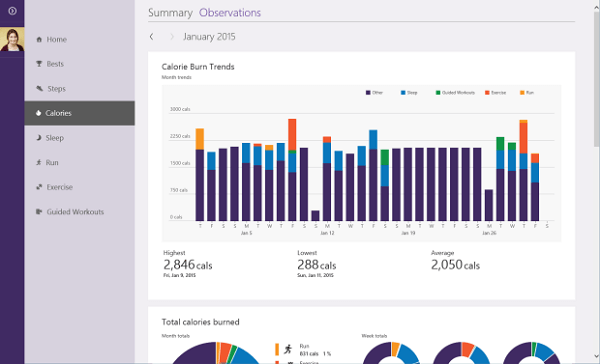
The mobile app will pretty much display anything you need to know regarding your fitness sessions: duration – start and end time included – a rough estimate of calories burned, when GPS is on it will map a route of your job, included with a colored history of your pace (making you feel bad when you’re in the blue – depicted by a snail). You can swipe through the screens of data to display things such as heart bpm.

All of your recorded data gets uploaded to your online Microsoft Health Dashboard so you can overview your progress over time and draw charts of your current activity. Once again, even the dashboard doesn’t feel that detailed as the professional fitness tracker ones seem to be capable of producing but still offers a great amount of illumination when it comes to your health-related habits.

Microsoft Band 2 Dashboard

If there’s one absolutely knackering detail about the Microsoft Band 2 is the fact that it feels relatively lackluster when it comes to gathering data from third party apps. Many other fitness tracker apps offer you this select feature that can make up for the lack of their native capabilities; instead the compatibility of the Microsoft Band 2 is questionable to say the least.

Microsoft Band 2 Features

In terms of the capabilities of the Microsoft Band 2, there are two ways we can look at it. Firstly, we can consider it an activity tracker and judge it as that. Then we can regard it as a smart watch; there’s no denial that the Microsoft Band was originally the company’s attempt at breaking through into the market, with the focus on health and fitness as another way to latch to a particular niche as a safety net.

As an activity tracker, the Microsoft Band 2 surely comes with an extra amount of attention paid to the accuracy of data regarding your day to day activity. While you can’t cover every single type of sport activity with it in the absence of personalized app tracking and even due to physical boundaries (take pool or open water swimming), the band does fairly well in a more generic sense.

Where it really lacks as a fitness tracker is its capability of acting independently. There’s close to none of that present on the Microsoft Band 2 – no coaching, a minimal amount of attempts to enforce a healthy lifestyle or automatic notifications to remind you to follow a healthy schedule unless you set it up manually to do so. While you can create custom workouts through it, it’s not the smoothest of processes and risks giving you a bit of a headache and test of patience when you decide to do it.

As a smart watch, it ends up almost feeling as half-measured as a fitness tracker. Yes, you can push notifications from your smartphone to your watch and even do a fair amount of interacting with it to check weather, calendar, set alarms or whatnot. But you won’t be able to reply to your texts or social media messages directly off the Microsoft Band 2. Even if you did, you’d once again walk in headfirst into the same issue we mentioned earlier – the oddly shaped display.

There are, however, some nice things you can still get with the Microsoft Band 2, especially if you’re a Windows phone user. Firstly, there’s the neat voice command feature you can get by using the microphone that was built in the device to dictate replies to messages, setting alarms and other smaller features of that kind. However, this is only possible when using a Windows phone paired to the band. Another feature some individuals may enjoy on this device is the preinstalled mini app that allows you use your watch to make purchases once you store your barcodes onto the watch.

Microsoft Band 2 Battery Life

One of the more delicate issues that most smartwatches and activity trackers alike are burdened with is battery usage; in other words, just how much you can make use of it without the worry of having to charge it. And native to any smart device with an AMOLED touchscreen that is either cramped into a small space or made to be thinner than anyone would even ask for, the battery issues are still something that a solution has not been found for.

Microsoft Band 2 Charging

Long story short, the battery of your Microsoft Band 2 will probably never last you longer than 2 days at most. Out of that amount of time you have to deduct things such as GPS usage, the amount of direct usage you actually put the band up to and how much time the screen actually stays on for as that one will probably be one of your largest power consumers in the first place. In reality, with average use you will most likely get about a day’s worth of juice out of its Li-Polymer battery.

The upside of it all is the fact that a full charge is hardly lengthy and you should probably get your Microsoft Band 2 from 0 to 100% in about an hour and a half. Even if you’re at work or simply not actively using the tracker you can easily put it up to charge on the go, wherever you are.

Microsoft Band 2 Verdict

So what have we gathered out of our trek with the Microsoft Band 2? At the risk of sounding harsh or unfair, I feel compelled to say that while the device feels premium and a well put together piece of technology, it ends up in a strange place between two planes. One plane is the one of smartwatches and I’m uncertain the Microsoft Band 2 has its place here; at least not one that it can proudly occupy and say that it was deserved because of some innovative feature.

The other plane is the plane of activity trackers and this one is as iffy as the former. It can do mostly everything you would want it to if you’re not into professional sports and really are just trying to stay healthy and keep track of your activity over the length of weeks and months. Not to mention that the entire potential of the Microsoft Band 2 may feel a little limited depending on other factors such as the phone you pair it with, the number of compatible third party apps that you manage to find for it and such.

The device is an outright upgrade from the previous Microsoft Band with no doubt, but in all honesty, it doesn’t feel like the second iteration of the series is up there yet. Especially if you take into account the rather spiky price you have to succumb to paying for it.

Microsoft Band 2 Summary

You can purchase the Microsoft Band 2 directly from the official website for $249.99. December 29th: It is truthfully currently listed at $199 with no mention of a promotion or when it will end. If you are considering purchasing it, you can probably still get it for the reduced price until the end of the year at least.

Image Source: 1, 2, 3, 4, 5, 6, 7, 8, 9, 10

Filed Under: Headlines Tagged With: microsoft activity tracker, microsoft band 2, microsoft band 2 review, microsoft smartwatch

Motorola Moto X Force Review – Champion in Durability

December 28, 2015 By Roxanne Briean 2 Comments

Motorola Moto X Force Header

Update 1/4/2016: It would appear that the 6.0 Marshmallow update has been made available for the Motorola Moto X Force!

Out of all the smartphones that have sincerely caught our attention recently is a rather intriguing end-of-the-year release that shifted its focus on something else than reducing thickness of body the body and the ever-growing power of the hardware that a phone can pack. Now, don’t get me wrong, I wouldn’t rate the Motorola Moto X Force that we’ll be taking a closer look at today mid-tier by any means. It may not come up to the absolute best specs a smartphone is capable of now, on the brink of 2016, but it’s certainly still great.

Now the main focus of the Motorola Moto X Force is, instead, cancelling out the danger of damage to your phone; and more specifically to your screen. Now, it personally never happened to me with any of my previous phones – and I have to say, my iPhone 5S took a little over a hundred tumbles and fearless leaps towards the floor – but that may very well just be my luck. Or surprisingly good cases. Regardless, there seems to be a ridiculous amount of times where the owner isn’t as lucky and what should be the bountiful long life of a newly purchased phone ends abruptly. Motorola knows that and made a point out of ensuring that the new Moto X Force does not share the same fate.

By employing the new Moto ShatterShield technology, the display of the phone is made strong enough to withstand the shock of falling and impact against various surfaces, including being hit by a blunt object. There is a vast number of videos on YouTube and other media channels depicting various “tests” being run to see just how strong the phone really is.

But that may not be the only thing that your regular user is interested in; so all things taken into account, let’s see how well the Moto X Force fares in when it comes to a 2015 smartphone release.

Pros:

  • Incredibly sturdy
  • Above average hardware
  • Great performance
  • Stock Android OS
  • Great battery life

Cons:

  • Pricey
  • The sturdiness of the screen comes with multiple downsides
  • Not a great timing for release now that 2016 hardware is about to come out

Motorola Moto X Force Design

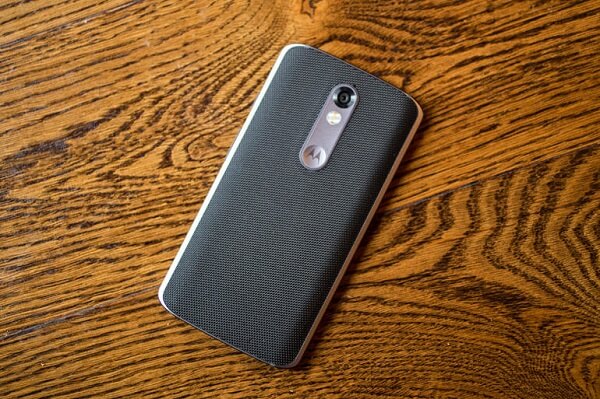
Motorola Moto X Force Back

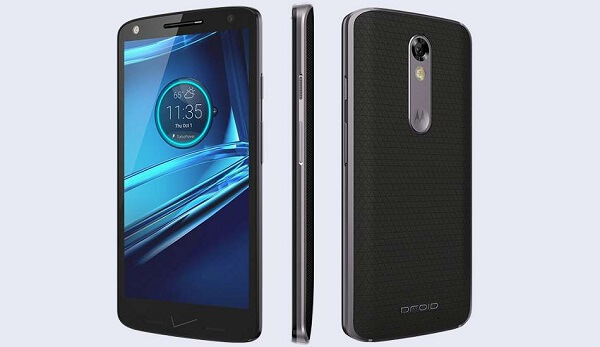
The Motorola Moto X Force is mere steps away from falling into the bigger brother, phablet category given its 5.4 inch display. It is undoubtedly a large device in more ways than one: given its 149.8 x 78 x 9.2 mm dimensions, it scores a weight of 169 grams, making it somewhere around 20% heavier than its slimmer and smaller counterparts such as the Samsung Galaxy S6. That can’t possibly come as a surprise however, given the phone’s thickness: at nearly 1 cm thickness, one probably stops to ask themselves how can a phone so large even be handled.

Truth is, this phone may not be particularly comfortable for every user out there. Despite its attempts at slightly curved edges and back panel, along with the relatively adherent material used to improve your grip, it may feel increasingly difficult to hold and operate the Motorola Moto X Force because of its sheer size.

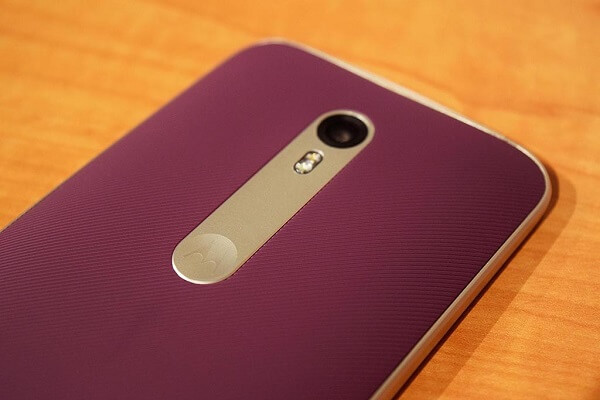
Design-wise, I won’t list the Moto X Force in my top 3, but there are a few touches to it that make it look pretty nice. The aluminum frame features slightly curved top and bottom sides, giving the phone a less sharp shape to look at, especially taking the rather wide build that the manufacturer chose into consideration. If there’s any part of the phone that turns out to be particularly catchy, it is probably the back cover of the phone. Featuring two unique patterns that you can get it in, the back is curved and covered with a leathery-feeling material, meant to not only assist with maintaining a good grip on the phone, but also take the overall design up a notch. While I couldn’t shake off the feeling of bulkiness throughout the entire time I studied the Motorola Moto X Force, I would be unfair to the design choices if I didn’t offer them some praise too.

Motorola Moto X Force Back

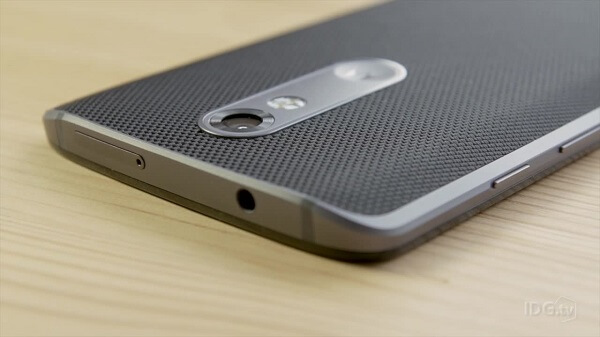
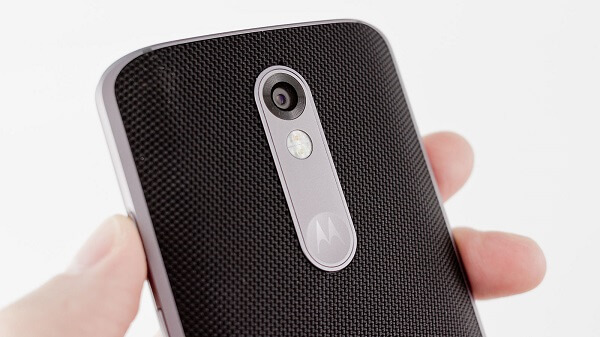
The back cover of the phone – while we’re at it – also manages to look sleek, with a smooth strip dragging down the upper center of the phone, hosting the rear camera sensor, its LED flash and the Motorola logo buried in the classic “Moto dimple” as everyone likes to call it. Sadly, my original thought that the logo was in fact a hidden fingerprint reader did not turn out to be anything else than a design choice.

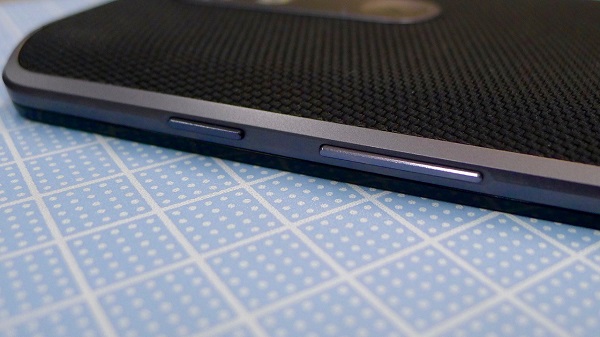
If you look at the back of the phone at a perfectly perpendicular angle, you’re able to see the metallic edges along with even more visible buttons sticking out around the frame – bringing some unwanted emphasis to the width of the phone. The buttons don’t bring any clever innovation to the table, nor any new and improved feature key. You’ll find your on/sleep button and volume rocker on the right hand side, while the top is left for the 3.5 mm headphone jack as well as the microSD/nanoSIM tray and the bottom for the micro-USB charging port.

Motorola Moto X Force Buttons

Motorola Moto X Force Side Button Design

While the display is certainly as well protected as it can get, it is worth mentioning that the bezel of the phone doesn’t exactly share the same treatment. Conduct too many experiments on your new and well-protected phone and damage will show on its edges and back; that’s something to take into consideration. On the front of the Motorola Moto X Force you’ll find the front facing camera along with its LED while the bottom of it features 2 orifices that you’d think hide the dual speakers. Instead, we are only provided with one, while the other serves as a microphone instead.

Overall the Motorola Moto X Force ends up feeling like a more stylish military-grade phone, vastly different from what we’ve grown accustomed to seeing when we refer to such a device. It’s not the greatest looker out there, but it makes for a sleek enough choice; especially when you take into account just how much beating it can actually take.

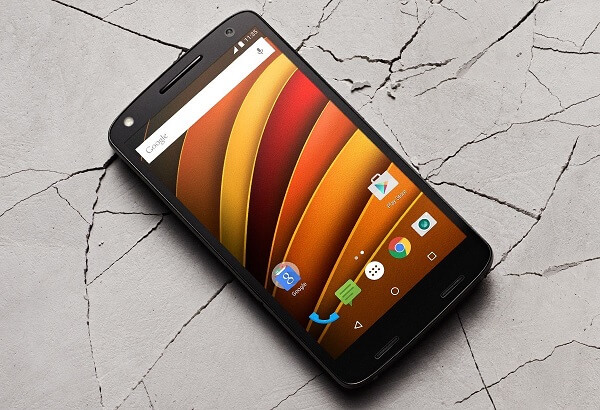
Motorola Moto X Force Display

Motorola Moto X Force Screen

The display remains the focal point of the Moto X Force. And it’s not even solely thanks to the ShatterShield technology that we have previously mentioned. In fact, the Motorola Moto X Force packs a rather outstanding display. For the 5.4 inch sized screen, the device offers the user a resolution of 2560 x 1440 pixels, which makes for an outstanding value of 540 ppi pixel density. In the lack of other recent smartphone models to use for scaling purposes – the only one immediately coming to mind being Samsung Galaxy S6’s 577 ppi and the iPhone 6S’s seemingly underwhelming 326 ppi – I’ll whole-heartedly declare that display of the Motorola Moto X Force is a sight for sore eyes.

It employs an AMOLED build that taxes a small portion on color vibrancy in favor of better contrast and less taxing on the battery. That’s why while brightness and color vibrancy seem to be excellent, blacks deep and whites bright, the only downside the AMOLED panel will face is a possible decay of color saturation over time. However, shifting the subject onto what most of you probably want to hear, the ShatterShield technology has its apparent ups and downs too.

Basically, instead of the usual 3-layer display that most devices employ, the ShatterShield has no less than 5. While that alone can ensure the survival of your screen, it comes with increased thickness (more than obvious in the overall thickness of the Motorola Moto X Force) and a few other mentions that might cause some dissatisfaction.

The first major issue is that the extra two layers are thick enough to make you aware of the fact that the display is buried deeper within the phone than it may initially seem. In other words, you’ll probably be fully aware that there is a visible layer of glass between the outer edge and where the image is actually projected.

Secondly, the outer layer of protective glass is awfully reflective. For some reason it feels like the manufacturers completely disregarded that aspect of smartphone development as the display doesn’t even make an effort in that direction; using it outside in broad daylight conditions also makes the display feel amazingly dim lit.

Motorola Moto X Force Specs & Hardware

Just like I mentioned earlier in the review, the Motorola Moto X Force does not come with something I would call mid-tier hardware by any means. If anything, I’d say it matches the competition pretty well unless you count the 2016 releases we’re soon to get in. Long story short, what you’ll find in this Motorola smartphone is an octa core Qualcomm MSM8994 Snapdragon 810 CPU along with its inbuilt Adreno 430 GPU, 32 and 64 GB hard disk variants, as well as 3 GB of RAM.

There’s plenty of debate whether the Snapdragon 810 is still a match against the newer Exynos chipsets that have made their way into flagship devices. Considering it’s one of the later, octa-core models, I’d say that it can hold its own extremely well. Consisting of a quad-core 1.5 GHz Cortex-A53 and another quad-core 2 GHz Cortex-A57, it can go to a clock speed of up to 2,5000 MHz. Thus, it is not only an extremely fast processing unit, but also extremely efficient when it comes to multi-tasking.

The Adreno 430 graphics processing unit is a separate GPU that supports DirectX 11.1 has a frequency of 500 MHz. Once again I’m placed in the situation where I have to say that while it is not the most proficient, it will serve you well with a vast number of 3D applications and games without so much as a whimper in most – even the more graphic intensive ones picked out of the lot.

Only coming as a compliment to everything stated above, the 3 GB of RAM memory are more than plenty. The particular model implemented in the Motorola Moto X Force is a 800 MHz 64-bit LP-DDR4 SDRAM unit, giving you quite a fair amount to work with and earn great performance results.

Lastly, the phone only comes in two variants – either the 32 GB or the 64 GB versions; however, you can easily expand the amount of storage space you’re stuck working with via micro-SD cards. That way you can add up to a maximum of 200 GB of storage space for your daily needs in case the base amount won’t suffice.

Motorola Moto X Force Software & Features

Motorola Moto X Force Android OS

Well, here one piece of good news that cannot and won’t be altered by any side effect or possible downside. And that is the fact that the Motorola Moto X Force comes with pure, stock Android installed on it. Now, it’s not the latest version, instead making use of the Android v5.1.1 Lollipop operating system version. However, it’s already been announced merely weeks post its launch that the 6.0 Marshmallow update will be making its way to the happy owners of the Moto X Force “sometime soon”. There’s no actual mention of a date, but highest chances are it won’t take very long until you can enjoy the very latest updates to the Android operating system.

If you choose to do so, you can also use the smartphone with some small UI improvements that the manufacturer has brought as a personal input in the say of things. They’re not gigantic features and mostly revolve around notifications and sound control – for example the Moto Display will also send you a pulse notification via the display when a notification pops up.

Motorola Moto X Force User Interface

In terms of performance, the phone really manages to pull itself through amazingly well. Part of that is thanks to the hardware that the manufacturer stuck in the not-so-small device but it is unfair not to also thank the particularly clean operating system for it. Because there’s no bloatware or anything that will not only clog up your storage space but also eat up resources such as memory, the phone will work like a charm with whatever you put it up to.

Motorola Moto X Force Camera

Motorola Moto X Force Rear Camera

As you’ve probably already picked up on the way, the Motorola Moto X Force features two, separate cameras. The rear camera – and most likely the focus of anyone reading this segment – is a 21 megapixel piece that uses phase-detection autofocus. There’s a half-nifty, half-annoying manual focus feature that allows you to take photos and manually choose the focus of the wanted image by tapping the screen where you want it to literally focus. It’s good for taking shots on the go and immortalizing special moments, but can lead to either completely defeating the purpose or a few extra attempts when you accidentally focus on the wrong side of your screen. That being said, there is no dedicated button that you press to take a photo.

There’s a fair amount of modes that you can select from when you attempt to take a picture. And I don’t mean just things such as HDR or panorama (which are present while we’re at it). By that I mean the actual editing extent that the phone offers its users; things such as exposure fall into your pre-shooting control. There are a fair few things you can do as on-screen post editing you can do, but there’s no reason to expect any PhotoShop-level processing either.

Already something that we can call a usual thing to the Motorola series of this year, there is a front-facing camera present on the Motorola Moto X Force too; scoring 5 megapixel in zoom potential and with its very own LED flash, this one will surely suffice when it comes to any of your selfie or video-conference needs.

Both cameras are capable of video capturing too, but the rear facing one is obviously a lot better at it being able to capture video in 1080p at 60 frames per second and even slow motion in 720p.

Motorola Moto X Force Battery

The Motorola Moto X Force packs an unusually powerful battery in its build: the 3,760 mAh cell that is tucked neatly inside is capable of outstanding amounts of juice for even the most intensive of activities that you choose to undergo on your phone. That is watching videos, playing games and multitasking in its core sense. Not only that battery usage is a very satisfactory thing to watch (as a whole movie will take you down somewhere between 15%-20%) but charging is done particularly fast thanks to the micro-USB charging. It’s not as fast as, say, Type-C charging would be, but in a little less than 2 hours you should be able to get a full charge up.

Motorola Moto X Force Verdict

Motorola Moto X Force Overview

So who can make the best use of the Motorola Moto X Force? If you ask me, this device is not only the best Motorola phone of the year, but comes as a worthy contender to many other devices that made it in the 2015 list. For anyone who knows and feels guilty about always ending up dropping their phone one way or another, the amount of protection that you’ll find on the Motorola Moto X Force will be more than welcome. You would have to pay the price of stylishness and slimness to some degree, but that aspect falls in your ability to judge.

The Motorola Moto X Force is a great phone overall; in terms of performance and capability, you’ll find yourself being more than just satisfied with what the phone can do. If you can live with the downsides of it all, then you’d get yourself a great thing that can assure longevity over anything else.

Image Source: 1, 2, 3, 4, 5, 6, 7, 8, 9, 10

Filed Under: Headlines Tagged With: durable motorola smartphone, military grade smartphone, moto shattershield, moto x force, motorola moto x force

Game of the Year – Our Own 2015 Selection

December 24, 2015 By Roxanne Briean Leave a Comment

Best Game of the Year 2015

I think we can all agree that 2015 was a great year for gaming, whether you’re a PC or a console gamer. We’ve had so many memorable titles this year that choosing just one game of the year per genre was near impossible. While not everyone may enjoy the direction that video games are going into, it would be silly not to admit that every single big release of these days can easily be considered a work of art. Here’s to hoping that 2016 will be at least just as good.

We chose to split them on genres for PC and choose one game of the year for each other platform respectively, for the console-only titles. However, because it would be unfair to completely disregard all the wonderful games that heavily competed for number one, we’ll at least give them a mention in each category. So be sure to check them out too!

Action – Adventure Game of the Year

Metal Gear Solid V: The Phantom Pain

Game of the Year Metal Gear Solid V: The Phantom Pain

Not only the game proclaimed as the best action adventure of year 2015, but this one is most likely to make it to the title of “Game of the Year” too. And there’s a very good reason behind that: no gameplay of this caliber has ever graced us in a Metal Gear Solid game so far, and boy, were we grateful. If there’s anything that this game truly excels in, it’s freedom; and I don’t mean Grand Theft Auto kind of freedom, at least not the same tonality. But despite the action-adventure stealth tag on it, The Phantom Pain does nothing to limit you and instead lets you choose your own way of doing things. Mission objectives remain minimal in the method you employ to complete them; it’s up to you to act according to external factors such as weather or time of day.

Story-wise, Metal Gear Solid: the Phantom Pain is chronologically set before the original Metal Gear game and takes onto the story of mercenary Punished “Venom” Snake. Sadly, however, Konami and Hideo Kojima have announced that this is the last instalment in the Metal Gear Solid series. And if this is truly the last time we get our hands on a MGS game, Kojima Productions has made sure it will be something to remember.

Special Mentions: there’s no action-adventure genre without the defining Grand Theft Auto series in it – and most specifically the GTA V that only managed to come out this year on PCs. Although it’s far from being a new game, the PC instalment of the game was an iconic release of this year that stole the souls of many in an even larger open world experience.

Secondly, the true successor to the Arkham series – Batman: Arkham Knight – also hit the shelves and amazed us with the possibilities of the genre

Role-Playing Game of the Year

The Witcher 3: Wild Hunt

Game of the Year The Witcher 3 - Wild Hunt

Another name murmured on the lips of gamers all over the world, The Witcher 3: Wild Hunt was a release that once again changed the way we see video games altogether. The game astounded the masses through its sheer size, managing to dwarf even epic names such as Elder Scrolls V: Skyrim. Considering that most actions you choose to undertake have a different outcome on the way the story or your relationship with various characters progresses, the game will take you hundreds and hundreds of hours for you to see every single possibility that the story holds.

Freedom of action plays an even greater role here as one could easily get lost in the dozens of side quests that can be found all over the place. But whom am I kidding? I probably spent most of the first days of the play through just riding Roach and enjoying the scenery – indomitably a work of art that truly deserves the praise and the title of the best role-playing game of the year.

Special Mentions: I’d be a heretic if I didn’t mention Fallout 4; an amazing success of the gaming industry altogether, Fallout 4 marked the end of a 7 year wait for the sequel to a genre-defining game. In the end, the game was an outstanding success that brought many great additions to gameplay and even more wasteland to explore and scavenge.

Action RPG Game of the Year

Dark Souls 2: Scholar of the First Sin

Game of the Year Dark Souls 2 - Scholar of the First Sin

For the die-hard fans of the Souls game series, the Dark Souls 2: Scholar of the First Sin upgrade was an amazing thing to behold. With the already boundless popularity that the original Dark Souls 2 gained throughout the ranks of hardcore games, the Scholar of the First Sin brought new things to the table. Firstly, it made the game available on PlayStation 4 and Xbox One and enabled DX11 features on the PC version. But that wasn’t what truly brought the game out in the light; instead, it was the rearranging of all of the monsters and items in the world. For all the players who’d already finished the game multiple times and lost count of the pluses in NG+, this brought a breath of fresh air to the game and even made it challenging once again.

Additionally, From Software added one more alternate ending, a new final boss as well as elaborating on the lore behind Aldia – whom we caught a glimpse of when we ventured in Aldia’s Keep in the basic Dark Souls 2. The Scholar of the First Sin edition also brought a new PvP feature, in the shape of 4-on-2 matches and a number of NPC invaders that are there to make your life particularly difficult. You’d thought you got enough white hairs from the original version plus the DLCs? How mistaken you’ve been.

Special Mentions: Games these days become harder and harder to define in terms of genre as the RPG features seem to have been seeping and stretching their tendrils all over the place. Tales from the Borderlands, however, I’ll stick here even if I’m fully aware of the very obvious lack of action and a more point and click experience, typical to what Telltale usually does with its seasonal games.

Dungeon Crawler Game of the Year

Binding of Isaac: Afterbirth

Game of the Year Binding of Isaac - Afterbirth

While I have to admit I’m doing a little injustice to other games here by listing Binding of Isaac, it honestly has to be done. For an independent game that has been released back in 2011 and received 3 expansions up to date, the Binding of Isaac: Afterbirth is the last addition that was brought to the series in order to make it whole.

The heavily downright disturbing story of Isaac continues as he delves into new challenges, countless of new bosses and new achievements to obtain as well as gaining the possibility of a new ending and final boss with the Afterbirth DLC. Individuals who have already played the original Binding of Isaac have probably told you what makes this game an amazing example of contemporary video game development. Here, it’s not about the graphics or incredibly amazing and intricate system of gameplay features. It’s about the way a very delicate and disturbing story is told and developed in a game that doesn’t initially look anything like the message it’s trying to convey.

Special Mentions: Pillars of Eternity, Dungeon of the Endless

Real Time Strategy Game of the Year

StarCraft 2: Legacy of the Void

Game of the Year StarCraft 2 - Legacy of the Void

Video game releases are split in two categories, regardless of genres: firstly, there’s the innovative and amazingly-designed new releases that don’t occur that often but manage to surprise and win the hearts of many gamers out there. Then, there’s the classics and their sequels, which people are already fond of as soon as they hear their name. StarCraft 2 is an iconic real time strategy game and only managed to seal the deal with the addition of the latest expansion, Legacy of the Void.

It’s not difficult to tell why we’re listing the new version of StarCraft as the best RTS of the year; while it may have lost a lot of ground in the esports section, the new expansion continues the story with a focus on Aiur and the Protoss. The expansion came with new units as well as balance changes to previously existing ones, not only serving a lore purpose but also appealing to the multiplayer factor of the series. Many of the old StarCraft 1 iconic units make an appearance – such as the Dragoon and Dark Archon – appealing to the other category of StarCraft player: the nostalgic. Even to the regular RTS player, the latest instalment of the StarCraft series will answer to all needs one may have from strategy games.

Special Mentions: Total War: Atilla, Grey Goo

Platformer Game of the Year

Ori and the Blind Forest

Game of the Year Ori and the Blind Forest

Ori and the Blind Forest was one of the unexpected releases of the year that for some reason strongly reminded me of the PS3 exclusive Journey, despite being completely different. The reason it reminded me of it is the amazing atmosphere and the heavily immersive soundtrack that made for more than just a simple platformer game (and in Journey’s case, simply an adventure art game). If there’s any single word that I can use to describe Ori and the Blind Forest is “beautiful”.

But the greatness of this game is far from ending there. The beautifully designed levels and downright dreamy sceneries are complimented with an amazingly high levels of gameplay that call back to the Metroidvania genre and keep you on your toes an amazing amount. With its very own skill tree that allows you to build your character the way you find it suitable and the increasing difficulty of the game, Ori and the Blind Forest stands out from so many other platformer games that prefer to place humor and other appealing focuses higher up the ranking ladder. Instead, it gives off a graceful feeling to the game that enchants you as soon as you start the first level.

Special Mentions: BROFORCE, Oddword: New ‘n’ Tasty (PC)

Shooter Game of the Year

Call of Duty: Black Ops 3

Game of the Year Call of Duty -  Black Ops 3

The last instalment of the Call of Duty series marks the 12th iteration of a long chain of games. It comes as a sequel to Black Ops 2, taking place 40 years after the events in the previous game of the series and continuing the story in a world where robotics has been developed to the point where robotic drones and cyborg supersoldiers are present.

But let’s be honest now, how many have been waiting for the Call of Duty: Black Ops 3 just to get to play the campaign? It’s not the primary focus of the developers and certainly not the primary focus of the players either. While the campaign is something you can also do in your spare time, the multiplayer is where the money’s at: with the new momentum-based movement system that was introduced with Black Ops 3, players are now able to perform a number of more or less airborne tricks such as wall running or sliding, as well as short-distance boosts in the air. You don’t lose your gun control in the meantime, giving the game a new level of gameplay altogether.

Special Mentions: Both Evolve and Star Wars Battlefront sadly lost the race to the top, coming with a number of improvements that ended up being choked by gameplay issues in the end.

Fighting Game of the Year

Mortal Kombat X

Game of the Year Mortal Kombat X

We don’t get that many fighting game releases in a year, simply because the already existing series have already tucked themselves in a very comfortable position on the market and not many even attempt at the well-established genre. So what is there to look forward to when releases such as the wild Injustice: Gods Among Us don’t make an appearance? We return to the classics we love most, of course!

And thankfully, they return to us as well. The latest Mortal Kombat X was released in Q1 of 2015 and brought countless of graphic and gameplay improvements. While the very first reception of the PC version of the game was reported quite unsatisfactory by individuals due to the technical issues that hindered a smooth and enjoyable experience. However, there’s no denying that Mortal Kombat is an iconic fighting game, only surpassed in multiplayer aspects by the Street Fighter series. Otherwise, the new Mortal Kombat X brought us new characters, new gameplay mechanics, great graphics and yet – an uncanny familiarity to what we’ve grown to love.

It’s a shame that Street Fighter V hasn’t made it as a 2015 release. Then we’d truly have a hard time deciding; but with just a beta that seems to be having difficulty in finding you a match running at this point in time, it’s hard to tell what the future holds for the fighting game genre.

Indie Game of the Year

SOMA

Game of the Year SOMA

Although there’s a huge number of amazing indie game releases that have graced our shelves and Steam Library this year, and even a huge number of indie subgenres, we had to choose one. And it’s going to have to be SOMA – a science fiction survival horror game. With an outstanding story and plot development, some may have been a little put off by its rather random and sudden introduction into the action.

Still, the game managed to drip with a rich textured narrative and atmospheric suspense, with the unshakable sense of impending doom and ultimate bitter-sweet ending sealing the deal. Coming from the developers at Frictional Games, the same group of people who made the iconic Penumbra and Amnesia series, the game is highly reminiscent of the aforementioned. It delves in psychological horror over the most commonly employed jump scares and mostly leaves you to choose your own level of involvement in the plot. Story-wise, the game may seem linear, but in terms of level design, the devs managed to pull off an outstanding degree of intricacy.

Special Mentions: Darkest Dungeon, Undertale, Hotline Miami 2 – very different from our first place selection, but still worth looking at

Expansion/DLC Game of the Year

The Witcher 3: Hearts of Stone

Game of the Year The Witcher 3 Hearts of Stone

In case you hadn’t spent enough hundreds of hours trying to explore every single nook and cranny of the gigantic world that The Witcher 3: Wild Hunt brought you, here’s a new reason to spend some more. Guaranteed to offer you at least 10 more hours of gameplay if you stick to the main storyline, Geralt is put in the position where he has to defeat a new antagonist – Olgierd von Everec.

On the way to succeeding in his quest however lie new characters, new monsters and a whole new gameplay mechanic, namely – the Runewords – that come in 3 tiers and offer a wide range of buffs. This changed the way combat gameplay worked before, thus giving the fans a new perspective on playing the game, and a very refreshing experience altogether. Ultimately, the Witcher 3: Hearts of Stone DLC ended up as a very well rounded addition to the game, equally enjoyed by players as the original was.

Special Mentions: Destiny: The Taken King, Final Fantasy XIV: Heavensward

Best Remastered Game of the Year

Resident Evil HD Remaster

Game of the Year Resident Evil HD Remaster

Getting a video game remake to actually appeal to the original’s fans is actually more difficult than it sounds. Remastering is a newer trend we’ve seen in the video gaming world, especially proficient this year. We’ve seen a few of them, but our winner has got to be the Resident Evil HD Remaster.

Finally, we were able to relive the 2002 nostalgia with a Windows 7 and above compatible game remake, featuring a more up to date aspect ratio, light blooms and more contemporary background textures. The plot and story of the original game were hardly, if at all changed, giving the old fans just a better looking game to replay and reminisce on the good days of the video games of our childhoods. For those who didn’t get to enjoy the original at its time, the remastered version came as a headache-free chance to play a very loyal copy of the 2002 version.

Special Mentions: Grim Fandango Remastered (with a heavy heart not Remastered Game of the Year), Fahrenheit: Indigo Prophecy Remastered

Best Xbox One Game of the Year

Rise of the Tomb Raider

Game of the Year Rise of the Tomb Raider

Following the highly successful Tomb Raider reboot of the series that came out in 2013, the Rise of the Tomb Raider continues the story of Lara Croft in a new-gen, highly stylized game that features highly intensive levels of gameplay and compelling puzzles. It maintains the 2013 Tomb Raider’s rather brutal and harsh-themed display of the main character over the more classic “cool” Lara Croft we remembered from the original Tomb Raider games.

Gameplay-wise, Rise of the Tomb Raider received a number of improvements over its predecessor, giving stealth-based play a more reliable role in the game, complimented by the new crafting system that allows you to turn scavenged items from plants and animals into useful tools. Weather conditions and the day-night cycle-dependent features have also been added into the game, giving it a whole new level of depth to gameplay and decision making.

Best PlayStation 4 Game of the Year

Bloodborne

Game of the Year Bloodborne

I’ll start off by saying I am a big fan of the Souls games, dating back to the soul-crunching, power of will-challenging and nerve-wracking Demon’s Souls. When I first saw the trailer for Bloodborne, I have to admit I was very reluctant and a bit of a non-believer because of the change of theme and a strong personal dislike of vampire-related things. However, for the sake of From Software and Hidetaka Miyazaki mostly (hearing that he was back at the wheel, unlike the case was with Dark Souls 2, figures), I decided to give the game a spin and now I can’t even go back to Dark Souls 2 anymore.

Safe to say, Bloodborne is a masterpiece that managed to appeal even to the less hardcore gamers without giving up much of its difficulty aspect. Or at least that’s how it felt for an old timer like me, I wouldn’t be able to speak in the name of someone who’s never played any Souls games whatsoever. Bloodborne managed to combine the strengths of each of the previous Souls games (without actually officially catering to the series, given the change of scenery), add some new features and creating an absolute masterpiece.

Amazingly rich in story – the kind of story that nobody actually tells you, but which you gather by reading item descriptions and particularly short dialogues with the scarce NPCs found in a dying world – Bloodborne truly showed its colors to me only on my second playthrough (on NG+). With the addition of the Old Hunters DLC that elaborates on some loose strings from the base game but also leaves so many questions unanswered, Bloodborne is probably something to continue looking forward to. At least until Dark Souls 3 comes out in April 2016.

Best Online Game of the Year

Halo 5: Guardians

Game of the Year Halo 5 Guardians

The fifth instalment on the Halo series finally came out roughly 2 months ago after a hefty 3 years wait. While the campaign depicts Master Chief’s disappearance and Jameson Locke’s job of finding him, it’s the online aspect that we were most enthusiastic about. Although it comes with the loss of split screen co-op play (R.I.P.), the new Warzone is where you’ll spend most of your time gaining points and increasing your ranks.

There’s also a level up system that allows you to access better items as you progress through your Warzone matches. Arena is where the diehard competitive gamer will go in order to amass skill rating and take competitiveness to the next level with the help of the 7 ladders: bronze, iron, gold, platinum, diamond, onyx and champion.

Special Mentions: H1Z1, Rocket League

Image Source: 1, 2, 3, 4, 5, 6, 7, 8, 9, 10, 11, 12, 13, 14, 15

Filed Under: Headlines Tagged With: best games of the year, binding of isaac, bloodborne, Call of Duty, dark souls 2, game of the year 2015, games of the year awards 2015, halo 5, Metal Gear Solid, mortal kombat x, ori and the blind forest, Resident Evil, Rise of the Tomb Raider, SOMA, starcraft, top games of the year 2015, Witcher 3

Last Minute Shopping Tech Gift Ideas for Christmas

December 22, 2015 By Roxanne Briean Leave a Comment

Tech Gift Ideas Header

It’s mere days until Christmas day; while you may have been caught up with work and everything, your kids for example surely haven’t. And that Christmas party that you’ve been planning for this year isn’t nearly enough without the much-awaited gifts to wrap everything up with, don’t you think?

Well, it’s alright if you’re late with doing your gift shopping simply because you’ve run out of ideas after all these years of imaginative and insightful presents. For what technology is concerned, I think that more often than not, it will make a great and vast source of ideas and possible gifts for absolutely anyone. After all, we’re slowly moving towards that fabled moment in human evolution when mostly everything will be done by some technological means.

So whether you’re looking for gifts for your kids, your friends and even the elders of your family, tech is what we know and do best, so here’s our list of ideas for this year’s last minute Christmas shopping.

Tech Gift Ideas #1 – Polaroid Zip

Christmas Tech Gift Ideas Polaroid Zip

There’s nothing better than managing to take a shot of that perfect moment you’ve experienced with your friends to truly immortalize it, one would think. That’s true, but add a portable photo printer to the ordeal and you’ve got your most special moments out in physical form to share with your dear ones on the spot. The Polaroid Zip Instant Photoprinter is a perfectly mobile and pocket-sized device that you can connect to any smartphone or tablet wirelessly via Bluetooth which will allow you to edit and print 2 x 3 inch format photos, in color.

Amazon has plenty of them for sale, in all of the 4 color variations for $129.99.

Tech Gift Ideas #2 – Tile (Second Generation)

Christmas Tech Gift Ideas Tile (Second Generation)

I’m sure I speak for a lot of people when I say I reminisce the amount of times I wished there was a search function in real life and not just on computers. While it’s not exactly the same, the second generation of Tile is an amazingly useful item to have. After you pair it with your smartphone or tablet via Bluetooth and attach it to your keys or that one item that you always seem to be misplacing, you’ll be able to trigger an audio notification from your phone whenever the object is question has gone missing. Find your keys in a matter of seconds instead of running late for work again because you’ve spent 15 minutes looking for your keys.

Considering the amount of time you’ll be saving with the tiny Tile, the $24.99 price that’s attached to it on Amazon shouldn’t be a problem.

Tech Gift Ideas #3 – Razor Hovertrax

Christmas Tech Gift Ideas Razor Hovertrax

You may have actually seen this one around, either on display in shopping centres or at least on TV. The spiritual successor to the Segway has lost its handlebars and the entire vertical bit of the construction and even made an improvement to its self-balancing system. In some ways, I guess you could say it’s a much slower but also much safer skateboard. Considering it’s automated and can only go up to 6 miles an hour, however, you won’t be taking it to the skateboarding park anytime soon. Surely much appreciated by kids, the Razor Hovertrax is what I would call an early attempt at those hover boards we’ve been seeing in Sci-Fi movies since we were kids ourselves.

A little costly, but surely a great amount of fun, the Razor Hovertrax can be purchased directly from the Razor website for $599.99. As alternatives, you can either try Amazon or your local Walmart.

Tech Gift Ideas #4 – Une Bobine

Christmas Tech Gift Ideas Une Bobine

For all the iPhone users out there who have attempted to maintain a FaceTime or Skype call with video for longer amounts of time, you’ve probably run in this situation. You’re low on battery and your hand is tired and there’s literally no way to hold the phone leaning on a vertical surface because of the charger plug at the bottom. For anyone who finds themselves video calling a lot as well as looking for solutions to the aforementioned problem, the Une Bobine is a very minimal and yet futuristic looking cable that you can very well use as a stand for your iPhone. It’s perfectly bendable so you can shape it any way you like and it features a Lightning port on one end and an USB jack on the other. You can use it for video calling, photo shooting setup and even as a nifty nightstand decoration while you’re charging your phone overnight.

It’s available for purchase via Amazon for $34.99.

Tech Gift Ideas #5 – Olloclip 4 in 1

Christmas Tech Gift Ideas Olloclip 4 in 1

For all the aspiring smartphone photographers out there who can’t get everything they wished for from their iPhone 6’s camera, the Olloclip 4-in-1 is here to help. In essence, it’s a lens system that clips onto the top of your iPhone that will enhance the image quality for both your front facing and rear facing cameras. It can be adjusted for both the normal and Plus versions and on top of the 10x and 15x magnification, respectively, you also get a wide-angle lens and a fisheye lens.

You can purchase the set from Herman St. for $26.96

Tech Gift Ideas #6 – Tylt Energi Sliding Power Case

Christmas Tech Gift Ideas Tylt Energi Sliding Power Case

We all have that one friend that spends most of his waking time with their phone in their hand, even if they’re not doing anything in particular. There’s always websites to browse, scores to check, texts to send, things to see and videos to watch. And because battery tends to drop at worrying rates with all of these lovely and bright displays these days, one needs a backup. Instead of the usual portable battery that will need to be carried around too (those things aren’t exactly small), you can instead opt for the Tylt Energi Sliding Power Case – designed for iPhone 6 and iPhone 6 Plus. Basically you get a portable battery in the shape of a case that serves as a downright sturdy source of protection for your phone. It will add a rechargeable 3,200 mAh battery that stop automatically when your phone reaches 100%.

This great power case can be found on Amazon for $78.70.

Tech Gift Ideas #7 – Grush Gaming Toothbrush

Christmas Tech Gift Ideas Grush Gaming Toothbrush

You can never be too careful with your children’s dental health. Because it is in their nature, kids will not only find brushing teeth an absolute drag that they have to do just because they’re told to, but may also not be amazingly thorough with it once they get to it. By employing clever use of gamification principles, the Grush Gaming Toothbrush makes kids actually find a joy in brushing their teeth. Furthermore, thanks to the motion sensor in it, parents will be able to track their kids brushing habits and patterns if you sync it to your phone via the dedicated app.

The toothbrush is currently offered only via the official website at GrushGamer.com for $59.

Tech Gift Ideas #8 – Drones and Other Remote Controlled Vehicles

I had to make this one a category because there are a fair few RC devices out there that you might want to take a look at, given that each one is somewhat special – in one way or another.

  • Blade BLH7600 Nano QX RTF. This tiny quadcopter is most proficient when flying indoors; but despite its size and weight, it’s amazingly sturdy and even comes with spare blades and canopy, should they need replacing. It’s a great toy that features simple controls and a smooth learning curve if you’re new to flying drones. It’s available on Amazon for $79.98.

Christmas Tech Gift Ideas Blade BLH7600 Nano QX RTF

  • Axis Aerius. Next up in the list of small sized quadcopters is the Axis Aerius – even smaller than the Blade Nano. It comes in a very compact package with the controller sporting a plastic dome that you can store the Axis Aerius in. The battery will give you roughly 5 minutes of flight time and it allows you to easily spot it thanks to the bright LEDs. Not recommended for outdoor use in most cases still, however. You can get it from the Axis website for $35.

Christmas Tech Gift Ideas Axis Aerius

  • Joysway Mad Shark 17” F1. Switching from aerial to aquatic, the Mad Shark is a fun torpedo boat that you can remotely control through a 2.4 GHz two-channel transmitter and receiver. It’s incredibly fast to, being able to reach up to 30 miles per hour thanks to the 2500KV Water Cooled Brushless Outrunner motor. We’ve only found it on Amazon.com so far, for $79.99.

Christmas Tech Gift Ideas Joysway Mad Shark 17” F1

  • Air Hogs Star Wars Remote Control Millennium Falcon. We’ve found this great, in-theme drone too that will suffice for any Star Wars fan out there. It has an impressive range of 200 feet and features 2.4 GHz communication. Luckily, this one is a little easier to get your hands on as it’s currently being sold by Walmart for $88.84.

Christmas Tech Gift Ideas Air Hogs Star Wars Remote Control Millennium Falcon

  • Parrot MiniDrone Jumping Sumo. And last but not least, let’s not forget about a good old rough terrain explorer such as the Parrot MiniDrone. It can take some crazy turns and even jumps up to 2.5 feet, not to mention that it comes with some predefined controls for a wide range of acrobatics. The greatest part of it all, however, is the fact that it comes with a preinstalled wide-angle camera slapped right on the front of the drone that can stream video to your smartphone while you’re using it. Who needs to attach a separate GoPro when you’ve got this? This amazingly talented and awesomely designed ground drone can be found on Amazon for $109.99.

Christmas Tech Gift Ideas Parrot MiniDrone Jumping Sumo

Tech Gift Ideas #9 – Apple iWatch

Christmas Tech Gift Ideas Apple iWatch

If you’ve got the budget to spare, what better gift to get a tech-savvy person than a smartwatch? While there’s nothing we can say to make the iWatch anything more than just a flashy extension of your Apple smartphone, it’s surely the beginning of a soon centric gadget in our day to day lives. If you hurry just the tiniest bit, you might still be able to get your hands on one of the discounted Apple iWatches at Sam’s Club. If not, you can get them straight from apple.com or any retail Apple store for $349.00.

Tech Gift Ideas #10 – Moga Pro Power

Christmas Tech Gift Ideas Moga Pro Power

This is one thing that will certainly appeal to your gamer friends will make mobile phone gaming legit by attaching a full scale controller to your smartphone. The Moga Pro Power employs the Xbox 360 controller model and has a S.M.R.T. Lock Arm where you can place your smartphone to turn it into a portable gaming console. You can also attach it to tablets, but that will require a separate slate purchase. Otherwise, this great device will not only make mobile phone gaming easier, but also charge your phone while it’s at it.

You can currently purchase it for a large discount on Amazon, at only $48.99 in comparison to its usual $80.

Tech Gift Ideas #11 – Xbox One Chatpad

Christmas Tech Gift Ideas Xbox One Chatpad

While we’re at the gaming section, no matter how fast you’re with your controller typing on your Xbox one console, chatting to someone is a downright hectic ordeal that most won’t even bother with. Give yourself and your gamer friends a break and make use of the Xbox One Chatpad. It connects into the bottom of your controller and contains a full-keyboard (despite rather small scaled). It features backlighting and offers you a rather good degree of headset audio control. It works on Windows 10 too so you can use it in more than one way.

It’s currently available on Amazon for $34.99 or off the official Microsoft website, right here.

Tech Gift Ideas #12 – Console Gift Cards: Xbox One and Playstation 4

Christmas Tech Gift Ideas Xbox Gift Cards

It’s difficult to keep track of all the games your friends already own or not if you’re thinking of gifting them something. You don’t want to find yourself in the awkward moment where you realize that you just got your best buddy the Witcher 3: Wild Hunt which he just bought last week on Steam Sales. Instead, and trust me – it will be much appreciated, you can get your gamer friends gift cards for their console of choice. They normally come in 3 amount variants – $10, $20 and $50 – which can suffice for most games, old or new. Alternatively, you can also opt to get them various amounts of subscription for PlayStation Plus or Xbox Live.

Both the gift cards and subscription cards can be found on either Amazon, eBay or via the official console websites at Playstation or at Xbox.

Tech Gift Ideas #13 – Bose QuietComfort 25 Headphones

Christmas Tech Gift Ideas Bose QuietComfort 25 Headphones

Headphones are always a good way to go in what gifts are concerned; whether you go for in-ear or over the head headsets, they can be greatly appreciated by anyone who enjoys music a great amount and wants to get a more reliable way of using their smartphone’s music player and still take calls. Our best option for this selection of factors is by far the Bose QuietComfort 25 Headphones – 2015 market leader in what circumaural noise cancelling headphones are concerned. They offer a great amount of immersion and do an amazing job and cancelling outside noise, while still offering you the chance to use them to take calls too.

They are a little more expensive, however, as they go for $269.95 on the bose.com website.

Tech Gift Ideas #14 – iRobot Roomba 880

Christmas Tech Gift Ideas iRobot Roomba 880

Who says household helpers can’t make great gifts too? As society slowly moves towards smart homes and basically automatic everything, you can start by making vacuuming a much less harrowing business. The iRobot Roomba 880 is one of the smartest automatic vacuums we’ve seen because it uses a set of improved scanners that manage to map out rooms and allows it to navigate through them almost perfectly. With several modes that you can set it on, the iRobot will do your vacuuming for you as soon as you turn it on; or alternatively schedule it to do a routine cleaning.

The easiest way to get the iRobot Roomba 880 is via Amazon, where you can find it for $699.

Tech Gift Ideas #15 – iHome iBT29BC Alarm Clock

Christmas Tech Gift Ideas iHome iBT29BC Alarm Clock

Useful and awesome looking, the iHome IBT29BC alarm clock is as much as it is a great addition to your room’s décor. It can change colors through a wide palette so it will go with any kind of wall color. As an alarm clock, it does what any other alarm clock would, including radio. However, I doubt your alarm clocks can also charge your phones via USB or also take it upon themselves to become speakerphones too. No need to struggle to maintain a voice call while you’re trying to get ready for school or work when you can simply take it through your alarm clock.

The iHome Alarm Clock is priced at $69.99 on Amazon.

Tech Gift Ideas #16 – Philips Hue White Starter Kit

Christmas Tech Gift Ideas Philips Hue White Starter Kit

Last but not least in the chapter of home customization and smart homes over all, if you or any of your acquaintances are fidgeting around the idea of remotely controlled homes, here’s a good idea. Because it’s difficult to transition towards a “smart house” if yours wasn’t built to be one by default, it’s easiest to begin with the smallest appliances. Lights, for example. The Philips Hue White Starter Kit consists of two white Hue bulbs, along with their remotely controlled bridge so you can sync them to your smartphone. They include movements sensors too so they can also turn on automatically when you get home for example.

Amazon is the best place to get them from, where they’re listed at a price of $79.99.

Image Source: 1, 2, 3, 4, 5, 6, 7, 8, 9, 10, 11, 12, 13, 14, 15, 16, 17, 18, 19, 20, 21

Filed Under: Headlines Tagged With: christmas 2015 best tech gifts, christmas gifts for gamers, christmas tech gifts, tech gift ideas

  • « Previous Page
  • 1
  • …
  • 28
  • 29
  • 30
  • 31
  • 32
  • …
  • 59
  • Next Page »

Subscribe to Blog via Email

Enter your email address to subscribe to this blog and receive notifications of new posts by email.

Join 11 other subscribers

Recent Articles

police handcuffs man

German Man Probed In Poisoning That Killed 21 Employees Since 2000

June 29, 2018 By Kenneth Scott Leave a Comment

Chicken wings bar

Intoxicated South Carolina Man Punches Waitress Who Refused to Serve Him Alcohol

June 29, 2018 By Karen Jackson Leave a Comment

gaming

New Zealand gamer Who Flew Halfway Across The World for Virginia Teen Gets Shots By Her Mother

June 28, 2018 By Cristopher Hall Leave a Comment

party

Former Virginia Tech Freshman Sentenced to 50 Years in Prison for Stabbing a Girl to Death

June 28, 2018 By Roxanne Briean Leave a Comment

bonfire

British Couple Sentenced to Life in Prison for Torturing and Murdering French Nanny

June 27, 2018 By Deborah Campbell Leave a Comment

pay phone

Texas Father of Girl Disappeared in the 80s Ignored by Authorities

June 26, 2018 By Cristopher Hall Leave a Comment

bottled water

San Francisco Woman Threatened to Call Police on Girl Who Sold Ice Water for Disneyland Trip

June 25, 2018 By Roxanne Briean Leave a Comment

Maplewood Park

Missouri Man Robbed by Date and Accomplice in Park

June 22, 2018 By Nancy Young Leave a Comment

coding

New York Man Sentenced in Cyberstalking Former Girlfriend, Mailing Drugs to Her Dorm

June 22, 2018 By Deborah Campbell Leave a Comment

headphones

Bose Poised to Launch Sleepbuds, In-Ear Headphones That Help You Sleep

June 21, 2018 By Nancy Young Leave a Comment

Police light

Intoxicated Female Driver in Custody for Pulling Arresting Officer by the Hair

June 21, 2018 By Kenneth Scott Leave a Comment

kitchen

Restaurant Manager Arrested and Charged in Shooting Death of Co-Worker over Negative Yelp Reviews

June 20, 2018 By Karen Jackson Leave a Comment

plastic container

Pennsylvania Couple Charged in Violent Death of Infant Discovered Buried in Cat Litter

June 19, 2018 By Cristopher Hall Leave a Comment

tailpipe

Minnesota Teen Gets Head Stuck In Oversized Tailpipe Winstock Music Festival

June 18, 2018 By Karen Jackson Leave a Comment

Pages

  • About Us
  • Contact us
  • Privacy Policy
  • Privacy Policy GDPR
  • Staff
  • Terms and Conditions

Recent Posts

  • German Man Probed In Poisoning That Killed 21 Employees Since 2000 June 29, 2018
  • Intoxicated South Carolina Man Punches Waitress Who Refused to Serve Him Alcohol June 29, 2018
  • New Zealand gamer Who Flew Halfway Across The World for Virginia Teen Gets Shots By Her Mother June 28, 2018
  • Former Virginia Tech Freshman Sentenced to 50 Years in Prison for Stabbing a Girl to Death June 28, 2018
  • British Couple Sentenced to Life in Prison for Torturing and Murdering French Nanny June 27, 2018
  • Texas Father of Girl Disappeared in the 80s Ignored by Authorities June 26, 2018
  • San Francisco Woman Threatened to Call Police on Girl Who Sold Ice Water for Disneyland Trip June 25, 2018

Categories

  • Business
  • Entertainment
  • Finance
  • Headlines
  • Health
  • Life
  • Nature
  • Science
  • Sports
  • Tech & Science
  • Travel
  • Uncategorized
  • United States
  • World

Copyright © 2026 ArgyllFreePress.com
About · Privacy Policy · Terms of Use · Contact